

10 beste programvarer for opplæringsadministrasjon i 2026

10 Kortliste over den beste programvaren for opplæringsadministrasjon


Det kan være en hodepine å administrere opplæring av ansatte. Du må håndtere timeplaner, følge med på fremdriften og forsøke å dokumentere avkastningen på investeringen. Det er ikke rart at du ser etter programvare som kan hjelpe deg.
Etter min erfaring kan riktig programvare for opplæringsadministrasjon utgjøre en stor forskjell. Den holder teamet ditt organisert og sørger for at alle er på samme side. Du sparer tid og reduserer stress.
Jeg har gjennomgått og testet utallige alternativer for å finne de beste for deg. Denne artikkelen veileder deg gjennom de beste alternativene og beskriver viktige funksjoner og fordeler. Du vil finne en løsning som passer teamets behov.
Why Trust Our Software Recommendations
Our team has been testing and reviewing software since 2012. As HR experts ourselves, we know how difficult—and important—it is to choose the right software.
For this guide, we evaluated tools using hands-on testing and independent research, scoring tools using our selection criteria. We also draw on insights from industry thought leaders and practicing HR experts.
Our reviews reflect our human editorial judgment, not a sales pitch.
Expert reviewers:
Sammenligningstabell for programvare for opplæringsadministrasjon
Tabellen nedenfor sammenligner prisdetaljene for mine beste utvalgte programmer for opplæringsadministrasjon.
| Tool | Best For | Trial Info | Price | ||
|---|---|---|---|---|---|
| 1 | Best training management software with AI-powered capabilities | Free demo available | From $5/user/month | Website | |
| 2 | Best for user and administrator experience | Free demo + 30-day free trial available | From $3.97/user/month (billed annually) | Website | |
| 3 | Best training management software for internal training | Free demo available | Pricing upon request | Website | |
| 4 | Best for role-based training assignments | Free plan + free demo available | From $119/month (billed annually) | Website | |
| 5 | Best as AI for business | Free demo available | From $8/user/month | Website | |
| 6 | Best for new process/new systems training | 14-day free trial | Pricing upon request | Website | |
| 7 | Best for AI roleplay coaching | Free demo available | Pricing upon request | Website | |
| 8 | Best for automated course scheduling | Free trial available | From $162/user/month (billed annually) | Website | |
| 9 | Best for building onboarding programs and learning paths | Free demo available | Pricing upon request | Website | |
| 10 | Best with multilingual course delivery | Free demo available | Pricing upon request | Website |


Anmeldelser av den beste programvaren for opplæringsadministrasjon
Nedenfor finner du mine detaljerte sammendrag av den beste programvaren for opplæringsadministrasjon som kom med på kortlisten min. Anmeldelsene mine gir et detaljert innblikk i de viktigste funksjonene, fordelene og ulempene, integrasjonene og ideelle bruksområdene for hvert verktøy, slik at du kan finne det beste alternativet for deg.

Deel HR
Best training management software with AI-powered capabilities
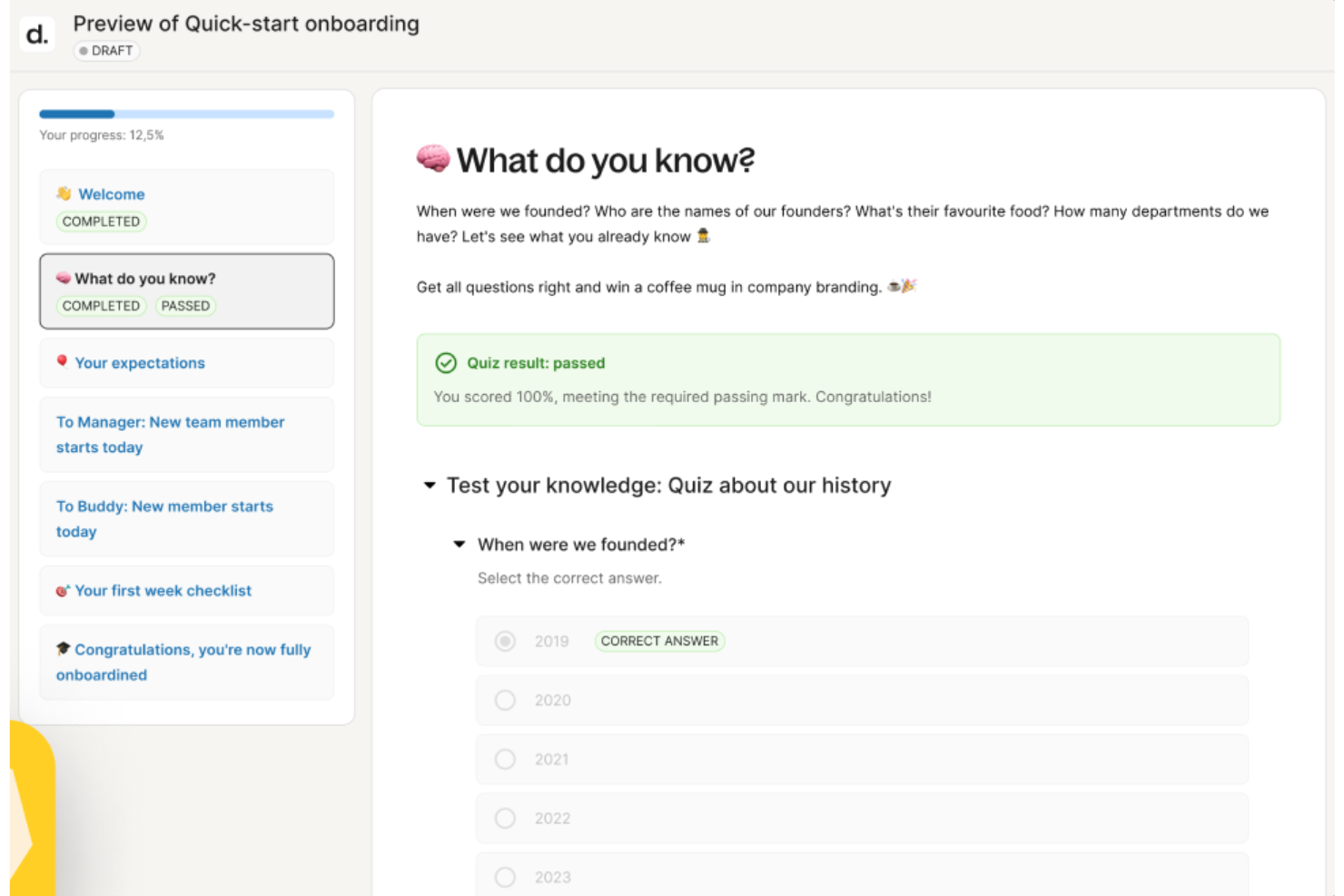
Deel HR helps global HR teams and people leaders manage employee training, compliance, and skill development in one platform, making it easier to upskill distributed workforces and track progress across multiple locations.
Who Is Deel HR Best For?
Deel HR is a strong fit for HR teams at mid-size to enterprise companies managing training and development across international or remote workforces.
Why I Picked Deel HR
I've included Deel HR in my top picks because its AI capabilities go well beyond basic automation—they're woven directly into the training and talent management workflow. I particularly like how Deel AI can draft competency libraries, training content, and feedback in minutes, pulling from a knowledge base built by HR and compliance experts across 150+ countries. That's a real advantage when you're building learning programs for a distributed team and don't want to start from scratch every time. The Engage module also connects learning directly to performance reviews, career development plans, and OKRs, so training isn't siloed from the rest of your people strategy.
Deel HR Key Features
- Learning path assignment: Assign structured training paths to employees based on role, location, or department.
- Compliance training tracking: Monitor completion of mandatory compliance courses and certifications across your workforce.
- Employee self-service portal: Let employees access training materials, track their own progress, and update their profiles independently.
- People analytics dashboard: View workforce training data, skill gaps, and development trends in one centralized reporting view.
Deel HR Integrations
Integrations include FaceUp, Snowflake, DefensX, Microsoft Finance, Kintsugi, ReFresh OS, Revo.ai, Keeper, Human Interest, and Everyminute.
Pros and Cons
Pros:
- Intuitive drag-and-drop interface
- Automates training workflows
- Seamless integration with Deel HR
Cons:
- Could offer more customization options
- Learning curve for new users
New Product Updates from Deel HR

Deel Expands Stablecoin Wallet to 80+ Countries
Deel expands its Stablecoin Wallet to 80+ countries with dollar-backed balances and optional rewards. This gives eligible contractors more ways to hold and manage earnings inside Deel. For more information, visit Deel’s official site.
 .
.
Best for user and administrator experience

iSpring LMS is a cloud-based training management platform for organizations that want to build employee skills with interactive courses, automated learning paths, and real-time progress tracking.
Who Is iSpring LMS Best For?
iSpring LMS is a great fit for mid-sized businesses and enterprises that need a straightforward platform for delivering and managing employee skill-building programs at scale.
Why I Picked iSpring LMS
iSpring LMS earns its spot on my shortlist because of how well it balances the learner and admin experience without sacrificing depth. I really like the admin dashboard—it gives you a clear view of course completion rates, individual learner progress, and department-level performance all in one place. On the learner side, the mobile app lets team members pick up training mid-course on any device, which keeps skill-building moving even outside the office. The automated enrollment rules are another feature I rely on, letting me assign specific learning paths based on job role or department without manual setup each time.
iSpring LMS Key Features
- Individual development plans: Build personalized, role-specific skill development plans that assign targeted tasks and milestones to each employee.
- 360-degree review: Collect structured performance feedback from peers, managers, and direct reports to assess employee competencies and identify skill gaps.
- Gamification: Award points and badges and display learner progress on leaderboards to encourage course completion and skill-building engagement.
- AI-powered course authoring: Generate course text, quiz questions, and images using a built-in AI assistant directly inside the LMS.
iSpring LMS Integrations
Integrations include Salesforce, MS Azure, MS Exchange, BambooHR, Udemy, Go1, LinkedIn Learning, and other popular course libraries.
Pros and Cons
Pros:
- Features a knowledge base
- Easy to create onboarding workflows
- Works on mobile devices both online and offline
Cons:
- More software integrations would be welcomed
- Convoluted pricing rubric (many add-on options)
New Product Updates from iSpring LMS

iSpring LMS Adds Multiple Observations to OJT Sessions
iSpring LMS now lets managers log multiple observations within one OJT session, grouping visits and auto-generating summary stats like averages, criterion results, and comparisons. For more information, visit iSpring LMS's official site.
Absorb
Best training management software for internal training
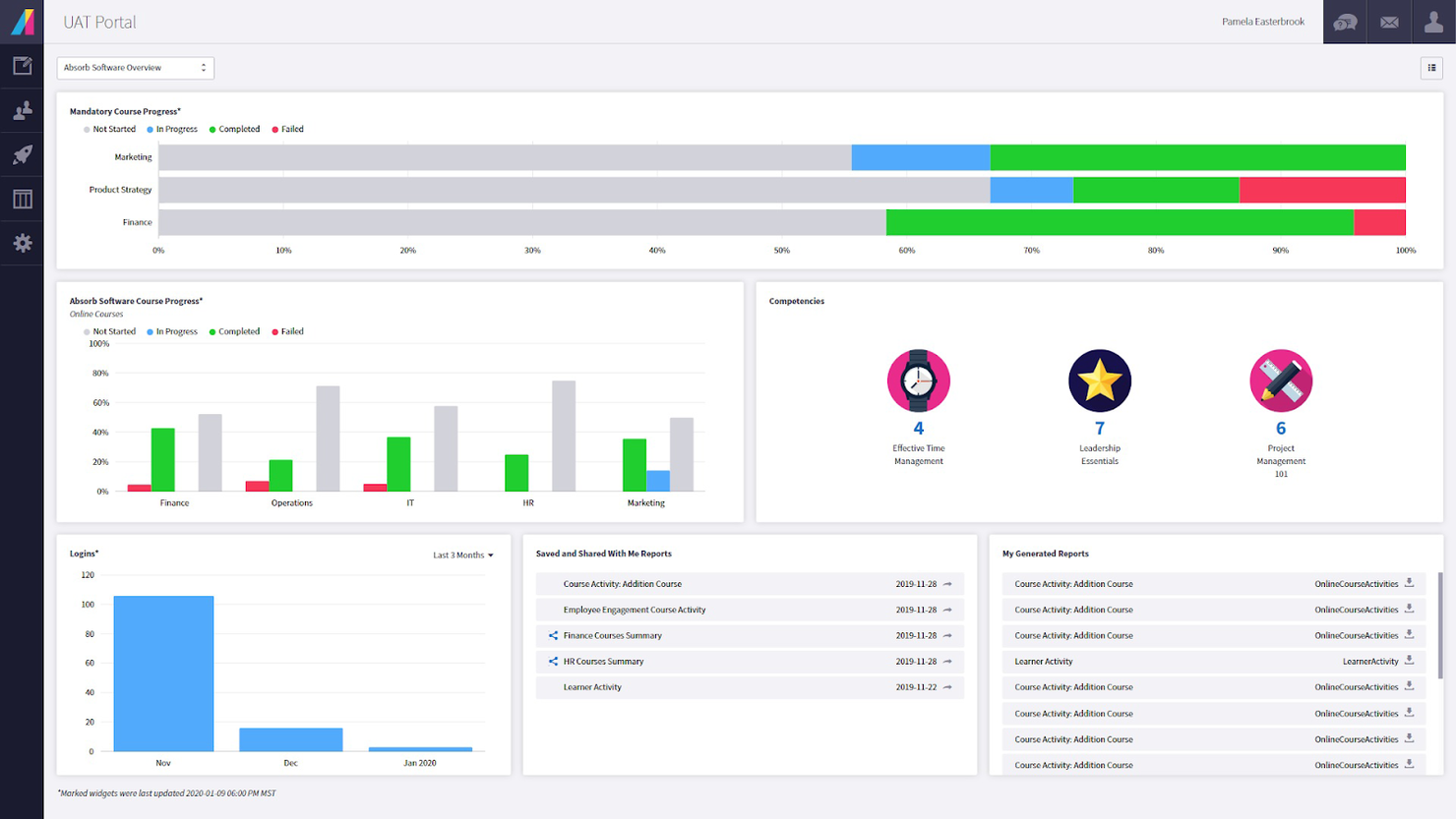
Absorb is a learning management platform built for organizations that want to deliver, track, and manage skill-building programs for employees, partners, or customers across industries.
Who Is Absorb Best For?
Absorb is a strong fit for mid-size to enterprise organizations with dedicated L&D teams managing structured internal training programs at scale.
Why I Picked Absorb
Absorb is one of the most complete platforms I've seen for managing internal training at scale. What I particularly like is Absorb Skills, which lets employees self-assess against 200 competencies and thousands of skills, then automatically assigns courses to close the gaps. That kind of role-based, goal-aligned learning path is exactly what internal L&D teams need when they're trying to move the needle on workforce capability. I also like the Intelligent Assist feature, which lets admins pull reports using plain-language prompts—so instead of digging through dashboards, you can type "show me all users who didn't complete leadership training" and receive a pre-populated report.
Absorb Key Features
- Course authoring tools: Build and publish training content directly in the platform using a built-in course creation suite.
- Automated enrollment: Assign courses to learners automatically based on role, department, or custom rules.
- Certification management: Issue, track, and renew certifications with automated expiry reminders.
- Mobile learning: Learners can access training content on any device, including offline access via the mobile app.
Absorb Integrations
Integrations include ADP, BambooHR, Namely, Workday, SAP SuccessFactors, UKG Pro, Dayforce, Salesforce, HubSpot, and Zoom.
Pros and Cons
Pros:
- Offline and online learning
- Great customization and localization options
- Responsive customer support
Cons:
- Search filters are not very specific
- System has a learning curve
New Product Updates from Absorb
Absorb Expands Instructor-Led Course Session Management
Absorb adds multi-class sessions, recurring classes, conflict indicators, and learner enrollment during setup for instructor-led courses. These updates give admins more control over scheduling and session management. For more information, visit Absorb’s official site.
 .
.
Best for role-based training assignments

TalentLMS gives HR teams and training managers a flexible platform to build, deliver, and track skill-building programs for employees, partners, or customers, enabling HR to manage learning at scale across roles and departments.
Who Is TalentLMS Best For?
TalentLMS is a strong fit for mid-sized businesses that need to train multiple employee groups, such as sales teams, customer support staff, or new hires, within a single system.
Why I Picked TalentLMS
TalentLMS earns its spot on my shortlist because of how well it handles role-based training assignments at scale. I particularly like the Branches feature, which lets you create separate training portals for different teams or departments—so sales and customer support teams each have a learning environment built around their specific skill needs, all managed from one central admin view. The custom roles and permissions system lets you control exactly what each user type sees and does, keeping training focused and relevant. AI-powered skills mapping ties it together by automatically matching courses to skill gaps, so you don't have to determine training needs manually.
TalentLMS Key Features
- Gamification: Add points, badges, levels, and leaderboards to courses to drive learner motivation and engagement throughout training programs.
- Assessments and certifications: Build quizzes, surveys, and assignments to measure skill progress, and issue custom certificates that can be set to expire and renew.
- Automations: Trigger training actions automatically based on user behavior, such as course completions, inactivity, or certification expiration.
- TalentLibrary: Access a built-in library of 1,000+ expert-built courses that learners can use to build job-relevant skills right away.
TalentLMS Integrations
Integrations include BambooHR, Salesforce, TalentHR, Sage People, Intercom, ADP Workforce Now, Zendesk Chat, Zoom, Microsoft Teams, and GoTo.
Pros and Cons
Pros:
- Clear learner grouping features support complex training structures.
- AI tools speed up course creation for fast-changing training needs.
- Built-in assessments support skills measurement and certification.
Cons:
- Built-in collaboration tools are basic compared with dedicated learning communities.
- Large multimedia files may require external hosting solutions.
New Product Updates from TalentLMS
TalentLMS Adds Learning Paths, AI Video, and Learner Experience Updates
TalentLMS introduced updates across learning management, content creation, and learner experience, including Learning Paths for Groups, AI video generation in TalentCraft, video bookmarking, and expanded administration tools. For more information, visit TalentLMS’s official site.

Best as AI for business
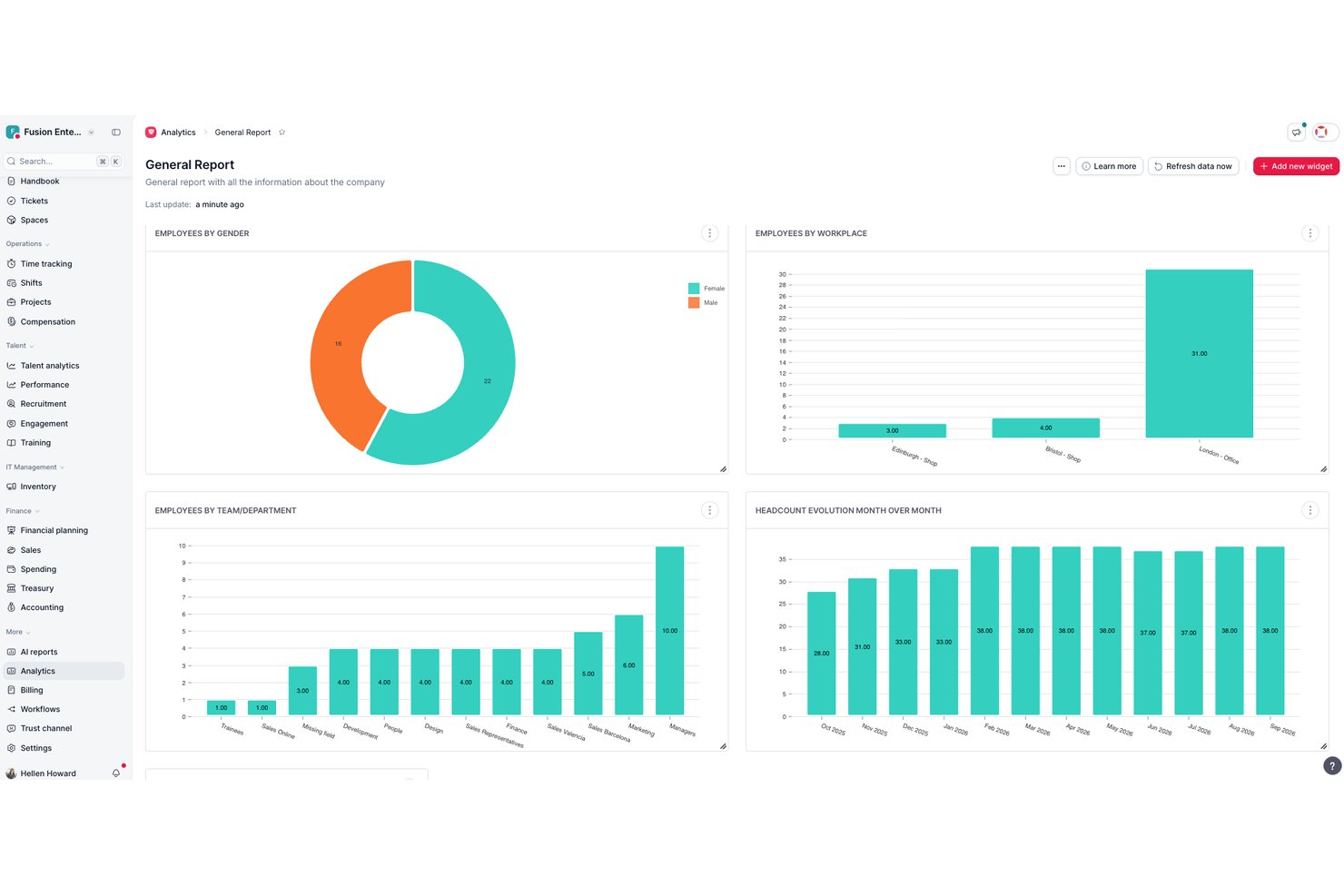
Factorial is an AI for business that brings HR, training, and people operations together—covering everything from learning schedules and course tracking to automated certificates and training insights reporting.
Who Is Factorial Best For?
Factorial suits HR teams at growing SMBs that want training, performance, and people operations managed in one AI-powered platform.
Why I Picked Factorial
I picked Factorial as one of the best because its AI for business positioning goes beyond typical HR software, actively assisting with day-to-day operations like planning learning schedules, generating training reports, and answering employee policy questions. I especially like how the Training Insights dashboard surfaces KPI-level data, including financial and executive metrics, so training managers can tie program outcomes to business results. Automatic enrollment rules and bulk certificate downloads reduce the manual lift that usually comes with managing training at scale.
Factorial Key Features
- Live session attendance tracking: Factorial automatically records participant attendance for live training sessions and stores transcripts, chat logs, and notes as an auditable record.
- Automatic enrollment rules: Set rule-based enrollment criteria to add employees to courses without manually managing rosters each time.
- LMS course builder: Build structured, interactive learning content directly within Factorial using a built-in course builder that supports knowledge tests and configurable completion criteria.
- Mobile training access: Employees can access training content and complete quizzes from Factorial's mobile app, without needing a desktop.
Factorial Integrations
Factorial offers native integrations with Google Workspace, Slack, Microsoft Azure, Okta, LinkedIn, and Recruitee. It also supports public API access, API keys, OAuth 2.0, webhooks, SDKs, and Zapier.
Pros and Cons
Pros:
- Automatic enrollment and completion rules track progress
- Skills and learning paths sit alongside HR records
- A reviewer praised stepwise new-hire training
Cons:
- Limited instructor and resource coordination
- Learners can't self-enroll in existing trainings
SkyPrep
Best for new process/new systems training
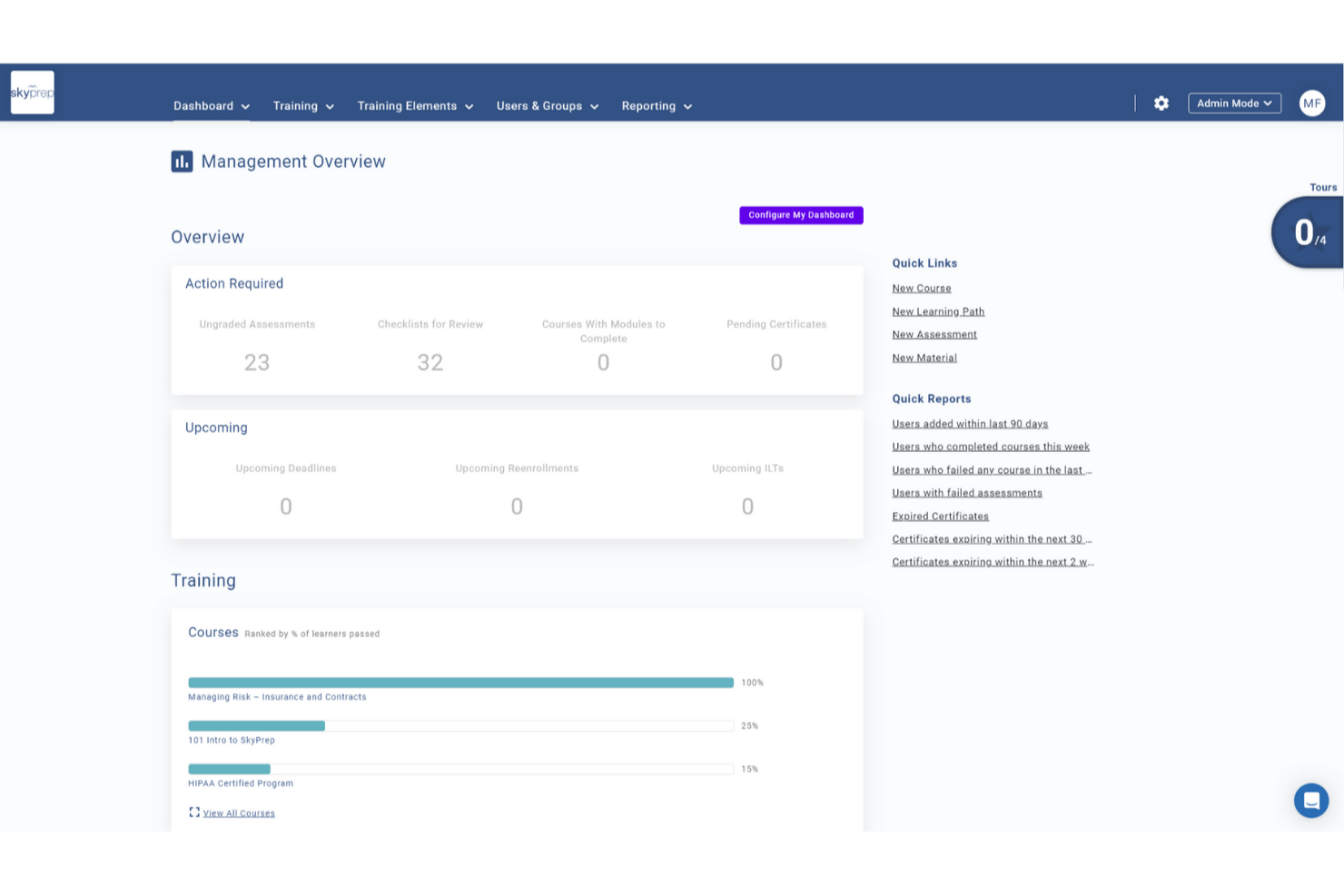
SkyPrep is a cloud-based training management platform built for HR teams and business leaders who need to deliver, track, and manage skill-building programs for employees adapting to new roles, tools, or processes.
Who Is SkyPrep Best For?
SkyPrep is a strong fit for mid-sized organizations that need a straightforward way to train employees across departments without relying on a dedicated L&D team.
Why I Picked SkyPrep
I picked SkyPrep as one of the best because it handles new process and systems training in a way that is purpose-built for operational change. I like how you can build structured learning paths that walk employees through a new tool or workflow step by step, with quizzes and assessments built in to confirm understanding before they move on. My team also uses the automated training assignments feature, which triggers the right course to the right employee the moment a role or process change is logged—no manual follow-up needed.
SkyPrep Key Features
- Gamification: Add points, badges, and leaderboards to courses to keep learners engaged throughout training programs.
- Reporting and analytics: Access out-of-the-box dashboards that track learner progress, course completion rates, and assessment scores.
- AI-powered content creation: Use SkyPrep's AI tools to generate and refine course content directly within the platform.
- Multi-tenant LMS: Run separate training portals for different departments, brands, or client groups from a single account.
SkyPrep Integrations
Integrations include ADP, Workday, BambooHR, Salesforce, HubSpot, Zoom, Microsoft Teams, Stripe, PayPal, and GoToMeeting.
Pros and Cons
Pros:
- Excellent course authoring tools
- Responsive customer support
- Easy to set up & learn
Cons:
- Automatic video captions locked to highest paid plan
- Pricing plans not publicly available


EducateMe LMS is a training management platform for organizations and educators that deliver interactive, skill-focused learning experiences and track employee or learner progress in real time.
Who Is EducateMe LMS Best For?
EducateMe LMS is a good fit for L&D teams and training managers at mid-sized companies who need a structured, scalable way to build and deliver skill-based learning programs.
Why I Picked EducateMe LMS
EducateMe LMS earns its spot on my shortlist because of how well its AI roleplay coach handles the kind of practice scenarios that traditional LMS platforms just can't replicate. I like that you can generate a full roleplay scenario from a single prompt—whether that's a sales objection conversation, a difficult manager-employee discussion, or a job interview prep session. The AI coach stays on-topic using configurable guardrails and branching logic, so learners aren't just going through the motions. The rubric-based feedback system gives learners consistent, specific input on their performance instead of the hit-or-miss feedback from human reviewers.
EducateMe LMS Key Features
- Learning paths: Build structured, step-by-step course sequences that guide learners through skill development in a set order.
- Program builder: Combine quizzes, flashcards, and assignments into a single interactive learning program using a block-based editor.
- Automation: Set up automatic reminders, enrollments, and course assignments to reduce manual admin work.
- Progress tracking and analytics: View detailed reports and scorecards on learner activity, course completions, and performance across training programs.
EducateMe LMS Integrations
Integrations include Notion, Loom, and Zoom, as well as a robust API for custom solutions.
Pros and Cons
Pros:
- API access and single sign-on
- Supports SCORM-compliant course content
- AI-powered roleplay coaching simulations
Cons:
- Advanced setup may require support
- Minimum user requirement for pricing
Best for automated course scheduling
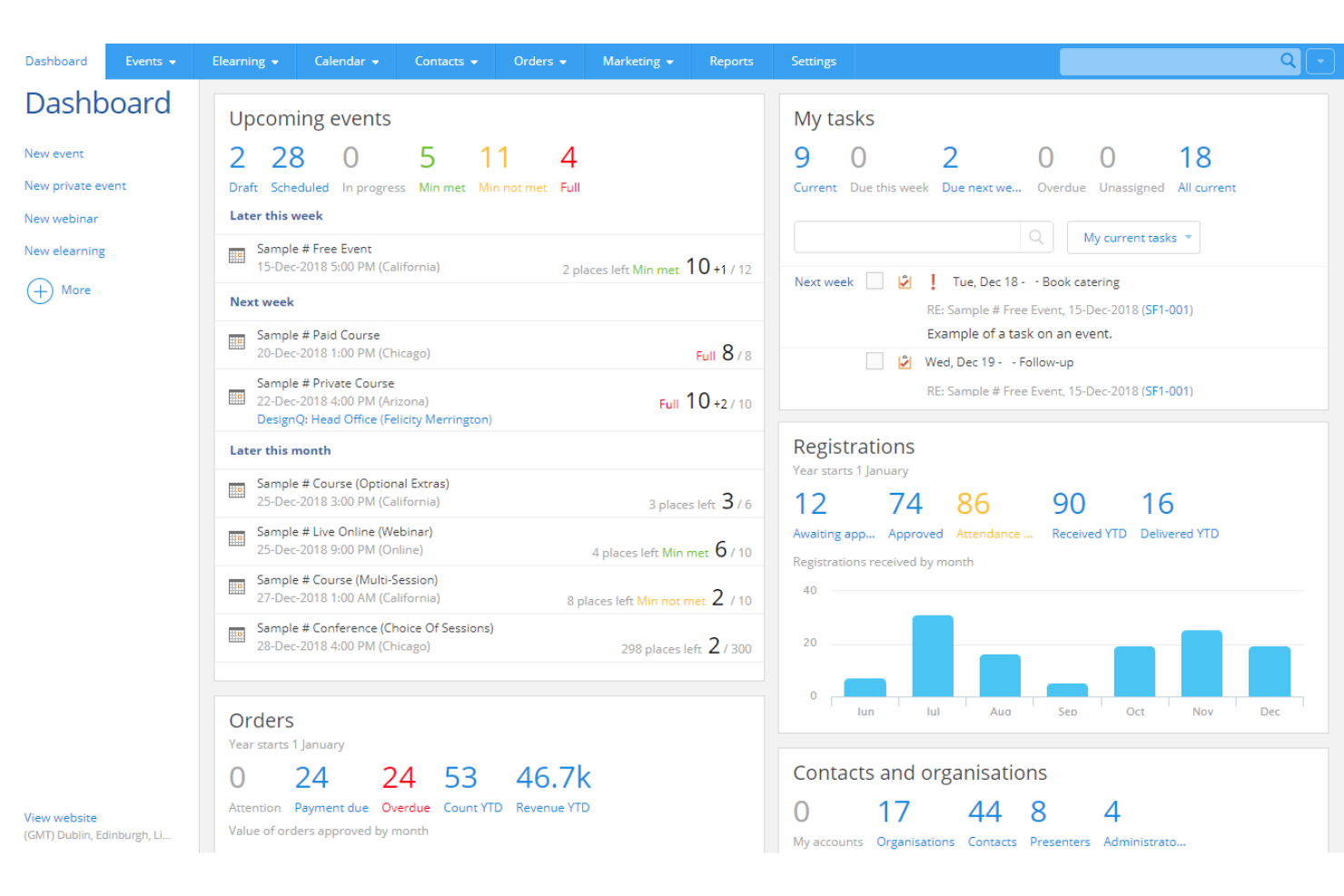
Arlo Training Management Software helps training providers, corporate L&D teams, and professional educators manage, deliver, and track instructor-led courses, organizing skill-building programs and streamlining the training process.
Who Is Arlo Training Management Software Best For?
Arlo is a strong fit for training providers and corporate L&D teams that run high volumes of instructor-led courses and need a dedicated platform to manage scheduling, registration, and learner communications.
Why I Picked Arlo Training Management Software
Arlo earns its spot on my shortlist because of how well it handles automated course scheduling for teams running multiple instructor-led programs at once. I like that you can set up recurring courses with predefined templates, so scheduling a new cohort doesn't mean rebuilding everything from scratch. Arlo also automates waitlist management and learner communications, sending enrollment confirmations and reminders without manual follow-up. This scheduling automation is useful when you're coordinating skill-building programs across different locations, trainers, and time zones.
Arlo Training Management Software Key Features
- Blended learning delivery: Package classroom sessions, live webinars, and elearning modules into a single multi-session course with unified scheduling and registration.
- Certification and license management: Approve and renew certifications and licenses across all training formats, with automated reminders before expiry.
- Mobile attendance tracking: Instructors can record attendance, mark grades, and view registrant details in real time from the Arlo mobile app.
- AI-powered elearning authoring: Build interactive courses from prompts or existing documents using AI workflows, with drag-and-drop quizzes and multimedia content.
Arlo Training Management Software Integrations
Integrations include Moodle, Wordpress, Xero, AccountsIQ, Authorize.Net, Campaign Monitor, CourseCheck, GoToWebinar, Salesforce, and Zoom.
Pros and Cons
Pros:
- Centralized course and event scheduling with templates
- Real-time reporting and CRM give insight into performance
- Automated workflows for bookings, reminders, certificates
Cons:
- No built-in support for multi-language UI
- Setup and initial configuration can be complex

Best for building onboarding programs and learning paths
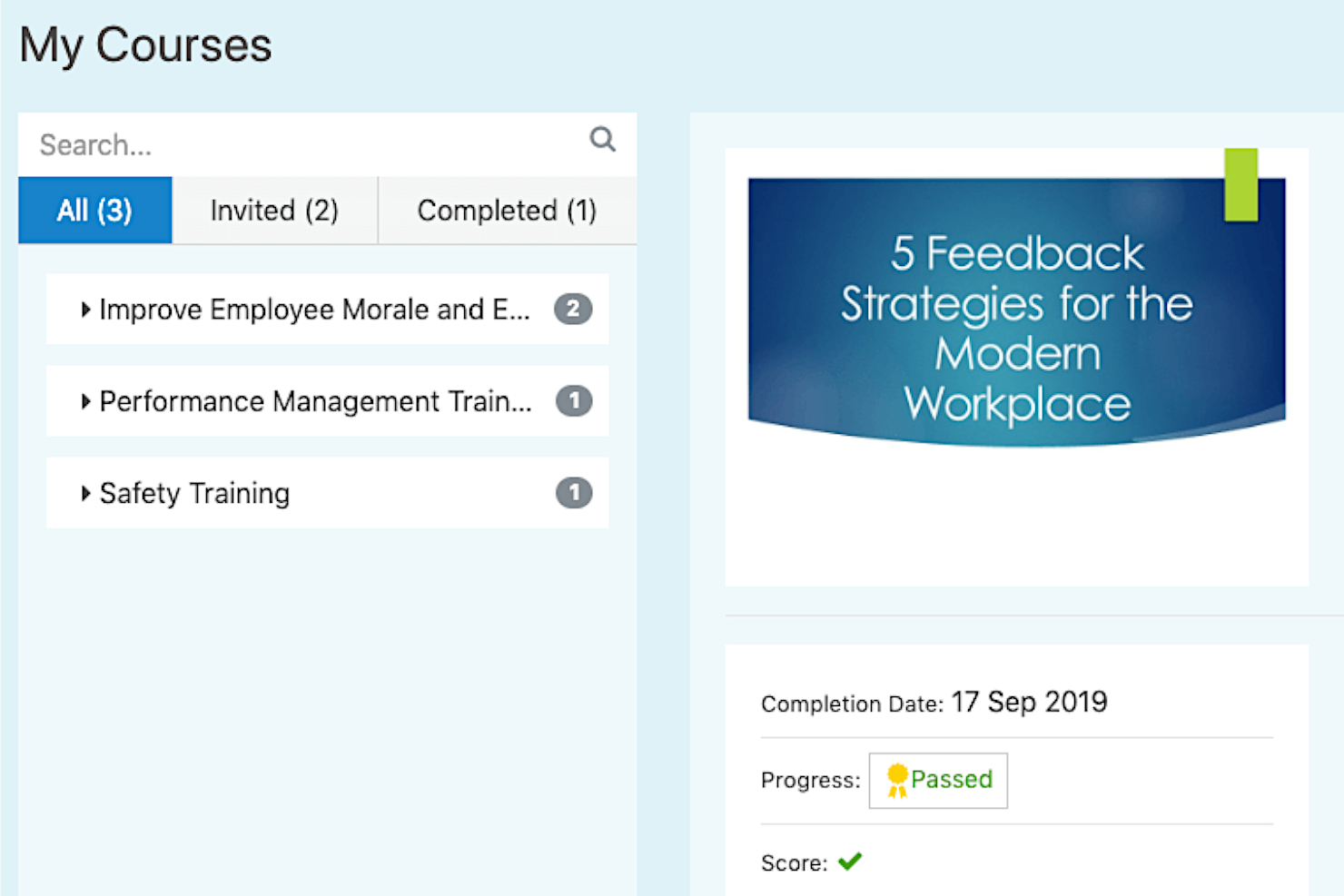
Mitratech Perform is an online platform that allows managers to track and monitor employee performance throughout their careers. It helps organizations set goals, provide feedback on performance, and develop employee skills.
Why I picked Mitratech Perform: Mitratech Perform provides a comprehensive suite of features to support the development and retention of employees in any organization, regardless of size. Its platform allows users to develop customized learning plans tailored to individual needs, measure progress, and assign tasks quickly and easily. By creating custom learning plans for each employee, you can ensure your employees get the most out of their training experience while working towards organizational objectives.
Mitratech Perform Standout Features & Integrations
Their multimedia course creation feature is a highly effective tool that allows curricula to be easily created and tailored. Through its intuitive platform, Mitratech Perform simplifies the course creation process by providing templates, drag-and-drop features, and interactive slides. Those building the course can customize the lessons' look and feel while weaving in important teaching points. This gives them added control over the quality of learning in those courses.
Mitratech Perform's SCORM compliance feature offers an efficient and effective means of integrating training courses from external sources into their online training management software. SCORM is a standard for packaging, launching, tracking, and reporting content used within the software. It allows users to integrate third-party e-learning content into their existing platform and ensure that course progress data and scores are synced across different vendors.
Integrations are available with HR systems and CRM software, and with content creation tools like Canva, Vimeo, and HTML, allowing instructional designers to create rich, engaging learning experiences that meet the needs of learners of all levels.
Pros and Cons
Pros:
- Integrates with other Mitratech Perform modules for easy onboarding workflows
- Easy to integrate SCORM content from third-party providers
- Training progress can be linked to specific employee performance goals
Cons:
- Pricing details and plan features are not transparent
- Small list of pre-built integrations

Continu
Best with multilingual course delivery
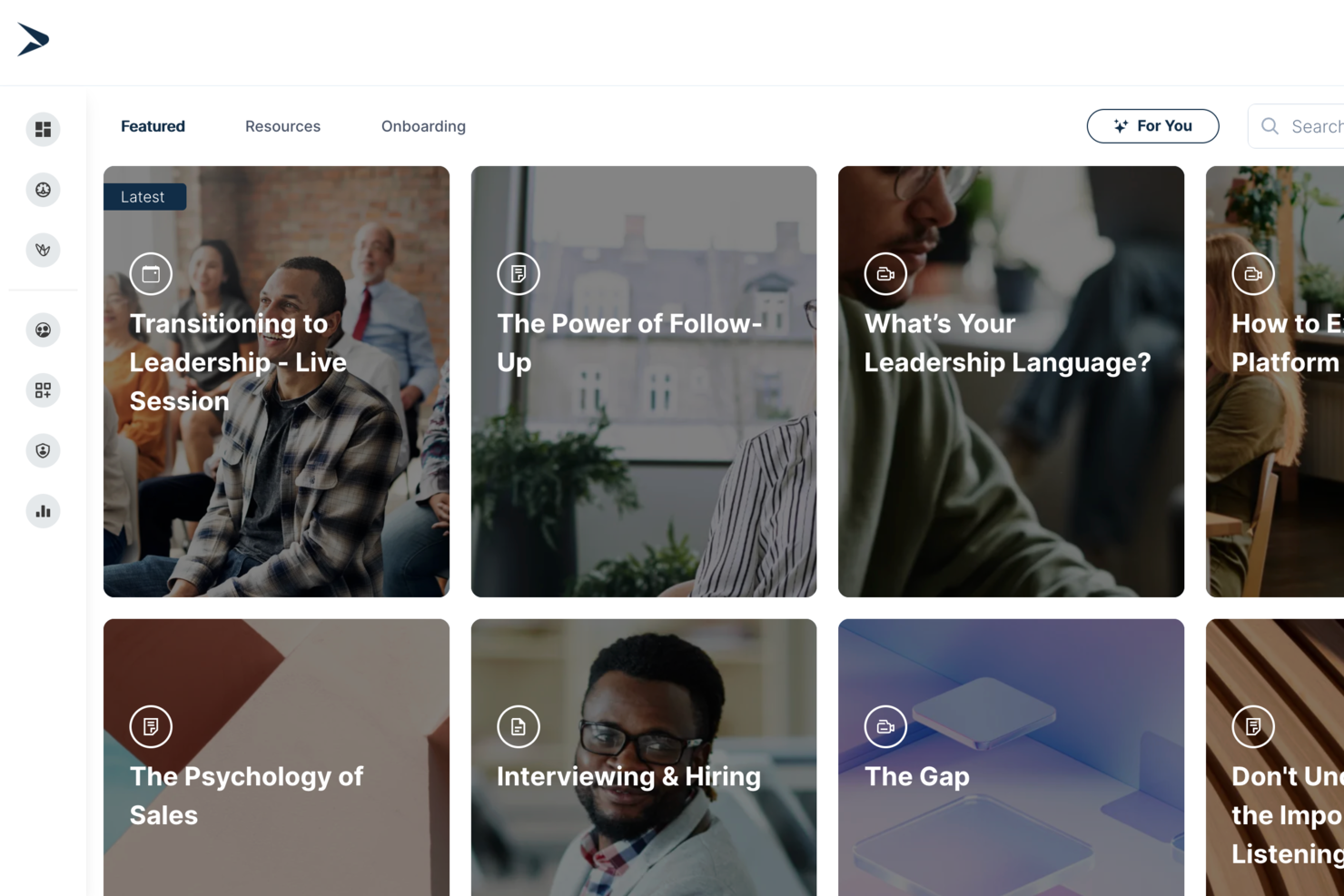
Continu is a training management software platform for businesses that brings together course authoring, SCORM compatibility, reporting tools, and resource management in one system.
Who Is Continu Best For?
Continu is a good fit for mid-to-large organizations with dedicated L&D teams that need a scalable platform for managing employee, partner, and customer training.
Why I Picked Continu
I've included Continu in my top picks because it handles multilingual course delivery natively through its Extend feature. Each white-labeled portal can serve content in multiple languages, either automatically or manually translated, which means a global team managing partner training across 20+ countries doesn't have to duplicate portals or build workarounds. I also like how Smart Segmentation™ layers on top of that, letting you target learners by region so the right language content reaches the right audience automatically.
Continu Key Features
- Continu Insights: An analytics dashboard where you can ask plain-English questions about your learning data and get instant answers without SQL or manual reporting.
- Learning Tracks: Build structured, multi-content course paths that combine videos, articles, SCORM files, and assessments in a defined sequence.
- Badges and certifications: Award learners with digital badges or certificates upon completing courses or demonstrating specific competencies.
- Compliance auditing: View real-time reports showing which learners haven't completed mandatory training, with automated reminders via Slack, MS Teams, or email.
Continu Integrations
Continu offers native integrations with Salesforce, Slack, Microsoft Teams, Zoom, and Google Workspace. It also provides an API for custom integrations.
Pros and Cons
Pros:
- Custom external portals for partner training
- Smart Segmentation for assigning training paths
- Native Salesforce, Slack, Teams integrations
Cons:
- No mobile app for on-the-go training
- Few off-the-shelf content library options
New Product Updates from Continu
Continu Adds Smarter Content Management
Continu adds Intelligent Tagging and Descriptions and richer content details to improve how learning content is organized and maintained. These updates reduce manual work and give teams more consistent, detailed content records. For more information, visit Continu’s official site.
 .
.Annen programvare for opplæringsadministrasjon
Her er noen flere alternativer for programvare for opplæringsadministrasjon som ikke kom med på kortlisten min, men som likevel er verdt å se nærmere på:
- Looop
Training management for automated learning pathways
- LearnUpon
Training management software for ecommerce
- Guidde
For AI-driven video tutorials
- WeSchool
Solution to simplify corporate training
- Docebo
Training management software for enterprises
- eloomi
Training management software for personalized learning and development
- Bridge
For advanced course authoring
- Litmos LMS
Training management software for corporate training
- Constructor Tech
Training management software that fosters active learning
- Seismic’s Lessonly
Training management software for sales teams


How I Evaluate Training Management Software
I split my evaluation into two layers: the baseline must-haves—like session scheduling and compliance tracking—and the differentiators that separate good tools from great ones.
Core Functionality (Table Stakes For This List)
When I'm selecting tools for my list, I rank each one on a scale from 0 (does not offer the functionality) to 5 (excels in this area) for each core functionality listed below. Then, I calculate the tool's total score as a percentage. Each tool needs to achieve a minimum total score of 65% to be considered for inclusion.
- Course & Session Scheduling: I check whether you can build a course catalogue, assign instructors, and schedule recurring sessions across in-person, virtual, and blended formats.
- Enrollment & Registration Management: Self-enrollment, manager approvals, waitlists, and group registration are all things I look for when evaluating how a tool handles learner intake.
- Training Records & Transcripts: Each tool should maintain a centralized learner history, so I evaluate how it logs completions, attendance, and scores into auditable transcripts.
- Certification & Compliance Tracking: I look for automated expiration alerts and recertification workflows, especially for teams managing safety certifications or mandatory regulatory training.
- Reporting & Analytics: Whether it's pulling completion rates by department or tracking overdue compliance training, I evaluate the depth and flexibility of each tool's reporting.
- Communication & Notifications: Automated enrollment confirmations, session reminders, and deadline alerts all matter, so I check how configurable each tool's notification workflows are.
Once I have a list of tools that meet the criteria, I consider what sets each platform apart.
Differentiating Factors (What Sets Vendors Apart)
Here's how I compare and contrast different vendors:
Standout Features
Skills and competency mapping is a big differentiator I look for because it lets L&D managers tie courses to specific job roles and identify gaps across teams. Native content authoring is another factor worth evaluating, especially for teams that need to build custom courses with quizzes and SCORM packages without relying on a separate tool. I also consider whether a platform supports selling courses externally through built-in e-commerce features, which matters for organizations that monetize their training programs.
Beyond Features
HRIS integrations are one of the first things I check because syncing employee data from platforms like Workday or BambooHR eliminates manual roster management. Industry-specific compliance fit also matters, particularly for teams in healthcare or manufacturing that need prebuilt frameworks for OSHA or HIPAA training. I evaluate scalability too, looking at whether a platform supports multi-language delivery and flexible licensing models that won't penalize you as headcount grows across regions.
Slik velger du programvare for opplæringsadministrasjon
Det er lett å gå seg vill i lange funksjonslister og kompliserte prisstrukturer. For å hjelpe deg med å holde fokus mens du arbeider deg gjennom den unike prosessen med å velge programvare, har jeg laget en sjekkliste over faktorer du bør ha i tankene:
| Faktor | Hva du bør vurdere |
|---|---|
| Skalerbarhet | Kan programvaren vokse sammen med teamet ditt? Vurder fremtidige behov og om verktøyet kan håndtere et økende antall brukere og mer data uten ekstra kostnader eller ytelsesproblemer. |
| Integrasjoner | Fungerer den sammen med systemene du bruker i dag? Kontroller kompatibiliteten med HR-, lønns- og andre verktøy for å unngå datasiloer og effektivisere arbeidsflytene. |
| Tilpasningsmuligheter | Kan du tilpasse den til prosessene dine? Se etter muligheter for å tilpasse dashbord, rapporter og brukerroller slik at de samsvarer med teamets behov. |
| Brukervennlighet | Vil teamet ditt bruke den med trygghet? Evaluer grensesnittet og navigasjonen. En enkel og intuitiv utforming reduserer opplæringstiden og øker bruken. |
| Implementering og innføring | Hvor raskt kan du komme i gang? Vurder støtten for oppsett, opplæringsressurser og eventuell tid eller innsats teamet ditt må bruke for å få programvaren i drift. |
| Kostnad | Hva er de totale eierkostnadene? Se lenger enn prislappen. Ta med abonnementsavgifter, oppsettskostnader og eventuelle skjulte gebyrer for å få et tydelig økonomisk bilde. |
| Sikkerhetstiltak | Hvor sikre er dataene dine? Sørg for at programvaren overholder standarder for databeskyttelse og tilbyr kryptering, tilgangskontroller og regelmessige sikkerhetsoppdateringer. |
Hva er programvare for opplæringsadministrasjon?
Programvare for opplæringsadministrasjon er et verktøy som hjelper med å organisere, gjennomføre og følge opp opplæringsprogrammer for ansatte. HR-medarbeidere, opplæringskoordinatorer og ledere bruker vanligvis disse verktøyene for å forbedre læring og utvikling. Planlegging, fremdriftsoppfølging og rapportgenerering bidrar til å administrere opplæringen effektivt og nå organisasjonens mål. Alt i alt forenkler disse verktøyene opplæringsprosessene og forbedrer utviklingen av arbeidsstyrken.
Funksjoner
Når du velger programvare for opplæringsadministrasjon, bør du se etter følgende nøkkelfunksjoner:
- Planlegging: Gjør det mulig å planlegge og organisere opplæringsøkter effektivt, slik at overlappinger eller konflikter unngås.
- Fremdriftsoppfølging: Overvåker deltakernes fremdrift og resultater, og gir innsikt i hvor effektiv opplæringen er og hvilke områder som trenger forbedring.
- Rapportering og analyse: Genererer detaljerte rapporter som gjør det enklere å vurdere effekten av opplæringen og ta informerte beslutninger.
- Innholdslevering: Støtter flere formater for levering av opplæringsmateriell og tar hensyn til ulike læringsstiler.
- Integrasjoner: Kobler seg til eksisterende HR- og lønnssystemer for å effektivisere dataflyten og utvide funksjonaliteten.
- Tilpasningsmuligheter: Tilbyr alternativer for å tilpasse dashbord, rapporter og brukerroller etter organisasjonens spesifikke behov.
- Mobiltilgang: Gjør det mulig for deltakere å få tilgang til opplæringsmateriell på farten, noe som øker fleksibiliteten og engasjementet.
- Sikkerhetstiltak: Beskytter sensitive data med kryptering og tilgangskontroller og sikrer samsvar med standarder for databeskyttelse.
- Brukervennlig grensesnitt: Tilbyr et intuitivt design som forenkler navigeringen og reduserer læringskurven for brukerne.
- Støtte ved innføring: Inkluderer ressurser som opplæringsvideoer og interaktive omvisninger for å legge til rette for en smidig implementering og innføring.
Fordeler
Implementering av programvare for opplæringsadministrasjon gir flere fordeler for teamet og virksomheten din. Her er noen av fordelene du kan se frem til:
- Bedre organisering: Funksjoner for planlegging og innholdslevering holder opplæringsprogrammene velorganiserte og enkle å administrere.
- Bedre oppfølging: Fremdriftsoppfølging og rapportering gir innsikt i deltakernes resultater og gjør det enklere å identifisere områder som kan forbedres.
- Tidsbesparelser: Automatisering av administrative oppgaver som planlegging og rapportering frigjør tid til mer strategiske aktiviteter.
- Bedre tilgjengelighet: Mobiltilgang gjør det mulig for deltakere å bruke opplæringsmateriell hvor som helst, noe som øker fleksibiliteten og deltakelsen.
- Bedre dataintegrasjon: Integrasjoner med eksisterende systemer sikrer en smidig informasjonsflyt på tvers av plattformer og reduserer datasiloer.
- Styrket sikkerhet: Sikkerhetstiltak beskytter sensitiv informasjon og sikrer samsvar med regelverket for databeskyttelse.
- Tilpassbar brukeropplevelse: Tilpasningsmulighetene lar deg tilpasse programvaren til dine spesifikke prosesser og gir økt brukertilfredshet.
Kostnader & priser
Å velge programvare for opplæringsadministrasjon krever en forståelse av de ulike prismodellene og abonnementene som er tilgjengelige. Kostnadene varierer basert på funksjoner, teamstørrelse, tillegg og mer. Tabellen nedenfor oppsummerer vanlige abonnementer, gjennomsnittsprisene deres og typiske funksjoner som er inkludert i løsninger for opplæringsadministrasjon:
Sammenligningstabell for programvare for opplæringsadministrasjon
| Abonnementstype | Gjennomsnittspris | Vanlige funksjoner |
|---|---|---|
| Gratisabonnement | $0 | Grunnleggende planlegging, begrenset rapportering og brukerstøtte fra fellesskapet. |
| Personlig abonnement | $5-$25/user/month | Utvidet oppfølging, mobiltilgang og brukerstøtte via e-post. |
| Bedriftsabonnement | $30-$75/user/month | Avansert analyse, integrasjoner og tilpasningsmuligheter. |
| Storskalabonnement | $100+/user/month | Omfattende sikkerhet, full tilpasning og dedikert kontoadministrasjon. |
Vanlige spørsmål om programvare for opplæringsadministrasjon
Her er noen svar på vanlige spørsmål om programvare for opplæringsadministrasjon:
Kan programvare for opplæringsadministrasjon håndtere eksterne kursdeltakere eller ikke-ansatte (f.eks. oppdragstakere eller partnere)?
Ja, mange systemer lar deg tildele opplæring til eksterne brukere ved å opprette gjestekontoer eller bruke separate portaler. Du kan kontrollere tilgangsnivåer, følge fremdriften deres separat fra interne ansatte og utstede sertifikater ved fullføring. Dette gjør det enklere å inkludere oppdragstakere, leverandører eller partnere i opplæringsflyten uten å blande dem inn i de ansattes registre.
Hvilken type rapportering og analyse kan programvare for opplæringsadministrasjon tilby for teamet mitt?
Programvare for opplæringsadministrasjon gir ofte oversikter og rapporter om fullførte opplæringer, forfalte kurs og kursresultater. Den kan bidra til å identifisere kursdeltakere som ikke har fullført obligatoriske økter, og fremheve kurs som kan ha behov for oppdatering. Du kan bruke denne innsikten til å planlegge opplæringen og følge fremdriften når det gjelder etterlevelse eller utvikling.
Hvor lang tid tar det å implementere programvare for opplæringsadministrasjon?
Implementeringstiden varierer avhengig av programvarens kompleksitet og hvor klare teamet ditt er. Enkle systemer kan ta noen dager, mens mer komplekse oppsett kan ta flere uker. Planlegg opplæringsøkter og sett av ressurser for å sikre en smidig overgang. Vurder å starte med en pilotgruppe for å løse eventuelle problemer.
Trenger jeg teknisk kompetanse for å bruke programvare for opplæringsadministrasjon?
Nei, det meste av programvaren for opplæringsadministrasjon er utviklet for brukere uten teknisk bakgrunn. Den tilbyr vanligvis brukervennlige grensesnitt og støtteressurser som veiledninger og kundeservice. Det kan likevel være nyttig å ha noen med tekniske ferdigheter under det første oppsettet, eller hvis du planlegger å integrere systemet med andre systemer.