

Det kan være utfordrende å holde teamet motivert, og du kan ha problemer med å anerkjenne hver enkelt medarbeiders bidrag, særlig når du må håndtere flere ansvarsområder samtidig. Det er her programvare for medarbeideranerkjennelse og et formelt program for medarbeideranerkjennelse kommer inn. De hjelper deg med å anerkjenne prestasjoner og styrke arbeidsmoralen uten å øke arbeidsbelastningen din.
Jeg har jobbet i HR-ledelsesbransjen i mange år, og har testet og vurdert programvare på selvstendig grunnlag. Jeg forstår utfordringene du står overfor, og målet mitt er å gi deg objektive og grundig undersøkte vurderinger av de beste løsningene som finnes.
I denne artikkelen vil jeg veilede deg gjennom mine beste anbefalinger for programvare for medarbeideranerkjennelse for små bedrifter. Du får praktisk innsikt som hjelper deg med å velge riktig verktøy for teamets unike behov.
Hvorfor du kan stole på våre programvareanbefalinger
6,700+
Reviews
20
Industry experts
16+
Evaluation factors
14
Years
Teamet vårt har testet og anmeldt programvare siden 2012. Vi er selv HR-eksperter, så vi vet hvor vanskelig og hvor viktig det er å velge riktig programvare.
I denne guiden har vi vurdert verktøyene gjennom praktisk testing og uavhengig research og gitt dem poeng ut fra våre utvelgelseskriterier. Vi bygger også på innsikt fra ledende eksperter i bransjen og erfarne HR-eksperter.
Anmeldelsene våre bygger på vår egen redaksjonelle vurdering. De er ikke et salgsargument.
Ekspertanmeldere:
- Phil GrayCOO
 Kim BehnkeHR Tech Editor & Analyst
 Josh BarkerPeople Ops Manager

Sammenligningstabell: Programvare for medarbeideranerkjennelse for små bedrifter
Denne sammenligningstabellen oppsummerer prisopplysningene for mine beste utvalgte programmer for medarbeideranerkjennelse for små bedrifter:
| Tool | Best For | Trial Info | Price | ||
|---|---|---|---|---|---|
| 1 | Best for values-tied peer recognition | Free demo available | Pricing upon request | Website | |
| 2 | Best for gift cards sent at face value | Free plan available | From $125/month (billed annually) | Website | |
| 3 | Best for values-tagged peer recognition analytics | Free trial + free demo available | From $5/user/month (billed annually) | Website | |
| 4 | Best for peer-to-peer feedback | Free demo available | Pricing upon request | Website | |
| 5 | Best for global employee engagement | Free demo available | Pricing upon request | Website | |
| 6 | Best for employee discounts | Free demo available | Pricing upon request | Website | |
| 7 | Best for customizable recognition programs | Free demo available | Pricing upon request | Website | |
| 8 | Best for small teams and startups | Free demo available | Pricing upon request | Website | |
| 9 | Best for internal communication tools | 90-day free trial + free demo available | Pricing upon request | Website | |
| 10 | Best for detailed employee profiles | Free plan available | From $2/user/month | Website |


Vurdering av den beste programvaren for medarbeideranerkjennelse for små bedrifter
Nedenfor finner du mine detaljerte sammendrag av den beste programvaren for medarbeideranerkjennelse for små bedrifter som kom med på kortlisten min. Vurderingene mine gir et detaljert innblikk i de viktigste funksjonene, fordelene og ulempene, integrasjonene og ideelle bruksområdene for hvert verktøy, slik at du kan finne det som passer best for deg.
 Best for values-tied peer recognition
- Free demo available
- Pricing upon request
Visit WebsiteCustomer Rating:4.7/5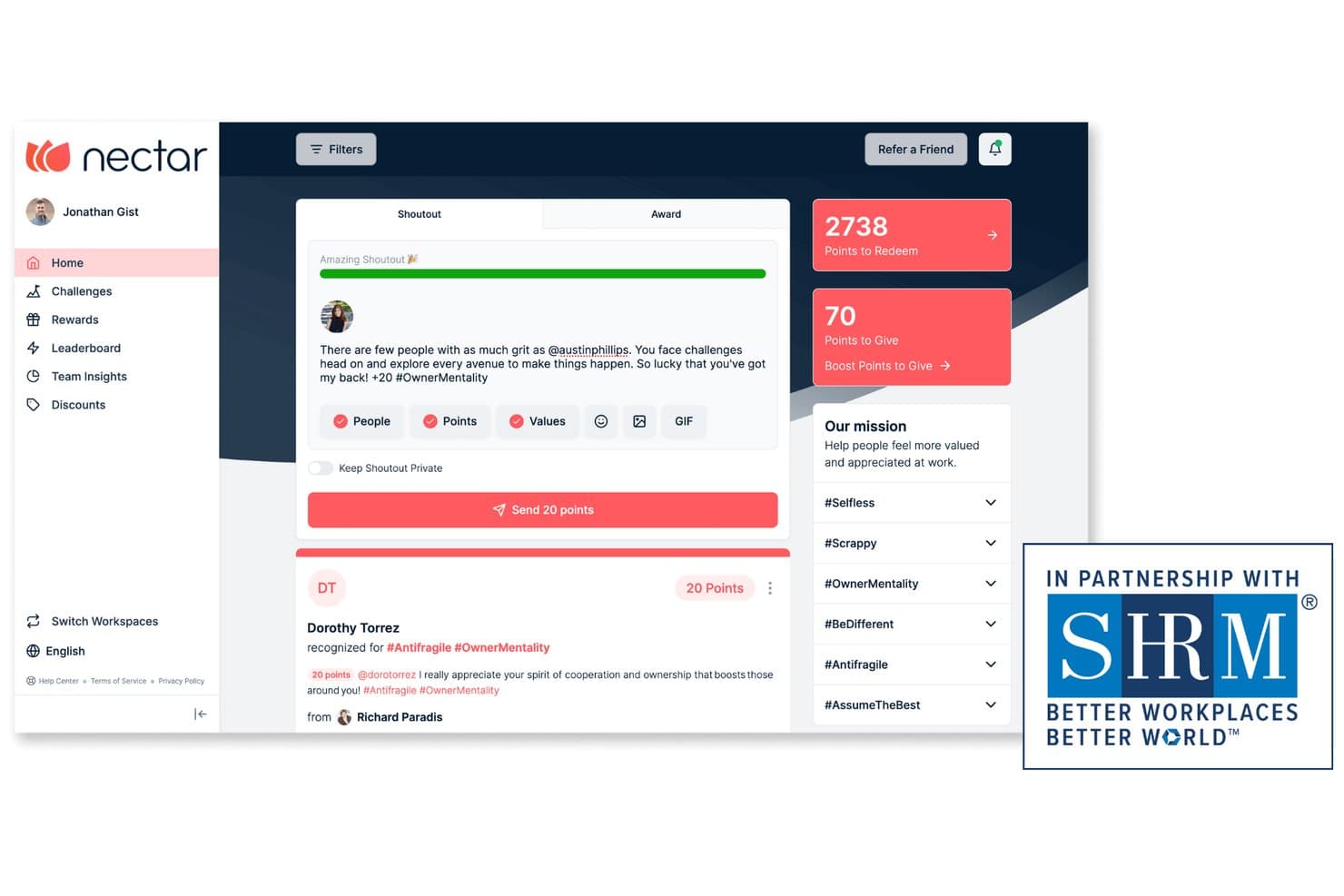
Nectar lets users send peer shoutouts and award points to teammates. Nectar Recognize is an employee recognition and rewards platform that brings together peer shoutouts, values tagging, milestone automation, points-based rewards, and team challenges in one place.
Who Is Nectar Best For?
Nectar is a strong fit for HR teams and people ops managers who want to tie peer recognition directly to company values, not just to milestones or one-off moments.
Why I Picked Nectar
I've included Nectar in my top picks because it's the only tool on this list that makes company values a first-class part of every shoutout, not an afterthought. When an employee recognizes a colleague, they tag a specific value alongside their message, and admins can then see which values show up most in recognition and which ones need more attention. I also love the Meaningful Meter, which nudges employees to write recognition that actually says something specific rather than a generic "great job."
Nectar Key Features
- Points-based rewards redemption: Employees redeem earned points for gift cards, Amazon catalog items, company swag, or custom perks like extra time off.
- Automated milestone recognition: Birthdays and work anniversaries trigger automatic shoutouts with customizable messages, point amounts, and feed visibility.
- Custom challenges: Teams can run points-backed challenges targeting wellness, learning, or team building, scoped to specific departments or locations.
- Recognition analytics dashboard: Admins track participation trends, budget spend by department, and which company values appear most in recognition activity.
Nectar Integrations
Nectar’s documented integrations include ADP, BambooHR, Gusto, Rippling, Workday, Okta, Slack, Microsoft Teams, and Kudoboard. The vendor doesn’t state a total integration count or API availability.
Pros and Cons
Pros:
- Automated milestones reduce routine HR follow-up
- Points make recognition tangible for employees
- Peer shoutouts reinforce company values
Cons:
- Recognition analytics may lack reporting depth
- Sales-led access complicates small-team adoption
Learn more about Nectar: Best for gift cards sent at face value
- Free plan available
- From $125/month (billed annually)
Visit WebsiteCustomer Rating:4.9/5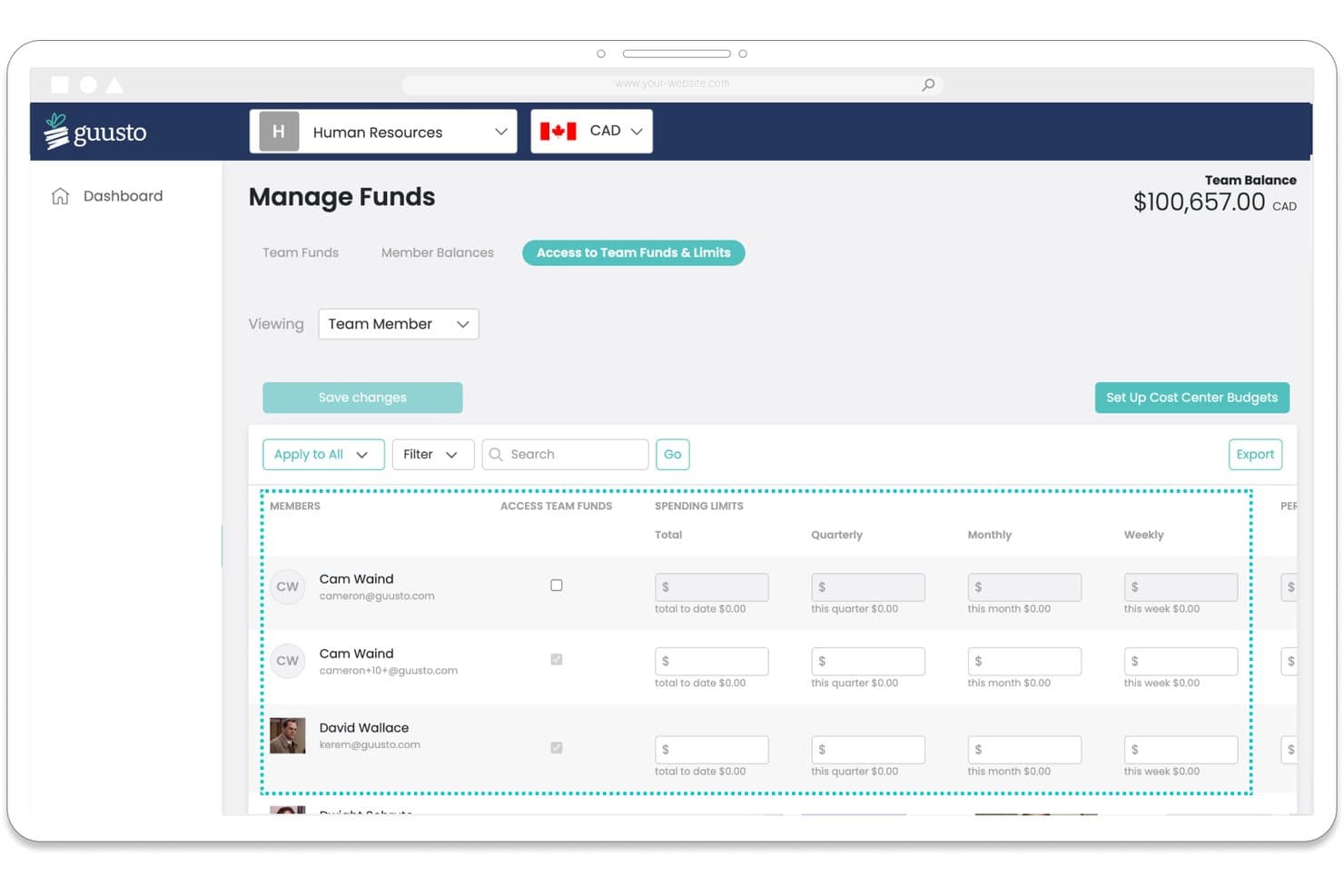
Guusto lets admins set spending limits per team member. Guusto is an employee recognition and rewards platform that lets teams send gift cards, swag, custom rewards, and charitable donations, with tools for milestone automation, peer shoutouts, budget controls, and manager-led recognition programs.
Who Is Guusto Best For?
Guusto works well for small business HR teams and office managers who want a straightforward rewards program without the overhead of a points system.
Why I Picked Guusto
I picked Guusto as one of the best because gift cards go out at face value with no markup, meaning every dollar your budget allocates actually lands in an employee's hands. Any unclaimed gift gets credited back in full, which I find especially useful for small teams where budget waste adds up fast. I also like that rewards reach staff who have no work email, delivered by text, QR code, or printed card.
Guusto Key Features
- Milestone automation: Automatically sends birthday, anniversary, and onboarding awards with personalized banners and manager alerts.
- Budget condition builder: Sets allocation rules based on employee data, with per-reward caps and approval workflows for spend control.
- TV and kiosk display: Shows recent recognition, leaderboards, and upcoming milestones on screens in shared workspaces.
- Bulk sending: Delivers up to 1,000 rewards at once via email, text, QR code, or printed card with scheduled delivery dates.
Guusto Integrations
Guusto offers native integrations with Microsoft Teams, Outlook, SharePoint, UKG Pro, Dayforce, Cornerstone, and Axonify. It also supports SSO, an open API, and SFTP for custom recognition, reporting, and payroll workflows.
Pros and Cons
Pros:
- Unclaimed gifts return to budget
- Rewards reach employees without work email
- Gift cards arrive at face value
Cons:
- Reward choices vary by location
- Social recognition lacks reactions and comments
Learn more about Guusto: Best for values-tagged peer recognition analytics
- Free trial + free demo available
- From $5/user/month (billed annually)
Visit WebsiteCustomer Rating:4.5/5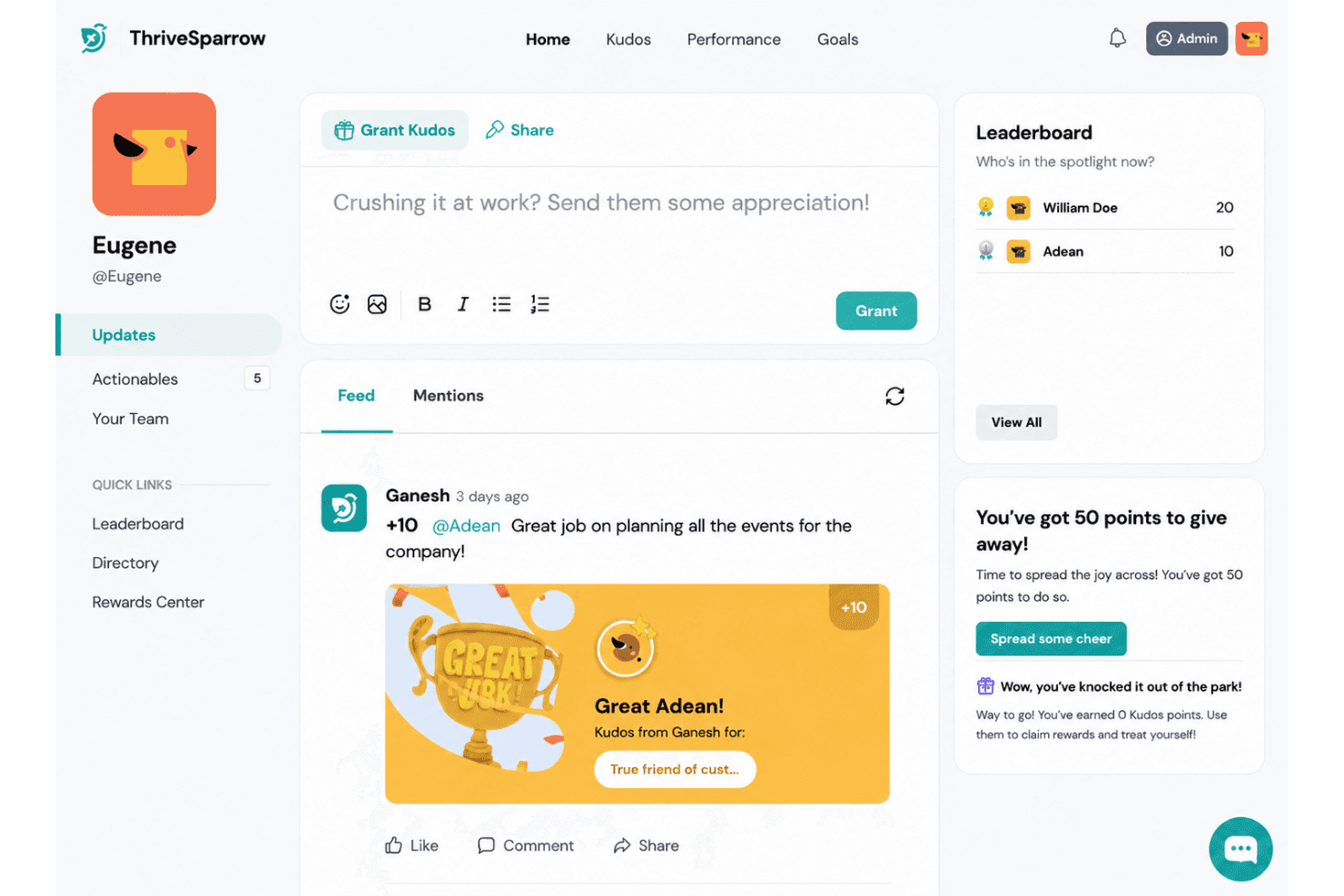
ThriveSparrow lets teams send kudos and track peer recognition points. ThriveSparrow's Kudos is a peer recognition and rewards platform that lets employees give values-tagged kudos, earn and redeem points through a rewards marketplace, and track recognition trends through built-in analytics dashboards.
Who Is ThriveSparrow Best For?
ThriveSparrow's Kudos is a good fit for HR managers and people ops teams who want to connect peer recognition directly to company values and track how those values show up across the organization over time.
Why I Picked ThriveSparrow
I picked ThriveSparrow as one of the best because of how it connects peer recognition directly to company values and then tracks that data over time. When an employee sends a Kudos, they tag a company value, and that tag feeds into dashboards showing which values appear most in recognition activity, how participation trends over reporting periods, and which keywords come up most often in messages. I find that level of values-to-recognition reporting genuinely useful for HR teams who need to show that culture initiatives are actually working.
ThriveSparrow Key Features
- Rewards marketplace: Employees redeem accumulated Kudos points for rewards through a built-in Rewards Center, with requests routed to an approver before fulfillment.
- Leaderboard: Rankings surface who's received the most Kudos and points, including which values they're recognized for, making participation visible across the team.
- Custom awards: Admins can create company-wide awards with set point values, dedicated budgets, and approval workflows.
- Slack and Microsoft Teams integration: Employees can give and receive recognition directly within Slack or Teams, with posts syncing back to the ThriveSparrow Home feed.
ThriveSparrow Integrations
ThriveSparrow offers native integrations with Slack, Microsoft Teams, Bamboo HR, Workday, Gusto, ADP, Deel, Oyster, Okta, and Google Workspace. Slack and Microsoft Teams support in-chat recognition, while other listed integrations support employee-data imports or user syncing.
Pros and Cons
Pros:
- Public kudos feed makes peer praise visible
- Reviewers praise clear dashboards and reports
- Values tags connect recognition with culture
Cons:
- Broader platform may exceed tiny teams' needs
- Milestone automation remains poorly documented
Learn more about ThriveSparrow: Best for peer-to-peer feedback
- Free demo available
- Pricing upon request
Visit WebsiteCustomer Rating:4.7/5
Kudos supports peer recognition and reward points tracking. Kudos is an employee engagement platform designed to improve workplace culture through peer-to-peer recognition and employee rewards. It's ideal for businesses looking to boost employee morale and foster a positive work environment and culture of appreciation. The tool allows your team to give and receive feedback, making everyone feel valued and appreciated.
Why I picked Kudos: Kudos excels in peer-to-peer feedback. It offers features such as recognition messages, where team members can acknowledge each other's contributions, and a points-based rewards system that motivates employees to engage more and redeem points for meaningful rewards. Additionally, Kudos provides detailed analytics, helping you understand how recognition impacts your team.
Standout features and integrations:
Features include a user-friendly dashboard that makes it easy for you to track recognition activities, customizable badges that let your team create unique recognition tokens tied to your core values, and reporting tools that give insights into employee engagement trends.
Integrations include Slack, Microsoft Teams, Google Workspace, BambooHR, ADP, Workday, SAP SuccessFactors, Okta, and more.
Pros and Cons
Pros:
- Flexible gift card rewards
- Deep culture and engagement analytics
- Values-based peer recognition feed
Cons:
- Point limits may frustrate some staff
- Can feel complex for SMEs
Learn more about Kudos: Best for global employee engagement
- Free demo available
- Pricing upon request
Visit WebsiteCustomer Rating:4.6/5
Reward Gateway centralizes global rewards and recognition programs. Reward Gateway is an employee engagement and rewards platform to support global recognition and reward systems. It's tailored for organizations that operate across multiple locations and want a unified approach to employee engagement. The platform offers tools to recognize achievements and connect teams worldwide.
Why I picked Reward Gateway: Reward Gateway excels in global employee engagement, making it ideal for businesses with a diverse workforce. It provides a centralized hub for recognition, allowing you to appreciate employees across different regions. Features such as a global rewards catalog and multilingual support cater to international teams, while customizable engagement surveys gather feedback from your global workforce.
Standout features and integrations:
Features include a customizable communications portal that lets you share company news and updates, a social recognition wall where employees can publicly acknowledge each other, and analytics tools that provide insights into engagement trends across different regions.
Integrations include Slack, Microsoft Teams, Workday, SAP SuccessFactors, BambooHR, ADP, Google Workspace, Okta, and more.
Pros and Cons
Pros:
- Good customer support
- Easy for employees to use
- Combines discounts, benefits, and recognition
Cons:
- Occasional voucher or refund issues
- Limited branding and layout flexibility
Learn more about Reward Gateway: Best for employee discounts
- Free demo available
- Pricing upon request
Visit WebsiteCustomer Rating:4.6/5
Vantage Circle combines points, perks, and employee discounts. Vantage Circle is an employee engagement platform that offers a tiered rewards and recognition solution with a focus on employee discounts. It's well-suited for businesses aiming to provide their employees with exclusive perks and benefits to increase employee satisfaction.
Why I picked Vantage Circle: Vantage Circle stands out with its extensive employee discount offerings. It provides access to a wide range of discounts across various categories, making it a valuable perk for your team. The platform also includes a rewards system that allows you to recognize and incentivize employees, as well as wellness programs to support employee health and well-being.
Standout features and integrations:
Features include a gamification element that adds fun to the recognition process, a detailed analytics dashboard to track engagement and program success, and wellness challenges to encourage healthy competition and healthy lifestyles.
Integrations include Slack, Microsoft Teams, SAP SuccessFactors, Workday, BambooHR, Zoho People, Oracle, Google Workspace, Okta, and more.
Pros and Cons
Pros:
- Includes engagement and wellness modules
- User-friendly portal for redemptions
- Strong catalogue of lifestyle discounts
Cons:
- Analytics depth lags larger competitor
- Limited flexibility in customising reward rules
Learn more about Vantage Circle: Best for customizable recognition programs
- Free demo available
- Pricing upon request
Visit WebsiteCustomer Rating:4.6/5
Terryberry powers custom recognition and service award programs. Terryberry offers a flexible approach to employee engagement, giving you rewards software tools to design personalized recognition experiences. It’s built for high-performing teams that want options in how they celebrate wins, with recognition programs that match your culture.
Why I picked Terryberry: Terryberry shines with its customizable recognition programs. You can tailor awards and recognition methods to fit your team's unique preferences and set up personalized milestones and achievements, giving you flexibility that ensures your recognition efforts resonate with your team and boost their engagement.
Standout features and integrations:
Features include a rewards catalog that lets you offer a wide range of gift options and company swag. Terryberry also provides a service award program to celebrate employee tenure and analytics tools to help you track and measure the success of your recognition initiatives.
Integrations include Microsoft Teams, Slack, and more.
Pros and Cons
Pros:
- Large, varied reward catalogue
- Highly customizable recognition workflows
- Strong long-service award programs
Cons:
- Pricing may not suit small budgets
- Interface may feel dated
Learn more about Terryberry: 8Best for small teams and startups
Mo
- Free demo available
- Pricing upon request
Visit WebsiteCustomer Rating:4.4/5
Mo highlights shout-outs and rewards for small, busy teams. Mo is an employee recognition platform for small teams and startups. It's designed to foster a positive work culture by enabling easy recognition among team members, with tools to help you celebrate achievements and milestones.
Why I picked Mo: Mo is ideal for small teams and startups due to its simplicity and ease of use. It offers features that allow you to create custom recognition moments tailored to your team's needs. The platform supports social recognition, which helps build a strong community within your team, and provides insights into team engagement, making it easy for you to track and improve morale.
Standout features and integrations:
Features include a user-friendly mobile app that allows you to give recognition on the go, a variety of templates for creating personalized recognition messages, and an analytics dashboard that gives you a clear view of team engagement levels.
Integrations include Slack, Microsoft Teams, Okta, and more.
Pros and Cons
Pros:
- Useful engagement reports for HR
- Helpful birthday and occasion reminders
- Excellent for social celebrations
Cons:
- Some users report a steep learning curve
- Rewards catalogue is mostly digital-only
Learn more about Mo: Best for internal communication tools
- 90-day free trial + free demo available
- Pricing upon request
Visit WebsiteCustomer Rating:4.5/5
Workmates supports internal news and employee recognition. Workmates is an employee recognition and engagement platform for enhancing internal communication. It's designed for organizations looking to improve collaboration and connectivity among team members. The platform provides tools to facilitate effective communication and recognition.
Why I picked Workmates: Workmates excels in providing internal communication tools that foster a connected workplace. It includes features such as a company newsfeed to keep everyone updated and customizable announcements, which you can tailor to your team's needs. Additionally, Workmates supports peer recognition, allowing team members to appreciate each other's contributions easily.
Standout features and integrations:
Features include an employee directory that helps you find and connect with colleagues quickly, event management tools to organize and promote company events, and pulse surveys for insights into employee sentiment and engagement levels.
Integrations include Slack, Microsoft Teams, Google Workspace, ADP, Workday, SAP SuccessFactors, Okta, Zoom, and more.
Pros and Cons
Pros:
- Good fit for remote employees
- Well-rated onboarding and support team
- Combines intranet, newsfeed, and recognition
Cons:
- Underdeveloped feature set
- Occasional issues with HRIS integrations
Learn more about Workmates:

GoProfiles records rich employee profiles and milestones. GoProfiles is an AI-driven employee recognition platform for enhancing workplace culture and connectivity. It is ideal for organizations looking to improve team dynamics through detailed employee profiles and peer recognition. The platform offers tools for creating organizational charts, celebrating milestones, and providing rewards.
Why I picked GoProfiles: GoProfiles excels in providing detailed employee profiles, which can help foster genuine connections within your team. It includes features such as customizable badges and rewards that can be redeemed for gift cards. The platform also supports employee mapping, allowing you to visualize team structures easily, and milestone celebrations that help you acknowledge important achievements.
Standout features and integrations:
Features include a dynamic directory powered by AI, which helps you maintain up-to-date employee information. GoProfiles also offers analytics tools to provide insights into team engagement and recognition trends. The mobile app ensures that you can access these features on the go, enhancing flexibility for remote teams.
Integrations include Slack, Microsoft Teams, Google Workspace, BambooHR, ADP, Workday, SAP SuccessFactors, Okta, and more.
Pros and Cons
Pros:
- Supports milestone celebrations
- Customizable recognition badges
- Detailed employee profiles
Cons:
- Some features overlap with existing tools
- Basic reporting capabilities
Learn more about GoProfiles:
Annen programvare for medarbeideranerkjennelse for små bedrifter
Her er noen flere alternativer for programvare for medarbeideranerkjennelse for små bedrifter som ikke kom med på kortlisten min, men som likevel er verdt å se nærmere på:
- 11ApplauzBest for real-time recognition
- 12eCardWidgetBest for digital greeting cards
- 13MatterBest for integration with Slack
- 14ConnecteamBest for mobile-first recognition
- 15BonuslyBest for micro-bonus rewards
- 16AssemblyBest for flexible rewards catalog
- 17AwardcoBest for Amazon integration
- 18Bucketlist RewardsBest for experiential rewards
- 19MotivosityBest for fostering workplace culture
- 20WorkTangoBest for employee surveys
How I Evaluate Employee Recognition Software for Small Business
I split my evaluation into baseline must-haves—a public recognition feed, automated milestones, and a redeemable rewards catalog—and the differentiators that matter for lean HR teams.
Core Functionality (Table Stakes For This List)
When I'm selecting tools for my list, I rank each one on a scale from 0 (does not offer the functionality) to 5 (excels in this area) for each core functionality listed below. Then, I calculate the tool's total score into a percentage. Each tool needs to achieve a minimum total score of 65% to be considered for inclusion.
- Peer-to-Peer Recognition: I check whether employees can send public shoutouts through a social-style feed where the whole team sees and reacts, not just private messages.
- Rewards & Redemption Catalog: The catalog matters—I look for built-in options like gift cards, swag, or charitable donations that employees redeem themselves.
- Milestone & Anniversary Automation: I evaluate whether the tool auto-triggers celebrations for birthdays and work anniversaries without an HR admin setting manual reminders each time.
- Manager Recognition Workflows: Managers need their own tools, so I look for dedicated budget controls, nomination flows, and the ability to issue spot awards to direct reports.
- Workplace Tool Integrations: I check for native Slack and Microsoft Teams bots plus HRIS connectors, since small teams rely on recognition happening where they already work.
- Recognition Analytics & Reporting: Dashboards should show participation rates, budget spend, and gaps—I look for the ability to spot under-recognized teams at a glance.
Once I have a list of tools that meet this criteria, I consider what sets each platform apart.
Differentiating Factors (What Sets Vendors Apart)
Here's how I compare and contrast different vendors:
Standout Features
Values-based recognition is a big differentiator—I look for tools that let you tag shoutouts to specific company values, so recognition reinforces the behaviors you actually want to see. Custom award programs also matter. A platform that supports Employee of the Month nominations or spot bonus workflows gives managers structured ways to celebrate standout work. I also check whether the tool includes pulse surveys or eNPS, since pairing recognition data with engagement sentiment helps small HR teams connect the dots between appreciation and retention.
Beyond Features
Pricing transparency matters a lot for small teams. I look for per-user-per-month plans with no seat minimums, so a 15-person company isn't forced into an enterprise contract. Implementation speed is another factor I weigh—small businesses rarely have a dedicated IT team, so self-serve setup with pre-built templates makes a real difference. Reward fulfillment logistics also come into play. I check whether the vendor handles gift card delivery and swag shipping directly, because an HR generalist juggling five other responsibilities shouldn't be manually processing reward orders.
Slik velger du programvare for medarbeideranerkjennelse for en liten bedrift
Det er lett å gå seg vill i lange funksjonslister og kompliserte prisstrukturer. For å hjelpe deg med å holde fokus mens du går gjennom den unike prosessen med å velge programvare, har jeg laget en sjekkliste over faktorer du bør ha i bakhodet:
| Faktor | Hva du bør vurdere |
|---|---|
| FaktorSkalerbarhet | Hva du bør vurdereVil verktøyet vokse med virksomheten din? Vurder om det støtter antallet brukere du forventer når teamet ditt utvides. |
| FaktorIntegrasjoner | Hva du bør vurdereKobler programvaren seg til verktøyene du allerede bruker? Kontroller kompatibiliteten med de eksisterende systemene dine for å unngå avbrudd. |
| FaktorTilpasningsmuligheter | Hva du bør vurdereKan du tilpasse programvaren slik at den passer til bedriftskulturen din? Se etter alternativer for å tilpasse programmer for anerkjennelse og belønninger. |
| FaktorBrukervennlighet | Hva du bør vurdereEr programvaren intuitiv? Sørg for at det ikke kreves omfattende opplæring for å komme i gang, noe som kan spare tid for teamet ditt. |
| FaktorImplementering og innføring | Hva du bør vurdereHvor lang tid tar det å sette opp? Rask innføring for nyansatte, med tilgjengelige ressurser som veiledninger og brukerstøtte, kan gjøre overgangen enklere. |
| FaktorKostnad | Hva du bør vurdereEr prisene i tråd med budsjettet ditt? Vurder totalkostnaden, inkludert eventuelle skjulte gebyrer, for å sikre at det er overkommelig for den lille bedriften din. |
| FaktorSikkerhetstiltak | Hva du bør vurdereHvor sikker er plattformen? Kontroller tiltakene for databeskyttelse og overholdelse av bransjestandarder for å beskytte sensitiv informasjon. |
| FaktorTilgjengelig brukerstøtte | Hva du bør vurdereEr hjelp tilgjengelig når du trenger det? Vurder tilgjengeligheten og kvaliteten på kundestøtten for å løse eventuelle problemer som oppstår. |
Hva er programvare for medarbeideranerkjennelse for små bedrifter?
Programvare for medarbeideranerkjennelse for små bedrifter er utviklet for å hjelpe virksomheter med å anerkjenne og belønne medarbeidernes bidrag. Disse verktøyene brukes vanligvis av HR-medarbeidere, personalteam og ledere, og styrker arbeidsmoralen og engasjementet. Funksjoner som anerkjennelse mellom kolleger, tilpassede belønninger og tilbakemeldinger i sanntid bidrar til å bygge en positiv bedriftskultur og anerkjennelseskultur, forbedre medarbeidertilfredsheten og medarbeideropplevelsen samt fremme et støttende miljø som motiverer og beholder talenter.
Funksjoner
Her er de viktigste funksjonene all god programvare for medarbeideranerkjennelse for små bedrifter bør ha:
- Anerkjennelse mellom kolleger: Gjør det mulig for medarbeidere å anerkjenne hverandres bidrag og gode arbeid, noe som fremmer et støttende teammiljø.
- Tilpassede belønninger: Tilbyr personlige belønningsalternativer som samsvarer med bedriftskulturen og motiverer medarbeiderne.
- Tilbakemeldinger i sanntid: Gir umiddelbare, automatiserte tilbakemeldinger for å styrke kommunikasjonen og medarbeiderutviklingen.
- Analysedashbord: Gir innsikt i trender innen anerkjennelse og medarbeiderengasjement, slik at ledere kan ta informerte beslutninger.
- Mobiltilgang: Gjør det mulig for medarbeidere å gi og motta anerkjennelse på farten, slik at engasjementet opprettholdes kontinuerlig.
- Tilpassbare merker: Lar brukerne opprette unike anerkjennelsesmarkører som gjenspeiler teamets verdier.
- Markering av milepæler: Støtter anerkjennelse av betydelige medarbeiderprestasjoner og arbeidsjubileer.
- Integrasjon: Kobles til eksisterende verktøy for å sikre en smidig arbeidsflyt og konsistente data.
- Spillifisering: Oppmuntrer til deltakelse gjennom morsomme, konkurransepregede funksjoner som styrker moralen.
- Sikkerhetsbeskyttelse: Beskytter sensitive medarbeiderdata med robuste sikkerhetstiltak og overholdelse av bransjestandarder.
Fordeler
Implementering av programvare for medarbeideranerkjennelse i den lille bedriften din gir flere fordeler for teamet og virksomheten. Her er noen av fordelene du kan se frem til:
- Bedre moral: Regelmessig anerkjennelse gjennom anerkjennelse mellom kolleger styrker medarbeidernes motivasjon og skaper et positivt arbeidsmiljø.
- Økt engasjement: Tilbakemeldinger i sanntid og tilpassede belønninger øker engasjementet ved å holde medarbeiderne motiverte og knyttet til arbeidet sitt.
- Bedre medarbeiderbevaring: Markering av milepæler og prestasjoner bidrar til å redusere personalutskifting ved at medarbeiderne føler seg verdsatt og anerkjent.
- Økt produktivitet: Anerkjennelse og insentiver oppmuntrer medarbeiderne til å yte sitt beste, noe som fører til økt produktivitet.
- Mer informerte beslutninger: Analysedashbord gir innsikt i teamdynamikken og hjelper ledere med å ta datadrevne beslutninger.
- Styrket bedriftskultur: Tilpassbare merker og belønninger samsvarer med virksomhetens verdier og styrker en samlet og støttende kultur.
- Effektiv kommunikasjon: Integrasjonsmuligheter sikrer en smidig informasjonsflyt og forbedrer den overordnede kommunikasjonen og samarbeidet i teamet.
Kostnader og priser
Valg av programvare for medarbeideranerkjennelse for enhver liten bedrift krever en forståelse av de ulike prismodellene og abonnementene som er tilgjengelige. Kostnadene varierer basert på funksjoner, teamstørrelse, tillegg og mer. Tabellen nedenfor oppsummerer vanlige abonnementer, gjennomsnittsprisene deres og typiske funksjoner som er inkludert i programvareløsninger for medarbeideranerkjennelse for småbedrifter:
Sammenligningstabell for programvare for medarbeideranerkjennelse for småbedrifter
| Abonnementstype | Gjennomsnittspris | Vanlige funksjoner |
|---|---|---|
| AbonnementstypeGratisabonnement | Gjennomsnittspris$0/user/month | Vanlige funksjonerGrunnleggende anerkjennelsesfunksjoner, begrensede tilpasningsmuligheter og tilgang til et lite utvalg belønninger. |
| AbonnementstypePersonlig abonnement | Gjennomsnittspris$5-$15/user/month | Vanlige funksjonerAnerkjennelse mellom kolleger, egendefinerte merker og grunnleggende rapporteringsfunksjoner. |
| AbonnementstypeBedriftsabonnement | Gjennomsnittspris$16-$30/user/month | Vanlige funksjonerAvansert analyse, mobiltilgang, integrasjonsmuligheter og markering av milepæler. |
| AbonnementstypeStorbedriftsabonnement | Gjennomsnittspris$31-$50/user/month | Vanlige funksjonerFull tilpasning, støtte for flere språk, sikkerhetstiltak og førsteklasses kundestøtte. |
Vanlige spørsmål
Her er noen svar på vanlige spørsmål om programvare for medarbeideranerkjennelse for småbedrifter:
Hvordan integrerer jeg programvare for medarbeideranerkjennelse med eksisterende verktøy?
Mange løsninger for medarbeideranerkjennelse kan integreres med verktøy som Slack, Microsoft Teams og HR-systemer. Sjekk programvarens integrasjonsmuligheter før du kjøper, slik at du sikrer kompatibilitet med de eksisterende verktøyene dine. Dette bidrar til å effektivisere kommunikasjon og datadeling. Se etter plattformer som tilbyr API-tilgang eller ferdigbygde integrasjoner for en enklere konfigurering.
Kan programvare for medarbeideranerkjennelse tilpasses bedriftskulturen min?
Ja, mange plattformer for medarbeideranerkjennelse tilbyr tilpasningsmuligheter. Du kan tilpasse anerkjennelsesprogrammer, belønninger og til og med merkevareelementer slik at de passer bedriftskulturen din, med egendefinerte merker, meldinger og belønninger som gjenspeiler teamets unike identitet. Dette sikrer at programvaren føles som en naturlig videreføring av de eksisterende systemene og verdiene dine.
Er programvare for medarbeideranerkjennelse sikker?
Ja, anerkjente programmer for medarbeideranerkjennelse inkluderer sikkerhetstiltak for å beskytte dataene dine. Se etter plattformer som følger bransjestandarder, for eksempel GDPR, eller som har ISO-sertifiseringer. Sørg for at datakryptering, sikre tilgangskontroller og regelmessige sikkerhetsrevisjoner er en del av pakken, slik at du kan beskytte sensitive medarbeideropplysninger og opprettholde tilliten.
Hvordan måler jeg hvor vellykket programvaren for medarbeideranerkjennelse er?
Du kan måle resultatene gjennom analyse og tilbakemeldinger fra medarbeiderne. Se etter programvare med rapporteringsfunksjoner for å følge med på engasjement, deltakelsesgrad og trender innen anerkjennelse. Innhent regelmessig tilbakemeldinger fra teamet for å forstå erfaringene deres og identifisere områder som kan forbedres. Bruk denne innsikten til å justere anerkjennelsesstrategien din og maksimere programvarens effekt.