

Een AI-agent voor HR is software die verzoeken van medewerkers beantwoordt en acties uitvoert binnen HR-werkstromen volgens geconfigureerde machtigingen. De beste optie voor jouw team geeft antwoorden die aansluiten op het beleid, voltooit relevante taken en werkt samen met je HRIS en werkpleksystemen. Deze shortlist vergelijkt tools voor medewerkersservice, goedkeuringen, wijzigingen gedurende de levenscyclus van medewerkers en HR-IT-coördinatie, met bijzondere aandacht voor toegangscontroles, escalatieroutes en beveiligingsmaatregelen voor gevoelige gegevens.
Waarom u onze softwarebeoordelingen kunt vertrouwen
6,700+
Reviews
20
Industry experts
16+
Evaluation factors
14
Years reviewing software
Ons team test en beoordeelt software sinds 2012. Als HR-experts weten we zelf hoe moeilijk — en belangrijk — het is om de juiste software te kiezen.
Voor deze gids hebben we tools geëvalueerd met behulp van praktijktests en onafhankelijk onderzoek, waarbij we tools beoordeelden aan de hand van onze selectiecriteria. We putten ook uit inzichten van vooraanstaande experts uit de branche en van praktiserende HR-professionals.
Onze reviews weerspiegelen ons menselijke redactionele oordeel, geen verkooppraatje.
Deskundige beoordelaars:
- Phil GrayCOO
 Kim BehnkeHR Tech-redacteur & analist
 Josh BarkerPeople Ops Manager

Vergelijkingstabel: AI-agents voor HR
Vergelijk de prijzen en specificaties naast elkaar van de AI-agents voor HR die op mijn shortlist staan.
Score legend (out of 5)
- Excellent4.5–5
- Good4–4.4
- Average3–3.9
- Below average2–2.9
- Poor1–1.9
Sorted by: Default
| Tool | Starting Price | Website | |||||||
|---|---|---|---|---|---|---|---|---|---|
Best for HR controls and payroll assurance | 3.5 out of 5 | 3 | 4 | 3 | 3 | 4 | 4 | Pricing upon request Free demo available | Website |
Best for one HR and IT employee front door | 3.8 out of 5 | 4 | 4 | 3 | 4 | 4 | 4 | $15/user/month Not available | Website |
Best for HR data readiness before rollout | 4.2 out of 5 | 5 | 3 | 4 | 4 | 5 | 4 | Pricing upon request Free demo available | Website |
Best for policy-led HR service workflows in SAP | 3.8 out of 5 | 4 | 4 | 4 | 3 | 4 | 4 | Pricing upon request 30-day free trial | Website |
Best for acting on Workday HR workflows | 3.7 out of 5 | 3 | 3 | 4 | 4 | 4 | 4 | Pricing upon request Free demo available | Website |
Best for employee help across workplace systems | 4.2 out of 5 | 3 | 5 | 4 | 4 | 5 | 4 | Pricing upon request Free demo available | Website |
Best for approval-led employee workflows | 4.2 out of 5 | 4 | 5 | 4 | 4 | 4 | 4 | Pricing upon request Free demo available | Website |
Best for HR-IT employee lifecycle coordination | 3.8 out of 5 | 3 | 4 | 4 | 4 | 4 | 4 | $25,000/year Free trial + demo available | Website |
Best for linking HR changes to IT access | 3.3 out of 5 | 2 | 4 | 4 | 4 | 3 | 3 | Pricing upon request Free demo available | Website |
Best for HR actions under native permissions | 3.3 out of 5 | 1 | 4 | 4 | 4 | 4 | 3 | Pricing upon request Free demo available | Website |


Beoordelingen van AI-agents voor HR
Hieronder staan mijn beoordelingen van de beste AI-agents voor HR op mijn shortlist. Elk overzicht behandelt werkstromen voor medewerkers, mogelijkheden en toegangscontroles, zodat je de juiste software voor jouw team kunt vinden.
 Best for HR controls and payroll assurance
- Free demo available
- Pricing upon request
Visit WebsiteCustomer Rating:4.3/5
Oracle HCM Cloud's skill reputation screen offers ways to improve a skill, such as finding a mentor or taking learning. Oracle HCM Cloud is an enterprise HCM platform with embedded AI agents covering recruiting, payroll, benefits, workforce scheduling, and HR case management through a unified system of record.
Who Is Oracle HCM Cloud Best For?
Oracle HCM Cloud is a strong fit for large enterprises managing complex, multi-country workforces that need robust payroll controls, audit trails, and AI-assisted compliance monitoring within a single HR system of record.
Why I Picked Oracle HCM Cloud
I've included Oracle HCM Cloud in my top picks because its AI-powered payroll controls cover several important parts of the employee lifecycle. The Hire-to-Retire Assurance agent validates sensitive payroll runs, compensation changes, and timecard transactions to help identify potential issues. Meanwhile, the Court Order Processing Agent handles income withholding orders from intake through classification and processing. Combined with the Payslip Analyst for employee-facing payroll inquiries, these capabilities provide AI assistance across multiple stages of payroll administration.
Oracle HCM Cloud Key Features
- Benefits guidance agent: Answers employee questions about benefits options using uploaded organizational documents configured within the system.
- Career Coach: Provides personalized job recommendations, application guidance, and candidate support around the clock during recruitment.
- Dynamic Skills: An AI-powered skills engine that consolidates workforce skills data and provides recommendations across hiring, learning, internal mobility, and workforce planning.
- HR Help Desk case management: Logs, routes, and tracks HR service requests, with AI-generated case summaries and knowledge article recommendations for HR teams.
Oracle HCM Cloud Integrations
Oracle HCM Cloud has native integrations with Oracle Fusion Cloud SCM and CX and Oracle Health, along with payroll partner integrations with ADP Global Payroll, Neeyamo, and Ramco. Its REST API supports custom integrations.
Pros and Cons
Pros:
- Provides personalized career recommendations
- Automates court-order withholding processes
- Validates sensitive payroll transactions
Cons:
- HR tasks involve navigation
- Guided chats lack retention
Learn more about Oracle HCM Cloud: Best for one HR and IT employee front door
- Not available
- From $15/user/month (billed annually)
Visit WebsiteCustomer Rating:4.3/5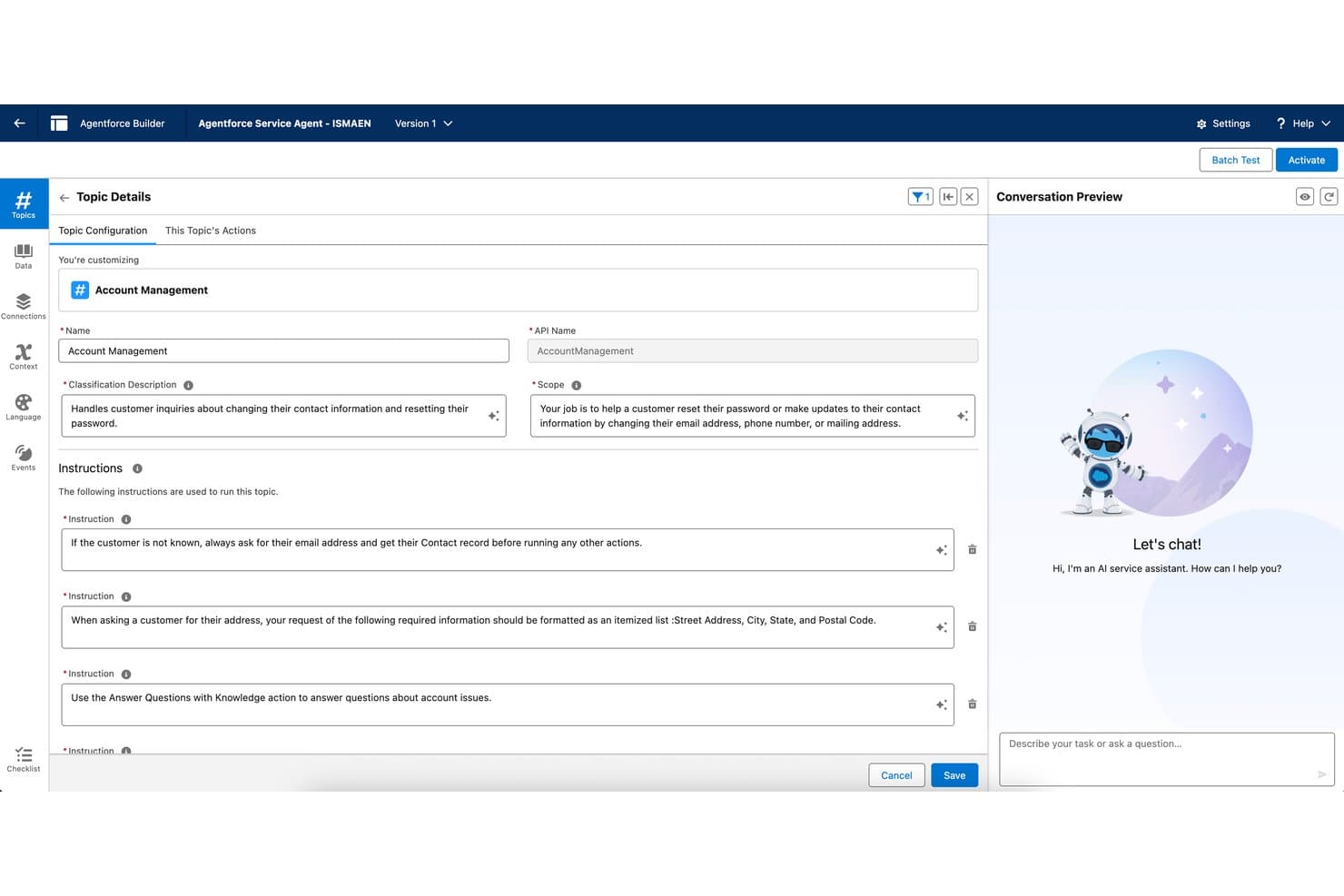
Configuring an Account Management topic in Agentforce Builder's Topic Details screen. Salesforce Agentforce is an AI agent platform for HR and IT employee support that handles conversational inquiries, automates actions through connected systems such as Workday, SAP, and ADP, and routes complex cases to human specialists across Slack, Microsoft Teams, and a self-service portal. AI Agents for Employees costs $15/user/month for employees accessing AI-powered support, while HR Service Desk Enterprise starts at $50/user/month for HR professionals managing employee cases. Both licenses are billed annually in USD.
Who Is Salesforce Agentforce Best For?
Salesforce Agentforce is a strong fit for mid-to-large enterprises that already use Salesforce and want a single point of access for HR and IT employee support.
Why I Picked Salesforce Agentforce
I've included Salesforce Agentforce in my top picks because it brings HR and IT employee support together through a single AI agent layer. I like how Paige, the built-in employee agent, handles leave balance checks, expense submissions, and payslip corrections conversationally across Slack and Microsoft Teams. The AI Agents for Employees offering starts at $15/user/month, while HR Service Desk Enterprise starts at $50/user/month and adds unified HR case management. When a request requires human intervention, the case-management capabilities help HR specialists continue with the conversation context intact rather than asking employees to repeat information.
Salesforce Agentforce Key Features
- Generative knowledge management: Retrieves and synthesizes HR policy content dynamically to provide employees with accurate, grounded answers without routing routine inquiries to a human agent.
- Unified agentic case management: Tracks, routes, and manages HR requests in a single workspace, allowing specialists to review cases with the full context already available.
- 50+ prebuilt service catalog items: Includes ready-made catalog entries for common HR and IT requests, reducing the configuration work required before deployment.
- Einstein Trust Layer: Applies prompt defense, toxicity detection, and zero data retention for third-party LLMs to AI interactions across the platform.
Salesforce Agentforce Integrations
Salesforce Agentforce integrates with Slack, Microsoft Teams, Workday, SAP, and ADP. It also provides secure APIs for custom connections, with MuleSoft setup required for third-party integrations.
Pros and Cons
Pros:
- Includes prebuilt service catalogs
- Preserves context during escalations
- Unifies employee service channels
Cons:
- Existing systems complicate adoption
- Custom connections require MuleSoft
Learn more about Salesforce Agentforce: Best for HR data readiness before rollout
- Free demo available
- Pricing upon request
Visit WebsiteCustomer Rating:4.2/5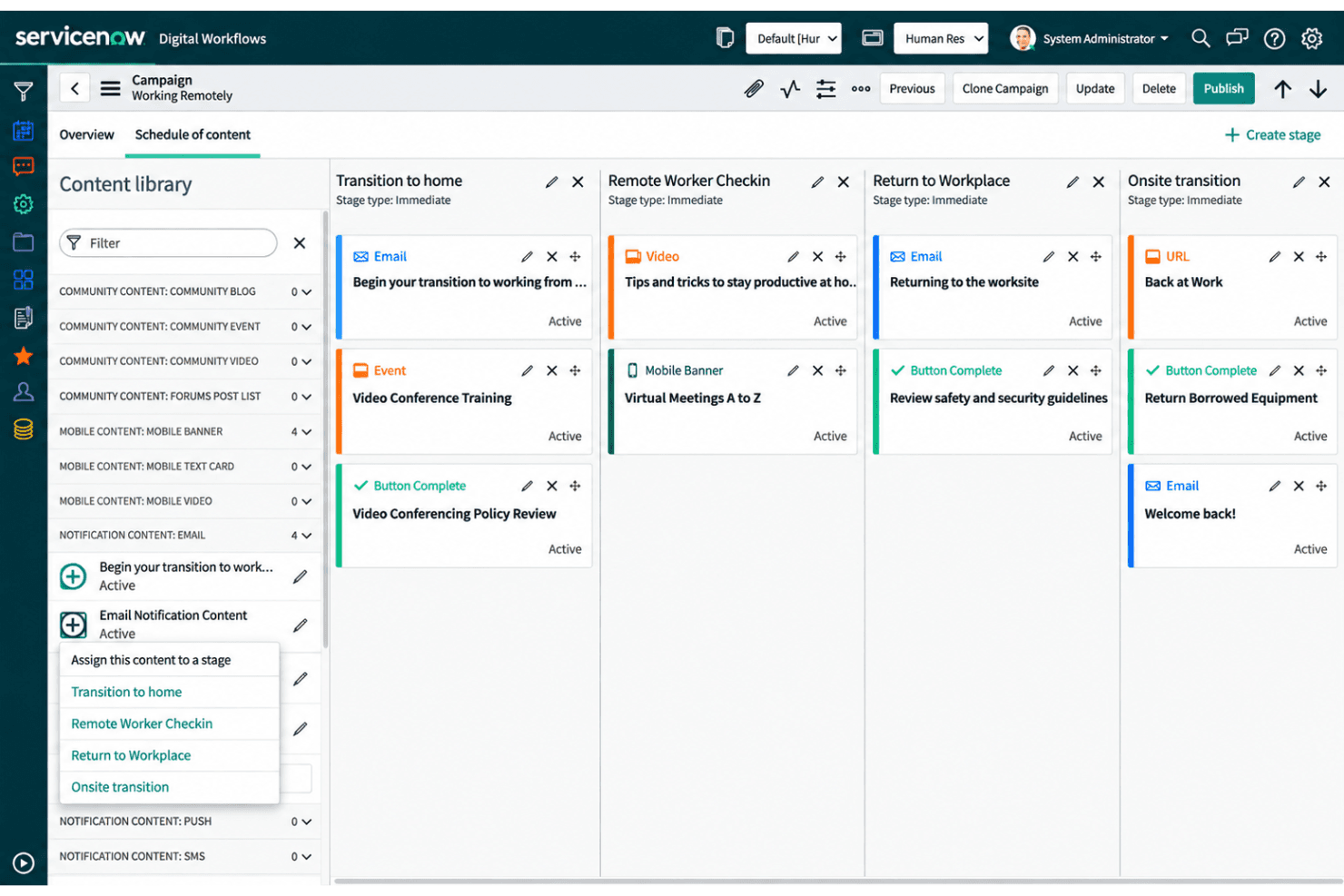
ServiceNow Digital Workflows campaign builder scheduling remote-work content across stages. ServiceNow HR Service Delivery is an enterprise AI agent platform for HR that handles case management, employee self-service, voice and chat interactions, workflow automation, and lifecycle events, such as onboarding and offboarding, across departments.
Who Is ServiceNow HR Service Delivery Best For?
ServiceNow HR Service Delivery is a strong fit for large enterprises with dedicated IT and HR operations teams that need to manage high case volumes across departments.
Why I Picked ServiceNow HR Service Delivery
I picked ServiceNow HR Service Delivery because its HR Data Readiness Dashboard helps organizations assess their data before deploying AI agents. The dashboard scores 32 metrics across six readiness areas, highlighting case data quality, knowledge freshness, and schema health using red, yellow, and green indicators. This gives teams a clear picture of what needs attention before implementation. I also like its Predictive Intelligence feature, which automatically classifies and routes cases once the underlying data is ready, helping teams transition from preparation to active AI-assisted HR service delivery.
ServiceNow HR Service Delivery Key Features
- Virtual Agent for HR: A generative AI chatbot that handles predefined HR self-service topics, including leave requests, benefits inquiries, address updates, and case status checks, across web, Teams, and Slack.
- Employee Journey Management: Coordinates multistep lifecycle events, such as onboarding, parental leave, and offboarding, across HR, IT, and workplace services through a single workflow.
- Voice Agents for HR: Lets employees submit requests, check approvals, and retrieve information through natural-language voice interactions from any device.
- Autonomous Service Desk: Uses AI agents to handle HR cases from intake through resolution, reducing the need for human intervention in routine requests.
ServiceNow HR Service Delivery Integrations
ServiceNow HR Service Delivery integrates with Microsoft Teams and Slack for conversational HR support, along with Oracle HCM and Zoho for documented voice agent workflows. REST, SOAP, and webhook APIs support custom integrations.
Pros and Cons
Pros:
- Automates predictive case routing
- Centralizes employee case histories
- Evaluates 32 readiness metrics
Cons:
- Stale knowledge undermines responses
- Setup requires technical expertise
Learn more about ServiceNow HR Service Delivery: Best for policy-led HR service workflows in SAP
- 30-day free trial (excludes Joule AI capabilities)
- Pricing upon request
Visit WebsiteCustomer Rating:3.8/5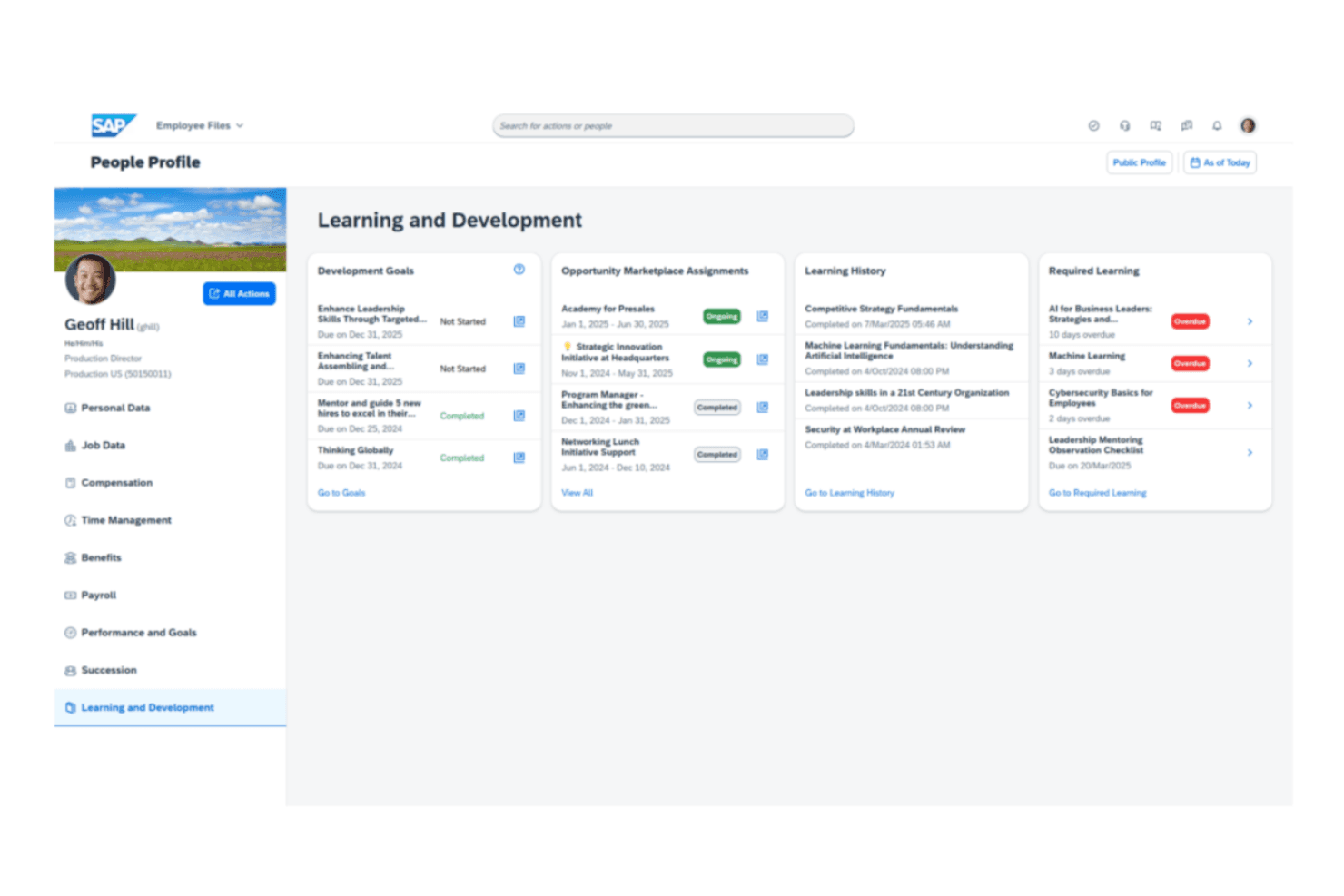
SAP SuccessFactors People Profile showing development goals, learning history, and overdue required learning. SAP SuccessFactors is an enterprise HCM suite that integrates AI agents and assistants across core HR, payroll, talent management, and workforce analytics through its Joule AI framework.
Who Is SAP SuccessFactors Best For?
SAP SuccessFactors is a strong fit for large enterprises already using SAP infrastructure that need AI-driven HR service workflows governed by company policy documents.
Why I Picked SAP SuccessFactors
I've included SAP SuccessFactors in my top picks because its HR Service Orchestration Agent grounds responses in company policy documents, helping employees receive answers aligned with organizational rules rather than generic guidance. I also like how the agent can trigger Employee Central Quick Actions directly from a conversation, allowing employees to move from receiving answers to completing tasks. For large enterprises already using SAP infrastructure, this connection between policy guidance and workflow execution can help streamline HR service delivery.
SAP SuccessFactors Key Features
- Joule Agents: Prebuilt AI agents carry out multistep HR workflows across SAP and non-SAP systems using business process context, third-party tools, and other agents.
- People Intelligence Assistant: Detects workforce signals, explains their underlying drivers, and provides guidance based on workforce data and HR best practices.
- Performance Preparation Agent: Generates personalized talking points and insights to help managers prepare for performance discussions and reviews.
- Onboarding Assistant: Guides new hires through task completion, digital forms, and e-signatures across onboarding, offboarding, and crossboarding processes.
SAP SuccessFactors Integrations
SAP SuccessFactors offers marketplace integrations with SmartRecruiters, DocuSign, Benefitfocus, and WorkForce Software. Its REST API supports custom integrations with HRIS, payroll, recruiting, and workforce management systems.
Pros and Cons
Pros:
- Analyzes workforce intelligence signals
- Provides AI-assisted performance preparation
- Connects policies with actions
Cons:
- Agent actions require review
- Joule struggles with complexity
Learn more about SAP SuccessFactors: Best for acting on Workday HR workflows
- Free demo available
- Pricing upon request
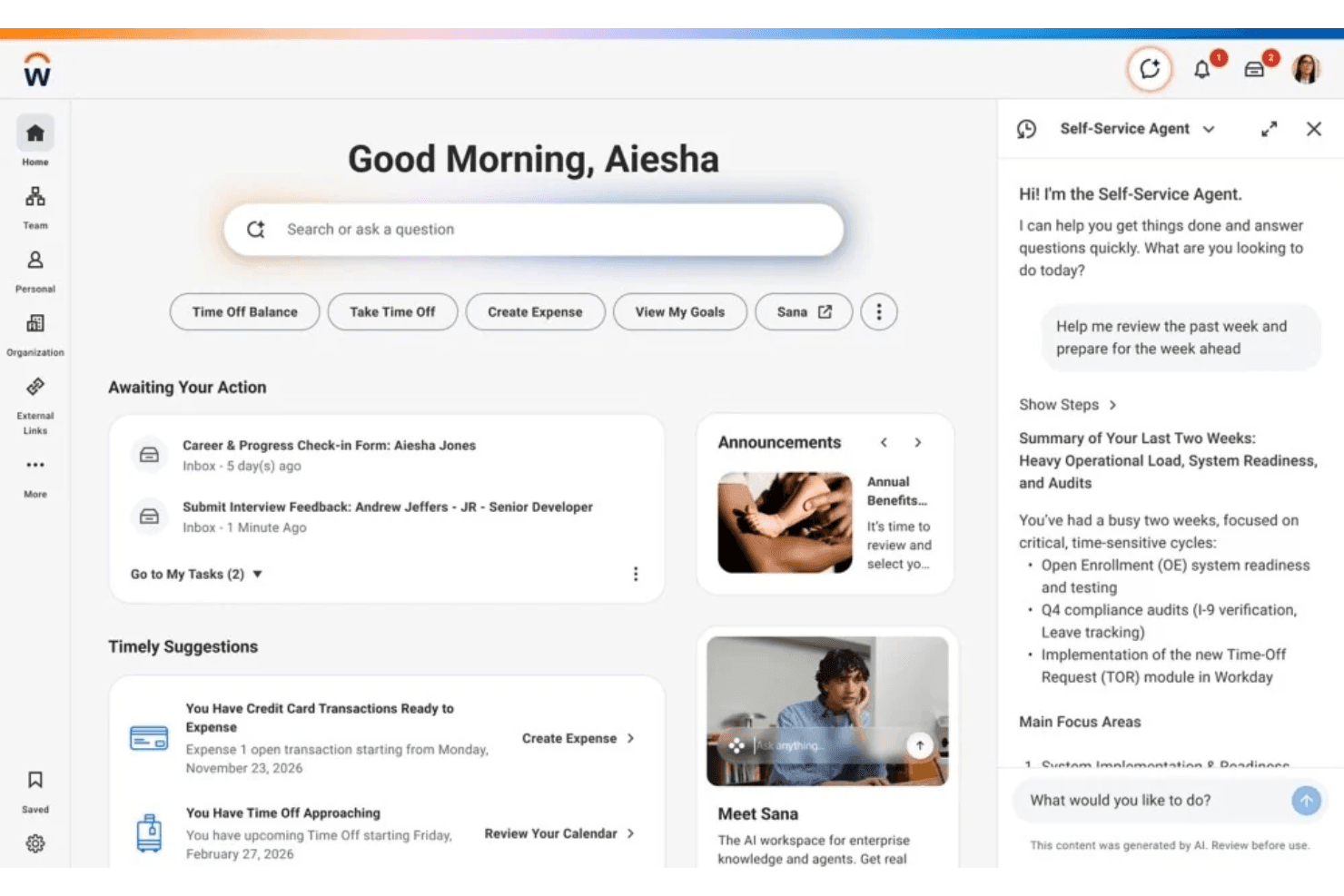
Workday's home screen with its Self-Service Agent summarizing recent work and suggesting next steps. Workday Illuminate is an AI agent suite embedded within the Workday platform that spans HR, payroll, and workforce management. It uses native Workday data to support recruiting, employee self-service, case handling, and scheduling.
Who Is Workday Illuminate Best For?
Workday Illuminate is designed for large enterprises already managing HR, payroll, and workforce operations through the Workday platform.
Why I Picked Workday Illuminate
I picked Workday Illuminate because its AI agents operate directly within the Workday platform, using the same data that supports existing HR and payroll workflows. I especially like the Talent Acquisition Agent, which sources candidates, scores resumes, and coordinates interviews without requiring teams to leave Workday's ecosystem. The Case Agent also stands out because it automatically classifies, assigns, and summarizes HR cases, reducing the need for manual triage of employee requests.
Workday Illuminate Key Features
- Self-Service Agent: Lets employees check pay, view time-off balances, request absences, and get answers to benefits questions through a conversational interface.
- Workforce Management Agent: Automates shift swaps, schedule changes, and demand-based staffing, escalating requests to managers for approval when necessary.
- Decision Intelligence: Analyzes workforce data to identify gaps and recommend actions for HR and people leaders.
- Agent System of Record (ASOR): Gives administrators a centralized hub to register, configure, monitor, and govern agents, with audit trails and access controls.
Workday Illuminate Integrations
Documented integrations include Microsoft Teams, Slack, Gemini, Claude, and SMS-supported notifications. Workday Illuminate also supports REST, SOAP, GraphQL, and MCP-based APIs for custom connectivity.
Pros and Cons
Pros:
- Centralizes agent governance controls
- Coordinates AI-assisted recruitment activities
- Executes Workday-native HR workflows
Cons:
- ASOR requires tenant-specific configuration
- Agent availability varies regionally
Learn more about Workday Illuminate: Best for employee help across workplace systems
- Free demo available
- Pricing upon request
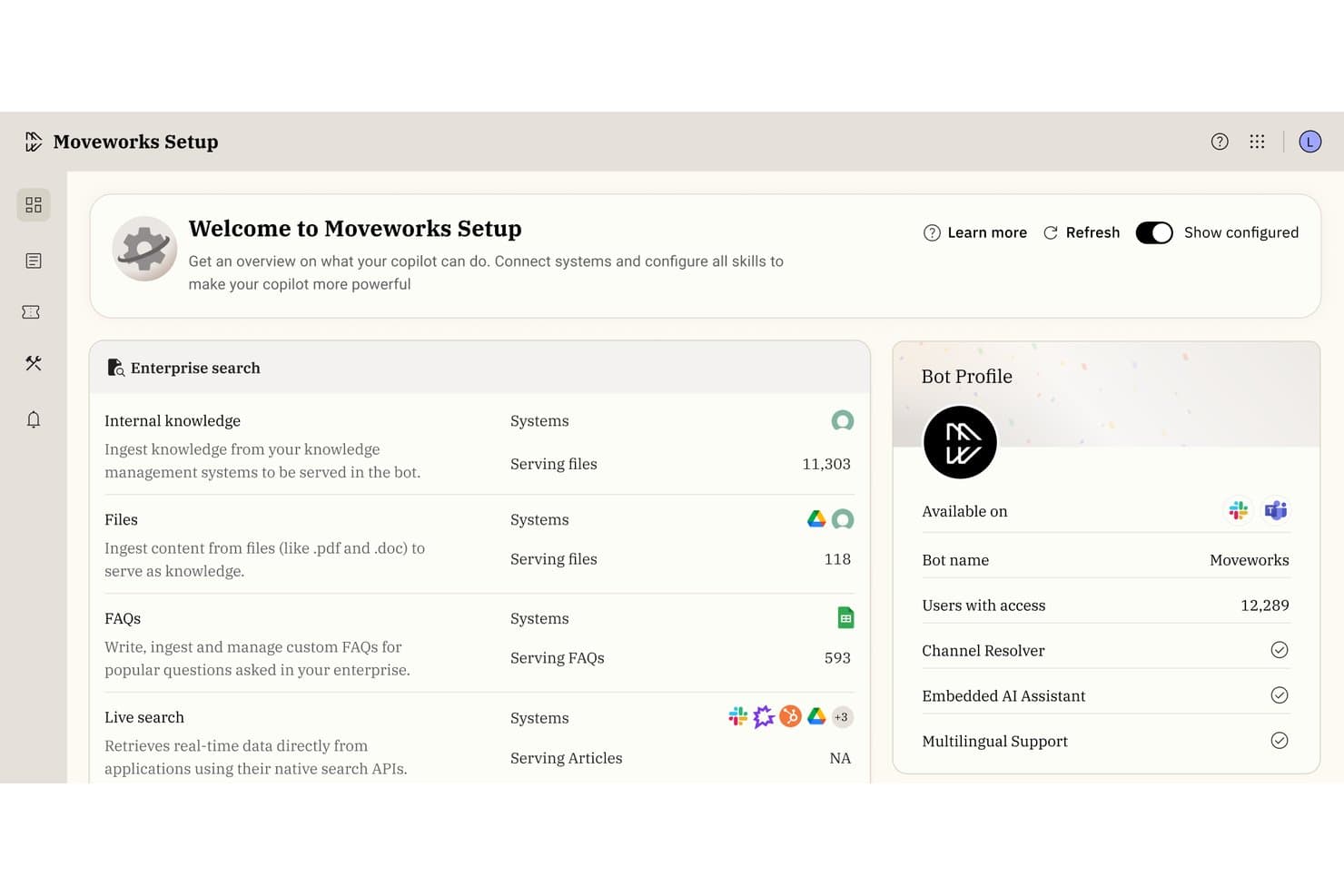
Moveworks Setup dashboard, where admins connect enterprise systems and configure the copilot's search sources and channels. Moveworks is an AI agent platform built around a conversational assistant that lets employees resolve HR requests, such as onboarding tasks, name updates, time-off requests, and case tracking, across connected workplace systems through Slack, Microsoft Teams, and other work interfaces.
Who Is Moveworks Best For?
Moveworks is a strong fit for large enterprises with complex, multi-system HR environments where IT and HR teams want employees to resolve requests through self-service without submitting tickets.
Why I Picked Moveworks
I picked Moveworks because it's designed to help employees resolve HR requests across systems they already use, such as Workday, SAP SuccessFactors, and UKG, without submitting a ticket. What I find compelling is how the AI assistant delivers personalized, role- and location-aware answers with source citations, so employees receive guidance relevant to their circumstances rather than generic responses. Tool Studio also lets HR and IT teams orchestrate multistep workflows with built-in policy validation before any action is executed.
Moveworks Key Features
- Omnichannel assistant access: Employees can access the AI assistant through Slack, Microsoft Teams, intranets, service portals, and the web in more than 100 languages.
- Proactive task nudges: The assistant sends automated reminders for time-sensitive or recurring tasks, such as security training or onboarding steps, without waiting for employees to ask.
- Knowledge article generation: Knowledge managers can generate grounded knowledge articles directly within the platform to address FAQ gaps and improve self-service coverage.
- AI Agent Marketplace: A curated library of prebuilt, customizable agents and solution packs lets HR and IT teams deploy ready-to-use workflows without building them from scratch.
Moveworks Integrations
Moveworks integrates with hundreds of enterprise systems, including Workday, SAP SuccessFactors, ADP, UKG, Oracle HCM Cloud, Greenhouse, Dayforce, and HiBob. Its Conversations API and Data APIs support custom integrations.
Pros and Cons
Pros:
- Offers extensive agent marketplace
- Supports proactive employee reminders
- Provides role-aware policy answers
Cons:
- Niche queries evade search
- Complex cases require escalation
Learn more about Moveworks: Best for approval-led employee workflows
- Free demo available
- Pricing upon request
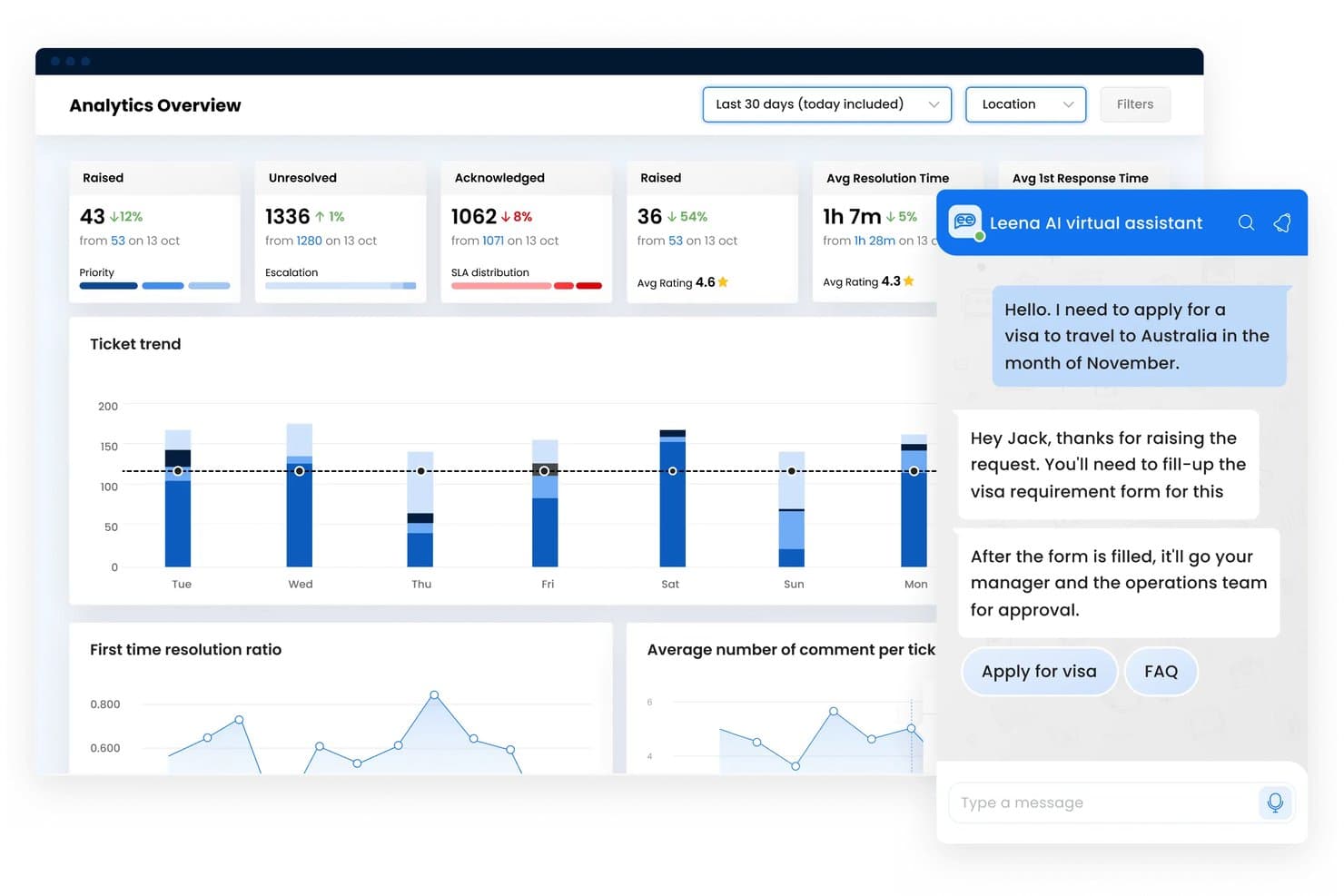
Leena AI's analytics dashboard and virtual assistant handling a visa request in one view. Leena AI is an AI agent for HR that handles employee self-service requests, routes cases to HR with full context, and executes multistep workflows across connected HRIS, payroll, and benefits systems.
Who Is Leena AI Best For?
Leena AI is a strong fit for HR operations teams at mid-to-large enterprises that need approval-based workflows across Workday, SAP SuccessFactors, or similar HRIS platforms.
Why I Picked Leena AI
I've included Leena AI in my top picks because it makes approval-led workflows configurable without requiring engineering support for every change. Its Agent Operating Protocol lets process owners define multistep workflows in plain English, complete with approval gates at each stage. This helps ensure that requests, such as job changes or leave exceptions, receive the necessary review. The Workbench layer then pauses a workflow until approval is received before resuming from the same point.
Leena AI Key Features
- Knowledge conflict analysis: Scans connected knowledge sources to identify contradictions across documents and flags them for HR review before they reach employees.
- Omnichannel deployment: Delivers the HR assistant across Microsoft Teams, Slack, WhatsApp, web, mobile, voice, email, and kiosks through a shared context layer.
- Role-based access control: Synchronizes user roles and permissions from Active Directory and your HRIS to limit the actions the assistant can perform on behalf of each employee.
- Run observability: Logs every reasoning step, tool call, and fallback in real time, with replay available through the Debugging Console for auditing and troubleshooting.
Leena AI Integrations
Leena AI offers more than 200 prebuilt integrations, including Workday, SAP SuccessFactors, Oracle Fusion, UKG Pro, Dayforce, ADP, BambooHR, ServiceNow, and Microsoft Teams. REST, MCP, and A2A APIs support custom connectivity.
Pros and Cons
Pros:
- Preserves paused workflow states
- Detects conflicting policy documents
- Configurable gates enforce approvals
Cons:
- Advanced workflows require configuration
- Responses sometimes lack specificity
Learn more about Leena AI: Best for HR-IT employee lifecycle coordination
- Free trial + demo available
- From $25,000/year (billed annually)
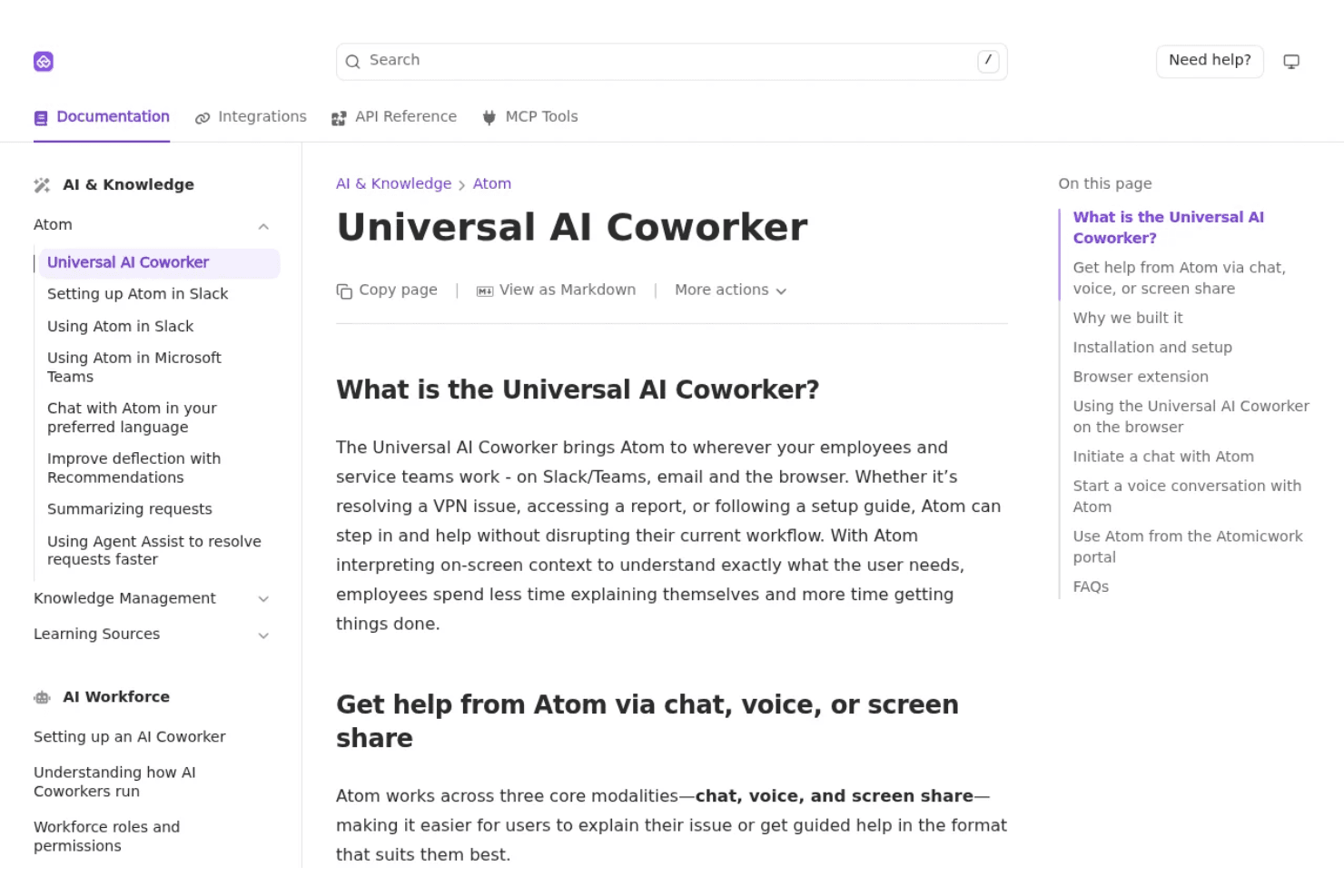
Atomicwork's documentation introduces the Universal AI Coworker across chat, voice, and screen share. Atomicwork is an AI-native enterprise service management platform that deploys specialized HR AI Coworkers to handle employee onboarding, offboarding, benefits operations, and self-service support across Slack, Microsoft Teams, email, and a web portal.
Who Is Atomicwork Best For?
Atomicwork is a strong fit for enterprise HR and IT teams that need to coordinate employee lifecycle events, such as onboarding and offboarding, across both departments through a single platform.
Why I Picked Atomicwork
I picked Atomicwork because it coordinates HR and IT tasks across the employee lifecycle through a single platform. When a new hire accepts an offer through Greenhouse, the Onboarding Manager Coworker initiates access provisioning, device setup, and HR paperwork simultaneously, coordinating both departments without manual handoffs. The Offboarding Manager handles the reverse process, managing access revocation, device returns, and license recovery across HR and IT through a coordinated workflow.
Atomicwork Key Features
- Benefits Ops Manager: An AI Coworker that guides employees through benefits enrollment, coverage questions, claims inquiries, and benefits changes without requiring assistance from HR staff.
- Multilingual employee support: Atom, the universal agent, handles employee requests in more than 25 languages across Slack, Microsoft Teams, email, and a web portal.
- No-code workflow builder: Creates conditional HR workflows with approval gates and automated notifications without requiring coding skills.
- Federated knowledge retrieval: Connects SharePoint, Confluence, Google Drive, and other enterprise sources to provide permission-aware answers using information from across your organization.
Atomicwork Integrations
Atomicwork's directory lists more than 50 native app integrations, including Workday, BambooHR, SAP SuccessFactors, Personio, Gusto, Paylocity, Greenhouse, Checkr, Slack, and Microsoft Teams. It also supports an API and a native MCP server for custom integrations.
Pros and Cons
Pros:
- Supports multilingual employee interactions
- Automates employee equipment provisioning
- Coordinates cross-department lifecycle tasks
Cons:
- Workflow failures lack visibility
- AI responses vary unpredictably
Learn more about Atomicwork: Best for linking HR changes to IT access
- Free demo available
- Pricing upon request
Resolve Vault dashboard showing DaVinci Resolve connection and cloud backup status. Espressive was acquired by Resolve in 2025 and is now part of its agentic automation platform. The platform handles HR and IT lifecycle workflows, including onboarding, job changes, leave management, and offboarding. It coordinates actions across HRIS, identity, and business systems through a conversational virtual agent and an AI-powered workflow engine.
Who Is Espressive Best For?
Espressive is a strong fit for IT and HR operations teams that need to coordinate access provisioning, identity changes, and system updates whenever an employee's employment status changes.
Why I Picked Espressive
I picked Espressive because its HR-IT lifecycle workflows are designed to coordinate IT actions when employee information changes. When an employee receives a promotion, the platform's lifecycle workflow engine can update permissions, synchronize group memberships, and apply changes across HR, IT, and identity systems. I especially like its leave-of-absence access management, which suspends and reinstates system access according to policy, helping teams maintain appropriate access controls throughout an employee's leave.
Espressive Key Features
- Embedded knowledge chat: Answers employee HR policy questions through a conversational AI interface without routing routine inquiries to a live agent.
- AgentLab agent builder: Lets teams describe an agent's purpose in plain language and generate a working agent using an AI-assisted canvas builder.
- Workflow audit trails: Records automated actions across HRIS, ITSM, and identity systems with exportable, activity-level logs.
- Approvals and policy enforcement: Routes requests to managers, HR, or security teams for approval based on role, location, and policy rules.
Espressive Integrations
Espressive offers native integrations with Workday, ADP, BambooHR, ServiceNow, Okta, Microsoft 365, and Microsoft Active Directory. It supports custom connections through REST, SOAP, SSH, SNMP, TCP, SMTP, and CLI interfaces.
Pros and Cons
Pros:
- Provides exportable workflow logs
- Automates leave-related access suspension
- Synchronizes HR-triggered identity changes
Cons:
- Automation coverage remains incomplete
- Policy responses occasionally misinterpret
Learn more about Espressive: 10Best for HR actions under native permissions
Rippling
- Free demo available
- Pricing upon request
Customer Rating:4.9/5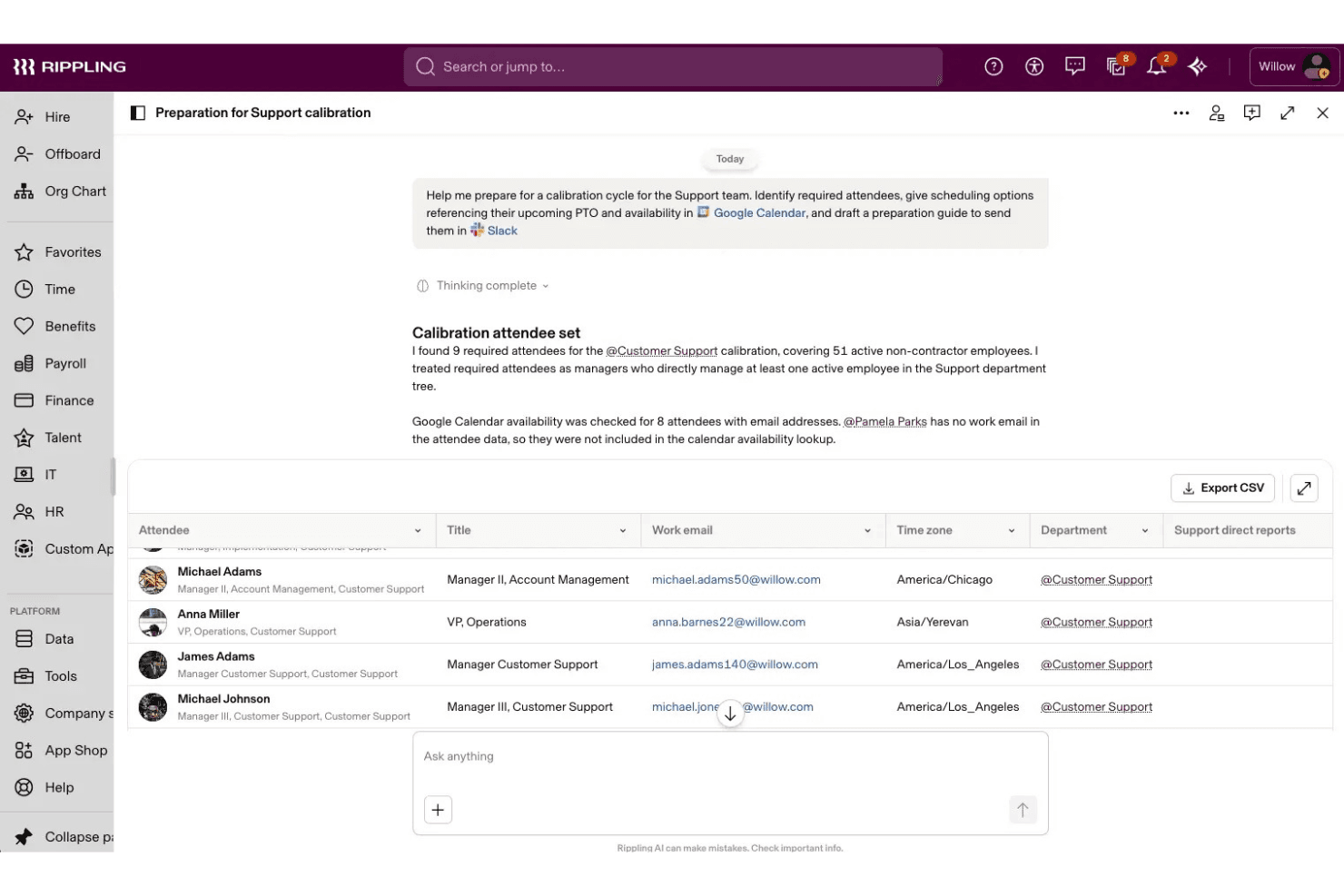
Rippling's AI assistant building a Support team calibration attendee list with contact and time zone details. Rippling is an HRIS and workforce management platform with a built-in AI layer that lets users execute HR actions, answer employee questions, and automate workflows across HR, payroll, and IT through a single system.
Who Is Rippling Best For?
Rippling is a strong fit for HR and IT operations teams that need AI-driven task execution governed by the same permissions and approval workflows already established across their organization.
Why I Picked Rippling
I picked Rippling because its AI capabilities execute HR actions using the same permission profiles and approval chains already configured within an organization. When an employee submits a time-off request through Rippling AI, it enters the manager approval queue. When a new hire record is drafted, it remains staged for human review rather than being processed automatically. This governance-focused approach helps HR teams maintain oversight while using AI to streamline administrative tasks.
Rippling Key Features
- Reusable AI skills: Build repeatable AI workflows and assign them by role, location, or other employee attributes across your organization.
- Spreadsheet action execution: Map spreadsheet data, flag issues, request approval, and execute resulting commands across more than 185 countries.
- Attribute-based permissions: Automatically updates permission profiles when employee attributes, such as role, level, or department, change.
- Custom approval chains: Creates multi-approver workflows with automatic rerouting when a primary approver is unavailable.
Rippling Integrations
Rippling documents more than 600 out-of-the-box integrations and over 60 AI MCP connections, including Greenhouse, Ashby, Lattice, Slack, and Google Workspace. Its REST API supports custom read/write integrations.
Pros and Cons
Pros:
- Supports reusable AI skills
- Automates attribute-based access updates
- Enforces existing permission hierarchies
Cons:
- Workflow setup requires verification
- Lacks integrated inquiry tracking
Andere AI-agents voor HR
Hier zijn enkele aanvullende opties die mijn shortlist niet hebben gehaald, maar die toch het bekijken waard zijn:
- 11ZendeskBest for HR requests in shared service desks
- 12Phenom Best for linking hiring with internal mobility
- 13AiseraBest for document-heavy HR workflows
- 14PersonioBest for AI inside European HR and payroll
- 15FountainBest for linking frontline hiring and shifts
- 16HiBobBest for permissioned HR data in external AI
- 17WorkatoBest for HR actions within Workday permissions
- 18Microsoft Copilot StudioBest for HR self-service in Microsoft 365
- 19CapacityBest for policy answers inside work tools
- 20GleanBest for HR workflows using company context
How I Evaluate AI Agents for HR
To make this list, a tool’s AI needs to handle real HR work, like answering policy questions and completing employee requests. From there, I evaluate three things. Core functionality carries the most weight, like orchestrating workflows and routing cases. Then I look at standout features, like multilingual support, and what a tool offers beyond its feature set, like clear audit trails.
Core Functionality (Table Stakes For This List)
When I'm selecting tools for my list, I score each one on a scale from 0 (does not offer the functionality) to 5 (excels in this area) for each core functionality listed below. I then convert the total into a percentage to help assess each tool's overall fit, with extra weight on any functionalities I’ve deemed essential.
- Task Execution (Essential): I look for multi-step tasks the agent can complete, such as processing a leave request or updating employee details, and where human review applies.
- Conversational Support (Essential): I assess how well employees can ask varied questions in natural language, clarify details, and request actions across multiple turns.
- HR System Integration: I check whether connections let the agent retrieve and update relevant HRIS, payroll, or ATS data with appropriate access.
- Workflow Orchestration: I look for conditional steps, approvals, and escalation paths in workflows such as onboarding or employee changes.
- Policy Guidance: I assess whether answers draw accurately from current company policies and benefits documents, especially when guidance spans multiple sources.
- Case Management: I check how the tool logs, routes, tracks, and escalates inquiries so employees can follow requests through to resolution.
Once I have a list of tools that meet the criteria, I consider what sets each platform apart.
Differentiating Factors (What Sets Vendors Apart)
Here's how I compare and contrast different vendors:
Standout Features
I look for multilingual support that goes beyond simple translation—agents like Leena AI and Moveworks need to understand intent accurately across languages so global teams get the same quality of help. Sentiment and intent analysis matters too, especially when an employee's message signals something urgent like a harassment concern or burnout; I check whether the agent flags these for human follow-up rather than generating a generic reply. I also evaluate proactive nudges, like surfacing lapsing certifications or stalled approvals before anyone has to chase them down.
Beyond Features
I check whether each vendor provides clear audit trails showing what data the agent accessed and what actions it took autonomously—essential when agents touch payroll or benefits records. Trust and transparency matter just as much; I look for visible boundaries between what the agent handles on its own and what routes to a human, since HR business partners won't adopt a tool that makes opaque decisions about pay or disciplinary cases. I also evaluate scalability across multi-entity and multi-country setups, because an agent that works for one office often breaks down when union rules or regional payroll enter the picture.
Een AI-agent voor HR kiezen
Kies een HR-agent door te testen of de antwoorden en acties accuraat, geautoriseerd en controleerbaar blijven in de werkstromen die medewerkers daadwerkelijk indienen.
| Als jouw prioriteit is | Let dan op |
|---|---|
| Als jouw prioriteit isBetrouwbare beleidsinformatie | Let dan opAntwoorden die zijn gebaseerd op actuele, goedgekeurde documenten, waarbij onduidelijke gevallen naar een medewerker worden doorverwezen |
| Als jouw prioriteit isGevoelige gegevens beschermen | Let dan opOp rollen gebaseerde toegangscontroles en logboeken van bekeken of gewijzigde gegevens |
| Als jouw prioriteit isGecontroleerde voltooiing van werkstromen | Let dan opGoedkeurings-, afwijzings- en escalatieroutes die overeenkomen met je bestaande regels |
| Als jouw prioriteit isConsistente dienstverlening op verschillende locaties | Let dan opEen gelijkwaardige afhandeling van beleidsvragen en routering tussen entiteiten en talen |
Je shortlist beoordelen
- Test beleidsantwoorden: Dien vijf geanonimiseerde vragen van medewerkers in en bewaar het antwoordenlogboek, inclusief de aangehaalde beleidsbronnen en eventuele doorverwijzingen naar HR.
- Test machtigingen: Gebruik drie accounts met verschillende rollen om toegang te proberen te krijgen tot de salaris- of verlofgegevens van een andere medewerker; vraag daarna het toegangslogboek op.
- Voer een werkstroomtest uit: Dien in een testomgeving één wijziging van medewerkergegevens in en leg vast of de agent de stappen voor goedkeuring, afwijzing en overdracht aan een medewerker volgt.
- Vraag schriftelijke voorwaarden op: Vraag vóór een pilot de voorwaarden van de leverancier voor het bewaren van gegevens op en een voorbeeld van een auditregistratie waarin toegang en acties worden weergegeven.
- Kies je afweging: Bepaal of je meer waarde hecht aan een werkplekagent die meerdere systemen omvat of aan een HRIS-eigen agent met een nauwere context van HR-gegevens; geef prioriteit aan een groter bereik of strakkere controle.
Wat zijn AI-agents voor HR?
Een AI-agent voor HR is software die vragen van medewerkers beantwoordt en HR-taken uitvoert binnen geconfigureerde machtigingen. De agent kan bedrijfsbeleid en gekoppelde HR-systemen gebruiken om verzoeken zoals vragen over verlof of wijzigingen in personeelsgegevens te ondersteunen, terwijl gevoelige of onduidelijke gevallen naar een medewerker worden doorverwezen.
Functies
Dit zijn de belangrijkste functies waarop ik let bij een AI-agent voor HR:
- Conversationele ondersteuning: Hiermee kunnen medewerkers vragen stellen in natuurlijke taal en details verduidelijken tijdens meerdere interacties. Zo kan de agent verzoeken beter begrijpen voordat deze antwoord geeft of actie onderneemt.
- Beleidsbegeleiding: Haalt antwoorden op uit actuele, goedgekeurde bedrijfsbeleidsregels en documenten over arbeidsvoorwaarden. De agent moet onduidelijke informatie herkennen en medewerkers doorverwijzen naar HR in plaats van aannames te doen.
- Taakuitvoering: Voert toegestane verzoeken uit, zoals het indienen van verlofaanvragen of het bijwerken van personeelsgegevens. Gevoelige of ingrijpende wijzigingen moeten de geconfigureerde beoordelingsprocedures volgen.
- Integratie met HR-systemen: Maakt verbinding met HRIS-, salarisadministratie- of ATS-systemen om informatie op te halen of bij te werken. Toegang moet aansluiten bij de machtigingen van elke medewerker en bij de uit te voeren taak.
- Workfloworkestratie: Coördineert voorwaardelijke stappen, goedkeuringen en overdrachten voor processen zoals onboarding of wijzigingen van medewerkers. Teams kunnen bestaande regels toepassen in plaats van elk verzoek op dezelfde manier te behandelen.
- Casemanagement: Registreert en routeert vragen van medewerkers, houdt de status bij en escaleert onopgeloste zaken. Medewerkers en HR-teams kunnen zien wat aandacht nodig heeft en de voortgang van verzoeken volgen.
- Toegangsbeheer op basis van rollen: Beperkt tot welke dossiers en acties de agent toegang heeft op basis van de rol van een gebruiker. Dit helpt voorkomen dat medewerkers gevoelige informatie van een andere persoon bekijken of wijzigen.
- Audittrail: Registreert tot welke gegevens de agent toegang had en welke acties deze heeft uitgevoerd. HR-teams kunnen deze logboeken bekijken bij het controleren van verzoeken of het onderzoeken van onverwachte wijzigingen.
- Meertalige ondersteuning: Begrijpt verzoeken van medewerkers in ondersteunde talen in plaats van antwoorden simpelweg te vertalen. Zo krijgen verspreid werkende teams consistente begeleiding en worden verzoeken consistent afgehandeld.
Voordelen
Dit zijn enkele veelvoorkomende voordelen die je van AI-agents voor HR kunt verwachten:
- Snellere antwoorden over beleid: Agents kunnen richtlijnen ophalen uit goedgekeurde beleids- en arbeidsvoorwaardendocumenten en onduidelijke vragen vervolgens doorverwijzen naar HR.
- Afgehandelde verzoeken van medewerkers: Met HR-systeemverbindingen op basis van machtigingen kunnen agents taken uitvoeren zoals het indienen van verlofaanvragen of het bijwerken van personeelsgegevens.
- Consistente goedkeuringen en overdrachten: Workflowregels kunnen verzoeken door de juiste goedkeuringsstappen leiden of gevoelige zaken escaleren naar een medewerker.
- Duidelijke opvolging van verzoeken: Casemanagement kan vragen registreren, de status ervan weergeven en medewerkers en HR-teams helpen onopgeloste verzoeken te volgen.
- Meer gecontroleerde gegevenstoegang: Machtigingen op basis van rollen beperken wat een agent kan bekijken of wijzigen, terwijl audittrails de toegang en acties ervan registreren.
- Ondersteuning in meerdere talen: Meertalige mogelijkheden kunnen medewerkers helpen vragen te stellen en verzoeken in hun voorkeurstaal uit de ondersteunde talen in te dienen.
Prijzen
De prijzen voor AI-agents voor HR variëren afhankelijk van het aantal medewerkers, het AI-gebruik, integraties en implementatievereisten. De meeste zakelijke aanbieders hanteren aangepaste prijzen, terwijl andere kosten per gebruiker, via jaarabonnementen of op basis van AI-verbruik in rekening brengen.
Vergelijkingstabel van plannen voor AI-agents voor HR
| Prijsmodel | Gebruikelijke kosten | Veelvoorkomende functies |
| Licenties per gebruiker | Vanaf $15/gebruiker/maand | Zelfbediening voor medewerkers, conversationele AI en beleidsbegeleiding. |
| Licenties voor servicedesks | Vanaf $50/gebruiker/maand | HR-casemanagement, routering van verzoeken en workflowautomatisering. |
| Op gebruik gebaseerde prijzen | Op basis van AI-credits of voltooide taken | AI-aangedreven taakuitvoering en geautomatiseerde oplossing van verzoeken. |
| Jaarabonnement voor het platform | Varieert per leverancier en implementatieomvang | Gecentraliseerde workflows, systeemintegraties en beheerdersfuncties. |
| Aangepaste prijzen voor ondernemingen | Prijs op aanvraag | Geavanceerde automatisering, configureerbare machtigingen, audittrails en toegewijde ondersteuning. |
Controleer vóór het selecteren van een aanbieder of AI-mogelijkheden, integraties, implementatie en aanvullend gebruik zijn inbegrepen in de opgegeven prijs.
Veelgestelde vragen
Enkele antwoorden op veelgestelde vragen over AI-agenten voor HR:
Kan een AI-agent een HR-team vervangen?
Nee, een AI-agent moet HR-medewerkers ondersteunen in plaats van de mensen te vervangen die verantwoordelijk zijn voor beslissingen over werknemers. De agent kan routinevragen over beleid beantwoorden, informatie verzamelen, toegestane aanvragen indienen en zaken doorsturen. Laat beslissingen over disciplinaire maatregelen, aanpassingen, klachten, uitzonderingen op de beloning of complexe beleidsvragen over aan gekwalificeerde HR-beoordelaars. Bepaal vóór de lancering wanneer escalatie nodig is en maak het overdrachtsproces zichtbaar voor werknemers. Controleer zaken waarin de agent de bedoeling verkeerd heeft begrepen of onvolledige begeleiding heeft gegeven en werk de kennis en routeringsregels bij wanneer het beleid verandert.
Welke HR-taken moeten door een persoon worden uitgevoerd?
Laat beslissingen die empathie, discretie of interpretatie vereisen over aan getrainde professionals. Voorbeelden zijn het onderzoeken van zorgen over intimidatie, het oplossen van kwesties rond werknemersrelaties, het beoordelen van verzoeken om aanpassingen en het nemen van disciplinaire beslissingen. Een agent kan eerste informatie verzamelen of een zaak doorsturen, maar moet de uiteindelijke beslissing niet nemen. Stel duidelijke escalatieregels op voor urgente bewoordingen, tegenstrijdige beleidsbronnen of verzoeken waarbij gevoelige gegevens betrokken zijn. Test deze regels vóór de lancering en vertel werknemers hoe ze rechtstreeks contact kunnen opnemen met HR als ze ondersteuning nodig hebben.
Hoe moeten we een AI-agent introduceren bij werknemers?
Begin met een beperkte reeks goed gedocumenteerde verzoeken, zoals beleidsvragen of het indienen van verlofaanvragen. Vertel werknemers wat de agent kan doen, tot welke gegevens de agent toegang heeft en wanneer een persoon het overneemt. Test veelvoorkomende verzoeken met werknemers uit verschillende functies en locaties voordat je de toegang uitbreidt. Bied werknemers een duidelijke manier om een antwoord te corrigeren of contact op te nemen met HR. Controleer escalaties en feedback tijdens de pilot en pas de begeleiding en werkstromen van de agent aan voordat je meer taken toevoegt.
Hoe meet je of een AI-agent voor HR goed werkt?
Houd bij of werknemers nauwkeurige antwoorden krijgen en of hun verzoeken tot de juiste resultaten leiden. Nuttige meetpunten zijn de nauwkeurigheid van antwoorden, afgehandelde verzoeken, escalatiepercentages, doorlooptijd en feedback van werknemers. Controleer regelmatig een steekproef van gesprekken, vooral gesprekken over gevoelige onderwerpen of mislukte overdrachten. Vergelijk resultaten per type verzoek, locatie en taal om inconsistente dienstverlening te identificeren. Stel vóór de lancering een uitgangswaarde vast en spreek drempelwaarden af voor het pauzeren of aanpassen van een werkstroom. Een hoog voltooiingspercentage is op zichzelf niet voldoende als de agent fouten maakt of zaken mist die menselijke beoordeling vereisen.