

Open-source salarissoftware biedt salarisfuncties die zijn gebaseerd op broncode die u kunt inspecteren en, afhankelijk van de licentie, kunt aanpassen of zelf kunt hosten. De opties variëren van salarismodules binnen HR- en ERP-platforms tot tools die salarisgegevens koppelen aan tijdregistratiegegevens of salarisfunctionaliteit in een ander product integreren. Vergelijk de salarisfuncties, ondersteuning voor lokale naleving, integraties en installatievereisten van elke tool voordat u beslist of deze past bij uw HR-workflows en technische middelen.
Waarom u onze softwarebeoordelingen kunt vertrouwen
6,700+
Reviews
20
Industry experts
16+
Evaluation factors
14
Years reviewing software
Ons team test en beoordeelt software sinds 2012. Als HR-experts weten we zelf hoe moeilijk — en belangrijk — het is om de juiste software te kiezen.
Voor deze gids hebben we tools geëvalueerd met behulp van praktijktests en onafhankelijk onderzoek, waarbij we tools beoordeelden aan de hand van onze selectiecriteria. We putten ook uit inzichten van vooraanstaande experts uit de branche en van praktiserende HR-professionals.
Onze reviews weerspiegelen ons menselijke redactionele oordeel, geen verkooppraatje.
Deskundige beoordelaars:
- Phil GrayCOO
 Kim BehnkeHR Tech-redacteur & analist
 Josh BarkerPeople Ops Manager

Vergelijkingstabel: open-source salarissoftware
Vergelijk de prijzen en specificaties naast elkaar van de open-source salarissoftware die op mijn selectie staat.
Score legend (out of 5)
- Excellent4.5–5
- Good4–4.4
- Average3–3.9
- Below average2–2.9
- Poor1–1.9
Sorted by: Default
| Tool | Starting Price | Website | |||||||
|---|---|---|---|---|---|---|---|---|---|
Best for linking payroll with ERP accounting | 4.0 out of 5 | 4 | 4 | 5 | 4 | 3 | 4 | Pricing upon request Free plan available | Website |
Best for salary workflows in a connected ERP | 3.2 out of 5 | 4 | 3 | 5 | 3 | 1 | 3 | Free Free open-source framework | Website |
Best for DIY payroll around a self-hosted ERP | 3.0 out of 5 | 5 | 1 | 5 | 2 | 1 | 4 | Free software Free plan + free demo available | Website |
Best for self-hosting with setup support | 3.2 out of 5 | 3 | 3 | 4 | 4 | 2 | 3 | Pricing upon request Free demo available | Website |
Best for payroll tied to wider ERP operations | 3.7 out of 5 | 5 | 3 | 5 | 3 | 2 | 4 | Free Free open-source framework | Website |
Best for workforce costs in a wider ERP | 3.2 out of 5 | 3 | 3 | 4 | 3 | 2 | 4 | Free Free plan + free demo available | Website |
Best for India-specific payroll compliance | 4.2 out of 5 | 4 | 4 | 5 | 4 | 4 | 4 | $5/month Free plan + 14-day free trial available | Website |
Best for embedding payroll in your product | 3.8 out of 5 | 4 | 4 | 4 | 4 | 3 | 4 | Free framework Free open-source framework | Website |
Best for free, unlimited-user self-hosted HR | 3.8 out of 5 | 4 | 4 | 4 | 4 | 4 | 3 | $7/user/month Free plan + 30-day free trial available | Website |
Best for payroll tied to staff schedules | 3.2 out of 5 | 3 | 4 | 1 | 3 | 4 | 4 | $50/month 30-day free trial + free demo available | Website |


Beoordelingen van open-source salarissoftware
Hieronder vindt u mijn samenvattingen van de beste open-source salarissoftware die op mijn selectie staat. In mijn beoordelingen kijk ik naar de salarisfuncties, ondersteuning voor naleving en installatievereisten van elke softwareoptie, zodat u de beste keuze kunt vinden.
 Best for linking payroll with ERP accounting
- Free plan available
- Pricing upon request
Visit WebsiteCustomer Rating:4.2/5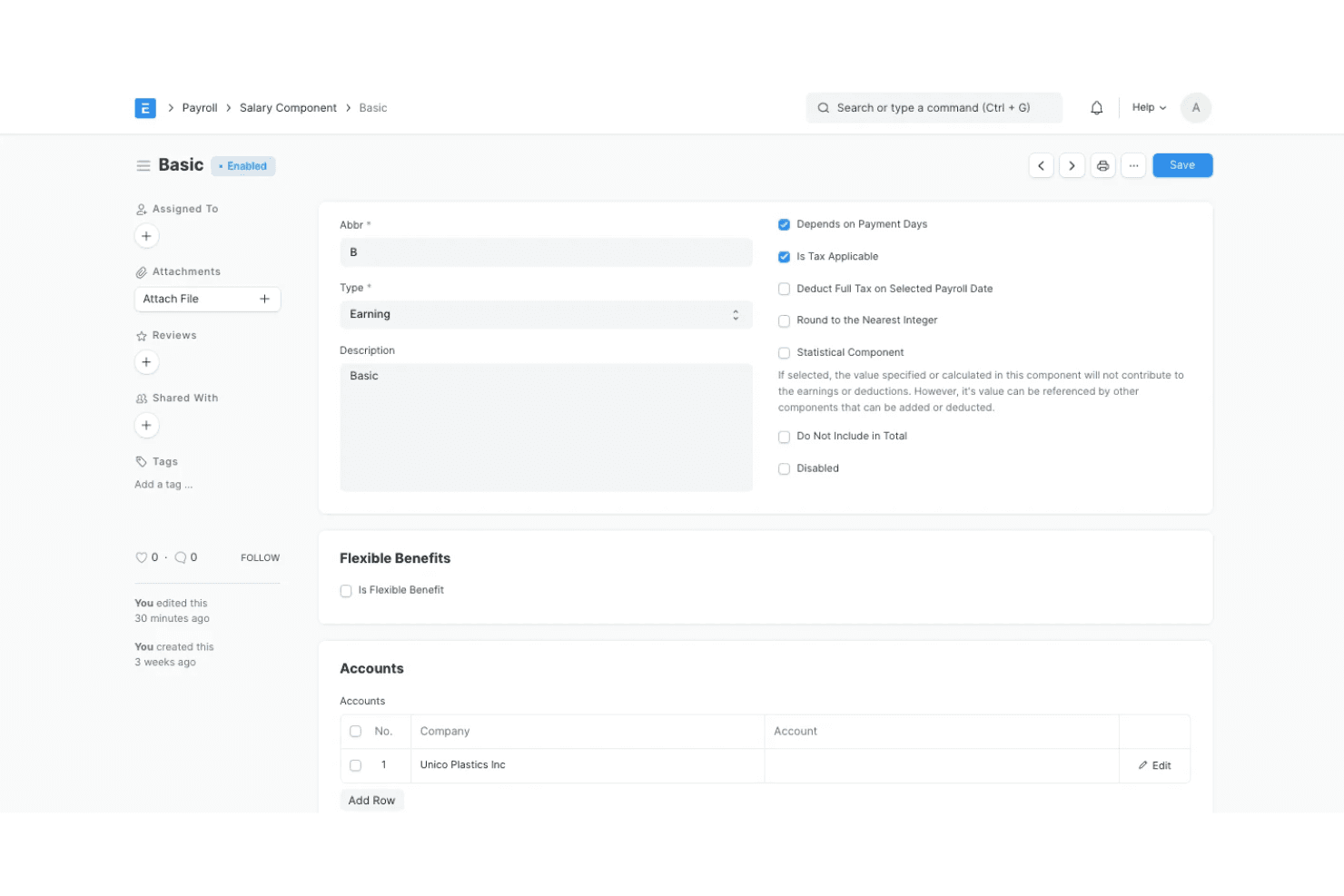
ERPNext's Payroll module lets you configure salary components such as Basic pay, including tax and account settings. ERPNext is an open-source ERP platform that, when used with the separate Frappe HR application, covers payroll processing, salary structure configuration, tax slab setup, bulk payroll processing, and direct accounting integration across HR, finance, and operations modules.
Who Is ERPNext Best For?
ERPNext is a strong fit for small businesses and IT teams that want to manage payroll, accounting, and HR within a single open-source platform they can fully control.
Why I Picked ERPNext
I picked ERPNext because it connects payroll processing directly with its accounting module. When you submit salary slips, ERPNext automatically creates the corresponding accrual journal entries, keeping payroll payable accounts up to date without manual reconciliation. I also like that you can configure salary structures with custom components and tax slabs, then process bulk payroll across branches or departments through a single payroll entry.
ERPNext Key Features
- Salary structure configuration: Define salary components, formulas, and tax slabs, then assign structures to individual employees or groups.
- Timesheet-based payroll: Calculate employee pay from submitted timesheets using the hourly rate defined in the salary structure.
- Salary slip email delivery: Automatically email password-protected salary slip PDFs to each employee's preferred email address.
- Role-based payroll access: Control who can process payroll and post accounting entries using HR Manager and Accounts User role permissions.
ERPNext Integrations
ERPNext has 398 marketplace apps, including Google Sheets Data Sync, Banking, Biostar Biometric Integration, and WhatsApp Integration. Its RESTful API supports custom integrations.
Pros and Cons
Pros:
- Supports encrypted payslip delivery
- Processes department-specific payroll batches
- Automatically posts payroll accruals
Cons:
- Non-Indian tax rules vary
- Accounting mappings need validation
Learn more about ERPNext: Best for salary workflows in a connected ERP
- Free open-source framework
- Free (self-hosted)
Visit WebsiteCustomer Rating:4.1/5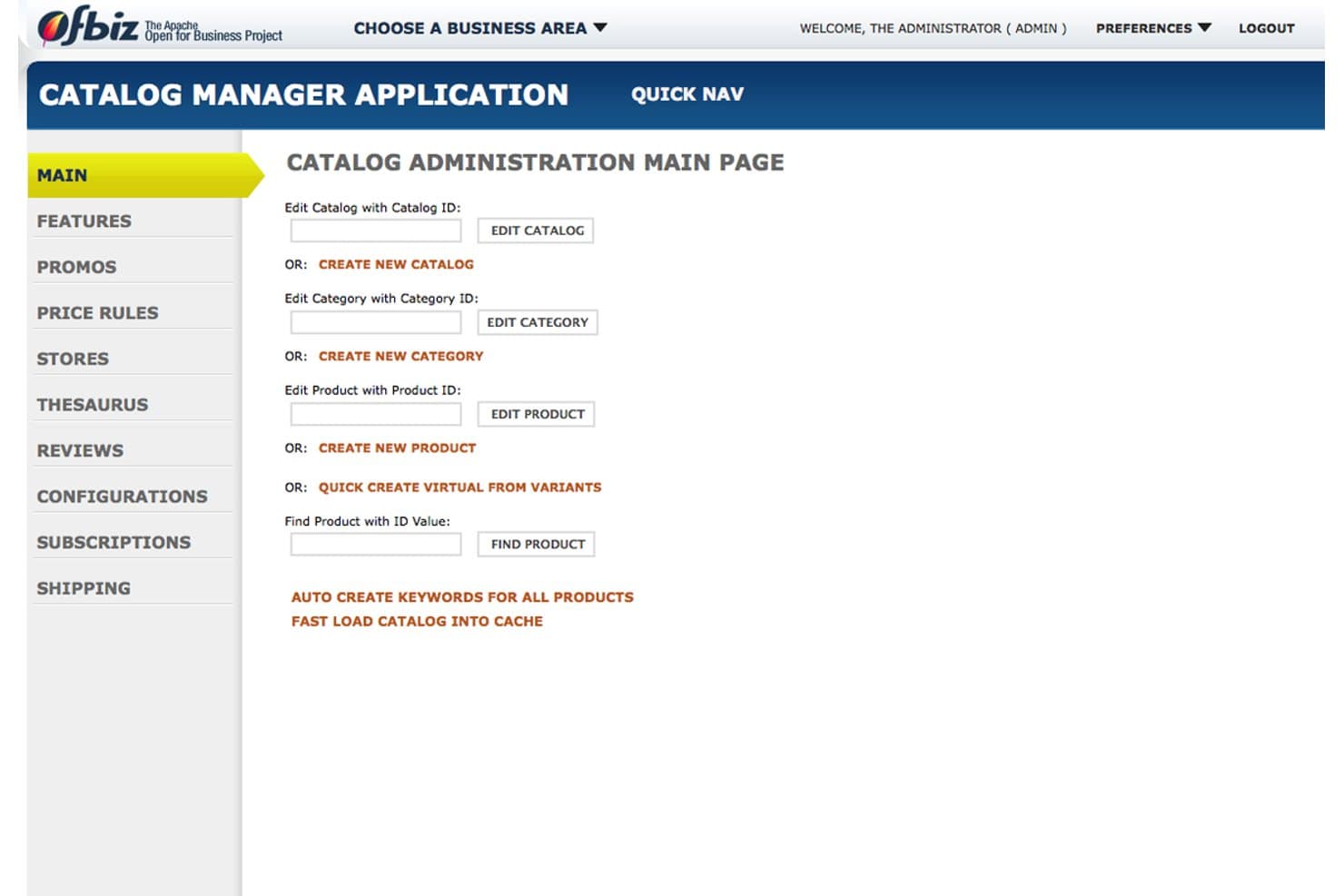
The Apache OFBiz Catalog Manager main page, for editing catalogs, categories and products. Apache OFBiz is an open-source, Java-based ERP framework with an HR module that handles salary calculations, pay grade management, payslip generation, and payroll invoice processing through an integrated accounting system.
Who Is Apache OFBiz Best For?
Apache OFBiz is a good fit for developer-led teams that need to build and maintain a self-hosted ERP with salary workflows closely connected to accounting and HR.
Why I Picked Apache OFBiz
I picked Apache OFBiz because its salary workflows operate within an integrated HR and accounting environment rather than as a separate application. You can define pay grades and salary steps linked to job position types, calculate salaries using direct amounts or grade-and-step structures, and process payroll invoices through the Accounting module's invoice lifecycle, from creation to general ledger posting and payment. I find this workflow particularly useful for teams that need payroll and general ledger records to remain synchronized without manual data transfers.
Apache OFBiz Key Features
- Pay grade and salary step configuration: Define pay grades and salary steps linked to job position types, with rates specified by year, month, week, or hour.
- HR and accounting module integration: Process payroll invoices through the Accounting module's invoice lifecycle, including creation, general ledger posting, and payment.
- Entity and service engine architecture: Build and extend custom business logic at the data model and service levels without being restricted by a fixed application structure.
- On-premises self-hosting: Deploy OFBiz on your own infrastructure across supported Windows or Unix-based environments to maintain control over payroll data.
Apache OFBiz Integrations
Apache OFBiz does not document native integrations with named external vendors. It provides APIs and connects HR salary workflows with its built-in Accounting module for custom integrations.
Pros and Cons
Pros:
- Processes integrated payroll invoices
- Supports flexible Java customization
- Configures graded salary steps
Cons:
- Payroll history uses invoices
- Statutory withholding setup undocumented
Learn more about Apache OFBiz: Best for DIY payroll around a self-hosted ERP
- Free plan + free demo available
- Free software (payroll add-on from €180)
Visit WebsiteCustomer Rating:4.5/5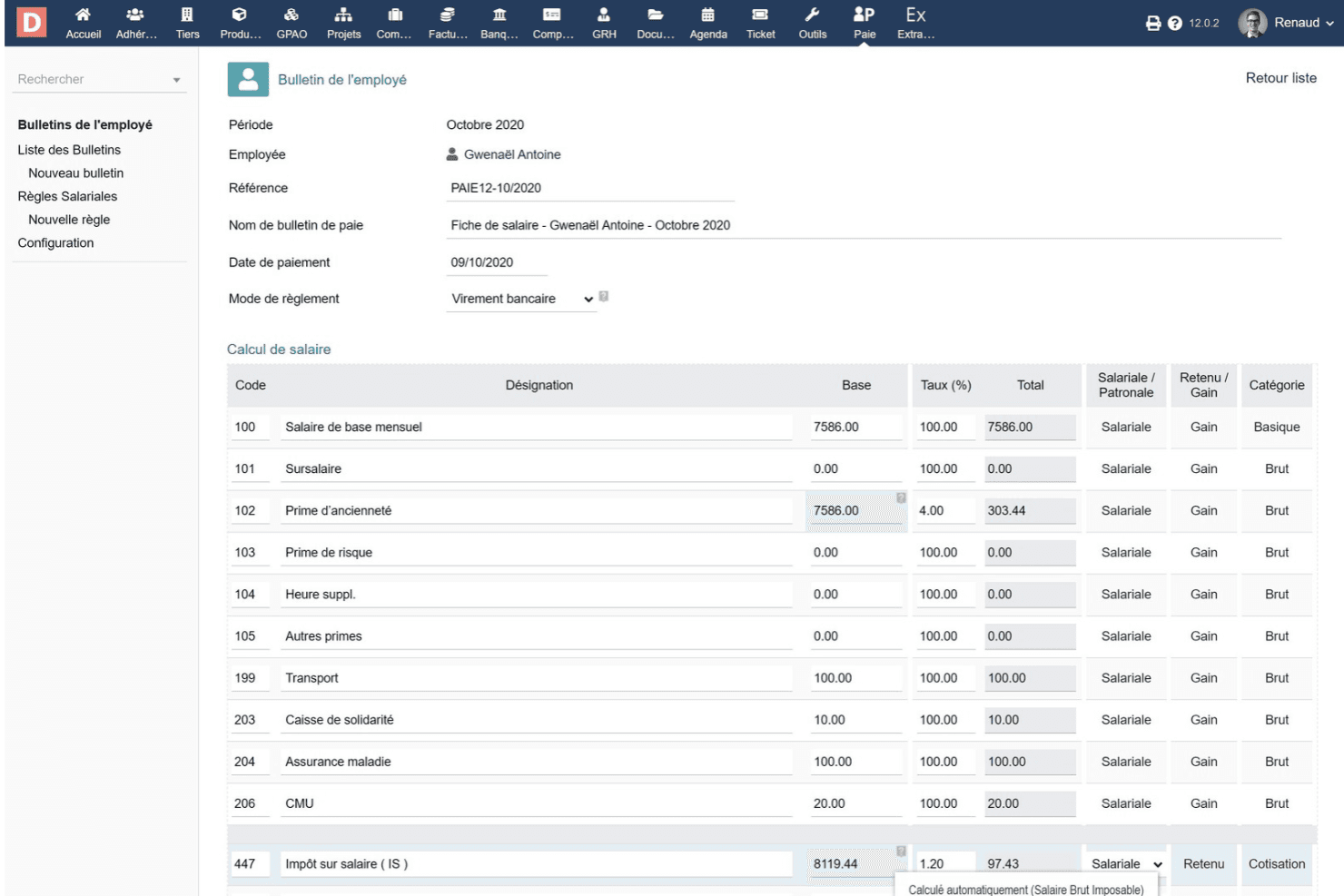
Dolibarr's payroll module generating an employee payslip with salary lines and social contributions. Dolibarr is an open-source ERP and CRM suite that covers HR, finance, billing, timesheets, and expense management. Its built-in Salaries module records salary payments, while full gross-to-net payroll calculations require a separately purchased add-on, such as Odoo Payroll for Dolibarr.
Who Is Dolibarr Best For?
Dolibarr is a good fit for technically inclined small business owners and developers who want a self-hosted, open-source ERP foundation that they can extend with custom payroll logic.
Why I Picked Dolibarr
I picked Dolibarr because it provides a self-hosted ERP environment that businesses can extend to accommodate their payroll requirements. The core Salaries module handles salary payment recording, while the separately purchased Odoo Payroll for Dolibarr add-on provides configurable gross-to-net calculations using custom salary rules, structures, and formula-based logic. This flexibility is useful for businesses with compensation arrangements that do not fit standard payroll structures, although the additional module cost and local compliance requirements must be considered.
Dolibarr Key Features
- Employee and user management: Create employee profiles, organize users into groups and hierarchies, and assign role-based permissions across the system.
- Leave request tracking: Employees submit leave requests through the platform, supervisors approve or decline them, and the system automatically updates leave balances.
- Timesheet recording: Record time by day, week, month, project, or task, and convert logged hours into monetary values using each employee's configured hourly rate.
- REST API and module builder: Access REST APIs through an embedded API explorer and use the low-code Module Builder to extend or customize the application without writing everything from scratch.
Dolibarr Integrations
Dolibarr offers native LDAP integration for user authentication and synchronization. Its REST API, triggers, hooks, and external modules support custom connections with HR, accounting, and payroll systems.
Pros and Cons
Pros:
- Extends payroll through add-ons
- Records employee salary payments
- Supports modular ERP customization
Cons:
- Add-on compliance needs validation
- Native payroll excludes calculations
Learn more about Dolibarr: Best for self-hosting with setup support
- Free demo available
- Pricing upon request
Visit WebsiteCustomer Rating:3/5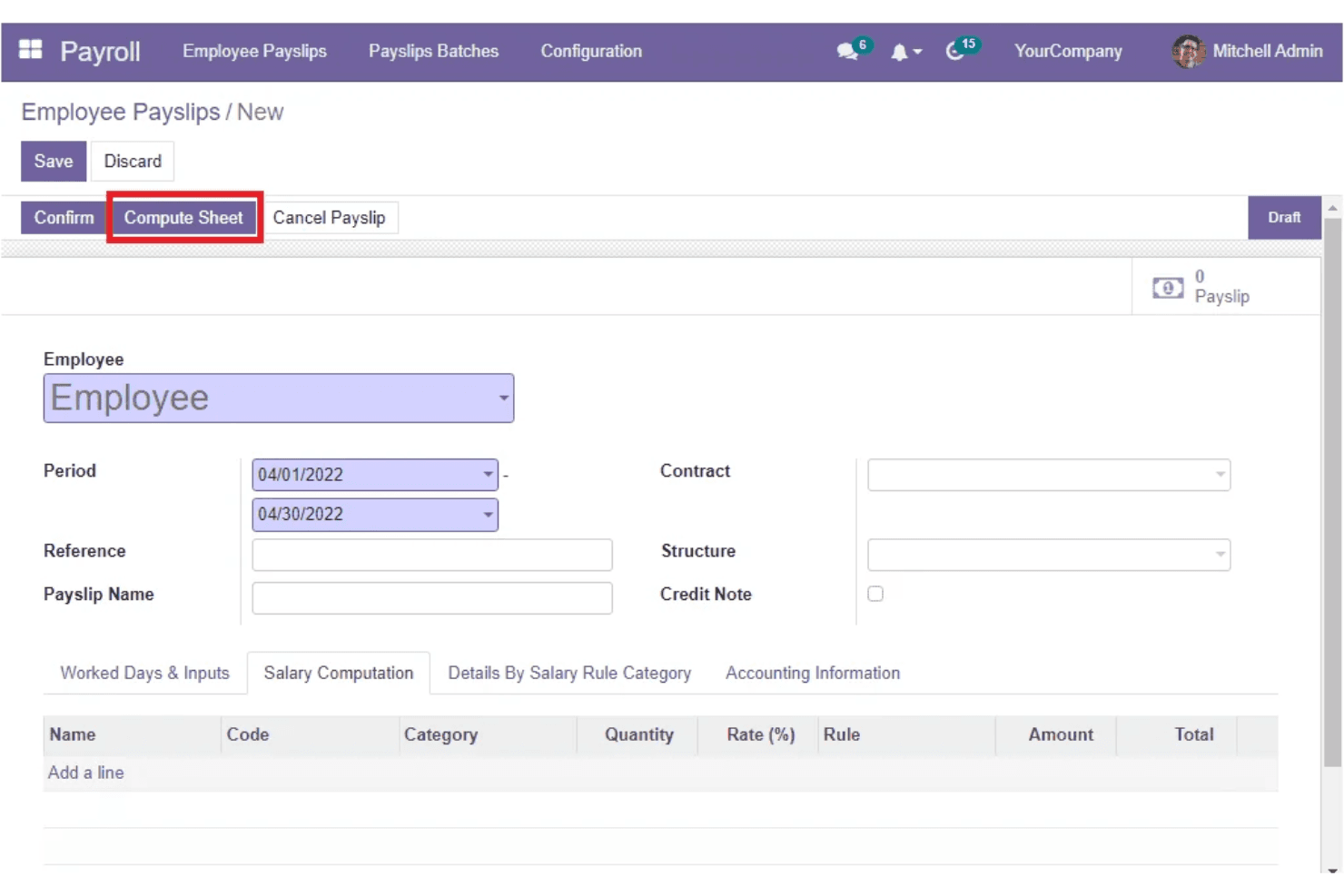
Payroll app screen for creating an employee payslip and computing the salary sheet. Open HRMS is an open-source HR and payroll management system built on Odoo that covers payroll processing, attendance, leave management, recruitment, appraisals, and employee records.
Who Is Open HRMS Best For?
Open HRMS is a strong fit for small businesses and IT teams that want a self-hosted, open-source HR and payroll system they can deploy on their own infrastructure and customize at the code level.
Why I Picked Open HRMS
I've included Open HRMS in my top picks because it's designed for teams that want to manage payroll on their own infrastructure without ongoing software licensing fees. I particularly like that it offers vendor-backed implementation packages, allowing organizations to access support when setting up Odoo. Its payroll module also handles salary structures, configurable deduction rules, and batch payslip generation, supporting gross-to-net payroll processing once an active employee contract is in place.
Open HRMS Key Features
- Payslip batch generation: Group employees under the same salary structure and generate their payslips together in a single batch.
- Biometric attendance integration: Connect fingerprint-reading and facial recognition devices to capture attendance data that feeds directly into payroll calculations.
- Employee loan management: Configure loan policies, manage approvals, and automatically deduct repayments from employee payslips.
- HR reporting suite: Generate reports covering attendance, leave, payroll, and expenses, with filtering and drill-down options for detailed analysis.
Open HRMS Integrations
Open HRMS has documented native integrations with biometric devices, including fingerprint-reading and facial recognition devices, for attendance tracking. Native third-party integrations and API availability are not clearly documented.
Pros and Cons
Pros:
- Includes vendor-backed implementation assistance
- Connects biometric attendance devices
- Generates batch employee payslips
Cons:
- Deployment guidance lacks detail
- Jurisdictional payroll modules vary
Learn more about Open HRMS: Best for payroll tied to wider ERP operations
- Free open-source framework
- Free (self-hosted)
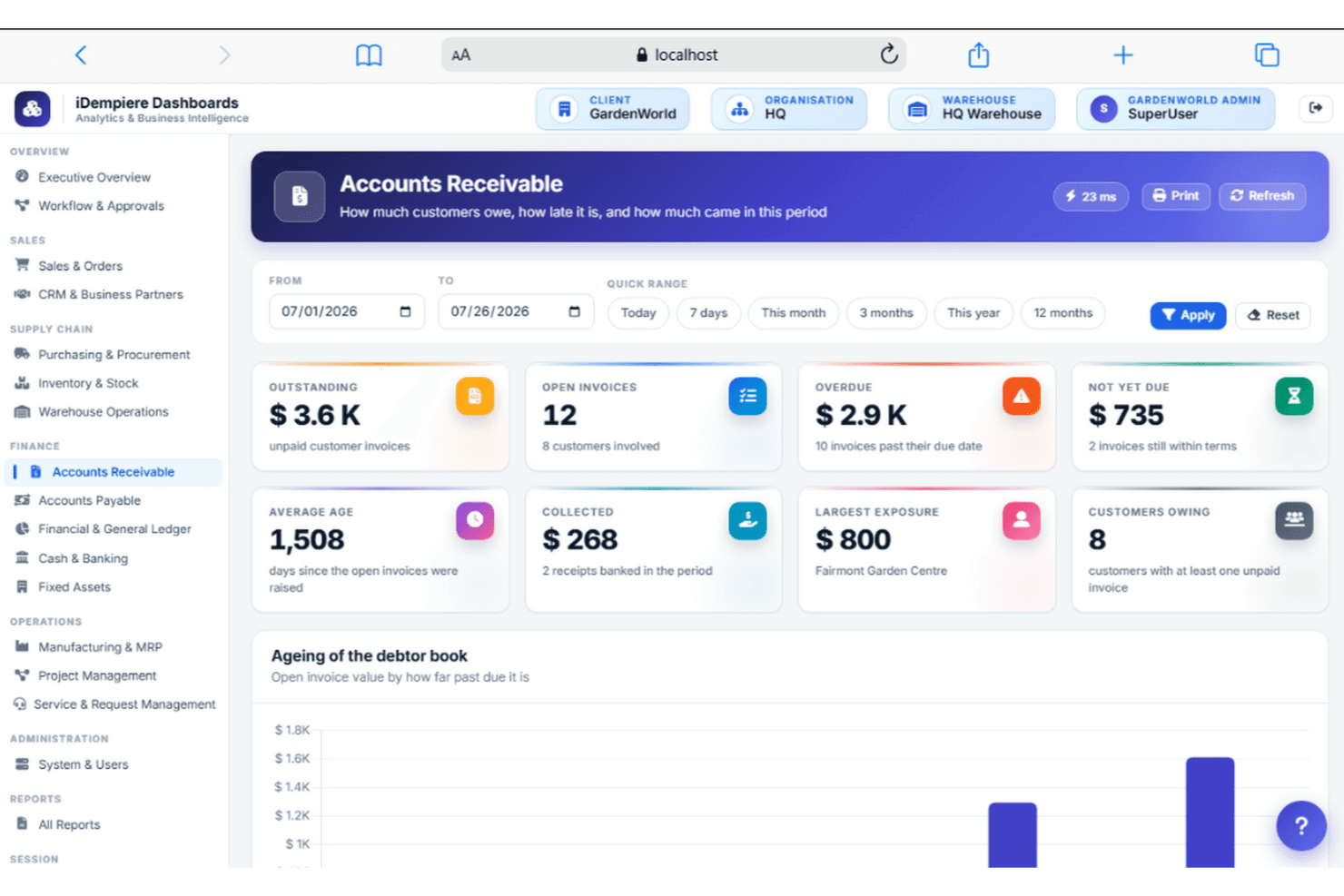
The iDempiere Accounts Receivable dashboard, showing outstanding invoices, overdue amounts and debtor ageing. iDempiere is an open-source ERP platform that connects payroll processing, HR, accounting, procurement, inventory, and manufacturing within a single self-hosted system.
Who Is iDempiere Best For?
iDempiere is a strong fit for IT teams and developers who need payroll integrated with a broader ERP system and have the technical expertise to configure and self-host it.
Why I Picked iDempiere
I picked iDempiere because its payroll functionality can operate within a comprehensive ERP platform that also handles accounting, procurement, and manufacturing. Through the CDSoftware Payroll plugin, payroll calculations connect directly with iDempiere's financial accounting system, allowing payroll and journal entries to remain synchronized without manual exports. I also like that the plugin supports multi-currency payroll attributes and employee loan management with accounting functionality, which is useful for organizations managing different compensation structures.
iDempiere Key Features
- Role-based access controls: Assign permissions at the organization, table, column, and record levels to restrict access to sensitive payroll information.
- REST and SOAP APIs: Connect iDempiere to external HR, finance, or reporting tools using built-in REST and optional SOAP/XML web services.
- Payroll report generation: Generate standard reports, including payment receipts, employee directories, work certificates, and assignment and deduction summaries.
- On-premises deployment: Self-host iDempiere on Linux, Windows, or macOS servers, maintaining control over where payroll data is stored.
iDempiere Integrations
Documented integrations include Snowflake, dbt, Tableau, 3CX, OpenEMR, Availity, and TriZetto. iDempiere also supports REST and SOAP/XML web services for custom payroll and ERP integrations.
Pros and Cons
Pros:
- Accommodates multicurrency payroll attributes
- Supports granular record permissions
- Connects payroll with accounting
Cons:
- Localization depends on extensions
- Payroll requires external plugins
Learn more about iDempiere: Best for workforce costs in a wider ERP
- Free plan + free demo available
- Free (self-hosted)
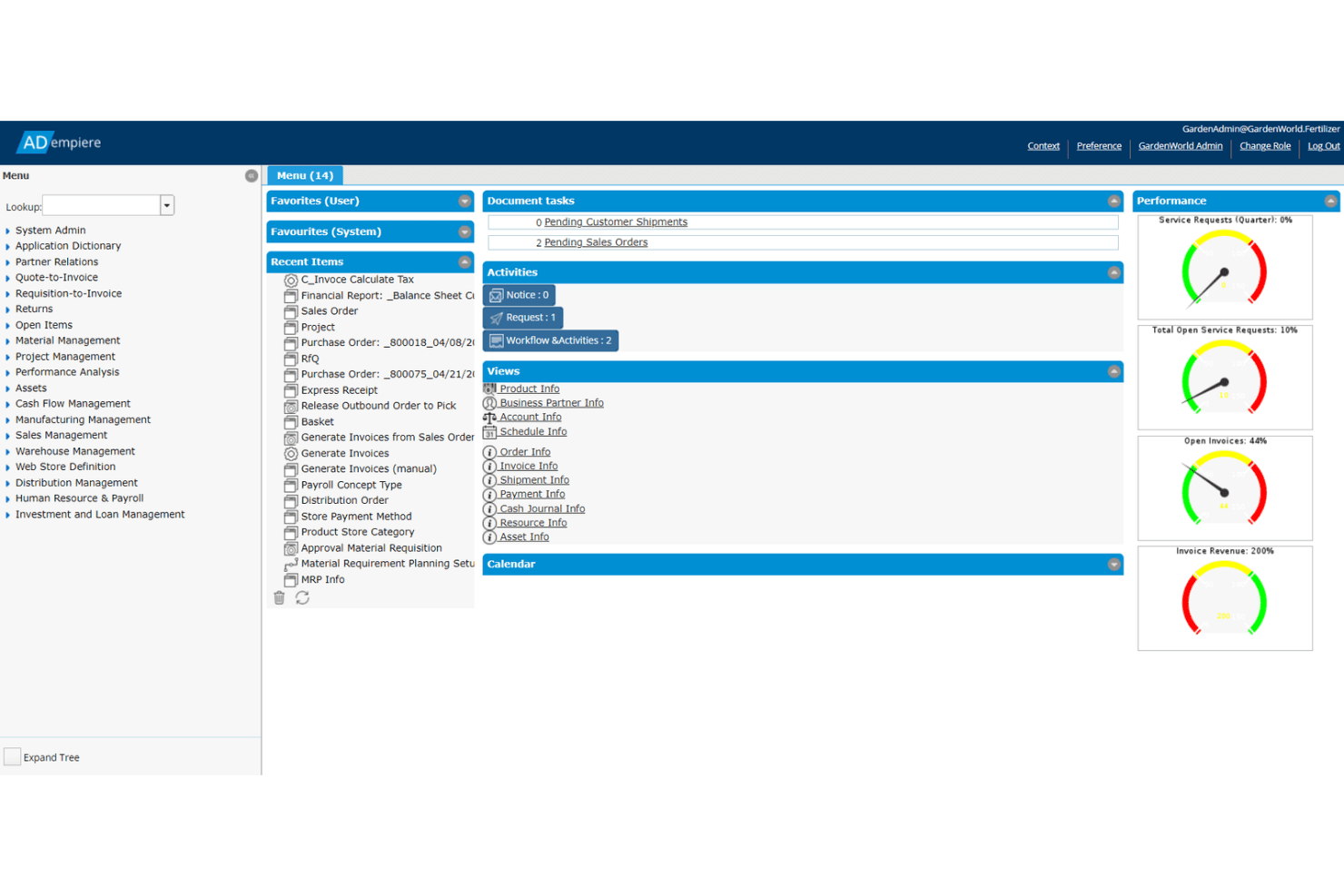
The ADempiere main dashboard with menu navigation, recent items, pending tasks and performance gauges. ADempiere is an open-source ERP with a built-in payroll module that handles payroll rules, calculations, payroll movement processing, and accounting integration through a self-hosted, GPL-2.0-licensed platform.
Who Is ADempiere Best For?
ADempiere works best for IT-led teams that need payroll integrated with a broader ERP and have the technical resources to configure and maintain a self-hosted, open-source system.
Why I Picked ADempiere
I picked ADempiere because it integrates payroll with a comprehensive ERP, allowing workforce costs to be managed alongside purchasing, accounting, and inventory in a single system. I find its payroll rules engine particularly useful because you can define custom payroll concepts, configure stop values for individual employees or payroll runs, and post final amounts through Accounts Payable without leaving the platform. The JSR 223 scripting API also allows teams to create custom calculation logic for payroll rules, which is helpful when standard deduction structures do not match an organization's pay policies.
ADempiere Key Features
- Payroll report generation: Generate salary-change, employee-dependent, employee-detail, and bank-account-detail reports directly from the payroll module.
- Payroll process selection criteria: Filter payroll runs by department, job type, employee status, salary structure, shift group, and more than a dozen other criteria.
- Accounts Payable posting: Post final payroll amounts through the built-in Accounts Payable model using ADempiere's standard accounting framework.
- JasperReports integration: Build and generate custom payroll report templates using JasperReports, which is embedded in ADempiere's reporting engine.
ADempiere Integrations
ADempiere does not clearly document native third-party integrations. Its payroll module connects internally with Accounts Payable, commission calculations, and payment selection within the ERP.
Pros and Cons
Pros:
- Customizes JasperReports payroll templates
- Filters detailed payroll runs
- Executes scripted payroll calculations
Cons:
- Payroll scripting needs maintenance
- Prebuilt compliance rules sparse
Learn more about ADempiere: Best for India-specific payroll compliance
- Free plan + 14-day free trial available
- From $5/month (hosting; software free)
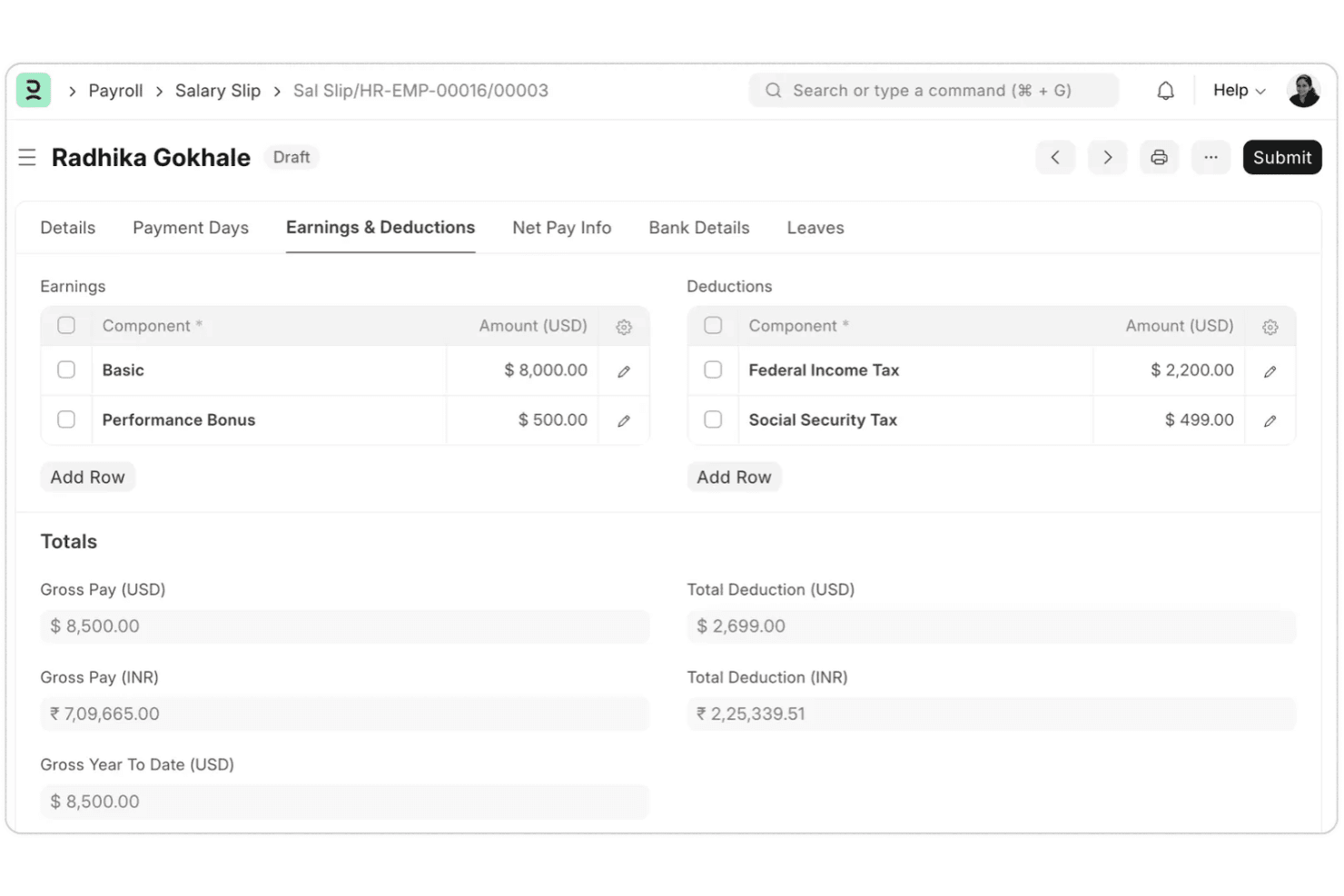
Frappe HR's salary slip screen lists earnings, deductions, and totals for an employee in draft status. Frappe HR is an open-source HR and payroll platform with dedicated modules for salary structures, statutory deductions, attendance, leave, expense claims, and employee lifecycle management.
Who Is Frappe HR Best For?
Frappe HR is a strong fit for India-based HR and payroll teams that need built-in statutory compliance support covering Provident Fund (PF), Employees' State Insurance (ESI), Professional Tax, and Labour Welfare Fund requirements across multiple states.
Why I Picked Frappe HR
I've included Frappe HR in my top picks because it offers built-in statutory compliance support for India's complex payroll deductions. The India Payroll module covers Professional Tax across more than 15 states, Labour Welfare Fund requirements across 14 states, ESI wage ceilings, and PF configuration, including voluntary contributions. I also like that employees can compare the old and new tax regimes, declare exemptions, and save their selected regime to their salary structure assignments.
Frappe HR Key Features
- Salary structure builder: Create rule-based salary structures with earnings, deductions, conditions, and formulas for different employee groups.
- Multi-currency payroll: Process payroll in a foreign currency and view gross and net totals in both that currency and your company's base currency.
- Timesheet-based payroll: Set hourly rates linked to project or task timesheets and process separate payroll entries for time-based compensation.
- Income tax declarations and proofs: Collect employee exemption declarations and supporting documents to incorporate into payroll tax calculations.
Frappe HR Integrations
Frappe HR has native integrations with ERPNext and Frappe Lending, along with REST API and webhook support for custom integrations.
Pros and Cons
Pros:
- Compares employee taxation regimes
- Configures voluntary PF contributions
- Supports Indian statutory deductions
Cons:
- Conditional formulas require configuration
- International tax localization limited
Learn more about Frappe HR: Best for embedding payroll in your product
- Free open-source framework
- Free framework (commercial regulations priced separately)
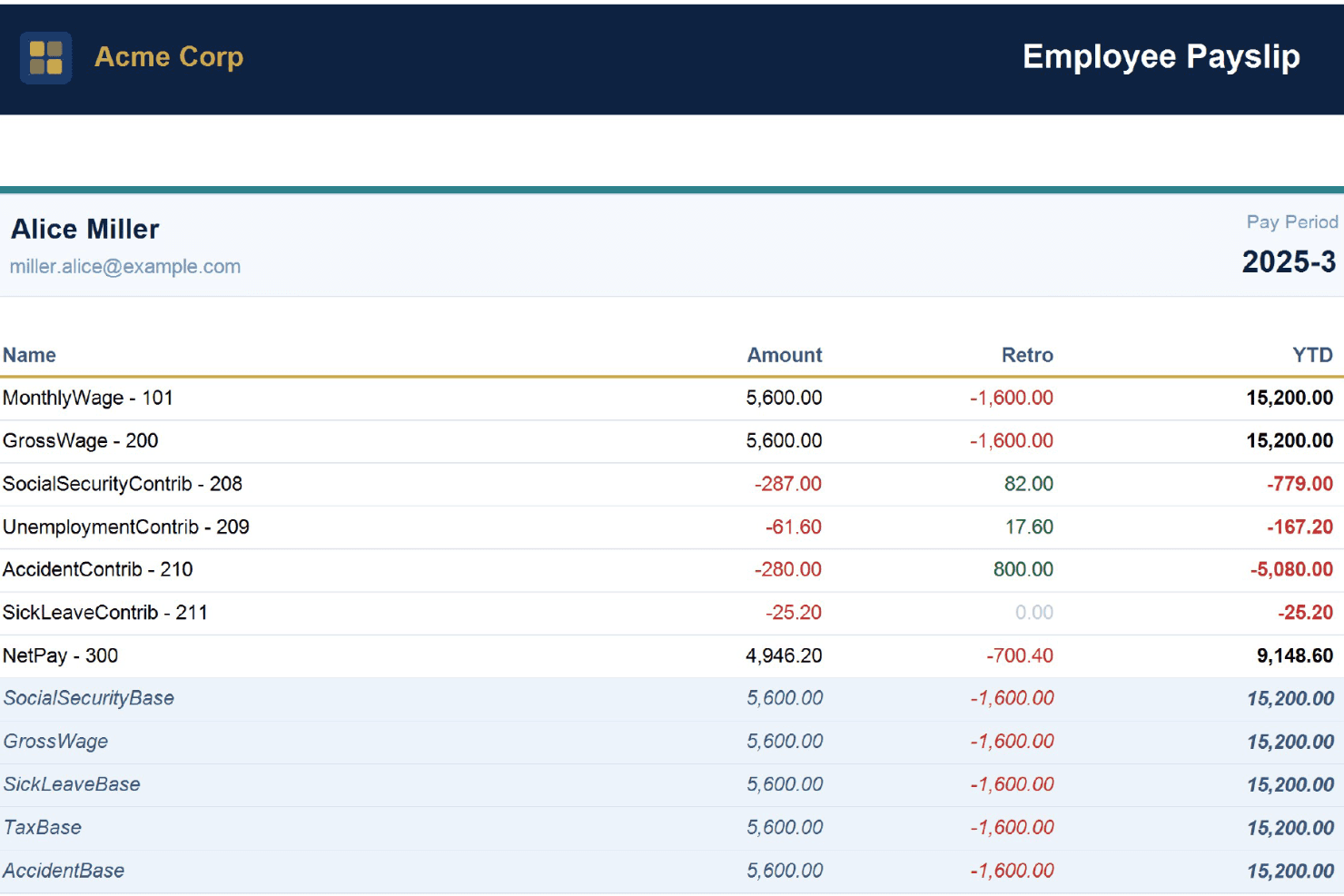
Sample employee payslip showing wages, statutory contributions, net pay and year-to-date totals. Payroll Engine is an open-source, self-hosted payroll framework built on .NET that handles gross-to-net calculations, retroactive payroll processing, multi-tenant regulation layers, forecasting, and report generation through a REST API and C# scripting model.
Who Is Payroll Engine Best For?
Payroll Engine is designed for developers and software teams that need to embed payroll processing logic directly into a custom application or platform.
Why I Picked Payroll Engine
I picked Payroll Engine because it's purpose-built for embedding payroll logic into custom products rather than operating as a standalone payroll application. I find its composable regulation layer model particularly useful because teams can combine country, company, and tenant-level rules, version them, and extend them with C# scripts or no-code actions to accommodate different pay structures. The retroactive payroll engine also handles past-dated corrections without requiring manual workarounds, which is valuable for product teams building payroll functionality into their platforms.
Payroll Engine Key Features
- Composable regulation layers: Combine country, company, and tenant-level payroll rules that can be versioned, inherited, and shared across tenants.
- Payroll forecasting: Run named what-if payroll scenarios against live regulations and employee data without affecting production results.
- Lifecycle test framework: Define JSON-based tests covering case input, payroll processing, and report output, with CI/CD pipeline support.
- Multi-format report output: Generate payslips and summaries using culture-specific templates and export them as XML, Excel, or PDF files.
Payroll Engine Integrations
Payroll Engine does not provide native integrations. It supports custom connectivity through its OpenAPI 3.1 REST API, webhooks, and .NET Client SDK.
Pros and Cons
Pros:
- Versions complex regulatory layers
- Handles retroactive payroll corrections
- Embeds payroll into applications
Cons:
- Compliance packs require licensing
- Requires custom application development
Learn more about Payroll Engine: Best for free, unlimited-user self-hosted HR
- Free plan + 30-day free trial available
- From $7/user/month
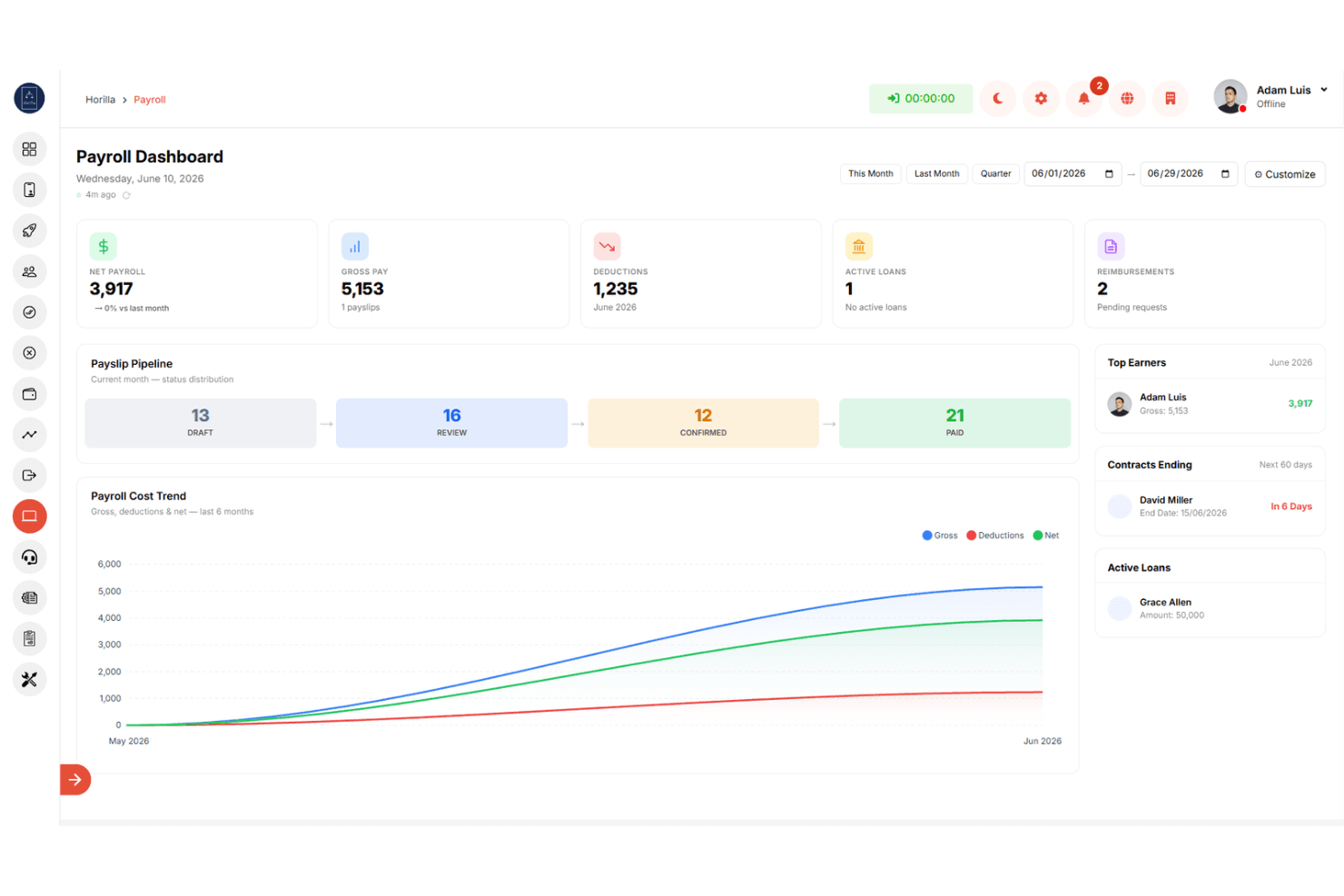
Horilla's payroll dashboard tracks net pay, deductions, payslip status and six-month cost trends in one view. Horilla is an open-source HR and payroll platform that covers the employee lifecycle, including payroll calculations, attendance tracking, leave management, recruitment, and onboarding, through a single self-hosted or cloud-deployed system.
Who Is Horilla Best For?
Horilla is a strong fit for small businesses and technical teams that want a comprehensive HR and payroll system without paying per-user licensing fees for its self-hosted open-source edition.
Why I Picked Horilla
I picked Horilla because it allows organizations to self-host an HR and payroll system for an unlimited number of users without ongoing software licensing fees. The payroll module handles gross-to-net calculations, statutory components such as PF and TDS, configurable tax brackets, and automatic loan recovery across pay cycles. I also like that attendance data flows directly into payroll, reducing the need for manual reconciliation when overtime or mid-month starts affect employee compensation.
Horilla Key Features
- Pay structure configuration: Create multiple salary structures and assign them by grade, department, or individual employee.
- Loan and advance tracking: Record employee loans and advances with automatic repayment schedules spread across future pay cycles.
- Payslip status workflow: Move payslips through draft, review, confirmed, and paid statuses, with bulk generation and CSV or PDF exports.
- Employee self-service portal: Allow employees to view their payslips, leave balances, attendance records, and submitted documents without requiring HR assistance.
Horilla Integrations
Horilla offers native integrations with LDAP, Google Drive, and WhatsApp, along with LinkedIn and Google Meet for HR workflows. Its REST API supports custom integrations through JWT authentication and Swagger/OpenAPI documentation. No accounting or ERP connectors are documented.
Pros and Cons
Pros:
- Tracks individual payslip statuses
- Automates employee loan recovery
- Offers unlimited self-hosted users
Cons:
- Payroll trend analysis limited
- Accounting connectors remain absent
Learn more about Horilla: 10Best for payroll tied to staff schedules
TimeTrex
- 30-day free trial + free demo available
- From $50/month
Visit WebsiteCustomer Rating:4.5/5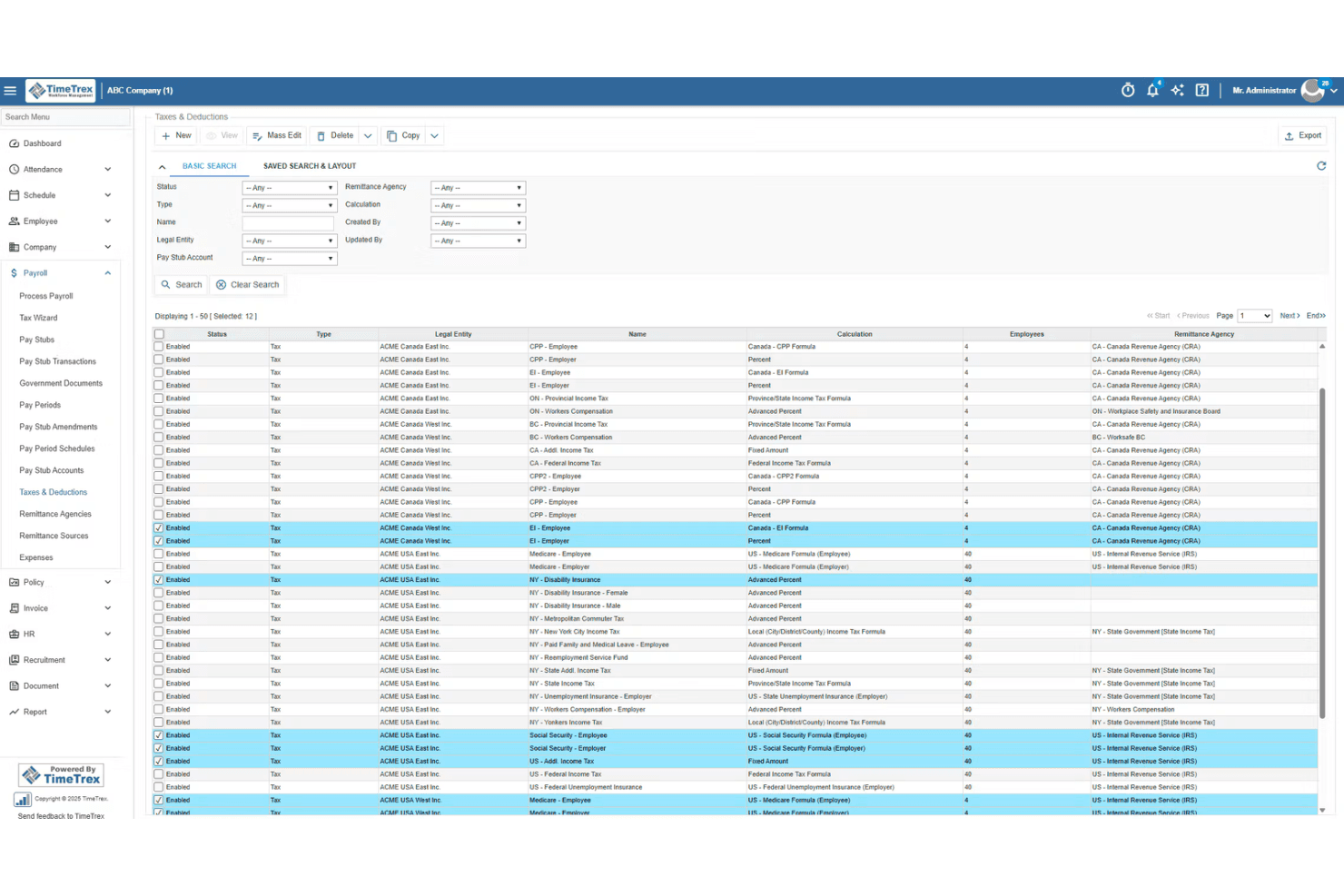
TimeTrex's Taxes & Deductions screen lists payroll tax entries by legal entity, calculation method, and remittance agency. TimeTrex is a workforce management platform with an on-premises deployment option that combines payroll processing, tax calculations, time and attendance tracking, and employee scheduling in a single system.
Who Is TimeTrex Best For?
TimeTrex is a strong fit for payroll managers who need time tracking and employee scheduling data to feed directly into payroll calculations.
Why I Picked TimeTrex
I've included TimeTrex in my top picks because its payroll engine connects directly with employee scheduling and time-tracking data. When a shift runs longer than planned or an employee clocks out early, that information feeds into payroll calculations without requiring manual data entry. I particularly like its automated scheduling capabilities and support for federal, state, and local payroll tax calculations. Its open-source Community Edition includes core scheduling and payroll functionality, although advanced features may vary by edition.
TimeTrex Key Features
- Payroll deductions management: Calculates and tracks deductions for benefits, taxes, and wage garnishments within each payroll run.
- Payroll tax calculations: Calculate federal, state, and local payroll taxes using configured tax rules, with jurisdiction-specific filing requirements needing separate verification.
- Employee self-service portal: Allows employees to access pay stubs, update personal information, and submit time-off requests directly.
- RESTful API and webhooks: Connects TimeTrex to external accounting, HR, and payroll systems through documented APIs and webhooks.
TimeTrex Integrations
TimeTrex offers integrations with Intuit QuickBooks, Sage, ADP, Paychex, Ceridian, the IRS, and the Canada Revenue Agency. It also provides a RESTful API, webhooks, and SDKs for custom connections.
Pros and Cons
Pros:
- Supports multi-state payroll calculations
- Identifies scheduling overtime risks
- Converts tracked shifts automatically
Cons:
- Deployment needs infrastructure management
- Advanced features vary by edition
Learn more about TimeTrex:
Andere open-source salarissoftware
Hier zijn enkele aanvullende opties die mijn selectie niet hebben gehaald, maar die nog steeds het bekijken waard zijn:
- 11PHP PayrollBest for varied pay types and local rules
- 12webERPBest for ERP users adding employee records
- 13PayrollBest for India-specific compliance outputs
- 14OCA PayrollBest for date-based tax rule changes
- 15Coati PayrollBest for payroll-linked vacation accruals
- 16JantaHRBest for legally cited payroll rule changes
- 17CworkBest for accountant-assisted Thai payroll
- 18AccountedBest for Swedish bureau pay runs via API
- 19DeduktoBest for South African tax in AI workflows
- 20Euron Open HRMSBest for managing payroll within HR workflows
How I Evaluate Open Source Payroll Software
I split my evaluation into three parts. Core functionality carries the most weight—I look for tools that can calculate gross-to-net pay and support configurable tax and compliance rules. I also check for standout features like multi-country localization, then consider total cost of ownership beyond the software itself.
Core Functionality (Table Stakes for This List)
When I'm selecting tools for my list, I score each one on a scale from 0 (does not offer the functionality) to 5 (excels in this area) for each core functionality listed below. I then convert the total into a percentage to help assess each tool's overall fit, with extra weight on any functionalities I've deemed essential.
- Open-Source Codebase (Essential): I check whether the source code is published under a recognized open-source license and whether the project has active maintainers and contribution channels.
- Payroll Calculation Engine (Essential): Each tool needs to compute gross-to-net pay across deductions, withholdings, and varied pay types like overtime, bonuses, and multiple pay schedules.
- Tax and Compliance Configuration: I look for configurable tax rules and statutory contributions that HR teams can adapt to their jurisdictions without waiting on a vendor update.
- Payslip and Report Generation: Tools should produce formatted payslips and summary reports that payroll managers can share with employees or use during audits.
- Self-Hosting Capability: I evaluate how well-documented the deployment process is, whether the project offers containers or install scripts, and how much technical effort setup requires.
- Integration and Extensibility: APIs, modules, or plugins that connect payroll to time-tracking, HR, or accounting systems matter here, since payroll rarely operates in isolation.
Once I have a list of tools that meet the criteria, I consider what sets each platform apart.
Differentiating Factors (What Sets Vendors Apart)
Here's how I compare and contrast different vendors:
Standout Features
I look for a modular plugin architecture that lets you add country-specific tax packs without touching the core code. For example, ERPNext and iDempiere both use module systems, but I check how easy it is to swap in a new localization pack when you expand to another region. Audit trail and versioning capabilities also matter—detailed logs of every payroll change help during internal reviews and regulatory checks. I evaluate whether employee self-service portals give staff direct access to payslips and tax documents, which reduces routine requests for HR teams.
Beyond Features
I check how often a project's GitHub repository receives commits and how active its forums are, since a stagnant codebase means you'll wait longer for compliance patches. Total cost of ownership matters too—hosting, developer hours for customization, and paid support tiers can quickly offset the savings of a free license. I also evaluate how clearly each tool documents deployment, because a platform like ERPNext with detailed install guides gets teams running far faster than one with sparse documentation. Finally, open-source payroll shifts regulatory responsibility to you, so I look for projects where community-maintained tax updates are released and reviewed promptly.
Zo kiest u open-source salarissoftware
Kies een systeem door uw rechtsgebied, technische capaciteit en verantwoordelijkheid voor wijzigingen in salarisregels af te stemmen op wat het project documenteert en ondersteunt.
| Als uw prioriteit … is | Zoek dan naar … |
|---|---|
| Als uw prioriteit … isLokale naleving | Zoek dan naar …Gepubliceerde dekking per rechtsgebied en gedateerde updates van regels |
| Als uw prioriteit … isControle over code en gegevens | Zoek dan naar …Een erkende licentie en gedocumenteerde vereisten voor zelf hosten |
| Als uw prioriteit … isTraceerbare wijzigingen in de salarisadministratie | Zoek dan naar …Bewaarde wijzigingsgegevens en een duidelijk proces voor het beoordelen van aanpassingen |
| Als uw prioriteit … isVoorspelbare eigendomskosten | Zoek dan naar …Schattingen voor hosting, onderhoud, maatwerk en nalevingswerkzaamheden |
Uw selectie beoordelen
- Vraag om bewijs van naleving: Vraag om een gedateerd document met de ondersteunde rechtsgebieden, de gedekte wettelijke regels en informatie over wie de updates onderhoudt.
- Voer drie testgevallen uit: Gebruik geanonimiseerde cijfers voor regulier salaris, overwerk en een eenmalige bonus; vergelijk de bruto-nettoresultaten met berekeningen die uw salarisspecialist heeft gecontroleerd.
- Controleer de licentie: Bewaar de licentietekst van het project en controleer of uw geplande aanpassingen, hosting en distributie voldoen aan de voorwaarden.
- Test de implementatie-inspanning: Volg de installatiehandleiding in een testomgeving, registreer het aantal uren voor de installatie en noteer eventuele afhankelijkheden waarvoor betaalde ondersteuning of specialistisch werk nodig is.
- Bepaal uw beslisfilter: Kies alleen voor controle over de code en maatwerk als u iemand kunt aanwijzen die minstens elk kwartaal wijzigingen in salarisregels beoordeelt; geef anders voorrang aan een project met duidelijk gedocumenteerde verantwoordelijkheid voor updates.
Wat is open-source salarissoftware?
Open-source salarissoftware is salarissoftware waarvan de broncode openbaar beschikbaar is onder een open-sourcelicentie. Afhankelijk van de licentie en het systeem kunt u de software inspecteren, aanpassen of zelf hosten. De salarisfuncties verschillen, dus controleer of een tool de salarisberekeningen, nalevingsregels en rapportages ondersteunt die uw organisatie nodig heeft.
Functies
Dit zijn de belangrijkste functies waar ik op let bij open-source salarissoftware:
- Loonberekeningen: Berekent het nettoloon op basis van het brutoloon door verdiensten, inhoudingen en afdrachten toe te passen. Dit geeft payrollteams een consistente manier om elke loonronde te verwerken.
- Fiscale en wettelijke regels: Past configureerbare belastingtarieven en verplichte bijdragen toe voor ondersteunde rechtsgebieden. Controleer hoe regels worden bijgewerkt en wie verantwoordelijk is voor het beoordelen van wijzigingen.
- Loonroosters en loonsoorten: Ondersteunt terugkerende loonperioden en verdiensten zoals overuren, bonussen en uurloon of salarissen. Deze opties helpen verschillende arbeidsrelaties te ondersteunen.
- Loondossiers van werknemers: Slaat gegevens op zoals beloning, fiscale informatie, betalingsvoorkeuren en inhoudingen. Nauwkeurige gegevens leveren de informatie die nodig is voor loonberekeningen.
- Loonstroken en toegang voor werknemers: Genereert gespecificeerde loonstroken met daarop verdiensten, inhoudingen en nettoloon. Via een werknemersportaal kunnen medewerkers hun documenten bekijken of downloaden.
- Loonrapporten: Vat loonkosten, inhoudingen en betalingstotalen samen voor controle of archivering. Rapporten kunnen teams helpen loonrondes af te stemmen en zich voor te bereiden op audits.
- Gegevens over tijd en aanwezigheid: Importeert of registreert uren, overuren en afwezigheden die worden gebruikt in loonberekeningen. Controleer of het systeem verbinding maakt met je tijdregistratietools of dat handmatige invoer nodig is.
- Integraties en uitbreidbaarheid: Verbindt loonadministratie met HR-, boekhoud- of tijdregistratiesystemen via API's, modules of plug-ins. Dit helpt teams dubbele gegevensinvoer in verschillende systemen te beperken.
- Wijzigingsgeschiedenis: Legt aanpassingen aan loon- en berekeningsgegevens vast, inclusief wie elke wijziging heeft aangebracht wanneer dit wordt ondersteund. Een bewaarde geschiedenis helpt teams correcties te beoordelen en afwijkingen te onderzoeken.
Voordelen
Hier zijn enkele veelvoorkomende voordelen die je kunt verwachten van opensourcesoftware voor loonadministratie:
- Controle over code en gegevens: Een erkende opensourcelicentie kan je team toestaan de code te bekijken of aan te passen en loonadministratiegegevens zelf te hosten.
- Flexibiliteit van loonregels: Configureerbare inhoudingen, afdrachten en loonsoorten kunnen je helpen berekeningen aan te passen aan de behoeften van je organisatie op het gebied van loonadministratie.
- Instellingen per rechtsgebied: Lokalisatiemodules of configureerbare regels kunnen lokale vereisten ondersteunen, op voorwaarde dat je team de dekking controleert en updates bijhoudt.
- Kostenflexibiliteit: Een gratis licentie kan softwarekosten verlagen en je tegelijkertijd laten bepalen hoeveel je uitgeeft aan hosting, maatwerk en ondersteuning.
- Traceerbaarheid van de loonadministratie: Wanneer een wijzigingsgeschiedenis wordt ondersteund, kunnen aanpassingslogboeken je team helpen correcties te beoordelen en zich voor te bereiden op audits.
- Verbonden werkstromen: API's, modules of plug-ins kunnen de loonadministratie verbinden met HR-, boekhoud- of tijdregistratiesystemen wanneer de software deze integraties ondersteunt.
Prijzen
Opensourcesoftware voor loonadministratie kan gratis te downloaden en zelf te hosten zijn, maar implementatie, hosting, onderhoud en ondersteuning kunnen extra kosten met zich meebrengen. De prijs hangt af van je implementatiemethode, technische vereisten en eventuele betaalde modules of diensten die je nodig hebt.
Vergelijkingstabel voor abonnementen van opensourcesoftware voor loonadministratie
| Type abonnement | Gebruikelijke prijs | Veelvoorkomende functies |
|---|---|---|
| Type abonnementGratis abonnement | Gebruikelijke prijs$0 softwarelicentie | Veelvoorkomende functiesBasisfuncties, zelf hosten en ondersteuning door de community. Installatie en onderhoud worden doorgaans intern uitgevoerd. |
| Type abonnementGehost abonnement | Gebruikelijke prijsVerschilt per aanbieder | Veelvoorkomende functiesBeheerde hosting, back-ups, software-updates en basisondersteuning, afhankelijk van de aanbieder. |
| Type abonnementZakelijk abonnement | Gebruikelijke prijsAbonnement of offerte op maat | Veelvoorkomende functiesExtra ondersteuning, integraties, configuratie van de loonadministratie en optionele nalevingsmodules. |
| Type abonnementAbonnement voor grote ondernemingen | Gebruikelijke prijsPrijs op maat | Veelvoorkomende functiesGeavanceerd maatwerk, hulp bij de implementatie, speciale ondersteuning en mogelijkheden voor meerdere entiteiten waar beschikbaar. |
Veelgestelde vragen
Enkele antwoorden op veelgestelde vragen over opensourcesalarissoftware:
Kan opensourcesalarissoftware voor meerdere landen worden gebruikt?
Sommige opensource-salarissystemen ondersteunen meerdere landen, maar de dekking hangt af van de software en de lokalisatiemodules ervan. Controleer of de inkomstenbelastingen, wettelijke bijdragen, rapportage-indelingen en loonregels van elk land gedocumenteerd en bijgehouden worden. Een systeem dat loonberekeningen voor één land ondersteunt, verwerkt niet automatisch de vereisten van een ander land. Test voordat u een keuze maakt voorbeeldberekeningen voor elk rechtsgebied waar u personeel in dienst heeft. Controleer wie de regels bijwerkt, hoe updates worden gecontroleerd en wat er gebeurt wanneer een regel tussen geplande releases door verandert.
Heb ik een ontwikkelaar nodig om opensourcesalarissoftware te gebruiken?
Niet altijd, maar u heeft iemand nodig met de vaardigheden om het gekozen systeem te installeren, configureren en onderhouden. Sommige projecten bieden installatiehandleidingen of implementatieopties op basis van containers, terwijl voor andere meer technisch handwerk nodig is. Uw team heeft ook iemand nodig die verantwoordelijk is voor loonregels, software-updates, back-ups en toegangsrechten. Test de installatie in een proefomgeving en leg vast hoeveel tijd en specialistische hulp nodig zijn. Die proef geeft een duidelijker beeld van de voortdurende werklast dan alleen de licentieprijs.
Dient opensourcesalarissoftware belastingaangiften automatisch in en betaalt deze belastingen?
Soms, maar functies voor loonberekening bieden geen garantie op automatische belastingaangifte of belastingbetalingen. Controleer in de productdocumentatie welke specifieke aangifte-indelingen, indieningsprocessen en betalingsfuncties in uw rechtsgebied worden ondersteund. Uw team moet mogelijk rapporten exporteren, formulieren indienen via een overheidsportaal of betalingen afzonderlijk regelen. Vergelijk voordat u de salarisadministratie daadwerkelijk verwerkt de berekeningen van de software met cijfers die door een salarisspecialist zijn gecontroleerd. Controleer ook wie toezicht houdt op wijzigingen in de regelgeving en updates controleert voordat deze gevolgen hebben voor het loon van werknemers.
Hoe kan ik werknemersgegevens beschermen wanneer ik salarissoftware zelf host?
Bescherm salarisgegevens met gecontroleerde toegang, veilige back-ups en een gedocumenteerd proces voor software-updates. Beperk de toegang tot werknemers die salarisinformatie nodig hebben en controleer de rechten wanneer iemand van functie verandert of uit dienst gaat. Versleutel gegevens tijdens de overdracht en in rust, voor zover uw infrastructuur dit ondersteunt, en test regelmatig of back-ups kunnen worden teruggezet. Houd toegangs- en wijzigingsregistraties bij als uw systeem dit ondersteunt. Uw organisatie blijft verantwoordelijk voor het voldoen aan toepasselijke privacy- en beveiligingsvereisten. Betrek daarom uw IT- en compliance-teams voordat u de software implementeert.