

How Buddy Punch Reduces Errors in Time Tracking



In 2012, I got a crash course in all the issues associated with time tracking.
By then, I’d grown my business to the height of managing three different franchises. Unfortunately, this meant running around to every location week after week collecting manual paper timecards that were less than accurate, to say the least. Arrival times fudged (on purpose or by accident), work hours exaggerated, and team members clocking in for their buddies.
I knew that none of it was sustainable. Not if I wanted to actually optimize and grow my business even further. But time tracking options were limited back then.
One day I shared my complaints with my roommate, friend, and engineer-extraordinaire, Nick Murphy. He heard my concerns and, over a singular weekend, assembled the foundation for what would later become a powerful time tracking software: Buddy Punch.
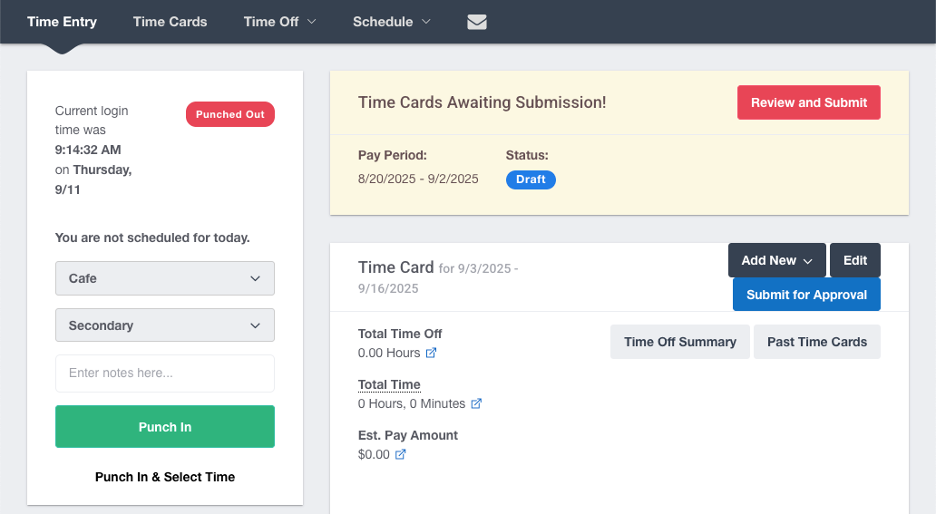
Buddy Punch is a simple web and mobile time tracking tool that automatically calculates hours and prevents time theft and human error. You don’t need special hardware or an IT degree to run this program–an internet connection will do.
 is a simple web and mobile time tracking tool that automatically calculates hours and prevents time theft and human error. You don’t need special hardware or an IT degree to run this program–an internet connection will do.
From the name of the program itself, we wanted Buddy Punch to solve all issues related to time tracking in the workplace. This includes stopping employees punching time for each other (also known as “buddy punching”) and cutting down on the human error that’s native to manual time tracking. No more inaccuracies or inconsistencies slowing down payroll, costing time and money, and leading to disputes.
It’s clear that we hit on a need in the market, since today over 10,000 organizations use Buddy Punch to reduce errors in time tracking, prevent time theft, and simplify payroll. But despite our audience growing larger, we’ve never forgotten our original philosophy: keep it simple, keep it fair, and ensure all clock ins and clock outs are legitimate.
Buddy Punch's Error Reduction Features
Here's an overview of the automatic features you'll find in Buddy Punch that reduce errors associated with manual time tracking. Keep in mind we're always evolving our software, so there's a chance we may add more features in the future.
| Automatic time tracking | $4.49/user/month | Automatically tracks employee work hours |
| Employee Scheduling | $5.99/user/month | Streamlines employee scheduling with recurring and hands-off features |
| GPS Tracking | Add on available for $2/user/month | Monitors employee locations via an interactive map |
| Geofencing | $5.99/user/month | Restrict punches to job sites with custom radius sizes |
| Overtime calculations | $4.49/user/month | Monitors and calculates overtime hours |
| Built-In Payroll | Add on available for $6/user/month | Review, sync, and pay employees with a few clicks. |
Below, we’ll take a more in-depth look at how each of these features helps multi-location businesses reduce errors in time calculation.
Automatic Time Tracking
Buddy Punch lets employees clock in and out from anywhere and tracks their time automatically. This means you'll always get an accurate log of when they clocked in and out.
This even counts on mobile devices, which means industries like construction and field services can count on accuracy in their employee time tracking.
Employee Scheduling
Buddy Punch comes with many convenient scheduling options, including a drag and drag schedule maker, employee self-service, and recurring schedules that repeat shifts week after week.
For businesses that operate in different locations or franchises, you can create all of your locations in Buddy Punch. You can use this feature to create separate schedules for all locations at once.
Real-time GPS Tracking
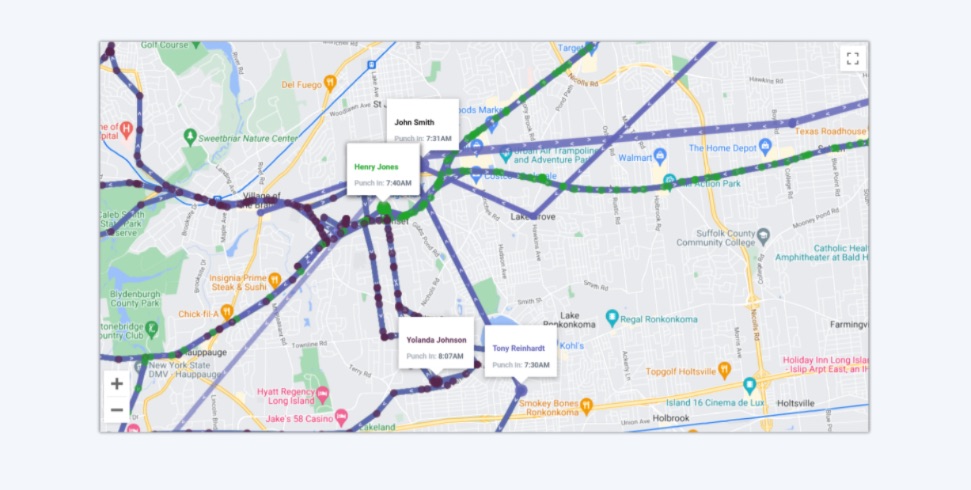
Buddy Punch also has automatic tracking of all real-time locations of your employees, for just $2 more per user.
For construction businesses, this feature can help monitor the routes, locations, and travel times of employees between work sites. This information can be used to optimize route planning or settle payroll disputes.
Geofencing
Buddy Punch’s geofencing allows business owners to create a virtual boundary around job sites, company offices, and customer households. Employees will only be able to clock in and clock out while present at these designated areas.
If you manage a field service business, you can set up geofences at remote locations to ensure that team members are only logging time at designated work spots. No need to manually check to ensure they are where they’re meant to be.
Overtime Calculations
With Buddy Punch, you can establish overtime policies and apply them to individual employees or your entire team. From then on, our tool will automatically identify and calculate overtime hours on your behalf.
In industries like construction where overtime is common, this helps business owners keep track of time and a half times pay. Buddy Punch can also send alerts when team members are nearing overtime so that managers can adjust schedules to circumvent it.
Built-In Payroll
Buddy Punch has a separate built-in payroll add on that can automatically track work hours and file payroll taxes on your behalf. You can also set up self-service to allow employees to enter their own pay stub, W2, and 1099 form details.
Results Reported By Our Customers
The fact that over 10,000 businesses have turned to Buddy Punch speaks to how effective our tool is at reducing errors, increasing employee accountability, and simplifying payroll. And our users have been so impressed they’ve been driven to speak about their results.
Look at construction, for example. Construction is a constant battle of logistics and planning, with numerous moving parts at remote locations. But as one user says:
Overall the experience has been great. I just needed to figure out how to get all the details I needed set up and once all were completed the software does all the work for me.
Sometimes business owners worry about how their employees will take to new software. After all, if there’s a large learning curve, it can be hard to start seeing results, no matter what a tool promises to do. But Buddy Punch’s intuitive design makes it easy for both managers and team members to take advantage of automatic features ASAP:
From an employee perspective, Buddy Punch is an excellent product! It is FAR superior to the paper clock-in sheets we previously used. (And my supervisor has told me how much easier it is for him to keep track of his employee’s hours since switching to Buddy Punch).
The more employees you manage, the more difficult it can be to ensure all time tracked is accurate. Thankfully, this is exactly where Buddy Punch's automatic features excel, whether you have a dozen employees over several hundreds.
Buddy Punch is flexible enough to have different use cases depending on your industry as well.
HR professionals can make use of job codes to track how long employees spend on each task, with accuracy down to the minute.
Business owners operating in hospitality can set up a central iPad as a time clock kiosk with Buddy Punch. Then,, employees can all clock into the same device while you use punch rounding to keep the data accurate to the interval of your choosing.
Buddy Punch is designed to improve data transparency and reliability for all users, regardless of industry. Whether it’s streamlining manual methods of tracking remote work in construction, keeping field workers accountable, or streamlining payroll in retail, Buddy Punch delivers measurable results for business leaders.
Other Features Designed for Multi-Location Teams
Once you start using Buddy Punch, you’ll notice that it can do a lot more than just reducing errors.
Buddy Punch can also help with employee management thanks to features like attendance tracking to monitor employee arrivals and departures. Know when tardiness and absence are becoming an issue so you can take steps to remedy them.
You can also track PTO automatically, establishing your desired PTO accrual rules and getting notifications when team members put in their leave requests.
Because Buddy Punch functions on both the web and as a native app, you and your team members can use it on Desktop, iOS, Android, or ChromeOS. Employees can almost always be monitored by our systems.
Buddy Punch is simple to use and versatile, which means that ultimately how much you get out of it depends on what you need to best manage your teams.
Buddy Punch FAQs
Here are answers to some common questions about Buddy Punch’s automatic features.

