

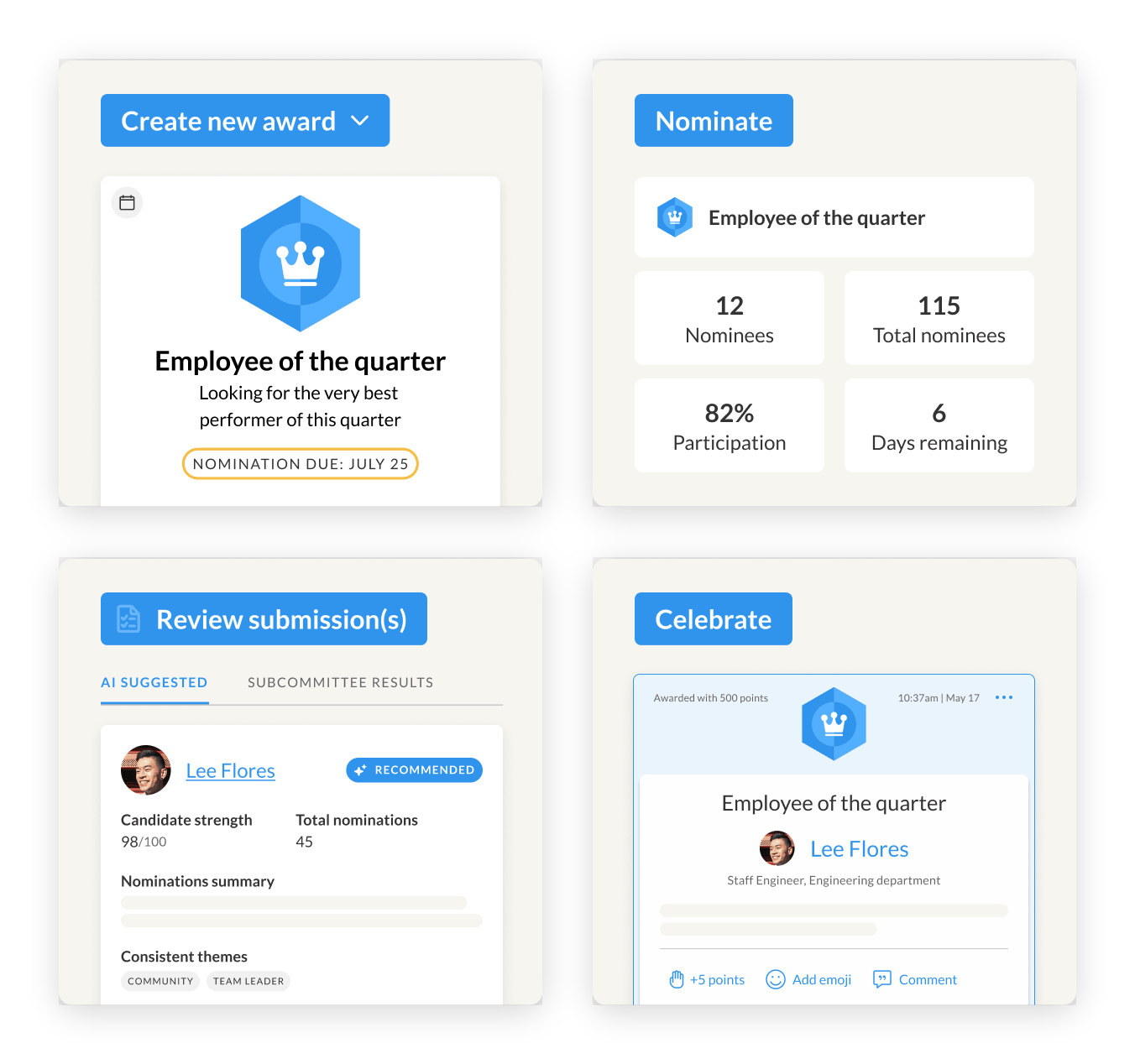
A well-structured employee awards program moves through five stages. A program owner builds the award, collects nominations, reviews them with a committee, names a winner, and shares the result with the company. In many organizations, this is a manual process.
WorkTango Awards & Nominations is a feature of WorkTango Recognition & Rewards (R&R) that runs every stage of an employee awards program in one platform, included at no extra charge for R&R customers.
This guide walks through how to set up and run an awards program in WorkTango, from the first nomination to the winner's announcement.
Summary
- An employee awards program has five stages: building the award, collecting nominations, reviewing nominations with a committee, naming a winner, and announcing the winner.
- WorkTango Awards & Nominations lets HR teams build custom awards around their core values, and runs the entire process from building the award to the announcement in one platform, cutting out the work behind a manual award program.
- In WorkTango, nominations route directly to a chosen review subcommittee, and members see each other's endorsements as they review.
- In WorkTango Awards & Nominations, any award can be duplicated for the next round, carrying over all of the settings. This makes it easy to run recurring programs like employee of the month awards.
- When a winner is named in WorkTango, the announcement posts to the company activity feed and a permanent badge appears on the winner's profile.
- Awards & Nominations is included in the WorkTango Recognition & Rewards product with unlimited use at no extra charge.
Step 1. Build the award and set eligibility
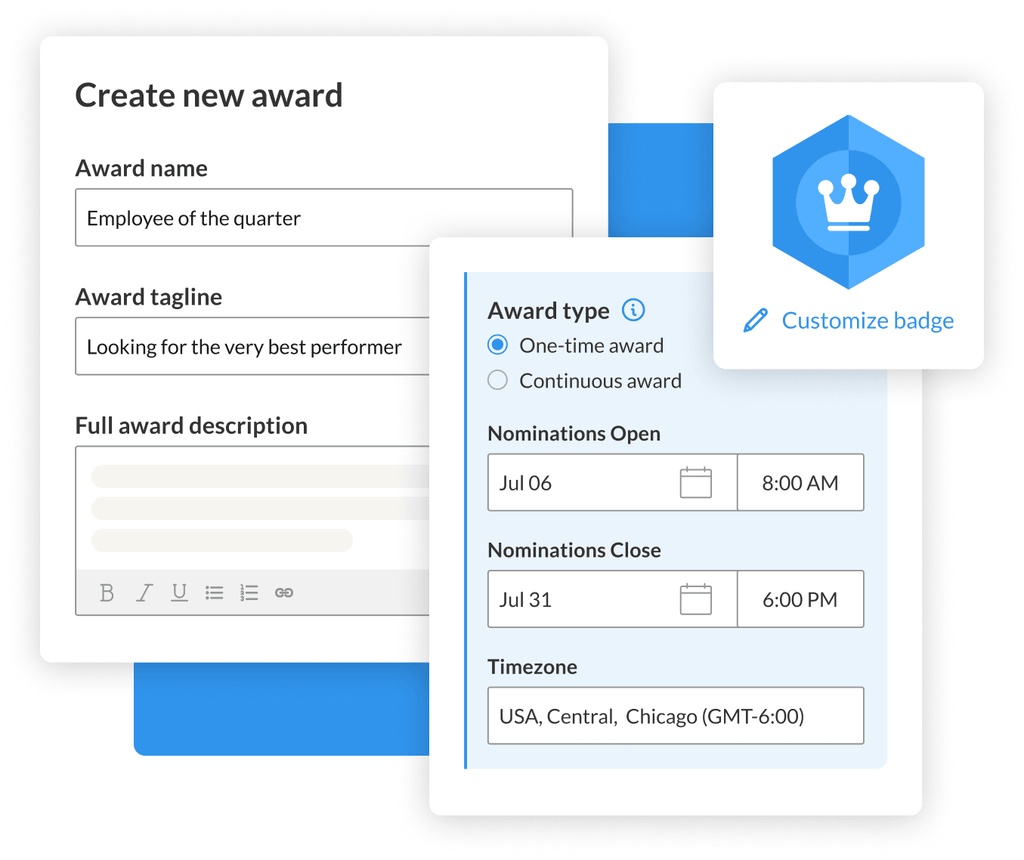
Every award program that customers run in WorkTango starts on one setup screen. The program owner sets up each award in a few steps. They give the award a name and choose a badge to go with it. The badge is what winners keep, and it appears on their WorkTango profile for everyone to see once the award is announced. Then the program owner writes the nomination questions, decides who can be nominated, and picks the dates.
An award can be open to everyone, limited to managers or specific groups, or built from a custom list by search or CSV upload. No IT ticket is needed.
WorkTango customers use this setup to build custom awards around their own values, like employee of the month awards.
Step 2. Collect nominations with focused questions
Every nomination in WorkTango starts with the questions the program owner writes for that award. Focused questions lead to stronger nominations. For example, asking how a nominee made a difference on a project or for a customer gives reviewers more to judge than a blank text box. The program owner writes these questions once per award, and WorkTango reuses them every cycle.
When an employee submits a nomination, it goes straight to the award’s review subcommittee. Nominations never land in a shared inbox, and no one has to combine entries from different forms.
Step 3. Review nominations as a committee
Every award in WorkTango is reviewed by a subcommittee the program owner chooses during the initial set up. During the review window, subcommittee members can see each other’s nominee endorsements. The shortlist builds as reviewers weigh in, so no one has to tally votes at the end. The program owner makes the final decision on the winner.
Committee review also makes the process more transparent. When several reviewers judge nominations against the same criteria, the result reflects more than one person’s opinion.
Step 4. Name the winner and share it automatically
Every award in WorkTango ends with an automatic announcement. When the program owner names a winner, WorkTango posts the win to the company activity feed. At the same time, a permanent badge appears on the winner’s WorkTango profile. Employees see the announcement in the same place whether they work in an office, on the floor, or remotely.
An award in WorkTango can have more than one winner. Program owners can name multiple winners without any extra setup.
Duplicate the award for the next cycle
Every award in WorkTango can be duplicated for the next round. Duplicating an award carries over its name, badge, nomination questions, review subcommittee, and eligibility. The program owner only needs to update the dates. This makes recurring awards like employee of the month or quarterly culture awards quick to run again.
Why one platform matters for HR teams stretched thin
WorkTango Recognition & Rewards brings formal awards, peer recognition, and milestone celebrations into one platform. For HR teams managing awards alongside everything else, that means one less system to run. Employees see awards in the same place they already go to recognize each other, so there’s no separate tool to learn. See how it works at worktango.com.