

As melhores alternativas ao Airtable oferecem à sua equipa de RH bases de dados flexíveis, automatização segura de fluxos de trabalho e integração simples, sem uma configuração informática complexa. Se está à procura de alternativas ao Airtable, é provável que precise de software de gestão de tarefas que suporte a privacidade dos dados, acesso ilimitado da equipa e operações de pessoas personalizáveis — sem obrigar o seu processo a seguir um modelo rígido.
Este guia centra-se nas ferramentas que eu utilizaria efetivamente em projetos de RH, comparando opções que respondem às suas necessidades reais em matéria de conformidade, colaboração, painéis personalizados e expansão do trabalho da sua equipa. Ficará a saber quais as plataformas concebidas para as realidades dos RH e como escolher uma que cumpra os seus objetivos para 2026 e para os anos seguintes.
O que é o Airtable?
O Airtable é uma plataforma baseada na nuvem que combina funcionalidades de folhas de cálculo e bases de dados para ajudar as equipas a organizar, acompanhar e gerir projetos orientados por dados. Permite criar fluxos de trabalho personalizados, listas de verificação de integração e painéis de RH sem programação. Os profissionais de RH utilizam o Airtable para armazenar dados dos colaboradores, colaborar em tarefas, automatizar processos rotineiros e apoiar as operações de pessoas — tudo isto adaptando o espaço de trabalho às necessidades de RH em constante evolução.
Tabela de comparação das alternativas ao Airtable
Compare, lado a lado, os preços e as especificações das alternativas ao Airtable que entraram na minha lista restrita.
Score legend (out of 5)
- Excellent4.5–5
- Good4–4.4
- Average3–3.9
- Below average2–2.9
- Poor1–1.9
Sorted by: Default
| Tool | Starting Price | Website | |||||||
|---|---|---|---|---|---|---|---|---|---|
Best for AI-built portals from a prompt | 4.8 out of 5 | 4 | 5 | 5 | 5 | 5 | 5 | $25/month Free plan + 7-day free trial + free demo available | Website |
Best for HR apps with unlimited user access | 4.7 out of 5 | 3 | 5 | 5 | 5 | 5 | 5 | $49/month Free trial available | Website |
Best for Airtable migration with EU data residency | 4.5 out of 5 | 5 | 4 | 5 | 3 | 5 | 5 | €7/user/month Free plan available | Website |
Best for flat-rate database with unlimited users | 4.8 out of 5 | 5 | 5 | 5 | 4 | 5 | 5 | $50/month 14-day free trial | Website |
Best for HR databases bundled with suite chat | 4.5 out of 5 | 5 | 4 | 4 | 4 | 5 | 5 | $6/user/month Free plan available | Website |
Best for docs-and-database builds | 4.7 out of 5 | 5 | 4 | 4 | 5 | 5 | 5 | $12/user/month Free plan + free trial available | Website |
Best for open-source data with no lock-in | 4.7 out of 5 | 5 | 5 | 4 | 4 | 5 | 5 | $12/user/month Free plan + trial + demo available | Website |
Best for docs-and-database workspaces | 4.0 out of 5 | 5 | 3 | 3 | 4 | 4 | 5 | $10/user/month Free plan + 30-day trial available | Website |
Best for app-based HR with Deluge scripting | 5.0 out of 5 | 5 | 5 | 5 | 5 | 5 | 5 | $8/user/month Free plan + free demo + 15-day trial available | Website |
Best for open-source data with no seat cap | 3.8 out of 5 | 4 | 3 | 3 | 4 | 5 | 4 | $12/user/month Free plan + free trial + free demo available | Website |


Porque pode confiar nas nossas recomendações de software
6,700+
Reviews
20
Industry experts
16+
Evaluation factors
14
Years reviewing software
A nossa equipa testa e analisa software desde 2012. Como especialistas em RH, sabemos o quão difícil — e importante — é escolher o software certo.
Para este guia, avaliámos as ferramentas através de testes práticos e pesquisa independente, pontuando-as de acordo com os nossos critérios de seleção. Recorremos também a contributos de líderes de opinião do setor e de especialistas em RH no ativo.
As nossas análises refletem o juízo da nossa equipa editorial, e não um discurso de vendas.
Revisores especialistas:
- Phil GrayCOO
 Kim BehnkeHR Tech Editor & Analyst
 Josh BarkerPeople Ops Manager

Avaliações das melhores alternativas ao Airtable
Apresentamos abaixo os meus resumos detalhados das melhores alternativas ao Airtable que entraram na minha lista restrita. As minhas avaliações oferecem uma análise detalhada das funcionalidades, dos melhores casos de utilização e das capacidades de cada plataforma, para o ajudar a encontrar a melhor opção para si.
 Best for AI-built portals from a prompt
- Free plan + 7-day free trial + free demo available
- From $25/month
Visit WebsiteCustomer Rating:4.7/5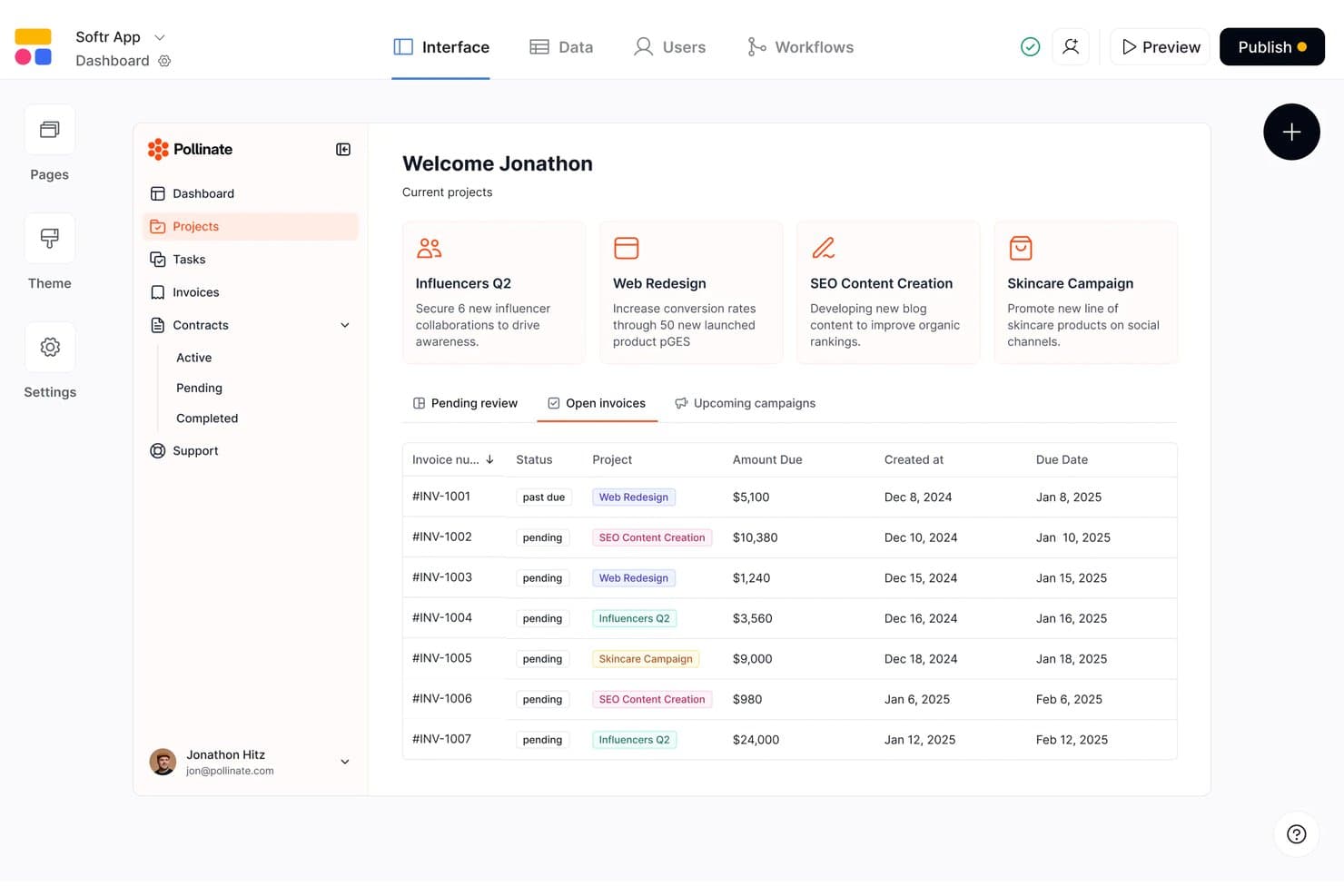
Softr lets users manage projects, invoices, and campaigns in one portal. Softr gives teams in any industry a way to quickly turn data into custom portals, internal tools, or client-facing solutions without code, appealing to those who want flexibility beyond traditional task management platforms.
Who Is Softr Best For?
Softr is a fit for HR teams and business units that need to create tailored internal tools or self-serve portals without involving developers.
Why Softr Is a Good Airtable Alternative
I picked Softr as one of the best because I can use AI prompts to transform my team's data into custom portals for HR and business needs. My experience with Softr’s template library and built-in data integration features means I can quickly create internal tools or client-facing platforms without coding or IT support.
Softr Key Features
- Drag-and-drop builder: Build portals and apps visually using a no-code interface with flexible page elements.
- User access controls: Set custom permissions to manage which users or groups can view and edit data.
- Integrated database options: Connect data sources like Airtable, Google Sheets, or internal tables to power your tools.
- Pre-built templates: Start quickly with ready-made templates for common workflows and use cases.
Softr Integrations
Softr offers native integrations with Airtable, Google Sheets, HubSpot, Mailchimp, Stripe, and Google Analytics, and it connects with Zapier. An API is available for custom integrations.
Pros and Cons
Pros:
- User access controls for internal or client tools
- Drag-and-drop builder with HR-focused templates
- AI prompt can build portals from data
Cons:
- App performance can slow with large datasets
- Workflow automation less advanced than Airtable
Learn more about Softr: Best for HR apps with unlimited user access
- Free trial available
- From $49/month (billed annually)
Visit WebsiteCustomer Rating:4.4/5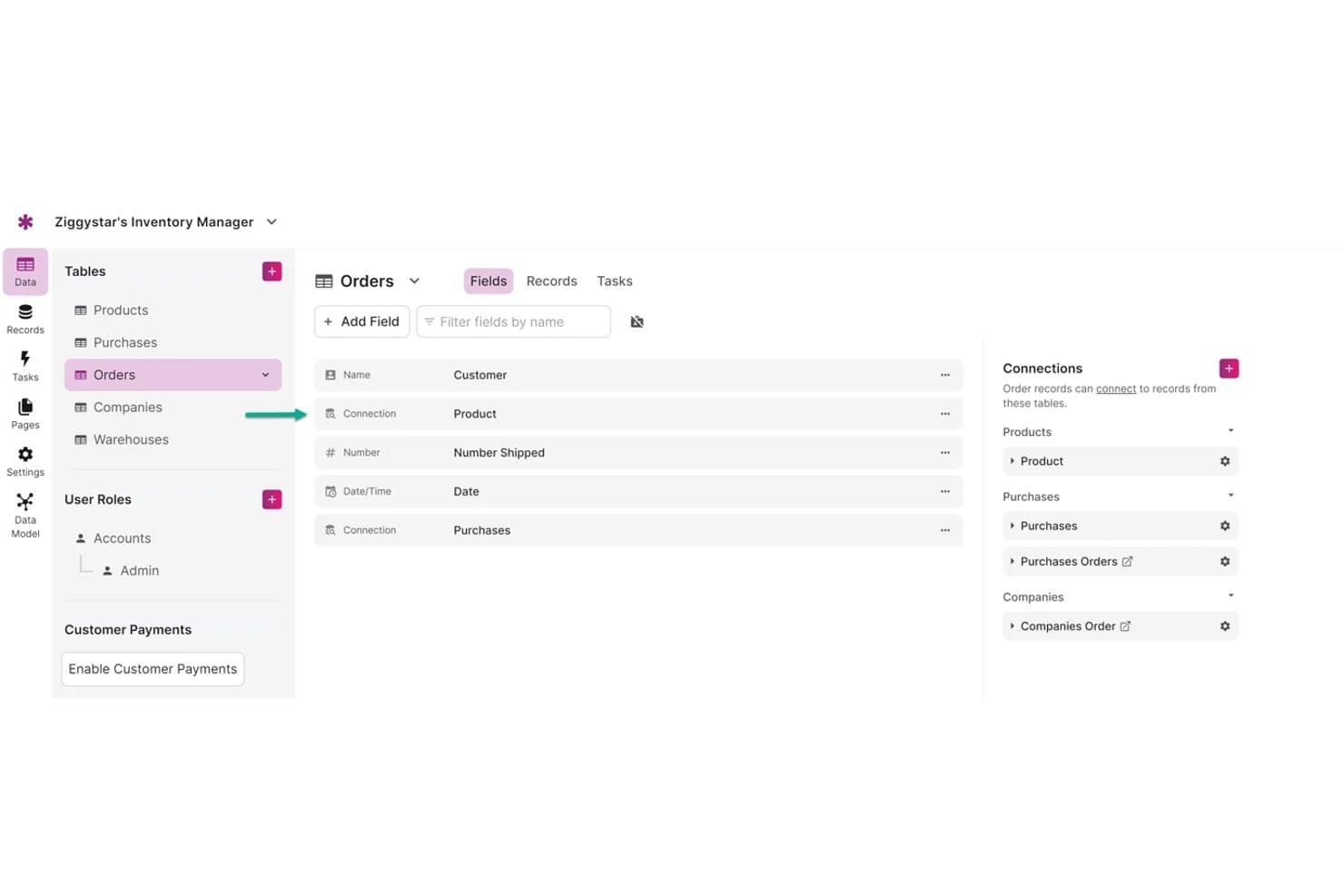
Knack lets users define data relationships across tables visually. Knack is a no-code platform designed for HR teams who want to build custom apps to manage workflows, automate tasks, and handle employee data without needing developer resources.
Who Is Knack Best For?
Knack is a good fit for HR teams at growing organizations that want to build custom internal apps without coding.
Why Knack Is a Good Airtable Alternative
I picked Knack as a top Airtable alternative because my team can build unlimited custom HR apps and give access to as many users as we need. We use Knack’s visual app builder to automate HR workflows and manage employee data in a way that adapts to our processes—without limits on team size or access.
Knack Key Features
- Drag-and-drop interface: Build custom database apps by dragging and dropping elements onto your workspace.
- Custom data fields: Set up fields for dates, text, numbers, images, or files to organize employee data and processes.
- User roles and permissions: Assign different access levels to control who can view or edit specific app sections.
- Integration with third-party apps: Connect with tools like Zapier to automate HR processes and move data between systems.
Knack Integrations
Knack offers native integrations with Zapier and Make, allowing you to connect with hundreds of external apps. It also provides an API for custom integrations.
Pros and Cons
Pros:
- Visual interface for custom workflow automation
- Flexible database-style app builder for HR teams
- Unlimited users included on all plans
Cons:
- No built-in analytics or reporting dashboards
- Limited template options for common HR processes
Learn more about Knack: Best for Airtable migration with EU data residency
- Free plan available
- From €7/user/month (billed annually)
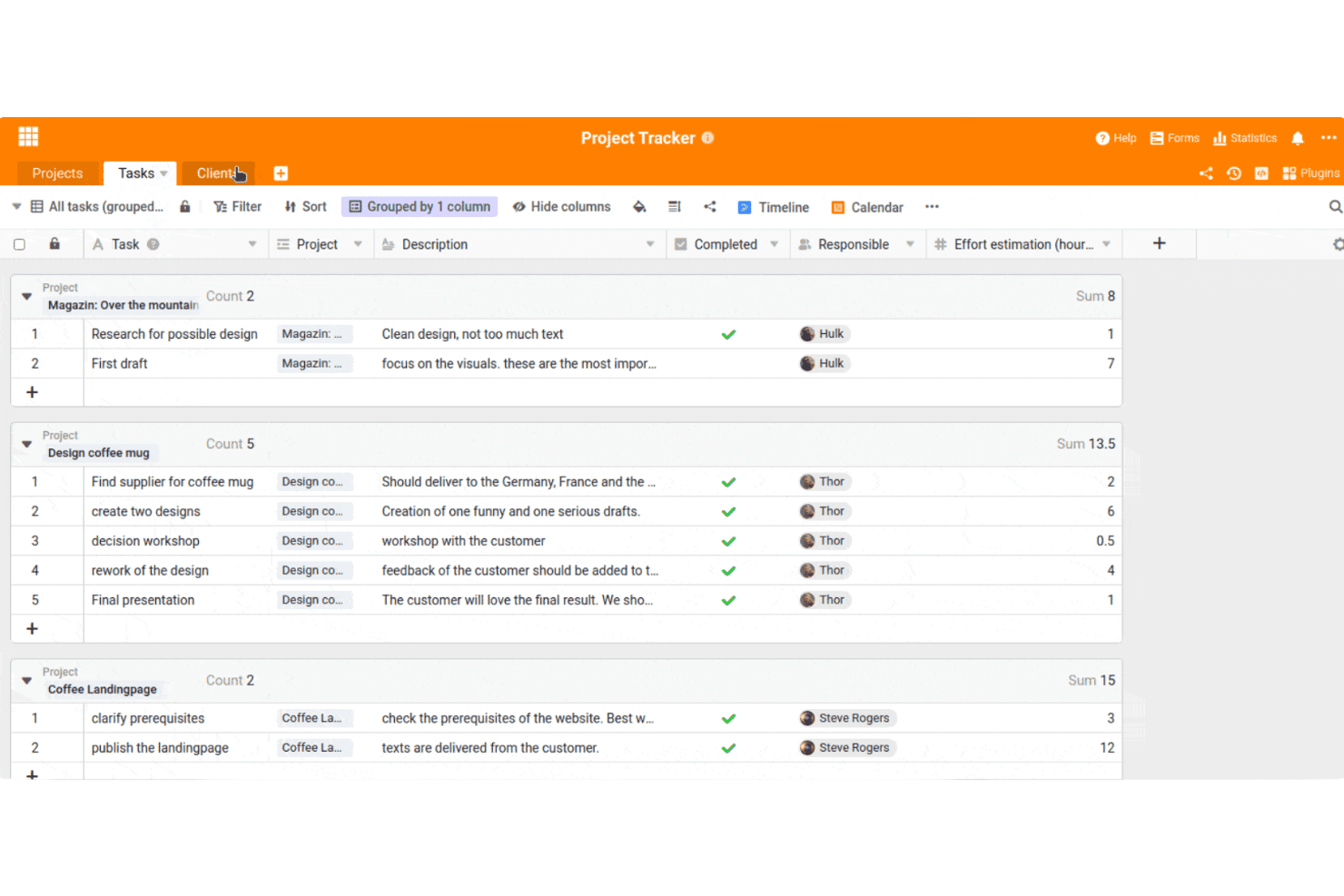
SeaTable organizes tasks by project with effort tracking and assignments. SeaTable offers a spreadsheet-style workspace designed for teams who want flexible task management, data organization, and custom workflows without coding or vendor lock-in. You’ll find it especially useful if your projects move between tables, databases, and collaborative processes.
Who Is SeaTable Best For?
SeaTable is a good fit for teams in Europe who need flexible, no-code data collaboration with strict EU data residency compliance.
Why SeaTable Is a Good Airtable Alternative
I picked SeaTable as one of the best because it lets my team move databases from Airtable quickly while meeting strict EU data residency needs. I use its flexible tables and strong access controls to manage data collaboration for projects that can't leave Europe. The no-code workflow builder saves us time as requirements change.
SeaTable Key Features
- Automation builder: Set up rule-based triggers to automate routine tasks and notifications across your tables.
- Customizable views: Switch between grid, gallery, kanban, and calendar views to organize and display your data how you want.
- Form designer: Create and share forms to collect information directly into your SeaTable base with customizable layouts and logic.
- Granular permissions: Assign detailed user roles and permissions for each table, view, or record to control access within your team.
SeaTable Integrations
SeaTable offers native integrations with Microsoft 365, Google Workspace, Slack, Jira, and Dropbox. It provides an API for custom integrations and supports integration through Zapier.
Pros and Cons
Pros:
- Flexible permission controls for complex teams
- Fast Airtable database import and migration
- EU data residency guarantees GDPR compliance
Cons:
- Limited mobile functionality compared to Airtable
- Interface translations occasionally incomplete
Learn more about SeaTable: Best for flat-rate database with unlimited users
- 14-day free trial
- From $50/month
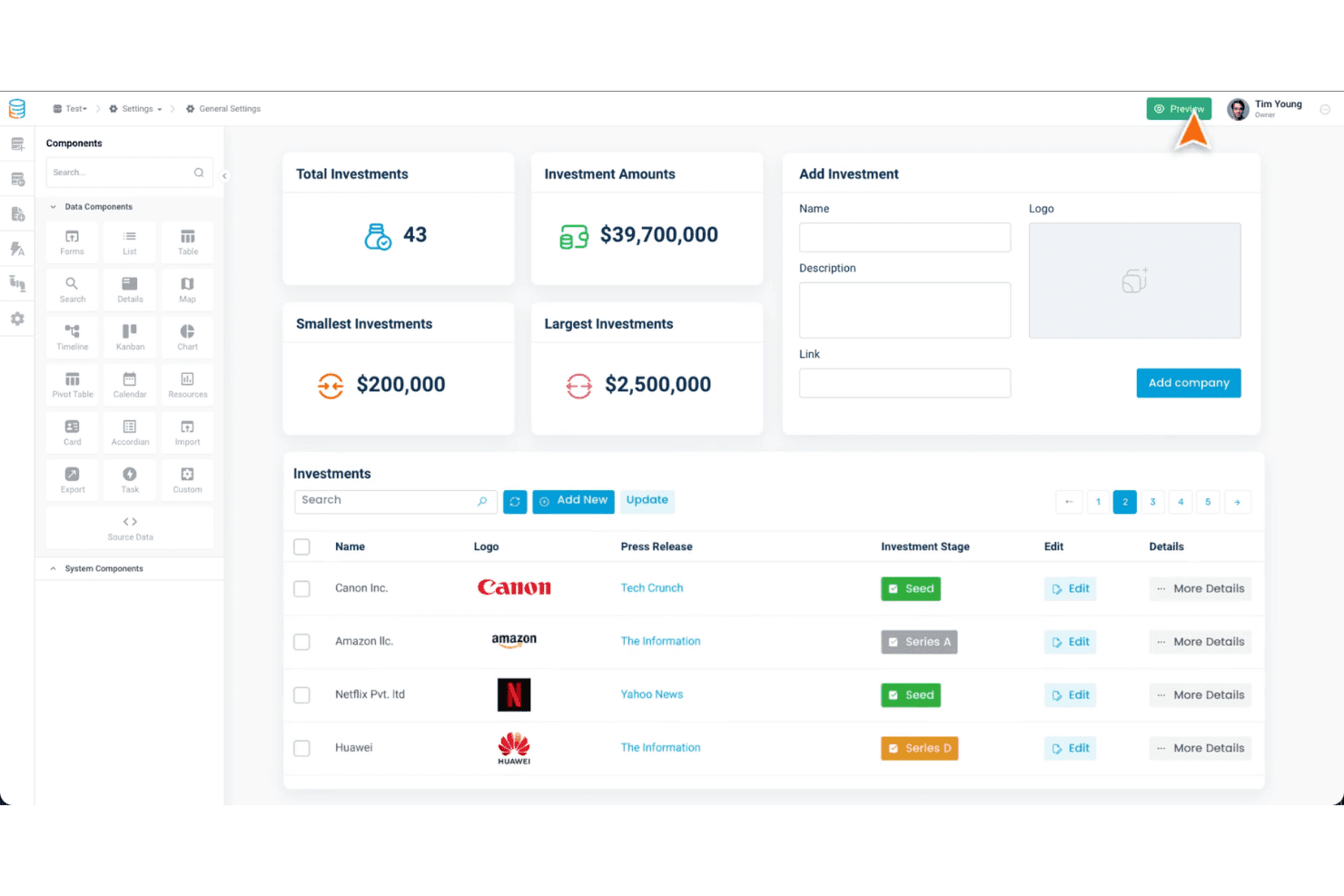
Tadabase lets users build investment dashboards with tables and forms. Tadabase is a no-code database platform designed for organizations that want to build custom task management tools and automate workflows without needing a developer. It’s a fit for operations teams, project leaders, and anyone looking to centralize complex processes.
Who Is Tadabase Best For?
Tadabase suits operations teams or project leads who want to build custom apps for task management and workflow automation without coding expertise.
Why Tadabase Is a Good Airtable Alternative
I picked Tadabase because I like how it delivers a flat-rate database that truly supports unlimited users, which makes budgeting simpler for growing project teams. My team is able to build custom task management apps and automate workflow steps, all without having to touch code or hit user limits.
Tadabase Key Features
- Visual app builder: Create custom task management workflows with drag-and-drop components and real-time previews.
- Custom roles and permissions: Set granular access levels for users, records, and data views to control how your team interacts with information.
- Automated process triggers: Build rules to automate task assignments, notifications, and status updates based on activity or field changes.
- Data integration connectors: Connect with external data sources and push updates to apps using built-in integrations and APIs.
Tadabase Integrations
Tadabase integrates with Twilio, Dropbox, Amazon S3, Okta, Stripe, Facebook, Make, Workato, and more. Tadabase supports integrations via Zapier and provides an API for custom integrations.
Pros and Cons
Pros:
- Granular access controls for data security
- Drag-and-drop builder for custom workflows
- Supports unlimited users without extra cost
Cons:
- Fewer visualization options than Airtable
- Complex setup for external integrations
Learn more about Tadabase: Best for HR databases bundled with suite chat
- Free plan available
- From $6/user/month (billed annually)
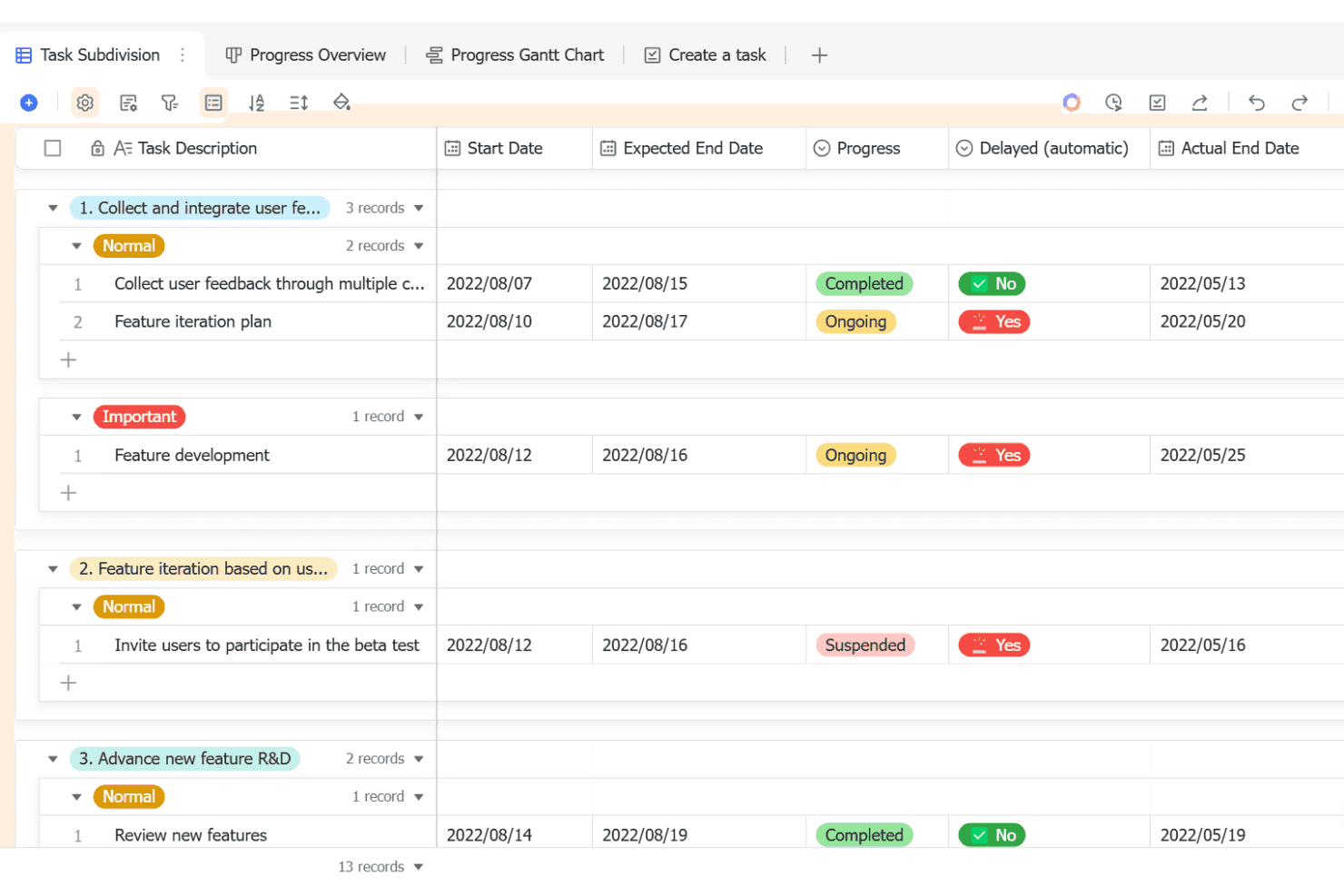
Lark Base organizes tasks by priority, progress, and deadlines in one view. Lark Base brings together database-building, visual workflow management, and flexible data views designed for HR teams who want everything connected in one workspace with chat and collaboration.
Who Is Lark Base Best For?
HR teams in growing organizations who want an all-in-one workspace with built-in chat and customizable HR databases.
Why Lark Base Is a Good Airtable Alternative
I’ve included Lark Base in my top picks because it lets me build customizable HR databases that are integrated with chat for seamless teamwork. I use its visual workflow management to track hiring and onboarding, and the team benefits from flexible data views, which keep everything connected inside our main workspace.
Lark Base Key Features
- Custom form creator: Build and deploy tailored forms to gather structured HR data from your team.
- Automated reminders: Set up automatic notifications to prompt task completions and follow-ups within projects.
- Role-based access controls: Assign permissions to manage who can view or edit sensitive HR database information.
- Calendar view: Visualize tasks, deadlines, and project milestones in a centralized calendar for easy tracking.
Lark Base Integrations
Native integrations are not clearly documented. Lark Base provides an API for custom integrations.
Pros and Cons
Pros:
- Flexible data views inside collaborative environment
- Visual workflow management for hiring and onboarding
- All-in-one workspace with chat and HR database
Cons:
- Free plan limits row and automation capacity
- Steep learning curve for new users
Learn more about Lark Base: 6Best for docs-and-database builds
Coda
- Free plan + free trial available
- From $12/user/month (billed annually)
Visit WebsiteCustomer Rating:4.7/5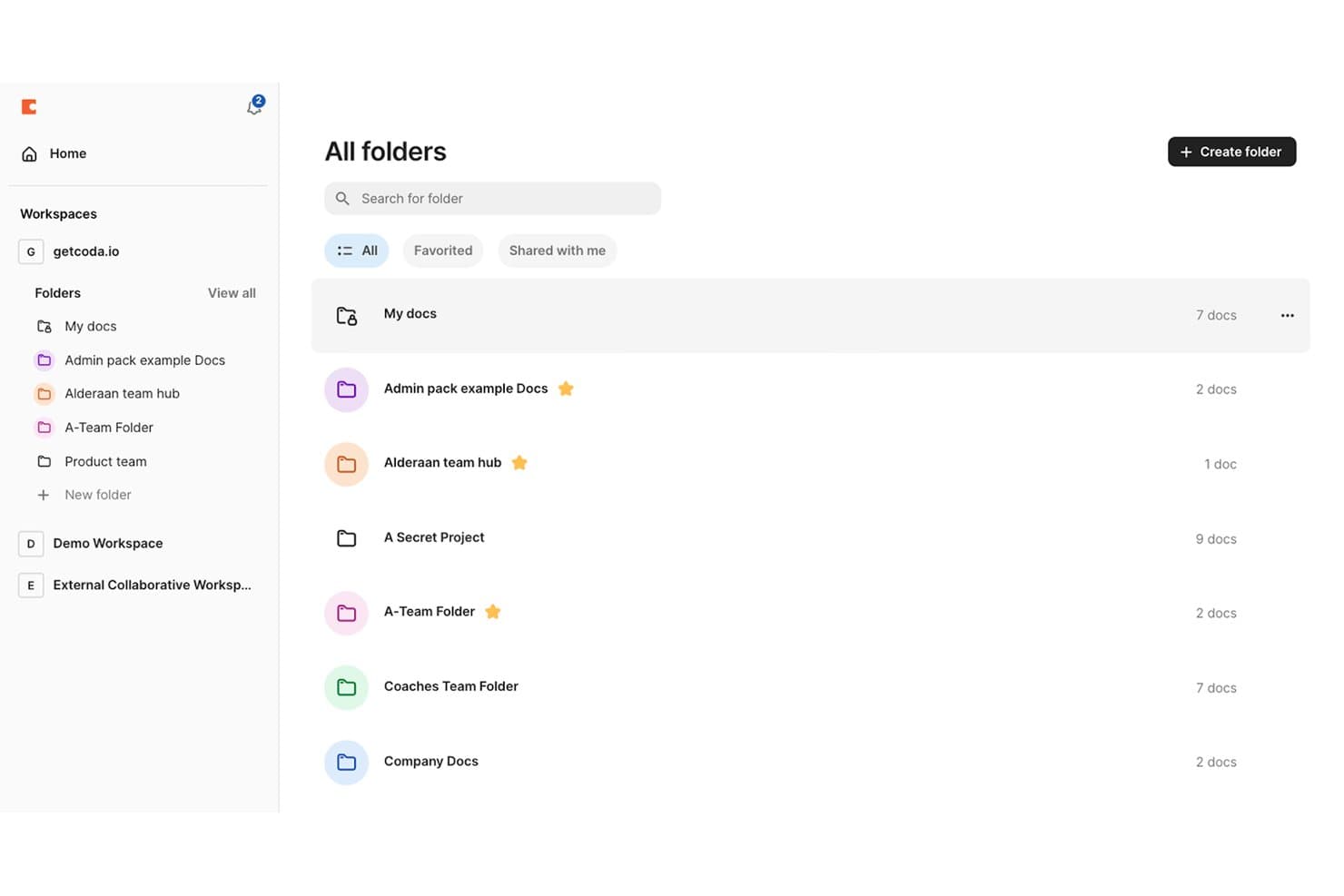
Coda organizes docs into folders across multiple workspaces. Coda brings teams a flexible platform that lets you create documents, workflows, and simple databases, offering a custom workspace for businesses that need more control over their processes than basic spreadsheets or standard task management tools.
Who Is Coda Best For?
Coda is a good fit for teams who need a flexible workspace that blends documentation, project tracking, and simple databases in one tool.
Why Coda Is a Good Airtable Alternative
I picked Coda as a top alternative because I can build documents that double as custom databases and flexible trackers in a single workspace. My team is able to create interactive pages with embedded tables and automate cross-functional processes, which is especially helpful for blending documentation with data management. This level of customization is tough to replicate with most tools.
Coda Key Features
- Automation rules: Set up recurring workflows and automate tasks inside your workspace.
- Pack integrations: Connect with apps like Slack, Google Calendar, and Jira for real-time data syncing.
- Custom views: Filter and display tables as cards, timelines, or calendars for tailored project tracking.
- Granular sharing controls: Choose viewing and editing permissions for individual sections and pages.
Coda Integrations
Coda offers native integrations with Slack, Google Calendar, Jira, GitHub, and Salesforce. It also supports integrations through Zapier and provides an API for custom integrations.
Pros and Cons
Pros:
- Automation rules for recurring team workflows
- Flexible page design with embedded interactive elements
- Blends documentation and database tables in one place
Cons:
- Complex workspaces can overwhelm new users
- Less advanced reporting compared to Airtable
Learn more about Coda: Best for open-source data with no lock-in
- Free plan + trial + demo available
- From $12/user/month
Visit WebsiteCustomer Rating:4.7/5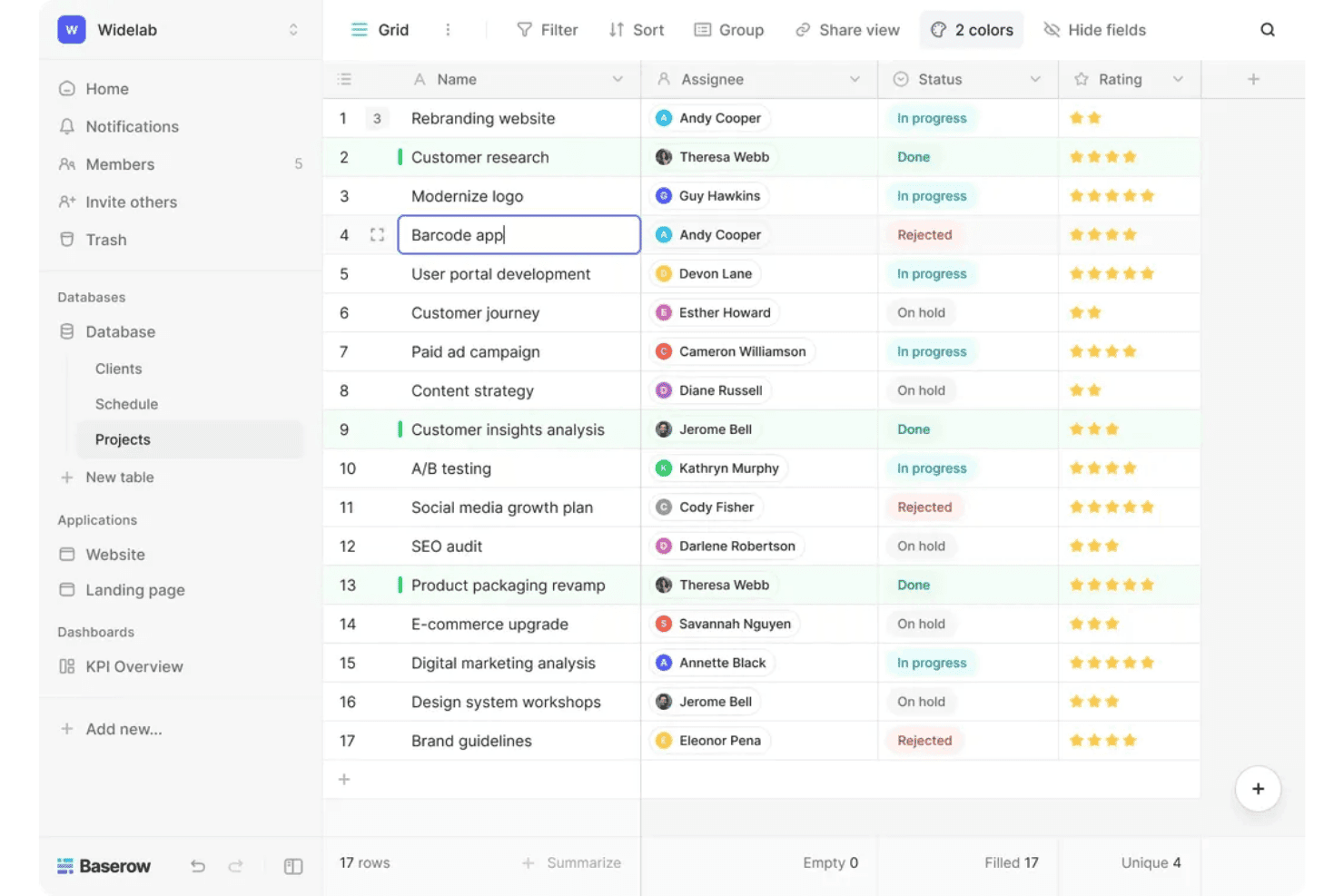
Baserow organizes project data in a customizable grid view with status and ratings. Baserow is a no-code database platform that lets teams in any industry build, organize, and share task and project data without technical barriers or proprietary limits.
Who Is Baserow Best For?
Teams that want a flexible, open-source database platform without vendor lock-in or technical limitations.
Why Baserow Is a Good Airtable Alternative
I picked Baserow because I appreciate having full access to the platform’s source code, so my team isn’t locked into proprietary limitations. We’re able to self-host or use the cloud version, build custom workflows, and keep full control over our project data with no forced upgrades or vendor restrictions.
Baserow Key Features
- Table-based interface: Organize, view, and filter project and task data in a spreadsheet-style grid.
- Real-time collaboration: Edit, comment, and update data simultaneously with teammates in shared workspaces.
- Role-based permissions: Set custom user roles to manage access and editing rights across projects.
- API access: Connect Baserow data to your other tools and systems using a built-in REST API.
Baserow Integrations
Baserow offers native integrations with Amazon S3, Anthropic, Mistral, Make, Snetry, Posthog, n8n, and more. It offers an API for custom integrations and connects with Zapier.
Pros and Cons
Pros:
- Self-hosting available for full control
- No vendor lock-in for data ownership
- Fully open-source with transparent codebase
Cons:
- Native integrations require custom setup
- Limited built-in automation options
Learn more about Baserow: Best for docs-and-database workspaces
- Free plan + 30-day trial available
- From $10/user/month (billed annually)
Visit WebsiteCustomer Rating:4.6/5
Notion organizes team tasks by status across a kanban-style board. Notion is a flexible workspace platform that brings together note-taking, project management, and customizable databases, making it a strong choice for teams that want unified task tracking, documentation, and knowledge sharing in one place.
Who Is Notion Best For?
Notion is a strong fit for hybrid teams who need a flexible workspace to unify documentation, project tracking, and shared knowledge.
Why Notion Is a Good Airtable Alternative
I picked Notion as a go-to Airtable alternative because it merges documents, project boards, and powerful databases in one workspace. I use its relational databases to build dynamic knowledge hubs, connect meeting notes to projects, and customize views for everything from onboarding workflows to asset libraries.
Notion Key Features
- Calendar view: See tasks and projects on a visual calendar to manage schedules and deadlines directly in your workspace.
- Custom templates: Create and use templates for recurring tasks, meeting notes, and project plans to save set-up time.
- Commenting and mentions: Collaborate by leaving comments on any item and tagging team members for feedback or updates.
- Permission controls: Set granular access levels for pages, databases, and workspaces to manage who can view or edit information.
Notion Integrations
Notion offers native integrations with Slack, GitHub, Jira, Asana, Trello, Google Drive, Microsoft Teams, Zoom, Figma, and Zapier. An API is available for custom integrations.
Pros and Cons
Pros:
- Connects notes, docs, and tasks seamlessly
- Customizes database views for any workflow
- Combines documents and databases in one workspace
Cons:
- Performance can lag with large databases
- Advanced relational features require manual setup
Learn more about Notion: Best for app-based HR with Deluge scripting
- Free plan + free demo + 15-day trial available
- From $8/user/month (billed annually)
Visit WebsiteCustomer Rating:4.3/5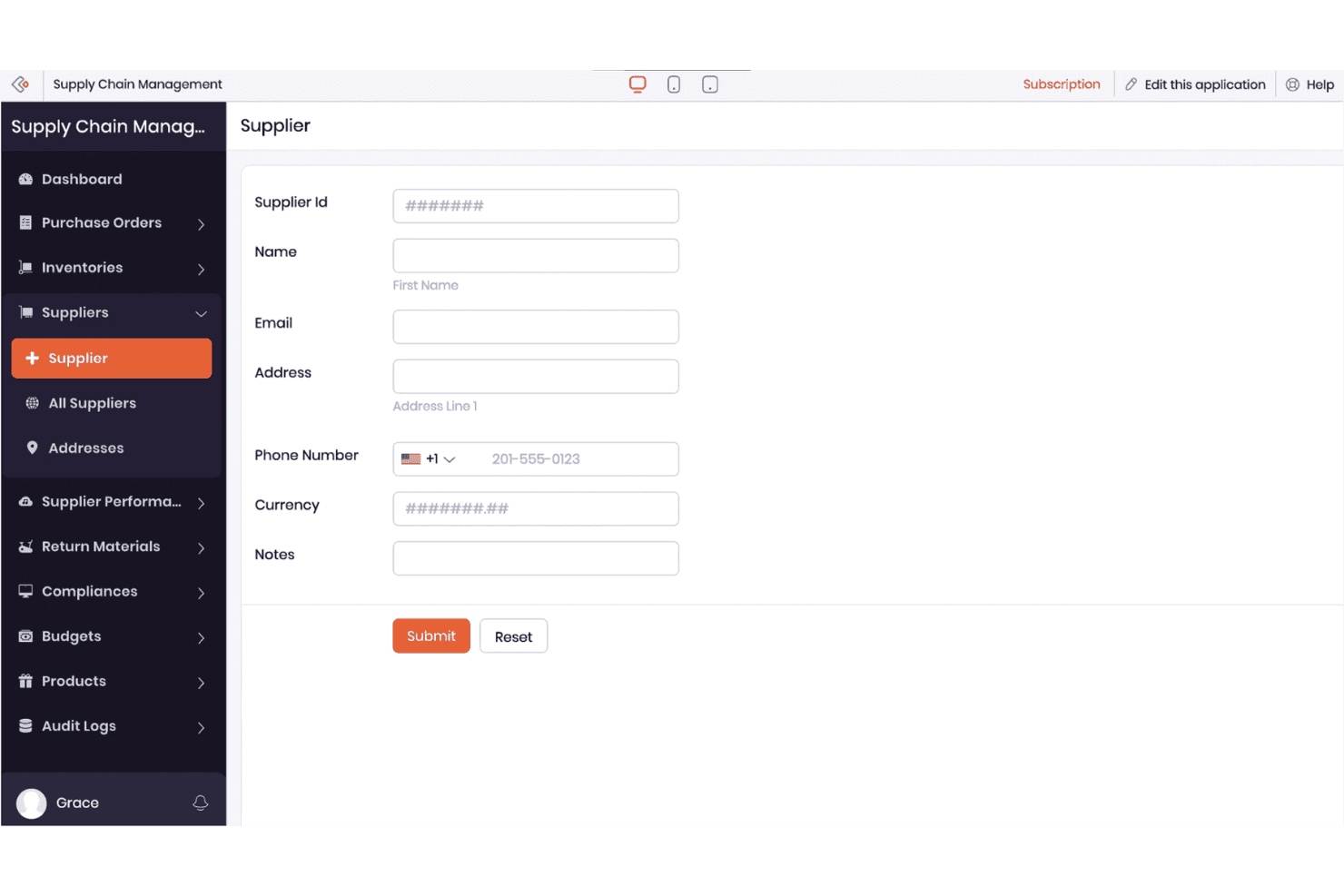
Zoho Creator lets users build supplier intake forms with custom fields. Zoho Creator gives HR teams and business leaders a no-code platform for building custom task management apps, automating processes, and tailoring workflows for unique needs across industries.
Who Is Zoho Creator Best For?
HR teams and business leaders who need a flexible, no-code platform to build and automate custom workflows across different industries.
Why Zoho Creator Is a Good Airtable Alternative
I picked Zoho Creator as one of the best because I can quickly build custom HR task management apps without writing code. The Deluge scripting lets my team automate approval flows and onboarding steps tailored to our processes. We use it to design workflows that match the exact needs of different departments and industries.
Zoho Creator Key Features
- Drag-and-drop app builder: Build custom HR applications using a visual interface without technical skills.
- Role-based access controls: Set permissions and manage data visibility for different users within your team.
- Integration with Zoho and third-party apps: Connect your HR workflows to a wide selection of tools through built-in and API integrations.
- Mobile app support: Access and manage tasks, forms, and approvals from dedicated iOS and Android apps.
Zoho Creator Integrations
Zoho Creator offers native integrations across the Zoho ecosystem, including Zoho Books, Zoho CRM, Zoho Desk, and Zoho People, as well as direct connections to Google Workspace, PayPal, QuickBooks, Salesforce, and Twilio. It also supports integration with Zapier and provides an API for custom integrations.
Pros and Cons
Pros:
- Mobile app provides consistent on-the-go access
- Drag-and-drop builder simplifies custom app creation
- Deluge scripting enables advanced workflow automation
Cons:
- Visual customization options are somewhat limited
- Navigation can overwhelm new users
Learn more about Zoho Creator: 10Best for open-source data with no seat cap
NocoDB
- Free plan + free trial + free demo available
- From $12/user/month (billed annually)
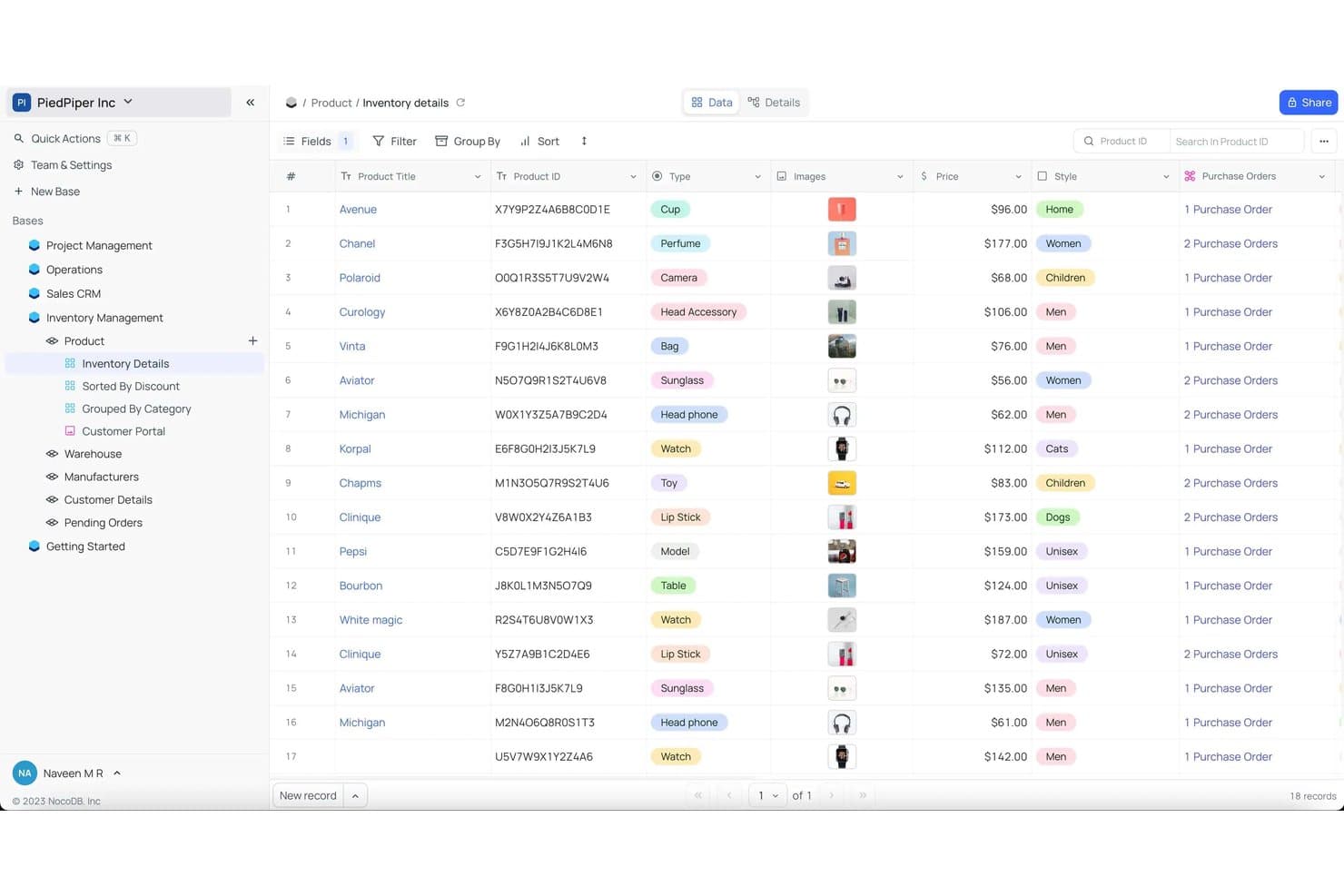
NocoDB organizes product inventory with fields, filters, and purchase orders. NocoDB is an open-source platform that lets teams turn databases into collaborative task management workspaces, making it ideal for IT, operations, and businesses that want flexible, code-free tools tailored to their own processes.
Who Is NocoDB Best For?
NocoDB is a solid choice for IT teams and operations professionals who need a flexible, open-source platform to manage collaborative workflows without user limits.
Why NocoDB Is a Good Airtable Alternative
I picked NocoDB because it lets my team turn existing databases into flexible, no-code workspaces with no seat cap. I like being able to create unlimited user access for large projects and manage collaborative workflows without extra costs. Having an open-source foundation also means we can customize setups for unique team needs.
NocoDB Key Features
- Spreadsheet-style interface: Work with data in a familiar grid layout that supports sorting and filtering.
- Custom role permissions: Set tailored access levels and workflow controls for each team member.
- REST API support: Connect NocoDB with other apps or services using the built-in API endpoints.
- Automation scripting: Trigger custom tasks or logic using script blocks built into your workspaces.
NocoDB Integrations
NocoDB connects to databases like MySQL, PostgreSQL, Microsoft SQL Server, SQLite, MariaDB, and Oracle. It offers an API for custom integrations. Native integrations are not publicly listed.
Pros and Cons
Pros:
- Can connect to existing SQL databases
- Open source for full self-hosting control
- Unlimited users without extra fees
Cons:
- Lacks advanced reporting and chart options
- Visual automation builder is limited
Learn more about NocoDB:
Outras alternativas ao Airtable
Eis algumas alternativas adicionais ao Airtable que não entraram na minha lista restrita, mas que vale a pena conhecer:
- 11QuickbaseBest for compliance-heavy app builds
- 12monday.comBest for no-code pipelines with AI agents
- 13SmartsheetBest for spreadsheet-familiar workflow at scale
- 14WrikeBest for enterprise workflow at scale
- 15NinoxBest for AI-native database building
- 16ClickUpBest for workflows with AI agents built in
- 17StackbyBest for HR stacks with live API data in fields
- 18SmartSuiteBest for full HR lifecycle in one database
- 19NolocoBest for client portals over HR data
- 20FiberyBest for AI-built workspaces across linked data
How I Evaluate Airtable Alternatives
I split my evaluation into two layers: core functionality every Airtable alternative must have, and differentiating factors that separate the best from the rest. Here's how I think about both.
Core Functionality (Table Stakes for This List)
When I'm selecting tools for my list, I rank each one on a scale from 0 (does not offer the functionality) to 5 (excels in this area) for each core functionality listed below. I then calculate the tool's total score into a percentage, and use that to help me assess its overall fit for the list.
- Relational database structure: I check whether linked records work across multiple tables, like connecting employee profiles to training logs or department budgets.
- Multiple data views: Each tool needs grid, kanban, calendar, or gallery views so HR teams can track hiring pipelines and headcount plans the way they prefer.
- Workflow automation: I evaluate built-in triggers and actions for tasks like sending onboarding reminders when a new hire record is created.
- Third-party integrations: The platform should connect with tools your team already uses, such as calendar apps, communication platforms, or HRIS systems.
- Custom field types: I look for flexible columns including dropdowns, attachments, formulas, and linked records to structure data like benefits elections or offer details.
- Collaborative editing: Real-time multi-user access matters, so I check whether HR managers and recruiters can update shared records without overwriting each other's work.
Once I have a list of tools that meet the criteria, I consider what sets each platform apart.
Differentiating Factors (What Sets Vendors Apart)
Here's how I compare and contrast different vendors:
Standout Features
I look for pre-built HR templates that cover applicant tracking, onboarding, and headcount planning so teams can skip blank-canvas setup. AI-assisted data entry is another priority—tools that auto-categorize candidate records or generate formulas cut hours of manual HRIS upkeep. I also evaluate portal or client-facing views, since HR teams often need candidates or managers to interact with specific records without full platform access.
Beyond Features
Data privacy readiness is where I spend the most time. HR databases hold sensitive PII, so I check for field-level encryption, audit trails, and data residency options—especially for teams hiring across multiple regions. Pricing models matter just as much, since HR tools touch recruiters, hiring managers, and finance. A per-seat plan that looks affordable for five users can spike fast when you loop in interview panels or contractors. I also evaluate how well each platform scales as headcount grows, looking at record limits and cross-linked base performance so teams don't hit walls mid-year.
Por que motivo procurar uma alternativa ao Airtable?
Embora o Airtable seja uma boa opção de software de gestão de tarefas, existem vários motivos pelos quais alguns utilizadores procuram soluções alternativas. Poderá estar à procura de uma alternativa ao Airtable porque…
- Precisa de controlos de privacidade de dados mais robustos para informações de RH sensíveis
- Pretende registos ou utilizadores ilimitados sem custos adicionais
- As limitações de automatização e de fluxos de trabalho do Airtable já não são suficientes
- Precisa de opções de conformidade para várias regiões ou setores
- Pretende mais modelos orientados para RH e funcionalidades de integração
Se alguma destas situações lhe é familiar, veio ao sítio certo. A minha lista inclui várias opções de software de gestão de tarefas mais adequadas para equipas que enfrentam estes desafios com o Airtable e procuram soluções alternativas.
Principais funcionalidades das alternativas ao Airtable
Eis algumas das principais funcionalidades das alternativas ao Airtable, para o ajudar a comparar as soluções alternativas disponíveis:
- Estrutura de base de dados relacional: Crie tabelas interligadas para que as equipas de RH possam associar dados dos colaboradores, acompanhar o progresso da formação e detalhar os orçamentos dos departamentos sem duplicação manual.
- Várias visualizações de dados: Apresente os dados como grelhas, quadros kanban, calendários ou galerias. Esta flexibilidade permite que a sua equipa trabalhe na visualização que melhor se adapta a cada processo de RH, desde os processos de recrutamento até ao planeamento de ausências.
- Automatização de fluxos de trabalho: Configure regras que acionem lembretes, atualizações ou pedidos de aprovação automatizados sempre que um registo seja criado ou alterado. Isto ajuda a reduzir o acompanhamento manual de tarefas rotineiras de RH.
- Tipos de campos personalizados: Adicione colunas para listas pendentes, anexos, fórmulas, caixas de seleção e registos associados, de modo a registar diversos dados de RH — como cópias de contratos, ofertas de emprego e estado de conformidade.
- Edição colaborativa: Permita que vários utilizadores editem registos em tempo real, reduzindo o risco de substituições ou de atualizações não efetuadas em projetos de RH dinâmicos.
- Integrações com terceiros: Ligue a plataforma a ferramentas como aplicações de calendário, sistemas HRIS ou plataformas de comunicação, para que a sua equipa possa partilhar dados e trabalhar sem mudar de contexto.
- Modelos de RH pré-criados: Utilize esquemas prontos para o acompanhamento de candidatos, a integração de novos colaboradores e os registos de colaboradores, para não ter de começar do zero sempre que o seu processo evolui.
- Controlos de acesso baseados em funções: Atribua permissões ao nível do espaço de trabalho ou do campo, concedendo aos gestores, recrutadores e entrevistadores o nível de acesso adequado às suas responsabilidades.
- Registos de auditoria e histórico de versões: Monitorize as alterações aos registos de RH com registos detalhados e reverta edições quando necessário, promovendo a conformidade e a transparência.
- Opções de privacidade e residência dos dados: Escolha onde e como os seus dados são armazenados, com encriptação ao nível do campo e alojamento específico por região para proteger informações sensíveis e cumprir os requisitos de conformidade.
Custos e preços
A seleção de alternativas ao Airtable exige uma compreensão dos vários modelos de preços e planos disponíveis. Os custos variam consoante as funcionalidades, o tamanho da equipa, os complementos, entre outros fatores. A tabela abaixo resume os planos comuns, os respetivos preços médios e as funcionalidades normalmente incluídas nas soluções alternativas ao Airtable:
Tabela de comparação de planos para alternativas ao Airtable
| Tipo de plano | Preço médio | Funcionalidades comuns |
|---|---|---|
| Tipo de planoPlano gratuito | Preço médio$0/user/month | Funcionalidades comunsInclui tabelas e visualizações básicas, um número limitado de registos, automatizações simples e suporte padrão. |
| Tipo de planoPlano pessoal | Preço médio$5-$12/user/month | Funcionalidades comunsAdiciona limites de registos superiores, mais visualizações de dados, integrações com aplicações populares e modelos básicos. |
| Tipo de planoPlano empresarial | Preço médio$20-$35/user/month | Funcionalidades comunsDisponibiliza automatizações avançadas, funções personalizadas, registos de auditoria, integrações melhoradas e modelos avançados. |
| Tipo de planoPlano empresarial avançado | Preço médio$40-$80/user/month | Funcionalidades comunsDisponibiliza registos ilimitados, controlos de segurança avançados, suporte dedicado, ferramentas de conformidade e SLAs. |