

Gerir visitantes pode ser um desafio para as empresas, exigindo um equilíbrio entre a segurança e a conformidade, ao mesmo tempo que se cria uma primeira impressão positiva. O software de gestão de visitantes (VMS) simplifica este processo, garantindo operações fluidas e melhorando a segurança e a eficiência.
Depois de analisar exaustivamente várias ferramentas, identifiquei as melhores soluções de gestão de visitantes disponíveis. Neste artigo, apresentarei informações honestas e imparciais sobre os seus pontos fortes e fracos, ajudando-o a escolher a opção certa para a sua equipa. Vamos explorar as principais opções que podem simplificar o seu processo de gestão de visitantes.
Why Trust Our Software Recommendations
6,700+
Reviews
20
Industry experts
16+
Evaluation factors
14
Years
Our team has been testing and reviewing software since 2012. As HR experts ourselves, we know how difficult—and important—it is to choose the right software.
For this guide, we evaluated tools using hands-on testing and independent research, scoring tools using our selection criteria. We also draw on insights from industry thought leaders and practicing HR experts.
Our reviews reflect our human editorial judgment, not a sales pitch.
Expert reviewers:
- Phil GrayCOO
 Kim BehnkeHR Tech Editor & Analyst
 Josh BarkerPeople Ops Manager

Tabela comparativa de software de gestão de visitantes
Esta tabela comparativa resume os preços, os detalhes dos períodos de teste e das demonstrações das minhas principais seleções de software de gestão de visitantes.
| Tool | Best For | Trial Info | Price | ||
|---|---|---|---|---|---|
| 1 | Best for automating visitor registration | Free trial available | From $159/month | Website | |
| 2 | Best for proactive visitor coordination | Not available | From $3000/year | Website | |
| 3 | Best for AI-powered visitor invitations | Free demo available | Pricing upon request | Website | |
| 4 | Best for automated access rights | Free plan + free trial + free demo available | From $4/resource/month (billed annually) | Website | |
| 5 | Best for visitor badge printing | Free demo available | From $500/month | Website | |
| 6 | Best for enterprise visitor and contractor management | Free demo available | Pricing upon request | Website | |
| 7 | Best for flexible workspace booking | Free plan available | From $32.58/user/month (billed annually) | Website | |
| 8 | Best for enterprise solutions | Free demo available | Pricing upon request | Website | |
| 9 | Best for flexible workspaces | 7-day free trial + free demo available | From $1.79/user/month (billed annually) | Website | |
| 10 | Best for hybrid workplaces | Free demo available | Pricing upon request | Website |


Avaliações do melhor software de gestão de visitantes
Abaixo encontram-se os meus resumos detalhados do melhor software de gestão de visitantes que entrou na minha seleção. As minhas avaliações oferecem uma análise detalhada das principais funcionalidades, vantagens & desvantagens, integrações e casos de utilização ideais de cada ferramenta, para o ajudar a encontrar a melhor opção para as suas necessidades.
 Best for automating visitor registration
- Free trial available
- From $159/month
Visit WebsiteCustomer Rating:4.9/5
With Archie, hosts are automatically notified when visitors check in. Archie is a visitor management platform designed for offices, coworking spaces, and flexible workplaces that want to simplify guest check-ins, improve security, and create a smooth experience for both visitors and staff.
Who Is Archie Best For?
Archie is a strong fit for office managers and workplace teams at small to mid-sized businesses who need a structured, professional way to handle visitor check-ins.
Why I Picked Archie
Archie earns its spot as one of the best on my shortlist because of how far it takes visitor registration automation. I love that you can build separate check-in flows for different visit types—a job interview triggers an HR form and photo capture, while a maintenance visit routes through a completely different set of steps, all without any front desk involvement. Pre-registration is another feature I find genuinely useful: hosts can schedule visits in advance, and guests receive an email with directions and any required documents to sign before they even arrive, so check-in is just a QR code scan. The automations layer on top of that lets you define check-out procedures, set time-based access restrictions, and trigger host notifications in Slack or Microsoft Teams the moment a guest walks in.
Archie Key Features
- Visitor badge printing: Automatically generate and print branded visitor badges at check-in, including the guest's name, photo, host, and visit time.
- Watchlist screening: Flag visitors against a custom watchlist during check-in and trigger an alert to security or front desk staff before granting access.
- Visitor log and reporting: Access a real-time log of all current and past visitors, with exportable records for compliance and audit purposes.
- Desk and room booking: Let visitors or employees book desks and meeting rooms directly through the platform alongside their visit registration.
Archie Integrations
Integrations include Microsoft Teams, Slack, Google Calendar, Microsoft Outlook, Zoom, Kisi, Stripe, GoCardless, QuickBooks, and Xero.
Pros and Cons
Pros:
- Easy to set up and manage
- Modern UI with custom branding
- Offers powerful automation features
Cons:
- UI available in only 6 languages
- Some reporting features could be improved
Learn more about Archie: Best for proactive visitor coordination
- Not available
- From $3000/year
Visit WebsiteCustomer Rating:4.6/5
Tactic’s room reservation dashboard for managing meeting spaces and tracking availability in real time. Tactic helps workplaces manage visitor flow and desk bookings, giving office managers and HR teams tools to coordinate arrivals, track occupancy, and create a smooth experience for guests and employees.
Who Is Tactic Best For?
Tactic is a good fit for mid-sized companies managing hybrid workplaces that need to coordinate visitor arrivals alongside employee desk and space bookings.
Why I Picked Tactic
Tactic earns its spot on my shortlist because I love how it connects visitor check-in directly to desk and space booking in one platform. When a host sends a pre-registration invite, it includes arrival details and parking info—so guests aren't left guessing when they show up. I also like that host alerts fire instantly through Slack or Microsoft Teams the moment a visitor checks in, which means no one is left waiting in the lobby. The ability to capture NDA signatures and custom forms right at check-in is a detail I find genuinely useful for compliance-conscious teams.
Tactic Key Features
- Visitor pre-registration and invites: Hosts send guests a pre-arrival invite that includes check-in guidance, parking info, and arrival instructions before they reach the office.
- Digital badge generation: Tactic automatically prints or displays visitor badges with the guest's name, host, and access details at the moment of check-in.
- Visit history and audit log: All visitor data is securely stored and searchable, giving compliance teams a reliable record for security audits.
- Physical access system integration: Tactic connects visitor check-in data to access control systems, so guest permissions can be managed alongside their visit record.
Tactic Integrations
Integrations include Microsoft Teams, Slack, Google Calendar, Outlook, Zoom, Microsoft Entra ID, and Avigilon.
Pros and Cons
Pros:
- Centralized visitor log
- Efficient visitor pre-registration
- Offers real-time notifications
Cons:
- Some features require additional setup
- May be too complex for small businesses
Learn more about Tactic: Best for AI-powered visitor invitations
- Free demo available
- Pricing upon request
Visit WebsiteCustomer Rating:4.6/5
Kadence delivers a global, configurable visitor check-in experience, from ID verification to host approval. Kadence is a workplace management platform designed for organizations that want to simplify visitor scheduling, automate check-ins, and enhance security for guests and employees.
Who Is Kadence Best For?
Kadence is a good fit for hybrid-first organizations that need a centralized way to manage office attendance, desk booking, and visitor access across multiple locations.
Why I Picked Kadence
I picked Kadence as one of the best for its AI assistant, which handles visitor invitations end-to-end. Instead of manually coordinating visits, I can trigger the entire workflow—invite, NDA signing, and host notification—through a single prompt in Slack or Microsoft Teams. I also like that pre-arrival document management is built into the same flow, so guests arrive already compliant. Automated, AI-driven coordination from invite to arrival gives Kadence an edge in visitor management.
Kadence Key Features
- Interactive floor plans: View a live, color-coded map of your office to see desk availability, team locations, and space popularity in real time.
- Attendance tracking: Monitor in-office attendance by team, department, or location and compare actual presence against hybrid policy expectations.
- Smart booking suggestions: Get AI-generated desk recommendations based on when your teammates are scheduled to be in the office.
- Workplace analytics dashboard: Access occupancy trends, peak office days, and space utilization data to support real estate and policy decisions.
Kadence Integrations
Integrations include Microsoft Teams, Slack, Google Workspace, BambooHR, Gusto, Okta, Workday, Zendesk, Jira, and ServiceNow.
Pros and Cons
Pros:
- Broad integrations with workplace tools
- Real-time occupancy and safety tracking
- Strong hybrid workplace management features
Cons:
- Setup can be time intensive
- Limited offline visitor check-in support
 4Best for automated access rights
anny
- Free plan + free trial + free demo available
- From $4/resource/month (billed annually)
Visit WebsiteCustomer Rating:4.8/5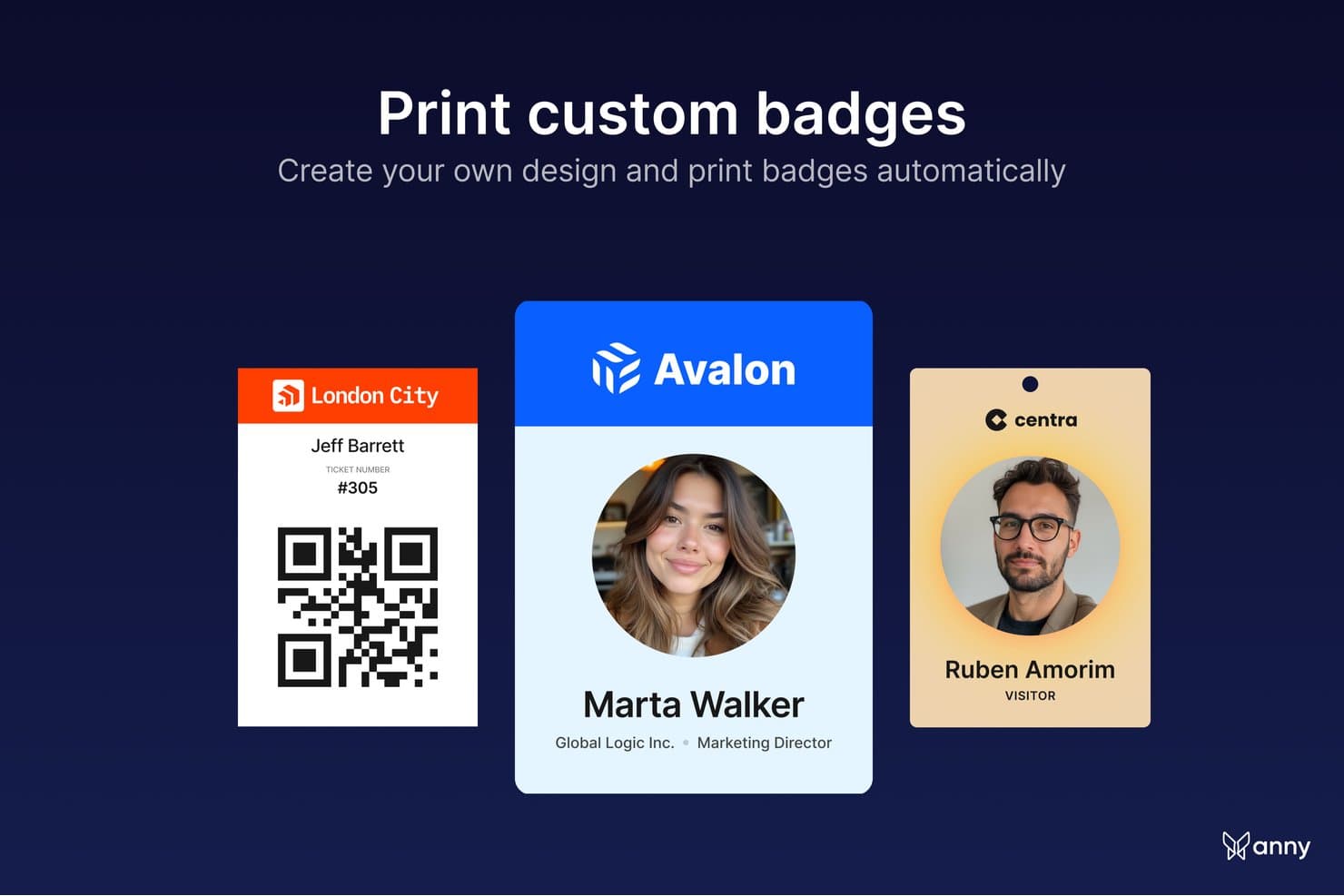
anny lets users print custom-designed badges automatically for events. anny is a visitor management solution built into a broader resource-booking platform, designed for organizations that want guest check-in, access control, and workplace booking to run in one place. It automates visitor registration, captures digital signatures, prints badges on arrival, and keeps a live record of who is in the building—from check-in to check-out.
Why I Picked anny
anny earns its spot on my shortlist because it ties visitor check-in to access control, not just the front desk. I like that a guest's access rights are issued and revoked automatically around their visit, so security teams aren't managing credentials by hand. The arrival flow is well thought out too—guests self-check-in by QR code or at a branded terminal, hosts get an instant SMS or AI call, and NDAs can be signed on the spot. For Microsoft 365 teams, visitors can even be registered straight from an Outlook meeting invite.
anny Key Features
- Flexible visitor check-in: Guests check in by QR code, email, or at a branded self-service terminal, so arrivals move quickly without tying up the front desk.
- On-arrival badge printing: Automatically print badges with the guest's name, company, host, and a check-out QR code, in a badge design you control.
- Automated access rights: Sync check-in with your access-control system and smart locks (like Salto, Nuki, or dormakaba) so visitor credentials activate on arrival and expire at check-out.
- Document capture at check-in: Have visitors sign NDAs, terms, or safety briefings on-site during check-in, with a copy emailed automatically and stored for audits.
anny Integrations
Integrations include Microsoft 365, Outlook, Google Workspace, Microsoft Teams, Zoom, Personio, SAML/SSO, and a broad range of access-control and smart-lock systems, including Salto, Nuki, dormakaba, Tapkey, iLOQ, KleverKey, Comydo, UniFi, Glutz, and more.
Pros and Cons
Pros:
- Strong compliance with ISO 27001, GDPR and EU-based hosting
- Covers the full flow from check-in to check-out
- Visitor credentials activate and expire automatically
Cons:
- Admin interface can feel complex
- No built-in watchlist or ID-document scanning
Learn more about anny: 5Best for visitor badge printing
elia
- Free demo available
- From $500/month
Visit WebsiteCustomer Rating:4.7/5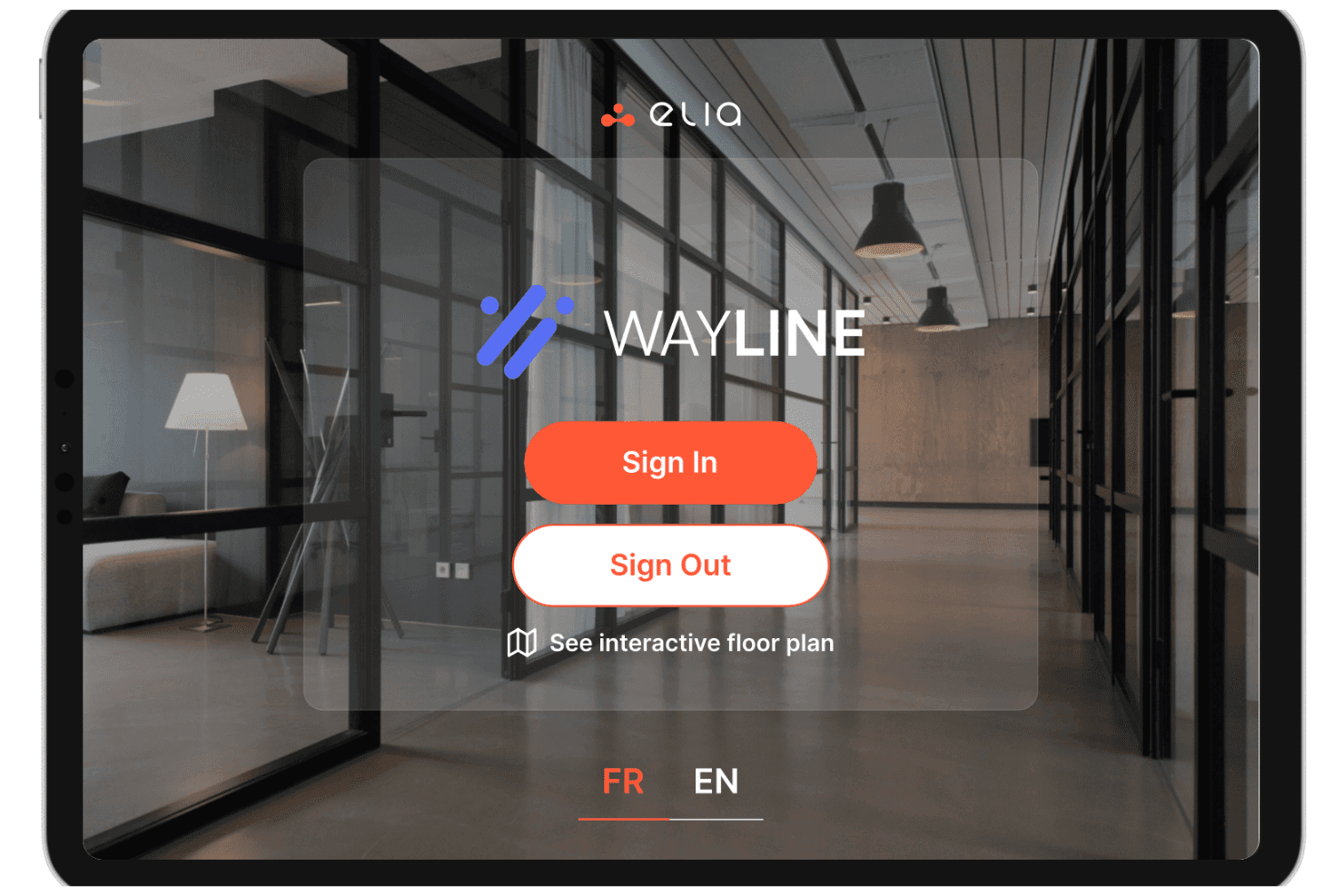
elia offers a visitor management kiosk interface called Wayline, allowing guests to sign in, sign out, or view an interactive floor plan. elia is a visitor management platform with a kiosk-based check-in system, badge printing, host notifications, document signing, and emergency evacuation tracking built for multi-site workplaces.
Who Is elia Best For?
elia is a strong fit for facilities and workplace teams managing visitor flow across multiple office locations or corporate campuses.
Why I Picked elia
I picked elia as one of the best because of how much control it gives you over visitor categorization and check-in workflows. You can create distinct visitor categories (think: contractors, guests, interviewees, VIPs) and tailor the data capture fields for each one. That means a contractor's badge will print with the specific details relevant to them—like host info or dynamic access details—while a guest badge keeps it simple. Combined with visitor photo capture, it turns standard badge printing into a powerful identification tool rather than just a basic label.
elia Key Features
- Pre-registration: Send visitors a registration link before their arrival so their details are captured in advance, speeding up the check-in process on the day.
- Host notifications: Alert the visiting employee via email, Slack, or Microsoft Teams the moment their guest checks in at the kiosk.
- Document signing at check-in: Collect visitor signatures on NDAs, safety waivers, or custom documents directly within the check-in flow.
- Visitor log export: Access a full, time-stamped record of all site visits and export it as a CSV for audits or security reviews.
elia Integrations
elia offers native integrations with Microsoft 365, Google Workspace, Slack, and specific tools within those ecosystems, including Google Calendar, Microsoft Teams, and Microsoft Outlook.
Pros and Cons
Pros:
- Built-in floor plan for space context
- Supports iPad kiosks
- Includes evacuation lists in standard plans
Cons:
- No ID scanning or watchlist screening
- Limited access control integrations available
Learn more about elia: Best for enterprise visitor and contractor management
- Free demo available
- Pricing upon request
Visit WebsiteCustomer Rating:4.3/5
Hybrid Hero sends real-time visitor notifications to hosts. Hybrid Hero is a workplace management platform for organizations that manage visitor access, monitor occupancy, and optimize space usage across offices, coworking spaces, and hybrid work environments.
Who Is Hybrid Hero Best For?
Hybrid Hero is a good fit for facilities and workplace teams in mid-to-large organizations managing hybrid work schedules and shared office spaces.
Why I Picked Hybrid Hero
Hybrid Hero earns its spot on my shortlist because of how well it connects visitor management with real-time occupancy data. I like that it tracks space utilization alongside visitor check-ins, so my team can see exactly how meeting rooms and shared areas are being used on any given day. The occupancy analytics dashboard gives us a clear view of peak usage times, which helps with capacity planning and desk allocation. That combination of visitor data and space intelligence distinguishes it from tools that only handle front-desk check-ins.
Hybrid Hero Key Features
- Visitor pre-registration: Send visitors a pre-registration link before their arrival to capture details and speed up the check-in process.
- Digital visitor logbook: Maintain a searchable, time-stamped record of all visitor entries and exits across multiple office locations.
- Host notifications: Automatically alert the relevant employee when their visitor has checked in at reception.
- Desk booking: Let employees reserve desks in advance, with availability displayed on an interactive floor plan.
Hybrid Hero Integrations
Integrations include Microsoft 365, Outlook, Teams, Azure AD, Google Workspace, and custom workflows through an API.
Pros and Cons
Pros:
- Includes real-time headcount tracking for workplace coordination and safety monitoring
- Provides centralized visibility across multiple office locations
- Combines visitor, contractor, and workplace management in one platform
Cons:
- Best suited for mid-sized and enterprise organizations rather than smaller teams
- Mobile experience is less robust than the desktop platform
Learn more about Hybrid Hero: Best for flexible workspace booking
- Free plan available
- From $32.58/user/month (billed annually)
Visit WebsiteCustomer Rating:4.8/5
Othership allows guests to check-in from anywhere, while also providing automated screening for hosts for added security. Othership is a workspace management platform designed for businesses and teams who need to coordinate hybrid work, manage guest access, and optimize office space for both employees and visitors.
Who Is Othership Best For?
Othership is a strong fit for hybrid-first companies that need to manage flexible desk booking, meeting rooms, and visitor access across shared office environments.
Why I Picked Othership
I've included Othership in my top picks because it's one of the few visitor management tools that ties guest access directly into a broader flexible workspace booking system. Where most visitor management tools treat guests as a separate workflow, Othership connects visitor scheduling to desk booking and meeting room reservations in one place. When a guest is invited to your office, the host can simultaneously book a meeting room or desk for that visit without jumping between tools. I also like that Othership's interactive floorplans let admins coordinate where visitors and employees are sitting on any given day, which is genuinely useful when your office headcount fluctuates week to week.
Othership Key Features
- Visitor invitations via multiple channels: Invite and manage guests from your phone, calendar, app, or entry tablet without a dedicated front desk device.
- Compliance data export: Export visitor logs and audit data on demand to meet compliance requirements without manual record-keeping.
- Employee feedback collection: Prompt employees to submit feedback, report broken amenities, and flag issues directly within the platform.
- Space utilization analytics: Review real-time data on office usage patterns, booking trends, and workspace preferences to inform space planning decisions.
Othership Integrations
Integrations include Microsoft 365, Google Workspace, MS Teams, Slack, Zoom, and an API is available for custom integrations.
Pros and Cons
Pros:
- Video conferencing and document management
- Self check-in with real-time updates
- Provides detailed visitor logs and analytics
Cons:
- Potential integration challenges
- Limited customization options
Learn more about Othership: Best for enterprise solutions
- Free demo available
- Pricing upon request
Visit WebsiteCustomer Rating:4.6/5
Proxyclick advances visitor flow management for large enterprises. Proxyclick is a visitor management platform built for organizations that need secure, customizable check-in experiences and compliance controls, helping facilities teams and security professionals manage visitors, contractors, and deliveries across multiple locations.
Who Is Proxyclick Best For?
Proxyclick is a strong fit for large enterprises and multi-site organizations that need centralized visitor management with advanced security and compliance controls.
Why I Picked Proxyclick
Proxyclick earns its spot as one of the best on my shortlist because of how well it handles the complexity that comes with enterprise-scale visitor management. I particularly like the watchlist feature—you can create an internal watchlist and connect it to third-party screening systems, so security teams can flag or block specific visitors before they ever reach the front desk. The access control integration is also a standout for large sites: Proxyclick syncs visitor details directly with your existing access control system and can issue QR codes or RFID cards on the spot, so visitors move through the building without creating bottlenecks at reception. For organizations managing multiple locations, the ability to configure visitor workflows, entry points, and badge designs per site from a central admin panel makes it genuinely practical at scale.
Proxyclick Key Features
- Host notifications: Send automatic SMS or email alerts to hosts the moment their visitor checks in.
- Pre-registration: Add visitors in advance and share maps, entry requirements, and contact details before they arrive.
- Guest badges and Wi-Fi credentials: Issue customized printed badges and personalized Wi-Fi credentials to each visitor at check-in.
- Destination dispatch elevator integration: Automatically direct visitors to their designated floors by connecting with destination dispatch elevator systems.
Proxyclick Integrations
Integrations include Microsoft Teams, Slack, Cisco Webex, Honeywell, LenelS2, Genetec, Avigilon, Okta, Azure Active Directory, and Google Workspace.
Pros and Cons
Pros:
- Offers detailed visitor analytics
- Advanced security options
- Supports multiple locations
Cons:
- Occasional syncing issues
- Complex setup process
Learn more about Proxyclick: Best for flexible workspaces
- 7-day free trial + free demo available
- From $1.79/user/month (billed annually)
Visit WebsiteCustomer Rating:4.8/5
WorkInSync facilitates check-ins, desk bookings, and space utilization. WorkInSync is a workplace management platform designed for organizations that want to simplify visitor check-ins, manage hybrid workspaces, and enhance on-site security for employees and guests.
Who Is WorkInSync Best For?
WorkInSync is a strong fit for mid-sized to large organizations managing hybrid or flexible workplaces where coordinating visitor access alongside desk and room bookings is a daily operational need.
Why I Picked WorkInSync
WorkInSync earns its spot on my shortlist because it's one of the few visitor management tools that's genuinely built around flexible workspaces rather than bolted onto one. I like that visitor check-ins connect directly with desk booking and meeting room scheduling, so when a guest arrives, the host's workspace is already accounted for. In practice, that means my team can pre-register visitors, assign QR code-based entry, and coordinate the host's desk or room booking all from the same platform. The customized workflow feature also lets you tailor notification messages and approval steps per visit type, which is useful when different teams have different access requirements on any given day.
WorkInSync Key Features
- Branded check-in screens: Customize check-in kiosks with your company's logo, colors, and messaging to create a consistent on-site experience for every visitor.
- Visitor log and reporting: Track visitor history, host details, and access patterns in a centralized log that can be exported for audits or compliance reviews.
- Host notifications via Microsoft Teams or email: Automatically alert hosts the moment their guest arrives, so there's no need to manually monitor the front desk.
- Emergency and evacuation management: Access a real-time list of all visitors on-site during an emergency to account for guests quickly and support safe evacuations.
WorkInSync Integrations
Integrations include Microsoft Teams, Google Workspace, Outlook, OneLogin, Okta, Active Directory, Slack, Zoom, Cisco Webex, and ServiceNow.
Pros and Cons
Pros:
- Enhances safety with contactless check-ins
- Detailed workspace analytics
- Efficient visitor pre-registration
Cons:
- Occasional syncing issues
- Some advanced features cost extra
Learn more about WorkInSync: 10Best for hybrid workplaces
Robin
- Free demo available
- Pricing upon request
Visit WebsiteCustomer Rating:4.5/5
Robin simplifies visitor check-ins and office space management. Robin helps organizations manage visitors, desks, and meeting spaces in dynamic office environments, making it easier for workplace teams to coordinate guest access, ensure compliance, and create a welcoming experience for everyone entering the office.
Who Is Robin Best For?
Robin is a great fit for mid-sized to enterprise companies managing hybrid work schedules who need visitor management built into a broader workplace operations platform.
Why I Picked Robin
Robin earns its spot on my shortlist because it's one of the few visitor management tools built directly into a hybrid workplace platform. I like that visitor check-in doesn't exist in isolation—it sits alongside desk reservations, meeting room booking, and real-time office maps. When a client arrives for an on-site, my team gets an automatic notification via Slack or email, and the visitor has already completed any required documents like NDAs or health questionnaires before they even walk in. The bulk visitor invite feature is also a practical touch I rely on for larger events, where uploading a CSV saves a lot of manual entry.
Robin Key Features
- Arrival displays: Self-service kiosks let visitors self-register and check in without staff assistance.
- Delivery management: Log, track, and manage incoming packages with recipient notifications and delivery status updates.
- Custom forms: Build registration forms with custom questions and fields to capture the specific visitor information your office needs.
- Visitor data export: Track and export records of guest visits to support security audits and compliance reporting.
Robin Integrations
Integrations include Microsoft 365, Microsoft Teams, Google Workspace, Slack, and an API is available for custom integrations.
Pros and Cons
Pros:
- Provides instant visitor notifications
- Offers detailed office analytics
- Supports flexible work arrangements
Cons:
- Can be complex for new users
- Some features cost extra
Learn more about Robin:
Outro software de gestão de visitantes
Eis algumas opções adicionais de software de gestão de visitantes que não entraram na minha seleção, mas que continuam a merecer atenção:
- 11YAROOMSBest for meeting room booking
- 12Envoy VisitorBest for office visitor tracking
- 13The ReceptionistBest for easy setup
- 14DeskFlexBest for visitor access monitoring
- 15SkeddaBest for venue booking
- 16Greetly by OfficeSpaceBest for secure visitor verification
- 17WhatspotBest for approval-based visitor bookings
- 18OfficeSpaceBest for touchless check-ins
- 19GreetlyBest for customizable check-ins
- 20iLobbyBest for compliance needs
How I Evaluate Visitor Management Software
I evaluate every tool against baseline requirements first—like digital check-in flows and automated host alerts—then weigh differentiators like multi-location support and HRIS integrations.
Core Functionality (Table Stakes For This List)
When I'm selecting tools for my list, I rank each one on a scale from 0 (does not offer the functionality) to 5 (excels in this area) for each core functionality listed below. Then, I calculate the tool's total score into a percentage. Each tool needs to achieve a minimum total score of 65% to be considered for inclusion.
- Visitor Check-In Experience: I evaluate whether candidates and contractors can check in via tablet, kiosk, or mobile—and whether pre-registration cuts lobby wait times.
- Automated Host Notifications: Each tool should alert hosts through email, SMS, or workplace apps like Slack or Teams the moment their visitor checks in.
- Digital Visitor Log: I look for searchable, exportable records with timestamps and visit details that HR and security teams can pull quickly during audits.
- Badge Printing on Arrival: Printed badges with photos, host names, and expiration details help front-desk staff and security identify authorized visitors at a glance.
- Legal Document Capture: I check whether NDAs, health declarations, or site waivers can be signed digitally during check-in with a stored audit trail.
- Watchlist & Compliance Screening: Tools should screen arriving visitors against internal blocklists or regulatory lists and flag matches before granting entry.
Once I have a list of tools that meet the criteria, I consider what sets each platform apart.
Differentiating Factors (What Sets Vendors Apart)
Here's how I compare and contrast different vendors:
Standout Features
Multi-location management matters when your organization runs several offices. I look for a single dashboard where admins configure check-in flows and pull visitor reports per site. Emergency evacuation tools are another big differentiator; real-time on-site rosters during a fire drill or incident directly support duty-of-care responsibilities. I also evaluate access control integrations, since linking visitor check-in to turnstiles or smart locks means temporary credentials expire automatically when a visit ends.
Beyond Features
Compliance and data privacy carry real weight here. I check whether platforms offer configurable data retention policies and hold certifications like SOC 2 Type II, especially when visitor PII crosses jurisdictions. Integration fit is equally important; a tool that syncs host directories from your HRIS and creates visits from calendar invites saves HR teams hours of manual coordination. I also evaluate pricing transparency, since hidden costs for hardware or per-entry fees can quietly inflate budgets as visitor volumes grow.
Como escolher software de gestão de visitantes
É fácil perder-se em longas listas de funcionalidades e estruturas de preços complexas. Para o ajudar a manter-se concentrado enquanto conduz o seu processo único de seleção de software, eis uma lista de fatores essenciais a ter em conta:
| Fator | O que considerar |
| Escalabilidade | Certifique-se de que o software consegue acompanhar o crescimento da sua empresa. Considere se consegue lidar com um número crescente de visitantes e localizações sem perder desempenho. |
| Integrações | Verifique se o software se integra com ferramentas existentes, como o seu calendário, sistemas de controlo de acessos e plataformas de comunicação, para simplificar as operações. |
| Personalização | Procure opções que permitam adaptar os fluxos de trabalho, a marca e as experiências dos visitantes às necessidades específicas da sua empresa e melhorar a satisfação dos visitantes. |
| Facilidade de utilização | Avalie se a interface do utilizador é intuitiva. A sua equipa deve conseguir navegar rapidamente pelo sistema sem formação extensa ou conhecimentos técnicos. |
| Orçamento | Tenha em conta as limitações do seu orçamento. Compare os modelos de preços e certifique-se de que obtém valor pelas funcionalidades disponibilizadas, sem despesas desnecessárias. |
| Medidas de segurança | Certifique-se de que o software dispõe de medidas de segurança robustas. Procure funcionalidades como o rastreio de visitantes, a encriptação de dados e a conformidade com os regulamentos do setor. |
| Suporte | Avalie a disponibilidade e a qualidade do suporte ao cliente. Um suporte fiável pode ajudar a sua equipa a resolver problemas rapidamente e a manter operações fluidas. |
| Opiniões dos utilizadores | Leia as avaliações dos utilizadores para compreender as experiências no mundo real. Procure opiniões sobre a fiabilidade, a eficácia das funcionalidades e a satisfação geral para orientar a sua escolha. |
Tendências no software de gestão de visitantes
Na minha pesquisa, recolhi inúmeras atualizações de produtos, comunicados de imprensa e registos de lançamentos de diferentes fornecedores de software de gestão de visitantes. Eis algumas das tendências emergentes que estou a acompanhar:
- Registo sem contacto: Muitos fornecedores estão a adicionar opções sem contacto para melhorar a segurança e a conveniência. Esta funcionalidade permite que os visitantes façam o registo utilizando os seus smartphones, reduzindo o contacto físico. É especialmente relevante no atual contexto de preocupação com a saúde.
- Informações baseadas em IA: A IA está a ser utilizada para analisar os dados dos visitantes e fornecer informações acionáveis. Isto ajuda as empresas a otimizar o fluxo de visitantes e a melhorar a segurança geral. Alguns fornecedores utilizam a IA para prever períodos de maior afluência e recomendar ajustes no número de funcionários.
- Reconhecimento facial: Esta tecnologia está a ser integrada para permitir registos mais rápidos e seguros. Permite uma identificação rápida sem necessidade de crachás ou introdução manual de dados. Os fornecedores que adotam esta tendência estão a melhorar a segurança e a eficiência.
- Personalização e imagem de marca: Cada vez mais software permite às empresas personalizar as interfaces destinadas aos visitantes com logótipos e fluxos de trabalho adaptados. Esta tendência ajuda as empresas a apresentar uma imagem profissional e a criar uma experiência de marca consistente para os visitantes.
- Funcionalidades de sustentabilidade: Os fornecedores estão a incorporar opções ecológicas, como crachás digitais e registos sem papel. Esta tendência ajuda as empresas a reduzir a sua pegada ambiental, mantendo operações eficientes.
O que é o software de gestão de visitantes?
O software de gestão de visitantes é um sistema que ajuda as organizações a gerir e monitorizar os visitantes que entram nas suas instalações. Estas ferramentas são normalmente utilizadas por gestores de escritório, rececionistas e pessoal de segurança para reforçar a segurança e melhorar a experiência dos visitantes. Funcionalidades como o registo sem contacto, as informações baseadas em IA e o reconhecimento facial ajudam a processar os visitantes de forma eficiente e a reforçar a segurança.
De um modo geral, estas ferramentas proporcionam valor ao assegurarem uma experiência segura e organizada para os visitantes das empresas.
Funcionalidades do software de gestão de visitantes
Ao selecionar o melhor sistema de gestão de visitantes para si, esteja atento às seguintes funcionalidades essenciais:
- Registo sem contacto: Permite que os visitantes façam o registo utilizando os seus smartphones, reduzindo o contacto físico e reforçando a segurança.
- Pré-registo de visitantes: Permite que os visitantes se registem antes da chegada, acelerando o processo de registo e reduzindo os tempos de espera.
- Reconhecimento facial: Proporciona uma identificação rápida e segura sem necessidade de crachás ou introdução manual de dados.
- Notificações instantâneas: Avisa os anfitriões quando os seus visitantes chegam, melhorando a comunicação e a coordenação.
- Fluxos de trabalho personalizáveis: Permite às empresas adaptar o processo de registo às suas necessidades específicas, melhorando a experiência dos visitantes.
- Análise em tempo real: Fornece informações sobre os padrões e as tendências dos visitantes, ajudando as empresas a otimizar as operações.
- Impressão de crachás: Gera crachás para os visitantes, facilitando a identificação e reforçando a segurança.
- Gestão de evacuações: Garante a segurança ao monitorizar os visitantes durante situações de emergência e ao fornecer instruções de evacuação.
- Reserva de secretárias ou salas: Muitos VMS’s oferecem funcionalidades adicionais para servir locais de trabalho híbridos, como sistemas internos de reserva de secretárias ou ferramentas de reserva de salas de reunião.
- Capacidades de integração: Liga-se a ferramentas existentes, como calendários e sistemas de controlo de acesso, para simplificar as operações.
- Medidas de segurança: Implementa medidas como a encriptação de dados e a gestão da conformidade para proteger informações sensíveis.
Benefícios do software de gestão de visitantes
A implementação de software de gestão de visitantes proporciona vários benefícios à sua equipa e à sua empresa. Eis alguns dos benefícios que pode esperar:
- Segurança reforçada: Funcionalidades como o reconhecimento facial e a impressão de crachás ajudam a garantir que apenas pessoas autorizadas entram nas suas instalações.
- Maior eficiência: O registo sem contacto e o pré-registo simplificam o processo de receção dos visitantes, reduzindo os tempos de espera e as tarefas administrativas.
- Melhor comunicação: As notificações instantâneas mantêm a sua equipa informada sobre a chegada dos visitantes, melhorando a coordenação e os tempos de resposta.
- Informações baseadas em dados: A análise em tempo real fornece informações valiosas sobre as tendências dos visitantes, ajudando-o a tomar decisões fundamentadas.
- Experiência personalizável: Os fluxos de trabalho adaptados e as opções de imagem de marca permitem-lhe criar uma experiência para os visitantes alinhada com as necessidades da sua empresa.
- Apoio à conformidade: As medidas de segurança e as funcionalidades de gestão de dados ajudam-no a cumprir os regulamentos do setor e a proteger informações sensíveis.
Custos e preços do software de gestão de visitantes
A seleção de software de gestão de visitantes requer uma compreensão dos vários modelos de preços e planos disponíveis. Os custos variam consoante as funcionalidades, o tamanho da equipa, os complementos, entre outros fatores.
A tabela abaixo resume os planos comuns, os seus preços médios e as funcionalidades normalmente incluídas nas soluções de software de gestão de visitantes:
Tabela de comparação de planos de software de gestão de visitantes
| Tipo de plano | Preço médio | Funcionalidades comuns |
| Plano gratuito | $0 | Inclui registo de entrada básico, registos de visitantes e notificações limitadas. |
| Plano pessoal | $5-$25 por utilizador/mês | Inclui um processo de registo de entrada personalizável, impressão de crachás e análise básica. |
| Plano empresarial | $25-$50 por utilizador/mês | Inclui registo de entrada sem contacto, capacidades de integração e análise avançada. |
| Plano empresarial de grande dimensão | $50+ por utilizador/mês | Inclui funcionalidades de segurança abrangentes, gestão de várias localizações e suporte dedicado. |
Perguntas frequentes sobre software de gestão de visitantes
Eis algumas respostas a perguntas comuns sobre software de gestão de visitantes:
Qual é o nível de segurança do software de gestão de visitantes?
O software de gestão de visitantes é concebido tendo a segurança em mente. Inclui frequentemente funcionalidades como triagem de visitantes, verificação de identidade e encriptação de dados para proteger as suas instalações e informações sensíveis. Estas ferramentas ajudam a garantir que apenas as pessoas autorizadas obtêm acesso, reforçando a segurança geral.
Os sistemas de gestão de visitantes podem integrar-se com ferramentas existentes?
Sim, a maioria dos sistemas de gestão de visitantes oferece capacidades de integração. Podem ligar-se a ferramentas como sistemas de calendário, controlo de acessos e plataformas de comunicação. Esta integração ajuda a simplificar as operações e garante uma comunicação contínua entre as diferentes plataformas da sua organização.
Que hardware é necessário para o software de gestão de visitantes?
Os requisitos de hardware podem variar consoante as capacidades do sistema. Alguns sistemas podem necessitar apenas de um tablet ou computador para os registos de entrada, enquanto outros podem exigir impressoras para a impressão de crachás ou leitores de códigos QR para a entrada sem contacto. É essencial escolher hardware adequado às necessidades da sua organização.
Como lidam os sistemas de gestão de visitantes com a privacidade dos dados?
Estes sistemas incluem normalmente funcionalidades de proteção de dados para cumprir os regulamentos de privacidade. Oferecem encriptação de dados, armazenamento seguro e opções para controlar o acesso aos dados. Pode gerir a forma como os dados dos visitantes são recolhidos, armazenados e utilizados, garantindo o cumprimento da legislação aplicável.
Está disponível formação para novos utilizadores?
Muitos fornecedores disponibilizam recursos de formação para ajudar os novos utilizadores a começar. Estes podem incluir vídeos de formação, visitas guiadas ao produto, seminários online e manuais de utilizador. O acesso a estes recursos garante que a sua equipa consegue utilizar eficazmente o software e maximizar os seus benefícios.
Os sistemas de gestão de visitantes podem ser personalizados?
Sim, a personalização é frequentemente uma funcionalidade essencial. Muitas vezes, pode adaptar o processo de registo de entrada, a imagem da marca e os fluxos de trabalho às necessidades específicas da sua empresa. Esta flexibilidade ajuda a criar uma experiência personalizada para os visitantes e garante que o sistema está alinhado com os seus requisitos operacionais.