

Realizar reuniões eficazes tornou-se cada vez mais difícil à medida que as equipas lidam com calendários preenchidos, colaboração remota e projetos que avançam rapidamente. Muitas pessoas passam mais tempo a coordenar, registar notas e fazer acompanhamentos do que propriamente a discutir o trabalho. Os assistentes de reuniões com IA podem ajudar ao tratar de tarefas como a transcrição, o registo de notas, a extração de itens de ação e a gestão de agendas, para que a sua equipa se possa manter concentrada na conversa.
Testei e analisei uma vasta gama de ferramentas de assistência a reuniões com IA para perceber quais poupam realmente tempo e quais apenas acrescentam ruído. As ferramentas deste guia permitem uma documentação mais clara, acompanhamentos mais simples e rotinas de reunião mais eficientes em qualquer equipa ou setor.
Neste artigo, encontrará as minhas principais recomendações, juntamente com informações sobre as suas funcionalidades, pontos fortes e casos de utilização ideais. No final, terá uma noção clara de quais os assistentes de reuniões com IA que podem melhorar de forma significativa a maneira como planeia, conduz e revê as suas reuniões.
Why Trust Our Software Recommendations
6,700+
Reviews
20
Industry experts
16+
Evaluation factors
14
Years
Our team has been testing and reviewing software since 2012. As HR experts ourselves, we know how difficult—and important—it is to choose the right software.
For this guide, we evaluated tools using hands-on testing and independent research, scoring tools using our selection criteria. We also draw on insights from industry thought leaders and practicing HR experts.
Our reviews reflect our human editorial judgment, not a sales pitch.
Expert reviewers:
- Phil GrayCOO
 Kim BehnkeHR Tech Editor & Analyst
 Josh BarkerPeople Ops Manager

Tabela comparativa de assistentes de reuniões com IA
Esta tabela comparativa resume os detalhes de preços das minhas principais escolhas de assistentes de reuniões com IA:
| Tool | Best For | Trial Info | Price | ||
|---|---|---|---|---|---|
| 1 | Best for syncing action items to boards | Free plan + 14-day free trial + free demo available | From $9/user/month (billed annually) | Website | |
| 2 | Best for team feedback | Free plan available | From $7/user/month (billed annually) | Website | |
| 3 | Best for meeting insights | 14-day free trial + free demo available | From $19/user/month (billed annually) | Website | |
| 4 | Best for project scheduling | Free trial available | From $19/seat/month (billed annually) | Website | |
| 5 | Best for task automation | Free plan + free demo available | From $10/user/month (billed annually) | Website | |
| 6 | Best for real-time transcription | Free plan available | From $8.33/user/month (billed annually) | Website | |
| 7 | Best for noise cancellation | Free plan + trial available | From $8/user/month (billed annually) | Website | |
| 8 | Best for meeting analytics | Free plan available | From $15/month (billed annually) | Website | |
| 9 | Best for note-taking | Free plan available | From $15/user/month | Website | |
| 10 | Best for meeting summaries | Free plan available | From $10/user/month (billed annually) | Website |


Análise dos melhores assistentes de reuniões com IA
Seguem-se os meus resumos detalhados das melhores ferramentas de assistência a reuniões com IA que entraram na minha lista. As minhas análises apresentam uma perspetiva detalhada sobre as principais funcionalidades, vantagens e desvantagens, integrações e casos de utilização ideais de cada ferramenta, para o ajudar a encontrar a melhor opção para si.
 Best for syncing action items to boards
- Free plan + 14-day free trial + free demo available
- From $9/user/month (billed annually)
Visit WebsiteCustomer Rating:4.6/5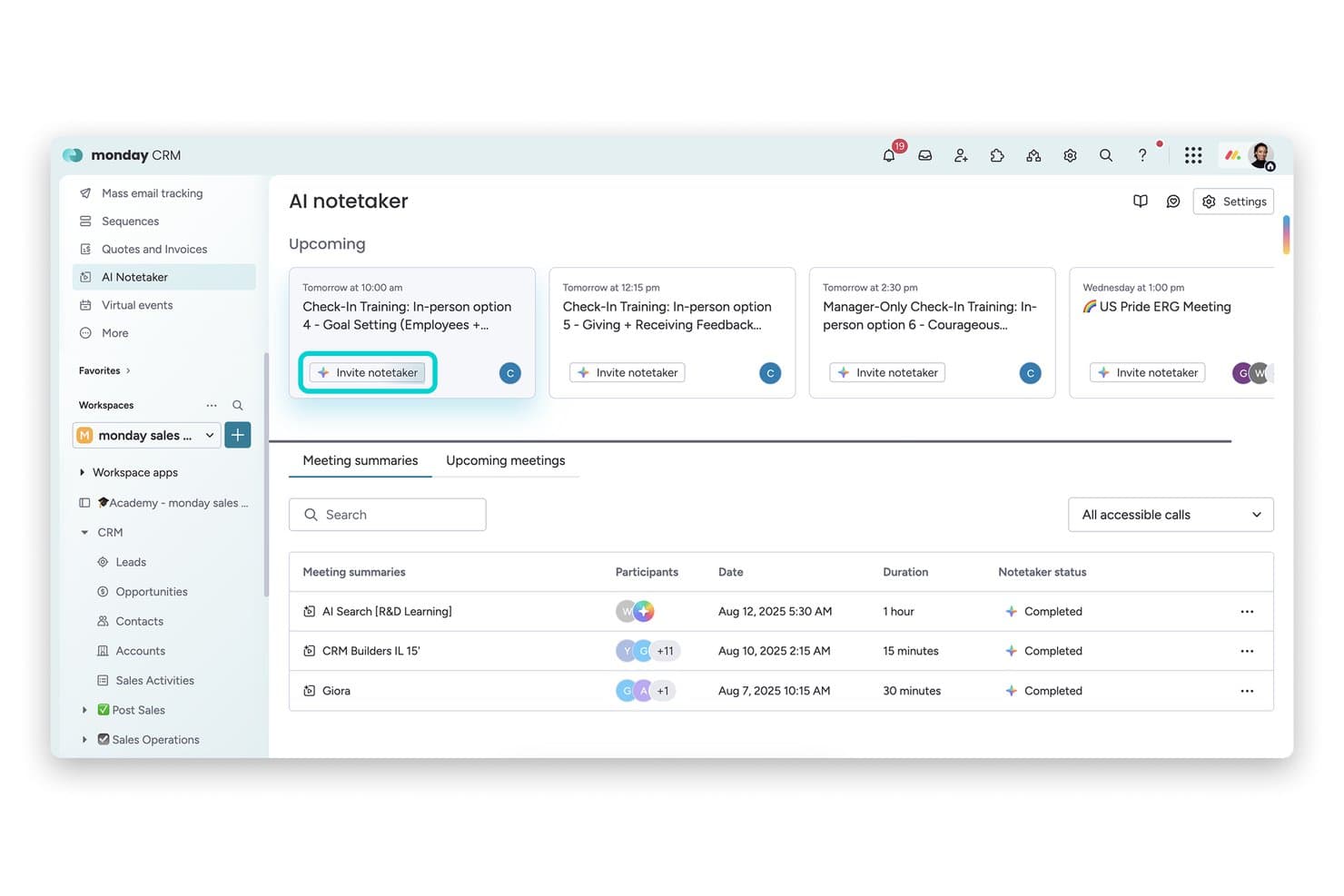
monday AI Workspace offers an AI Notetaker feature that displays upcoming meetings. monday AI Workspace is a work management platform with a built-in AI meeting assistant that transcribes calls on Zoom, Teams, and Google Meet, generates summaries, and converts meeting action items directly into board tasks.
Who Is monday AI Workspace Best For?
It's a strong fit for project-driven teams that already run their work inside monday.com and want meeting action items to land directly in their boards.
Why I Picked monday AI Workspace
monday AI Workspace earns its spot on my shortlist because no other meeting assistant connects conversation to tracked work as directly. When AI Notetaker captures action items from a call, I can push them straight to any monday board as subitems in just a few clicks. I also like that the bot auto-joins scheduled meetings two minutes early, so nothing gets missed before the conversation even starts.
monday AI Workspace Key Features
- AI-powered meeting transcriptions: Transcribes Zoom, Teams, and Google Meet calls with speaker attribution in real time.
- AI-generated meeting summaries: Creates structured overviews of meeting content using built-in AI tools.
- Integrated board automations: Lets you automate workflow actions based on meeting outputs or changes to items.
- Multi-platform workspace templates: Provides customizable templates for different meeting and task types within the platform.
monday AI Workspace Integrations
monday AI Workspace offers over 200 native integrations, including Zoom, Microsoft Teams, Google Meet, Google Workspace, Slack, Salesforce, and Outlook. It also supports Zapier and provides an API for custom integrations.
Pros and Cons
Pros:
- AI-generated summaries available within workspace boards
- Auto-joins meetings and transcribes with speaker labels
- Syncs meeting tasks to monday boards instantly
Cons:
- Lacks conversation analytics or sentiment tracking
- No interview or HR-specific summary templates
Learn more about monday AI Workspace: Best for team feedback
- Free plan available
- From $7/user/month (billed annually)
Visit WebsiteCustomer Rating:4.7/5
Fellow is a meeting tool that helps teams run structured meetings and share feedback. Fellow earns a spot here because it's built for feedback-driven cultures, not just meeting notes. Its feedback features tie in directly with AI meeting summaries, so teams can capture decisions and peer input right as they're made. I like that you can request feedback in context and pull insights into one place, which makes follow-ups much more actionable.
Fellow’s Best For
- Teams prioritizing feedback and action items from meetings
- Managers who want to connect meetings directly to performance reviews
Fellow’s Not Great For
- Those needing detailed automated transcriptions or voice-based AI actions
- Teams seeking a pure scheduling or calendar assistant
What Sets Fellow Apart
Fellow stands out by making feedback and meeting follow-up a central part of the workflow, not an afterthought. Unlike tools like Otter.ai that focus mainly on recording and transcribing, Fellow expects you to start and end meetings with defined outcomes and actionable feedback. This works best when you want meeting notes to connect directly to growth conversations and performance reviews.
Tradeoffs with Fellow
Fellow optimizes for feedback and meeting outcomes, but that emphasis means you lose out on full voice transcription and some AI-driven automation that other meeting assistants provide.
Pros and Cons
Pros:
- Meeting analytics with talk-time data
- Built-in team feedback and action tracking
- Collaborative agendas for structured meetings
Cons:
- Setup needed for workflow automation
- Limited offline functionality
Learn more about Fellow: Best for meeting insights
- 14-day free trial + free demo available
- From $19/user/month (billed annually)
Visit WebsiteCustomer Rating:4.6/5
Avoma is an AI tool that transcribes meetings and gives insights to improve productivity. Avoma makes my shortlist because it goes beyond basic transcription with meeting intelligence I haven't seen elsewhere. I recommend Avoma when you want to capture exact action items, sentiment, and speaker insights you can actually use after the call. What I like is how quickly teams can search and review specific topics or trends from recorded meetings—nothing gets lost in the shuffle.
Avoma’s Best For
- Sales, customer success, and recruiting teams needing meeting insights
- Teams that want searchable conversation records and sentiment analysis
Avoma’s Not Great For
- Organizations with strict data residency or privacy requirements
- Those prioritizing real-time meeting collaboration over post-call analysis
What sets Avoma apart
Avoma organizes meeting information around searchable highlights, action items, and topics so you don’t lose insights in lengthy call recordings. It expects you to reference conversations later, not just during live meetings. Unlike Google Meet’s built-in summaries or tools like Otter, Avoma gives you event-based navigation and speaker insights that make finding meaning fast, especially for teams reviewing high-stakes customer calls.
Tradeoffs with Avoma
Avoma optimizes for post-meeting analysis and insights, but that means you give up real-time editing and collaboration during meetings. Teams expecting dynamic in-call whiteboarding or simultaneous note-taking often still use a second tool.
Pros and Cons
Pros:
- Offers real-time transcription
- Includes AI call scoring and topic tracking
- Provides detailed meeting analytics
Cons:
- Requires internet connection
- Advanced analytics require paid add-ons
Learn more about Avoma: Best for project scheduling
- Free trial available
- From $19/seat/month (billed annually)
Visit WebsiteCustomer Rating:4.2/5
Motion is a project management tool that automates scheduling and task management for teams. Motion earns its spot here because it uniquely blends project scheduling with smart AI to automate meeting planning. When I tested its AI calendar assistant, I saw it dynamically rearrange tasks and meetings based on shifting project priorities.
What I appreciate most is how Motion keeps calendars, deadlines, and meetings in sync for teams that juggle frequent project-based meetings. It saves time by automatically finding and booking the best meeting slots around existing project work.
Motion’s Best For
- Teams with frequent project-based meetings needing dynamic scheduling
- Managers who want AI to automate calendar updates
Motion’s Not Great For
- Simple teams without shifting meeting priorities
- Organizations expecting detailed meeting transcripts and recording
What sets Motion apart
Motion stands out by using AI to constantly reorganize meetings and tasks in real time. Unlike traditional AI assistants that just summarize or record, Motion expects you to let the tool actively manage calendar conflicts and shifting priorities as project needs change. In practice, I see this working best when schedules are unpredictable and meetings compete with project deadlines.
Tradeoffs with Motion
Motion optimizes for adapting to shifting schedules, but you give up advanced meeting note-taking and recording. This means teams who need detailed meeting documentation should look elsewhere.
Pros and Cons
Pros:
- Supports multiple meeting platforms
- High transcription accuracy
- Converts notes to tasks
Cons:
- Limited customization in templates
- Limited offline functionality
Learn more about Motion: Best for task automation
- Free plan + free demo available
- From $10/user/month (billed annually)
Visit WebsiteCustomer Rating:4.3/5
Fireflies.ai is an AI meeting assistant that transcribes talks and organizes tasks for teams. Fireflies.ai earns a spot on my list because its AI meeting assistant doesn’t just transcribe, but actively automates meeting outcomes. I like that you can instantly highlight action items and set automated follow-ups directly from transcripts, so nothing falls through the cracks after a call. This works best when your team is overwhelmed by manual note-taking or repetitive post-meeting tasks—Fireflies.ai turns those into click-and-go actions that save you real time.
Fireflies.ai’s Best For
- Teams wanting automated meeting summaries and follow-ups
- Managers who track action items from recurring calls
Fireflies.ai’s Not Great For
- Organizations needing highly secure, on-premise storage
- Teams with complex privacy or sensitive compliance demands
What sets Fireflies.ai apart
Fireflies.ai expects your meetings to generate actionable outcomes, not just notes. Unlike Otter.ai, which mainly focuses on transcription and data capture, Fireflies.ai leans into automating what happens after the call. In practice, this suits managers and project leads who want action items automatically surfaced and followed up, instead of moving tasks around after every meeting.
Tradeoffs with Fireflies.ai
Fireflies.ai optimizes for automation and fast follow-ups, but you lose some manual control over privacy and storage, which can be a dealbreaker if your process requires on-premise recording or tight data governance.
Pros and Cons
Pros:
- AI Apps for follow-up tasks
- Supports many recording workflows
- Automated action item creation
Cons:
- Can slow down with long recordings
- Accuracy varies with audio quality
Learn more about Fireflies.ai: Best for real-time transcription
- Free plan available
- From $8.33/user/month (billed annually)

Otter.ai is an AI tool that transcribes meetings and makes summaries for sales, education, and media professionals. Otter earns a spot on my list because its live transcription keeps up with fast-paced meetings without missing speaker changes or key details. This is the first tool I go to when real-time capture is essential, especially in environments where you can't afford to pause for notes or review recordings later.
What I appreciate is how it instantly generates searchable, shareable transcripts and highlights action items live as the conversation unfolds. If you're in meetings that move quickly or handle lots of speakers, Otter handles the workload reliably and gives you a full, accurate record right away.
Otter’s Best For
- Teams needing live, searchable meeting transcriptions
- Fast-paced meetings with multiple, quickly changing speakers
Otter’s Not Great For
- Sensitive conversations needing advanced privacy controls
- Teams requiring meeting summaries or advanced analytics
What sets Otter apart
Otter focuses on capturing conversations as they happen, making live transcription its core workflow. Instead of structured collaboration like you see with Google Workspace or meeting summaries like Fireflies, it expects teams to use transcripts as a single source of truth, often in high-velocity or multi-speaker meetings.
You get transcripts you can search and reference almost immediately, which helps when topics move fast.
Tradeoffs with Otter
Otter optimizes for speed and live accuracy, but you give up deep built-in meeting insights or summaries, so teams spend more time digging through transcripts for decisions or action items.
Pros and Cons
Pros:
- Syncs notes to major platforms
- Action item identification
- Voice command functionality
Cons:
- May struggle with accents
- Audio transcription may require some manual review
Learn more about Otter: Best for noise cancellation
- Free plan + trial available
- From $8/user/month (billed annually)

Krisp is a noise-canceling app that helps remote workers and teams have clear, distraction-free calls. Krisp makes the cut for best AI meeting assistant because it uses advanced voice AI to remove background noise in real time, something I haven’t seen matched by other meeting tools. I usually recommend Krisp when teams or individuals work from noisy environments and can’t risk distractions bleeding into meetings.
What I really like is how Krisp’s noise cancellation can be toggled on for both input and output, so you never have to worry about what’s happening in your space or the other person’s. In practice, I’ve found meetings are just less stressful with it on, especially with kids, pets, or city noise nearby.
Krisp’s Best For
- Remote workers in noisy environments needing distraction-free calls
- Teams that join meetings from shared or unpredictable workspaces
Krisp’s Not Great For
- Users who want AI-driven note-taking and meeting summaries
- Teams that require built-in scheduling or collaboration tools
What Sets Krisp Apart
Krisp is focused on making remote meetings quieter by blocking background sounds before they reach the call. It assumes you value having a clean audio channel over capturing and processing meeting content. In practice, I’ve noticed this suits people who work from busy or unpredictable spaces, rather than teams who want deep collaboration tools bundled in. Unlike Otter.ai, Krisp doesn’t emphasize transcripts or searchable notes.
Tradeoffs with Krisp
Krisp optimizes for real-time audio clarity, but you sacrifice meeting notes and searchable content, so you’ll need a second tool if note capture is essential.
Pros and Cons
Pros:
- Minimal impact on system resources
- Works across multiple platforms
- Improves call clarity
Cons:
- Performance varies with device setup
- Limited features beyond audio processing
Learn more about Krisp:

Read.ai helps teams analyze meetings and improve communication. Read AI is on my shortlist because it gives meeting analytics you can act on, not just raw notes or transcripts. When I tested it, I found the automated sentiment and talk-time breakdowns actually change how teams review engagement and speaking balance. I like how you can spot when meetings drift off track, then use the analytics to coach teams and improve future sessions.
Read AI's Best For
- Teams that want actionable meeting analytics and insights
- Organizations focused on improving meeting engagement and participation
Read AI's Not Great For
- Anyone looking for full-featured AI note-taking or summaries
- Teams that rarely analyze or follow up on meeting data
What sets Read AI apart
Read AI takes a meeting analytics approach instead of just capturing transcripts or action items like Otter or Fireflies. It assumes you want to understand how meetings actually run, not just what gets said. In practice, I see the value when you want to fix common issues like team members dominating the agenda or overall disengagement. Unlike note-taking tools, it shows you where your meeting structure can improve.
Tradeoffs with Read AI
Read AI optimizes for analytics and meeting diagnostics, so you give up strong AI note-taking or summary-focused features. That means you may still need another tool to capture action items or provide detailed written recaps.
Pros and Cons
Pros:
- AI search across meetings and messages
- Automatic recaps and insights
- Engagement and participation analytics
Cons:
- Advanced features only on paid plans
- Setup may require onboarding
Learn more about Read AI:

MeetGeek is an AI tool that takes and organizes meeting notes. Meetgeek.ai earns a spot on my shortlist for its focus on automatic, structured meeting note-taking that stays accurate as conversations evolve. This isn’t just about live transcription—Meetgeek.ai generates shareable summaries, highlights decisions, and even picks up on action items as people talk.
What I like most is how you can search, review, and revisit notes instantly, which solves the "what did we agree on?" headache right away. It fits well when you need reliable, searchable meeting records for recurring team syncs and client calls.
Meetgeek.ai’s Best For
- Teams that need accurate, automatic meeting notes
- Organizations tracking decisions and action items across calls
Meetgeek.ai’s Not Great For
- Teams needing advanced video conferencing or collaboration features
- Groups that want full meeting management or scheduling
What sets Meetgeek.ai apart
Meetgeek.ai flips the script on meeting documentation by actively capturing and structuring key moments while conversations are happening. Unlike Otter.ai, which focuses mainly on transcription, Meetgeek.ai organizes highlights and action items in real time so you can reference outcomes quickly without trawling through full transcripts.
I see this working best when meetings move fast and decisions need to be recalled without extra manual cleanup.
Tradeoffs with Meetgeek.ai
Meetgeek.ai optimizes for automation and clarity in note capture, but that comes at the cost of broader meeting management features. If you want one platform for video calls, scheduling, and deep collaboration, you’ll need to pair this with another tool.
Pros and Cons
Pros:
- Browser-based recording option
- Automatic call-type summaries
- Detailed and searchable transcripts
Cons:
- Limited offline functionality
- Limited customization options
Learn more about Meetgeek.ai:

Sembly is an AI tool that transcribes meetings and gives simple summaries. Sembly earns a spot on my list for how well it turns conversations into clear, smart summaries you can actually use. When meeting notes need to be accurate and shareable—no more messy transcriptions or missed details—I’ve found Sembly’s AI-generated summaries catch people up fast and with important context. What I appreciate most is how action items, speaker highlights, and key decisions are neatly organized so teams can follow up without chasing down recordings.
Sembly’s Best For
- Teams needing fast, actionable meeting summaries
- Organizations handling a high volume of virtual meetings
Sembly’s Not Great For
- Users needing in-depth voice analytics or sentiment analysis
- Teams preferring manual note-taking or highly formatted outputs
What sets Sembly apart
Sembly approaches meetings by automatically breaking conversations into usable summaries and turning long calls into short, action-focused recaps. Unlike tools like Otter.ai, which mostly emphasize transcription accuracy, Sembly highlights context, decisions, and next steps in a concise, digestible format. This works well if you want clarity without sifting through long transcripts.
Tradeoffs with Sembly
Sembly optimizes for quick, summary-focused outputs, but this means you lose detailed capturing of every spoken nuance. In practice, teams that need full verbatim transcripts or extensive analytics may feel limited.
Pros and Cons
Pros:
- Saves time on meeting reviews
- Generates actionable insights
- Offers keyword search functionality
Cons:
- Complexity in advanced features
- Limited customization options
Learn more about Sembly:
Outros assistentes de reuniões com IA
Eis algumas opções adicionais de assistentes de reuniões com IA que não entraram na minha lista, mas que ainda assim vale a pena conhecer:
- 11JamieBest for bot-free note-taking
- 12Board IntelligenceBest with AI-driven board governance tools
- 13CluelyBest for team collaboration
- 14Meeting.aiBest for agenda management
- 15GongBest for sales team insights
- 16TactiqBest for real-time captions
- 17NottaBest for language translation
- 18BubblesBest for asynchronous collaboration
- 19tl;dvBest for timestamped meeting highlights
- 20Zoom AI CompanionBest for integrated video conferencing
How I Evaluate AI Meeting Assistants
Any tool can join a call and hit record, but I look for AI that gives HR teams something back—like walking out of a candidate debrief with a ready-made summary instead of scattered notes. I evaluate each tool on two levels: the core functionality it needs to qualify and the differentiating factors that set one option apart from the rest.
Core Functionality (Table Stakes For This List)
When I'm selecting tools for my list, I rank each one on a scale from 0 (does not offer the functionality) to 5 (excels in this area) for each core functionality listed below. Then, I calculate the tool's total score into a percentage. Each tool needs to achieve a minimum total score of 65% to be considered for inclusion.
- Automated Meeting Transcription: I evaluate transcript accuracy, speaker attribution, and language support—especially in fast-paced panel interviews where multiple voices overlap.
- AI-Generated Summaries: Good summaries should go beyond raw bullet points. I look for structured recaps tailored to the meeting type, like a candidate interview debrief or 1:1 check-in.
- Action Item Extraction: I check whether the tool picks up on next steps organically from conversation, like a hiring manager agreeing to send a take-home assignment by Friday.
- Video Conferencing Integrations: Each tool should connect natively with Zoom, Microsoft Teams, and Google Meet at a minimum, with smooth calendar-based auto-join.
- Searchable Meeting Repository: I look for organized storage where an HR team can search past transcripts by speaker, keyword, or date—useful when revisiting notes across a full interview loop.
- Conversation Intelligence & Analytics: Metrics like talk-time ratios, sentiment tracking, and topic trends help HR teams spot patterns across recurring meetings such as stay interviews or skip-levels.
Once I have a list of tools that meet this criteria, I consider what sets each platform apart.
Differentiating Factors (What Sets Vendors Apart)
Here's how I compare and contrast different vendors:
Standout Features
ATS and HRIS integrations matter a lot here. I look for tools that push interview notes or meeting summaries directly into platforms like Greenhouse or Workday, saving recruiters from manual copy-paste after every call. Bias detection and PII redaction are equally valuable—especially when documenting employee relations conversations where sensitive details need to stay protected. I also check for AI-generated interview scorecards that help hiring panels evaluate candidates consistently across a full loop.
Beyond Features
Compliance and data privacy top my list. HR meetings often touch sensitive topics like terminations or accommodation requests, so I check for SOC 2 Type II certification, configurable data residency, and consent management workflows. Security goes hand-in-hand here—role-based access controls matter when an employee relations specialist's recordings shouldn't be visible to the broader team. I also evaluate pricing structures to understand whether per-seat models work for a small recruiting team or if volume-based enterprise plans better fit an organization-wide rollout.
Como escolher um assistente de reuniões com IA
É fácil ficar sobrecarregado com listas extensas de funcionalidades e estruturas de preços complexas. Para o ajudar a manter-se concentrado enquanto conduz o seu processo específico de seleção de software, eis uma lista de verificação dos fatores a ter em conta:
| Fator | O que considerar |
| Escalabilidade | A ferramenta pode crescer com a sua equipa? Considere a forma como lida com um aumento do número de utilizadores ou reuniões sem problemas de desempenho. Procure planos flexíveis que acomodem o crescimento. |
| Integrações | É compatível com as ferramentas que já utiliza? Verifique se se integra com as suas plataformas atuais, como o Zoom, o Slack ou o Google Calendar, para evitar interrupções no fluxo de trabalho. |
| Personalização | Pode adaptar a ferramenta às suas necessidades? Procure opções para ajustar definições, modelos ou fluxos de trabalho que estejam alinhados com os processos da sua equipa. |
| Facilidade de utilização | É fácil de utilizar? Avalie a interface e a navegação. Uma ferramenta intuitiva reduz o tempo de aprendizagem e os obstáculos à adoção por parte da sua equipa. |
| Implementação e integração inicial | É fácil começar a utilizá-la? Considere os recursos e o suporte disponibilizados durante a configuração. Procure materiais de formação ou visitas guiadas ao produto para acelerar a integração inicial. |
| Custo | É compatível com o seu orçamento? Compare as estruturas de preços e procure custos ocultos. Certifique-se de que o custo está alinhado com o valor que proporciona à sua equipa. |
| Medidas de segurança | Existem proteções de dados? Verifique se a ferramenta segue as normas do setor relativas à encriptação de dados e à conformidade, para proteger informações sensíveis das reuniões. |
| Disponibilidade do suporte | É possível obter ajuda quando necessário? Verifique a disponibilidade de canais de suporte, como chat, e-mail ou telefone, e certifique-se de que correspondem às necessidades da sua equipa. |
O que é um assistente de reuniões com IA?
Um assistente de reuniões com IA é uma ferramenta concebida para ajudar a automatizar e melhorar a gestão de reuniões. Estas ferramentas são habitualmente utilizadas por profissionais de áreas como a gestão de projetos, as vendas e os recursos humanos, proporcionando valor através de uma maior eficiência e organização.
Funcionalidades como a transcrição em tempo real, a tomada automática de notas e a atribuição de tarefas ajudam os utilizadores a registar os detalhes das reuniões com precisão e a garantir que as ações de acompanhamento são claras. De um modo geral, estas ferramentas poupam tempo e reduzem a carga administrativa associada à gestão de reuniões.
Funcionalidades de um assistente de reuniões com IA
Ao selecionar um assistente de reuniões com IA, esteja atento às seguintes funcionalidades principais:
- Transcrição em tempo real: Regista as palavras proferidas durante as reuniões, permitindo uma documentação precisa e imediata.
- Tomada automática de notas: Gera notas detalhadas automaticamente, poupando tempo e garantindo que nada é esquecido.
- Resumos de reuniões: Fornece sínteses concisas das conversas, ajudando os utilizadores a compreender rapidamente os pontos principais.
- Atribuição de tarefas: Cria e atribui automaticamente tarefas a partir das conversas das reuniões, garantindo que as ações de acompanhamento são claras.
- Etiquetagem por palavras-chave: Permite aos utilizadores etiquetar tópicos importantes para facilitar a consulta e a pesquisa.
- Ativação por comando de voz: Permite controlar a ferramenta sem utilizar as mãos, melhorando a capacidade de realizar várias tarefas durante as reuniões.
- Tradução de idiomas: Dá suporte a equipas multilingues ao traduzir reuniões em tempo real.
- Análise de sentimentos: Avalia o tom emocional das conversas, fornecendo informações sobre o envolvimento dos participantes.
- Capacidades de integração: Liga-se a ferramentas existentes, como o Zoom, o Slack e o Google Calendar, para manter a continuidade do fluxo de trabalho.
- Medidas de segurança: Protege dados sensíveis através de encriptação e da conformidade com as normas do setor.
Vantagens de um assistente de reuniões com IA
A implementação de um assistente de reuniões com IA proporciona várias vantagens à sua equipa e à sua empresa. Eis algumas das que pode esperar:
- Poupança de tempo: A tomada automática de notas e a atribuição de tarefas reduzem o tempo despendido em tarefas administrativas, permitindo que a sua equipa se concentre em trabalho mais importante.
- Maior precisão: A transcrição em tempo real garante que os detalhes das reuniões são registados com precisão, minimizando mal-entendidos.
- Melhor colaboração: As capacidades de integração permitem uma ligação simples a ferramentas como o Zoom e o Slack, mantendo intacto o fluxo de trabalho da sua equipa.
- Melhor organização: A etiquetagem por palavras-chave e os resumos de reuniões ajudam a manter a informação organizada e facilmente acessível, melhorando a produtividade.
- Maior acessibilidade: As funcionalidades de tradução de idiomas dão suporte a equipas multilingues, tornando as reuniões inclusivas para todos os participantes.
- Informações acionáveis: A análise de sentimentos e a análise de reuniões fornecem informações valiosas sobre a dinâmica da equipa e os níveis de envolvimento.
Custos e preços de um assistente de reuniões com IA
A seleção de um assistente de reuniões com IA exige uma compreensão dos vários modelos de preços e planos disponíveis. Os custos variam consoante as funcionalidades, o tamanho da equipa, os complementos e outros fatores. A tabela abaixo resume os planos comuns, os respetivos preços médios e as funcionalidades normalmente incluídas nas soluções de assistentes de reuniões com IA:
Tabela de comparação de planos para assistente de reuniões com IA
| Tipo de plano | Preço médio | Funcionalidades comuns |
| Plano gratuito | $0 | Transcrição básica, minutos de reunião limitados e integrações essenciais. |
| Plano pessoal | $7-$19.99/utilizador/mês | Transcrição ilimitada, resumos de reuniões e integrações básicas. |
| Plano empresarial | $29-$50/utilizador/mês | Análises avançadas, atribuição de tarefas e integrações melhoradas. |
| Plano empresarial de grande dimensão | $60-$100/utilizador/mês | Funcionalidades personalizáveis, assistência dedicada e medidas de segurança premium. |
Perguntas frequentes sobre assistentes de reuniões com IA
Eis algumas respostas a perguntas comuns sobre assistentes de reuniões com IA:
A IA pode tirar notas durante uma reunião presencial?
Sim, muitos assistentes de reuniões com IA podem tirar notas durante reuniões presenciais. Utilizam frequentemente aplicações móveis para captar o áudio e transcrevê-lo para notas. Esta funcionalidade pode ser útil em discussões longas, nas quais a tomada de notas manual pode deixar escapar detalhes importantes. Certifique-se de que a aplicação é compatível com a utilização presencial.
Quais são os riscos dos assistentes de reuniões com IA?
A utilização de assistentes de reuniões com IA pode apresentar riscos, como inibir a conversa aberta. Alguns participantes podem sentir-se desconfortáveis ao saberem que as suas palavras estão a ser transcritas ou gravadas. Considere estabelecer orientações sobre como e quando utilizar estas ferramentas, de modo a manter um ambiente confortável para todos os participantes.
É seguro utilizar um assistente de IA?
Os assistentes de IA podem suscitar preocupações de segurança, sobretudo no que diz respeito à privacidade. Muitas vezes, necessitam de acesso a informações sensíveis, como e-mails e calendários. Certifique-se de que a ferramenta escolhida cumpre os regulamentos de privacidade e dispõe de medidas de segurança robustas para proteger os seus dados.
Como lidam os assistentes de reuniões com IA com vários oradores?
A maioria dos assistentes de reuniões com IA consegue identificar e distinguir vários oradores utilizando algoritmos avançados. Esta funcionalidade garante que as transcrições são precisas e que os contributos de cada participante são corretamente atribuídos. Antes de escolher uma ferramenta, verifique a sua precisão na identificação dos oradores.
Os assistentes de reuniões com IA podem integrar-se com outras ferramentas?
Sim, muitos assistentes de reuniões com IA disponibilizam integrações com plataformas como o Zoom, o Slack e o Google Calendar. Estas integrações ajudam a manter fluxos de trabalho contínuos, sincronizando os dados das reuniões entre as suas ferramentas. Verifique a compatibilidade do assistente de IA preferido com o conjunto de aplicações que já utiliza.
Os assistentes de reuniões com IA oferecem tradução de idiomas?
Alguns assistentes de reuniões com IA disponibilizam tradução de idiomas em tempo real, o que é benéfico para equipas multilingues. Esta funcionalidade pode melhorar a comunicação ao traduzir as palavras proferidas para diferentes idiomas durante as reuniões. Verifique os idiomas suportados pela ferramenta para garantir que satisfaz as necessidades da sua equipa.