O melhor software de intranet ajuda as organizações a criar um local de trabalho digital centralizado que mantém as equipas alinhadas, envolvidas e informadas.
Se ainda depende de folhas de cálculo complicadas, longas cadeias de e-mails ou plataformas desatualizadas para gerir a comunicação interna, a partilha de documentos e a cultura da empresa, é provável que sinta a pressão para encontrar uma solução mais moderna e simplificada.
Neste guia, partilharei as minhas principais escolhas de plataformas de intranet que simplificam a comunicação, facilitam a localização de recursos e melhoram a colaboração entre departamentos — tudo com base em investigação direta, anos a analisar o panorama tecnológico dos recursos humanos e nove anos de experiência direta em recursos humanos, incluindo a gestão de documentos da intranet.
Porque pode confiar nas nossas recomendações de software
6,700+
Reviews
20
Industry experts
16+
Evaluation factors
14
Years reviewing software
A nossa equipa testa e analisa software desde 2012. Como especialistas em RH, sabemos o quão difícil — e importante — é escolher o software certo.
Para este guia, avaliámos as ferramentas através de testes práticos e pesquisa independente, pontuando-as de acordo com os nossos critérios de seleção. Recorremos também a contributos de líderes de opinião do setor e de especialistas em RH no ativo.
As nossas análises refletem o juízo da nossa equipa editorial, e não um discurso de vendas.
Revisores especialistas:
- Phil GrayCOO
 Kim BehnkeHR Tech Editor & Analyst
 Josh BarkerPeople Ops Manager

Tabela de comparação de soluções de software de intranet
Esta tabela de comparação resume os detalhes de preços, período experimental e demonstração das minhas principais escolhas de software de intranet.
Sorted by: Default
| Tool | Starting Price | Website | |
|---|---|---|---|
Best AI-native employee experience platform | 4.7 out of 5 | Pricing upon request Free demo available | Website |
Best for multi-channel comms across all worker types | 4.6 out of 5 | Pricing upon request Free demo available | Website |
Best for a dynamic employee directory and efficient document management | 4.4 out of 5 | $2.77/user/month 30-day free trial + free demo available | Website |
Best for simple workspace management | 4.5 out of 5 | Pricing upon request Free demo available | Website |
Best for content management features and customizable team Spaces | 4.4 out of 5 | $10/month Free demo available | Website |
Best for mobile intranet for frontline teams | 4.6 out of 5 | $35/month Free plan + 14-day trial + demo available | Website |
Best for people-first approach | 4.8 out of 5 | $1.50/user/month Free trial available | Website |
Best for personalized content delivery | 4.5 out of 5 | Pricing upon request Free demo available | Website |
Best social intranet with collaborative Spaces for deep employee engagement | 4.8 out of 5 | Pricing upon request Free demo available | Website |
Best mobile-first intranet solution for frontline or deskless workforces | 4.7 out of 5 | $3.75/user/month 14-day free trial + free demo available | Website |


Avaliações do melhor software de intranet
Eis uma breve descrição de cada solução de software de intranet para colaboradores, destacando o melhor caso de utilização de cada ferramenta, algumas funcionalidades relevantes e capturas de ecrã que lhe permitem conhecer a interface do utilizador.
 Best AI-native employee experience platform
- Free demo available
- Pricing upon request
Visit WebsiteCustomer Rating:4.7/5
Staffbase platform displayed across mobile and desktop, highlighting employee communications, tasks, and AI assistant support in one interface. Staffbase is an intranet platform that connects deskless, frontline, and office teams through centralized communication, mobile access, and personalized employee experiences.
Who Is Staffbase Best For?
Staffbase is a strong fit for mid-size to enterprise organizations with large, distributed workforces that need a unified channel for internal communications.
Why I Picked Staffbase
I chose Staffbase as a top pick because AI is deeply integrated into the content creation and communication workflow. I particularly like the AI writing assistant, which helps my team draft, translate, and personalize internal communications without switching tools or spending time on manual editing. Staffbase also uses AI to surface relevant content to each employee based on their role, location, and language, so frontline workers aren't buried under updates that don't apply to them.
Staffbase Key Features
- Employee journeys: Automatically surface personalized content to employees based on milestones like onboarding, role changes, and other key moments.
- Pulse surveys: Collect employee feedback through quick pulse surveys or in-depth questionnaires directly within the platform.
- Live town halls: Broadcast real-time, interactive video to every employee screen, including frontline and deskless workers.
- Employee directory: Maintain customizable user profiles with contact details and other information to keep the workforce connected.
Staffbase Integrations
Integrations include Microsoft 365, Cornerstone, ServiceNow, Google Workspace, SAP, Workday, BambooHR, Salesforce, Confluence, and Box.
Pros and Cons
Pros:
- Provides engagement analytics across multiple channels
- Enables communication across frontline and office teams
- Supports AI-assisted content governance and targeting
Cons:
- Pricing not publicly disclosed
- Primarily designed for large organizations and enterprises
Learn more about Staffbase: 2Best for multi-channel comms across all worker types
Oak
- Free demo available
- Pricing upon request
Visit WebsiteCustomer Rating:4.6/5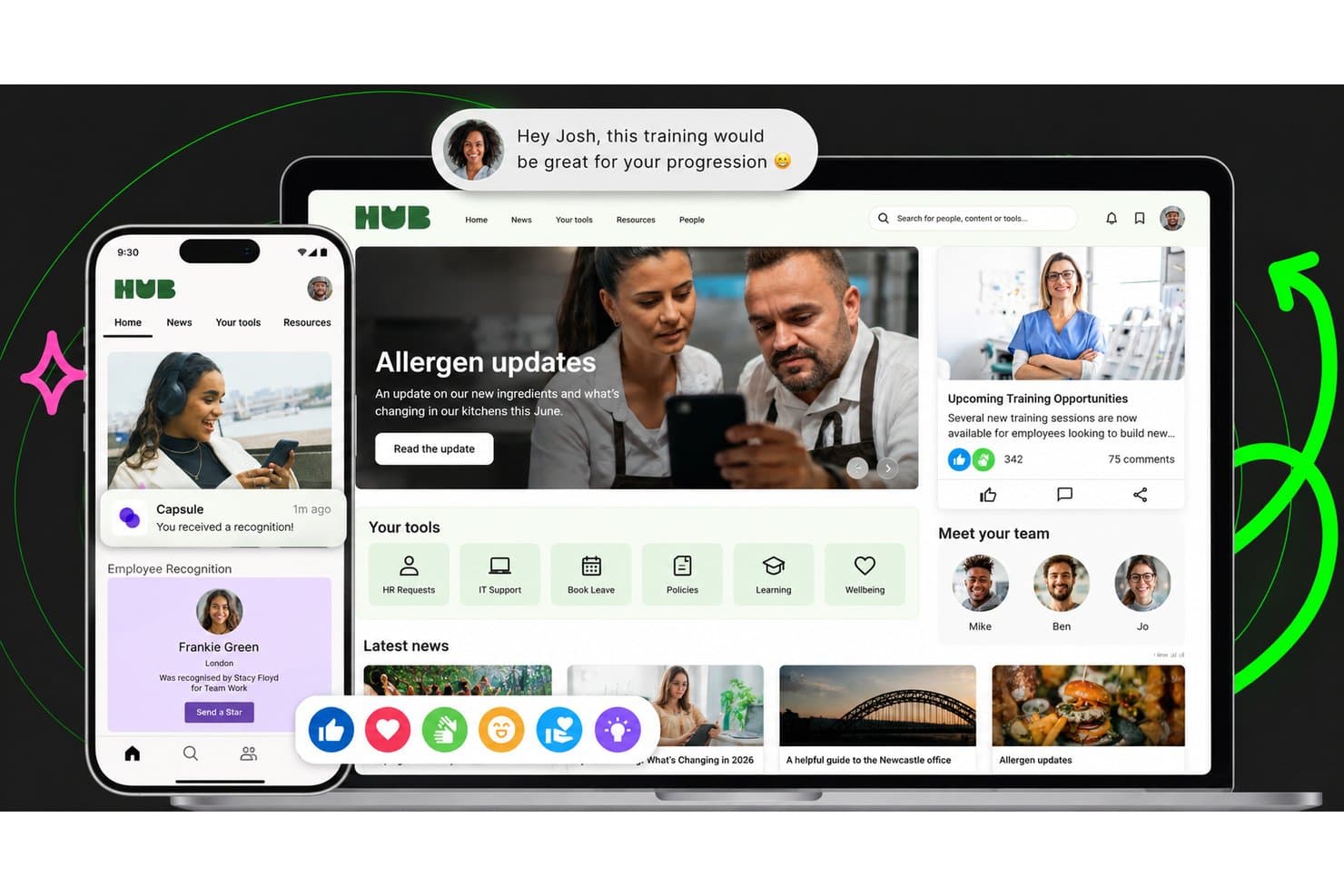
Oak centralizes news, tools, and team recognition in one intranet hub. Oak Engage is an all-in-one intranet platform that brings together targeted communications, an employee directory, AI-powered search, mobile access, digital signage, and workplace messaging for desk-based and frontline teams.
Who Is Oak Best For?
Oak Engage suits organizations with a mix of desk-based and frontline workers that need to reach every employee through the right channel, whether that's mobile, digital signage, SMS, or desktop.
Why I Picked Oak
Oak Engage earns its spot on my shortlist because it's genuinely built for organizations where not everyone sits at a desk. I love how it layers communication channels so you can push the same update to a mobile app, a digital signage screen in a warehouse, or directly via SMS for workers without smartphones. Its mandatory-read tracking with automated manager alerts means critical updates don't get lost, and the location-targeted signage lets site-specific teams see content that's actually relevant to them.
Oak Key Features
- AI-powered search: Aria uses natural-language queries and intent recognition to surface answers and concise summaries from policies, documents, and connected systems.
- Employee recognition: Real-time shoutouts, awards, and celebrations can be tied to company values and shared across departments.
- Hubs and communities: Dedicated spaces for projects, social groups, and employee resource groups, each with custom layouts, feeds, and moderation controls.
- Pulse surveys and polls: Surveys and polls embed directly into the intranet homepage and content feeds to collect employee feedback within daily workflows.
Oak Engage Integrations
Oak Engage offers integrations across the Microsoft ecosystem, including Microsoft 365, Teams, SharePoint, Outlook, Power BI, and Microsoft Entra ID, plus Google Workspace, Salesforce, and SAP. Its Developer Centre provides APIs for custom integrations.
Pros and Cons
Pros:
- Location-targeted signage reaches site teams
- Mandatory-read tracking clarifies message reach
- Targeted updates reach desk and frontline teams
Cons:
- Search can feel difficult
- Permission setup can feel clunky
Learn more about Oak: Best for a dynamic employee directory and efficient document management
- 30-day free trial + free demo available
- From $2.77/user/month (billed annually)
Visit WebsiteCustomer Rating:4.4/5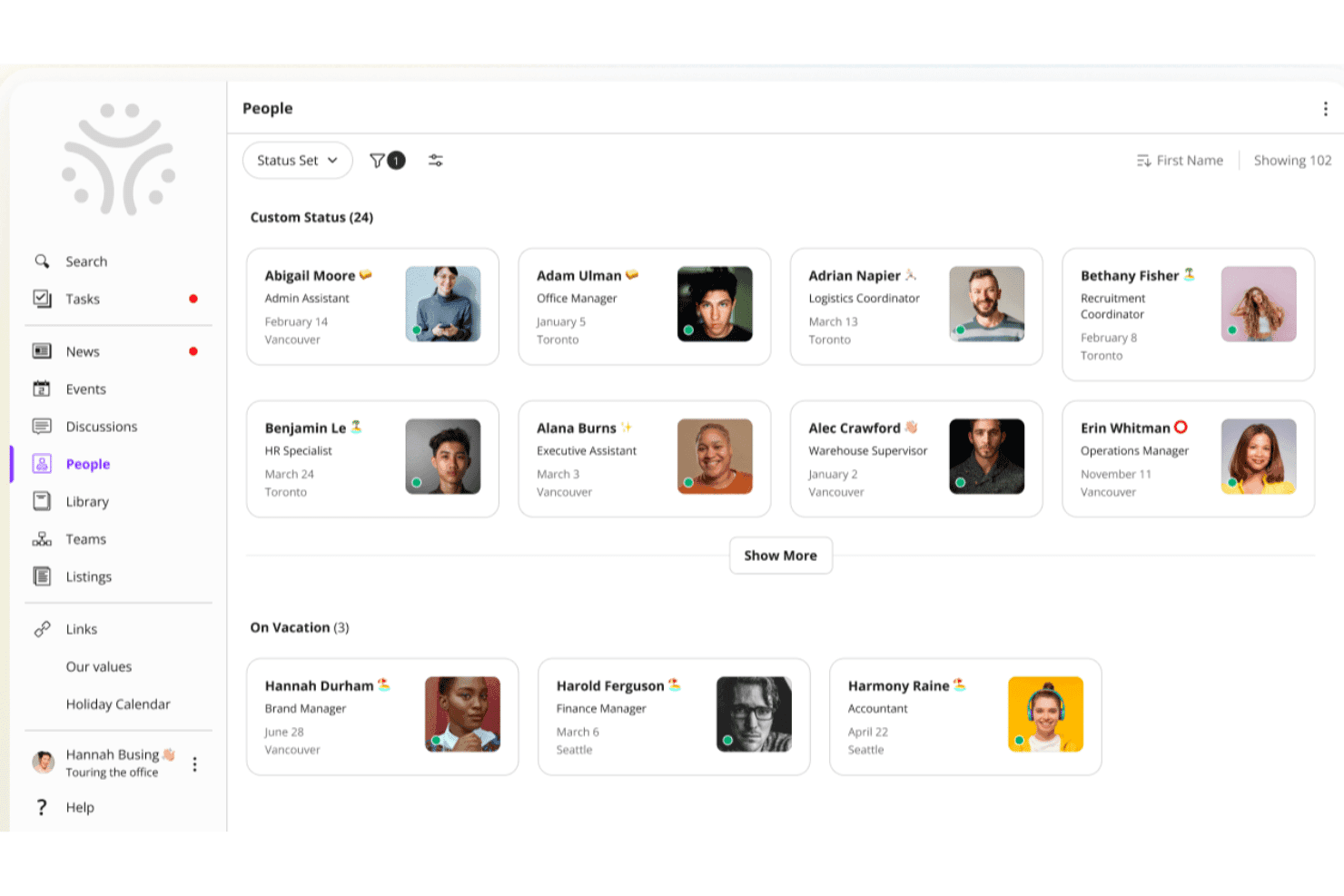
Jostle offers a People directory with employee cards showing names, roles, locations, and custom statuses. Jostle is an intranet platform designed for organizations that want to boost team connection, simplify internal communication, and make it easy for employees to find people, documents, and updates in one place.
Who Is Jostle Best For?
Jostle is a good fit for mid-sized organizations looking for a straightforward intranet that keeps employees connected without the complexity of enterprise-level platforms.
Why I Picked Jostle
Jostle earns its spot on my shortlist because of how well its People directory and Library work together as a knowledge-finding system. The People section lets employees search by role, location, department, or even a specific skill—so if I need to find someone who handles benefits compliance in a regional office, I can do that in seconds. On the document side, Jostle's Library assigns clear ownership to each volume, meaning subject matter experts manage their own files and everyone always knows which version is current. That combination of "find the right person" and "find the right document" is exactly what distributed teams need from an intranet.
Jostle Key Features
- News feed: Publish company-wide announcements and team updates that employees can react to and comment on.
- Events calendar: Create and share org-wide or team-specific events that employees can RSVP to directly in the platform.
- Shout-outs: Recognize individual employees publicly with peer-to-peer shout-outs visible across the intranet.
- Discussions: Host threaded conversations organized by topic or team to keep internal dialogue focused and searchable.
Jostle Integrations
Integrations include Google Workspace, Microsoft 365, Slack, Salesforce, Zoom, Dropbox, BambooHR, HubSpot, QuickBooks Online, and Zendesk.
Pros and Cons
Pros:
- Clear visual organizational charts
- Simplified file and document organization
- High user adoption rates
Cons:
- Limited third-party app marketplace
- Rigid layout customization options
Learn more about Jostle: 4Best for simple workspace management
Hub
- Free demo available
- Pricing upon request
Visit WebsiteCustomer Rating:4.5/5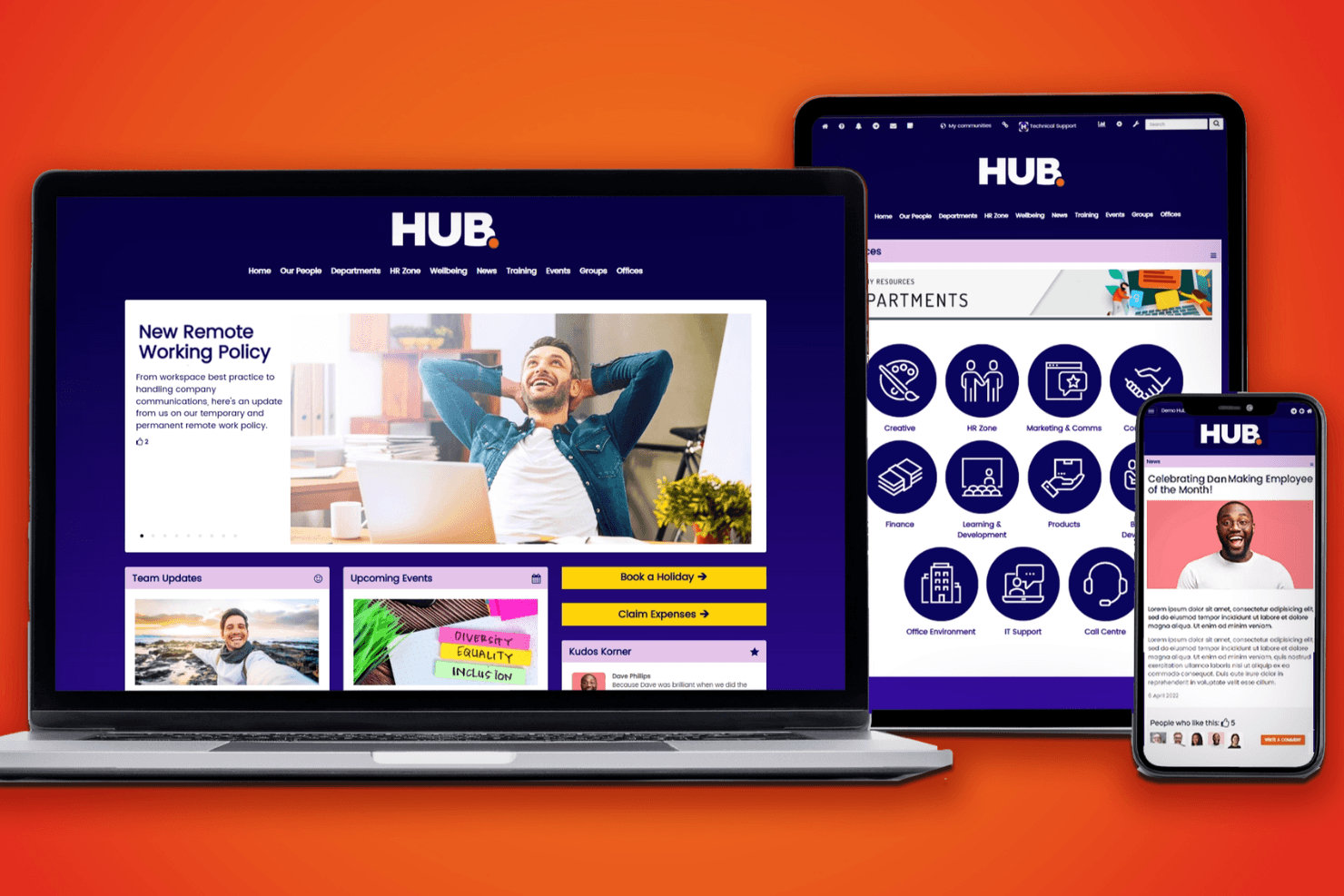
Hub's intranet software keeps your team connected, engaged, and informed across various devices. HUB is an all-in-one intranet platform that brings together internal communications, knowledge management, employee engagement, and digital workplace tools in a single, centrally managed environment.
Who Is HUB Best For?
HUB is a strong fit for HR and internal communications teams that want an all-in-one intranet they can manage and update without relying on IT.
Why I Picked HUB
I picked HUB as one of the best because it packs a genuinely complete intranet into a single, centrally managed environment that non-technical teams can run without IT support. I especially like how content ownership and approval workflows keep publishing organized at scale, with designated editors, owners, and approvers handling every draft before it goes live. The no-code content management means HR and comms teams can update pages, segment content by office or group, and track Must Read confirmations without filing a single IT ticket.
HUB Key Features
- Federated search: Searches across your HUB content and connected cloud drives—including Google Drive, SharePoint, and Box—in a single query.
- Group forums: Create public, private, or hidden spaces where teams can discuss topics, share resources, and collaborate.
- Leave and absence system: Lets employees submit leave requests and track live balances, with manager approval built into the workflow.
- People directory and org charts: A searchable employee directory with rich profiles and visual org charts showing departments and reporting lines.
HUB Integrations
HUB integrates with Microsoft 365, Google Workspace, Box, Confluence, Jira, Slack, SharePoint, Google Drive, BambooHR, and Microsoft Entra ID. It also supports SSO through Okta and OneLogin, but a public API isn't documented.
Pros and Cons
Pros:
- Forums and shout-outs connect distributed teams
- Content approvals keep company publishing organized
- Reviewers say updates reduce unnecessary emails
Cons:
- Engagement depends on employee participation
- One reviewer says search needs improvement
Learn more about Hub: Best for content management features and customizable team Spaces
- Free demo available
- From $10/month
Visit WebsiteCustomer Rating:4.4/5
Axero’s deep list of intranet features create a single source of information for employees at all levels. Axero is an intranet platform built for organizations that want to centralize communication, knowledge sharing, and collaboration across teams, making it easier for employees to find resources, connect, and work together in one digital space.
Who Is Axero Best For?
Axero is a good fit for mid-size to large organizations that need a structured intranet to manage internal content, connect distributed teams, and give departments their own dedicated digital workspace.
Why I Picked Axero
Axero earns its spot as one of the best on my shortlist because of how well it handles content management and team Spaces together in one place. I love that content workflows in Axero include version control, expiration dates, and required reading tracking—so when my team publishes a policy update or internal guide, I can set it to auto-notify authors when content ages and confirm that key employees have actually read it. The customizable Spaces are equally impressive: each department or project gets its own dedicated hub with targeted permissions, so HR, IT, and operations aren't wading through each other's content. I also use the page builder to tailor each Space's layout with drag-and-drop widgets, which means every team's hub looks and functions exactly the way they need it to.
Axero Key Features
- Employee directory: Search rich employee profiles with customizable fields that highlight skills, roles, and interests across the organization.
- AI chatbot (Axero Copilot): An AI assistant trained on your intranet's knowledge base that answers employee questions directly within the platform.
- Announcements and broadcasts: Send targeted updates to specific groups or the entire organization, with support for urgent news and top-level communications.
- Cases and tickets: A native help desk tool for managing employee questions, assigning tasks, tracking status, and setting due dates.
Axero Integrations
Integrations include Slack, Microsoft Office 365, Google Workspace, Twilio, Microsoft Teams, Zoom, and SharePoint Online Documents.
Pros and Cons
Pros:
- Spaces/Sub Spaces keep department content organized and easy to navigate
- Content expiration helps your intranet stay clean and up to date
- Required Reading ensures important posts are actually seen by employees
Cons:
- Analytics require initial setup to surface the most useful insights
- Space-permission setup may get complex as your intranet grows
Learn more about Axero: Best for mobile intranet for frontline teams
- Free plan + 14-day trial + demo available
- From $35/month
Visit WebsiteCustomer Rating:4.6/5
Users can easily login to the mobile app to view internal updates while managers can gain insight on user activity for messaging and updates. Connecteam gives organizations with deskless and distributed teams a centralized platform to manage internal communication, share resources, and coordinate daily operations, making it easier to keep everyone connected and informed.
Who Is Connecteam Best For?
Connecteam is a great fit for small to mid-sized businesses in industries like retail, hospitality, construction, and healthcare that rely heavily on frontline or field-based workers.
Why I Picked Connecteam
Connecteam earns its spot as one of the best on my shortlist because it's built from the ground up for teams that don't sit at a desk. I picked it specifically for its mobile-first design—the app puts the company news feed, team chat, and document library right in a worker's pocket, which matters when your staff is on a job site or a shop floor. I also like the employee knowledge base feature, where my team can store and access SOPs, training materials, and HR documents without needing a laptop. The push notification system keeps everyone looped in on updates in real time, so nothing gets missed between shifts.
Connecteam Key Features
- Employee directory: Browse a searchable company directory with contact details and role information for every team member.
- Surveys and polls: Create and send surveys or polls through the app to gather team feedback.
- Task management: Assign, track, and manage tasks for individuals or groups with due dates and status updates.
- Scheduling: Build and share employee schedules, manage shift assignments, and handle shift swaps from within the platform.
Connecteam Integrations
Integrations include QuickBooks, Gusto, Xero, ADP, Wix, Lightspeed, PrismHR, Square, BambooHR, and Shopify.
Pros and Cons
Pros:
- Time-clock + geofencing gives site-based attendance tracking
- Combined communication + task tool avoids multiple separate apps
- Strong mobile app design for non-desk and frontline teams
Cons:
- Customization of forms and permissions may feel limited at scale
- Reporting and analytics features are less advanced than specialist platforms
 7Best for people-first approach
Sift
- Free trial available
- From $1.50/user/month
Visit WebsiteCustomer Rating:4.8/5
The Mobile Team’s Sift page shows team purpose, key contacts, linked resources, and member roles for easy collaboration. Sift is an intranet platform for organizations that need to connect employees, surface internal knowledge, and help teams find the right people and resources across the company.
Who Is Sift Best For?
Sift is a strong fit for mid-sized to large organizations where HR and internal communications teams need to help employees find colleagues, navigate org structures, and stay connected across departments.
Why I Picked Sift
Sift earns its spot on my shortlist because it puts people at the center of the intranet experience in a way that most platforms don't. I love how employee profiles go beyond basic contact info—team members can showcase their skills, interests, and areas of expertise, which makes it genuinely useful for finding the right person across a large org. I also like the dynamic org chart, which updates automatically and gives my team a clear picture of how the company is structured without anyone having to maintain it manually.
Sift Key Features
- Sift Pages: Create dedicated pages for departments, projects, remote teams, and employee resource groups to give every part of your org a searchable home.
- Certification showcasing: Display employee certifications on profiles so teams can quickly identify who has the expertise needed for specific projects or roles.
- Advanced search and filtering: Search and filter employees by any attribute—role, skills, experience, or location—to find the right person for any task.
- Analytics: Track how employees are engaging with the directory and people data across the organization.
Sift Integrations
Integrations include Azure Active Directory, Google Workspace, LDAP, Slack, and Microsoft Teams, with an API available for custom integrations.
Pros and Cons
Pros:
- Manages internal talent discovery
- Deeply integrates with existing HRIS
- Highly visual and interactive profiles
Cons:
- Requires consistent employee profile updates
- Limited native project management features
Learn more about Sift: Best for personalized content delivery
- Free demo available
- Pricing upon request
Visit WebsiteCustomer Rating:4.5/5
Interact Software provides detailed analytics for tracking and analyzing intranet usage. For organizations that want to deliver tailored content to every employee, Interact Software offers a focused approach to intranet communication. Its platform is built for HR teams, internal communicators, and business leaders who need to reach diverse audiences with relevant updates and resources. Interact Software stands out for its ability to personalize news, documents, and notifications based on user roles, locations, and interests.
Who Is Interact Software Best For?
Internal communications and HR leaders in mid-sized to enterprise organizations across distributed workforces. It fits companies that need personalized content delivery to improve information relevance and engagement.
Why I Picked Interact Software
What drew me to Interact Software is its advanced approach to personalized content delivery within an intranet environment. The platform uses intelligent targeting to push news, documents, and updates to employees based on their role, location, or interests. I like that you can set up dynamic content rules, so each user’s homepage is automatically tailored to what matters most to them. This level of personalization helps organizations keep communications relevant and engaging, especially in large or distributed teams.
Interact Software Key Features
Some other features that make Interact Software a strong intranet option include:
- Content Management System: Create, organize, and publish articles, documents, and multimedia content.
- Employee Directory: Search and connect with colleagues using detailed staff profiles.
- Social Collaboration Tools: Enable commenting, liking, and sharing on news and posts.
- Analytics Dashboard: Track engagement metrics and content performance across the intranet.
Interact Software Integrations
Integrations include Microsoft 365, Google Workspace, Zendesk, ServiceNow, SharePoint, Slack, and more.
Pros and Cons
Pros:
- Easily manages multiple global brands
- Provides internal communication analytics
- Sophisticated automated intelligence engine
Cons:
- User interface can be overwhelming
- Advanced features require professional services
Learn more about Interact Software: Best social intranet with collaborative Spaces for deep employee engagement
- Free demo available
- Pricing upon request
Visit WebsiteCustomer Rating:4.8/5
Workvivo boosts employee engagement through social features like collaborative Spaces, shout-outs and employee spotlights. Workvivo is a modern intranet platform built for organizations that want to boost employee connection, simplify internal communications, and create a vibrant digital workplace for teams of all sizes.
Who Is Workvivo Best For?
Workvivo is a strong fit for mid-size to enterprise organizations with large, distributed, or frontline workforces that need more than a traditional intranet to keep employees informed and connected.
Why I Picked Workvivo
Workvivo earns its spot as one of the best on my shortlist because it approaches the intranet as a social experience rather than a static content repository. I particularly like the Spaces feature, which lets teams create dedicated hubs for departments, projects, or communities—complete with feeds, documents, and member lists in one place. I also find the social activity feed genuinely useful for surfacing recognition, announcements, and peer interactions in a format that feels more like a social network than a corporate bulletin board. That combination makes it much easier to build the kind of ongoing engagement that most traditional intranets simply don't support.
Workvivo Key Features
- Surveys and polls: Capture employee sentiment with built-in surveys and quick polls you can send to specific teams or the entire organization.
- Auto-translate: Automatically translate content into employees' native languages so global teams can access every update without language barriers.
- Knowledge base and wikis: Store and organize company information, policies, and documents in a searchable, centrally accessible location.
- Employee engagement analytics: Track how employees interact with content across the platform to understand what's resonating and where engagement is dropping off.
Workvivo Integrations
Integrations include Microsoft 365, Google Workspace, Slack, Zoom, BambooHR, Workday, Sage HR, Personio, HiBob, and Trello.
Pros and Cons
Pros:
- Simplified global company-wide broadcasts
- Strong mobile app for accessibility
- Familiar social media-style interface
Cons:
- Lacks advanced document co-authoring tools
- Higher price point for startups
 10Best mobile-first intranet solution for frontline or deskless workforces
Blink
- 14-day free trial + free demo available
- From $3.75/user/month (billed annually)
Visit WebsiteCustomer Rating:4.7/5
Blink’s full-feature mobile intranet solution makes it easy for frontline workers to stay connected with their team while on the go. Blink is a modern intranet platform built for organizations with distributed or deskless teams, connecting employees through mobile communication, document sharing, and real-time updates.
Who Is Blink Best For?
Blink is a strong fit for industries like retail, healthcare, logistics, and hospitality, where large portions of the workforce are on the move and rarely sit at a desk.
Why I Picked Blink
Blink earns its spot on my shortlist because it's purpose-built for the workers most intranets forget—the ones who don't have a company email or a desk. I picked it specifically for its mobile-first feed, which lets managers push targeted announcements directly to frontline staff by location, shift, or role. I also like the built-in digital forms and document hub, which means a warehouse worker or retail associate can pull up a policy or complete an onboarding checklist right from their phone without needing a laptop or a login to a separate system.
Blink Key Features
- Secure chat: Send direct and group messages to individuals or teams within the Blink app.
- Employee recognition: Give personalized recognition to colleagues with Blink Kudos.
- Surveys: Build and distribute single- or multi-question surveys directly to employees inside the app.
- Communities: Create shared virtual spaces where employees can connect around common interests or teams.
Blink Integrations
Integrations include Microsoft 365, Google Workspace, Workday, ADP, Okta, OneLogin, ServiceNow, Salesforce, Slack, and SAP. An API is available for custom integrations.
Pros and Cons
Pros:
- Effective digital forms and checklists
- Secure instant messaging for teams
- Single sign-on for frontline staff
Cons:
- Minimal advanced data visualization options
- Desktop version lacks mobile fluidity
Learn more about Blink:
Outro software de intranet para colaboradores
Eis mais algumas opções de software de intranet para colaboradores que não entraram na lista principal:
- 11SimpplrBest modern intranet software for prescriptive analytics and a dynamic people directory
- 12XoxodayBest social intranet software for peer-to-peer recognition
- 13ThoughtFarmerBest intranet solution for interactive engagement
- 14HappeoBest intranet solution for customized news feeds and engagement tools
- 15MyHubBest company intranet software for IT, HR, and marketing professionals
- 16Microsoft SharePointBest for targeted employee communication
- 17NoodleBest intranet software with SaaS and on-premise offerings
- 18IglooBest digital workplace platform with pre-built templates for business challenges
- 19LumAppsBest for AI-powered intranet personalization
- 20GuruBest Intranet software solution with AI-driven enterprise search
- 21UnilyBest enterprise-level employee experience platform with communication, knowledge management, and extranet features
- 22Eleviant TechBest mobile and web-based intranet for Microsoft 365 users
- 23IntranetProBest for sharing documents via Microsoft 365 and SharePoint
- 24AssemblyBest all-in-one intranet and employee communication platform for your people and tools
- 25NectarBest for crafting engaging announcements
- 26HaystackBest for unified knowledge access
- 27PeopleOneBest modern intranet solution for Microsoft 365 users
- 28XobinBest intranet platform that merges social features with a mobile intranet and extranet capabilities
- 29OnSembleBest intranet software for customer-oriented/service-oriented company cultures
- 30ClaromentisBest intranet software with a unique Audit Management module for managing ISO 9001:2015 requirements
- 31Bitrix24Best intranet platform for collaboration, task management, and unlimited users
- 32JiveBest intranet software with an embedded machine learning framework for advanced user insights
- 33MangoAppsBest cloud-based intranet solution for team collaboration and enterprise-grade security
- 34FridayBest intranet platform for organizing meetings, tasks and action items
- 35HCL ConnectionsBest enterprise-level collaboration platform focused on employee engagement and networking
How I Evaluate Intranet Software
I split my evaluation into two layers: baseline capabilities a tool must offer to qualify—like document management and employee directories—and the differentiators that set the best options apart.
Core Functionality (Table Stakes For This List)
When I'm selecting tools for my list, I rank each one on a scale from 0 (does not offer the functionality) to 5 (excels in this area) for each core functionality listed below. Then, I calculate the tool's total score into a percentage. Each tool needs to achieve a minimum total score of 65% to be considered for inclusion.
- Content & Document Management: I look at how each platform handles HR policy pages, handbooks, and file libraries—especially version control and whether content authors can schedule or approve updates before publishing.
- Employee Directory & Profiles: A good directory goes beyond a contact list. I check for org chart views, custom profile fields like skills and certifications, and whether the directory syncs with an HRIS.
- Internal Communications Tools: I evaluate how each tool delivers company news, from broad announcements to posts targeted by department, location, or role, along with read tracking to confirm messages land.
- Social & Engagement Features: Platforms that support comments, reactions, community groups, and peer recognition give HR teams a way to build culture. I look at how naturally these features fit into daily use.
- Permissions & Access Control: HR teams manage sensitive content like compensation policies and benefits details. I check for role-based permissions, audience segmentation by attribute, and audit visibility.
- Search & Integrations: I evaluate whether the search spans pages, documents, and people in one query, and whether the tool connects with collaboration apps like Slack, Teams, and Microsoft 365 or Google Workspace.
Once I have a list of tools that meet the criteria, I consider what sets each platform apart.
Differentiating Factors (What Sets Vendors Apart)
Here's how I compare and contrast different vendors:
Standout Features
Mobile access matters when your workforce includes frontline or deskless employees who rarely sit at a desktop. I check whether the app delivers full functionality or just a stripped-down feed. Onboarding journeys are another differentiator—platforms with automated checklists and staged content for new hires save HR teams hours of manual follow-up. I also look for built-in pulse surveys and engagement analytics, which help you measure whether employees actually read policy updates and how content is landing across teams.
Beyond Features
HR tech stack integrations are a big deal here. If your intranet can't sync employee data from your HRIS—whether that's Workday, BambooHR, or ADP—you'll end up managing duplicate records. I also evaluate security and compliance posture, checking for SOC 2 Type II certification and data residency options, especially for organizations with employees across multiple regions. Implementation support is worth a close look too. Rolling out an intranet is a change management effort, and vendors that offer launch playbooks and adoption benchmarking tend to drive stronger long-term engagement.
O que é o software de intranet?
O software de intranet é uma plataforma digital segura que as organizações utilizam para centralizar a comunicação interna, os recursos e as ferramentas de colaboração. Ajuda as equipas a partilhar atualizações, gerir documentos e aceder ao conhecimento da empresa num único local.
Os profissionais de recursos humanos e os responsáveis de equipa utilizam plataformas de intranet para simplificar a comunicação, reduzir os silos de informação e melhorar o envolvimento dos colaboradores — especialmente em equipas remotas e híbridas.
Principais funcionalidades do software de intranet
Ao escolher um software de intranet, procure as seguintes funcionalidades principais:
- Interface do utilizador: Um design intuitivo e simples ajuda-o a encontrar rapidamente elementos essenciais, como o diretório de pessoas, a biblioteca de conhecimento ou os principais documentos da empresa. As melhores plataformas também permitem personalizar a página inicial de acordo com as suas preferências, para que começar o dia seja um pouco mais acolhedor e menos parecido com um labirinto interminável.
- Usabilidade: Uma navegação simples pode fazer toda a diferença. Uma estrutura de menus bem organizada permite-lhe evitar a caça ao tesouro e aceder diretamente aos recursos de que precisa — sem cliques intermináveis nem menus pendentes misteriosos.
- Integrações de software: As melhores soluções de intranet funcionam sem problemas com as suas outras ferramentas — por exemplo, sistemas de gestão de documentos como o Google Workspace e o Microsoft SharePoint, plataformas de e-mail ou aplicações de envolvimento dos colaboradores. Assim, não precisa de alternar entre separadores ou plataformas só para realizar o seu trabalho.
- Gestão de conteúdos: Deve poder criar, organizar e atualizar conteúdos facilmente. Uma gestão de conteúdos eficaz mantém todos a par da informação e garante que a informação atualizada está sempre ao alcance da sua equipa.
- Ferramentas de colaboração: O chat integrado, os fóruns de discussão, os painéis de anúncios e as funcionalidades de partilha de ficheiros ajudam a sua equipa a comunicar e colaborar sem precisar de uma dúzia de ferramentas diferentes. Tudo o que precisa para trabalhar em conjunto, num único local.
- Controlo de acesso e permissões: As definições de permissões fiáveis permitem-lhe decidir quem pode ver ou editar determinadas informações. Isto protege os conteúdos sensíveis e garante que cada pessoa só acede ao que realmente precisa.
- Acessibilidade em dispositivos móveis: O melhor software de intranet funciona sem problemas em smartphones e tablets, além de computadores, facilitando a ligação e o acesso à informação a partir de qualquer lugar.
- Funcionalidade de pesquisa: Uma funcionalidade de pesquisa robusta permite-lhe encontrar rapidamente pessoas, documentos e conhecimento da empresa. Esqueça as longas deslocações pela página — escreva simplesmente aquilo de que precisa e encontre-o em segundos.
Funcionalidades comuns de inteligência artificial do software de intranet
Para além das funcionalidades padrão do software de intranet apresentadas acima, muitas destas soluções estão a incorporar inteligência artificial com funcionalidades como:
- Pesquisa com tecnologia de IA: As ferramentas de pesquisa avançadas utilizam IA para compreender consultas em linguagem natural e antecipar aquilo que procura, permitindo-lhe encontrar documentos e recursos — mesmo quando não tem a certeza do título ou da localização exatos.
- Recomendações de conteúdos automatizadas: A IA sugere artigos relevantes, atualizações da empresa ou recursos da equipa com base na sua atividade ou nos seus interesses anteriores, tornando a descoberta muito mais simples e personalizada.
- Notificações inteligentes: Em vez de o inundar com alertas, a IA aprende quais são as atualizações mais importantes para si e envia notificações quando são realmente úteis, poupando-o à sobrecarga de notificações.
- Gestão automatizada de fluxos de trabalho: A IA pode reconhecer processos repetitivos e sugerir automatizações para aprovações, pedidos ou comunicações de rotina, ajudando-o a poupar tempo e a evitar erros manuais.
- Análise de sentimentos: As ferramentas de IA podem analisar fóruns internos ou conversas de chat para avaliar o estado de espírito da equipa ou detetar problemas emergentes, permitindo-lhe resolvê-los antes de se tornarem problemas graves.
Perguntas frequentes sobre software de intranet
Eis algumas respostas a perguntas frequentes que poderá ter sobre software de intranet e o seu funcionamento:
Como escolho o software de intranet adequado para a minha organização?
Comece por definir as necessidades específicas da sua equipa em termos de comunicação, colaboração e gestão de documentos. Faça uma lista das funcionalidades essenciais, como a partilha simples de ficheiros, a publicação de notícias ou os diretórios de colaboradores. Compare várias plataformas de intranet, dando prioridade à facilidade de utilização, a um apoio ao cliente fiável e a uma integração sólida com os seus sistemas atuais. Leia avaliações de outros responsáveis de RH e profissionais de comunicação interna para obter informações baseadas em experiências reais. Solicite demonstrações ao vivo ou acesso experimental e envolva tanto a equipa de TI como os utilizadores finais no processo de avaliação, para verificar qual o software mais intuitivo e robusto para a sua equipa.
Quais são os desafios mais comuns ao implementar software de intranet?
Os maiores desafios incluem normalmente uma baixa adoção por parte dos utilizadores, objetivos pouco claros das partes interessadas, dificuldades na migração de dados e a dificuldade em adaptar a plataforma à cultura da sua organização.
Para os ultrapassar, estabeleça objetivos claros desde o início, garanta o apoio da liderança e comunique de forma consistente com os colaboradores sobre os benefícios. Planeie uma integração abrangente e disponibilize sessões de formação contínuas. Nomeie embaixadores internos de diferentes departamentos para incentivar a participação e recolha feedback para poder aperfeiçoar a implementação.
Uma colaboração sólida entre as equipas de TI e de RH ajuda a resolver tanto os problemas técnicos como os relacionados com a gestão da mudança.
Como pode o software de intranet melhorar o envolvimento e a comunicação dos colaboradores?
O software de intranet funciona como um centro centralizado para notícias, atualizações empresariais e recursos, ajudando os colaboradores a sentirem-se informados e incluídos. Funcionalidades como feeds sociais, sondagens, murais de reconhecimento e fóruns de discussão permitem aos colaboradores partilhar feedback e estabelecer contactos com os colegas. Muitas plataformas incluem calendários de eventos, programas de reconhecimento e ferramentas para criar redes entre colegas.
Para os responsáveis de RH e de comunicação interna, estas funções permitem um diálogo dinâmico e transparente e garantem que todos têm acesso a informações importantes, independentemente da sua localização. Com o tempo, observará um maior envolvimento, uma melhoria do estado de espírito e um melhor alinhamento entre as equipas.
O software de intranet pode integrar-se com outras ferramentas de trabalho, como HRIS ou Slack?
Sim, quase todas as plataformas de intranet modernas oferecem uma integração profunda com ferramentas de trabalho populares. Isso inclui sistemas de informação de recursos humanos (HRIS), aplicações de comunicação como o Slack ou o Microsoft Teams, plataformas de gestão de projetos e serviços de armazenamento de documentos, como o Google Drive ou o SharePoint.
Peça aos fornecedores uma lista das integrações incorporadas ou informações sobre a disponibilidade de APIs abertas para ligações personalizadas. Uma integração perfeita permite aos colaboradores aceder a tudo a partir de um único portal, reduz os silos de dados e automatiza tarefas comuns de RH ou de comunicação, tornando o trabalho diário mais simples para todos.
Que funcionalidades de segurança devo procurar nas plataformas de intranet?
Dê prioridade a plataformas com elementos essenciais de segurança robustos: controlo de acesso baseado em funções, autenticação multifator, encriptação de dados em trânsito e em repouso e opções de início de sessão único (SSO). Certifique-se de que o fornecedor do software mantém atualizações de segurança regulares e corrige as vulnerabilidades.
Para utilização em RH e nas comunicações internas, as definições de permissões granulares são cruciais para proteger dados sensíveis, como ficheiros de pessoal ou anúncios da empresa. Verifique também se a plataforma cumpre normas de privacidade como o RGPD ou a HIPAA, consoante as suas necessidades, e informe-se sobre ferramentas de auditoria e elaboração de relatórios para uma maior tranquilidade.
Outras avaliações de software de comunicação
Agora que já tem software de intranet em mente, poderá ter interesse em saber mais sobre outros tipos de software de comunicação interna. Para poupar horas de pesquisa, consulte algumas das minhas outras listas de software especializado:
- Software de comunicação com os colaboradores
- Software de envolvimento dos colaboradores
- Aplicações de comunicação entre equipas
- Plataformas de reconhecimento dos colaboradores
- Software de colaboração para equipas remotas
- Software para trabalho remoto