

O software de acompanhamento de quilometragem regista, categoriza e comunica automaticamente as distâncias percorridas em viagens profissionais, para garantir reembolsos exatos e o cumprimento das obrigações fiscais. Se procura as melhores soluções de acompanhamento de quilometragem, provavelmente precisa de simplificar o registo de viagens, acompanhar os quilómetros percorridos em trabalho, reduzir erros manuais e manter os seus registos prontos para auditorias — quer seja para a sua equipa ou enquanto profissional independente. Esta lista ajudá-lo-á a comparar as principais opções, compreender quais as funcionalidades mais importantes para as suas necessidades e escolher uma solução adequada ao seu fluxo de trabalho e aos requisitos de conformidade.
Porque pode confiar nas nossas recomendações de software
6,700+
Reviews
20
Industry experts
16+
Evaluation factors
14
Years
A nossa equipa testa e analisa software desde 2012. Como especialistas em RH, sabemos o quão difícil — e importante — é escolher o software certo.
Para este guia, avaliámos as ferramentas através de testes práticos e pesquisa independente, pontuando-as de acordo com os nossos critérios de seleção. Recorremos também a contributos de líderes de opinião do setor e de especialistas em RH no ativo.
As nossas análises refletem o juízo da nossa equipa editorial, e não um discurso de vendas.
Revisores especialistas:
- Phil GrayCOO
 Kim BehnkeHR Tech Editor & Analyst
 Josh BarkerPeople Ops Manager

Tabela comparativa de software de acompanhamento de quilometragem
Esta tabela comparativa resume os detalhes de preços das minhas principais escolhas de software de acompanhamento de quilometragem:
Sorted by: Default
| Tool | Starting Price | Website | |
|---|---|---|---|
Best with real-time credit card purchase alerts | 4.6 out of 5 | $11.99/user/month Free demo available | Website |
Best for payroll and HR platform integrations | 4.6 out of 5 | $4/user/month 14-day free trial | Website |
Best for finance system integrations | 4.4 out of 5 | $8/user/month Free demo available | Website |
Best for route learning and auto-tagging | 4.2 out of 5 | Pricing upon request Free demo available | Website |
Best for direct reimbursement payments | 4.4 out of 5 | Pricing upon request Free demo available | Website |
Best with automatic expense syncing | Not rated | $8.99/month Free plan available and 7-day free trial | Website |
Best with battery-saving GPS tracking | Not rated | Pricing upon request Free demo available | Website |
Best for integrated time and expense tracking | Not rated | $4.99/user/month Free plan available | Website |
Best for swipe-based trip classification | Not rated | $7.50/month Free plan available | Website |
Best for multi-vehicle mileage logs | Not rated | $11/user/month Free plan available | Website |


Análises de software de acompanhamento de quilometragem
Apresentamos abaixo os meus resumos detalhados dos softwares de acompanhamento de quilometragem que entraram na minha lista restrita. As minhas análises oferecem uma visão detalhada das funcionalidades, integrações e melhores casos de utilização de cada software, para o ajudar a encontrar a melhor opção para si.
 Best with real-time credit card purchase alerts
- Free demo available
- From $11.99/user/month (billed annually)
Visit WebsiteCustomer Rating:4.6/5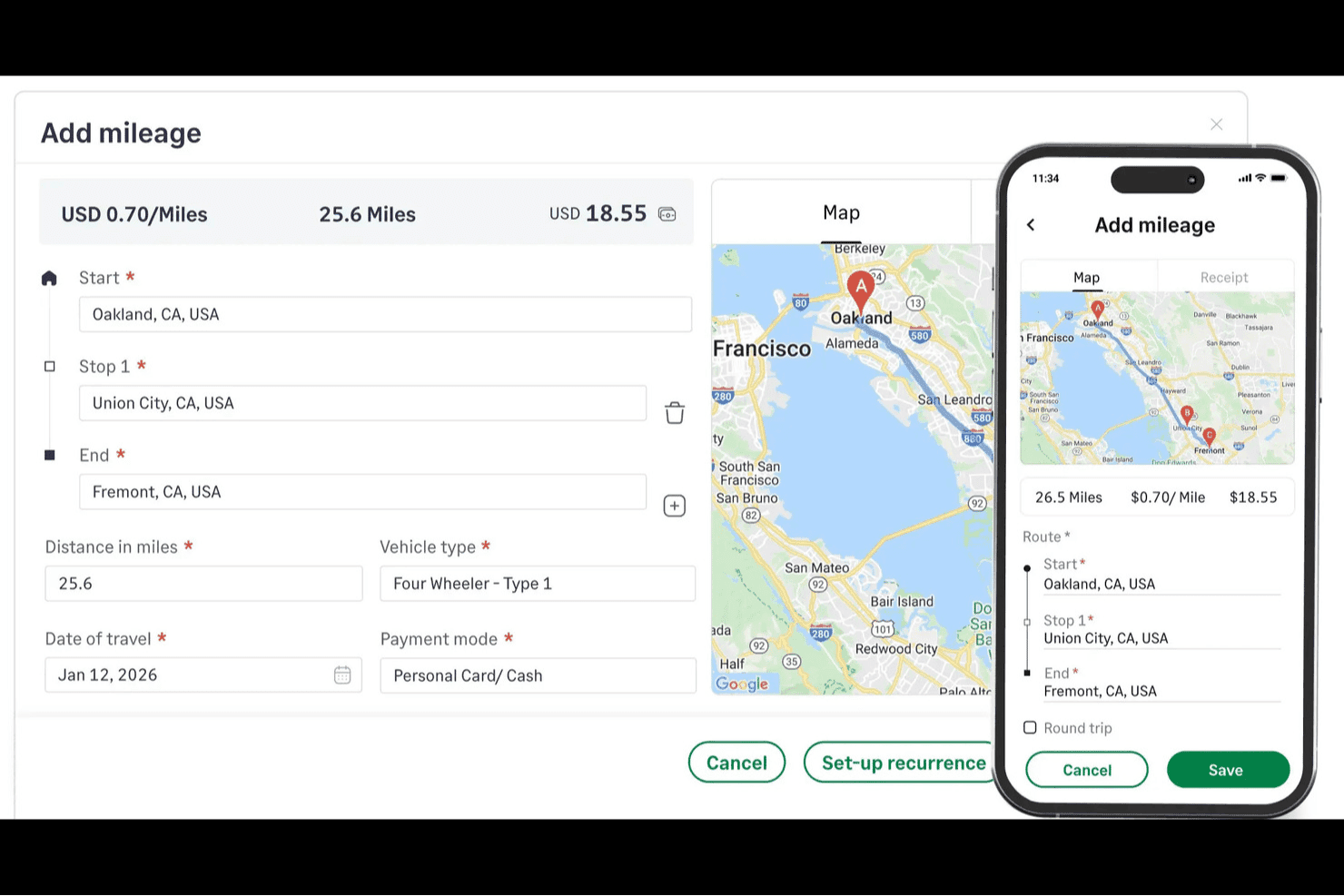
Sage Expense Management is an expense management platform that combines manual mileage logging, real-time corporate card transaction alerts, receipt capture, and multi-level approval workflows.
Who Is Sage Expense Management Best For?
Sage Expense Management is a good fit for finance teams at small to mid-sized companies that need structured expense reporting and corporate card reconciliation alongside mileage reimbursement.
Why I Picked Sage Expense Management
I've included Sage Expense Management in my top picks because its real-time card transaction alerts set it apart: the moment a corporate card is used, employees get a text and can reply with a receipt photo, tying card spend directly to mileage and expense reports without the usual back-and-forth. I also like how the commute deduction feature automatically subtracts home-to-office miles from claimed distances, keeping reimbursements IRS-compliant without extra admin work. The configurable rate engine supports vehicle type, fuel type, engine size, and annual distance slabs, so finance teams can mirror their exact reimbursement policy.
Sage Expense Management Key Features
- Multi-stop mileage entry: Log trips with up to 10 stops per journey, with Google Maps calculating the total distance automatically.
- Annual distance slab rates: Configure rates that switch automatically once an employee crosses a set yearly mileage threshold, mirroring tiered reimbursement policies.
- Passenger rate add-on: Set a separate per-passenger, per-mile rate that applies on top of the base mileage rate for carpooling reimbursement.
- Multi-level mileage approvals: Route mileage expense reports through single or multi-stage approval chains, with approvers able to act directly from Gmail, Slack, or the mobile app.
Sage Expense Management Integrations
Sage Expense Management offers native integrations with Google Maps, QuickBooks Online, Xero, Sage 50, Sage Intacct, and Sage 300 CRE for mileage calculations and expense syncing. An API supports custom integrations.
Pros and Cons
Pros:
- Mileage reports retain IRS-required trip details
- Configurable vehicle and annual-slab reimbursement rates
- Google Maps calculates routes with multiple stops
Cons:
- No business-versus-personal trip classification
- Trips require manual start and end entry
Learn more about Sage Expense Management (formerly Fyle): Best for payroll and HR platform integrations
- 14-day free trial
- From $4/user/month
Visit WebsiteCustomer Rating:4.6/5
Timeero offers GPS mileage tracking for field teams to monitor travel and time accurately. Timeero offers GPS-based mileage tracking designed for businesses that need to monitor employee travel and time on the road. It’s a strong fit for field service teams, construction companies, and organizations with mobile workforces. Timeero helps reduce manual mileage logs and supports accurate reimbursement for teams that are always on the move.
Who Is Timeero Best For?
Timeero is a good fit for small to mid-sized businesses with mobile or field-based teams that need to track mileage and integrate travel data with payroll and HR systems.
Why I Picked Timeero
What drew me to Timeero for mileage tracking is how well it connects with payroll and HR platforms. I see this as especially valuable for businesses that want mileage data to flow directly into payroll processing, reducing manual entry and errors. Timeero offers direct integrations with providers like Gusto, QuickBooks Payroll, and ADP, so mileage reimbursement can be handled alongside regular payroll runs. This makes it easier for HR and finance teams to manage travel expenses and ensure employees are paid accurately for their mileage.
Timeero Key Features
Some other features that make Timeero useful for mileage tracking include:
- Automatic GPS mileage tracking: The mobile app automatically records mileage in real time as employees travel between job sites.
- Geofencing for job sites: Set up geofences to track when employees enter or leave specific locations for more accurate mileage logs.
- Route replay: Review detailed maps of employee routes to verify travel and mileage claims.
- Mileage and time audit logs: Access a full audit trail of mileage and time entries for compliance and reporting needs.
Timeero Integrations
Integrations include QuickBooks, Gusto, ADP, Paycor, Paychex, Paylocity, and Sage Intacct.
Pros and Cons
Pros:
- Suggested routes save on fuel costs
- Accurate routes with GPS breadcrumbs
- Segmented tracking for multi-stop days
Cons:
- Limited mileage editing after clock-out
- Higher cost for advanced team features
Learn more about Timeero: Best for finance system integrations
- Free demo available
- From $8/user/month (billed annually)
Visit WebsiteCustomer Rating:4.4/5
Rydoo is an expense platform that automates mileage, travel costs, and reporting for teams. Rydoo is an expense management platform designed for organizations that need to track mileage and business travel costs. It’s a strong fit for finance teams and HR professionals who want to automate expense reporting and ensure compliance. Rydoo helps businesses simplify mileage logging, policy enforcement, and reimbursement workflows in one place.
Who Is Rydoo Best For?
Rydoo is a good fit for mid-sized to large businesses with complex expense management needs, especially those with distributed teams or frequent business travelers.
Why I Picked Rydoo
What makes Rydoo stand out for mileage tracking is its deep integration with leading finance and accounting systems. I picked Rydoo because it connects directly with platforms like SAP, Oracle, and Xero, so mileage expenses flow automatically into your company’s financial records. This reduces manual data entry and helps finance teams reconcile mileage reimbursements with other business expenses. For organizations that need mileage tracking to fit into their broader finance workflows, Rydoo offers a level of connectivity that’s hard to match.
Rydoo Key Features
Some other features that make Rydoo useful for mileage tracking include:
- Mobile mileage capture: Employees can log trips and mileage directly from their smartphones using the Rydoo app.
- Automated policy enforcement: The platform flags out-of-policy mileage claims and applies company rules automatically.
- Multi-currency support: Rydoo handles mileage reimbursements in different currencies for global teams.
- Custom approval workflows: You can set up multi-level approval processes for mileage and expense claims.
Rydoo Integrations
Integrations include SAP S/4HANA, Oracle NetSuite, Microsoft Dynamics 365, Xero, QuickBooks, and Uber.
Pros and Cons
Pros:
- High-speed OCR for other travel costs
- Seamlessly merges mileage with receipts
- Global tax and legal compliance built-in
Cons:
- Overkill for simple mileage tracking
- No fully automatic GPS start-and-stop
Learn more about Rydoo: Best for route learning and auto-tagging
- Free demo available
- Pricing upon request
Visit WebsiteCustomer Rating:4.2/5
Hurdlr provides automated mileage tracking and expense management for small businesses. Hurdlr offers mileage tracking software designed for self-employed professionals, freelancers, and small business owners who need to keep accurate records for tax or reimbursement purposes. The platform stands out for its automation features that help users minimize manual entry and reduce errors. If you’re looking for a tool that can simplify mileage tracking while supporting expense and income management, Hurdlr is worth considering.
Who Is Hurdlr Best For?
Hurdlr is a strong fit for self-employed professionals, freelancers, and small business owners who need automated mileage and expense tracking for tax or reimbursement purposes.
Why I Picked Hurdlr
What makes Hurdlr stand out for me is its route learning and auto-tagging capabilities, which are especially useful for anyone who drives similar routes regularly. The platform automatically recognizes frequently traveled routes and can tag trips as business or personal based on your past behavior, reducing manual sorting. I also like that Hurdlr uses machine learning to improve its trip categorization over time, making mileage logs more accurate and less time-consuming to maintain. For users who want to automate repetitive tracking tasks and minimize errors, these features make Hurdlr a compelling choice.
Hurdlr Key Features
Some other features in Hurdlr that support mileage tracking and expense management include:
- Automatic expense tracking: The app automatically tracks business expenses by syncing with your bank accounts and credit cards.
- Real-time tax calculations: Hurdlr calculates your tax deductions and estimated taxes as you log trips and expenses.
- Customizable income streams: You can add and manage multiple income sources, including freelance, rideshare, and delivery work.
- Detailed financial reports: Generate and export reports that break down your mileage, expenses, and income for easy recordkeeping.
Hurdlr Integrations
Integrations include Uber, Square, Stripe, PayPal, and Shopify.
Pros and Cons
Pros:
- Offers real-time tax deduction estimates
- Tracks income and expenses alongside mileage
- Auto-tags trips based on learned driving patterns
Cons:
- Lacks route optimization or dispatch features
- Mobile app notifications can be inconsistent
Learn more about Hurdlr: Best for direct reimbursement payments
- Free demo available
- Pricing upon request
Visit WebsiteCustomer Rating:4.4/5
Cardata provides mileage reimbursement software that automates compliance and policy management. Cardata offers a mileage reimbursement platform designed for organizations with employees who drive for work. The software appeals to HR, finance, and operations teams looking to automate compliance and simplify vehicle program administration. Cardata helps businesses manage mileage logs, reimbursements, and policy enforcement in one place.
Who Is Cardata Best For?
Cardata is a good fit for mid-sized to large organizations that need to manage and automate mileage reimbursement for mobile employees.
Why I Picked Cardata
What stands out about Cardata is its focus on direct reimbursement payments, which is a key concern for organizations managing mobile workforces. Cardata handles the entire reimbursement process, from mileage tracking to payment distribution, so employees receive payments directly and on time. I appreciate that the platform automates IRS-compliant mileage calculations and integrates policy controls to ensure accuracy and compliance. For teams that want to eliminate manual reimbursement steps and reduce administrative overhead, Cardata offers an optimized, end-to-end solution.
Cardata Key Features
Some other features in Cardata that support mileage tracking and vehicle program management include:
- Automated mileage capture: The app automatically detects and records trips using GPS, reducing manual entry.
- Policy compliance monitoring: Cardata tracks driver activity to ensure adherence to company vehicle and reimbursement policies.
- Customizable reporting tools: Generate detailed reports on mileage, expenses, and driver activity for audits or management review.
- Mobile document upload: Drivers can upload required documents, such as insurance or registration, directly through the app.
Cardata Integrations
Integrations include SAP Concur., ADP, Workday, and UKG.
Pros and Cons
Pros:
- Supports tax-free FAVR and CPM plans
- Live insurance and compliance audits
Cons:
- Custom pricing requires a direct quote
- App can stall during low power mode
Learn more about Cardata: Best with automatic expense syncing
- Free plan available and 7-day free trial
- From $8.99/month

Everlance automates mileage and expense tracking for freelancers and teams. Everlance offers a mileage tracking solution designed for freelancers, small businesses, and teams that need to manage both mileage and expenses in one place. The platform helps users automate trip logging and organize receipts for accurate reporting. If you’re looking to simplify IRS-compliant recordkeeping and reduce manual entry, Everlance is built to support those needs.
Who Is Everlance Best For?
Everlance is a good fit for freelancers, small business owners, and distributed teams that need to track mileage and expenses for tax or reimbursement purposes.
Why I Picked Everlance
I chose Everlance because its automatic expense syncing stands out for users who want to manage both mileage and expenses without juggling multiple apps. The platform automatically imports and categorizes expenses from linked bank accounts and credit cards, making it easier to match trips with related costs. I also like that Everlance lets you attach receipts directly to trips, which helps keep records organized for audits or reimbursements. These features make it especially useful for anyone who needs a unified approach to mileage and expense tracking.
Everlance Key Features
Some other features that make Everlance a strong choice for mileage tracking include:
- Automatic trip detection: The app uses GPS to automatically detect and log trips without manual input.
- IRS-compliant mileage logs: Everlance generates detailed mileage reports that meet IRS requirements for tax deductions.
- Customizable trip classification: Users can set rules to automatically categorize trips as business, personal, or custom types.
- Team management dashboard: Admins can view, approve, and manage team mileage and expense reports from a centralized dashboard.
Everlance Integrations
Integrations include QuickBooks, Xero, ADP, Gusto, Rippling, Paychex, Zenefits, and SAP Concur.
Pros and Cons
Pros:
- Team dashboard for admin oversight
- Customizable trip classification rules
- IRS-compliant reports for tax filing
Cons:
- No built-in route optimization
- Occasional missed trips with GPS tracking
Learn more about Everlance:

Motus offers mileage tracking for mobile teams, automating compliant logs and reporting. Motus offers a mileage tracking app designed for businesses with mobile workforces and distributed teams. The platform appeals to organizations that need accurate, compliant mileage logs for reimbursement and tax purposes. Motus helps reduce manual entry and administrative overhead by automating trip capture and reporting.
Who Is Motus Best For?
Motus is a good fit for mid-sized to large businesses with mobile employees who need compliant, automated mileage tracking for reimbursement.
Why I Picked Motus
What drew me to Motus is its focus on battery-saving GPS tracking, which addresses a common frustration for mobile workers who rely on their phones throughout the day. Motus uses a patented technology that captures mileage accurately while minimizing battery drain, so users don’t have to worry about their devices running out of power during long shifts. I also appreciate that Motus automatically detects trips in the background, reducing the need for manual input. For teams that need reliable, always-on mileage tracking without sacrificing phone performance, Motus offers a practical solution.
Motus Key Features
In addition to its battery-saving GPS tracking, Motus offers several other features for mileage tracking and reimbursement:
- Automated mileage capture: The app detects trips automatically and logs mileage without manual input.
- IRS-compliant mileage logs: Motus generates mileage logs that meet IRS requirements for tax and reimbursement purposes.
- Customizable reimbursement rates: Set and manage reimbursement rates based on company policy or IRS guidelines.
- Mobile receipt capture: Upload and store receipts directly in the app for expense tracking and reporting.
Motus Integrations
Integrations include SAP Concur.
Pros and Cons
Pros:
- Enterprise CRM and HR integrations
- Advanced FAVR reimbursement models
- Automatic GPS start and stop tracking
Cons:
- Mobile app logout issues on Android
- Interface can feel complex for drivers
Learn more about Motus: Best for integrated time and expense tracking
- Free plan available
- From $4.99/user/month (billed annually)

TripLog offers mileage and expense tracking for businesses and teams. TripLog offers an automatic mileage tracker app designed for businesses and professionals who need to manage both driving and related expenses. The tool is especially useful for teams that want to track mileage, time, and spending in one place. If you’re looking for a solution that brings together trip logging and expense management, TripLog is worth considering.
Who Is TripLog Best For?
TripLog is a strong fit for small to mid-sized businesses and accounting teams that need to track mileage, time, and expenses together.
Why I Picked TripLog
What stands out about TripLog is how it brings mileage, time, and expense tracking together in one platform. This is especially useful for businesses that need to manage employee reimbursements and compliance for both driving and work hours. I like that TripLog lets you log trips, capture receipts, and track time all from the same app, which reduces the need for multiple tools. This integrated approach makes it easier to generate accurate reports and keep all reimbursement data organized in one place.
TripLog Key Features
Some other features that make TripLog useful for mileage tracking include:
- Automatic trip detection: The app uses GPS and motion sensors to automatically detect and log trips without manual input.
- Multiple vehicle support: You can track mileage for several vehicles under one account, making it easier for users with more than one car.
- Customizable mileage rates: Set different reimbursement rates for various vehicle types, clients, or locations to match your organization’s policies.
- Odometer reading capture: Enter and store odometer readings to ensure accurate mileage records and compliance with tax requirements.
TripLog Integrations
Integrations include SAP Concur, ADP, UKG, Sage Intacct, Emburse, and Outlook Calendar.
Pros and Cons
Pros:
- Offers Bluetooth and USB auto start
- Tracks fuel parking and tolls easily
- Built in odometer logs for tax audits
Cons:
- Privacy concerns with background GPS
- Interface feels dated and complex
Learn more about TripLog: Best for swipe-based trip classification
- Free plan available
- From $7.50/month (billed annually)

MileIQ is a mobile app that automatically tracks mileage for IRS-compliant records. MileIQ offers a mobile-first mileage tracking solution designed for busy professionals and small business owners who need accurate, IRS-compliant records. The app automatically logs drives in the background and helps users separate business and personal trips with minimal effort. If you want to simplify mileage tracking for tax deductions or reimbursements, MileIQ provides a focused, user-friendly approach.
Who Is MileIQ Best For?
MileIQ is a good fit for self-employed professionals, small business owners, and mobile employees who need a simple way to track and classify mileage for tax or reimbursement purposes.
Why I Picked MileIQ
What sets MileIQ apart is its swipe-based trip classification, which makes sorting business and personal drives quick and intuitive. I picked MileIQ because users can simply swipe right for business and left for personal, reducing the time spent on manual entry or editing. The app also automatically detects and logs trips in the background, so you don’t have to remember to start or stop tracking. This approach is especially helpful for anyone who wants to keep mileage records accurate without interrupting their day.
MileIQ Key Features
Some other features that make MileIQ a strong option for mileage tracking include:
- Automatic drive detection: The app uses GPS to automatically log trips without requiring manual input.
- Multi-vehicle support: Users can track miles for multiple vehicles within a single account.
- Customizable mileage rates: You can set custom reimbursement rates to match your organization’s policies or IRS guidelines.
- Detailed monthly reports: Generate and export IRS-compliant mileage reports for the tax season or expense reimbursement purposes.
MileIQ Integrations
Integrations include QuickBooks Online and Xero.
Pros and Cons
Pros:
- Custom mileage rates for different organizations
- Supports multiple vehicles per user account
- Automatic trip logging runs in the background
Cons:
- Lacks direct integration with accounting platforms
- Battery drain reported on some mobile devices
Learn more about MileIQ:

Driversnote is a mileage tracking app for professionals needing accurate, compliant trip records. Driversnote offers a mileage tracking solution designed for professionals and businesses that need accurate, compliant records for multiple vehicles. The app appeals to users who manage fleets, drive for work, or need to document trips for tax or reimbursement purposes. With features tailored for detailed trip logging and reporting, Driversnote removes the hassle from mileage management for busy teams and individuals.
Who Is Driversnote Best For?
Driversnote is a good fit for small businesses, fleet managers, and self-employed professionals who need to track mileage across multiple vehicles for compliance or reimbursement.
Why I Picked Driversnote
Driversnote stands out for teams or individuals who need to track mileage across multiple vehicles. I picked it because it lets you create separate logs for each vehicle, making it easy to manage business and personal trips without confusion. The app automatically records trips using GPS and lets you assign each trip to a specific vehicle with just a tap. This focus on multi-vehicle support makes Driversnote a strong choice for anyone juggling several cars or managing a small fleet.
Driversnote Key Features
Some other features that make Driversnote useful for mileage tracking include:
- Odometer readings: Enter and track odometer readings to ensure accurate mileage records and cross-check trip data.
- Custom mileage rates: Set different reimbursement rates for various vehicle types, locations, or purposes.
- Automatic trip classification: Categorize trips as business or personal with a single tap for easier reporting.
- IRS- and HMRC-compliant reports: Generate detailed mileage reports that meet tax authority requirements in multiple countries.
Driversnote Integrations
Integrations include Wave.
Pros and Cons
Pros:
- Free version available for light users
- Supports multiple vehicles and rates
- Easy swipe to classify trip types
Cons:
- Full automation requires paid hardware
- No built-in fuel or expense tracking
Learn more about Driversnote:
Outros softwares de acompanhamento de quilometragem
Eis algumas opções adicionais de software de acompanhamento de quilometragem que não entraram na minha lista restrita, mas que vale a pena conhecer:
- 11MileageWiseBest with Google Maps Timeline import
- 12ShoeboxedBest with IRS-ready mileage reports
- 13PsngrBest for collaborative trip sharing
- 14Sage Expense ManagementBest for real-time policy violation alerts
How I Evaluate Mileage Tracking Software
I split my evaluation into two layers: the core capabilities a tool must have—like automatic GPS tracking and IRS-compliant reporting—and the differentiators that separate the best picks.
Core Functionality (Table Stakes For This List)
When I'm selecting tools for my list, I rank each one on a scale from 0 (does not offer the functionality) to 5 (excels in this area) for each core functionality listed below. Then, I calculate the tool's total score as a percentage. Each tool needs to achieve a minimum total score of 65% to be considered for inclusion.
- Automatic Mileage Tracking: I check whether the app detects drives on its own or requires users to manually start each trip—background GPS tracking matters most for field teams.
- Tax-Compliant Mileage Reporting: Reports need to include trip date, destination, purpose, and distance so they hold up during a tax audit without extra manual documentation.
- Reimbursement Rate Management: I look for tools that let you set custom rates by vehicle type, role, or region rather than locking you into a single flat rate.
- Payroll & HRIS Integration: Mileage data should sync with platforms like ADP, Gusto, or QuickBooks so reimbursements flow into payroll without re-keying figures.
- Approval Workflows: I evaluate whether managers can review, approve, or flag submitted trips—and whether routing rules adapt to your org's approval hierarchy.
- Business vs. Personal Classification: The tool should make it easy for drivers to categorize trips, whether through swipe gestures, scheduled work hours, or saved location rules.
Once I have a list of tools that meet the criteria, I consider what sets each platform apart.
Differentiating Factors (What Sets Vendors Apart)
Here's how I compare and contrast different vendors:
Standout Features
Fraud detection is a big one—I look for tools that flag duplicate trips, inflated distances, or unusual patterns before claims reach payroll. Geofencing adds another layer by auto-classifying trips when drivers enter or leave saved client sites. I also evaluate team dashboards and analytics, since HR and operations leaders need aggregate views of mileage costs across departments or cost centers to spot trends and manage budgets.
Beyond Features
Since mileage tools collect real-time location data, I pay close attention to how each vendor handles employee privacy—things like the ability to pause tracking outside work hours and role-based access controls matter a lot for HR teams. Scalability is another factor I evaluate, especially whether pricing and admin controls work for a 10-person sales team the same way they do for a distributed workforce across multiple cost centers. I also consider how easy the mobile app is for drivers to adopt, since low adoption kills the value of any mileage program.
Como escolher um software de acompanhamento de quilometragem
É fácil ficar preso a listas extensas de funcionalidades e estruturas de preços complexas. Para o ajudar a manter-se concentrado enquanto percorre o seu processo específico de seleção de software, eis uma lista de verificação dos fatores a ter em conta:
| Fator | O que deve considerar |
| Escalabilidade | O software suportará a dimensão atual e futura da sua equipa, incluindo um crescimento sazonal ou rápido? |
| Integrações | Estabelece ligação nativa aos seus sistemas de processamento salarial, recursos humanos ou contabilidade para evitar a introdução manual de dados? |
| Personalização | Pode adaptar as categorias de quilometragem, os fluxos de trabalho de aprovação ou os formatos de relatórios às suas políticas? |
| Facilidade de utilização | Os colaboradores com diferentes níveis de conhecimentos tecnológicos considerarão a aplicação e o painel de administração fáceis de utilizar? |
| Implementação e integração inicial | Quanto tempo demorará a começar a utilizar o sistema e que recursos ou apoio fornece o fornecedor? |
| Custo | Os níveis de preços são claros e estão alinhados com os seus padrões de utilização e limitações orçamentais? |
| Medidas de segurança | O fornecedor disponibiliza encriptação de dados, controlos de acesso dos utilizadores e conformidade com as normas de privacidade? |
| Disponibilidade do apoio | Pode contactar o apoio durante o seu horário de funcionamento e são disponibilizados vários canais (chat, telefone, e-mail)? |
O que é um software de acompanhamento de quilometragem?
O software de acompanhamento de quilometragem é uma ferramenta digital que regista automaticamente a distância percorrida em viagens relacionadas com o trabalho. Utiliza GPS ou introdução manual para recolher os detalhes das viagens, ajudando as empresas a acompanhar as deslocações dos colaboradores para efeitos de reembolso, impostos ou conformidade. Estes sistemas geram frequentemente relatórios, permitem o acesso através de dispositivos móveis e integram-se com plataformas de processamento salarial ou contabilidade para simplificar a gestão da quilometragem e reduzir os erros manuais.
Funcionalidades do software de acompanhamento de quilometragem
Ao selecionar um software de acompanhamento de quilometragem, tenha em atenção as seguintes funcionalidades essenciais:
- Acompanhamento automático por GPS: Utiliza o GPS do seu dispositivo para registar a quilometragem em tempo real, reduzindo a introdução manual e aumentando a precisão de cada viagem.
- Classificação de viagens: Permite aos utilizadores identificar as viagens como profissionais ou pessoais, facilitando a separação entre a quilometragem reembolsável e as deslocações não reembolsáveis.
- Mapeamento de rotas: Apresenta um mapa visual de cada viagem, ajudando a verificar as rotas percorridas e apoiando as necessidades de auditoria ou conformidade.
- Relatórios de quilometragem: Gera relatórios detalhados que resumem a quilometragem por data, utilizador ou projeto, podendo ser exportados para efeitos de reembolso ou fiscais.
- Acesso através de aplicação móvel: Permite aos colaboradores acompanhar a quilometragem em movimento através dos seus telemóveis, garantindo registos precisos mesmo quando estão fora do escritório.
- Integração com sistemas de processamento salarial ou contabilidade: Liga-se diretamente aos sistemas de processamento salarial ou contabilidade, para que os dados de quilometragem sejam transferidos automaticamente para o reembolso ou acompanhamento de despesas.
- Delimitação geográfica: Configura limites virtuais em torno de locais de trabalho ou escritórios para iniciar ou parar automaticamente o acompanhamento da quilometragem ao entrar ou sair de locais específicos.
- Taxas de reembolso personalizáveis: Permite aos administradores definir taxas de reembolso da quilometragem em conformidade com a política da empresa ou com a legislação local.
- Registo de auditoria: Mantém um registo seguro de todas as entradas e edições de quilometragem, apoiando a conformidade e a resolução de litígios.
- Gestão de vários utilizadores: Permite aos administradores gerir permissões, monitorizar a utilização e rever os registos de quilometragem em várias equipas ou departamentos.
Vantagens do software de acompanhamento de quilometragem
A implementação de um software de acompanhamento de quilometragem proporciona várias vantagens à sua equipa e à sua empresa. Eis algumas das vantagens que pode esperar:
- Registos precisos da quilometragem: O acompanhamento automático por GPS e os registos de auditoria ajudam a garantir que cada viagem é registada corretamente para efeitos de reembolso ou conformidade.
- Redução da introdução manual: As aplicações móveis e as integrações com sistemas de processamento salarial ou contabilidade eliminam a necessidade de registos em papel e folhas de cálculo.
- Processo de reembolso simplificado: Os relatórios personalizáveis e as exportações diretas de dados facilitam o processamento rápido e consistente dos pedidos de reembolso da quilometragem.
- Melhoria da conformidade: Funcionalidades como os registos de auditoria, o mapeamento de rotas e a delimitação geográfica apoiam o cumprimento da legislação fiscal e laboral.
- Maior visibilidade: Os painéis de controlo em tempo real e a gestão de vários utilizadores proporcionam aos administradores uma visão clara das deslocações e despesas da equipa.
- Controlo de custos: As taxas de reembolso personalizáveis e os relatórios detalhados ajudam as empresas a monitorizar e gerir as despesas relacionadas com deslocações.
- Comodidade para os colaboradores: O acesso móvel e a classificação automática das viagens facilitam o acompanhamento da quilometragem pelos colaboradores sem interromperem o seu fluxo de trabalho.
Custos e preços do software de acompanhamento de quilometragem
A seleção de um software de acompanhamento de quilometragem exige a compreensão dos vários modelos de preços e planos disponíveis. Os custos variam consoante as funcionalidades, a dimensão da equipa, os complementos, entre outros fatores. A tabela abaixo resume os planos comuns, os respetivos preços médios e as funcionalidades normalmente incluídas nas soluções de software de acompanhamento de quilometragem:
Tabela de comparação de planos de software de acompanhamento de quilometragem
| Tipo de plano | Preço médio | Funcionalidades comuns |
| Plano gratuito | $0 | Acompanhamento básico por GPS, introdução manual de viagens, relatórios limitados e acesso à aplicação móvel. |
| Plano pessoal | $4-$11/user/month | Acompanhamento automático da quilometragem, classificação de viagens, relatórios básicos e exportação para folhas de cálculo. |
| Plano empresarial | $9-$25/user/month | Gestão de vários utilizadores, relatórios avançados, integrações com sistemas de processamento salarial, delimitação geográfica e registos de auditoria. |
| Plano empresarial de grande dimensão | $10+/user/month | Integrações personalizadas, suporte dedicado, segurança avançada, ferramentas de conformidade e fluxos de trabalho personalizados. |
Perguntas frequentes sobre software de controlo de quilometragem
Aqui estão algumas respostas a perguntas comuns sobre software de controlo de quilometragem:
Como regista o software de controlo de quilometragem as deslocações?
O software de controlo de quilometragem utiliza tecnologia GPS ou introdução manual para registar os pontos de início e de fim de cada deslocação. A maioria dos sistemas deteta automaticamente quando uma deslocação começa e termina, registando a distância e os detalhes do percurso para obter registos precisos da quilometragem.
O software de controlo de quilometragem pode ser utilizado tanto para deslocações pessoais como profissionais?
Sim, a maioria dos softwares de controlo de quilometragem permite aos utilizadores categorizar as deslocações como pessoais ou profissionais. Isto ajuda a separar a quilometragem reembolsável das deslocações não reembolsáveis e simplifica os relatórios para efeitos fiscais ou de conformidade com as políticas da empresa.
O software de controlo de quilometragem está em conformidade com as normas do IRS ou com a regulamentação fiscal local?
Sim, muitas soluções foram concebidas para gerar registos e relatórios de quilometragem em conformidade com os requisitos do IRS. Normalmente, incluem funcionalidades como trilhos de auditoria, registos detalhados das deslocações e taxas de reembolso personalizáveis para apoiar a conformidade com a regulamentação fiscal e laboral.
Que dispositivos podem os trabalhadores utilizar para controlar a quilometragem?
Normalmente, os trabalhadores podem controlar a quilometragem através de aplicações móveis em smartphones ou tablets. Algumas soluções também disponibilizam painéis de controlo Web para introdução ou revisão manual, facilitando o registo das deslocações no terreno ou no escritório.
Quão seguros estão os dados recolhidos pelo software de controlo de quilometragem?
A maioria dos fornecedores de software de controlo de quilometragem conceituados utiliza encriptação de dados, autenticação segura dos utilizadores e controlos de acesso. Estas salvaguardas ajudam a proteger os dados sensíveis de localização e das deslocações contra acessos não autorizados ou violações de segurança.
O software de controlo de quilometragem pode ser integrado com sistemas de processamento salarial ou contabilidade?
Sim, muitas ferramentas de controlo de quilometragem oferecem integrações diretas com plataformas de processamento salarial, recursos humanos ou contabilidade. Isto permite a transferência automática dos dados de quilometragem, reduzindo a introdução manual e acelerando os processos de reembolso.