

As ferramentas de IA podem fazer tudo, desde assumir tarefas repetitivas até ajudar a compreender melhor os seus dados, dando-lhe espaço para se concentrar no trabalho que realmente precisa da sua atenção. Quer trabalhe na área da saúde, do marketing ou dos negócios, existem muitas aplicações de IA disponíveis para os profissionais que trabalham atualmente.
Na minha experiência a analisar diferentes plataformas de IA, percebi o quanto a ferramenta certa pode alterar o seu fluxo de trabalho diário. Testei estas opções pessoalmente para lhe dar uma visão justa do que oferecem e das áreas em que se destacam, desde IA generativa e ferramentas de produtividade até à síntese de notas de reuniões. É provável que exista uma ferramenta adequada à tarefa específica que tem em mente.
Why Trust Our Software Recommendations
6,700+
Reviews
20
Industry experts
16+
Evaluation factors
14
Years
Our team has been testing and reviewing software since 2012. As HR experts ourselves, we know how difficult—and important—it is to choose the right software.
For this guide, we evaluated tools using hands-on testing and independent research, scoring tools using our selection criteria. We also draw on insights from industry thought leaders and practicing HR experts.
Our reviews reflect our human editorial judgment, not a sales pitch.
Expert reviewers:
- Phil GrayCOO
 Kim BehnkeHR Tech Editor & Analyst
 Josh BarkerPeople Ops Manager

Tabela de comparação de plataformas de IA
Esta tabela de comparação resume os detalhes de preços das minhas principais escolhas de plataformas de IA:
| Tool | Best For | Trial Info | Price | ||
|---|---|---|---|---|---|
| 1 | Best for AI-assisted project risk detection | Free plan + 14-day free trial + free demo available | From $9/user/month (billed annually) | Website | |
| 2 | Best for AI-Powered ITSM | 14-day free trial | From $19/user/month (billed annually) | Website | |
| 3 | Best for workflow process design with drag-and-drop | Free demo available | $40/user/month | Website | |
| 4 | Best for performance analytics backed by AI | Free demo available | Pricing upon request | Website | |
| 5 | Best for AI governance policy management | Free demo available | Pricing upon request | Website | |
| 6 | Best for unified data and AI model governance | Free edition available + 14-day free trial | From $0.15/DBU | Website | |
| 7 | Best for collaborative inbox management | 30-day free trial + free demo available | From $14/user/month (billed annually) | Website | |
| 8 | Best for no-code AI agent builder | 7-day free trial + free plan + free demo available | From $32/month (billed annually) | Website | |
| 9 | Best for enterprise knowledge integration | Free trial available | Pricing upon request | Website | |
| 10 | Best for AI-powered background screening | Free demo available | From $29.99/report | Website | |
| 11 | Best for governing AI across the full ML lifecycle | 14-day free trial | Pricing upon request | Website | |
| 12 | Best for AI deployment in regulated industries | Free demo available | Pricing upon request | Website | |
| 13 | Best for secure AI-driven board meeting management | Free demo available | Pricing upon request | Website | |
| 14 | Best for multi-model agent orchestration at scale | 30-day free trial | From $21/user/month | Website | |
| 15 | Best for enterprise-scale model fleet governance | 30-day free trial available | From $0.165 per 1M input tokens | Website |


Análises das melhores plataformas de IA
Apresentamos abaixo os meus resumos detalhados das melhores plataformas de IA que chegaram à minha lista restrita. As minhas análises oferecem uma visão detalhada das principais funcionalidades, vantagens & desvantagens, integrações e casos de utilização ideais de cada ferramenta, para o ajudar a encontrar a melhor opção para si.
 Best for AI-assisted project risk detection
- Free plan + 14-day free trial + free demo available
- From $9/user/month (billed annually)
Visit WebsiteCustomer Rating:4.6/5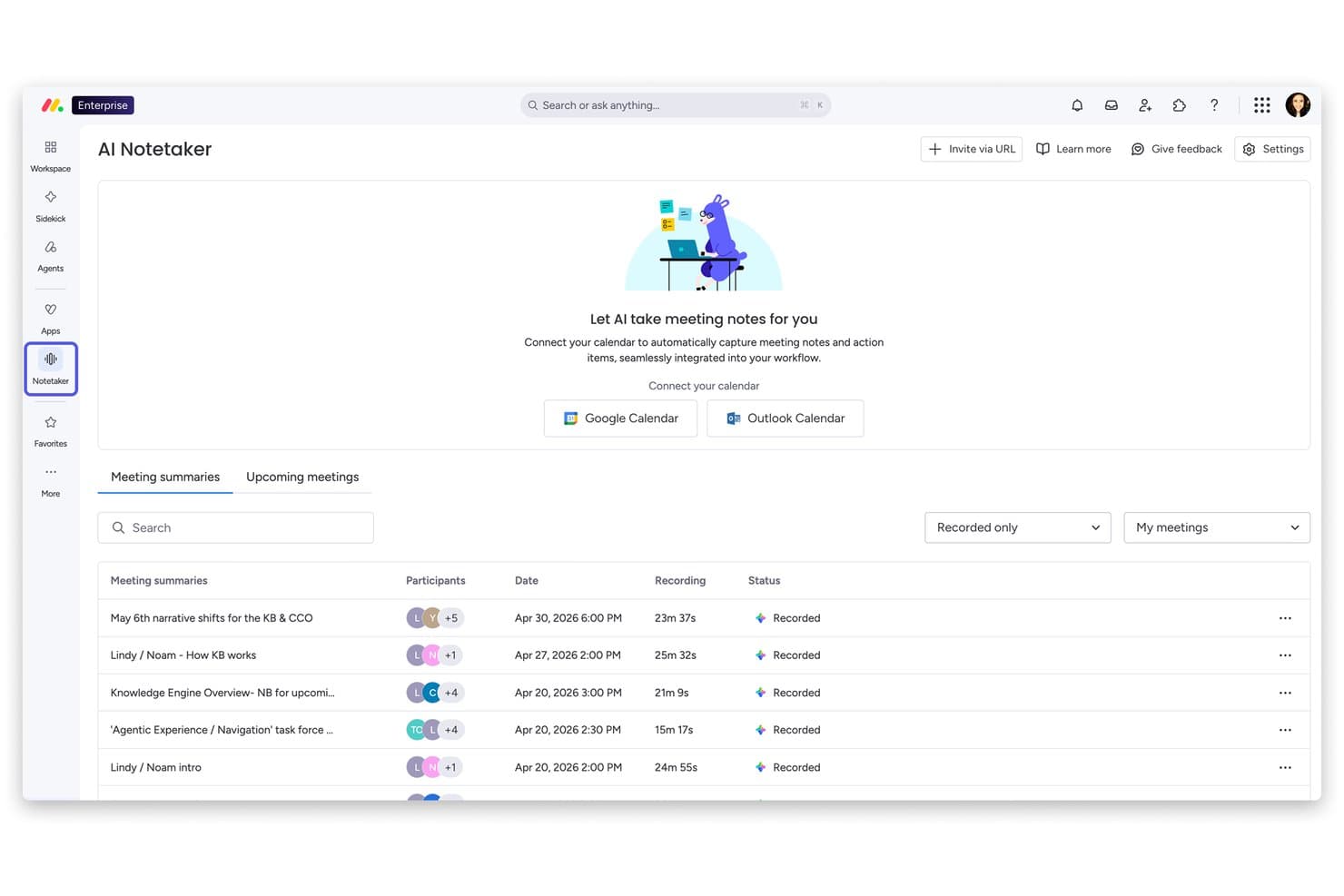
monday AI Workspace offers an AI Notetaker feature that automatically records, transcribes, and summarizes meetings with calendar integration. Monday AI Workspace is a general-purpose AI work platform that combines agentic AI, generative AI tools, and predictive analytics across project management, CRM, service, and dev workflows.
Who Is Monday AI Workspace Best For?
It's a strong fit for cross-functional teams and operations managers at mid-size to enterprise organizations running multiple projects simultaneously.
Why I Picked Monday AI Workspace
Monday AI Workspace earns its spot on my shortlist because of its portfolio-level AI Risk Insights feature. I like that it doesn't just scan one project at a time — it analyzes all linked boards daily, reviewing item names, update sections, and activity logs to surface risks before they become blockers. That kind of proactive, cross-project visibility is genuinely difficult to find in a general-purpose work platform.
Monday AI Workspace Key Features
- AI workflow builder: Automate project processes and tasks with no-code, AI-driven workflow assembly.
- AI meeting notetaker: Capture and summarize meeting discussions directly within your project boards.
- Sidekick AI assistant: Generate project-related content, answer queries, and provide context-aware suggestions in your workspace.
- Portfolio-level dashboards: Visualize and manage multiple projects with real-time, customizable dashboards for tracking progress and metrics.
Monday AI Workspace Integrations
Monday AI Workspace offers hundreds of integrations through its built-in integrations and marketplace, including tools like Slack, Salesforce, HubSpot, Google Workspace, Jira, GitHub, Microsoft Teams, Zoom, Zendesk, and Trello. It also supports Zapier and provides an API for custom integrations.
Pros and Cons
Pros:
- Generative AI covers multiple content creation tasks
- No-code workflow automation with AI assistance
- AI risk detection spans multiple projects simultaneously
Cons:
- Not purpose-built for dedicated HR workflows
- Setup complexity increases with advanced AI configurations
Learn more about monday AI Workspace: Best for AI-Powered ITSM
- 14-day free trial
- From $19/user/month (billed annually)
Visit WebsiteCustomer Rating:4.6/5
Freshservice has an AI-powered assistant for automated conversational prompts. Freshservice is an AI-powered IT service management (ITSM) platform that handles incident management, asset tracking, workflow automation, and enterprise service management across IT, HR, finance, and operations teams.
Who Is Freshservice Best For?
Freshservice is a strong fit for mid-size to enterprise IT teams that need a structured, scalable service desk with built-in AI capabilities.
Why I Picked Freshservice
Freshservice is one of my top picks because I love how deeply automation is baked into its ITSM core. It handles intelligent ticket routing automatically, assigning tickets based on agent availability, workload, and skills. Meanwhile, no-code workflow automation covers everything from approvals to incident resolution without any custom dev work.
Freshservice Key Features
- Service catalog: Lets users browse and request IT services through a configurable self-service portal without contacting the help desk directly.
- Change management: Supports structured CAB approvals with built-in risk assessment and change advisory workflows.
- Freddy AI Copilot: An AI assistant that helps agents draft responses, summarize ticket history, and suggest solutions from within the ticket view.
- Problem management: Links recurring incidents to underlying problems and tracks root cause analysis through to resolution.
Freshservice Integrations
Freshservice offers 1,200+ marketplace integrations, including Microsoft Teams, Slack, Jira, Azure AD, and TeamViewer, along with connector apps for syncing data with external tools via a low-code UI. It's available on Zapier and provides an API for custom integrations.
Pros and Cons
Pros:
- Supports asset tracking from procurement
- Extends beyond IT to HR and facilities
- No-code workflow automator for ticket routing
Cons:
- Freddy AI lacks configuration flexibility
- Reporting customization options are restricted
Learn more about Freshservice: Best for workflow process design with drag-and-drop
- Free demo available
- $40/user/month
Visit WebsiteCustomer Rating:4.7/5
Creatio Studio lets you create campaign flows with drag-and-drop editor. Creatio Studio is a no-code AI platform for building business applications, automating workflows, and designing AI agents using visual drag-and-drop tools and natural language prompts. Creatio AI Studio, launched in July 2026, is a dedicated product for building, deploying and governing AI agents, included in the same platform license.
Who Is Creatio Studio Best For?
Creatio Studio is a strong fit for mid-size to enterprise organizations that want non-technical teams to build and automate business applications without relying on developers.
Why I Picked Creatio Studio
Creatio Studio earns its spot on my shortlist because its BPMN 2.0-driven Process Designer makes workflow design genuinely visual. I like that you can map multi-step approval flows, conditional branching, and parallel gateways by dragging elements onto a canvas. The Workflow Agent Designer extends this further, letting you wire AI agents directly into process logic without writing a line of code.
Creatio Studio Key Features
- Prompt Agent Designer: A visual tool for building AI agents by defining instructions, context, and goals using natural language prompts.
- Agent SDK: A code-based environment for building complex agents, with native support for AI coding tools including Claude Code, GitHub Copilot, and Codex.
- ML model builder: A drag-and-drop interface for creating machine learning models that power predictions and data-driven decisions inside your apps.
- Natural language app generation: A feature that lets you describe an application in plain text and have Creatio Studio generate its structure, UI, and logic automatically.
Creatio Studio Integrations
Creatio Studio connects with the rest of your tech stack through 500+ connectors and ready-to-use templates available on the Creatio Marketplace, including marketplace connectors for SAP HANA, DocuSign, Sage Intacct, SharePoint Office 365, and Formstack. The platform provides built-in integration capabilities via .NET tools, REST, SOAP, OData, and open API, and it's available on Zapier. It supports MCP (Model Context Protocol) for connecting AI agents to the wider AI ecosystem.
Pros and Cons
Pros:
- Agent SDK supports Claude Code and Codex
- Native MCP support for connecting AI agents
- Dedicated AI Studio for building and governing agents
Cons:
- AI Credits are consumption-based and need sizing
- Limited variety of ready-made templates
Learn more about Creatio AI Studio: Best for performance analytics backed by AI
- Free demo available
- Pricing upon request
Visit WebsiteCustomer Rating:4.5/5
HiBob improves HR work by organizing employee data, engagement tools, and performance tracking. HiBob is an HR platform designed to meet the needs of mid-sized companies, offering tools for employee management, engagement, and performance tracking. It caters to HR teams looking to streamline their processes with AI-driven insights and automation.
Why I picked HiBob: It provides tailored features for mid-sized companies, making it an ideal fit for growing teams. With AI-driven analytics, you can gain insights into employee performance and engagement. The platform offers customizable workflows that adapt to your company's specific needs. HiBob's focus on simplifying HR tasks helps your team save time and improve efficiency.
Standout Features & Integrations:
Features include customizable workflows that allow you to tailor processes to fit your company's needs. The platform also offers performance tracking to help you monitor and improve employee productivity. Additionally, HiBob provides engagement tools to keep your team connected and motivated.
Integrations include G Suite, Slack, Microsoft Teams, BambooHR, Greenhouse, Workable, Okta, OneLogin, Zoom, and LinkedIn.
Pros and Cons
Pros:
- AI-driven analytics
- Customizable workflows
- Tailored for mid-sized companies
Cons:
- Initial setup may require time
- Limited advanced features for large enterprises
 Best for AI governance policy management
- Free demo available
- Pricing upon request
Visit WebsiteCustomer Rating:5/5
Trustible provides executives with a centralized dashboard to monitor AI use cases, vendors, risks, and business impact across the organization. Trustible is well-suited for organizations in financial services, healthcare, insurance, and defense that face regulatory scrutiny over how they build, buy, and deploy AI.
Why I Picked Trustible
I picked Trustible as one of the best because of how it connects governance policies directly to operational workflows. Instead of managing policies in separate documents, Trustible maps them to intake reviews, risk tiers, and approval decisions happening across the platform in real time. I also like the AI-powered control gap analysis, which evaluates your internal policies against specific framework articles and surfaces exactly where coverage is missing.
Trustible Key Features
- Centralized AI inventory: Track every AI use case, model, agent, and vendor your organization uses in a single registry with ownership and governance status visible across the portfolio.
- Attributes-based risk scoring engine: Automatically scores each AI use case across five risk categories (Performance, Data Privacy, Cybersecurity, Ethical, and Legal) and assigns a governance tier.
- Audit-ready evidence packages: Exports timestamped governance records, assessment outcomes, and approval decisions in PDF or Excel format for regulatory review.
- Structured impact assessments: Triggers guided assessment workflows for high-risk use cases, walking reviewers through harm evaluation, regulatory obligations, and mitigation documentation.
Trustible Integrations
Native integrations are not clearly documented. Trustible integrates directly with MLOps tools to help connect developer workflows with risk management teams, but specific vendor names are not listed. The Enterprise tier adds enterprise customizations and integrations into existing systems, suggesting that integrations are configured during implementation rather than available as pre-built connectors. An API is not explicitly documented on the platform's website.
Pros and Cons
Pros:
- Automated risk-based intake triage routing
- Built for governance teams, not developers
- Maps controls across 10+ regulatory frameworks
Cons:
- Pricing requires contacting the sales team
- Limited third-party integration options available
Learn more about Trustible: Best for unified data and AI model governance
- Free edition available + 14-day free trial
- From $0.15/DBU
Visit WebsiteCustomer Rating:4.5/5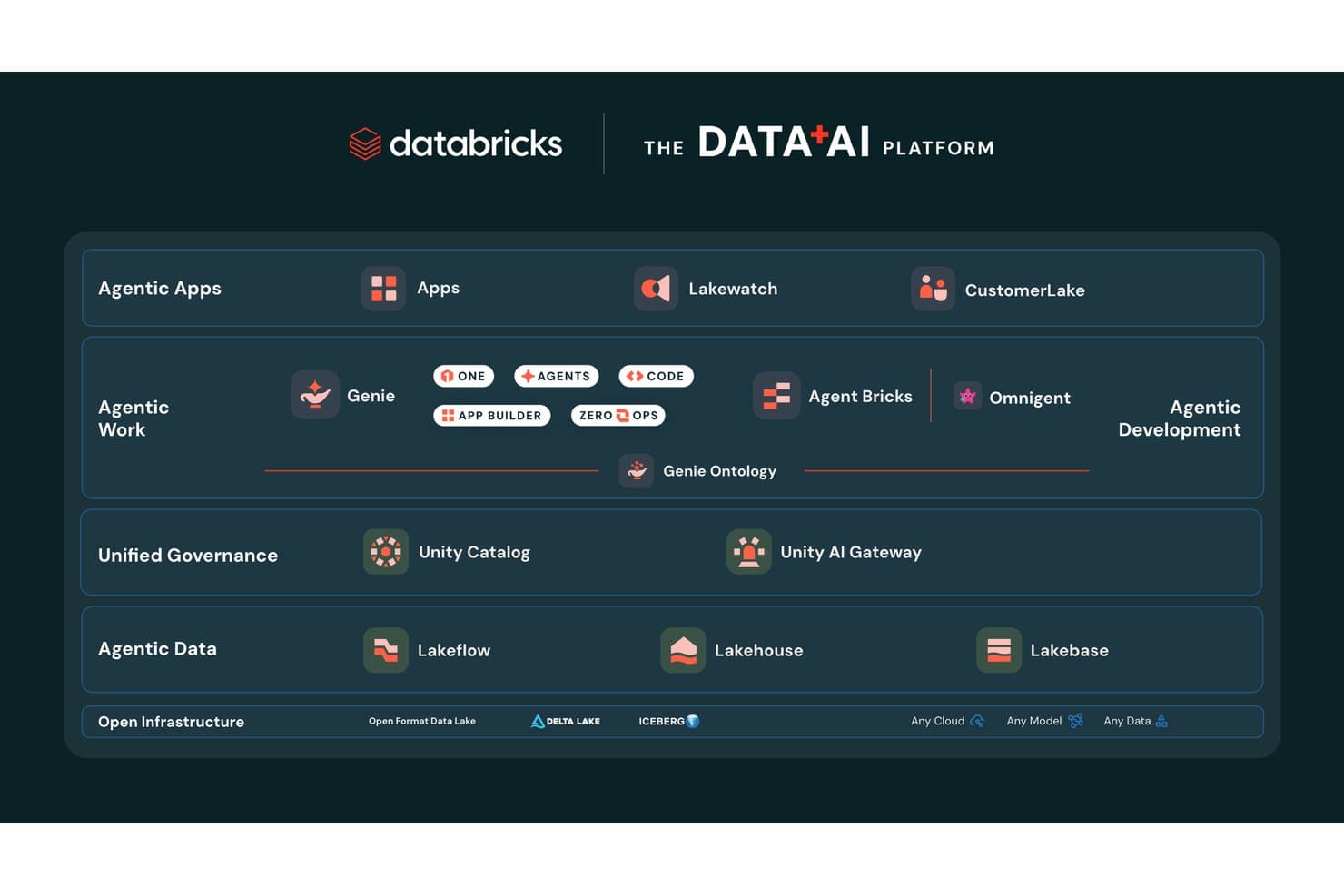
Databricks organizes its Data+AI platform across agentic, governance, and infrastructure layers. Databricks is a unified data and AI platform that combines model training, agent building, pipeline orchestration, and governance across cloud environments.
Who Is Databricks Best For?
Databricks is a strong fit for enterprise data science and engineering teams that need to build, govern, and scale AI models across complex, multi-cloud environments.
Why I Picked Databricks
Databricks earns its spot on my shortlist because no other platform matches its depth of unified governance across data, models, and AI agents simultaneously. I'm particularly impressed by Unity Catalog, which tracks column-level lineage from raw data all the way through model outputs, with automatic PII classification and audit logging built in. Unity Gateway layers on top to enforce rate limits, content filtering, and cost controls across every model your team touches, whether that's GPT-4, Claude, or a fine-tuned Llama.
Databricks Key Features
- Foundation Model APIs: Access state-of-the-art LLMs from OpenAI, Anthropic, Meta, Google, and open-source providers hosted directly on Databricks infrastructure with pay-per-token pricing.
- AI Playground: Test and compare models in a pre-deployment validation environment before committing them to production workflows.
- Managed MLflow: Track experiments, version models, and manage the full ML lifecycle using an enterprise-grade extension of open-source MLflow.
- Databricks Clean Rooms: Collaborate on data analysis with internal teams or external partners without exposing the underlying data to either party.
Databricks Integrations
Databricks offers native integrations with Salesforce, SAP, MySQL, PostgreSQL, Snowflake, Amazon Redshift, Google BigQuery, Tableau, Power BI, and dbt Cloud. It also supports MCP, Delta Sharing, REST APIs, and 6,000+ marketplace and partner connections for custom data and AI workflows.
Pros and Cons
Pros:
- No vendor lock-in with open model access
- Supports multi-agent AI and model orchestration
- Column-level governance for data and AI assets
Cons:
- Initial setup demands advanced technical expertise
- DBU-based billing complicates cost predictability
Learn more about Databricks: Best for collaborative inbox management
- 30-day free trial + free demo available
- From $14/user/month (billed annually)
Visit WebsiteCustomer Rating:4.8/5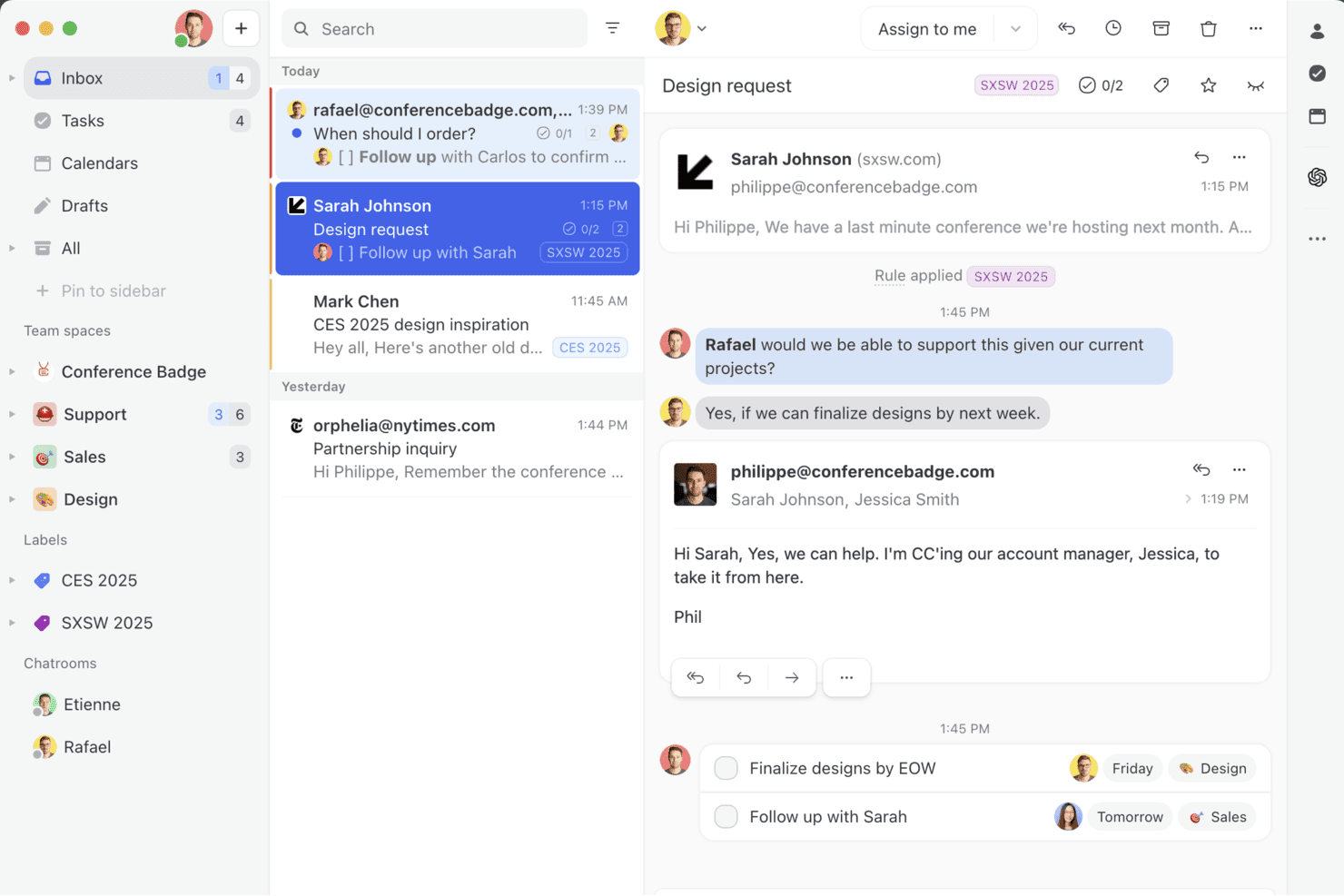
Missive brings shared inboxes, internal comments, and real-time collaboration into one workspace so your team can manage email, SMS, and social messages together — without the back-and-forth. Missive is a collaborative inbox platform that unifies email, SMS, and social messaging channels into a shared team workspace, with an embedded AI assistant for drafting, summarizing, and triaging communications.
Who Is Missive Best For?
Missive suits customer-facing and operations teams that need a shared inbox where multiple people collaborate on incoming emails, messages, and support threads.
Why I Picked Missive
Missive earns its spot on my shortlist because its AI assistant is built directly into the shared inbox, not bolted on as an afterthought. I'm particularly impressed by how it drafts context-aware replies by reading the full conversation thread before generating anything, which cuts down on back-and-forth considerably. The AI-powered automation rules go beyond simple keyword triggers, detecting tone and intent to route and label incoming messages automatically.
Missive Key Features
- Multi-model AI support: Switch between OpenAI, Anthropic Claude, and Google Gemini models, or connect your own API key to control costs and model choice.
- Custom AI prompts: Save and reuse custom prompt templates for recurring tasks like tone adjustment, grammar fixes, or reply generation.
- Missive MCP Server: Connect external AI tools (like Claude or ChatGPT) to query conversations, check calendars, and draft replies—while keeping agent review required before sending.
- Pre-send AI checks: Review outgoing messages with AI before they're sent to catch errors or flag tone issues.
Missive Integrations
Missive offers integrations with OpenAI, Anthropic, Google Gemini, Notion, Linear, Stripe, Attio, and ClickUp. It also provides a REST API with webhooks for custom connections, supports Zapier, and includes its new MCP Server on Productive and Business plans (requires admin activation).
Pros and Cons
Pros:
- AI rules automate message triage and labeling
- Flexible multi-model AI assistant options
- Collaborative inbox with native AI-driven replies
Cons:
- No predictive insights or workforce modeling
- Lacks HR-specific automations and analytics
Learn more about Missive: Best for no-code AI agent builder
- 7-day free trial + free plan + free demo available
- From $32/month (billed annually)
Visit WebsiteCustomer Rating:4.4/5
Chatbase homepage showcasing AI agents for building and deploying customer support experiences, with a clean interface and source integration panel. Chatbase is an AI agent platform where you can build, train, and deploy custom chatbots across your website, messaging apps, and business tools—without writing any code.
Who Is Chatbase Best For?
Chatbase is a good fit for small to mid-sized businesses that want to deploy AI-powered customer support or lead generation without a dedicated engineering team.
Why I Picked Chatbase
Chatbase is one of my top picks because I love how directly it connects your existing content to a deployable AI agent. You can upload PDFs, Word docs, or plain text files, and Chatbase trains a chatbot on that material—so when a customer asks a question, the answer comes directly from your documentation. I also like the website crawl feature, where Chatbase scrapes your URLs automatically, so your chatbot stays current without manual re-uploads every time your content changes.
Chatbase Key Features
- Multiple LLM support: Choose from models including GPT-4o, Claude, Gemini, and Llama to power your chatbot based on your performance or cost needs.
- AI Actions: Connect your chatbot to external systems so it can perform tasks like booking appointments, checking order status, or collecting lead information mid-conversation.
- Human handoff: Set escalation rules that automatically route conversations to a live agent when the chatbot reaches the limits of its knowledge.
- Conversation analytics: Review chat logs, user queries, and resolution rates to identify gaps in your training data and improve chatbot responses over time.
Based on the homepage and search results, I can now see the verified integrations. The homepage lists: Make, Zendesk, Notion, Slack, Stripe, Salesforce, Cal.com, Calendly, WhatsApp, Zapier, and Messenger. The blog content also confirms Shopify and Instagram as native integrations. Let me also verify the Instagram and other channel integrations mentioned.
Chatbase Integrations
Chatbase offers native integrations with Shopify, Zendesk, Salesforce, Stripe, Slack, WhatsApp, Messenger, Instagram, Notion, Cal.com, Calendly, and Make. It also connects with Zapier and provides an API for custom integrations.
Pros and Cons
Pros:
- Suggestions flag knowledge base gaps automatically
- AI Actions trigger tasks from chat
- Supports multiple AI model choices
Cons:
- Occasional hallucinations outside training data
- No visual flow builder for conversations
Learn more about Chatbase: Best for enterprise knowledge integration
- Free trial available
- Pricing upon request
Visit WebsiteCustomer Rating:4.7/5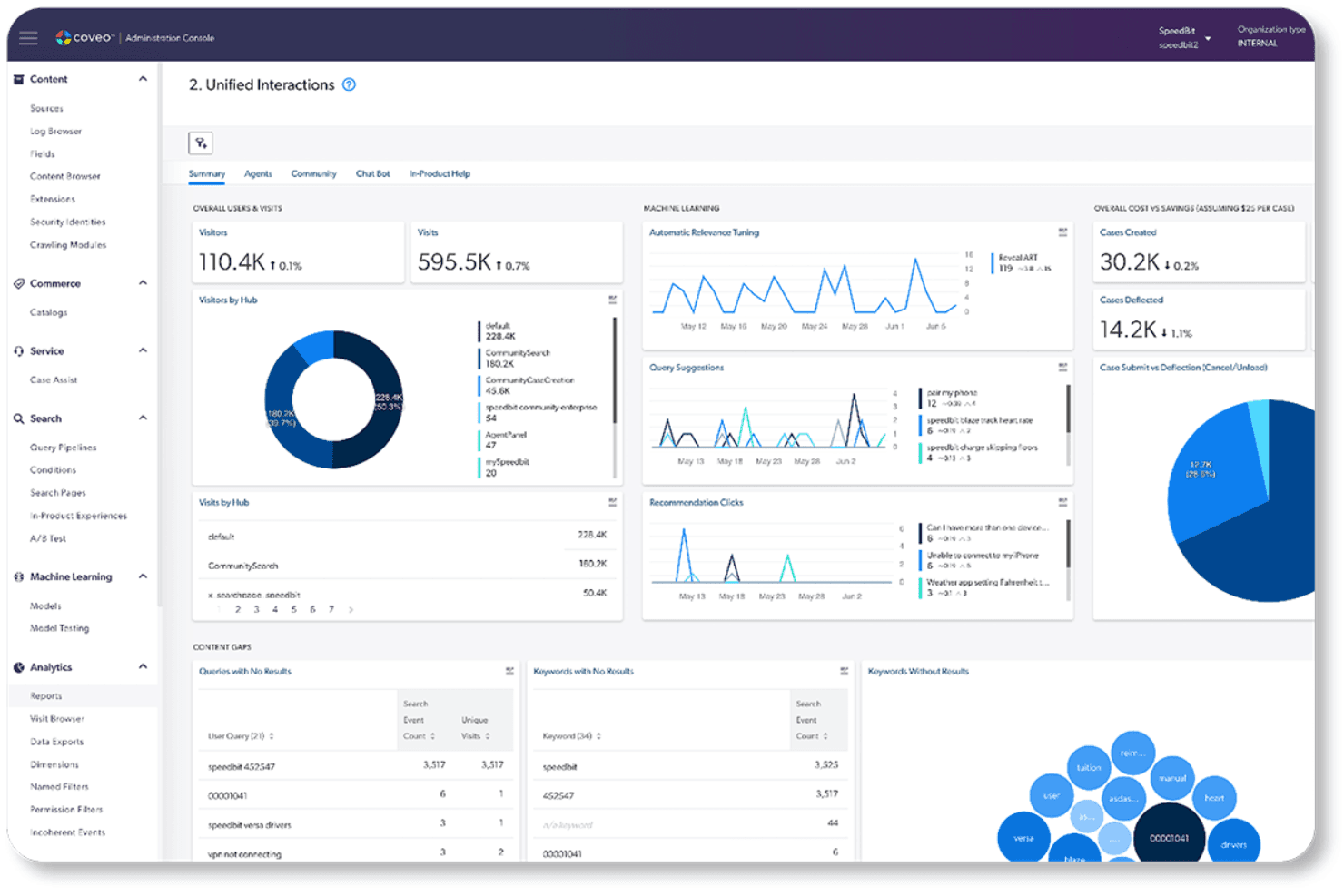
Coveo offers a unified interactions dashboard with analytics covering visitors, machine learning insights, case deflection, and content gap analysis. Coveo is an enterprise AI search and generative answering platform that indexes content across your existing systems and delivers AI-powered search, retrieval-grounded answers, and personalized recommendations through APIs and pre-built integrations.
Who Is Coveo Best For?
Coveo fits mid-market to enterprise teams that need AI-powered search and generative answers across complex, multi-system knowledge environments.
Why I Picked Coveo
I picked Coveo because no other platform on my list handles enterprise knowledge integration the way it does. Its unified hybrid index pulls content from 100+ sources, including Salesforce, SAP, and ServiceNow, and makes that knowledge retrievable through AI-generated answers with source citations. I'm particularly impressed by the Passage Retrieval API, which lets AI agents pull precise text chunks from the unified index in real time to ground responses in trusted content.
Coveo Key Features
- Dynamic navigation: Automatically adjusts facets and filters to help users refine search results.
- Personalized recommendations: Uses user behavior and intent to suggest relevant products or content.
- Role-based access controls: Applies permissions so users access only authorized content.
- Search analytics: Tracks search behavior and conversions through dashboards and attribution tools.
Coveo Integrations
Coveo offers 30+ connectors to hundreds of systems, including Salesforce, SAP, Shopify, AWS, Sitecore, Adobe, ServiceNow, Zendesk, and Agentforce. Its Answer API, Passage Retrieval API, and Headless toolkit support custom integrations and embedding search or retrieval in applications.
Pros and Cons
Pros:
- Document-level security restricts answers by permissions
- Gartner Magic Quadrant Leader for search
- Unified hybrid index across 100+ content sources
Cons:
- Unpredictable costs at enterprise scale
- No custom model training or deployment
Learn more about Coveo: 10Best for AI-powered background screening
Checkr
- Free demo available
- From $29.99/report
Visit WebsiteCustomer Rating:4.5/5
Checkr uses AI to detect resume risks and flag suspicious candidate signals. For organizations seeking an AI-driven platform to streamline hiring processes, Checkr presents a compelling solution. Designed with the needs of modern businesses in mind, Checkr leverages AI to enhance background screening, ensuring faster, more accurate, and compliant hiring decisions. Whether you are in retail, healthcare, or technology, Checkr's AI capabilities can help you transform complex data into actionable insights, addressing challenges like inefficient hiring and compliance uncertainties.
Why I Picked Checkr
I picked Checkr for its standout AI capabilities that redefine background screening. The platform's Charge Classifier automatically categorizes criminal charges, simplifying adjudication with custom rules. Additionally, the Name Matcher ensures accurate record matching by identifying and associating various name formats with the correct candidate. These features not only improve report accuracy but also address compliance and efficiency challenges, making Checkr an ideal AI platform for hiring needs.
Checkr Key Features
In addition to AI background screening, Checkr offers:
- Doc Inspector: Analyzes uploaded documents for authenticity, detecting alterations that might indicate forgery.
- Role Matcher: Verifies candidates' job titles against employer data, identifying discrepancies while ignoring minor errors.
- Real-Time Updates: Provides candidates with timely status updates on their background checks, enhancing communication.
- Compliance Tools: Provides tools that keep up with local compliance laws, enabling seamless hiring processes.
Checkr Integrations
Integrations include Workday, Greenhouse, BambooHR, Rippling, Lever, JazzHR, iCIMS, SmartRecruiters, Bullhorn, and Planning Center. Checkr also offers an API for custom integrations.
Pros and Cons
Pros:
- Fast background check results help speed up candidate hiring decisions
- Candidate-friendly interface simplifies completing background check requirements
- Automated background screening reduces manual verification and administrative work
Cons:
- Feature access and workflows sometimes unclear for new platform users
- Some background and employment checks may take longer than expected
Learn more about Checkr: 11Best for governing AI across the full ML lifecycle
Dataiku
- 14-day free trial
- Pricing upon request
Visit WebsiteCustomer Rating:4.6/5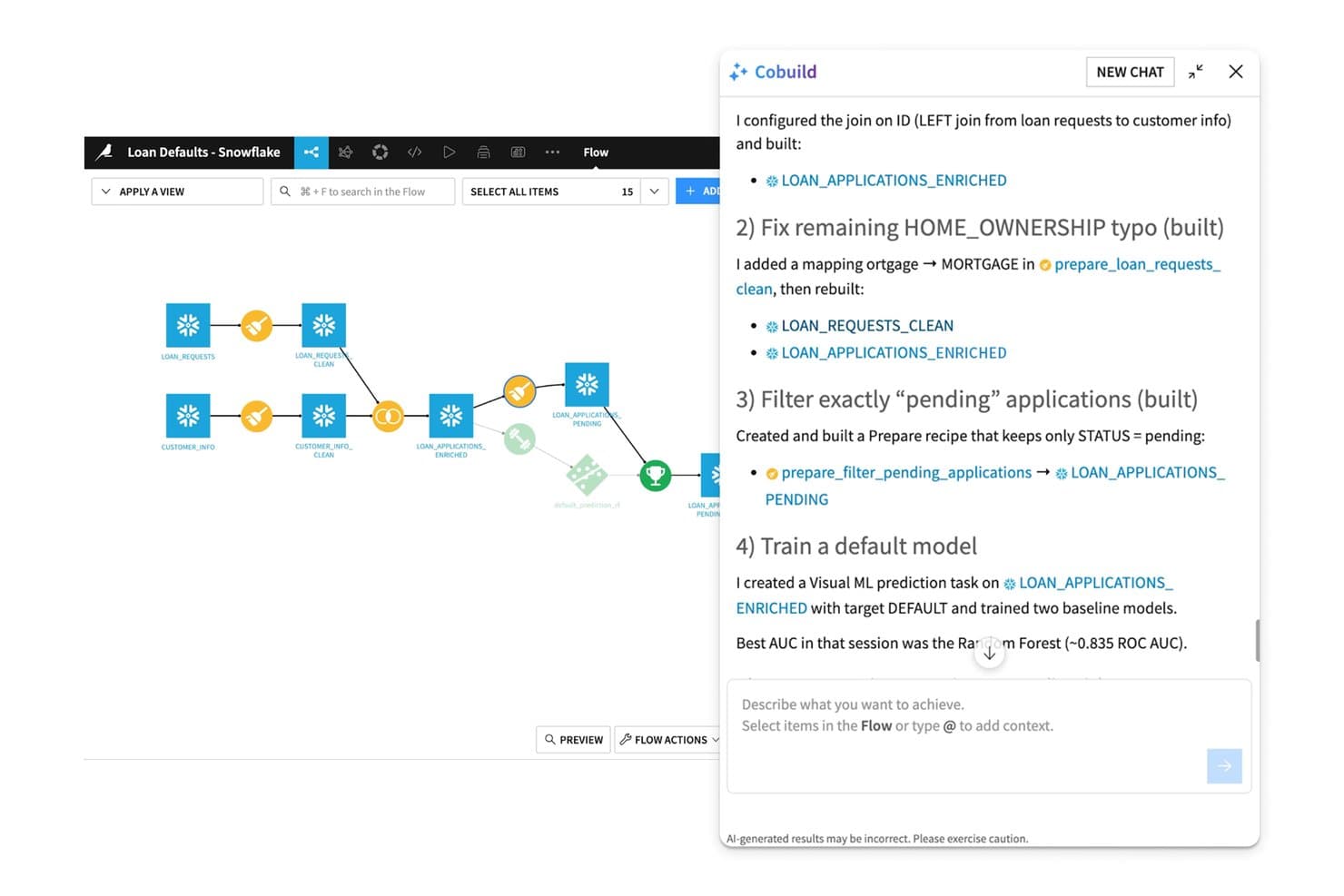
Dataiku's Cobuild AI assistant builds and refines ML pipelines conversationally. Dataiku is an enterprise AI platform that spans data preparation, ML development, AutoML, MLOps, multi-agent orchestration, and governed LLM access through a single unified environment.
Who Is Dataiku Best For?
Dataiku is a strong fit for enterprise data science and ML engineering teams that need a single governed environment to build, deploy, and monitor AI at scale.
Why I Picked Dataiku
Dataiku earns its spot on my shortlist because its governance capabilities are built into the platform's core, not added as an afterthought. I particularly like the AI Inventory and LLM Mesh combination: the AI Inventory tracks every model, agent, and dataset across teams, while LLM Mesh routes requests across providers like OpenAI, Anthropic, and Bedrock through a single governed gateway with cost controls and audit trails. That means a team running GenAI at scale can enforce compliance policies without slowing down deployment.
Dataiku Key Features
- AutoML and custom ML development: Build models using automated machine learning or full-code Python, R, and SQL environments within the same workspace.
- Dataiku Flow pipeline canvas: Design, version, and roll back data and model pipelines visually using a drag-and-drop recipe builder.
- Prompt Studios: A dedicated workspace for designing, testing, and iterating on LLM prompts before deploying them in production.
- Continuous model monitoring: Track drift, bias, and performance degradation post-deployment with automated alerting and retraining triggers.
Dataiku Integrations
Dataiku offers 20+ native SQL database integrations, including Snowflake, Databricks, Google BigQuery, Amazon Redshift, PostgreSQL, Oracle, and SAP HANA, plus Amazon S3, SharePoint, MongoDB, and Apache Iceberg. It connects to major LLM providers and supports custom integrations and CI/CD through its Python API.
Pros and Cons
Pros:
- Handles full ML and GenAI lifecycle
- AI Inventory and LLM Mesh enable compliance
- Governance tools built into platform core
Cons:
- Governance module not accessible during trial
- Collaboration features limited on lower tiers
Learn more about Dataiku:
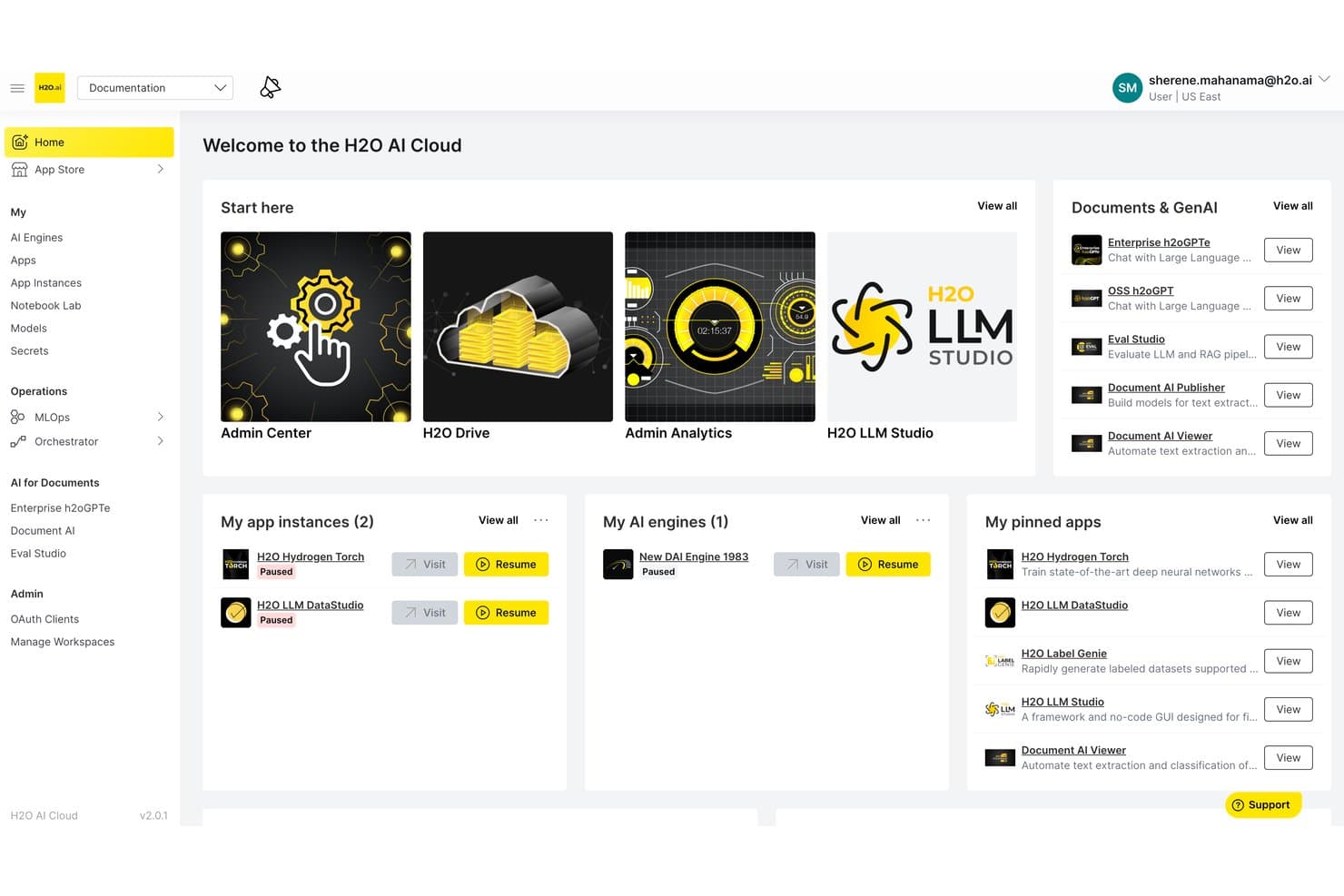
H2O.ai centralizes AI tools, apps, and engines in one cloud dashboard. H2O.ai is an enterprise AI platform that brings together AutoML, generative AI, LLM fine-tuning, and agentic AI orchestration into a single architecture designed for air-gapped, on-premises, and cloud deployments.
Who Is H2O.ai Best For?
H2O.ai is a strong fit for enterprise data science and IT teams in regulated industries like finance, healthcare, and government that need air-gapped or on-premises AI deployment.
Why I Picked H2O.ai
H2O.ai earns its spot on my shortlist because no other platform I've evaluated matches its depth of compliance certifications for sensitive data environments: SOC 2 Type II, FedRAMP High, HIPAA, and IRAP PROTECTED. I picked it specifically for teams in finance, healthcare, and government that need fully air-gapped or on-premises AI deployment, where data cannot leave the organization's environment. Its Intelligent Model Routing and Model Risk Management tools make it practical for audit-ready, regulated AI workflows.
H2O.ai Key Features
- Driverless AI AutoML: An automated machine learning engine that handles feature engineering, model selection, validation, and documentation with GPU-accelerated algorithms.
- H2O LLM Studio: A no-code fine-tuning framework that lets your team train custom LLMs on private data using alignment methods like DPO and IPO.
- Intelligent model routing: Dynamically selects the best-fit LLM for each query based on cost, latency, and accuracy requirements across open-source and third-party models.
- H2O Wave: A low-code app development framework for building and deploying custom AI-powered applications within your organization's environment.
H2O.ai Integrations
H2O.ai supports 200+ documented integrations, including Microsoft SharePoint, Slack, Microsoft Teams, GitHub, AWS, Google Cloud Platform, Azure, Snowflake, Apache Spark, and LangGraph. REST APIs and Python, R, Java, and Scala clients support custom integrations.
Pros and Cons
Pros:
- Fine-tuning without vendor data training risk
- Best-in-class compliance for regulated deployments
- World-record agentic AI performance accuracy
Cons:
- Lacks HR-specific automation and analytics
- Enterprise-only focus excludes smaller teams
Learn more about H2O.ai: Best for secure AI-driven board meeting management
- Free demo available
- Pricing upon request
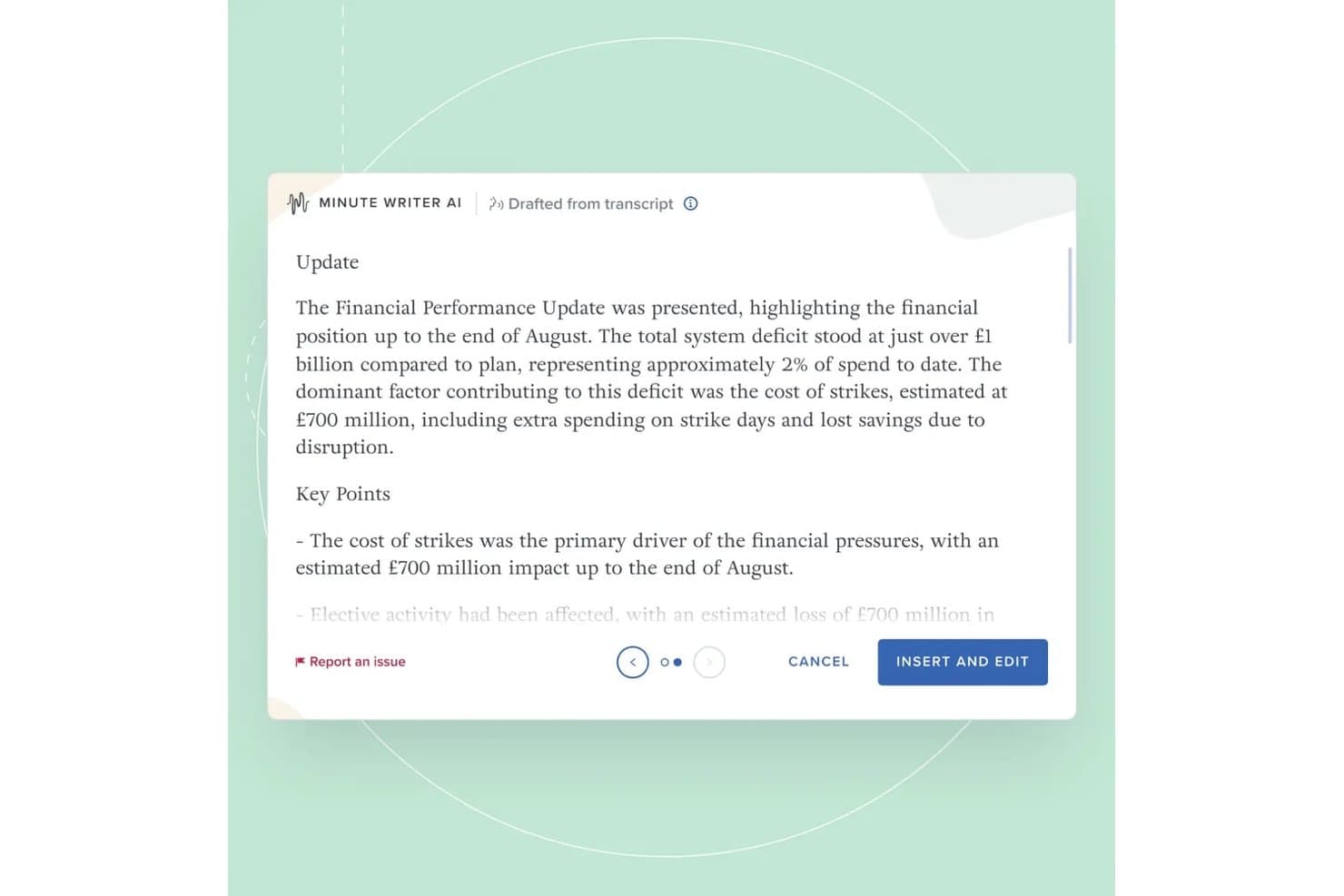
Board Intelligence's Minute Writer AI drafts structured meeting minutes from transcripts, summarizing financial performance updates with key points automatically. Board Intelligence is a board management AI platform that combines AI-powered report writing, minute generation, meeting preparation, agenda planning, and governance insights across the full board cycle.
Who Is Board Intelligence Best For?
Board Intelligence suits company secretaries, general counsel, and governance teams at mid-to-large enterprises managing complex board and committee cycles.
Why I Picked Board Intelligence
Board Intelligence earns its spot on my shortlist because its AI is purpose-built for governance, not adapted from generic tools. I particularly like Minute Writer AI, which produces structured minutes directly from board discussions, and IQ Insights, which surfaces governance-relevant themes across 130+ board domains before meetings start. What really sets it apart is the zero data retention policy, meaning sensitive board content never persists in the AI model.
Board Intelligence Key Features
- Agenda planner: Build board and committee meeting agendas aligned to key business priorities.
- Report briefer: Commission board papers using standardized briefs and approval workflows.
- Action tracker: Track and manage action items assigned during board meetings from one place.
- Board surveys: Run board effectiveness assessments using expert-designed survey templates.
Board Intelligence Integrations
Board Intelligence offers native integrations with Microsoft 365 (including Word), Microsoft Teams, Zoom, and supports single sign-on through enterprise SSO providers.
Pros and Cons
Pros:
- Advanced agenda builder for board meetings
- Automated minute writing saves administrative time
- Secure AI with zero data retention
Cons:
- Limited analytics outside board topics
- No API for custom integrations
Learn more about Board Intelligence: Best for multi-model agent orchestration at scale
- 30-day free trial
- From $21/user/month
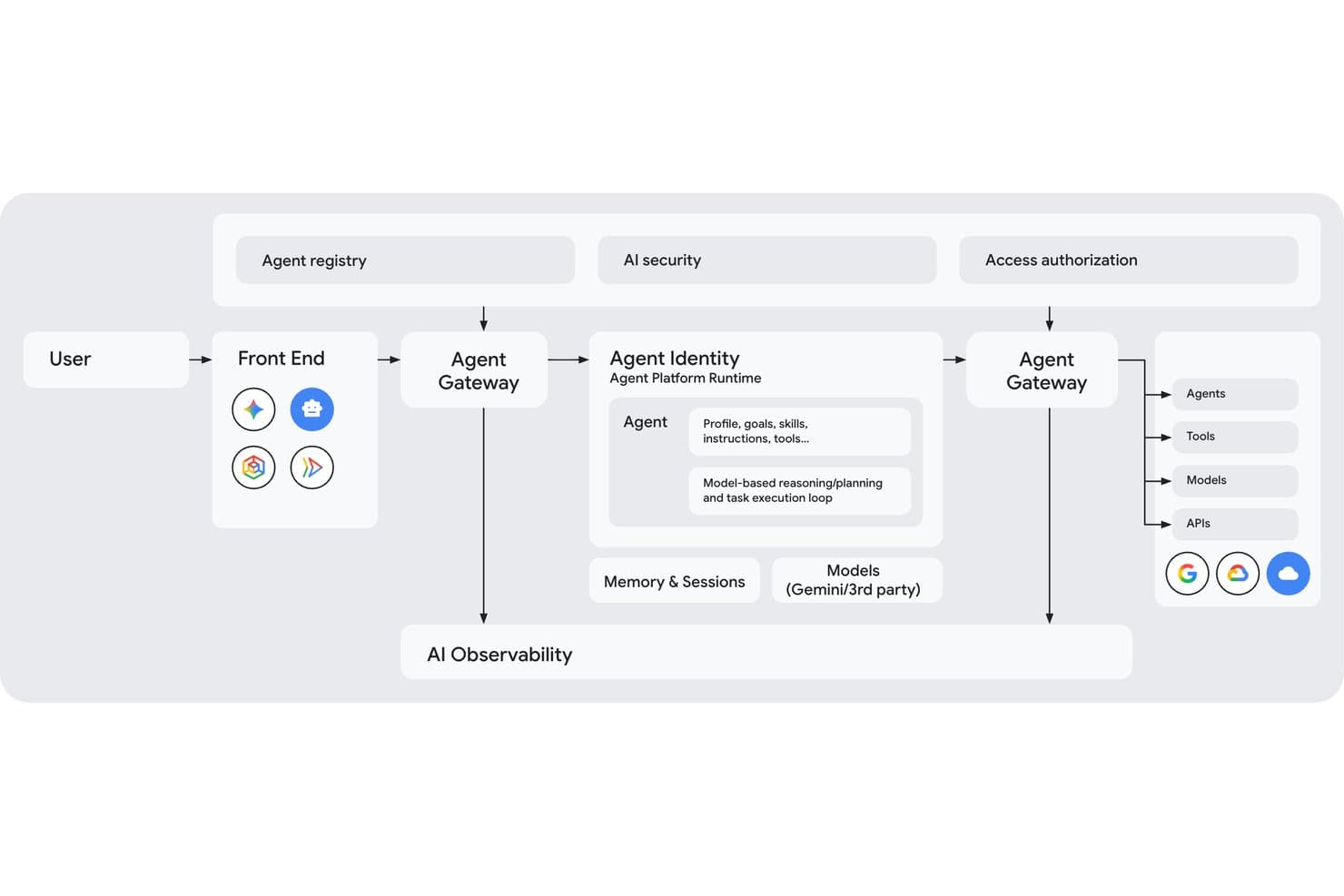
Gemini Enterprise Agent Platform maps its full multi-agent architecture visually. Gemini Enterprise Agent Platform is Google Cloud's enterprise AI platform that gives teams access to 200+ models, multi-agent orchestration, custom model training and fine-tuning, and a full governance suite for deploying and managing AI agents at scale.
Who Is Gemini Enterprise Agent Platform Best For?
It's a strong fit for enterprise engineering and data science teams that need to build, orchestrate, and govern complex multi-agent AI systems on Google Cloud infrastructure.
Why I Picked Gemini Enterprise Agent Platform
I picked Gemini Enterprise Agent Platform as one of the best because its graph-based multi-agent orchestration lets engineering teams coordinate networks of specialized sub-agents across complex, multi-day workflows in a way most platforms simply can't match. The Model Garden's 200+ models, spanning Gemini, Claude, Grok, and Llama, means teams can route each task to the right model based on cost, speed, or accuracy. On top of that, the Agent Identity system assigns every agent a cryptographic SPIFFE ID, giving security teams real auditability across every action taken.
Gemini Enterprise Agent Platform Key Features
- Agent Studio: A low-code, browser-based interface for designing, testing, and iterating on agents using natural language, code, images, or video without deep coding knowledge.
- RAG Engine: Connects your enterprise data sources to LLMs via Vector Search, grounding model outputs in proprietary knowledge to reduce hallucinations.
- Agent simulation: Generates synthetic conversations to test agents against defined success and safety criteria before any live deployment.
- Memory Bank: Retains long-term context across agent sessions, enabling personalized and consistent interactions over time.
Gemini Enterprise Agent Platform Integrations
Gemini Enterprise Agent Platform offers native integrations across Google Cloud and Google Workspace, including BigQuery, Cloud Storage, Google Sheets, Gmail, and Drive, plus Workday’s Sana Self-Service Agent. It supports Apigee, MCP, REST, gRPC, webhooks, and APIs for custom integrations.
Pros and Cons
Pros:
- Complex multi-agent orchestration for advanced workflows
- Enterprise-grade governance with SPIFFE Agent Identity
- Unmatched breadth of curated AI models
Cons:
- Documentation and product rebranding create confusion
- Pricing complexity and unpredictable costs reported
Learn more about Gemini Enterprise Agent Platform: Best for enterprise-scale model fleet governance
- 30-day free trial available
- From $0.165 per 1M input tokens
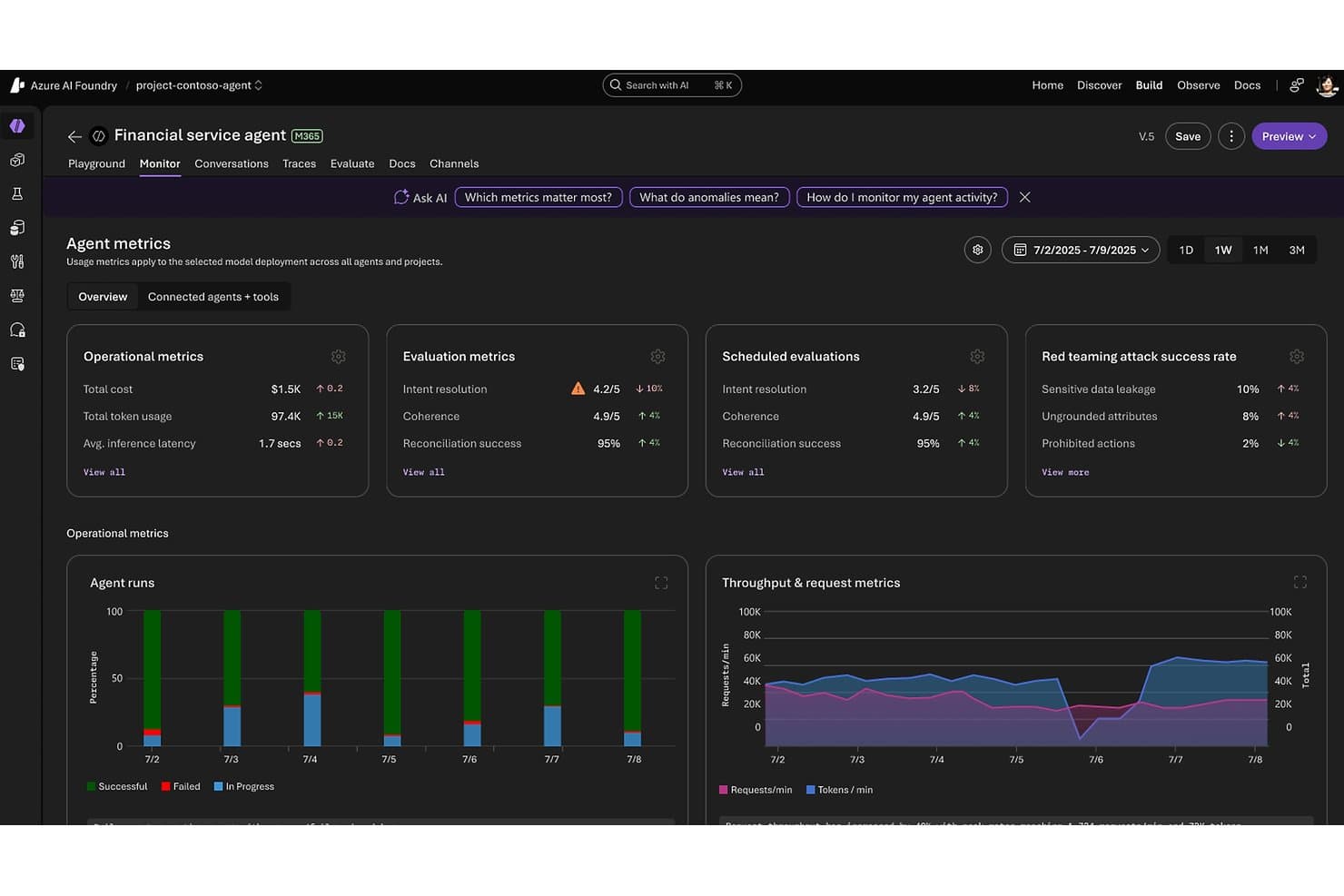
Microsoft Foundry tracks agent performance metrics and safety evaluations. Microsoft Foundry is an enterprise AI platform from Microsoft that unifies model access, agent building, workflow automation, and governance across a catalog of 11,000+ models from providers like OpenAI, Anthropic, Meta, and Mistral.
Who Is Microsoft Foundry Best For?
Microsoft Foundry is best suited for large enterprises with existing Azure infrastructure that need centralized control over multiple AI models, teams, and workloads at scale.
Why I Picked Microsoft Foundry
Microsoft Foundry earns its spot on my shortlist because no other platform comes close to its fleet-level governance at enterprise scale. The Foundry Control Plane gives IT and AI infrastructure leads a centralized dashboard to track compliance posture, cost anomalies, and agent health across every project and team simultaneously. I'm also impressed by the AI Red Teaming Agent, which automatically probes deployments for vulnerabilities, and the Model Router, which cuts inference costs by roughly 50% by routing each query to the optimal model without any code changes.
Microsoft Foundry Key Features
- Foundry Agent Service: Build autonomous agents that can reason, plan, and execute multi-step tasks using tools, memory, and multi-agent orchestration patterns like sequential handoff and group chat.
- Foundry IQ: Connects agents to enterprise data sources—including Snowflake, S3, and OneLake—using dynamic reasoning rather than static vector lookups for next-generation RAG.
- Fine-tuning via portal, SDK, or REST: Customize Azure OpenAI and open-source base models on your own organizational data directly within the Foundry interface.
- Azure Logic Apps integration: Access 1,400+ pre-built connectors to automate workflows across third-party apps, databases, and enterprise systems without custom code.
Microsoft Foundry Integrations
Microsoft Foundry has native integrations across the Microsoft ecosystem, including Microsoft 365, Microsoft Fabric, Microsoft Copilot Studio, Power Automate, Microsoft Entra ID, Azure Machine Learning, and Azure AI Search. It also supports 1,400+ Azure Logic Apps connectors, REST APIs, SDKs, and MCP/OpenAPI connections for custom integrations.
Pros and Cons
Pros:
- Model Router reduces overall inference costs
- Enterprise-grade governance and compliance tools
- Centralized control over 11,000+ AI models
Cons:
- No native HR-specific features or connectors
- Requires existing Azure infrastructure investment
Learn more about Microsoft Foundry:
Outras plataformas de IA
Eis algumas opções adicionais de plataformas de IA que não chegaram à minha lista restrita, mas que ainda vale a pena conhecer:
- 16TidioBest for customer interaction automation
- 17Leena AIBest for AI automations for HR teams
- 18DataRobotBest for AI automated machine learning
- 19Amazon BedrockBest for multi-model access on AWS infrastructure
- 20IBM watsonx.aiBest for enterprise AI with built-in IP indemnity
- 21Palantir AIPBest for AI agents grounded in enterprise ontology
How I Evaluate AI Platforms
I split my evaluation into baseline capabilities every platform must clear, and differentiators like how well a tool grounds AI outputs in proprietary data or manages agent workflows at scale.
Core Functionality (Table Stakes For This List)
When I'm selecting tools for my list, I rank each one on a scale from 0 (does not offer the functionality) to 5 (excels in this area) for each core functionality listed below. I then calculate the tool's total score into a percentage, using 75% as a benchmark to help assess its overall fit for the list.
- Conversational AI Interfaces: I evaluate whether the platform supports multi-turn, context-aware interactions—not just scripted responses—and whether those assistants can connect to enterprise data sources.
- Intelligent Workflow Automation: I look for AI-driven decision-making within workflows, not just rule-based triggers—think cross-functional processes where the platform can route, escalate, or adapt based on context.
- Predictive Analytics: I check whether forecasting goes beyond static dashboards—specifically, whether platforms offer scenario modeling or risk analysis that informs real decisions rather than just reporting on past performance.
- Generative AI and Language Models: I evaluate model flexibility, grounding options, and whether the platform supports retrieval-augmented generation (RAG) to ground outputs in your organization's own data and knowledge.
- Responsible AI and Governance: I look at audit trails, bias detection, and explainability controls—whether you can actually trace why a model made a decision, not just that it did.
Once I have a list of tools that meet the criteria, I consider what sets each platform apart.
Differentiating Factors (What Sets Vendors Apart)
Here's how I compare and contrast different vendors:
Standout Features
Enterprise knowledge grounding is where I see the biggest gaps between platforms. I look at whether a tool can connect to your organization's actual data—through RAG, semantic search, or knowledge graphs—and return outputs that reflect your context, not just general training. Closely related is AI model customization: fine-tuning and prompt management determine whether a platform adapts to your workflows or forces you to adapt to it. I also evaluate low-code AI development, since the best platforms let both technical and non-technical HR teams build and iterate without depending entirely on engineering resources.
Beyond Features
Pricing transparency matters more than most buyers expect. I look at whether token, compute, or usage-based costs are clearly documented—because AI workloads can scale fast, and opaque pricing creates real budget risk. I also pay close attention to security and regulatory readiness: specifically, whether a platform offers data residency options, enforces access controls, and maps to standards like SOC 2 or the EU AI Act—non-negotiables for HR teams handling sensitive workforce data.
Qual é a melhor ferramenta de IA gratuita?
A melhor ferramenta de IA gratuita depende da tarefa específica que precisa de automatizar, mas o ChatGPT, o Claude, o Gemini e o Canva oferecem os planos gratuitos mais competentes para as operações empresariais diárias. A maioria dos escalões gratuitos dá acesso aos modelos principais e à automatização básica, embora normalmente limite a utilização diária e restrinja as integrações empresariais.
Eis como as principais opções gratuitas se distribuem por caso de utilização:
| Ferramenta de IA gratuita | Mais indicada para | Principais funcionalidades |
|---|---|---|
| Ferramenta de IA gratuitaChatGPT | Mais indicada paraMelhor opção geral para texto, escrita e chuva de ideias | Principais funcionalidadesCriação de rascunhos de texto, programação ligeira, navegação na Web e acesso a GPT personalizados |
| Ferramenta de IA gratuitaClaude | Mais indicada paraMelhor para análise de documentos longos e escrita com nuances | Principais funcionalidadesResume ficheiros longos, lê PDFs/folhas de cálculo e oferece tons de escrita naturais |
| Ferramenta de IA gratuitaCanva | Mais indicada paraMelhor para conteúdos visuais e apresentações rápidas | Principais funcionalidadesMagic Write, modelos de apresentação e edição visual básica |
| Ferramenta de IA gratuitaMicrosoft Copilot | Mais indicada paraMelhor para investigação ligada à Web | Principais funcionalidadesResultados de pesquisa com citações, geração de imagens e integração com o navegador Edge |
| Ferramenta de IA gratuitaGemini | Mais indicada paraMelhor para investigação no Google Workspace | Principais funcionalidadesPesquisa na Web em tempo real, integração com o Gmail/Docs e entradas multimodais |
Quando é que uma ferramenta de IA gratuita não é suficiente?
As ferramentas de IA gratuitas ficam aquém no momento em que precisa de privacidade de dados, acionadores de fluxos de trabalho automatizados ou conformidade especializada com os requisitos do setor. Eis as limitações das ferramentas de IA gratuitas:
| Se precisar de… | As ferramentas de IA gratuitas ficam aquém porque… |
|---|---|
| Se precisar de…Segurança e privacidade dos dados | As ferramentas de IA gratuitas ficam aquém porque…Os pedidos gratuitos podem ser utilizados para treinar modelos públicos e não garantem a retenção zero de dados. |
| Se precisar de…Automatização de fluxos de trabalho | As ferramentas de IA gratuitas ficam aquém porque…Tem de copiar/colar manualmente os pedidos entre separadores do navegador. |
| Se precisar de…Operações especializadas | As ferramentas de IA gratuitas ficam aquém porque…Os modelos gerais não dispõem de conformidade específica do setor nem de lógica de representação de papéis. |
| Se precisar de…Integração completa da pilha tecnológica | As ferramentas de IA gratuitas ficam aquém porque…As ferramentas gratuitas ficam isoladas numa janela separada do navegador. |
Por outro lado, as plataformas de IA pagas disponibilizam ambientes privados para dados com retenção zero de dados, agentes de IA sem intervenção manual que executam fluxos de trabalho em várias etapas e motores concebidos especificamente para tarefas especializadas, como verificações de antecedentes, análise da força de trabalho e formação de gestores. O melhor de tudo é que sincronizam bidirecionalmente através de APIs com o seu ATS, HRIS ou serviço de assistência existentes.
Como escolher plataformas de IA
Para escolher a plataforma de IA certa, defina o problema operacional específico que precisa de resolver e, em seguida, avalie as ferramentas com base nas normas de privacidade dos dados, na profundidade da integração com a sua pilha tecnológica existente e no custo total real.
Em vez de se perder em longas listas de funcionalidades ou no entusiasmo exagerado do marketing dos fornecedores, concentre o seu processo de seleção nestes sete fatores críticos:
| Fator | O que considerar |
| Escalabilidade | A plataforma acompanhará o crescimento da sua empresa? Verifique se o seu ecossistema suporta volumes crescentes de dados e de utilizadores sem degradar o desempenho ou exigir atualizações dispendiosas. |
| Integrações | Funciona com as suas ferramentas existentes? Verifique a compatibilidade com a sua pilha tecnológica atual, como sistemas CRM ou ERP, para evitar interrupções e custos adicionais de integração. |
| Personalização | Pode adaptar a plataforma às suas necessidades? Procure flexibilidade nas definições e nos fluxos de trabalho, de modo a alinhá-los com os processos e objetivos específicos da sua equipa. |
| Facilidade de utilização | A interface é intuitiva para a sua equipa? Certifique-se de que não exige formação extensa, o que pode tornar a adoção mais lenta e causar frustração entre os utilizadores. |
| Implementação e integração inicial | Com que rapidez pode começar a utilizar a plataforma? Avalie o tempo e os recursos necessários para a configuração, incluindo a migração de dados e a formação dos utilizadores, para evitar atrasos prolongados. |
| Custo | O preço cabe no seu orçamento? Considere todos os custos, incluindo taxas de subscrição, possíveis complementos e compromissos financeiros a longo prazo, para garantir que são comportáveis. |
| Salvaguardas de segurança | Os seus dados e operações estão protegidos? Verifique a existência de encriptação, conformidade com os regulamentos de proteção de dados e controlos de acesso robustos para manter as informações sensíveis em segurança. |
O que são plataformas de IA?
As plataformas de IA são soluções de software que utilizam inteligência artificial para automatizar tarefas, analisar dados e gerar informações úteis. Fornecem a infraestrutura subjacente — como capacidades de aprendizagem automática, processamento de linguagem natural e análise preditiva — que os cientistas de dados, analistas e equipas técnicas utilizam para criar, personalizar e dimensionar fluxos de trabalho baseados em IA. Estas plataformas ajudam as empresas a simplificar processos, melhorar a tomada de decisões e promover a inovação em todas as operações.
As plataformas de IA diferem das ferramentas de IA quanto ao seu âmbito:
- As plataformas de IA oferecem ambientes completos para criar e gerir sistemas de IA.
- As ferramentas de IA são aplicações prontas a utilizar, concebidas para executar uma tarefa específica baseada em IA.
Se procura ferramentas de IA individuais que ajudem na escrita, pesquisa, design, produtividade e muito mais, pode consultar a nossa lista de ferramentas de IA num artigo separado.
Funcionalidades
Ao selecionar plataformas de IA, procure as seguintes funcionalidades essenciais:
- Algoritmos de aprendizagem automática: Automatizam a análise de dados e melhoram a tomada de decisões ao identificar padrões e tendências.
- Processamento de linguagem natural: Compreende e processa a linguagem humana para facilitar a comunicação e automatizar tarefas.
- Análise preditiva: Prevê resultados futuros com base em dados históricos, ajudando-o a tomar decisões empresariais informadas.
- Fluxos de trabalho personalizáveis: Adapte os processos às necessidades específicas da sua equipa, melhorando a eficiência e a adaptabilidade.
- Processamento de dados em tempo real: Analise e aja sobre os dados à medida que são recolhidos, obtendo informações e respostas atempadas.
- Capacidades de integração: Ligue-se às ferramentas e aos sistemas existentes para garantir um ambiente tecnológico coeso.
- Informações baseadas em IA: Fornece recomendações acionáveis e informações geradas por IA com base na análise de dados para apoiar o planeamento estratégico.
- Tomada de decisões automatizada: Utilize a pesquisa de IA para devolver automaticamente dados e criar lógica baseada em regras, simplificando as decisões de rotina e libertando tempo para tarefas mais complexas.
- Medidas de segurança: Proteja informações sensíveis e canais de comunicação com encriptação e controlos de acesso para manter a integridade dos dados.
- Escalabilidade: Suporte volumes crescentes de dados e de utilizadores sem sacrificar o desempenho ou exigir atualizações significativas.
Benefícios
A implementação de plataformas de IA proporciona vários benefícios para a sua equipa e para a sua empresa. Eis alguns dos benefícios que pode esperar:
- Maior eficiência: Automatize tarefas de rotina com IA, libertando tempo para trabalho mais estratégico.
- Melhor tomada de decisões: Utilize a análise preditiva para tomar decisões informadas com base em informações orientadas por dados.
- Melhor comunicação: Facilite uma comunicação mais clara com as capacidades de processamento de linguagem natural.
- Poupança de custos: Reduza os custos operacionais através da automatização de processos e da minimização do esforço manual.
- Escalabilidade: Expanda as suas operações sem se preocupar com problemas de desempenho, graças a soluções de IA escaláveis.
- Maior inovação: Tire partido das informações baseadas em IA para explorar novas oportunidades e impulsionar o crescimento da empresa.
Custos e preços
A seleção de plataformas de IA exige uma compreensão dos vários modelos de preços e planos disponíveis. Os custos variam consoante as funcionalidades, o tamanho da equipa, os complementos, entre outros fatores. A tabela abaixo resume os planos comuns, os respetivos preços médios e as funcionalidades normalmente incluídas nas soluções de plataformas de IA:
Tabela de comparação de planos para plataformas de IA
| Tipo de plano | Preço médio | Funcionalidades comuns |
| Plano gratuito | $0 | Análise básica de dados, capacidades de IA limitadas e acesso restrito a integrações. |
| Plano pessoal | $5-$25/utilizador/mês | Funcionalidades de IA melhoradas, fluxos de trabalho personalizáveis e acesso ao apoio ao cliente. |
| Plano empresarial | $30-$100/utilizador/mês | Análise avançada, capacidades de integração completas e serviços de apoio prioritário |
| Plano empresarial de grande dimensão | $100+/utilizador/mês | Ferramentas de IA abrangentes, gestão de conta dedicada e funcionalidades de segurança avançadas. |
Perguntas frequentes sobre plataformas de IA
Aqui estão algumas respostas a perguntas comuns sobre plataformas de IA:
Que ferramenta de IA é melhor do que o ChatGPT?
Embora o ChatGPT funcione bem para pedidos conversacionais pontuais, as ferramentas dedicadas superam-no em operações empresariais específicas. Por exemplo, o Claude supera o ChatGPT na análise de documentos extensos e no tom natural da escrita. Plataformas concebidas especificamente para este fim, como o monday AI Workspace, o Freshservice e o Tidio, são melhores do que o ChatGPT para fluxos de trabalho empresariais automatizados.
Opinião de especialista: Utilize o ChatGPT para geração abrangente de ideias e criação rápida de rascunhos diários. Mude para o Claude quando a qualidade dos resultados e o tratamento de documentos forem prioritários, ou avance para as plataformas dedicadas da minha seleção quando precisar de fluxos de trabalho automatizados, elevada privacidade dos dados ou execução de tarefas específicas do seu setor.
Como avalio a escalabilidade de uma plataforma de IA?
Para avaliar a escalabilidade, considere a forma como a plataforma lida com o aumento do volume de dados e do número de utilizadores. Procure funcionalidades como computação distribuída e balanceamento de carga. Peça aos fornecedores estudos de caso ou exemplos de como a plataforma apoia empresas em crescimento. Certifique-se de que não serão necessárias atualizações dispendiosas à medida que a sua equipa aumenta.
As plataformas de IA podem integrar-se com software existente?
Sim, a maioria das plataformas de IA oferece capacidades de integração com software popular, como sistemas de CRM e ERP. Consulte a lista de integrações compatíveis do fornecedor. Poderá ter de utilizar APIs ou ferramentas de terceiros para integrações personalizadas. Certifique-se de que o processo de integração da plataforma está alinhado com a sua infraestrutura de TI, para evitar interrupções.
Que tipo de apoio devo esperar de um fornecedor de plataformas de IA?
Espere apoio multicanal, incluindo por e-mail, chat e telefone. Procure fornecedores que ofereçam apoio 24 horas por dia, 7 dias por semana, especialmente se a sua equipa trabalhar em diferentes fusos horários. Avalie os tempos de resposta e o nível de conhecimento do fornecedor consultando as avaliações dos clientes. Alguns fornecedores disponibilizam gestores de conta dedicados para prestar assistência personalizada.
Como posso garantir a segurança dos dados com uma plataforma de IA?
Verifique se a plataforma utiliza encriptação e cumpre os regulamentos de proteção de dados, como o RGPD. Procure funcionalidades como controlos de acesso baseados em funções. Pergunte aos fornecedores sobre as suas auditorias e certificações de segurança. Certifique-se de que dispõem de protocolos para responder a violações de dados e de que fornecem informações transparentes sobre as suas práticas de segurança.