

O software de planeamento de remunerações com IA utiliza IA e dados salariais para apoiar revisões de remunerações, análises de equidade e decisões salariais. Precisará de uma ferramenta que se adapte ao seu processo de revisão, mantenha as recomendações explicáveis e dê aos RH controlo sobre as decisões finais. As minhas quase duas décadas de experiência em operações, incluindo a previsão financeira e a utilização de HRIS, fundamentam esta comparação de ferramentas para revisões salariais, incentivos e planeamento dos custos da força de trabalho. As capacidades de IA variam, por isso, vou ajudá-lo a comparar o que cada plataforma oferece e a escolher uma que se adeque à sua equipa.
Why Trust Our Software Recommendations
6,700+
Reviews
20
Industry experts
16+
Evaluation factors
14
Years
Our team has been testing and reviewing software since 2012. As HR experts ourselves, we know how difficult—and important—it is to choose the right software.
For this guide, we evaluated tools using hands-on testing and independent research, scoring tools using our selection criteria. We also draw on insights from industry thought leaders and practicing HR experts.
Our reviews reflect our human editorial judgment, not a sales pitch.
Expert reviewers:
- Phil GrayCOO
 Kim BehnkeHR Tech Editor & Analyst
 Josh BarkerPeople Ops Manager

Tabela de comparação: software de planeamento de remunerações com IA
Compare preços e especificações, lado a lado, do software de planeamento de remunerações com IA que entrou na minha lista restrita.
Score legend (out of 5)
- Excellent4.5–5
- Good4–4.4
- Average3–3.9
- Below average2–2.9
- Poor1–1.9
Sorted by: Default
| Tool | Starting Price | Website | |||||||
|---|---|---|---|---|---|---|---|---|---|
Best for multi-level compensation budgeting | 3.0 out of 5 | 2 | 1 | 3 | 3 | 5 | 4 | Pricing upon request Free demo available | Website |
Best for auditable AI-guided pay decisions | 3.5 out of 5 | 2 | 4 | 3 | 4 | 4 | 4 | Pricing upon request Free demo available | Website |
Best for modeling complex incentive programs | 3.3 out of 5 | 3 | 4 | 3 | 4 | 3 | 3 | Pricing upon request Free demo available | Website |
Best for budget-aware pay equity remediation | 3.0 out of 5 | 4 | 2 | 2 | 4 | 3 | 3 | Pricing upon request Free demo available | Website |
Best for flight-risk-aware pay reviews | 3.2 out of 5 | 2 | 2 | 3 | 4 | 4 | 4 | Pricing upon request Free demo available | Website |
Best for custom, explainable pay guidance | 3.3 out of 5 | 2 | 4 | 4 | 3 | 3 | 4 | Pricing upon request Free demo available | Website |
Best for market-informed merit planning | 2.7 out of 5 | 3 | 2 | 1 | 2 | 4 | 4 | Pricing upon request Free demo available | Website |
Best for connecting pay and workforce plans | 3.3 out of 5 | 2 | 3 | 4 | 3 | 4 | 4 | Pricing upon request Free demo available | Website |
Best for modeling workforce cost trade-offs | 2.7 out of 5 | 2 | 2 | 2 | 2 | 4 | 4 | Pricing upon request Free demo available | Website |
Best for AI that can change planning settings | 3.7 out of 5 | 2 | 4 | 4 | 4 | 4 | 4 | $15,000/year Free demo available | Book Demo |


Avaliações de software de planeamento de remunerações com IA
Abaixo encontram-se as minhas avaliações do melhor software de planeamento de remunerações com IA incluído na minha lista restrita. Cada visão geral abrange funcionalidades, ferramentas de equidade salarial e fluxos de trabalho de revisão para o ajudar a encontrar a plataforma certa para a sua equipa.
 Best for multi-level compensation budgeting
- Free demo available
- Pricing upon request
Visit WebsiteCustomer Rating:4.6/5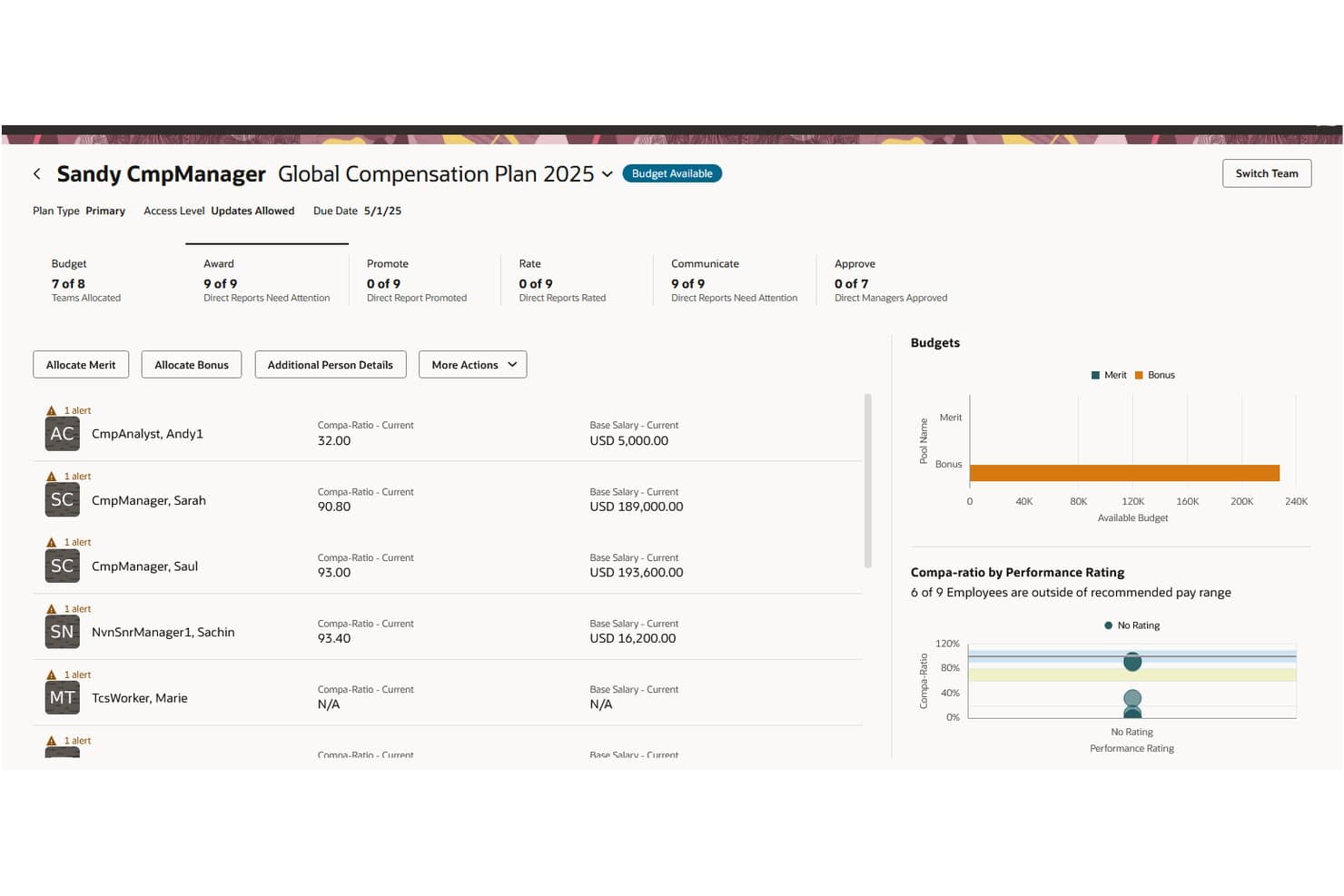
Oracle HCM lets managers review team compensation plans and budgets. Oracle Compensation is a compensation planning tool within Oracle Fusion Cloud HCM that supports budget modeling, merit and bonus allocations, approval workflows, and total compensation statements.
Who Is Oracle Best For?
Oracle Compensation is best for enterprise HR and compensation teams using Oracle Fusion Cloud HCM that need multi-level compensation planning, manager-level budgeting, and approval hierarchies.
Why I Picked Oracle
I picked Oracle Compensation for its individual compensation plans, which let employees submit allowance claims with supporting document uploads and approval workflows. This is separate from its workforce compensation planning features, where managers can review and adjust allocations at different approval levels before submitting them. I also like that Oracle supports manager-level budgeting across organizational hierarchies.
Oracle Key Features
- Budget pool modeling: Configure up to five budget pools for compensation components such as merit increases, bonuses, and stock awards.
- Total compensation statements: Generate employee statements covering earnings, equity awards, benefits, and other compensation components.
- Pay-for-performance planning: Incorporate employee performance measures into compensation targets, budgeting, and allocation approvals.
- AI-assisted compensation insights: Ask Compensation Advisor questions about employee pay, market composites, and compensation percentiles.
Oracle Integrations
Oracle Compensation connects with Oracle Performance Management and Oracle Succession Planning within Oracle Fusion Cloud HCM. Oracle also provides REST APIs for custom integrations.
Pros and Cons
Pros:
- Merit and bonus planning supports review cycles
- Linked budget pools track manager allocations
- Employee-claimed allowances include approval workflows
Cons:
- Market surveys require customer-managed imports
- Custom worksheet approval routes are unsupported
Learn more about Oracle: Best for auditable AI-guided pay decisions
- Free demo available
- Pricing upon request
Visit WebsiteCustomer Rating:4.7/5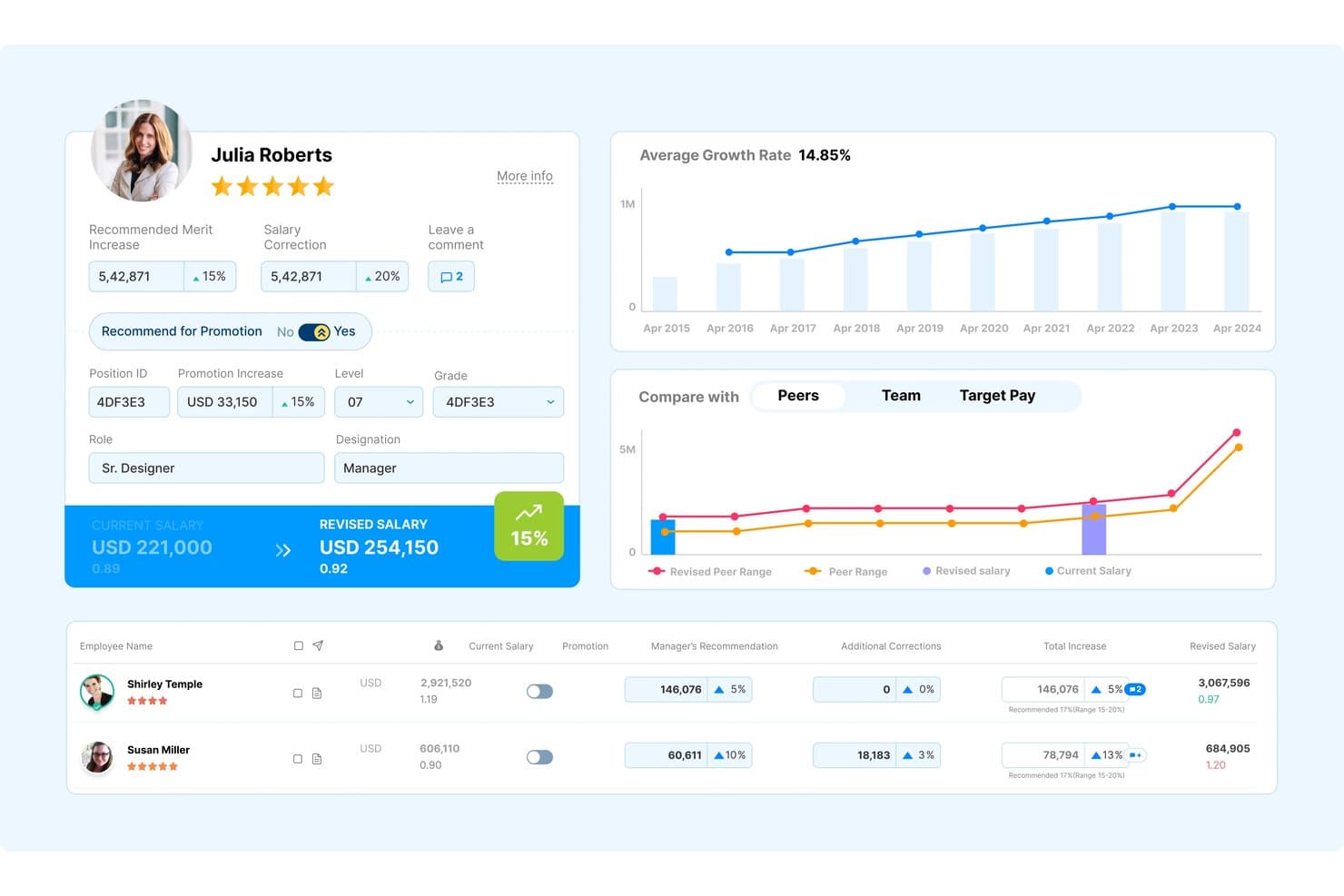
Compport helps managers review and adjust employee salaries with peer benchmarking. Compport is an AI-native compensation management platform that supports merit and bonus planning, pay equity analysis, long-term incentive modeling, total rewards statements, and sales incentive planning.
Who Is Compport Best For?
Compport is best for compensation, total rewards, and HR teams at mid-sized and large organizations managing salary reviews, incentive plans, pay equity analysis, and compensation approvals.
Why I Picked Compport
I picked Compport for its AI-guided compensation recommendations with built-in audit trails and human approval controls. CompportIQ records the user, timestamp, and basis behind each recommendation, while requiring an authorized person to approve changes to compensation records. Its six AI agents, including Pay Equity and Comp Planner, support compensation analysis and planning. The Pay Equity agent can also identify proposed salary increases that may create or widen pay gaps before approvals close.
Compport Key Features
- Bonus plan scenario simulation: Build and compare variable pay scenarios with budget and impact analyses before implementing a plan.
- Long-term incentive modeling: Configure LTI plans by grade, tenure, and location, set performance-based vesting multipliers, and simulate potential equity value.
- Total rewards statements: Combine salary, bonuses, equity, and benefits into personalized employee statements with historical rewards data and configurable content.
- HR analytics with 200+ reports: Access prebuilt compensation reports with interactive drill-downs covering pay parity, salary growth, performance ratings, and budget usage.
Compport Integrations
Compport offers native integrations with Workday, SAP SuccessFactors, Oracle HCM, ADP, and UKG. It also provides an API for custom integrations.
Pros and Cons
Pros:
- Configurable cycles cover salary and incentive reviews
- Mid-cycle equity checks flag widening pay gaps
- AI recommendations carry approval and audit trails
Cons:
- AI-generated pay changes require human approval
- Market benchmarking requires licensed external data
Learn more about Compport: Best for modeling complex incentive programs
- Free demo available
- Pricing upon request
Visit WebsiteCustomer Rating:4.4/5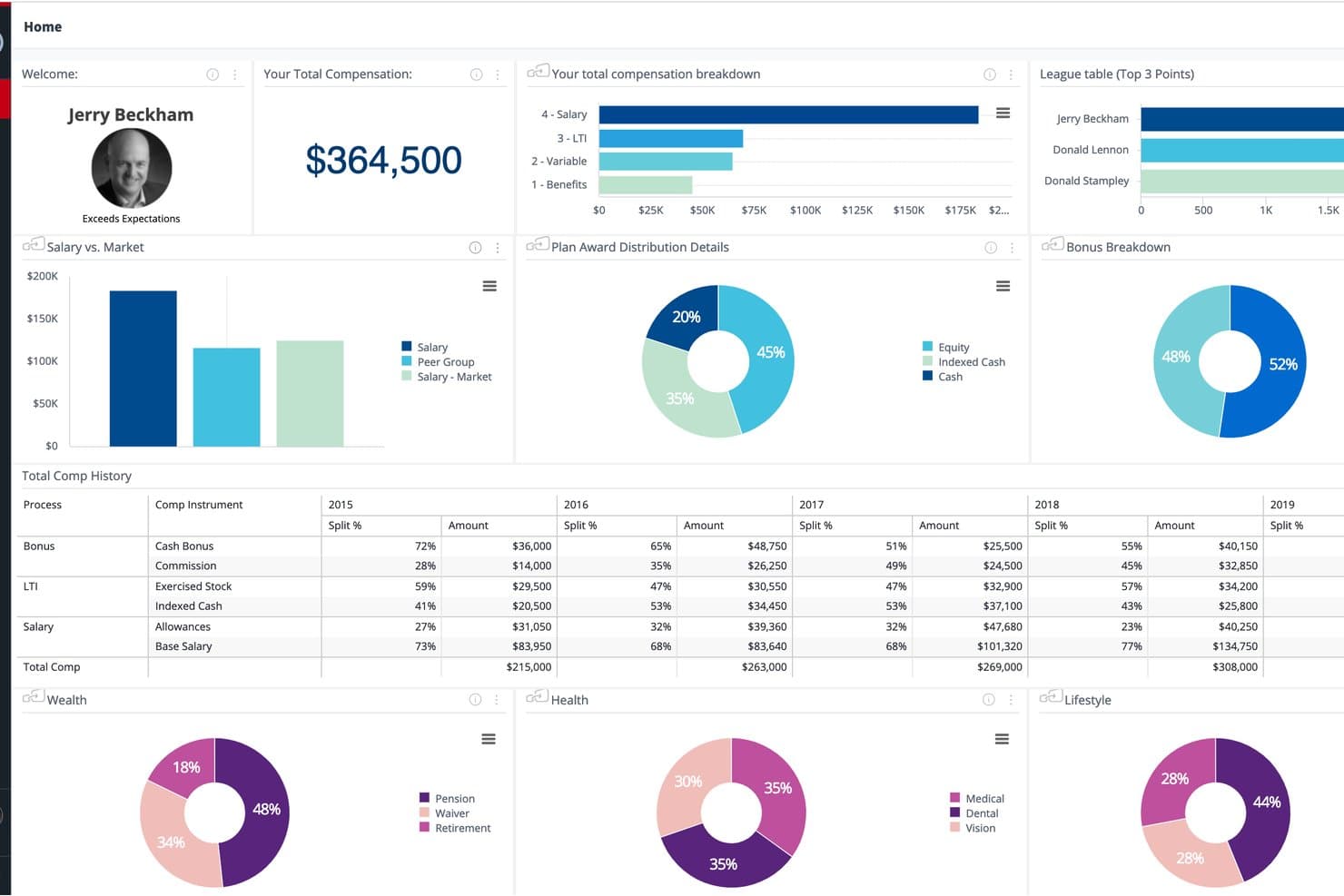
beqom gives employees a full view of total compensation and history. beqom is an AI-powered compensation management platform for global enterprises, offering salary planning, short- and long-term incentive management, sales compensation, pay equity analysis, and pay transparency tools.
Who Is beqom Best For?
beqom is best for compensation and benefits teams at large, global enterprises managing salary reviews, bonuses, sales commissions, and long-term incentive programs across multiple business units and countries.
Why I Picked beqom
I picked beqom for its support of complex compensation and incentive programs across global organizations. Its long-term incentive management tools let compensation teams configure equity- and cash-based awards, model different performance outcomes, and forecast program costs, vesting schedules, and accruals. I also like its no-code configuration tools, which let HR teams manage compensation plan rules and workflows without custom development.
beqom Key Features
- Pay equity gap analysis: Analyze compensation differences across employee groups and generate individual pay adjustment recommendations.
- Compensation rounds workspace: Configure compensation review cycles with validation rules, approval routing, and decision histories.
- AI pay predictions: Apply machine-learning models to generate pay recommendations for hiring, merit increases, and promotions.
- Global pay transparency tools: Support employee pay information requests, compensation reporting, and reward communication.
beqom Integrations
beqom lists integrations with Workday, SAP SuccessFactors, Oracle, ADP, UKG, and Dayforce. The platform also supports connectivity with HR, payroll, finance, and equity systems, though integration methods and setup requirements may vary.
Pros and Cons
Pros:
- Pay equity recommendations include human oversight
- LTI simulations model dilution and vesting
- Configurable workflows handle varied incentive rules
Cons:
- Benchmark data sources and refresh cadence undisclosed
- BYOM requires customer-supplied prediction models
Learn more about beqom: Best for budget-aware pay equity remediation
- Free demo available
- Pricing upon request
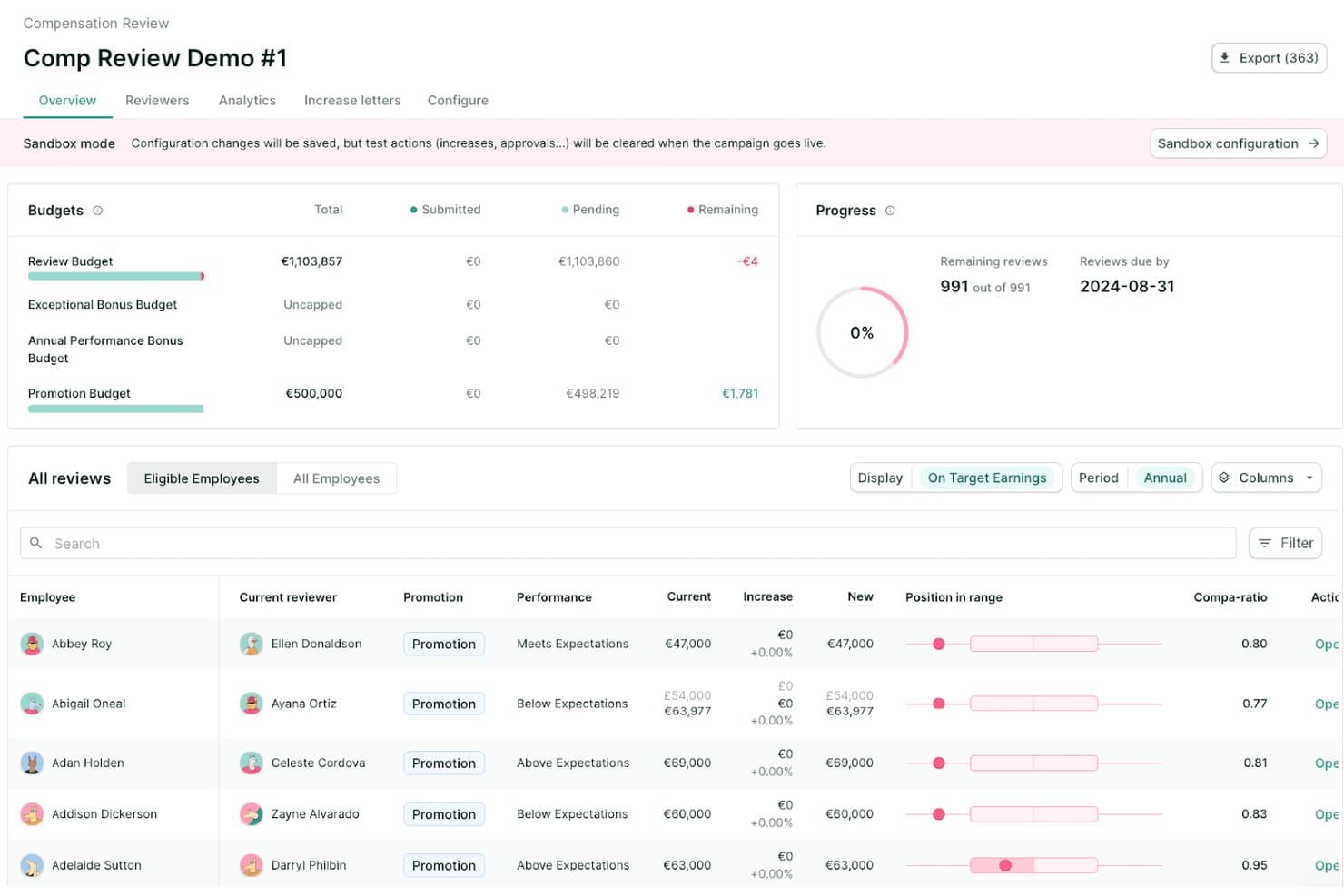
Figures tracks compensation review budgets, progress, and employee increases. Figures is a compensation management platform offering salary benchmarking, salary band management, pay equity analysis, and collaborative compensation review workflows.
Who Is Figures Best For?
Figures is best for compensation managers, total rewards teams, and HR leaders at European companies managing salary structures, pay equity analysis, and EU pay transparency requirements.
Why I Picked Figures
I picked Figures for its pay equity analysis and budget-based remediation planning. Its pay equity tools identify raw pay gaps above 5% by worker category and support correction scenarios aligned with compensation budgets. Figures also offers automated remediation review campaigns and real-time monitoring of how salary decisions affect pay equity.
Figures Key Features
- FiguresAI benchmark predictions: Uses XGBoost machine learning to estimate compensation ranges by job, location, and level.
- Salary band management: Create and manage salary bands using market benchmarks, employee positioning indicators, and change history.
- Compensation review campaigns: Configure annual and off-cycle salary reviews with approval workflows, multiple budgets, and live budget tracking.
- Pay equity analysis: Identify pay gaps by worker category and simulate salary adjustments against compensation budgets.
Figures Integrations
Figures lists 30+ HRIS integrations, including Workday, HiBob, and BambooHR, along with Ledgy for equity data. It also supports Google Workspace sign-in.
Pros and Cons
Pros:
- Benchmarks include data quality indicators
- Annual and off-cycle reviews include approvals
- Pay-gap remediation scenarios align with budgets
Cons:
- Benchmark predictions depend on data coverage
- Advanced pay equity analysis requires add-on
Learn more about Figures: Best for flight-risk-aware pay reviews
- Free demo available
- Pricing upon request
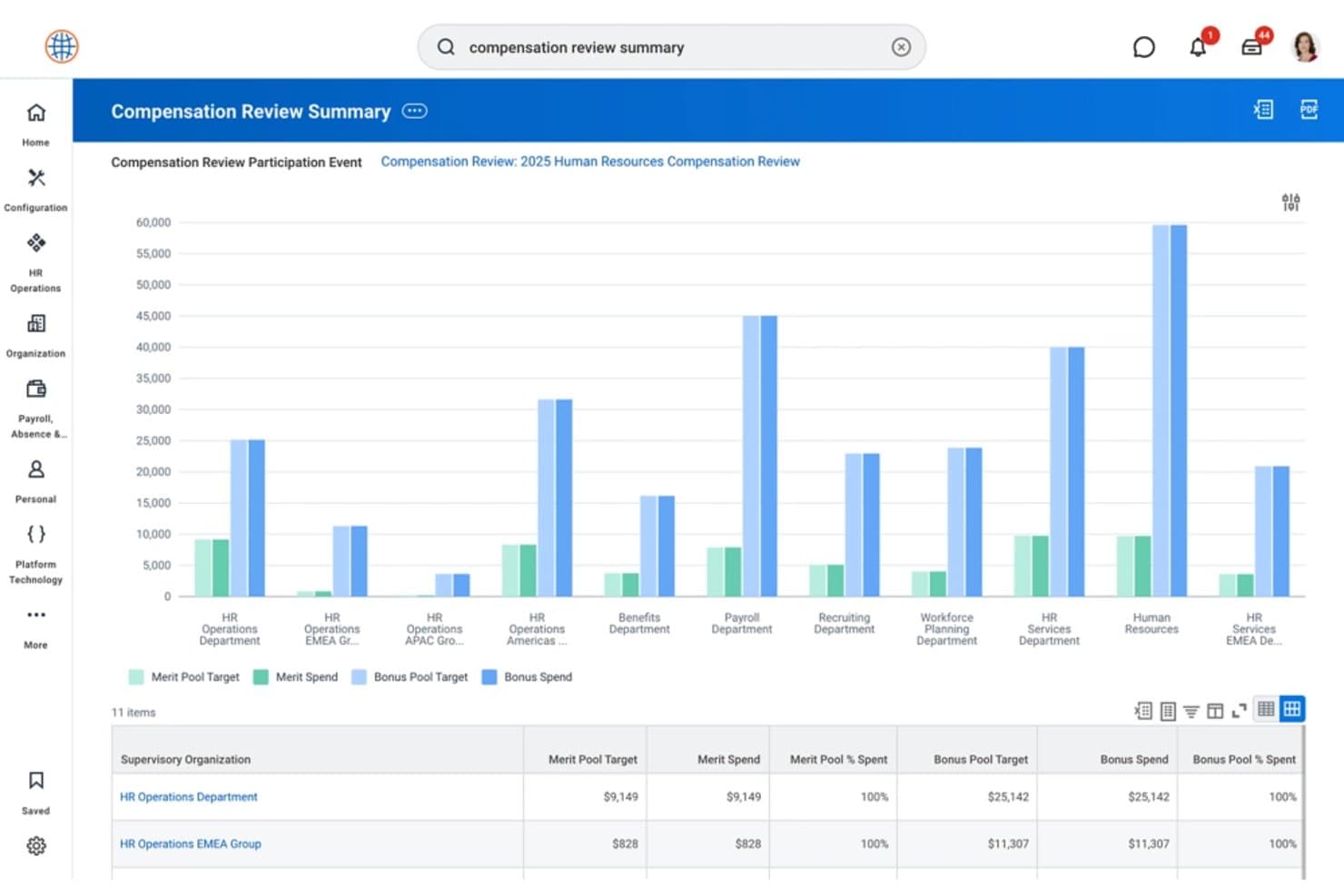
Workday displays merit and bonus pool spending by department. Workday Compensation is an AI-assisted compensation management tool within Workday HCM that supports pay reviews, budget planning, pay equity analysis, and market benchmarking.
Who Is Workday Compensation Best For?
Workday Compensation is best suited for HR and compensation teams at mid-sized and large organizations using Workday HCM to manage pay reviews, compensation budgets, and pay equity analysis.
Why I Picked Workday Compensation
I picked Workday Compensation because it combines compensation planning with AI-assisted retention insights and pay equity analysis. Workday provides flight-risk information to inform compensation decisions, while its Pay Equity Discovery Board helps HR teams examine pay differences across demographic groups, including gender, ethnicity, and age. Managers can also review performance, skills, and budget information when planning merit increases and bonus awards.
Workday Compensation Key Features
- Compensation review workflow: Configure annual, semiannual, quarterly, and off-cycle compensation reviews with planner roles, approval steps, and organizational hierarchies.
- What-if modeling: Simulate compensation changes and evaluate potential budget impacts before finalizing award pools.
- Skills-informed pay decisions: Review employee skills and performance information alongside proposed merit increases and bonus awards.
- Personalized total rewards statements: Configure employee statements covering compensation, benefits, and other reward components.
Workday Compensation Integrations
Workday Compensation integrates with Compa through the Workday Marketplace's Real-time Employee Benchmarks app, providing market compensation data within Workday workflows. Workday also supports public web services for compensation matrices, survey data, benchmark configuration, and job matching.
Pros and Cons
Pros:
- Supports multiple external compensation surveys
- Real-time budget tracking across award pools
- Flight-risk flags add review context
Cons:
- External survey benchmarks require data configuration
- Compensation matrix limits require custom validations
Learn more about Workday Compensation: Best for custom, explainable pay guidance
- Free demo available
- Pricing upon request
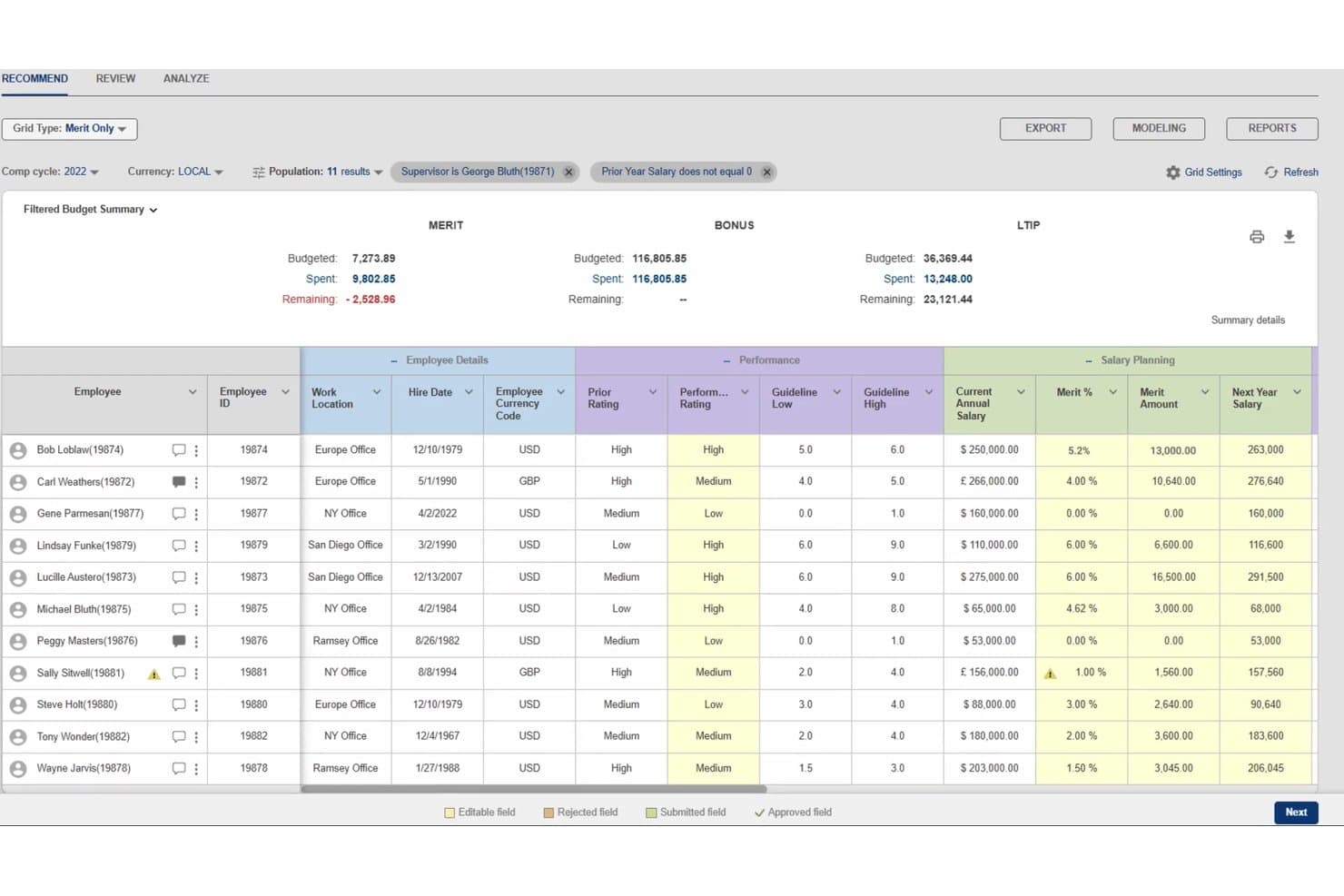
Decusoft Compose lets users manage merit, bonus, and LTIP salary planning. Decusoft Compose is an AI-powered compensation planning platform that supports salary, merit, bonus, equity, and incentive program management alongside configurable approval workflows, pay equity reporting, and scenario modeling.
Who Is Decusoft Compose Best For?
Compose is best for compensation managers, total rewards teams, and HR and finance leaders at mid-sized and large organizations managing multiple compensation programs across regions and currencies.
Why I Picked Decusoft Compose
I picked Decusoft Compose for its AI-based compensation recommendations and configurable prediction models. Teams can factor performance, tenure, location, cost of living, and market benchmarks into compensation scenarios before finalizing pay decisions. I also like that Compose supports audit records for compensation decisions and approval workflows, giving compensation teams a record of how pay changes were reviewed.
Decusoft Compose Key Features
- Multi-program compensation planning: Configure salary, merit, bonus, equity, commission, deferred compensation, and long-term incentive programs.
- Pay equity reporting: Analyze compensation patterns, salary progression, and pay equity metrics across employee groups and organizational levels.
- Configurable approval workflows: Route compensation recommendations through multiple management levels with customizable approval screens and email notifications.
- Scenario modeling and forecasting: Compare potential compensation adjustments, merit allocations, and budget outcomes using configurable predictive models.
Decusoft Compose Integrations
Decusoft Compose integrates with Workday, ADP, UKG, SAP, and Oracle HCM through APIs or secure file exchange. It also supports API-based connections with other systems.
Pros and Cons
Pros:
- Role-based access with customizable permissions
- Configurable planning for complex pay programs
- Explainable AI recommendations using configurable factors
Cons:
- Some requirements need custom feature development
- Large commission uploads may delay calculations
Learn more about Decusoft Compose: 7Best for market-informed merit planning
Pave
- Free demo available
- Pricing upon request
Visit WebsiteCustomer Rating:4.7/5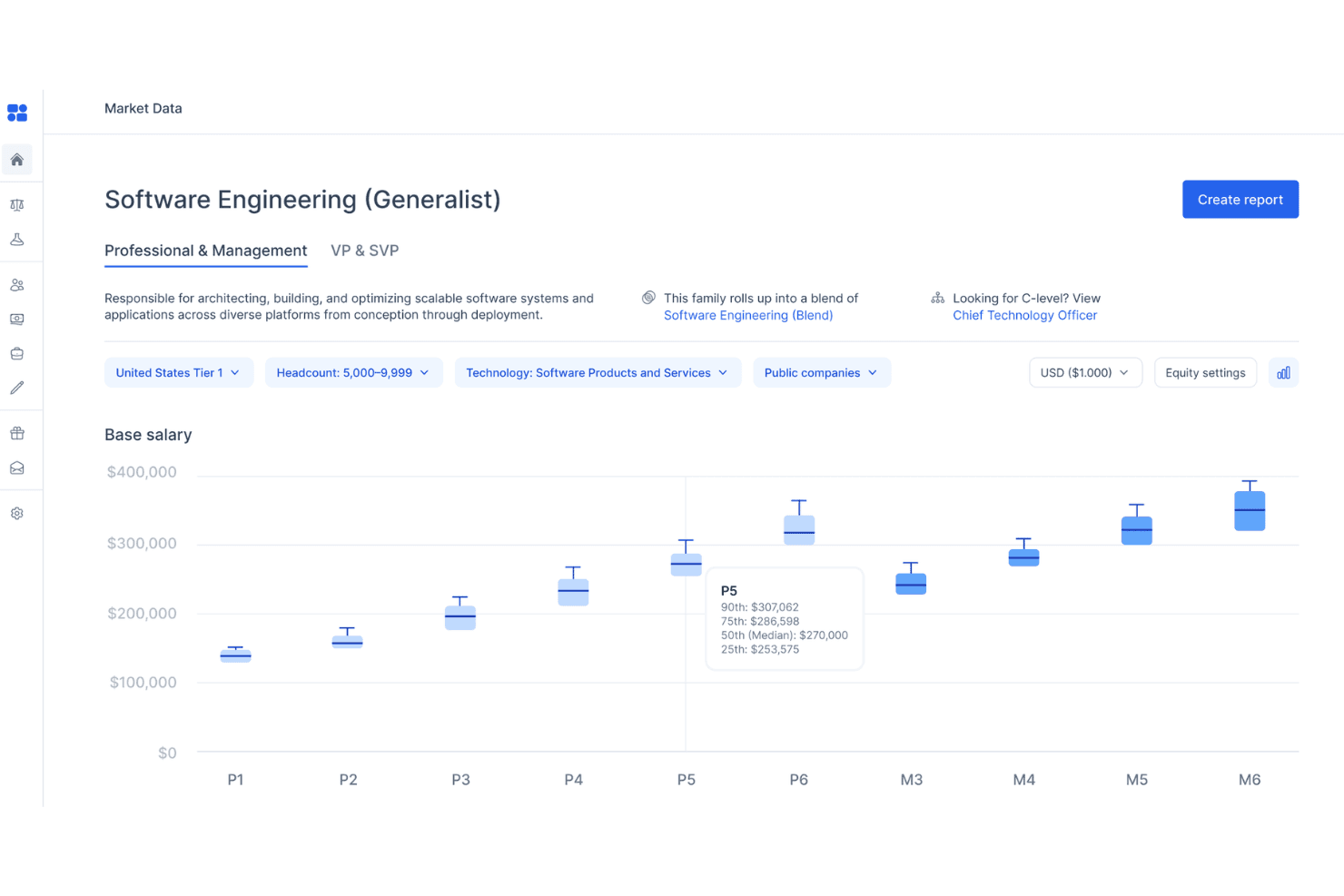
Pave provides software engineering salary ranges by level and percentile. Pave is a compensation planning platform that combines market benchmarking with merit cycle workflows, configurable budgets, approval chains, and compensation analytics.
Who Is Pave Best For?
Pave is best for compensation managers and HR teams managing structured merit cycles that involve market benchmarking, salary and equity adjustments, budget allocations, and approval workflows.
Why I Picked Pave
I picked Pave because it combines market compensation benchmarks with configurable merit cycle planning. Its top-down and bottom-up budgeting options support cash and equity allocations, while budget monitoring provides information on spending throughout the cycle. I also considered its Smart Flags, which identify compensation outliers, manager compression, and equity vesting drops based on configurable rules.
Pave Key Features
- Smart Flags: Configure rule-based indicators for compensation outliers, manager compression, and equity vesting drops, with soft or hard stops for flagged decisions.
- Cycle access permissions: Restrict compensation planning cycles to selected roles, including executive or department-specific reviews.
- AI employee summaries: Generate employee summaries covering tenure, performance, compensation band positioning, equity vesting, and proposed adjustments.
- Cycle insights: Monitor budget consumption, approval progress, compensation increases, and pay band adherence during and after planning cycles.
Pave Integrations
Pave lists integrations with Workday, ADP, BambooHR, Rippling, Greenhouse, Culture Amp, Carta, and Pulley. It also provides a REST API with read-only access to compensation planning data for custom integrations.
Pros and Cons
Pros:
- Approval chains track submissions and cycle progress
- Top-down and bottom-up cash, equity budgets
- Location-filtered compensation market benchmarks
Cons:
- Advanced formulas require Handlebars knowledge
- API supports read-only access to planning data
Learn more about Pave: Best for connecting pay and workforce plans
- Free demo available
- Pricing upon request
Visit WebsiteCustomer Rating:4.5/5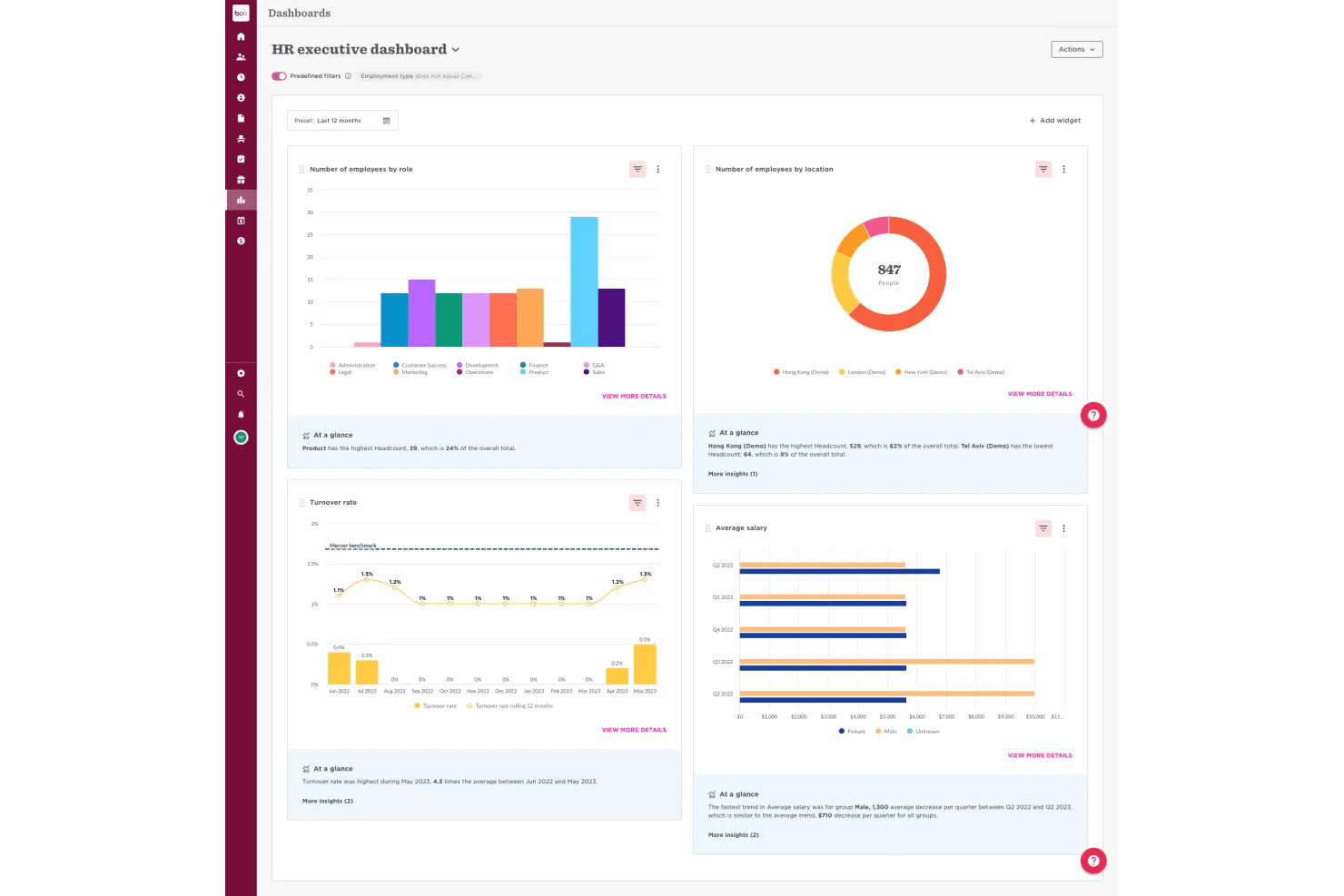
HiBob provides HR leaders with an executive analytics dashboard. HiBob is an AI-powered human capital management (HCM) platform with a compensation planning module that supports salary bands, compensation cycles, budget controls, pay equity analysis, and scenario modeling.
Who Is HiBob Best For?
HiBob is best for HR, People Operations, and Finance teams at mid-market and enterprise organizations managing compensation cycles, salary structures, and workforce planning.
Why I Picked HiBob
I picked HiBob because its compensation module connects salary planning with workforce planning and Finance-approved budget controls. Managers can review proposed increases against budget limits, while real-time alerts identify potential overruns during compensation cycles. HiBob also includes an AI-powered pay equity analyzer that identifies gaps by role, level, gender, and location, allowing HR teams to review potential discrepancies before compensation decisions are finalized.
HiBob Key Features
- Global compensation cycles: Manage compensation reviews across currencies and locations with configurable workflows and role-specific salary bands.
- Multi-level approval workflows: Route compensation proposals based on role level, budget impact, location, and organizational hierarchy.
- Compensation analytics: Monitor budget utilization, pay equity metrics, cycle progress, and manager compensation decisions.
- Job Catalog: Define job roles, levels, and pay bands to support compensation planning and salary structures.
HiBob Integrations
HiBob Marketplace integrations include ADP Workforce Now (US), Google Workspace, Okta, OneLogin, Slack, and Zalaris Payroll. HiBob also offers a public API and webhooks for custom integrations, with OAuth-based connectivity available to approved Marketplace partners.
Pros and Cons
Pros:
- Explainable AI considers performance, benchmarks, and budgets
- Multi-currency cycles pair budgets with scenarios
- Real-time budget guardrails flag manager overruns
Cons:
- OAuth integrations require approved partner status
- Mercer benchmarking requires separate package purchase
 Best for modeling workforce cost trade-offs
- Free demo available
- Pricing upon request
Visit WebsiteCustomer Rating:4.8/5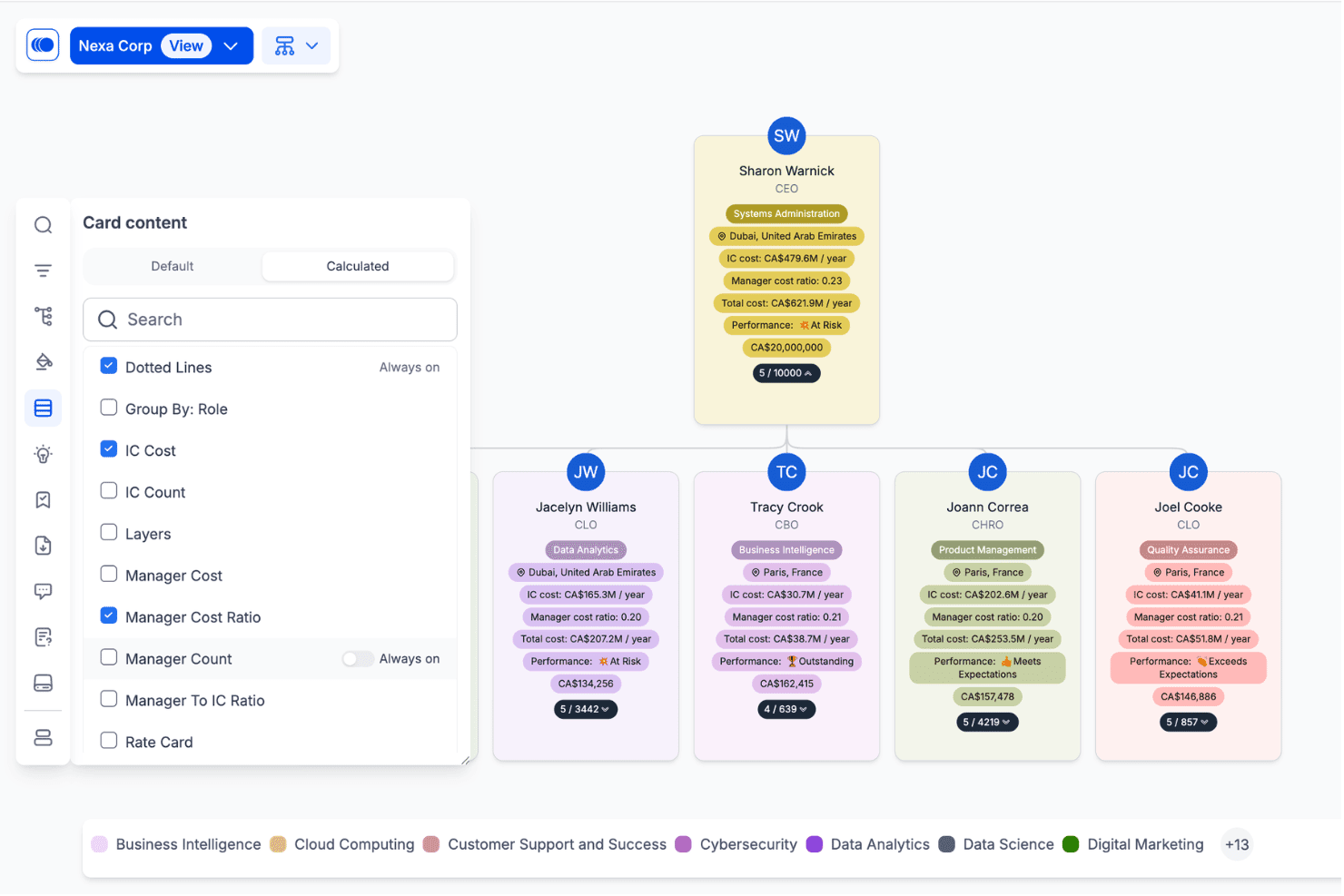
Agentnoon lets users customize org chart card content and view cost metrics. Agentnoon, now part of Dayforce Strategic Workforce Planning, is a workforce planning platform that supports headcount forecasting, organizational scenario modeling, and workforce cost analysis using employee data and AI-assisted planning tools.
Who Is Agentnoon Best For?
Agentnoon is best for HR and finance leaders who need to model workforce scenarios, evaluate organizational structures, and compare headcount costs when planning workforce changes.
Why I Picked Agentnoon
I picked Agentnoon because it supports workforce scenario planning across headcount, organizational structure, and labor costs. Now part of Dayforce, it lets HR and finance teams compare proposed workforce changes, review cost implications, and create presentation materials for stakeholder discussions. Its natural-language planning capabilities also support organizational scenario exploration without requiring users to start with a predefined report.
Agentnoon Key Features
- Workforce scenario modeling: Create full-organization, department-level, or new-team scenarios to evaluate proposed changes to positions, reporting structures, and salaries.
- Headcount and cost forecasting: Review projected workforce costs and headcount changes across monthly, quarterly, or annual planning periods.
- Organizational structure analysis: Analyze reporting layers, spans of control, headcount distribution, and workforce costs using configurable charts.
- Workforce planning presentations: Create slide packs from workforce charts, customize presentation content, and export reports to PowerPoint.
Agentnoon Integrations
Agentnoon, now part of Dayforce, supports workforce data imports from HRIS platforms such as Workday, BambooHR, and ADP through CSV uploads or configured integrations. SFTP and REST API options are also documented for workforce data synchronization. Integration availability and refresh schedules depend on configuration.
Pros and Cons
Pros:
- Explores skills and costs through plain-language questions
- Visualizes organizational structures and headcount variance
- Compares workforce cost scenarios before headcount decisions
Cons:
- Manual imports require administrator refreshes
- Scenario changes require separate HRIS updates
Learn more about Agentnoon: 10Best for AI that can change planning settings
Aeqium
- Free demo available
- From $15,000/year
Visit WebsiteCustomer Rating:4.6/5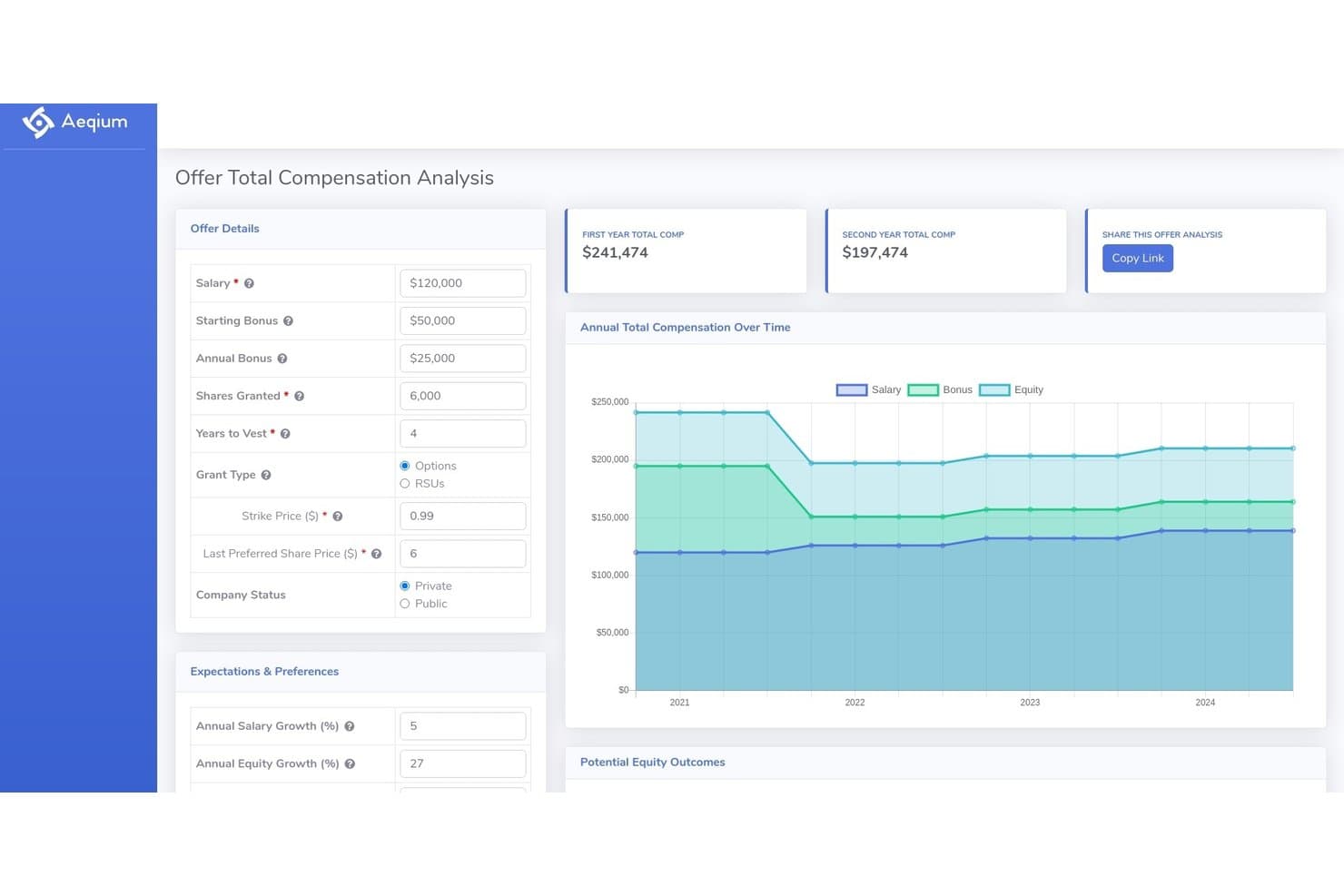
Aeqium lets users analyze total compensation offers with equity and bonus breakdowns. Aeqium is an AI-powered compensation planning platform for managing merit, bonus, and equity cycles. It includes configurable approval workflows, budget scenario modeling, and compensation analytics.
Who Is Aeqium Best For?
Aeqium is best for total rewards and compensation teams that manage merit, bonus, and equity planning cycles and need to configure eligibility rules, approval workflows, and budget allocations without IT support.
Why I Picked Aeqium
I picked Aeqium for its AI-assisted compensation configuration and reporting capabilities. Aeqium Assist applies changes to cycle settings, including eligibility rules and approval workflows, based on plain-language instructions. Aeqium Analyst lets compensation teams query current and historical compensation data and generate reports identifying patterns, outliers, and recommendations without manually building spreadsheets.
Aeqium Key Features
- Pay equity analysis: Analyze compensation gaps across employee groups using regression-based reporting and demographic breakdowns, available as an add-on.
- Compensation statements: Generate personalized compensation statements for employees at the end of a review cycle.
- Interactive offer letters: Present salary, equity, and benefits information with an equity offer simulator for comparing grant scenarios.
- Budget guardrails: Configure budget limits and approval rules for manager compensation recommendations during planning cycles.
Aeqium Integrations
Aeqium lists native integrations with BambooHR, Workday, Rippling, ADP Workforce Now, SAP, Xero, and TriNet HR Plus. It also supports CSV uploads and custom integrations through API or SFTP connections.
Pros and Cons
Pros:
- Configurable approval chains support complex workflows
- Budget scenarios update in real time
- AI can directly change cycle settings
Cons:
- Draft band publishing cannot be undone
- Market benchmarks require separately licensed survey data
Learn more about Aeqium:
Outro software de planeamento de remunerações com IA
Eis algumas opções adicionais que não entraram na minha lista restrita, mas que continuam a valer a pena consultar:
- 11Deel ServicesBest for gated manager access to pay bands
- 12AnaplanBest for forecasting deferred bonus payouts
- 13SAPBest for SAP Employee Central pay planning
- 14LatticeBest for linking performance reviews to pay
- 15WorkleapBest for showing employees total rewards
- 16SyndioBest for EU pay transparency compliance
- 17HRSoftBest for pay planning across org hierarchies
- 18PequityBest for linking market data to pay cycles
- 19Salary.comBest for in-platform survey participation
- 20PayfactorsBest for year-round manager pay decisions
How I Evaluate AI Compensation Planning Software
To make this list, a tool’s AI needs to handle compensation work, like recommending pay and flagging equity gaps. From there, I evaluate three things. Core functionality carries the most weight, like allocating budgets and managing approvals. Then I look at standout features, like manager talking points, and beyond-feature factors, like the credibility of market data.
Core Functionality (Table Stakes For This List)
When I'm selecting tools for my list, I score each one on a scale from 0 (does not offer the functionality) to 5 (excels in this area) for each core functionality listed below. I then convert the total into a percentage to help assess each tool's overall fit, with extra weight on any functionalities I’ve deemed essential.
- AI Pay Recommendations (Essential): I look for recommendations informed by factors such as role, performance, and market data, with enough explanation for HR to review them.
- Compensation Budgeting (Essential): I assess whether managers can allocate merit, bonus, and equity budgets within limits and track their teams’ proposed changes.
- Pay Equity Analysis: I check whether teams can identify disparities across employee groups and review potential corrections before a compensation cycle closes.
- Market Benchmarking: I consider the roles and markets covered, how current the data is, and whether comparisons help HR assess pay bands.
- Approval Workflows: I look for configurable review steps, role-based access, status tracking, and records of manager and HR decisions.
- Scenario Modeling: I assess whether HR can compare budget scenarios by changing assumptions and reviewing projected costs across teams.
Once I have a list of tools that meet the criteria, I consider what sets each platform apart.
Differentiating Factors (What Sets Vendors Apart)
Here's how I compare and contrast different vendors:
Standout Features
Manager enablement tools matter a lot here. I look for guided talking points and simulation features that help managers explain pay decisions with confidence—especially during merit cycles when employees ask, "Why this number?" Platforms like beqom and Aeqium approach this differently, so I check how actionable the guidance actually is. I also evaluate equity and long-term incentive modeling, since many organizations need to present RSUs or stock options alongside cash comp in a single view. HRIS and payroll sync rounds this out: bi-directional, real-time data flow prevents the spreadsheet reconciliation that derails tight review timelines.
Beyond Features
I evaluate how each vendor sources and refreshes market data. Platforms pulling from verified third-party surveys on a quarterly cadence give compensation teams stronger footing when defending recommendations to leadership than those relying on crowdsourced inputs. Data privacy governance matters just as much—I check for SOC 2 or ISO 27001 certifications and whether role-based access controls limit salary visibility by hierarchy. I also look at integration depth, since native HRIS and payroll connectors cut manual reconciliation during tight review cycles.
Como escolher software de planeamento de remunerações com IA
Escolha uma plataforma testando se as suas decisões salariais são explicáveis, se os seus dados são rastreáveis e se os seus controlos se adequam ao seu processo de remuneração.
| Se a sua prioridade for | Procure |
|---|---|
| Se a sua prioridade forExplicar recomendações salariais | ProcureUma justificação de exemplo que identifique os fatores de decisão e registe as alterações manuais |
| Se a sua prioridade forRever a equidade salarial | ProcureUm método documentado para identificar disparidades e avaliar correções propostas |
| Se a sua prioridade forManter os gestores dentro do orçamento | ProcureRegras claras para atribuir e acompanhar o fundo de remuneração de cada equipa |
| Se a sua prioridade forDefender comparações com o mercado | ProcureDocumentação de referências salariais com fontes de dados, correspondências de funções e datas de atualização |
Como avaliar a sua lista restrita
- Rastreie uma recomendação: Peça um exemplo anonimizado e solicite a um revisor de RH que associe a justificação apresentada aos dados de entrada e ao registo da decisão.
- Verifique as evidências de referência: Peça o documento metodológico e a data da atualização mais recente; depois, compare as correspondências de funções com três funções que a sua equipa recruta ou revê.
- Teste os controlos orçamentais: Utilize uma tarefa de teste com uma equipa fictícia e um fundo fixo; altere duas remunerações propostas e confirme a atribuição resultante com base nas suas regras.
- Escolha o seu modelo de orientação: Utilize a sua política de remuneração escrita como critério de decisão — privilegie regras configuráveis quando as exceções forem mais importantes, ou uma orientação mais prescritiva quando forem mais importantes recomendações consistentes entre gestores.
O que é o software de planeamento de remunerações com IA?
O software de planeamento de remunerações com IA utiliza inteligência artificial e dados salariais para apoiar revisões salariais, atribuição orçamental e análise da equidade salarial. As equipas de RH podem utilizá-lo para avaliar recomendações, modelar custos de remuneração e gerir aprovações. Os revisores humanos devem verificar as recomendações e manter o controlo sobre as decisões salariais finais.
Funcionalidades
Eis as principais funcionalidades que procuro num software de planeamento de remunerações com IA:
- Recomendações salariais com IA: O sistema sugere alterações salariais com base em fatores como a função, o desempenho e os dados de mercado. Os profissionais de RH devem poder analisar a justificação e ajustar as recomendações antes de as decisões serem finalizadas.
- Afetação e acompanhamento do orçamento: Os profissionais de RH definem os fundos de remuneração e os gestores propõem aumentos por mérito, prémios ou atribuição de capital dentro desses limites. O software acompanha as alterações propostas face ao orçamento disponível de cada equipa.
- Análise da equidade salarial: A ferramenta compara a remuneração entre grupos de trabalhadores para identificar potenciais disparidades salariais. Os profissionais de RH podem analisar os resultados e ponderar ajustamentos antes do encerramento de um ciclo de remuneração.
- Comparação com o mercado: As equipas de remuneração comparam os salários dos trabalhadores com dados de mercado relativos a funções e localizações relevantes. Correspondências claras entre funções, fontes de dados e datas de atualização ajudam os profissionais de RH a avaliar se as comparações são adequadas.
- Fluxos de aprovação: As etapas de análise configuráveis encaminham as alterações salariais propostas para os gestores e responsáveis de RH adequados. O acesso baseado em funções, o acompanhamento do estado e os registos de decisões ajudam as equipas a gerir as aprovações.
- Modelação de cenários: Os profissionais de RH ajustam pressupostos, como limites orçamentais ou níveis de prémios, para comparar os custos de remuneração projetados em diferentes cenários de planeamento.
- Orientação para gestores: A plataforma pode fornecer argumentos ou orientações para ajudar os gestores a explicar as decisões salariais. Os profissionais de RH podem verificar se o material reflete as políticas de remuneração da organização.
- Integrações com sistemas de informação de recursos humanos e processamento salarial: As ligações de dados transferem registos de trabalhadores e de remuneração entre sistemas. As capacidades de integração, incluindo a sincronização bidirecional e a frequência de atualização, variam consoante o fornecedor.
Benefícios
Eis alguns benefícios comuns que pode esperar de um software de planeamento de remunerações com IA:
- Maior supervisão das recomendações da IA: As equipas de RH podem analisar os fatores subjacentes às alterações salariais sugeridas e ajustar as propostas antes da aprovação final.
- Melhor controlo dos orçamentos de remuneração: As comparações orçamentais ajudam as equipas de RH e finanças a identificar afetações propostas que excedem os limites de despesa estabelecidos.
- Oportunidades para análises antecipadas da equidade salarial: A análise da remuneração ajuda os profissionais de RH a identificar potenciais disparidades e a ponderar ajustamentos durante o ciclo de planeamento.
- Mais contexto para as decisões de remuneração: As comparações com o mercado fornecem referências salariais externas que os profissionais de RH podem avaliar em conjunto com as estruturas salariais internas.
- Maior responsabilização nos processos de aprovação: As decisões registadas e os históricos de aprovação ajudam as equipas a identificar quem analisou, alterou ou autorizou as alterações de remuneração.
- Maior visibilidade dos custos projetados: As comparações de cenários ajudam as equipas de RH e finanças a avaliar as implicações financeiras de diferentes planos de remuneração antes de finalizarem os orçamentos.
- Conversas salariais mais estruturadas: A orientação para gestores fornece pontos de referência para explicar as decisões de remuneração de acordo com as políticas da empresa estabelecidas.
Preços
Os preços variam consoante as funcionalidades, o número de trabalhadores e os termos do contrato. A maioria dos fornecedores apresenta os preços mediante pedido, pelo que deve considerar os preços iniciais publicados como referências, e não como tarifas padrão por utilizador.
Tabela de comparação de planos para software de planeamento de remunerações com IA
| Tipo de preço | Preço habitual | Funcionalidades comuns |
|---|---|---|
| Tipo de preçoPlaneamento personalizado de remunerações | Preço habitualPreço mediante pedido | Funcionalidades comunsOrçamentação de remunerações, recomendações salariais, fluxos de aprovação e análise da equidade salarial. |
| Tipo de preçoPlaneamento personalizado da força de trabalho | Preço habitualPreço mediante pedido | Funcionalidades comunsModelação de cenários, previsão do número de trabalhadores, análise organizacional e planeamento dos custos da força de trabalho. |
| Tipo de preçoSubscrição anual publicada | Preço habitualA partir de $15,000/ano (Aeqium) | Funcionalidades comunsModelação de cenários orçamentais, análise de remunerações e fluxos de aprovação configuráveis. |
Perguntas frequentes
Algumas respostas a perguntas comuns sobre software de planeamento de remunerações com IA:
O software de planeamento de remunerações com IA toma decisões finais sobre os salários?
Não. O software de planeamento de remunerações com IA deve apoiar recomendações e análises, enquanto as pessoas autorizadas tomam as decisões finais sobre os salários. Antes do lançamento, defina quem pode recomendar, rever, aprovar e substituir cada alteração. Pergunte aos fornecedores se o sistema regista os dados introduzidos, a fundamentação, o responsável pela revisão e qualquer substituição. Durante um ciclo, os Recursos Humanos devem rever as exceções e confirmar que as recomendações estão de acordo com as políticas salariais documentadas, os orçamentos e os requisitos aplicáveis. Considere uma pontuação de IA como um alerta para revisão, não como um substituto do discernimento ou do contexto específico de cada trabalhador.
Como deve o departamento de Recursos Humanos validar as recomendações salariais da IA?
Valide as recomendações antes de estas serem apresentadas aos gestores, testando funções, localizações, níveis de desempenho e históricos de remuneração representativos. Verifique se o sistema utiliza os dados corretos dos trabalhadores e se a sua fundamentação está de acordo com a sua política salarial. Peça aos responsáveis dos Recursos Humanos e da remuneração que analisem resultados invulgares, comparem padrões entre grupos de trabalhadores e registem as substituições. Em seguida, realize um projeto-piloto de pequena dimensão e analise as alterações efetuadas pelos gestores, os resultados das aprovações e as perguntas dos trabalhadores antes de expandir a utilização. Repita as verificações após alterações aos dados ou atualizações do modelo; uma única revisão inicial não lhe dirá se os resultados continuam adequados.
Os gestores podem ver apenas os dados salariais da sua equipa?
Frequentemente, sim, mas os controlos de acesso exatos dependem do produto e da sua configuração. Peça ao fornecedor que demonstre como as permissões restringem os detalhes salariais individuais, as vistas das equipas e as ações de aprovação. Teste com contas separadas de gestor, Recursos Humanos e direção, utilizando registos de exemplo, antes de abrir um ciclo ativo. Verifique se o acesso segue as linhas hierárquicas e se os Recursos Humanos podem auditar as alterações às permissões. Não parta do princípio de que um painel de gestão oculta todos os campos sensíveis; confirme o que os utilizadores podem exportar, transferir ou ver nas notificações.
Que dados devemos preparar antes da implementação?
Prepare os registos dos trabalhadores, os níveis profissionais, os salários atuais, os intervalos salariais, os orçamentos e as relações hierárquicas. As classificações de desempenho e as referências de mercado também podem ser necessárias, dependendo do software e do processo de remuneração. Antes de importar os dados, reveja os códigos profissionais em falta, os registos duplicados, as moedas inconsistentes e as estruturas hierárquicas desatualizadas. Pergunte aos fornecedores que campos são obrigatórios, como são atualizados os dados dos trabalhadores e se é possível efetuar correções durante ciclos de remuneração ativos.