

ActivTrak vs. Hubstaff: Comparison & Expert Reviews For 2026



The right productivity tool can change the way you evaluate performance and manage your business. If you’re picking between ActivTrak and Hubstaff, you want to understand which one genuinely provides the functionality your team needs.
I examined both platforms and looked into their most recent features, price, integration capabilities, and security measures to give you the whole picture. In this article, I’ll share what you need to know to choose the best workforce analytics and monitoring tool that will meet your team’s productivity needs.
ActivTrak vs. Hubstaff: An Overview
ActivTrak


Hubstaff


Why Trust Our Software Recommendations
Our team has been testing and reviewing software since 2012. As HR experts ourselves, we know how difficult—and important—it is to choose the right software.
For this guide, we evaluated tools using hands-on testing and independent research, scoring tools using our selection criteria. We also draw on insights from industry thought leaders and practicing HR experts.
Our reviews reflect our human editorial judgment, not a sales pitch.
Expert reviewers:
ActivTrak vs. Hubstaff Pricing Comparison
| ActivTrak | Hubstaff | |
|---|---|---|
| Free Trial | Free demo + 14-day free trial available | Free demo + 14-day free trial available |
| Pricing | From $10/user/month (billed annually) | From $4.99/user/month (billed annually) |
ActivTrak vs. Hubstaff Hidden Costs
When considering hidden costs, ActivTrak’s pricing is straightforward with tiered plans based on user count and features. While the base plans cover essential productivity monitoring, features such as HRIS integrations or premium support often come at an extra cost, so factoring these in early can help avoid surprises.
Hubstaff offers tiered pricing, but you’ll pay extra for premium features like GPS tracking, advanced integrations, and API access. Also, be aware that its per-seat pricing starts with a two-seat minimum, so you'll be paying for both of the seats, even if you just need one.
ActivTrak vs. Hubstaff Feature Comparison
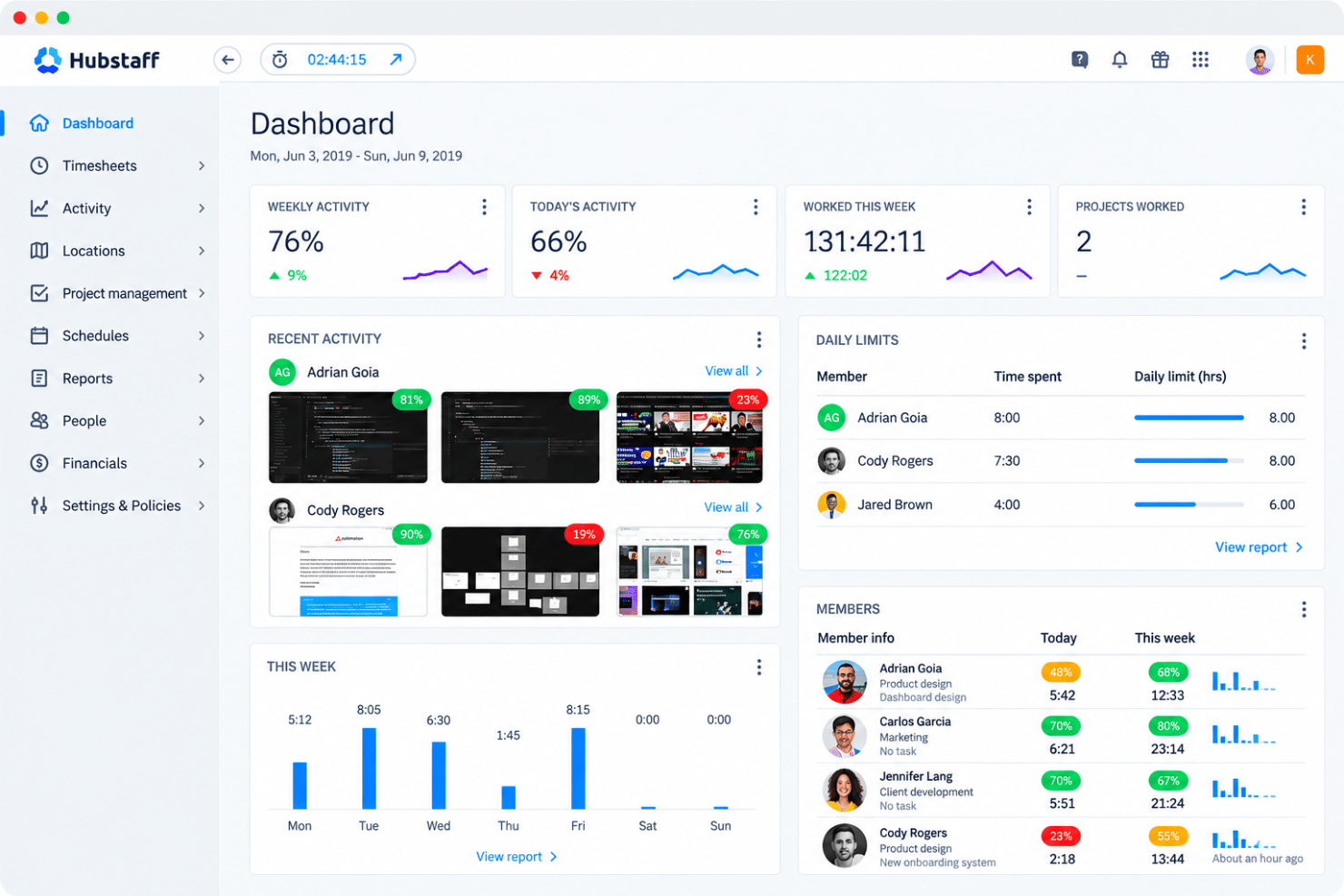
ActivTrak reveals how your team spends work hours through real-time app and website tracking and productivity categorization. Simple dashboards highlight bottlenecks with automatic alerts, without invasive micromanagement. Privacy safeguards ensure compliance while building trust. Hubstaff excels at precise time tracking with GPS, screenshots, and productivity scoring for remote and field teams. It integrates scheduling, task monitoring, and automated payroll and invoicing in one platform. You get verifiable work data that simplifies billing and payments.
| ActivTrak | Hubstaff | |
|---|---|---|
| API | ||
| Dashboard | ||
| Data Export | ||
| Data Import | ||
| Data Visualization | ||
| External Integrations | ||
| Feedback Management | ||
| Forecasting | ||
| Multi-User | ||
| Notifications |
ActivTrak vs. Hubstaff Integrations
| Tools | ActivTrak | Hubstaff |
| Slack | ✅ | ✅ |
| Microsoft Teams | ✅ | ❌ |
| Jira | ✅ | ✅ |
| Trello | ❌ | ✅ |
| Asana | ✅ | ✅ |
| Salesforce | ✅ | ✅ |
| Google Workspace | ✅ | ❌ |
| Zapier | ✅ | ✅ |
| QuickBooks | ❌ | ✅ |
| PayPal | ❌ | ✅ |
| FreshBooks | ❌ | ✅ |
| Okta | ✅ | ❌ |
Both ActivTrak and Hubstaff let you integrate their platforms with other applications you use on a daily basis. ActivTrak focuses on workforce analytics connections, offering APIs and connectors that interact with major project management, collaboration, and identity management solutions. Hubstaff prioritizes interfaces that enable time tracking, billing, and payroll procedures, which include many major accounting and project management software. Overall, both platforms ensure that data flows smoothly throughout your IT stack.
ActivTrak vs. Hubstaff Security, Compliance & Reliability
| Factor | ActivTrak | Hubstaff |
| Data Encryption | The platform offers end-to-end encryption for data in transit and at rest using AES-256. | Uses AES-256 encryption for data in transit (TLS 1.2+) and at rest. |
| Compliance Standards | ActivTrak has SOC 2 Type II, GDPR, CCPA, and HIPAA-ready configurations. | It offers SOC 2 Type II, GDPR, and CCPA compliance. |
| Access Controls | Uses role-based access, SSO (Okta, Azure AD), MFA, and audit logs. | Hubstaff provides role-based permissions, SSO support, 2FA, and detailed activity logging. |
| Data Privacy | Has privacy-by-design, opt-in screenshots, no PII collection by default. | Provides granular privacy controls, screenshot blurring, and data retention policies. |
| Uptime/Reliability | ActivTrak provides 99.9%+ uptime SLA and cloud-hosting with redundancy. | Hubstaff has a 99.9% uptime guarantee with multiple data centers for redundancy. |
| Security Audits | Offers third-party penetration testing and vulnerability assessments. | Offers annual SOC 2 audits and continuous security monitoring and testing. |
ActivTrak and Hubstaff don’t mess around with security. Both encrypt your data, maintain compliance certs, and limit access to employee information based on role and needs. ActivTrak builds its workforce analytics with privacy at the core while meeting compliance standards across industries. Hubstaff, meanwhile, zeroes in on secure time tracking that lets remote teams adjust privacy settings to their comfort level. Either platform will handle your most important monitoring needs without compromising security.
ActivTrak vs. Hubstaff Ease of Use
| Factor | ActivTrak | Hubstaff |
| User Interface | The platform has clean, analytics-focused dashboards with intuitive visualizations and customizable views. | Hubstaff has a modern, sleek interface with straightforward time tracking and reporting layouts. |
| Setup Time | Offers quick agent deployment (under 10 minutes per device) with automated discovery for endpoints. | Has a simple desktop and mobile app installation process with easy account linking in 5-15 minutes. |
| Onboarding Process | Has a guided setup wizard, video tutorials, and a live demo option for new users. | Provides quick setup guides, free migration support, and quick-start templates. |
| Learning Curve | ActivTrak has a moderate learning curve for its analytics features, but it’s easier for basic monitoring with its helpful tooltips. | It’s beginner-friendly for time tracking, but requires minimal training for its core functions. |
| Customer Support | Offers email, chat, and phone support with dedicated managers for its Pro plans | The platform provides 24/7 live chat, email tickets, a knowledge base, and priority support for higher price tiers. |
| Mobile Experience | Provides web-based mobile access with a responsive design for on-the-go insights. | Hubstaff has a native iOS and Android app for time tracking, approvals, and real-time monitoring. |
Both ActivTrak and Hubstaff deliver straightforward experiences tailored to their strengths. ActivTrak shines with accessible analytics dashboards that make productivity insights approachable, while Hubstaff offers a streamlined interface perfect for a quick time tracking setup. You’ll find either tool’s onboarding straightforward, with robust support resources to minimize disruptions.
ActivTrak vs Hubstaff: Pros & Cons
ActivTrak
- Scales easily with flexible tiered pricing and free plan.
- AI-powered insights help you discover productivity trends and burnout concerns, allowing for more effective coaching and planning.
- To secure employee data, ActivTrak does not collect keystrokes, monitor emails, record videos, or track personal devices.
- Lacks deep task context beyond surface-level activity data.
- Integration with HRIS systems are paid add-ons.
- ActivTrak’s vast data might be overwhelming, making it difficult to quickly discover the most useful insights.
Hubstaff
- GPS tracking and geofencing support field-team timekeeping.
- Screenshots and app tracking verify billable hours.
- Project budgets and approvals connect tracked time to costs.
- Idle detection can misclassify meetings and reading as inactivity.
- Reports require manual editing and lack timezone controls.
- Monitoring and screenshots can feel intrusive to employees.
Best Use Cases for ActivTrak and Hubstaff
ActivTrak
- BPO, Call Centers, and Professional Services Firms that rely on billable hours and need accurate time, activity, and utilization data to protect margins.
- HR Departments ActivTrak provides valuable data to help you understand and improve employee engagement.
- Retail and Ecommerce Businesses Looking to improve labor allocation, staffing levels, and operational efficiency across stores or support centers.
- Remote Teams With accurate activity tracking, you can effectively monitor and support your remote workforce.
- Financial Services and Insurance Organizations that monitor activity for compliance while maintaining strong privacy controls.
- Technology and Software Companies Managing distributed development and support teams that need detailed productivity and focus-time insights.
Hubstaff
- Remote Agencies Hubstaff combines timers, screenshots, reports, budgets, and client billing features for agencies tracking distributed project work.
- Field Service Teams GPS and location tracking, scheduling, attendance features, and mobile apps help managers record work performed away from a central workplace.
- Distributed Contractors Desktop, web, and mobile timers give contractors multiple ways to record hours, while screenshots and activity reports provide project-level visibility.
- Payroll Departments Hubstaff supports approvals, payroll, payments, and integrations with QuickBooks, Gusto, PayPal, and BambooHR for teams managing paid work hours.
- Client Services Teams Budgets, reports, time entries, and integrations with Asana, ClickUp, Jira, and Trello help client teams connect tracked hours with project work.
- Growing Enterprises Enterprise features include SSO, account provisioning, compliance features, location tracking, and dedicated support for organizations with larger workforce administration needs.
Who Should Use ActivTrak, and Who Should Use Hubstaff?
ActivTrak is a better fit if you’re primarily looking to understand how work gets done so you can optimize processes, coaching, and capacity planning across hybrid or in-office teams. It suits operations leaders, HR, and department heads who want privacy-conscious workforce analytics, rich productivity insights, and trends across applications, teams, and locations rather than granular GPS tracking or payroll tooling.
Hubstaff is usually the stronger choice if your priority is accurate time tracking, attendance, and location data for remote, freelance, or field-based teams, especially when you need tight links to billing and payroll. You’ll get more value from Hubstaff if you manage distributed workforces, client projects, or on-site jobs where GPS, scheduling, and automated payments matter as much as basic productivity visibility.
Differences Between ActivTrak and Hubstaff
| ActivTrak | Hubstaff | |
|---|---|---|
| Core Focus | ActivTrak emphasizes workforce analytics and productivity insights through aggregated behavioral trends rather than individual surveillance. | Hubstaff prioritizes precise time tracking, attendance, and location monitoring for billing and payroll accuracy. |
| Features & Functionalities | ActivTrak lacks native GPS tracking, focusing instead on digital activity across endpoints regardless of physical location. | Hubstaff includes robust GPS tracking for mobile and field teams, essential for verifying on-site presence and routes. |
| Screenshot Capabilities | ActivTrak offers opt-in, privacy-focused screenshots with automatic blurring and no default PII collection. | Hubstaff provides frequent screenshot capture with customizable intervals and manual blurring options for activity proof. |
| Team Structure | ActivTrak excels for mid-to-large hybrid and office teams needing capacity planning and process optimization. | Hubstaff targets small-to-medium remote, freelance, or field service teams requiring scheduling and invoicing. |
| Visit ActivTrakOpens new window | Read Hubstaff ReviewOpens new window |
Similarities Between ActivTrak and Hubstaff
| Cross-Platform Access | Both support agent installation on Windows, macOS, and Linux endpoints with cloud-based management for hybrid work environments. |
|---|---|
| Employee Monitoring | Both deliver live dashboards tracking application usage, website activity, and productivity metrics for immediate team oversight. |
| Reporting | Both offer flexible report builders with exportable data, scheduled delivery, and visualizations for analyzing work patterns over time. |
| Role-Based Access | Both implement granular role-based permissions, SSO integrations, and multi-factor authentication to ensure secure, controlled access to sensitive productivity reports. |
| Security | Both provide AES-256 encryption for data at rest and in transit, SOC 2 Type II compliance, and GDPR/CCPA adherence to protect employee monitoring data. |
| Visit ActivTrakOpens new window Read Hubstaff ReviewOpens new window | |