



Buddy Punch vs. Clockify: Comparison & Expert Reviews For 2026



Buddy Punch helps you capture clean time data across field, on-site, and office teams so you can trust your hours. Clockify helps you track work across projects and teams with flexible timers, timesheets, and reports. They’re similar for core tracking, but Buddy Punch leans into workforce accountability while Clockify leans into project timekeeping and analysis. In this guide, I’ll compare the tools and their features, pros and cons, and pricing as time clock software.
Buddy Punch vs. Clockify: An Overview
Buddy Punch


Clockify
Why Trust Our Software Recommendations
Our team has been testing and reviewing software since 2012. As HR experts ourselves, we know how difficult—and important—it is to choose the right software.
For this guide, we evaluated tools using hands-on testing and independent research, scoring tools using our selection criteria. We also draw on insights from industry thought leaders and practicing HR experts.
Our reviews reflect our human editorial judgment, not a sales pitch.
Expert reviewers:
Buddy Punch vs. Clockify Pricing Comparison
| Buddy Punch | Clockify | |
|---|---|---|
| Free Trial | 14-day free trial + free demo available | Free plan available |
| Pricing | From $4.99/user/month + $19/month base fee (billed annually) | From $4.99/user/month |
Buddy Punch vs. Clockify Pricing & Hidden Costs
Buddy Punch pricing uses per-user fees plus a base account fee, with optional add-ons for things like real-time GPS, scheduling, reporting, and payroll that can increase total cost as you scale. Clockify pricing offers a free plan for unlimited users and tiered per-seat upgrades that add features like approvals, scheduling, GPS, screenshots, and security controls.
For managers and HR leaders, pick by modeling your real headcount and required controls: map must-have policies (geofencing, approvals, audits), estimate add-ons or tier jumps over 6–12 months, and test exports and admin workflows with a pilot team before you commit.
Buddy Punch vs. Clockify Feature Comparison
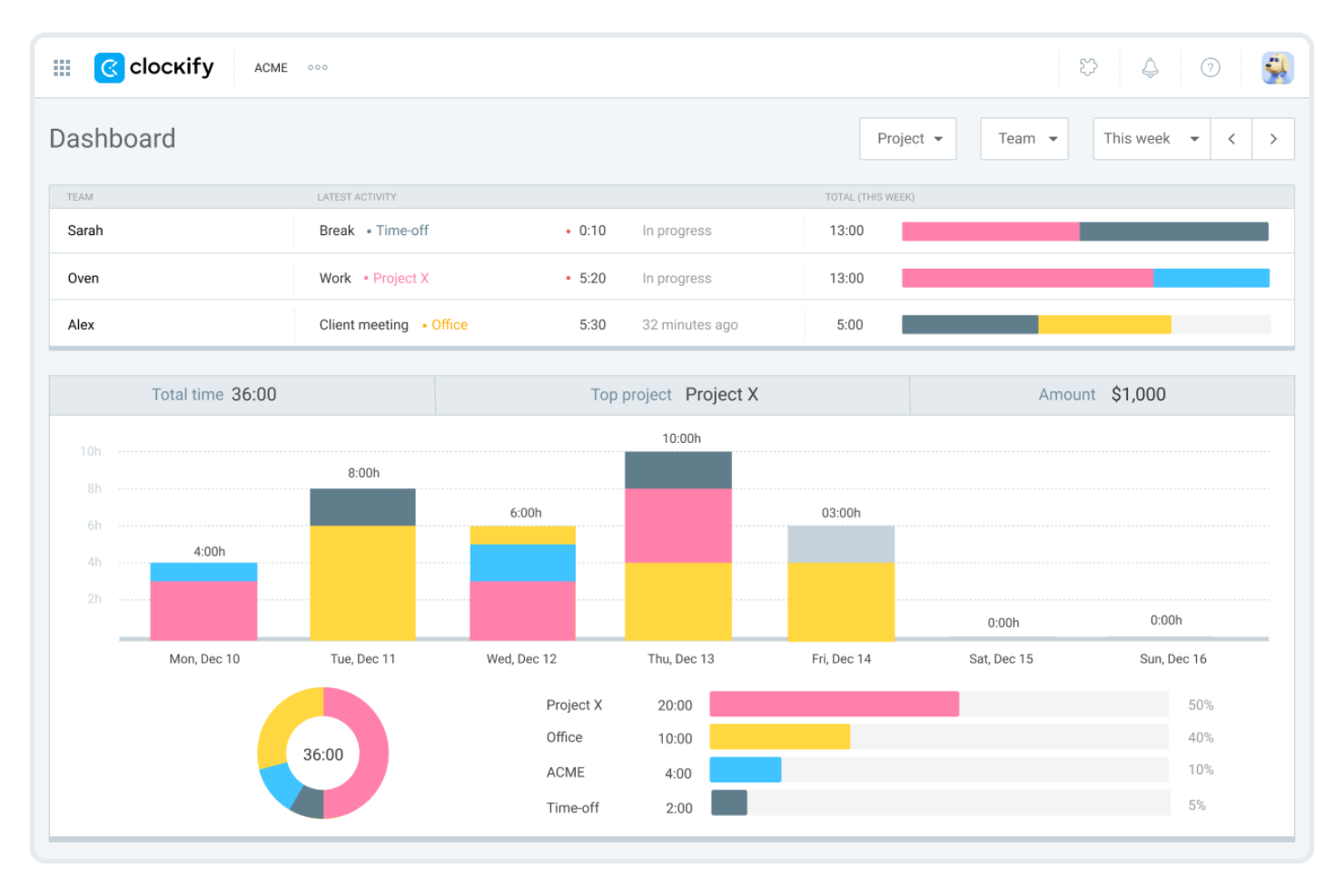
Buddy Punch’s geofencing and GPS on punch let you lock clock-ins to job sites—perfect if you run crews across multiple locations and need rock-solid attendance for payroll. Clockify’s auto-tracker and project budgets are great for teams logging billable work across apps and need fast reports on costs and profit. Compared to Buddy Punch’s field accountability, Clockify shines when your day lives in projects and tasks.
| Buddy Punch | Clockify | |
|---|---|---|
| API | ||
| Attendance Tracking | ||
| Batch Permissions & Access | ||
| Budgeting | ||
| Calendar Management | ||
| Dashboard | ||
| Data Export | ||
| Data Import | ||
| Data Visualization | ||
| External Integrations | ||
| Forecasting | ||
| Multi-User | ||
| Notifications | ||
| Project Management | ||
| Scheduling | ||
| Timesheets | ||
| Vacation & Absence Calendar |
Buddy Punch vs. Clockify Integrations
| Integration | Buddy Punch | Clockify |
| QuickBooks | ✅ | ✅ |
| Gusto | ✅ | ❌ |
| ADP Workforce Now | ✅ | ❌ |
| Paychex | ✅ | ❌ |
| Rippling | ✅ | ❌ |
| Asana | ❌ | ✅ |
| Trello | ❌ | ✅ |
| Jira | ❌ | ✅ |
| Google Calendar | ❌ | ✅ |
| Outlook | ❌ | ✅ |
| API | ✅ | ✅ |
| Zapier | ✅ | ✅ |
With Buddy Punch’s integrations, you can connect time tracking directly to payroll and HR platforms to simplify processing and reduce admin work. Clockify’s integrations focus more on productivity and project tools, letting you track time across tasks, calendars, and collaboration apps. Both make it easier to keep your team’s time data connected to the tools you already use every day.
Buddy Punch vs. Clockify Security, Compliance & Reliability
| Factor | Buddy Punch | Clockify |
| Data Encryption | Encrypts all data at rest and in transit using modern encryption protocols. | Uses 256-bit SSL encryption for all data connections and AWS-hosted infrastructure. |
| Data Privacy | Stores limited employee data with strict access controls and audit logs. | Collects only consented data, keeping screenshots and GPS optional and admin-controlled. |
| Compliance | Complies with GDPR and general data protection regulations. | Fully GDPR, ISO, and SOC2 compliant across its platform. |
| Backups & Recovery | Performs regular backups with secure storage and role-based access. | Performs infrastructure-level backups on AWS but no per-account recovery. |
| Reliability | High uptime with secure servers and redundancy built into its systems. | Maintains 99.99% uptime with global availability and redundant hosting. |
Both tools take data protection seriously, but Clockify goes further with ISO and SOC2 compliance, making it slightly stronger for organizations with strict standards. If you’re deciding between them, check your internal compliance needs first—review audit logs, recovery options, and where data is stored before committing.
Buddy Punch vs. Clockify Ease of Use
| Factor | Buddy Punch | Clockify |
| Interface | Clean, simple dashboard that’s easy to navigate across devices. | Intuitive layout with visual dashboards and browser extensions for fast tracking. |
| Setup | Quick to configure with guided setup and live chat support. | Easy sign-up and ready-to-go use with minimal setup or training required. |
| Mobile Experience | Reliable mobile apps with offline options for field teams. | Highly responsive mobile and desktop apps that sync instantly across platforms. |
| Onboarding | Offers step-by-step tutorials and same-day setup help. | Includes free onboarding sessions for upgraded plans. |
| Support | Live chat with responsive, friendly human support. | 24/7 global support via chat, phone, and email. |
Buddy Punch feels smoother for field and hourly teams since it’s built for straightforward time capture and approvals. Clockify is faster for project-based tracking and analysis, with a cleaner workflow for tech or office teams that live in apps all day.
Buddy Punch vs Clockify: Pros & Cons
Buddy Punch
- It’s easy for your team to learn and use every day without training.
- GPS, geofencing, and photo punches make it simple to stop time theft and hold people accountable.
- Scheduling, time-off, and attendance tools all work smoothly together so you can manage shifts fast.
- Reports can feel basic if you want deep analytics or advanced custom filters.
- Less ideal for large enterprises with complex time keeping policies.
- Customizing alerts and permissions can take some trial and error to get right.
Clockify
- Free plan supports unlimited users and projects
- Detailed reporting and export options for payroll
- Kiosk mode allows shared device clock-ins
- Mobile app can be buggy and unreliable
- Lacks advanced scheduling and payroll integrations
- Manual time entry can lead to user errors
Best Use Cases for Buddy Punch and Clockify
Buddy Punch
- Construction Teams Track job-site attendance and hours with GPS and geofencing for clear accountability.
- Field Services Manage remote crews with live GPS maps and job codes tied to each project.
- Healthcare Providers Use punch limits, PTO tracking, and automatic breaks to manage compliance and shift coverage.
- Retail & Restaurants Create weekly schedules fast and handle shift swaps or time-off requests in minutes.
- Office Staff Monitor attendance and time-off without micromanaging, and export reports for payroll in seconds
- Transportation & Logistics Track drivers’ locations, manage shifts, and prevent early punch-ins to reduce labor costs.
Clockify
- Creative Agencies Project-based tracking and client billing features support agency workflows.
- Remote Teams Cloud-based access and mobile apps help distributed teams track hours.
- Nonprofits Unlimited users on the free plan suit budget-conscious organizations.
- Consulting Firms Detailed reporting and billable rates help with client invoicing.
- Startups Simple onboarding and transparent pricing work for fast-growing teams.
- IT Departments Integration with project management tools supports tech team workflows.
Who Should Use Buddy Punch, and Who Should Use Clockify?
Buddy Punch is the better fit for hourly teams that need clear attendance tracking, job-site visibility, and easy payroll prep. It’s ideal for field crews, healthcare, retail, and any operation with shift work or multiple locations. Clockify makes more sense if you’re managing projects, tracking billable time, or analyzing productivity across knowledge-based teams. If your work revolves around tasks, projects, and reporting rather than physical attendance, Clockify will fit you better.
Differences Between Buddy Punch and Clockify
| Buddy Punch | Clockify | |
|---|---|---|
| Automation | Offers auto punch rules, overtime, and scheduling automations. | Provides automated time tracking, reminders, and idle detection. |
| Core Focus | Focuses on workforce time tracking, scheduling, and attendance. | Focuses on project tracking, billable time, and productivity insights. |
| Location Tracking | Strong GPS and geofencing for location-based teams. | GPS and location tracking available only on higher tiers. |
| Pricing | Charges per user with base and add-on fees. | Free for unlimited users with paid feature tiers. |
| Reporting | Simplified reports for payroll and attendance. | Advanced, customizable reports for projects, costs, and profitability. |
| Visit Buddy PunchOpens new window | Read Clockify ReviewOpens new window |
Similarities Between Buddy Punch and Clockify
| Cross-Platform Access | Each works across web, desktop, and mobile apps, keeping your data synced in real time. |
|---|---|
| Exports | Each provides downloadable reports for time, attendance, and costs in multiple formats. |
| Integrations | Both integrate with payroll and productivity tools, plus connect via Zapier and API. |
| Scheduling Tools | Both offer scheduling tools and PTO tracking for managing shifts and leave. |
| Time Tracking | Both let your team clock in/out or log hours manually from web, mobile, or kiosk apps. |
| Visit Buddy PunchOpens new window Read Clockify ReviewOpens new window | |