



Buddy Punch vs. Homebase: Comparison & Expert Reviews For 2026



Buddy Punch gives you reliable, no-nonsense time tracking with strong accountability for teams on the move. Homebase focuses on small businesses that want easy scheduling, team messaging, and payroll in one simple app. They’re similar on basics like time clocks and PTO, but different in emphasis—Buddy Punch leans into GPS and controls, while Homebase leans into automation, comms, and AI. In this article, I’ll compare these time clock software options, from features to pros and cons, pricing, and more.
Buddy Punch vs. Homebase: An Overview
Buddy Punch


Homebase
Why Trust Our Software Recommendations
Our team has been testing and reviewing software since 2012. As HR experts ourselves, we know how difficult—and important—it is to choose the right software.
For this guide, we evaluated tools using hands-on testing and independent research, scoring tools using our selection criteria. We also draw on insights from industry thought leaders and practicing HR experts.
Our reviews reflect our human editorial judgment, not a sales pitch.
Expert reviewers:
Buddy Punch vs. Homebase Pricing Comparison
| Buddy Punch | Homebase | |
|---|---|---|
| Free Trial | 14-day free trial + free demo available | Free plan available; 14-day free trial |
| Pricing | From $4.99/user/month + $19/month base fee (billed annually) | From $30/month |
Buddy Punch vs. Homebase Pricing & Hidden Costs
Buddy Punch pricing uses a per-user model with a monthly base fee, plus optional add-ons that can increase costs (e.g., real-time GPS, data retention, custom reporting, and a separate payroll module). Homebase pricing is tiered per location with unlimited employees on paid plans, and offers add-ons like payroll, tips, tasks, background checks, and hiring tools that can stack up.
To pick the right fit, estimate your monthly active headcount, number of locations, and which add-ons you’ll actually use, then model a typical pay period with overtime and PTO to see true monthly spend for your team.
Buddy Punch vs. Homebase Feature Comparison
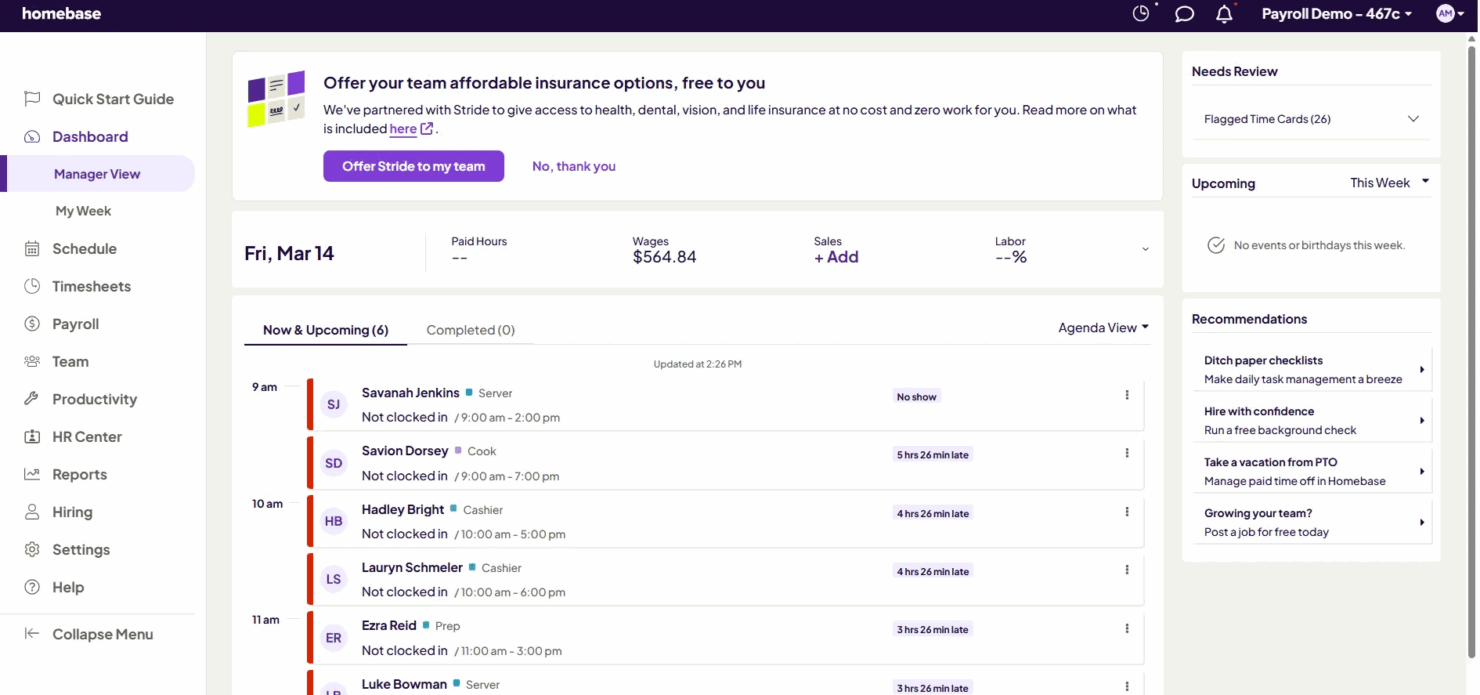
Buddy Punch’s GPS/geofencing and photo verification let you lock down off-site punches—perfect when you’re juggling rotating crews across job sites and need clean, defensible timesheets. Homebase’s auto-scheduling, team messaging, and labor-vs-sales tools are great for storefronts that need quick shift swaps, fewer no-shows, and tighter labor targets. Both cover the basics, but each shines in different day-to-day realities.
| Buddy Punch | Homebase | |
|---|---|---|
| 360 Degree Feedback | ||
| API | ||
| Attendance Tracking | ||
| Batch Permissions & Access | ||
| Budgeting | ||
| Calendar Management | ||
| Dashboard | ||
| Data Export | ||
| Data Import | ||
| Data Visualization | ||
| Employee Database | ||
| Employee Engagement | ||
| Employee Onboarding | ||
| External Integrations | ||
| Feedback Management | ||
| Forecasting | ||
| Multi-User | ||
| Notifications | ||
| Project Management | ||
| Scheduling | ||
| Timesheets | ||
| Travel Management | ||
| Vacation & Absence Calendar |
Buddy Punch vs. Homebase Integrations
| Integration | Buddy Punch | Homebase |
| QuickBooks Online | ✅ | ✅ |
| QuickBooks Desktop | ✅ | ❌ |
| ADP RUN | ❌ | ✅ |
| ADP Workforce Now | ✅ | ❌ |
| Gusto | ✅ | ✅ |
| Paychex | ✅ | ✅ |
| Rippling | ✅ | ✅ |
| Workday | ✅ | ❌ |
| Deltek | ✅ | ❌ |
| Square | ❌ | ✅ |
| Toast | ❌ | ✅ |
| Clover | ❌ | ✅ |
| Shopify | ❌ | ✅ |
| SurePayroll | ✅ | ✅ |
| API | ✅ | ✅ |
| Zapier | ✅ | ❌ |
Buddy Punch integrates well with accounting and payroll tools, making it simple to sync time data and streamline pay runs for growing teams. Homebase, on the other hand, connects deeply with POS systems, HR software, and job boards, giving small businesses more flexibility to link scheduling, sales, and staffing in one place. Both reduce manual work, but each focuses on different types of integrations to fit distinct workflows.
Buddy Punch vs. Homebase Security, Compliance & Reliability
| Factor | Buddy Punch | Homebase |
| Data encryption | Encrypts data in transit and at rest; runs regular security audits and vulnerability assessments. | Encrypts data in transit and at rest; conducts annual pen tests and continuous monitoring via SIEM/EDR. |
| Access controls | Supports MFA and role-based access control; SSO available on higher tiers. | Offers 2FA, SSO, password-less login, and RBAC across the platform. |
| Compliance posture | Operates in compliant data centers and maintains privacy policies aligned with GDPR. | Publishes a Trust Center with independent audits, policy reviews, and vendor risk evaluations. |
| Operational security | Uses vetted partners and secure API practices to protect integrations and data flows. | Runs 24/7 threat detection, incident response processes, and post-incident reviews. |
| Status transparency | Public status page for uptime and reliability updates. | Public Status Page plus Trust Center resources and security contact. |
Both emphasize strong encryption and access controls, but Homebase publishes deeper ops detail (SIEM/EDR, Trust Center), while Buddy Punch highlights straightforward safeguards and compliant hosting. To choose, map your risk areas (SSO/MFA needs, audit evidence, vendor reviews), request each vendor’s security docs, and verify controls against your policies and legal requirements.
Buddy Punch vs. Homebase Ease of Use
| Factor | Buddy Punch | Homebase |
| Interface clarity | Clean dashboard that keeps punches, schedules, and PTO easy to find for busy managers. | Simple, consumer-style app with clear menus and alerts that keep hourly teams on track. |
| Setup speed | Bulk add employees, set rules, and start tracking within minutes. | Fast start with guided setup; schedule and time clock can go live same day. |
| Mobile experience | Reliable mobile clock-in with GPS/geofence and photo options. | Mobile-first experience with messaging, shift reminders, and easy shift trades. |
| Scheduling workflow | Drag-and-drop builder with templates and repeating shifts. | Auto-scheduling, open shifts, and real-time labor vs. sales cues to adjust on the fly. |
| Reporting flow | Quick, exportable reports for hours, PTO, and overtime. | Payroll-ready timesheets and labor cost views tied to POS data. |
Buddy Punch feels lighter and more controlled for clean time capture and approvals, while Homebase feels faster for daily schedule changes, comms, and store-floor adjustments. If you live in the schedule and POS world, Homebase is smoother, but if you need airtight time data with tight punch rules, Buddy Punch is simpler.
Buddy Punch vs Homebase: Pros & Cons
Buddy Punch
- It’s easy for your team to learn and use every day without training.
- GPS, geofencing, and photo punches make it simple to stop time theft and hold people accountable.
- Scheduling, time-off, and attendance tools all work smoothly together so you can manage shifts fast.
- Reports can feel basic if you want deep analytics or advanced custom filters.
- Less ideal for large enterprises with complex time keeping policies.
- Customizing alerts and permissions can take some trial and error to get right.
Homebase
- You can easily schedule shifts and track time with its intuitive interface.
- Your team will benefit from integrated communication tools for quick updates via the Homebase app.
- It simplifies shift swapping and covers changes with minimal hassle.
- It lacks advanced HR and payroll features for comprehensive HR management.
- Your team might find customer support response times slower than desired.
- It may not suit larger businesses needing robust HR functionalities.
Best Use Cases for Buddy Punch and Homebase
Buddy Punch
- Construction Teams Track job-site attendance and hours with GPS and geofencing for clear accountability.
- Field Services Manage remote crews with live GPS maps and job codes tied to each project.
- Healthcare Providers Use punch limits, PTO tracking, and automatic breaks to manage compliance and shift coverage.
- Retail & Restaurants Create weekly schedules fast and handle shift swaps or time-off requests in minutes.
- Office Staff Monitor attendance and time-off without micromanaging, and export reports for payroll in seconds
- Transportation & Logistics Track drivers’ locations, manage shifts, and prevent early punch-ins to reduce labor costs.
Homebase
- Retail Stores Homebase simplifies shift scheduling and time tracking, making it easy to manage part-time staff.
- Cafes & Restaurants You can quickly adjust shifts and communicate updates, keeping your service running smoothly.
- Boutiques Team communication is streamlined, helping you maintain seamless customer service with flexible staffing.
- Service Providers If you manage hourly workers, Homebase keeps scheduling and time tracking straightforward.
- Small Offices Homebase's easy-to-use interface supports efficient scheduling, team coordination, and labor costing.
- Hospitality Venues With its focus on shift management, Homebase suits venues needing flexible staffing arrangements.
Who Should Use Buddy Punch, and Who Should Use Homebase?
Buddy Punch is best for businesses that care most about accurate time tracking, location control, and payroll-ready reporting—think construction crews, remote field teams, or service-based operations. Homebase, on the other hand, fits small businesses with shift-based staff who need simple scheduling, communication, and payroll in one place. I’d pick Buddy Punch for tighter oversight and accountability, and Homebase if I wanted an all-in-one tool to keep my team organized day to day.
Differences Between Buddy Punch and Homebase
| Buddy Punch | Homebase | |
|---|---|---|
| Artificial Intelligence | No AI automation tools. | Includes AI Assistants for hiring, scheduling, and payroll support. |
| Core Features | Emphasizes time tracking, GPS/geofencing, and job-cost tracking. | Emphasizes scheduling, team communication, and payroll bundled. |
| Integrations | Syncs mainly with payroll and HR systems. | Connects to POS, payroll, job boards, and HR tools. |
| Pricing | Charges per user per month with optional add-ons. | Charges per location with unlimited employees and add-on features. |
| Scheduling Tools | Offers manual scheduling and templates for repeat shifts. | Automates schedules, shift swaps, and labor forecasts. |
| Visit Buddy PunchOpens new window | Read Homebase ReviewOpens new window |
Similarities Between Buddy Punch and Homebase
| Mobile Usability | Each offers a mobile app that lets teams clock in, review hours, and check schedules on the go. |
|---|---|
| Payroll | Each connects with leading payroll tools like Gusto, ADP, and QuickBooks to streamline pay runs. |
| Reporting | Both provide exportable reports on time, attendance, and labor data for managers to review and analyze. |
| Time Off Management | Both track vacation, sick days, and approvals inside the platform for easier scheduling. |
| Time Tracking | Both capture employee hours, breaks, and overtime accurately for payroll prep, with built-in fraud prevention. |
| Visit Buddy PunchOpens new window Read Homebase ReviewOpens new window | |