



Buddy Punch vs. Hubstaff: Comparison & Expert Reviews For 2026



Buddy Punch gives you straightforward time tracking that keeps teams accountable without added noise. Hubstaff focuses on time tracking with robust monitoring and analytics for remote and hybrid work. Comparing these time clock software options to one another, Buddy Punch is simpler and field-friendly, while Hubstaff is richer in monitoring. In this guide, I’ll compare the tools, their features, pros and cons, pricing, and more to help you decide on the right option to add to your tech stack.
Buddy Punch vs. Hubstaff: An Overview
Buddy Punch


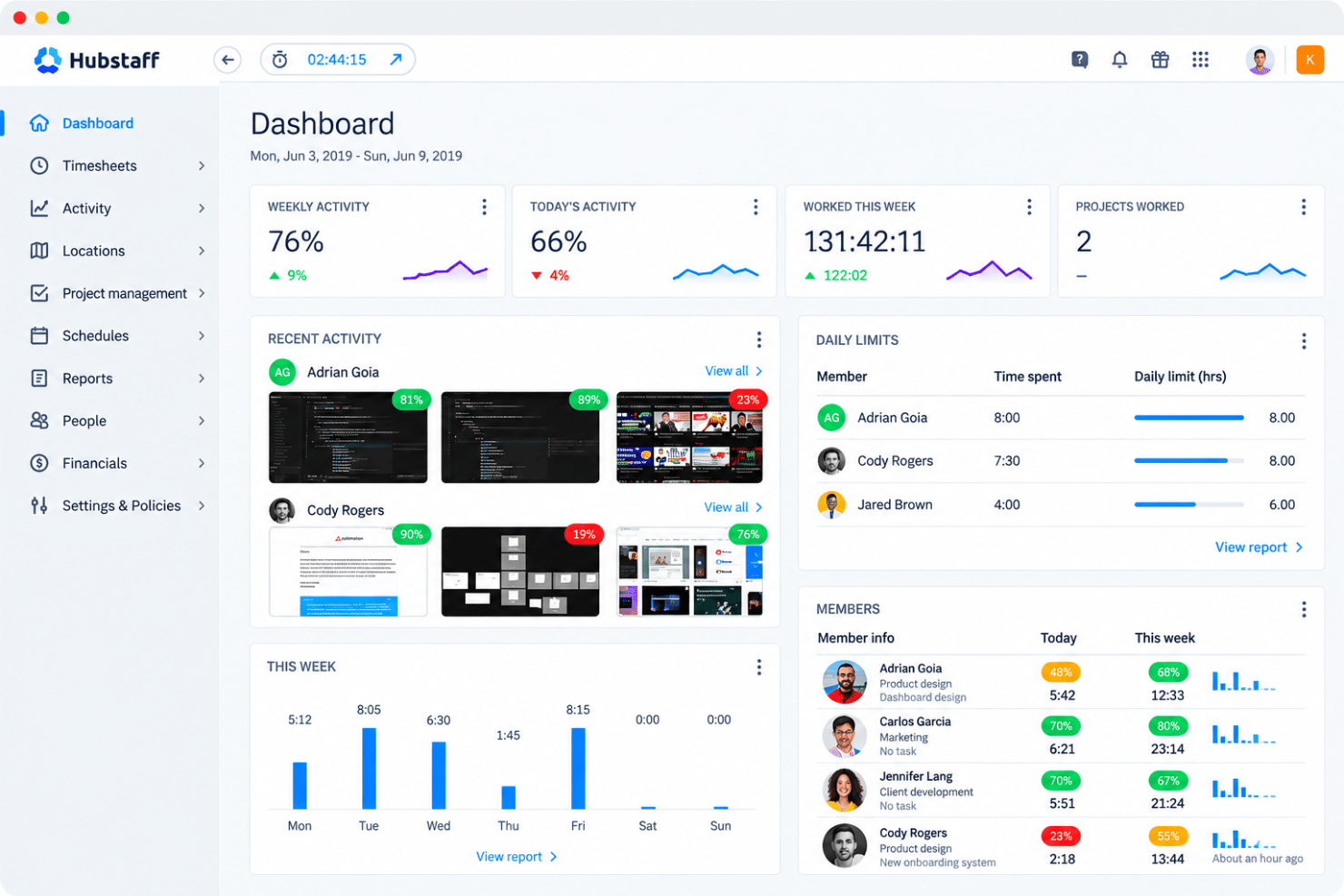
Hubstaff


Why Trust Our Software Reviews
Our team has been testing and reviewing software since 2012. As HR experts ourselves, we know how difficult—and important—it is to choose the right software.
For this guide, we evaluated tools using hands-on testing and independent research, scoring tools using our selection criteria. We also draw on insights from industry thought leaders and practicing HR experts.
Our reviews reflect our human editorial judgment, not a sales pitch.
Expert reviewers:
Buddy Punch vs. Hubstaff Pricing Comparison
| Buddy Punch | Hubstaff | |
|---|---|---|
| Free Trial | 14-day free trial + free demo available | Free demo + 14-day free trial available |
| Pricing | From $4.99/user/month + $19/month base fee (billed annually) | From $4.99/user/month (billed annually) |
Buddy Punch vs. Hubstaff Pricing & Hidden Costs
Buddy Punch pricing uses a per-user monthly model with a small base fee and optional add-ons for payroll, scheduling, GPS tracking, and custom reporting. Costs can increase if you add premium tools like real-time GPS or extended data retention. Hubstaff pricing follows a per-seat subscription with tiered plans and optional add-ons like Insights, Locations, and Tasks; higher tiers unlock integrations and workforce analytics.
For managers and HR teams, the best way to choose is to map each platform’s add-ons to your actual workflow. List what you’ll really use—like GPS tracking, payroll, or analytics—and calculate total cost per team size before committing.
Buddy Punch vs. Hubstaff Feature Comparison
With Buddy Punch’s GPS and geofencing tools, you can confirm your field crews clock in where they should, keeping job-site accountability tight. Hubstaff’s activity tracking and Insights dashboard, on the other hand, help you spot bottlenecks and improve how your remote team spends its time. Both support solid time tracking, but one leans on visibility, while the other leans on productivity data.
| Buddy Punch | Hubstaff | |
|---|---|---|
| 360 Degree Feedback | ||
| API | ||
| Attendance Tracking | ||
| Batch Permissions & Access | ||
| Budgeting | ||
| Calendar Management | ||
| Dashboard | ||
| Data Export | ||
| Data Import | ||
| Data Visualization | ||
| Employee Database | ||
| Employee Engagement | ||
| Employee Onboarding | ||
| External Integrations | ||
| Feedback Management | ||
| Forecasting | ||
| Multi-User | ||
| Notifications | ||
| Project Management | ||
| Scheduling | ||
| Timesheets | ||
| Travel Management | ||
| Vacation & Absence Calendar |
Buddy Punch vs. Hubstaff Integrations
| Integration | Buddy Punch | Hubstaff |
| QuickBooks Online | ✅ | ✅ |
| ADP Workforce Now | ✅ | ❌ |
| Gusto | ✅ | ✅ |
| Paychex | ✅ | ❌ |
| Asana | ❌ | ✅ |
| Trello | ❌ | ✅ |
| PayPal | ❌ | ✅ |
| Workday | ✅ | ❌ |
| Zapier | ✅ | ✅ |
| API | ✅ | ✅ |
Buddy Punch’s integrations make it easy to connect time tracking with payroll and HR workflows, helping you cut down on duplicate data entry and admin work. Hubstaff’s integrations focus more on project management and productivity tools, giving you a clearer view of how time links to tasks and output. Both platforms help streamline how your team tracks time and moves data across systems.
Buddy Punch vs. Hubstaff Security, Compliance & Reliability
| Factor | Buddy Punch | Hubstaff |
| Data Encryption | Encrypts all employee and payroll data at rest and in transit to prevent unauthorized access. | Uses SSL over HTTPS with encryption at rest and in transit, plus detailed audit logs for transparency. |
| Compliance Standards | Follows GDPR and U.S. labor compliance rules for timekeeping and payroll processing. | Certified for SOC 2 Type II, HIPAA, and GDPR compliance with regular external audits. |
| Access Controls | Offers role-based permissions, MFA, and user-specific punch permissions for tighter control. | Provides granular role-based permissions, two-factor authentication, and SCIM provisioning. |
| Data Retention | Allows custom data retention policies or extended retention through add-ons. | Offers adjustable data retention policies with optional six-year add-on storage. |
| System Reliability | Maintains stable cloud uptime and secure backup systems across verified data centers. | Uses redundant infrastructure with automatic failover and continuous backups for maximum uptime. |
Both tools take security seriously, but Hubstaff provides a stronger compliance framework for regulated industries. If you’re a manager or HR leader comparing them, review certification levels, access control settings, and incident response policies to decide which aligns best with your company’s privacy and accountability standards.
Buddy Punch vs. Hubstaff Ease of Use
| Factor | Buddy Punch | Hubstaff |
| Interface Design | Clean, intuitive dashboard with simple navigation for employees and managers. | Modern layout with more data widgets that can feel busy for smaller teams. |
| Onboarding | Quick setup and clear guides make getting started easy without training. | Offers guided onboarding and tutorials, but setup takes longer due to feature depth. |
| Mobile Experience | Straightforward mobile app with fast punching and GPS tagging. | Robust mobile app with full monitoring and reporting but slightly heavier to load. |
| Admin Controls | Simple admin tools for managing shifts, PTO, and approvals. | Advanced admin features for analytics and customization with a steeper learning curve. |
| Support Resources | Live chat and help center deliver responsive, human support. | Extensive knowledge base, tutorials, and 24/5 live chat support. |
Buddy Punch feels easier for everyday use thanks to its simpler layout and short learning curve. Hubstaff offers more control and customization but takes longer to master, making it better suited if your work depends on analytics and detailed activity tracking.
Buddy Punch vs Hubstaff: Pros & Cons
Buddy Punch
- It’s easy for your team to learn and use every day without training.
- GPS, geofencing, and photo punches make it simple to stop time theft and hold people accountable.
- Scheduling, time-off, and attendance tools all work smoothly together so you can manage shifts fast.
- Reports can feel basic if you want deep analytics or advanced custom filters.
- Less ideal for large enterprises with complex time keeping policies.
- Customizing alerts and permissions can take some trial and error to get right.
Hubstaff
- GPS tracking and geofencing support field-team timekeeping.
- Screenshots and app tracking verify billable hours.
- Project budgets and approvals connect tracked time to costs.
- Idle detection can misclassify meetings and reading as inactivity.
- Reports require manual editing and lack timezone controls.
- Monitoring and screenshots can feel intrusive to employees.
Best Use Cases for Buddy Punch and Hubstaff
Buddy Punch
- Construction Teams Track job-site attendance and hours with GPS and geofencing for clear accountability.
- Field Services Manage remote crews with live GPS maps and job codes tied to each project.
- Healthcare Providers Use punch limits, PTO tracking, and automatic breaks to manage compliance and shift coverage.
- Retail & Restaurants Create weekly schedules fast and handle shift swaps or time-off requests in minutes.
- Office Staff Monitor attendance and time-off without micromanaging, and export reports for payroll in seconds
- Transportation & Logistics Track drivers’ locations, manage shifts, and prevent early punch-ins to reduce labor costs.
Hubstaff
- Remote Agencies Hubstaff combines timers, screenshots, reports, budgets, and client billing features for agencies tracking distributed project work.
- Field Service Teams GPS and location tracking, scheduling, attendance features, and mobile apps help managers record work performed away from a central workplace.
- Distributed Contractors Desktop, web, and mobile timers give contractors multiple ways to record hours, while screenshots and activity reports provide project-level visibility.
- Payroll Departments Hubstaff supports approvals, payroll, payments, and integrations with QuickBooks, Gusto, PayPal, and BambooHR for teams managing paid work hours.
- Client Services Teams Budgets, reports, time entries, and integrations with Asana, ClickUp, Jira, and Trello help client teams connect tracked hours with project work.
- Growing Enterprises Enterprise features include SSO, account provisioning, compliance features, location tracking, and dedicated support for organizations with larger workforce administration needs.
Who Should Use Buddy Punch, and Who Should Use Hubstaff?
Buddy Punch is best for small to midsize teams that want straightforward, reliable time tracking without the extra noise. It’s ideal if your team works in the field, runs hourly shifts, or needs clean records for payroll and PTO. Hubstaff, on the other hand, fits companies that want deeper productivity data and tighter visibility into remote or hybrid work. If you manage desk workers and distributed teams, Hubstaff gives you the analytics and oversight you’ll actually use.
Differences Between Buddy Punch and Hubstaff
| Buddy Punch | Hubstaff | |
|---|---|---|
| Employee Monitoring | Doesn’t include screen monitoring or activity tracking to maintain privacy. | Offers app/URL tracking, screenshots, and idle timeouts for productivity management. |
| Feature Depth | Prioritizes essential time tracking, scheduling, and payroll tools. | Provides broader capabilities, including workforce analytics and expense tracking. |
| Pricing Model | Charges per user plus a base fee, with add-ons for advanced features. | Uses tiered per-seat plans with optional add-ons like Insights and Locations. |
| Time Tracking | Focuses on simple clock-ins, GPS tracking, and geofencing for accurate hours. | Tracks time with added activity monitoring, screenshots, and detailed analytics. |
| User Interface | Clean, simple layout that’s easy for field and hourly workers to use. | Data-heavy dashboards with more setup options for managers and analysts. |
| Visit Buddy PunchOpens new window | Read Hubstaff ReviewOpens new window |
Similarities Between Buddy Punch and Hubstaff
| Core Functionality | Both provide employee clock-in and clock-out, timesheet generation and tracking of hours worked. |
|---|---|
| Cross-Platform Usability | Both are built with flexibility across devices and worker types (office, remote, field) in mind. |
| Location Tracking | Both offer GPS-based time tracking and geofencing, helping you verify job-site attendance and prevent off-site clock-ins. |
| Reporting | Both generate detailed reports on hours, attendance, and labor costs so you can make data-driven staffing decisions. |
| Scheduling Tools | Each platform supports shift scheduling, time-off requests, and attendance tracking to simplify workforce management. |
| Visit Buddy PunchOpens new window Read Hubstaff ReviewOpens new window | |