

Kilometre takip yazılımı, doğru geri ödemeler ve vergi uyumluluğu için iş seyahatlerindeki mesafeleri otomatik olarak kaydeder, kategorilere ayırır ve raporlar. En iyi kilometre takip yazılımlarını arıyorsanız muhtemelen seyahat kaydını basitleştirmeniz, işle ilgili kilometreleri takip etmeniz, manuel hataları azaltmanız ve ister ekibiniz ister bağımsız bir profesyonel olarak kayıtlarınızı denetime hazır tutmanız gerekiyordur. Bu liste, önde gelen seçenekleri karşılaştırmanıza, ihtiyaçlarınız için hangi özelliklerin en önemli olduğunu anlamanıza ve iş akışınıza ve uyumluluk gereksinimlerinize uygun bir çözüm seçmenize yardımcı olacaktır.
Why Trust Our Software Recommendations
6,700+
Reviews
20
Industry experts
16+
Evaluation factors
14
Years
Our team has been testing and reviewing software since 2012. As HR experts ourselves, we know how difficult—and important—it is to choose the right software.
For this guide, we evaluated tools using hands-on testing and independent research, scoring tools using our selection criteria. We also draw on insights from industry thought leaders and practicing HR experts.
Our reviews reflect our human editorial judgment, not a sales pitch.
Expert reviewers:
- Phil GrayCOO
 Kim BehnkeHR Tech Editor & Analyst
 Josh BarkerPeople Ops Manager

Kilometre Takip Yazılımları Karşılaştırma Tablosu
Bu karşılaştırma tablosu, en iyi kilometre takip yazılımı seçimlerimin fiyatlandırma ayrıntılarını özetlemektedir:
Sorted by: Default
| Tool | Starting Price | Website | |
|---|---|---|---|
Best with real-time credit card purchase alerts | 4.6 out of 5 | $11.99/user/month Free demo available | Website |
Best for payroll and HR platform integrations | 4.5 out of 5 | $4/user/month 14-day free trial | Website |
Best for finance system integrations | 4.4 out of 5 | $8/user/month Free demo available | Website |
Best for route learning and auto-tagging | 4.2 out of 5 | Pricing upon request Free demo available | Website |
Best for direct reimbursement payments | 4.4 out of 5 | Pricing upon request Free demo available | Website |
Best with automatic expense syncing | Not rated | $8.99/month Free plan available and 7-day free trial | Website |
Best with battery-saving GPS tracking | Not rated | Pricing upon request Free demo available | Website |
Best for integrated time and expense tracking | Not rated | $4.99/user/month Free plan available | Website |
Best for swipe-based trip classification | Not rated | $7.50/month Free plan available | Website |
Best for multi-vehicle mileage logs | Not rated | $11/user/month Free plan available | Website |


Kilometre Takip Yazılımı İncelemeleri
Aşağıda kısa listeme giren kilometre takip yazılımlarının ayrıntılı özetlerini bulabilirsiniz. İncelemelerim, sizin için en iyi seçeneği bulmanıza yardımcı olmak amacıyla her yazılımın özelliklerine, entegrasyonlarına ve en uygun kullanım alanlarına ayrıntılı bir bakış sunmaktadır.
 Best with real-time credit card purchase alerts
- Free demo available
- From $11.99/user/month (billed annually)
Visit WebsiteCustomer Rating:4.6/5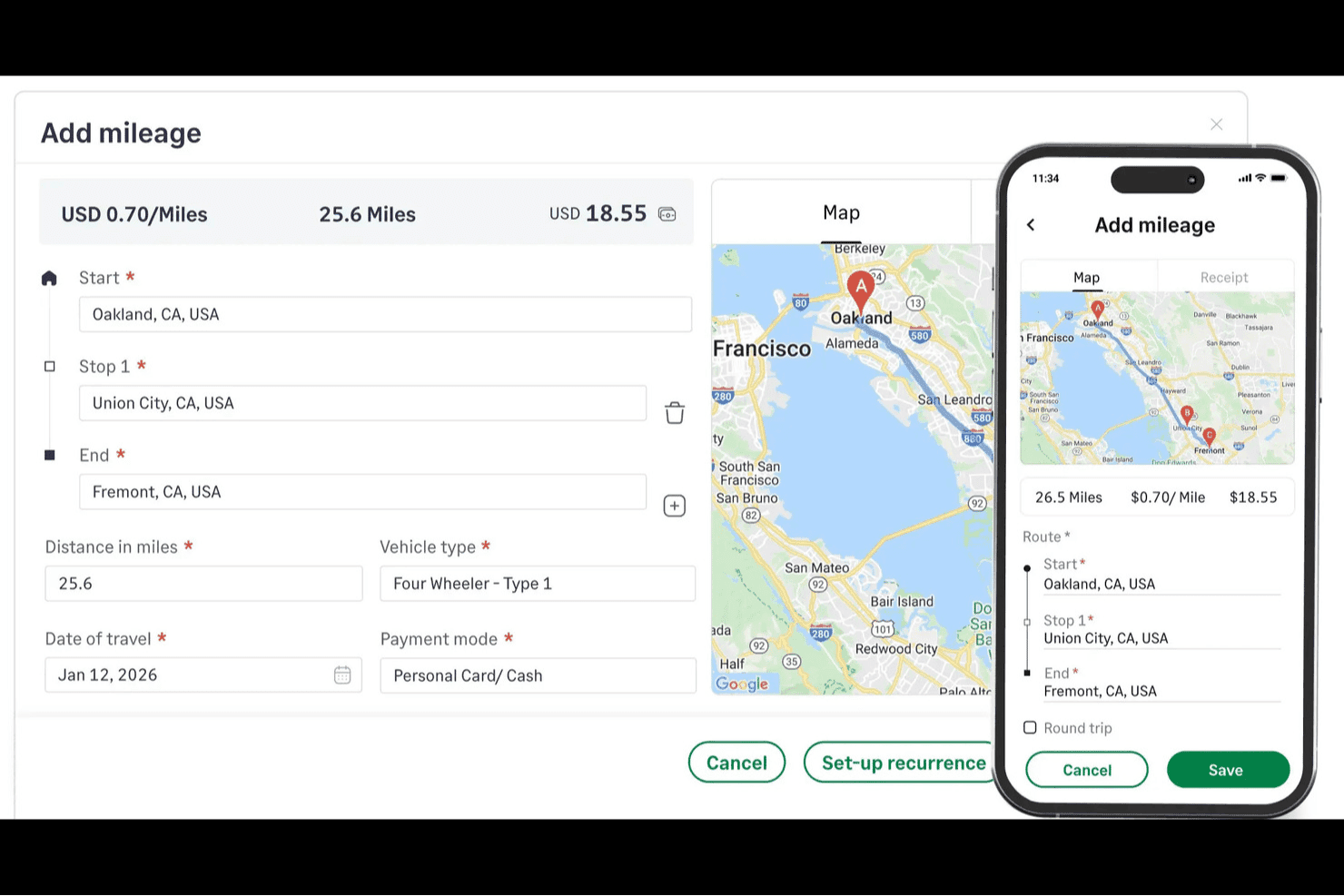
Sage Expense Management is an expense management platform that combines manual mileage logging, real-time corporate card transaction alerts, receipt capture, and multi-level approval workflows.
Who Is Sage Expense Management Best For?
Sage Expense Management is a good fit for finance teams at small to mid-sized companies that need structured expense reporting and corporate card reconciliation alongside mileage reimbursement.
Why I Picked Sage Expense Management
I've included Sage Expense Management in my top picks because its real-time card transaction alerts set it apart: the moment a corporate card is used, employees get a text and can reply with a receipt photo, tying card spend directly to mileage and expense reports without the usual back-and-forth. I also like how the commute deduction feature automatically subtracts home-to-office miles from claimed distances, keeping reimbursements IRS-compliant without extra admin work. The configurable rate engine supports vehicle type, fuel type, engine size, and annual distance slabs, so finance teams can mirror their exact reimbursement policy.
Sage Expense Management Key Features
- Multi-stop mileage entry: Log trips with up to 10 stops per journey, with Google Maps calculating the total distance automatically.
- Annual distance slab rates: Configure rates that switch automatically once an employee crosses a set yearly mileage threshold, mirroring tiered reimbursement policies.
- Passenger rate add-on: Set a separate per-passenger, per-mile rate that applies on top of the base mileage rate for carpooling reimbursement.
- Multi-level mileage approvals: Route mileage expense reports through single or multi-stage approval chains, with approvers able to act directly from Gmail, Slack, or the mobile app.
Sage Expense Management Integrations
Sage Expense Management offers native integrations with Google Maps, QuickBooks Online, Xero, Sage 50, Sage Intacct, and Sage 300 CRE for mileage calculations and expense syncing. An API supports custom integrations.
Pros and Cons
Pros:
- Mileage reports retain IRS-required trip details
- Configurable vehicle and annual-slab reimbursement rates
- Google Maps calculates routes with multiple stops
Cons:
- No business-versus-personal trip classification
- Trips require manual start and end entry
Learn more about Sage Expense Management (formerly Fyle): Best for payroll and HR platform integrations
- 14-day free trial
- From $4/user/month
Visit WebsiteCustomer Rating:4.5/5
Timeero offers GPS mileage tracking for field teams to monitor travel and time accurately. Timeero offers GPS-based mileage tracking designed for businesses that need to monitor employee travel and time on the road. It’s a strong fit for field service teams, construction companies, and organizations with mobile workforces. Timeero helps reduce manual mileage logs and supports accurate reimbursement for teams that are always on the move.
Who Is Timeero Best For?
Timeero is a good fit for small to mid-sized businesses with mobile or field-based teams that need to track mileage and integrate travel data with payroll and HR systems.
Why I Picked Timeero
What drew me to Timeero for mileage tracking is how well it connects with payroll and HR platforms. I see this as especially valuable for businesses that want mileage data to flow directly into payroll processing, reducing manual entry and errors. Timeero offers direct integrations with providers like Gusto, QuickBooks Payroll, and ADP, so mileage reimbursement can be handled alongside regular payroll runs. This makes it easier for HR and finance teams to manage travel expenses and ensure employees are paid accurately for their mileage.
Timeero Key Features
Some other features that make Timeero useful for mileage tracking include:
- Automatic GPS mileage tracking: The mobile app automatically records mileage in real time as employees travel between job sites.
- Geofencing for job sites: Set up geofences to track when employees enter or leave specific locations for more accurate mileage logs.
- Route replay: Review detailed maps of employee routes to verify travel and mileage claims.
- Mileage and time audit logs: Access a full audit trail of mileage and time entries for compliance and reporting needs.
Timeero Integrations
Integrations include QuickBooks, Gusto, ADP, Paycor, Paychex, Paylocity, and Sage Intacct.
Pros and Cons
Pros:
- Suggested routes save on fuel costs
- Accurate routes with GPS breadcrumbs
- Segmented tracking for multi-stop days
Cons:
- Limited mileage editing after clock-out
- Higher cost for advanced team features
Learn more about Timeero: Best for finance system integrations
- Free demo available
- From $8/user/month (billed annually)
Visit WebsiteCustomer Rating:4.4/5
Rydoo is an expense platform that automates mileage, travel costs, and reporting for teams. Rydoo is an expense management platform designed for organizations that need to track mileage and business travel costs. It’s a strong fit for finance teams and HR professionals who want to automate expense reporting and ensure compliance. Rydoo helps businesses simplify mileage logging, policy enforcement, and reimbursement workflows in one place.
Who Is Rydoo Best For?
Rydoo is a good fit for mid-sized to large businesses with complex expense management needs, especially those with distributed teams or frequent business travelers.
Why I Picked Rydoo
What makes Rydoo stand out for mileage tracking is its deep integration with leading finance and accounting systems. I picked Rydoo because it connects directly with platforms like SAP, Oracle, and Xero, so mileage expenses flow automatically into your company’s financial records. This reduces manual data entry and helps finance teams reconcile mileage reimbursements with other business expenses. For organizations that need mileage tracking to fit into their broader finance workflows, Rydoo offers a level of connectivity that’s hard to match.
Rydoo Key Features
Some other features that make Rydoo useful for mileage tracking include:
- Mobile mileage capture: Employees can log trips and mileage directly from their smartphones using the Rydoo app.
- Automated policy enforcement: The platform flags out-of-policy mileage claims and applies company rules automatically.
- Multi-currency support: Rydoo handles mileage reimbursements in different currencies for global teams.
- Custom approval workflows: You can set up multi-level approval processes for mileage and expense claims.
Rydoo Integrations
Integrations include SAP S/4HANA, Oracle NetSuite, Microsoft Dynamics 365, Xero, QuickBooks, and Uber.
Pros and Cons
Pros:
- High-speed OCR for other travel costs
- Seamlessly merges mileage with receipts
- Global tax and legal compliance built-in
Cons:
- Overkill for simple mileage tracking
- No fully automatic GPS start-and-stop
Learn more about Rydoo: Best for route learning and auto-tagging
- Free demo available
- Pricing upon request
Visit WebsiteCustomer Rating:4.2/5
Hurdlr provides automated mileage tracking and expense management for small businesses. Hurdlr offers mileage tracking software designed for self-employed professionals, freelancers, and small business owners who need to keep accurate records for tax or reimbursement purposes. The platform stands out for its automation features that help users minimize manual entry and reduce errors. If you’re looking for a tool that can simplify mileage tracking while supporting expense and income management, Hurdlr is worth considering.
Who Is Hurdlr Best For?
Hurdlr is a strong fit for self-employed professionals, freelancers, and small business owners who need automated mileage and expense tracking for tax or reimbursement purposes.
Why I Picked Hurdlr
What makes Hurdlr stand out for me is its route learning and auto-tagging capabilities, which are especially useful for anyone who drives similar routes regularly. The platform automatically recognizes frequently traveled routes and can tag trips as business or personal based on your past behavior, reducing manual sorting. I also like that Hurdlr uses machine learning to improve its trip categorization over time, making mileage logs more accurate and less time-consuming to maintain. For users who want to automate repetitive tracking tasks and minimize errors, these features make Hurdlr a compelling choice.
Hurdlr Key Features
Some other features in Hurdlr that support mileage tracking and expense management include:
- Automatic expense tracking: The app automatically tracks business expenses by syncing with your bank accounts and credit cards.
- Real-time tax calculations: Hurdlr calculates your tax deductions and estimated taxes as you log trips and expenses.
- Customizable income streams: You can add and manage multiple income sources, including freelance, rideshare, and delivery work.
- Detailed financial reports: Generate and export reports that break down your mileage, expenses, and income for easy recordkeeping.
Hurdlr Integrations
Integrations include Uber, Square, Stripe, PayPal, and Shopify.
Pros and Cons
Pros:
- Offers real-time tax deduction estimates
- Tracks income and expenses alongside mileage
- Auto-tags trips based on learned driving patterns
Cons:
- Lacks route optimization or dispatch features
- Mobile app notifications can be inconsistent
Learn more about Hurdlr: Best for direct reimbursement payments
- Free demo available
- Pricing upon request
Visit WebsiteCustomer Rating:4.4/5
Cardata provides mileage reimbursement software that automates compliance and policy management. Cardata offers a mileage reimbursement platform designed for organizations with employees who drive for work. The software appeals to HR, finance, and operations teams looking to automate compliance and simplify vehicle program administration. Cardata helps businesses manage mileage logs, reimbursements, and policy enforcement in one place.
Who Is Cardata Best For?
Cardata is a good fit for mid-sized to large organizations that need to manage and automate mileage reimbursement for mobile employees.
Why I Picked Cardata
What stands out about Cardata is its focus on direct reimbursement payments, which is a key concern for organizations managing mobile workforces. Cardata handles the entire reimbursement process, from mileage tracking to payment distribution, so employees receive payments directly and on time. I appreciate that the platform automates IRS-compliant mileage calculations and integrates policy controls to ensure accuracy and compliance. For teams that want to eliminate manual reimbursement steps and reduce administrative overhead, Cardata offers an optimized, end-to-end solution.
Cardata Key Features
Some other features in Cardata that support mileage tracking and vehicle program management include:
- Automated mileage capture: The app automatically detects and records trips using GPS, reducing manual entry.
- Policy compliance monitoring: Cardata tracks driver activity to ensure adherence to company vehicle and reimbursement policies.
- Customizable reporting tools: Generate detailed reports on mileage, expenses, and driver activity for audits or management review.
- Mobile document upload: Drivers can upload required documents, such as insurance or registration, directly through the app.
Cardata Integrations
Integrations include SAP Concur., ADP, Workday, and UKG.
Pros and Cons
Pros:
- Supports tax-free FAVR and CPM plans
- Live insurance and compliance audits
Cons:
- Custom pricing requires a direct quote
- App can stall during low power mode
Learn more about Cardata: Best with automatic expense syncing
- Free plan available and 7-day free trial
- From $8.99/month

Everlance automates mileage and expense tracking for freelancers and teams. Everlance offers a mileage tracking solution designed for freelancers, small businesses, and teams that need to manage both mileage and expenses in one place. The platform helps users automate trip logging and organize receipts for accurate reporting. If you’re looking to simplify IRS-compliant recordkeeping and reduce manual entry, Everlance is built to support those needs.
Who Is Everlance Best For?
Everlance is a good fit for freelancers, small business owners, and distributed teams that need to track mileage and expenses for tax or reimbursement purposes.
Why I Picked Everlance
I chose Everlance because its automatic expense syncing stands out for users who want to manage both mileage and expenses without juggling multiple apps. The platform automatically imports and categorizes expenses from linked bank accounts and credit cards, making it easier to match trips with related costs. I also like that Everlance lets you attach receipts directly to trips, which helps keep records organized for audits or reimbursements. These features make it especially useful for anyone who needs a unified approach to mileage and expense tracking.
Everlance Key Features
Some other features that make Everlance a strong choice for mileage tracking include:
- Automatic trip detection: The app uses GPS to automatically detect and log trips without manual input.
- IRS-compliant mileage logs: Everlance generates detailed mileage reports that meet IRS requirements for tax deductions.
- Customizable trip classification: Users can set rules to automatically categorize trips as business, personal, or custom types.
- Team management dashboard: Admins can view, approve, and manage team mileage and expense reports from a centralized dashboard.
Everlance Integrations
Integrations include QuickBooks, Xero, ADP, Gusto, Rippling, Paychex, Zenefits, and SAP Concur.
Pros and Cons
Pros:
- Team dashboard for admin oversight
- Customizable trip classification rules
- IRS-compliant reports for tax filing
Cons:
- No built-in route optimization
- Occasional missed trips with GPS tracking
Learn more about Everlance:

Motus offers mileage tracking for mobile teams, automating compliant logs and reporting. Motus offers a mileage tracking app designed for businesses with mobile workforces and distributed teams. The platform appeals to organizations that need accurate, compliant mileage logs for reimbursement and tax purposes. Motus helps reduce manual entry and administrative overhead by automating trip capture and reporting.
Who Is Motus Best For?
Motus is a good fit for mid-sized to large businesses with mobile employees who need compliant, automated mileage tracking for reimbursement.
Why I Picked Motus
What drew me to Motus is its focus on battery-saving GPS tracking, which addresses a common frustration for mobile workers who rely on their phones throughout the day. Motus uses a patented technology that captures mileage accurately while minimizing battery drain, so users don’t have to worry about their devices running out of power during long shifts. I also appreciate that Motus automatically detects trips in the background, reducing the need for manual input. For teams that need reliable, always-on mileage tracking without sacrificing phone performance, Motus offers a practical solution.
Motus Key Features
In addition to its battery-saving GPS tracking, Motus offers several other features for mileage tracking and reimbursement:
- Automated mileage capture: The app detects trips automatically and logs mileage without manual input.
- IRS-compliant mileage logs: Motus generates mileage logs that meet IRS requirements for tax and reimbursement purposes.
- Customizable reimbursement rates: Set and manage reimbursement rates based on company policy or IRS guidelines.
- Mobile receipt capture: Upload and store receipts directly in the app for expense tracking and reporting.
Motus Integrations
Integrations include SAP Concur.
Pros and Cons
Pros:
- Enterprise CRM and HR integrations
- Advanced FAVR reimbursement models
- Automatic GPS start and stop tracking
Cons:
- Mobile app logout issues on Android
- Interface can feel complex for drivers
Learn more about Motus: Best for integrated time and expense tracking
- Free plan available
- From $4.99/user/month (billed annually)

TripLog offers mileage and expense tracking for businesses and teams. TripLog offers an automatic mileage tracker app designed for businesses and professionals who need to manage both driving and related expenses. The tool is especially useful for teams that want to track mileage, time, and spending in one place. If you’re looking for a solution that brings together trip logging and expense management, TripLog is worth considering.
Who Is TripLog Best For?
TripLog is a strong fit for small to mid-sized businesses and accounting teams that need to track mileage, time, and expenses together.
Why I Picked TripLog
What stands out about TripLog is how it brings mileage, time, and expense tracking together in one platform. This is especially useful for businesses that need to manage employee reimbursements and compliance for both driving and work hours. I like that TripLog lets you log trips, capture receipts, and track time all from the same app, which reduces the need for multiple tools. This integrated approach makes it easier to generate accurate reports and keep all reimbursement data organized in one place.
TripLog Key Features
Some other features that make TripLog useful for mileage tracking include:
- Automatic trip detection: The app uses GPS and motion sensors to automatically detect and log trips without manual input.
- Multiple vehicle support: You can track mileage for several vehicles under one account, making it easier for users with more than one car.
- Customizable mileage rates: Set different reimbursement rates for various vehicle types, clients, or locations to match your organization’s policies.
- Odometer reading capture: Enter and store odometer readings to ensure accurate mileage records and compliance with tax requirements.
TripLog Integrations
Integrations include SAP Concur, ADP, UKG, Sage Intacct, Emburse, and Outlook Calendar.
Pros and Cons
Pros:
- Offers Bluetooth and USB auto start
- Tracks fuel parking and tolls easily
- Built in odometer logs for tax audits
Cons:
- Privacy concerns with background GPS
- Interface feels dated and complex
Learn more about TripLog: Best for swipe-based trip classification
- Free plan available
- From $7.50/month (billed annually)

MileIQ is a mobile app that automatically tracks mileage for IRS-compliant records. MileIQ offers a mobile-first mileage tracking solution designed for busy professionals and small business owners who need accurate, IRS-compliant records. The app automatically logs drives in the background and helps users separate business and personal trips with minimal effort. If you want to simplify mileage tracking for tax deductions or reimbursements, MileIQ provides a focused, user-friendly approach.
Who Is MileIQ Best For?
MileIQ is a good fit for self-employed professionals, small business owners, and mobile employees who need a simple way to track and classify mileage for tax or reimbursement purposes.
Why I Picked MileIQ
What sets MileIQ apart is its swipe-based trip classification, which makes sorting business and personal drives quick and intuitive. I picked MileIQ because users can simply swipe right for business and left for personal, reducing the time spent on manual entry or editing. The app also automatically detects and logs trips in the background, so you don’t have to remember to start or stop tracking. This approach is especially helpful for anyone who wants to keep mileage records accurate without interrupting their day.
MileIQ Key Features
Some other features that make MileIQ a strong option for mileage tracking include:
- Automatic drive detection: The app uses GPS to automatically log trips without requiring manual input.
- Multi-vehicle support: Users can track miles for multiple vehicles within a single account.
- Customizable mileage rates: You can set custom reimbursement rates to match your organization’s policies or IRS guidelines.
- Detailed monthly reports: Generate and export IRS-compliant mileage reports for the tax season or expense reimbursement purposes.
MileIQ Integrations
Integrations include QuickBooks Online and Xero.
Pros and Cons
Pros:
- Custom mileage rates for different organizations
- Supports multiple vehicles per user account
- Automatic trip logging runs in the background
Cons:
- Lacks direct integration with accounting platforms
- Battery drain reported on some mobile devices
Learn more about MileIQ:

Driversnote is a mileage tracking app for professionals needing accurate, compliant trip records. Driversnote offers a mileage tracking solution designed for professionals and businesses that need accurate, compliant records for multiple vehicles. The app appeals to users who manage fleets, drive for work, or need to document trips for tax or reimbursement purposes. With features tailored for detailed trip logging and reporting, Driversnote removes the hassle from mileage management for busy teams and individuals.
Who Is Driversnote Best For?
Driversnote is a good fit for small businesses, fleet managers, and self-employed professionals who need to track mileage across multiple vehicles for compliance or reimbursement.
Why I Picked Driversnote
Driversnote stands out for teams or individuals who need to track mileage across multiple vehicles. I picked it because it lets you create separate logs for each vehicle, making it easy to manage business and personal trips without confusion. The app automatically records trips using GPS and lets you assign each trip to a specific vehicle with just a tap. This focus on multi-vehicle support makes Driversnote a strong choice for anyone juggling several cars or managing a small fleet.
Driversnote Key Features
Some other features that make Driversnote useful for mileage tracking include:
- Odometer readings: Enter and track odometer readings to ensure accurate mileage records and cross-check trip data.
- Custom mileage rates: Set different reimbursement rates for various vehicle types, locations, or purposes.
- Automatic trip classification: Categorize trips as business or personal with a single tap for easier reporting.
- IRS- and HMRC-compliant reports: Generate detailed mileage reports that meet tax authority requirements in multiple countries.
Driversnote Integrations
Integrations include Wave.
Pros and Cons
Pros:
- Free version available for light users
- Supports multiple vehicles and rates
- Easy swipe to classify trip types
Cons:
- Full automation requires paid hardware
- No built-in fuel or expense tracking
Learn more about Driversnote:
Diğer Kilometre Takip Yazılımları
İşte kısa listeme giremeyen ancak yine de göz atmaya değer bazı ek kilometre takip yazılımı seçenekleri:
- 11MileageWiseBest with Google Maps Timeline import
- 12ShoeboxedBest with IRS-ready mileage reports
- 13PsngrBest for collaborative trip sharing
- 14Sage Expense ManagementBest for real-time policy violation alerts
How I Evaluate Mileage Tracking Software
I split my evaluation into two layers: the core capabilities a tool must have—like automatic GPS tracking and IRS-compliant reporting—and the differentiators that separate the best picks.
Core Functionality (Table Stakes For This List)
When I'm selecting tools for my list, I rank each one on a scale from 0 (does not offer the functionality) to 5 (excels in this area) for each core functionality listed below. Then, I calculate the tool's total score as a percentage. Each tool needs to achieve a minimum total score of 65% to be considered for inclusion.
- Automatic Mileage Tracking: I check whether the app detects drives on its own or requires users to manually start each trip—background GPS tracking matters most for field teams.
- Tax-Compliant Mileage Reporting: Reports need to include trip date, destination, purpose, and distance so they hold up during a tax audit without extra manual documentation.
- Reimbursement Rate Management: I look for tools that let you set custom rates by vehicle type, role, or region rather than locking you into a single flat rate.
- Payroll & HRIS Integration: Mileage data should sync with platforms like ADP, Gusto, or QuickBooks so reimbursements flow into payroll without re-keying figures.
- Approval Workflows: I evaluate whether managers can review, approve, or flag submitted trips—and whether routing rules adapt to your org's approval hierarchy.
- Business vs. Personal Classification: The tool should make it easy for drivers to categorize trips, whether through swipe gestures, scheduled work hours, or saved location rules.
Once I have a list of tools that meet the criteria, I consider what sets each platform apart.
Differentiating Factors (What Sets Vendors Apart)
Here's how I compare and contrast different vendors:
Standout Features
Fraud detection is a big one—I look for tools that flag duplicate trips, inflated distances, or unusual patterns before claims reach payroll. Geofencing adds another layer by auto-classifying trips when drivers enter or leave saved client sites. I also evaluate team dashboards and analytics, since HR and operations leaders need aggregate views of mileage costs across departments or cost centers to spot trends and manage budgets.
Beyond Features
Since mileage tools collect real-time location data, I pay close attention to how each vendor handles employee privacy—things like the ability to pause tracking outside work hours and role-based access controls matter a lot for HR teams. Scalability is another factor I evaluate, especially whether pricing and admin controls work for a 10-person sales team the same way they do for a distributed workforce across multiple cost centers. I also consider how easy the mobile app is for drivers to adopt, since low adoption kills the value of any mileage program.
Kilometre Takip Yazılımı Nasıl Seçilir?
Uzun özellik listeleri ve karmaşık fiyatlandırma yapılarına kendinizi kaptırmanız kolaydır. Benzersiz yazılım seçimi sürecinizi yürütürken odaklanmanıza yardımcı olmak için göz önünde bulundurmanız gereken faktörleri içeren bir kontrol listesi hazırladık:
| Faktör | Dikkat Edilmesi Gerekenler |
| Ölçeklenebilirlik | Yazılım, mevsimsel veya hızlı büyüme dâhil olmak üzere mevcut ve gelecekteki ekip büyüklüğünüzü destekleyebilecek mi? |
| Entegrasyonlar | Manuel veri girişini önlemek için bordro, İK veya muhasebe sistemlerinize yerel olarak bağlanabiliyor mu? |
| Özelleştirilebilirlik | Kilometre kategorilerini, onay iş akışlarını veya raporlama biçimlerini politikalarınıza uyacak şekilde özelleştirebilir misiniz? |
| Kullanım kolaylığı | Her seviyeden teknoloji bilgisine sahip çalışanlar uygulamayı ve yönetici panelini kolayca kullanabilecek mi? |
| Uygulama ve kullanıma alıştırma | Çalışır duruma gelmek ne kadar sürecek ve sağlayıcı hangi kaynakları veya desteği sunuyor? |
| Maliyet | Fiyatlandırma kademeleri açık mı ve kullanım alışkanlıklarınızla bütçe kısıtlamalarınıza uyuyor mu? |
| Güvenlik önlemleri | Sağlayıcı veri şifreleme, kullanıcı erişim kontrolleri ve gizlilik standartlarına uyumluluk sunuyor mu? |
| Destek erişilebilirliği | Çalışma saatlerinizde desteğe ulaşabiliyor musunuz ve birden fazla kanal (sohbet, telefon, e-posta) sunuluyor mu? |
Kilometre Takip Yazılımı Nedir?
Kilometre takip yazılımı, işle ilgili seyahatlerde katedilen mesafeyi otomatik olarak kaydeden ve günlükte tutan dijital bir araçtır. Seyahat ayrıntılarını yakalamak için GPS veya manuel giriş kullanır ve işletmelerin geri ödeme, vergi veya uyumluluk amaçları doğrultusunda çalışan seyahatlerini takip etmesine yardımcı olur. Bu sistemler genellikle raporlar oluşturur, mobil erişimi destekler ve kilometre yönetimini basitleştirip manuel hataları azaltmak için bordro veya muhasebe platformlarıyla entegre olur.
Kilometre Takip Yazılımının Özellikleri
Kilometre takip yazılımı seçerken aşağıdaki temel özelliklere dikkat edin:
- Otomatik GPS takibi: Kilometreyi gerçek zamanlı olarak kaydetmek için cihazınızın GPS'ini kullanır; manuel veri girişini azaltır ve her yolculuk için doğruluğu artırır.
- Yolculuk kategorilendirme: Kullanıcıların yolculukları işle ilgili veya kişisel olarak etiketlemesine olanak tanır; geri ödenebilir kilometreleri geri ödenemeyen seyahatlerden ayırmayı kolaylaştırır.
- Güzergâh haritalama: Her yolculuğun görsel bir haritasını görüntüler; seyahat güzergâhlarının doğrulanmasına ve denetim ya da uyumluluk gereksinimlerinin desteklenmesine yardımcı olur.
- Kilometre raporlama: Kilometreyi tarihe, kullanıcıya veya projeye göre özetleyen ayrıntılı raporlar oluşturur; bu raporlar geri ödeme veya vergi amaçlarıyla dışa aktarılabilir.
- Mobil uygulama erişimi: Çalışanların akıllı telefonlarını kullanarak hareket hâlindeyken kilometreyi takip etmesini sağlar ve ofis dışındayken bile doğru kayıtlar tutulmasını güvence altına alır.
- Bordro veya muhasebe ile entegrasyon: Bordro veya muhasebe sistemlerine doğrudan bağlanır; böylece kilometre verileri geri ödeme veya gider takibi için otomatik olarak aktarılır.
- Coğrafi sınırlandırma: Belirli konumlara girildiğinde veya bu konumlardan çıkıldığında kilometre takibini otomatik olarak başlatmak ya da durdurmak için iş sahaları veya ofislerin çevresinde sanal sınırlar oluşturur.
- Özelleştirilebilir geri ödeme oranları: Yöneticilerin, şirket politikasına veya yerel düzenlemelere uygun kilometre geri ödeme oranları belirlemesine olanak tanır.
- Denetim izi: Tüm kilometre kayıtlarının ve düzenlemelerinin güvenli bir kaydını tutarak uyumluluğu ve anlaşmazlıkların çözümünü destekler.
- Çok kullanıcılı yönetim: Yöneticilerin ekipler veya departmanlar genelinde izinleri yönetmesini, kullanımı izlemesini ve kilometre kayıtlarını incelemesini sağlar.
Kilometre Takip Yazılımının Faydaları
Kilometre takip yazılımını uygulamak, ekibiniz ve işletmeniz için çeşitli faydalar sağlar. Yararlanabileceğiniz birkaç avantaj şunlardır:
- Doğru kilometre kayıtları: Otomatik GPS takibi ve denetim izleri, geri ödeme veya uyumluluk amacıyla her yolculuğun doğru şekilde kaydedilmesine yardımcı olur.
- Azaltılmış manuel veri girişi: Mobil uygulamalar ve bordro ya da muhasebe sistemleriyle entegrasyonlar, kâğıt kayıt ve elektronik tablo ihtiyacını ortadan kaldırır.
- Sadeleştirilmiş geri ödeme süreci: Özelleştirilebilir raporlama ve doğrudan veri dışa aktarma özellikleri, kilometre taleplerinin hızlı ve tutarlı bir şekilde işlenmesini kolaylaştırır.
- Geliştirilmiş uyumluluk: Denetim kayıtları, güzergâh haritalama ve coğrafi sınırlandırma gibi özellikler, vergi ve iş gücü düzenlemelerine uyulmasını destekler.
- Geliştirilmiş görünürlük: Gerçek zamanlı panolar ve çok kullanıcılı yönetim, yöneticilere ekip seyahatlerini ve giderlerini net bir şekilde görme olanağı sunar.
- Maliyet kontrolü: Özelleştirilebilir geri ödeme oranları ve ayrıntılı raporlama, işletmelerin seyahatle ilgili harcamaları izlemesine ve yönetmesine yardımcı olur.
- Çalışan kolaylığı: Mobil erişim ve otomatik yolculuk kategorilendirme, çalışanların iş akışlarını aksatmadan kilometreyi takip etmesini kolaylaştırır.
Kilometre Takip Yazılımının Maliyetleri ve Fiyatlandırması
Kilometre takip yazılımı seçmek, mevcut çeşitli fiyatlandırma modellerini ve planları anlamayı gerektirir. Maliyetler özelliklere, ekip büyüklüğüne, eklentilere ve daha fazlasına göre değişir. Aşağıdaki tablo, kilometre takip yazılımı çözümlerinde yaygın planları, ortalama fiyatlarını ve genellikle sunulan özellikleri özetlemektedir:
Kilometre Takip Yazılımı İçin Plan Karşılaştırma Tablosu
| Plan Türü | Ortalama Fiyat | Yaygın Özellikler |
| Ücretsiz Plan | $0 | Temel GPS takibi, manuel yolculuk girişi, sınırlı raporlama ve mobil uygulama erişimi. |
| Kişisel Plan | $4-$11/kullanıcı/ay | Otomatik kilometre takibi, yolculuk kategorilendirme, temel raporlama ve elektronik tablolara dışa aktarma. |
| İşletme Planı | $9-$25/kullanıcı/ay | Çok kullanıcılı yönetim, gelişmiş raporlama, bordro entegrasyonları, coğrafi sınırlandırma ve denetim kayıtları. |
| Kurumsal Plan | $10+/kullanıcı/ay | Özel entegrasyonlar, özel destek, gelişmiş güvenlik, uyumluluk araçları ve özel iş akışları. |
Kilometre Takip Yazılımı SSS
Kilometre takip yazılımı hakkında sık sorulan bazı soruların yanıtları:
Kilometre takip yazılımı seyahatleri nasıl kaydeder?
Kilometre takip yazılımı, her seyahatin başlangıç ve bitiş noktalarını kaydetmek için GPS teknolojisini veya manuel girişi kullanır. Çoğu sistem, bir seyahatin ne zaman başlayıp sona erdiğini otomatik olarak algılayarak doğru kilometre kayıtları için mesafe ve güzergâh ayrıntılarını kaydeder.
Kilometre takip yazılımı hem kişisel hem de iş seyahatleri için kullanılabilir mi?
Evet, çoğu kilometre takip yazılımı kullanıcıların seyahatleri kişisel veya işle ilgili olarak kategorilere ayırmasına olanak tanır. Bu, geri ödenebilir kilometreleri geri ödenemeyen seyahatlerden ayırmaya yardımcı olur ve vergi veya şirket politikalarına uyum için raporlamayı kolaylaştırır.
Kilometre takip yazılımı IRS veya yerel vergi düzenlemelerine uygun mudur?
Evet, birçok çözüm IRS uyumlu kilometre kayıtları ve raporları oluşturacak şekilde tasarlanmıştır. Bu çözümler genellikle vergi ve iş gücü düzenlemelerine uyumu desteklemek için denetim izleri, ayrıntılı seyahat kayıtları ve özelleştirilebilir geri ödeme oranları gibi özellikler içerir.
Çalışanlar kilometre takibi yapmak için hangi cihazları kullanabilir?
Çalışanlar genellikle akıllı telefon veya tabletlerdeki mobil uygulamaları kullanarak kilometre takibi yapabilir. Bazı çözümler ayrıca manuel giriş veya inceleme için web panelleri sunar; bu da seyahatlerin sahadan veya ofisten kolayca kaydedilmesini sağlar.
Kilometre takip yazılımı tarafından toplanan veriler ne kadar güvenlidir?
Saygın kilometre takip yazılımı sağlayıcılarının çoğu veri şifreleme, güvenli kullanıcı kimlik doğrulama ve erişim kontrolleri kullanır. Bu güvenlik önlemleri, hassas konum ve seyahat verilerinin yetkisiz erişime veya veri ihlallerine karşı korunmasına yardımcı olur.
Kilometre takip yazılımı bordro veya muhasebe sistemleriyle entegre olabilir mi?
Evet, birçok kilometre takip aracı bordro, İK veya muhasebe platformlarıyla doğrudan entegrasyonlar sunar. Bu, kilometre verilerinin otomatik olarak aktarılmasını sağlar; manuel veri girişini azaltır ve geri ödeme süreçlerini hızlandırır.