
Verimliliği takip etmek, İK profesyonelleri için yaygın bir zorluktur. Sayısız görevi aynı anda yürütürken ekibinizi hedefte tutmak bunaltıcı olabilir. Verimlilik takibi yazılımı, bu karmaşayı yönetmenin bir yolunu sunarak gerçekten önemli olan konulara odaklanmanıza yardımcı olur.
Size mevcut en iyi seçeneklerin tarafsız bir incelemesini sunmak için verimlilik takibi araçları dünyasını derinlemesine inceledim. Deneyimlerime göre doğru yazılımı seçmek, ekibinizin çalışma biçimini dönüştürerek işinizi kolaylaştırabilir.
Bu makalede, ihtiyaçlarınıza uygun özellikleri ve avantajları öne çıkararak en iyi seçimlerim arasında size rehberlik edeceğim. Ekibinizin verimli ve üretken kalmasını sağlamak üzere bilinçli bir karar vermenize yardımcı olacak bilgiler bulacaksınız.
Why Trust Our Software Recommendations
6,700+
Reviews
20
Industry experts
16+
Evaluation factors
14
Years
Our team has been testing and reviewing software since 2012. As HR experts ourselves, we know how difficult—and important—it is to choose the right software.
For this guide, we evaluated tools using hands-on testing and independent research, scoring tools using our selection criteria. We also draw on insights from industry thought leaders and practicing HR experts.
Our reviews reflect our human editorial judgment, not a sales pitch.
Expert reviewers:
- Phil GrayCOO
 Kim BehnkeHR Tech Editor & Analyst
 Josh BarkerPeople Ops Manager

Verimlilik Takibi Yazılımları Karşılaştırma Tablosu
En iyi verimlilik takibi yazılımı seçimlerim için fiyatlandırma ayrıntılarını bu karşılaştırma tablosunda özetledim:
Sorted by: Default
| Tool | Starting Price | Website | |
|---|---|---|---|
Best productivity tracking software for automated and simple time mapping | 4.8 out of 5 | $8/user/month Free trial + free demo available | Website |
Best for presenting work patterns | 4.6 out of 5 | $19.99/user/month Free trial available | Book Demo |
Best for refocusing teams on high-impact work | 4.5 out of 5 | $10/user/month Free plan + 14-day free trial available | Book Demo |
Best for tracking mobile workforce activity | 4.5 out of 5 | $6.42/user/month Free trial available | Website |
Best for visual work verification | 4.5 out of 5 | Pricing upon request 14-day free trial + demo available | Website |
Best for advanced user behavior analytics | 4.5 out of 5 | Pricing upon request Free demo available | Website |
Best for detailed reporting | 4.6 out of 5 | $6/user/month Free plan + Free trial + Free demo available | Book Demo |
Best for real-time activity monitoring | Not rated | $6.67per user/month Free demo + 14-day free trial availbale | Website |
Best productivity tracking software for comprehensive insights on employee efficiency levels | 4.9 out of 5 | $7/seat/month Free 21-day trial + free plan for up to 3 users | Website |
Best productivity tracking software for garnering real-time productivity analytics | 4.8 out of 5 | $5/user/month Free demo + 7-day free trial available | Website |


En İyi Verimlilik Takibi Yazılımları
Her verimlilik takibi yazılımının en uygun kullanım alanını, dikkat çeken özelliklerini ve bazı artılarını & eksilerini gösteren kısa bir açıklamasını burada bulabilirsiniz. Kullanıcı arayüzlerinin genel görünümünü sunmak için ekran görüntülerini de ekledim.
 Best productivity tracking software for automated and simple time mapping
- Free trial + free demo available
- From $8/user/month (billed annually)
Visit WebsiteCustomer Rating:4.8/5
Insightful tracks several project-specific attributes that depict how much time your employees spend on different projects. Insightful lives up to its name, with the tool promising to deliver several project-related insights and employee productivity attributes. Many small businesses rely on Insightful for spiking productivity and tracking employee efficiency.
Why I picked Insightful: I like Insightful primarily because of the automated time mapping feature. By implementing automatic time data mapping, insightful delivers accurate project insights that eliminate human error. Insightful provides you with a comprehensive view of the time spent by your employees at distinct stages of a project. The tool also offers precise statistics to help you better justify your projects' budgets and billable hours.
Proof of work is another challenge for employers hiring freelancers or contractors who invoice against billable hours. Insightful implements a real-time monitoring method that gives a snapshot of employees' website and app usage. Additionally, you can personally label apps and websites that are productive for your project or organization.
Insightful Standout Features and Integrations
Features include automated screenshots, verified attendance, automated time entries mapping, attendance tracking, historical timekeeping, productivity labeling, and different logins for clients, managers, and employees.
Integrations include 5+ tools like Data Studio, IBM Cognos Analytics, Looker, Power BI, Slack, Tableau, and others.
Pros and Cons
Pros:
- User-friendly user interface
- Screenshots depicting window changes
- Includes a REST-based API for custom integrations
Cons:
- Occasional automation bugs
- Can't delete users in some cases
Learn more about Insightful: Best for presenting work patterns
- Free trial available
- From $19.99/user/month
Visit WebsiteCustomer Rating:4.6/5
Prodoscore lets managers compare employee productivity patterns using objective, role-based scoring without invasive monitoring. For businesses that want to get more out of their teams, Prodoscore offers a practical way to turn employee activity data into insights you can actually use. It focuses on real-time productivity metrics without crossing privacy lines, making it a good fit for remote and hybrid work environments. By clarifying how work really gets done, Prodoscore helps you make informed decisions that support stronger performance.
Why I Picked Prodoscore
I picked Prodoscore because it delivers real-time visibility into employee productivity through AI-driven analytics. It stands out for pulling data from multiple business tools and presenting it in a way that clearly shows work patterns. This makes it easier to recognize high performers and identify where others may need support. By providing objective metrics without tracking hours, Prodoscore lets you make data-driven management decisions while respecting employee privacy.
Prodoscore Key Features
In addition to its core analytics capabilities, Prodoscore offers several other features that enhance its utility as a productivity tracking tool.
- Deep API Integrations: Connects seamlessly with various business applications to aggregate data for a comprehensive productivity view.
- Browser Extension: Captures usage statistics for web-based applications, providing deeper insights into daily activities.
- Desktop Agent: Monitors application usage on desktop computers, adding another layer of data for productivity analysis.
- ProdoAI: Leverages artificial intelligence to offer predictive insights and coaching recommendations for performance improvement.
Prodoscore Integrations
Integrations include Google Workspace, Microsoft 365, Salesforce, Slack, Zoom, HubSpot, RingCentral, Cisco Webex, Dropbox, and QuickBooks.
Pros and Cons
Pros:
- AI-driven insights for proactive coaching
- Deep integrations across core business tools
- Objective productivity metrics without surveillance
Cons:
- Pricing not publicly disclosed
- No real-time screen monitoring
Learn more about Prodoscore: Best for refocusing teams on high-impact work
- Free plan + 14-day free trial available
- From $10/user/month (billed annually)
Visit WebsiteCustomer Rating:4.5/5
ActivTrak monitors productivity data, showing when team members are actively working, and their app and website usage. ActivTrak is a productivity tracking platform that helps you understand how work happens across your organization. It captures digital activity data to show where time goes, how teams perform, and where efficiency can improve.
Why I picked ActivTrak: I picked ActivTrak because it helps you see what’s driving performance without crossing privacy boundaries. It tracks productive, unproductive, and offline work so you can spot gaps and improvement opportunities. You can benchmark individual and team productivity against organizational averages to see where focus or coaching is needed.
The platform also highlights low-value activities so teams can refocus on tasks that deliver results. With its performance insights and burnout prevention tools, you can balance workloads and keep your team’s energy steady.
Standout features & integrations:
Features include productivity performance tracking that breaks down time spent on different activity types, helping you pinpoint inefficiencies and improvement areas. Another useful tool is schedule optimization, which uses attendance data to ensure consistent coverage and prevent missed shifts, keeping operations running smoothly.
Integrations include Microsoft Outlook, Google Calendar, Salesforce, Microsoft Teams, Slack, ServiceNow, Zendesk, Zoom, Microsoft Viva, Lattice, Qualtrics, and Jira Software.
Pros and Cons
Pros:
- Detailed breakdown of productive vs. unproductive time
- Helps detect burnout before it impacts output
- Benchmarking makes performance comparisons easier
Cons:
- Limited customization of dashboard layouts
- No built-in payroll or HR tools
Learn more about ActivTrak: Best for tracking mobile workforce activity
- Free trial available
- From $6.42/user/month (billed annually)
Visit WebsiteCustomer Rating:4.5/5
DeskTime offers a detailed daily productivity dashboard showing arrival time, time at work, and effectiveness percentage. DeskTime is an automatic time and productivity tracking tool that monitors app, URL, and document usage across desktop and mobile devices, giving managers and employees visibility into how work hours are spent.
Built around automatic time tracking, DeskTime is a productivity monitoring platform that captures app and URL activity, project time, and team attendance data across desktop and mobile.
DeskTime is a productivity tracking platform that automatically logs app usage, website activity, and project time across devices, combining time tracking with scheduling and absence management in one place.
Who Is DeskTime Best For?
DeskTime is a good fit for managers and team leads in small to mid-sized businesses who need automatic, hands-off visibility into how their teams spend work time.
Why I Picked DeskTime
I picked DeskTime as one of the best for tracking mobile workforce activity because the mobile app doesn't strip out core functionality the way many desktop-first tools do. Whether your team is traveling to client sites, working from a job location, or clocking time away from a computer, the app supports both manual and automatic time tracking on iOS and Android, including offline time logging. That offline capability is key: hours recorded without a connection sync back automatically, so there are no gaps in your data. The mobile dashboard also gives managers real-time access to team member productivity levels, project progress, and offline time assignments, all from their phone.
DeskTime Key Features
- URL and app tracking: Automatically logs every website visited and application used during work hours, categorized as productive, unproductive, or neutral.
- Document title tracking: Captures the specific file or document names employees work on, giving you granular visibility beyond just which app is open.
- Productivity reports: Generates daily, weekly, and custom-range reports on individual and team productivity scores based on tracked activity data.
- Shift scheduling: Lets managers build and assign work schedules so that tracked time can be measured against expected hours worked.
DeskTime Integrations
DeskTime offers a small set of native integrations, including Google Calendar, Outlook Calendar, Trello, GitLab, Asana, and Jira, and it connects with Zapier. An API is also available for custom integrations.
Pros and Cons
Pros:
- Supports mobile tracking for remote workers
- Classifies app and URL productivity per team
- Tracks time automatically without manual input
Cons:
- Auto-start on desktop occasionally fails to trigger
- Mobile app lacks automatic URL tracking
Learn more about DeskTime: Best for visual work verification
- 14-day free trial + demo available
- Pricing upon request
Visit WebsiteCustomer Rating:4.5/5
Hubstaff offers a comprehensive dashboard for tracking time and productivity insights. Hubstaff is a versatile time tracking and productivity monitoring tool that caters to teams of any size, whether you're a solo entrepreneur or part of a large organization. Its primary goal is to enhance productivity by providing insights into how time is spent across various projects and tasks.
Why I picked Hubstaff: One of the key features that stands out to me is its activity monitoring capability. The software measures keyboard and mouse usage to determine activity levels, offering a quantifiable way to assess engagement during work hours. This data helps managers identify patterns, allocate resources effectively, and address potential productivity issues.
Another notable feature is Hubstaff's optional screenshot functionality. Managers can configure the software to take periodic screenshots of employees' screens, providing visual confirmation of work being performed. This feature can be customized to blur sensitive information, balancing oversight with privacy considerations.
Hubstaff Standout Features and Integrations
Features include time tracking, timesheets, attendance management, reporting, payroll, expenses and invoicing, GPS time tracking, project cost management, employee scheduling, overtime tracker, billing and invoicing, and workforce analytics.
Integrations include Jira, Slack, Asana, Trello, QuickBooks, Salesforce, GitHub, PayPal, FreshBooks, ClickUp, monday.com, and Zendesk.
Pros and Cons
Pros:
- Chrome extension
- Productivity line charts
- Automated reports
Cons:
- User interface navigation is a little tricky
- Occasional data mismatch between calculated time in employee and admin panels
Learn more about Hubstaff: Best for advanced user behavior analytics
- Free demo available
- Pricing upon request
Visit WebsiteCustomer Rating:4.5/5
Teramind monitors the performance and activities of individual employees. Teramind is a user behavior analytics software platform designed for businesses across various industries, with features focusing on cybersecurity, compliance management, and employee productivity.
Why I picked Teramind: Teramind's productivity tracking software gives you detailed insights into how your team spends their time at work. With behavior analysis, you can see patterns in user actions, helping to spot inefficiencies and refine workflows. The data telemetry feature collects user activity information without being intrusive, showing where time is well-spent or wasted.
Another useful feature is AI-driven predictive analytics, which spots potential productivity bottlenecks before they become serious issues. The software also helps with insider threat monitoring, alerting you to any suspicious activities to manage risks and keep your work environment secure. For hybrid teams, Teramind supports compliance management, ensuring all activities align with company policies.
Teramind Standout Features and Integrations
Features include keystroke logging, screen recording, file transfer tracking, email monitoring, instant message tracking, social media activity monitoring, print job tracking, clipboard monitoring, network activity monitoring, application usage tracking, and website usage tracking.
Integrations include Google Cloud BigQuery, Splunk Cloud Platform, Jira, Zendesk, Redmine, Microsoft Power BI, IBM Security QRadar, LogRhythm, ArcSight, McAfee Business Protection, Microsoft Entra ID, and ServiceNow.
Pros and Cons
Pros:
- Detailed user behavior analytics to detect anomalies
- Real-time alerts and automated responses to policy violations
- Supports both cloud-based and on-premises deployments
Cons:
- Minimum of 5 seats
- Limited support for mobile device monitoring
 Best for detailed reporting
- Free plan + Free trial + Free demo available
- From $6/user/month
Visit WebsiteCustomer Rating:4.6/5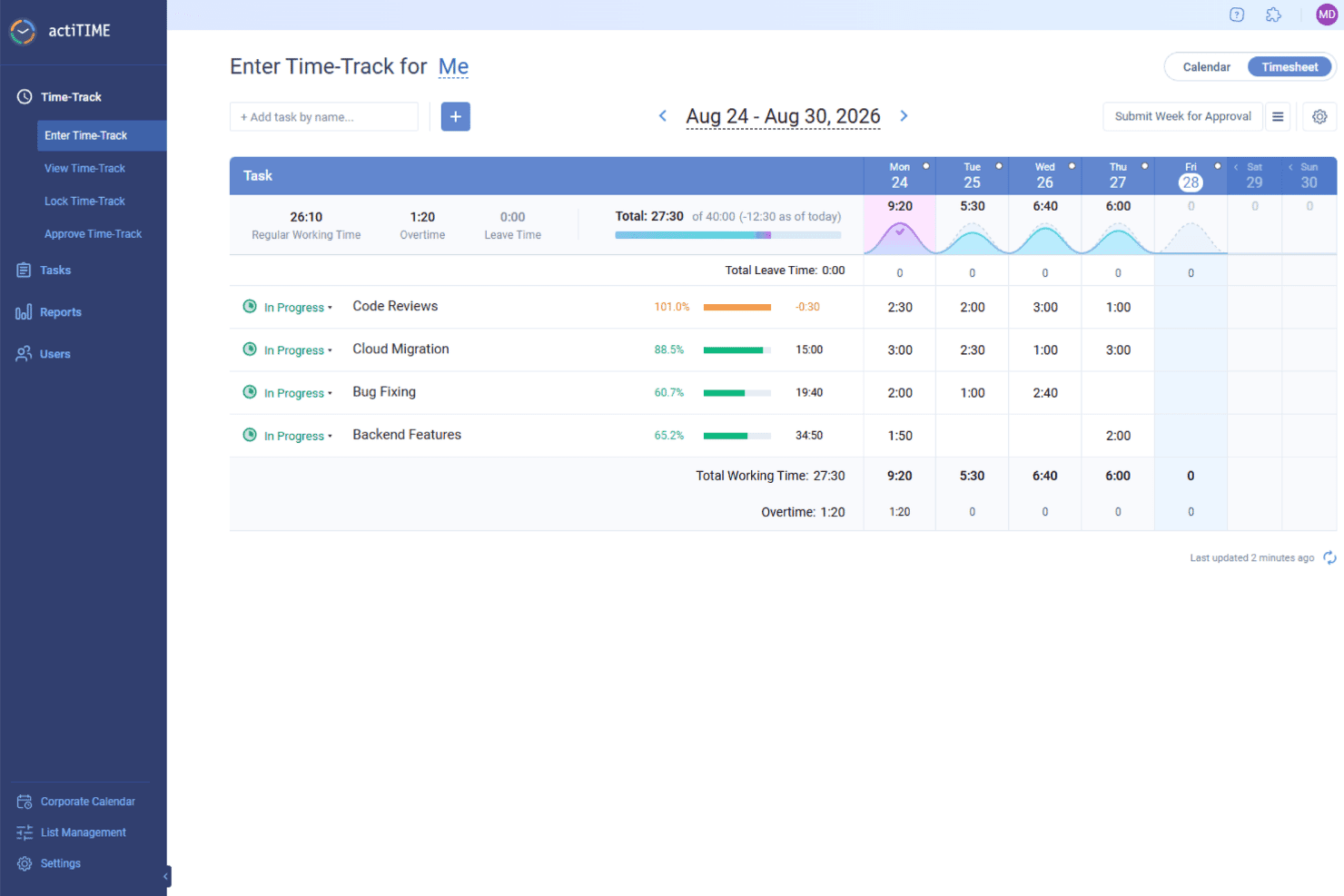
actiTIME helps hybrid teams track working hours, task progress, overtime, and productivity across the workweek. actiTIME is a time-tracking software that helps businesses manage projects, teams, and clients in one place. It enables your team to log work hours, track leave time, and monitor project progress.
Why I picked actiTIME: One reason I chose actiTIME is its comprehensive reporting capabilities. You can generate detailed reports on time distribution across clients and assignments, monitor individual and team productivity trends, and assess project costs. These insights allow you to identify profitable projects and make data-driven decisions to enhance efficiency.
Another notable feature is actiTIME's task and project management tools. You can set task estimates, deadlines, and statuses to keep your projects on track. The Kanban board view provides a clear picture of work progress, helping your team stay organized and focused. This structured approach to task management contributes to improved productivity and timely project completion.
actiTIME Standout Features and Integrations
Features include weekly timesheet, calendar view, overtime calculation, timesheet locking, timesheet approval, email notifications, custom workflows, data export, user permissions, workload management, task assignments, and custom fields.
Integrations include actiPLANS, QuickBooks, Zapier, GitHub, Salesforce, Jira, Trello, Outlook, Evernote, Todoist, Bamboo HR, and Google Calendar.
Pros and Cons
Pros:
- Mobile app facilitates time tracking on the go
- Detailed reporting capabilities for productivity analysis
- Comprehensive time and project tracking features
Cons:
- Initial setup and customization can be time-consuming
- Limited integration options compared to competitors
Learn more about actiTIME: Best for real-time activity monitoring
- Free demo + 14-day free trial availbale
- From $6.67per user/month (billed annually)

Controlio’s dashboard provides real-time visibility into employee activities, helping managers monitor productivity trends. Controlio is a cloud-based productivity tracking and employee monitoring tool designed to help organizations measure, analyze, and improve workforce performance. It captures activity data from desktops to provide detailed insights into productivity levels, app and web usage, and work habits across in-office, remote, and hybrid teams.
Why I picked Controlio: I picked Controlio because it provides real-time visibility into employee activities, helping you identify which tasks and applications contribute most to productivity. Its productivity scoring system automatically categorizes time spent on different apps and websites, allowing you to spot both productive and distracting behaviors. I also like that Controlio supports continuous screen recording and live session viewing, which makes it easier to verify work progress and maintain accountability.
For distributed teams, this combination of tracking, scoring, and surveillance offers a complete picture of how work happens day-to-day.
Controlio standout features and integrations:
Features include productivity scoring that rates users and departments based on time spent on productive and distracting activities, real-time surveillance for monitoring desktops live, and continuous screen recording that captures user screens for later review. The software also supports detailed behavior analytics, time distribution insights, and compliance with data protection standards like GDPR and HIPAA, ensuring responsible monitoring practices.
Integrations are not currently listed by Controllo.
Pros and Cons
Pros:
- Tracks productive and distracting activities
- Offers continuous screen recording
- Complies with GDPR and HIPAA
Cons:
- Limited search in recorded data
- Continuous video may raise privacy concerns
Learn more about Controlio: Best productivity tracking software for comprehensive insights on employee efficiency levels
- Free 21-day trial + free plan for up to 3 users
- From $7/seat/month
Visit WebsiteCustomer Rating:4.9/5
Traqq generates an insightful pie-chart collating data points of how your team spends their time online. Traqq enables businesses to retrospect and analyze internal processes. With Traqq, your teams unlock a new dimension in understanding various aspects of work productivity. As a result, you can conduct root cause analysis of low productivity times and quickly implement a workaround to boost efficiency.
Why I picked Traqq: I love how the developers at Traqq have created a simple yet comprehensive productivity tracking software. The activity levels generated on the Traqq dashboard have an interesting algorithm. The tool tracks your employees’ keyboard clicks and mouse movements. Consequently, the activity page populates your employees’ daily activity in different coloured blocks depicting sessions of low, average, and high activity levels.
Traqq detects and reports websites and apps on which your employees spend over 10 seconds. As a result, you can get a quick overview of what distracts your employees. Traqq also takes random screenshots at 10-minute intervals and uploads them to a secure online storage space.
Traqq Standout Features and Integrations
Features include application and URL tracking, activity level generation, desktop screenshots, desktop screen recording, idle time and attendance tracking, team management, analysis and reporting, and others.
Integration details are currently not available.
Pros and Cons
Pros:
- Accurate employee tracking
- Screenshot-taking can be paused
- Automation of email reports (daily/weekly)
Cons:
- No support for foreign languages
- No support for third-party integrations
Learn more about Traqq: 10Best productivity tracking software for garnering real-time productivity analytics
We360.ai
- Free demo + 7-day free trial available
- From $5/user/month (billed annually)
Visit WebsiteCustomer Rating:4.8/5
We360.ai has a handy employee wellness tracker that gives you a glimpse of underutilized and overworked employees. We360.ai started in Q4 of 2020 and has made significant strides in productivity-tracking software. The software offers many tools, including project management, tracking productivity logs, and real-time analytics.
Why I picked We360.ai: I'm particularly interested in the real-time productivity analytics that We360.ai offers. We360.ai gives you live statistics about your employees' activities: what applications they use, their usage duration, and their availability status. It's like a live stream of your employees' online activities.
Additionally, We360.ai has a nifty leave management system that tracks employee leaves, aiding with payroll processing. As a result, you can easily track, approve, or reject leave requests. The Health360 segment of We360.ai helps you manage your employees' well-being. You can swiftly analyze which employees are overworking or underworking and then intelligently shift workloads.
We360.ai Standout Features and Integrations
Features include real-time analytics, desktop screenshots, a time tracking app, leave management, user data import, CSV report export, cross-OS compatibility, automated attendance, domain blocking, a mobile application for admins, and task & project management tools.
Integrations include 10+ tools like Asana, ClickUp, GitHub, Google Calendar, Insightly, Jira, PayPal, Slack, Trello, Zapier, Zendesk, and others.
Pros and Cons
Pros:
- There is an option for a Lifetime Deal (LTD)
- Free and detailed live training
- Dedicated account manager
Cons:
- Issues with bulk downloading screenshots
- The monthly plan requires a minimum of 10 users
Learn more about We360.ai:
Diğer Verimlilik Takibi Yazılımları
En iyi verimlilik takibi yazılımları listesine giremeyen, ancak bahsetmeye değer birkaç seçenek daha:
- 11GuruBest for enterprise AI knowledge search
- 12EmailAnalyticsBest productivity tracking software for charting email trends and improving email response rates
- 13DeskTrackBest productivity tracking software for setting time-bound restrictions to applications
- 14HeightBest productivity tracking for project, task, and workflow management
- 15monday AI WorkspaceBest productivity tracking software for codeless automation of manual and repetitive tasks
- 16ClickUpBest productivity tracking software for automating sales processes and managing accounts
- 17MonitaskBest productivity tracking software with activity monitoring
- 18WebWork Time Tracker Best for AI-powered productivity reports
- 19Peoplebox.aiBest productivity tracking software for implementing automated engagement surveys
- 20WrikeBest productivity tracking software for monitoring team progress and identifying potential roadblocks
- 21IntelogosBest for AI-based employee insights
- 22Time DoctorBest productivity tracking software for business process outsourcing and organizations with offshore functions
- 23KeepactiveBest productivity tracking software with keystroke logging features
- 24Profit.coBest productivity tracking software for aligning with organization-wide objectives and key results (OKRs)
- 25HiveBest productivity tracking software for visualizing progress made towards pre-defined goals
- 26VeriatoBest productivity tracking software for tracking idle time of work-from-home employees and remote teams
- 27QbserveBest productivity tracking software for organizations using macOS
How I Evaluate Productivity Tracking Software
I split my evaluation into must-have capabilities—like automated activity capture and privacy controls—and the differentiators that separate a genuinely HR-ready tool from a basic time tracker.
Core Functionality (Table Stakes For This List)
When I'm selecting tools for my list, I rank each one on a scale from 0 (does not offer the functionality) to 5 (excels in this area) for each core functionality listed below. Then, I calculate the tool's total score into a percentage. Each tool needs to achieve a minimum total score of 65% to be considered for inclusion.
- Activity Tracking: I look for automated capture of app usage, website visits, and active versus idle time rather than tools that rely solely on manual employee input.
- Productivity Analytics & Dashboards: Each tool should surface visual trend data at the individual, team, and org level so HR leaders can spot workload shifts across pay periods.
- Time & Task Monitoring: I evaluate whether a tool can map hours to specific tasks or projects, which matters when HR needs to validate resource allocation during headcount planning.
- Workforce Insights & Benchmarking: Tools like ActivTrak and Teramind approach this differently, so I check whether insights go beyond raw numbers to flag burnout risk, collaboration gaps, or focus time trends.
- Privacy & Compliance Controls: I look for configurable anonymization, consent workflows, and audit trails that let HR teams adapt monitoring policies to regional data protection requirements.
- HR & Workflow Integrations: The tool should connect with HRIS, payroll, or project management platforms your team already uses rather than operating as a standalone data silo.
Once I have a list of tools that meet the criteria, I consider what sets each platform apart.
Differentiating Factors (What Sets Vendors Apart)
Here's how I compare and contrast different vendors:
Standout Features
Wellbeing detection matters a lot here. I check whether a tool can flag patterns like excessive overtime or shrinking focus time—signals that help HR step in before burnout hits. AI-powered recommendations add another layer, surfacing coaching prompts or workload rebalancing suggestions managers can act on. I also evaluate goal and OKR alignment, since tying tracked activity back to team objectives shifts the conversation from "hours logged" to outcomes delivered during performance reviews.
Beyond Features
Employee trust is a major consideration. I look at whether a vendor offers employee-facing dashboards so workers can view their own data—this shifts the tool from surveillance to shared accountability. Compliance and data residency also matter, especially for teams operating across multiple regions where data hosting location and certifications like SOC 2 or ISO 27001 affect rollout timelines. I also evaluate how well a platform fits into an existing HR tech stack, checking for native connections to tools like BambooHR, Workday, or Slack.
Verimlilik Takibi Yazılımı Nasıl Seçilir?
Uzun özellik listeleri ve karmaşık fiyatlandırma yapılarına kendinizi kaptırmanız kolaydır. Kendinize özgü yazılım seçimi sürecinde ilerlerken odaklanmanıza yardımcı olmak için aklınızda bulundurmanız gereken faktörlerin kontrol listesi burada:
| Faktör | Dikkate Alınması Gerekenler |
|---|---|
| FaktörÖlçeklenebilirlik | Dikkate Alınması GerekenlerYazılım ekibinizle birlikte büyüyebilir mi? Gelecekteki ihtiyaçlarınızı ve aracın kullanıcı veya veri sayısındaki artışı sorunsuz şekilde karşılayıp karşılayamayacağını değerlendirin. |
| FaktörEntegrasyonlar | Dikkate Alınması GerekenlerZaten kullandığınız araçlara bağlanabiliyor mu? İş akışındaki kesintileri önlemek için mevcut sistemlerinizle sorunsuz entegrasyon sağlayan çözümleri arayın. |
| FaktörÖzelleştirilebilirlik | Dikkate Alınması GerekenlerYazılımı süreçlerinize uyacak şekilde uyarlayabilir misiniz? Ayarları, görünümleri ve raporları kendinize özgü ihtiyaçlarınıza göre düzenleme seçeneklerini arayın. |
| FaktörKullanım kolaylığı | Dikkate Alınması GerekenlerEkibiniz bunu hızlı bir şekilde benimser mi? Öğrenme sürecini ve arayüzün günlük kullanıcılar için ne kadar sezgisel olduğunu değerlendirin. |
| FaktörUygulama ve işe alışma | Dikkate Alınması GerekenlerKurulum süreci ne kadar sorunsuz? Yayına alma, eğitim ve ekibinizin hız kazanması için gereken zamanı ve kaynakları değerlendirin. |
| FaktörMaliyet | Dikkate Alınması GerekenlerBütçeniz dahilinde mi? Fiyatlandırma planlarını, gizli ücretleri ve özelliklerin fiyatla örtüşüp örtüşmediğini karşılaştırın. Ekibiniz büyüdükçe uzun vadeli maliyetleri göz önünde bulundurun. |
| FaktörGüvenlik önlemleri | Dikkate Alınması GerekenlerVerilerinizi nasıl koruyor? Bilgilerin güvende kalması için aracın şifreleme ve erişim denetimleri gibi güvenlik standartlarını karşıladığından emin olun. |
| FaktörDestek erişilebilirliği | Dikkate Alınması GerekenlerGerektiğinde yardım alabiliyor musunuz? Ekibinize yardımcı olmak için 7/24 destek, canlı sohbet veya özel müşteri yöneticileri sunulup sunulmadığını kontrol edin. |
Verimlilik Takip Yazılımı Nedir?
Verimlilik takip yazılımı, görevler ve projeler için harcanan zamanı izlemeye ve yönetmeye yardımcı olan bir araçtır. Yöneticiler, uzaktan çalışanlar ve serbest çalışanlar gibi profesyoneller, verimliliği artırmak ve ilerlemeyi takip etmek için bu araçları kullanır. Zaman takibi, görev yönetimi ve raporlama özellikleri düzenli kalmaya ve verimlilik eğilimlerini belirlemeye yardımcı olur. Genel olarak bu araçlar çalışma alışkanlıkları hakkında değerli bilgiler sunar ve günlük rutinleri optimize etmeye yardımcı olur.
Özellikler
Verimlilik takip yazılımı seçerken aşağıdaki temel özelliklere dikkat edin:
- Zaman takibi: Kullanıcıların görevlere harcadıkları saatleri kaydetmesini sağlar; böylece verimlilik analiz edilebilir ve zaman etkili bir şekilde yönetilebilir.
- Görev yönetimi: Görevleri ve projeleri tek bir yerde düzenleyerek önceliklendirmeyi ve ilerlemeyi takip etmeyi kolaylaştırır.
- Raporlama ve analiz: Çalışma düzenleri ve verimlilik eğilimleri hakkında bilgiler sunarak veriye dayalı karar alma süreçlerine yardımcı olur.
- Entegrasyonlar: Farklı sistemler arasında sorunsuz bir iş akışı sağlamak için diğer araçlara ve platformlara bağlanır.
- Özelleştirilebilir panolar: Bireysel veya ekip tercihlerine ve ihtiyaçlarına uygun özel görünümler ve raporlar sunar.
- Mobil uygulama kullanılabilirliği: Kullanıcıların görevleri hareket hâlindeyken takip etmesini ve yönetmesini sağlayarak esnekliği ve erişilebilirliği artırır.
- Otomatik uyarılar ve hatırlatıcılar: Kullanıcıları son tarihler ve önemli görevler hakkında bilgilendirerek gözden kaçırma riskini azaltır.
- Kullanıcı yönetimi: Yöneticilerin erişimi denetlemesine ve etkinlikleri izlemesine olanak tanıyarak güvenli ve verimli operasyonlar sağlar.
- Yapay zekâ destekli içgörüler: Kişiselleştirilmiş öneriler ve verimlilik ipuçları sunmak için yapay zekâdan yararlanır.
- Güvenlik önlemleri: Gizliliği ve güvenliği koruyarak verilerin şifreleme ve erişim denetimleriyle korunmasını sağlar.
Avantajlar
Verimlilik takip yazılımını uygulamak ekibiniz ve işletmeniz için çeşitli avantajlar sağlar. Yararlanabileceğiniz avantajlardan bazıları şunlardır:
- Geliştirilmiş zaman yönetimi: Görevlere harcanan saatleri takip eden ekipler, zaman kaybına neden olan noktaları belirleyebilir ve programlarını optimize edebilir.
- Artırılmış odaklanma: Görev yönetimi özellikleri işlerin önceliklendirilmesine yardımcı olarak dikkat dağıtıcı unsurları azaltır ve konsantrasyonu artırır.
- Veriye dayalı kararlar: Raporlama ve analiz, bilinçli karar alma ve stratejik planlamayı destekleyen bilgiler sunar.
- Artan hesap verebilirlik: Otomatik uyarılar ve hatırlatıcılar son tarihlere uyulmasını sağlayarak ekip üyelerinin sorumluluklarını yerine getirmesine yardımcı olur.
- Daha iyi iş birliği: Diğer araçlarla entegrasyon, bağlantılı bir iş akışını destekleyerek ekip koordinasyonunu ve iletişimini geliştirir.
- Esneklik ve erişilebilirlik: Mobil uygulama kullanılabilirliği, ekip üyelerinin görevleri her yerden yönetmesine olanak tanıyarak uzaktan veya hibrit çalışma düzenlerine uyum sağlar.
- Güvenli operasyonlar: Güvenlik önlemleri hassas bilgileri koruyarak gizliliği ve veri düzenlemelerine uyumluluğu sağlar.
Maliyetler ve Fiyatlandırma
Verimlilik takibi yazılımını seçmek, mevcut çeşitli fiyatlandırma modellerini ve planları anlamayı gerektirir. Maliyetler özelliklere, ekip büyüklüğüne, eklentilere ve daha fazlasına bağlı olarak değişir. Aşağıdaki tablo, verimlilik takibi yazılımı çözümlerinde yaygın olarak sunulan planları, ortalama fiyatlarını ve genellikle dahil edilen özellikleri özetlemektedir:
Verimlilik Takibi Yazılımı İçin Plan Karşılaştırma Tablosu
| Plan Türü | Ortalama Fiyat | Yaygın Özellikler |
|---|---|---|
| Plan TürüÜcretsiz Plan | Ortalama Fiyat$0 | Yaygın ÖzelliklerTemel zaman takibi, görev yönetimi ve sınırlı raporlama. |
| Plan TürüKişisel Plan | Ortalama Fiyat$5-$15/kullanıcı/ay | Yaygın ÖzelliklerGelişmiş zaman takibi, özelleştirilebilir panolar ve mobil uygulama erişimi. |
| Plan Türüİşletme Planı | Ortalama Fiyat$20-$50/kullanıcı/ay | Yaygın ÖzelliklerEkip iş birliği araçları, diğer yazılımlarla entegrasyonlar ve gelişmiş güvenlik. |
| Plan TürüKurumsal Plan | Ortalama Fiyat$60+/kullanıcı/ay | Yaygın ÖzelliklerÖzelleştirilebilir özellikler, özel destek ve kapsamlı analizler. |
SSS
Verimlilik takibi yazılımı gizliliği ihlal edebilir mi?
Evet, verimlilik takibi yazılımı sorumlu bir şekilde kullanılmadığında gizlilikle ilgili endişelere yol açabilir. Gizlilik ayarlarının özelleştirilmesine izin veren araçları seçmek ve hangi verilerin takip edildiği konusunda ekibinizle açık bir iletişim kurmak önemlidir. Şeffaf veri kullanım politikaları sunan ve kullanıcıların kendi verilerini kontrol etmesine olanak tanıyan yazılımları tercih edin. Ekibinizin takip sürecini anlamasını ve bu sürece onay vermesini sağlamak, gizlilik sorunlarını azaltmaya yardımcı olabilir.
Verimlilik takibi yazılımı uzaktan çalışan ekipler için uygun mu?
Evet, verimlilik takibi yazılımı özellikle uzaktan çalışan ekipler için kullanışlıdır. Fiziksel olarak aynı yerde bulunmadan görevlerin yönetilmesine ve zamanın takip edilmesine yardımcı olarak daha iyi koordinasyon ve hesap verebilirlik sağlar. Zaman takibi ve görev yönetimi gibi özellikler sayesinde uzaktan çalışan ekipler düzenli ve bağlantılı kalabilir. Birçok araç mobil uygulamalar ve bulut tabanlı erişim sunarak uzaktan çalışanların faaliyetlerini kaydetmesini ve ekip üyeleriyle her yerden iş birliği yapmasını kolaylaştırır.