

10 Best Teramind Alternatives in 2026

Best Teramind Alternatives Shortlist


Teramind is a heavy-duty monitoring tool, but its intense surveillance features and complex pricing aren't a fit for every organization. Having spent years in HR balancing compliance with workplace culture, I know that effective tracking shouldn't feel like a micromanagement mission.
Whether you need trust-first productivity insights, localized data hosting, lighter setup overhead, or burnout tracking, these handpicked Teramind alternatives deliver actionable workforce visibility without damaging employee trust.
What Is Teramind?
Teramind is employee monitoring and user activity tracking software for businesses that need visibility into how work gets done. It records user actions, monitors application and website usage, flags risky activity, and helps analyze productivity trends. HR, IT, and security teams use Teramind to address compliance, prevent data loss, and manage remote or hybrid teams with real-time insight, customizable alerts, and reports on employee work patterns.
Why Trust Our Software Recommendations
Our team has been testing and reviewing software since 2012. As HR experts ourselves, we know how difficult—and important—it is to choose the right software.
For this guide, we evaluated tools using hands-on testing and independent research, scoring tools using our selection criteria. We also draw on insights from industry thought leaders and practicing HR experts.
Our reviews reflect our human editorial judgment, not a sales pitch.
Expert reviewers:
Teramind Alternatives Comparison Table
| Tool | Best For | Trial Info | Price | ||
|---|---|---|---|---|---|
| 1 | Best for time tracking with payroll automation | 14-day free trial + free demo available | From $3.99/user/month (billed annually) | Website | |
| 2 | Best for tracking employee web and bandwidth usage | 14-day free trial | Pricing upon request | Website | |
| 3 | Best for keylogging and forensic data leak prevention | Free demo available | Pricing upon request | Website | |
| 4 | Best for analyzing work patterns in hybrid teams | Free demo + 7-day free trial available | From $8/user/month (billed annually) | Website | |
| 5 | Best for burnout risk and workforce health insights | Free demo + 14-day free trial available | From $10/user/month (billed annually) | Website | |
| 6 | Best for automated attendance and idle-time alerts | Free demo + 7-day free trial available | From $3.9/user/month (billed annually) | Website | |
| 7 | Best for monitoring with an employee self-view | Free demo + 14-day free trial available | From $7/user/month (billed annually) | Website | |
| 8 | Best for privileged access and session management | Free trial available | Pricing upon request | Website | |
| 9 | Best for client billing and project time tracking | 14-day free trial | Pricing upon request | Website | |
| 10 | Best for automated app and URL blocking controls | Free demo + 7-day free trial available | From $5/user/month (billed annually) | Website |

Teramind Alternatives Reviews
Below are detailed summaries of the top picks that made my shortlist. Each review covers the software’s key features, best use cases, strengths, and weaknesses to help you find the right fit.
Best for time tracking with payroll automation
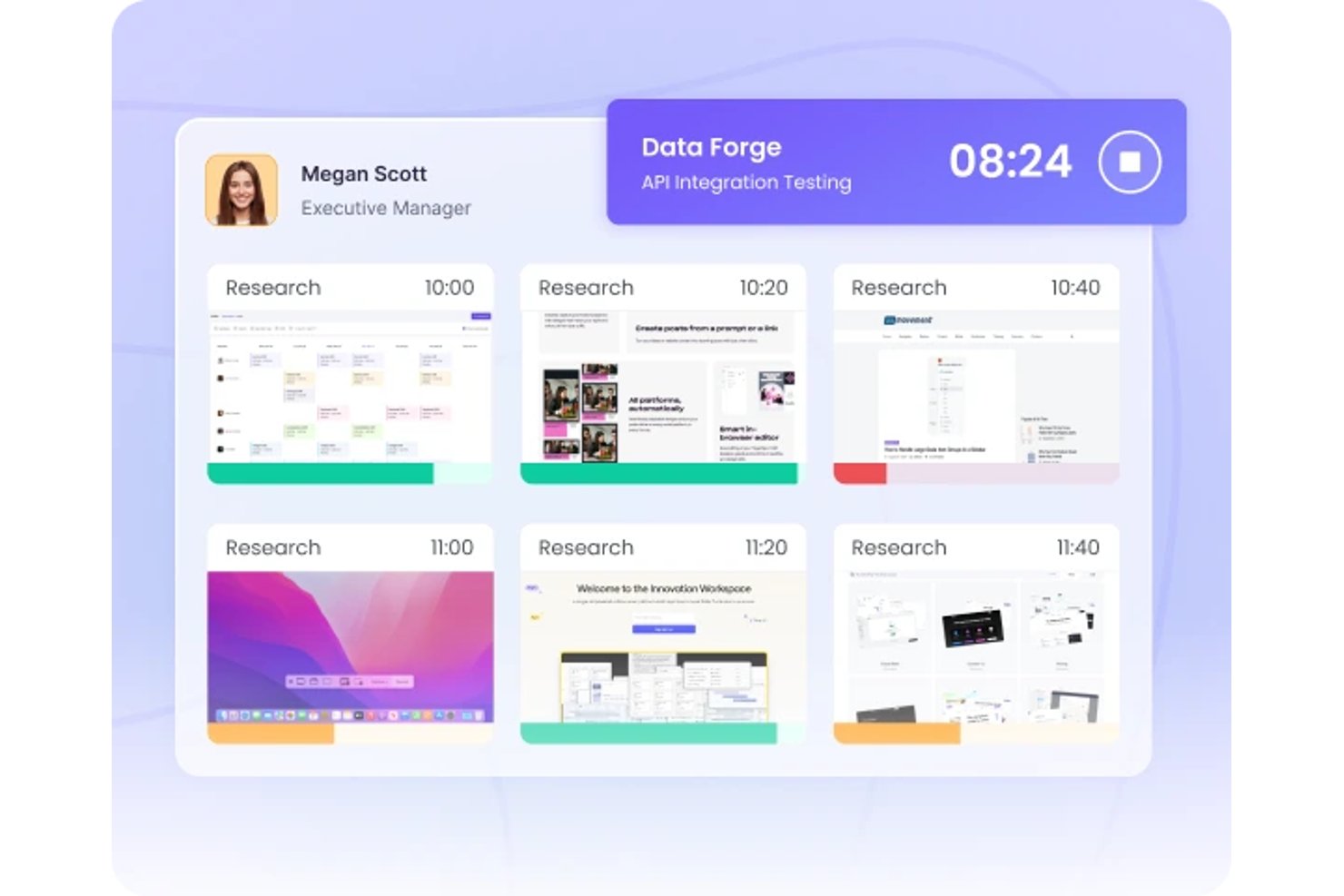
WebWork Time Tracker is an employee monitoring and productivity platform for remote teams, agencies, and growing businesses that need visibility into work activity, project hours, and attendance as a Teramind alternative.
Who Is WebWork Time Tracker Best For?
WebWork Time Tracker suits HR and payroll teams that need tracked hours, attendance data, and payroll-ready reports for remote or hybrid employees.
Why WebWork Time Tracker Is a Good Best Teramind Alternative
I picked WebWork Time Tracker because it combines time tracking with payroll automation. My team can review tracked project hours and attendance data for remote or hybrid employees, then use payroll-ready reports for payroll processing. That focus makes it a practical Teramind alternative when payroll accuracy matters.
WebWork Time Tracker Key Features
- Screenshots: Captures periodic screenshots of employee screens.
- App and website tracking: Records the applications and websites employees access.
- GPS tracking: Displays employee locations during tracked work.
- AI insights: Analyzes activity data and highlights work patterns.
WebWork Time Tracker Integrations
WebWork Time Tracker offers native integrations with Google Workspace, Slack, Trello, Asana, Jira, ClickUp, QuickBooks, Gusto, and Stripe. It also supports Make, Zapier, and an API for custom integrations, making it suitable for connecting tracked hours with payroll and project workflows.
Pros and Cons
Pros:
- AI highlights activity patterns for managers
- GPS adds location visibility for field teams
- Payroll-ready reports simplify payroll reconciliation
Cons:
- Sync issues can affect recorded hours
- Screenshot monitoring can feel intrusive
Best for tracking employee web and bandwidth usage
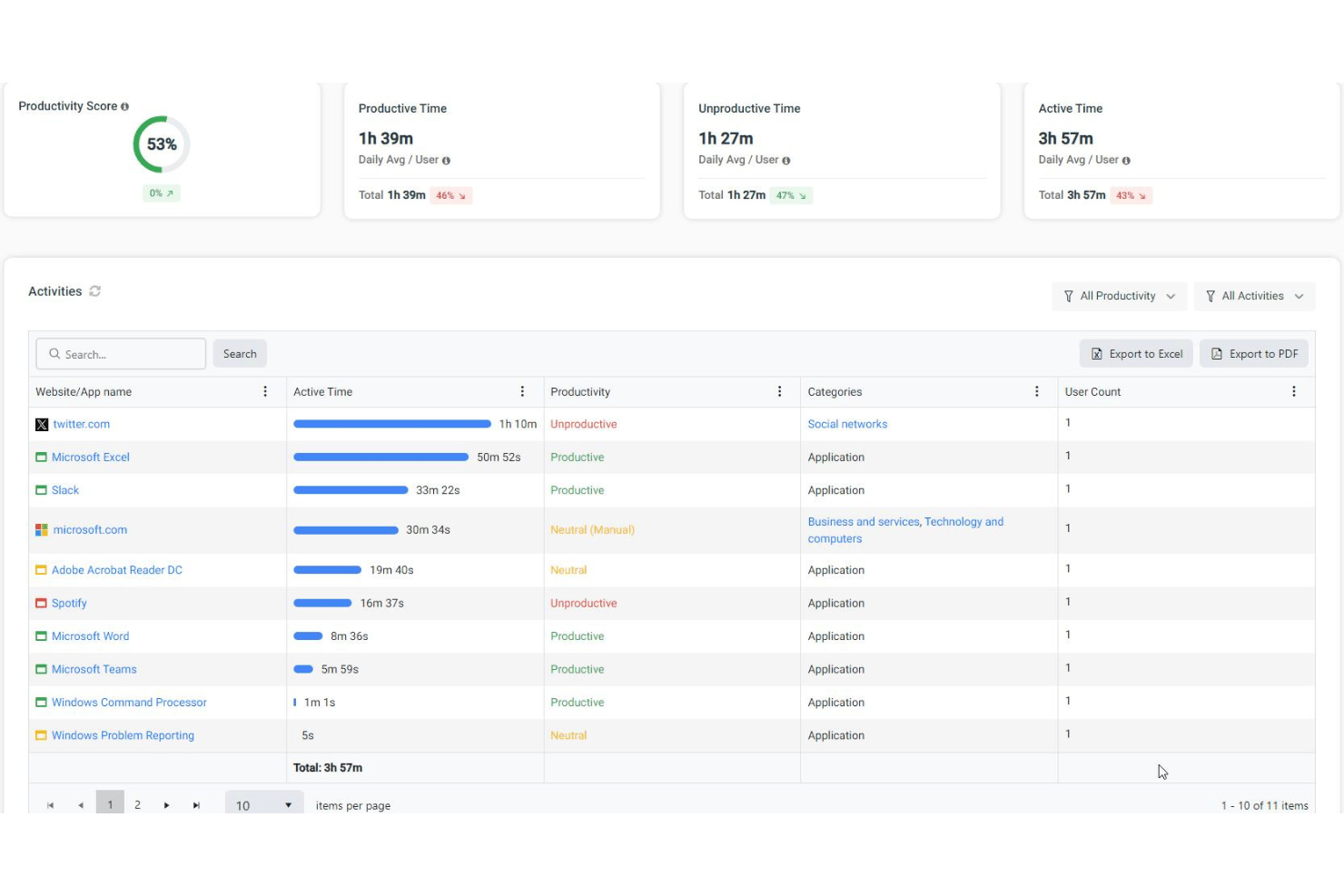
BrowseReporter by CurrentWare offers businesses detailed insight into employee internet habits, helping IT teams, HR, and managers monitor web activity, enforce acceptable use policies, and address productivity or compliance concerns across in-office and remote teams.
Who Is BrowseReporter by CurrentWare Best For?
IT teams and HR professionals who need visibility into employee internet and bandwidth usage across both on-site and remote environments.
Why BrowseReporter by CurrentWare Is a Good Teramind Alternative
I picked BrowseReporter by CurrentWare because it offers granular reports on employee web and bandwidth usage, letting users pinpoint productivity trends and inappropriate browsing in real time. You can track web activity across teams—both in-office and remote—which helps address compliance or acceptable use policy issues fast.
BrowseReporter by CurrentWare Key Features
- Automated activity alerts: Set up automatic notifications for flagged browsing behavior or access to specific websites.
- Screen capture scheduling: Capture periodic screenshots of employee desktops to review web activity in greater detail.
- Idle time tracking: Monitor keyboard and mouse inactivity to identify periods when a workstation is not actively used.
- Custom report builder: Create and save tailored web usage reports based on user, group, or department filters.
BrowseReporter by CurrentWare Integrations
Native SaaS integrations are limited, though BrowseReporter supports custom data extraction via automated exports and direct database access.
Pros and Cons
Pros:
- Idle time data helps pinpoint productivity gaps
- Automated alerts for flagged browsing behavior
- Periodic screenshot capture for visual audit trails
Cons:
- Bandwidth reporting lacks micro-level real-time visibility
- No clearly documented native third-party integrations
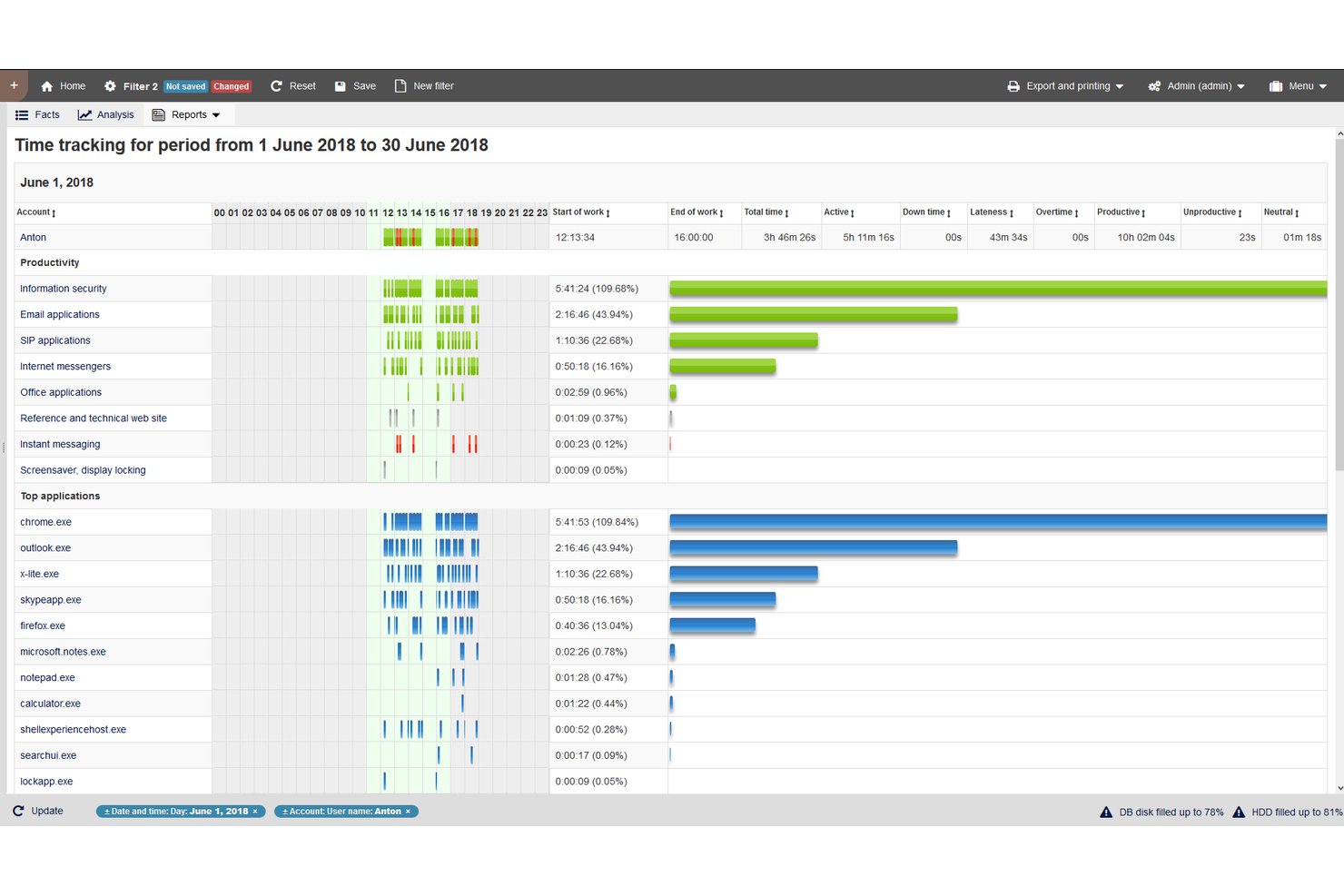
StaffCop is an on-premises enterprise platform that gives you granular oversight of user activity for organizations that need detailed monitoring, making it a strong fit for banks, legal firms, and companies with heightened security needs.
Who Is StaffCop Best For?
StaffCop is a solid choice for IT and security teams at financial institutions or legal firms who need detailed user activity tracking and insider threat prevention.
Why StaffCop Is a Good Teramind Alternative
I picked StaffCop as a top Teramind alternative because I can capture keystrokes for every user and drill into forensic analysis when investigating possible data leaks. My team is able to set up granular user activity tracking, apply rules to flag risky behavior, and store evidence for compliance investigations.
StaffCop Key Features
- Application activity monitoring: Track which programs and applications users open and use during their work hours.
- Email monitoring: Log sent and received emails to capture data movement and communications across the organization.
- Web and social media tracking: Monitor and record websites visited and social media usage to identify potential risks.
- Remote desktop control: Allow administrators to view or take control of user desktops for auditing or troubleshooting purposes.
StaffCop Integrations
StaffCop doesn't offer any native integrations. But, REST API and SIEM connectors are available for custom connections.
Pros and Cons
Pros:
- Granular tracking of email and web activity
- Forensic analysis supports compliance investigations
- Captures detailed keystrokes for every user
Cons:
- API requires technical setup for integrations
- User interface feels dated and complex

Best for analyzing work patterns in hybrid teams
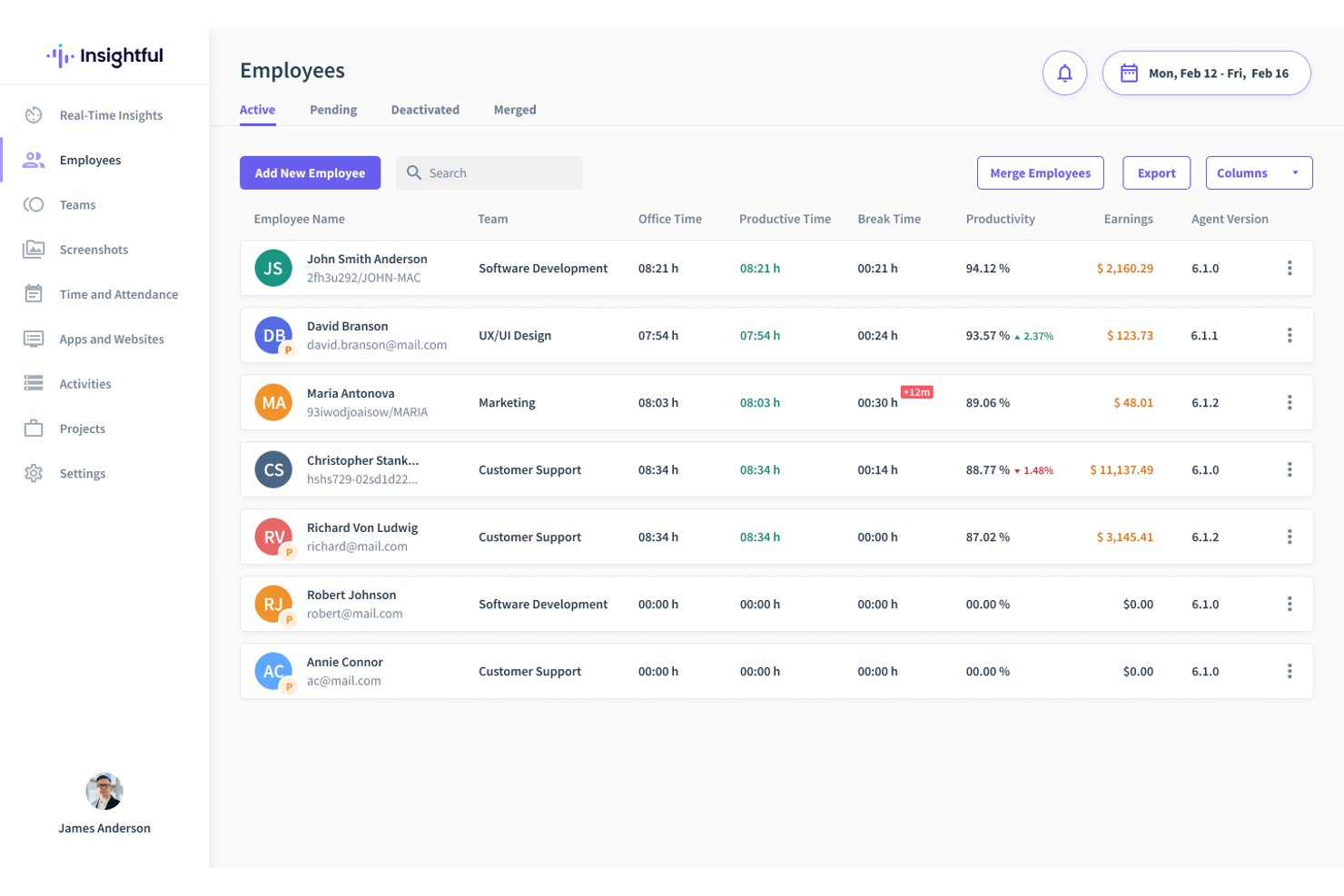
Insightful is a workforce analytics platform built for HR leaders and managers who need clear visibility into employee productivity, time allocation, and work habits across hybrid or distributed teams.
Who Is Insightful Best For?
Insightful is a solid fit for HR and operations leaders who need to track productivity and work patterns across distributed or hybrid teams.
Why Insightful Is a Good Teramind Alternative
I picked Insightful as a top alternative because I can track how hybrid teams allocate time across projects and locations. Insightful’s activity mapping and work habits analytics let me pinpoint where productivity changes in real-world hybrid settings. I appreciate the way dashboards turn raw team data into clear, actionable patterns.
Insightful Key Features
- Automated time tracking: Monitor app and website usage automatically to capture accurate time data without manual input.
- Real-time productivity monitoring: View live activity dashboards that update as employees work.
- Customizable privacy controls: Adjust settings to anonymize data or respect user privacy per organizational policy.
- Project and task tagging: Assign recorded time to specific projects or tasks for granular reporting across teams.
Insightful Integrations
Insightful offers 50+ native integrations, including Jira, Asana, BambooHR, Data Studio (formerly Looker Studio), and BigQuery. A public API for custom conenctions is also available.
Pros and Cons
Pros:
- Automated, passive time and activity capture
- Live dashboards for monitoring team activity
- Visualizes productivity patterns for hybrid teams
Cons:
- Exports and custom ad-hoc report filtering can feel rigid
- Lacks detailed keystroke or screen monitoring
New Product Updates from Insightful
Insightful Expands MCP and HRIS Integrations
Insightful adds OAuth connections for ChatGPT and Microsoft Copilot Studio through its MCP Server, while HRIS integrations gain manager scope syncing in Beta. These updates expand AI access and automate permission management. For more information, visit Insightful’s official site.
 .
.
Best for burnout risk and workforce health insights
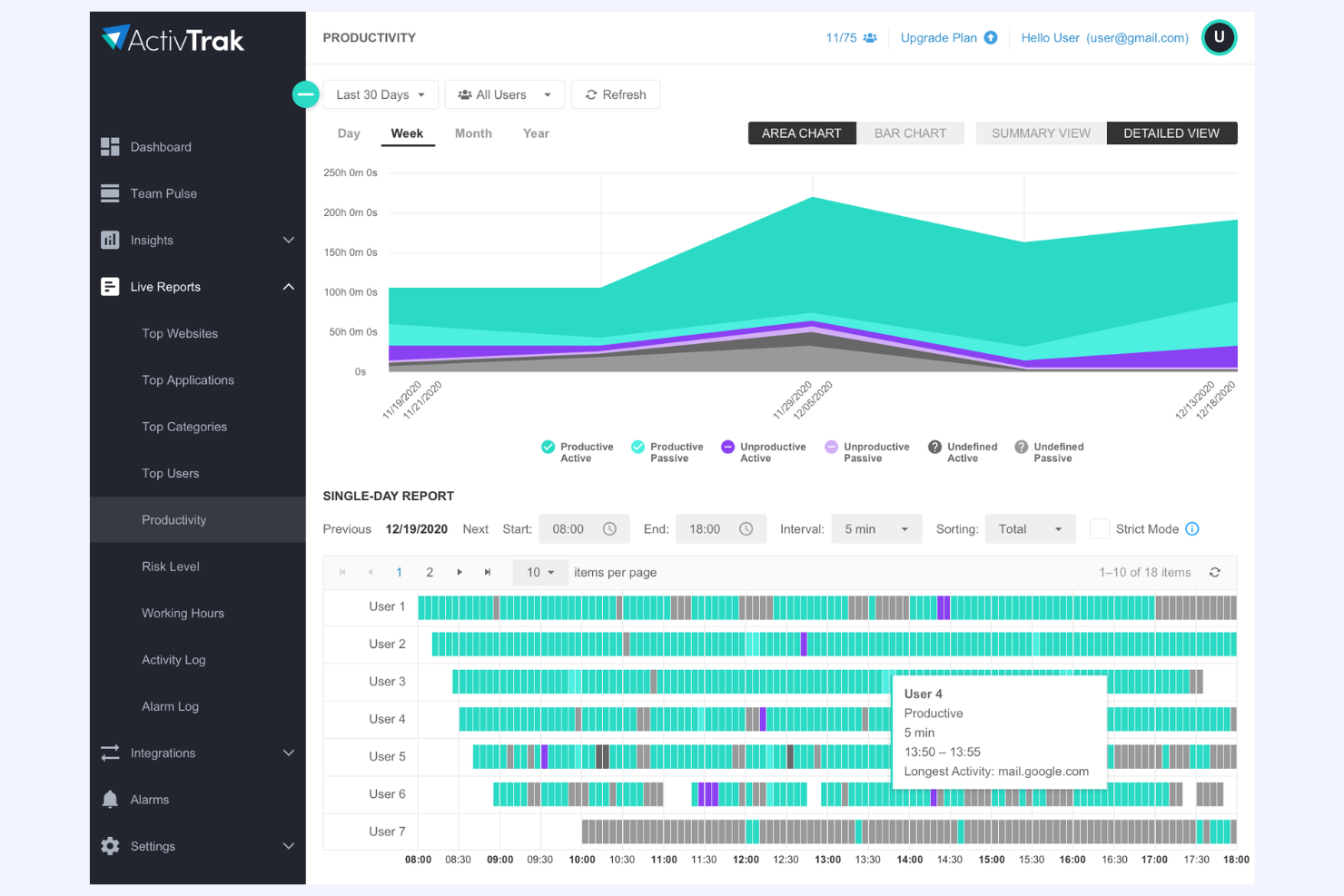
ActivTrak is a workforce analytics solution for HR and business leaders who need visibility into work habits, productivity patterns, and organizational health to identify opportunity areas and address bottlenecks across hybrid and remote teams.
Who Is ActivTrak Best For?
HR and business leaders at companies with hybrid or remote teams who want visibility into workforce wellbeing and productivity.
Why ActivTrak Is a Good Teramind Alternative
I picked ActivTrak as a top Teramind alternative because I get detailed insights into burnout risk and workforce health without relying on invasive monitoring. I use its productivity dashboards and wellness trackers to spot patterns that lead to overload and help managers address work-life balance before issues escalate.
ActivTrak Key Features
- Automated activity classification: Tracks and categorizes application and website usage for teams and individuals.
- Real-time user activity monitoring: Lets you view live user sessions to understand workflow and engagement during work hours.
- Customizable reporting dashboards: Offers configurable dashboards for tracking productivity metrics and comparing teams or departments.
- Alerting and anomaly detection: Notifies you of unusual patterns or risky behavior based on custom thresholds and rules.
ActivTrak Integrations
ActivTrak integrates with Microsoft Outlook Calendar, Google Calendar, Slack, Salesforce, UKG, ADP, Microsoft Entra ID, and Okta. ActivConnect API for custom data pipelines is also available.
Pros and Cons
Pros:
- Dashboards focus on organizational health insights
- Offers wellness and productivity pattern tracking
- Identifies burnout risk with clarity
Cons:
- Anomaly alerts may require frequent manual adjustment
- Limited granular control over real-time monitoring
Best for automated attendance and idle-time alerts
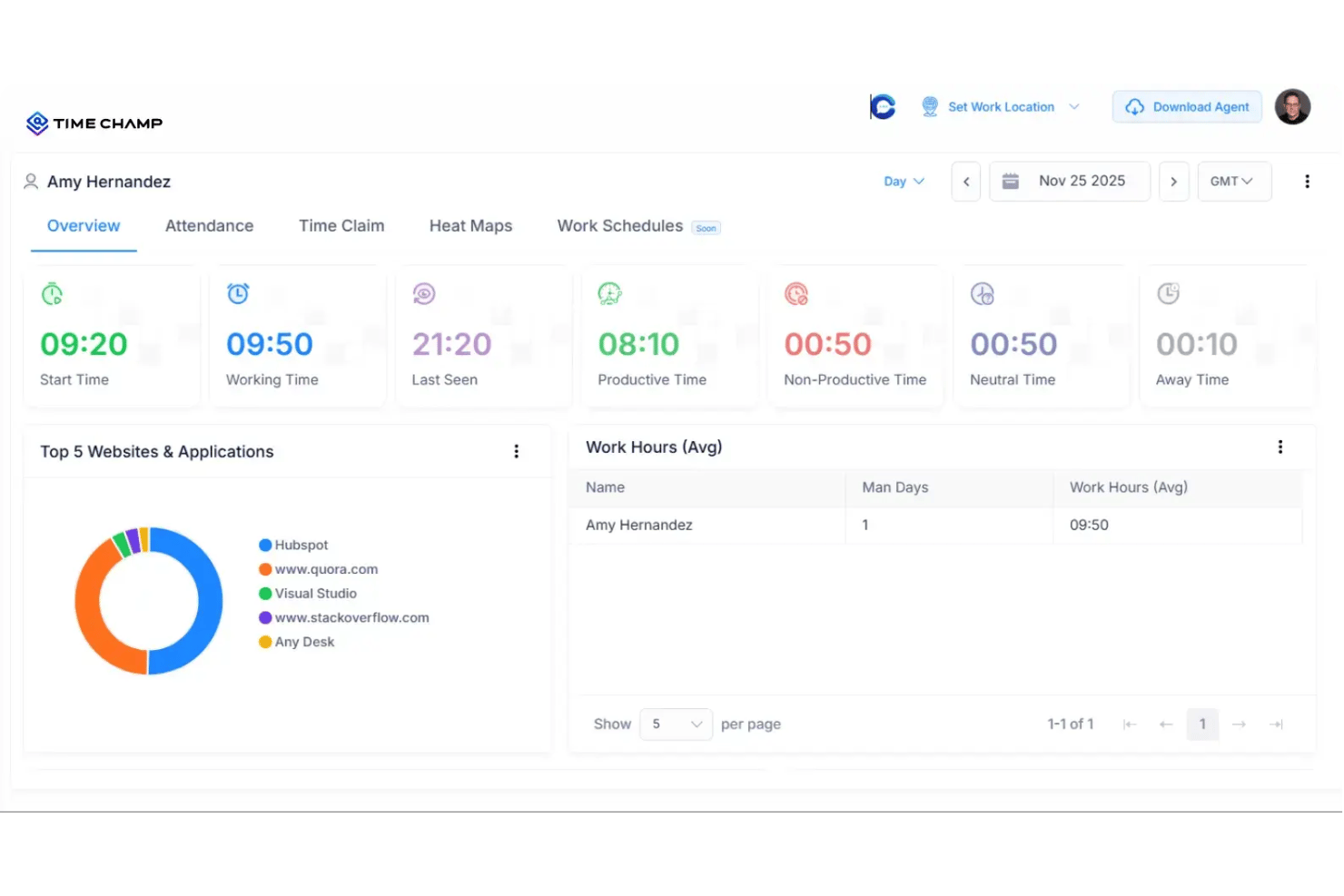
Time Champ is a workforce analytics tool for organizations that need detailed insights into employee productivity, focusing on tracking activities, attendance, and idle time to help you address workflow bottlenecks and maintain compliance in a remote or hybrid environment.
Who Is Time Champ Best For?
Time Champ is a smart pick for HR and operations teams at remote or hybrid organizations that need to closely monitor attendance and productivity patterns.
Why Time Champ Is a Good Teramind Alternative
I picked Time Champ as a top Teramind alternative because it automatically tracks employee attendance and flags idle time, so you always know who's actually working and when. My team has used its detailed activity logs to spot workflow bottlenecks and keep productivity on track, especially in hybrid setups.
Time Champ Key Features
- Project and task tracking: Monitor time spent on specific projects and tasks for clear accountability.
- Automated activity screenshots: Capture desktop screenshots at set intervals for audit trails and visibility.
- Website and app usage monitoring: Track software and browser activity to identify time spent on work-related versus non-work activities.
- Customizable reporting dashboards: Build reports with metrics most relevant to your organization’s monitoring and compliance needs.
Time Champ Integrations
Time Champ integrates with 70+ platforms, including Asana, Avaza, Evernote, Flow, ClickUp, HubSpot, Intercom, and Zendesk. An API is also available for custom connections.
Pros and Cons
Pros:
- Customizable reporting dashboards for HR and operations
- Captures desktop screenshots for compliance needs
- Automated attendance tracking with idle-time alerts
Cons:
- Users report rigid idle-time logging
- Steep learning curve due to complex user interface
Best for monitoring with an employee self-view
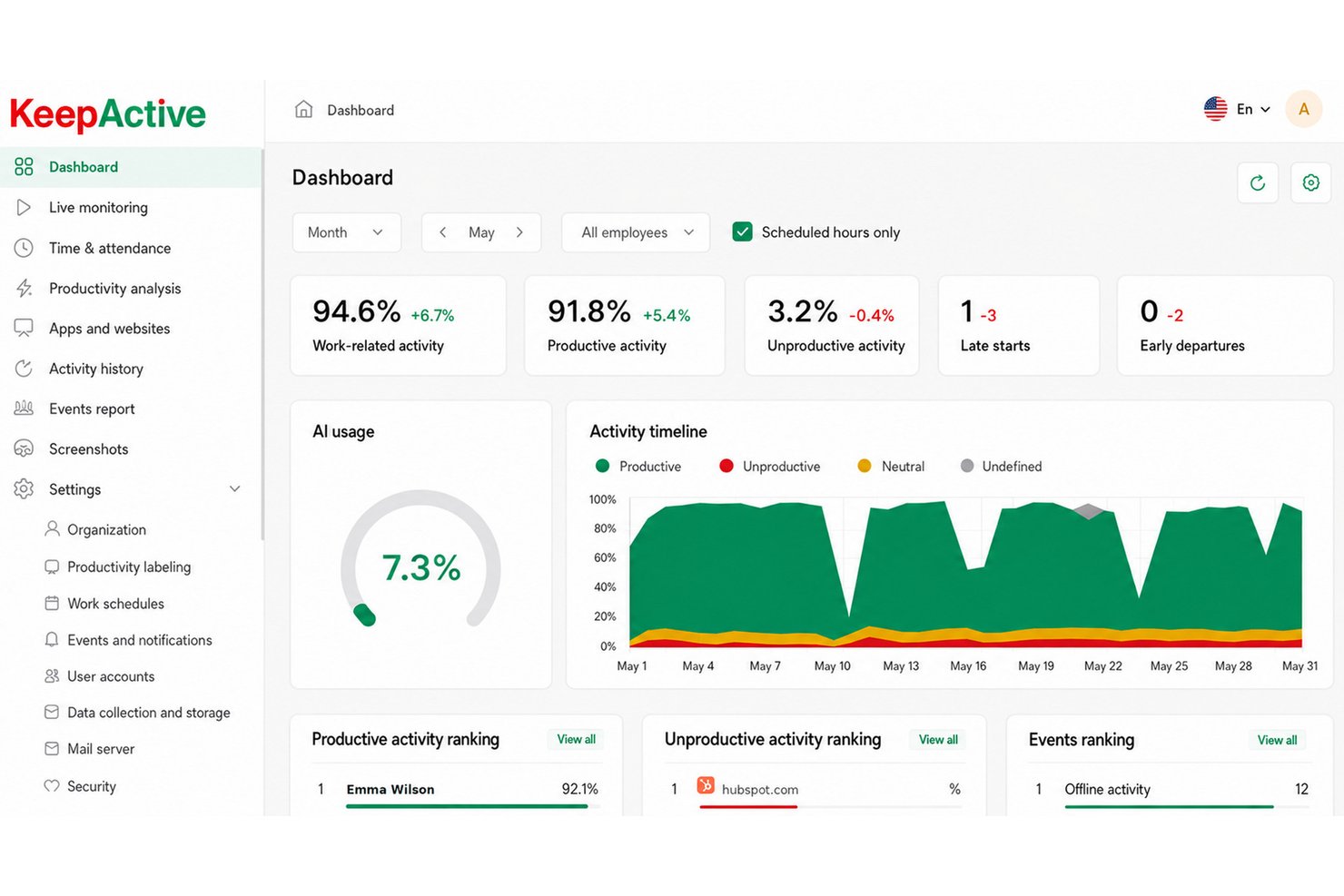
KeepActive gives businesses and HR teams detailed visibility into employee activities, making it a strong fit for organizations that want real-time oversight, transparent monitoring, and actionable insights for distributed or in-office teams.
Who Is KeepActive Best For?
KeepActive is a good fit for HR teams and business leaders who need detailed, real-time insight into employee activity across distributed or in-office teams.
Why KeepActive Is a Good Teramind Alternative
I picked KeepActive as one of the best Teramind alternatives because I can monitor employee activities in real time, and employees can see their own activity data. I like using the transparent monitoring tools and live dashboards to deliver immediate feedback and insights for HR teams focused on accountability.
KeepActive Key Features
- Screen recording: Capture real-time or scheduled screenshots of employee desktops for detailed session review.
- App and website usage tracking: Monitor which applications and websites employees access during work hours.
- Automated reports: Generate customizable reports on activity summaries, idle time, and task focus.
- Keystroke logging: Record and analyze keyboard activity to assess engagement and detect unproductive behavior.
KeepActive Integrations
Lacks out-of-the-box native integrations, but provides a REST API for custom data exports and IT system connections
Pros and Cons
Pros:
- Offers screen recording for detailed audit trails
- Automated activity reports and productivity analytics
- Real-time monitoring with employee self-dashboard
Cons:
- Keystroke logging may raise privacy concerns
- No native integrations with major HR platforms
Syteca
Best for privileged access and session management
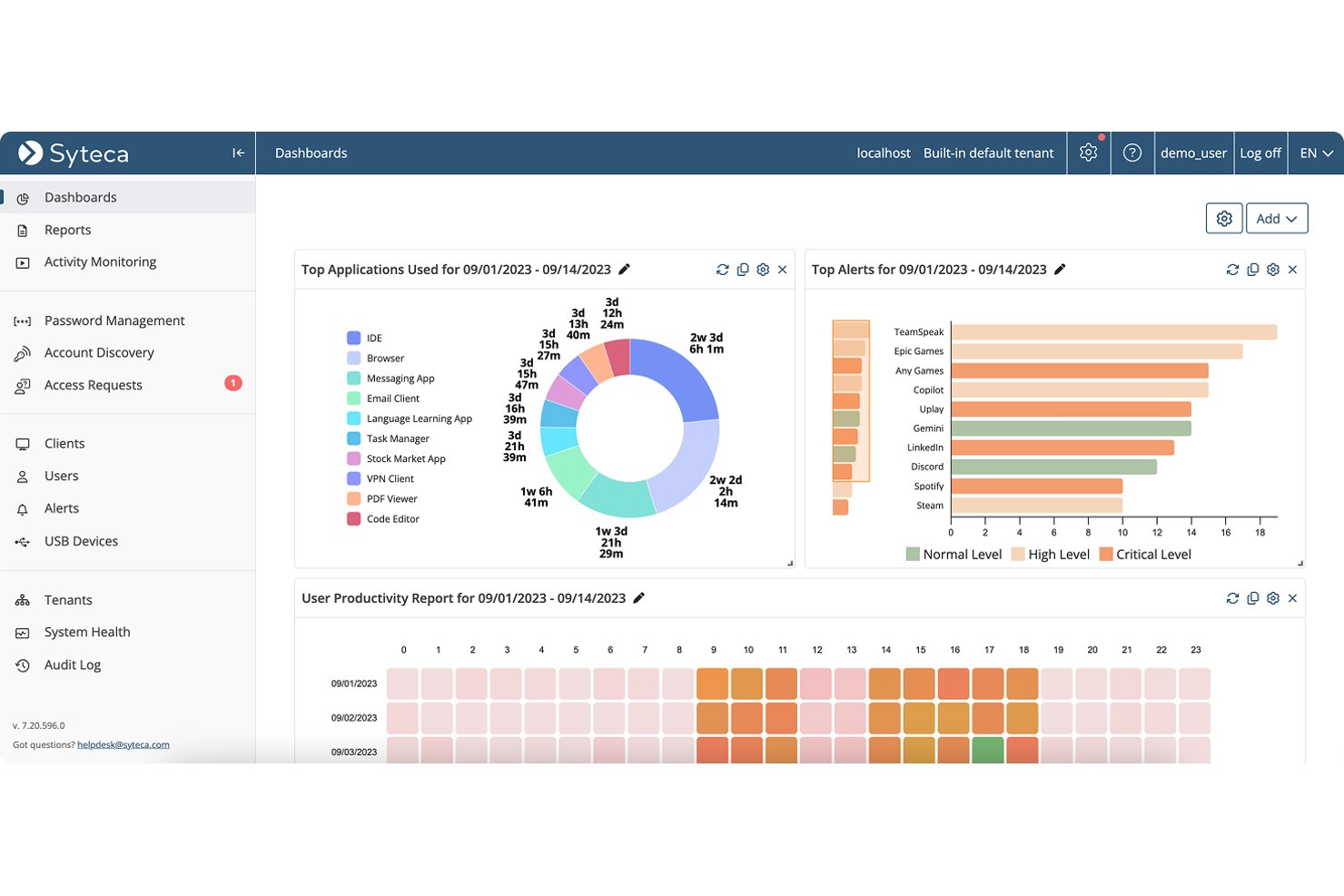
Syteca offers businesses a user activity monitoring platform designed to help IT, HR, and compliance teams track, audit, and control user sessions across sensitive systems and applications.
Who Is Syteca Best For?
Syteca is a strong fit for IT, HR, and compliance teams in organizations that need to monitor privileged user access and session activity across sensitive systems.
Why Syteca Is a Good Teramind Alternative
I picked Syteca as a top Teramind alternative because I can track and manage privileged user sessions with detailed auditing and access controls. Session recording lets my team review activity on sensitive systems, and customizable alerts help us meet compliance requirements while monitoring privileged access in real time.
Syteca Key Features
- Real-time dashboard: View all ongoing user sessions and activities in a single, live interface.
- Access policy management: Set granular permissions for users and groups to match your organization’s security needs.
- Automated reporting: Generate scheduled or on-demand reports on access, sessions, and activity logs.
- Multi-factor authentication integration: Enforce stronger sign-in requirements by connecting with industry-standard MFA providers.
Syteca Integrations
Syteca lacks native connectors for standard SaaS productivity tools, but offers SIEM/AD integrations alongside a REST API SDK for custom connections.
Pros and Cons
Pros:
- Automated reporting supports audit and compliance needs
- Real-time dashboard to monitor privileged activities
- Granular access policy management for user sessions
Cons:
- Lacks advanced behavior analytics found in peers
- Native integrations are not clearly documented
Best for client billing and project time tracking
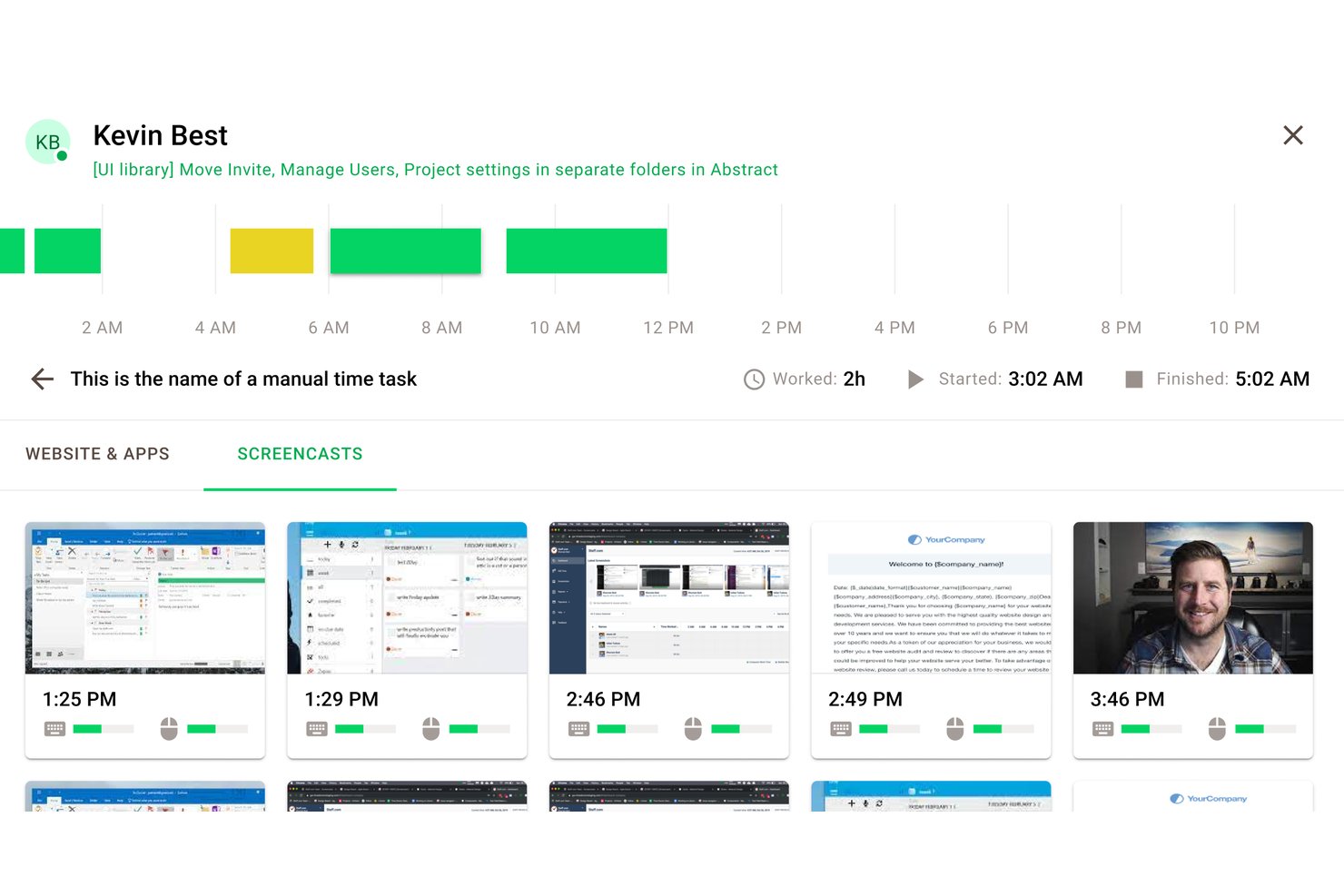
Time Doctor helps organizations monitor work hours, track task progress, and analyze productivity patterns—ideal for distributed teams, agencies, and managers needing visibility into how work gets done across projects and clients.
Who Is Time Doctor Best For?
Teams and agencies who need to track work hours and manage billable client projects across distributed workforces.
Why Time Doctor Is a Good Teramind Alternative
I’ve included Time Doctor in my top picks because tracking billable hours by client or project is effortless. I use built-in reports to break down time spent across tasks and quickly create invoices for clients. My team is able to capture accurate work details for distributed projects, making it straightforward to analyze productivity patterns across the business.
Time Doctor Key Features
- Real-time activity monitoring: Track keyboard and mouse activity to monitor engagement during work hours.
- App and website usage tracking: Record which apps and websites users access while the timer runs.
- Customizable alerts: Set pop-up notifications to remind users to stay on task or take breaks.
- Work schedule management: Define start and end times for shifts and set attendance policies.
Time Doctor Integrations
Time Doctor offers native integrations with Asana, Trello, Jira, Basecamp, Slack, Todoist, and Zapier. An API for custom integrations is also available.
Pros and Cons
Pros:
- Monitors app and website usage for accountability
- Generates detailed productivity and activity reports
- Tracks billable hours by project or client
Cons:
- Desktop app can occasionally cause performance issues
- Activity monitoring may feel invasive to some

We360.ai
Best for automated app and URL blocking controls
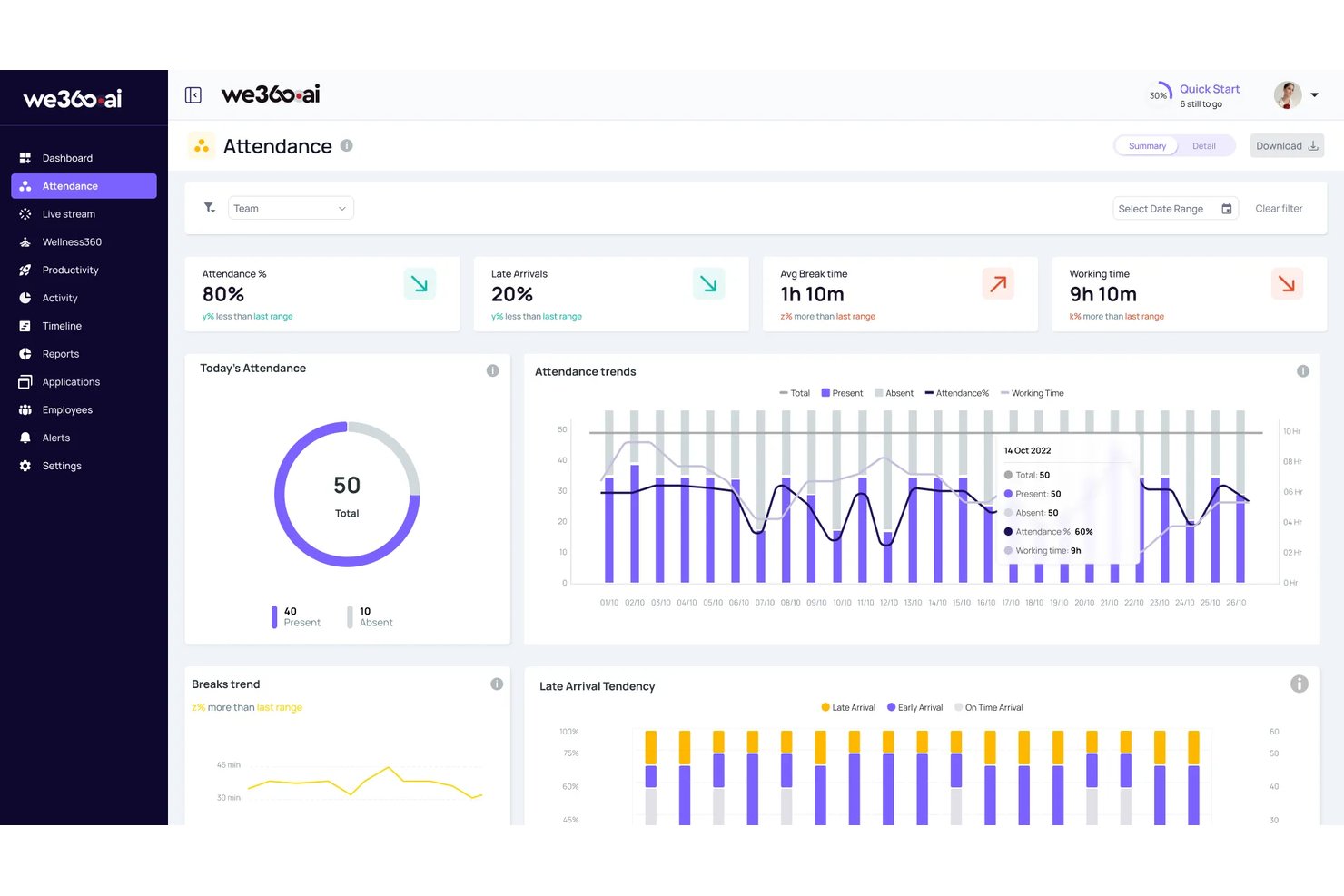
We360.ai is an employee monitoring software designed for businesses that want clear visibility into app usage, productivity trends, and compliance across distributed or hybrid teams.
Who Is We360.ai Best For?
Teams in distributed or hybrid environments who need clear oversight of employee productivity and application usage.
Why We360.ai Is a Good Teramind Alternative
I picked We360.ai as a top Teramind alternative because it makes app and URL blocking automated and straightforward. I like that I can set granular restrictions, get instant alerts when someone tries to access blocked sites, and pull audit logs to show compliance with company policies. For distributed teams, I find these controls make policy enforcement far less manual.
We360.ai Key Features
- Automated attendance tracking: Monitors check-in and check-out times without manual input.
- Real-time activity monitoring: Shows live updates on employee screen activity and application use.
- Productivity trend analytics: Visualizes productivity patterns for individuals and teams over time.
- Comprehensive reporting dashboard: Offers exportable reports on time spent, tasks, and productivity metrics.
We360.ai Integrations
We360 integrates with 20+ HRIS, project management, and collaboration tools, including Salesforce, Asana, Microsoft Teams, Workday, Lattice, and HubSpot. A REST API and Webhooks are available for custom connections.
Pros and Cons
Pros:
- Audit logs show real compliance evidence
- Live activity feeds support remote teams
- Automated app and URL blocking controls
Cons:
- API setup required for external integrations
- Weak task and project management features
Other Teramind Alternatives
- Hubstaff
For GPS tracking and mobile field force management
- Veriato
For AI-driven insider risk scoring
- Controlio
For affordable cloud and on-prem monitoring
- TimeCamp
For time tracking with privacy-first monitoring
- DeskTime
For visual activity reports and gap analysis
- Monitask
For client-visible project activity proof
- WorkTime
For compliance-friendly attendance tracking
- Workstatus
For all-in-one monitoring with GPS field ops
- InterGuard
For cross-device insider threat response
- EmpMonitor
For stealth mode and on-prem data control


How I Evaluate Teramind Alternatives
I split my evaluation into two layers: core functionality every viable tool must cover—activity monitoring, screen capture, productivity analytics, time tracking, alerts, and privacy controls—and differentiating factors like OCR, burnout signals, and deployment flexibility that separate one vendor from another.
Core Functionality (Table Stakes For This List)
When I'm selecting tools for my list, I rank each one on a scale from 0 (does not offer the functionality) to 5 (excels in this area) for each core functionality listed below. I then calculate the tool's total score into a percentage, using 75% as a benchmark to help assess its overall fit for the list.
- User activity monitoring: I check whether a tool tracks app usage, website visits, and active/idle time together, since gaps in any one area leave blind spots for hybrid teams.
- Screen capture and playback: I look for automated screenshot intervals and session recording with searchable playback, which matters when HR or compliance needs to review a flagged incident after the fact.
- Productivity analytics: I evaluate how each tool classifies activities as productive or unproductive and whether its dashboards let you benchmark teams, not just individuals.
- Time and attendance tracking: Automatic work-hour logging tied to tasks or projects is what I look for here, especially integrations that feed timesheet data into payroll or HRIS workflows.
- Policy and behavior alerts: I consider how flexible the rule engine is—can you set custom triggers for things like unauthorized USB use or after-hours access, and does it notify the right people fast?
- Privacy controls and compliance: Tools that offer role-based access, data redaction, and consent workflows get priority, since monitoring without proper privacy guardrails creates legal and trust risks for HR teams.
Once I have a list of tools that meet the criteria, I consider what sets each platform apart.
Differentiating Factors (What Sets Vendors Apart)
Here's how I compare and contrast different vendors:
Standout Features
I look for insider threat detection that goes beyond simple rule triggers—tools like Veriato and Syteca use behavior-based anomaly scoring to flag unusual data movement or off-hours access before a breach happens. OCR search across screenshots matters when your compliance team needs to surface a specific keyword during an audit. I also evaluate whether a tool offers employee-facing transparency dashboards, since letting people see their own productivity data shifts the dynamic from surveillance to coaching.
Beyond Features
Deployment model matters a lot here. I check whether a tool offers cloud, private cloud, and on-prem options, plus regional data hosting, since HR teams with employees across multiple jurisdictions need to satisfy local data residency rules. Pricing transparency is another factor I evaluate—some vendors publish per-user tiers while others require a sales call, and hidden costs for screen recording storage or add-on modules like DLP can shift your total cost significantly. I also look at how each vendor supports ethical rollout, including consent workflows, anonymized analytics, and change-management resources that help HR introduce monitoring without eroding trust.
Why Look For A Teramind Alternative?
While Teramind offers a range of workforce visibility and productivity features, it may not meet every team’s needs. You might want an alternative if you need:
- Flexible privacy settings and employee consent controls
- Regional data hosting options to meet compliance standards
- Transparent, employee-facing dashboards over silent surveillance
- Deeper workforce analytics and burnout tracking
- A lighter administrative setup with lower management overhead
- Clearer, more predictable pricing structures
Teramind Key Features
Here are some of the key features of Teramind to help you contrast and compare what alternative solutions offer:
- User activity monitoring: Tracks app usage, website visits, and active versus idle time to show you how employees spend their work hours.
- Screen capture and playback: Takes automatic screenshots and records sessions, so you can review work activity, look into flagged incidents, or check activity for compliance.
- Productivity analytics: Labels activities as productive or unproductive and provides team and individual dashboards to help you spot trends and unusual activity.
- Time and attendance tracking: Automatically records work hours and attendance and links activity to tasks or projects to support payroll, HR, and compliance needs.
- Policy and behavior alerts: Allows you to create rules that send alerts for actions such as unauthorized USB access, data transfers, or logins outside work hours.
- Privacy controls and compliance: Includes role-based access, data redaction, and consent tools to help you protect employee privacy and meet local regulations.
- Insider threat detection: Uses activity patterns to flag unusual behavior and help security teams identify potential data loss or harmful actions early.
- Data loss prevention (DLP): Monitors and limits risky data transfers, such as copying files to external drives or sending restricted information by email.
- Reporting and auditing: Provides customizable productivity reports and activity logs to support audits and management reviews with clear, exportable records.
- Deployment flexibility: Supports both cloud and on-premises deployment, giving organizations options based on their data, security, and IT needs.
Costs and Pricing of Teramind Alternatives
Finding the right Teramind alternative means comparing the pricing models and plans that best fit your needs. Costs can vary depending on features, team size, add-ons, and other factors. The table below highlights common pricing plans, average costs, and typical features offered by these alternatives.
Plan Comparison Table for Teramind Alternatives
| Plan Type | Average Price | Common Features |
|---|---|---|
| Free Plan | $0 | Basic time tracking, limited user activity monitoring, simple productivity analytics, and core privacy controls. |
| Personal Plan | $5–$15/user/month | Enhanced monitoring, screen capture, detailed productivity insights, limited alerts, and self-service support. |
| Business Plan | $10–$25/user/month | Full user activity tracking, policy-based alerts, time and attendance reporting, team benchmarking, and admin controls. |
| Enterprise Plan | $20–$40/user/month | Advanced compliance tools, insider threat detection, custom integrations, deployment flexibility, and granular privacy settings. |