

10 Best Mobile Workforce Management Software Reviewed in 2026

10 Best Mobile Workforce Management Software Shortlist


Struggling to manage your remote and field teams efficiently? Mobile workforce management software can help.
With real-time GPS tracking, automated timesheets, and seamless job dispatching, you’ll minimize manual processes, eliminate payroll errors, boost productivity, and stay compliant with labor laws.
These tools are an important investment for many organizations. Use my shortlist of the best mobile workforce management solutions to help you compare features, pricing, use cases and USPs.
Why Trust Our Software Recommendations
Our team has been testing and reviewing software since 2012. As HR experts ourselves, we know how difficult—and important—it is to choose the right software.
For this guide, we evaluated tools using hands-on testing and independent research, scoring tools using our selection criteria. We also draw on insights from industry thought leaders and practicing HR experts.
Our reviews reflect our human editorial judgment, not a sales pitch.
Expert reviewers:
Mobile Workforce Management Software Comparison Table
This comparison table summarizes pricing details for my top mobile workforce management software selections:
| Tool | Best For | Trial Info | Price | ||
|---|---|---|---|---|---|
| 1 | Best for managing mobile teams across countries | Free demo available | From $5/user/month | Website | |
| 2 | Best as an AI for business | Free demo available | From $8/user/month | Website | |
| 3 | Best for flexible clock-in methods | Free 21-day trial + free demo available | From $2.93/user/month (billed annually) | Website | |
| 4 | Best for GPS tracking and geofencing | 30-day free trial + free demo available | From $50/user/month | Website | |
| 5 | Best for team communication | Free demo available | Pricing upon request | Website | |
| 6 | Best for HR analytics integration | Free demo + free plan available | From $5/employee/month (billed annually) | Website | |
| 7 | Best for AI-powered event staffing operations | Free demo available | From $49/month | Website | |
| 8 | Best for field service management | Free demo available | Pricing upon request | Website | |
| 9 | Best for workforce forecasting | Free demo available | Pricing upon request | Website | |
| 10 | Best for enterprise scalability | Free demo available | Pricing upon request | Website |
Best Mobile Workforce Management Software Review
Below are my detailed summaries of the best mobile workforce management software that made it onto my shortlist. My reviews offer a detailed look at the key features, pros & cons, integrations, and ideal use cases of each tool to help you find the best one for you.

Deel HR
Best for managing mobile teams across countries

Deel is a global HR platform designed to help businesses manage international hiring, onboarding, and payroll across over 150 countries. It provides end-to-end solutions for managing remote and mobile teams—particularly those working as contractors or employees outside the organization’s home country.
Why I Picked Deel: I chose Deel for its strong global compliance features, which are essential for companies managing distributed or mobile workforces. It simplifies contractor onboarding and international payroll, offering mobile access and support for multi-currency payments—features that benefit HR teams overseeing global operations. Deel’s Employer of Record (EOR) service also makes it possible to legally hire talent without setting up local entities, a major time-saver for scaling companies.
Standout features & integrations:
Features include automated tax form collection, digital contracts with e-signatures, expense tracking, and time off management.
Additionally, Deel's mobile app makes HR tasks like document uploads and time tracking accessible on the go.
Integrations include QuickBooks, Xero, BambooHR, ADP, Workday, Google Workspace, Salesforce, and more. An API is available for custom integration.
Pros and Cons
Pros:
- Ensures global compliance with local labor laws
- Comprehensive features for HR, IT, and payroll management
- Robust tool for managing teams and facilitating remote work
Cons:
- Complex to set up for small teams
- Limited customization options
New Product Updates from Deel HR

Deel Expands Stablecoin Wallet to 80+ Countries
Deel expands its Stablecoin Wallet to 80+ countries with dollar-backed balances and optional rewards. This gives eligible contractors more ways to hold and manage earnings inside Deel. For more information, visit Deel’s official site.
 .
.
Best as an AI for business
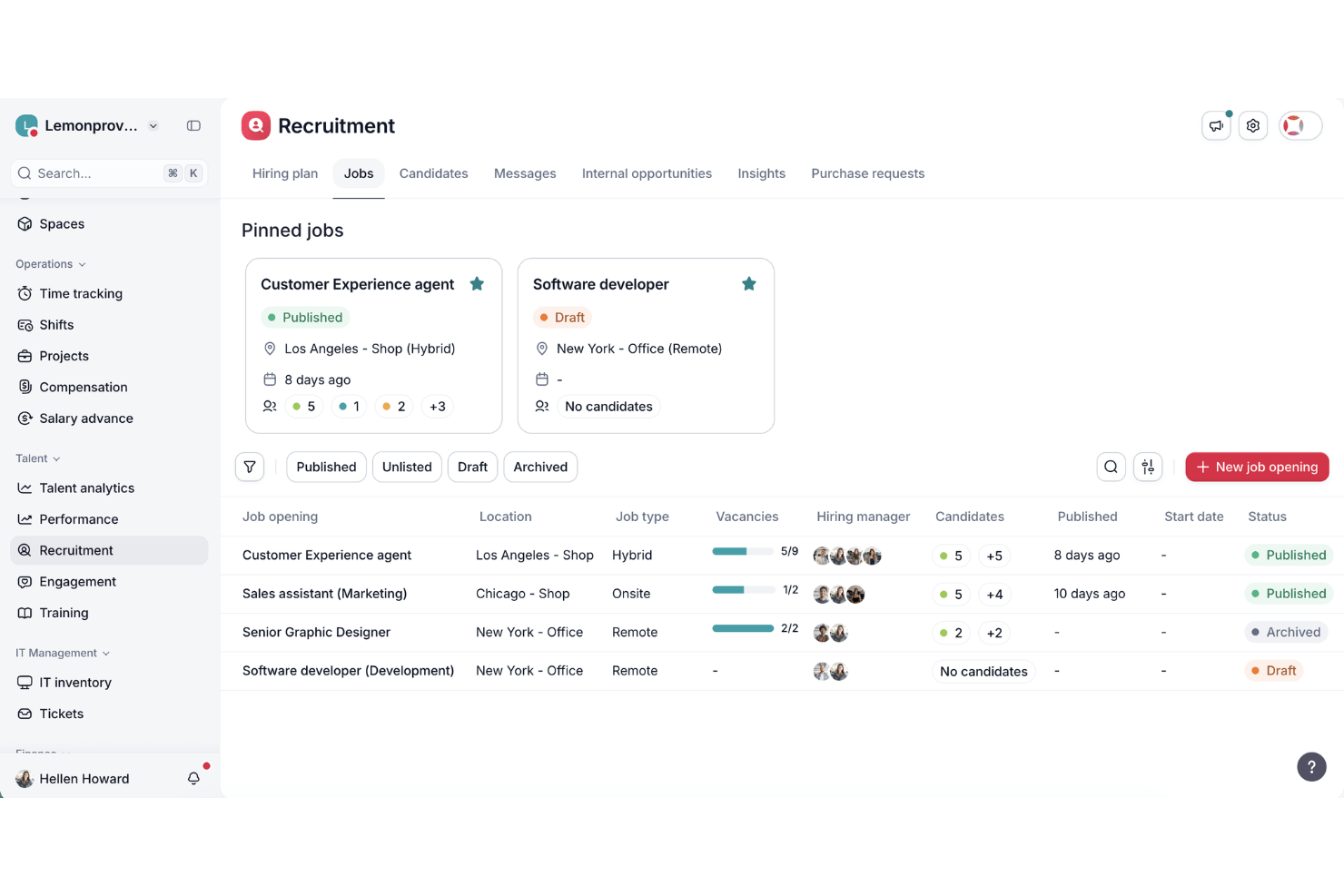
Factorial is an AI for business platform that covers mobile workforce management needs—including AI-assisted shift scheduling, GPS-based time tracking, absence management, and employee self-service—across a full HR operations suite.
Who Is Factorial Best For?
Factorial is a strong fit for SMBs managing a mix of desk-based and field-based employees who want AI-assisted HR operations—from shift scheduling to reporting—in one platform.
Why I Picked Factorial
I picked Factorial as one of the best because it approaches mobile workforce management as a genuinely AI-driven platform, not just an app with a scheduling feature bolted on. Factorial's AI agent, One, handles real-time report generation, answers employee policy questions, and assists with timetable planning across your entire operation. Pair that with AI-assisted shift scheduling and offline-capable GPS clock-in, and you get a platform that actively reduces daily HR admin for teams managing workers in the field.
Factorial Key Features
- Offline time tracking: Employees can clock in and out without an internet connection, with data stored locally and synced automatically once they're back online.
- Biometric and facial recognition clock-in: Factorial supports face recognition and fingerprint verification as clock-in methods, reducing buddy punching across field-based teams.
- Geofencing alerts: Managers can set virtual boundaries around job sites, with automated alerts triggered when employees clock in or out outside the designated area.
- Shift swap requests: Employees can request shift swaps directly through the mobile app, giving managers visibility and approval control without manual back-and-forth.
Factorial Integrations
Factorial offers native integrations with Slack, Microsoft Power BI, ZKTeco, and Suprema, plus payroll connectors such as Sage, DATEV LODAS, and Silae. It also supports a public REST API, webhooks, and Zapier.
Pros and Cons
Pros:
- Biometric verification limits buddy punching
- Offline clock-ins support disconnected job sites
- AI assists timetable planning and reporting
Cons:
- Geofencing lacks route history and dispatch
- No native team chat for field workers

Agendrix
Best for flexible clock-in methods

Agendrix is an employee scheduling and workforce management software built to support mobile teams, particularly in shift-based small and midsize businesses. It simplifies scheduling, time tracking, and HR tasks—delivering a unified platform accessible across desktop and mobile.
Why I Picked Agendrix: I chose Agendrix for its mobile-first design and strong scheduling functionality, which makes it ideal for teams working across locations or on the go. You can build and share schedules, track time and attendance, and manage shift changes all from a smartphone. The platform also offers flexible clock-in methods, including geolocation and biometric options, helping businesses with dispersed teams ensure accurate time tracking and accountability.
Standout Features & Integrations
Features include drag-and-drop schedule creation, shift swapping, mobile clock-ins with GPS, PTO tracking, and HR tools like onboarding and document management. Employees can use mobile apps to view schedules, request time off, and communicate with team members through built-in messaging tools. They also offer bilingual support and user interface in English and French.
Integrations include EmployerD, Nethris, Sage 50, Acomba, QuickBooks, Ceridian Powerpay, ADP Workforce Now, Payworks, Lightspeed, Azur, Easypay, BeLocum, Hopem, and Folks HR.
Pros and Cons
Pros:
- Built-in messaging and notifications
- Supports printable, email, and mobile schedule sharing
- Integrates with major Canadian payroll systems
Cons:
- Limited customization options for reports and analytics
- Certain integrations may require manual setup

TimeTrex
Best for GPS tracking and geofencing

TimeTrex speaks directly to teams juggling mobile, shift-based, or field-oriented workforces who need reliable time tracking, scheduling, and payroll tools on the go. If you manage staff across different locations — from retail floors and construction sites to remote or mobile crews — TimeTrex offers mobile-friendly attendance, scheduling, and payroll in one package.
Why I Picked TimeTrex
I like TimeTrex because its mobile time-tracking and GPS/geo-fencing features give clear visibility into where and when work happens, which is ideal if your team works on-site or at many locations. It also supports scheduling and shift assignments that employees can view and manage from their phones — helping mobile teams stay organized and avoid confusion. Finally, the built-in payroll integration ensures tracked hours feed directly into payroll, reducing mistakes and saving managers time.
TimeTrex Key Features
In addition to the features mentioned, I also found these valuable:
- Shift Scheduling with Leave Management: You can build and edit staff schedules, manage shift swaps and time-off requests, and let employees view their assignments in real time.
- Job Costing and Invoicing: Track labor and expenses by project or task, and generate invoices based on actual hours worked — useful if you bill clients for labor or track profitability per job.
- HR Management: Tools for recruitment, onboarding, performance management, and compliance tracking.
- Analytics & Reporting: Customizable reporting and real-time dashboards for data-driven decision-making.
TimeTrex Integrations
The platform offers an API for custom integrations, allowing you to connect TimeTrex with other software solutions as needed.
Pros and Cons
Pros:
- Allows employee self-service for time off, schedules, timesheets
- Supports mobile and biometric clock-in, handy for distributed workforces
- Time and attendance plus payroll in one package
Cons:
- Limited number of native integrations compared with leading HR platforms.
- Free plan lacks customer support and mobile app access.
New Product Updates from TimeTrex
TimeTrex Adds Quick Punch App With Offline and QR Support
TimeTrex adds a new Quick Punch app, offline punching, QR code scanning, punch images, configurable messages, and punch warnings or lockouts to improve employee clock-ins across browsers and local computers. For more information, visit TimeTrex’s official site.
 .
.
Best for team communication

Beekeeper is a communication platform designed for frontline workers and non-desk employees. It facilitates real-time messaging, collaboration, and content sharing to keep teams connected and informed.
I picked Beekeeper: This tool excels in team communication, offering features that enhance connectivity among dispersed teams. It includes real-time messaging and group chats, which help keep everyone in the loop.
You can also create and share content through streams, ensuring important updates reach all employees. These capabilities are essential for organizations with a large number of non-desk workers.
Standout features & integrations:
Features include a mobile-first design that ensures accessibility for all team members. The platform supports customizable communication streams, allowing you to tailor content delivery.
Additionally, Beekeeper offers analytics to track communication effectiveness and employee engagement.
Integrations include Microsoft Azure, Google Workspace, Salesforce, Microsoft Teams, Okta, BambooHR, Workday, ADP, Microsoft SharePoint, and Kronos.
Pros and Cons
Pros:
- Supports employee engagement
- Mobile-first design
- Customizable communication streams
- Real-time messaging capabilities
- Strong focus on non-desk workers
Cons:
- May need ongoing support
- Requires consistent content updates
- Limited advanced features
- Can be overwhelming for new users
- May require initial setup assistance
ChartHop
Best for HR analytics integration

ChartHop is a People Ops Platform designed for HR teams and people leaders, offering solutions in HRIS, compensation, and performance management. It helps organizations visualize HR data and improve workforce planning and engagement.
Why I picked ChartHop: This platform excels in HR analytics integration, making it ideal for data-driven decision-making. It features AI-powered dashboards and customizable data sheets that enhance operational efficiency.
The organizational charts and employee profiles provide a clear view of your team structure. These tools are invaluable for HR teams looking to improve planning and engagement.
Standout features & integrations:
Features include geographic mapping for visualizing employee locations, headcount planning to manage workforce growth, and performance management tools that help track employee progress.
The platform also offers compensation review capabilities, ensuring fair and competitive pay structures. Additionally, it supports employee engagement initiatives to boost morale and productivity.
Integrations include BambooHR, Greenhouse, Lever, Namely, Netsuite, Okta, Slack, Workday, ADP, Google Workspace, and Microsoft Azure.
Pros and Cons
Pros:
- Enhances team collaboration
- Customizable reporting options
- Supports strategic planning
- Useful for detailed HR analytics
- Strong data visualization tools
Cons:
- May need dedicated HR staff
- Requires consistent data input
- Complex setup process
- Limited mobile capabilities
- Steeper learning curve
New Product Updates from ChartHop
ChartHop Adds Role and Filter Controls for Ask ChartHop
AI Pro customers can now set access controls for Ask ChartHop in AI settings, restricting who can use the assistant by role or filter criteria. For more information, visit ChartHop's official site.
 .
.
Ubeya
Best for AI-powered event staffing operations

Ubeya is a mobile workforce management platform built for event staffing operations. It helps businesses manage hourly and on-site workers through tools for scheduling, attendance tracking, and payroll automation. With mobile access for both managers and staff, it simplifies daily operations and communication across teams.
Why I picked Ubeya: I picked Ubeya for its strong AI-powered scheduling and time tracking tools that make it easy to manage hourly event teams working across shifts and locations. You can create and adjust schedules, monitor attendance in real time, and ensure accurate payroll processing with minimal manual input.
I also liked how the platform includes built-in communication tools and compliance monitoring, which help you keep your operations aligned with labor laws while maintaining team coordination.
Standout features & integrations:
Features include shift scheduling, time and attendance tracking, payroll automation, compliance monitoring, and built-in communication tools. The AI-driven reporting and analytics help you track workforce performance and identify efficiency gaps.
Integrations include Google Calendar, Microsoft Outlook, Recruit CRM, HubSpot, WhatsApp Notifications, Google Sheets, QuickBooks, Slack, Microsoft Teams, ADP, Bullhorn, and Xero.
Pros and Cons
Pros:
- Strong compliance and audit features
- Automated payroll and reporting tools
- Mobile apps for staff and managers
Cons:
- Interface may take time to master
- Minimum monthly spend required

Skedulo
Best for field service management

Skedulo is a workforce management platform designed for companies with mobile and field-based teams. It optimizes scheduling, dispatching, and job management to enhance operational efficiency.
Why I picked Skedulo: The platform is built for field service management and delivers features designed for mobile workforce operations. It provides real-time scheduling and dispatching, ensuring your team is always in the right place at the right time.
The mobile app lets team members access job details and update their status on the go. Its capabilities are essential for businesses that depend on field operations.
Standout features & integrations:
Features include intelligent scheduling that optimizes resource allocation. The platform supports real-time communication between dispatchers and field workers, enhancing coordination.
Additionally, Skedulo offers analytics tools to track performance metrics and improve decision-making.
Integrations include Salesforce, Zendesk, Microsoft Dynamics, Google Calendar, Okta, ServiceNow, Workday, ADP, QuickBooks, and Xero.
Pros and Cons
Pros:
- Provides performance analytics
- Enhances team communication
- Effective real-time scheduling
- Supports field job management
- Strong focus on mobile teams
Cons:
- Steeper learning curve
- May need integration support
- Limited offline functionality
- Requires training for new users
- Complex initial setup

Legion
Best for workforce forecasting

Legion is a workforce management platform designed to optimize labor efficiency for businesses in retail, hospitality, and other service industries. It focuses on scheduling, labor forecasting, and compliance management to enhance workforce productivity.
Why I picked Legion: The platform excels in workforce forecasting, providing tools to predict labor needs accurately. It offers advanced scheduling algorithms that adapt to your business's unique demands.
You can also manage compliance effortlessly with built-in labor law adherence. These features help businesses optimize staffing and reduce labor costs.
Standout features & integrations:
Features include demand-driven scheduling that aligns workforce availability with business needs. The platform provides real-time analytics to track labor efficiency. Additionally, Legion offers employee self-service tools, empowering your team to manage their schedules and availability.
Integrations include ADP, Workday, SAP, Oracle, UKG, BambooHR, Salesforce, Kronos, Microsoft Dynamics, and QuickBooks.
Pros and Cons
Pros:
- Empowers employee self-service
- Provides real-time analytics
- Advanced scheduling capabilities
- Supports compliance management
- Effective labor forecasting tools
Cons:
- Can be resource-intensive
- Requires data input consistency
- Limited offline functionality
- May need initial training
- Complex setup process

IFS
Best for enterprise scalability

IFS is an enterprise software provider focused on mobile workforce management. It serves the aerospace, energy, and manufacturing industries and performs key business functions such as asset lifecycle management, workforce scheduling, and customer relationship management.
Why I picked IFS: The software is tailored for enterprise scalability, making it suitable for large organizations. It offers specialized asset and customer relationship management features to boost operational efficiency.
Its versatility makes it ideal for various industries with specific needs. Workforce scheduling tools further enhance their value for complex organizational structures.
Standout features & integrations:
Features include detailed asset lifecycle management to track and manage assets efficiently. Workforce scheduling offers flexibility for managing large teams and complex schedules. The customer relationship management tools help maintain strong client relationships and improve service delivery.
Integrations include SAP, Oracle, Microsoft Dynamics, IBM Maximo, Salesforce, AWS, Google Cloud, Azure, Infor, and Siemens.
Pros and Cons
Pros:
- Comprehensive asset management
- Enhances operational efficiency
- Supports sustainability initiatives
- Customizable for industry needs
- Effective in large-scale settings
Cons:
- May need ongoing technical support
- High resource requirements
- Limited pricing transparency
- Requires training for full use
- Complex initial setup
Other Mobile Workforce Management Software
Here are some additional mobile workforce management software options that didn’t make it onto my shortlist but are still worth checking out:
- SafetyCulture
For safety compliance checks
- Cognito iQ
For real-time insights
- AllWork
For gig economy workers
- Synerion
For time tracking features
- MyMobileWorkers
For logistics operations
- Connecteam
For small business teams
- Hubstaff
For remote work monitoring
- eduMe
For AI-powered training content
- Parim
For automated scheduling and tracking
- Commusoft
For plumbing and HVAC businesses


How I Evaluate Mobile Workforce Management Software
I split my evaluation into two layers: whether a tool can actually serve a crew of field technicians clocking in from job sites, then what separates it from the rest.
Core Functionality (Table Stakes For This List)
When I'm selecting tools for my list, I rank each one on a scale from 0 (does not offer the functionality) to 5 (excels in this area) for each core functionality listed below. Then, I calculate the tool's total score into a percentage. Each tool needs to achieve a minimum total score of 65% to be considered for inclusion.
- Mobile Employee App: I check whether the native iOS/Android app lets workers view schedules, request time off, and clock in from the field—not just access a clunky mobile browser version.
- GPS & Geofencing: Each tool's location features matter, especially geofenced job sites that flag when a technician clocks in from outside a designated work zone.
- Shift Scheduling & Dispatch: I look for drag-and-drop schedule builders, open shift claiming, and real-time dispatch updates that reach workers on their phones before they leave home.
- Time & Attendance Tracking: Accurate clock-in/out data with break and overtime capture is essential, along with approval workflows that feed clean timesheets into payroll.
- Workforce Communication: Tools should offer in-app messaging or push notifications so a warehouse manager can reach the night shift instantly instead of relying on personal texts.
- Compliance & Payroll Integration: I evaluate whether the platform enforces labor rules like mandatory rest periods and connects to payroll or HRIS systems for accurate, timely pay runs.
Once I have a list of tools that meet this criteria, I consider what sets each platform apart.
Differentiating Factors (What Sets Vendors Apart)
Here's how I compare and contrast different vendors:
Standout Features
Offline mode is a big one—field crews on remote construction sites or in underground facilities need to log hours even without a signal, so I look for apps that queue data locally and sync once connectivity returns. Biometric verification like selfie-based clock-ins also matters because it directly addresses buddy punching across dispersed teams. I evaluate job and task management features too, since assigning work orders with photo proof of completion turns a scheduling tool into a true field operations hub.
Beyond Features
Integration ecosystem is something I always evaluate—a platform that connects to your existing HRIS or payroll system, like ADP or BambooHR, saves hours of duplicate data entry every pay cycle. I also consider industry and workforce fit, since a tool built for healthcare shift workers may not serve a landscaping company with seasonal crews. Compliance and security round it out; I check for SOC 2 certification and role-based access controls, especially when the platform handles sensitive GPS and employee data.
How to Choose Mobile Workforce Management Software
It’s easy to get bogged down in long feature lists and complex pricing structures. To help you stay focused as you work through your unique software selection process, here’s a checklist of factors to keep in mind:
| Factor | What to Consider |
| Scalability | Ensure the software can grow with your business. Look for solutions that support additional users and features as your team expands. |
| Integrations | Check if the software integrates with your current tools like payroll, CRM, and communication platforms to streamline operations and avoid data silos. |
| Customizability | Look for software that allows you to tailor workflows and dashboards to match your processes, ensuring it fits your team's specific needs. |
| Ease of Use | Choose a user-friendly interface that minimizes the learning curve for your team, allowing them to get up and running quickly without extensive training. |
| Budget | Consider the total cost, including setup fees and ongoing subscriptions. Ensure it fits your financial plan without hidden costs. |
| Security Safeguards | Verify that the software offers robust security measures like data encryption and regular updates to protect sensitive information. |
| Support | Evaluate the availability and quality of customer support. Look for 24/7 assistance and multiple support channels to address any issues promptly. |
| Mobile Access | Ensure the software provides a strong mobile app experience, enabling your team to access essential features on the go and boosting productivity in the field. |
Trends in Mobile Workforce Management Software
In my research, I sourced countless product updates, press releases, and release logs from different mobile workforce management software vendors. Here are some of the emerging trends I’m keeping an eye on:
AI-driven analytics
Vendors are incorporating AI to provide predictive analytics and insights to help teams make data-driven decisions and optimize workforce deployment. For example, some platforms now offer AI-powered scheduling to anticipate staffing needs.
Employee wellness features
More tools are adding features to track employee wellness and engagement. These include stress management tools and feedback loops to improve job satisfaction and retention. Some vendors offer dashboards that monitor employee sentiment in real-time.
Augmented reality (AR) support
AR is used to enhance field training and support, beneficial for complex tasks where visual guidance can improve accuracy and efficiency.
Eco-friendly initiatives
There's a rising focus on sustainability, with platforms providing features to track and reduce carbon footprints, for example dashboards to monitor energy usage and emissions.
This aligns with growing environmental concerns and helps businesses meet eco-friendly goals.
Advanced compliance tracking
As regulations evolve, tools add more sophisticated features. This ensures businesses stay up-to-date with legal requirements and avoid penalties.
Some software now automatically updates compliance protocols based on regional laws.
What Is Mobile Workforce Management Software?
Mobile workforce management software helps businesses manage their employees who work in the field or remotely.
Professionals such as field service managers, logistics coordinators, and team leaders use these tools to keep track of tasks, schedules, and team performance.
Features like time tracking, real-time communication, and scheduling help optimize workforce deployment, enhance communication, and maintain compliance.
Overall, these tools provide valuable insights and efficiencies for managing a mobile workforce.
Features
These tools seek to tackle the same problems in slightly different ways, but there are key features to look out for.
When selecting mobile workforce management software, keep an eye out for the following key features:
- Time tracking: Accurately records employee hours and attendance, helping manage payroll and productivity.
- Scheduling: Automates creating and managing employee schedules, ensuring optimal workforce deployment.
- Real-time communication: Facilitates instant messaging and updates between team members, enhancing coordination and efficiency.
- GPS tracking: Monitors employee locations to ensure accountability and optimize route planning.
- Compliance management: Keeps track of labor laws and regulations, helping businesses avoid penalties and stay compliant.
- Analytics and reporting: Provides data-driven report insights into workforce performance and productivity.
- Mobile access: Allows employees to access schedules and job details from their mobile devices, improving flexibility.
- Employee self-service: Empowers employees to manage their own schedules and availability, reducing administrative workload.
- Customizable workflows: Adapts to specific business processes, ensuring the software meets unique organizational needs.
Benefits
The right mobile workforce management software will make everyone’s lives easier and add real value to the business. Here are a few benefits you can look forward to:
- Improved productivity: Time tracking and scheduling ensure your team works efficiently and focuses on the right tasks.
- Enhanced communication: Real-time communication features keep your team connected, reducing misunderstandings and delays.
- Better compliance: Compliance management tools help your business stay up-to-date with labor laws and avoid costly penalties.
- Increased flexibility: Mobile access allows your team to work from anywhere, adapting to changing work environments.
- Greater transparency: GPS tracking and analytics provide insights into employee activities, fostering accountability and informed decision-making.
- Reduced administrative workload: Employee self-service features empower your team to manage their schedules, freeing up time for managers.
- Customizable solutions: Customizable workflows ensure the software fits your business's unique needs, improving overall efficiency.
Costs and Pricing of Mobile Workforce Management Software
Like any software, selecting a mobile workforce management system requires an understanding of the various pricing models and plans available.
Costs vary based on features, team size, add-ons, and support level (important). The table below summarizes common plans, their average prices, and typical features included in mobile workforce management software solutions:
Plan Comparison Table for Mobile Workforce Management Software
| Plan Type | Average Price | Common Features |
| Free Plan | $0/user/month | Basic scheduling, time tracking, and limited reporting. |
| Personal Plan | $5-$25/user/month | Advanced scheduling, mobile access, and basic analytics. |
| Business Plan | $30-$60/user/month | Real-time communication, compliance management, and customizable workflows. |
| Enterprise Plan | $70-$120/user/month | Full analytics suite, employee self-service, and dedicated support and training. |
Mobile Workforce Management Software FAQs
Here are some answers to common questions about mobile workforce management software: