

Paylocity beklentilerinizi karşılamıyor mu? İster platformun karmaşıklığı, ister artan maliyetler, ister büyüyen ekibinizle artık örtüşmeyen özellikler olsun, değişim zamanının geldiğini düşünen tek kişi siz değilsiniz.
İK yazılımlarını bağımsız olarak test edip inceleyen biri olarak, tıpkı sizin gibi sayısız İK profesyonelinin iş akışlarını gerçekten destekleyen, günlük görevleri kolaylaştıran ve benzersiz iş ihtiyaçlarına uyum sağlayan araçları bulmasına yardımcı oldum. İşe alım ve işe alıştırmadan performans değerlendirmelerine ve bordroya kadar doğru çözüm büyük fark yaratabilir.
Bu makalede, günümüzde kullanılabilen en iyi Paylocity alternatiflerini inceleyeceğim; kullanım kolaylığı, ölçeklenebilirlik ve sektöre özgü özellikleriyle öne çıkan platformları ele alacağım. Sadece kutucukları işaretlemekten fazlasını yapan, ekibinizin gerçekten gelişmesine yardımcı olan bir İK aracı bulalım.
Paylocity nedir?
Paylocity, işletmelerin bordro ve insan kaynakları görevlerini yönetmesine yardımcı olan bir İK yazılım platformudur. Çalışan verilerini ve bordroyu verimli bir şekilde yönetmesi gereken İK profesyonelleri ve bordro uzmanları tarafından yaygın olarak kullanılır.
Zaman takibi, yan haklar yönetimi ve uyumluluk yönetimi gibi özellikler sunarak İK süreçlerini düzenlemeye, hataları azaltmaya ve mevzuata güncel kalmaya yardımcı olur. Paylocity'nin genel değeri, İK görevlerini basitleştirme ve İK ekiplerinin en önemli konulara odaklanmasını kolaylaştırma becerisinde yatar.
Neden bir Paylocity alternatifi aramalısınız?
Paylocity'nin kurulumu biraz zaman alabilir ve raporları ile desteği, özellikle sınırlı bir İK ekibiyle çalışıyorsanız veya hızlı yanıtlara ihtiyacınız varsa, işlerinizi yavaşlatabilir. Başka bir aracın daha uygun olabileceği durumlar şunlardır:
- İK ve bordro raporlarını sık sık alıyorsunuz. Bazı kullanıcılar Paylocity'nin raporlarını tutarsız ve gezinmesi zor buluyor; bu da ihtiyaç duyduğunuz raporları oluşturmak için fazladan zaman harcamanız anlamına geliyor. PrimePay gibi araçlar, gerçek zamanlı bordro, devamlılık ve yan haklar analizleri sunan esnek panolar sağlar.
- Bir sorun çıktığında hızlı yardıma ihtiyacınız var. Bazı müşteriler destek yanıtlarının yavaş olduğunu veya gerektiğinde bir yetkiliye ulaşmakta zorlandıklarını bildiriyor. Paycom gibi platformlar özel destek sunarken Patriot Software güvenilir müşteri desteğiyle tanınır.
- Bordronun hızlı bir şekilde çalışmaya başlamasını istiyorsunuz. Bazı ekipler uygulamanın beklenenden uzun sürdüğünü ve önemli miktarda zaman ve kaynak gerektirdiğini düşünüyor. Patriot Software gibi seçenekler, yönlendirmeli ve kolay bordro kurulumu sunarak küçük bir ekibin çalışanlarına daha kısa sürede ödeme yapmaya başlamasını sağlar.
- Saatlik çalışanlarınız her ödeme döneminde çalışma sürelerini kaydediyor. Bazı kullanıcılar, izin bilgilerinin zaman kodlarını otomatik olarak doldurmaması gibi nedenlerle zaman çizelgelerinin ekstra adımlar gerektirdiğini düşünüyor. Justworks gibi uygulamalar, her bordro çalıştırmasından önce zaman çizelgesi onayı sunarak zaman verilerini doğrudan bordroyla senkronize eder.
Paylocity şu durumda hâlâ doğru seçimdir: Bordroyu ve İK'yı şirket güncellemeleri, çalışanlar arası takdir ve ekip tartışmaları için yerleşik bir alanla birlikte istiyorsanız. Çalışan bağlılığına odaklanan orta ölçekli işverenler için bu avantajlar, daha uzun kurulum süresinden ve raporlar için harcanan ek zamandan daha ağır basabilir.
Why Trust Our Software Recommendations
6,700+
Reviews
20
Industry experts
16+
Evaluation factors
14
Years
Our team has been testing and reviewing software since 2012. As HR experts ourselves, we know how difficult—and important—it is to choose the right software.
For this guide, we evaluated tools using hands-on testing and independent research, scoring tools using our selection criteria. We also draw on insights from industry thought leaders and practicing HR experts.
Our reviews reflect our human editorial judgment, not a sales pitch.
Expert reviewers:
- Phil GrayCOO
 Kim BehnkeHR Tech Editor & Analyst
 Josh BarkerPeople Ops Manager

Paylocity Alternatifleri Karşılaştırma Tablosu
En iyi Paylocity alternatifleri seçimlerimin fiyatlandırma ayrıntılarını özetleyen bu karşılaştırma tablosu:
Score legend (out of 5)
- Excellent4.5–5
- Good4–4.4
- Average3–3.9
- Below average2–2.9
- Poor1–1.9
Sorted by: Default
| Tool | Starting Price | Website | |||||||
|---|---|---|---|---|---|---|---|---|---|
Best for offering pay on demand | 3.7 out of 5 | 4 | 3 | 3 | 4 | 4 | 4 | Pricing upon request Free demo available | Website |
Best for global teams outgrowing US payroll | 3.5 out of 5 | 4 | 4 | 2 | 4 | 4 | 3 | $29/user/month Free demo available | Website |
Best for integrated time tracking tools | Not rated | 4 | 3 | Not rated | 3 | 3 | 4 | $79/user/month Free demo available | Website |
Best for managing AI agents alongside staff | 3.7 out of 5 | 4 | 3 | 3 | 4 | 4 | 4 | Pricing upon request Not available | Website |
Best for small and mid-sized businesses | 3.7 out of 5 | 4 | 3 | 4 | 3 | 4 | 4 | Pricing upon request Free demo available | Website |
Best for tying field hours to job costs | 3.7 out of 5 | 4 | 3 | 4 | 4 | 4 | 3 | Pricing upon request Free demo available | Website |
Best for unifying HR and payroll data | 3.8 out of 5 | 4 | 4 | 4 | 4 | 3 | 4 | Pricing upon request Free demo available | Website |
Best for customizable dashboards | 3.0 out of 5 | 4 | 2 | 2 | 3 | 4 | 3 | $55/month + $5/employee per pay period Free demo available | Website |
Best for affordability for small businesses | 3.0 out of 5 | 4 | 3 | 2 | 3 | 3 | 3 | $17/month 30-day free trial + free demo available | Website |
Best for contractor-friendly payroll | 3.5 out of 5 | 4 | 3 | 4 | 3 | 3 | 4 | $49/month Free trial + free demo available | Website |


En İyi Paylocity Alternatifleri İncelemeleri
Aşağıda, kısa listeme giren en iyi Paylocity alternatiflerinin ayrıntılı özetlerini bulabilirsiniz. İncelemelerim, size en uygun seçeneği bulmanıza yardımcı olmak için her aracın temel özelliklerine, artılarına ve eksilerine, entegrasyonlarına ve ideal kullanım alanlarına ayrıntılı bir bakış sunuyor.
 Best for offering pay on demand
- Free demo available
- Pricing upon request
Visit WebsiteCustomer Rating:4.3/5
Paycom gives employees a self-service dashboard for HR tasks. Paycom is a single-database HCM platform that handles payroll, HR, benefits, and time tracking in one place—making it a strong fit for HR teams and payroll administrators who want to cut manual data entry and keep employee records accurate across every process.
Who Is Paycom Best For?
Paycom is a strong fit for HR teams and payroll administrators at mid-sized to large organizations who want payroll, time, benefits, and HR data managed in a single system with minimal manual entry.
Why I Picked Paycom
I picked Paycom as one of the best because its Everyday feature gives hourly employees access to their earned wages daily, without waiting for payday. After timecards are approved, workers can cash out through direct deposit or a Vault payroll card, with no charge to the employee. I also appreciate that Beti, Paycom's automated payroll tool, identifies errors and notifies employees before payroll is ever submitted, keeping pay accurate across every cycle.
Paycom Key Features
- Single-database architecture: All HR, payroll, time, and benefits data lives in one database, so updates in one area flow across the system without manual reentry.
- IWant AI search: A command-driven AI tool that searches employee profiles, company policies, and management dashboards to surface answers without navigating menus.
- Manager on-the-Go: A mobile tool that lets managers approve timecards, review expenses, adjust schedules, and complete hiring and performance tasks from their phone.
- Client Action Center: A centralized hub that tracks tax rates, flags employee tax-profile discrepancies, and routes agency notices to Paycom tax specialists for review.
Paycom Integrations
Paycom doesn't have any native integrations. It supports custom data imports through converters and mapped general-ledger reports for direct import into accounting software, but no public API is documented.
Pros and Cons
Pros:
- Tax alerts route agency notices for review
- Connected payroll reduces duplicate employee-data entry
- Daily wage access supports hourly workers
Cons:
- Custom reports can take work to build
- Implementation can demand substantial setup effort
 Best for global teams outgrowing US payroll
- Free demo available
- From $29/user/month
Visit WebsiteCustomer Rating:4.9/5
Deel's dashboard centralizes payroll, payments, and onboarding in one view. Deel Payroll is a global payroll platform that lets HR teams run payroll for employees and contractors across 130+ countries, handling local tax compliance, multi-currency payouts, and consolidated reporting from a single dashboard.
Who Is Deel Payroll Best For?
Deel Payroll is a strong fit for HR and payroll teams managing employees and contractors across multiple countries from a single platform.
Why I Picked Deel Payroll
I picked Deel Payroll as one of the best because it's built specifically for teams whose payroll complexity has outgrown a US-only system. I love that you can run payroll across 130+ countries from a single dashboard, choosing self-serve or fully managed payroll country by country. Deel also automates local tax calculations, statutory filings, and compliance monitoring, so when your team expands into Germany or Singapore, the rules are already built in.
Deel Payroll Key Features
- Payroll Connect: View Deel-managed and third-party payrolls side by side in a single consolidated dashboard.
- Anytime Pay: Earned wage access that lets direct employees draw earned pay before payday, configurable at the entity level.
- AI-powered payroll risk checks: Flags anomalies, missing data, and potential compliance issues automatically before payroll is approved.
- Customizable gross-to-net reporting: Generate single-cycle, consolidated global, and variance reports with configurable fields, exportable as CSV, XLSX, or PDF.
Deel Payroll Integrations
Deel says it offers over 130 native integrations, including Workday, UKG, SAP, Oracle, NetSuite, BambooHR, HiBob, Okta, and Azure AD. APIs and real-time webhooks support custom workforce data, workflow, event, and status-change connections.
Pros and Cons
Pros:
- Employees access payslips and tax documents
- Automates local tax calculations and filings
- Consolidates payroll across 130+ countries
Cons:
- Finding tax documents can require repeated navigation
- International transfers can take several days
Learn more about Deel Payroll: Best for integrated time tracking tools
- Free demo available
- From $79/user/month
Visit WebsiteCustomer Rating:4.6/5
Justworks centralizes payroll, benefits, PTO, and HR tools in one platform. Justworks Payroll is straightforward payroll software built for small businesses that want to handle payroll, HR recordkeeping, and time tracking without the complexity of a full HCM suite.
Who Is Justworks Best For?
Justworks Payroll is a strong fit for small business owners and payroll administrators who want clean, affordable payroll with time tracking built in.
Why I Picked Justworks
I picked Justworks as one of the best because its native time tracking connects directly to payroll in a way that cuts out a lot of manual reconciliation. When my team runs payroll, approved shifts from Justworks Time Tracking transfer automatically into Payroll timecards, with regular, overtime, and double-time hours already sorted. I also like that the mobile app lets employees view pay stubs, check PTO balances, and submit time-off requests without needing to contact HR.
Justworks Key Features
- Multi-state payroll processing: Run payroll across multiple states with support for custom pay periods, multiple pay rates, off-cycle payments, and tip processing.
- W-2 and 1099 filing: Justworks files both W-2 and 1099 forms and handles employer payroll tax filings and state unemployment insurance administration.
- AI-powered analytics: A built-in Report Builder lets admins generate custom workforce and payroll reports using plain-language requests, with filters by department, office, and country.
- International contractor payments: Pay independent contractors in more than 60 countries directly through the platform as a paid add-on.
Justworks Integrations
Justworks lists 30 marketplace integrations, including Sage Intacct, Xero, Greenhouse, Lever, JazzHR, Leapsome, Culture Amp, Checkr, and Ramp. Its Partner API supports native Electric connectivity for employee provisioning and de-provisioning.
Pros and Cons
Pros:
- Reviewers praise straightforward setup and payroll navigation
- Mobile access covers pay stubs and PTO
- Approved timecards transfer directly into payroll
Cons:
- Payroll requires advance cutoffs and processing time
- No documented native benefits administration
Learn more about Justworks: Best for managing AI agents alongside staff
- Not available
- Pricing upon request
Visit WebsiteCustomer Rating:3.4/5
isolved displays payroll totals, alerts, and anomaly detection in one dashboard. isolved People Cloud is an HCM platform that unifies payroll, HR, benefits, and talent management for small to mid-sized businesses looking to consolidate people operations and reduce manual work across teams.
Who Is isolved Best For?
isolved People Cloud is a strong fit for small to mid-sized businesses that need payroll, HR, and benefits in one place and want visibility into both their human workforce and AI agents.
Why I Picked isolved
I picked isolved as one of the best because it's the only HCM platform I've seen that places AI agents directly in the org chart alongside your human staff. Its Agent View feature assigns each AI agent a named human manager and an escalation path, so you always know who owns what. The Guardian, isolved's payroll AI agent, monitors live payroll runs for errors before they close, which is the kind of human-plus-AI accountability that most HCM platforms aren't built to support yet.
isolved Key Features
- Managed tax filing service: Covers federal, state, and local tax filings, deposits, amendments, and zero reporting across jurisdictions.
- Talent acquisition platform: Combines job distribution, applicant tracking, AI-assisted candidate matching, and onboarding in one hiring workflow.
- Employee mobile app: Gives employees mobile access to pay stubs, time cards, PTO requests, and benefits enrollment with biometric sign-in.
- Performance and learning tools: Supports goal setting, feedback, performance reviews, and access to a library of more than 95,000 learning courses.
isolved Integrations
isolved offers marketplace integrations with Instant Pay, Idelic, and SkillSurvey. It also provides a REST API and Employee Data Beacon for custom connections, though a total integration count isn’t documented.
Pros and Cons
Pros:
- Mobile self-service covers pay, benefits, and PTO
- Named AI-agent owners and escalation paths
- Payroll, HR, and time data stay connected
Cons:
- Support responsiveness varies across customer accounts
- Report discovery and customization take extra steps
Learn more about isolved: 5Best for small and mid-sized businesses
GoCo
- Free demo available
- Pricing upon request
Visit WebsiteCustomer Rating:4.6/5
GoCo helps users manage and sync employee benefit EOI submissions. GoCo is an HR and payroll platform built for smaller organizations that want to bring onboarding, benefits administration, time tracking, and embedded payroll under one roof without the complexity of an enterprise system.
Who Is GoCo Best For?
GoCo is a natural fit for small and mid-sized businesses that want HR, benefits, and payroll in one place without the overhead of an enterprise system.
Why I Picked GoCo
I picked GoCo as one of the best Paylocity competitors because it's purpose-built for small and mid-sized businesses that need HR, benefits, and embedded payroll without the complexity of an enterprise platform. I particularly like its Magic Docs feature, which turns any document into a signable, fillable form that syncs directly to employee records, and its benefits enrollment tools, which let employees compare plans and enroll from any device during open enrollment without HR chasing paperwork.
GoCo Key Features
- Payroll Grid: A consolidated payroll dashboard that flags missing employee information, incomplete direct deposit details, and unsubmitted timesheets before each pay run.
- AI receipt scanner: Automatically extracts data from uploaded expense receipts and routes approved expenses into GoCo payroll.
- Payroll Sync Dashboard: Tracks employee and pay-data changes by pay period for teams using an external payroll provider, with a downloadable CSV audit list.
- Geofencing for time tracking: Configurable location boundaries that either alert administrators or block employees from clocking in outside an approved work area.
GoCo Integrations
GoCo lists more than 100 integrations, including QuickBooks Online, ADP Workforce Now, Paychex, Human Interest, Greenhouse, JazzHR, Workable, Remote, and Zapier. Its REST-style API supports custom connections.
Pros and Cons
Pros:
- Payroll grid flags missing information before pay runs
- Employees access pay and HR records independently
- Benefits enrollment reduces open-enrollment paperwork
Cons:
- Older reviews cite slow, inaccurate HR reports
- Reviewers report payroll errors and W-2 corrections
Learn more about GoCo: Best for tying field hours to job costs
- Free demo available
- Pricing upon request
Visit WebsiteCustomer Rating:4.4/5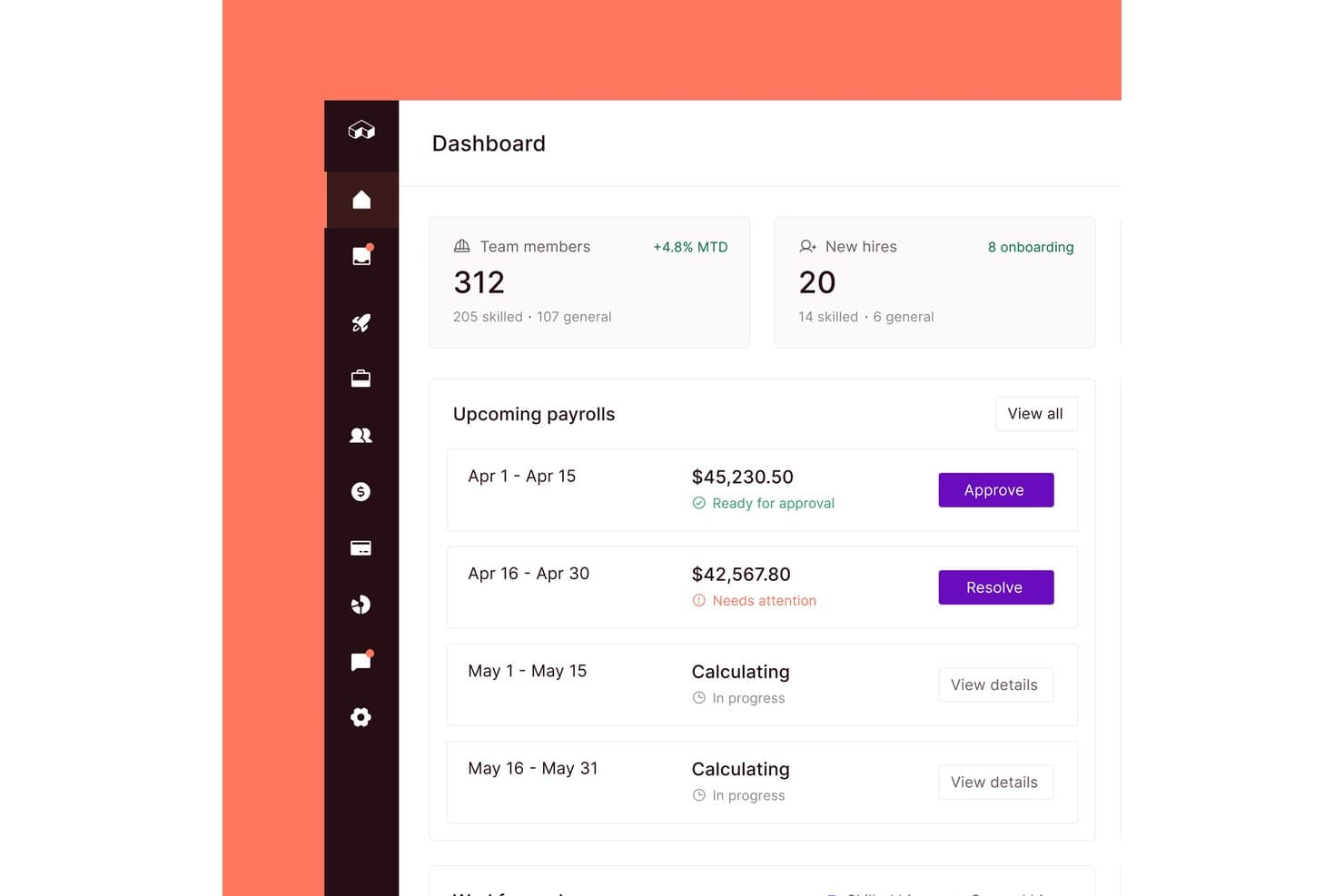
Miter centralizes payroll approvals and workforce tracking in one dashboard. Miter is a construction-focused HCM platform that unifies payroll, HR, benefits, recruiting, and field operations for contractors managing hourly crews, union rules, certified payroll, and job costing in one place.
Who Is Miter Best For?
Miter is built for construction contractors who need payroll, HR, and field operations in one place—especially those managing union crews, certified payroll, or prevailing wage requirements.
Why I Picked Miter
I picked Miter as one of the best because it's the only platform I've seen that ties field hours directly to job costs in real time, which is exactly what construction payroll teams need. When a crew clocks in on a jobsite, Miter assigns those hours to specific jobs and cost codes instantly, feeding fully burdened labor costs straight into your ERP. I also appreciate that it handles union fringes, prevailing wage, and certified payroll submissions to state portals automatically, cutting out the manual reporting work that bogs down construction HR teams.
Miter Key Features
- Digital onboarding: Collects new-hire forms, I-9s, and W-4s with electronic signatures on mobile or desktop.
- Benefits administration: Supports medical, dental, vision, 401(k), HSA/FSA, and more, with elections syncing directly to payroll deductions.
- Applicant tracking system: Manages candidates, posts jobs to Indeed and LinkedIn, and transfers accepted offers directly into onboarding.
- Multi-level time approvals: Routes timesheet entries through configurable approval chains before they're sent to payroll.
Miter Integrations
Miter offers native integrations with Sage Intacct, NetSuite, Acumatica, Procore, QuickBooks Online, QuickBooks Desktop, and Employee Navigator. It also supports custom integrations through a REST API and benefits connectivity through API and EDI feeds.
Pros and Cons
Pros:
- Payroll, benefits, and HR share one system
- Field hours feed job-cost calculations directly
- Certified payroll handles union and prevailing-wage rules
Cons:
- Mobile clock app crashes or loads slowly
- Time-entry mistakes can mean later corrections
Learn more about Miter: Best for unifying HR and payroll data
- Free demo available
- Pricing upon request
Visit WebsiteCustomer Rating:4.2/5
Dayforce gives employees a personalized HR hub for benefits and team management. Dayforce is an HCM platform built for midsize and larger organizations that want to manage payroll, HR, benefits, time, and talent from a single system with a shared employee record.
Who Is Dayforce Best For?
Dayforce fits midsize and larger organizations that want HR, payroll, benefits, time, and talent data unified in a single employee record.
Why I Picked Dayforce
I picked Dayforce as one of the best Paylocity competitors because of how completely it unifies HR and payroll data in a single employee record. What I appreciate most is that payroll calculates continuously as time is captured, so there's no waiting until a payroll run to spot a discrepancy. Pair that with over 300 pre-built reports and predictive flight-risk analytics, and you get a system that connects pay, time, and people decisions in one place rather than stitching data together from multiple tools.
Dayforce Key Features
- Talent management suite: Dayforce includes recruiting, onboarding, learning, performance management, succession planning, and career exploration tools in one platform.
- Demand-based scheduling: Automated scheduling uses business demand, labor budgets, and worker preferences to generate and adjust staff schedules.
- Earned wage access: Dayforce Wallet lets employees access earned wages before payday at no additional cost to employers.
- Benefits enrollment and carrier feeds: Employees can enroll in benefits through the platform or mobile app, with XML/834 and multi-carrier export feeds supported.
Dayforce Integrations
Dayforce supports more than 650 benefits-carrier-verified feeds through Dayforce Link, plus payroll connectors for Oracle HCM, SAP SuccessFactors, Workday, and NetSuite when purchased. It also offers Open APIs, OData, event services, and RESTful web services for custom integrations.
Pros and Cons
Pros:
- Mobile self-service covers pay, schedules, and benefits
- HR, benefits, and payroll share employee records
- Payroll updates continuously as time is captured
Cons:
- Report creation can require database knowledge
- Implementation often takes months and needs staff
Learn more about Dayforce: Best for customizable dashboards
- Free demo available
- From $55/month + $5/employee per pay period
Visit WebsiteCustomer Rating:4/5
PrimePay offers customizable dashboards with real-time payroll insights. CoAd Pay is a payroll and HR compliance platform that suits small to mid-sized businesses looking to automate tax filing, simplify pay runs, and give employees self-service access to their pay and time-off information.
Who Is CoAd Pay Best For?
CoAd Pay suits small to mid-sized businesses that want straightforward payroll automation with built-in HR compliance tools and don't need enterprise-level reporting depth.
Why I Picked PrimePay
I picked PrimePay as one of the best because I love how much control it gives you over your payroll dashboard view. The platform lets you tailor what you see and when, so if you're managing payroll across multiple pay schedules, you're not wading through irrelevant data to find what matters. I also appreciate that CoAd Quantum Mobile gives employees direct access to pay details and PTO without routing every request through HR.
CoAd Pay Key Features
- Automated payroll tax filing: CoAd Pay calculates, files, and remits federal and state payroll taxes on your behalf each pay period.
- Earned Wage Access: Employees can withdraw a portion of their earned wages before their scheduled payday.
- Mineral-powered HR compliance alerts: The platform sends location-based employment law alerts tailored by state, law type, and affected roles.
- Built-in learning management system: You can upload training content, assign courses, and track employee completion directly within the platform.
PrimePay Integrations
Integrations include QuickBooks, Xero, bswift, Employee Navigator, PlanSource, WEX, GetHired, and Workato. PrimePay’s API availability and most integration data flows aren’t documented.
Pros and Cons
Pros:
- Employee app shows pay details and PTO
- Approved time flows directly into payroll
- Payroll setup and runs praised as straightforward
Cons:
- Reports can be hard to find and customize
- Tax filing complaints raise compliance concerns
Learn more about PrimePay: Best for affordability for small businesses
- 30-day free trial + free demo available
- From $17/month
Visit WebsiteCustomer Rating:5/5
Patriot Software lets users review and manage employee time cards by pay period. Patriot Payroll is a straightforward payroll solution built for small U.S.-based businesses that need affordable, no-frills payroll processing, tax filing, and basic HR tools without the complexity of enterprise-grade platforms.
Who Is Patriot Software Best For?
Patriot Payroll is a strong fit for small business owners and payroll administrators who need straightforward, affordable U.S. payroll without the complexity of enterprise HR platforms.
Why I Picked Patriot Software
I picked Patriot Software as one of the best Paylocity competitors because it's the most affordable full-service payroll option I've found for small U.S. businesses. The Full Service Payroll plan handles federal, state, and local tax collection, filing, and remittance automatically, including year-end W-2 and W-3 filings, backed by a tax-filing reliability guarantee. With auto payroll, unlimited payroll runs, and contractor payments all included from $17/month, it covers the core payroll needs of a lean team without the enterprise price tag.
Patriot Software Key Features
- Employee self-onboarding: New W-2 hires can enter their personal details, federal W-4 information, and direct-deposit data directly through the portal.
- Multi-state payroll support: Full Service Payroll files and deposits payroll taxes across multiple states, with each additional state available for $12/month.
- Time and Attendance add-on: Employees can clock in and out via the My Patriot mobile app, with custom overtime rules and direct hour imports into payroll.
- HR software add-on: Provides paperless employee files, document management, employee information tracking, and manager and direct-report assignments.
Patriot Software Integrations
Patriot Software offers native integrations with QuickBooks Online, QuickBooks Desktop, Patriot Accounting, SimplyInsured, Vestwell, and ERGO NEXT Insurance. An API and total integration count aren’t clearly documented, so it offers a smaller connectivity set than Paylocity.
Pros and Cons
Pros:
- Reviewers praise patient setup support
- Full service tax handling earns praise
- AutoPay and weekly payroll earn praise
Cons:
- No recruiting, performance, or learning suite
- Reports can require multiple tax views
Learn more about Patriot Software:

Gusto lets users review employee hours and pay before processing payroll. Gusto is a payroll and HR platform built for small and midsize businesses that want to pay employees and contractors, manage benefits, and handle tax filings without the complexity of enterprise-grade systems.
Who Is Gusto Best For?
Gusto is a strong fit for small and midsize businesses that pay a mix of W-2 employees and contractors and want payroll, benefits, and HR in one place without a long-term contract.
Why I Picked Gusto
I picked Gusto as one of the best Paylocity competitors because it handles W-2 employees and contractors in a single payroll run without any extra setup. I especially like that domestic contractor payments are built into every plan, and global contractor payments are available as an add-on covering 100-plus countries, so my team can pay a freelancer in Vietnam the same week we run standard payroll.
Gusto Key Features
- Payroll on AutoPilot: Automatically runs payroll on a set schedule without requiring manual initiation each pay period.
- Multi-state payroll: Processes payroll across multiple states, available on Plus and Premium plans.
- Customizable reporting: Builds and schedules custom payroll, employee, and time reports with configurable columns, filters, and date ranges.
- On-demand pay: Lets employees access earned wages before payday through Clair, managed directly from the Gusto dashboard.
Gusto Integrations
Gusto lists 154 marketplace integrations, including QuickBooks, QuickBooks Desktop, Xero, Checkr, ApplicantPro, Ashby, and 15Five. Gusto Embedded also offers a RESTful payroll API with OAuth2, a React SDK, and pre-built Flows for custom integrations.
Pros and Cons
Pros:
- Routine payroll runs need fewer steps
- Employees access pay records without HR
- Pays employees and contractors together
Cons:
- Tax filing concerns and slow support
- Less analytics depth than Paylocity
Learn more about Gusto:
Diğer Paylocity Alternatifleri
Kısa listeme giremeyen ancak yine de göz atmaya değer bazı ek Paylocity alternatifleri şunlardır:
- 11RipplingBest for complex HR and IT needs
- 12Keka HRBest for unified payroll and performance reviews
- 13Papaya GlobalBest for global payroll management
- 14Paychex FlexBest for scalability across business sizes
- 15HomebaseBest for hourly team management
- 16PaycorBest for niche payroll needs
- 17ADP Workforce NowBest for automated compliance monitoring
- 18BambooHRBest for multi-state payroll simplicity
- 19Sage HRBest for small business HR needs
- 20ArcoroBest for construction industry compliance
How I Evaluate Paylocity Competitors
I split my evaluation into baseline must-haves—payroll, HRIS, and benefits admin—and the differentiators, like analytics depth and implementation support, that determine real-world fit.
Core Functionality (Table Stakes For This List)
When I'm selecting tools for my list, I rank each one on a scale from 0 (does not offer the functionality) to 5 (excels in this area) for each core functionality listed below. Then, I calculate the tool's total score into a percentage. Each tool needs to achieve a minimum total score of 75% to be considered for inclusion.
- Payroll Processing: I evaluate whether each platform handles automated tax calculations and filings across multiple jurisdictions, plus direct deposit and garnishment support.
- Core HR & Employee Records: A centralized HRIS should store employee data, documents, and org charts so your team can pull records and run reports without digging through spreadsheets.
- Benefits Administration: I check for open enrollment workflows, carrier integrations, and ACA tracking—areas where platforms like Gusto and Rippling take notably different approaches.
- Time & Attendance: Each tool should sync time tracking, PTO balances, and scheduling directly into payroll so managers aren't manually reconciling hours before every pay run.
- Onboarding & Offboarding: I look for automated workflows that handle e-signatures, tax form collection, and task assignments to get new hires set up before day one.
- Employee Self-Service: Your employees should be able to view pay stubs, update personal info, and submit PTO requests from a mobile app without filing a ticket to HR.
Once I have a list of tools that meet this criteria, I consider what sets each platform apart.
Differentiating Factors (What Sets Vendors Apart)
Here's how I compare and contrast different vendors:
Standout Features
Built-in recruiting and applicant tracking is a big differentiator because it lets your team move a candidate from job posting to onboarded employee without switching systems. I also evaluate HR analytics and reporting depth—platforms that offer turnover predictions or DEI dashboards give people ops leaders data they can actually act on. Employee engagement tools like pulse surveys and peer recognition are worth weighing too, especially for teams trying to reduce attrition across distributed workforces.
Beyond Features
I look closely at implementation and onboarding support because migrating payroll data mid-year can derail a team if the vendor doesn't assign a dedicated specialist. Integration ecosystems matter just as much—your HCM platform needs to connect with your accounting software, 401(k) providers, and background check services without custom development. Pricing transparency is another factor I weigh heavily. Some vendors publish per-employee-per-month rates while others require custom quotes, which makes it harder to forecast total cost as your headcount grows.
Paylocity Temel Özellikleri
Alternatif çözümlerin sunduklarını karşılaştırmanıza yardımcı olmak için Paylocity'nin temel özelliklerinden bazıları şunlardır:
- Bordro yönetimi: Zamanında ve doğru ödemeler yapılmasını sağlamak için bordro işlemlerini otomatikleştirir.
- Zaman takibi: Ekibinizin işe giriş ve çıkış yapmasına, çalışılan saatleri takip etmesine ve izin taleplerini yönetmesine olanak tanır.
- Yan haklar yönetimi: Sağlık sigortası ve emeklilik planları da dahil olmak üzere çalışan yan haklarını tek bir platformda yönetir.
- Çalışan self servis hizmeti: Çalışanların kişisel bilgilerine erişip bunları güncellemesini ve maaş bordrolarını görüntülemesini sağlar.
- Vergi beyannamesi işlemleri: Ekibinizin vergileri doğru şekilde yönetmesine ve beyan etmesine yardımcı olarak uyumluluk risklerini azaltır.
- Gider yönetimi: Daha iyi finansal denetim için çalışan giderlerinin takibini ve onaylanmasını kolaylaştırır.
- Ücret yönetimi: Çalışan maaşlarını ve primlerini etkili bir şekilde yönetmenize olanak tanır.
- Performans yönetimi: Verimliliği artırmak için çalışan hedefleri belirlemeyi ve performans değerlendirmeleri yapmayı destekler.
- İşe alıştırma: Dijital formlar ve kontrol listeleriyle yeni çalışanları kuruluşunuza dahil etme sürecini kolaylaştırır.
- İK analitiği: İş gücü verileri hakkında içgörüler sunarak bilinçli İK kararları almanıza yardımcı olur.
Paylocity'nin bordro ve İK özellikleri hakkında daha fazla bilgi edinmek isterseniz, sonraki adımda Paylocity hakkındaki ayrıntılı incelememizi okuyun.