

En iyi çalışan yönetim sistemleri tüm İK süreçlerinizi bir araya getirir; böylece verileri merkezileştirebilir, idari görevleri otomatikleştirebilir ve ekibinize daha sorunsuz, daha bağlantılı bir deneyim sunabilirsiniz.
Çalışan bilgileri birden fazla elektronik tabloya ve araca dağıldığında, bu durum hem İK hem de personel için verimsizliklere, hatalara ve hayal kırıklıklarına yol açar. Doğru sistem, işe alıştırma ve devam takibinden performans değerlendirmelerine ve bordroya kadar her şeyi kolaylaştırarak sizi tekrarlayan idari işlerden kurtarır.
Onlarca platformu test ettikten sonra sezgisel, ölçeklenebilir ve İK operasyonlarınızı kolaylaştırmak için tasarlanmış en iyi çalışan yönetim sistemlerini belirledim. Bu rehberde organizasyonu iyileştiren, iletişimi güçlendiren ve işletmeniz büyürken ekibinizi destekleyen çözümleri bulacaksınız.
Why Trust Our Software Recommendations
6,700+
Reviews
20
Industry experts
16+
Evaluation factors
14
Years
Our team has been testing and reviewing software since 2012. As HR experts ourselves, we know how difficult—and important—it is to choose the right software.
For this guide, we evaluated tools using hands-on testing and independent research, scoring tools using our selection criteria. We also draw on insights from industry thought leaders and practicing HR experts.
Our reviews reflect our human editorial judgment, not a sales pitch.
Expert reviewers:
- Phil GrayCOO
 Kim BehnkeHR Tech Editor & Analyst
 Josh BarkerPeople Ops Manager

Çalışan Yönetim Sistemleri Karşılaştırma Tablosu
Bu karşılaştırma tablosu, en iyi çalışan yönetimi yazılımı seçimlerimin fiyatlandırma ayrıntılarını özetlemektedir.
Sorted by: Default
| Tool | Starting Price | Website | |
|---|---|---|---|
Best with integrated time tracking for payroll | 4.6 out of 5 | $79/user/month Free demo available | Book Demo |
Best as AI for business | 4.4 out of 5 | $8/user/month Free trial + Free demo available | Website |
Best for managing employees and contractors | 4.8 out of 5 | $5/user/month Free demo available | Website |
Best for small and mid-sized businesses | 4.6 out of 5 | $49/month Free trial + free demo available | Book Demo |
Best for performance management compliance | 4.3 out of 5 | Pricing upon request Free demo available | Website |
Best for mobile workforce coordination | 4.6 out of 5 | Pricing upon request Free plan + 14-day free trial available | Website |
Best with AI-powered project risk detection | 4.6 out of 5 | $9/user/month Free plan + 14-day trial available | Book Demo |
Best for payroll and benefits integration | 4.3 out of 5 | Pricing upon request Free demo available | Website |
Best for global teams | 4.5 out of 5 | $199/user/month Free plan + free demo available | Website |
Best for hourly staff scheduling | 4.2 out of 5 | $99/month Free plan + 30-day free trial + free demo available | Website |


En İyi Çalışan Yönetim Sistemi İncelemeleri
En iyi çalışan yönetim sistemleri arasından ayrıntılı özetlerim burada en iyi 10 listeme giren sistemler; bunları neden seçtiğime dair notlar da dahil. Her inceleme, size en uygun aracı bulmanıza yardımcı olmak için her sistemin temel özelliklerine, artılarına ve eksilerine, entegrasyonlarına ve ideal kullanım alanlarına ayrıntılı bir bakış sunar.
 Best with integrated time tracking for payroll
- Free demo available
- From $79/user/month
Visit WebsiteCustomer Rating:4.6/5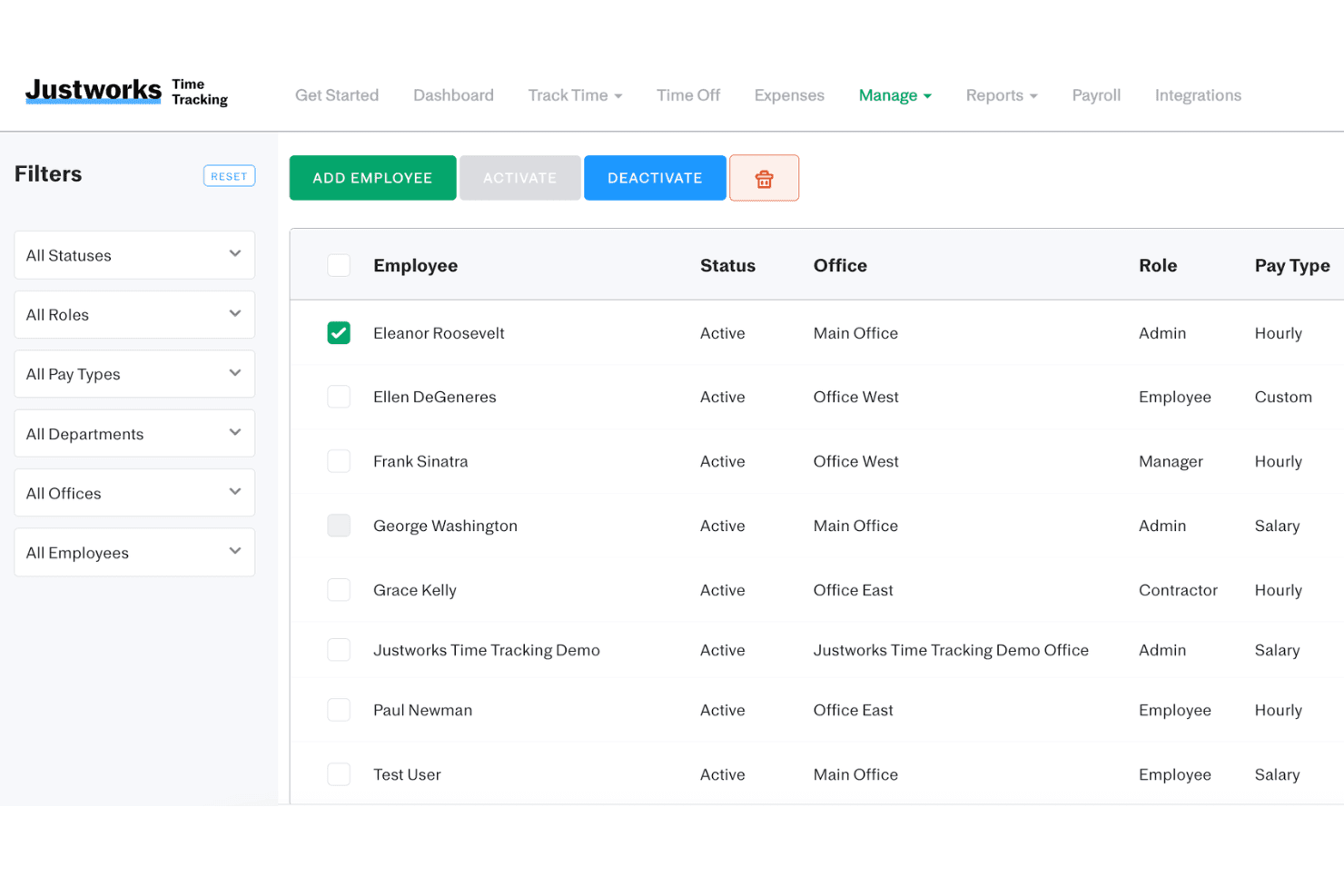
Justworks Time Tracking offers an employee management interface where admins can view, filter, activate, or deactivate employees by status, role, pay type, and office. Justworks is a cloud-based employee management system that combines payroll, benefits administration, HR support, compliance tools, and time tracking in one platform. It helps small and growing businesses centralize essential workforce processes while reducing manual administrative work.
Who Is Justworks Best For?
Small and growing businesses looking for an all-in-one HR, payroll, benefits, and compliance platform with integrated time tracking.
Why I Picked Justworks
I picked Justworks because its time tracking tools connect employee hours directly with payroll, reducing manual data entry between systems. Employees can record their hours, while administrators can review timesheets and use approved data when processing payroll. The platform also combines payroll tax administration, benefits management, employee records, and HR support in one place. This makes it easier for small businesses to manage essential workforce processes without maintaining several disconnected systems. Its compliance resources and access to HR guidance are particularly useful for teams without a large internal HR department.
Justworks Key Features
- Benefits administration: Manages employee access to medical, dental, vision, retirement, and wellness benefits within one platform
- HR consulting: Provides access to HR professionals who can advise businesses on policies, employee relations, and compliance matters
- Automated tax filings: Automates payroll tax withholding, reporting, remittance, and annual filings such as W-2s and 1099s
- Custom reporting: Creates customizable reports covering payroll, benefits, employee records, taxes, and workforce data
Justworks Integrations
Integrations include QuickBooks, NetSuite, Xero, Sage Intacct, Greenhouse Recruiting, JazzHR, Lever, 15Five, Culture Amp, and Leapsome.
Pros and Cons
Pros:
- Offers nationwide health benefits management
- Live HR compliance support available anytime
- Seamless time tracking linked to payroll
Cons:
- Health benefit options can be costly
- Limited native integrations with other tools
Learn more about Justworks: Best as AI for business
- Free trial + Free demo available
- From $8/user/month
Visit WebsiteCustomer Rating:4.4/5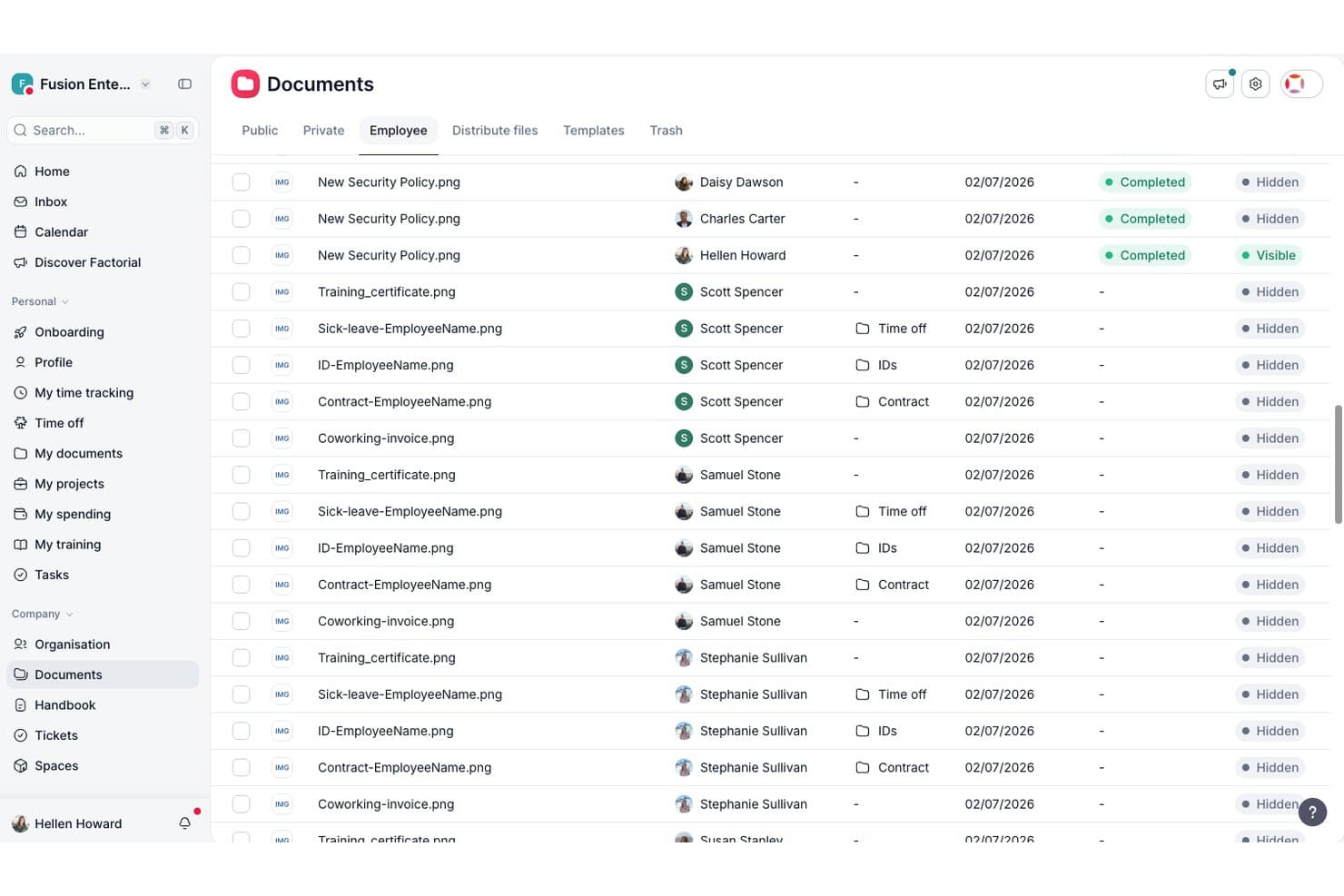
Factorial centralizes employee documents with visibility controls. Factorial is an AI-powered employee management platform that covers time tracking, shift scheduling, leave management, performance reviews, and workforce analytics.
Who Is Factorial Best For?
Factorial is a strong fit for small and mid-sized businesses that want a single platform to handle time tracking, leave management, and shift scheduling without needing a large HR team.
Why I Picked Factorial
I picked Factorial as one of the best because it positions itself as an AI for business, meaning it doesn't just store HR data—it actively helps with day-to-day operations like planning timetables, generating reports, and answering employee questions about policies. I find its leave management particularly strong, with accrual rules, carryover limits, and blackout dates all configurable in one place. Its shift scheduling with drag-and-drop tools and built-in conflict detection keeps managers from publishing broken schedules.
Factorial Key Features
- Mobile time clock: Employees can clock in and out from the Factorial app using one-tap entry, QR code scanning, or offline mode on iOS and Android.
- Geofencing for time tracking: Location-based boundaries can restrict clock-ins to approved worksites, so only on-site hours get logged.
- Time-off policy configuration: Admins can set up policies with accrual rules, carryover limits, custom absence types, and blackout dates based on location or contract type.
- Shift swap requests: Employees can request shift swaps directly through the mobile app, keeping schedule changes visible and traceable without manager intervention.
Factorial Integrations
Marketplace integrations include Google Workspace, Slack, Microsoft Azure, Microsoft Power BI, Okta, LinkedIn, Recruitee, and payroll tools such as DATEV LODAS. Factorial also offers an API and Zapier.
Pros and Cons
Pros:
- Employee documents reduce routine HR requests
- Mobile clock-ins support distributed teams
- Leave balances and approvals stay centralized
Cons:
- Complex workflows may require workarounds
- Custom reporting options can feel limited
 Best for managing employees and contractors
- Free demo available
- From $5/user/month
Visit WebsiteCustomer Rating:4.8/5
Deel’s self-service platform gives users powerful management features without having to switch tools. Deel HR gives HR teams and business leaders a single platform to manage global employees and contractors, automate onboarding, handle payroll, and stay compliant across multiple countries.
Who Is Deel HR Best For?
Deel HR is a strong fit for globally distributed companies that need one system to manage both full-time employees and contractors across multiple countries.
Why I Picked Deel HR
I shortlisted Deel HR because it handles both full-time employees and contractors in a single, unified HRIS. Worker classification is built directly into the hiring flow: you choose whether someone is an employee or contractor at the point of hire, and the platform generates the appropriate localized contract. The AI-powered misclassification assessment evaluates contractor relationships across 150+ countries, reducing much of the legal guesswork when your workforce spans multiple regions.
Deel HR Key Features
- Workforce planning: Forecast headcount, roles, and costs using live workforce and hiring data instead of spreadsheets.
- Applicant tracking system (ATS): Source candidates automatically, manage interviews and offers, then move directly into onboarding.
- Performance and engagement tools: Run performance reviews, set goals, build learning paths, and measure employee engagement in one system.
- Anonymous reporting: Built-in whistleblowing tools let employees raise concerns securely, supporting compliant and transparent HR practices.
Deel HR Integrations
Integrations include FaceUp, Snowflake, DefensX, Microsoft Finance, Kintsugi, ReFresh OS, Revo.ai, Keeper, Human Interest, and Everyminute.
Pros and Cons
Pros:
- Multi-currency payroll simplifies global payment processes
- Built-in HR tools reduce reliance on multiple systems
- Managed by 200+ local legal and tax compliance experts
Cons:
- Overlapping plan features require custom pricing
- No free trial available
 Best for small and mid-sized businesses
- Free trial + free demo available
- From $49/month
Visit WebsiteCustomer Rating:4.6/5
Gusto’s full service payroll service makes it easy to process payroll no matter where your workforce is located. Gusto is an all-in-one employee management platform designed for small and mid-sized businesses that need payroll, benefits, and HR tools to simplify hiring, onboarding, and compliance.
Who Is Gusto Best For?
Gusto is a great fit for small and mid-sized businesses that want a single platform to handle payroll, HR, and benefits without needing a dedicated HR team.
Why I Picked Gusto
Gusto earns its spot on my shortlist because it packages payroll, onboarding, and benefits into one platform that works for small and mid-sized businesses without requiring a full HR department to run it. I like how Gusto's automated payroll handles federal, state, and local tax filings, removing a major compliance burden for lean teams. The onboarding tools let new hires complete paperwork, set up direct deposit, and enroll in benefits before their first day. For growing businesses without dedicated HR staff, this self-service setup saves time.
Gusto Key Features
- Time tracking: Employees can log hours directly in Gusto, with data that syncs automatically to payroll.
- PTO management: Set custom PTO policies, automate accruals, and let employees submit time-off requests from their self-service portal.
- Benefits administration: Manage health, dental, vision, and 401(k) plans from a single dashboard without third-party brokers.
- HR reporting: Generate reports on headcount, compensation, and workforce trends to support people decisions.
Gusto Integrations
Integrations include QuickBooks, Xero, FreshBooks, 7Shifts, Asana, Bench, Box, Aplos, Betterment at Work, and Checkr.
Pros and Cons
Pros:
- Payroll, benefits, and HR in one unified platform.
- Automatic tax filings and direct deposit simplify payroll compliance.
- Employee self-service portal empowers staff to access pay and forms.
Cons:
- Per-person pricing can get expensive as team grows.
- SMBs that need advanced compliance or niche industry-specific HR modules may find Gusto limiting.
 Best for performance management compliance
- Free demo available
- Pricing upon request
Visit WebsiteCustomer Rating:4.3/5
Trakstar's self-review feature enables employees to assess their own performance, fostering self-awareness and growth. Organizations with strict compliance needs often look to Mitratech Perform for performance management that aligns with regulatory standards. This platform is designed for HR teams and compliance officers in highly regulated industries who need to document, track, and audit employee performance processes. Mitratech Perform helps reduce compliance risk by centralizing performance reviews, approvals, and documentation in one secure system.
Who is Mitratech Perform Best For?
Mitratech Perform is suited for HR and compliance leaders in regulated mid-sized to enterprise organizations. It supports companies aligning performance management with governance requirements.
Why I Picked Mitratech Perform
When compliance is a top priority in performance management, Mitratech Perform stands out for its focus on auditability and regulatory alignment. I picked this tool because it lets HR teams create, track, and store performance reviews with built-in controls for approvals and documentation, which is essential for regulated industries. The platform also supports automated workflows that ensure every step of the review process is logged and traceable. If your organization faces strict compliance requirements, Mitratech Perform helps you manage employee performance while maintaining a clear audit trail.
Mitratech Perform Key Features
In addition to its compliance-focused workflows, I also found these features valuable:
Customizable forms: Build and tailor performance review forms to fit your organization’s needs.
Role-based access controls: Set permissions for users based on their job function or department.
Automated notifications: Trigger reminders for review deadlines and required actions.
Reporting dashboard: Visualize performance data and track review completion rates.
Mitratech Perform Integrations
Native integrations are not currently listed by Mitratech Perform.
Pros and Cons
Pros:
- Robust reporting and analytics
- Customizable appraisal templates
- Comprehensive performance management
Cons:
- May not be cost-effective for small biz
- Learning curve for advanced features
Learn more about Mitratech Perform: Best for mobile workforce coordination
- Free plan + 14-day free trial available
- Pricing upon request
Visit WebsiteCustomer Rating:4.6/5
Connecteam is designed for remote employee management and includes job scheduling, task management, time sheets, and more. Connecteam is built for businesses managing deskless or mobile teams who need to coordinate schedules, tasks, and communication on the go. It’s especially useful for industries like retail, hospitality, construction, and field services where employees rarely sit at a desk. With Connecteam, managers can handle time tracking, shift planning, and real-time updates all from a single mobile app.
Who is Connecteam Best For?
Connecteam is designed for operations managers in small to mid-sized organizations with mobile or deskless staff. It supports companies coordinating scheduling and communication across frontline teams.
Why I Picked Connecteam
Coordinating a mobile workforce brings unique challenges that Connecteam is designed to address. I picked this tool because it offers a mobile-first platform where managers can assign shifts, track attendance, and communicate instantly with employees in the field. The built-in GPS time clock helps verify employee locations during clock-in and clock-out, which is especially useful for distributed teams. For organizations with staff who are always on the move, Connecteam brings scheduling, task management, and communication together in one app.
Connecteam Key Features
Some other features that make Connecteam stand out include:
Digital forms and checklists: Create and distribute custom forms for safety checks, inspections, or daily reports.
Employee directory: Give your team instant access to contact details for coworkers and managers.
Training modules: Deliver onboarding and ongoing training directly through the mobile app.
Surveys and polls: Collect feedback from employees with built-in survey and poll tools.
Connecteam Integrations
Integrations include Gusto, QuickBooks, Paychex, Xero, Lightspeed, Wix Bookings, Square, BambooHR, PrismHR, and ADP.
Pros and Cons
Pros:
- Automatic end-of-shift reports help your team save time
- User-friendly mobile app
- Automatic end-of-shift reports save you time
Cons:
- Customization can be time-consuming
- Limited sub-tasks in Basic and Advanced plans
Learn more about Connecteam: Best with AI-powered project risk detection
- Free plan + 14-day trial available
- From $9/user/month (billed annually)
Visit WebsiteCustomer Rating:4.6/5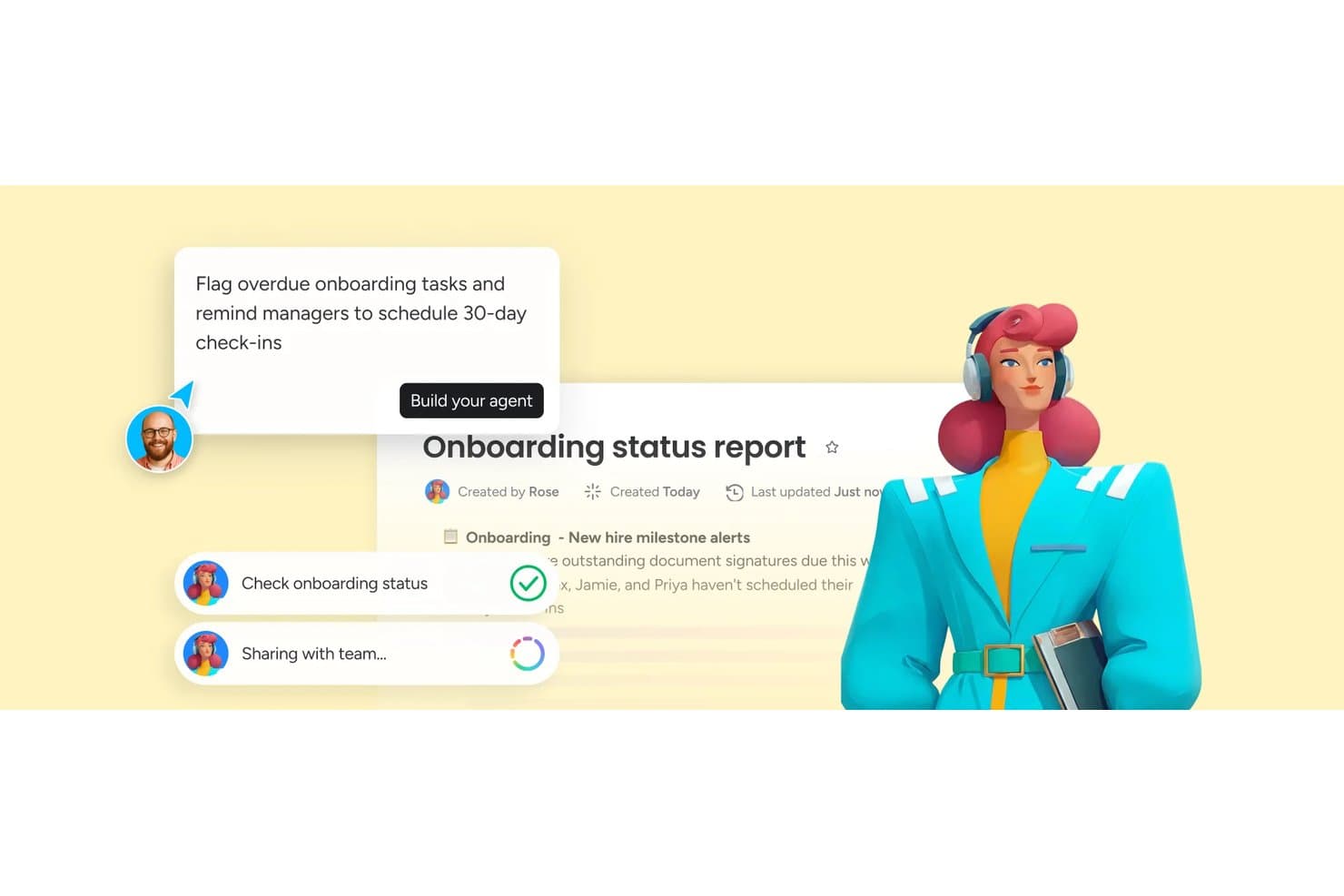
monday AI Workspace offers an AI agent builder that automates onboarding task monitoring and manager reminders, with real-time status reports shared across teams. monday AI Workspace is a configurable work management platform that lets teams build employee lifecycle workflows — including onboarding, offboarding, task tracking, and HR request management — on a shared, AI-powered canvas.
Who Is monday AI Workspace Best For?
It's a strong fit for small to mid-sized teams that need flexible, customizable workflows to manage people operations alongside broader cross-functional work.
Why I Picked monday AI Workspace
monday AI Workspace earns its spot on my shortlist because of how its AI risk detection applies directly to people-heavy workflows. When I'm running onboarding projects across multiple new hires at once, the AI flags dependency conflicts and timeline risks before they derail the process. I also like that it pairs this with smart resource allocation, surfacing which team members are overloaded so I can reassign tasks before bottlenecks build up.
monday AI Workspace Key Features
- Customizable HR boards: Build and adjust boards to manage employee requests, documents, and records.
- Role-based access control: Set permissions for users, admins, and managers to secure sensitive HR information.
- Automated reminders: Configure rule-based alerts for document submissions, onboarding tasks, or HR deadlines.
- Native integrations: Connect with payroll, calendar, and communication platforms to sync employee-related workflows.
monday AI Workspace Integrations
monday AI Workspace offers hundreds of native integrations through its built-in integrations and marketplace, including Slack, Salesforce, HubSpot, Google Workspace, Microsoft 365, Zoom, DocuSign, Zendesk, Trello, and Asana. It also supports Zapier and provides an API for custom integrations.
Pros and Cons
Pros:
- Automates employee lifecycle task assignments
- Boards adapt to any HR process
- AI flags HR workflow risks proactively
Cons:
- Not purpose-built for HR teams
- No built-in payroll or benefits management
Learn more about monday AI Workspace: Best for payroll and benefits integration
- Free demo available
- Pricing upon request
Visit WebsiteCustomer Rating:4.3/5
Paylocity offers a self-service portal for employees to manage their personal data, view pay stubs, and request time off. Paylocity is a cloud-based employee management platform designed for HR teams and business leaders who want to centralize payroll, benefits, time tracking, and employee engagement in one system.
Who Is Paylocity Best For?
Paylocity is a strong fit for mid-sized businesses that need a unified HR platform to manage payroll, benefits, and workforce operations without juggling multiple systems.
Why I Picked Paylocity
Paylocity earns its spot on my shortlist because of how tightly its payroll and benefits features work together in a single system. I love that benefit deductions flow directly into payroll without any manual data entry—eligibility changes update automatically, and carrier integrations handle EDI file generation so my team isn't chasing down errors before a pay run. The Payroll Readiness Dashboard is genuinely useful too: it surfaces flagged issues like unexpected pay spikes before you process, which means fewer corrections after the fact. On the benefits side, the Benefits Decision Support tool gives employees personalized plan recommendations during open enrollment, which cuts down on the "which plan should I pick?" questions that tend to flood HR inboxes every fall.
Paylocity Key Features
- Time and attendance tracking: Log hours, manage schedules, and track overtime directly within the platform using time clocks, mobile punch-in, or web entry.
- Performance management: Set goals, run review cycles, and collect continuous feedback through structured templates built into the employee record.
- Onboarding workflows: Automate new hire paperwork, task assignments, and e-signatures so employees can complete onboarding steps before their first day.
- Employee self-service portal: Let employees view pay stubs, request time off, update personal information, and access HR documents without contacting HR directly.
Paylocity Integrations
Integrations include Microsoft Entra, Google Workspace, and Okta. An API is also available for custom integrations.
Pros and Cons
Pros:
- Includes performance management features
- On demand payment options
- Includes tax compliance services
Cons:
- Lacks support for independent contractor payments
- Setup can be time consuming
 Best for global teams
- Free plan + free demo available
- From $199/user/month
Visit WebsiteCustomer Rating:4.5/5
Browse through your entire team and easily filter by contractors, employees, and new hires. RemoFirst helps companies managing employees and contractors across multiple countries, enabling HR teams to handle international payroll, compliance, and onboarding from a single platform.
Who Is RemoFirst Best For?
RemoFirst is a strong fit for HR teams at small to mid-sized companies that are hiring or scaling across international markets.
Why I Picked RemoFirst
RemoFirst is on my shortlist because it simplifies managing a global team. I like how the platform handles multi-country payroll in a single aggregated payment, so my team isn't juggling dozens of individual transactions across currencies. The localized onboarding and contract management also stand out—RemoFirst generates employment contracts that align with each country's labor laws, allowing me to onboard international hires in days rather than weeks. The compliant offboarding feature covers country-specific notice periods and final payouts, reducing legal guesswork when a global hire exits.
RemoFirst Key Features
- Workforce management: Manage time off, bonuses, and benefits for international employees according to each country's local labor laws.
- Visa and immigration support: Handle work permits and visa applications for employees across 85+ countries directly through the platform.
- Background checks: Run global background screening on international hires to verify identity and maintain hiring compliance.
- Equipment delivery: Arrange laptop and hardware delivery to remote employees in international locations through the platform.
RemoFirst Integrations
Native integrations are not currently listed.
Pros and Cons
Pros:
- Compliance issues are handled by local experts around the world
- Fast and responsive customer service
- EOR services available in 150+ countries
Cons:
- No mobile app
- Lacks extensive integrations
 10Best for hourly staff scheduling
Homebase
- Free plan + 30-day free trial + free demo available
- From $99/month (billed annually)
Visit WebsiteCustomer Rating:4.2/5
Homebase allows you to store digital documents for your employees in one centralized place. Homebase is an employee management platform designed for small businesses and teams that need to handle scheduling, time tracking, and team communication, helping owners and managers simplify workforce management and reduce administrative headaches.
Who Is Homebase Best For?
Homebase is a great fit for small businesses in retail, hospitality, and food service that manage hourly workers across one or more locations.
Why I Picked Homebase
Homebase is one of the best on my shortlist because it handles the specific chaos of managing hourly workers. I love that the auto-scheduling feature pulls in each employee's availability and time-off requests, so I'm not cross-referencing spreadsheets or chasing down texts before I build the week's schedule. A standout feature is the sales forecast integration—Homebase connects with your POS system to show you projected sales alongside your labor costs in real time, so you can staff a Friday night rush without accidentally blowing your labor budget. I also rely on the shift reminder notifications, which automatically text employees before their shifts start and alert me if someone is late to clock in.
Homebase Key Features
- Applicant tracking system: Track all candidates from multiple job boards in one hiring dashboard, with screener questions to identify the best fits.
- Self-onboarding tools: Send new hires a digital welcome packet with W-4, I-9, W-9, and direct deposit forms to e-sign before their first day.
- PTO and time-off controls: Set rules for time-off requests and blackout dates, with employee availability tracked directly in the platform.
- Built-in team messaging: Send direct messages or group announcements to your team within the app, separate from personal messaging apps.
Homebase Integrations
Integrations include Square, Toast, Clover, Shopify, QuickBooks Online, Gusto, ADP RUN, Paychex, Rippling, and Restaurant365.
Diğer Çalışan Yönetim Sistemleri
En iyi çalışan yönetimi yazılımı listesine giremeyen birkaç seçenek daha burada. Yararlı İK sistemleri için ek önerilere ihtiyacınız varsa bunlara göz atın:
- 11Express EvaluationsBest for customizable evaluation forms
- 12HiBobBest for automated onboarding workflows
- 13SloneekBest for digital document management
- 14TalentHRBest with built-in optional AI for HR tasks
- 15VeriatoBest for employee activity monitoring
- 16LatticeBest for performance-related feedback
- 17GoCoBest for employee self-service
- 18EddyBest for local business HR need
- 19edaysBest for absence and leave tracking
- 20WorkleapBest for employee engagement insights
- 21ChartHopBest for unified people data
- 22InspireBest for goal alignment tracking
- 23Kissflow WorkflowBest for workflow automation flexibility
- 24eloomiBest for learning and development tools
- 25Mitratech TalentReefBest for high-volume hourly hiring
- 26BullhornBest for staffing agency operations
- 27TrinetBest for PEO and HR outsourcing
- 28SAP SuccessFactorsBest for enterprise HR integration
- 29Insperity Best for HR support services
- 30SyncHRBest for unified HR and payroll data
- 31RipplingBest for unified workforce automation
- 32Buddy PunchBest for simple time clock solutions
- 33MonitaskBest for software usage tracking
- 34LeapsomeBest for continuous feedback cycles
- 35Peoplebox.aiBest for OKR and performance tracking
- 36TimeTrexBest for integrated time and attendance
- 37PaycorBest for scalable payroll solutions
- 38BambooHRBest for onboarding, performance, and payroll
- 39RemoteBest for global hiring compliance
- 4015FiveBest for employee feedback and recognition
İlgili İK Yazılımı İncelemeleri
Aradığınızı hâlâ burada bulamadıysanız test edip değerlendirdiğimiz şu diğer ilgili araçlara göz atın:
- İK Yazılımı
- Bordro Yazılımı
- İşe Alım Yazılımı
- Kayıtlı İşveren Hizmetleri
- Aday Takip Sistemleri
- İşgücü Yönetimi Yazılımı
How I Evaluate Employee Management Systems
My evaluation has two layers: the core capabilities a platform must cover—think onboarding workflows and PTO tracking—and the differentiators that determine which tool actually fits your team.
Core Functionality (Table Stakes For This List)
When I'm selecting tools for my list, I rank each one on a scale from 0 (does not offer the functionality) to 5 (excels in this area) for each core functionality listed below. Then, I calculate the tool's total score into a percentage. Each tool needs to achieve a minimum total score of 75% to be considered for inclusion.
- Employee Database & Records: I look for a centralized repository where you can store job history, compensation details, documents, and custom fields—so you're not digging through spreadsheets when a manager asks for a headcount breakdown by department.
- Onboarding & Offboarding Workflows: Each tool should support structured task sequences for new hires and departures, including document collection, e-signatures, and role-based assignments that keep IT, payroll, and the hiring manager in sync.
- Time & Attendance Tracking: I evaluate how the platform handles PTO requests, leave accruals, and approval chains—especially whether it supports multiple leave types like parental leave, sick days, and regional holidays without manual workarounds.
- Performance Management Tools: Review cycles, goal tracking, and feedback channels all factor in here. I check whether the tool supports formats like 360 reviews or OKRs, and how configurable the review cadence and templates are.
- Compliance & HR Reporting: Strong platforms offer prebuilt and customizable reports covering metrics like turnover rate, headcount trends, and EEO data, plus audit logs that make it easy to pull records during a compliance review.
- Employee Self-Service Portal: I look for a portal where employees can update personal info, request time off, and access pay stubs or company policies on their own—reducing the volume of routine HR inbox requests.
Once I have a list of tools that meet the criteria, I consider what sets each platform apart.
Differentiating Factors (What Sets Vendors Apart)
Here's how I compare and contrast different vendors:
Standout Features
Payroll integration is a big one—I check whether a platform can sync hours, deductions, and tax data directly to payroll without CSV exports. For teams spread across multiple countries, global support matters too, including localized tax rules, multi-currency pay, and language options. I also evaluate employee engagement tools like pulse surveys and peer recognition, since they turn a system of record into something your people actually interact with beyond submitting PTO requests.
Beyond Features
Integration ecosystem is something I always evaluate—your employee management system needs to connect to your ATS, payroll, and tools like Slack or Microsoft Teams without manual workarounds. I also look at compliance and data security, including certifications like SOC 2 Type II and role-based access controls that protect sensitive employee records. Pricing transparency matters just as much; I check whether vendors clearly disclose per-employee costs and whether implementation, support tiers, or add-on modules carry hidden fees that inflate your total cost of ownership.

uzman ipucu
Çalışan yönetim sistemlerini değerlendirirken, öncelikle temel İK sorunlarınızı belirleyin. Bordro, mevzuata uyum ve çalışan kayıtları gibi temel ihtiyaçları karşılayan araçları arayın. Bu temeller sağlam değilse, işletmenizi büyütürken diğer her şeyi yönetmek daha zor hale gelir.—ClearHR’da İK Teknolojileri Stratejisti Crystal Pinney-Ramos
Çalışan Yönetim Sistemi Nasıl Seçilir?
Çalışan yönetim sistemleri birçok farklı sorunu çözebilir ve çok sayıda iş akışını iyileştirebilir. İhtiyaçlarınıza en uygun çalışan yönetim sistemini belirlemenize yardımcı olmak için öncelikle temel kullanıcılarınızı belirlemeniz ve onların karşılaştığı özel sorunları belgeleyerek ortaya koymanız gerekir.
Kendinize özgü çalışan yönetimi yazılımı seçim sürecinizi yürütürken aşağıdaki noktaları göz önünde bulundurun:
- Hangi çalışan yönetimi sorunlarını çözmeye çalışıyorsunuz? Aşmaya çalıştığınız zorlukları belirleyerek başlayın. Bu, çalışan yönetimi yazılımının sunması gereken özellikleri ve işlevleri netleştirmenize yardımcı olur. Yaygın çalışan yönetimi sorunları şunlardır:
- Çalışan verilerinin yönetimi ve kayıt tutma süreçlerini takip etmekte zorlanma,
- Verimsiz çalışan vardiya planlama ve zaman takibi süreçleri,
- Entegrasyon olmadan diğer sistemlerde yalıtılmış şekilde yürütülen bordro ve yan haklar yönetimi süreçleri,
- Hantal ve tutarsız çalışan performansı süreçleri veya
- Özellikle uzaktan işe alınan yeni çalışanlar için yetersiz işe alıştırma deneyimleri.
- Hangi sonuçlar önemli ve başarıyı nasıl ölçeceksiniz? Değerli zamanınızı boşa harcamamak için hedeflediğiniz sonuçları en baştan netleştirmeniz çok önemlidir. Odaklanmak isteyebileceğiniz temel sonuçlar şunlardır:
- Manuel veri girişini azaltan veya ortadan kaldıran, İK işlevleri için entegre modüller,
- Daha az vardiya çakışması veya devamsızlık sağlayan otomatik çalışan vardiya planlama özellikleri,
- Çalışanların vardiyalarını değiştirmesine veya self servis özelliklerine erişmesine olanak tanıyarak personeliniz için daha iyi bir çalışan deneyimi sağlama veya
- Yeni iş akışı otomasyonu özellikleri ve yapay zekâ destekli İK süreçleri sayesinde İK ekibinizin verimliliğini artırma.
- Temel kullanıcılarınız kimler? Yazılımı kimlerin kullanacağını ve kaç lisansa ihtiyaç duyacağınızı değerlendirin. Erişimin yalnızca İK profesyonelleriniz ve yöneticileriniz için mi, yoksa tüm kuruluşunuz için mi gerekli olacağını belirlemeniz gerekir. Bu netleştikten sonra, tüm ihtiyaçların karşılandığından emin olmak için farklı kullanıcılarınızın ihtiyaçlarını önem sırasına koyarak uzman kullanıcılarınız, yöneticileriniz ve çalışanlarınız için temel öncelikleri belirlemeniz de yararlı olacaktır.
- Bütçeniz nedir? Maliyeti değerlendirmek için mevcut iş gücünüzün çalışan sayısını ve önümüzdeki 5 ila 10 yıla ilişkin öngörülerinizi hesaba katın. Çoğu personel yönetimi aracı çalışan başına aylık ücret aldığından, bu hesaplama aylık maliyetlerinizi proaktif biçimde tahmin etmenize yardımcı olur.
- Belirli yazılım entegrasyonlarına ihtiyacınız var mı? Yeni çalışan yönetim sisteminizin mevcut araçların yerini alıp almayacağını veya bu araçlarla entegre olması gerekip gerekmediğini netleştirin. Aradığınız çalışan yazılımının türüne bağlı olarak dikkat etmeniz gereken temel entegrasyonlar arasında bordro yazılımları ile devam ve zaman takibi araçları yer alır.
- Yeni yazılım teknik gereksinimlerinizi karşılıyor mu? Yazılım seçimini mevcut iş akışlarınız ve sistemlerinizle birlikte değerlendirin. Yeni çalışan yönetim sistemi istediğiniz güvenlik özelliklerini (ör. iki faktörlü kimlik doğrulama (2FA) vb.) sunuyor mu? Yazılım, mobil cihazlar üzerinden bağlantı kurmanızı sağlayan ücretsiz bir çalışan yönetimi uygulaması sunuyor mu?
Unutmayın, her işletme farklıdır — sırf popüler olduğu için bir çalışan yönetim sisteminin kuruluşunuz için işe yarayacağını varsaymayın.
2026 Yılında Çalışan Yönetim Sistemlerindeki Trendler
Çalışan yönetim sistemleri, teknolojideki gelişmelerin yanı sıra değişen iş yeri dinamiklerini de içerecek şekilde gelişmeye devam ediyor. Günümüzde çalışan yönetim sistemlerinin geleceğini şekillendiren en güncel trendler şunlardır:
- Yapay Zekâ Destekli Öngörücü Analiz: Günümüzde birçok sistem, İK ekiplerinin personel ihtiyaçlarını öngörmesine, olası çalışan kayıplarını işaretlemesine ve iyileştirme alanlarını belirlemesine yardımcı olmak için yapay zekâ destekli içgörüler sunuyor. Bu proaktif yaklaşım, İK'yı tepkisel görev yönetiminden stratejik iş gücü planlamasına dönüştürüyor.
- Kişiselleştirilmiş Çalışan Deneyimleri: Sistemler; her çalışanın rolüne, hedeflerine ve tercihlerine göre uyarlanmış özel öğrenme yolları, yan hak önerileri ve iyi yaşam kaynakları gibi hiper kişiselleştirilmiş çözümlere yöneliyor. Bu eğilim, daha yüksek bağlılığı ve çalışanların elde tutulmasını destekliyor.
- Mobil Erişilebilirlik: Çalışan yönetimi sistemlerine mobil erişimin önemi artmaya devam ediyor. Güncellemeler giderek mobil kullanıcı deneyimini geliştirmeye odaklanıyor ve çalışanların ve yöneticilerin sisteme erişerek her yerden, her zaman görevlerini gerçekleştirebilmesini sağlıyor.
- Otomasyon: Otomasyon, tekrarlayan görevleri kolaylaştırdığı, verimliliği artırdığı ve insan hatasını azalttığı için çalışan yönetimi yazılımlarındaki güncel bir eğilimdir. HRIS araç setinin yeteneklerini geliştirmek, şirketlerin çalışan planlaması ve devam takibi gibi zahmetli görevleri otomatikleştirmesine olanak tanır.
- Entegre İletişim Araçları: Daha yeni sistemler, sohbet ve geri bildirim araçlarını doğrudan platformlara yerleştiriyor. Böylece yöneticilerin ve çalışanların uygulamadan ayrılmadan iletişim kurması, performans değerlendirmelerini tamamlaması veya destek talep etmesi kolaylaşıyor.
- Veri Gizliliği & Uyumluluk Özellikleri: Veri koruma düzenlemeleri dünya genelinde sıkılaştıkça çalışan yönetimi platformları uyumluluk araçlarına daha fazla önem veriyor. Otomatik politika güncellemeleri, role dayalı izinler ve denetim izleri gibi özellikler, işletmelerin güvenli ve uyumlu kalmasına yardımcı olmak için standart hâle geliyor.
Çalışan yönetimi yazılımındaki bu gelişmeler; günlük İK operasyonlarını optimize etmek, uygulanabilir içgörüleri ortaya çıkarmak ve daha iyi bir çalışan deneyimi sunmak üzere tasarlanmış, daha entegre, akıllı ve kullanıcı dostu çözümlere doğru net bir eğilime işaret ediyor.
Çalışan Yönetimi Sistemi Nedir?
Çalışan yönetimi sistemi, şirketlerin çalışan verilerini düzenlemesine ve temel İK işlevlerini tek bir yerden yönetmesine yardımcı olan bir yazılımdır.
Bu sistemler genellikle işe alım, işe alıştırma, zaman takibi, performans yönetimi, eğitim, bordro ve yan haklar için araçlar içerir. Bu sistemler, İK ekiplerine ve çalışanlara tüm iş gücü bilgileri için tek bir doğru kaynağı sunar.
Çalışan yönetimi sistemleri, planlama, görev yönetimi ve iş gücü segmentasyonu için ölçeklenebilir araçlar sunarak verimliliği artırır, manuel çalışmayı azaltır ve şirket büyümesini destekler.
Çalışan Yönetimi Sistemlerinin Özellikleri
Bir çalışan yönetimi sistemi seçerken aşağıdaki temel özelliklere dikkat edin:
- Merkezi çalışan veri tabanı: Çalışan bilgilerinizin, belgelerinizin ve kayıtlarınızın tamamı güvenli tek bir yerde bulunur; böylece ihtiyacınız olanları yönetmeniz, güncellemeniz ve bulmanız kolaylaşır; artık sayısız elektronik tabloyu karıştırmanıza gerek kalmaz.
- Zaman ve devam takibi: Bu özellik, çalışanların işe giriş ve çıkış saatlerini izlemenize, izin taleplerini yönetmenize ve devamsızlıkları takip etmenize olanak tanır; böylece kimlerin ne zaman müsait olduğunu her zaman bilirsiniz.
- Bordro yönetimi: Maaş, kesinti ve yan hak hesaplamalarını otomatikleştirerek bordroyu hızlı ve doğru bir şekilde hazırlayın; böylece maaş günü basit ve hatasız hâle gelir.
- Performans yönetimi: Hedefler belirleyin, başarıları takip edin ve performans değerlendirmeleri yapın; böylece yetenekli çalışanları takdir etmek ve herkesin gelişmeye devam etmesine yardımcı olmak için ihtiyaç duyduğunuz araçlara sahip olun.
- Belge yönetimi: Temel İK belgelerini, sözleşmeleri ve uyumluluk kayıtlarını depolayın, düzenleyin ve bunlara kolayca erişin; böylece evrak aramak için son dakikada telaşlanmazsınız.
- İşe alıştırma ve işten ayrılma iş akışları: Yeni işe alınan ve ayrılan çalışanları, evrak işlerinden eğitime kadar her şeyi kapsayan açık, adım adım süreçlerle yönlendirin; böylece hiçbir ayrıntının gözden kaçmamasını sağlayın.
- Çalışan self servis portalı: Çalışanların her seferinde İK'ya e-posta göndermek zorunda kalmadan programlarını görüntülemelerine, izin talep etmelerine ve kişisel bilgilerini güncellemelerine olanak tanıyın; böylece herkes daha fazla kontrol sahibi olur ve evrak işleri azalır.
- Görev ve hatırlatıcı yönetimi: Görevler atayın, son tarihler belirleyin ve hatırlatıcıları otomatikleştirin; böylece siz ve ekibiniz her zaman ilgilenilmesi gerekenleri bilirsiniz ve hiçbir iş gözden kaçmaz.
- Uyumluluk yönetimi: Sertifikaları yönetmenize, politika değişikliklerini takip etmenize ve aksilik riskini azaltmanıza yardımcı olan yerleşik araçlarla iş kanunlarının ve sektörel düzenlemelerin gerisinde kalmayın.
Yaygın Çalışan Yönetimi Sistemi Yapay Zekâ Özellikleri
Yukarıda listelenen standart çalışan yönetimi sistemi özelliklerinin yanı sıra, bu çözümlerin çoğu aşağıdaki gibi özelliklerle yapay zekâyı bünyesine katıyor:
- İK chatbot desteği: Yapay zekâ destekli chatbot'lar rutin İK sorularını yanıtlar, çalışanlara süreçlerde rehberlik eder ve anında destek sunar; böylece e-posta birikiminizi azaltır ve herkesin bilgilendirilmesini sağlar.
- Otomatik özgeçmiş taraması: Yapay zekâ, başvuruları inceleyerek nitelikleri ve deneyimi belirlediğiniz kriterlerle eşleştirir ve en iyi adayları öne çıkarır; böylece işe alım sürecinde büyük ölçüde zaman kazanırsınız.
- Öngörücü çalışan devir hızı analizleri: Çalışan bağlılığı verilerini ve geçmiş eğilimleri analiz ederek ayrılmayı düşünüyor olabilecek çalışanları belirleyin; böylece sorunları beklenmedik bir istifaya dönüşmeden önce ele alabilirsiniz.
- Akıllı vardiya planlama optimizasyonu: Yapay zekâ, çatışmaları azaltan ve verimliliği en üst düzeye çıkaran çalışma programları oluşturmanıza yardımcı olmak için uygunluk durumunu, becerileri ve personel gereksinimlerini değerlendirir.
- Çalışan duygu analizi: Ekip moralini değerlendirmek ve memnuniyetsizliğin veya tükenmişliğin erken belirtilerini fark etmek için anketlerden, e-postalardan veya sohbetlerden gelen geri bildirimleri otomatik olarak analiz eder.
Çalışan Yönetim Sistemlerinin Faydaları
Çalışan yönetim sistemleri; işe alım ve işe uyum, çalışma süresi ve devam takibi, performans yönetimi, eğitim ve gelişim, bordro ve yan haklar yönetimi dâhil olmak üzere temel İK işlevlerini düzenlemek için tek bir doğru bilgi kaynağı görevi gören güçlü iş gücü yönetimi araçlarıdır.
İhtiyaçlarınıza en uygun çalışan yönetimi yazılımını seçerek aşağıdaki faydaları elde etmeyi bekleyebilirsiniz:
- Artan Verimlilik: Çalışma süresi takibi, bordro ve çalışan verilerinin yönetimi gibi rutin görevleri otomatikleştiren çalışan yönetim sistemleri, bu süreçleri yönetmek için gereken zaman ve çabayı önemli ölçüde azaltır. Bu sayede İK profesyonelleri daha stratejik görevlere odaklanabilir ve böylece İK departmanının genel verimliliği artar.
- Geliştirilmiş Çalışan Deneyimi: Çalışanları self servis portallarıyla güçlendiren ve kişiselleştirme ile mobil uyumlu özellikler sayesinde kullanıcı deneyimlerini geliştiren çalışan yönetim sistemleri, genel çalışan deneyimini iyileştirerek daha yüksek iş memnuniyeti sağlar.
- Gelişmiş Veri Doğruluğu ve Güvenliği: Çalışan yönetimi platformları, manuel veri girişiyle ilişkili hataları en aza indirerek veri doğruluğunu artırır. Ayrıca hassas çalışan bilgilerini korumak, veri koruma düzenlemelerine uyumu sağlamak ve veri ihlallerini önlemek için şifreleme ve iki faktörlü kimlik doğrulama gibi gelişmiş güvenlik özellikleri sunar.
- Sadeleştirilmiş İletişim ve İş Birliği: Çalışan bilgilerini merkezileştiren ve geri bildirim toplama ile çift yönlü iletişim araçları sunan çalışan yönetim sistemleri, yöneticiler ve çalışanlar arasındaki iletişimi iyileştirir ve daha iş birlikçi bir çalışma ortamını destekler.
- Veriye Dayalı Karar Verme: Kapsamlı analiz ve raporlama araçlarıyla çalışan yönetim sistemleri; çalışan devir hızı, çalışan bağlılığı ve verimlilik düzeyleri gibi önemli İK ölçümleri hakkında içgörüler sunar. Bu içgörüler, İK profesyonellerinin ve işletme yöneticilerinin kuruluşun büyümesini ve performansını olumlu yönde etkileyebilecek bilinçli kararlar almasını sağlar.
Gördüğünüz gibi çalışan yönetim sistemleri, verimliliğin artması, daha iyi bir çalışan deneyimi ve operasyonel başarıyı destekleyecek veriye dayalı içgörüler dâhil olmak üzere her büyüklükteki kuruluşa operasyonel faydalar sunar.
Çalışan Yönetim Sistemleri için Maliyetler ve Fiyatlandırma
Çoğu zaman yeni bir yazılım sistemine yatırım yapma kararı nihai fiyata bağlıdır ve bunda utanılacak bir şey yoktur. Bütçeniz dâhilinde çalışan, ancak aynı zamanda işletmenizin ihtiyaçlarını da karşılayan bir çalışan yönetim sistemi bulmanız önemlidir.
Çalışan yönetim sistemleri, farklı kuruluşların ihtiyaçlarına ve büyüklüklerine hitap eden çeşitli planlar ve fiyatlandırma seçenekleri sunar. Birçoğu ayrıca sınırlı özelliklere sahip ücretsiz denemeler veya ücretsiz planlar (yani freemium planlar) sunarak bir sözleşme imzalamadan önce yazılımı denemenize olanak tanır.
Çalışan Yönetim Sistemleri için Plan Karşılaştırma Tablosu
| Plan Türü | Ortalama Fiyat | Yaygın Olarak Dahil Edilen Özellikler |
|---|---|---|
| Plan TürüÜcretsiz | Ortalama Fiyat$0 | Yaygın Olarak Dahil Edilen ÖzelliklerTemel çalışan takibi, sınırlı raporlama ve az sayıda kullanıcı için erişim |
| Plan TürüTemel | Ortalama Fiyat$2 - $8 kullanıcı başına/aylık | Yaygın Olarak Dahil Edilen ÖzelliklerÇalışan self servisi, çalışma süresi ve devam takibi, temel İK raporlaması ve e-posta desteği |
| Plan TürüProfesyonel | Ortalama Fiyat$8 - $15 kullanıcı başına/aylık | Yaygın Olarak Dahil Edilen ÖzelliklerTam İK paketi (işe alım ve işe uyum dâhil), gelişmiş analizler, diğer yazılımlarla entegrasyonlar ve telefon desteği |
| Plan TürüKurumsal | Ortalama FiyatÖzel Fiyatlandırma | Yaygın Olarak Dahil Edilen ÖzelliklerÖzelleştirilebilir özellikler, özel destek, gelişmiş güvenlik seçenekleri, API erişimi ve ölçeklenebilirlik seçenekleri |
Çalışan yönetimi yazılımı için plan türlerinin, maliyetlerin ve özelliklerin dökümü.
Doğru planı seçmek, kuruluşunuzun özel ihtiyaçları ile bütçe koşullarınız arasında denge kurmayı gerektirir. Kararınızı verirken sistemin ölçeklenebilirliğini ve müşteri desteğinin kalitesini her zaman göz önünde bulundurun.
Başlangıçta ücretsiz veya temel bir planla başlamak istemeniz anlaşılabilir olsa da daha gelişmiş bir planı tercih etmek istemenizin aşağıdakiler dâhil olmak üzere çeşitli nedenleri vardır:
- Çalışan Sayısındaki Artış: Birçok temel plan, sahip olabileceğiniz yönetici kullanıcı ve çalışan hesabı sayısını sınırlar. Ancak daha gelişmiş planlar, daha fazla sayıda kullanıcıyı destekleyebilir ve artan çalışan verileri ile idari görevleri yönetmek için daha iyi araçlar sunabilir.
- Gelişmiş Raporlama İhtiyaçları: Bilinçli kararlar vermek için daha ayrıntılı içgörülere ve analizlere ihtiyacınız varsa bu gelişmiş İK raporlama yazılımı özelliklerinin kilidini açmak için planınızı yükseltmeniz gerekir. Bununla birlikte performansı izlemenize, eğilimleri belirlemenize ve iş gücünüzün genel verimliliğini artırmanıza yardımcı olacak araçlara erişmek için biraz daha fazla ödeme yapmak buna değer.
- Diğer Sistemlerle Entegrasyon: Entegrasyon olanakları, ücretsiz veya temel planlarda genellikle oldukça sınırlıdır ya da hiç yoktur. Bununla birlikte çalışan yönetimi verilerinizi bordro, CRM veya ERP'niz dâhil olmak üzere diğer iş sistemleriyle entegre etmek yatırım yapmaya değerdir; çünkü bu, sistemler arasındaki veri senkronizasyonunu iyileştirerek manuel veri girişini ve hata olasılığını azaltır.
- Özelleştirme ve Esneklik: Özgün iş ihtiyaçlarınız daha fazla özelleştirme seçeneği gerektiriyorsa bu özelliklere erişmek için muhtemelen planınızı yükseltmeniz gerekir. Daha yüksek fiyatlı bir plana geçerek iş akışlarınızı şirketinizin süreçleriyle uyumlu hâle getirme olanağı kazanırsınız.
- Gelişmiş Destek ve Eğitim: Yalnızca temel sorun gidermenin ötesinde desteğe ihtiyacınız olduğunu fark ederseniz gelişmiş bir plan sizin için daha uygun olabilir. Gelişmiş planlar genellikle daha üstün müşteri desteği ve eğitim kaynakları sunarak yazılımın potansiyelinden en iyi şekilde yararlanmanıza ve sisteme hızlıca alışmanıza yardımcı olur.
Sonuç olarak mevcut ihtiyaçlarınızı karşılamak ve bütçenizi aşmadan karşılaştığınız zorlukları çözmek için ihtiyaç duyduğunuz özellikleri sunan bir plan seçmeniz önemlidir.
nÇalışan yönetimini iyileştirmek için bazı ipuçları ve en iyi uygulamalar nelerdir?
n
Etkili çalışan yönetimi, üretken, bağlı ve sadık bir iş gücü oluşturmanın anahtarıdır. Yaklaşımınızı geliştirmenize yardımcı olacak bazı en iyi uygulamalar şunlardır:
- Açık İletişim Kurun: İletişimi açık ve anlaşılır tutun. Düzenli kontroller, uyumun ve bağlılığın korunmasına yardımcı olur.
- Beklentileri ve Hedefleri Belirleyin: Ekip ve şirket hedefleriyle uyumlu, net beklentiler tanımlayın ve ölçülebilir hedefler belirleyin.
- Düzenli Geri Bildirim Verin: Yıllık değerlendirmeleri beklemeyin. Çalışanların gelişmesine ve motivasyonlarını korumasına yardımcı olmak için gerçek zamanlı geri bildirim sağlayın.
- Gelişimi Destekleyin: Çalışanların bağlı kalmasını ve rollerine adanmışlıklarını sürdürmesini sağlamak için eğitim ve gelişim fırsatları sunun.
- Karar Alma Sürecini Güçlendirin: Belirlenen sınırlar dâhilinde karar alma esnekliği sağlayarak çalışanları işlerinin sorumluluğunu üstlenmeye teşvik edin.
- Olumlu Bir Çalışma Ortamı Oluşturun: Morali yüksek tutmak için iş birliğini teşvik edin, başarıları kutlayın ve iş-yaşam dengesine saygı gösterin.
- Verimlilik İçin Teknolojiden Yararlanın: İdari görevleri yerine getirmek, performansı takip etmek ve programları verimli bir şekilde yönetmek için çalışan yönetimi araçlarını kullanın.
- İyi Oluş Hâline Odaklanın: Dayanıklı ve bağlı bir ekip oluşturmak için çalışanların fiziksel ve zihinsel iyi oluşunu destekleyin.
Bu uygulamalar, odaklanmış, motive ve üretken bir ekip oluşturmanıza yardımcı olur. Net hedefler, gerçek zamanlı geri bildirim ve destekleyici bir ortam, daha iyi çalışan yönetiminin temel unsurlarıdır.
İzin yönetimi sistemi nedir?
İzin yönetimi sistemi, otomatik izin taleplerinin işlenmesini sağlayan bir tür çalışan yönetimi uygulamasıdır. Bu faaliyet, kuruluşta her zaman yeterli sayıda personel bulunmasını sağlamak için İK departmanı açısından genellikle zaman alıcı bir görevdir. Bu sistem, süreci hem yöneticiler hem de çalışanlar için zahmetsiz hâle getirir.
Öncelikli olarak ücretli izin (PTO) taleplerinizi takip edip yönetmenize yardımcı olacak bir araç arıyorsanız, en iyi izin yönetimi yazılımları listeme de göz atın.
Diğer Çalışan Yönetimi Araçları
Madem ilgileniyorsunuz, değerlendirmek isteyebileceğiniz diğer çalışan yönetimi aracı türlerine ilişkin bazı bağlantıları burada bulabilirsiniz:
- Yan Haklar Yönetimi Yazılımı
- Bağlılık ve Performans İçin Çalışan Deneyimi Yazılımı
- Çevrim İçi Öğrenme ve Gelişim İçin Çalışan Eğitimi Yazılımı
- Küçük İşletmeler İçin Çalışan Planlama Yazılımı
- Çalışan Vardiya Planlama Yazılımı
- Ücretsiz Çalışan Planlama Yazılımı
- Devam Takip Yazılımı
- İnsan Kaynakları Yönetimi İçin İKYS
- İK İçin Yetenek Yönetimi Sistemleri
- Öğrenme Yönetim Sistemleri