





Payroll can be stressful, with errors, compliance issues, and manual work quickly piling up. If you're searching for payroll software, you likely want something reliable that saves time and keeps HR tasks manageable. Gusto is a popular option, and it’s not just payroll; it also brings core HR functions like employee records, onboarding, and benefits into the same system, so you can manage your workforce in one place.
In this review, I will share my hands-on evaluation of Gusto, including its strengths, limitations, and overall value, so you can decide if it fits your payroll needs.
Gusto Evaluation Summary
- From $49/month + $6/month/user
- Free demo available
Why Trust Our Software Reviews
Our team has been testing and reviewing software since 2012. As HR experts ourselves, we know how difficult—and important—it is to choose the right software.
For this guide, we evaluated tools using hands-on testing and independent research, scoring tools using our selection criteria. We also draw on insights from industry thought leaders and practicing HR experts.
Our reviews reflect our human editorial judgment, not a sales pitch.
Expert reviewers:
Gusto Overview
Gusto is a cloud-based payroll, benefits, and HR platform designed for small to midsize businesses. It helps you run payroll, file taxes, manage employee benefits, and handle core HR tasks in one place.
It focuses on automation and simplicity, helping you reduce manual work, stay organized, and keep payroll running smoothly. Overall, it suits growing teams that want a straightforward payroll and HR solution without the complexity of larger platforms.
pros
-
You can run payroll using guided steps, even without prior payroll experience.
-
Employees can access pay stubs, tax forms, and update personal details without HR help.
-
Health insurance premiums and 401(k) contributions are automatically deducted and synced with payroll.
cons
-
Support response times can be slower outside standard business hours.
-
Costs can rise quickly as you add employees and features.
-
May feel limiting if you need enterprise-level scalability and controls.
Is Gusto Right For Your Needs?
Who Would be a Good Fit for Gusto?
Gusto works best for organizations that want a simple, reliable way to run payroll, stay compliant, and manage basic HR without heavy setup or complex systems. It is especially suitable for smaller and growing teams that value automation, clear workflows, and predictable payroll processing over deep customization or enterprise-level controls.
-
Small Businesses
Good fit if you want an easy way to run payroll, file taxes, and manage employee records without needing payroll expertise.
-
Mid-Sized Business
Works well for growing teams that need automated payroll, benefits management, and support for multiple pay schedules.
-
Contractor Business
Useful if you pay freelancers or contractors regularly and need simple 1099 generation and payment tracking.
-
Accountants
Helps accountants manage payroll for multiple clients from one system with automated tax filing and reporting.
-
New Businesses
Ideal if you want to set up payroll quickly, stay compliant from the start, and avoid manual payroll processing.
-
One Employee Teams
Suitable for solo employers who need to run compliant payroll and handle taxes without complex HR tools.
Who Would be a Bad Fit for Gusto?
Gusto may not be the right choice if your payroll and HR needs are highly complex or require deep customization. It works best for straightforward payroll and HR setups, so organizations with specialized payroll rules, heavy compliance requirements, or advanced HR needs beyond core HRIS functions may find it limiting.
-
Large Enterprise
May feel too basic if you need advanced HR systems, layered permissions, and deep customization.
-
Complex Payroll Environments
Not ideal if you manage union rules, complex overtime, or highly customized pay structures.
-
Complex Multi-State Employers
May feel limiting if you handle intricate state tax scenarios and compliance-heavy payroll setups.
-
Advanced HR Teams
May feel limiting if you need deeply configurable workflows, advanced performance management, and enterprise-level HR customization.
-
Finance-Intensive Organizations
Reporting and payroll controls may be too basic for complex financial analysis and forecasting.
-
Union-Heavy Industries
Not ideal if you manage union rules, complex overtime tiers, or specialized payroll agreements.
How We Test & Score Our Tools
We’ve spent years building, refining, and improving our software testing and scoring system. The rubric is designed to capture the nuances of software selection and what makes a tool effective, focusing on critical aspects of the decision-making process.
Below, you can see exactly how our testing and scoring works across seven criteria. It allows us to provide an unbiased evaluation of the software based on core functionality, standout features, ease of use, onboarding, customer support, integrations, customer reviews, and value for money.
Core Functionality (25% of final score)
The starting point of our evaluation is always the core functionality of the tool. Does it have the basic features and functions that a user would expect to see? Are any of those core features locked to higher-tiered pricing plans? At its core, we expect a tool to stand up against the baseline capabilities of its competitors.
Standout Features (25% of final score)
Next, we evaluate uncommon standout features that go above and beyond the core functionality typically found in tools of its kind. A high score reflects specialized or unique features that make the product faster, more efficient, or offer additional value to the user.
We also evaluate how easy it is to integrate with other tools typically found in the tech stack to expand the functionality and utility of the software. Tools offering plentiful native integrations, 3rd party connections, and API access to build custom integrations score best.
Ease of Use (10% of final score)
We consider how quick and easy it is to execute the tasks defined in the core functionality using the tool. High scoring software is well designed, intuitive to use, offers mobile apps, provides templates, and makes relatively complex tasks seem simple.
Onboarding (10% of final score)
We know how important rapid team adoption is for a new platform, so we evaluate how easy it is to learn and use a tool with minimal training. We evaluate how quickly a team member can get set up and start using the tool with no experience. High scoring solutions indicate little or no support is required.
Customer Support (10% of final score)
We review how quick and easy it is to get unstuck and find help by phone, live chat, or knowledge base. Tools and companies that provide real-time support score best, while chatbots score worst.
Customer Reviews (10% of final score)
Beyond our own testing and evaluation, we consider the net promoter score from current and past customers. We review their likelihood, given the option, to choose the tool again for the core functionality. A high scoring software reflects a high net promoter score from current or past customers.
Value for Money (10% of final score)
Lastly, in consideration of all the other criteria, we review the average price of entry level plans against the core features and consider the value of the other evaluation criteria. Software that delivers more, for less, will score higher.
Core Features
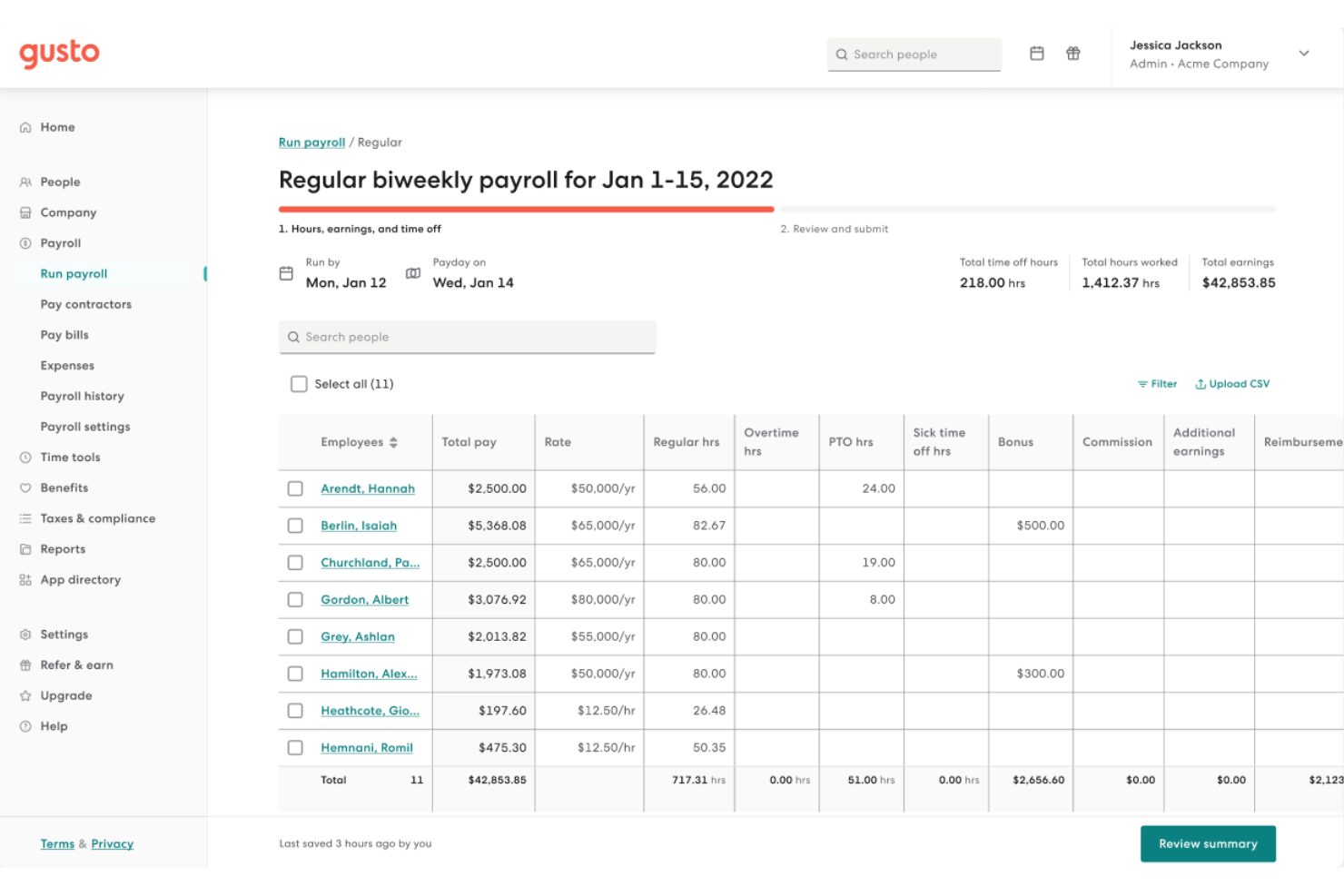
Full-Service Payroll
You can run payroll in a few clicks while Gusto calculates wages, deductions, and taxes automatically. It also files and pays payroll taxes for you, reducing errors and saving time.
Employee Benefits
You can manage health insurance, retirement plans, and other benefits in the same system as payroll. Premiums and contributions sync automatically, so you don’t have to track them manually.
Time Tracking Tools
You can track employee hours, overtime, and paid time off directly in the platform. Approved hours flow into payroll automatically, reducing manual adjustments.
Talent Management
You can send offer letters, store employee records, and manage basic workforce data in one place. This keeps hiring and employee information organized and easy to access.
HR and Onboarding
Gusto helps you collect documents, set up new hires, and stay compliant with required forms and reporting. This makes onboarding faster and more structured for your team.
Insights and Reporting
You can view payroll summaries, tax reports, and workforce data from built-in reports. These insights help you monitor payroll costs and stay informed without manual tracking.
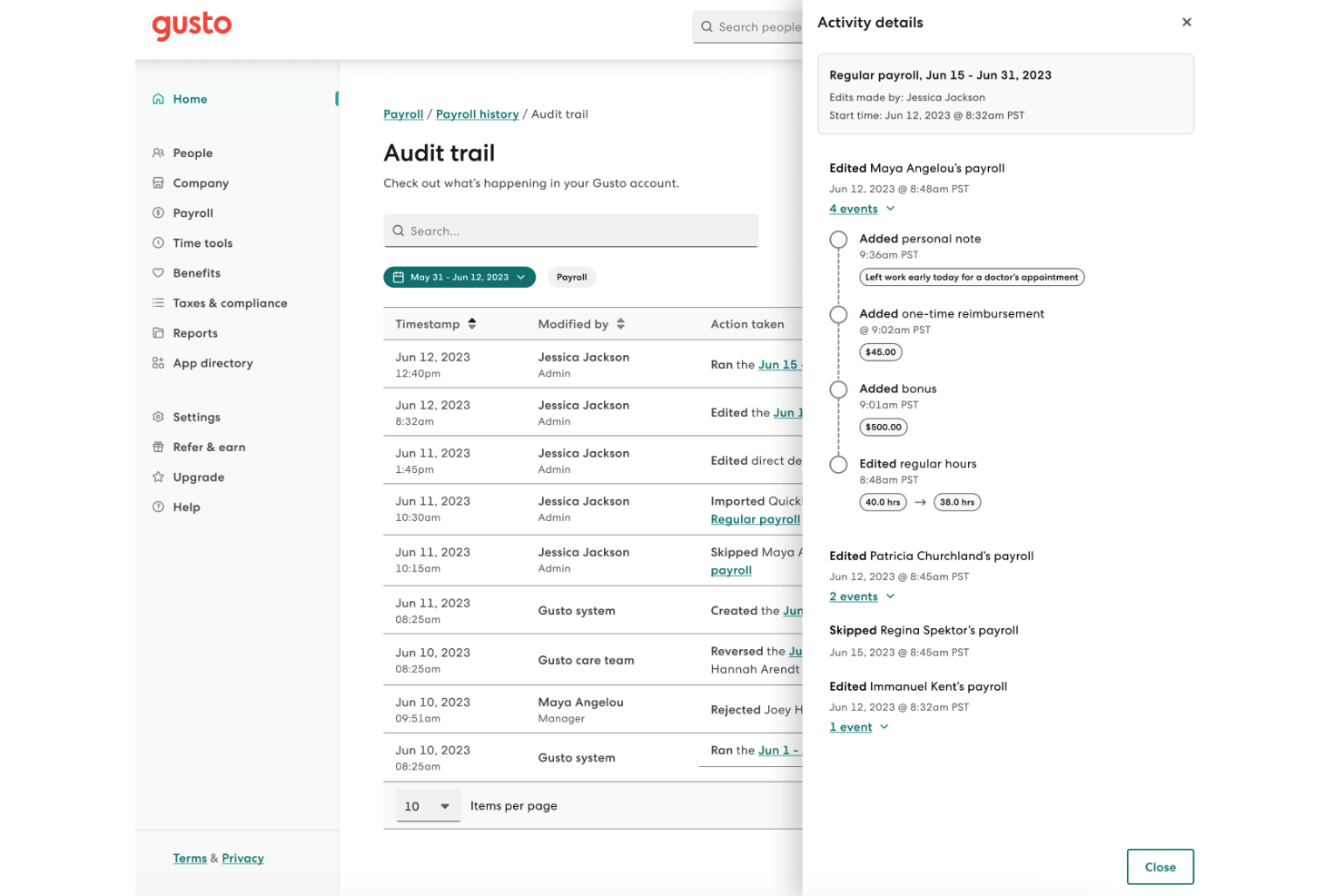
Standout Features
Gusto Money
Employees can access a spending account, savings tools, and early wage access from their dashboard. This helps your team manage finances more effectively without additional HR involvement.
Workers’ Comp Insurance
Gusto lets you set up workers’ compensation and sync premiums with payroll automatically. Payments adjust based on payroll, helping you stay compliant and avoid manual tracking.
Ease of Use
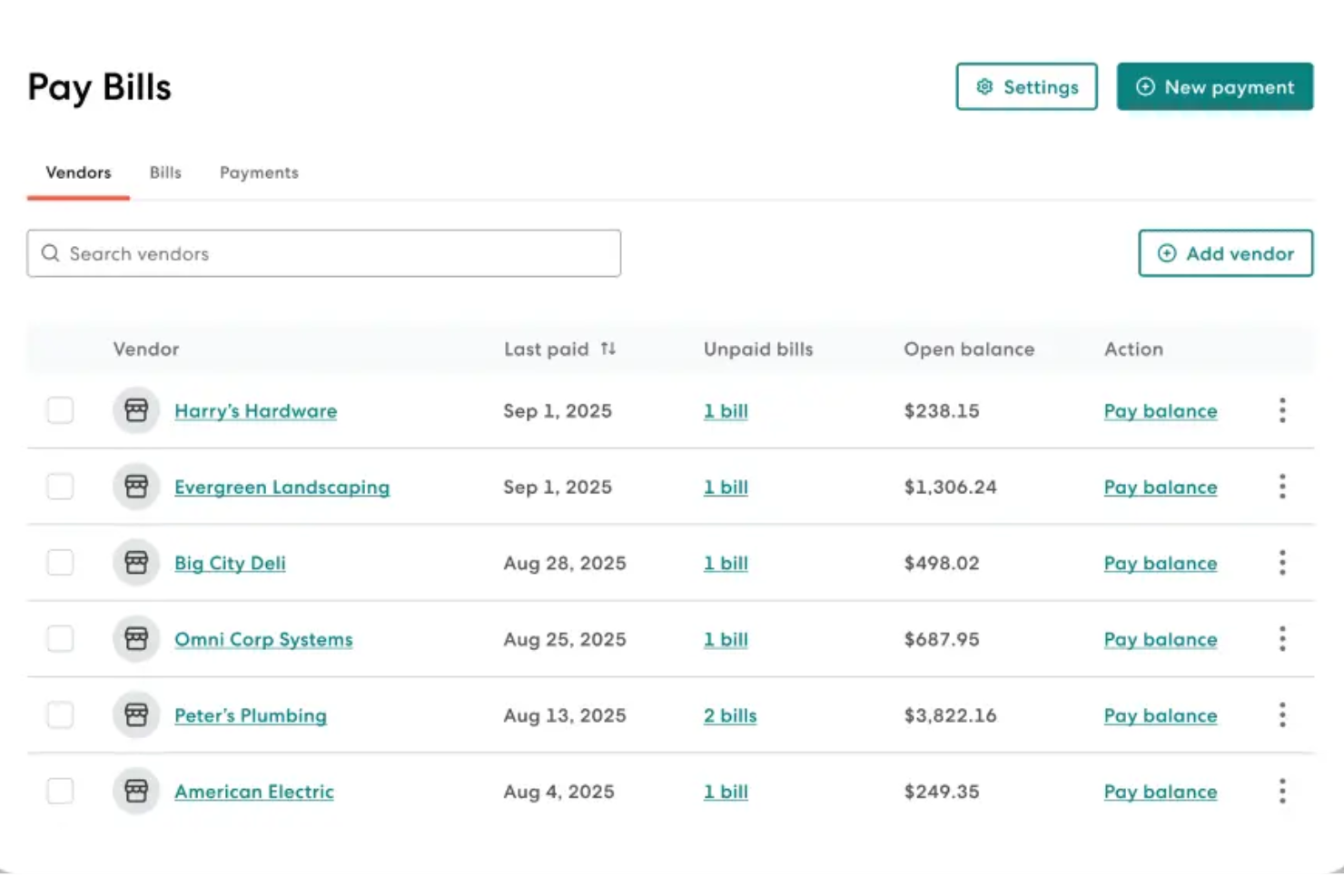
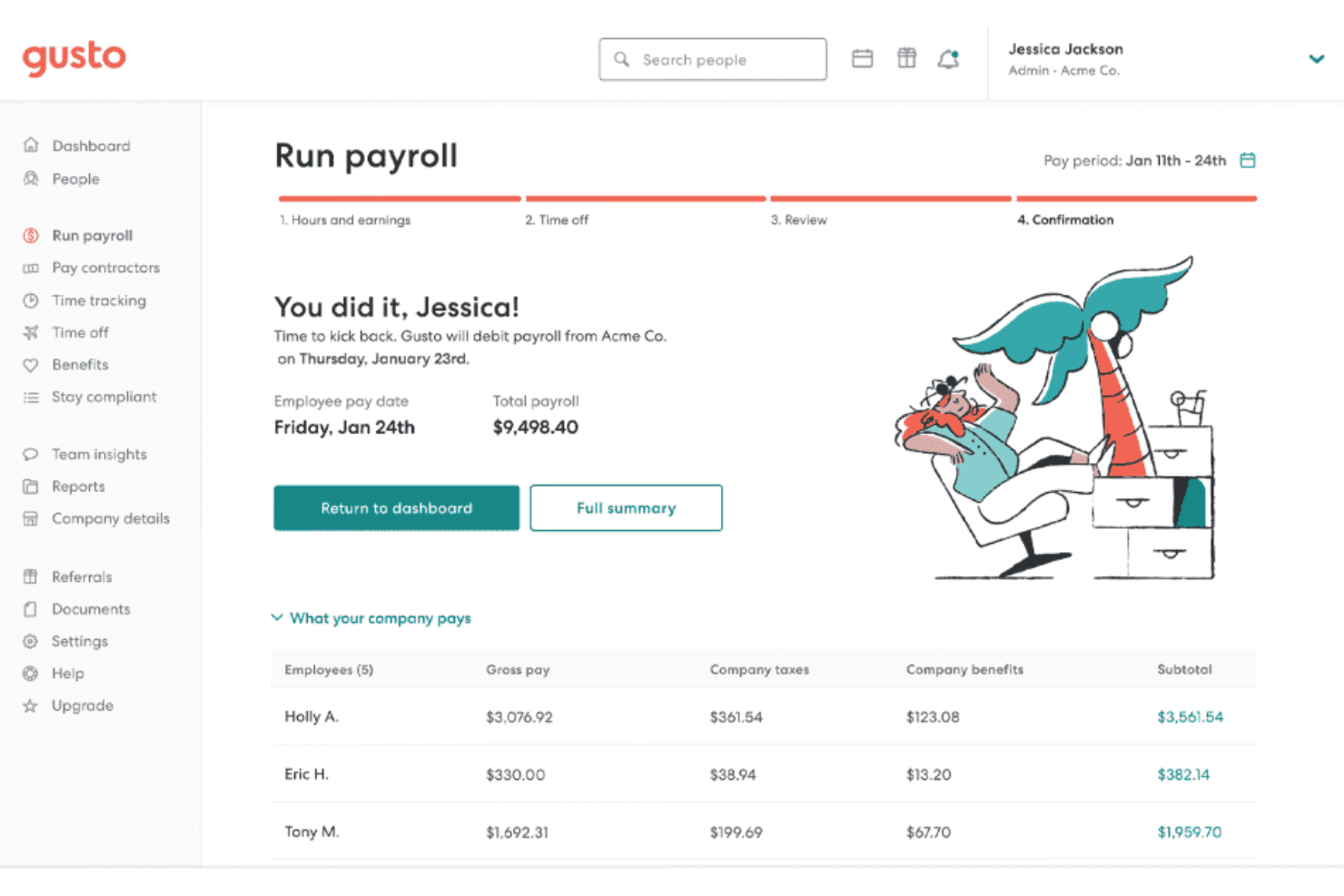
I find Gusto to be one of the most user-friendly payroll systems available. The interface is clean and easy to navigate, and payroll tasks follow clear, step-by-step flows with built-in guidance when needed. You can get payroll up and running quickly with minimal training, even without prior payroll experience.
Onboarding
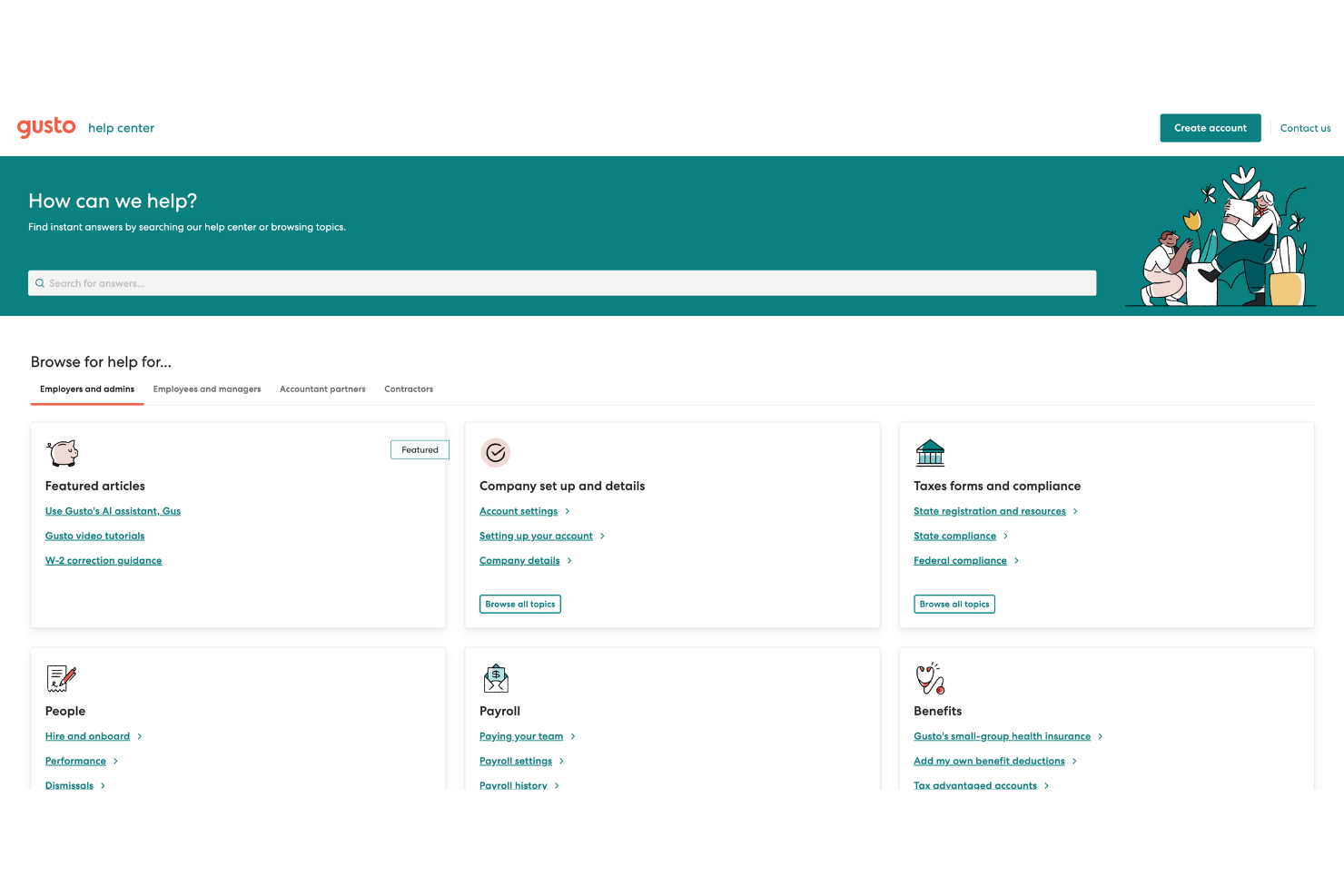
Setup is guided with clear steps that help you add company details, employees, and payroll settings without confusion. Its Help Center offers practical guides, tutorials, and searchable articles when you need support, so you can move forward without heavy training. Most teams reach first payroll quickly, though more hands-on setup help for complex cases would improve the experience.
Customer Support
You can reach support by chat, phone, or email, with chat being the fastest way to get help for urgent issues. In my experience, chat resolves most questions quickly and keeps your work moving. You do need to be signed in to contact support, and response times can vary outside business hours, but help is generally reliable when you need it.
Integrations
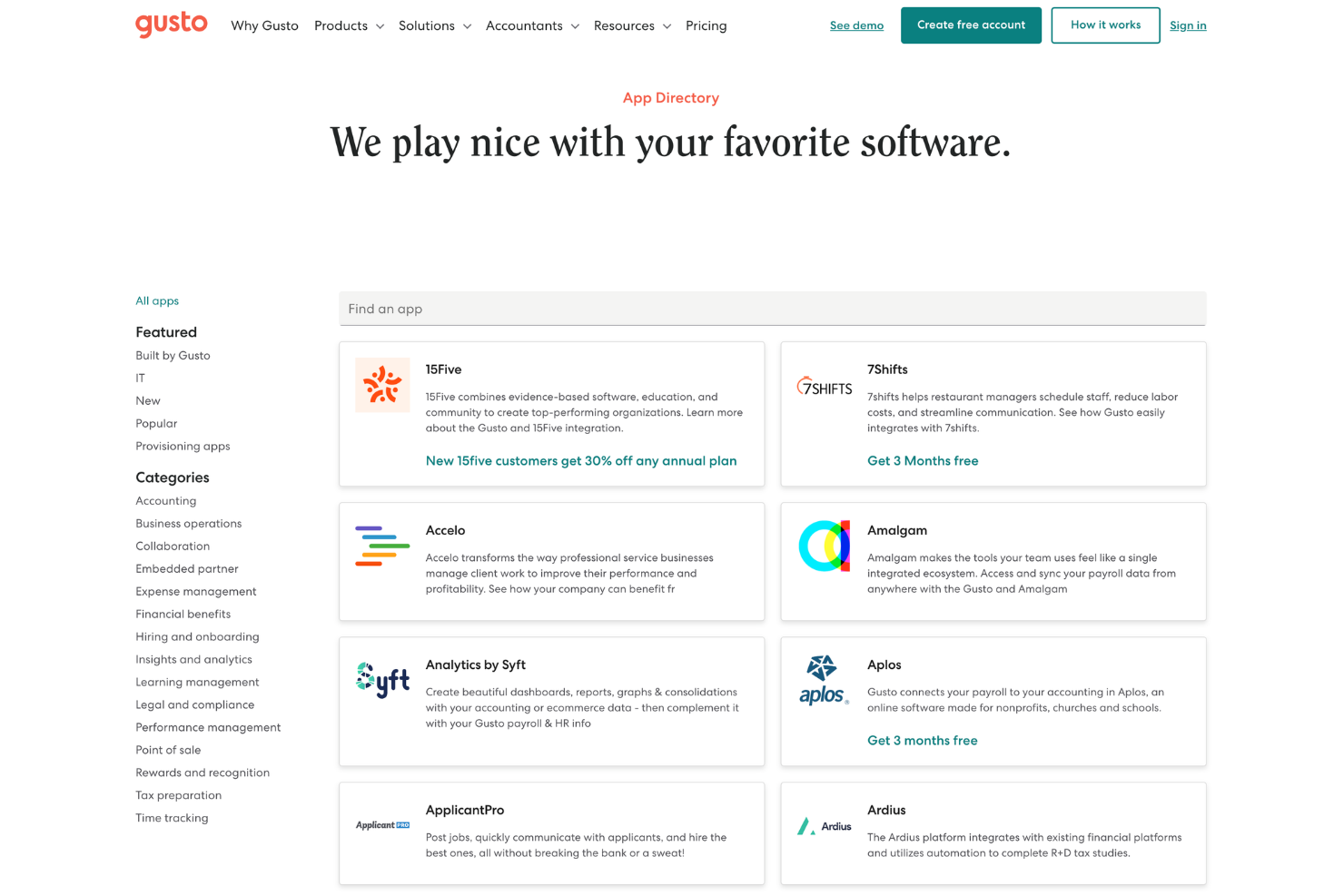
Integrations include QuickBooks Online, QuickBooks Desktop, Xero, FreshBooks, Expensify, Deputy, When I Work, Homebase, and more available in the app directory. An API is available for building custom integrations.
Value for Money
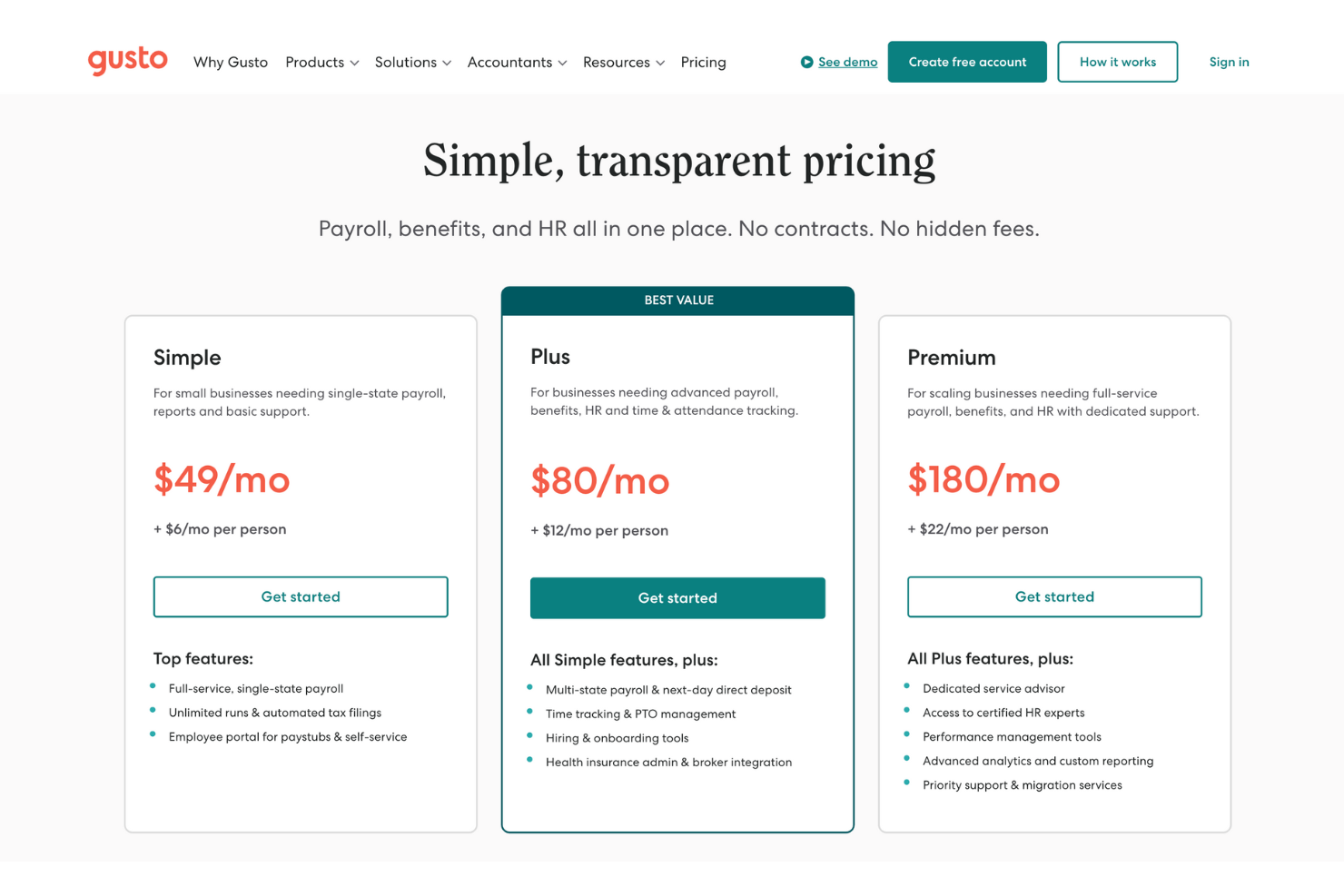
Gusto pricing is fair for what you get—strong payroll tools, tax filing, and HR features that grow with your team. Users say the setup is smooth, and the automation saves time. Each tier has a base per-month fee and an additional per-person-per-month fee, which means it can get expensive as your team grows.
- Simple: Full-service payroll, auto tax filings (W-2 and 1099s), expert support, employee app, 2–4 day direct deposit, health benefits, life and disability, 401(k), workers’ comp admin, basic team management, invoices and bill pay, Payroll Bridge.
- Plus: Everything in Simple, plus next-day direct deposit, multi-state payroll, time and project tracking, hiring suite, advanced team management, expanded HR tools, and full benefits support.
- Premium: Everything in Plus, plus a dedicated service advisor, priority support, HR resource center, HR expert access, and Gusto Money Plus.
- Contractor Only: Contractor payments, 1099 filing, and payroll tools for businesses without W-2 employees.
New Product Updates from Gusto
Gusto Adds Solo Advisory Tools and Mobile Money Features
Gusto adds Solo S-Corp Advisory Tools with tax and salary calculators, plus mobile access to Gusto Money for invoicing and bill payments. These updates make it easier to provide S-corp guidance and manage incoming and outgoing payments on the go. Highlights include:
- Tax Savings Calculator: Compares S-corp and sole proprietor or LLC taxation to help assess potential tax savings.
- Reasonable Salary Calculator: Uses BLS wage data to help determine a defensible salary for S-corp owners.
- Mobile Invoicing: Creates branded invoices with shareable payment links, card or bank payments, and automatic reminders from mobile.
- Mobile Bill Pay: Pays bills by card or bank transfer and schedules one-time or recurring payments from mobile.
Visit Gusto’s official site for more details.
 for more details.
Gusto Expands 401(k), Life, and Disability Benefits
Gusto now lets admins set up and manage 401(k) plans directly from the Benefits dashboard while offering voluntary life and disability coverage through national carriers. These updates reduce administrative work, keep benefit deductions connected to payroll, and give employees access to more coverage options without adding employer premium costs. Highlights include:
- Built-In 401(k) Management: Set up and manage retirement plans directly from Gusto’s Benefits dashboard without using a separate platform.
- Voluntary Life Insurance: Offer employee-paid life insurance through national carriers with deductions synced to payroll.
- Voluntary Disability Insurance: Add employee-paid disability coverage without additional employer premium costs.
- Integrated Benefits Administration: Manage retirement and insurance benefits alongside payroll from the same system.
Visit Gusto’s official site for more details.
Gusto Automates FICA Tip Tax Credit Calculations
Gusto now automatically calculates the FICA tip tax credit and generates pre-filled, ready-to-file tax documents for eligible employers with tipped workers. These updates reduce manual tax preparation and make it easier to claim eligible Social Security and Medicare tax credits. Highlights include:
- Automatic FICA Tip Tax Credit Calculations: Calculate eligible FICA tip tax credits automatically for tipped employees.
- Pre-Filled Tax Forms: Generate ready-to-file tax documents with pre-filled credit information.
- Simplified Tax Filing: Reduce manual work when claiming Social Security and Medicare tax credits.
Visit Gusto's official site for more details.
Gusto Specs
- API
- Application Tracking
- Approval Workflows
- Attendance Tracking
- Budgeting
- Calendar Management
- Compliance Tracking
- Dashboard
- Data Export
- Data Import
- Data Visualization
- Employee Database
- Employee Incentive Management
- Employee Onboarding
- Expense Tracking
- External Integrations
- Feedback Management
- Forecasting
- Multi-Currency
- Multi-User
- Notifications
- Payroll
- Scheduling
- Tax Management
- Time Management
- Timesheets
- Travel Management
- Vacation & Absence Calendar
Gusto FAQs
How easy is it to switch your payroll to Gusto?
Is there a mobile app for Gusto?
How does Gusto help you stay compliant with payroll laws?
How secure is your payroll and employee data in Gusto?
How does Gusto handle corrections and payroll mistakes?
How does Gusto support HR recordkeeping and audits?
Gusto Company Overview & History
Gusto is a payroll and HR software company headquartered in San Francisco, California. It serves hundreds of thousands of small and midsize businesses and employs thousands of people across the United States. The company focuses on helping you run payroll, manage benefits, and handle HR in one system, and it’s widely known for its user-friendly approach to payroll. Gusto has raised significant venture funding and is recognized as a major private company in the payroll software market.
Gusto Major Milestones
- 2011: Founded as ZenPayroll in San Francisco by Joshua Reeves, Edward Kim, and Tomer London.
- 2012: Launched its cloud-based payroll product for small businesses.
- 2015: Rebranded from ZenPayroll to Gusto as it expanded into HR and benefits.
- 2015: Reached unicorn status after major funding rounds.
- 2021: Surpassed hundreds of thousands of business customers using the platform.
What's Next?
To remain up to date on all the latest in people management, subscribe to our newsletter for leaders and managers. You'll receive insights and offerings tailored to leaders and HR professionals straight to your inbox.