

The best Gusto alternatives will help you manage payroll, benefits, and HR tasks but with slightly difference specialties and areas of focus.
Gusto is a trusted HR and payroll platform for small and mid-sized businesses, but it may not be the perfect match for every team.
Drawing on my experience testing and comparing HR systems, I’ve curated a list of the top Gusto alternatives that deliver reliability, automation, and scalability.
In this guide, you’ll find trusted platforms that simplify HR management, streamline payroll, and give you the freedom to choose what works best for your organization.
What is Gusto?
Gusto offers a combination of HR software and services that are designed to manage payroll, benefits, and human resources for businesses. Their software solution is commonly used by small to medium-sized businesses that need to handle employee compensation, benefits administration, and compliance with labor laws, but want extra support managing these functions efficiently.
Why Trust Our Software Recommendations
6,700+
Reviews
20
Industry experts
16+
Evaluation factors
14
Years reviewing software
Our team has been testing and reviewing software since 2012. As HR experts ourselves, we know how difficult—and important—it is to choose the right software.
For this guide, we evaluated tools using hands-on testing and independent research, scoring tools using our selection criteria. We also draw on insights from industry thought leaders and practicing HR experts.
Our reviews reflect our human editorial judgment, not a sales pitch.
Expert reviewers:
- Phil GrayCOO
 Kim BehnkeHR Tech Editor & Analyst
 Josh BarkerPeople Ops Manager

Gusto Alternatives Pricing Comparison Table
Use this comparison table to compare pricing details for my top Gusto alternatives.
Sorted by: Default
| Tool | Starting Price | Website | |
|---|---|---|---|
Best for scaling mid-sized businesses | 4.5 out of 5 | Pricing upon request Free demo available | Book Demo |
Best for employee self-service portal | 4.3 out of 5 | $99/month Free demo available | Website |
Best for payroll outside the US | 4.8 out of 5 | $29/user/month Free demo available | Website |
Best for migrating from Gusto | 4.4 out of 5 | $35/user/month + $89/month platform fee Free demo available | Website |
Best PEO-based HR & payroll support | 4.6 out of 5 | $79/user/month Free demo available | Website |
Best for flexible HR service models | 4.0 out of 5 | Pricing upon request Free demo available | Website |
Best for minimizing payroll complexity | 4.7 out of 5 | $20/user/month Free demo available | Website |
Best for managing hourly staff in small businesses | 4.2 out of 5 | $24/location/month Free plan + 14-day free trial + free demo available | Website |
Best for multi-jurisdiction tax filing | 4.1 out of 5 | Pricing upon request Free demo available | Website |
Best for budget-conscious remote team expansion | 4.5 out of 5 | $199/user/month Free plan + demo available | Website |


Best Gusto Alternative Reviews
Below are in-depth summaries of my recommendations for the best Gusto alternatives. I’ll walk you through the pros and cons of each tool, their features, and their best use cases to help you find the best fit for your needs.
 Best for scaling mid-sized businesses
- Free demo available
- Pricing upon request
Visit WebsiteCustomer Rating:4.5/5
Paycom offers a tax center dashboard for important actions required. Paycom is a single-database payroll and HR platform that helps growing teams automate payroll, manage benefits, streamline onboarding, and handle complex compliance in one system designed for scaling mid-sized organizations.
Who Is Paycom Best For?
HR teams at mid-sized and larger organizations seeking advanced payroll automation and integrated HR management in the US.
Why Paycom Is a Good Gusto Alternative
I picked Paycom as one of the best because it handles the payroll, HR, and compliance needs of scaling mid-sized businesses all in one place. I appreciate automating payroll across multiple states, as well as using built-in onboarding and advanced time tracking as teams grow.
Paycom Key Features
- Native document management: Store and manage employee files and compliance documents in a secure digital vault.
- Custom reporting tools: Build, schedule, and export custom payroll and HR reports directly from the platform.
- Org chart visualization: Create and maintain dynamic organization charts based on your live employee data.
- Employee self-service portal: Empower employees to update personal info, download pay stubs, and access HR tasks on demand.
Paycom Integrations
Native integrations are not clearly documented. Paycom offers an API for custom integrations.
Pros and Cons
Pros:
- Offers compliance for multi-state employers
- Employee-driven payroll corrections
- Payroll changes sync instantly across all modules
Cons:
- Contract requires longer-term commitment
- Custom third-party app connections are limited
 Best for employee self-service portal
- Free demo available
- From $99/month
Visit WebsiteCustomer Rating:4.3/5
Paycor performance management dashboard displaying employee objectives, reviews, recognition tools, and mobile team member feedback features. Paycor is a people operations platform designed for HR and payroll teams looking for flexibility in managing workforce processes. With tools for payroll, benefits, and onboarding, Paycor supports growing businesses and organizations that want more control over their employee experience.
Who Is Paycor Best For?
Paycor suits HR teams at mid-sized businesses in the US that need to centralize payroll and empower employees with direct access to their information.
Why Paycor Is a Good Gusto Alternative
I picked Paycor for its employee self-service portal, which gives employees direct access to pay stubs, tax documents, and benefits enrollment without routing every request through HR. I appreciate that employees can update their own personal information and complete open enrollment tasks independently, which takes real administrative pressure off my team. Paycor's mobile app extends that access further, so employees aren't tied to a desktop to manage their own HR needs.
Paycor Key Features
- Payroll processing: Run payroll for hourly and salaried employees with automated tax calculations and direct deposit.
- Time and attendance tracking: Log employee hours, manage schedules, and flag overtime directly within the platform.
- Performance management: Set goals, conduct reviews, and track employee development through structured review cycles.
- Recruiting and applicant tracking: Post job listings, manage candidates, and move applicants through a hiring pipeline from one place.
Paycor Integrations
Paycor offers native integrations with QuickBooks, Indeed, ZipRecruiter, Microsoft 365, and Xero, and provides an API for custom integrations.
Pros and Cons
Pros:
- Mobile app for employees and managers
- Customizable permission levels for user access
- Employee self-service portal for pay and benefits
Cons:
- Reporting suite lacks advanced customization
- Occasional delays with payroll processing
 Best for payroll outside the US
- Free demo available
- From $29/user/month
Visit WebsiteCustomer Rating:4.8/5
Deel’s powerful interface makes it easy to manage employee and contractor data. Deel is a global payroll and compliance management solution designed to streamline hiring and payments for international teams. HR professionals and payroll specialists use it to manage remote workers and contractors. It automates compliance processes, handling things like local tax laws, and provides a unified platform for managing contracts, payments, and documentation.
Why it's a good Gusto alternative: What sets Deel apart from Gusto is its ability to manage international payroll and compliance. Deel is particularly well-suited for companies that employ remote workers or contractors across multiple countries, providing tools to handle complex compliance issues, local tax laws, and multi-currency payments. For businesses in industries with a significant number of international hires, Deel offers a solid solution to manage global teams effectively. In contrast, Gusto excels in managing payroll, benefits, and HR needs for U.S.-based businesses, making Deel the better choice for organizations with a global workforce.
Standout Features & Integrations:
Features include global mobility support, integrated Slack tools, and advanced integrations. Their global mobility service helps companies with visa sponsorship, allowing them to bring in candidates from abroad. Deel is one of the largest international payroll solutions out there, with the company reporting over 100,000 active worker contracts. They offer 24/7 online support and dedicated account managers for specific requests.
Integrations are available with Ashby, BambooHR, Expensify, Greenhouse, Hibon, NetSuite, Okta, OneLogin, Quickbooks, Xero, Workday, and Workable. They also have an Open API to support additional custom integrations too.
Pros and Cons
Pros:
- Pay employees in 150+ currencies, including crypto
- Advanced employer of record (EOR) services also available
- Covers up to $25,000 if a misclassification/legal case arises
Cons:
- No mobile app available
- No free trial available
Learn more about Deel Payroll: 4Best for migrating from Gusto
Warp
- Free demo available
- From $35/user/month + $89/month platform fee
Visit WebsiteCustomer Rating:4.4/5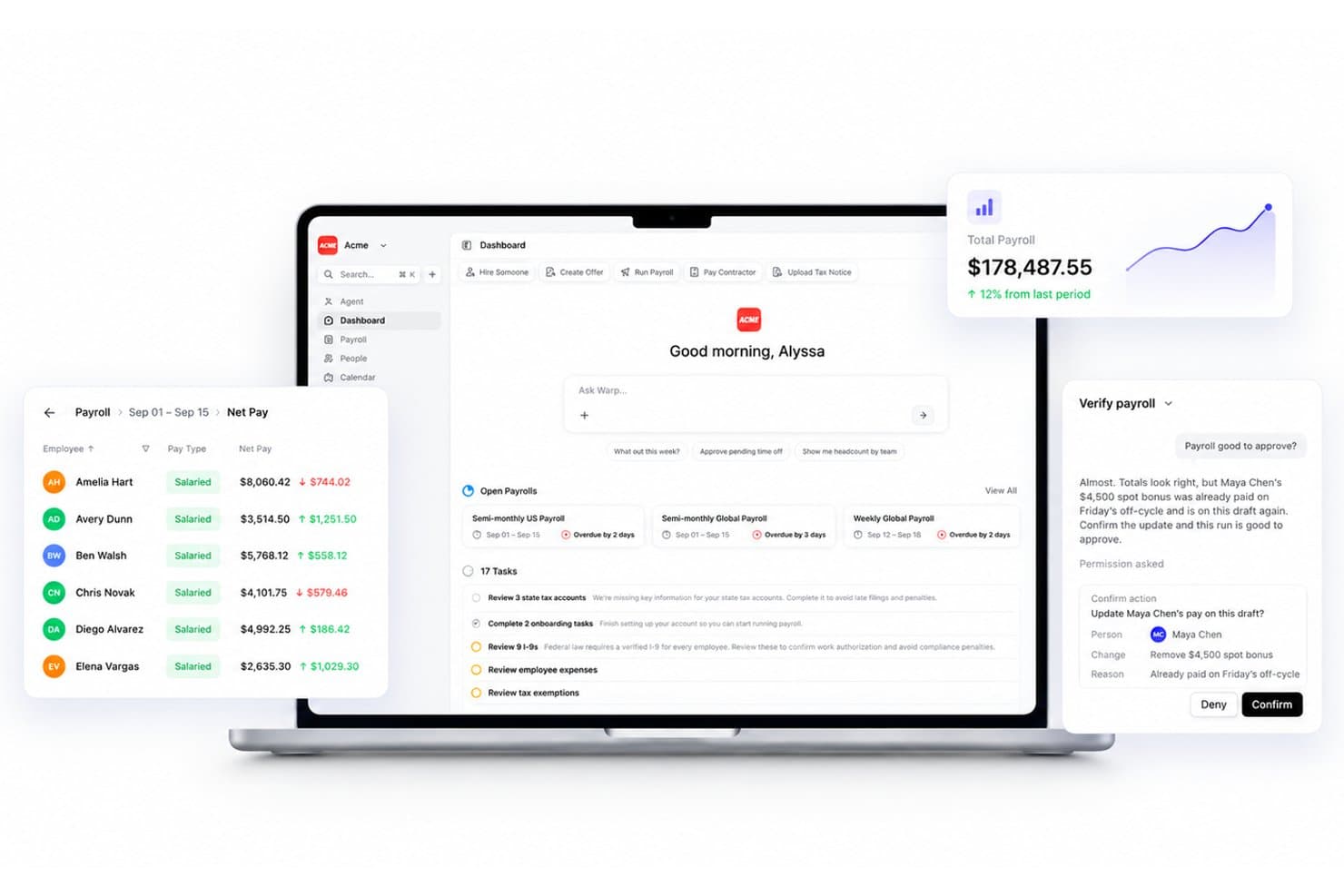
Warp automates payroll verification and flags duplicate bonus payments. Warp is an HR and payroll platform for growing businesses that want to manage payroll, benefits, and employee information in one system as they move beyond Gusto.
Who Is Warp Best For?
Warp suits founders and lean HR or operations teams that have outgrown Gusto and want payroll, benefits, and employee records managed together.
Why I Picked Warp
I like Warp as a Gusto alternative because its white-glove migration transfers employee records, pay history, tax filings, and benefits enrollment, while Warp handles tax-account setup and employee onboarding. I also value its year-to-date payroll import and record checks before the first payroll, which help teams switch midyear without rekeying prior pay data.
Warp Key Features
- Benefits plans: Offers health, dental, vision, and 401(k) benefits.
- IT provisioning: Sets up SSO, devices, and app access when employees join, then revokes access when they leave.
- Global contractor payroll: Pays contractors in more than 150 countries with local currency, compliant contracts, and invoicing.
- Integrations: Connects with tools including QuickBooks, Xero, NetSuite, and Okta.
Warp Integrations
Warp offers native integrations with QuickBooks, Xero, NetSuite, Rillet, Ashby, Lever, Checkr, Human Interest, Accrue 401k, and Vestwell. It also provides REST API, CLI, and MCP access on Starter and Pro, with custom ERP integrations on Enterprise.
Pros and Cons
Pros:
- Reviewers praise responsive support and quick setup
- Automates new-state tax setup and notice handling
- White-glove migration carries payroll history and filings
Cons:
- Reports of sales promises exceeding delivered features
- Benefits and 401(k) choices trail larger platforms
Learn more about Warp: Best PEO-based HR & payroll support
- Free demo available
- From $79/user/month
Visit WebsiteCustomer Rating:4.6/5
The dashboard in Justworks centralizes all alerts and tasks. Justworks offers a compelling alternative to Gusto for businesses that want more than just payroll software. Instead of focusing solely on payroll and HR tools, Justworks operates as a professional employer organization (PEO) that helps you manage payroll, benefits, and compliance in one platform while connecting you with HR experts when you need guidance. Its payroll processing, benefits administration, and compliance support are designed to meet the needs of small to mid-size companies looking to offload administrative work and access competitive health plans and employment support.
Why I Picked Justworks
I picked Justworks because it combines PEO-level HR support with payroll and benefits management, giving your business access to enterprise-type benefits and regulatory guidance that you won’t get from many traditional payroll platforms. Justworks pairs integrated payroll processing with compliance support across multiple states and access to group health insurance and other benefits that can help you attract and retain talent. In doing so, it shifts much of the administrative burden from you to a partner that understands the nuances of HR administration and employment law.
Justworks Key Features
Aside from the core HR and payroll capabilities, Justoworks offers:
- Payroll Automation: Automates payroll processing for both employees and contractors, including tax calculations and filings.
- Time Tracking: Simplifies attendance management with integrated time tracking tools.
- COBRA Administration: Manages COBRA benefits, ensuring compliance with federal regulations.
- Integrated Onboarding Tools: Syncs hiring data from ATS platforms like Greenhouse and Lever directly to your HR system.
Justworks Integrations
Integrations include QuickBooks, NetSuite, Xero, Sage Intacct, Lever, and Trainual. If you need custom integrations, Justworks offers an API for developers.
Pros and Cons
Pros:
- Justworks simplifies onboarding, offboarding, and payroll processes.
- Provides comprehensive HR tools and compliance support.
- Accessible expert support as a Professional Employer Organization.
Cons:
- Some admins want more flexibility than platform defaults allow.
- Global coverage is only available as a paid add-on.
Learn more about Justworks: Best for flexible HR service models
- Free demo available
- Pricing upon request
Visit WebsiteCustomer Rating:4/5
TriNet supports recruiting workflows with applicant tracking and skill assessment visibility. For businesses seeking a Gusto alternative, TriNet offers a tailored approach to HR management that can align with various industry needs. If you're managing a small to medium-sized business and need a comprehensive solution for payroll, benefits, and compliance, TriNet's flexible service packages might be appealing. With a focus on personalized support and advanced technology, TriNet addresses the common challenges of managing HR tasks efficiently and compliantly.
Why I Picked TriNet
I picked TriNet because of its dual service model that caters to different business needs, providing both full-service PEO and flexible HR Plus options. This flexibility allows you to choose between a shared HR responsibility and maintaining employer status while receiving support. TriNet's emphasis on compliance and risk management can be crucial for businesses looking to navigate complex regulatory environments. Additionally, the platform offers advanced technology tools that facilitate seamless payroll processing and benefits management, addressing key concerns for businesses transitioning from Gusto.
TriNet Key Features
In addition to its flexible service models, TriNet offers several other features that could be beneficial for your business:
- HR Consulting Expertise: Access to seasoned HR professionals who can guide you through complex HR challenges and compliance issues.
- Comprehensive Benefits Access: A wide range of benefits options that can be tailored to meet the specific needs of your workforce.
- Contractor and Global Workforce Support: Tools and services to manage a diverse and geographically dispersed workforce.
- Tailored Training Programs: Customized training solutions designed to enhance employee skills and productivity.
TriNet Integrations
Native integrations are not currently listed by TriNet.
Pros and Cons
Pros:
- Comprehensive payroll, benefits, and compliance
- Strong compliance credentials and support
- Flexible PEO or HR models
Cons:
- Platform may feel complex for new users
- Pricing is unclear
 Best for minimizing payroll complexity
- Free demo available
- From $20/user/month (billed annually)
Visit WebsiteCustomer Rating:4.7/5
Multiplier’s 4-step onboarding process will get your EOR employees up and running quickly. Multiplier is a global Employer of Record (EOR) that helps businesses hire, onboard, and pay employees in 150+ countries without setting up local entities. The platform focuses on multi-currency payroll, compliance management, and cost-effective global hiring.
Why I picked Multiplier: I picked Multiplier as a Gusto alternative because it focuses on fast global hiring while minimizing payroll complexity. You can onboard employees quickly, manage payments in over 120 currencies, and stay compliant with local tax laws. I especially liked their flat pricing model with no hidden fees, which can help with predictable budgeting.
Multiplier also offers a user-friendly dashboard that combines payroll, time-off tracking, and expenses in one place. Their 24/7 customer support with dedicated account managers makes it easier to manage international teams across time zones.
Multiplier Key Features:
Features include multi-country payroll, fast contract generation, benefits administration, time-off and expense management, and support for payments in over 120 currencies. The platform automatically adjusts payroll for expenses and leave, reducing manual work.
Integrations include Workday, BambooHR, Personio, and HiBob.
Pros and Cons
Pros:
- Fast global onboarding with compliant contracts
- 24/7 support with dedicated account managers
- Multi-currency payments across 120+ countries
Cons:
- Some users may find the interface initially difficult to navigate
- Limited self-service resources and troubleshooting guides
Learn more about Multiplier: Best for managing hourly staff in small businesses
- Free plan + 14-day free trial + free demo available
- From $24/location/month (billed annually)
Visit WebsiteCustomer Rating:4.2/5
Homebase offers a Manager View dashboard with real-time employee clock-in status, shift schedules, late alerts, and built-in team messaging tools. Homebase is a workforce management and payroll platform designed for small businesses with hourly teams, making it easier to handle scheduling, time tracking, payroll, and team communication all in one place.
Who Is Homebase Best For?
Owners and managers of small businesses who need to coordinate hourly teams, simplify payroll, and manage employee schedules with minimal overhead.
Why Homebase Is a Good Gusto Alternative
I picked Homebase as one of the best because it lets my team manage hourly staff with tools for scheduling, time tracking, and payroll in one place, saving us time each week and making shift changes painless.
Homebase Key Features
- Tip management: Automatically import and allocate tips from your POS system.
- HR document storage: Maintain compliance by securely storing employee forms and records.
- Integrated hiring tools: Post jobs, screen candidates, and start onboarding directly from the platform.
- Mobile time clock: Let hourly staff clock in or out from mobile devices with GPS verification.
Homebase Integrations
Homebase offers native integrations with Square, Toast, Clover, Shopify, Revel Systems, Heartland, ADP, QuickBooks, Gusto, and Paychex. An API is available for custom integrations.
Pros and Cons
Pros:
- Mobile time clock with GPS verification
- Auto-calculates overtime and wage compliance
- Built-in tools for managing hourly schedules
Cons:
- Requires a separate paid add-on to run payroll
- Locks geofencing tools behind the upper tiers
 Best for multi-jurisdiction tax filing
- Free demo available
- Pricing upon request
Visit WebsiteCustomer Rating:4.1/5
RUN by ADP's main dashboard provides an overview of payroll tasks and quick navigation to essential features. RUN by ADP is a comprehensive payroll and HR software solution designed to simplify payroll processing and human resource management for small businesses.
Why it's a good Gusto alternative: RUN by ADP differentiates itself with its extensive tax filing support across multiple jurisdictions, automated compliance updates, and a dedicated team of experts to help navigate complex tax laws, which can be a significant advantage over Gusto’s more simplified tax services. Additionally, RUN by ADP offers advanced HR tools like employee background checks, access to legal assistance, and custom reporting capabilities.
Standout features & integrations:
Features include direct deposit, an employee self-service portal, HR compliance support, time and attendance tracking, garnishment payment services, new hire reporting, retirement plan services, workers' compensation management, payroll and tax reports, and mobile app access.
Integrations include Quickbooks, Wave, Xero, ClockShark, Points North, TruSaic, Compy, Wex, Synerion, JazzHR, 7Shifts, Snappy Gifts, Absorb LMS, SmartRecruiters, and hundreds more.
Pros and Cons
Pros:
- Employee self-service option
- Good mobile app
- Automates tax calculations and filing
Cons:
- Setup can be complex
- Most HR functions are only available on higher-tier plans
Learn more about RUN Powered by ADP®: Best for budget-conscious remote team expansion
- Free plan + demo available
- From $199/user/month
Visit WebsiteCustomer Rating:4.5/5
RemoFirst's dashboard provides a comprehensive view of payroll, active workers, onboardings, and new employees. RemoFirst is an Employer of Record (EOR) service that helps you hire and manage employees and contractors in over 180 countries. By handling local compliance, payroll, and benefits, it allows your team to focus on growth without the complexities of international employment.
Why it's a good Gusto alternative: I chose RemoFirst as a solid alternative to Gusto because of its extensive global reach. While Gusto primarily serves U.S.-based businesses, RemoFirst enables you to hire full-time employees and contractors worldwide, ensuring compliance with local labor laws and regulations. This global capability is crucial if you're looking to expand your team internationally while on a budget and without the hassle of establishing foreign subsidiaries. It also handles payroll processing in multiple currencies, tax filings, and offers benefits like health insurance and retirement plans tailored to each region.
Standout Features & Integrations:
Features include visa and work permit assistance, helping your team members obtain the necessary documentation to work legally in their respective countries. They also offer background checks to ensure potential hires meet your standards and comply with local regulations. Additionally, it provides intellectual property protection, ensuring your company's assets are safeguarded across different jurisdictions.
Integrations include ADP.
Pros and Cons
Pros:
- Robust employee support
- Ability to provide locally relevant employee benefits
- Comprehensive compliance management
Cons:
- Service availability may vary by region
- No mobile app available
Other Gusto Alternatives
If you’d like a few more options to consider, here are several other worthwhile Gusto alternatives that are also worth checking out:
- 11TimeTrexBest for complex pay structures and time tracking
- 12Patriot PayrollBest for unlimited payroll runs
- 13UKG ReadyBest for AI-powered HR and workforce management solutions
- 14SurePayrollBest for unlimited payroll runs and tax filing guarantee
- 15NamelyBest for customizable HR solutions with robust analytics
- 16TrinetBest for comprehensive HR outsourcing services
- 17Patriot SoftwareBest for affordable and easy-to-use payroll software
- 18WaveBest for automatic tax payments
- 19Paychex Best for comprehensive payroll and HR solutions
- 20RemunanceBest EOR in India
Related HR Software Reviews
If you still haven't found what you're looking for here, check out these other related tools that we've tested and evaluated:
- HR Software
- Payroll Software
- Recruiting Software
- Employer of Record Services
- Applicant Tracking Systems
- Workforce Management Software
How I Evaluate Gusto Alternatives
I evaluate Gusto alternatives in two layers: core requirements like payroll tax filing and benefits admin, and the differentiators that matter for your team size, budget, and HR complexity.
Core Functionality (Table Stakes For This List)
When I'm selecting tools for my list, I rank each one on a scale from 0 (does not offer the functionality) to 5 (excels in this area) for each core functionality listed below. Then, I calculate the tool's total score into a percentage. Each tool needs to achieve a minimum total score of 75% to be considered for inclusion.
- Full-Service Payroll Processing: I check whether a platform handles automated pay runs, wage calculations, and tax withholdings across multiple jurisdictions without requiring manual intervention.
- Benefits Administration: Each tool is evaluated on how it manages enrollment for health, dental, vision, and retirement plans, and whether deductions sync directly into payroll.
- Employee & Contractor Onboarding: I look for digital onboarding workflows that collect tax forms, e-signatures, and direct deposit details so new hires are payroll-ready from day one.
- Time Tracking & PTO Management: The platform should offer built-in or tightly integrated time tracking and leave management that feeds hours and accruals straight into payroll runs.
- Compliance & Tax Filing: I evaluate whether the tool generates year-end forms like W-2s and 1099s, handles new-hire reporting, and stays current with changing tax regulations.
- HRIS & Employee Records: A central employee database with document storage, role history, and org charts matters here, especially for teams outgrowing spreadsheets.
Once I have a list of tools that meet this criteria, I consider what sets each platform apart.
Differentiating Factors (What Sets Vendors Apart)
Here's how I compare and contrast different vendors:
Standout Features
Global payroll and EOR capabilities matter if your team is distributed across borders, since platforms like Deel and Rippling let you pay international contractors and employees without setting up local entities. I also look for built-in performance and engagement tools—pulse surveys, review cycles, and goal tracking—that save you from bolting on a separate platform. Automated HR workflows for approvals, onboarding tasks, and notifications are another separator worth evaluating.
Beyond Features
Pricing transparency is one of the first things I check. Some vendors bundle tax filing and year-end forms into the base price, while others charge add-on fees that stack up fast as headcount grows. I also evaluate how well each platform connects to the tools teams already use—especially accounting software like QuickBooks or Xero—since a clean payroll-to-ledger sync prevents reconciliation headaches. Migration support matters too. Switching payroll providers mid-year is stressful, so I look for guided data imports and dedicated onboarding help.
Why Look for a Gusto Alternative?
Gusto hires employees abroad through a partner, keeps custom reports on its top plan, and some users find live help hard to reach, which matters as small teams grow. Here’s when another tool might fit better:
- You’re hiring full-time employees outside the US. Gusto pays international contractors directly, but employees abroad are hired through a partner employer-of-record service. Tools like Deel Payroll or Multiplier are built around global payroll, with compliance for many countries in one place.
- You want fast expert help when payroll or tax questions get tricky. Some users say it’s hard to reach a live person, especially at busy times like year-end or outside business hours. Platforms such as Justworks or RUN Powered by ADP pair payroll with access to HR or tax experts.
- You need flexible, detailed reports. Custom reports come only with Gusto’s top plan, and some users find the standard reports rigid. Options like Paycom or TimeTrex offer deeper custom reporting across payroll and time data.
- You need detailed admin roles and permissions. Some users say roles and permissions are hard to customize. If several managers or admins need different levels of access, list who should see and approve what, then ask each vendor to demo those exact settings.
Gusto is still the right choice if you’re a small US business that wants easy full-service payroll with automatic tax filing and benefits in one place. For small US teams with simple needs, that can outweigh partner-based hiring abroad, harder-to-reach support and limited reporting.
Key Features to Look for in Gusto Alternatives
Here are some key features of Gusto that your alternative software should be able to replicate or improve upon to be a good fit:
- Payroll Processing: Automates payroll calculations and tax filings.
- Employee Benefits: Manages health insurance, retirement plans, and other benefits.
- Time Tracking: Tracks employee hours and integrates with payroll.
- Onboarding: Simplifies new hire paperwork and processes.
- Compliance: Ensures adherence to labor laws and tax regulations.
- Direct Deposit: Facilitates direct deposit payments to employees.
- Employee Self-Service: Allows employees to access pay stubs and update personal information.
- Reporting: Generates detailed payroll and HR reports.
- Customer Support: Provides assistance through various channels.
- Integration: Connects with other business software and tools.
Are There Any Free Gusto Alternatives?
When it comes to managing payroll, Gusto is a popular choice for many small businesses. However, it comes with a cost that might not be feasible for every business. Fortunately, there are several free alternatives to Gusto that offer robust features to help you manage your payroll without breaking the bank. Here are some of the best free payroll software worth considering:
- Payroll4Free: This software is ideal for small businesses with up to 25 employees. It offers features like tax calculations, direct deposit, and an employee portal. However, it only works on Windows and includes ads.
- TimeTrex: TimeTrex offers a free Community Edition that includes time tracking, scheduling, and payroll processing. It is cloud-based and supports unlimited employees, but it does not file payroll taxes.
- HR.my: This platform is completely free and supports unlimited employees. It offers multilingual capabilities, time tracking, and an employee portal. However, it does not calculate or file payroll taxes.
- eSmart Paycheck: eSmart Paycheck provides a free payroll calculator that can handle federal and state tax calculations. It also offers paid plans for additional features like e-filing.
- ExcelPayroll: This is a free, spreadsheet-based payroll solution that works with Microsoft Excel. It supports up to 50 employees and includes features like tax form printing and deduction management.
- Homebase: Homebase offers a free plan that includes scheduling and time tracking. Payroll services are available as an add-on, starting at $6 per employee per month.
- Zoho Payroll: Zoho Payroll offers a free plan for small teams with up to 10 employees. It includes features like automatic payroll calculations and direct deposits.
These tools provide a range of features that can help you manage your payroll and HR tasks efficiently without the need for a paid service like Gusto.