

10 Best Employee Management Software for Small Businesses Reviewed in 2026

10 Best Employee Management Software for Small Businesses Shortlist


Managing a small business has its own set of challenges, especially when it comes to handling HR tasks. You might find yourself juggling employee records, payroll, and compliance, all while trying to keep your team happy and productive. That's where employee management software can make a difference.
In my experience, the right software can save you time, reduce headaches, and improve employee experience. It helps you focus on what matters most—your people. I've tested and reviewed a range of options to bring you an unbiased look at the best tools on the market.
In this article, you'll find my top picks, each chosen for its unique features and benefits. Let's explore how these solutions can meet your team's needs.
Why Trust Our Software Recommendations
Our team has been testing and reviewing software since 2012. As HR experts ourselves, we know how difficult—and important—it is to choose the right software.
For this guide, we evaluated tools using hands-on testing and independent research, scoring tools using our selection criteria. We also draw on insights from industry thought leaders and practicing HR experts.
Our reviews reflect our human editorial judgment, not a sales pitch.
Expert reviewers:
Comparison Table: Employee Management Software for Small Businesses
This comparison table summarizes pricing details for my top selections of employee management software for small businesses.
| Tool | Best For | Trial Info | Price | ||
|---|---|---|---|---|---|
| 1 | Best as AI for business | Free demo available | From $8/user/month | Website | |
| 2 | Best with biometric and geofencing time tracking | 30-day free trial + free demo available | From $50/user/month | Website | |
| 3 | Best for small business HR tasks | Free demo available | From $4/user/month + $50/month | Website | |
| 4 | Best for employee self-service | Free plan for 6 months (up to 4 users) + 14-day free trial | From $6/employee/month | Website | |
| 5 | Best for affordability and flexibility | 30-day free trial | From $6/employee/month | Website | |
| 6 | Best for all-in-one HR needs | Free trial + free demo available | Pricing upon request | Website | |
| 7 | Best for cloud-based HR solutions | 30-day free trial | From $1.25/user/month (billed annually) | Website | |
| 8 | Best for data protection compliance | Free trial + demo available | From GBP £3.50/employee/month (GBP £25/month minimum) | Website | |
| 9 | Best for small to medium-sized business needs | Free demo available | From $49/month + $6/month/user | Website | |
| 10 | Best for deskless or remote teams | 14-day free trial | From $29/month (billed annually) | Website |

Best Employee Management Software for Small Businesses Review
Below are my detailed summaries of the best employee management software solutions for small businesses that made it onto my shortlist. My reviews offer a detailed look at the key features, pros and cons, integrations, and ideal use cases of each tool to help you find the best one for you.

Best as AI for business
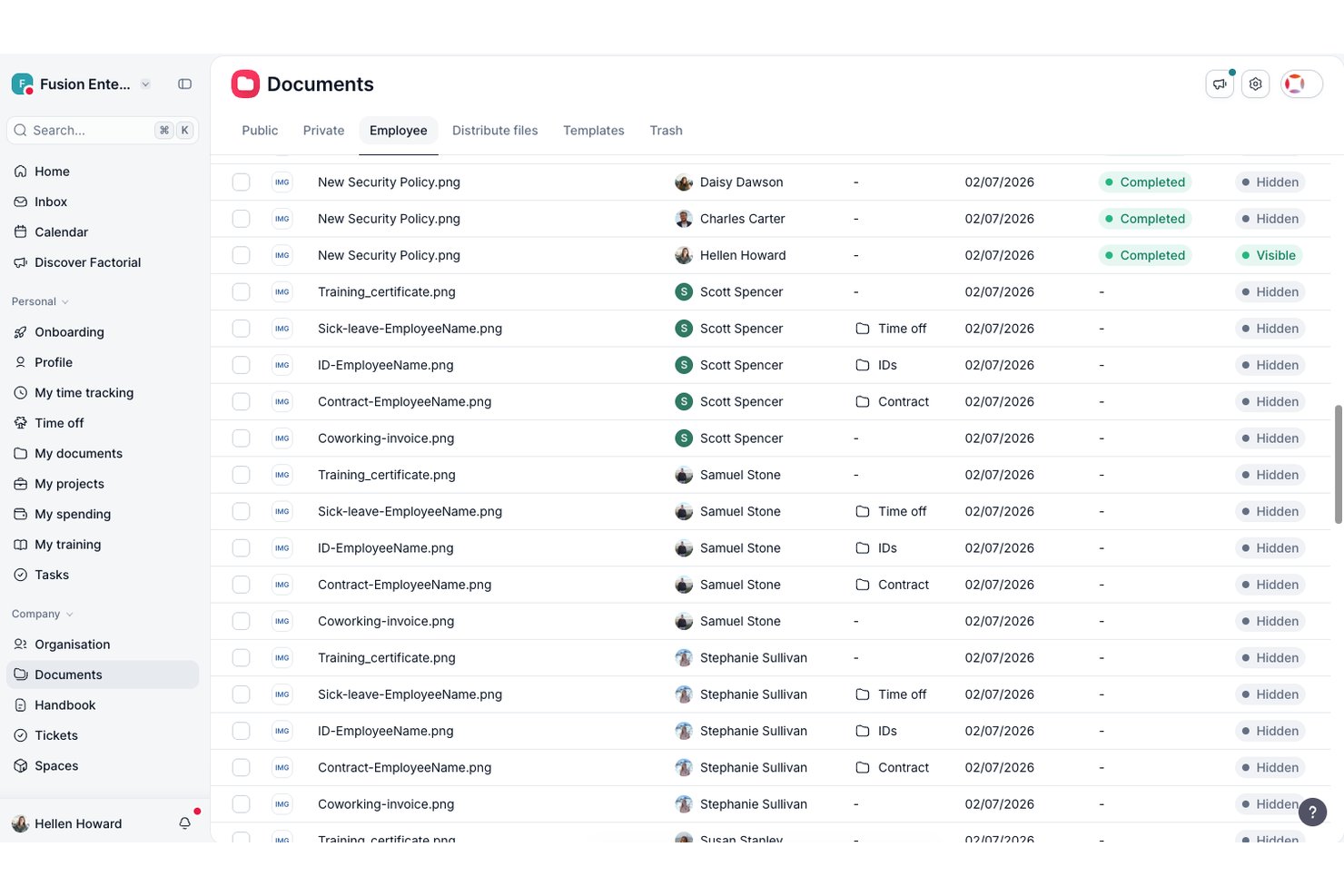
Factorial is an AI-powered employee management platform for small and mid-sized businesses, covering HR workflows like time tracking, shift scheduling, leave management, onboarding, document handling, and performance reviews.
Who Is Factorial Best For?
Factorial is a strong fit for small and mid-sized business HR teams that want AI woven into daily operations—from scheduling and reporting to answering employee policy questions.
Why I Picked Factorial
I picked Factorial as one of the best because its AI weaves into the daily operations small HR teams actually wrestle with, from auto-generating shift schedules to producing reports and answering employee questions about company policies on the spot. I especially like how the AI handles timetable planning, cutting out the back-and-forth that eats up a manager's day, and how employees can get instant policy answers without pinging HR every time.
Factorial Key Features
- Time off management: Employees submit leave requests through the platform, and managers review, approve, and track absences on a shared team calendar.
- Built-in e-signature: Send contracts, payslips, and other documents for legally binding electronic signature directly within the platform.
- Employee self-service portal: Employees access their profiles, documents, schedules, and pay information without needing to contact HR.
- 360-degree performance reviews: Collect structured feedback from employees, peers, and managers, and track goals and competencies across review cycles.
Factorial Integrations
Factorial offers marketplace integrations with Google Workspace, Slack, Microsoft Power BI, Okta, LinkedIn, and payroll tools including Sage 200 and Silae. It also provides an API with OAuth 2.0, webhooks, and SDKs, plus hundreds of tools through Zapier.
Pros and Cons
Pros:
- Leave requests and balances stay visible
- Mobile clock-ins suit distributed teams
- AI answers employee policy questions
Cons:
- Costs can rise with added modules
- Automatic shift planning requires Enterprise

TimeTrex
Best with biometric and geofencing time tracking
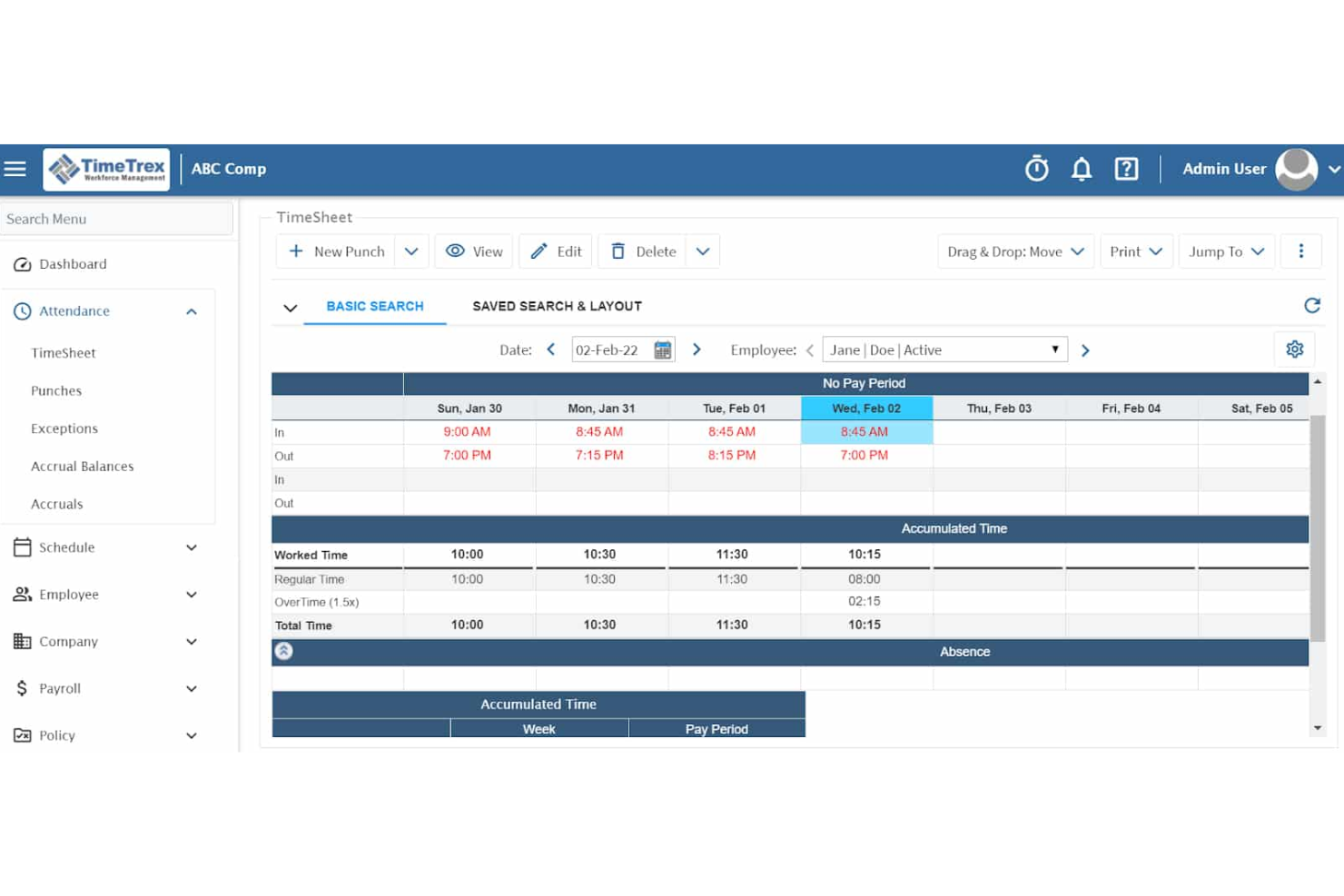
TimeTrex is a workforce management platform for small businesses that combines time and attendance tracking, employee scheduling, payroll processing, HR records management, and compliance reporting in one system.
Who Is TimeTrex Best For?
Small businesses with hourly or field-based workforces that need precise, location-verified time tracking will find TimeTrex a natural fit.
Why I Picked TimeTrex
I picked TimeTrex as one of the best because its biometric facial recognition timeclocks and geofencing tools directly address time fraud. The geofencing feature lets me set virtual perimeters at specific job sites, so employees can only clock in when physically present, right down to the device level. I also like that the biometric timeclock eliminates buddy punching entirely, which I find invaluable when managing hourly workers across multiple locations.
TimeTrex Key Features
- Native payroll processing: Handles payroll calculations, tax filings, direct deposits, and electronic pay stubs within the platform.
- Employee self-service portal: Lets employees view pay stubs, update personal details, review schedules, and request leave without needing HR involvement.
- Job costing and labor allocation: Tracks time spent by employees on specific cost centers or projects for detailed labor reporting.
- Customizable reporting suite: Generates compliance, payroll, and HR reports with options for custom fields and data exports.
TimeTrex Integrations
TimeTrex offers native integrations with QuickBooks, Sage, ADP, Paychex, Ceridian, and every US state tax authority, and provides an API for custom integrations.
Pros and Cons
Pros:
- Native payroll processing built in
- Geofencing enforces location-based clock-ins
- Biometric timeclocks eliminate buddy punching
Cons:
- Weak performance management and engagement tools
- Dated interface compared to modern competitors
New Product Updates from TimeTrex
TimeTrex Adds Quick Punch App With Offline and QR Support
TimeTrex adds a new Quick Punch app, offline punching, QR code scanning, punch images, configurable messages, and punch warnings or lockouts to improve employee clock-ins across browsers and local computers. For more information, visit TimeTrex’s official site.
 .
.
Eddy
Best for small business HR tasks
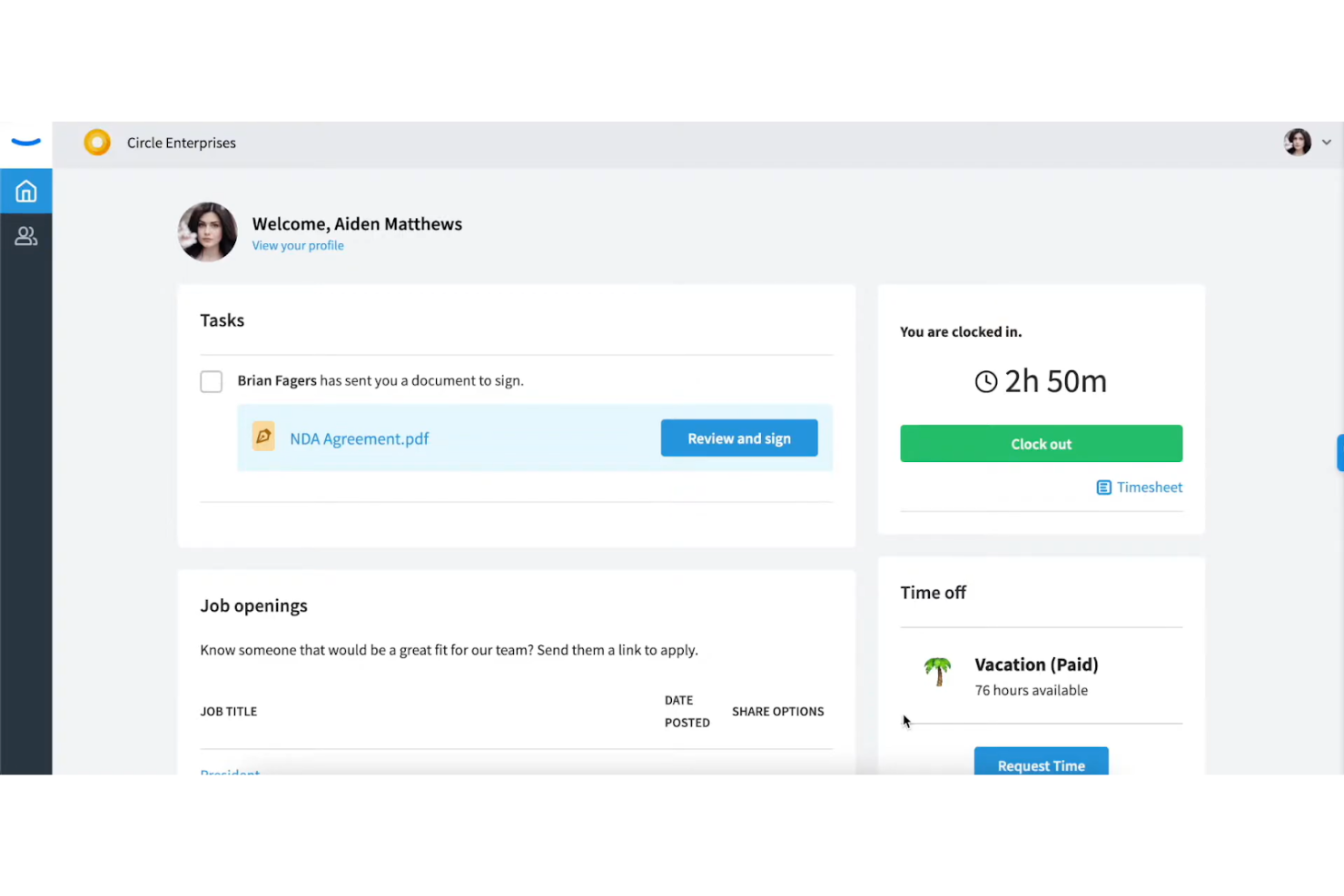
Eddy is an HR software solution designed for small businesses. It helps manage hiring, onboarding, employee data, and timesheets.
Why I picked Eddy: It simplifies HR tasks for small businesses with straightforward features. The hiring and onboarding tools make it easy to attract and integrate new hires. Its employee database keeps all your team's information organized and accessible. With time tracking capabilities, you can efficiently manage work hours and run payroll accurately.
Standout features and integrations:
Features include performance management, which allows you to evaluate your team's performance and enhance employee experience effectively. The document storage feature enables you to store all your HR documents securely and access them when needed. Additionally, Eddy offers a customizable dashboard that helps you tailor the platform to your specific needs.
Integrations include QuickBooks, Indeed, Checkr, LinkedIn, Synergy Suite, and more.
Pros and Cons
Pros:
- Customizable dashboard for improved user experience
- Supports small business needs
- Effective onboarding tools
Cons:
- Minimal workflow automations available
- Limited advanced features

HRLocker
Best for employee self-service
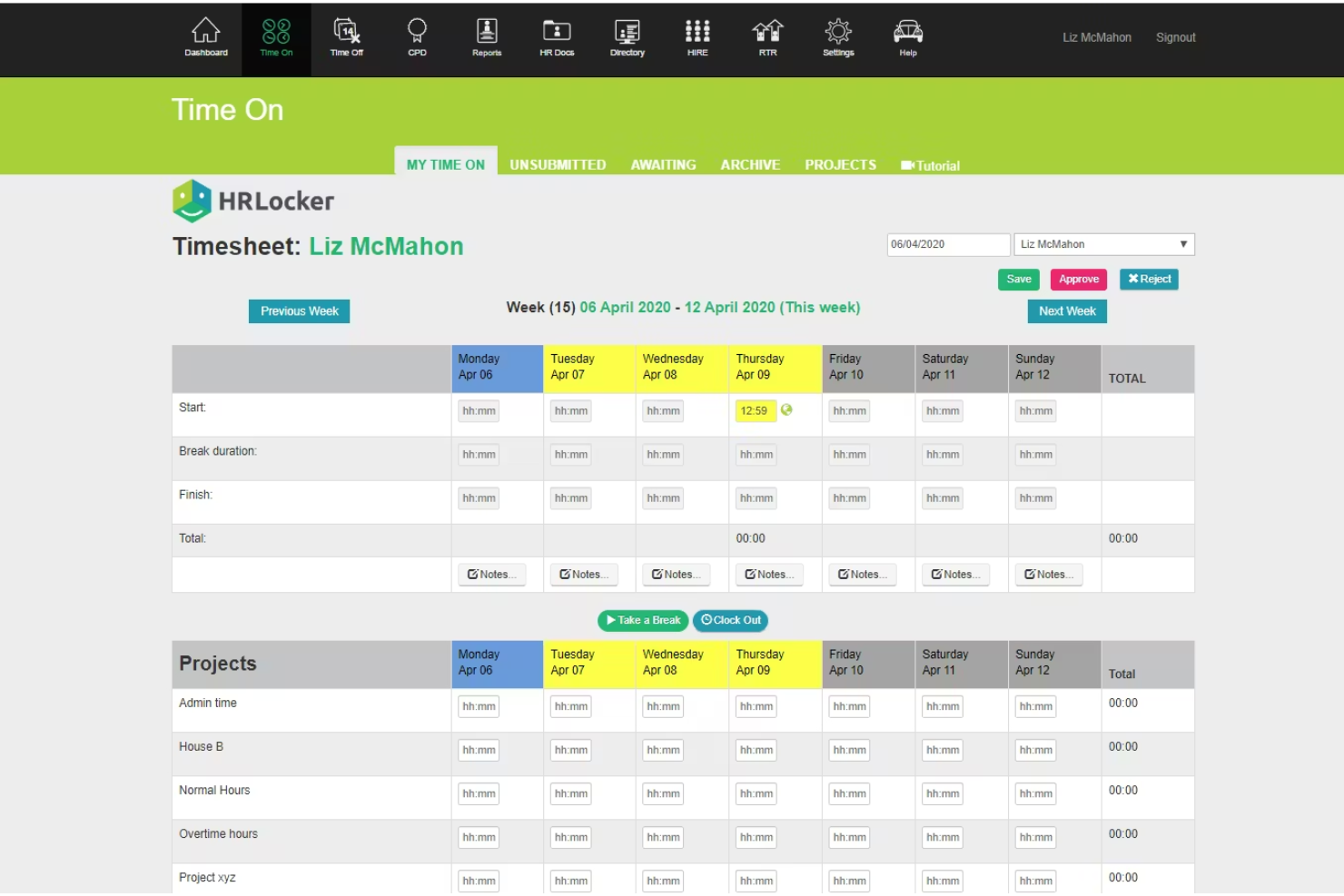
HRLocker is an online HR management tool that serves small to medium-sized businesses. It focuses on simplifying HR processes such as leave management, time tracking, and employee data storage.
Why I picked HRLocker: It emphasizes employee self-service, allowing your team to manage their own leave requests and personal information. The tool’s time tracking feature helps you monitor attendance and productivity. HRLocker’s user-friendly dashboard makes it easy for your team to access the information they need. Self-service capabilities can reduce the administrative burden on your HR team.
Standout features and integrations:
Features include performance management, which helps you set and track employee goals. The recruitment module allows you to manage job postings and applications efficiently. Additionally, HRLocker provides compliance tracking to ensure your business meets legal requirements.
Integrations are not publicly listed.
Pros and Cons
Pros:
- Dashboard designed for optimal user experience
- Enables employee self-service
- Simplifies compliance tracking
Cons:
- May get costly as businesses grow
- Limited advanced features
Sage HR
Best for affordability and flexibility
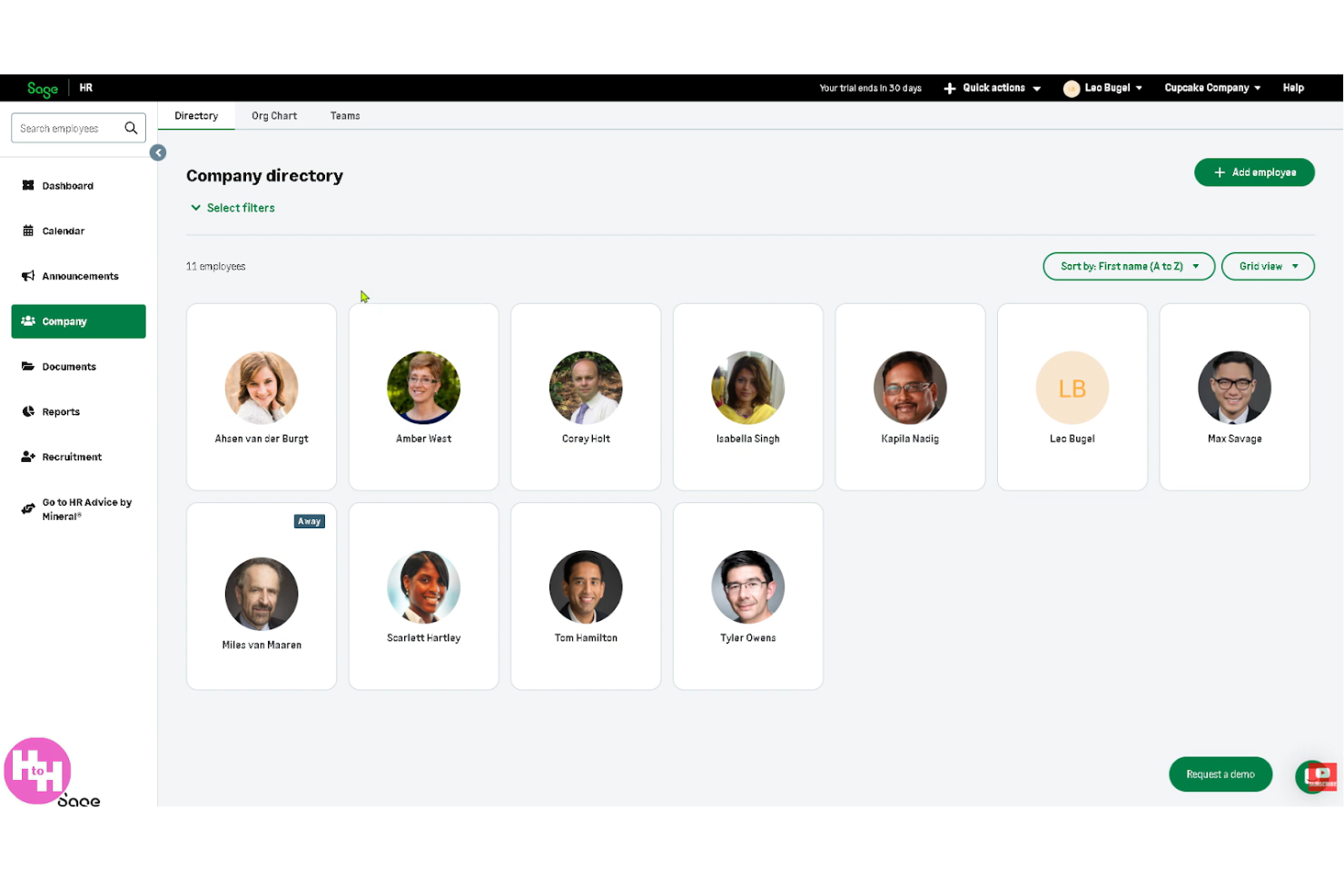
Sage HR is a cloud-based HR management tool designed for small to medium-sized businesses. It focuses on core HR functions such as leave management, expense tracking, and performance reviews.
Why I picked Sage HR: It offers affordability and functionality, making it accessible for smaller budgets without compromising on features. The tool conveniently allows you to manage employee time off and track expenses. With its customizable performance review system, you can tailor evaluations to fit your team's needs. Sage HR's affordability, adaptability, and functionality make it ideal for growing businesses.
Standout features and integrations:
Features include shift scheduling, which helps you conveniently organize and manage employee shifts. The recruitment module simplifies the hiring process, allowing you to post jobs and track applicants. Additionally, the employee self-service portal empowers your team to access and update their own information.
Integrations are not publicly listed.
Pros and Cons
Pros:
- Supports expense tracking
- Affordable for small businesses
- Customizable recruitment module
Cons:
- Initial setup can be complex
- Limited advanced features

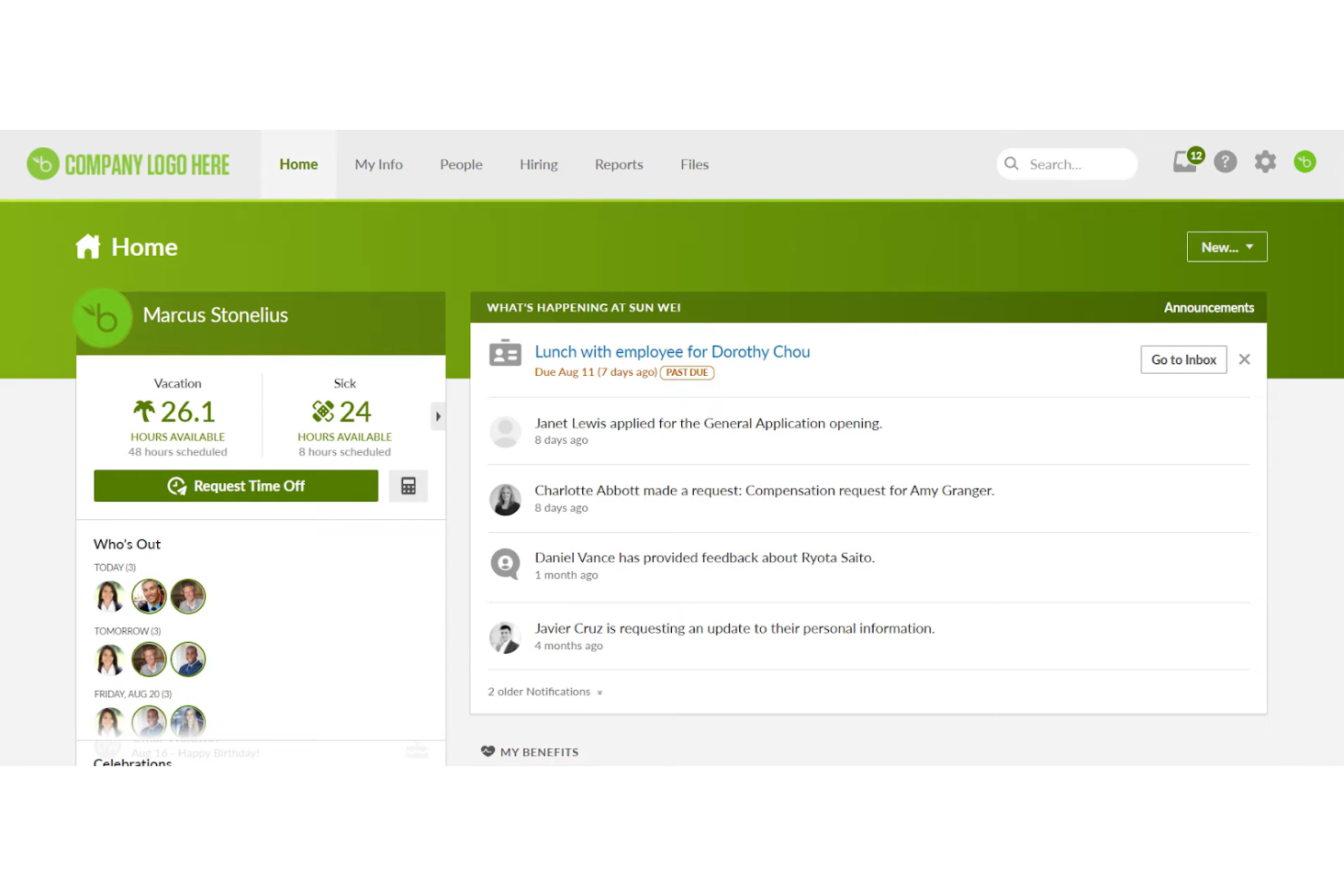
BambooHR is HR software designed for small to midsize businesses. It is an HRIS that handles key HR processes, such as employee data management, running payroll, and performance reviews.
Why I picked BambooHR: It caters specifically to small and midsize businesses, including startups, with its intuitive interface and cost-effective solutions. The platform offers employee records management and performance reviews, ensuring HR teams can handle essential tasks without a steep learning curve. Its focus on user experience allows your team to quickly onboard and manage day-to-day HR functions efficiently.
BambooHR's focus on these core functionalities makes it ideal for businesses looking for straightforward HR management.
Standout features and integrations:
Features include employee self-service so your team can access their own records and manage time-off requests. It also supports performance management, allowing you to set goals and track progress. Customizable reporting helps you generate insights tailored to your business needs.
Integrations include Google Workspace, Slack, QuickBooks, Xero, Okta, NetSuite, Greenhouse, Checkr, Indeed, and more.
Pros and Cons
Pros:
- Intuitive employee self-service
- Customizable reporting options
- Easy to use for all levels
Cons:
- Requires training for customization
- Limited advanced features

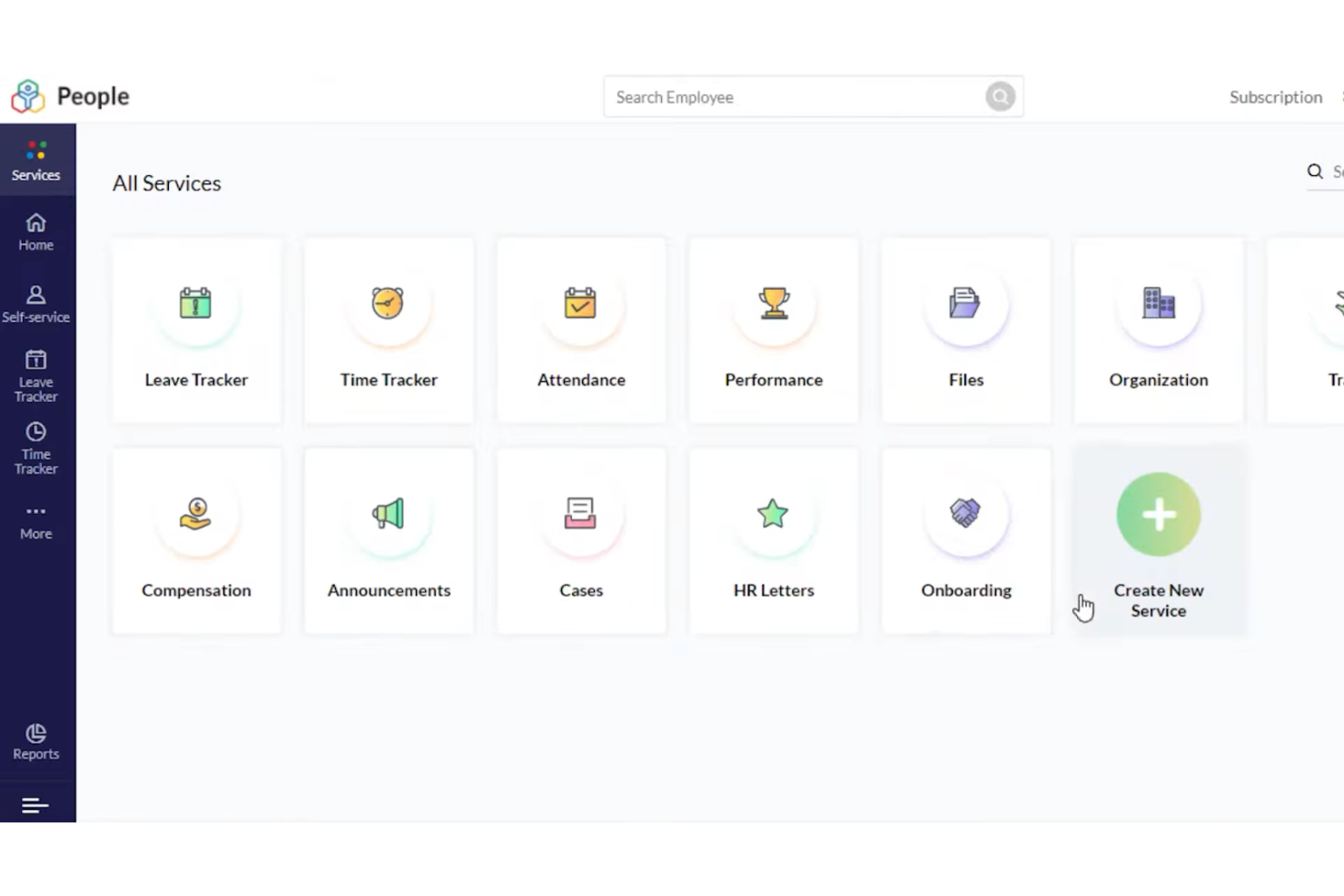
Zoho People is a cloud-based HR management tool designed for businesses of all sizes. It handles employee records, time tracking, and performance management.
Why I picked Zoho People: It offers modular HR solutions, allowing you to customize the platform to fit your specific needs. You can manage employee records efficiently and use time tracking to monitor attendance. The performance management features enable you to set goals, conduct evaluations, and drive retention. This modular approach makes it flexible for various HR functions.
Standout features and integrations:
Features include leave management, which allows you to handle leave requests and approvals with ease. The employee self-service portal empowers your team to update personal information and manage tasks. Additionally, the HR analytics feature provides insights into workforce data for better decision-making.
Integrations include Zoho Suite, Google Workspace, QuickBooks, Zapier, Slack, Adobe Sign, Microsoft Teams, and more.
Pros and Cons
Pros:
- Employee self-service portal
- Detailed HR analytics
- Highly customizable modules
Cons:
- Limited advanced features
- Requires ongoing customization
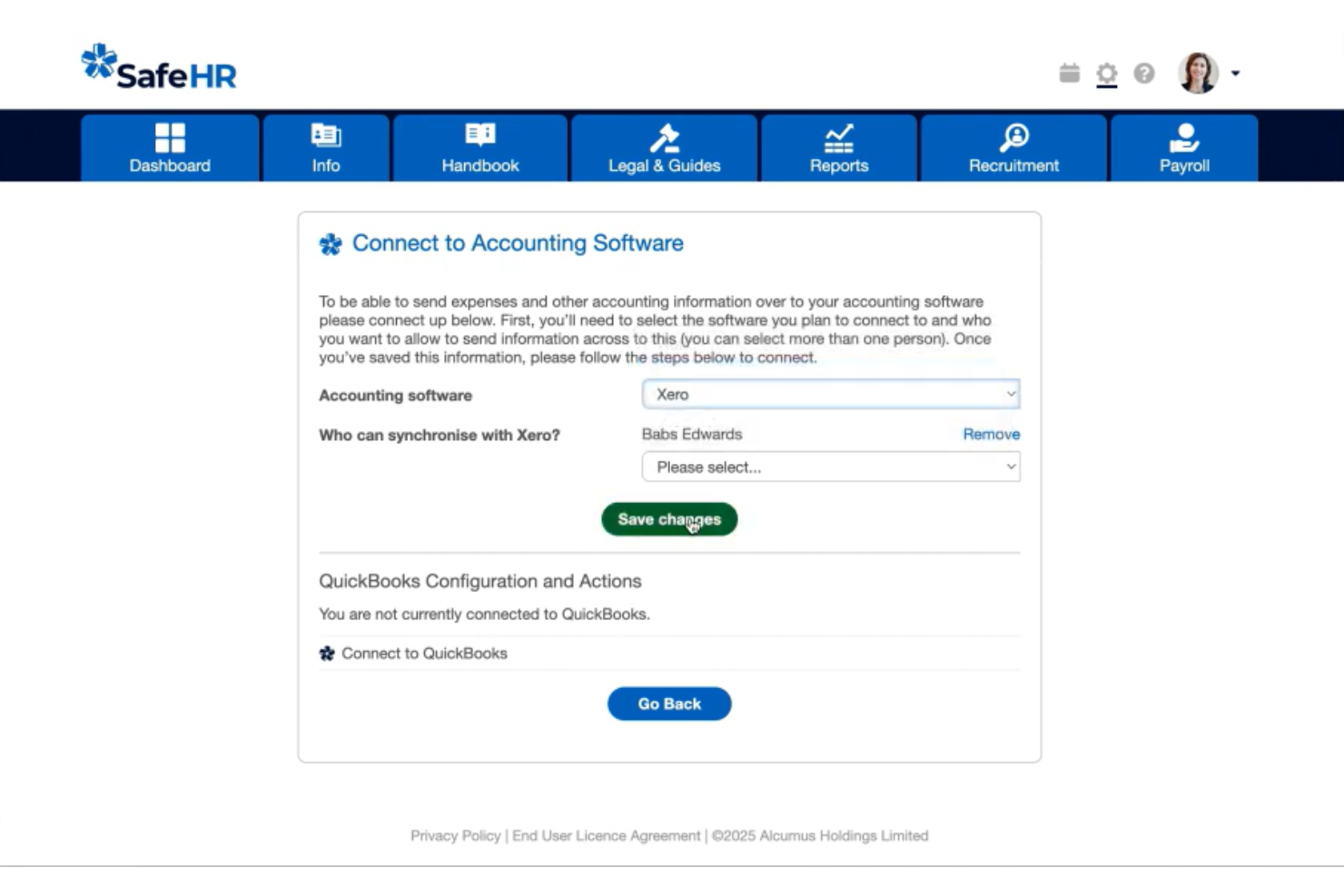
SafeHR, formerly CitrusHR, is an HR software solution tailored for small businesses. It focuses on employee management, payroll processing, and compliance tracking.
Why I picked SafeHR: Its data protection compliance ensures your HR processes align with legal standards. The platform offers GDPR-compliant data management and secure access controls. Compliance tracking and secure document storage help your business maintain privacy and security. This focus on data protection makes it a top choice for businesses prioritizing compliance.
Standout features and integrations:
Features include holiday and absence management, allowing you to handle employee time off without hassle. The recruitment and onboarding tools keep the hiring process organized and ensure smooth transitions for new hires. Additionally, performance management features help your HR team evaluate and develop your employees' skills while driving retention.
Integrations include Xero, QuickBooks, Telleroo, Xledger, and more.
Pros and Cons
Pros:
- Secure document storage
- GDPR-compliant data management
- Strong focus on data protection
Cons:
- No mobile app
- Limited customization options

Gusto
Best for small to medium-sized business needs
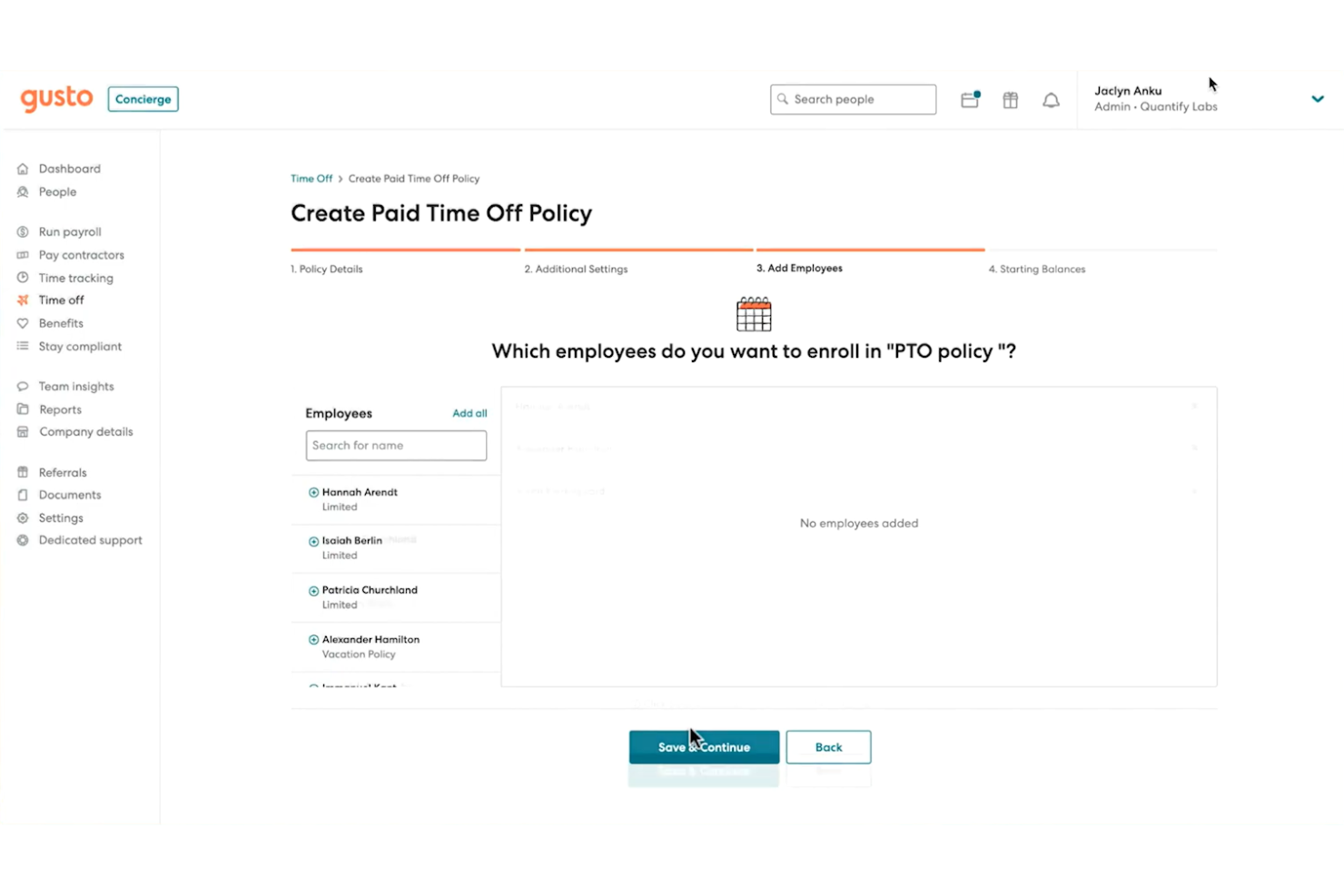
Gusto is a complete payroll and HR software solution tailored for small businesses. It handles payroll processing, benefits administration, and compliance management.
Why I picked Gusto: Its payroll management features automatic payroll runs and direct deposit. This HR platform simplifies benefits administration, making it easier for your team to manage health insurance and retirement plans. Its compliance tools help ensure your business meets regulatory requirements. Gusto's focus on payroll and benefits makes it a go-to for small businesses looking to manage these areas efficiently.
Standout features and integrations:
Features include employee onboarding, which helps you get new hires up to speed quickly. The time tracking feature allows you to easily manage employee timesheets and attendance. Additionally, Gusto has expert HR support teams to help you navigate complex HR issues.
Integrations include QuickBooks, Xero, FreshBooks, Deputy, Clover, Trainual, Expensify, JazzHR, When I Work, and more.
Pros and Cons
Pros:
- Expert HR support available
- Automatic payroll runs
- Simplifies benefits administration
Cons:
- May have certain feature limitations
- Not highly customizable
New Product Updates from Gusto
Gusto Adds Solo Advisory Tools and Mobile Money Features
Gusto adds Solo S-Corp Advisory Tools and Gusto Money on Mobile for tax guidance, invoicing, and bill payments. These updates help accountants advise solopreneurs and let users manage business finances from their phones. For more information, visit Gusto’s official site.

Connecteam
Best for deskless or remote teams
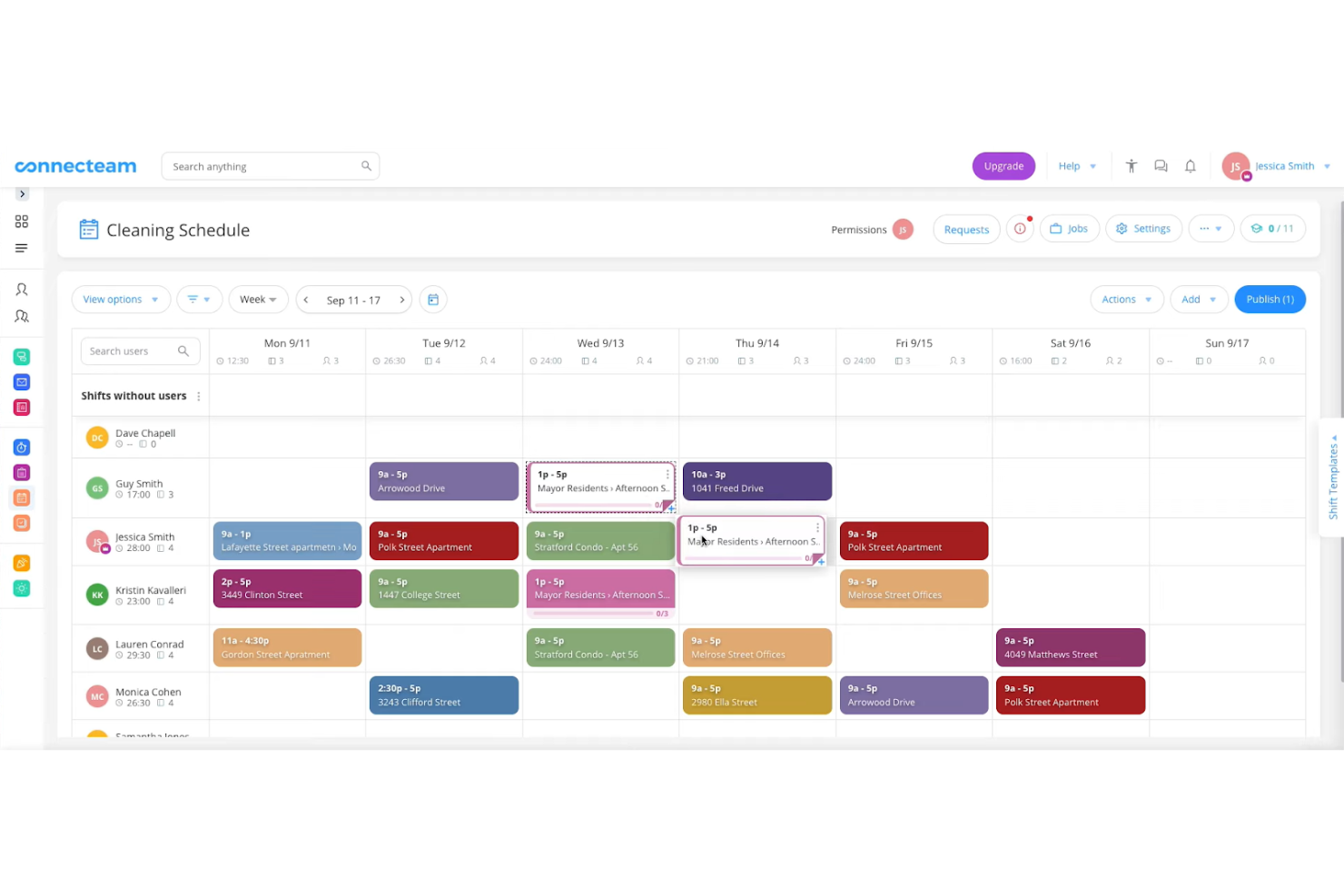
Connecteam is mobile-first employee management software designed for deskless or remote teams. It assists with communication, scheduling, and task management for businesses of all sizes.
Why I picked Connecteam: It caters specifically to deskless or remote teams, including startups, making it easy to manage employees on the go. The app offers timesheets, time tracking, and digital forms, which are essential for mobile workforces. Its communication tools help keep your team connected, no matter where they are.
With its focus on mobile functionality, you can effectively manage remote operations.
Standout features and integrations:
Features include task management, allowing you to assign and track tasks across your team. The digital forms allow you to collect and manage data efficiently. You can also use the scheduling feature to coordinate shifts and ensure coverage.
Integrations include QuickBooks, Zapier, Square, Wix, and more.
Pros and Cons
Pros:
- Mobile-first design for remote work
- Easy shift scheduling
- Strong communication tools
Cons:
- Limited metrics and analytics capabilities
- Requires training for full use
New Product Updates from Connecteam

Connecteam Expands Break and Timesheet Controls
Connecteam adds flexible break thresholds, personalized policies, auto-end options, a centralized exceptions report, and improved timesheet issue visibility to help teams manage breaks and timesheets more effectively. For more information, visit Connecteam’s official site.
 .
.Other Employee Management Software for Small Businesses
Here are some additional options for employee management software for small businesses that didn’t make it onto my shortlist but are still worth checking out:
- Homebase
For hourly workforce management
- Paycom
For payroll and compliance
- ClickUp
For project management integration
- Workday
For financial management
- Leapsome
For performance management and learning
- Deel HR
For international payroll solutions
- UKG
For workforce analytics
- SAP SuccessFactors
For enterprise HR needs
- Zoho One
For all-in-one business and HR tools
- Paycor
For midsize business payroll
- Rippling
For employee device management


How I Evaluate Employee Management Software for Small Business
I start by checking whether a tool handles the basics a 10-person team actually relies on—records, time off, onboarding—then look at what differentiates it for small businesses.
Core Functionality (Table Stakes For This List)
When I'm selecting tools for my list, I rank each one on a scale from 0 (does not offer the functionality) to 5 (excels in this area) for each core functionality listed below. Then, I calculate the tool's total score into a percentage. Each tool needs to achieve a minimum total score of 65% to be considered for inclusion.
- Employee Records Management: I look for a centralized database where you can store hire dates, job titles, compensation history, and uploaded documents like contracts or certifications in one place.
- Time & Attendance Tracking: Whether it's approving PTO requests or reviewing weekly timesheets, I evaluate how well each tool handles leave accruals, clock-in/out, and schedule management.
- Onboarding & Offboarding Workflows: Each tool should let you build structured task lists for new hires—like collecting tax forms and assigning training—and mirror that process for departures.
- Payroll & Benefits Integration: I check whether the platform syncs employee hours and deductions directly with payroll providers or handles payroll natively, so your team avoids manual data entry.
- Performance Management: Goal setting, scheduled reviews, and feedback tracking all matter here. I look at how each tool supports regular check-ins between managers and direct reports.
- Compliance & Reporting: Small teams often lack dedicated compliance staff, so I evaluate whether a tool offers audit-ready reports, labor law alerts, and role-based access to sensitive employee data.
Once I have a list of tools that meet this criteria, I consider what sets each platform apart.
Differentiating Factors (What Sets Vendors Apart)
Here's how I compare and contrast different vendors:
Standout Features
A self-service portal is a big deal for small teams because it lets employees update their own addresses, download pay stubs, and submit time-off requests without pinging HR. Mobile app access matters just as much—managers who split time between locations need to approve requests and check schedules from their phones. I also look for built-in engagement tools like pulse surveys or recognition features, which help small businesses track morale without purchasing a separate platform.
Beyond Features
Pricing transparency matters—I check whether vendors offer clear per-employee-per-month rates and whether there's a free or low-cost tier for very small teams still getting off the ground. Integration ecosystem is another big factor. A tool that connects with your existing payroll provider, QuickBooks or Xero, and communication apps like Slack saves hours of duplicate data entry each week. I also evaluate how quickly a non-technical office manager can get the platform up and running, including whether it supports CSV imports from spreadsheets.
How To Choose Employee Management Software for Small Businesses
It’s easy to get bogged down in long feature lists and complex pricing structures. To help you stay focused as you work through your unique software selection process, here’s a checklist of factors to keep in mind:
| Factor | What to Consider |
|---|---|
| Scalability | Can the software grow with your business? Consider if it supports additional users and features as your team expands. Look for flexible plans that accommodate growth without a steep increase in cost. |
| Integrations | Does it work with tools you already use? Check for compatibility with your existing systems, like payroll, scheduling, and communication tools. Avoid tools that require manual data transfer or duplicate work. |
| Customizability | How adaptable is the software to your needs? Ensure you can tailor workflows, reports, and user permissions. A lack of customization can force you to change your processes to fit the tool, not the other way around. |
| Ease of use | Is the interface intuitive for your team? Test the software with potential users to see if they can navigate it without extensive training. Complex systems can lead to frustration and low adoption rates. |
| Implementation and onboarding | How quickly can you get up and running? Check for support resources like setup guides, training videos, and customer service availability. Consider the time and effort required to switch from your current system. |
| Cost | Does the price fit your budget? Compare the total cost, including setup fees and ongoing expenses. Look for hidden fees and consider if the features provided justify the cost. |
| Security safeguards | How does the software protect your data? Ensure it complies with data protection regulations and offers features like encryption and user access controls. Data breaches can be costly and damage trust with your team. |
| Support availability | What support options are offered? Check if support is available in your time zone and through multiple channels like chat, email, or phone. Good support can save time and reduce frustration when issues arise. |
What Is Employee Management Software for Small Businesses?
Employee management software for small businesses is a digital tool that helps manage HR tasks, such as scheduling, payroll, and compliance. It's typically used by HR professionals, managers, and business owners who need to organize and oversee their team's operations efficiently. Time tracking, payroll processing, and compliance monitoring help with managing employee data and ensuring smooth operations. Overall, these tools help small businesses save time, reduce errors, and focus on effective team growth and retention.
Features
When selecting employee management software for small businesses, keep an eye out for the following key features:
- Time tracking: Automates the process of recording work hours, reducing manual errors and helping ensure accurate timesheets and payroll.
- Payroll processing: Simplifies payment calculations and disbursements, saving time and ensuring compliance with tax regulations.
- Employee scheduling: Allows you to create and manage shifts easily, ensuring proper coverage and minimizing scheduling conflicts.
- Compliance monitoring: Keeps track of labor law requirements, helping your business avoid legal issues and fines.
- Employee self-service portals: Empower employees to manage their own information and leave requests, reducing administrative workload and improving employee experience.
- Performance management: Facilitates setting goals and conducting evaluations, helping improve employee productivity and development.
- Recruitment and onboarding: Simplify hiring and integration of new employees, ensuring a smooth transition into the company.
- Document storage: Provides secure storage for HR documents, making it easy to access and manage important files.
- Customizable dashboards: Offer tailored views and reports, allowing you to focus on the metrics that matter most to your business.
- Mobile app accessibility: Ensures you can manage HR tasks on the go, increasing functionality for remote or mobile teams.
Benefits
Implementing employee management software for small businesses provides several benefits for your team and your business. Here are a few you can look forward to:
- Time savings: Automate repetitive HR tasks, such as payroll and scheduling, freeing up time for more strategic activities.
- Improved accuracy: Reduces manual errors in processes such as time tracking and payroll, ensuring accurate data and payments.
- Enhanced compliance: Monitors labor laws and regulations, helping your business avoid legal issues and penalties.
- Better employee engagement: Offers self-service portals for employees to manage their information, increasing satisfaction and reducing administrative burden.
- Organized hiring: Simplifies recruitment and onboarding processes, making it easier to attract and integrate new talent.
- Data-driven decisions: Provide analytics and reporting tools, enabling you to make informed decisions based on real-time data.
- Increased functionality: Supports mobile access, allowing you to manage HR tasks from anywhere, which is especially useful for remote teams.
Costs and Pricing
Selecting employee management software for small businesses requires an understanding of the various pricing models and plans available. Costs vary based on features, team size, add-ons, and more. The table below summarizes common plans, their average prices, and typical features included in employee management software for small business solutions:
Plan Comparison Table for Employee Management Software for Small Businesses
| Plan Type | Average Price | Common Features |
|---|---|---|
| Free Plan | $0/user/month | Basic time tracking, employee records, and limited reporting. |
| Personal Plan | $5-$15/user/month | Time and attendance tracking, basic payroll processing, and employee self-service portals. |
| Business Plan | $15-$30/user/month | Advanced scheduling, compliance monitoring, onboarding tools, and performance management. |
| Enterprise Plan | $30-$50/user/month | Customizable dashboards, advanced analytics, dedicated support, and enhanced security features. |
Employee Management Software for Small Businesses FAQs
Here are some answers to common questions about employee management software for small businesses:
How do I migrate HR data safely from spreadsheets?
Start by exporting your spreadsheets into consistent CSVs. Standardize fields (e.g., names, job titles, pay rates, start dates) and remove duplicates before import. Most small business HR tools offer an import wizard or onboarding specialist—use their templates so columns map correctly. Run a test import with 5–10 employees first, verify profiles, PTO balances, and historical notes, then import the full set. Keep the old file in a read-only format for 1–2 cycles as a backup.
Which features matter most for teams under 50 people?
For very small teams, prioritize the basics that replace manual administration: a central employee database, self-service profiles, time-off tracking, simple onboarding checklists, and payroll or timesheet integration if you need it. Fancy features such as advanced metrics and analytics or complex performance review cycles can wait.
Also look for mobile-friendliness and easy permissions, since small business managers tend to wear multiple hats and need quick access without burdensome training overhead.
How well do these apps currently handle local labor laws?
Even if a platform is global, local compliance depends on configuration. Check whether the tool supports your country’s leave types, overtime rules, holiday calendars, and employee documents. Many apps let you create custom policies, approval flows, and reports to match laws, but you may need to set them up manually. If you operate in multiple countries, pick software with multi-location rules and audit trails so your HR team can prove compliance easily.
Can we automate HR workflows without support from the IT team?
Yes, many small business tools include no-code workflow builders. You can automate PTO approvals, onboarding tasks, document e-signing, probation reminders, and recurring surveys using drag-and-drop rules. Start with one workflow, document the trigger and owner, then expand.
If the tool lacks automation, Zapier-style connectors can fill gaps. The key is to keep rules simple and review them quarterly as roles evolve, so they match how your team works and minimal disruption occurs.
What happens if we downgrade or cancel plans?
Typically, you keep access to your data, but features and functionality shrink as you downgrade. Expect limits on users, reporting, automation, or integrations—so export key reports and employee records before changing plans. When canceling, confirm how long data remains available, whether you can re-activate without re-importing, and what happens to payroll tax filings or time-clock histories. Set a final cutoff date internally so managers finish approvals and downloads beforehand without last-minute surprises.