

Kâr amacı gütmeyen kuruluş bordro yazılımları, kuruluşunuzun hibe desteğiyle finanse edilen pozisyonlar için bordroyu yönetmesine, programlar genelindeki iş gücünü izlemesine ve 501(c)(3) kuruluşları, inanç temelli gruplar ve laik kâr amacı gütmeyen kuruluşlar için önem taşıyan kurallara uymasına yardımcı olur. Kâr amacı gütmeyen bir kuruluşun bordrosunu yönetiyorsanız, çalışanlarınızı ve misyonunuzu desteklerken maliyet dağılımını, denetime hazır raporlamayı ve benzersiz vergi zorluklarını dengelemenin ne kadar yorucu olduğunu zaten biliyorsunuz.
2026 için en iyi kâr amacı gütmeyen kuruluş bordro yazılımı araçlarını bir araya getirdim. Daha az stresli bordro işlemleri yapmanızı, denetime hazır olmanızı ve hibe ile fon takibini fon sağlayıcılarınızın beklentilerine uygun şekilde yönetmenizi sağlayan özelliklere odaklandım. Seçiminizi yapmadan önce bilmeniz gerekenler şöyle.
Why Trust Our Software Recommendations
6,700+
Reviews
20
Industry experts
16+
Evaluation factors
14
Years
Our team has been testing and reviewing software since 2012. As HR experts ourselves, we know how difficult—and important—it is to choose the right software.
For this guide, we evaluated tools using hands-on testing and independent research, scoring tools using our selection criteria. We also draw on insights from industry thought leaders and practicing HR experts.
Our reviews reflect our human editorial judgment, not a sales pitch.
Expert reviewers:
- Phil GrayCOO
 Kim BehnkeHR Tech Editor & Analyst
 Josh BarkerPeople Ops Manager

Kâr Amacı Gütmeyen Kuruluş Bordro Yazılımları Karşılaştırma Tablosu
Kısa listeme giren kâr amacı gütmeyen kuruluş bordro yazılımlarının fiyatlarını ve teknik özelliklerini yan yana karşılaştırın.
Score legend (out of 5)
- Excellent4.5–5
- Good4–4.4
- Average3–3.9
- Below average2–2.9
- Poor1–1.9
Sorted by: Default
| Tool | Starting Price | Website | |||||||||||||
|---|---|---|---|---|---|---|---|---|---|---|---|---|---|---|---|
Best for global and contractor payroll in one place | Not rated | 3 | 4 | 2 | 4 | Not rated | 2 | Not rated | Not rated | Not rated | Not rated | Not rated | Not rated | $29/user/month Free demo available | Website |
Best for coordinating paid staff and volunteers | Not rated | Not rated | Not rated | Not rated | Not rated | Not rated | Not rated | 3 | 4 | 2 | 4 | 3 | 2 | $4/user/month Free demo available | Website |
Best for mid-market grant and program labor tracking | Not rated | 5 | 5 | 4 | 5 | 4 | 3 | Not rated | Not rated | Not rated | Not rated | Not rated | Not rated | Pricing upon request Free demo available | Website |
Best for time-to-payroll tracking in one place | Not rated | Not rated | Not rated | Not rated | Not rated | Not rated | Not rated | Not rated | 4 | 2 | 2 | 3 | 3 | $50/user/month 30-day free trial + free demo available | Website |
Best for small teams with staff across states | Not rated | Not rated | Not rated | Not rated | Not rated | Not rated | Not rated | 3 | 4 | 4 | 2 | 4 | 3 | Pricing upon request Free demo available | Website |
Best for clergy and grant-funded payroll | Not rated | 5 | 5 | 4 | 5 | 4 | 3 | Not rated | Not rated | Not rated | Not rated | Not rated | Not rated | Pricing upon request Free demo available | Website |
Best for grant labor allocation at payroll | Not rated | 5 | 5 | 5 | 5 | 2 | 3 | Not rated | Not rated | Not rated | Not rated | Not rated | Not rated | Pricing upon request Free demo available | Website |
Best for grant and fund labor cost allocation | Not rated | 4 | 5 | 5 | 5 | 5 | 3 | Not rated | Not rated | Not rated | Not rated | Not rated | Not rated | $6/user/month Free demo available | Website |
Best for clergy and grant-level payroll compliance | Not rated | 5 | 5 | 5 | 5 | 4 | 4 | Not rated | Not rated | Not rated | Not rated | Not rated | Not rated | Pricing upon request Free demo available | Website |
Best for church and clergy payroll compliance | Not rated | 5 | 5 | 3 | 5 | 5 | 3 | Not rated | Not rated | Not rated | Not rated | Not rated | Not rated | Pricing upon request Not available | Website |





Kâr Amacı Gütmeyen Kuruluş Bordro Yazılımı İncelemeleri
Aşağıda, kısa listeme giren en iyi kâr amacı gütmeyen kuruluş bordro yazılımlarına ilişkin ayrıntılı özetlerimi bulabilirsiniz. İncelemelerim, size en uygun seçeneği bulmanıza yardımcı olmak için her yazılımın özelliklerine, en uygun kullanım alanlarına ve yeteneklerine ayrıntılı bir bakış sunuyor.
 Best for global and contractor payroll in one place
- Free demo available
- From $29/user/month
Visit WebsiteCustomer Rating:4.9/5
Deel Payroll manages global payroll cycles across multiple countries in one view. Deel Payroll is a global payroll and contractor management platform that handles multi-country employee payroll, contractor payments, tax filing, and built-in time tracking across 150+ countries.
Who Is Deel Payroll Best For?
Deel Payroll is a strong fit for nonprofits that employ a mix of international staff and independent contractors and need both payroll and contractor payments managed in one place.
Why I Picked Deel Payroll
I've included Deel Payroll in my top picks because it's the only platform I've found that handles both international employee payroll and contractor payments in one place, which matters for nonprofits running programs across borders with a mix of staff and freelancers. I like that it files 1099-NECs directly from the platform and covers federal, state, and local tax filing across all 50 states automatically. Its percentage-based cost center splits also let you divide wages across programs without manual spreadsheet work.
Deel Payroll Key Features
- Built-in time tracking: Workers clock in and out via app, browser, or Slack, with approved hours flowing directly into payroll calculations.
- Multi-country payroll: Deel processes payroll across 150+ countries in 120+ currencies, covering international staff alongside US employees.
- Employee self-service portal: Employees can access pay history, year-to-date tax summaries, W-2s, and update direct deposit and withholding details independently.
- Cost center wage splitting: Wages can be divided across multiple cost centers by percentage with effective dates, supporting labor cost allocation across programs.
Deel Payroll Integrations
Deel Payroll offers native GL Sync integrations with QuickBooks Online, Xero, NetSuite, Sage Intacct, SAP, and Microsoft Dynamics. Syncs are manual, and there are no documented integrations with nonprofit platforms such as Aplos or Blackbaud.
Pros and Cons
Pros:
- Supports percentage-based program wage allocation
- Handles multi-state tax filings automatically
- Combines employee and contractor payroll
Cons:
- Grant reporting remains limited to cost centers
- No clergy or housing allowance workflows
Learn more about Deel Payroll: Best for coordinating paid staff and volunteers
- Free demo available
- From $4/user/month
Visit WebsiteCustomer Rating:4.5/5
Workzoom centralizes payroll processing tasks, pay runs, and sundries in one dashboard. Workzoom is a payroll and HR platform that handles grant-based salary allocation, fund-separated journal entries, volunteer tracking, and multi-jurisdiction pay processing across Canada, the United States, and the Bahamas.
Who Is Workzoom Best For?
Workzoom is a strong fit for mid-sized nonprofits with 50 or more employees that need to coordinate paid staff and volunteers within a single payroll and HR system.
Why I Picked Workzoom
I picked Workzoom as one of the best because it's one of the few platforms that keeps paid staff and volunteers inside the same scheduling view, so your team isn't toggling between systems to build a shift roster. Where it really shines is grant-based salary allocation: approved hours automatically split across configured grant codes, with fund-separated journal entries generated from those same rules, making funder audit reports far less painful to produce.
Workzoom Key Features
- Three-step pay run: Guides payroll through validation, audit and lock, and disbursement, with pre-flight checks that flag missing banking details, unapproved time, and tax-form gaps before processing.
- Multi-jurisdiction tax calculations: Applies jurisdiction-specific payroll rules across all 50 US states, Canada, and the Bahamas.
- Volunteer profile tracking: Maintains a distinct profile type for volunteers, separate from paid staff, with hours tracked and excluded from payroll and T4 generation.
- Statutory payroll outputs: Generates country-specific filing documents, including Canadian T4s and ROEs, US W-2s, and Bahamas NIB outputs, ready for employer review and submission.
Workzoom Integrations
Workzoom supports SAML 2.0 single sign-on with Microsoft Entra ID, Okta, and OneLogin. Fund-separated journal entries export as mapped general ledger files for QuickBooks Online and Sage, with Excel export for Power BI and deduction files for benefit carriers. API availability isn’t documented.
Pros and Cons
Pros:
- Reviewers praise responsive implementation support
- Paid staff and volunteers share scheduling
- Grant-coded hours generate fund-separated journals
Cons:
- Small nonprofits fall below its stated audience
- Employers submit filings and remit payroll taxes
Learn more about Workzoom: Best for mid-market grant and program labor tracking
- Free demo available
- Pricing upon request
Visit WebsiteCustomer Rating:4.3/5
Paylocity's dashboard lets employees track time, time off, and tasks. Paylocity is a unified HR and payroll platform that handles payroll processing, time tracking, tax filing, benefits administration, and labor cost allocation across grants, programs, and funding sources for nonprofit organizations.
Who Is Paylocity Best For?
Paylocity is a strong fit for mid-market nonprofits with 100–500 employees that need to track and allocate labor costs across multiple grants, programs, or funding sources.
Why I Picked Paylocity
I picked Paylocity as one of the best because of how well it handles labor cost allocation across multiple grants and programs at the timesheet level. Employees can assign hours directly to specific jobs, cost centers, or funding sources, and those hours flow straight into payroll with no duplicate entry. The GL mapping at the payroll code level means finance teams can split a single payroll run across several grant budgets without manual workarounds.
Paylocity Key Features
- 403(b) plan administration: Paylocity's built-in retirement module, powered by Vestwell, supports 403(b) plans with automatic payroll-connected contribution syncing.
- Multi-state payroll processing: Run payroll across all 50 states in a single pay run, with automated state-specific tax calculation, filing, and compliance alerts.
- Automated tax filing: Paylocity files federal, state, and local taxes—including W-2s, 941s, and 1099s—and assumes liability for any filing errors.
- Employee self-service mobile app: Employees can access pay stubs, request time off, enroll in benefits, and clock in via the mobile app with biometric and geofencing support.
Paylocity Integrations
Paylocity offers native integrations with QuickBooks Online, Sage Intacct, and NetSuite, plus embedded Vestwell retirement administration. Its marketplace includes TrakPay, E-COMP NOW!, SmartPay, Accident Fund, and InsurePay, while APIs support custom integrations.
Pros and Cons
Pros:
- Multi-state tax compliance with real-time alerts
- Automated housing and clergy payroll settings
- Handles grant and program labor tracking
Cons:
- Limited fund accounting integrations available
- No nonprofit-specific pricing or discounts
 Best for time-to-payroll tracking in one place
- 30-day free trial + free demo available
- From $50/user/month
Visit WebsiteCustomer Rating:4.5/5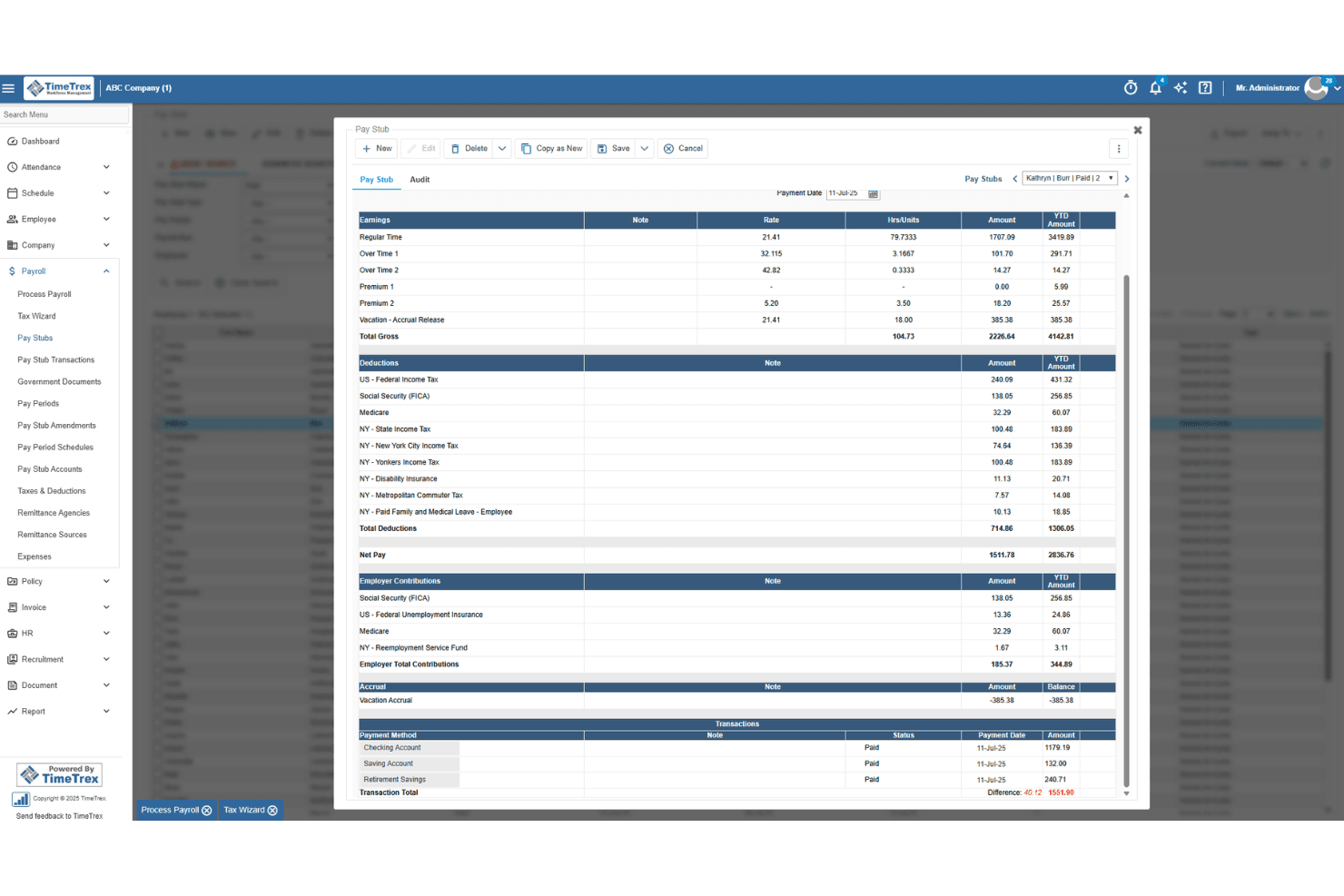
TimeTrex generates detailed pay stubs with earnings, deductions, and taxes. TimeTrex is a workforce management platform that combines time and attendance tracking, employee scheduling, leave management, and payroll processing in a single system.
Who Is TimeTrex Best For?
TimeTrex suits small nonprofits that want time tracking and payroll in one place, particularly those with hourly staff where hours-to-paycheck accuracy matters most.
Why I Picked TimeTrex
I picked TimeTrex as one of the best because of how tightly it connects time tracking to payroll, which matters when you're running hourly staff at a nonprofit and need every hour accounted for before a pay run. Clock-in data flows directly into payroll calculations, so there's no manual hour-entry step where numbers can drift. I also like that cost centers can be allocated across up to four levels, letting you tag hours to specific departments or programs before payroll runs.
TimeTrex Key Features
- Biometric facial recognition: Employees clock in and out using facial recognition to verify their identity at the point of punch.
- Leave and absence management: Tracks leave requests, balances, and accruals for paid time off and sick leave in a centralized system.
- Customizable workforce reports: Generates reports on attendance, labor trends, and payroll data that can be tailored to your organization's needs.
- QuickBooks and Sage integration: Transfers financial data between TimeTrex and your accounting system via two-way or flat-file data sharing.
TimeTrex Integrations
TimeTrex integrations include Intuit QuickBooks, Sage, ADP, Paychex, and Ceridian. It offers a REST API and custom integrations, though nonprofit fund-accounting workflows aren’t specified.
Pros and Cons
Pros:
- Grant-hour summaries support audit preparation
- Users praise patient, clear support responses
- Reviewers say time data simplifies payroll runs
Cons:
- Customers remain responsible for filing payroll taxes
- Fund-level payroll allocation isn’t documented
Learn more about TimeTrex: Best for small teams with staff across states
- Free demo available
- Pricing upon request
Visit WebsiteCustomer Rating:4.1/5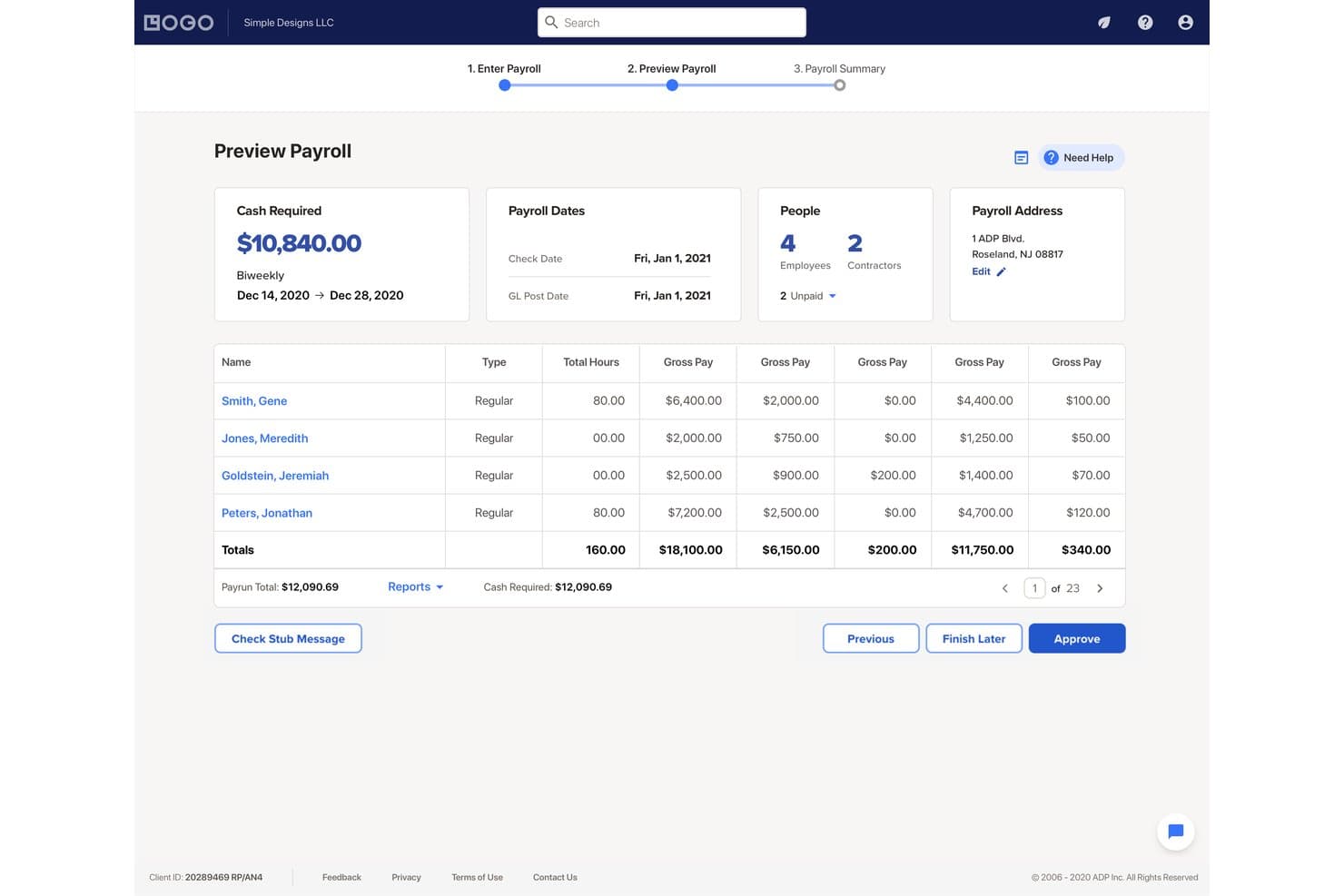
RUN Powered by ADP lets users preview payroll totals before approving. RUN Powered by ADP is a small-business payroll and HR platform that handles payroll processing, payroll tax filing, multi-jurisdiction pay runs, and employee payment disbursement across web, mobile, and phone.
Who Is RUN Powered by ADP Best For?
RUN Powered by ADP is a strong fit for small nonprofits with payroll administrators who need reliable multi-state tax filing and payment disbursement without managing compliance manually.
Why I Picked RUN Powered by ADP
I picked RUN Powered by ADP as one of the best because it handles multi-jurisdiction payroll within a single pay period, with ADP managing the associated tax filing automatically. For small nonprofits with staff spread across state lines, that means no manually tracking which state taxes apply to which employee. I also like the Tax Notices feature, which lets you photograph a tax agency notice and hand it directly to ADP's tax team to resolve.
RUN Powered by ADP Key Features
- Automated payroll tax filing: RUN calculates, deposits, and reconciles payroll taxes across federal, state, and local jurisdictions, with ADP handling tax agency inquiries directly.
- ADP Assist payroll inspector: An AI-enabled tool flags potential payroll errors before you submit, giving you a chance to correct mistakes in the preview stage.
- State Unemployment Insurance management: Available on Enhanced Payroll and above, this feature audits SUI experience rates and handles state agency correspondence on your behalf.
- General ledger interface: Exports payroll journal entries to QuickBooks, Xero, Wave, or Creative Solutions after each pay run.
RUN Powered by ADP Integrations
RUN Powered by ADP offers native integrations with QuickBooks, Xero, Wave, and Creative Solutions, plus a 7shifts marketplace integration and an API for custom integrations.
Pros and Cons
Pros:
- Handles employees across multiple tax jurisdictions
- Automated tax filing reduces manual compliance work
- Reviewers praise quick payroll runs
Cons:
- No documented clergy-specific payroll handling
- Department coding doesn’t track grants or funds
Learn more about RUN Powered by ADP®: Best for clergy and grant-funded payroll
- Free demo available
- Pricing upon request
Visit WebsiteCustomer Rating:4.5/5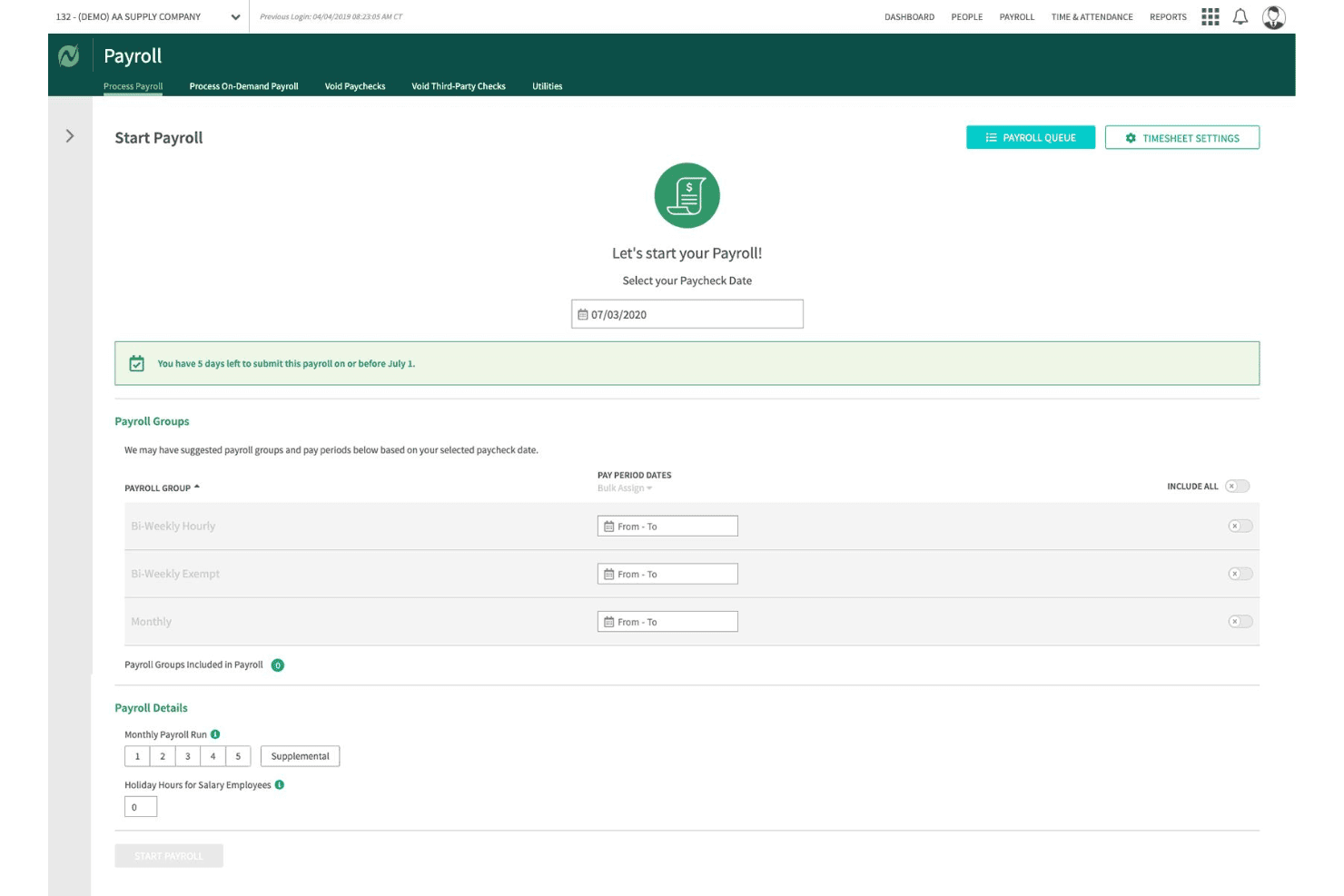
Netchex lets users configure payroll groups and pay periods before processing. Netchex is a full-service payroll and HR platform built for nonprofits, handling payroll processing, tax filing, time tracking, fund and grant allocation, and benefits administration in one system.
Who Is Netchex Best For?
Netchex is a strong fit for mid-sized nonprofits and faith-based organizations that need clergy payroll, housing allowance tracking, and multi-grant labor cost allocation handled natively in one platform.
Why I Picked Netchex
Netchex earns its spot on my shortlist because it handles clergy payroll and grant-funded labor allocation as native platform features, not manual workarounds. I particularly like how it supports minister dual-status payroll, IRC §107 housing allowance tracking with W-2 annotation, and Form 4361 Social Security opt-outs configured directly in the system. On the grant side, you can split a single employee's labor costs across multiple funds and programs at the timecard level, which flows automatically into audit-ready reporting.
Netchex Key Features
- OneScreen Payroll™ dashboard: Aggregates payroll readiness data across multiple locations or entities so you can review and run payroll in a single view.
- ACT Verification tool: Automatically checks that each employee is taxed correctly based on their work location, covering all 50 states.
- Timecard-level job code tracking: Links time entries to specific departments, cost centers, and programs directly on the timecard before payroll processes.
- AI anomaly monitoring via Sentinel: Continuously scans payroll data for compliance issues, approval errors, and compensation changes between pay periods.
Netchex Integrations
Netchex documents 23+ accounting and GL integrations, including QuickBooks Online, Blackbaud Financial Edge, MIP, Sage 50, Sage 300, Oracle NetSuite, and Microsoft Dynamics 365 Business Central. It also lists 44+ 401(k) provider integrations and supports custom GL file formats.
Pros and Cons
Pros:
- ACA, SUI, WOTC, and 501(c)(3) compliance
- Audit-ready fund and grant allocation built-in
- Clergy payroll and housing allowance automated
Cons:
- Interface slow and cumbersome for small teams
- No clear support for 403(b) plans
Learn more about Netchex: Best for grant labor allocation at payroll
- Free demo available
- Pricing upon request
Visit WebsiteCustomer Rating:4.4/5
UKG Ready's AI assistant guides managers through approving employee timesheets. UKG Ready is an HR and payroll platform with built-in time tracking, benefits administration, tax filing, and grant labor allocation tools designed for mid-to-large nonprofit organizations.
Who Is UKG Ready Best For?
UKG Ready is a strong fit for mid-to-large nonprofits that manage grant-funded programs and need payroll to reflect real-time labor allocations across multiple funding sources.
Why I Picked UKG Ready
I picked UKG Ready as one of the best because its dedicated "Time and Effort Reporting for Grants" module does something most payroll platforms don't: it lets you assign labor costs to specific grants in real time, with dashboards showing live spend versus budget. You can set employee rates by grant, track hours against milestones, and run role-based timesheet approvals that distinguish between, say, a principal investigator and a program assistant. Native 403(b) administration with 15-year rule support rounds out the nonprofit fit.
UKG Ready Key Features
- SmartCheck™ payroll error flagging: An AI-powered review scans each payroll run and surfaces potential errors before you finalize it.
- Multi-EIN payroll support: Run payroll across separate chapters, campuses, or affiliated entities under a single platform login.
- 403(b) catch-up contribution administration: Native setup supports 15-year rule provisions and USERRA make-up contributions for nonprofit retirement plans.
- Automated multi-jurisdiction tax filing: Federal, state, and local tax submissions—including W-2s, 1099s, and 941s—are filed end-to-end on your behalf.
UKG Ready Integrations
UKG Ready has documented integrations with QuickBooks and NetSuite, plus a Sage Intacct Marketplace connection. These accounting integrations support payroll-to-ledger workflows for nonprofit finance teams.
Pros and Cons
Pros:
- Multi-entity payroll under one login
- Native 403(b) 15-year rule support
- Real-time grant labor allocation during payroll
Cons:
- Reporting tools require administrative expertise
- No pre-built clergy tax workflows
Learn more about UKG Ready: Best for grant and fund labor cost allocation
- Free demo available
- From $6/user/month

APS Payroll lets users review gross-to-net payroll details before final approval. APS Payroll is a payroll and HR platform built with dedicated support for nonprofits and faith-based organizations, covering payroll processing, tax compliance, time tracking, benefits administration, and grant-level labor cost allocation.
Who Is APS Payroll Best For?
APS Payroll is a strong fit for nonprofits and faith-based organizations that need to allocate labor costs across multiple grants or programs and want a dedicated support team.
Why I Picked APS Payroll
APS Payroll earns its spot on my shortlist because of its Dimensions module, which lets you tag employee time directly to specific grants, programs, or departments at the timecard level. I love that those allocations flow straight into payroll processing and GL exports, so there's no manual rework when you're reconciling labor costs across multiple funding sources. The platform also handles 501(c)(3) FUTA exemptions and clergy dual-status taxation natively, which matters if your organization runs a mixed workforce of lay staff and ordained ministers.
APS Payroll Key Features
- Clergy housing allowance tracking: Set up, document, and track ministerial housing allowances to support correct federal income tax exclusion treatment.
- Employee self-service portal: Staff can view pay stubs, update direct deposit details, adjust W-4 withholding, and request time off through a web or mobile app.
- Sage Intacct bidirectional integration: Syncs employee records and dimensions between APS and Sage Intacct, then automatically posts payroll GL data by dimension into your fund accounting system.
- Custom report builder: Build ad hoc payroll and labor expense reports using configurable filters and columns to support board presentations and Form 990 preparation.
APS Payroll Integrations
APS Payroll lists 238 total connections, including a native bidirectional Sage Intacct integration plus integrations with QuickBooks, AccountMate, Acumatica, ACS Technologies, and Employee Navigator. An open API supports custom integrations.
Pros and Cons
Pros:
- Handles clergy housing allowance and dual-status
- Dedicated nonprofit and faith-based support teams
- Grant-level labor cost allocation with audit trails
Cons:
- No Aplos or Blackbaud Financial Edge NXT integration
- High monthly minimum excludes small nonprofits
Learn more about Apspayroll: Best for clergy and grant-level payroll compliance
- Free demo available
- Pricing upon request

Inova Payroll visualizes labor distribution and payroll trends by position and business unit. UKG Inova Payroll is a full-service payroll platform built for nonprofits, handling automated payroll processing, multi-state tax filing, clergy housing allowances, grant-level labor cost allocation, and fund accounting integrations across organizations of all sizes.
Who Is UKG Inova Payroll Best For?
UKG Inova Payroll is a strong fit for faith-based organizations and nonprofits managing federally funded programs that need clergy housing allowance support and grant-level labor cost tracking in one payroll system.
Why I Picked UKG Inova Payroll
I've included UKG Inova Payroll in my top picks because it handles two of the most technically demanding nonprofit payroll scenarios out of the box: clergy compensation and grant-level labor tracking. I specifically like that it supports housing allowances, Form 4361, and minister dual-status configuration, which most generalist platforms simply don't address. On the grant side, you can code timecards directly to funding sources, set primary and secondary funding splits per employee, and pull grant-level labor reports that hold up to OMB Uniform Guidance requirements.
UKG Inova Payroll Key Features
- Full-service tax filing: Files Forms 940, 941, 944, W-2, W-3, and 1099 across all 50 states and Washington, D.C., with automated reciprocity withholding and geospatial local tax ID matching.
- Multi-EIN payroll management: Manages payroll across multiple affiliated entities, chapters, or campuses under one login with separate EIN handling and consolidated reporting.
- Pay-as-you-go workers' comp: Calculates workers' compensation premiums per payroll run with no down payment, avoiding large year-end true-ups.
- Sage Intacct integration: Syncs payroll data bidirectionally with Sage Intacct, auto-posting GL journal entries by department, location, and dimension after each payroll run.
UKG Inova Payroll Integrations
UKG Inova Payroll integrates with Sage Intacct, QuickBooks Online, Acumatica, and Xero. It also provides an open REST API for custom connections, while Sage Intacct supports bidirectional GL and dimension syncing.
Pros and Cons
Pros:
- Manages multi-EIN nonprofit payroll compliance
- Supports grant-level labor cost tracking
- Handles clergy housing and parsonage allowances
Cons:
- No free trial or instant sandbox access
- No explicit support for 403(b) retirement plans
Learn more about UKG Inova Payroll: Best for church and clergy payroll compliance
- Not available
- Pricing upon request

Payroll Partners guides new hires through onboarding tasks and I-9 completion. Payroll Partners is a payroll and HR platform built specifically for churches and faith-based nonprofits, covering clergy tax handling, multi-campus labor allocation, time and attendance, benefits enrollment, and ATS-integrated recruiting.
Who Is Payroll Partners Best For?
Payroll Partners is built for churches and faith-based nonprofits that need clergy housing allowance management, dual-status minister tax handling, and multi-campus payroll support in one place.
Why I Picked Payroll Partners
Payroll Partners earns its spot on my shortlist because no other platform handles clergy payroll complexity with this level of specificity. I'm particularly impressed by its dual-status minister tax handling, which correctly separates FICA from SECA obligations, and its dedicated clergy housing allowance workflows, which even support mid-year reviews when a pastor's expenses change. It also manages pay confidentiality for pastoral staff, something most general payroll platforms simply don't offer.
Payroll Partners Key Features
- ATS-integrated recruiting: Post open roles directly to Indeed, Glassdoor, and ZipRecruiter, then manage candidate prescreening, scoring, and committee review workflows within the same platform.
- Paperless onboarding: New hires complete offer letter signing, federal and state forms, and I-9 verification online, with manager and employee task checklists tracking each step.
- ACA compliance dashboard: Tracks Applicable Large Employer status, generates 1094-C and 1095-C forms, and handles electronic filing with built-in compliance alerts.
- Multi-method time tracking: Employees can clock in via physical time clocks (badge, biometric, or proximity fob), web portal timesheets, or mobile app, with hours feeding directly into payroll.
Payroll Partners Integrations
Payroll Partners integrates with QuickBooks, Sage, Shelby Systems, Blackbaud, and ACS for accounting workflows. It also connects with Indeed, Glassdoor, and ZipRecruiter through its ATS, with custom integrations available on request.
Pros and Cons
Pros:
- Dedicated multi-campus labor allocation features
- Dual-status minister tax workflows included
- Handles clergy housing and parsonage allowances
Cons:
- Employee portal interface feels dated
- No public pricing or trial available
Learn more about Payroll Partners:
Diğer Kâr Amacı Gütmeyen Kuruluş Bordro Yazılımları
Kısa listeme giremeyen ancak yine de göz atmaya değer bazı ek kâr amacı gütmeyen kuruluş bordro yazılımı seçenekleri şunlardır:
- 11Sage Intacct PayrollBest for grant-funded labor allocation across funds
- 12RipplingBest for all-in-one payroll with grant tracking
- 13GustoBest for clergy and 501(c)(3) payroll tax setup
- 14Paychex FlexBest for scaling secular nonprofits' payroll compliance
- 15PaycorBest for pay-as-you-go workers' comp
- 16OnPayBest for clergy and 501(c)(3) tax exemptions
- 17PaycomBest for mid-to-large nonprofits needing full HCM
- 18JustworksBest for secular nonprofits wanting PEO-backed benefits
- 19MIP Fund AccountingBest for grant-funded labor cost allocation
- 20isolvedBest for mid-size secular nonprofits needing full HCM
How I Evaluate Nonprofit Payroll Software
My evaluation splits into baseline criteria every tool must meet—like clergy tax handling and fund allocation—and differentiators that separate a solid pick from the right one for your org.
Core Functionality (Table Stakes For This List)
When I'm selecting tools for my list, I rank each one on a scale from 0 (does not offer the functionality) to 5 (excels in this area) for each core functionality listed below. I then calculate the tool's total score into a percentage, using 65% as a benchmark to help assess its overall fit for the list.
- Payroll processing: I check whether the tool handles automated pay runs across multiple schedules, direct deposit, and contractor payments without manual workarounds.
- Tax filing and compliance: Each tool needs to calculate, withhold, and file federal and state payroll taxes and generate year-end forms like W-2s and 1099s.
- Employee self-service: I look for a portal where staff can pull up pay stubs, download tax forms, and update their own direct deposit or withholding details.
- Nonprofit tax exemptions: Tools should support 501(c)(3) FUTA exemptions and clergy housing allowances—both come up constantly in nonprofit payroll setups.
- Fund and grant allocation: I evaluate how each platform splits labor costs across grants, programs, or restricted funds, since funders expect audit-ready reporting at the line-item level.
- Fund accounting integration: Syncing payroll data to systems like QuickBooks, Sage Intacct, or Aplos matters, so I check for native or bidirectional integrations with nonprofit accounting platforms.
Once I have a list of tools that meet the criteria, I consider what sets each platform apart.
Differentiating Factors (What Sets Vendors Apart)
Here's how I compare and contrast different vendors:
Standout Features
I check whether time tracking syncs directly into payroll with grant or job codes at the timecard level, since duplicate entry across systems is where allocation errors start. Board-ready reporting matters too—I look for pre-built labor cost reports broken out by fund, grant, and program that are formatted for board packets or grantor audits without manual spreadsheet work. For nonprofits running multiple chapters or campuses, I evaluate multi-entity support under a single login with separate EIN handling and consolidated reporting.
Beyond Features
I check whether each vendor offers onboarding support from specialists who understand nonprofit fund structures and clergy tax setup—not just generic payroll reps. A bad mid-year migration can mean duplicate tax filings or misallocated grant wages. I also look for bidirectional integrations with fund accounting platforms like Sage Intacct, Aplos, or QuickBooks, with class and dimension mapping that keeps your chart of accounts intact. Nonprofit-specific pricing matters too, especially flexible per-employee rates without long-term contracts for orgs with fluctuating grant-funded headcount.
Kâr Amacı Gütmeyen Kuruluş Bordro Yazılımı Nasıl Seçilir?
Kâr amacı gütmeyen kuruluşunuzun hibe takibi, uyumluluk ve program maliyeti dağılımı ihtiyaçlarına uygun bordro yazılımını seçerken nelere dikkat etmelisiniz:
| Önceliğiniz... | Şunları arayın... |
|---|---|
| Önceliğiniz...Hibeler veya programlar genelinde iş gücünü izlemek | Şunları arayın...Her bordro işleminde yerleşik hibe/fon maliyeti dağılımı |
| Önceliğiniz...Din görevlileri veya inanç temelli kuruluşlar için bordro vergisi uyumluluğu | Şunları arayın...Özel din görevlisi konut/vergilendirme modülleri |
| Önceliğiniz...Fon sağlayıcılar veya yönetim kurulları için denetime hazır raporlama | Şunları arayın...Önceden oluşturulmuş, fon bazlı iş gücü maliyeti raporlaması |
| Önceliğiniz...Kâr amacı gütmeyen kuruluş muhasebe araçlarıyla kolay entegrasyon | Şunları arayın...QuickBooks veya Sage ile yerel, çift yönlü senkronizasyon |
| Önceliğiniz...Değişken çalışan sayısı veya geçici personelle ölçeklenmek | Şunları arayın...Uzun vadeli sözleşme gerektirmeyen esnek, kullanıcı başına fiyatlandırma |
Kısa Listenizi Nasıl Değerlendirmelisiniz?
- Uygulama içinde hibe dağılımını test edin: Örnek bir hibe için bordroyu dağıtın ve onaylayın; ardından dışa aktarılan raporun doğruluğunu kontrol edin.
- Din görevlisi vergileri için demo talep edin: Satıcıdan, din görevlisi konut ödeneği ile 501(c)(3) muafiyeti kurulumunu size göstermesini isteyin.
- Bir denetim raporu örneği edinin: Hibe verenlerin denetimleri veya yönetim kurulu dosyaları için sunulduğu biçimde, fon bazında iş gücü maliyeti raporu isteyin.
- Bir muhasebe entegrasyonunu deneyin: 7 günlük deneme ortamında bir bordro çalıştırın ve sonuçları kâr amacı gütmeyen kuruluş muhasebe yazılımınızla senkronize edin.
- Ödünleşim—sektör uzmanlığı mı, genel bordro ölçeği mi: Yerleşik uyumluluk sunan kâr amacı gütmeyen kuruluş uzmanı bir sağlayıcıyı mı, yoksa özelleştirme sunan ancak sektöre daha az odaklanan daha büyük bir sağlayıcıyı mı istediğinize karar verin.
Kâr Amacı Gütmeyen Kuruluş Bordro Yazılımları Nedir?
Kâr amacı gütmeyen kuruluşlara yönelik bordro yazılımları, çalışan ücretlerini, vergi uyumluluğunu ve fon veya hibe tahsisini özellikle kâr amacı gütmeyen kuruluşlar için yönetmek üzere tasarlanmış dijital araçlardır. Bu platformlar; iş gücü maliyetlerini program veya fon bazında takip etme, din görevlileri ya da inanç temelli kuruluşların bordro ihtiyaçlarını destekleme ve hibe sağlayıcılar ile yönetim kurulları için denetime hazır raporlar oluşturma gibi kâr amacı gütmeyen kuruluşlara özgü gereksinimleri karşılamanıza yardımcı olur. Kuruluşunuzun uyumlu ve düzenli kalmasında önemli bir rol oynarlar.
Kâr Amacı Gütmeyen Kuruluş Bordro Yazılımlarının Özellikleri
Kâr amacı gütmeyen kuruluşlara yönelik bordro yazılımı seçerken aşağıdaki temel özelliklere dikkat edin:
- Bordro işleme: Çalışanlar ve yükleniciler için yinelenen ve tek seferlik ücret ödemelerini yönetir, birden fazla ödeme takvimini destekler ve kazanç, kesinti ve fazla mesai hesaplamalarını otomatikleştirerek bordroyu manuel çaba harcamadan işlemenizi sağlar.
- Vergi beyanı ve uyumluluk: Federal, eyalet ve yerel bordro vergilerini (501(c)(3) kuruluşlarına yönelik özel kurallar da dahil olmak üzere) hesaplar, keser ve beyan eder; ayrıca uyumluluğunuzu korumanıza yardımcı olmak için W-2 ve 1099 gibi yıl sonu vergi formları oluşturur.
- Fon ve hibe tahsisi: Her ödeme döneminde maaş ve ücret giderlerini belirli hibeler, fonlar veya programlar arasında bölmenize olanak tanır; ayrıntılı maliyet takibi için denetime hazır raporlamayı ve fon sağlayıcı gereksinimlerini destekler.
- Kâr amacı gütmeyen kuruluşlara yönelik vergi muafiyetleri: Kâr amacı gütmeyen kuruluşlar için FUTA muafiyeti ayarlarını destekler ve din görevlilerinin konut ödeneği işlemlerini mümkün kılar; böylece sektöre özgü vergi kurallarını geçici çözümlere başvurmadan yönetebilirsiniz.
- Çalışan self servis portalı: Çalışanlara dijital ücret bordrolarına ve vergi belgelerine erişim sağlarken kişisel ve banka bilgilerini güncellemelerine de olanak tanır; böylece İK iş yükünü azaltır ve çalışanların kendi işlemlerini bağımsız şekilde yürütmesini destekler.
- Fon muhasebesi entegrasyonu: Bordro verilerini QuickBooks, Sage Intacct veya Aplos gibi kâr amacı gütmeyen kuruluş muhasebe platformlarıyla senkronize eder ve doğru finansal raporlama için bordro maliyetlerini hesap planınıza eşler.
- İş veya hibe kodlarıyla zaman takibi: Çalışanların zaman kayıtlarını doğrudan finansman kaynaklarına veya programlara bağlar, veri giriş hatalarını azaltır ve iş gücü maliyetlerinin her bordroda doğru şekilde tahsis edilmesini sağlar.
- Hazır denetim ve yönetim kurulu raporlaması: İş gücü maliyetlerini hibe, fon veya programa göre ayrıştıran ve hibe sağlayıcı denetimleri ya da yönetim kurulu incelemeleri için biçimlendirilen standart raporlar sunar; böylece paydaş gereksinimlerini manuel veri düzenlemesi yapmadan karşılayabilirsiniz.
- Birden fazla kuruluş yönetimi: Birden fazla şube veya tesis işleten kuruluşlar için ayrı EIN ve mali kayıtları desteklerken tek bir oturum açma üzerinden konsolide denetim sağlar.
- Kâr amacı gütmeyen kuruluşlara odaklı kurulum ve destek: Kâr amacı gütmeyen kuruluş bordrosunu, fon yapılarını ve din görevlilerine yönelik vergi senaryolarını anlayan uzmanlara erişim sunarak kurulum ve geçiş sırasında uyumluluk hatalarından kaçınmanıza yardımcı olur.
Kâr Amacı Gütmeyen Kuruluş Bordro Yazılımlarının Faydaları
Kâr amacı gütmeyen kuruluşlara yönelik bordro yazılımını uygulamak, ekibiniz ve işletmeniz için çeşitli faydalar sağlar. Yararlanabileceğiniz bazı avantajlar şunlardır:
- Doğru hibe ve fon tahsisi: Her ödeme döneminde bordro giderlerini belirli hibeler, programlar veya fonlara tahsis ederek raporlamanızı denetimlere ve fon sağlayıcı gereksinimlerine hazır hâle getirir.
- Uzmanlaşmış kâr amacı gütmeyen kuruluş vergi uyumluluğu: Manuel hesaplamalara gerek kalmadan uyumluluğunuzu korumanızı sağlayan özel modüller aracılığıyla 501(c)(3) FUTA muafiyetlerini ve din görevlilerinin konut ödeneklerini yönetin.
- Entegre muhasebe iş akışları: Bordro verilerini QuickBooks, Sage Intacct veya Aplos gibi kâr amacı gütmeyen kuruluş muhasebe sistemleriyle doğrudan senkronize ederek kayıtlarınızın doğru ve denetime hazır kalmasını sağlar.
- Denetime hazır raporlama: İş gücü maliyetlerini fon, program veya hibe bazında ayrıştıran hazır raporlar oluşturur; böylece ek elektronik tablo çalışmasına gerek kalmadan yönetim kurulu sunumlarını ve hibe sağlayıcı denetimlerini desteklersiniz.
- Çalışan self servis araçları: Çalışanların güvenli çevrimiçi portallar üzerinden ücret bordrolarını indirmesine, vergi formlarına erişmesine ve bilgilerini güncellemesine olanak tanıyarak İK iş yükünü azaltır.
- Kâr amacı gütmeyen kuruluşlara odaklı kurulum desteği: Kâr amacı gütmeyen kuruluşların fon yapılarını ve din görevlilerine yönelik vergi kurallarını anlayan uzmanlarla çalışarak kurulum hatalarını ve uyumluluk risklerini en aza indirir.
- Uyarlanabilir fiyatlandırma ve ölçeklenebilirlik: Değişken hibe finansmanlı çalışan sayılarını destekleyen ve uzun vadeli sözleşmelerden kaçınmanızı sağlayan esnek, kullanıcı başına fiyatlandırma modellerinden yararlanın.
Kâr Amacı Gütmeyen Kuruluş Bordro Yazılımlarının Maliyetleri ve Fiyatlandırması
Kâr amacı gütmeyen kuruluşlara yönelik bordro yazılımı seçmek, mevcut çeşitli fiyatlandırma modellerinin ve planların anlaşılmasını gerektirir. Maliyetler özelliklere, ekip büyüklüğüne, eklentilere ve daha fazlasına göre değişir. Aşağıdaki tablo, yaygın planları, ortalama fiyatlarını ve kâr amacı gütmeyen kuruluşlara yönelik bordro yazılımı çözümlerinde genellikle sunulan özellikleri özetlemektedir:
Kâr Amacı Gütmeyen Kuruluş Bordro Yazılımları İçin Plan Karşılaştırma Tablosu
| Plan Türü | Ortalama Fiyat | Yaygın Özellikler |
|---|---|---|
| Plan TürüÜcretsiz Plan | Ortalama Fiyat$0 | Yaygın ÖzelliklerTemel bordro işlemleri, basit vergi hesaplamaları ve sınırlı çalışan self servis özellikleri. |
| Plan TürüBireysel Plan | Ortalama Fiyat$8–$15/kullanıcı/ay | Yaygın ÖzelliklerStandart bordro çalıştırmaları, otomatik federal ve eyalet vergi bildirimleri, çalışan self servis portalı ve e-posta desteği. |
| Plan Türüİşletme Planı | Ortalama Fiyat$16–$35/kullanıcı/ay | Yaygın ÖzelliklerÇalışanlar ve yükleniciler için bordro, hibe ve fon maliyeti dağıtımı, muhasebe entegrasyonları ve denetim raporlaması. |
| Plan TürüKurumsal Plan | Ortalama Fiyat$36–$60/kullanıcı/ay | Yaygın ÖzelliklerÖzel iş akışları, çoklu tüzel kişilik desteği, özel işe alım desteği, öncelikli destek ve gelişmiş uyumluluk. |
Kâr Amacı Gütmeyen Kuruluşlar için Bordro Yazılımı SSS
Kâr amacı gütmeyen kuruluşlar için bordro yazılımı hakkında sık sorulan bazı soruların yanıtları burada:
Kâr amacı gütmeyen kuruluşlara yönelik bordro yazılımı platformları hibeleri ve kısıtlı fonları nasıl yönetir?
Kâr amacı gütmeyen kuruluşlara yönelik bordro yazılımlarının çoğu, her bordro çalıştırmasında maaşları ve ücretleri doğrudan belirli hibelere, fonlara veya programlara dağıtmanıza olanak tanır. Bu, fon sağlayıcıların kalem bazında iş gücü raporlaması gerekliliklerini karşılamanıza yardımcı olur ve denetimlerin düzenli kalmasını sağlar. Bazı araçlar zaman takibini veya iş kodlarını finansman kaynaklarına bile bağlar; böylece iş gücü dağıtımı otomatik olarak gerçekleşir.
Kâr amacı gütmeyen kuruluşlara yönelik bordro yazılımı din görevlilerine sağlanan vergi avantajlarını ve 501(c)(3) muafiyetlerini yönetebilir mi?
Evet, birçok kâr amacı gütmeyen kuruluş bordro aracı, din görevlilerine yönelik konut ödenekleri ve 501(c)(3) FUTA muafiyetleri için yerleşik modüller sunar. Bunu tanıtım sürecinde mutlaka test etmelisiniz. Bazı sistemler din görevlilerine ilişkin vergi kurulumunda size yol gösterirken, diğerleri daha karmaşık dini bordro düzenlemeleri için manuel yapılandırmaya olanak tanır.
Hangi muhasebe platformları kâr amacı gütmeyen kuruluşlara yönelik bordro yazılımıyla entegre olur?
Kâr amacı gütmeyen kuruluşlara yönelik bordro çözümlerinde genellikle QuickBooks, Sage Intacct ve Aplos entegrasyonlarını bulabilirsiniz. Bazı platformlar bordro verilerinin hesap planınızla doğrudan eşitlenmesini sunarken, diğerleri dışa aktarma/içe aktarma araçlarını veya üçüncü taraf uygulamaları kullanır. Yeniden çalışma ihtiyacını önlemek için çift yönlü eşitleme ile sınıf veya boyut eşlemesini destekleyip desteklemediğini kontrol etmeye değer.
Bir bordro sağlayıcısının kâr amacı gütmeyen kuruluşların ihtiyaçlarını gerçekten anladığını nasıl bilebilirim?
Yalnızca standart bordro temsilcileriyle değil, kâr amacı gütmeyen kuruluş uzmanlarıyla işe alım süreci sunan sağlayıcıları arayın. Hibe bazında iş gücü maliyetleri gibi örnek raporlar isteyin ve hibe ile fon dağıtımı iş akışlarının tanıtımını talep edin. Gerçek uzmanlık, aracın kâr amacı gütmeyen kuruluşlara özgü vergi kurallarını, raporlamayı ve uyumluluğu ne kadar kolay yönettiğinde kendini gösterir.
Birden fazla şubesi veya tesisi olan kuruluşlar için bordro yazılımını değerlendirmenin en iyi yolu nedir?
Yazılımın tek bir oturum açma altında çoklu tüzel kişilik veya çoklu EIN yönetimini desteklediğini kontrol edin. Bu, birden fazla konumu veya programı olan kuruluşlar için ayrı bordrolar çalıştırabileceğiniz, maliyetleri dağıtabileceğiniz ve birleştirilmiş raporlar oluşturabileceğiniz anlamına gelir; üstelik birden fazla hesabı yönetmeniz gerekmez.
Hibeye dayalı veya değişken çalışan sayısına sahip kâr amacı gütmeyen kuruluşlar için esnek fiyatlandırma seçenekleri var mı?
Evet, birçok kâr amacı gütmeyen kuruluş bordro yazılımı sağlayıcısı, uzun vadeli taahhütler olmadan aydan aya ve çalışan başına fiyatlandırma kullanır. Bu esneklik, kâr amacı gütmeyen kuruluşların hibe finansmanı veya proje çalışmaları yıl içinde değiştikçe ölçeklerini büyütmelerine veya küçültmelerine yardımcı olur. Sözleşme koşullarını mutlaka netleştirin ve mevsimlik veya geçici çalışan seçeneklerini sorun.