

Ücretsiz çalışan takdir yazılımları, ekibinize başarıları kutlamak, harika çalışmaları öne çıkarmak ve morali yükseltmek için başlangıç maliyeti olmadan dijital araçlar sunar. Takdiri kolay ve erişilebilir hâle getirmenin yollarını arıyor ancak ücretsiz bir plana veya deneme sürümüne bağlı kalmanız gerekiyorsa doğru yerdesiniz. En iyi seçenekleri, her birinin hangi konuda öne çıktığını ve İK ekiplerinin takdiri anlamlı ve basit tutmak için bunları gerçekte nasıl kullandığını değerlendirmenize yardımcı olacağım.
Why Trust Our Software Recommendations
6,700+
Reviews
20
Industry experts
16+
Evaluation factors
14
Years
Our team has been testing and reviewing software since 2012. As HR experts ourselves, we know how difficult—and important—it is to choose the right software.
For this guide, we evaluated tools using hands-on testing and independent research, scoring tools using our selection criteria. We also draw on insights from industry thought leaders and practicing HR experts.
Our reviews reflect our human editorial judgment, not a sales pitch.
Expert reviewers:
- Phil GrayCOO
 Kim BehnkeHR Tech Editor & Analyst
 Josh BarkerPeople Ops Manager

Ücretsiz Çalışan Takdir Yazılımları Karşılaştırma Tablosu
Bu karşılaştırma tablosu, en iyi ücretsiz çalışan takdir yazılımı seçimlerimin fiyatlandırma ayrıntılarını özetlemektedir:
Sorted by: Default
| Tool | Starting Price | Website | |
|---|---|---|---|
Best for group celebration message boards | 4.8 out of 5 | $6.99/board Free trial available | Website |
Best for points-based peer appreciation programs | 4.6 out of 5 | $3/user/month Free plan + 30-day free trial available | Website |
Best for Microsoft Teams engagement features | 4.7 out of 5 | $7/user/month Free plan + 30-day free trial + free demo available | Website |
Best for automated milestone celebrations | 4.7 out of 5 | $1/user/month Free trial available | Website |
Best for direct Slack recognition workflows | Not rated | $50/month Free trial + free demo available | Website |
Best for gamified culture-building via chat | 4.6 out of 5 | $3/user/month Free trial + free demo available | Website |
Best for AI-powered recognition suggestions | Not rated | $3/user/month Free plan + 14-day free trial + free demo available | Website |
Best for customizable value-based kudos | Not rated | $1/user/month 14-day free trial + free plan + free demo available | Website |
Best for recognition using Slack and Teams emojis | Not rated | $3/user/month 30-day free trial | Website |
Best for unlimited recognition with no user cap | Not rated | $1/user/month Free plan available | Website |


Ücretsiz Çalışan Takdir Yazılımı İncelemeleri
Aşağıda, kısa listeme giren ücretsiz çalışan takdir yazılımlarına ilişkin ayrıntılı özetlerimi bulabilirsiniz. İncelemelerim, sizin için en iyi seçeneği bulmanıza yardımcı olmak üzere her platformun özelliklerini, en uygun kullanım alanlarını ve entegrasyonlarını ayrıntılı biçimde ele almaktadır.
 Best for group celebration message boards
- Free trial available
- From $6.99/board
Visit WebsiteCustomer Rating:4.8/5
Kudoboard offers a home dashboard with highlighted boards, quick actions, and tools to create boards, cards, and send gifts. Kudoboard is a digital group card and employee recognition platform where teams collaborate on celebration boards, shout-outs, and milestone messages using text, photos, GIFs, and video.
Who is Kudoboard Best For?
Kudoboard works well for HR and people ops teams at small to mid-sized companies that want a simple, low-lift way to coordinate group celebrations across remote or hybrid teams.
Why I Picked Kudoboard
I picked Kudoboard as one of the best because its group board format is genuinely built around collective celebration in a way most recognition tools aren't. Instead of individual shoutouts, you can coordinate a whole team to contribute messages, photos, GIFs, and videos to a single board for a colleague's birthday or work anniversary. I particularly like the slideshow mode, which lets you display the finished board live at an in-person or hybrid event rather than just emailing a link.
Kudoboard Key Features
- Company values tagging: Admins can create custom tags to tie recognition posts to company values and core behaviors.
- Printable keepsakes: Boards can be transformed into hard-bound books or posters and shipped to recipients.
- GIF and Unsplash integration: Users can add GIFs and high-quality images from GIPHY and Unsplash directly to recognition posts.
- Advanced analytics: Admins get access to detailed engagement and participation metrics to track the reach of recognition programs.
Kudoboard Integrations
Kudoboard offers native integrations with Slack, Microsoft Teams, Okta, OneLogin, and many HRIS systems including ADP, Workday, BambooHR, Gusto, and Paylocity. It also provides an API for custom integrations.
What's Free?
Kudoboard's Lite Board lets you create a single board for free, with a cap of 20 posts and basic features like messages, photos, and GIFs. It's not a free-forever plan in the traditional sense, as boards are created individually rather than through an ongoing subscription, and the Business plan offers a free trial with no credit card required.
Pros and Cons
Pros:
- Custom backgrounds and branding
- Boards display as a live slideshow at events
- Group boards collect contributions from the whole team
Cons:
- Per-board pricing makes ongoing recognition expensive
- Contributors must sign up before posting to a board
Learn more about Kudoboard: Best for points-based peer appreciation programs
- Free plan + 30-day free trial available
- From $3/user/month
Visit WebsiteCustomer Rating:4.6/5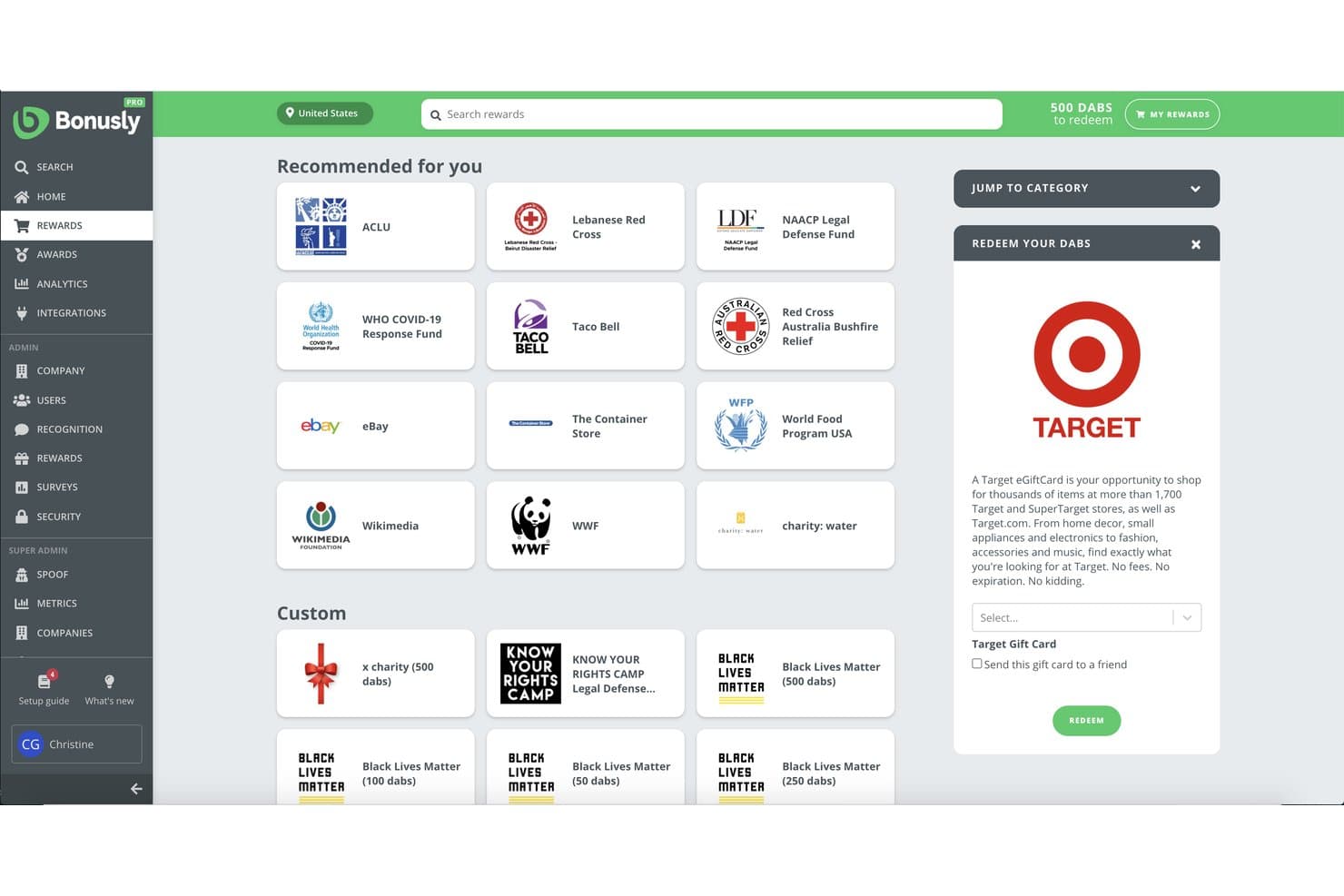
Bonusly offers a rewards redemption marketplace where employees can browse and redeem points (dabs) for gift cards, charitable donations, and custom rewards. Bonusly is an employee recognition platform built around a points-based system where employees give each other small monetary allowances, tie recognition to company values, and automate milestone celebrations like birthdays and work anniversaries.
Who is Bonusly Best For?
Bonusly is a strong fit for people ops and HR teams at small to mid-sized companies looking to build a structured peer recognition culture across remote or hybrid teams.
Why I Picked Bonusly
I picked Bonusly because the monthly points allowance model sets it apart from a simple kudos board. Every employee gets a monthly budget to distribute to peers in small increments, keeping recognition frequent and distributed rather than top-down. I love that value hashtags tie each shoutout directly to a specific company value, and those tags feed into analytics that show which values are actually showing up day-to-day across your team.
Bonusly Key Features
- Recognition feed: Company-wide social feed displays all shoutouts and celebrations in real time.
- Reactions and comments: Team members can like, react, or comment on any recognition post for greater engagement.
- Milestone automation: Automatically tracks and posts birthdays, anniversaries, and tenure milestones.
- Slack and Teams integration: Native integration enables employees to give and view recognition without leaving chat tools.
Bonusly Integrations
Bonusly offers native integrations with Slack, Microsoft Teams, Google Chat, BambooHR, ADP, Rippling, Toast, Notion, Workday, and more, and it provides an API for custom integrations.
What's Free?
Bonusly offers a free-forever plan that includes core peer recognition features with no user limit, making it accessible to teams of any size. The free plan doesn't include advanced features like 1:1s, check-ins, or the analytics and insights available on paid tiers.
Pros and Cons
Pros:
- Unused points can be donated to nonprofits
- Public shoutouts are visible across the whole company feed
- Points allowance resets monthly, encouraging frequent recognition
Cons:
- Recognition engagement tends to drop after the initial launch period
- Reward redemption catalog is limited outside of the United States
Learn more about Bonusly: Best for Microsoft Teams engagement features
- Free plan + 30-day free trial + free demo available
- From $7/user/month (billed annually)
Visit WebsiteCustomer Rating:4.7/5
Teamflect offers a centralized home dashboard featuring upcoming meetings, active goals, tasks, and pending review actions for employees. Teamflect is a performance management and employee recognition platform that combines peer-to-peer recognition, customizable badges, milestone celebrations, points-based rewards, and a company-wide recognition feed.
Who is Teamflect Best For?
Teamflect is a natural fit for small teams already working inside Microsoft 365 who want recognition built into their existing workflow.
Why I Picked Teamflect
I picked Teamflect as one of the best because recognition happens directly inside Microsoft Teams, with no separate app required. My team can send customizable badges mid-conversation in a Teams channel, and those recognitions post to a company-wide feed that colleagues can react to in real time. I also love the automated milestone alerts for birthdays and anniversaries, which surface inside Teams before they quietly slip past.
Teamflect Key Features
- Custom recognition badges: Create and assign badges tailored to your company’s values and achievements.
- Leaderboards: Track and highlight top-recognized employees with real-time, point-based ranking boards.
- Automated milestone recognitions: Automatically celebrate birthdays, anniversaries, and key work milestones within the platform.
- Microsoft 365 integration: Syncs with Outlook, Planner, To-Do, Power Automate, and Power BI for unified HR processes.
Teamflect Integrations
Teamflect has native integrations across the Microsoft ecosystem and 200+ HRIS systems, including Gusto, BambooHR, Paylocity, Rippling, HiBob, and Deel. An API is available for custom integrations.
What's Free?
Teamflect's Starter plan is a free-forever plan that includes recognition badges, a recognition feed, leaderboard views, recognition points, and redeemable rewards. It's capped at 10 users, so it works best for very small teams or as a way to pilot the product before committing to a paid plan.
Pros and Cons
Pros:
- Free plan includes points and redeemable rewards
- Peer recognition tied to custom values-based badges
- Recognition sends directly inside Microsoft Teams chats
Cons:
- Useless for organizations outside the Microsoft ecosystem
- 10-user cap makes it unusable for most teams
Learn more about Teamflect: Best for automated milestone celebrations
- Free trial available
- From $1/user/month
Visit WebsiteCustomer Rating:4.7/5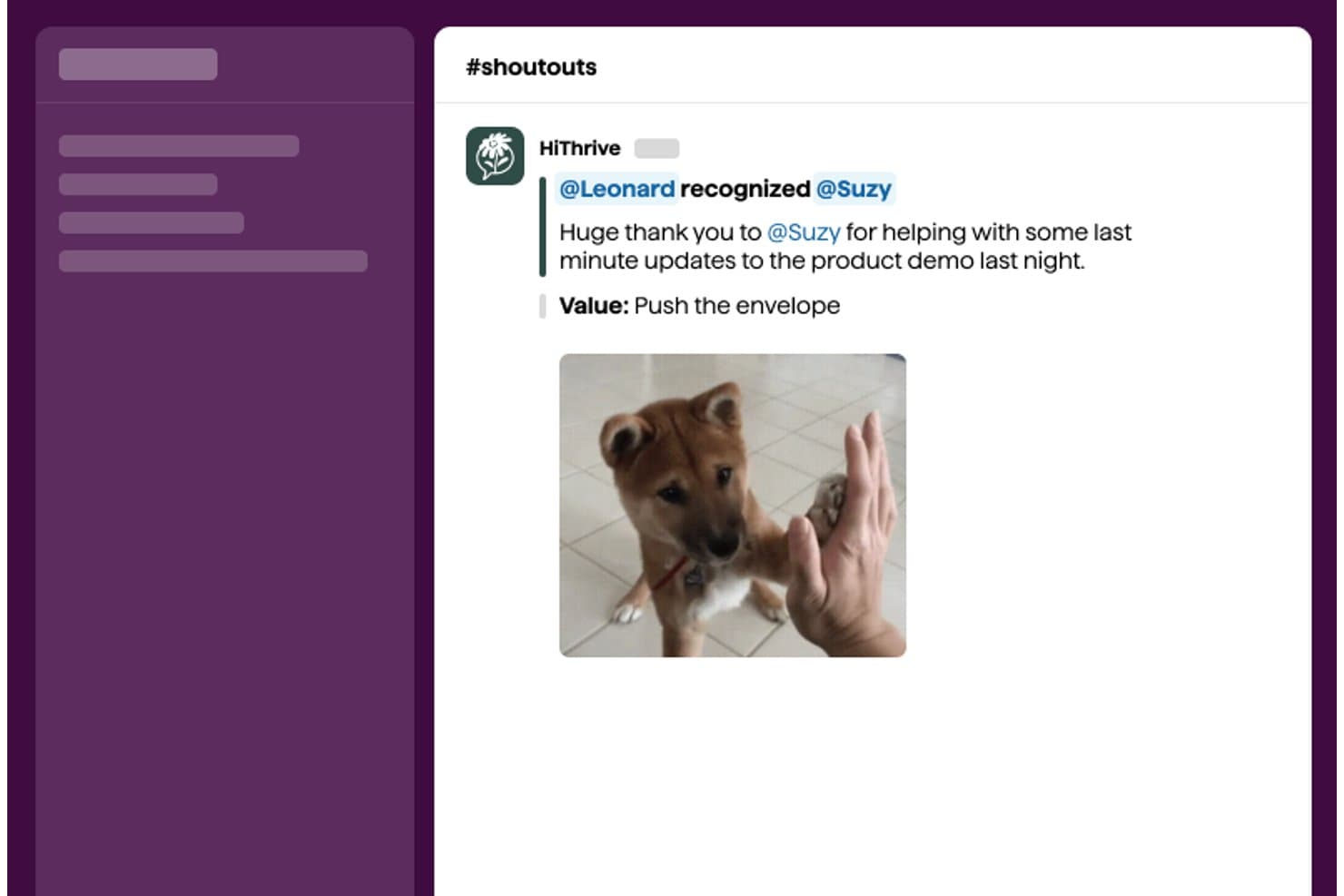
HiThrive offers a Slack-integrated #shoutouts channel where employees can publicly recognize colleagues with personalized messages and company values. HiThrive is an employee recognition platform that supports peer-to-peer shoutouts, values-based recognition, automated milestone celebrations, and a built-in rewards catalog through Slack, Microsoft Teams, or a standalone web app.
Who is HiThrive Best For?
HiThrive is a strong fit for people operations teams at small to mid-sized companies that run Slack- or Teams-based workplaces and want structured, automated recognition programs.
Why I Picked HiThrive
HiThrive earns its spot as one of the best because of how thoughtfully it handles automated milestone celebrations. I love that work anniversary programs let you configure each milestone year separately, with its own point value, gift, message, and announcement timing. The birthday workflow is particularly smart: it asks each employee how they'd prefer to celebrate, whether publicly, privately, or not at all, before anything goes out.
HiThrive Key Features
- Peer-to-peer recognition: Send public or private kudos to any colleague directly in Slack, Microsoft Teams, or the web app.
- Recognition feed: View a company-wide social wall of appreciation posts, keeping recognition visible to everyone.
- Company values tagging: Assign recognition to specific core values, allowing admins to customize and track value-driven behaviors.
- In-app rewards catalog: Choose from digital gift cards, Amazon redemptions, nonprofit donations, and custom company swag for digital rewards.
HiThrive Integrations
HiThrive offers native integrations with ADP, BambooHR, Gusto, HiBob, Namely, Paylocity, Rippling, Sage, UKG, Workday, and more. An API is available for custom integrations.
What's Free?
HiThrive offers a 30-day free trial of its Recognize plan, with no free-forever tier available. After the trial ends, you'll need to subscribe to a paid plan to keep using the platform.
Pros and Cons
Pros:
- Values tagging tracks cultural behavior patterns
- Birthday celebrations respect individual employee preferences
- Milestone workflows configurable per anniversary year
Cons:
- Limited analytics on recognition participation rates
- No free-forever plan beyond trial period
Learn more about HiThrive: Best for direct Slack recognition workflows
- Free trial + free demo available
- From $50/month (billed annually)

CultureBot automatically announces employee lottery winners in Slack, displaying their prize directly in the channel. CultureBot is a Slack and Microsoft Teams-native recognition app that combines peer-to-peer shoutouts, automated milestone celebrations, pulse surveys, and conversation starters in a single install.
Who is CultureBot Best For?
CultureBot suits small to mid-sized remote and hybrid teams that run their daily communication in Slack and want recognition built into that same workflow.
Why I Picked CultureBot
CultureBot earns its spot on my shortlist because the entire recognition workflow lives inside Slack, with no tab-switching or separate login required. I love that team members can fire off a shoutout using a simple slash command, and that shoutout lands directly in a shared Slack channel for everyone to see and react to. The automated birthday and work anniversary messages are also set-and-forget, which means recognition keeps running even when no one is actively thinking about it.
CultureBot Key Features
- In-app trivia games: Teams can launch and play real-time trivia games directly inside Slack channels.
- Employee surveys and polls: Collect feedback and run anonymous surveys within the platform to gauge sentiment.
- Automated holiday celebrations: Set up custom messages to mark holidays and awareness days throughout the year.
- Onboarding experiences: Schedule and automate onboarding journeys for new hires using timed Slack messages.
CultureBot Integrations
CultureBot offers native integrations with Slack and Microsoft Teams.
What's Free?
CultureBot offers a 14-day free trial, not a free-forever plan. The trial gives you access to the platform's features before committing to a paid subscription, and no credit card is required to get started.
Pros and Cons
Pros:
- Trivia and games boost team engagement
- Automated milestone messages require no manual setup
- Slash command recognition is quick and frictionless
Cons:
- Analytics and reporting tools are basic
- No standalone web-based recognition feed
Learn more about CultureBot: Best for gamified culture-building via chat
- Free trial + free demo available
- From $3/user/month (billed annually)
Visit WebsiteCustomer Rating:4.6/5
Karma's Status dashboard offers real-time team activity, showing who is working on which project, for how long, and their current status. Karma is a chat-native employee recognition platform for Slack, Microsoft Teams, and Telegram that lets team members exchange karma points, tag company values, automate milestone celebrations, and redeem points for custom or gift card rewards.
Who is Karma Best For?
Karma is a strong fit for remote and hybrid SMB teams that run their daily work inside Slack or Microsoft Teams.
Why I Picked Karma
Karma earns its spot on my shortlist because of how naturally it turns peer recognition into a game your team actually wants to play. Type
@name + reasonin Slack or Teams and a karma point is awarded instantly, visible on a leaderboard that updates in real time. I also like that points are redeemable for custom rewards or branded gift cards, which gives recognition a tangible outcome beyond a public shoutout.Karma Key Features
- Automated milestone celebrations: Tracks and celebrates team member birthdays and work anniversaries directly in chat.
- Company values tagging: Lets you tag recognition with preset or custom company values for added cultural alignment.
- Public and private recognition: Choose whether individual kudos are visible to the whole team or sent privately.
- AI-powered analytics dashboard: Provides dashboards and insights into engagement, participation, and values alignment across your team.
Karma Integrations
Karma offers native integrations with Slack, Microsoft Teams, and Telegram. An API is available for custom integrations.
What's Free?
Karma offers a 30-day free trial, not a free-forever plan. The trial requires a minimum of 5 seats and gives you access to the full feature set, including unlimited users, AI-powered analytics, peer recognition, and rewards.
Pros and Cons
Pros:
- Points convert to tangible reward options
- Recognition stays inside existing chat tools
- Leaderboards update in real time
Cons:
- Less useful for non-chat-based teams
- No free-forever plan available
Learn more about Karma: Best for AI-powered recognition suggestions
- Free plan + 14-day free trial + free demo available
- From $3/user/month (billed annually)

Wrenly offers a home feed displaying peer recognitions, anonymous feedback, and a getting-started checklist for free employee recognition. Wrenly is a Slack and Microsoft Teams-native recognition and engagement platform that combines peer-to-peer kudos, AI-generated recognition suggestions, milestone celebrations, and feedback tools in a single workspace.
Who is Wrenly Best For?
Wrenly is a strong fit for people operations teams at SMBs that run primarily on Slack or Microsoft Teams and want recognition to happen inside those tools.
Why I Picked Wrenly
Wrenly earns its spot on my shortlist because of how its AI handles the blank-page problem in recognition. When I open a recognition prompt, Wrenly's AI drafts a message based on the recipient's recent contributions, so I'm not staring at a cursor trying to find the right words. I also like that it auto-generates feel-good summaries for work anniversaries and flags upcoming milestones before I'd even think to check.
Wrenly Key Features
- Slack and Teams integration: Lets users send and receive recognition directly within team chat platforms.
- Recognition feed: Displays all peer shoutouts and kudos in a shared channel for the company to see.
- Custom company value tags: Links recognitions to your core values or behavioral competencies for easy tracking.
- Automated milestone reminders: Notifies about upcoming birthdays and anniversaries so teams never miss important dates.
Wrenly Integrations
Wrenly offers native integrations with Slack and Microsoft Teams. An API is available for custom integrations.
What's Free?
Wrenly has a free plan that includes up to 10 peer recognitions per month and one admin account. Paid plans start at $3/user/month and unlock unlimited recognitions, celebration automations, analytics, and additional admin access.
Pros and Cons
Pros:
- Free plan includes recognition boards with no ads
- AI drafts recognition messages inside Slack or Teams
- Anonymous feedback channel for sensitive employee concerns
Cons:
- Free plan caps recognitions at 10 per month
- Reporting exports are limited on lower-tier plans
Learn more about Wrenly: Best for customizable value-based kudos
- 14-day free trial + free plan + free demo available
- From $1/user/month (billed annually)

Matter integrates with Mattermost to let team members send and receive public Kudos recognition directly within their workspace channels. Matter is an employee recognition platform that runs natively inside Slack and Microsoft Teams, combining peer-to-peer kudos, a coins-based rewards system, automated milestone celebrations, and employee feedback pulse surveys.
Who is Matter Best For?
Matter is a strong fit for people ops and culture teams at remote or hybrid organizations that rely on Slack or Microsoft Teams as their primary communication hub.
Why I Picked Matter
I picked Matter as one of the best because of how it ties kudos directly to named company values. Rather than generic shoutouts, admins can build custom kudos cards mapped to specific values or behaviors, so every recognition moment reinforces something your culture actually cares about. I also like Matter's Feedback Friday, a recurring weekly prompt that keeps peer recognition consistent rather than leaving it to chance.
Matter Key Features
- Slack and Teams integration: Recognition, kudos, and feedback flow directly into your existing chat platforms.
- Recognition feed: Company-wide kudos posts are visible in a shared channel for broad visibility.
- Reactions and comments: Team members can like, react, or comment on kudos within Slack or Teams.
- Weekly coin system: Peer recognition is powered by coins that refresh each week to encourage ongoing engagement.
Matter Integrations
Matter offers native integrations with Slack and Microsoft Teams.
What's Free?
Matter has a free-forever plan that includes kudos recognition, a kudos template library, and Feedback Friday. Before committing to the free plan, you get a 14-day trial of all paid features, after which your account automatically rolls back to the free tier with no credit card required.
Pros and Cons
Pros:
- Free plan is free-forever without time limits
- Feedback Friday prompts consistent weekly peer recognition
- Custom kudos tied to named company values
Cons:
- Recognition analytics unavailable on the free tier
- Rewards redemption locked behind paid plans only
Learn more about Matter: Best for recognition using Slack and Teams emojis
- 30-day free trial
- From $3/user/month

HeyTaco offers an Individual Redemptions admin panel showing fulfilled reward requests with details like taco amounts, redemption dates, and delivery data. HeyTaco is a peer-to-peer recognition tool that runs natively inside Slack, Microsoft Teams, and Google Chat, letting team members send emoji-based appreciation, tag company values, and track recognition through leaderboards and analytics.
Who is HeyTaco Best For?
HeyTaco is a strong fit for remote and hybrid teams that already run their day-to-day communication through Slack or Microsoft Teams.
Why I Picked HeyTaco
HeyTaco earns its spot on my shortlist because recognition happens entirely inside Slack or Microsoft Teams, with no separate app or login required. I love that sending a :taco: emoji in any channel doubles as a formal shoutout, and you can tag a company value directly in the same message. The Taco TV feature lets me broadcast those recognition moments on office displays, so the shoutout reaches people well beyond the original thread.
HeyTaco Key Features
- Milestone celebrations: Automatically celebrates team member birthdays and work anniversaries within Slack or Microsoft Teams.
- Company values tagging: Lets you tie recognition messages to specific company values for greater cultural alignment.
- Customizable leaderboards: Tracks and displays team and individual recognition activity so you can see who’s giving and receiving the most tacos.
- Taco shop rewards: Allows admins to set up custom rewards that employees can redeem using their earned tacos.
HeyTaco Integrations
HeyTaco offers native integrations with Slack and Microsoft Teams.
What's Free?
HeyTaco offers a 30-day free trial that includes all Deluxe-tier features, with no credit card required. After the trial ends, you won't be automatically charged, but recognition will stop working until you subscribe to a paid plan, so it's not a free-forever option.
Pros and Cons
Pros:
- Taco TV displays shoutouts on office screens
- Values tagging built into every shoutout
- Works inside Slack without switching apps
Cons:
- Analytics reporting locked behind paid tiers
- Daily taco limits cap peer recognition
Learn more about HeyTaco: 10Best for unlimited recognition with no user cap
Clappy
- Free plan available
- From $1/user/month (billed annually)

Clappy offers a culture channel with kudos, work anniversaries, coffee chat scheduling, and a real-time engagement score dashboard. Clappy is a Slack- and Microsoft Teams-native peer recognition tool that lets teams send kudos, tag company values, track recognition with an insights dashboard, and run leaderboards and rewards programs.
Who is Clappy Best For?
Clappy is a strong fit for small and mid-sized teams that already run on Slack or Microsoft Teams and want to build a recognition culture without a dedicated budget.
Why I Picked Clappy
Clappy earns its spot as one of the best on my shortlist because it removes the recognition ceiling that limits so many free tools. Every team member gets a weekly clap allocation to send however they choose, with no cap on total kudos volume across the team. I also love the values dashboard: every kudo is tied to a specific company value, so I can see exactly which values are being lived and by whom, broken down by team and time period.
Clappy Key Features
- Insights dashboard: Track kudos volume, value tags, and top givers or receivers across teams and time periods.
- Leaderboards: Highlight employees who give or receive the most recognition for extra visibility, with options to filter by value.
- Levels and gamification: Unlock levels for frequent recognition activity to help sustain engagement through friendly competition.
- Appreciation Day automation: Set recurring days for the whole team to participate in shoutouts and structured appreciation.
Clappy Integrations
Clappy offers native integrations with Slack and Microsoft Teams and provides an API for custom integrations.
What's Free?
Clappy is free forever for teams of up to 10 employees, with no time limit. Teams larger than 10 users move to the paid plan at $1/user/month (billed annually), but the core peer recognition features, values tagging, and Slack and Microsoft Teams integrations are available on the free tier.
Pros and Cons
Pros:
- Gamification levels reward frequent recognition participation
- Automated birthday and work anniversary celebrations included
- Leaderboards highlight top givers and receivers
Cons:
- No built-in rewards catalog or point redemption
- Free tier limited to 10 team members
Learn more about Clappy:
Diğer Ücretsiz Çalışan Takdir Yazılımları
Kısa listeme girmeyen ancak yine de göz atmaya değer bazı ek çalışan takdir yazılımı seçenekleri şunlardır:
- 11Tap My BackBest for self-driven feedback alongside kudos
- 12NectarBest for customizable reward redemption options
- 13Workleap OfficevibeBest for culture and recognition insights
- 14ThanksBest for unlimited recognitions with global reach
How I Evaluate Free Employee Recognition Software
First, I define what counts as free. For employee recognition software, that means a long-term free plan—not a trial—since recognition loses its culture-building impact if it disappears after 30 days. From there, I split my evaluation into core functionality every tool must cover and the differentiating factors that separate a good pick from a great one.
Core Functionality (Table Stakes For This List)
In addition to my free offer requirements, I also use a scoring system to select tools for my list. Here's how it works:
I rank each one on a scale from 0 (does not offer the functionality) to 5 (excels in this area) for each core functionality listed below. Then, I calculate the tool's total score into a percentage. Each tool needs to achieve a minimum total score of 65% to be considered for inclusion.
- Peer-to-Peer Recognition: I look for whether any employee can send kudos to a colleague—not just managers—so recognition flows across teams organically.
- Recognition Feed: A shared, company-wide wall where shoutouts are visible matters. It's what turns a private "nice job" into a culture moment.
- Reactions & Comments: I check whether teammates can like, react, or comment on posts, since engagement on recognition drives repeat participation.
- Company Values Tagging: Each tool should let admins tie kudos to specific values like "collaboration" or "ownership" so recognition reinforces what your org cares about.
- Milestone Celebrations: I evaluate whether the tool auto-surfaces birthdays and work anniversaries so your team doesn't miss a five-year tenure milestone.
- Communication Tool Integration: The tool should plug into Slack, Microsoft Teams, or similar platforms so recognition happens where your team already works.
Once I have a list of tools that meet the criteria, I consider what sets each platform apart.
Differentiating Factors (What Sets Vendors Apart)
Here's how I compare and contrast different vendors:
Standout Features
Customizable badges tied to company values make a real difference—when someone gets recognized for "innovation" with a branded badge, it reinforces what your org stands for beyond a generic "great job." I also evaluate how deeply milestone automation works. Some tools just flag a birthday; others trigger team-wide celebration workflows with personalized messages. Slack or Teams integration depth matters too, since strong free tiers let you send and receive kudos entirely inside chat without switching apps.
Beyond Features
Free plan user caps are one of the first things I check. A team of 50 that's hiring fast will outgrow a 25-person limit quickly, so I look for plans that scale with your headcount. Setup matters too—without a dedicated CSM, you need self-serve onboarding with clear docs and templates ready to go. I also evaluate the upgrade path, because if your recognition history and data don't carry over when you move to a paid plan, you're starting from scratch.
Ücretsiz Çalışan Takdir Yazılımı Nasıl Seçilir?
Uzun özellik listeleri ve karmaşık fiyatlandırma yapılarına kendinizi kaptırmanız kolaydır. Benzersiz yazılım seçim sürecinizi yürütürken odaklanmanızı korumanıza yardımcı olmak için göz önünde bulundurmanız gereken faktörleri içeren bir kontrol listesi hazırladım:
| Faktör | Göz önünde bulundurulması gerekenler |
|---|---|
| FaktörÖlçeklenebilirlik | Göz önünde bulundurulması gerekenlerÜcretsiz kullanıcı sınırı veya kısıtlamaları, ekibinizin bugünkü ve gelecek yılki ihtiyaçlarına uyacak mı? Yalnızca bugünü değil, büyümeyi de planlayın. |
| FaktörEntegrasyonlar | Göz önünde bulundurulması gerekenlerSlack, Teams, e-posta veya İK araçlarınıza yerel olarak bağlanıyor mu? Yalnızca entegrasyonun bulunup bulunmadığını değil, kapsamını da kontrol edin. |
| FaktörÖzelleştirilebilirlik | Göz önünde bulundurulması gerekenlerTakdir kategorilerini, rozetleri veya değerleri kurum kültürünüze uyacak şekilde özelleştirebilir misiniz, yoksa seçenekler sabit mi? |
| FaktörKullanım kolaylığı | Göz önünde bulundurulması gerekenlerArayüz, her düzeyde teknoloji deneyimine sahip kullanıcılar için sezgisel mi? Farklı kullanıcılarla bir demo yapmayı deneyin. |
| FaktörUygulama ve işe alıştırma | Göz önünde bulundurulması gerekenlerÖzellikle BT desteği sınırlıyken, sistemi kullanıma açmak ve herkesi eğitmek gerçekçi olarak ne kadar sürer? |
| FaktörMaliyet | Göz önünde bulundurulması gerekenlerGelecekteki bütçeleri etkileyen gizli yükseltme koşulları, kullanıcı koltuğu sınırlamaları veya ücretli özellikler var mı? |
| FaktörGüvenlik önlemleri | Göz önünde bulundurulması gerekenlerHangi veri koruma önlemleri ve sertifikalar geçerli? GDPR, SOC 2 veya benzer gereksinimler için desteği doğrulayın. |
| FaktörDestek erişilebilirliği | Göz önünde bulundurulması gerekenlerSon kullanıcılar ve yöneticiler yardım için nereye başvurabilir: topluluk forumuna mı, e-posta desteğine mi, yoksa kapsamlı bir yardım merkezine mi? |
Ücretsiz Çalışan Takdir Yazılımı Nedir?
Ücretsiz çalışan takdir yazılımı, ekiplerin sürekli ücret ödemeden herkese açık veya özel teşekkür mesajları göndermesine, dönüm noktalarını kutlamasına ve takdir kültürünü geliştirmesine olanak tanıyan dijital bir araçtır. Bu platformlar genellikle ekip arkadaşları arasında takdir, şirket genelinde takdir akışı ve mesajlaşma entegrasyonları gibi temel özellikleri sunar. Tüm bunlar, küçük ekipler veya pilot programlar için tasarlanmış ve sürekli olarak ücretsiz olan planlar kapsamında sağlanır.
Özellikler
Çalışan takdir yazılımlarında yaygın olarak bulunan özellikleri ve bunların hangilerinin genellikle ücretsiz ve ücretli planlara dâhil edildiğini inceleyelim.
Genellikle Ücretsiz Çalışan Takdir Yazılımı Özellikleri
- Çalışanlar arası takdir mesajları: Çalışanlar iş arkadaşlarına teşekkür veya takdir mesajları gönderebilir ve kuruluş genelinde olumlu bir geri bildirim kültürü oluşturabilir.
- Takdir akışı: Herkese açık bir duvar veya akış, tüm takdirleri görüntüler; böylece başarılar görünür hâle gelir ve ekipler kazanımları birlikte kutlayabilir.
- Tepkiler ve yorumlar: Ekip üyeleri takdir gönderilerini beğenebilir, emojilerle tepki verebilir veya yorum yapabilir; bu da etkileşimi ve sosyal iletişimi artırır.
- Basit şirket değerleri etiketleri: Kullanıcılar, kuruluş kültürünü pekiştirmek için takdir gönderilerine önceden tanımlanmış değer etiketleri (örneğin “ekip çalışması” veya “yenilikçilik”) ekleyebilir.
- Otomatik dönüm noktası hatırlatıcıları: Platform, yaklaşan doğum günleri veya iş yıl dönümleri hakkında kullanıcıları bilgilendirerek önemli etkinliklerin gözden kaçırılmasını azaltır.
- Temel Slack veya Teams entegrasyonu: Takdir etkinlikleri yaygın sohbet platformlarında paylaşılır; böylece kullanıcılar mesajlaşma uygulamalarından ayrılmadan takdirleri görebilir ve gönderebilir.
- Kullanıcı profil sayfaları: Her çalışanın aldığı takdirleri özetleyen bir sayfası bulunur; bu sayfa katkıların ve güçlü yönlerin geçmişini oluşturur.
- Yönetici panoları: Temel analizler, genel takdir etkinliğini ve katılım oranlarını üst düzeyde gösterir.
Genellikle Ücretli Çalışan Takdir Yazılımı Özellikleri
- Özelleştirilebilir rozetler ve ödüller: Yöneticiler, belirli davranışlara veya dönüm noktalarına bağlı benzersiz dijital rozetler ya da ödüller tasarlayabilir ve daha kişiselleştirilmiş takdir deneyimleri sunabilir.
- Gelişmiş analiz ve raporlama: Yöneticiler, takdir eğilimleri, katılım ve kültürel etki hakkında ayrıntılı içgörüler elde ederek veriye dayalı İK kararlarını destekleyebilir.
- Ödül puanları ve hediye katalogları: Takdirlerle birlikte çalışanların seçilmiş bir katalogdaki hediye kartları, ürünler veya deneyimlerle değiştirebileceği puanlar ya da jetonlar verilir.
- Ekip ve departmanlar arası takdir: Araçlar, grup takdirlerini destekler ve ekipler veya konumlar arasındaki başarıların kutlanmasını kolaylaştırır.
- Otomatik kutlama iş akışları: Sistem planlanmış mesajlar gönderebilir, tüm ekibe e-postalar göndermeyi tetikleyebilir veya doğum günleri ve yıl dönümleri için özel sohbet başlıkları başlatabilir.
- İK bilgi sistemleri platformlarıyla entegrasyon: İK sistemlerine doğrudan bağlantılar, kullanıcı bilgilerinin, yıl dönümlerinin ve doğum günlerinin her zaman güncel olmasını sağlar.
- Özel değer çerçeveleri: Kuruluşlar kendi markalı değerlerini veya yetkinliklerini oluşturabilir ve daha güçlü bir kültürel uyum için tüm takdirleri bu çerçevelere bağlayabilir.
- Gelişmiş gizlilik denetimleri: Ayrıntılı ayarlar, takdir görünürlüğünü kısıtlamanıza, hassas bilgileri korumanıza ve veri standartlarına uymanıza olanak tanır.
- API ve Zapier erişimi: İş akışlarını otomatikleştirerek veya takdir verilerini kullandığınız diğer iş araçlarıyla entegre ederek platformun kapsamını genişletin.
- Öncelikli destek: Canlı sohbet, işe alıştırma desteği veya atanmış bir müşteri başarı yöneticisi aracılığıyla daha hızlı yanıtlar ve özel yardım alın.
Avantajlar
Ücretsiz çalışan takdir yazılımını uygulamak, ekibiniz ve işletmeniz için çeşitli avantajlar sağlar. Yararlanabileceğiniz avantajlardan bazıları şunlardır:
- Artan moral: Motivosity gibi platformlardan gönderilen düzenli takdir mesajları ve herkese açık takdir, çalışanların moralini yükseltir ve katkılarının değer gördüğünü hissetmelerini sağlar.
- Gelişmiş ekip kültürü: Çalışanlar arası takdir mesajları ve değerlere dayalı takdirler, ortak değerleri ve topluluk duygusunu teşvik eder.
- Daha yüksek etkileşim: Uygulama içindeki kolay tepkiler, yorumlar ve Slack veya Teams entegrasyonları herkesin takdir sürecine dâhil olmasını sağlar.
- Dönüm noktalarının kutlanması: Doğum günleri ve iş yıl dönümleri için otomatik hatırlatıcılar, hızla büyüyen ekiplerde bile önemli hiçbir etkinliğin gözden kaçmamasını sağlar.
- Daha düşük kaynak engelleri: Ücretsiz planlar, İK ekiplerinin bütçe onayı veya kapsamlı BT desteği gerektirmeden takdir programları başlatmasına olanak tanır.
- Ekip başarılarına ilişkin içgörü: Panolar ve akışlar, yöneticilere kimlerin katkıda bulunduğuna ve ekiplerin nasıl iş birliği yaptığına dair net bir genel bakış sunar.
- Ölçeklenebilir deneme deneyimi: Küçük işletmeler takdir programlarını ücretsiz olarak deneme amacıyla uygulayabilir ve ekipleri büyüdükçe sorunsuz şekilde ücretli plana geçebilir.
Maliyetler ve Fiyatlandırma
Bu makaleye ücretsiz olarak sunulan en iyi çalışan takdir yazılımı seçeneklerini aradığınızı biliyorum. Ancak ücretsiz planlar yalnızca sınırlı özellikler sunduğundan, gelecekte planınızı yükseltmeniz gerekme ihtimali oldukça yüksektir.
Aşağıdaki tablo, yaygın planları, ortalama fiyatlarını ve çalışan takdir yazılımında genellikle bulunan özellikleri özetlemektedir:
Çalışan Takdir Yazılımı için Plan Karşılaştırma Tablosu
| Plan Türü | Ortalama Fiyat | Yaygın Özellikler |
|---|---|---|
| Plan TürüÜcretsiz Plan | Ortalama Fiyat$0 | Yaygın ÖzelliklerTemel akranlar arası takdir, şirket genelinde takdir akışı, basit dönüm noktası hatırlatıcıları, sınırlı entegrasyonlar ve temel analizler. |
| Plan TürüKişisel Plan | Ortalama Fiyat$5–$10/kullanıcı/ay | Yaygın ÖzelliklerÖzel rozetler, geliştirilmiş değer etiketleme, Slack veya Teams entegrasyonu, kişisel profil sayfaları ve öncelikli destek. |
| Plan Türüİşletme Planı | Ortalama Fiyat$10–$20/kullanıcı/ay | Yaygın ÖzelliklerGelişmiş analizler, ödül puanları ve hediye katalogları, otomatik kutlama iş akışları, HRIS entegrasyonları ve ayrıntılı yönetici denetimleri. |
| Plan TürüKurumsal Plan | Ortalama Fiyat$20–$25+/kullanıcı/ay | Yaygın ÖzelliklerÖzel değer çerçeveleri, API ve SSO entegrasyonu, gelişmiş güvenlik ve gizlilik özellikleri, özel hesap yönetimi ve özel raporlama. |
Ücretsiz Çalışan Takdir Yazılımı Hakkında SSS
Ücretsiz çalışan takdir yazılımı hakkında sık sorulan bazı soruların yanıtları burada yer alıyor:
Ücretsiz çalışan takdir yazılımı platformları gerçekten ücretsiz mi?
Evet, birçok platform akranlar arası teşekkür mesajları ve dönüm noktası hatırlatıcıları gibi temel özellikleri içeren gerçekten ücretsiz planlar sunar. Ancak gelişmiş özellikler veya daha yüksek kullanıcı limitleri, ekibiniz büyüdükçe genellikle ücretli bir yükseltme gerektirir.
Ücretsiz bir planın ekibim için yeterli olup olmayacağını nasıl anlayabilirim?
Kullanıcı sınırlarına, mevcut entegrasyonlara ve şu anda hangi takdir özelliklerinin en önemli olduğuna bakın. Ücretsiz planlar küçük ekipler veya pilot programlar için uygundur; ancak genellikle kapsamlı raporlama, ödüller veya özel markalama özelliklerinden yoksundur.
Ücretsiz çalışan takdir yazılımı sohbet araçlarımızla entegre olabilir mi?
Evet, çoğu ücretsiz plan temel Slack veya Microsoft Teams entegrasyonlarını içerir; böylece teşekkür mesajları ve kutlamalar, ekibinizin her gün iletişim kurduğu kanallarda görünür. Yalnızca entegrasyon kapsamı veya yapılandırılabilir seçenekler konusunda sınırlamalar olup olmadığını kontrol ettiğinizden emin olun.
Çalışanlarımın verileri ücretsiz takdir platformlarında güvende mi?
Saygın sağlayıcıların çoğu temel veri güvenliği uygulamalarını izler ve GDPR gibi düzenlemelere uyar. Yine de güvenlik belgelerini inceleyin ve kuruluşunuzun gizlilik standartlarını dikkate alın; çünkü ücretsiz planlar daha az yapılandırma seçeneği sunabilir.
Daha sonra ücretli bir plana yükseltirsek takdir geçmişimize ne olur?
Çoğu durumda takdir verileriniz, kullanıcı profilleriniz ve etkinlik geçmişiniz ücretli kademeye sizinle birlikte aktarılır. Bir sağlayıcıya karar vermeden önce sorunsuz bir geçiş ve veri sürekliliği olduğundan emin olun.