

Eğitim sırasında ekibinizin motivasyonunu korumak her zaman kolay değildir. Programları, öğrenme stillerini ve herkesin öğrendiklerini gerçekten hatırlamasını sağlama baskısını aynı anda yönetmeniz gerekir. Bu nedenle, net ve uygulanabilir geri bildirim sağlayan araçlar büyük fark yaratabilir; bu araçlar, insanların hangi alanlarda geliştiğini ve nerelerde desteğe ihtiyaç duyduğunu anlamanıza yardımcı olur.
Deneyimlerime göre AI araçları, eğitime yaklaşımınızı dönüştürebilir ve gerçek zamanlı analizler ile kişiye özel öğrenme yolları sunabilir. Bu makalede, mevcut en iyi AI geri bildirim yazılımlarını inceleyecek, bunların benzersiz özelliklerine ve ekibinizin özel ihtiyaçlarını nasıl karşılayabileceklerine odaklanacağım.
Tarafsız ve güvenilir bilgiler sunabilmek için bu araçları bağımsız olarak test ettim. Şimdi bu çözümlerin eğitim çalışmalarınızı nasıl geliştirebileceğini ve kuruluşunuzda nasıl fark yaratabileceğini inceleyelim.
Why Trust Our Software Recommendations
6,700+
Reviews
20
Industry experts
16+
Evaluation factors
14
Years
Our team has been testing and reviewing software since 2012. As HR experts ourselves, we know how difficult—and important—it is to choose the right software.
For this guide, we evaluated tools using hands-on testing and independent research, scoring tools using our selection criteria. We also draw on insights from industry thought leaders and practicing HR experts.
Our reviews reflect our human editorial judgment, not a sales pitch.
Expert reviewers:
- Phil GrayCOO
 Kim BehnkeHR Tech Editor & Analyst
 Josh BarkerPeople Ops Manager

AI Geri Bildirim Yazılımları Karşılaştırma Tablosu
Bu karşılaştırma tablosu, çalışan eğitimi için en iyi AI geri bildirim yazılımı seçimlerim arasındaki fiyatlandırma ayrıntılarını özetlemektedir:
Sorted by: Default
| Tool | Starting Price | Website | |
|---|---|---|---|
Best for AI-powered scenarios | 4.7 out of 5 | Pricing upon request 14-day free trial + demo available | Website |
Best with observational checklists | 4.6 out of 5 | Pricing upon request Free trial available | Website |
Best for survey integration | 4.6 out of 5 | $30/user/month Free plan available | Website |
Best for engagement insights | 4.5 out of 5 | Pricing upon request Free demo available | Website |
Best for corporate training | 4.2 out of 5 | $20/user/month 30-day free trial + free demo available | Website |
Best for in-depth analytics | 3.9 out of 5 | Pricing upon request Free demo available | Website |
Best for AI-driven courses | Not rated | $35/month for 25 courses Free demo available | Website |
Best for onboarding | Not rated | Pricing upon request Free demo available | Website |
Best for compliance training | Not rated | Pricing upon request Free demo available | Website |
Best for team feedback | Not rated | $4,999/year + $32/manager/month Free demo available | Website |


Çalışan Eğitimi için En İyi AI Geri Bildirim Yazılımları İncelemeleri
Aşağıda, kısa listeme giren çalışan eğitimi için en iyi AI geri bildirim yazılımlarına ilişkin ayrıntılı özetlerimi bulabilirsiniz. İncelemelerimde, her aracın temel özelliklerine, artılarına ve eksilerine, entegrasyonlarına ve ideal kullanım alanlarına ayrıntılı bir bakış sunarak sizin için en uygun olanı bulmanıza yardımcı oluyorum.
 Best for AI-powered scenarios
- 14-day free trial + demo available
- Pricing upon request
Visit WebsiteCustomer Rating:4.7/5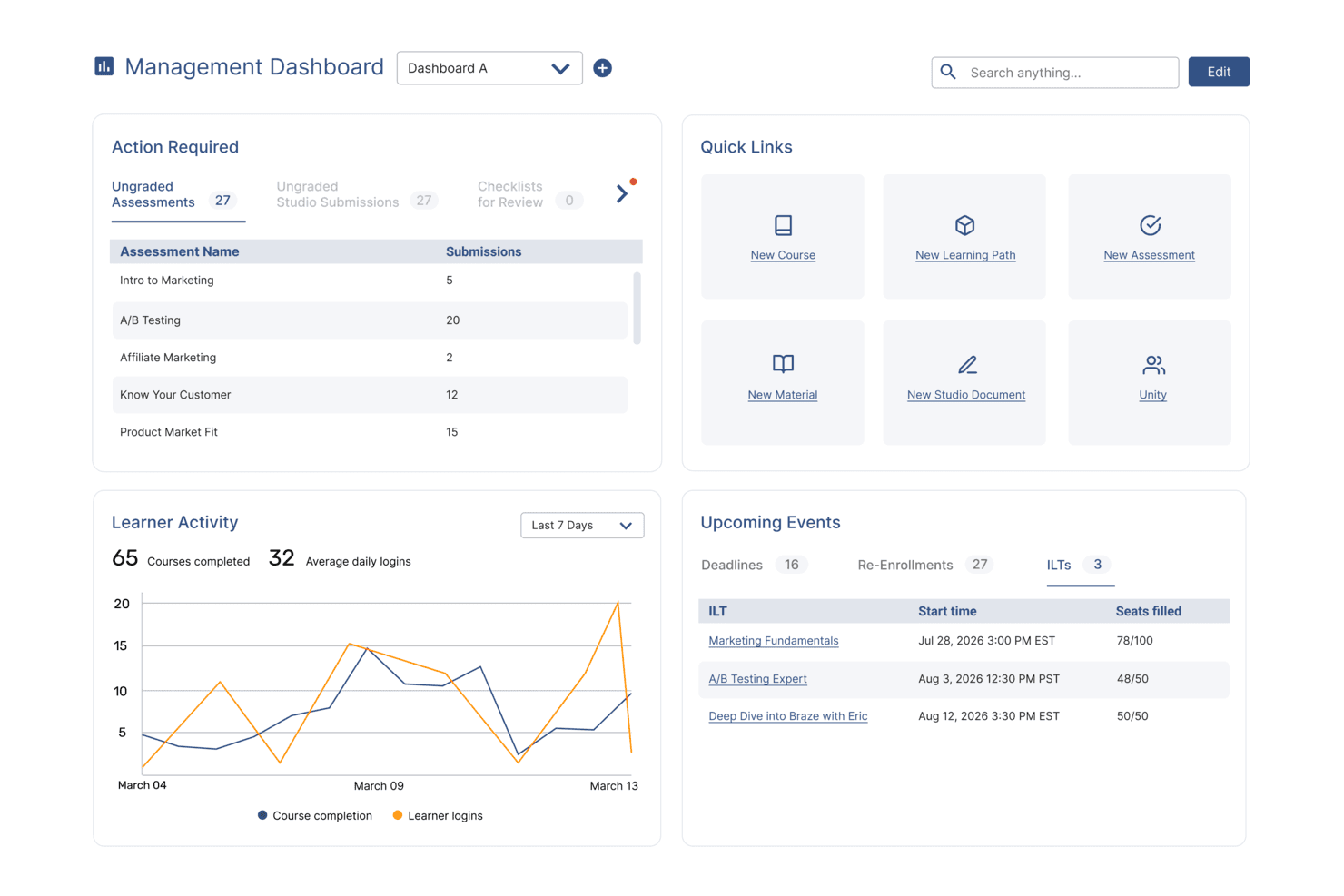
SkyPrep's management dashboard displays learner activity, upcoming events, and quick links. SkyPrep provides an online training platform that uses AI to make employee training more engaging and effective. It is designed for businesses that want to improve their training programs by supporting interactive learning and reducing manual administrative work. These capabilities help increase learner engagement while improving overall training efficiency.
Why I Picked SkyPrep
I picked SkyPrep because it integrates AI tools in a practical way that improves how feedback is used in employee training. The AI-powered scenarios simulate real-world situations, helping employees build decision-making skills in a realistic context. The interactive timelines are especially useful for onboarding and product training, enabling learners to navigate content in a clear, structured way. Together, these features support stronger skill assessment and better content comprehension without adding unnecessary complexity.
SkyPrep Key Features
In addition to its AI-driven feedback capabilities, I also found several other features that enhance its value:
- Hotspots: Enable learners to click on images for detailed explanations, enhancing understanding of complex concepts.
- Flowcharts: Visualize complex information and processes to aid comprehension, especially in compliance training.
- Org Charts: Display organizational structures to help new employees understand team dynamics.
- Virtual Classroom: Tools for conducting online training sessions that can be accessed from anywhere, facilitating flexible learning environments.
SkyPrep Integrations
Integrations include ADP, Zoom, BambooHR, Salesforce, Google Workspace, Microsoft Teams, Paycor, Paycom, QuickBooks, and Slack.
Pros and Cons
Pros:
- Org charts clarify team structure and dynamics
- Hotspots support deeper understanding of complex concepts
- AI-driven scenarios improve real-world decision-making skills
Cons:
- Basic built-in authoring tools with few advanced features
- Mobile app lacks offline access and gamification
Learn more about SkyPrep: Best with observational checklists
- Free trial available
- Pricing upon request
Visit WebsiteCustomer Rating:4.6/5
Absorb course management dashboard showing category filtering and course organization tools for managing manufacturing training programs. Absorb offers AI-driven feedback and training tools designed for organizations that want to elevate employee learning experiences. It’s a good fit for HR teams, L&D professionals, and businesses looking to automate feedback, track progress, and personalize training at scale. The platform helps you address skill gaps, compliance needs, and engagement challenges with flexible learning options and actionable insights.
Who Is Absorb Best For?
Absorb suits HR and learning and development teams in mid-sized to large organizations that need scalable, AI-powered employee training and feedback solutions.
Why I Picked Absorb
For teams that want to assess real-world skills and behaviors, I picked Absorb because of its strong support for observational checklists. This feature lets you create and manage structured checklists to evaluate employee performance during live or simulated training scenarios. I appreciate how the platform allows trainers to provide immediate, targeted feedback based on direct observation, which helps reinforce learning and track progress over time. The ability to tie checklist results into broader analytics and reporting also makes it easier to identify skill gaps and training needs.
Absorb Key Features
Some other features that make Absorb a strong choice for AI feedback in employee training include:
- AI-powered content recommendations: The platform suggests relevant training modules to learners based on their progress and performance data.
- Automated assessment tools: Create quizzes and tests that are automatically graded, providing instant feedback to employees.
- Customizable learning paths: Design tailored training journeys for different roles or departments within your organization.
- Advanced reporting and analytics: Access detailed dashboards and reports to monitor training effectiveness and learner engagement.
Absorb Integrations
Integrations include Microsoft Teams, Zoom, WebEx, Salesforce, ADP, LinkedIn Learning, Skillsoft, Workday, BambooHR, and SAP SuccessFactors.
Pros and Cons
Pros:
- Detailed analytics for tracking training outcomes
- AI-driven content recommendations for learners
- E-signature verification for compliance tracking
Cons:
- Some advanced features require higher-tier plans
- Limited customization of AI feedback workflows
Learn more about Absorb: Best for survey integration
- Free plan available
- From $30/user/month (billed annually)
Visit WebsiteCustomer Rating:4.6/5
SurveyMonkey analyzes employee feedback to deliver actionable insights. SurveyMonkey is a versatile survey platform designed for businesses seeking to gather feedback and insights efficiently. Its main user base includes HR teams and managers who need to conduct employee surveys and analyze data to drive improvements. The AI capabilities of SurveyMonkey help analyze survey responses, offering actionable insights to enhance decision-making.
Why I picked SurveyMonkey: It's an ideal tool for integrating survey feedback into training programs. The AI-driven analytics provide you with deep insights into employee responses, helping you tailor training initiatives. You can create custom surveys that align with your team's specific goals. In my experience, these features make SurveyMonkey a valuable asset for organizations prioritizing feedback-driven training.
Standout Features & Integrations:
Features include customizable survey templates that let you create tailored questionnaires. The platform offers real-time results tracking, so you can see how your team responds instantly. Advanced data analysis tools help you interpret survey results and make informed decisions.
Integrations include Microsoft Teams, Slack, Salesforce, HubSpot, Mailchimp, Google Drive, Zendesk, Eventbrite, Shopify, and Constant Contact.
Pros and Cons
Pros:
- Includes advanced data analysis tools
- Provides real-time results tracking
- Offers customizable survey templates
Cons:
- Limited offline capabilities
- May require time to master features
Learn more about SurveyMonkey: Best for engagement insights
- Free demo available
- Pricing upon request
Visit WebsiteCustomer Rating:4.5/5
Culture Amp strengthens workplace culture with AI-analyzed engagement insights. Culture Amp is an employee engagement and performance management platform designed for HR professionals and managers seeking to enhance workplace culture. It helps teams gather insights into employee engagement through AI-driven analytics and feedback tools, offering actionable data to improve team performance and satisfaction.
Why I picked Culture Amp: It's a great choice for teams focused on understanding and improving engagement. The AI features analyze employee feedback to provide clear insights into engagement levels and areas for improvement. You can use its tools to create surveys that capture valuable employee sentiment. In my experience, these capabilities make Culture Amp a key asset for organizations aiming to cultivate a positive workplace culture.
Standout Features & Integrations:
Features include customizable surveys that help you gather specific employee feedback. The platform offers performance management tools to track progress and set goals. You can also access a library of resources to support learning and development initiatives.
Integrations include Slack, Microsoft Teams, Workday, SAP SuccessFactors, BambooHR, Greenhouse, Lever, ADP, Google Workspace, and LinkedIn Learning.
Pros and Cons
Pros:
- Supports performance management and goal setting
- Offers customizable survey options
- Provides detailed engagement analytics
Cons:
- May not integrate smoothly with other HR platforms
- May have a learning curve for new users
Learn more about Culture Amp: Best for corporate training
- 30-day free trial + free demo available
- From $20/user/month (billed annually)
Visit WebsiteCustomer Rating:4.2/5
Skillsoft advances employee development with AI-personalized learning paths. Skillsoft is an eLearning platform tailored for corporate training, serving businesses looking to enhance employee skills and development. It provides a wide range of learning content and AI-driven features to personalize learning experiences and track progress.
Why I picked Skillsoft: It's perfect for organizations seeking complete corporate training solutions. The AI capabilities offer personalized learning paths that adapt to individual needs, ensuring your team gains relevant skills. You can leverage its analytics to monitor progress and identify areas for improvement. In my experience, these features make Skillsoft an important tool for corporate learning and development.
Standout Features & Integrations:
Features include a vast content library that covers various topics and industries. The platform supports video-based learning to enhance engagement and retention. You can also access tools for tracking compliance and measuring learning impact.
Integrations include Workday, SAP SuccessFactors, Microsoft Teams, LinkedIn Learning, Cornerstone, Oracle, Saba, Moodle, Blackboard, and Canvas.
Pros and Cons
Pros:
- Offers tools for compliance tracking
- Supports video-based learning
- Extensive content library for diverse industries
Cons:
- Limited customization for specific needs
- May require time for onboarding
Learn more about Skillsoft: Best for in-depth analytics
- Free demo available
- Pricing upon request
Visit WebsiteCustomer Rating:3.9/5
Qualtrics transforms experience data into clear, AI-driven organizational insights. Qualtrics is a sophisticated survey and experience management platform designed for organizations that require detailed insights into customer and employee experiences. Its main users include HR teams and researchers, offering AI-driven analytics that transform raw data into actionable insights to enhance decision-making.
Why I picked Qualtrics: It's perfect for teams that need complete data analysis capabilities. The AI features help you uncover trends and insights from complex datasets, providing a deeper understanding of employee feedback. You can customize surveys to align with your organization's needs, ensuring relevant data collection. In my experience, these features make Qualtrics invaluable for teams that prioritize data-driven strategies.
Standout Features & Integrations:
Features include advanced survey logic that lets you tailor questions based on responses. The platform offers sentiment analysis to gauge employee feelings and attitudes. You can also access dashboards that visualize data in a way that's easy to interpret and share.
Integrations include Salesforce, Microsoft Teams, Slack, SAP, Adobe, Tableau, Google Analytics, HubSpot, Zendesk, and Marketo.
Pros and Cons
Pros:
- Offers sentiment analysis for feedback
- Supports advanced survey logic
- Provides detailed data visualization tools
Cons:
- Can be expensive for smaller organizations
- Requires time to master complex features
Learn more about Qualtrics: Best for AI-driven courses
- Free demo available
- From $35/month for 25 courses

Coursebox AI centralizes course creation with personalized, AI-driven learning content. Coursebox AI is an innovative eLearning platform designed for educators and businesses seeking to leverage AI in course creation and delivery. It serves a diverse user base, offering AI-driven features that enhance the learning experience by personalizing content and automating administrative tasks.
Why I picked Coursebox AI: It's an excellent choice for teams that want to integrate AI into their training programs. The platform's AI features allow you to automate course creation, making it easier to develop personalized learning paths. You can also use its analytics to monitor learner progress and optimize outcomes. In my experience, these capabilities make Coursebox AI ideal for organizations aiming to deliver intelligent and adaptive learning experiences.
Standout Features & Integrations:
Features include a user-friendly course builder that simplifies content creation. The platform supports adaptive learning, ensuring courses adjust to individual learner needs. You can also access detailed analytics to track and improve learning performance.
Integrations include Google Workspace, Microsoft Teams, Slack, Zoom, Salesforce, LinkedIn Learning, Moodle, Blackboard, Canvas, and SAP SuccessFactors.
Pros and Cons
Pros:
- Provides detailed analytics for performance tracking
- Supports adaptive learning experiences
- Automates course creation with AI
Cons:
- Limited customization for specific industries
- May require initial setup time
Learn more about Coursebox AI:

WorkRamp personalizes onboarding and training with AI-driven guidance. WorkRamp is a versatile learning management platform designed for businesses that prioritize effective employee onboarding and continuous development. It serves a range of industries, offering AI-powered roleplays, coaching, and automated feedback that enhance the onboarding and training experience.
Why I picked Workramp: Why I picked WorkRamp is its strength in delivering onboarding programs supported by AI-driven coaching and feedback tools. Its AI roleplays allow employees to practice real-world scenarios and receive automated feedback, while recommendation tools surface relevant training content. These capabilities make it a practical solution for organizations aiming to accelerate onboarding effectiveness.
Standout Features & Integrations:
Features include a user-friendly course builder for creating onboarding content, analytics dashboards for tracking progress, and certification management for compliance workflows. AI roleplays generate automated performance feedback, helping teams practice communication, sales, or support scenarios at scale.
Integrations include Salesforce, Slack, Zoom, Microsoft Teams, Google Workspace, Workday, Okta, BambooHR, LinkedIn Learning, and Zendesk.
Pros and Cons
Pros:
- Enterprise security with SOC 2, SSO, RBAC
- Supports fully branded learning environments
- Native mobile apps for iOS and Android
Cons:
- Separate portals prevent unified reporting
- Lacks granular control in lesson structuring
Learn more about WorkRamp:

Litmos automates compliance-focused training and regulatory tracking. Litmos is a cloud-based learning management system designed for businesses that require rigorous compliance training. It serves industries with strict regulatory requirements, offering AI-powered video assessments that deliver instant learner feedback and tools that automate compliance tracking and reporting.
Why I picked Litmos: Why I picked Litmos is its strong alignment with industries that rely on accurate and auditable training processes. Its AI/ML video assessment feature provides automated performance feedback, helping trainers evaluate communication and presentation skills at scale. Automated reporting and compliance tracking make it a reliable choice for organizations with mandatory certification or regulatory workflows.
Standout Features & Integrations:
Features include a course library with a wide range of compliance-focused content, mobile learning for flexible access, and analytics to track learner performance. AI/ML video assessments offer automated feedback, helping teams measure proficiency and identify areas that may require additional training.
Integrations include Salesforce, Microsoft Teams, Zoom, Okta, LinkedIn Learning, BambooHR, Workday, Zendesk, Shopify, and Google Workspace.
Pros and Cons
Pros:
- AI assistant for fast content summarization
- Embeds external content like videos and podcasts
- In-platform AI content authoring tool
Cons:
- Reporting tools lack full customization
- Limited analytics depth for advanced insights
Learn more about Litmos: Best for team feedback
- Free demo available
- From $4,999/year + $32/manager/month (billed annually)

OfficeVibe interprets team feedback to improve engagement and productivity. OfficeVibe is an employee engagement platform designed for teams that want to improve communication and feedback. It primarily serves managers and HR professionals, offering tools for gathering insights into team dynamics and performance. The AI capabilities in OfficeVibe help analyze feedback, providing actionable insights to enhance team engagement and productivity.
Why I picked OfficeVibe: It's ideal for teams focused on enhancing feedback and communication. The AI-driven feedback analysis provides you with clear insights into team morale and areas for improvement. You can set up regular pulse surveys to keep a pulse on team sentiment. In my experience, these features make OfficeVibe a valuable tool for fostering a transparent and communicative team culture.
Standout Features & Integrations:
Features include customizable surveys that let you tailor questions to your team's needs. The platform offers feedback tools that encourage open communication and improve team dynamics. You can also access detailed reports to track engagement and identify trends over time.
Integrations include Slack, Microsoft Teams, Google Workspace, Jira, Trello, Asana, Zendesk, BambooHR, Workday, and Salesforce.
Pros and Cons
Pros:
- Provides detailed engagement reports
- Encourages open team communication
- Supports regular pulse surveys
Cons:
- May require time to interpret data
- Limited customization for larger organizations
Learn more about Officevibe:
Çalışan Eğitimi için Diğer AI Geri Bildirim Yazılımları
İşte kısa listeme giremeyen ancak yine de göz atmaya değer bazı ek çalışan eğitimi için AI geri bildirim yazılımı seçenekleri:
- 11RehearsalBest for game-based learning
- 12Learning PoolBest for tailored content
- 13Deel HRBest with global payroll automation
- 14Peoplebox.aiBest for OKR integration
- 15LatticeBest for performance management
Related Reviews
How I Evaluate AI Feedback Software for Employee Training
I look for tools where AI adds real value—generating personalized coaching after a role-play, not just scoring a quiz. I break my evaluation into the core functionality a tool must have to make the list and the differentiating factors that separate one vendor from another.
Core Functionality (Table Stakes For This List)
When I'm selecting tools for my list, I rank each one on a scale from 0 (does not offer the functionality) to 5 (excels in this area) for each core functionality listed below. Then, I calculate the tool's total score into a percentage. Each tool needs to achieve a minimum total score of 65% to be considered for inclusion.
- AI-Generated Feedback: I look for tools that produce contextual, personalized feedback using AI rather than canned responses—think specific coaching tips after a sales role-play, not just a pass/fail score.
- Training Content Integration: The tool should connect with existing training content or platforms like an LMS, supporting formats like SCORM or xAPI so L&D teams aren't rebuilding courses from scratch.
- Performance Analysis: I evaluate how deeply the AI analyzes learner input—whether it can assess written answers, spoken responses, or simulation behaviors to pinpoint where someone struggled.
- Real-Time Feedback Delivery: Feedback that arrives days later misses the learning moment, so I check whether tools deliver coaching during or immediately after a training activity.
- Skill Gap & Progress Tracking: Strong tools let you track competency growth over time at the individual and team level, helping L&D managers spot patterns and adjust programs accordingly.
- Manager & L&D Reporting: I look for dashboards that give HR and L&D leaders a clear view of feedback trends, training outcomes, and areas where intervention may be needed across the org.
Once I have a list of tools that meet this criteria, I consider what sets each platform apart.
Differentiating Factors (What Sets Vendors Apart)
Here's how I compare and contrast different vendors:
Standout Features
Adaptive learning paths are a big differentiator—I look for tools where the AI reshapes content difficulty and feedback depth based on how each learner performs. Voice and video analysis matters too, especially for customer-facing roles where tone and delivery are part of the skill set. I also evaluate whether a platform can generate custom training scenarios using AI, saving L&D teams from manually building every role-play prompt.
Beyond Features
Data privacy is top of mind because these tools process sensitive employee performance data—I check for SOC 2 compliance, clear AI governance policies, and role-based access controls. Integration with existing HR and L&D stacks also carries real weight. A tool that syncs with your HRIS and LMS means employee data flows in without manual uploads. I also evaluate whether vendors offer meaningful implementation support, since rolling out AI feedback tools requires change management and trainer buy-in to drive adoption.
Çalışan Eğitimi için AI Geri Bildirim Yazılımı Nasıl Seçilir?
Uzun özellik listeleri ve karmaşık fiyatlandırma yapıları arasında kaybolmak kolaydır. Kendinize özgü yazılım seçim sürecinizi yürütürken odağınızı korumanıza yardımcı olmak için göz önünde bulundurmanız gereken faktörleri aşağıdaki kontrol listesinde bulabilirsiniz:
| Faktör | Nelere Dikkat Edilmeli? |
|---|---|
| FaktörÖlçeklenebilirlik | Nelere Dikkat Edilmeli?Yazılım ekibinizle birlikte büyüyebilir mi? Gelecekteki büyümeyi ve aracın performans sorunları yaşamadan artan kullanıcı veya veri miktarını işleyip işleyemeyeceğini değerlendirin. |
| FaktörEntegrasyonlar | Nelere Dikkat Edilmeli?Mevcut sistemlerinizle çalışıyor mu? İnsan kaynakları yazılımları, iletişim platformları ve veri analitiği sistemleri gibi araçlarla entegre olup olmadığını kontrol edin. |
| FaktörÖzelleştirilebilirlik | Nelere Dikkat Edilmeli?İhtiyaçlarınıza uyacak şekilde uyarlayabilir misiniz? İş akışlarını, gösterge panellerini ve raporlamayı süreçlerinize uygun şekilde ayarlama seçenekleri arayın. |
| FaktörKullanım Kolaylığı | Nelere Dikkat Edilmeli?Ekibiniz için kullanıcı dostu mu? Öğrenme eğrisini ve kullanıcıların kapsamlı eğitim veya destek almadan araçta gezinebilip gezinemeyeceğini değerlendirin. |
| FaktörUygulama ve İşe Alıştırma | Nelere Dikkat Edilmeli?Ne kadar hızlı başlayabilirsiniz? İşe alıştırma sürecine yardımcı olacak eğitim videoları veya destek gibi kaynakların bulunabilirliğinin yanı sıra kurulum sürecini de değerlendirin. |
| FaktörMaliyet | Nelere Dikkat Edilmeli?Bütçeniz dahilinde mi? Mali planınızla uyumlu olduğundan emin olmak için gizli ücretler veya uzun vadeli sözleşmeler de dahil olmak üzere fiyatlandırma yapısını analiz edin. |
| FaktörGüvenlik Önlemleri | Nelere Dikkat Edilmeli?Verilerinizi nasıl koruyor? Veri korumaya ilişkin sektör standartlarına uyduğundan ve şifreleme ile kullanıcı erişim denetimleri gibi özellikler sunduğundan emin olun. |
| FaktörDestek Kullanılabilirliği | Nelere Dikkat Edilmeli?Hangi destek seçenekleri mevcut? Yanıt süreleri ile sohbet, e-posta veya telefon gibi kanallar da dahil olmak üzere müşteri hizmetlerinin bulunabilirliğini değerlendirin. |
Çalışan Eğitimi için AI Geri Bildirim Yazılımı Nedir?
Çalışan eğitimi için yapay zekâ destekli geri bildirim yazılımı, eğitim oturumları sırasında gerçek zamanlı geri bildirim ve içgörüler sağlamak için yapay zekâ kullanan bir araçtır. İK profesyonelleri, yöneticiler ve eğitmenler bu araçları genellikle çalışanların öğrenme ve gelişimini desteklemek için kullanır.
Otomatik geri bildirim, kişiselleştirilmiş öğrenme yolları ve veri analitiği; eğitim etkinliğini artırmaya, içeriği bireysel ihtiyaçlara göre uyarlamaya ve ilerlemeyi takip etmeye yardımcı olur. Genel olarak bu araçlar, çalışanlar için daha etkili ve ilgi çekici eğitim deneyimleri sağlayabilecek değerli içgörüler sunar.
Özellikler
Çalışan eğitimi için yapay zekâ destekli geri bildirim yazılımı seçerken aşağıdaki temel özelliklere dikkat edin:
- Gerçek zamanlı geri bildirim: Öğrenmeyi ve bilgilerin kalıcı olmasını desteklemek için eğitim oturumları sırasında anında içgörüler ve öneriler sunar.
- Kişiselleştirilmiş öğrenme yolları: Eğitim içeriğini her çalışanın ihtiyaçlarına ve beceri düzeyine göre uyarlamak için yapay zekâ kullanır.
- Otomatik analitik: Uygulanabilir içgörüler sunmak ve çalışanların zaman içindeki ilerlemesini takip etmek için eğitim verilerini analiz eder.
- Duygu analizi: Eğitim sırasında çalışanların moralini ve katılımını değerlendirmek için çalışan yanıtlarını inceler.
- Uyarlanabilir öğrenme: Öğrenme sonuçlarını en iyi duruma getirmek için eğitim materyallerini çalışan performansına ve geri bildirimlerine göre düzenler.
- Oyunlaştırma ögeleri: Çalışanlar arasındaki katılımı ve motivasyonu artırmak için oyun benzeri özellikler içerir.
- Entegrasyon özellikleri: Birleşik bir iş akışı için mevcut İK ve iletişim araçlarına hızlı bağlantı kurulmasını sağlar.
- Mobil erişim: Çalışanların mobil cihazları kullanarak eğitim ve geri bildirimlere her yerden erişmesini sağlar.
- Veri görselleştirme: Kolay yorumlama için eğitim verilerinin anlaşılır ve sezgisel görsel temsillerini sunar.
- Güvenlik özellikleri: Gizliliği korumak için şifreleme ve erişim denetimleri yoluyla veri koruması sağlar.
Faydalar
Çalışan eğitimi için yapay zekâ destekli geri bildirim yazılımının uygulanması, ekibiniz ve işletmeniz için çeşitli faydalar sağlar. Yararlanabileceğiniz bazı faydalar şunlardır:
- Öğrenilen bilgilerin daha iyi hatırlanması: Gerçek zamanlı geri bildirim, çalışanların eğitim sırasında bilgileri daha etkili bir şekilde anlamasına ve hatırlamasına yardımcı olur.
- Özelleştirilmiş eğitim deneyimleri: Kişiselleştirilmiş öğrenme yolları, içeriği bireysel ihtiyaçlara göre uyarlayarak katılımı ve etkinliği artırır.
- Bilinçli karar alma: Otomatik analitik, uygulanabilir içgörüler sunarak yöneticilerin eğitim programlarında veriye dayalı iyileştirmeler yapmasına yardımcı olur.
- Çalışan katılımının artması: Oyunlaştırma ögeleri ve etkileşimli özellikler, çalışanların motivasyonunu korur ve öğrenme süreçlerine bağlı kalmalarını sağlar.
- Kaynakların verimli dağıtılması: Uyarlanabilir öğrenme, eğitim kaynaklarının en çok ihtiyaç duyulan alanlara yönlendirilmesini sağlayarak sonuçları en iyi duruma getirir.
- Geliştirilmiş veri güvenliği: Yerleşik güvenlik özellikleri, hassas eğitim verilerini koruyarak gizliliğin ve uyumluluğun sağlanmasına yardımcı olur.
- Ekip dinamiklerinin daha iyi anlaşılması: Duygu analizi, çalışanların morali ve katılımı hakkında içgörüler sunarak ekip yönetimine yardımcı olur.
Maliyetler & Fiyatlandırma
Çalışan eğitimi için yapay zekâ destekli geri bildirim yazılımı seçmek, mevcut çeşitli fiyatlandırma modellerinin ve planların anlaşılmasını gerektirir. Maliyetler özelliklere, ekip büyüklüğüne, eklentilere ve daha fazlasına göre değişir. Aşağıdaki tablo, çalışan eğitimi çözümlerine yönelik yapay zekâ destekli geri bildirim yazılımlarında yaygın planları, ortalama fiyatlarını ve genellikle sunulan özellikleri özetlemektedir:
Çalışan Eğitimi için Yapay Zekâ Destekli Geri Bildirim Yazılımı Plan Karşılaştırma Tablosu
| Plan Türü | Ortalama Fiyat | Yaygın Özellikler |
|---|---|---|
| Plan TürüÜcretsiz Plan | Ortalama Fiyat$0/user/month | Yaygın ÖzelliklerTemel geri bildirim özellikleri, sınırlı analitik ve standart güvenlik özellikleri. |
| Plan TürüKişisel Plan | Ortalama Fiyat$5-$25/user/month | Yaygın ÖzelliklerGelişmiş geri bildirim seçenekleri, kişiselleştirilmiş öğrenme yolları ve temel entegrasyonlar. |
| Plan Türüİşletme Planı | Ortalama Fiyat$30-$60/user/month | Yaygın ÖzelliklerAyrıntılı analitik, gelişmiş entegrasyonlar ve özelleştirilebilir eğitim modülleri. |
| Plan TürüKurumsal Plan | Ortalama Fiyat$70-$100/user/month | Yaygın ÖzelliklerTam yapay zekâ özellikleri paketi, kapsamlı özelleştirme seçenekleri, öncelikli destek ve gelişmiş güvenlik. |
Çalışan Eğitimi için Yapay Zekâ Geri Bildirim Yazılımı SSS
Çalışan eğitimi için yapay zekâ geri bildirim yazılımı hakkında sık sorulan bazı soruların yanıtlarını burada bulabilirsiniz:
İlk eğitim aşamasının ötesinde sürekli öğrenme için genellikle destek sağlanıyor mu?
Birçok ekip, yapay zekâ geri bildirim yazılımını yalnızca işe alım sürecinde değil, çalışan yaşam döngüsü boyunca da kullanır. Bu, çalışanların becerilerini geliştirmeye devam etmelerini, beklentilerle uyumlu kalmalarını ve sorumluluklar değiştikçe uyum sağlamalarını güvence altına almaya yardımcı olur.
Yapay zekâ geri bildirim yazılımı mevcut İK sistemlerinin çoğuyla entegre olabilir mi?
Evet, birçok yapay zekâ geri bildirim aracı popüler İK sistemleriyle entegrasyon özellikleri sunar. Yazılımın maaş bordrosu, iletişim ve öğrenme yönetim sistemleri gibi mevcut platformlarınızı destekleyip desteklemediğini kontrol edin. Bu entegrasyon, veri akışını birleştirebilir ve verimliliği artırabilir. Satın almadan önce mevcut sistemlerinizle uyumluluğu doğrulayın ve sağlayıcılara entegrasyonlarla ilişkili ek maliyetler olup olmadığını sorun.
Yazılım sağlayıcılarından ne tür bir destek beklemeliyim?
İşe alım sürecinde yardım ve sürekli teknik destek de dâhil olmak üzere kapsamlı bir destek beklemelisiniz. Sohbet, e-posta ve telefon gibi birden fazla destek kanalı sunan sağlayıcıları arayın. Web seminerleri, eğitimler ve belgeler gibi eğitim kaynakları sağlayıp sağlamadıklarını kontrol edin. Ekibinizin karşılaşabileceği belirli ihtiyaçlar veya zorluklar konusunda yardımcı olabilecek özel bir müşteri yöneticisine erişiminizin olması da faydalıdır.
Çalışan eğitimi için yapay zekâ geri bildirim yazılımı ne kadar güvenli?
Çoğu yapay zekâ geri bildirim yazılımı, verilerinizi korumak için yerleşik güvenlik önlemleri içerir. Şifreleme, kullanıcı erişim denetimleri ve düzenli güvenlik güncellemeleri gibi özellikleri arayın. Yazılımın, işletmeniz için geçerliyse GDPR gibi sektör standartlarına ve düzenlemelere uygun olduğundan emin olun. Sağlayıcının güvenlik politikasını incelemek ve veri depolama ile işleme uygulamalarını sormak önemlidir.
Yapay zekâ geri bildirim yazılımı çalışan bağlılığını artırır mı?
Evet, yapay zekâ geri bildirim yazılımı zamanında ve kişiselleştirilmiş geri bildirim sağlayarak çalışan bağlılığını artırabilir. Yapay zekânın kullanılması, daha ilgili ve ilgi çekici eğitim deneyimleri sunulmasını sağlar. Oyunlaştırma özellikleri ve kişiselleştirilmiş öğrenme yolları aracılığıyla katılımı teşvik eder. Eğitim, bireysel hedefler ve tercihlerle uyumlu hâle getirildiğinde çalışanların motivasyonlarını koruma ve gelişimlerine yatırım yapma olasılığı artar.