

En iyi bilgi yönetimi yazılımı, kuruluşunuzun ortak bilgi birikimini yakalamanıza, düzenlemenize ve paylaşmanıza yardımcı olur; böylece ekibiniz bilgilere anında erişebilir ve daha verimli çalışabilir.
Bilgi dağınık belgelerde, e-postalarda veya sohbet dizilerinde bulunduğunda üretkenliği yavaşlatır ve aynı işin tekrar yapılmasına neden olur. Doğru araç, bu bilgileri merkezileştirir, iş birliğini kolaylaştırır ve günlük içgörüleri daha iyi kararlar alınmasını sağlayan aranabilir, eyleme dönüştürülebilir bilgilere çevirir.
İK ve iş birliği yazılımlarını değerlendirme konusundaki yıllara dayanan deneyimimden yararlanarak sezgisel, ölçeklenebilir ve ekiplerin daha akıllı çalışmasına yardımcı olmak üzere tasarlanmış en iyi bilgi yönetimi çözümlerini inceledim. Bu kılavuzda kuruluşunuz genelinde bilgi akışını sürdüren, zamandan tasarruf sağlayan ve uyumu geliştiren araçları bulacaksınız.
Why Trust Our Software Recommendations
6,700+
Reviews
20
Industry experts
16+
Evaluation factors
14
Years
Our team has been testing and reviewing software since 2012. As HR experts ourselves, we know how difficult—and important—it is to choose the right software.
For this guide, we evaluated tools using hands-on testing and independent research, scoring tools using our selection criteria. We also draw on insights from industry thought leaders and practicing HR experts.
Our reviews reflect our human editorial judgment, not a sales pitch.
Expert reviewers:
- Phil GrayCOO
 Kim BehnkeHR Tech Editor & Analyst
 Josh BarkerPeople Ops Manager

Bilgi Yönetimi Yazılımları Karşılaştırma Tablosu
Aşağıdaki tabloda en iyi bilgi yönetimi yazılımı seçimlerimin fiyatlandırma ayrıntıları karşılaştırılmaktadır.
Sorted by: Default
| Tool | Starting Price | Website | |
|---|---|---|---|
Best for customer service | 4.8 out of 5 | Pricing upon request Free demo + 14-day free trial available | Website |
Best for support ticket deflection features | 4.7 out of 5 | Pricing upon request 14-day free trial + free demo available | Website |
Best for automated content creation | Not rated | $40/month 10-day free trial + free demo available | Website |
Best for self-service portals | 4.4 out of 5 | $29/user/month 14-day free trial available | Book Demo |
Best for intranet knowledge management | 4.5 out of 5 | £3.75/user/month Free demo available | Website |
Best for company training | 4.6 out of 5 | $3.97/user/month Free trial available | Book Demo |
Best for knowledge sharing in remote teams | 4.7 out of 5 | Pricing upon request 14-day free trial + demo available | Website |
Best for searchable profiles. | 4.8 out of 5 | $1.50/user/month Free trial available | Website |
Best with secure cloud storage | 4.7 out of 5 | $9.20/user/month Free plan + 14-day free trial available | Website |
Best for interconnected knowledge databases | 4.6 out of 5 | $10/user/month Free plan + free trial + free demo available | Website |


En İyi Bilgi Yönetimi Yazılımı İncelemeleri
Aşağıda kısa listeme giren en iyi bilgi yönetimi yazılımlarına ilişkin ayrıntılı özetlerimi bulabilirsiniz. İncelemelerimde, sizin için en uygun aracı bulmanıza yardımcı olmak amacıyla her aracın temel özelliklerine, avantajlarına & dezavantajlarına, entegrasyonlarına ve ideal kullanım alanlarına ayrıntılı bir bakış sunuyorum.
 Best for customer service
- Free demo + 14-day free trial available
- Pricing upon request
Visit WebsiteCustomer Rating:4.8/5
Stonly's interactive step-by-step guides and a searchable help center work together to lead users to the exact answers they need. Stonly is a knowledge management platform that lets teams build interactive guides, step-by-step tutorials, and searchable knowledge bases for both internal and customer-facing use.
Who Is Stonly Best For?
Stonly is a good fit for customer support teams that need to deliver consistent, guided answers to customers across multiple channels.
Why I Picked Stonly
Stonly earns its spot on my shortlist because of how it handles knowledge delivery for customer service teams specifically. Unlike a standard knowledge base, it uses an interactive guide format—instead of pointing agents or customers to a long static article, Stonly walks them through branching decision trees that adapt to the situation. Agents can access these guides inside their help desk without switching tabs, which keeps the workflow focused during live tickets. The ability to automatically fill ticket fields and trigger macros from within a guide is a feature I haven't seen handled this well elsewhere.
Stonly Key Features
- Auto-translate: Automatically translate knowledge base content into multiple languages to support global customer bases.
- Content segmentation and targeting: Display different knowledge content to different users based on their context or profile.
- Review flows: Set up structured content review and approval processes to keep knowledge accurate and up to date.
- Guided answers: Detect user intent and surface the most relevant guide, giving you control over the resolution path.
Stonly Integrations
Stonly offers native integrations with Zendesk, Freshdesk, Intercom, Salesforce, HubSpot, LiveChat, and Front. An API is available for custom integrations.
Pros and Cons
Pros:
- Contextual help brings knowledge directly into web apps.
- AI search pinpoints exact steps instead of full articles.
- Interactive guides adapt instructions to each user’s situation.
Cons:
- AI answers and help desk integrations are limited to the enterprise plan.
- Guide building can feel complex for large conditional flows.
Learn more about Stonly: Best for support ticket deflection features
- 14-day free trial + free demo available
- Pricing upon request
Visit WebsiteCustomer Rating:4.7/5
Document360's dashboard provides access to various modules such as knowledge base, documentation, and analytics. Document360 is a knowledge management software platform for building, organizing, and publishing internal and external knowledge bases with advanced authoring, categorization, and analytics tools.
Who Is Document360 Best For?
Document360 is a good fit for customer support and product teams at SaaS companies that need a self-service knowledge base to help users find answers without contacting support.
Why I Picked Document360
Document360 made my shortlist because it's deliberately built to keep users out of your support queue. I particularly like the Ticket Deflector feature, which automatically surfaces relevant knowledge base articles when a user is about to submit a support request—intercepting the ticket before it's ever created. The Eddy AI Chatbot is trained on your knowledge base content and can handle follow-up questions in real time, escalating to Zendesk or Freshdesk only when it can't resolve the issue. The search analytics show which queries aren't returning results, letting me identify content gaps and fill them before they become repeat tickets.
Document360 Key Features
- Category manager: Organize your knowledge base using a drag-and-drop category manager that supports over six levels of nested categories and subcategories.
- Version control and rollback: View the full history of any article and restore a previous version to prevent accidental overwrites.
- Interactive decision tree: Build step-by-step guided flows that walk users through complex processes to help them reach the right answer.
- AI-powered auto-translation: Localize your knowledge base across 50+ languages using context-aware AI translation.
Document360 Integrations
Document360 offers native integrations with Zendesk, Freshdesk, Intercom, Slack, Microsoft Teams, Google Analytics, and Disqus. It also provides an API for custom integrations.
Pros and Cons
Pros:
- Smart file management features
- Offers powerful reporting and analytics
- Provides robust version control with audit trails
Cons:
- Most integrations are only available on higher-tier plans
- Support for large media files needs improvement
Learn more about Document360: Best for automated content creation
- 10-day free trial + free demo available
- From $40/month (billed annually)

TruPeer enables rapid content creation for AI-powered knowledge bases. TruPeer is a knowledge management platform that uses AI to help teams generate, organize, and update internal content and documentation.
Who Is TruPeer Best For?
TruPeer is a good fit for HR and operations teams that need to build and maintain internal knowledge bases without heavy manual content work.
Why I Picked TruPeer
I picked TruPeer as one of the best because of how it handles the content creation side of knowledge management. Most teams I know spend hours manually writing SOPs, help articles, and onboarding guides from scratch. TruPeer flips that by letting you record your screen once and then using AI to generate a complete step-by-step guide with screenshots, headings, and summaries. I also like the Knowledge Base Generator, which ingests existing materials like PDFs, FAQs, and training videos and turns them into categorized, tagged, searchable articles without any manual formatting.
TruPeer Key Features
- Multi-language translation: Translate any video or guide into 65+ languages directly within the platform.
- Brand template mirroring: Upload an existing company document and TruPeer applies your fonts, colors, and layout structure to every new guide automatically.
- AI video search: Search across your entire knowledge base using natural language queries, including within video content.
- Centralized knowledge base: Store and organize articles, SOPs, and videos in one shared space with access controls for internal and external audiences.
TruPeer Integrations
Native integrations are not clearly documented. TruPeer offers an API for custom integrations.
Pros and Cons
Pros:
- Transforms screen recordings into polished videos quickly
- Collaborative tools support multi-user editing and sharing
- AI video search improves accessibility to information quickly
Cons:
- Limited advanced editing features restrict detailed customization
- Customization options may not meet all branding needs
Learn more about Trupeer: Best for self-service portals
- 14-day free trial available
- From $29/user/month (billed annually)
Visit WebsiteCustomer Rating:4.4/5
Freshdesk knowledge base supports self-service portals with organized help guides. Freshdesk is a cloud-based knowledge management platform that lets teams build knowledge bases, manage support content, and organize self-service resources for both customers and internal users.
Who Is Freshdesk Best For?
Freshdesk is a strong fit for customer support teams at small to mid-sized businesses that need a structured way to manage help content and reduce incoming ticket volume.
Why I Picked Freshdesk
Freshdesk earns its spot on my shortlist because of how well its self-service portal handles both customer-facing content and internal knowledge needs in one place. I like that you can build fully branded portals where customers search the knowledge base, browse community forums, or submit a ticket—all without agent involvement. The flexible knowledge base hierarchy lets my team organize content by category and topic, and article versioning means I can track changes and push updates without losing previous drafts. The approval workflow adds another layer of control before anything goes live.
Freshdesk Key Features
- Multilingual knowledge base: Create and manage help content in multiple languages, with built-in translation support for global customer bases.
- Community forums: Build a peer-to-peer support space where customers can post questions, share answers, and engage with your team's published content.
- Freddy AI Copilot: An AI assistant that helps agents draft knowledge base articles and suggest relevant content while handling tickets.
- Role-based access control: Assign different permission levels to agents and editors to control who can create, edit, or publish knowledge content.
Freshdesk Integrations
Freshdesk offers 100+ native integrations, including Slack, Jira, Salesforce, HubSpot, Shopify, Mailchimp, Google Workspace, Microsoft Teams, Trello, and Zoom. An API is available for custom integrations.
Pros and Cons
Pros:
- Organized ticketing system with multiple views for tracking and collaboration
- Self-service portal connects knowledge base with ticketing for faster support
- AI Copilot suggests replies and summarizes tickets to save agent time
Cons:
- Slow loading times when handling large ticket volumes
- No built-in asset management compared to other Freshworks products
Learn more about Freshdesk: 5Best for intranet knowledge management
Hub
- Free demo available
- From £3.75/user/month (billed annually)
Visit WebsiteCustomer Rating:4.5/5
Employees can easily access HR resources, benefits, policies, and support in one central place. Hub is an intranet knowledge management platform that brings together document management, content sharing, collaboration tools, and advanced search to help organizations organize and access internal information.
Who Is Hub Best For?
Hub is a good fit for mid-sized to large organizations that need a centralized intranet to manage internal knowledge, company documents, and employee communications in one place.
Why I Picked Hub
Hub earns its spot on my shortlist because it approaches knowledge management from the intranet up—meaning your knowledge base isn't a bolt-on, it's baked into the same environment where employees already communicate and collaborate. I particularly like the federated search feature, which searches across connected cloud drives like SharePoint and Google Drive, and even inside PDFs, so employees aren't hunting across multiple systems to find a policy or procedure. The version control on every page and document provides a full audit history and lets you roll back to a previous version in a single click, which is important for managing compliance-sensitive content. Content ownership assignments also mean specific team members are accountable for keeping pages current, with automated review notices when content is due to expire.
Hub Key Features
- Pulse surveys: Run anonymous employee surveys with hidden scoring to quantify responses and track wellbeing trends over time.
- Assessment builder: Create knowledge checks with randomised questions, scorable answers, and leaderboards to test employee understanding of key content.
- Approval workflows: Route draft pages and news articles through a structured approval process before they go live, so only reviewed content gets published.
- Must reads: Mark content as mandatory and track who has confirmed they've read it, with automated reminders sent to anyone who hasn't.
Hub Integrations
Hub offers native integrations with Microsoft 365, SharePoint, Google Drive, OneDrive, and Dropbox. An API is available for custom integrations.
Pros and Cons
Pros:
- Efficient document management and sharing
- Provides insights into user engagement
- Advanced search functionality
Cons:
- Limited language support
- Comprehensive features may not be ideal for smaller businesses
Learn more about Hub: Best for company training
- Free trial available
- From $3.97/user/month (billed annually)
Visit WebsiteCustomer Rating:4.6/5
iSpring LMS provides a centralized platform for organizing, managing, and delivering training materials and other knowledge base materials. iSpring LMS is a cloud-based knowledge management system designed for organizing, delivering, and tracking company training materials, courses, and resources.
Who Is iSpring LMS Best For?
iSpring LMS is a strong fit for HR and L&D teams in mid-size to large companies that need a structured platform for employee onboarding, compliance training, and ongoing skill development.
Why I Picked iSpring LMS
iSpring LMS earns its spot on my shortlist because it's one of the few platforms that treats company training as a full knowledge lifecycle—not just a course library. I particularly like the intelligent reenrollment system, which automatically tracks certification expiry dates and reassigns training before a lapse occurs. That's a real differentiator for compliance-heavy teams managing dozens of certifications across a large workforce. I also use the observation checklists to verify that employees aren't just completing courses but actually applying knowledge on the job—something most LMS platforms don't address at all.
iSpring LMS Key Features
- Individual development plans: Create personalized learning paths for each employee that map out courses, milestones, and skill-building activities tied to their role.
- Knowledge base: Store and organize corporate resources, guides, and FAQs in a role-based, cloud-accessible hub that subject matter experts and managers can update directly.
- 360-degree review: Collect multi-source performance feedback to build a full picture of each employee's competencies beyond course completion data.
- Gamification: Award points and badges and display leaderboard rankings to give employees real-time visibility into their training progress.
iSpring LMS Integrations
iSpring LMS offers native integrations with Zoom, Microsoft Teams, and Salesforce. An API is available for custom integrations.
Pros and Cons
Pros:
- The mobile app facilitates learning on-the-go
- Supports various training needs
- Good content management system
Cons:
- Some reporting options are limited
- Could offer more robust search capabilities
Learn more about iSpring LMS: Best for knowledge sharing in remote teams
- 14-day free trial + demo available
- Pricing upon request
Visit WebsiteCustomer Rating:4.7/5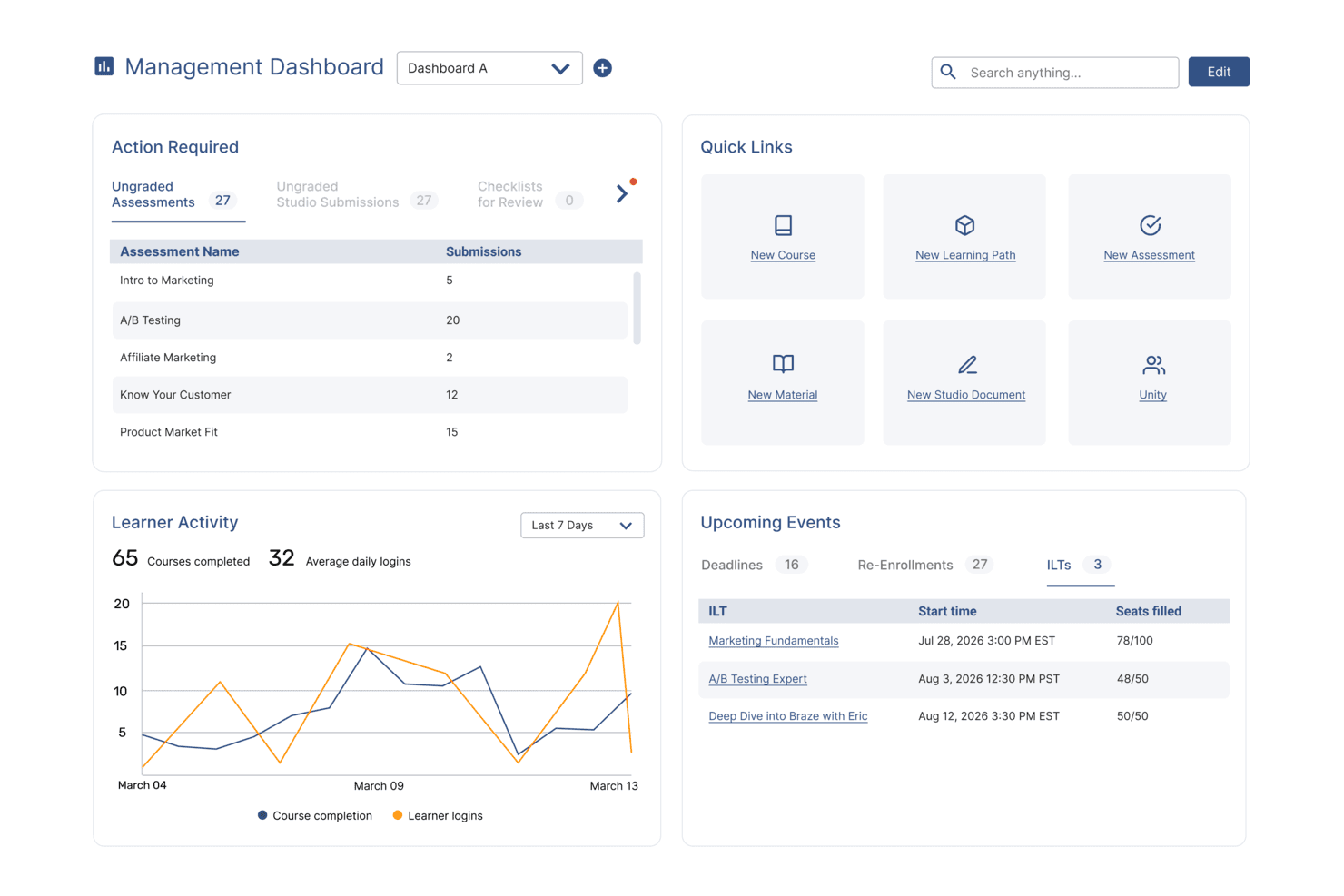
SkyPrep's management dashboard displays learner activity, upcoming events, and quick links. SkyPrep is a knowledge management platform that lets you organize, share, and track training materials, documents, and resources in a centralized online hub.
Who Is SkyPrep Best For?
SkyPrep is a good fit for HR and L&D teams in mid-sized organizations that need to manage and distribute training content across distributed or remote workforces.
Why I Picked SkyPrep
SkyPrep handles knowledge sharing across distributed teams particularly well. SkyPrep Unity, the platform's collaborative learning module, lets remote employees participate in group discussions, comment on training materials, and pose questions directly within the content—so knowledge doesn't just flow top-down, it circulates across the team. I also like the folder-based document management, which lets you store materials in public or private folders and assign them to specific users, so the right people always have access to the right content. The deep search functionality, which lets you search text within documents as well as across comments and discussions, makes it easy for remote employees to find what they need without having to ask around.
SkyPrep Key Features
- AI course builder: Automatically generates assessments, questions, and visuals from your content using built-in AI authoring tools.
- Trigger-based workflow automation: Kicks off enrollment, notifications, and user group updates based on events like course completion, expiration, or user status changes.
- Scheduled and configurable reporting: Lets you build custom reports with filters and columns, then schedule them to be automatically delivered to stakeholders on a recurring basis.
- SCORM and multimedia support: Accepts SCORM packages, videos, PDFs, and interactive media so you can upload and deliver content in multiple formats.
SkyPrep Integrations
SkyPrep offers native integrations with Google Workspace, Microsoft 365, Zoom, Okta, BambooHR, and Salesforce. It also provides an API for custom integrations.
Pros and Cons
Pros:
- Easy content organization
- Solid analytics
- Employee engagement features
Cons:
- Limited customization
- No offline access
Learn more about SkyPrep: 8Best for searchable profiles.
Sift
- Free trial available
- From $1.50/user/month
Visit WebsiteCustomer Rating:4.8/5
The Mobile Team’s Sift page shows team purpose, key contacts, linked resources, and member roles for easy collaboration. Sift is a knowledge management platform that helps organizations build a searchable directory of employee profiles, skills, and organizational structure.
Who Is Sift Best For?
Sift is a good fit for mid-sized to large organizations where finding the right person or expertise across teams and departments is a daily challenge.
Why I Picked Sift
Sift earns its spot on my shortlist because of how well it handles the "who knows what" problem that slows down work in large organizations. The search feature surfaces results in under 100 milliseconds across every data point in the directory—skills, experience, projects, languages, and more—so my team can find a subject matter expert without digging through org charts or pinging managers. I also like that profiles pull data from multiple sources, including HR systems, Active Directory, and LinkedIn, so the information employees find is current and complete. The skill proficiency levels on each profile are a nice touch too, letting you gauge not just who knows something, but how well they know it.
Sift Key Features
- Org chart visualization: An interactive, auto-updating org chart built from your existing HR and IT system data, with color coding, flexible card views, and open role visibility.
- Sift Pages: Dedicated pages for departments, projects, remote teams, ERGs, and communities that go beyond the standard directory to capture the informal structure of your organization.
- Analytics dashboard: Visual breakdowns of skills, interests, locations, and other profile data points, with filters to identify talent gaps and support internal mobility decisions.
- Open API: A GraphQL and REST API that lets developers pull profile data, photos, and search functionality into other internal tools and applications.
Sift Integrations
Sift offers native integrations with Microsoft 365, Azure Active Directory, Google Workspace, Okta, and Workday, and provides an API for custom integrations.
Pros and Cons
Pros:
- Customizable profiles for rich context
- Find experts in seconds
- Visual org charts improve clarity
Cons:
- Not ideal for small teams
- Limited advanced analytics options
Learn more about Sift: Best with secure cloud storage
- Free plan + 14-day free trial available
- From CAD $9.20/user/month (billed annually)
Visit WebsiteCustomer Rating:4.7/5
Google Drive suggests relevant files based on recent activity and collaboration history, helping you quickly find and manage team documents. Google Drive is a cloud-based knowledge management platform that lets teams organize, store, and collaborate on documents, spreadsheets, and files in one centralized workspace.
Who Is Google Drive Best For?
Google Drive is a strong fit for teams of all sizes that are already working within the Google Workspace ecosystem and need a centralized place to store and share knowledge.
Why I Picked Google Drive
Google Drive is one of my top picks because it handles data security without adding management burden. I particularly like the zero trust controls, which include client-side encryption and data loss prevention (DLP) that automatically identifies and labels sensitive content. That lets my team store HR documents, employee records, and policy files knowing that access is tightly controlled—right down to setting expiration dates on shared links. The AI-powered classification layer flags sensitive files at scale, which I've found useful when managing large volumes of personnel documents.
Google Drive Key Features
- Shared drives: Create team-owned storage spaces where files persist regardless of individual user access, with configurable role-based permissions.
- AI-powered search: Surface relevant files based on your activity and content context, without needing to remember exact file names or folder locations.
- Activity view: See a consolidated feed of file activity across your Workspace, including access requests, comments, and edits.
- Document scanning: Scan physical documents directly from the Drive mobile app and save them as searchable PDFs.
Google Drive Integrations
Google Drive integrates with Google Workspace apps including Gmail, Docs, Sheets, Slides, Forms, Sites, and Keep. It also connects to third-party tools like Slack, Zoom, Salesforce, Atlassian, and SAP, and an API is available for custom integrations.
Pros and Cons
Pros:
- Version history makes knowledge auditing easier
- Smart suggestions cut file search time significantly
- Files stay with team drive even when members change
Cons:
- Some advanced AI features only in higher-tier plans
- ome users experience slow upload and download speeds
Learn more about Google Drive: 10Best for interconnected knowledge databases
Notion
- Free plan + free trial + free demo available
- From $10/user/month
Visit WebsiteCustomer Rating:4.6/5
Notion lets teams organize company resources and documents into linked collections for seamless knowledge management. Notion is a knowledge management platform that lets teams organize, connect, and share information using customizable databases, collaborative workspaces, and flexible content blocks.
Who Is Notion Best For?
Notion is a good fit for small to mid-sized teams that need a flexible, all-in-one workspace to document, organize, and connect knowledge across projects and departments.
Why I Picked Notion
Notion earns its spot as one of the best on my shortlist because of how it handles interconnected knowledge through its relational database system. I can link a project database to a team wiki, a meeting notes database, and an HR policy library—all pulling from the same source of truth. I also like Notion's bidirectional linking, which lets my team surface related content without duplicating it across pages.
Notion Key Features
- Synced blocks: Write a piece of content once and have it automatically update across every page where it's embedded.
- Page verification: Mark pages as verified so team members know they're reading accurate, current information.
- Collapsible toggles: Organize long documents with collapsible sections that keep pages readable without hiding content.
- AI meeting notes: Automatically capture and summarize meeting notes, then connect them directly to relevant pages and projects.
Notion Integrations
Notion offers native integrations with Slack, GitHub, Google Drive, Figma, Asana, Jira, Zoom, and Typeform. It also connects with Zapier and provides an API for custom integrations.
Pros and Cons
Pros:
- Wiki-style page interconnections support knowledge sharing
- Rich template library jump-starts knowledge systems
- Flexible database linking enhances knowledge retrieval
Cons:
- Initial setup can be time-intensive
- Performance may lag with very large or complex databases
Learn more about Notion:
Diğer Bilgi Yönetimi Yazılımları
Kısa listeme girmeyen ancak yine de göz atmaya değer bazı ek bilgi yönetimi yazılımı seçenekleri şunlardır:
- 11SliteBest for AI-powered instant answers
- 12NuclinoBest for unified project management
- 13Microsoft 365Best for integrated community knowledge sharing
- 14BloomfireBest for social sharing of knowledge
- 15KnowmaxBest for centralized knowledge access
- 16TettraBest for internal knowledge management
- 17XWikiBest for open-source enterprise wikis
- 18GuruBest for AI-driven contextual searches
- 19GleanBest for enterprise-wide search integration
- 20Bit.aiBest for flexible sharing options
- 21PapyrsBest for small teams needing customization
- 22KipwiseBest for Slack integration
- 23SlimWikiBest for simple team wikis
- 24ReadinBest for onboarding new employees
How I Evaluate Knowledge Management Software
When HR teams are drowning in scattered policies and repetitive employee questions, I evaluate whether a tool can first serve as a reliable single source of truth—then look at what sets it apart.
Core Functionality (Table Stakes For This List)
When I'm selecting tools for my list, I rank each one on a scale from 0 (does not offer the functionality) to 5 (excels in this area) for each core functionality listed below. Then, I calculate the tool's total score as a percentage. Each tool needs to achieve a minimum total score of 65% to be considered for inclusion.
- Centralized Knowledge Repository: I evaluate how well a tool organizes HR content into logical structures—like separate spaces for benefits, leave policies, and workplace safety—with tagging and cross-linking.
- Search & AI Retrieval: Strong search matters when employees need fast answers, so I check whether a tool supports natural language queries like "how do I update my emergency contact?"
- Access Controls & Permissions: HR teams manage sensitive content like compensation bands and disciplinary procedures, so I look for granular, role-based permissions at the article or section level.
- Content Authoring & Collaboration: I check whether HR generalists can draft, comment on, and co-edit policy updates using a rich-text editor with templates and embedded media like walkthrough videos.
- Version Control & Audit Trails: Policy updates need a clear paper trail, so the tool should track revision history, support rollback, and log who approved changes and when.
- Employee Self-Service Portal: I look for a branded, employee-facing portal or native integrations with tools like Slack or Microsoft Teams that let staff find HR answers without filing a ticket.
Once I have a list of tools that meet the criteria, I consider what sets each platform apart.
Differentiating Factors (What Sets Vendors Apart)
Here's how I compare and contrast different vendors:
Standout Features
An AI knowledge assistant can turn a static policy library into something employees actually use—answering questions like "am I eligible for parental leave?" without HR lifting a finger. I also look for analytics that surface content gaps, such as failed searches or outdated articles, so HR teams know exactly where to focus. Scheduled content reviews round this out by automatically flagging policies due for renewal, which keeps compliance documentation current.
Beyond Features
HRIS integrations matter because a knowledge base that connects with platforms like BambooHR or Workday can serve contextual content based on role, location, or department. Compliance and security standards are equally important—I check for SOC 2 Type II certification and data residency options, especially for HR teams handling sensitive employee records. Pricing structure also shapes fit; per-seat models can become expensive fast when the goal is company-wide employee access, so I evaluate whether a tool offers viewer-friendly tiers.
Bilgi Yönetimi Yazılımı Nasıl Seçilir?
Uzun özellik listeleri ve karmaşık fiyatlandırma yapılarına takılıp kalmak kolaydır. Kendinize özgü yazılım seçim sürecinizi yürütürken odaklanmanıza yardımcı olmak için göz önünde bulundurmanız gereken faktörleri içeren bir kontrol listesi hazırladım:
| Faktör | Dikkat Edilmesi Gerekenler |
|---|---|
| FaktörÖlçeklenebilirlik | Dikkat Edilmesi GerekenlerEkibinizle birlikte büyüyebilir mi? Kullanıcı sınırlarını ve veri kapasitesini göz önünde bulundurun. Tamamen yeniden yapılandırmaya gerek kalmadan öngörülen büyümenizi karşılayabileceğinden emin olun. |
| FaktörEntegrasyonlar | Dikkat Edilmesi GerekenlerMevcut araçlarınıza bağlanabiliyor mu? Slack, Google Workspace veya Salesforce gibi temel yazılımlarla uyumluluğunu kontrol edin ve kurulum kolaylığını değerlendirin. |
| FaktörÖzelleştirilebilirlik | Dikkat Edilmesi Gerekenlerİş akışlarınıza uyacak şekilde uyarlayabilir misiniz? Süreçlerinizle uyumlu özel alanlar veya panolar oluşturma olanağı ve esnek ayarlar sunan çözümleri tercih edin. |
| FaktörKullanım kolaylığı | Dikkat Edilmesi GerekenlerTüm kullanıcılar için sezgisel mi? Basit olduğundan ve kapsamlı bir eğitim gerektirmediğinden emin olmak için arayüzü ekibinizdeki farklı kişilerle test edin. |
| FaktörUygulama ve işe alıştırma | Dikkat Edilmesi GerekenlerBaşlamak ne kadar sürer? Kurulum için gereken zamanı ve kaynakları değerlendirin. Hızlı başlangıç kılavuzları ve destek kaynakları sunan çözümleri tercih edin. |
| FaktörMaliyet | Dikkat Edilmesi GerekenlerBütçenize uygun mu? Abonelikler, eğitim ve olası eklentiler dahil olmak üzere toplam sahip olma maliyetini göz önünde bulundurun. Beklenmedik ücretler içeren çözümlerden kaçının. |
| FaktörGüvenlik önlemleri | Dikkat Edilmesi GerekenlerVerileriniz korunuyor mu? Şifreleme, kullanıcı erişim kontrolleri ve uygulanabiliyorsa GDPR veya HIPAA gibi standartlara uyumluluk özelliklerini doğrulayın. |
Bilgi Yönetimi Yazılımındaki Trendler
Bilgi yönetimi yazılımı önemli ölçüde değişerek işletmelerin insan kaynaklarını ve bordroyu yönetme biçimini dönüştürüyor. Teknoloji ilerledikçe en son gelişmelerden haberdar olmak büyük önem taşıyor. İşte kuruluşunuzu etkileyebilecek ve yakından takip edilmesi gereken bazı önemli trendler.
- Yapay Zekâ Destekli Arama: Yapay zekâ destekli arama giderek daha yaygın hâle geliyor. Kullanıcıların bilgileri daha hızlı ve doğru bir şekilde bulmasına yardımcı oluyor. Bu trend, üretkenliği artırdığı için önemli.
- İş Birliği Araçlarıyla Entegrasyon: Bilgi yönetimi yazılımı, iş birliği araçlarıyla giderek daha fazla entegre oluyor. Bu, daha iyi bilgi paylaşımına ve ekip çalışmasına olanak tanıyor. Kuruluşlardaki bilgi silolarını ortadan kaldırdığı için ilgi çekici.
- Gelişmiş Veri Güvenliği: Gelişmiş veri güvenliği özelliklerine öncelik veriliyor. Bu özellikler, hassas bilgileri veri ihlallerine karşı koruyor. Bu trend, siber tehditlerin artması nedeniyle önemli.
- Mobil Erişilebilirlik: Mobil erişilebilirlik giderek yaygınlaşıyor. Kullanıcılar bilgi yönetimi sistemlerine her yerden erişebiliyor. Bu, uzaktan çalışanlar ve hareket hâlindeki kullanıcılar için önemli.
- Kişiselleştirilmiş Kullanıcı Deneyimi: Kişiselleştirilmiş kullanıcı deneyimleri standart hâle geliyor. Yazılım, bireysel kullanıcı ihtiyaçlarına ve tercihlerine uyum sağlıyor. Bu trend, kullanıcı etkileşimini artırdığı için ilgi çekici.
Bu değişen trendlerden yararlanan şirketler, teknoloji ilerledikçe muhtemelen rekabet avantajı elde edecek.
Bilgi Yönetimi Yazılımı Nedir?
Bilgi yönetimi yazılımı, kuruluşların bilgileri verimli bir şekilde toplamasına, depolamasına ve paylaşmasına yardımcı olan bir araçtır. İnsan kaynakları yöneticileri, BT uzmanları ve müşteri destek ekipleri gibi profesyoneller, iş birliğini geliştirmek ve önemli verilere hızlı bir şekilde erişmek için bu araçları kullanır.
Arama işlevleri, iş birliği araçları ve belge yönetimi özellikleri, şirket bilgilerinin verimli bir şekilde ele alınmasını destekler. Bu araçlar, üretkenliği artırarak ve ekip üyelerinin ihtiyaç duydukları bilgileri kolayca bulup kullanabilmesini sağlayarak genel değer sunar.
Özellikler
Bilgi yönetimi yazılımı seçerken, İK görevlerinizi daha verimli bir şekilde yönetmenizi sağlayacak temel özellikleri belirlemek önemlidir. Aranması gereken en temel özellikler şunlardır.
- Kullanıcı Dostu Arayüz: Kullanıcı dostu bir arayüz, yazılımın uygulanmasının, kurulmasının ve erişilmesinin kolay olmasını sağlar. Bu, zamandan tasarruf sağlar ve hayal kırıklığını azaltarak üretkenliği ve iş memnuniyetini artırır.
- Güçlü Arama İşlevi: Google gibi güçlü bir arama motoru, kullanıcıların ilgili bilgileri hızlı bir şekilde bulmasını sağlar. Bu özellik, bilgi arama ve toplama sürecini kolaylaştırmak için gereklidir.
- Birden Fazla Cihazla Uyumluluk: Birden fazla cihazla uyumluluk, kullanıcıların masaüstü bilgisayarlar, dizüstü bilgisayarlar, tabletler ve akıllı telefonlar dâhil olmak üzere çeşitli cihazlardan bilgi tabanına erişebilmesini sağlar. Bu, uzaktan çalışan ekipler ve hareket hâlindeki kullanıcılar için gereklidir.
- Özelleştirme Seçenekleri: Özelleştirme seçenekleri, kuruluşların bilgi tabanını ihtiyaçlarına göre uyarlamasına olanak tanır. Buna markalama, temalar ve özel roller ile izinler oluşturma olanağı dâhildir.
- Ekip İş Birliği Araçları: Ekip iş birliği araçları, birden fazla kullanıcının bilgi tabanını oluşturmak, yönetmek ve güncel tutmak için birlikte çalışmasını sağlar. Bu özellik, ekip çalışması ve bilgi paylaşımı kültürünü teşvik etmek için gereklidir.
- Yerleşik İçerik Oluşturma & Düzenleme: Sezgisel bir içerik oluşturma ve düzenleme aracı, kullanıcıların kolayca içerik oluşturmasına ve güncellemesine olanak tanır. Bu özellik, bilgi tabanını güncel ve ilgili tutmak için gereklidir.
- Üçüncü Taraf Entegrasyonları: CRM, yardım masası ve anket yazılımı gibi üçüncü taraf araçlarla kusursuz entegrasyon, bilgi yönetimi sisteminin işlevselliğini artırır. Bu özellik, bilgi tabanının çeşitli iş süreçleri için merkezi bir merkez olmasını sağlar.
- Yerleşik Analizler: Yerleşik analizler, bilgi tabanının performansı hakkında içgörüler sağlar. Buna oluşturulan makale sayısı, arama başarı oranları ve kullanıcı etkileşimi gibi ölçümler dâhildir. Bu içgörüler, bilgi tabanını geliştirmek için bilinçli kararlar alınmasına yardımcı olur.
- Geri Bildirim Sistemi: Güçlü bir geri bildirim sistemi, kullanıcıların içerik hakkında görüş bildirmesine olanak tanır. Bu özellik, kullanıcı önerilerini dâhil ederek ve sorunları ele alarak bilgi tabanını ilgili ve değerli tutmak için gereklidir.
- Ölçeklenebilirlik: Ölçeklenebilirlik, bilgi yönetimi sisteminin kuruluş içinde büyüyebilmesini sağlar. Bu özellik, işletme büyüdükçe artan veri ve kullanıcıları karşılamak için gereklidir.
Doğru bilgi yönetimi yazılımını seçmek, kuruluşunuzun özel ihtiyaçlarını karşıladığından emin olmak için bu temel özelliklere odaklanmayı gerektirir.
Faydalar
İşletmeler, bilgi yönetimi yazılımından yararlanarak üretkenliği artırabilir, karar alma süreçlerini iyileştirebilir ve sürekli öğrenme kültürünü teşvik edebilir. Aşağıda, kullanıcılar ve kuruluşlar için bilgi yönetimi yazılımının beş temel faydası yer almaktadır.
- Geliştirilmiş İş Birliği: Bilgi yönetimi yazılımı, bilgi ve kaynakların paylaşılması için merkezi bir platform sağlayarak ekip üyeleri arasındaki verimli iş birliğini kolaylaştırır.
- Geliştirilmiş Verimlilik: Yazılım, bilgileri düzenler ve kategorilere ayırır; çalışanların veri aramak için harcadığı zamanı azaltarak üretkenliğin ve verimliliğin artmasını sağlar.
- Daha İyi Karar Verme: Doğru ve güncel bilgilere erişim, çalışanların hızlı bir şekilde bilinçli kararlar almasını sağlayarak genel iş sonuçlarını iyileştirir.
- Bilginin Korunması: Yazılım, değerli bilgilerin çalışanlar ayrıldığında bile kuruluş içinde korunmasını sağlamak için bilgileri belgeler ve depolar.
- Müşteri Memnuniyeti: Bilgilere kolay erişim sayesinde müşteri hizmetleri ekipleri daha hızlı ve doğru yanıtlar sunabilir; bu da müşteri memnuniyetinin ve sadakatinin artmasını sağlar.
Bilgi yönetimi yazılımına yatırım yapmak, kuruluşların bilgileri ele alma biçimini dönüştürebilir ve iç operasyonları ve müşteri deneyimlerini geliştiren çok sayıda fayda sağlayabilir.
Maliyetler & Fiyatlandırma
Bu bölüm, ortalama bilgi yönetimi yazılımı planları ve bunlarla ilişkili maliyetler hakkında ayrıntılı bir tahmin sunar. Veriler, standart fiyatlandırma kademeleri ve sundukları özelliklerin analizinden elde edilmiştir.
Bu fiyatlandırma yapılarını anlayan kullanıcılar, gereksinimlerine uygun bilgi yönetimi yazılımını seçerken ihtiyaçlarını ve bütçe hususlarını daha iyi değerlendirebilir.
Bilgi Yönetimi Yazılımı İçin Plan Karşılaştırma Tablosu
| Plan Türü | Ortalama Fiyat | Yaygın Özellikler |
|---|---|---|
| Plan TürüÜcretsiz Plan | Ortalama Fiyat$0 | Yaygın ÖzelliklerTemel belge depolama, sınırlı kullanıcı ve temel arama işlevi |
| Plan TürüBireysel Plan | Ortalama Fiyat$4 - $12/ kullanıcı/ay | Yaygın ÖzelliklerGelişmiş arama, temel analizler, sınırlı entegrasyonlar ve temel destek |
| Plan Türüİşletme Planı | Ortalama Fiyat$12 - $54/ kullanıcı/ay | Yaygın ÖzelliklerGelişmiş arama, ayrıntılı analizler, birden fazla entegrasyon, role dayalı erişim denetimi ve geliştirilmiş destek |
| Plan TürüKurumsal Plan | Ortalama Fiyat$54/ kullanıcı/ay | Yaygın ÖzelliklerÖzelleştirilebilir özellikler, kapsamlı entegrasyonlar, gelişmiş güvenlik, özel destek ve sınırsız kullanıcı |
Bilgi yönetimi yazılımı için plan türlerinin, maliyetlerin ve özelliklerin dökümü.
Bilgi Yönetimi Yazılımı SSS
Bilgi yönetimi yazılımı hakkında sık sorulan soruların bazı yanıtları:
Bilgi yönetimi yazılımında veri güvenliğini nasıl sağlayabilirim?
Bilgi yönetimi yazılımında veri güvenliğini sağlamak için güçlü erişim denetimleri, şifreleme ve düzenli güvenlik denetimleri uygulayın. Ek bir koruma katmanı eklemek için çok faktörlü kimlik doğrulamayı (MFA) kullanın. Güvenlik açıklarını gidermek ve sektör standartları ile düzenlemelere uyumu sağlamak için yazılımı düzenli olarak güncelleyin.
Verileri yeni bir bilgi yönetimi sistemine taşımak için en iyi uygulamalar nelerdir?
Verileri yeni bir bilgi yönetimi sistemine taşırken, öncelikle aktarılması gerekenleri belirlemek için kapsamlı bir veri denetimi gerçekleştirin. Yinelenen ve güncel olmayan bilgileri kaldırmak için verileri temizleyin. Taşıma sürecini kolaylaştırmak ve veri bütünlüğünü sağlamak için otomatik araçlar kullanılır. Sorunları belirlemek ve çözmek için canlıya geçmeden önce taşımayı kontrollü bir ortamda test edin.
Bir bilgi yönetimi sisteminin yatırım getirisini (ROI) nasıl ölçerim?
Kullanıcı benimseme oranları, bilgi aramada tasarruf edilen süre ve gereksiz işlerdeki azalma gibi temel performans göstergelerini (KPI’lar) izleyerek bir bilgi yönetimi sisteminin yatırım getirisini (ROI) ölçün. Kullanıcı geri bildirimlerini toplamak ve sistemin üretkenlik ile karar alma üzerindeki etkisini değerlendirmek için düzenli anketler gerçekleştirin. ROI’yi belirlemek için bu ölçümleri sistemi uygulama ve sürdürme maliyetleriyle karşılaştırın.
Kullanıcıların bilgi yönetimi yazılımını benimsemesini teşvik etmek için hangi stratejileri kullanabilirim?
Kullanıcıların benimsemesini teşvik etmek için, yazılımın avantajlarını ve işlevlerini anlamalarına yardımcı olacak kapsamlı eğitim ve destek sağlayın. Kullanıcı dostu bir arayüz oluşturun ve yazılımı mevcut araçlar ve iş akışlarıyla entegre edin. Bilgi tabanına aktif olarak katkıda bulunan kullanıcıları takdir edin ve ödüllendirin. Kullanıcı deneyimini iyileştirmek için sistemi kullanıcı geri bildirimlerine göre düzenli olarak güncelleyin.
Bilgi yönetimi yazılımını diğer kurumsal sistemlerle nasıl entegre edebilirim?
Bilgi yönetimi yazılımını API’ler ve ara yazılım çözümleri kullanarak diğer kurumsal sistemlerle entegre edin. Yazılımın REST veya SOAP gibi standart entegrasyon protokollerini desteklediğinden emin olun. Gerekirse özel entegrasyonlar geliştirmek için tedarikçilerle birlikte çalışın. Sistemler arasındaki veri akışını ve işlevselliği sağlamak için entegrasyonları kapsamlı biçimde test edin.
Bir bilgi yönetimi sistemini sürdürürken karşılaşılan yaygın zorluklar nelerdir ve bunlar nasıl ele alınabilir?
Bir bilgi yönetimi sistemini sürdürürken karşılaşılan yaygın zorluklar arasında içeriği güncel tutmak, kullanıcı etkileşimini sağlamak ve veri kalitesini yönetmek yer alır. Bu zorlukları; açık içerik yönetişimi politikaları oluşturarak, bilgi tabanını düzenli olarak gözden geçirip güncelleyerek ve kullanıcı katkılarını teşvik ederek ele alın. Sistem kullanımını izlemek ve iyileştirme alanlarını belirlemek için analizleri kullanın.