

En iyi kurumsal öğrenme yönetim sistemleri, ister yeni çalışanların işe alıştırılması, ister uyumluluğun sürdürülmesi veya uzun vadeli büyüme için çalışan becerilerinin geliştirilmesi olsun, İK ve öğrenme profesyonellerinin kuruluş genelinde tutarlı ve ölçeklenebilir eğitim sunmasına yardımcı olur.
Eğitimi yönetmek için hâlâ elektronik tablolara, e-posta hatırlatıcılarına veya eski araçlara güveniyorsanız verimsizlik, düşük katılım ve öğrenme sonuçları hakkında sınırlı görünürlük gibi sorunlarla karşı karşıya olabilirsiniz. Ya da hâlihazırda bir LMS'niz vardır, ancak sistem kullanışsızdır, özelleştirmesi zordur ve ekibinizin ihtiyaç duyduğu sonuçları sunmuyordur.
Bu rehberde, 9 yıl boyunca kurum içi eğitim programlarını yönetme ve 3 yılı aşkın süre boyunca L&D araçlarını değerlendirme konusundaki uygulamalı deneyimime dayanarak en iyi kurumsal öğrenme yönetim sistemlerini paylaşacağım. Amacım, seçenekler arasından doğru çözümü bulmanıza ve öğrenme ve gelişim ihtiyaçlarınızı gerçekten karşılayan bir sistem seçmenize yardımcı olmak.
Why Trust Our Software Recommendations
6,700+
Reviews
20
Industry experts
16+
Evaluation factors
14
Years
Our team has been testing and reviewing software since 2012. As HR experts ourselves, we know how difficult—and important—it is to choose the right software.
For this guide, we evaluated tools using hands-on testing and independent research, scoring tools using our selection criteria. We also draw on insights from industry thought leaders and practicing HR experts.
Our reviews reflect our human editorial judgment, not a sales pitch.
Expert reviewers:
- Phil GrayCOO
 Kim BehnkeHR Tech Editor & Analyst
 Josh BarkerPeople Ops Manager

Kurumsal LMS Sistemleri Karşılaştırma Tablosu
Bu karşılaştırma tablosu, en iyi kurumsal LMS sistemi seçimlerim için fiyatlandırma ayrıntılarını özetlemektedir:
Sorted by: Default
| Tool | Starting Price | Website | |
|---|---|---|---|
Best for HR-native compliance and onboarding training | 4.9 out of 5 | $8/user/month Free trial + free demo available | Book Demo |
Best AI-powered learning management system for global teams | 4.8 out of 5 | $5/user/month Free demo available | Website |
Best for role-specific training for performance | 4.6 out of 5 | $3.97/user/month Free trial available | Book Demo |
Best for customized LMS solutions | Not rated | Pricing upon request Free demo available | Website |
Best for AI roleplay coaching | Not rated | Pricing upon request Free demo available | Website |
Best for dynamic content creation workflows | 4.7 out of 5 | Pricing upon request Free demo available | Website |
Best for role-based training delivery | 4.6 out of 5 | $119/month Free plan + free demo available | Book Demo |
Best corporate learning management system for ease of use | 4.7 out of 5 | Pricing upon request 14-day free trial + demo available | Website |
Best for a holistic learning management software solution | 4.6 out of 5 | Pricing upon request Free trial available | Website |
Best cloud-based LMS with an auto-enrollment feature | 4.3 out of 5 | Pricing upon request Free demo available | Website |


En İyi Kurumsal Öğrenme Yönetim Sistemi İncelemeleri
Eğitim hedefleriniz için en uygun seçeneği bulmak üzere her LMS’yi ayrıntılı olarak inceleyin. Araçları hızlıca karşılaştırmanıza yardımcı olmak için öne çıkan kullanım alanlarını, dikkat çeken özellikleri ve kullanıcı arayüzü görüntülerini belirttim.
 Best for HR-native compliance and onboarding training
- Free trial + free demo available
- From $8/user/month
Visit WebsiteCustomer Rating:4.9/5
Rippling lets users set automatic enrollment rules by location and role. Rippling is an HR-native LMS module that combines drag-and-drop course authoring, a 80,000+ course library via Go1, automated compliance training enrollment, and real-time reporting—all built directly on top of its own HRIS.
Who Is Rippling Best For?
Rippling's LMS is a strong fit for HR operations teams that already use—or plan to use—Rippling as their core HR system and need compliance and onboarding training to run on autopilot.
Why I Picked Rippling
Rippling earns its spot on my shortlist because its LMS is built directly on its own HRIS, which means compliance training enrollment happens automatically based on real HR data like role, location, and tenure. I love that when a new hire joins, a single workflow can trigger app access, MFA setup, and cybersecurity training simultaneously. Automated location-based compliance bundles, like harassment training, remove the manual work HR teams usually dread.
Rippling Key Features
- Go1 content library: Access more than 80,000 ready-made courses through Rippling's built-in Go1 integration, searchable with AI.
- Drag-and-drop course builder: Create custom courses using a visual editor that supports videos, images, quizzes, and case studies.
- Role- and location-based auto-enrollment: Automatically assign courses to employees based on HR attributes like department, tenure, and geography.
- Real-time reporting dashboard: Track completions, overdue training, and team progress through custom dashboards powered by Rippling Analytics and AI.
Rippling Integrations
Rippling supports more than 650 integrations, including Slack, Microsoft Teams, and Salesforce. Its native HRIS and identity workflows connect training with employee records, onboarding, and access management.
Pros and Cons
Pros:
- Onboarding workflows connect training and access
- Go1 provides over 80,000 courses
- HR data automates compliance enrollment
Cons:
- Certification renewal workflows remain unclear
- Advanced assessment tools remain limited
 Best AI-powered learning management system for global teams
- Free demo available
- From $5/user/month
Visit WebsiteCustomer Rating:4.8/5
Deel offers an AI-powered learning management system that automates employee training paths. Deel HR gives global organizations a unified platform to manage employee learning, compliance, and HR processes, making it easier for distributed teams to deliver, track, and optimize corporate training across multiple countries and languages.
Who Is Deel HR Best For?
Deel HR is a strong fit for mid-size to enterprise companies managing internationally distributed workforces who need learning and HR tools that work across borders.
Why I Picked Deel HR
I've included Deel HR in my top picks because I love how its AI-powered LMS is built directly into the same platform your team already uses for HR, payroll, and onboarding. The AI course builder lets you generate a first draft of a training course in minutes—just describe the topic, and Deel HR scaffolds the content for you, which I find genuinely useful when you're rolling out compliance training across multiple countries at once. What I also appreciate is the automated course assignment logic: you set rules based on hire date, role, or department, and the right training reaches the right people without any manual follow-up. For global HR teams, that kind of automation across 150+ countries is where Deel HR really earns its place on this list.
Deel HR Key Features
- OpenSesame course library integration: Connect your OpenSesame account to access thousands of ready-made courses directly alongside your custom content in one place.
- Multi-format course builder: Build courses using a drag-and-drop editor that supports video, quizzes, PDFs, tasks, surveys, and PowerPoint files in a single course.
- Learning analytics dashboard: Track completion rates, active learning time, quiz pass/fail rates, and assessment scores across your entire workforce.
- Self-directed learning access: Let employees browse the learning library, enroll in courses independently, and track their own progress from their Deel home page.
Deel HR Integrations
Integrations include FaceUp, Snowflake, DefensX, Microsoft Finance, Kintsugi, ReFresh OS, Revo.ai, Keeper, Human Interest, and Everyminute.
Pros and Cons
Pros:
- Performance/career modules may require extra setup effort
- All-in-one suite may be more than needed for simple LMS only
- Provides dashboards for learning completion and skills gaps
- Combines learning, performance and career planning in one tool
- Automates training assignments based on hire date or role
 Best for role-specific training for performance
- Free trial available
- From $3.97/user/month (billed annually)
Visit WebsiteCustomer Rating:4.6/5
iSpring LMS shows courses and progress on desktop and mobile. iSpring LMS gives HR teams and business leaders a platform to deliver, track, and manage corporate training programs tailored to different roles, making it easier to support compliance, onboarding, and ongoing employee development.
Who Is iSpring LMS Best For?
iSpring LMS is a strong fit for mid-sized to large organizations that need structured, role-based training programs across departments like sales, customer service, and operations.
Why I Picked iSpring LMS
iSpring LMS earns its spot on my shortlist because of how well it connects role-specific learning paths to actual performance outcomes. I like that you can assign training tracks based on job role, department, or position, so a new sales rep and a compliance officer aren't sitting through the same generic content. The built-in performance review tools let me tie learning progress directly to employee goals, which makes it easier to see whether training is actually moving the needle. I also use the detailed reporting to track completion rates and assessment scores by role, which gives me real data to bring into performance conversations.
iSpring LMS Key Features
- AI-powered course authoring: Build scrollable courses with AI-generated text, quiz questions, images, and translations directly inside the LMS—no technical skills needed.
- Gamification: Employees earn points and badges and track their progress on leaderboards to reinforce engagement during training.
- Knowledge base: Store corporate guides, FAQs, and resources in a centralized, cloud-based hub with role-based access controls.
- Mobile app: A native iOS and Android app lets learners complete training offline, with progress automatically synced when they reconnect.
iSpring LMS Integrations
Integrations include Salesforce, MS Azure, MS Exchange, BambooHR, Udemy, Go1, LinkedIn Learning, and other popular course libraries.
Pros and Cons
Pros:
- Strong reporting for tracking lesson-level engagement
- Learning paths enforce structured, sequential training progression
- Includes iSpring Suite for advanced course and quiz creation
Cons:
- Custom branding options cost extra on lower-tier plans
- Limited native integrations compared to larger enterprise LMS platforms
Learn more about iSpring LMS: Best for customized LMS solutions
- Free demo available
- Pricing upon request

Synergy Learning provides customizable dashboards with options for course management, updates, and personalized learning paths. Synergy Learning partners with organizations that need a tailored approach to corporate learning, helping HR teams and L&D professionals deliver engaging, scalable training experiences that fit unique business requirements.
Who Is Synergy Learning Best For?
Synergy Learning is a strong fit for mid-size to enterprise organizations that need a fully customized LMS built around their specific workflows, branding, and compliance requirements.
Why I Picked Synergy Learning
I've included Synergy Learning in my top picks because its level of customization goes well beyond what most off-the-shelf LMS platforms can deliver. Rather than fitting your organization into a fixed template, Synergy Learning works with you to design the platform around your specific workflows, branding, and learning goals. I particularly like the Spark LMS theme, which lets teams apply full custom branding without bespoke development. The bespoke development service also means you can build custom workflows and personalized learning pathways—something I've found especially useful when onboarding across multiple departments with different training requirements.
Synergy Learning Key Features
- Compliance training automation: Set up automated enrolment, reminders, and deadline alerts to keep learners on track with mandatory training requirements.
- Multi-tenancy support: Create separate learning environments for different departments, divisions, or subsidiaries within a single platform instance.
- Custom report builder: Schedule and automatically deliver tailored reports to decision-makers using Moodle Workplace's built-in tools.
- AI-assisted content creation: Generate text and images directly in the LMS editor, with learner-created content logged automatically for admin review.
Synergy Learning Integrations
Integrations include Moodle, Totara, and LearnUpon, and an API is available for custom connections.
Learn more about Synergy Learning:

EducateMe LMS offers a comprehensive course library for corporate training. EducateMe LMS offers a transformative approach to corporate training by integrating AI-driven tools to enhance learning experiences. Tailored for businesses aiming to optimize employee development, it provides intuitive content creation and real-world practice simulations, addressing the need for engaging and effective training solutions. This platform is ideal for corporations seeking to streamline onboarding and compliance training while improving learner engagement and organizational efficiency.
Why I Picked EducateMe LMS
I picked EducateMe LMS because of its innovative AI roleplay coaching feature, which provides realistic practice environments crucial for effective corporate training. This tool's analytics capabilities allow your team to gain insights into learner performance, helping to identify and address skill gaps promptly. Additionally, the seamless integration with various platforms through its API reduces administrative workload, making it a strategic choice for organizations looking to enhance training efficiency.
EducateMe LMS Key Features
In addition to its unique AI-driven functionalities, I also found several other features that make EducateMe LMS a valuable tool for corporate learning management:
- Course Builder and Content Management: Create structured courses with quizzes, assignments, live sessions, embedded content, and SCORM file support, while organizing materials within centralized course libraries.
- AI Assistant and Roleplays: Generate or update lessons and activities using AI support, and enable simulated workplace scenarios with automated feedback for applied skill development.
- Learning Paths and Automation: Guide learners through step-by-step training journeys, configure automated enrollments and reminders, and manage certifications within structured workflows.
- Analytics, Customization, and Multi-Tenancy: Monitor engagement and completion through real-time dashboards, customize branded portals, and create separate training environments for departments or client groups.
EducateMe LMS Integrations
Integrations include Zoom, MS Teams, Google Calendar, Slack, Salesforce, and an API for custom integrations.
Pros and Cons
Pros:
- White-label branding with SSO
- Strong analytics for skill gaps
- AI roleplay coaching for practice
Cons:
- Limited advanced gamification features
- Lack of a dedicated mobile application
Learn more about EducateMe LMS: Best for dynamic content creation workflows
- Free demo available
- Pricing upon request
Visit WebsiteCustomer Rating:4.7/5
Continu dashboard showcasing AI-powered learning and workforce training programs. Continu is a corporate learning management system that lets teams author, organize, deliver, and track training content with interactive modules, analytics, onboarding workflows, and support for various learning formats.
Who Is Continu Best For?
Continu is a strong fit for mid-sized to enterprise companies that need a centralized platform to manage employee training, onboarding, and continuous learning programs.
Why I Picked Continu
I've included Continu in my top picks because its content authoring workflow is genuinely built for L&D teams who need to move fast. I love that subject matter experts can build, preview, and publish courses directly in the platform using a WYSIWYG editor without looping in designers. The AI-assisted authoring generates outlines, adjusts tone, and auto-tags content on publish. When a policy changes, you update once and it deploys across every Learning Track or Journey instantly.
Continu Key Features
- Smart Segmentation™: Set rules-based filters to automatically deliver the right training content to the right learners by role, region, or product line.
- Badges and certifications: Award learners digital credentials upon course or program completion to validate knowledge and track compliance.
- Workshops: Schedule and host in-person or virtual instructor-led training sessions directly within Continu, with support for Zoom, Microsoft Teams, and Google Meet.
- Learning Tracks: Group multiple content types into structured, course-style paths that learners move through in a defined sequence.
Continu Integrations
Continu offers native integrations with Workday, BambooHR, Rippling, UKG, Okta, Microsoft Teams, Slack, Zoom, SAP SuccessFactors, and Google Workspace. An API is available for custom integrations.
Pros and Cons
Pros:
- Seamless HRIS and collaboration tool integrations
- Real-time analytics dashboard for engagement insights
- Automated training assignment via smart segmentation
Cons:
- Fewer prebuilt content templates than some rivals
- Some advanced analytics require higher-tier plans
Learn more about Continu: Best for role-based training delivery
- Free plan + free demo available
- From $119/month (billed annually)
Visit WebsiteCustomer Rating:4.6/5
TalentLMS’ course library view highlights recent activity, curated collections, and language options for quick course selection. TalentLMS is a cloud-based learning management system built for businesses that need to deliver, track, and manage corporate training across different teams, departments, or locations.
Who Is TalentLMS Best For?
TalentLMS is suitable for mid-sized businesses and growing companies that need to train multiple employee groups with different learning needs.
Why I Picked TalentLMS
TalentLMS stands out for handling role-based training delivery at scale. I particularly like the Branches feature, which lets me create separate training environments for different departments or teams, each with its own branded portal, content, and user base, all managed from one central admin view. Custom roles and permissions let me give instructors, managers, and learners exactly the access they need without overlap. With group-based course assignments, rolling out targeted training to specific employee segments is straightforward.
TalentLMS Key Features
- SCORM and xAPI support: Import and run SCORM, xAPI, and cmi5 content packages directly within the platform.
- Automated course completion rules: Set conditions that automatically mark courses complete based on learner activity or assessment scores.
- Built-in assessment builder: Create tests, quizzes, and surveys directly in the platform without needing a third-party tool.
- Gamification: Add points, badges, leaderboards, and levels to training courses to drive learner engagement.
TalentLMS Integrations
Integrations include BambooHR, Salesforce, ADP Workforce Now, Zoom, Microsoft Teams, GoTo, Shopify, WooCommerce, LinkedIn Learning, and OpenSesame.
Pros and Cons
Pros:
- Automation rules reduce repetitive administrative training tasks significantly.
- User groups and branches support complex organizational hierarchies well.
- Clear course structure helps teams follow assigned learning paths easily.
Cons:
- Video hosting relies on external storage for larger media files.
- Visual course editor feels limited compared with modern drag-and-drop tools.
Learn more about TalentLMS: Best corporate learning management system for ease of use
- 14-day free trial + demo available
- Pricing upon request
Visit WebsiteCustomer Rating:4.7/5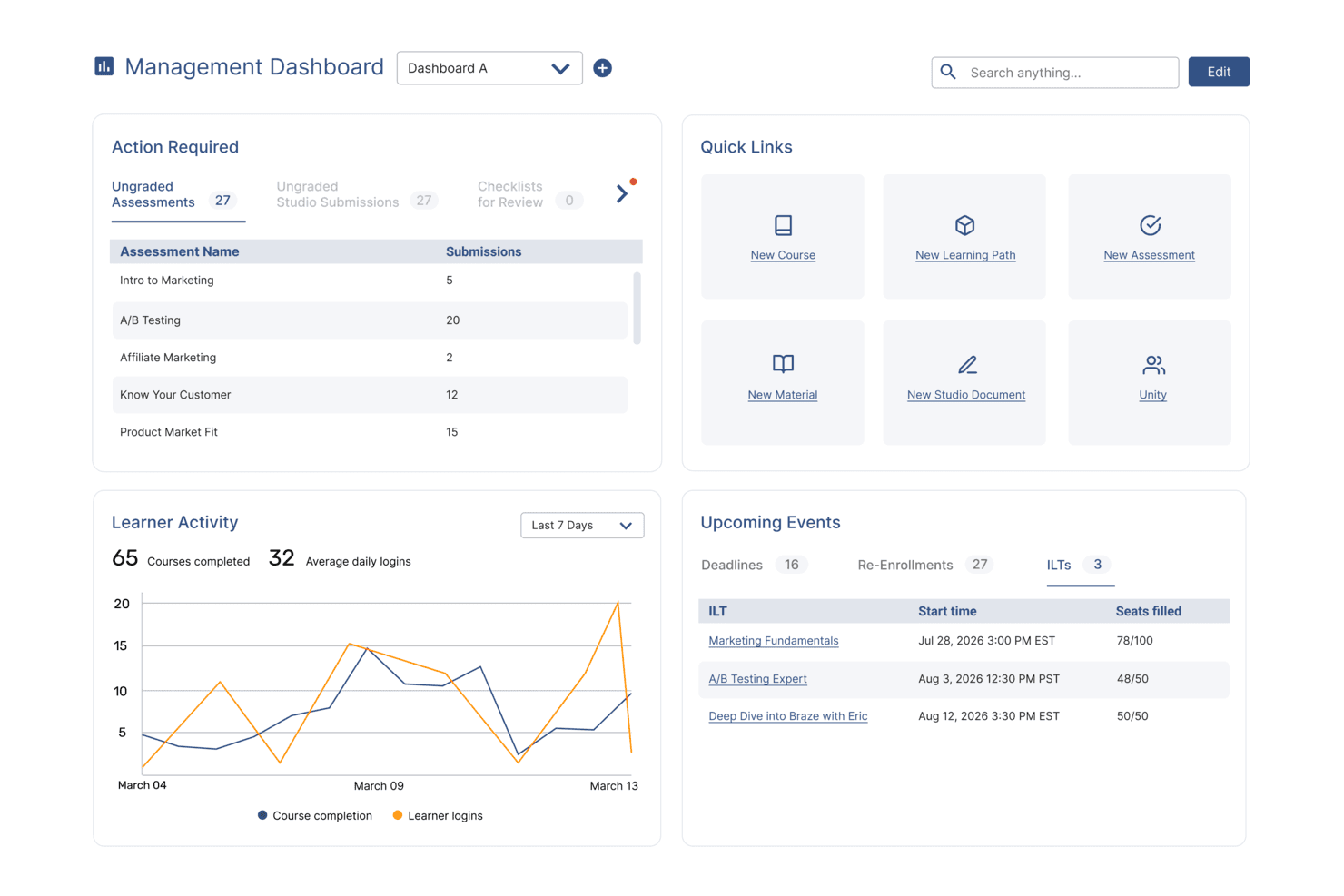
SkyPrep's management dashboard displays learner activity, upcoming events, and quick links. SkyPrep is a cloud-based learning management system built for HR teams and business leaders who need to deliver, track, and manage employee training, compliance, and onboarding across a range of industries.
Who Is SkyPrep Best For?
SkyPrep is a strong fit for small to mid-sized businesses that need a straightforward LMS without a steep learning curve or lengthy implementation.
Why I Picked SkyPrep
I picked SkyPrep as one of the best corporate LMS options because it's quick to set up and straightforward to run day-to-day. I like that course auto-enrollment and automated alerts handle many administrative tasks that would otherwise fall on your HR team. The course builder lets you put together assessments, checklists, and knowledge checks without any technical background. Out-of-the-box reporting lets my team pull training completion data without first configuring reports.
SkyPrep Key Features
- Gamification: Add points, badges, and leaderboards to courses to keep learners engaged throughout their training.
- Multi-tenant LMS: Manage separate training platforms for different clients, brands, or branches from a single account.
- Custom branding: Personalize your platform with your company's logos, colors, certificates, and email templates.
- AI-powered content creation: Use built-in AI tools to simplify and speed up the process of building new training content.
SkyPrep Integrations
Integrations include ADP, Workday, BambooHR, Salesforce, HubSpot, Zoom, Microsoft Teams, Stripe, PayPal, and GoToMeeting.
Learn more about SkyPrep: Best for a holistic learning management software solution
- Free trial available
- Pricing upon request
Visit WebsiteCustomer Rating:4.6/5
Absorb LMS gives you clear course stats and analytics. Absorb LMS gives HR teams and corporate trainers a flexible platform to deliver, track, and manage employee learning, compliance, and development programs across industries and business sizes.
Who Is Absorb LMS Best For?
Absorb LMS is a strong fit for mid-size to enterprise organizations that need a scalable learning platform to support both employee training and extended enterprise use cases.
Why I Picked Absorb LMS
Absorb LMS earns its spot as one of the best on my shortlist because it covers the full learning lifecycle in a single platform—from AI-powered course creation to compliance tracking to extended enterprise training. What I like most is Absorb Create, which uses generative AI to build entire courses, complete with quizzes, narration, and videos, in minutes. That saves time when my team needs to roll out training across multiple departments on tight timelines. I also rely heavily on the reporting suite—pre-built templates for learner progress, course completions, and certifications mean I can schedule automated reports straight to department heads without any manual data pulls.
Absorb LMS Key Features
- Learner portal: A personalized, branded homepage where employees can browse, enroll in, and track their assigned and elective courses.
- Observation checklists: Managers can assess and verify hands-on skills by completing structured, in-person evaluation forms directly within the platform.
- eCommerce tools: Sell and distribute training content externally with built-in course catalog, payment processing, and enrollment management.
- Multilingual support: Deliver training in multiple languages to support global workforces and regional compliance requirements.
Absorb LMS Integrations
Integrations include Salesforce, ADP, BambooHR, Namely, Okta, Microsoft Teams, Zoom, LinkedIn Learning, SAP SuccessFactors, and Workday.
Pros and Cons
Pros:
- Automation reduces repetitive admin and learner management tasks
- Multi-portal setup keeps audiences separate but centrally managed
- Supports both internal and external training in one ecosystem
Cons:
- Pricing requires a custom quote and can be higher than basic LMS tools
- Custom reporting for niche metrics may require extra configuration
Learn more about Absorb: Best cloud-based LMS with an auto-enrollment feature
- Free demo available
- Pricing upon request
Visit WebsiteCustomer Rating:4.3/5
Mitratech Perform's dashboard presents a visual summary of reports with customizable filters for precise results. Mitratech Perform is a cloud-based learning management system for HR teams and corporate trainers managing employee development, compliance, and ongoing training across growing organizations.
Who Is Mitratech Perform Best For?
Mitratech Perform is a strong fit for mid-sized to large organizations that need a scalable way to manage employee training, compliance, and performance development in one place.
Why I Picked Mitratech Perform
I picked Mitratech Perform as one of the best because of how its auto-enrollment feature removes one of the most tedious parts of running a corporate training program. Instead of manually assigning courses one by one, you can enroll your entire workforce and filter by role, department, or tenure. New hires get automatically enrolled from the moment of hire, so onboarding training starts without any manual intervention. I also like that completed courses and earned certifications sync directly to employee performance reviews, which links learning activity to the broader performance management picture — a capability most standalone LMS tools lack.
Mitratech Perform Key Features
- Quizzes and assessments: Build interactive quizzes using multiple-choice, short answer, and matching formats to test employee comprehension after completing a course.
- Course creation tools: Create and update multimedia course content; integrates with Microsoft Office, Canva, YouTube, Vimeo, and supports HTML-based formats.
- Upskilling program management: Assign self-directed courses to employees by role or department to support ongoing skill development outside of onboarding.
- Compliance reporting: Generate real-time reports on course completions, test scores, and training timelines to document compliance and track workforce-wide progress.
Mitratech Perform Integrations
No native integrations are listed.
Pros and Cons
Pros:
- Works internationally, across languages and regions
- Lets you monitor completion and compliance across large workforces
- Automatically assigns training based on role changes or additions
Cons:
- Deep customisation (branding, UI) may require additional configuration
Learn more about Mitratech Perform:
Diğer Kurumsal LMS Sistemleri
En iyi kurumsal LMS yazılımları listesine girmeyen ancak yine de değerlendirmeye değer birkaç seçenek daha şöyle:
- 11GoSkillsBest for AI-assisted course building at speed
- 12TovutiBest corporate training LMS with an extensive, built-in course library
- 13WeSchoolBest learning management system to simplify corporate training
- 14Kallidus LearnBest for a combined learning, HR, and performance management platform
- 15DoceboBest for maximizing user engagement
- 16EdCastBest talent experience platform for attracting, training, and retaining employees
- 17eloomiBest for an all-in-one learning and people development platform
- 18Cornerstone OnDemandBest for creating personalized learning experiences
- 19BridgeBest for advanced course authoring
- 20SAP SuccessFactorsBest for building a continuous learning culture
- 21Constructor TechBest for fostering active learning across complex topics
- 22LMS365Best learning platform built into Microsoft Office 365 and Microsoft Teams
- 23Brainier LMSBest for a customizable corporate training & learning platform
- 24Learn AmpBest for a comprehensive LMS with tailored learning pathways
- 25QooperA corporate learning, mentorship, and coaching platform
- 26ConnecteamBest for evaluation quizzes, recognition, and rewards
- 27ClearCoBest for extensive course offerings
- 28ExecBest for AI-powered personalized learning
- 29SAI360Best for industry-specific compliance training and reporting
- 30ProProfs Training MakerBest for corporate learning with an emphasis on OSHA training
İlgili İK Yazılımı İncelemeleri
Burada aradığınızı hâlâ bulamadıysanız test edip değerlendirdiğimiz diğer ilgili araçlara göz atın:
- İK Yazılımı
- Bordro Yazılımı
- İşe Alım Yazılımı
- Kayıtlı İşveren Hizmetleri
- Aday Takip Sistemleri
- İşgücü Yönetimi Yazılımı
How I Evaluate Corporate Learning Management Systems
I split my evaluation into baseline requirements—like course authoring, compliance tracking, and HRIS sync—and the differentiators that separate a great LMS from a good one.
Core Functionality (Table Stakes For This List)
When I'm selecting tools for my list, I rank each one on a scale from 0 (does not offer the functionality) to 5 (excels in this area) for each core functionality listed below. Then, I calculate the tool's total score into a percentage. Each tool needs to achieve a minimum total score of 75% to be considered for inclusion.
- Course Authoring & Content Management: I check whether you can build courses natively and import SCORM or xAPI packages—say, uploading a vendor-provided safety training module alongside an internally authored onboarding course.
- Learning Path & Curriculum Design: Each platform should let you sequence courses into structured programs tied to roles or teams, like a 90-day onboarding track for new managers that includes prerequisites.
- Progress Tracking & Reporting: I look for dashboards that give L&D managers real-time visibility into completions and scores, plus exportable reports they can hand to leadership during quarterly reviews.
- Compliance & Certification Management: Recurring training cycles, expiration tracking, and automated renewal reminders matter here—think annual data privacy certifications that auto-reassign when they lapse.
- Employee & Learner Management: The platform should handle role-based permissions and group segmentation, and I evaluate how well it syncs employee data with HRIS platforms to avoid manual user provisioning.
- Assessments & Knowledge Checks: Built-in quizzing with multiple question types is essential. I look at whether you can create randomized question banks for post-training evaluations that verify real comprehension.
Once I have a list of tools that meet the criteria, I consider what sets each platform apart.
Differentiating Factors (What Sets Vendors Apart)
Here's how I compare and contrast different vendors:
Standout Features
Skills and competency mapping is where I see the biggest variation between platforms. I look for tools that connect course completions to a skills taxonomy so HR teams can identify gaps and guide internal mobility decisions. Mobile and offline access also carries weight—organizations with frontline or field-based workers need learners to download modules and complete training without a Wi-Fi connection. AI-powered recommendations add depth by surfacing relevant courses based on a learner's role, progress, and development goals.
Beyond Features
HRIS integration depth matters here. I evaluate whether a platform connects natively with systems like Workday or BambooHR so employee records stay in sync without manual imports after every new hire. Compliance and security certifications are another key factor—organizations in regulated industries need SOC 2 or GDPR compliance and audit-ready reporting baked in. I also consider pricing transparency, checking whether per-user costs scale predictably as headcount grows and whether content libraries are included or sold separately.
Kurumsal Öğrenme Yönetim Sistemi Nedir?
Kurumsal öğrenme yönetim sistemi (LMS), şirketlerin çalışan eğitim programları oluşturmak, sunmak, izlemek ve yönetmek için kullandığı dijital bir araçtır.
İK ekipleri ve L&D profesyonelleri, işe alıştırmayı iyileştirmek, uyumluluğu sağlamak ve personelin becerilerini daha verimli şekilde geliştirmek için LMS platformlarını kullanır. LMS yazılımı, eğitim içeriklerini merkezileştirip raporlamayı otomatikleştirerek manuel yönetim işlerini azaltır, bilgilerin kalıcılığını artırır ve öğrenmeyi kuruluş genelinde ölçeklendirir.
Kurs oluşturma ve yönetme araçlarına ek olarak kurumsal LMS'ler mobil cihazlarda esnek öğrenmeyi destekler ve bilgilerin kalıcılığını ölçmek için eğitim sonrası değerlendirme araçları içerir.
Kurumsal Öğrenme Yönetim Sistemlerinin Özellikleri
Kurumsal öğrenme yönetim sistemlerini seçerken aşağıdaki temel özelliklere dikkat edin:
- Kurs yönetimi: Eğitim modüllerini zahmetsizce oluşturmanıza, düzenlemenize ve planlamanıza olanak tanır. Kurslar atayabilir, tamamlanma durumlarını takip edebilir ve eğitim ihtiyaçlarınız değiştikçe içerikleri güncelleyebilirsiniz.
- Kullanıcı yönetimi: Öğrencileri, eğitmenleri ve grupları tek bir platformdan kolayca yönetebilirsiniz. Yeni çalışanları kaydedebilir, izinleri ayarlayabilir ve rollere veya departmanlara göre öğrenme yollarını kişiselleştirebilirsiniz.
- Değerlendirme ve sınavlar: Özelleştirilebilir sınavlar ve değerlendirmeler aracılığıyla bilgi kalıcılığını ve ilerlemeyi test edebilirsiniz. Otomatik puanlama zamandan tasarruf etmenizi sağlarken anında geri bildirim, öğrencilerin gelişime odaklanmasına yardımcı olur.
- İlerleme takibi ve raporlama: Gösterge panelleri ve raporlar aracılığıyla bireysel ve ekip performansını izleyebilirsiniz. Beceri eksikliklerini veya yüksek başarı gösterenleri hızlıca belirleyerek takip eğitimini buna göre uyarlayabilirsiniz.
- Entegrasyon olanakları: LMS'nizi hâlihazırda kullandığınız İK yazılımları, üretkenlik araçları veya iletişim platformlarıyla bağlayabilirsiniz. Bu, işe alıştırma sürecini, performans değerlendirmelerini ve kurum içi iletişimi kolaylaştırır.
- Oyunlaştırma: Eğitim modüllerine entegre edilmiş rozetler, liderlik tabloları ve ödül sistemleriyle çalışanları motive edebilirsiniz. Dostane rekabet, etkileşimi artırabilir ve sürekli öğrenmeyi teşvik edebilir.
- Mobil erişilebilirlik: Öğrenciler kurslara akıllı telefonlarından veya tabletlerinden istedikleri zaman ve istedikleri yerden erişebilir. Bu özellik uzaktan çalışmayı ve tam zamanında öğrenmeyi destekler; yoğun veya geleneksel olmayan çalışma programlarına sahip çalışanlar için oldukça faydalıdır.
- İçerik kütüphanesi: Yerleşik içeriklere, şablonlara ve kaynaklara erişebilirsiniz. Hazır materyallere sahip olmak, eğitimi sıfırdan oluşturmak için harcadığınız zamanı azaltır.
Yaygın Kurumsal Öğrenme Yönetim Sistemlerinin Yapay Zekâ Özellikleri
Yukarıda sıralanan standart kurumsal öğrenme yönetim sistemi özelliklerinin yanı sıra bu çözümlerin çoğu aşağıdakiler gibi özelliklerle yapay zekâyı da kullanıma sunuyor:
- Sohbet robotu desteği: Yapay zekâ sohbet robotları öğrenci sorularını yanıtlayabilir, hatırlatıcılar sunabilir ve tam zamanında yardım sağlayabilir. Böylece rutin destek görevlerinin yükünü üzerinizden alırken öğrenmeyi herkes için daha erişilebilir hâle getirir.
- Kişiselleştirilmiş öğrenme önerileri: Yapay zekâ, ilgili kursları önermek için her çalışanın geçmişini ve tercihlerini analiz eder; böylece ekibiniz ihtiyaçlarına gerçekten uyan beceri geliştirme olanaklarına her zaman erişebilir.
- Otomatik içerik düzenleme: LMS, kaynak yığınlarını tarayarak eğitimi; trendlere, beceri eksikliklerine veya bireysel ilerlemeye göre seçebilir ve güncelleyebilir.
- Akıllı değerlendirme analizi: Yapay zekâ destekli araçlar, sınav sonuçları ve ilerleme hakkında daha derin içgörüler sunarak çalışanların hangi konularda zorlandığını ve hangi alanlarda başarılı olduğunu anlamanıza yardımcı olan kalıpları belirler.
- Öngörücü analiz: Sistemin kullanıcı verilerine dayanarak beceri eksikliklerini ve öğrenme trendlerini öngörmesini sağlayarak gelecekteki eğitim ihtiyaçlarını tahmin edebilirsiniz. Böylece iş gücü gelişiminde her zaman bir adım önde olursunuz.
Kurumsal LMS'nin Faydaları
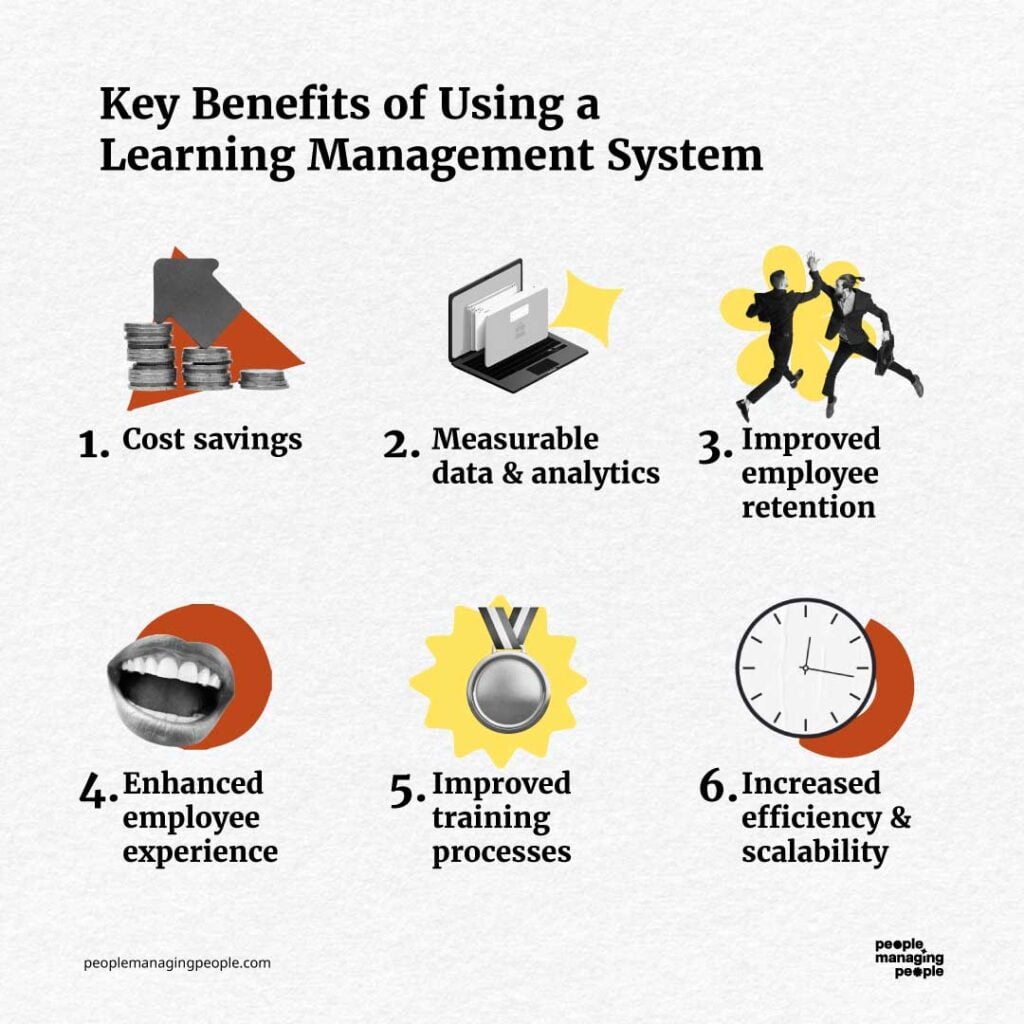
Kurumsal öğrenme yönetim sistemleri, çalışan gelişimini ve kuruluşun büyümesini destekleyen güçlü araçlardır. Genel olarak eğitimi kolaylaştırır, etkileşimi artırır ve ölçülebilir sonuçlar sunarken uyumluluğun sağlanmasına yardımcı olurlar.
Kurumsal bir LMS uygulayarak elde etmeyi bekleyebileceğiniz bazı faydalar şunlardır:
- Ölçeklenebilir öğrenme programları: Kuruluşlar, kurumsal bir LMS kullanarak idari yükü artırmadan büyüyen iş gücüne eğitim sunabilir ve ekipler genelinde tutarlı öğrenme deneyimleri sağlayabilir.
- Geliştirilmiş çalışan etkileşimi: Oyunlaştırma, sınavlar ve çoklu ortam içerikleri gibi etkileşimli özellikler çalışanların motivasyonunu korur ve öğrenme süreçlerine bağlı kalmalarını sağlar.
- Geliştirilmiş uyumluluk takibi: Belirli eğitimlerin gerekli olduğu kuruluşlar veya sektörler için otomatik takip, çalışanların zorunlu eğitimleri zamanında tamamlamasını sağlar; böylece sektör standartları korunurken mevzuata aykırılık nedeniyle uygulanabilecek cezaların riski azaltılır.
- Küresel erişilebilirlik: Mobil uyumluluk ve çoklu dil desteği, farklı konumlardaki çalışanların eğitime erişmesini sağlayarak kapsayıcılığı destekler ve çeşitli bir iş gücünü teşvik eder.
- Ekonomik eğitim sunumu: Sanal eğitim; seyahat giderlerini, mekân maliyetlerini ve basılı materyal masraflarını azaltarak mesleki gelişimi daha erişilebilir ve uygun maliyetli hâle getirir.
Bunlar LMS sistemlerinin sunduğu faydalardan yalnızca birkaçı; elbette daha fazlası da var! Üst düzey yöneticilerinizi kurumsal bir LMS'nin gerçekten yatırıma değer olduğuna ikna etmek için daha güçlü argümanlara ihtiyacınız varsa, bu kapsamlı LMS özellikleri ve faydaları listesini de inceleyin.
Özetle kuruluşlar, bir LMS'ye yatırım yaparak sürekli öğrenme kültürünü teşvik edebilir ve kendilerini uzun vadeli başarıya hazırlayabilir.
Kurumsal LMS İçin Maliyetler ve Fiyatlandırma
Kurumsal öğrenme yönetimi sistemleri, küçük işletmelerden büyük kuruluşlara kadar farklı kurumsal ihtiyaçlara uyum sağlamak için genellikle kademeli fiyatlandırma modelleriyle sunulur. Bu seçenekleri anlamak, bütçeniz ve eğitim hedeflerinizle uyumlu bir plan seçmenize yardımcı olabilir.
Aşağıda, her düzeyde sunulan özellikler de dahil olmak üzere yaygın plan ve fiyatlandırma seçeneklerinin bir dökümü yer almaktadır.
Kurumsal LMS'ler İçin Plan Karşılaştırma Tablosu
| Plan | Ortalama Fiyat | Yaygın Özellikler |
|---|---|---|
| PlanÜcretsiz Seçenek | Ortalama Fiyat$0 | Yaygın ÖzelliklerTemel kurs yönetimi, sınırlı kullanıcı sayısı, ilerleme takibi, temel düzeyde raporlama ve topluluk desteği |
| PlanTemel Plan | Ortalama Fiyat$5–$15 kullanıcı başına/ay | Yaygın ÖzelliklerKurs oluşturma, kullanıcı yönetimi, uyumluluk takibi, mobil erişim ve temel entegrasyonlar |
| PlanStandart Plan | Ortalama Fiyat$20–$50 kullanıcı başına/ay | Yaygın ÖzelliklerGelişmiş raporlama, özelleştirilebilir öğrenme yolları, oyunlaştırma ve İK araçlarıyla entegrasyonlar |
| PlanKurumsal Plan | Ortalama FiyatÖzel fiyatlandırma | Yaygın ÖzelliklerSınırsız kullanıcı, markalama, API erişimi, çok dilli destek, özel hesap yöneticisi ve analizler |
Kurumsal LMS sistemleri için plan türleri, maliyetler ve özelliklerin dökümü.
Her plan, farklı düzeylerde işlevsellik ve ölçeklenebilirlik sunar. Alıcılar, yatırımları karşılığında en iyi değeri elde etmek için doğru planı seçerken kuruluşlarının büyüklüğünü, eğitim ihtiyaçlarını ve bütçesini göz önünde bulundurmalıdır.
Şirket Kurumsal Öğrenme Yönetim Sistemleri Hakkında SSS
Kurumsal LMS sistemleri ve nasıl çalıştıkları hakkında merak edebileceğiniz sık sorulan soruların bazı yanıtlarını burada bulabilirsiniz:
Kuruluşumun ihtiyaçları için doğru LMS'yi nasıl seçerim?
Öğrenme hedeflerinizi ve kullanıcı gereksinimlerinizi belirleyerek başlayın. Eğitim hedeflerinizle, tercih ettiğiniz sunum formatlarıyla ve raporlama ihtiyaçlarınızla uyumlu LMS platformlarını arayın. Ücretsiz denemeler veya demolarla farklı platformları test edin ve geri bildirim toplamak için kilit paydaşları ve son kullanıcıların bir örneklemini sürece dahil edin. LMS’nizin şirketinizle birlikte büyüyebilmesini sağlamak için ölçeklenebilirliği ve güvenilir müşteri desteğini kontrol edin.
LMS ile Eğitim Yönetim Sistemi arasındaki fark nedir?
Bir Öğrenme Yönetim Sistemi (LMS), çalışanlarınız için çevrim içi öğrenme ve e-öğrenme içeriklerini sunmak, izlemek ve yönetmek üzere tasarlanmıştır. Dijital öğrenme deneyimleri için kurs oluşturma, değerlendirmeler, ilerleme takibi ve raporlama gibi özellikleri destekler.
Buna karşılık, bir Eğitim Yönetim Sistemi (TMS), eğitmen liderliğindeki eğitimleri, atölye çalışmalarını ve sınıf etkinliklerini (hem yüz yüze hem de sanal) düzenlemeye ve yönetmeye odaklanır. TMS; programlama, mekan yönetimi, kayıtlar ve kaynak tahsisi gibi lojistik süreçleri yönetir.
Bazı platformlar hem LMS hem de TMS özelliklerini bir arada sunar, ancak temel amaçları farklıdır: LMS dijital öğrenmenin sunulması, TMS ise canlı eğitim lojistiğinin yönetilmesi içindir.
Kurumsal bir LMS'de hangi entegrasyonları aramalıyım?
Öğrenmeyi daha geniş İK süreçleriyle ilişkilendirmenize olanak tanıyan ve İK bilgi sisteminiz, bordro ve performans yönetimi sistemlerinizle bağlantı kuran LMS entegrasyonlarına odaklanın. Kolay erişim için tek oturum açmaya ve Microsoft Teams, Slack, Google Workspace ile video konferans uygulamaları gibi popüler araçlarla entegrasyonlara öncelik verin.
Sorunsuz entegrasyonlar, kullanıcı verilerini senkronize ederek, yöneticilerin manuel işlerini azaltarak, iş akışlarını otomatikleştirerek ve sorunsuz bir öğrenme deneyimi için öğrenme ilerlemesini diğer işletme ölçümleriyle birlikte izleyerek zaman kazandırır.
Yeni bir LMS için yüksek kullanıcı benimsemesini nasıl sağlayabilirim?
Çalışanları ve yöneticileri platform seçimine ve pilot testlere dahil ederek erken aşamada destek kazanın. Uygulamalı eğitim oturumları, hızlı başvuru kılavuzları ve kolay erişilebilir yardım kaynaklarıyla kapsamlı bir işe alıştırma süreci sunun.
Sade, kullanıcı dostu bir arayüze ve güçlü mobil erişime sahip bir LMS seçin. Yönetici desteğini teşvik ederek, başarı hikâyelerini paylaşarak ve eğitim dönüm noktalarını sertifikalar veya kurum içi ödüllerle takdir ederek düzenli kullanımı teşvik edin.
Çoğu kurumsal LMS platformunda eğitim programlarını özelleştirmek mümkün müdür?
Evet, önde gelen kurumsal LMS platformlarının neredeyse tamamı kursları ve öğrenme yollarını tamamen özelleştirmenize olanak tanır. Kendi sunumlarınızı, videolarınızı ve değerlendirmelerinizi yükleyebilir, üçüncü taraf içeriklerini ekleyebilir ve role veya departmana özel programlar tasarlayabilirsiniz.
Birçok sistem markalı portalları ve uyarlanabilir öğrenme modüllerini destekler; böylece platformu şirketinizin kültürü ve beceri geliştirme hedefleriyle uyumlu hâle getirebilirsiniz.
LMS yatırımımın yatırım getirisini nasıl ölçebilirim?
Eğitim tamamlama oranları, test puanları, öğrenmeye ayrılan süre ve eğitim sonrası performans ölçümleri gibi analizleri takip edin. Açıkları tespit etmek, eğilimleri belirlemek ve öğrenme sonuçlarını işe alım süresinin kısalması, uyum oranlarının iyileşmesi veya çalışan bağlılığının artması gibi kurumsal hedeflerle karşılaştırmak için LMS’nin yerleşik raporlama araçlarını kullanın.
Ayrıca niteliksel iyileşmeleri işletme KPI’larıyla birlikte değerlendirmek için öğrenenlere ve yöneticilere anket uygulayarak geri bildirim toplayabilirsiniz.