

En iyi kurumsal öğrenme yönetim sistemleri (LMS), çalışan eğitim programlarını sunmanıza, izlemenize ve ölçeklendirmenize yardımcı olur; böylece iş gücünüzün yetkinliklerini kolayca geliştirebilir ve işletmenizin büyümesini sağlayabilirsiniz.
Eğitimi geniş ölçekte yönetirken dağınık materyaller ve manuel takip; tutarsız öğrenme deneyimlerine, düşük etkileşime ve karşılanmamış uyumluluk gereksinimlerine yol açabilir. Güçlü bir LMS, kurs içeriğini merkezileştirir, raporlamayı otomatikleştirir ve çalışanların ilerlemesine ilişkin içgörüler sunar; bunların hepsini tek bir platformda gerçekleştirir.
Yıllarca kurumsal eğitim programları tasarlayıp yürüttükten sonra, güçlü, esnek ve karmaşık kurumsal ihtiyaçları desteklemek üzere tasarlanmış en iyi kurumsal LMS çözümlerini değerlendirdim.
Bu rehberde, tüm ekibiniz genelinde beceri gelişimini, uyumluluk eğitimini ve bilgi paylaşımını geliştirecek en iyi platformları bulacaksınız.
Why Trust Our Software Recommendations
6,700+
Reviews
20
Industry experts
16+
Evaluation factors
14
Years
Our team has been testing and reviewing software since 2012. As HR experts ourselves, we know how difficult—and important—it is to choose the right software.
For this guide, we evaluated tools using hands-on testing and independent research, scoring tools using our selection criteria. We also draw on insights from industry thought leaders and practicing HR experts.
Our reviews reflect our human editorial judgment, not a sales pitch.
Expert reviewers:
- Phil GrayCOO
 Kim BehnkeHR Tech Editor & Analyst
 Josh BarkerPeople Ops Manager

Kurumsal Öğrenme Yönetim Sistemi Karşılaştırma Tablosu
Bu karşılaştırma tablosu, en iyi kurumsal öğrenme yönetim sistemi seçimlerim için fiyatlandırma ayrıntılarını özetlemektedir:
Sorted by: Default
| Tool | Starting Price | Website | |
|---|---|---|---|
Best for distributed global teams | 4.8 out of 5 | $5/user/month Free demo available | Website |
Best for bespoke LMS solutions | Not rated | Pricing upon request Free demo available | Website |
Best with integrated workflow automation | 4.7 out of 5 | Pricing upon request Free demo available | Website |
Best for rapid rollout and multi-audience training | 4.6 out of 5 | $119/month Free plan + free demo available | Book Demo |
Best for gamification features | 4.6 out of 5 | Pricing upon request Free trial available | Website |
Best for flexible content formats | 4.3 out of 5 | Pricing upon request Free demo available | Website |
Best for powering the entire training cycle | 4.6 out of 5 | $3.97/user/month Free trial available | Book Demo |
Best for providing real-time analytics | Not rated | Pricing upon request Free demo available | Website |
Best for user experience and support | 4.7 out of 5 | Pricing upon request 14-day free trial + demo available | Website |
Best for AI-generated course creation assistance | 4.7 out of 5 | $7,500/year Not available | Website |


En İyi Kurumsal Öğrenme Yönetim Sistemi İncelemesi
Aşağıda, kısa listeme giren en iyi kurumsal öğrenme yönetim sistemine ilişkin ayrıntılı özetlerimi bulabilirsiniz. İncelemelerim, size en uygun olanı bulmanıza yardımcı olmak için her aracın temel özelliklerine, artılarına & eksilerine, entegrasyonlarına ve ideal kullanım alanlarına ayrıntılı bir bakış sunmaktadır.
 Best for distributed global teams
- Free demo available
- From $5/user/month
Visit WebsiteCustomer Rating:4.8/5
Deel's learning management system allows you to automate training workflows. Deel Engage is designed for large organizations that want one place to manage learning, performance, and career development. It’s a good fit if your team needs automated training workflows, role-based course assignments, and support for global learning programs.
Why I Picked Deel Engage
I picked Deel Engage because it helps large companies deliver consistent training across complex teams without adding extra admin work. You can automate enrollments based on role, start date, or location, ensuring employees always receive the right courses at the right time.
Its AI-assisted course builder helps you produce multimedia lessons and quizzes quickly, which is particularly useful when you're rolling out frequent or large-scale training. I also like that you can connect learning outcomes to performance data, giving you a clearer view of how training impacts employee growth.
Together, these features make Deel Engage a strong match for organizations that need learning, performance, and career development to work in sync.
Deel Engage Key Features
Here are some standout features worth highlighting:
- 360° Feedback Tools: Collect manager, peer, and self-reviews to support ongoing performance discussions.
- Career Development Frameworks: Map skills, levels, and growth paths so employees understand how to advance.
- Training Resource Library: Give your team access to a mix of internal and external learning materials.
- Analytics Dashboards: Track learner progress, completion rates, and performance trends across teams or regions.
Deel Engage Integrations
Integrations include BambooHR, Slack, Workday, Greenhouse, Okta, Microsoft Teams, Google Workspace, Zapier, and Jira.
Pros and Cons
Pros:
- Integrated performance analytics
- Drag-and-drop course creation
- Automated training course assignments
Cons:
- Could have more customization options
- Learning curve for new users


Synergy Learning provides customizable dashboards with options for course management, updates, and personalized learning paths. Synergy Learning is a notable enterprise learning management system provider, known for its ability to tailor solutions to meet the specific needs of sectors such as non-profit, healthcare, financial services, and government.
Why I picked Synergy Learning: As a certified partner of Moodle and Totara, Synergy Learning offers platforms like Moodle LMS and Totara Suite, which assist organizations in efficiently delivering, managing, and tracking educational and training programs. The emphasis on bespoke development and user experience design helps create an intuitive interface that boosts learner engagement. Managed hosting services guarantee consistent platform performance, while consultancy and training services aid organizations in maximizing the capabilities of their LMS.
Synergy Learning Standout Features and Integrations:
Standout features include their Spark LMS theme that offers a range of integrations, user-friendly design, and premium add-ons, allowing you to have a customized LMS experience. Synergy Learning also offers a flexible approach to learning content with learning content development services and digital conversion or expansion of existing learning content.
Integrations include HubSpot, Power BI, Google Apps, Microsoft Office 365, SAP, Oracle, Salesforce, Stripe, PayPal, and Zoom.
Pros and Cons
Pros:
- Client-focused approach ensures tailored solutions
- Offers managed hosting and consultancy services
- Highly customizable learning management systems
Cons:
- Customization options may require additional development
- May not be ideal for those looking for a quick-start solution
Learn more about Synergy Learning: Best with integrated workflow automation
- Free demo available
- Pricing upon request
Visit WebsiteCustomer Rating:4.7/5
Continu dashboard showcasing AI-powered learning and workforce training programs. Continu is an enterprise learning management system that offers course authoring, workflow automations, advanced analytics, custom learning paths, and support for multilingual content.
Who Is Continu Best For?
Continu is a strong fit for mid-to-large enterprises that need to train and develop distributed teams across multiple departments or regions.
Why I Picked Continu
I picked Continu as one of the best because its workflow automation goes well beyond basic reminders. The rules engine lets you trigger assignments based on role, partner tier, region, or any CRM or HRIS attribute—so when a new hire joins or a partner moves up a tier, the right training fires automatically. I also like the escalation workflows, which notify managers when assignments go overdue without any manual follow-up from your team.
Continu Key Features
- Smart Segmentation: Set rules-based filters to automatically deliver targeted content to learners based on their role, region, or product line.
- Continu Insights: Build custom dashboards and use plain-English prompts to pull real-time reports from your learning data without SQL or analyst support.
- Badges and certifications: Award learners with digital badges or certificates upon completing courses or demonstrating specific competencies.
- SCORM/xAPI support: Import externally created eLearning files directly into Continu to run alongside natively authored content.
Continu Integrations
Continu offers native integrations with Salesforce, Workday, Okta, and Google Workspace. An API is available for custom integrations.
Pros and Cons
Pros:
- Responsive support and customer success teams
- Comprehensive reporting for enterprise compliance needs
- Robust automation for HR and learning workflows
Cons:
- No mobile app for offline course access
- Limited prebuilt course content library compared to peers
Learn more about Continu: Best for rapid rollout and multi-audience training
- Free plan + free demo available
- From $119/month (billed annually)
Visit WebsiteCustomer Rating:4.6/5
TalentLMS is easy to setup and scale. TalentLMS is built for organizations that need to roll out training quickly across multiple audiences—employees, partners, and customers. It gives you branching environments, easy course creation, and flexible delivery options so you can offer different learning experiences while keeping everything centralized.
Why I Picked TalentLMS
I picked TalentLMS because it helps your team launch enterprise training programs in days instead of weeks. You can create courses using built-in tools or upload SCORM, xAPI, and cmi5 content, which gives you flexibility in how you build and manage learning.
Its branch management lets you run separate training portals for different groups, each with unique branding and permissions, while still overseeing everything from one account. I also like that you can automate enrollments and actions, which cuts down on admin work as your learner base grows. Plus, the mobile app with offline access ensures your distributed teams can complete training anywhere.
TalentLMS Key Features
Here are some key features worth highlighting:
- Branch Management: Create segmented training portals with custom branding and permissions.
- Gamification Tools: Use badges, points, and leaderboards to encourage learner engagement.
- Custom Reporting: Build reports that track progress, completion rates, and learning trends.
- Automations: Trigger enrollments, reminders, or actions based on user behavior.
TalentLMS Integrations
Integrations include Salesforce, Slack, Microsoft Teams, BambooHR, WordPress, Zoom, GoTo Webinar, Zendesk, and Google Workspace.
Pros and Cons
Pros:
- Branching lets you manage separate audiences from one platform
- Gamification supports engagement across large or distributed teams
- Fast setup helps enterprises deploy training programs quickly
Cons:
- Analytics lack deeper predictive insights
- Limited built-in authoring
Learn more about TalentLMS: Best for gamification features
- Free trial available
- Pricing upon request
Visit WebsiteCustomer Rating:4.6/5
Absorb's gamification function uses visual symbols to provide insights into skills. Clicking on a badge unlocks knowledge and encourages continuous learning. Absorb MS is built for organizations that want to motivate learners through structured goals and engaging course experiences. It works well for mid-sized and enterprise teams that need detailed progress tracking and a flexible learning environment that supports a wide range of training formats.
Why I Picked Absorb
I picked Absorb for its strong approach to learner engagement, especially if your team benefits from clear milestones and competitive motivation. Its gamification tools—like badges, points, and leaderboards—give employees immediate feedback and encourage consistent participation.
You can also create personalized learning paths that adapt to each employee’s role or skill level, ensuring training stays relevant, and I like that admins can manage user profiles, permissions, and enrollments from a single dashboard, reducing repetitive work.
Lastly, the platform’s built-in content tools also help you produce multimedia courses and quizzes without relying on external creation software.
Absorb Key Features
Here are some standout features worth highlighting:
- Adaptive Learning Paths: Create guided training sequences tailored to roles, goals, or certifications.
- Centralized User Management: Control permissions, profiles, and access levels from a unified admin panel.
- Content Authoring Tools: Build quizzes, modules, and multimedia courses directly inside the platform.
- Analytics & Reporting: Track learner progress, course completion, and knowledge gaps with exportable reports.
Absorb Integrations
Integrations include ADP, Box, Google Workspace, Microsoft 365, Salesforce, Shopify, Slack, Microsoft Teams, Twitter, and Zendesk.
Pros and Cons
Pros:
- Built-in tools for creating multimedia training content
- Gamification tools encourage consistent participation
- Supports large user volumes for enterprise-scale rollouts
Cons:
- Some advanced analytics require higher tiers or add-ons
- Limited customization for certain dashboard elements
Learn more about Absorb: Best for flexible content formats
- Free demo available
- Pricing upon request
Visit WebsiteCustomer Rating:4.3/5
Mitratech Perform's dashboard includes customizable filters for precise results. Mitratech Perform Learn is designed for organizations that want to deliver consistent, accessible employee training across locations. It’s a good fit for HR and L&D teams that need flexible learning formats, clear visibility into training progress, and hands-off enrollment for large or growing workforces.
Why I Picked Mitratech Perform
I picked Mitratech Perform because it gives your team a flexible way to deliver training through on-demand courses, live sessions, and social learning tools. For example, you can build your own courses or pull from their library, which helps you launch programs quickly without starting from scratch.
I also like that its reporting tools show you what employees have learned and where they’re falling behind, giving you clear next steps for improving your content, and their auto-enrollment feature is especially useful for larger teams—it enrolls employees based on rules you set, saving you the repetitive work of assigning courses manually.
Taken together, these features make it a strong choice for companies that want structured training without heavy administration.
Mitratech Perform Key Features
Here are some standout features worth highlighting:
- Real-Time Training Dashboards: Track learner progress, completion rates, and skills gaps at a glance.
- Built-In Course Authoring: Create custom training with your own videos, documents, and assessments.
- Gamified Learning Options: Add badges, points, and interactive elements to increase learner engagement.
- Role-Based Learning Paths: Assign courses automatically based on job role, department, or location.
Mitratech Perform Integrations
Integrations include ADP Workforce Now, Azure Active Directory, BambooHR, Google Workspace, Microsoft 365, Okta, OneLogin, Paylocity, Salesforce, and Zoom.
Pros and Cons
Pros:
- Uses can learn from anywhere with cloud-based delivery
- Has plenty of integrations
- Includes the ability to make custom courses
Cons:
- Pricing details are not transparent
- An integrated org chart feature would be nice
Learn more about Mitratech Perform: Best for powering the entire training cycle
- Free trial available
- From $3.97/user/month (billed annually)
Visit WebsiteCustomer Rating:4.6/5
With iSpring LMS, every essential course for a new hire is seamlessly integrated into a single learning track. iSpring LMS is built for companies that want to manage the full employee training cycle in one place, from onboarding to continuous skill development. It’s a strong fit for HR and L&D teams that need structured training paths, reliable tracking, and an easy way to deliver courses at scale.
Why I Picked iSpring LMS
I picked iSpring LMS because it automates many repetitive training tasks, so your team doesn’t have to manage them manually. For example, you can set rules that enroll employees in the right courses, send reminders, and track completions, ensuring that everything runs smoothly — even in a large organization.
I also like how it groups learners automatically based on location, role, or department, making it easier to assign relevant content. The platform supports full-cycle training management, from creating eLearning modules with the built-in authoring tool to monitoring progress with detailed performance data. And, with on-premise installation available, you can deploy the LMS on your servers for full control over data security, infrastructure, and compliance requirements.
These capabilities make it especially useful for organizations that train large or distributed teams.
iSpring LMS Key Features
Here are some standout features worth highlighting:
- Learning Tracks and Development Plans: Build step-by-step training paths that guide employees through required courses and ensure targeted training.
- Org Chart & Profiles: Visualize reporting lines and store employee training histories in one place.
- Corporate Newsfeed: Share updates or highlight important training programs to keep teams informed.
- Detailed Reporting: Track progress, completion rates, and knowledge gaps with targeted reports.
iSpring LMS Integrations
Integrations include Microsoft Teams, Zoom, Google Calendar, Apple Calendar, Outlook Calendar, Salesforce, Albato, and GoToMeeting.
Pros and Cons
Pros:
- Learning tracks help structure multi-step training programs
- Detailed completion reports highlight skill gaps clearly
- The on-premise installation option gives full control over the training infrastructure
Cons:
- Fewer native integrations than some competitors
- Limited gamification options
Learn more about iSpring LMS: Best for providing real-time analytics
- Free demo available
- Pricing upon request

EducateMe offers a centralized learning hub for managing courses and users. EducateMe offers a dynamic solution for organizations seeking to enhance their learning and development initiatives through an AI-driven platform. Tailored to meet the diverse needs of sectors such as corporations, academies, and training agencies, it addresses the challenges of employee training, onboarding, and compliance. By focusing on collaborative learning and integrating advanced analytics, EducateMe empowers your team to create and manage impactful educational experiences.
Why I Picked EducateMe
I chose EducateMe because it satisfies the need for data-driven decision-making for enterprises. Its reporting engine allows leaders and managers to see exactly where employees are struggling in real-time, rather than waiting for end-of-course assessments. This level of oversight is important for maintaining training ROI and operational efficiency. Additionally, it has a unique ability to integrate AI-driven roleplay coaching, providing interactive and personalized learning experiences.
EducateMe Key Features
In addition to its AI-driven roleplay coaching and analytics, I also found other features that enhance the platform's value for enterprises:
- Content Creation Tools: Enable your team to develop and customize courses, ensuring training materials align with organizational goals.
- White-Label Options: Allow you to brand the LMS platform to reflect your organization's identity, enhancing brand consistency.
- Collaborative Learning: Facilitates group interactions and discussions, promoting a culture of continuous learning and knowledge sharing.
- Automation: Lets you automate repetitive tasks like enrollments, reminders, and course assignments using a simple workflow builder.
EducateMe Integrations
Integrations include Google Workspace, Slack, Zoom, Salesforce, Figma, Calendly, and more. Additionally, EducateMe offers API access for custom integrations.
Pros and Cons
Pros:
- Built-in generative AI tools
- Clean and modern interface
- Real-time engagement dashboards
Cons:
- No native mobile app
- Limited gamification options
Learn more about EducateMe LMS: Best for user experience and support
- 14-day free trial + demo available
- Pricing upon request
Visit WebsiteCustomer Rating:4.7/5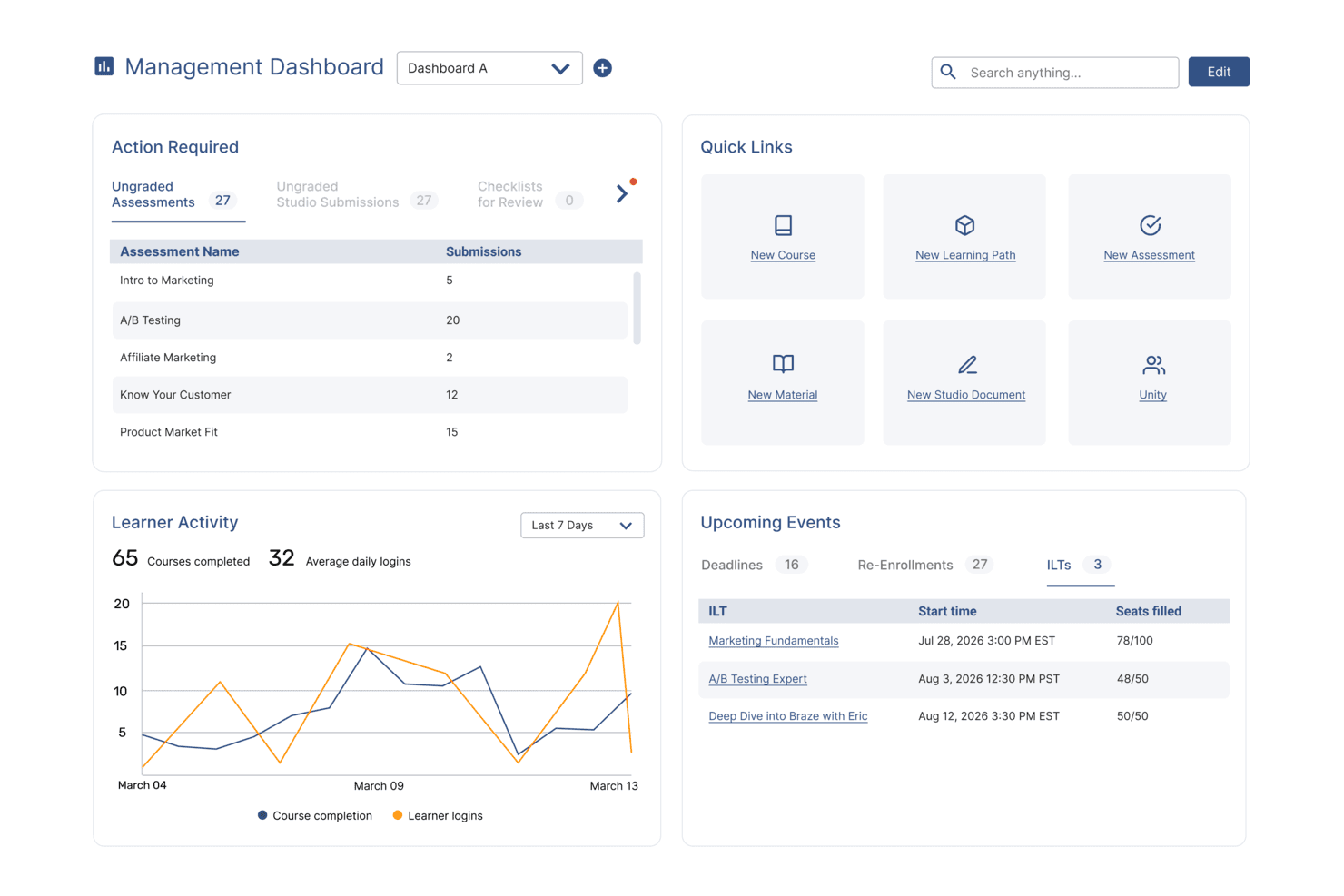
SkyPrep's management dashboard displays learner activity, upcoming events, and quick links. SkyPrep is built for companies that want a simple way to create and manage employee training without a steep learning curve. It’s best suited for teams that need to deliver courses quickly, keep learners engaged, and track progress in a clear, actionable way.
Why I Picked SkyPrep
I picked SkyPrep because it gives you practical tools to build training programs that people actually complete. You can create courses using videos, quizzes, and other interactive content your team can navigate without extra guidance.
I also like that you can set automated training paths so new hires or specific departments receive the right content at the right time. Its leaderboard and badge features keep learning engaging by adding light competition across your team, and the built-in progress tracking also helps you identify who needs support and which courses may require updates.
SkyPrep Key Features
Here are some standout features worth highlighting:
- Role-Based Automations: Assign courses automatically based on job role, location, or department.
- Custom Course Builder: Combine videos, documents, quizzes, and assessments in a single guided learning path.
- Advanced Progress Tracking: View course completion rates, quiz performance, and learner activity at a glance.
- Webinar Hosting Tools: Connect live sessions to your courses using integrated virtual meeting options.
SkyPrep Integrations
Integrations include Okta, SAML, OneLogin, ADP, Workday, Salesforce, HubSpot, Zoom, Webex, and G Suite.
Pros and Cons
Pros:
- Keeps your content as you upgrade plans
- Ecommerce tools to monetize courses
- Automated learning paths reduce manual admin work
Cons:
- Cannot save progress with certain types of documents
- No certificate auto generation
Learn more about SkyPrep: 10Best for AI-generated course creation assistance
Tovuti
- Not available
- From $7,500/year (billed annually)
Visit WebsiteCustomer Rating:4.7/5
Tovuti's dashboard offers an overview of course progress by team member as well as other analytics to understand the effectiveness of training programs. Tovuti is a comprehensive Learning Management System (LMS) designed to serve a wide range of educational and training needs for enterprises. As a robust online platform, Tovuti provides tools for creating, delivering, and managing educational content, making it an ideal solution for corporate training, educational institutions, and professional development programs.
Why I picked Tovuti: I particularly like Tovuti's AI assistant, Dizi, which allows users to create entire courses, quizzes, and lessons in just a few clicks, making it highly efficient for enterprise training and development needs. Additionally, Tovuti's extensive suite of LMS management tools, including user management, reporting, and analytics, ensures that enterprises can efficiently oversee their training programs. The platform's scalability and customization options further help large organizations with complex training needs.
Tovuti Standout Features and Integrations:
Standout features include its Learning Experience Platform (LXP), which provides a personalized learning journey for each user, fostering engagement and retention. It also offers an onboarding program to help users set up the platform, including step-by-step videos. Furthermore, Tovuti has over 30,000 pre-built courses, a mobile app for on-the-go learning, and various gamified and interactive tools.
Integrations include Salesforce, Zoom, Google Workspace, Microsoft Teams, LinkedIn Learning, PayPal, Stripe, Zapier, Slack, Shopify, HubSpot, Mailchimp, and BambooHR.
Pros and Cons
Pros:
- Good mobile learning experience
- Wide range of features include gamification and social learning
- Extensive customization options
Cons:
- Initial setup and implementation can be time consuming
- The backend of the system can be complex
Learn more about Tovuti:
Diğer Kurumsal Öğrenme Yönetim Sistemleri
Kısa listeme giremeyen ancak yine de göz atmaya değer bazı ek kurumsal öğrenme yönetim sistemi seçenekleri şunlardır:
- 11Kallidus LearnBest for tracking and analyzing learner metrics
- 12DoceboBest AI-based learning management system with accessibility accomodations
- 13eloomiBest all-in-one learning and development platform
- 14MedTrainerBest for healthcare-specific training
- 15Litmos LMSBest scalable learning management system
- 16Moodle LMSMS with a branded mobile app
- 17SAP Enterprise LearningBest LMS for an advanced content authoring environment
- 18Cornerstone LMSBest unified learning management system
- 19Seismic Enablement CloudBest learning management system for customer-facing teams
- 20CYPHER LearningBest for expert guidance via Solution Architects
- 21Brainier LMSBest learning management system for mobile-friendly access
- 22ConnecteamBest for creating mobile-friendly internal training courses
- 23ExecBest for AI roleplays
- 24eFrontBest LMS for complex learning
- 25LearnUponBest LMS for driving employee engagement
- 26360LearningBest LMS for blended and collaborative learning
- 27WorkRampBest LMS for customer training
- 28D2L WaveBest LMS platform for professional development
- 29SkillcastBest LMS for mandatory compliance training
How I Evaluate Enterprise Learning Management Systems
I split my evaluation into core requirements every enterprise LMS must clear—compliance automation, user provisioning at scale, SCORM support—and the differentiators that determine the best fit.
Core Functionality (Table Stakes For This List)
When I'm selecting tools for my list, I rank each one on a scale from 0 (does not offer the functionality) to 5 (excels in this area) for each core functionality listed below. Then, I calculate the tool's total score into a percentage. Each tool needs to achieve a minimum total score of 65% to be considered for inclusion.
- Course Authoring & Content Management: I check whether the platform supports SCORM and xAPI imports alongside built-in authoring, so teams can mix third-party courseware with custom-built modules in one library.
- Learning Path & Curriculum Design: Each tool's ability to sequence courses into role-based paths with prerequisites matters—like onboarding tracks that branch by department or job level.
- Enterprise-Scale User Management: I evaluate how the platform handles bulk provisioning, delegated admin, and multi-tenant setups for organizations managing learners across dozens of business units.
- Compliance & Certification Tracking: Automated renewal reminders, expiry workflows, and audit-ready logs are what I look for, especially for teams managing recurring safety or regulatory training.
- Reporting & Learning Analytics: The platform should offer configurable dashboards and exportable reports that go beyond basic completion rates to show assessment performance and progress by group.
- HRIS & Enterprise System Integrations: Native connectors to major HCM platforms and SSO providers matter here, along with open APIs that let your team sync learner data without manual imports.
Once I have a list of tools that meet this criteria, I consider what sets each platform apart.
Differentiating Factors (What Sets Vendors Apart)
Here's how I compare and contrast different vendors:
Standout Features
Skills and competency mapping is a major differentiator. I look for platforms that connect course completions to role-based skill profiles, so L&D teams can pinpoint gaps and target upskilling precisely. AI-driven content recommendations also matter, especially when learners span dozens of departments and career tracks. For organizations with frontline or deskless workers, mobile apps with offline access make a real difference. I also evaluate extended enterprise portals that let you train partners or customers through separate, branded experiences.
Beyond Features
Enterprise LMS rollouts often span thousands of users, so I evaluate each vendor's implementation support—structured onboarding programs and migration services can make or break adoption. Security and data privacy certifications like SOC 2 Type II and ISO 27001 are equally important, especially when employee learning records flow between systems. I also consider pricing transparency, checking whether implementation, support, and content marketplace access are bundled or billed as extras that inflate the total cost of ownership over time.
Kurumsal Öğrenme Yönetim Sistemleri Nasıl Seçilir?
Uzun özellik listeleri ve karmaşık fiyatlandırma yapılarına takılıp kalmak kolaydır. Benzersiz yazılım seçim sürecinizi yürütürken odaklanmanızı korumanıza yardımcı olmak için göz önünde bulundurmanız gereken faktörlerin bir kontrol listesi aşağıda yer alıyor:
| Faktör | Dikkat Edilmesi Gerekenler |
|---|---|
| FaktörÖlçeklenebilirlik | Dikkat Edilmesi GerekenlerSistem ekibinizle birlikte büyüyebilir mi? Maliyet veya karmaşıklıkta önemli bir artış olmadan artan sayıda kullanıcıyı ve kursu destekleyen çözümleri arayın. |
| FaktörEntegrasyonlar | Dikkat Edilmesi GerekenlerMevcut araçlarınızla çalışıyor mu? İş akışlarını kolaylaştırmak için İK sistemleri, iletişim platformları ve diğer temel yazılımlarla uyumluluğundan emin olun. |
| FaktörÖzelleştirilebilirlik | Dikkat Edilmesi GerekenlerSistemi ihtiyaçlarınıza uyacak şekilde özelleştirebilir misiniz? Platformun kurumsal hedeflerinize uyacak biçimde marka kullanımı, kurs içeriği ve kullanıcı rollerinde ayarlamalara izin verip vermediğini değerlendirin. |
| FaktörKullanım kolaylığı | Dikkat Edilmesi GerekenlerHer beceri düzeyindeki kullanıcı için sezgisel mi? Hem yöneticiler hem de öğrenenler için öğrenme eğrisini göz önünde bulundurun ve kullanıcı dostu arayüzler arayın. |
| FaktörUygulama ve işe alıştırma | Dikkat Edilmesi GerekenlerNe kadar hızlı başlayabilirsiniz? Satıcı tarafından sağlanan eğitim ve destek materyalleri de dâhil olmak üzere kurulum için gereken zamanı ve kaynakları değerlendirin. |
| FaktörMaliyet | Dikkat Edilmesi GerekenlerSahip olmanın toplam maliyeti nedir? Bütçe sürprizlerinden kaçınmak için ilk fiyatlandırmanın ötesine geçerek olası ek özellikleri, bakım ücretlerini ve yenileme maliyetlerini de hesaba katın. |
| FaktörGüvenlik önlemleri | Dikkat Edilmesi GerekenlerVeriler ve kullanıcı gizliliği korunuyor mu? GDPR gibi sektör standartlarına uygunluğu kontrol edin ve veri şifreleme ile erişim kontrolleri hakkında bilgi alın. |
| FaktörUyumluluk gereklilikleri | Dikkat Edilmesi GerekenlerSistem sektöre özgü düzenlemeleri karşılıyor mu? Sektörünüz için gerekli uyumluluk eğitimini ve raporlamasını desteklediğinden emin olun. |
Kurumsal Öğrenme Yönetim Sistemi Nedir?
Kurumsal öğrenme yönetim sistemi, büyük şirketlerin kurum içi eğitim ve öğretim programlarını tek bir platform üzerinden sunmasına, yönetmesine ve izlemesine yardımcı olan bir araçtır. Temel özellikleri arasında kurs oluşturma ve yönetme araçları, multimedya içerik kitaplıkları, değerlendirme araçları ve ilerleme raporları bulunur.
Bu sistemler genellikle çalışanlar, öğrenciler veya üyeler için öğrenme sürecini kolaylaştırmak amacıyla büyük şirketler, devlet kurumları ve eğitim kuruluşları tarafından kullanılır.
Kurumsal bir LMS, çevrim içi kurs sunumundan ilerleme takibine kadar kurum içi eğitim sürecinizin tüm yönlerini kolaylaştırırken kullanıcılarının çeşitli öğrenme ihtiyaçlarına ve mesleki gelişim hedeflerine de hitap edebilir.
Temel Özellikler
Kurumsal öğrenme yönetim sistemlerini seçerken aşağıdaki temel özelliklere dikkat edin:
- Kurs yönetimi: Çalışanların ihtiyaç duydukları zaman ve yerde eğitime kolayca erişebilmesi için kuruluşunuz genelinde çok çeşitli kursları ve öğrenme materyallerini düzenleyin, sunun ve takip edin.
- Kullanıcı ve rol yönetimi: Kullanıcı profilleri oluşturun, rollere veya departmanlara göre öğrenme yolları atayın ve erişimi kontrol edin; böylece sonsuz elektronik tablolarla uğraşmadan doğru kişilerin doğru eğitimi almasını sağlayın.
- Değerlendirme ve test araçları: Öğrenme ilerlemesini ölçmek ve hangi bilgilerin gerçekten kalıcı olduğunu (ve tazeleme oturumlarının nerelerde gerekli olabileceğini) görmek için testler, sınavlar ve yetkinlik kontrolleri oluşturun.
- Raporlama ve analiz: Kurs tamamlama, öğrenen ilerlemesi ve katılım hakkında ayrıntılı raporlar oluşturun; böylece neyin işe yaradığını görebilir veya birinin sessizce ilerleyemediğini fark edebilirsiniz.
- İçerik entegrasyonu: SCORM, xAPI ve diğer standart içerik biçimlerini kolayca içe aktarın; böylece mevcut materyalleri kullanabilir veya uygun gördüğünüz şekilde yeni, etkileşimli içerikleri bunlara ekleyebilirsiniz.
- Mobil erişilebilirlik: Ekibinize öğrenme modüllerine telefonlarından veya tabletlerinden erişme esnekliği sağlayın; böylece işe alıştırma ve beceri geliştirme süreçleri hiçbir zaman bir masa başına takılıp kalmasın.
- Uyumluluk yönetimi: Zorunlu eğitimleri takip edin, sertifika hatırlatıcılarını otomatikleştirin ve denetimleri kolayca tamamlamak için kapsamlı kayıtlar tutun; son dakika uyumluluk telaşlarına artık gerek kalmasın.
- İş birliği araçları: Ekibinizin aynı anda öğrenmesine ve bağlantı kurmasına yardımcı olan, gerçek dünyadaki iş birliğini destekleyen tartışma panolarını, grup çalışmalarını ve ortak projeleri etkinleştirin.
- İK ve üretkenlik araçlarıyla entegrasyon: Diğer platformlara (İK yazılımları veya üretkenlik uygulamaları gibi) bağlanarak eğitimi yalıtılmış bir görev olmaktan çıkarın ve kesintisiz iş akışınızın bir parçası hâline getirin.
Yaygın Kurumsal Öğrenme Yönetim Sistemi Yapay Zekâ Özellikleri
Yukarıda sıralanan standart kurumsal öğrenme yönetim sistemi özelliklerinin ötesinde, bu çözümlerin çoğu aşağıdaki gibi özelliklerle yapay zekâyı bünyesine katıyor:
- Kişiselleştirilmiş öğrenme yolları: Her öğrenen için özel olarak hazırlanmış kurslar ve kaynaklar önermek üzere yapay zekâyı kullanın; içeriği ilerlemeye, hedeflere ve beceri eksikliklerine göre uyarlayarak her çalışana özel hazırlanmış hissi veren bir eğitim planı sunun.
- Otomatik içerik derleme: Yapay zekânın geniş içerik kitaplıklarını tarayıp düzenlemesini sağlayın; en alakalı materyalleri kullanıma sunarak eğitim kaynaklarınızı kendiniz aramak zorunda kalmadan güncel tutun.
- Akıllı değerlendirme analizi: Kısa sınav ve test yanıtlarını incelemek, hatalardaki veya güçlü yönlerdeki kalıpları belirlemek, böylece hedefe yönelik geri bildirim sunmak ve öğrenme sonuçlarını daha verimli bir şekilde iyileştirmek için yapay zekâdan yararlanın.
- Doğal dil sohbet robotları: Öğrenenlerin yanıtları bulmasına, sorunları gidermesine veya modüllerde yönlendirmeli olarak ilerlemesine yardımcı olan yapay zekâ destekli anında yardım sunun; her küçük soru için artık insan desteği beklemeleri gerekmesin.
- Öngörücü analiz: Yapay zekâ, gelecekteki eğitim ihtiyaçlarını öngörmek veya geride kalma riski taşıyan çalışanları belirlemek için etkileşim ve performans verilerini inceler; böylece sorunlar büyümeden harekete geçebilirsiniz.
Faydalar
Kurumsal bir öğrenme yönetim sistemi uygulamak, ekibiniz ve işletmeniz için çeşitli faydalar sağlar. Yararlanabileceğiniz bazı avantajlar şunlardır:
- Geliştirilmiş eğitim verimliliği: Kursların sunulmasını ve takibini otomatikleştirerek eğitim ekibinizin zaman ve kaynak tasarrufu yapmasını sağlar.
- İyileştirilmiş uyumluluk: Uyumluluk izleme özellikleriyle kuruluşunuzun sektör standartlarını karşılamasını sağlar.
- Kişiselleştirilmiş öğrenme deneyimleri: Özelleştirilebilir öğrenme yolları bireysel ihtiyaçlara uyum sağlayarak öğrenenlerin katılımını ve memnuniyetini artırır.
- Veriye dayalı içgörüler: Raporlama ve analiz özellikleri, eğitim programlarını geliştirmek ve iyileştirmek için uygulanabilir içgörüler sunar.
- Esneklik ve erişilebilirlik: Mobil erişim, öğrenenlerin içeriğe istedikleri zaman erişmesini sağlayarak öğrenmeyi daha kolay hâle getirir.
- Artan katılım: Etkileşimli içerik, öğrenenlerin motivasyonunu korur ve eğitimlerine aktif olarak katılmalarını sağlar.
- Merkezi yönetim: Eğitim materyallerini ve kullanıcı verilerini tek bir platformda birleştirerek yönetimi ve denetimi kolaylaştırır.
Maliyetler ve Fiyatlandırma
Kurumsal bir öğrenme yönetim sistemi seçmek, mevcut çeşitli fiyatlandırma modellerinin ve planların anlaşılmasını gerektirir. Maliyetler özelliklere, ekip büyüklüğüne, eklentilere ve diğer etkenlere göre değişir. Aşağıdaki tablo, kurumsal öğrenme yönetim sistemi çözümlerinde yaygın planları, ortalama fiyatlarını ve genellikle sunulan özellikleri özetlemektedir:
Kurumsal Öğrenme Yönetim Sistemi için Plan Karşılaştırma Tablosu
| Plan Türü | Ortalama Fiyat | Yaygın Özellikler |
|---|---|---|
| Plan TürüÜcretsiz Plan | Ortalama Fiyat$0 | Yaygın ÖzelliklerSınırlı kurs oluşturma, temel kullanıcı yönetimi ve asgari düzeyde raporlama. |
| Plan TürüKişisel Plan | Ortalama Fiyat$5-$25/kullanıcı/ay | Yaygın ÖzelliklerStandart kurs kitaplıklarına erişim, temel analiz ve mobil erişim. |
| Plan Türüİşletme Planı | Ortalama Fiyat$25-$50/kullanıcı/ay | Yaygın ÖzelliklerGelişmiş raporlama, entegrasyon olanakları, özelleştirilebilir öğrenme yolları ve etkileşimli içerik. |
| Plan TürüKurumsal Plan | Ortalama Fiyat$50-$100/kullanıcı/ay | Yaygın ÖzelliklerKapsamlı uyumluluk takibi, kişiselleştirilmiş destek, kapsamlı entegrasyonlar ve tam özelleştirme seçenekleri. |
Kurumsal Öğrenme Yönetim Sistemi SSS
Kurumsal öğrenme yönetim sistemleri hakkında sık sorulan bazı soruların yanıtları:
Kurumsal LMS ile standart LMS arasındaki fark nedir?
Kurumsal LMS, karmaşık eğitim ihtiyaçları, birden fazla departmanı, küresel operasyonları ve ölçeklenebilirlik gereksinimleri olan büyük kuruluşlar için tasarlanmıştır. Genellikle gelişmiş entegrasyonlar (İKYS, CRM, ERP), çok kiracılı destek, gelişmiş raporlama ve uyumluluk takibi sunar. Standart LMS ise daha temel özelliklere sahiptir; genellikle küçük ve orta ölçekli şirketler için kurs oluşturma, kullanıcı yönetimi ve ilerleme takibi gibi temel eğitim işlevlerine odaklanır.
Kurumsal LMS için yatırım getirisi nasıl ölçülür?
Kurumsal bir LMS’nin yatırım getirisi, eğitimin çalışan performansı, üretkenlik, çalışanların elde tutulması ve uyumluluk oranları üzerindeki etkisi değerlendirilerek ölçülür. Kuruluşlar; azalan eğitim maliyetleri, daha hızlı işe alıştırma süreleri, iyileşen satış performansı veya azalan uyumluluk ihlalleri gibi ölçümleri takip eder. Gelişmiş LMS platformları, öğrenme çıktılarını temel iş KPI’larıyla ilişkilendiren analizler sunarak somut iş değerinin gösterilmesini kolaylaştırır. Zaman içinde yatırım getirisi, daha iyi kariyer gelişimi fırsatları sayesinde çalışan bağlılığındaki artış ve çalışan devir oranındaki azalma üzerinden de değerlendirilebilir.
ERP ile LMS arasındaki fark nedir?
Bir Kurumsal Kaynak Planlaması (ERP) sistemi; finans, İK, tedarik zinciri ve operasyonlar gibi temel iş süreçlerini yöneten merkezi bir platformdur. Buna karşılık Öğrenme Yönetim Sistemi (LMS), çalışan eğitim ve gelişim programlarını sunmak, izlemek ve yönetmek için özel olarak tasarlanmıştır. ERP’ler operasyonel verimliliğe ve kaynak yönetimine odaklanırken LMS platformları çalışan becerilerini, uyumluluğu ve kurumsal bilgiyi geliştirmeye odaklanır. Bazı ERP’ler, eğitim verilerini genel iş gücü yönetimiyle uyumlu hâle getirmek için LMS platformlarıyla entegre olabilir.