

Küçük işletmeler için en iyi LMS, eğitimi merkezileştirmenize, çalışanların ilerlemesini takip etmenize ve profesyonel gelişimi desteklemenize yardımcı olur; üstelik iş yükünüze ekstra idari görevler eklemez.
Ekibinizle birlikte büyüyebilecek kadar esnek, etkili ve ilgi çekici eğitimler sunmak için gereken araçları sağlayan; kullanımı kolay ve uygun fiyatlı bir sisteme ihtiyacınız var.
Bir startup'ta İK yöneticisi olarak öğrenme programları yürütme deneyimime ve son 4 yıldır İK yazılımlarını incelememe dayanarak, özellikle küçük işletmeler için tasarlanmış en iyi LMS çözümlerinin bir listesini hazırladım.
Why Trust Our Software Recommendations
6,700+
Reviews
20
Industry experts
16+
Evaluation factors
14
Years
Our team has been testing and reviewing software since 2012. As HR experts ourselves, we know how difficult—and important—it is to choose the right software.
For this guide, we evaluated tools using hands-on testing and independent research, scoring tools using our selection criteria. We also draw on insights from industry thought leaders and practicing HR experts.
Our reviews reflect our human editorial judgment, not a sales pitch.
Expert reviewers:
- Phil GrayCOO
 Kim BehnkeHR Tech Editor & Analyst
 Josh BarkerPeople Ops Manager

Karşılaştırma Tablosu: Küçük İşletmeler için LMS
Bu karşılaştırma tablosu, küçük işletmeler için en iyi LMS seçimlerimin fiyatlandırma ayrıntılarını özetlemektedir:
Sorted by: Default
| Tool | Starting Price | Website | |
|---|---|---|---|
Best LMS for teams with global learning needs | 4.8 out of 5 | $5/user/month Free demo available | Website |
Best for AI-powered training | Not rated | Pricing upon request Free demo available | Website |
Best LMS for deskless employee training | 4.6 out of 5 | Pricing upon request Free plan + 14-day free trial available | Website |
Best for effective performance tracking | 4.6 out of 5 | $3.97/user/month Free trial available | Book Demo |
Best for creating custom onboarding programs and learning paths | 4.3 out of 5 | Pricing upon request Free demo available | Website |
Best for fast training setup | 4.6 out of 5 | $119/month Free plan + free demo available | Book Demo |
Best for UX and customer support | 4.7 out of 5 | Pricing upon request 14-day free trial + demo available | Website |
Best for built-in course library and solo HR admin | 4.8 out of 5 | $8/user/month Free plan available | Website |
Best as AI for business | 4.4 out of 5 | $8/user/month Free trial + Free demo available | Website |
Best for an email based employee training system | Not rated | $29/month Free plan available | Website |


Küçük İşletmeler için En İyi LMS İncelemeleri
Aşağıda, aracın temel özelliklerini açıklayan kısa bir küçük işletme LMS açıklamasının yanı sıra kullanıcı arayüzünü gösteren ekran görüntülerini bulabilirsiniz.
 Best LMS for teams with global learning needs
- Free demo available
- From $5/user/month
Visit WebsiteCustomer Rating:4.8/5
Deel's learning management system offers powerful automation features, like automatic course assignments. Deel Engage gives small businesses a way to manage HR, onboarding, and training tasks in one platform, helping teams handle compliance and employee development without juggling multiple systems.
Who Is Deel Engage Best For?
Deel is a good fit for small businesses managing distributed or international teams who need HR and employee training handled in one place.
Why I Picked Deel Engage
I've included Deel in my top picks because I love how its training automation features remove the manual work that usually bogs down small HR teams. The standout feature for me is automated course assignment—you set up rules based on criteria like start date, role, or department, and Deel HR automatically assigns appropriate courses to employees. For a small business onboarding a new hire, that means compliance training, role-specific courses, and onboarding content all get queued up and delivered automatically from day one. I also like the AI-powered course builder, which lets my team draft training content in minutes using drag-and-drop, then combine formats like quizzes, videos, tasks, and documents into a single course. It's a real time-saver when you don't have a dedicated L&D team. The learning module sits inside Deel Engage alongside performance reviews, goals, and career development, so training data connects directly to employee growth plans rather than living in a separate system.
Deel Engage Key Features
- Performance review cycles: Run customizable 360° review cycles with configurable timelines, rating scales, and anonymous or open feedback options.
- Career development frameworks: Define role-specific competency libraries and career progression paths that show employees what's expected at each level.
- Employee pulse surveys: Build and send recurring surveys with centralized analytics dashboards to track engagement, satisfaction, and development needs over time.
- OKR and goal tracking: Set company, team, and individual OKRs with real-time progress tracking and adjustable cycles to keep everyone aligned.
Deel Engage Integrations
Integrations include Deel HR, BambooHR, Workday, Slack (via plugins), along with other HRIS, payroll, and workforce platforms available through the Deel App Store.
Pros and Cons
Pros:
- Tracks learner progress and assessment results
- Lets you combine media, quizzes, and tasks into courses
- Automates training assignments based on real team data
Cons:
- LMS module is tied to the larger Engage bundle
- Advanced reporting may require setup time


EducateMe LMS dashboard showing real-time course progress and completion analytics, helping small businesses track learner engagement at a glance. EducateMe LMS gives small businesses a flexible platform to create interactive training programs, helping teams build practical skills and track progress in real time.
Who Is EducateMe LMS Best For?
EducateMe LMS is a good fit for small businesses that need to train employees with hands-on, scenario-driven learning rather than passive content consumption.
Why I Picked EducateMe LMS
EducateMe LMS earns its spot on my shortlist because of how well its AI Roleplay Coach translates training content into hands-on practice. I like that you can generate a scenario from a single prompt—say, a difficult performance review conversation or a customer objection call—and the AI persona stays on-topic and responds realistically throughout. The branching logic and guardrails let me configure exactly how each scenario plays out, which keeps practice sessions grounded in the situations my team actually faces. The rubric-based feedback the AI coach delivers after each session gives learners specific, consistent guidance rather than vague scores.
EducateMe LMS Key Features
- Learning paths: Build sequential course journeys that guide learners through onboarding or skills training in a set order, with progress tracking at each step.
- Automation: Set up automatic enrollment triggers, reminders, and course assignments to reduce manual admin work for small HR teams.
- Live events: Schedule and host live training sessions with Zoom integration, automatic recording, and participant management built in.
- Analytics dashboard: View real-time reports on learner completion rates, engagement, and assessment scores across all training programs.
EducateMe LMS Integrations
No native integrations are listed.
Pros and Cons
Pros:
- Real-time learner performance analytics
- White-label branding for small teams
- AI roleplay training scenarios included
Cons:
- Lack of gamification
- No dedicated mobile app
Learn more about EducateMe LMS: Best LMS for deskless employee training
- Free plan + 14-day free trial available
- Pricing upon request
Visit WebsiteCustomer Rating:4.6/5
Connecteam’s dashboard uses data visualization to show key metrics such as the most popular courses and lessons, scores, and pass rates on quizzes and assessments. Connecteam is a mobile-first learning management system built for small businesses that need to train, onboard, and upskill employees who don’t work at a desk, like retail, hospitality, and field service teams.
Who Is Connecteam Best For?
Connecteam is a strong fit for small businesses in industries like construction, retail, and hospitality that rely heavily on frontline or field-based workers.
Why I Picked Connecteam
Connecteam earns its spot on my shortlist because it's one of the few LMS options built from the ground up for workers who are never at a desk. I love the AI Course Creator—you describe a training topic, and it generates a full course with modules automatically. My team can then drop in videos shot on a smartphone, PDFs, or images, which means we're not dependent on expensive content production to get training out the door. I also really like the compliance tracking side of things: the admin dashboard shows exactly who has completed each course, and automatic reminders go out to anyone who hasn't, which is a real advantage when you're managing certification requirements across a dispersed field team.
Connecteam Key Features
- Quiz builder: Create knowledge checks with multiple-choice questions to test employee understanding after completing a training module.
- In-app chat: Send direct or group messages to employees without needing a separate messaging tool.
- Digital forms and checklists: Build custom forms for onboarding, safety checks, or daily task sign-offs that employees complete on their phones.
- Time clock: Let employees clock in and out directly from the app, with GPS tracking to verify location.
Connecteam Integrations
Integrations include QuickBooks, Gusto, Xero, ADP, Zapier, Wix, Lightspeed, PrismHR, Square, and BambooHR.
Pros and Cons
Pros:
- Combines training with communication and scheduling
- Track progress and quiz scores to verify understanding
- Build and deliver training for mobile
Cons:
- Not ideal if you need complex LMS features
- Training analytics can feel basic
Learn more about Connecteam: Best for effective performance tracking
- Free trial available
- From $3.97/user/month (billed annually)
Visit WebsiteCustomer Rating:4.6/5
iSpring LMS shows courses and progress on desktop and mobile. iSpring LMS gives small businesses a straightforward way to create, deliver, and manage online training, helping teams build skills and track learning progress without a steep learning curve.
Who Is iSpring LMS Best For?
iSpring LMS is a great fit for small businesses that need a straightforward platform to train employees, onboard new hires, and monitor learning progress in one place.
Why I Picked iSpring LMS
iSpring LMS earns its spot on my shortlist because of how thoroughly it covers performance tracking without requiring a dedicated L&D team to make sense of the data. I particularly like the 360-degree review feature, which collects structured feedback from an employee's full circle—managers, peers, and direct reports—giving you a real picture of where someone stands, not just how they scored on a quiz. On top of that, the people reports let me see how individual learners and groups are progressing and how their training translates into on-the-job performance. For small businesses that need to show training ROI without building complex dashboards from scratch, that combination is useful.
iSpring LMS Key Features
- Learning tracks: Combine courses, assessments, and other materials into structured, sequential learning paths tailored to specific roles or teams.
- Gamification: Reward learners with points, badges, and leaderboard rankings to encourage course completion and ongoing engagement.
- Compliance training with auto-reenrollment: Automatically reassign certification courses before they expire, so your team stays compliant without manual follow-up.
- Mobile app: Let employees complete training on iOS or Android, with offline access that syncs progress once they're back online.
iSpring LMS Integrations
Integrations include Salesforce, MS Azure, MS Exchange, BambooHR, Udemy, Go1, LinkedIn Learning, and other popular course libraries.
Learn more about iSpring LMS: Best for creating custom onboarding programs and learning paths
- Free demo available
- Pricing upon request
Visit WebsiteCustomer Rating:4.3/5
Mitratech Perform's course creation tool offers different customizations, including the minimum course passing score and the option to retake the course. Mitratech Perform gives small businesses a flexible platform to manage employee learning, track progress, and build training programs tailored to their unique needs.
Who Is Mitratech Perform Best For?
Mitratech Perform is a good fit for small business HR teams and managers who need a structured way to onboard new hires and develop employees over time.
Why I Picked Mitratech Perform
I picked Mitratech Perform because its onboarding and learning path features work well together. When a new hire is added through Trakstar Hire, you can automatically enroll them in a custom onboarding program. I like that you can build those programs using a mix of PowerPoints, videos, audio, and text documents, so the content reflects how your team works. The auto-enrollment feature also lets you segment training by role, department, or tenure, so each employee receives a learning path relevant to their role, department, or tenure.
Mitratech Perform Key Features
- Quizzes and assessments: Build interactive quizzes using multiple-choice, short answer, and matching formats to test employee comprehension after completing a course.
- Upskilling courses: Give employees access to self-driven courses they can complete on any device, at any time, to build new skills at their own pace.
- Reporting and compliance tracking: Generate real-time reports on course completions, test scores, and training timelines to monitor progress and document compliance.
- eLearning course library: Access a built-in library of pre-built courses covering topics like employment law, DEI, ethics, cyber security, and health and safety.
Mitratech Perform Integrations
Integrations include ADP Workforce Now, Paylocity, BambooHR, UKG Pro, Ramco, Syntrio, Azure, Okta, Google Workspace, and Slack.
Learn more about Mitratech Perform: Best for fast training setup
- Free plan + free demo available
- From $119/month (billed annually)
Visit WebsiteCustomer Rating:4.6/5
TalentLMS’ course library view highlights recent activity, curated collections, and language options for quick course selection. TalentLMS gives small businesses a straightforward way to create, deliver, and track online training, making it easy for teams to roll out onboarding, compliance, and skills development programs without technical headaches.
Who Is TalentLMS Best For?
TalentLMS is a great fit for small and mid-sized businesses that need to train employees, customers, or partners without a dedicated L&D team.
Why I Picked TalentLMS
TalentLMS earns its spot on my shortlist because you can go from sign-up to live training in a single day. I've built and launched courses the same day using the AI course generator, which turns your existing materials into structured course content without starting from scratch. TalentLibrary™ is another feature I keep coming back to—it gives you instant access to 1,000+ ready-made courses on topics like compliance and soft skills, so you're not waiting on content creation to get training off the ground. For small businesses without a dedicated L&D team, that combination of AI-assisted building and pre-built content is genuinely hard to replicate.
TalentLMS Key Features
- Learning paths: Guide learners through a structured sequence of courses, unlocking content in a set order to reinforce knowledge over time.
- Gamification: Motivate learners with badges, points, levels, and leaderboards that you can customize to match your training goals.
- Branches: Create separate, branded training environments for different teams or departments, all managed from a single admin account.
- Automations: Trigger training actions automatically based on user behavior, such as course completions, inactivity, or certification expirations.
TalentLMS Integrations
Integrations include BambooHR, Salesforce, Zoom, Microsoft Teams, GoTo, ADP Workforce Now, Intercom, Sage People, Shopify, and LinkedIn Learning.
Pros and Cons
Pros:
- Built-in assessments support skills measurement and certification.
- AI tools speed up course creation for fast-changing training needs.
- Clear learner grouping features support complex training structures.
Cons:
- Large multimedia files may require external hosting solutions.
- Built-in collaboration tools are basic compared with dedicated learning communities.
Learn more about TalentLMS: Best for UX and customer support
- 14-day free trial + demo available
- Pricing upon request
Visit WebsiteCustomer Rating:4.7/5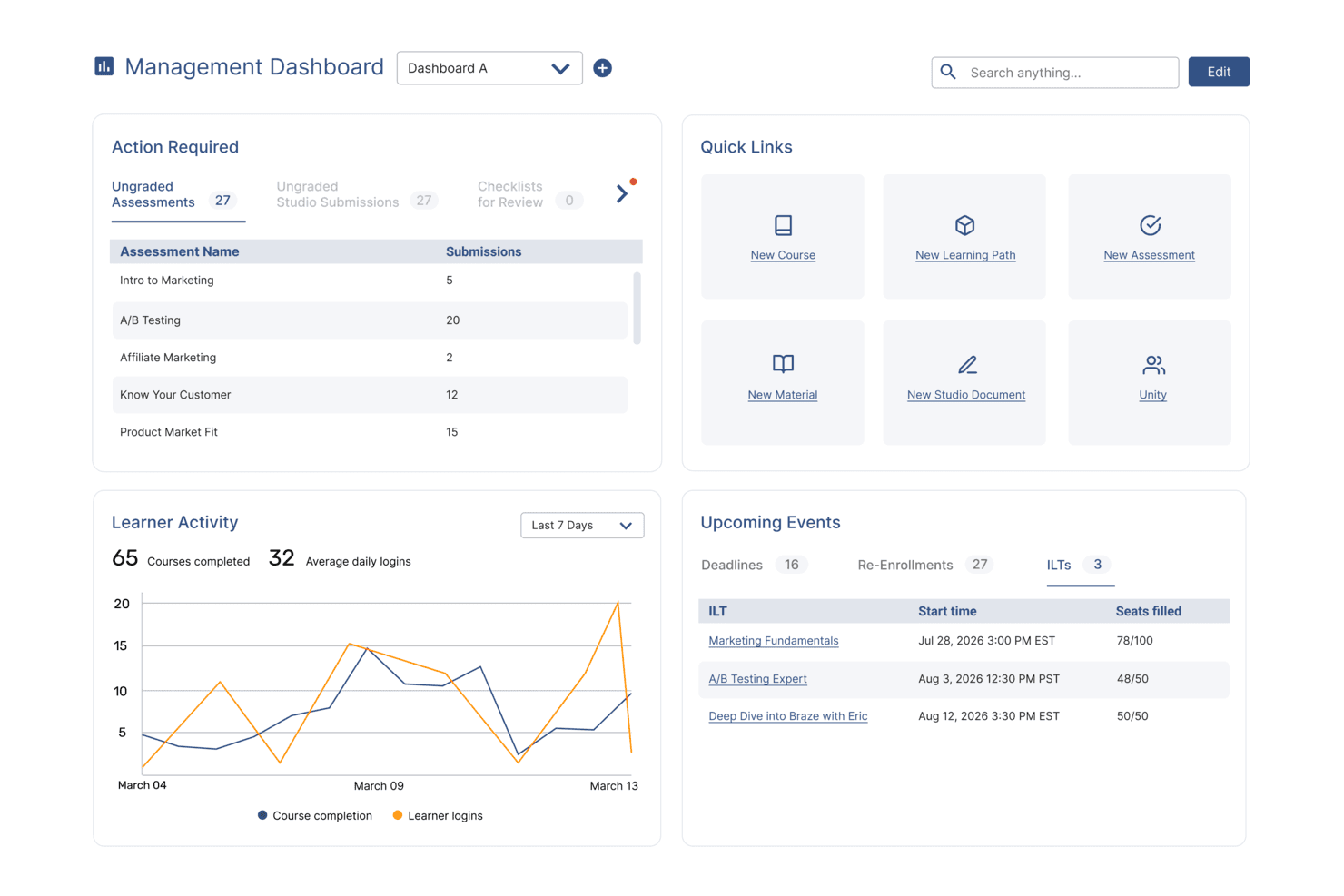
SkyPrep's management dashboard displays learner activity, upcoming events, and quick links. SkyPrep is a cloud-based LMS designed for small businesses that need a straightforward way to deliver, track, and manage employee training without technical complexity.
Who Is SkyPrep Best For?
SkyPrep is a strong fit for small and mid-sized businesses that want an easy-to-adopt LMS with minimal setup and hands-on support from the vendor.
Why I Picked SkyPrep
SkyPrep earns its spot on my shortlist because the learner and admin experience is genuinely one of the cleanest I've seen in this category. I like how the course builder lets my team upload existing content—PDFs, videos, SCORM files—and turn it into a structured course without any technical back-and-forth. The automated enrollment and progress tracking features mean I'm not manually chasing completions. SkyPrep's strongest advantage is the quality of its customer support—dedicated account managers and fast response times make a real difference for small teams without an in-house LMS admin.
SkyPrep Key Features
- Gamification: Add points, badges, and leaderboards to courses to keep learners engaged throughout training.
- Custom branding: Apply your company's logo, colors, and certificate designs directly to the platform.
- AI-powered content creation: Use built-in AI tools to simplify and speed up course content development.
- Assessment builder: Create quizzes, knowledge checks, and checklists within courses to measure learner understanding.
SkyPrep Integrations
Integrations include Salesforce, HubSpot, Zoom, GoToMeeting, Microsoft Teams, ADP, Workday, BambooHR, Stripe, and PayPal.
Pros and Cons
Pros:
- Course creation works well for non-technical training managers
- Dedicated customer success manager
- Clear navigation reduces admin setup and day-to-day management time
Cons:
- Fewer content-authoring tools than enterprise-focused LMS platforms
- Advanced reporting customization is limited
Learn more about SkyPrep: Best for built-in course library and solo HR admin
- Free plan available
- From $8/user/month (billed annually)
Visit WebsiteCustomer Rating:4.8/5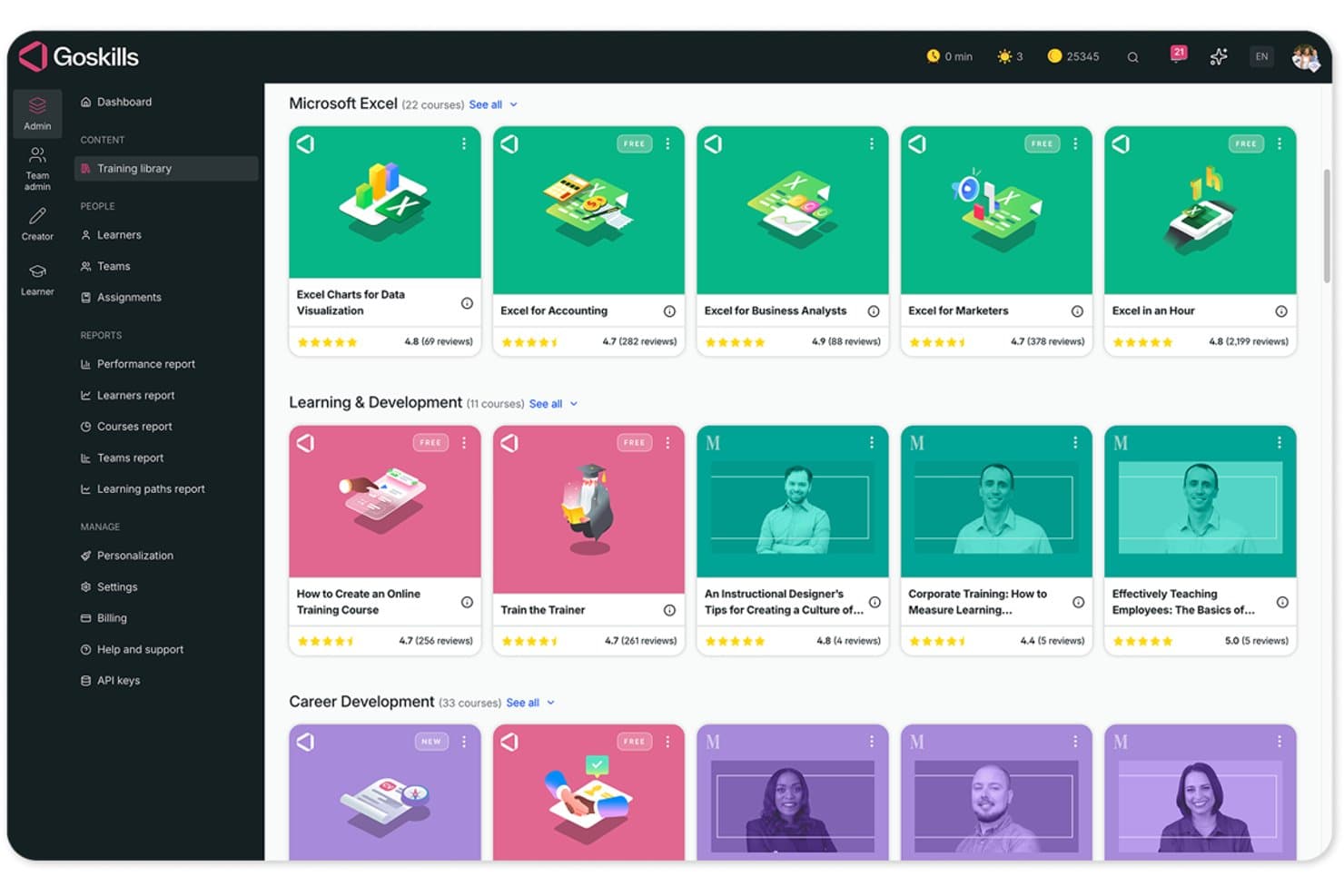
GoSkills organizes courses into categorized libraries for easy team access. GoSkills is a cloud-based LMS that lets you build and deliver custom courses, manage learner assignments, and track completions and certifications—alongside a built-in library of 500+ expert-led business courses.
Who Is GoSkills Best For?
GoSkills is a strong fit for HR generalists and small business managers who need to run training on their own, without a dedicated L&D team.
Why I Picked GoSkills
GoSkills earns its spot on my shortlist because it's one of the few LMS options that pairs a built-in library of 500+ expert-led courses with a no-code course builder, making it genuinely manageable for a solo HR admin. I love that you can assign onboarding or cybersecurity awareness training from the ready-made library on day one, then build your own internal courses using templates and AI-assisted authoring without looping in a developer. Recurring refresher schedules with automated reminders mean compliance training runs itself once it's set up.
GoSkills Key Features
- SCORM and xAPI course import: Upload existing courses in SCORM, xAPI, AICC, or CMI5 formats directly into the platform.
- Customizable completion certificates: Create and issue branded certificates that learners receive automatically upon finishing a course.
- Learner and team reporting: Filter and export progress reports by learner, team, date, or course to an Excel spreadsheet.
- Gamification tools: Learners earn coins, build streaks, and appear on leaderboards to stay motivated throughout training.
GoSkills Integrations
GoSkills has native integrations with Google, Okta, and Microsoft for single sign-on (SSO). It also offers an API for custom integrations.
Pros and Cons
Pros:
- Reviewers praise course assignment and learner tracking
- Reviewers value ready-made courses and short lessons
- Reviewers praise quick setup and intuitive navigation
Cons:
- Reviewers report cost concerns for smaller teams
- Some reviewers want broader specialist course coverage
Learn more about GoSkills: Best as AI for business
- Free trial + Free demo available
- From $8/user/month
Visit WebsiteCustomer Rating:4.4/5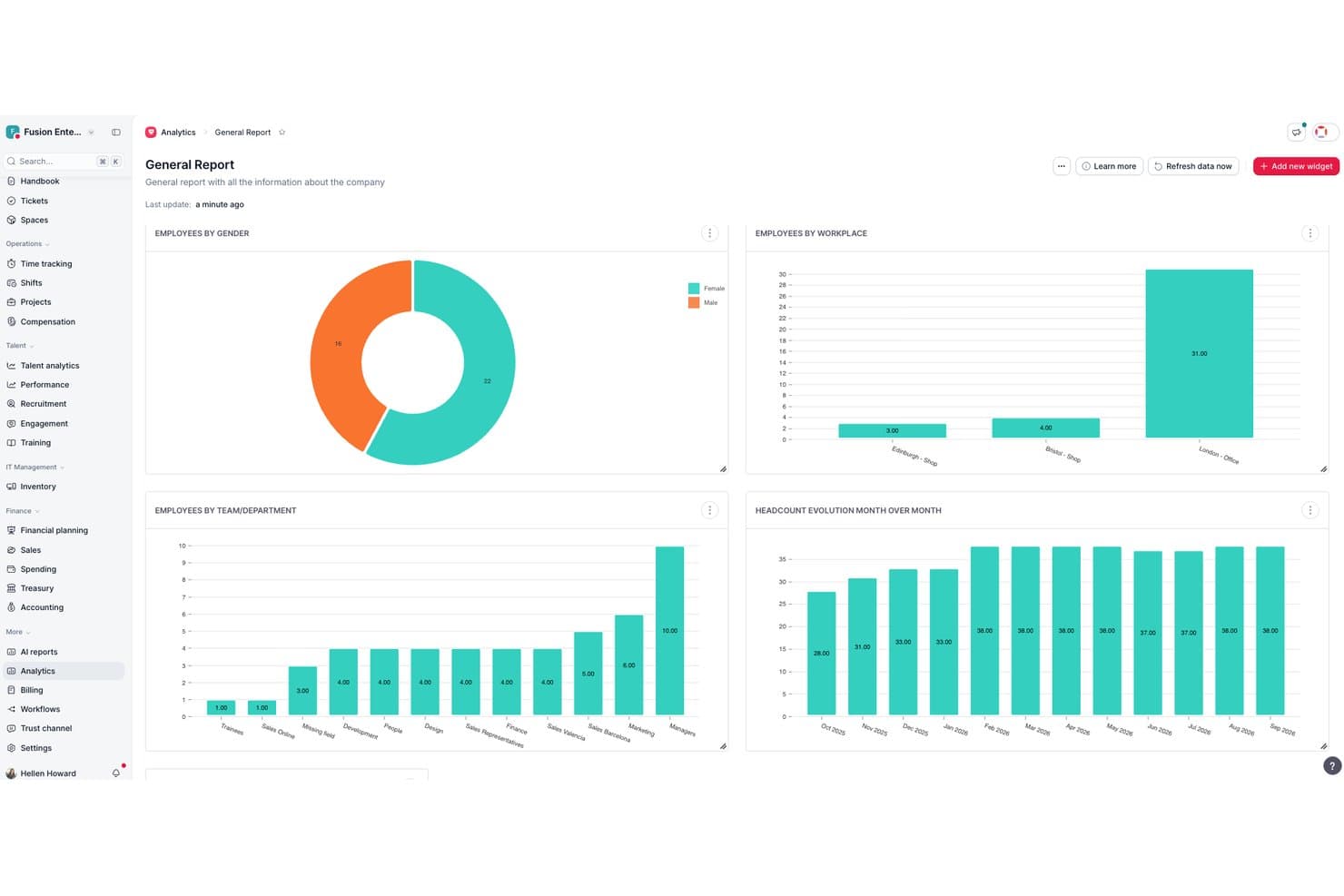
Factorial centralizes HR analytics into visual workforce reports. Factorial is an AI-driven business-management platform with a built-in LMS that covers course creation, SCORM imports, automated enrollment, progress tracking, and certificate generation.
Who Is Factorial Best For?
Factorial is a strong fit for HR teams and operations managers who want training, compliance tracking, and day-to-day HR workflows managed inside a single AI-driven platform.
Why I Picked Factorial
Factorial earns its spot on my shortlist because it's built as an AI for business, meaning the AI isn't bolted on as an afterthought—it actively helps with day-to-day operations like planning timetables, generating reports, and answering employee policy questions. I especially like how automatic enrollment assigns mandatory training to new hires the moment they join, and how completion certificates are generated and sent without any manual follow-up.
Factorial Key Features
- SCORM course import: Upload existing SCORM packages directly into Factorial's Training module, where completion and pass/fail results are tracked automatically.
- Knowledge tests: Build course-level assessments with configurable passing scores that can vary across different training courses.
- Mobile training access: Employees can view courses, track progress, confirm attendance, and complete SCORM trainings through Factorial's iOS and Android apps.
- Exportable training reports: Download employee training data from the training table to review completion rates and identify courses due for renewal.
Factorial Integrations
Factorial offers marketplace integrations with Slack, Okta, LinkedIn, Recruitee, Monday, and Microsoft Power BI. It also connects with Microsoft Business Central, SAP Business One, and Sage 100, plus Zapier, and provides an API for custom integrations.
Pros and Cons
Pros:
- Training sits beside core HR workflows
- Mobile SCORM courses suit distributed teams
- New hires can receive training automatically
Cons:
- Training reports offer limited custom filtering
- Costs can rise as teams add modules
 Best for an email based employee training system
- Free plan available
- From $29/month

Track where employees are in their training, as well as who got in-browser materials and who got email training. Groundwork1 is a learning management system designed for small businesses that want to deliver employee training through simple, accessible email-based courses without requiring app downloads or complex onboarding.
Who Is Groundwork1 Best For?
Groundwork1 is a good fit for small business owners and HR managers who need a low-friction way to train employees without dedicated IT support or complex software setup.
Why I Picked Groundwork1
I picked Groundwork1 as one of the best because it takes a genuinely different approach to employee training—delivering course content directly to employees' inboxes instead of asking them to log into a separate platform. I like how managers can build training sequences that drip out over time, so new hires receive lessons gradually rather than getting hit with everything at once. My team is able to track who's opened, completed, and responded to each lesson without chasing anyone down. That email-native delivery model makes it especially practical for small businesses training frontline or deskless workers who don't sit in front of a computer all day.
Groundwork1 Key Features
- Branded lesson landing pages: Employees access course content through branded landing pages linked from their email, with no login or password required.
- Drag-and-drop lesson designer: Build and sequence course content using a drag-and-drop editor, with the option to split lessons across multiple scheduled emails.
- Digital signatures: Collect employee acknowledgments and agreements directly within a lesson using checkbox confirmations or e-signatures.
- Progress reporting: Export completion reports or view individual employee progress through the team progress dashboard.
Groundwork1 Integrations
Native integrations are not currently listed.
Learn more about Groundwork1:
Küçük İşletmeler için Diğer LMS Yazılımları
En iyi öğrenme yönetim sistemleri listesine giremeyen birkaç LMS seçeneği daha şunlardır:
- 11360LearningBest LMS with flexible content authoring and learner feedback tools
- 12TeachFloorBest learning management system for cohort-based training and peer learning
- 13LearnUponBest LMS system with distinct learning portals for different employee groups
- 14TovutiBest LMS platform for rich employee engagement features
- 15Easy LMSBest affordable LMS and training Academy, available in multiple languages
- 16WeSchoolBest combined LMS and small business training software system
- 17isEazy LMSBest LMS for personalization options based on employee job roles
- 18eloomiAll-in-one learning and employee development platform
- 19WorkleapBest LMS for automatic learner evaluations and certification features
- 20Constructor TechBest easy-to-use LMS for a multimedia, interactive approach to learning
İlgili İK Yazılımı İncelemeleri
Burada aradığınızı hâlâ bulamadıysanız, test edip değerlendirdiğimiz bu diğer ilgili araçlara göz atın:
- İK Yazılımı
- Bordro Yazılımı
- İşe Alım Yazılımı
- Kayıtlı İşveren Hizmetleri
- Aday Takip Sistemleri
- İşgücü Yönetimi Yazılımı
How I Evaluate LMS for Small Business
My evaluation has two layers: the non-negotiables every tool must meet—think compliance tracking, SCORM support, and SMB pricing—and the differentiators that set tools apart for a lean HR team.
Core Functionality (Table Stakes For This List)
When I'm selecting tools for my list, I rank each one on a scale from 0 (does not offer the functionality) to 5 (excels in this area) for each core functionality listed below. Then, I calculate the tool's total score into a percentage. Each tool needs to achieve a minimum total score of 65% to be considered for inclusion.
- Course Authoring & Content: I check whether you can build courses with mixed formats—uploading videos, PDFs, and SCORM packages—or if you're stuck with one content type.
- Learner Enrollment & Assignment: Assigning a harassment training module to every new hire by department and due date should take clicks, not a spreadsheet workaround.
- Progress Tracking & Reporting: I evaluate how easily an HR generalist can pull a report showing who's overdue on safety training or which team has the lowest completion rates.
- Assessments & Certifications: I look for built-in quizzes with auto-grading and certificates that generate on completion, especially for recurring compliance topics like data privacy.
- SMB-Appropriate Pricing: Transparent pricing tiers matter here—tools like TalentLMS and Absorb LMS take different approaches, and I evaluate whether entry plans fit a 20-person team, not just 500.
- HR & Workflow Integrations: Syncing employee rosters from your HRIS instead of manually adding learners saves real time, so I check for native connectors to popular SMB tools.
Once I have a list of tools that meet the criteria, I consider what sets each platform apart.
Differentiating Factors (What Sets Vendors Apart)
Here's how I compare and contrast different vendors:
Standout Features
A pre-built course library saves real time when you don't have dedicated L&D staff. I look for vendors that include ready-made compliance, safety, and soft skills content you can assign on day one. AI-powered course creation is another differentiator—tools that let an HR generalist turn a policy document into a structured module with quizzes in minutes. Automated compliance workflows also matter, handling recertification reminders and audit-ready trails so annual training cycles don't slip through the cracks.
Beyond Features
Implementation speed matters for small teams. I evaluate whether an HR generalist can get the platform running in days with guided setup wizards and starter templates, not a months-long IT project. Pricing model flexibility is equally important—I check whether vendors offer per-active-user or flat-rate options that won't punish you for seasonal headcount swings. Customer support access rounds out my evaluation. A small business without a dedicated admin needs live chat or phone support on standard plans, not just a help center behind a premium paywall.
Öğrenme Yönetim Sistemi Nasıl Seçilir?
Bir öğrenme yönetim sistemi, kurum içi öğrenme kaynaklarınızı merkezileştirmenize ve çalışanlarınızın ihtiyaçlarına göre daha esnek öğrenme deneyimleri oluşturmanıza yardımcı olabilir.
Hangi LMS'nin küçük işletmenizin ihtiyaçlarına en uygun olduğunu belirlemenize yardımcı olması için aşağıdaki noktaları göz önünde bulundurun:
- Hangi öğrenme veya eğitim zorluklarını çözmeye çalışıyorsunuz? Mevcut zorluklarınızı belirlemek, bunların üstesinden gelmek için ihtiyaç duyduğunuz özellik ve işlevlere sahip yeni bir LMS seçmenize rehberlik edecektir. Örneğin, çalışanlarınız ofisten sık sık uzakta oldukları için eğitim materyallerini tamamlamakta zorlanıyorsa, kısa içeriklerle öğrenmeyi ve hareket hâlinde eğitimi destekleyen, mobil öncelikli bir eğitim sistemi aramanız akıllıca olacaktır.
- Hangi sonuçlar önemli ve başarıyı nasıl ölçeceksiniz? Proaktif olun ve yeni LMS'nizin başarılı kabul edilmesi için hangi sonuçları beklediğinize önceden karar verin. Örneğin, daha esnek biçimlerde öğrenme deneyimleri sunmak, ilerleme takibi için daha güçlü araçlar edinmek veya kurum içi eğitim amaçları doğrultusunda uyumluluk oranlarınızı artırmak isteyebilirsiniz. İstediğiniz sonuçları en baştan netleştirmek, değerli zamanınızı boşa harcamaktan kaçınmak için çok önemlidir.
- Öncelikli kullanıcı gruplarınız kimlerdir? Yazılımı kimlerin kullanacağını, farklı kullanıcı gruplarınızın kimlerden oluştuğunu ve kaç lisansa ihtiyaç duyacağınızı değerlendirin. Bir öğrenme yönetim sistemi için muhtemelen tüm çalışanlarınıza erişim sağlamak, İK yöneticileriniz ve yöneticileriniz için ise özel erişim sunmak isteyeceksiniz. Bu netleştikten sonra, tüm ihtiyaçlarının karşılandığından emin olmak için farklı kullanıcı gruplarınızın (yani ileri düzey kullanıcılarınızın, yöneticilerinizin ve çalışanlarınızın) ihtiyaçlarını listelemek de faydalı olacaktır.
- Hangi yazılım entegrasyonlarına ihtiyacınız var? Yeni LMS sisteminizin mevcut araçların yerini alıp almayacağını veya insan kaynakları yönetim sistemleriniz, performans yönetim sistemleriniz ve Slack ile Microsoft Teams gibi iletişim araçlarınızla entegre olup olmayacağını netleştirin. Birden fazla aracın yerini hepsi bir arada çalışan öğrenme & gelişim platformunun alması mümkün olabilir mi?
- Yeni LMS teknik gereksinimlerinizi karşılayacak mı? Yazılım seçimini mevcut iş akışlarınız ve sistemlerinizle birlikte değerlendirin. Yazılım, daha iyi bir öğrenen deneyimi için ücretsiz bir mobil uygulama sunuyor mu? Yeni yazılım, Microsoft 365 veya Google Workspace gibi çalışma işletim sisteminizle entegre olacak mı?
Unutmayın, her işletme farklıdır — yalnızca popüler olduğu için bir öğrenme yönetim sisteminin kuruluşunuz için işe yarayacağını varsaymayın. Bunun yerine kararınızı, her LMS sisteminin sunduğu özellik ve işlevlere ve bunların kullanıcı ihtiyaçlarınızı ve teknik gereksinimlerinizi ne ölçüde karşıladığına dayandırın.
2026 Yılında Küçük İşletmeler İçin LMS Trendleri
2026 itibarıyla küçük işletmelere yönelik LMS pazarı, teknolojik gelişmelerin ve etkili öğrenme stratejileri aracılığıyla çalışan bağlılığını, beceri gelişimini ve çalışanların elde tutulmasını nasıl artırabileceğine ilişkin farkındalığın artmasıyla şekillenen çeşitli yeni trendler göstermiştir.
Bu sistemlerin işletmelerin ve çalışanlarının değişen ihtiyaçlarını daha iyi karşılamak üzere nasıl geliştiğine dair bazı örnekler şunlardır:
- Artan Özelleştirme ve Entegrasyon: LMS platformları, işletmelerin öğrenme deneyimlerini belirli ihtiyaçlara uyacak şekilde düzenlemelerine ve öğrenme sonuçlarını iyileştirmelerine yardımcı olmak için daha kapsamlı özelleştirme seçenekleri ve üçüncü taraf araçlarla entegrasyon olanakları sunmaya başlamıştır.
- Mobil Öğrenme ve Erişilebilirlik: Hibrit ve uzaktan çalışma ortamlarının yaygınlaşmasıyla birlikte mobil öğrenme ve gelişmiş erişilebilirlik özellikleri giderek daha önemli hâle gelmektedir. Bu trend, farklı konumlardan çalışanlara uygun esnek öğrenme seçeneklerine duyulan ihtiyacı karşılamaktadır. Mobil uyumlu LMS platformları, çalışanın fiziksel konumundan bağımsız olarak sürekli öğrenme ve gelişim sağlar.
- Mikro Öğrenme ve Kısa İçerikler: Ders içeriğini hızlı, kolay anlaşılır ve kısa biçimlerde sunma seçeneği de önem kazanmıştır. Mikro öğrenmeye yönelim, dikkat sürelerinin ve esnek, özlü eğitim modüllerine duyulan ihtiyacın giderek daha iyi anlaşılmasını yansıtmaktadır. Mikro öğrenme içeriklerini yoğun bir programa dâhil etmek ve mobil cihazlarda tüketmek de daha kolaydır.
- Geliştirilmiş Etkileşimli İçerik: Öğrenme deneyimini zenginleştirmek ve öğrenen bağlılığını artırmak amacıyla testler, multimedya ve diğer etkileşimli unsurlar dâhil olmak üzere daha etkileşimli ve ilgi çekici ders içeriklerine yönelim vardır.
- Oyunlaştırma: Öğrenenleri motive etmek ve sürece dâhil etmek amacıyla puanlar, rozetler ve liderlik tabloları gibi oyun benzeri unsurların öğrenme sürecine eklenmesi giderek yaygınlaşmaktadır. Bu yaklaşımın çalışanlar arasında üretkenliği ve mutluluğu artırdığı görülmüştür.
Bu trendler, küçük işletmelerin ve çalışanlarının ihtiyaçlarını karşılayan daha esnek, erişilebilir ve etkileşimli öğrenme deneyimlerine doğru gerçekleşen daha geniş kapsamlı bir değişimi yansıtmaktadır. LMS sağlayıcıları; kullanıcı bağlılığına, entegrasyon olanaklarına ve mobil erişilebilirliğe odaklanarak küçük işletmelerin daha etkili ve verimli öğrenme ve gelişim programları oluşturmasına yardımcı olmaktadır.
Küçük İşletmeler İçin LMS Nedir?
Küçük işletmelere yönelik bir LMS, kurum içi tüm eğitim ve öğrenme & gelişim girişimlerinizin oluşturulması, sunulması ve izlenmesi için merkezi bir merkez görevi gören dijital bir platformdur. Bu listedeki LMS'ler; maliyet etkinliği, kullanım kolaylığı ve ölçeklenebilirlik gibi küçük işletmelerin kendine özgü ihtiyaçlarını karşılayacak şekilde seçilmiştir.
Bir LMS, daha verimli eğitim süreçleri, tüm çalışanlarınız için tutarlı bir öğrenme deneyimi ve çalışanlarınızın kendi hızlarında ve programlarına uygun şekilde öğrenmelerini sağlayan esnek sunum yöntemleri dâhil olmak üzere küçük işletmelere çok sayıda avantaj sunar. LMS'ler ayrıca kuruluşlara uyumluluk amaçları doğrultusunda eğitimlerin tamamlanma durumunu takip etme, çalışanların ilerlemesini ve performansını izleme ve iyileştirme alanlarını belirleme araçları sunar.
Sağlam bir LMS'yi küçük işletmelere yönelik İK platformlarıyla bir araya getirmek, çalışan eğitimi ve yönetimini kolaylaştırabilir.
Özellikler
Küçük işletmelere yönelik her iyi LMS'nin sahip olması gereken temel özellikler şunlardır:
- Merkezi eğitim yönetimi: Güçlü bir LMS, tüm eğitim materyallerini (videolar, belgeler, sınavlar ve kurslar) tek bir yerde saklamanıza olanak tanır. Böylece ekibiniz, dağınık dosyaları veya e-postaları tek tek aramak zorunda kalmadan ihtiyaç duyduğu her şeye erişebilir.
- Çalışan ilerlemesini takip etme: Küçük işletmelere yönelik LMS araçları; öğrenci etkinliğini, tamamlama oranlarını, sınav puanlarını ve çalışanların ek desteğe ihtiyaç duyabileceği alanları izlemeyi kolaylaştırır. İlerleme hakkında net bir görünürlük sağlanması, eğitim programlarının plana uygun ilerlemesine yardımcı olur.
- Özel öğrenme yolları: Belirli roller, yeni işe alınanlar, yöneticiler veya departmanlar için eğitim sıralarını özelleştirin. Kişiselleştirilmiş öğrenme yolları, her çalışanın doğru eğitimi doğru zamanda almasını sağlar.
- Kolay kurs oluşturma: Birçok LMS platformu, eğitim içeriği oluşturmayı kolaylaştıran yerleşik kurs oluşturucular veya şablonlar içerir. Bu sayede küçük ekipler işe alıştırma modüllerini, beceri geliştirme oturumlarını veya uyumluluk kurslarını hızlıca hazırlayabilir.
- Değerlendirme ve sertifikalandırma araçları: Sınavlar, beceri değerlendirmeleri ve otomatik sertifikalar, çalışanların kurs materyalini anladığını doğrulamaya yardımcı olur. Bu araçlar, özellikle güvenlik açısından hassas veya uyumluluk gereklilikleri yoğun sektörlerde değerlidir.
- Mobil uyumlu öğrenme: Mobil uyumluluk, çalışanların eğitimi her zaman ve her yerde tamamlayabilmesini sağlar. Bu özellik uzaktan çalışanlar, saha ekipleri veya hareket hâlindeyken öğrenmeyi tercih eden çalışanlar için idealdir.
- İşe alıştırma desteği: İyi bir LMS; formları, eğitim modüllerini, şirket politikalarını ve role özel öğrenmeyi yeni işe alınanlar için sorunsuz, otomatik bir iş akışında bir araya getirerek işe alıştırma sürecini kolaylaştırır.
- İçerik yönetimi & kolay güncellemeler: Küçük işletmelerin çoğu zaman eğitimleri hızlıca gözden geçirmesi gerekir. Doğru LMS; hızlı güncellemelere, sürüm denetimine ve yenilenen materyallerin sorunsuz şekilde dağıtılmasına olanak tanır.
- Etkileşim araçları: Oyunlaştırma, liderlik tabloları, tartışma forumları, anketler ve rozetler gibi özellikler çalışanları motive etmeye, öğrenmeyi daha etkileşimli ve keyifli hâle getirmeye yardımcı olur.
- Raporlama & analiz: Yerleşik analizler; kurs etkinliği, çalışan performansı, eğitim eksiklikleri ve uyumluluk durumu hakkında içgörüler sunarak veriye dayalı eğitim kararları almanıza yardımcı olur.
Küçük İşletmelere Yönelik Yaygın LMS AI Özellikleri
Modern öğrenme platformları, eğitim deneyimini ve verimliliği geliştirmek için genellikle yapay zekâ destekli özellikler içerir. Örneğin:
- Kişiselleştirilmiş öğrenme önerileri: AI; bir çalışanın rolüne, beceri eksikliklerine, performansına ve eğitim geçmişine göre kurslar ve öğrenme yolları önererek gelişimi hızlandırır.
- Otomatik içerik oluşturma desteği: AI; zamandan tasarruf etmek ve kurs kalitesini artırmak için sınavlar, öğrenme özetleri, mikro öğrenme modülleri veya hatta eksiksiz eğitim şablonları oluşturmaya yardımcı olur.
- Akıllı beceri haritalama: AI, eksiklikleri belirlemek, öğrenme fırsatları önermek ve uzun vadeli iş gücü geliştirme planlamasını desteklemek için çalışanların becerilerini ve performans verilerini analiz eder.
- Uyarlanabilir öğrenme motorları: AI, bir çalışanın ne kadar iyi performans gösterdiğine bağlı olarak kursun zorluk seviyesini veya içerik akışını ayarlayarak daha kişiselleştirilmiş bir öğrenme deneyimi sunar.
- Akıllı hatırlatıcılar ve yönlendirmeler: AI; süresi geçmiş eğitimler, yaklaşan son tarihler veya yeni kurs atamaları için otomatik olarak hatırlatmalar göndererek manuel takip gerektirmeden çalışanların sorumluluklarını yerine getirmesini sağlar.
- AI destekli arama ve bilgi erişimi: Çalışanlar, doğal dil sorgularını yorumlayan AI destekli arama araçlarını kullanarak doğru eğitim materyallerini hızlıca bulabilir.
- Öğrenme etkisi analizleri: AI, eğitimin performansı, çalışanların elde tutulmasını, etkileşimi ve üretkenliği nasıl etkilediğine ilişkin daha derin içgörüler sunarak küçük işletmelerin yatırım getirisini daha doğru ölçmesine yardımcı olur.
- Otomatik sertifika yönetimi: AI, yenileme tarihlerini takip eder, hatırlatmalar gönderir ve sertifika kayıtlarını manuel denetim olmadan günceller.
Avantajlar
İyi seçilmiş bir LMS, çalışan gelişimi ve kurumsal eğitim ortamınızın temel taşı olarak hareket edebilir ve kurum içi eğitim programlarınızı sunmak, izlemek ve yönetmek için ihtiyaç duyduğunuz araçları sağlayabilir. İhtiyaçlarınıza uygun LMS'ye yatırım yaparak aşağıdaki avantajları elde etmeyi bekleyebilirsiniz:
- Merkezi Öğrenme Kaynakları: Tüm öğrenme materyallerinizi LMS'nizde merkezileştirmek, kullanıcılarınızın kurslara ve içeriklere erişimini kolaylaştırmaya yardımcı olur. Bu, dağınık kaynaklar arasında arama yapmanın neden olduğu yaygın hayal kırıklığını ortadan kaldırırken zamandan tasarruf sağlar ve tutarlı bir öğrenme deneyimi sunar.
- Uygun Maliyetli Eğitim: Yüz yüze eğitim oturumlarına duyulan ihtiyacı azaltarak işletmeler seyahat, eğitmen ücretleri ve mekân maliyetlerinden tasarruf edebilir. Bunun yerine kuruluşlar, ölçülebilir sonuçlar sunan yüksek kaliteli çevrim içi eğitime yatırım yaparak kaynaklarını daha verimli şekilde tahsis edebilir.
- Geliştirilmiş Uyumluluk Yönetimi: Otomatik hatırlatıcılar ve entegre izleme özelliklerine sahip bir LMS kullanıldığında uyumluluk eğitimlerini takip etmek daha kolay hâle gelir. Bu, tüm çalışanların gerekli düzenleyici standartları karşılamasını sağlar; bu durum özellikle güvenliğin kritik önem taşıdığı sektörlerde önemlidir.
- Geliştirilmiş İzleme ve Raporlama: LMS platformları, öğrenenlerin ilerlemesini izlemek ve eğitim programlarının etkililiğini ölçmek için gelişmiş araçlar sunar. Bu, işletmelerin öğrenme hedeflerine ulaşmasını sağlamak üzere veriye dayalı kararlar almasına ve iyileştirmeler yapmasına yardımcı olur.
- Geliştirilmiş Öğrenen Katılımı ve Bilginin Hatırlanması: LMS platformlarındaki etkileşimli özellikler, çoklu ortam içerikleri ve kişiselleştirilmiş öğrenme yolları, kullanıcıların geleneksel eğitim yöntemlerine kıyasla daha etkili şekilde katılım göstermesini sağlar. Bu da bilginin hatırlanma oranlarının artmasına yol açarak öğrenenlerin yalnızca kurslarını tamamlamasını değil, aynı zamanda edindikleri bilgiyi özümsemesini ve uygulamasını sağlar.
Gördüğünüz gibi, bir öğrenme yönetim sistemine yatırım yapmak, yalnızca basit eğitim lojistiğinin ötesinde; öğrenenlerin bilgiyi hatırlamasını, katılımını ve uyumluluğunu geliştirmek gibi avantajlar sunar. Bu sistemler, bütçenizi ciddi ölçüde etkilemeden iş gücünüzün tüm potansiyelini ortaya çıkarmanıza ve operasyonel başarıyı desteklemenize yardımcı olabilir.
Maliyetler ve Fiyatlandırma
LMS çözümleri, küçük işletmelerin farklı ihtiyaçlarını karşılamak için çeşitli fiyatlandırma seçenekleri sunar. Bu planlar genellikle temel ücretsiz sürümlerden ek özelliklere sahip daha gelişmiş paketlere kadar uzanır. Her planın ayrıntılarını anlamak, işletmenizin ihtiyaçları ve bütçesi için en uygun seçeneği belirlemenize yardımcı olur.
Küçük İşletme LMS'leri için Plan Karşılaştırma Tablosu
| Plan Türü | Ortalama Fiyat | Yaygın Özellikler |
|---|---|---|
| Plan TürüÜcretsiz | Ortalama Fiyat$0 | Yaygın ÖzelliklerTemel kurs yönetimi, sınırlı kurs oluşturma araçları ve topluluk desteğine erişim |
| Plan TürüTemel | Ortalama Fiyat$5 - $10 kullanıcı/ay başına | Yaygın ÖzelliklerGeliştirilmiş kurs yönetimi, özel markalama, testler ve anketler ile e-posta desteği |
| Plan TürüStandart | Ortalama Fiyat$10 - $20 kullanıcı/ay başına | Yaygın ÖzelliklerTüm Temel özelliklerinin yanı sıra öğrenme yolları, sertifikalar, raporlama araçları ve canlı sohbet desteği |
| Plan TürüÜst Düzey | Ortalama Fiyat$20 - $35 kullanıcı/ay başına | Yaygın ÖzelliklerTüm Standart özelliklerinin yanı sıra gelişmiş analizler, entegrasyonlar, kişisel koçluk ve 7/24 destek |
Öğrenme yönetim sistemleri için planların ve fiyatlandırma ayrıntılarının dökümü.
Hangi LMS'nin sizin için doğru olduğunu değerlendirirken kuruluşunuzun özel eğitim ihtiyaçlarını ve bütçenizi göz önünde bulundurun. Ücretsiz bir planla başlamak, belirli bir LMS'nin işletmeniz için ne kadar iyi çalışacağını değerlendirmenin uygun maliyetli bir yoludur. Deneyip beğenirseniz, eğitim ihtiyaçlarınız büyüdüğünde gelecekte her zaman daha gelişmiş bir plana geçiş yapabilirsiniz.
SSS
İşte öğrenme yönetim sistemleri, nasıl çalıştıkları ve kurum içi İK öğrenme ve eğitim girişimlerinize nasıl değer katabilecekleri hakkında sıkça sorabileceğiniz sorulara verilen bazı yanıtlar:
Öğrenme yönetim sistemleri neden önemlidir?
Öğrenme yönetim sistemleri birçok nedenden dolayı önemlidir. LMS yazılımı, kuruluşunuzun kurum içi öğrenme ve eğitim girişimlerini merkezileştirmenize yardımcı olur. Ayrıca çalışan bağlılığınızı artırır ve çalışanlarınızın bilgileri hatırlamasını geliştirir. Gelişmiş L\u0026D analizleri, eğitim uyumluluğunu takip etmeyi de kolaylaştırır.\r\n\r\n\u003c!– wp:paragraph –\u003e\r\n\r\n\u003c!– /wp:paragraph –\u003e \u003c!– wp:paragraph –\u003e\r\n\r\nÖğrenme ve gelişim (L\u0026D) \u003ca href=\u0022https://learning.linkedin.com/resources/workplace-learning-report\u0022 rel=\u0022noreferrer noopener nofollow\u0022 target=\u0022_blank\u0022\u003eyükseliş trendindeyken\u003c/a\u003e, küçük işletmeler için özel bir LMS’ye sahip olmak şirketiniz için oyunun kurallarını değiştirebilir. Yukarıdaki seçenekleri incelemek ve sizin için en uygun olanı bulmak üzere biraz zaman ayırın.\r\n\r\n\u003c!– /wp:paragraph –\u003e
Öğrenme Yönetim Sistemi ile Eğitim Yönetim Sistemi arasındaki fark nedir?
\u003cstrong\u003e\u003cem\u003e“öğrenme”\u003c/em\u003e\u003c/strong\u003e ve \u003cstrong\u003e\u003cem\u003e“eğitim”\u003c/em\u003e\u003c/strong\u003e terimleri, kapsam açısından teknik olarak farklı olsalar da genellikle birbirinin yerine kullanılır.\r\n\r\n\u003c!– wp:paragraph –\u003e\r\n\r\n\u003c!– /wp:paragraph –\u003e \u003c!– wp:paragraph –\u003e\r\n\r\nEğitim, bir öğrenme yönetimi programının bir bölümünü oluşturur; ancak eğitim, kullanıcıya belirli bir görevi öğretmeye ve bu görevi doğru şekilde nasıl gerçekleştireceğini göstermeye odaklanır. Sağlık ve güvenlik prosedürleri veya diğer teknik beceriler buna yaygın örneklerdir.\r\n\r\n\u003c!– /wp:paragraph –\u003e \u003c!– wp:paragraph –\u003e\r\n\r\nÖte yandan öğrenme, bir öğrencinin becerilerini genişletmeyi, geliştirmeyi veya güçlendirmeyi amaçlar ve uzun vadeli kariyer gelişimine daha fazla odaklanır. Bu kategoride yönetim becerileri gibi daha yumuşak konularda eğitimler veya etkili bir mentor olma konusunda bir kurs bulabilirsiniz.\r\n\r\n\u003c!– /wp:paragraph –\u003e \u003c!– wp:paragraph –\u003e\r\n\r\nEğitim ve öğrenme her ikisi de önemlidir. Bu nedenle, bu listedeki LMS sistemlerinin çoğu, öğrenme yönetimi yazılımlarında her ikisini de barındırır. Gerçek bir Eğitim Yönetim Sistemi yalnızca prosedürel eğitime odaklanırken, öğrenme yönetim sistemleri daha geniş ve kapsamlı bir odağa sahip olma eğilimindedir.\r\n\r\n\u003c!– /wp:paragraph –\u003e \u003c!– wp:paragraph –\u003e\r\n\r\nEğitim ve öğrenme arasındaki ince ayrımla ilgileniyorsanız, İK alanında yenilik yapma akademisi tarafından hazırlanan \u003ca href=\u0022https://www.aihr.com/blog/learning-vs-training/\u0022 rel=\u0022nofollow noopener\u0022 target=\u0022_blank\u0022\u003eÖğrenme ve Eğitim: Fark Nedir ve Bunu Neden Bilmeniz Gerekir?\u003c/a\u003e başlıklı içeriğe göz atın.\r\n\r\n\u003c!– /wp:paragraph –\u003e
Kurum içi bir öğrenme ve gelişim programı çalışanların elde tutulmasını olumlu yönde etkileyebilir mi?
Evet, kurum içi bir öğrenme ve gelişim programı çalışanların elde tutulması üzerinde önemli bir etkiye sahip olabilir. Çalışanlar gelişimlerinin öncelik olduğunu gördüklerinde kendilerini değerli hisseder ve kuruma daha bağlı olurlar. Öğrenme fırsatları, şirketin onların potansiyeline ve kariyerine yatırım yaptığını gösterir; bu da bağlılığı ve sadakati artırır.\r\n\r\nÇalışanların, mesleki gelişimlerini aktif olarak destekleyen bir şirkette kalma olasılığı, bunu yapmayan bir şirkete kıyasla daha yüksektir; çünkü bu destek kişisel hedefleri ve beklentileriyle örtüşür. Bu görüşü kanıtlamak üzere, \u003ca href=\u0022https://www.microsoft.com/en-us/worklab/work-trend-index/hybrid-work-is-just-work\u0022 rel=\u0022noopener\u0022 target=\u0022_blank\u0022\u003eMicrosoft’un araştırması\u003c/a\u003e, çalışanların %76’sının öğrenme ve gelişim desteğinden yararlanabilmeleri durumunda bir şirkette daha uzun süre kalacağını ortaya koymuştur.\r\n\r\nYapılandırılmış bir öğrenme programı, ilerleme için net yollar oluşturmaya da yardımcı olarak çalışanları yeni sorumluluklar üstlenmeleri için ihtiyaç duydukları becerilerle donatır. Bu, yalnızca ekibi güçlendirmekle kalmaz; aynı zamanda güçlü bir amaç ve aidiyet duygusu oluşturarak çalışan devir oranını azaltır. Çalışanlar şirkette bir gelecek gördüklerinde ve gelişmek için donanımlı olduklarını hissettiklerinde uzun vadeli bağlılık gösterme olasılıkları artar; böylece gelişim ve çalışanların elde tutulmasından oluşan olumlu bir döngü yaratılır.