

İnsan kaynakları yönetiminin hızlı tempolu dünyasında ekibinizin bağlantıda kalmasını sağlamak, aynı anda birçok işi yürütmeyi gerektirebilir. Herkesin aynı noktada olduğundan emin olmanız beklenir, ancak geleneksel yöntemler artık yeterli değildir. Çalışan iletişimi uygulamaları tam da bu noktada devreye girer.
Bu dahili iletişim araçlarını inceleyerek ekibiniz için gerçekten nasıl fark yaratabileceklerini anlamaya zaman ayırdım. İş birliğini güçlendirmekten herkesin sesinin duyulmasını sağlamaya kadar bu uygulamalar, her gün karşılaştığınız zorluklara çözüm sunar.
Bu makalede, kapsamlı test ve analizlerin ardından en iyi seçimlerimi paylaşacağım. Ekibinizin kendine özgü ihtiyaçlarına hangi uygulamanın uygun olduğunu keşfedeceksiniz. Bu çözümlerin iş yerinizdeki iletişimi nasıl destekleyebileceğini birlikte inceleyelim.
Why Trust Our Software Recommendations
6,700+
Reviews
20
Industry experts
16+
Evaluation factors
14
Years
Our team has been testing and reviewing software since 2012. As HR experts ourselves, we know how difficult—and important—it is to choose the right software.
For this guide, we evaluated tools using hands-on testing and independent research, scoring tools using our selection criteria. We also draw on insights from industry thought leaders and practicing HR experts.
Our reviews reflect our human editorial judgment, not a sales pitch.
Expert reviewers:
- Phil GrayCOO
 Kim BehnkeHR Tech Editor & Analyst
 Josh BarkerPeople Ops Manager

Çalışan İletişimi Uygulamaları Karşılaştırma Tablosu
Bu karşılaştırma tablosu, çalışan iletişimi uygulamaları arasından en iyi seçimlerim için fiyatlandırma ayrıntılarını özetler:
Score legend (out of 5)
- Excellent4.5–5
- Good4–4.4
- Average3–3.9
- Below average2–2.9
- Poor1–1.9
Sorted by: Default
| Tool | Starting Price | Website | |||||||||||||
|---|---|---|---|---|---|---|---|---|---|---|---|---|---|---|---|
Best for publish-once multichannel intranet comms | Not rated | 4 | 4 | 3 | 4 | 3 | 4 | Not rated | Not rated | Not rated | Not rated | Not rated | Not rated | Pricing upon request Free demo available | Website |
Best for AI-driven employee engagement | Not rated | Not rated | Not rated | Not rated | Not rated | Not rated | Not rated | 5 | 5 | 5 | 4 | 5 | 5 | Pricing upon request Free demo available | Website |
Best for policy sign-off and compliance tracking | Not rated | Not rated | Not rated | Not rated | Not rated | Not rated | Not rated | 3 | 2 | 5 | 4 | 3 | 4 | $2.77/user/month 30-day free trial + free demo available | Website |
Best for mobile-first teams | Not rated | Not rated | Not rated | Not rated | Not rated | Not rated | Not rated | 3 | 5 | 5 | 5 | 5 | 4 | Pricing upon request Free plan + 14-day free trial available | Website |
Best for all-inclusive pricing and free onboarding | Not rated | Not rated | Not rated | Not rated | Not rated | Not rated | Not rated | 4 | 2 | 4 | 5 | 4 | 4 | £3.75/user/month Free demo available | Website |
Best for recognition-driven culture comms | Not rated | Not rated | Not rated | Not rated | Not rated | Not rated | Not rated | 5 | 5 | 5 | 5 | 4 | 5 | Pricing upon request Free demo available | Website |
Best for frontline workers | Not rated | Not rated | Not rated | Not rated | Not rated | Not rated | Not rated | 5 | 5 | 5 | 4 | 5 | 5 | $3.75/user/month 14-day free trial + free demo available | Website |
Best for internal comms analytics and AI insights | Not rated | Not rated | Not rated | Not rated | Not rated | Not rated | Not rated | 5 | 4 | 5 | 5 | 5 | 5 | Pricing upon request 14-day free trial + free demo available | Website |
Best for regulated-industry broadcast compliance | Not rated | Not rated | Not rated | Not rated | Not rated | Not rated | Not rated | 5 | 5 | 5 | 5 | 5 | 5 | $9/user/month 14-day free trial + free demo available | Website |
Best for leadership communications | Not rated | Not rated | Not rated | Not rated | Not rated | Not rated | Not rated | 5 | 5 | 5 | 5 | 5 | 5 | Pricing upon request Free demo available | Website |


En İyi Çalışan İletişimi Uygulaması İncelemeleri
Aşağıda, kısa listeme giren en iyi çalışan iletişimi uygulamalarının ayrıntılı özetlerini bulabilirsiniz. İncelemelerim, size en uygun seçeneği bulmanıza yardımcı olmak için her aracın temel özelliklerine, avantajlarına & dezavantajlarına, entegrasyonlarına ve ideal kullanım alanlarına ayrıntılı bir bakış sunar.
 Best for publish-once multichannel intranet comms
- Free demo available
- Pricing upon request
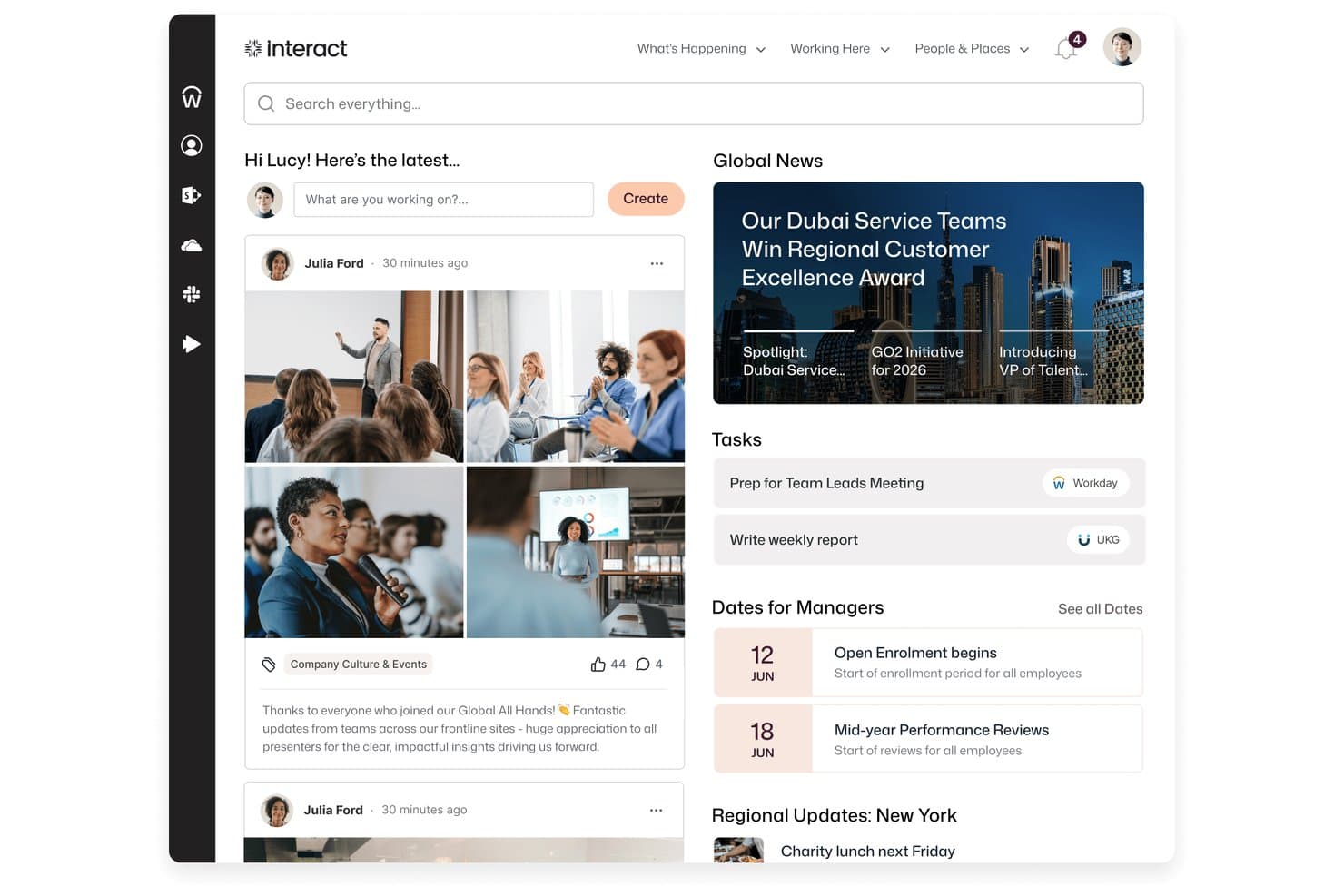
Interact Software centralizes news, tasks, and social updates in one intranet home screen. Interact Software is an AI-native employee experience platform that brings intranet, internal communications, HR tools, and multichannel broadcast messaging together in one system.
Who Is Interact Software Best For?
Interact Software is a strong fit for enterprise internal communications teams managing dispersed workforces across multiple locations, channels, and languages.
Why I Picked Interact Software
I picked Interact Software as one of the best because its publish-once multichannel delivery is genuinely hard to replicate: one update goes to the intranet, email, mobile app, SMS, Teams, Slack, and digital signage simultaneously, with targeting by role and location already baked in. I also like that mandatory-read acknowledgment tracking means you can confirm who's actually seen a critical policy update, not just who received it. Auto-translation across more than 100 languages makes that same message land for a global frontline workforce without any extra steps.
Interact Software Key Features
- Pulse surveys and polls: Run custom surveys and quick polls to collect employee feedback and measure sentiment across your workforce.
- Cue AI assistant: An AI layer that answers employee questions in plain language, links responses to source content, and can complete actions in connected systems like Workday and ServiceNow.
- Employee communities and forums: Let employees create and participate in topic-based communities, discussion forums, and social feeds for peer-to-peer collaboration.
- Editorial calendar and campaign management: Plan, schedule, and manage internal communications campaigns from a centralized calendar view.
Interact Software Integrations
Interact Software offers marketplace integrations with Workday, ServiceNow, Slack, Salesforce, Google, Box, Concur, SuccessFactors, Zendesk, and Microsoft 365, including Microsoft Teams. It also provides REST API and webhook access for custom integrations.
Pros and Cons
Pros:
- Reviewers praise centralized company news
- Mandatory-read tracking supports policy follow-through
- Publish announcements across seven channels
Cons:
- Complex pages take time to maintain
- Engagement analytics can require staff exports
Learn more about Interact Software: Best for AI-driven employee engagement
- Free demo available
- Pricing upon request
Visit WebsiteCustomer Rating:4.7/5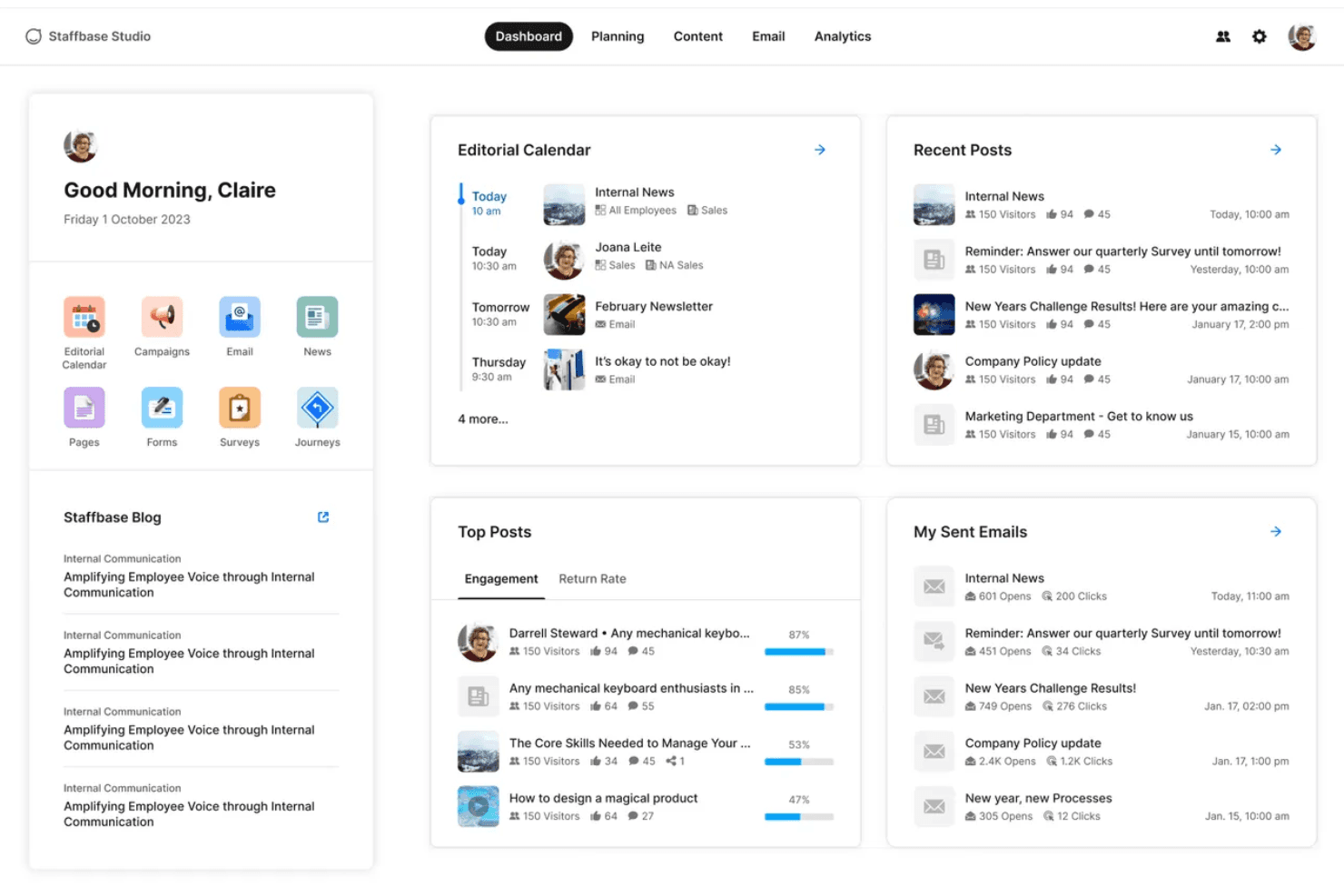
Staffbase centralizes internal comms with a unified intranet dashboard. Staffbase is an employee communication platform that brings together a branded mobile app, multi-channel messaging, an editorial intranet, AI writing tools, and engagement analytics into one system built for both desk-based and frontline workers.
Who Is Staffbase Best For?
Staffbase is a strong fit for mid-size to enterprise organizations with large frontline or deskless workforces that need to reach every employee through a single, AI-powered communication platform.
Why I Picked Staffbase
Staffbase earns its spot on my shortlist because AI isn't a bolt-on feature here—it's woven into every layer of the platform. I'm particularly impressed by Companion, which helps communicators draft, rewrite, and adjust tone directly in the editorial interface, and Navigator, an employee-facing chatbot that answers HR questions using only verified company content. The auto-translation across 110+ languages keeps analytics unified in a single post, which I think is a genuine edge for global teams.
Staffbase Key Features
- Mandatory read acknowledgments: Employees confirm they've read specific posts, generating a compliance-grade audit trail for policy and safety communications.
- Pulse surveys: Built-in surveys let employees respond directly from the mobile app, with results tracked via participation metrics and NPS scores.
- Employee directory with org chart: A searchable directory with customizable profiles and org chart visualization supports people discovery across large, distributed teams.
- Microsoft 365 integration: Staffbase connects natively with Teams, SharePoint, and Microsoft Copilot, surfacing company content directly within the tools employees already use.
Staffbase Integrations
Staffbase offers native integrations with Workday, ADP Workforce, SAP, Oracle, Microsoft 365, Okta, Google Drive, and ServiceNow. It also provides open APIs, an SDK, and MCP Server support for custom integrations and AI agent connections.
Pros and Cons
Pros:
- Multilingual posts unify analytics and feedback
- Native mobile app offers offline capability
- AI embedded in writing and analytics tools
Cons:
- Email content design options are limited
- No transparent or self-serve pricing available
Learn more about Staffbase: Best for policy sign-off and compliance tracking
- 30-day free trial + free demo available
- From $2.77/user/month (billed annually)
Visit WebsiteCustomer Rating:4.4/5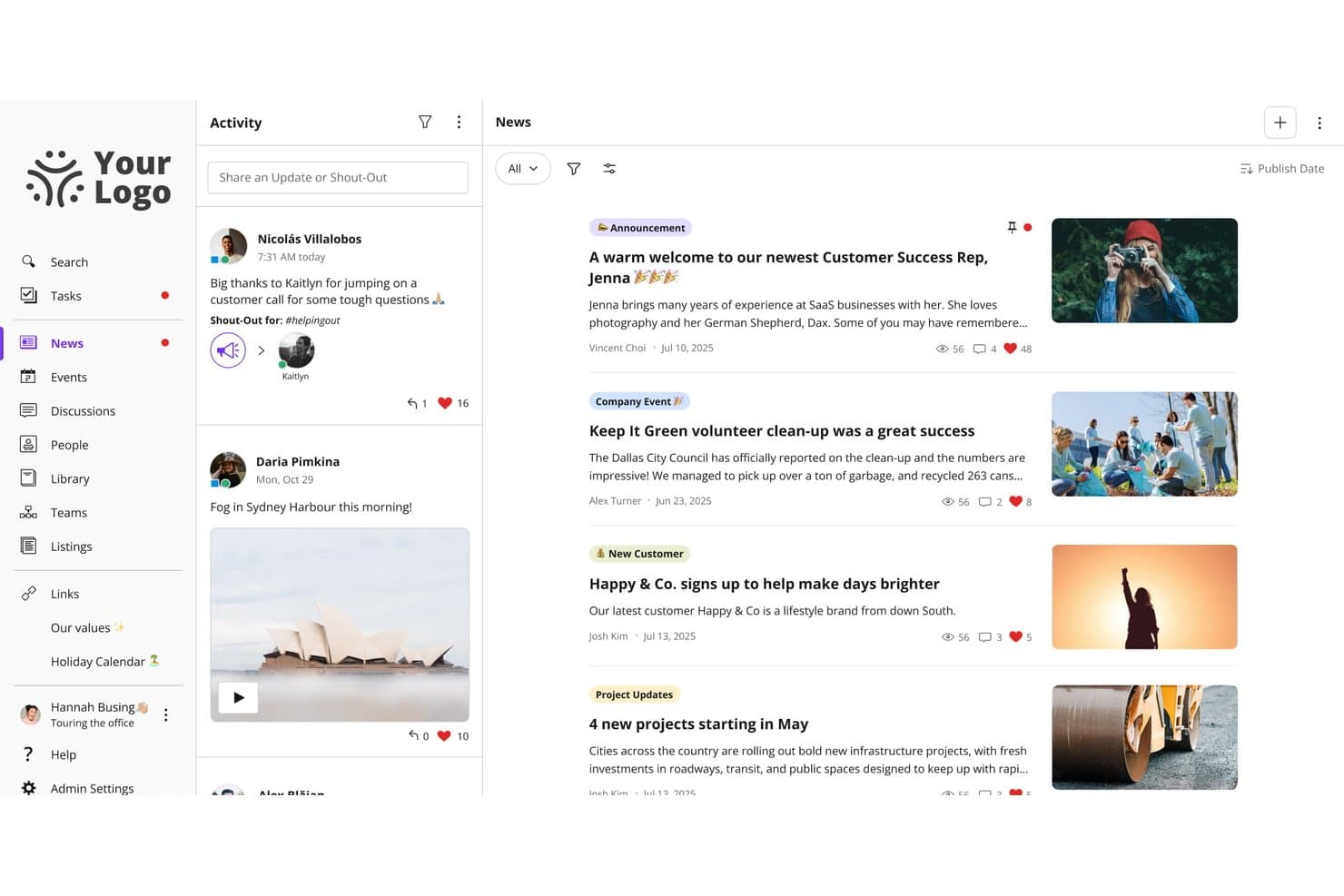
Jostle centralizes news, announcements, and activity feeds in one place. Jostle is an employee communication platform built around a company news feed, a searchable document library, and group messaging, with tools for targeted broadcasting, policy sign-off, and employee recognition.
Who Is Jostle Best For?
Jostle is a strong fit for HR and internal communications teams that need a structured way to distribute policies, track sign-off, and keep a well-organized document library.
Why I Picked Jostle
Jostle earns its spot on my shortlist because of how seriously it treats policy compliance. The Sign-Off feature lets you attach a mandatory read confirmation to any News post or Library document, then pull a timestamped report showing exactly who acknowledged it and when—which is genuinely useful during audits or regulatory reviews. I also like that Library topics have named owners and scheduled review cycles, so policies don't quietly go stale.
Jostle Key Features
- Targeted news publishing: Publish company updates to specific teams, departments, locations, or employee types, with audiences that update automatically as roles change.
- JostleAI knowledge assistant: An AI tool that answers employee questions using only the Library documents each user is permitted to see, citing its sources.
- Weekly AI digest: A personalized email digest written by AI and sent weekly, reaching employees who rarely log in directly to the platform.
- HRIS sync and auto-provisioning: User profiles and groups sync with HR systems like Workday, BambooHR, and ADP, so new hires get the right content access from day one.
Jostle Integrations
Jostle offers documented integrations with Google Workspace, Microsoft 365, Slack, Bonusly, Workday, BambooHR, ADP Workforce Now, UKG, and BI tools including Power BI. It also supports API and SFTP sync for custom HRIS connections, plus about 50 Zapier connections.
Pros and Cons
Pros:
- Library reviews help prevent stale policies
- Targeted broadcasts reach changing employee groups
- Policy sign-offs produce timestamped compliance records
Cons:
- Mobile app reliability draws reviewer complaints
- Frontline account setup requires manual workarounds
Learn more about Jostle: Best for mobile-first teams
- Free plan + 14-day free trial available
- Pricing upon request
Visit WebsiteCustomer Rating:4.6/5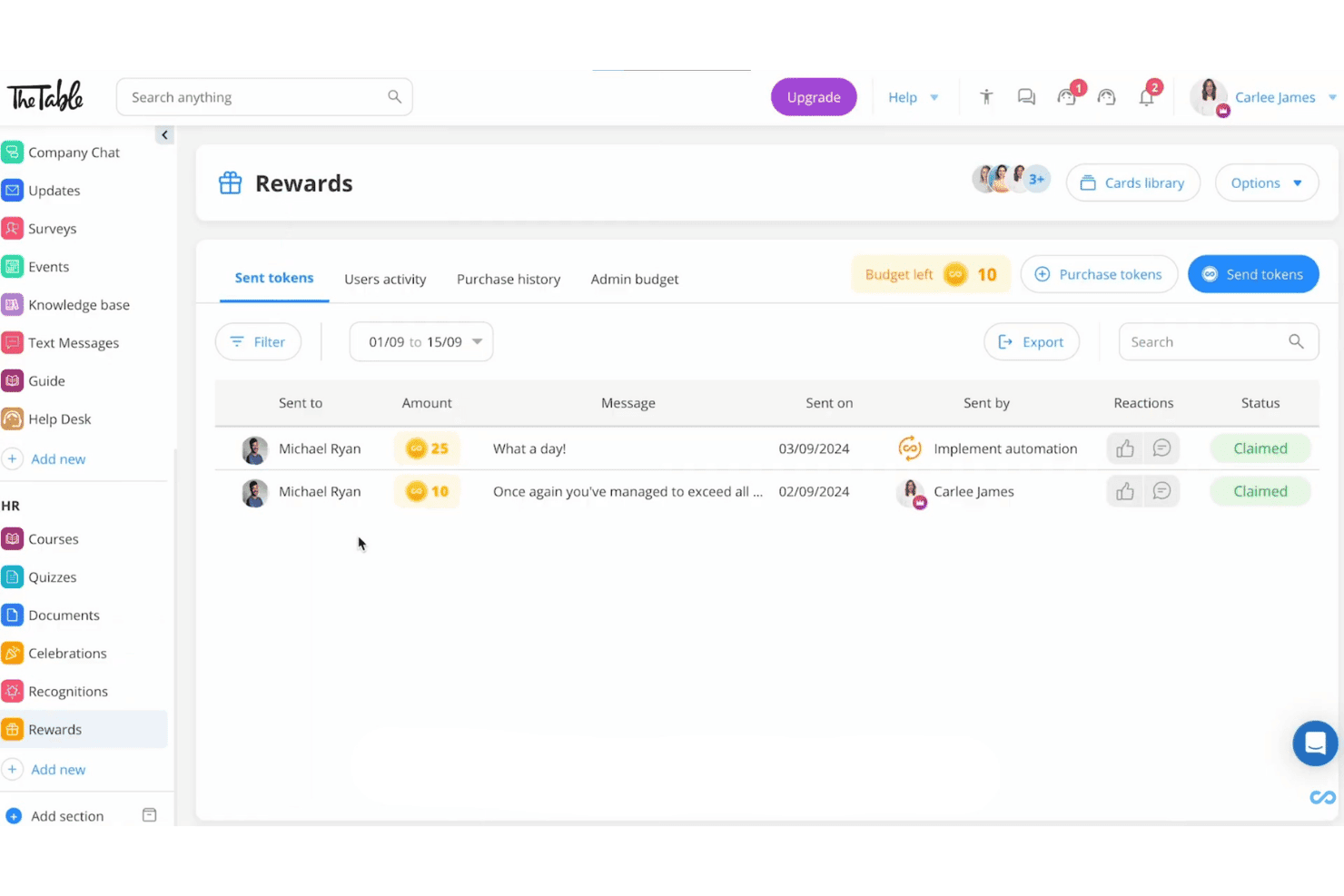
Connecteam's rewards feature offers sent tokens, amounts, messages, and claim statuses for team members in a clean dashboard view. Connecteam is a mobile-first employee communication app built for deskless and frontline teams, offering chat, company-wide broadcasts, a knowledge base, surveys, recognition tools, and HR content distribution in a single platform.
Who Is Connecteam Best For?
Connecteam is a strong fit for frontline and deskless teams in industries like hospitality, retail, construction, and healthcare, where most employees work without a corporate email or desk.
Why I Picked Connecteam
Connecteam earns its spot on my shortlist because it's purpose-built for the one scenario most communication tools struggle with: reaching workers who have no corporate email, no desk, and no time to log into a browser. I love that employees can join via QR code or phone number, and the Updates feed delivers segmented broadcasts with AI auto-translation, so a multilingual construction or hospitality crew all receive messages in their own language without any extra admin work.
Connecteam Key Features
- Read & Sign workflows: Employees can review and e-sign policy documents or compliance materials directly in the app, with admin tracking of completion status.
- Knowledge Base: A centralized content repository where teams can store and access SOPs, handbooks, and company policies from any mobile device.
- Pulse surveys and polls: Admins can send anonymous or standard surveys to collect employee feedback and sentiment from frontline workers on mobile.
- Token-based recognition and rewards: Managers and peers can send recognition with redeemable reward tokens, which employees can exchange for gift cards from major vendors.
Connecteam Integrations
Connecteam offers native integrations with ADP Workforce Now, BambooHR, Gusto, QuickBooks Online, Xero, Paychex Flex, Google, Okta, and Microsoft Azure Active Directory, plus an open API and Zapier.
Pros and Cons
Pros:
- Read receipts and e-signatures for compliance needs
- Multilingual auto-translation for announcements and chat
- Onboards frontline workers without email addresses
Cons:
- Reporting lacks dashboards and sentiment analysis
- No offline mode for low-connectivity sites
Learn more about Connecteam: 5Best for all-inclusive pricing and free onboarding
Hub
- Free demo available
- From £3.75/user/month (billed annually)
Visit WebsiteCustomer Rating:4.5/5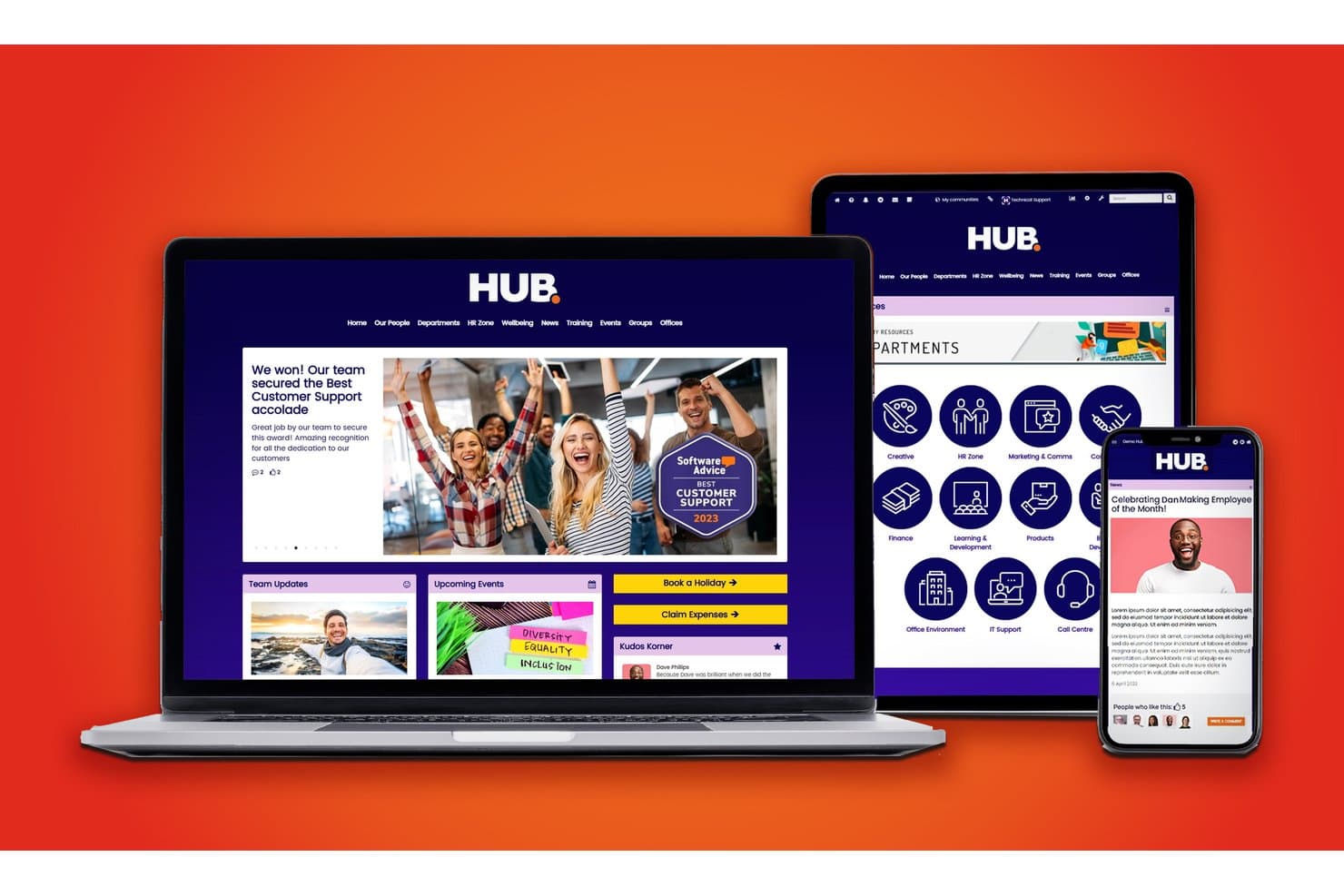
Hub offers a responsive intranet platform with employee news, department directories, team updates, and recognition features across desktop, tablet, and mobile. HUB is an intranet and employee communication platform that combines targeted news broadcasting, two-way engagement tools, AI-assisted content, smart workflows, and analytics into a single, no-code environment for HR and internal comms teams.
Who Is Hub Best For?
HUB is a strong fit for mid-market companies whose HR and internal comms teams need to manage employee communications without relying on IT.
Why I Picked Hub
HUB earns its spot on my shortlist because every feature, including AI writing assistance, pulse surveys, and must-read alerts, is available from day one with no tiered upgrade path. I love that the free onboarding includes two days of personalized 1-on-1 sessions, so my team isn't left piecing together a comms strategy from a help doc. In practice, that means we're broadcasting targeted announcements and tracking engagement reports from week one.
Hub Key Features
- Personalized user homepage: Each user sees a tailored dashboard with relevant news, tasks, and resources based on their role and location.
- Granular permission controls: Admins can assign access and publishing rights at page, group, or document levels across the organization.
- Employee recognition tools: Built-in kudos system lets colleagues send peer recognition and celebrate milestones right in the platform.
- Multi-site management: Manage communications, branding, and content for multiple office locations or business units from one central intranet.
Hub Integrations
HUB offers native integrations with SharePoint, Google Workspace, Box, Microsoft Teams, Slack, BambooHR, Confluence, and more. An API is available for custom integrations.
Pros and Cons
Pros:
- Must-read alerts with read-receipt tracking
- AI writing tools built into the editor
- Includes free personalized onboarding sessions
Cons:
- Reporting dashboards lack real-time filtering
- No dedicated mobile app for frontline workers
Learn more about Hub: Best for recognition-driven culture comms
- Free demo available
- Pricing upon request
Visit WebsiteCustomer Rating:4.8/5
Workvivo centralizes employee updates, ratings, and team news in one hub. Workvivo is an employee communication platform that blends a social-media-style activity feed with structured broadcasting tools, peer recognition, lifecycle automation, and AI-powered engagement analytics.
Who Is Workvivo Best For?
Workvivo is a strong fit for mid-to-large enterprises with mixed workforces—desk and frontline—where peer recognition and culture-building are as important as reaching every employee.
Why I Picked Workvivo
I picked Workvivo as one of the best because recognition is genuinely baked into how communication works here, not bolted on as a separate module. Peer-to-peer Shoutouts tie directly to company values, so when a frontline worker in a warehouse gets recognized publicly in the activity feed, it reinforces culture in the same breath as it informs. I also love that Read & Acknowledge lets me require confirmation on critical posts, giving me a compliance-grade audit trail without pulling employees into a separate system.
Workvivo Key Features
- Workvivo Journeys: Automates lifecycle communications—like onboarding sequences and policy rollouts—triggered by employee data attributes.
- Workvivo TV: Turns physical screens in warehouses, retail floors, or factories into live content channels with no per-device login required.
- Auto-translation: Automatically translates content into 90+ languages in real time for global and multilingual workforces.
- Seer people intelligence: Runs AI-powered sentiment analysis and 12-factor engagement surveys with a built-in Radar Heat Map for spotting risk and opportunity.
Workvivo Integrations
Workvivo advertises 40+ out-of-the-box integrations, including Workday, UKG, BambooHR, SAP SuccessFactors, Microsoft 365, Google Workspace, Slack, Salesforce, Okta, and Zoom. REST APIs and webhooks support custom connections.
Pros and Cons
Pros:
- Multilingual auto-translation reaches global teams
- Built-in peer recognition and shoutout features
- Mandatory read and acknowledge for compliance
Cons:
- Notification overload can bury important updates
- Real-time chat requires separate purchase
 Best for frontline workers
- 14-day free trial + free demo available
- From $3.75/user/month (billed annually)
Visit WebsiteCustomer Rating:4.7/5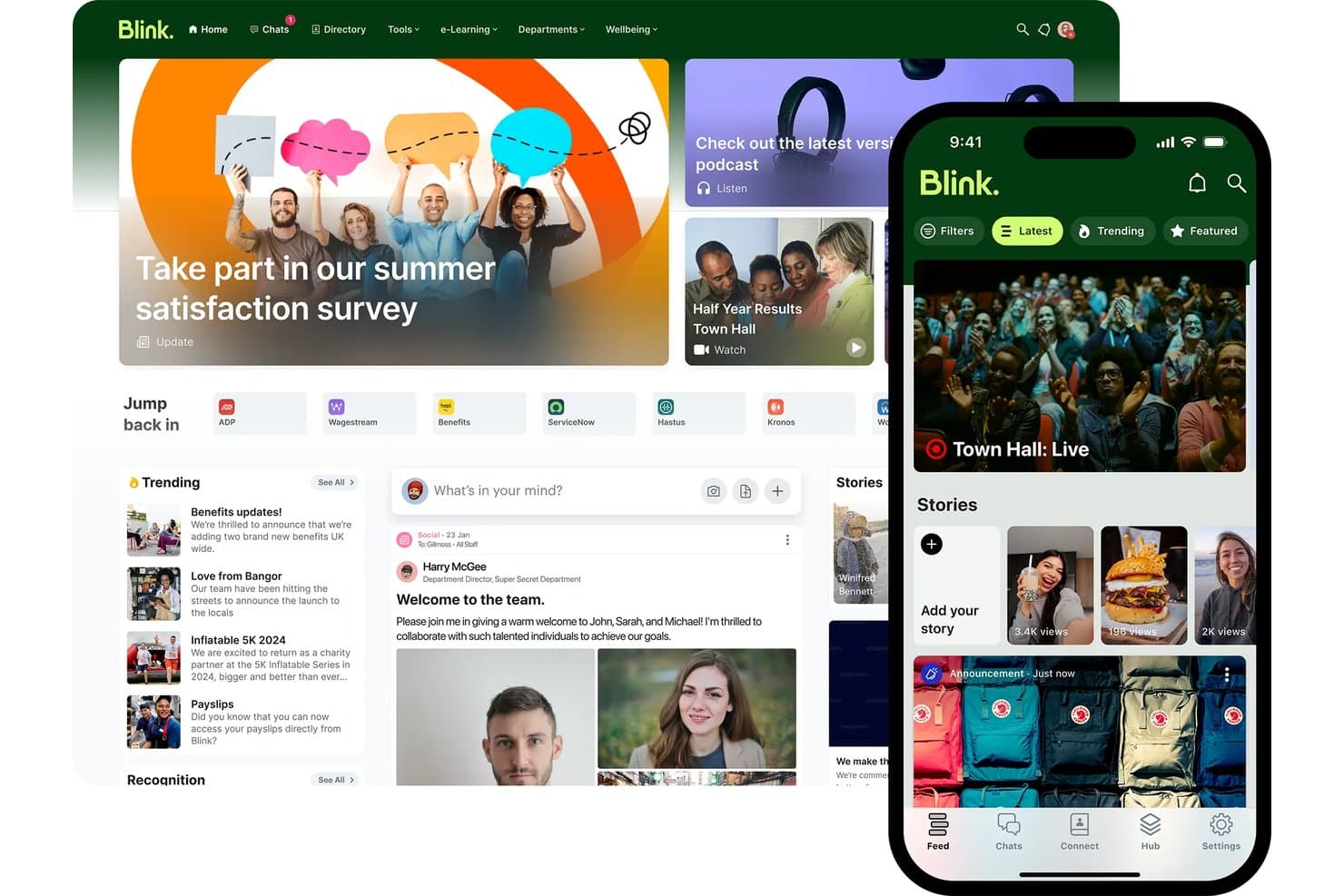
Blink unifies news, tools, and chat in one intranet platform. Blink is a mobile-first employee communication app built around chat, a social news feed, knowledge hub, surveys, and recognition tools for reaching frontline and deskless workforces without corporate email.
Who Is Blink Best For?
Blink is a strong fit for organizations with large frontline or deskless workforces—think retail, hospitality, logistics, and healthcare—where reaching employees without corporate email is a daily reality.
Why I Picked Blink
Blink earns its spot on my shortlist because no other tool I've reviewed is as deliberately built for workers who don't sit at a desk. I love that employees at a Domino's or Dollar Tree location can onboard with just a phone number or QR code—no corporate email, no IT ticket. Blink's AI Listening Agent is also genuinely impressive: it runs adaptive, conversational pulse surveys rather than static forms, which is why response rates are claimed to be 3x higher than traditional methods.
Blink Key Features
- Mandatory read acknowledgments: Require employees to confirm they've read specific posts or policies, with audit logs and automated reminders for non-readers.
- Blink Kudos recognition: Employees can send peer-to-peer recognition posts visible on the public newsfeed, with customizable award types.
- Knowledge Hub: A centralized content repository for storing and governing policies, procedures, and onboarding materials with access controls.
- Employee Journeys: Structured onboarding and milestone content paths that guide new hires through setup without requiring IT involvement.
Blink Integrations
Blink has 50+ integrations, including Workday, ADP, iTrent, Cornerstone, Okta, Microsoft 365, Google Workspace, ServiceNow, and Jira. Enterprise customers can use the open API and webhooks for custom integrations.
Pros and Cons
Pros:
- AI surveys drive high response from workers
- Mandatory read compliance for frontline policies
- Employees onboard with just a phone number
Cons:
- Posts can’t be edited by admins after publishing
- Advanced analytics require higher plan tiers
Learn more about Blink: Best for internal comms analytics and AI insights
- 14-day free trial + free demo available
- Pricing upon request
Visit WebsiteCustomer Rating:4.5/5
Poppulo organizes enterprise internal communication to promote engagement. Poppulo is an enterprise employee communication platform that unifies email, mobile app, digital signage, Microsoft Teams, and SharePoint publishing into a single interface, with built-in AI content tools, cross-channel analytics, and audience segmentation.
Who Is Poppulo Best For?
Poppulo is a strong fit for enterprise internal communications teams that need to reach both desk-based and frontline employees across multiple channels from one platform.
Why I Picked Poppulo
Poppulo earns its spot on my shortlist because the analytics depth here is genuinely unlike anything else I've seen in the employee comms space. The Comms Coach chatbot benchmarks your email performance against industry data in plain language, and the Analyze AI Agent surfaces sentiment patterns across channels without requiring you to dig through raw reports. I also love that cross-channel dashboards cover email, mobile, digital signage, and intranet in one view, so you're never piecing together results from separate tools.
Poppulo Key Features
- Multilingual auto-translation: Automatically translates email content into 54+ languages, including right-to-left scripts, using AI-assisted machine translation with a human-in-the-loop review workflow.
- Mandatory read acknowledgments: Tracks whether employees have read specific communications and requires documented confirmation, designed for safety alerts and compliance-sensitive policy updates.
- HRIS-synced audience segmentation: Syncs directly with Workday, SAP, Oracle PeopleSoft, and Microsoft Entra ID to build and update employee distribution lists automatically based on live HR data.
- Branded frontline mobile app: A white-labeled iOS and Android app that gives deskless and frontline workers access to company communications without requiring a corporate email address.
Poppulo Integrations
Poppulo offers native integrations across the Microsoft ecosystem, including Microsoft 365 and Entra ID, plus Workday, SAP, Oracle PeopleSoft, Okta, Power BI, Tableau, and Canva. An API supports custom integrations.
Pros and Cons
Pros:
- Supports must-read employee acknowledgments
- AI-powered content and sentiment insights included
- Deep analytics across all communication channels
Cons:
- Some AI agent features still unreleased
- Email template customization options are limited
Learn more about Poppulo: Best for regulated-industry broadcast compliance
- 14-day free trial + free demo available
- From $9/user/month (billed annually)

MangoApps centralizes news, resources, and employee tools in one intranet hub. MangoApps is an employee communication platform that unifies multi-channel broadcasting, frontline mobile access, campaign journeys, pulse surveys, and recognition into a single app.
Who Is MangoApps Best For?
MangoApps is a strong fit for HR and internal comms teams in regulated industries like healthcare, government, and manufacturing that need documented proof of message receipt across a mixed desk and frontline workforce.
Why I Picked MangoApps
MangoApps earns its spot on my shortlist because of how seriously it takes compliance in regulated industries. I'm particularly impressed by its mandatory-read acknowledgment system: you can send a policy update, track exactly who has confirmed receipt, collect e-signatures, and trigger automated follow-ups to anyone who hasn't responded. For healthcare or government teams, that's documented proof of message receipt built directly into the broadcast workflow. Campaign Journeys also let you sequence multi-channel messages across mobile, SMS, and digital signage from a single publish action.
MangoApps Key Features
- Campaign journeys: Build sequenced, multi-channel message campaigns that automatically deliver communications across mobile, SMS, and email in a defined order.
- Pulse surveys and eNPS: Run anonymous pulse surveys, eNPS, onboarding, and exit surveys with conditional logic, auto-reminders, and trend tracking built in.
- 50-language auto-translation: Automatically publish posts in 50+ languages at the point of sending, with employees receiving content in their preferred language without any extra steps.
- Live broadcasting: Host live town halls and leadership updates with real-time multilingual interpretation streamed directly through the platform.
MangoApps Integrations
MangoApps offers 200+ integrations, including Workday, UKG, ADP Workforce Now, Microsoft Teams, SharePoint, OneDrive, Google Drive, and Cornerstone. Its open REST API, webhooks, and SCIM 2.0 support custom connectivity and provisioning.
Pros and Cons
Pros:
- Campaigns deploy across email, SMS, and signage
- Offline mobile app access for frontline staff
- Built-in read receipts with e-signatures
Cons:
- In-platform file collaboration requires Microsoft licenses
- Feature volume makes navigation overwhelming
Learn more about MangoApps:

Unily Glass lets users take action across workplace app integrations. Unily is an enterprise employee communication and digital workplace platform that combines multi-channel broadcasting, AI-powered content creation, mobile access for frontline workers, and engagement analytics in one environment.
Who Is Unily Best For?
Unily is built for large enterprises with 1,000+ employees that need to reach both desk-based and frontline workers through a centralized communications hub.
Why I Picked Unily
Unily earns its spot on my list because its Broadcast Center is genuinely purpose-built for leadership communications at scale. I love that a single communicator can push an executive message across email, Microsoft Teams, Slack, and mobile push simultaneously, with AI auto-translation into 40+ languages handling multilingual workforces in one step. Mandatory read acknowledgments with tracking make compliance-grade documentation possible for safety and policy updates.
Unily Key Features
- Unily Glass: A conversational AI interface that lets employees complete tasks across connected systems like Workday and ServiceNow without leaving the platform.
- Indi AI agent: Drafts communications, generates images and video, and builds branded intranet pages from a single prompt within governance workflows.
- ScreenCloud digital signage: Extends reach to frontline workers without personal devices by displaying content on shared screens in break rooms and production floors.
- Pulse surveys and ideation portal: Captures employee feedback and ideas directly within the platform alongside broadcast communications.
Unily Integrations
Unily offers 50+ native integrations, including Workday, ServiceNow, Salesforce, Slack, ScreenCloud, and Microsoft 365. REST APIs, SDKs, and webhooks support custom integrations.
Pros and Cons
Pros:
- Mandatory read tracking supports compliance needs
- AI auto-translation handles 40+ languages
- Broadcasts reach both desk and frontline workers
Cons:
- Real-time chat costs extra per add-on
- Custom pricing requires direct contact
Learn more about Unily:
Diğer Çalışan İletişimi Uygulamaları
Kısa listeme giremeyen ancak yine de göz atmaya değer bazı ek çalışan iletişimi uygulaması seçenekleri şunlardır:
- 11SimpplrBest for AI-powered intranet and comms
- 12HaiiloBest social intranet features
- 13LumAppsBest for enterprise-wide multilingual broadcasts
- 14HaystackBest for HRIS-synced audience targeting
- 15SlackBest for integrations
- 16Microsoft TeamsBest for Microsoft 365-native team messaging
- 17BeekeeperBest for QR code onboarding without email
- 18WorkJamBest for deskless worker communications
- 19Cerkl BroadcastBest for personalized employee news digests
- 20FirstupBest for enterprise journey-based comms
- 21Microsoft Viva EngageBest for Microsoft 365-native community comms
- 22YOOBICBest for multi-store retail communications
How I Evaluate Employee Communication Apps
I split my evaluation into baseline features every tool must cover and the differentiators that separate a true frontline comms platform from a basic chat app.
Core Functionality (Table Stakes For This List)
When I'm selecting tools for my list, I rank each one on a scale from 0 (does not offer the functionality) to 5 (excels in this area) for each core functionality listed below. I then calculate the tool's total score into a percentage, using 75% as a benchmark to help assess its overall fit for the list.
- Multi-Channel Messaging: I look at whether the platform unifies chat, DMs, group channels, and push notifications—or forces teams to patch together separate tools to cover basic formats.
- Company-Wide Broadcasts: I evaluate targeting depth—specifically whether admins can segment by department or location, schedule sends, and require acknowledgment on critical announcements.
- Mobile Employee Access: I check whether frontline workers can sign up and log in without a corporate email address, and whether the app delivers full functionality on iOS and Android.
- Directory & Segmentation: I look for dynamic employee groups that sync from an HRIS or Active Directory, so messaging audiences stay accurate without manual list maintenance.
- Engagement Analytics: I evaluate whether communicators can track reach, read rates, and reactions at the campaign level—not just see a basic delivery confirmation on individual messages.
- Content & Media Sharing: I check whether the platform supports in-app video playback, document previews, and centralized file libraries rather than simple attachment uploads.
Once I have a list of tools that meet the criteria, I consider what sets each platform apart.
Differentiating Factors (What Sets Vendors Apart)
Here's how I compare and contrast different vendors:
Standout Features
Mandatory read acknowledgments matter most for safety-critical or policy-driven communications—I look for compliance-grade confirmations with follow-up nudges, not just a basic "seen" receipt. For global workforces, multilingual auto-translation is essential; I check whether translation happens in-message and in real time. I also evaluate pulse survey tools, specifically whether feedback is collected in the same channel as the broadcast, so leaders aren't stitching together separate listening tools.
Beyond Features
Pricing structure matters more than most buyers expect. I look at whether deskless workers are billed at a lower rate than desk-based employees, since high-turnover workforces in retail or healthcare can make per-seat costs unpredictable fast. I also check for white-labeling depth—a branded app with custom icons and push notifications lands differently with frontline teams than a generic platform. Finally, HRIS integration quality determines whether your employee directory stays accurate automatically or requires someone to manually manage it every time there's a hire or departure.
Çalışan İletişimi Uygulamaları Nasıl Seçilir?
Uzun özellik listeleri ve karmaşık fiyatlandırma yapılarına takılıp kalmak kolaydır. Kendinize özgü yazılım seçim sürecinizi yürütürken odaklanmanıza yardımcı olmak için göz önünde bulundurmanız gereken faktörleri içeren bir kontrol listesi hazırladım:
| Faktör | Dikkat Edilmesi Gerekenler |
|---|---|
| FaktörÖlçeklenebilirlik | Dikkat Edilmesi GerekenlerUygulama ekibinizle birlikte büyüyebilir mi? Gelecekteki büyümeyi ve aracın daha büyük ekipleri veya performans sorunları yaşamadan artan veri miktarlarını destekleyip desteklemediğini değerlendirin. |
| FaktörEntegrasyonlar | Dikkat Edilmesi GerekenlerMevcut araçlarınızla entegre oluyor mu? E-posta, takvimler ve proje yönetimi sistemleri gibi mevcut yazılımlarla uyumluluğunu kontrol edin. |
| FaktörÖzelleştirilebilirlik | Dikkat Edilmesi Gerekenlerİhtiyaçlarınıza uyacak şekilde uyarlayabilir misiniz? İş akışlarını, bildirimleri ve kullanıcı rollerini özel süreçlerinize uygun şekilde özelleştirme seçeneklerini arayın. |
| FaktörKullanım Kolaylığı | Dikkat Edilmesi GerekenlerTüm ekip üyeleri için kullanıcı dostu mu? Öğrenme eğrisini ve benimsemeyi kolaylaştırmak için eğitim kaynaklarının bulunup bulunmadığını değerlendirin. |
| FaktörUygulama ve İşe Alıştırma | Dikkat Edilmesi GerekenlerNe kadar hızlı çalışmaya başlayabilirsiniz? Kurulum, eğitim ve kuruluşunuz genelinde tam kullanıma geçiş için gereken süreyi ve kaynakları değerlendirin. |
| FaktörMaliyet | Dikkat Edilmesi GerekenlerBütçenize uygun mu? Fiyatlandırma planlarını, gizli ücretleri ve ödenen ücret karşılığında sunulan değeri karşılaştırın. Uzun vadeli maliyetleri ve olası yatırım getirisini değerlendirin. |
| FaktörGüvenlik Önlemleri | Dikkat Edilmesi Gerekenlerİletişimleriniz güvende mi? Bilgi güvenliğini sağlamak için şifreleme, veri koruma önlemleri ve sektör standartlarına uygunluk özelliklerini arayın. |
| FaktörDestek Kullanılabilirliği | Dikkat Edilmesi GerekenlerNe zaman yardım alabilirsiniz? Desteğin çalışma saatlerinizde ve telefon, sohbet veya e-posta gibi tercih ettiğiniz iletişim kanalları üzerinden sunulup sunulmadığını kontrol edin. |
Çalışan İletişim Uygulamaları Nedir?
Çalışan iletişim uygulamaları, kuruluşlar içinde iletişimi ve iş birliğini kolaylaştırmak için tasarlanmış dijital araçlardır. Bu araçlar genellikle çeşitli sektörlerdeki İK profesyonelleri, ekip liderleri ve çalışanlar tarafından bilgi paylaşımını ve ekip koordinasyonunu geliştirmek için kullanılır. Mesajlaşma, video konferans ve dosya paylaşımı özellikleri, ekiplerin bağlantıda ve bilgili kalmasına yardımcı olur. Genel olarak bu araçlar iş yeri verimliliğini artırır ve daha uyumlu bir çalışma ortamı oluşturur.
Özellikler
Her iyi çalışan iletişim uygulamasının sahip olması gereken temel özellikler şunlardır:
- Mesajlaşma: Ekip üyeleri arasında gerçek zamanlı iletişimi kolaylaştırarak hızlı bilgi alışverişi sağlar.
- Video konferans: Sanal yüz yüze toplantılar yapılmasını sağlayarak uzaktan iş birliğini ve katılımı geliştirir.
- Dosya paylaşımı: Belgelerin gönderilip alınması sürecini kolaylaştırır ve herkesin gerekli kaynaklara erişmesini sağlar.
- Görev yönetimi: Ekiplerin görevleri düzenlemesine ve önceliklendirmesine yardımcı olarak verimliliği ve sorumluluk bilincini artırır.
- Özelleştirilebilir bildirimler: Kullanıcıların uyarıları tercihlerine göre ayarlamasını sağlar; dikkat dağınıklığını azaltır ve önemli güncellemelere odaklanır.
- Analiz ve raporlama: İletişim kalıpları ve katılım hakkında içgörüler sunarak ekiplerin stratejilerini geliştirmesine yardımcı olur.
- Mobil erişim: Çalışanların hareket hâlindeyken bile bağlantıda ve bilgili kalmasını sağlar.
- Güvenlik önlemleri: Hassas bilgileri şifreleme ve sektör standartlarına uygunluk yoluyla korur.
- Entegrasyon olanakları: E-posta ve takvimler gibi mevcut araçlara bağlanarak birleşik bir iş akışı oluşturur.
- Çevrim dışı erişim: Kullanıcıların internet bağlantısı olmadan içerikleri görüntülemesine ve bunlarla etkileşim kurmasına olanak tanıyarak bilgilere sürekli erişim sağlar.
Faydalar
Çalışan iletişim uygulamalarını kullanıma sunmak ekibiniz ve işletmeniz için çeşitli faydalar sağlar. Yararlanmayı bekleyebileceğiniz birkaç fayda şunlardır:
- Gelişmiş iş birliği: Gerçek zamanlı mesajlaşma uygulamaları ve video konferans, konumdan bağımsız olarak ekibinizin etkili biçimde birlikte çalışmasına yardımcı olur.
- Artan verimlilik: Görev yönetimi özellikleri herkesin düzenli kalmasına ve çalışmalarını plan doğrultusunda sürdürmesine yardımcı olarak genel verimliliği artırır.
- Gelişmiş katılım: Özelleştirilebilir bildirimler ve sosyal özellikler çalışanların bilgili ve bağlantıda kalmasını sağlayarak topluluk duygusunu güçlendirir.
- Daha iyi karar alma: Analiz ve raporlama, iletişim eğilimleri hakkında değerli ölçümler ve içgörüler sunarak bilinçli seçimler yapmanıza yardımcı olur.
- Güvenli iletişim: Güvenlik önlemleri hassas bilgileri koruyarak veri paylaşırken içinizin rahat olmasını sağlar.
- Esneklik: Mobil ve çevrim dışı erişim, ekibinizin hareket hâlindeyken bile bağlantıda ve üretken kalmasını sağlar.
- Kolaylaştırılmış iş akışları: Entegrasyon olanakları mevcut araçlarınızı birbirine bağlayarak daha verimli bir çalışma ortamı oluşturur.
Maliyetler ve Fiyatlandırma
Çalışan iletişimi uygulamalarını seçmek, mevcut çeşitli fiyatlandırma modellerinin ve planların anlaşılmasını gerektirir. Maliyetler özelliklere, ekip büyüklüğüne, eklentilere ve daha fazlasına göre değişir. Aşağıdaki tabloda çalışan iletişimi uygulaması çözümlerinde yaygın olarak sunulan planlar, ortalama fiyatları ve tipik özellikler özetlenmektedir:
Çalışan İletişimi Uygulamaları İçin Plan Karşılaştırma Tablosu
| Plan Türü | Ortalama Fiyat | Yaygın Özellikler |
|---|---|---|
| Plan TürüÜcretsiz Plan | Ortalama Fiyat$0 | Yaygın ÖzelliklerTemel mesajlaşma, sınırlı dosya paylaşımı ve temel görev yönetimi. |
| Plan TürüKişisel Plan | Ortalama Fiyat$5-$15/kullanıcı/ay | Yaygın ÖzelliklerGelişmiş mesajlaşma, video konferans, dosya paylaşımı ve temel entegrasyonlar. |
| Plan Türüİşletme Planı | Ortalama Fiyat$20-$100/kullanıcı/ay | Yaygın ÖzelliklerGelişmiş görev yönetimi, analizler, özelleştirilebilir bildirimler ve daha fazla entegrasyon seçeneği. |
| Plan TürüKurumsal Plan | Ortalama Fiyat$150-$500+/kullanıcı/ay | Yaygın ÖzelliklerTam özelleştirme, gelişmiş güvenlik özellikleri, özel destek ve kapsamlı entegrasyonlar. |
SSS
Çalışan iletişimi uygulamaları hakkında sık sorulan bazı soruların yanıtları:
Çalışan iletişimi uygulamaları uzaktan çalışmayı nasıl iyileştirebilir?
Bu uygulamalar, konumdan bağımsız olarak ekibinizin bağlantıda kalmasını sağlayan çalışan iletişimi araçları sunarak uzaktan çalışmayı önemli ölçüde iyileştirebilir. İş birliğini ve üretkenliği sürdürmeye yardımcı olan anlık mesajlaşma, görüntülü aramalar ve dosya paylaşımı gibi özellikler sunarlar. Örneğin, uzaktan çalışan bir ekip sanal toplantılar düzenlemek için video konferansını, gün boyunca iletişimde kalmak için de mesajlaşmayı kullanabilir. Bu araçlar ayrıca gerçek zamanlı geri bildirim ve güncellemelere olanak tanıyarak herkesin aynı bilgiye sahip olmasını sağlar. Diğer yazılımlarla entegre olduklarında, tüm iletişim ihtiyaçları için merkezi bir merkez oluştururlar.
Çalışan iletişimi uygulamaları güvenli midir?
Evet, çoğu çalışan iletişimi uygulaması verilerinizi korumak için güvenliğe öncelik verir. Bu uygulamalar genellikle şifreleme, veri koruma önlemleri ve sektör standartlarına uyumluluk içerir. Bir araç seçmeden önce uçtan uca şifreleme ve kullanıcı kimlik doğrulama seçenekleri gibi özellikleri kontrol edin. Uygulamanın gizlilik politikalarını ve hizmet şartlarını incelemek de iyi bir fikirdir. Hassas sektörler için ek güvenlik sertifikaları sunan uygulamaları tercih edin. Sağlayıcının düzenli güncellemeleri ve desteği de uygulamanızın olası tehditlere karşı güvenli kalmasını sağlayabilir.
Çalışan iletişimi uygulamaları etkileşimi artırmaya yardımcı olabilir mi?
Evet, iletişim uygulamaları çalışanların bağlantı kurmasını, geri bildirim paylaşmasını ve bilgi sahibi olmasını kolaylaştırır. Anketler, sohbetler ve duyurular gibi özellikler herkesin sürece dahil olduğunu hissetmesine ve açık tartışmaların teşvik edilmesine yardımcı olarak çalışan deneyimlerini birbirine bağlar.
Ekibimi yeni bir iletişim aracını benimsemeye nasıl teşvik edebilirim?
Önce liderliğin desteğini alın, ardından faydaları ekibe anlatın. Eğitim sunun, zaman kazandıran özellikleri öne çıkarın ve kullanıma geçiş sırasında geri bildirim toplayın. Ekibiniz uyum sağlarken kabulü artırmak için endişeleri hızlı bir şekilde ele aldığınızdan emin olun.
Çalışan iletişimi uygulamaları ekip iş birliğini nasıl destekler?
Çalışan iletişimi uygulamaları, gerçek zamanlı iletişim ve proje yönetimi için platformlar sunarak ekip iş birliğini destekler. Ekip üyelerinin mesajlaşma veya görüntülü aramalar yoluyla fikirlerini ve geri bildirimlerini anında paylaşmalarına olanak tanır. Görev yönetimi özellikleri sorumlulukların atanmasına ve takip edilmesine yardımcı olarak herkesin rolünü bilmesini sağlar. Örneğin, bir ekip toplantıları planlamak için paylaşılan takvimleri, projeler üzerinde eş zamanlı çalışmak için de belge iş birliği araçlarını kullanabilir. Bu uygulamalar, tüm iletişim ve kaynakları erişilebilir tek bir yerde tutarak iş birliğine dayalı bir ortam oluşturur.
İletişim uygulamaları diğer İK yazılımlarıyla entegre olabilir mi?
Birçok çalışan iletişimi platformu HRIS, bordro veya planlama araçlarıyla entegrasyonu destekler. Mevcut sistemlerinizden güncellemeleri otomatikleştirebilmeniz veya bildirimleri tetikleyebilmeniz için hazır entegrasyonları ya da API’leri kontrol edin.