

Hibrit işyeri yönetimi yazılımı, esnek çalışma programlarını koordine etmeniz, masaları rezerve etmeniz ve uzaktan çalışanlarla yüz yüze çalışan ekipler arasında ofis kaynaklarını yönetmeniz için gereken araçları sunar. En iyi hibrit işyeri yönetimi yazılımını arıyorsanız muhtemelen çalışan esnekliğini desteklemenin, ofiste kimlerin bulunduğunu takip etmenin ve çalışma alanınızı daha verimli kullanmanın yollarını arıyorsunuzdur.
Bu rehberde, kuruluşunuzun hibrit çalışmayı yönetmesine yardımcı olacak en iyi araçlara ilişkin seçimlerimi bulacaksınız. İhtiyaçlarınıza uygun çözümü karşılaştırabilmeniz ve bulabilmeniz için temel özelliklere genel bir bakış da sunuyorum.
Why Trust Our Software Recommendations
6,700+
Reviews
20
Industry experts
16+
Evaluation factors
14
Years
Our team has been testing and reviewing software since 2012. As HR experts ourselves, we know how difficult—and important—it is to choose the right software.
For this guide, we evaluated tools using hands-on testing and independent research, scoring tools using our selection criteria. We also draw on insights from industry thought leaders and practicing HR experts.
Our reviews reflect our human editorial judgment, not a sales pitch.
Expert reviewers:
- Phil GrayCOO
 Kim BehnkeHR Tech Editor & Analyst
 Josh BarkerPeople Ops Manager

Hibrit İşyeri Yönetimi Yazılımları Karşılaştırma Tablosu
Bu karşılaştırma tablosu, en iyi hibrit işyeri yönetimi yazılımı seçimlerim için fiyatlandırma ayrıntılarını özetlemektedir:
Sorted by: Default
| Tool | Starting Price | Website | |
|---|---|---|---|
Best for department-based neighborhood seating | 4.9 out of 5 | $159/month Free trial available | Website |
Best for automated workplace experience workflows | 4.7 out of 5 | $500/month Free demo available | Book Demo |
Best for fast onboarding and setup | 4.7 out of 5 | €1.7/user/month Free plan available; 14-day free trial; free demo available | Website |
Best for security and compliance-driven workplaces | 4.8 out of 5 | $5/bookable resource/month Free demo available | Website |
Best for AI-driven office analytics | 4.5 out of 5 | Pricing upon request Free demo available | Website |
Best for full Microsoft Teams integration with AI assistant | 4.5 out of 5 | $99/month Free demo available | Website |
Best for ultra-simple room and desk management | 4.5 out of 5 | $51/month 30-day free trial available | Website |
Best for Slack-based bookings | 5.0 out of 5 | $2.50/user/month Free trial + free demo available | Website |
Best for planned team collaboration | Not rated | Pricing upon request Free demo available | Website |
Best for global coworking space access | 4.9 out of 5 | $1.50/user/month 14-day free trial + free demo available | Website |


En İyi Hibrit İşyeri Yönetimi Yazılımları İncelemeleri
Aşağıda, kısa listeme giren en iyi hibrit işyeri yönetimi yazılımlarına ilişkin ayrıntılı özetlerimi bulabilirsiniz. İncelemelerim, ihtiyaçlarınıza en uygun olanı bulmanıza yardımcı olmak için her platformun özelliklerini, en uygun kullanım alanlarını ve entegrasyonlarını ayrıntılı şekilde ele alıyor.
 Best for department-based neighborhood seating
- Free trial available
- From $159/month
Visit WebsiteCustomer Rating:4.9/5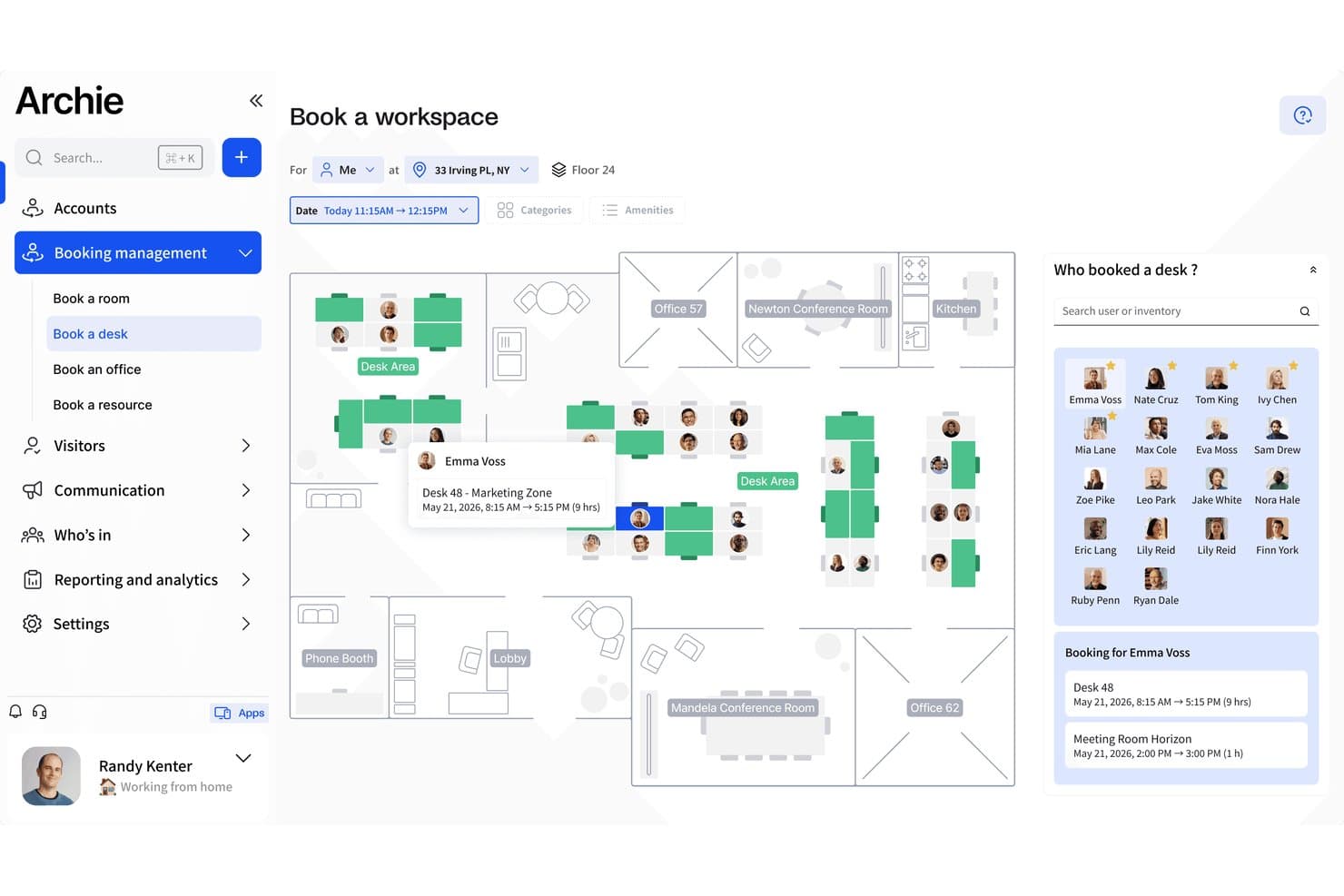
Archie lets users book desks and see who's in on an interactive floor map. Archie is a hybrid workplace management platform that combines desk and room booking, interactive floor plans, neighborhood zone configuration, team schedule coordination, and occupancy analytics.
Who Is Archie Best For?
Archie works well for facilities and workplace teams in mid-sized hybrid offices that want to organize seating by department using neighborhood zones.
Why I Picked Archie
I picked Archie as one of the best because its neighborhood zoning feature is genuinely useful for hybrid teams that need departments to sit together consistently. Admins can designate desk zones exclusively for specific teams, so when an engineer checks in, they're booking within their team's zone rather than scattering across the floor. I also like that the interactive floor plan updates in real time to prevent double bookings, so employees aren't guessing which desks are actually free.
Archie Key Features
- Recurring desk bookings: Users can set up repeating desk reservations so they don't have to rebook their preferred setup each week.
- Work-from status sharing: Employees can broadcast whether they're working from home, the office, or elsewhere so teammates can plan around each other.
- Desk amenity filters: Users can filter available desks by equipment or other criteria to find a seat that matches their specific needs.
- Schedulable occupancy reports: Admins can configure reports to generate and deliver automatically by email on a set schedule.
Archie Integrations
Archie offers 30+ integrations, including Microsoft Teams, Microsoft Outlook, Google Calendar, Slack, Kisi, DoorFlow, and IronWifi. It supports Zapier and an Open API with webhooks for custom connections.
Pros and Cons
Pros:
- Scheduled occupancy reports reveal peak office use
- Colleague visibility helps coordinate office days
- Team-specific neighborhoods keep departments together
Cons:
- Reporting filters can feel too limited
- Maps can load slowly in larger offices
Learn more about Archie: 2Best for automated workplace experience workflows
elia
- Free demo available
- From $500/month
Visit WebsiteCustomer Rating:4.7/5
elia offers a hybrid workplace management dashboard featuring desk and meeting room occupancy rates, office heatmaps, and team booking analytics. elia is a hybrid workplace management platform that brings together desk booking, room reservations, visitor management, occupancy tracking, and workplace automation tools for teams managing flexible office environments.
Who Is elia Best For?
elia is a good fit for facilities and workplace managers in mid-to-large organizations coordinating hybrid teams across multiple office locations.
Why I Picked elia
I picked elia as one of the best because its workplace automation module goes well beyond basic rule-setting. You can build workflows using customizable triggers, conditions, and actions, so something like automatically canceling a no-show desk booking and reassigning it, or sending visitor arrival alerts to the right host, runs without anyone touching it. I also like the execution logs feature, which gives you full visibility into when and how each automation ran, so you can troubleshoot or optimize without guessing.
elia Key Features
- Interactive floor plan booking: Book desks and rooms directly from a visual, real-time map of your office layout, showing live availability at a glance.
- Colleague presence dashboard: See which teammates are scheduled to come in on any given day, so employees can coordinate in-office time around the people they need to collaborate with.
- Occupancy analytics: Track real-time and historical workspace usage data to identify underutilized areas and make informed decisions about office capacity.
- Workplace request management: Submit and manage service requests (catering, IT, cleaning, maintenance) directly through the platform, with tasks routed to the right teams.
elia Integrations
elia offers native integrations with Microsoft 365, Google Workspace, Slack, and specific tools within those ecosystems, including Google Calendar, Microsoft Teams, and Microsoft Outlook.
Pros and Cons
Pros:
- Built-in visitor pre-registration and notifications
- Built-in IoT sensor occupancy tracking
- Flat-rate pricing regardless of user count
Cons:
- Limited status options beyond office or remote
- Mobile app less polished than desktop
Learn more about elia: Best for fast onboarding and setup
- Free plan available; 14-day free trial; free demo available
- From €1.7/user/month (billed annually)
Visit WebsiteCustomer Rating:4.7/5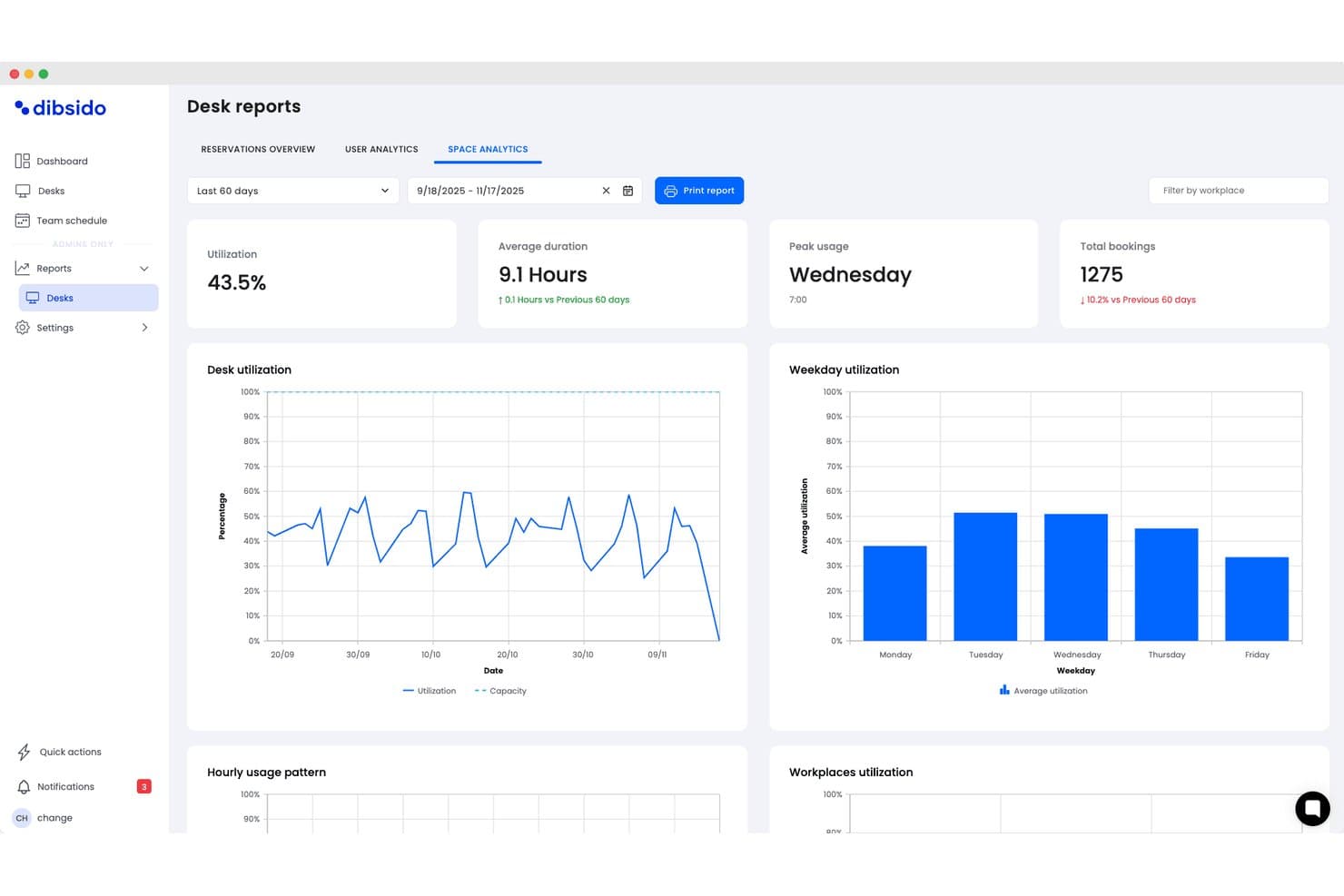
Dibsido offers a detailed desk reports dashboard with space analytics, showing utilization rates, average duration, peak usage days, and weekday utilization charts for hybrid workplace management. Dibsido is a hybrid workplace management software solution that provides tools for desk booking, meeting room scheduling, parking management, and interactive office maps with integrations for Microsoft, Google, and Slack.
Who Is Dibsido Best For?
Dibsido is a strong match for small to midsize organizations looking for quick and easy hybrid workplace management.
Why I Picked Dibsido
I picked Dibsido as one of the best because I can set up desk, meeting room, and parking bookings in minutes, even without training. In practice, my team uses their interactive floorplan to find and reserve spaces on day one.
Dibsido Key Features
- Microsoft Teams integration: Users can book desks and resources directly within their Microsoft Teams workspace.
- Parking spot management: Allocate, reserve, and manage parking spaces alongside desk and room bookings.
- Team schedule and visibility: View weekly attendance patterns showing who is in the office, working remotely, or on a custom status, complete with exportable attendance logs.
- Resource usage analytics: View usage data and trends to help optimize office layouts and resource planning.
Dibsido Integrations
Dibsido offers native integrations with Microsoft Teams and Slack, plus two-way calendar sync with Microsoft Outlook and Google Calendar. Enterprise SSO is supported through Microsoft Entra ID, Google Workspace, and SAML 2.0, with an API available for custom integrations.
Pros and Cons
Pros:
- Native mobile apps for iOS and Android
- Multilingual support for global hybrid teams
- Interactive floorplans for desk and parking selection
Cons:
- Fewer advanced facilities controls for enterprises
- Limited workflow automations compared to competitors
Learn more about Dibsido: Best for security and compliance-driven workplaces
- Free demo available
- From $5/bookable resource/month (billed annually)
Visit WebsiteCustomer Rating:4.8/5
Envoy manages visitor compliance and creates alerts for improved security. Envoy is a workplace management platform that covers visitor management, desk and room booking, employee scheduling, and physical access control across office locations.
Who Is Envoy Best For?
Envoy is a strong fit for companies in regulated industries like finance, healthcare, and government contracting, where visitor identity, access logs, and legal compliance are non-negotiable.
Why I Picked Envoy
I picked Envoy as one of the best because of how seriously it takes physical security and regulatory compliance as core platform functions, not afterthoughts. The check-in flow can prompt visitors for citizenship information for ITAR screening or require them to watch a safety video for OSHA compliance, and Envoy automatically stores that data in audit-ready records you can export on a schedule. I also like the Visual Compliance integration, which screens visitors against restricted party watchlists in real time.
Envoy Key Features
- Room scheduling: Book meeting rooms directly from Outlook, Google Calendar, or the Envoy app, with automatic release for no-shows.
- Delivery management: Log incoming packages and notify recipients automatically so deliveries don't pile up unattended.
- Capacity limits: Set and enforce location-level or floor-level occupancy caps to control how many people can be on-site at once.
- Desk booking: Let employees reserve hot desks in advance or find available seats on arrival using an interactive floor map.
Envoy Integrations
Envoy offers 100+ integrations through its app directory, including Slack, Microsoft Teams, Google Calendar, Microsoft Outlook, Okta, Salesforce, Brivo, Kisi, Avigilon Alta, and DocuSign. It also connects with Zapier and provides an API for custom integrations.
Pros and Cons
Pros:
- Emergency notifications reach staff on-site
- Real-time occupancy tracking across locations
- Visitor check-in includes compliance screening
Cons:
- Key features locked behind premium tiers
- Device-pairing dropouts require manual troubleshooting
 Best for AI-driven office analytics
- Free demo available
- Pricing upon request
Visit WebsiteCustomer Rating:4.5/5
Robin tracks office attendance, visitors, feedback, and rooms in real-time. Robin is an AI-driven workplace operations platform covering desk and room booking, space management, visitor management, and occupancy analytics for hybrid office environments.
Who Is Robin Best For?
Robin is a strong fit for IT, facilities, and workplace operations teams at mid-size to enterprise companies that need data-driven tools to manage a flexible, hybrid office day-to-day.
Why I Picked Robin
I picked Robin as one of the best because of how it uses AI to move beyond basic occupancy reporting. Its AI assistant for analytics lets you ask plain-language questions about space usage and get back actionable answers for key insights such as which floors are consistently underused or what real estate you could consolidate. I also like the CollabScore feature, which measures how effectively teams are actually working together in person by combining desk proximity, meeting, and occupancy data.
Robin Key Features
- Desk booking: Reserve desks in advance or on the spot, with AI-powered suggestions based on your team's in-office schedule.
- Meeting services: Submit and manage catering, AV support, and room setup requests from within the room booking workflow.
- Visitor management: Pre-register guests, handle check-ins, and maintain visit logs from a single visitor management module.
- In-office policies: Set and communicate hybrid attendance policies, and let employees track their own in-office progress against those requirements.
Robin Integrations
Robin offers native integrations across the Microsoft ecosystem, including Microsoft Teams, Outlook, Exchange, Entra ID, Intune, and Microsoft 365, as well as Google Calendar and Google Workspace. It also integrates with Slack, Zoom, Okta, OneLogin, Rippling, and access control systems like Avigilon, Brivo, and Kisi. An API is available for custom integrations.
Pros and Cons
Pros:
- Interactive office maps show live availability
- Abandoned meeting protection frees unused rooms
- Occupancy data informs real estate decisions
Cons:
- One-way issue reporting
- Limited move management and space planning
Learn more about Robin: Best for full Microsoft Teams integration with AI assistant
- Free demo available
- From $99/month
Visit WebsiteCustomer Rating:4.5/5
YAROOMS mobile app easily connects with Microsoft Teams for workspace booking. YAROOMS is a workplace management platform covering desk and room booking, hybrid work scheduling, visitor management, and workplace analytics, all operated through a native Microsoft Teams AI assistant called Yarvis.
Who Is YAROOMS Best For?
YAROOMS is a natural fit for mid-to-enterprise organizations already running Microsoft 365 that want workplace management built directly into their existing Teams environment.
Why I Picked YAROOMS
YAROOMS earns its spot on my shortlist because Yarvis, its AI assistant, lives natively inside Microsoft Teams, so employees can book a desk, find a free meeting room, or check a colleague's schedule without ever leaving the app they already use all day. I like that Yarvis handles natural-language requests, meaning someone can type "find me a room for three people Tuesday afternoon" and get bookable options back instantly. That level of Teams-native automation sets YAROOMS apart from tools that treat Microsoft 365 as just another calendar sync.
YAROOMS Key Features
- Hybrid work scheduling: Employees can set their weekly work location plan (office, home, or other) so teams can coordinate in-office days together.
- Interactive floor maps: Visual maps show real-time desk and space availability across floors, letting employees pick specific seats before arrival.
- Visitor management: Register visitors in advance, send automated arrival instructions, and log on-site guests for a full attendance record.
- Workplace analytics: Dashboards track space utilization, occupancy trends, and no-show rates across locations.
YAROOMS Integrations
YAROOMS offers native integrations across the Microsoft ecosystem, including Microsoft Teams, Microsoft 365, Outlook, and Azure AD, along with Google Calendar, Google Meet, Slack, Zoom, MappedIn, and SAML 2.0 for SSO. A REST API is also available for custom integrations.
Pros and Cons
Pros:
- Includes built-in workplace carbon dashboard
- Search function locates colleagues on floor plans
- Color-coded floor maps show live availability
Cons:
- Space limits per tier force unwanted upgrades
- Floorplan view is hard to use on iPhones
Learn more about YAROOMS: 7Best for ultra-simple room and desk management
Joan
- 30-day free trial available
- From $51/month
Visit WebsiteCustomer Rating:4.5/5
Joan’s floor plan displays real-time desk availability and booking status. Joan is a workplace management platform covering room booking, desk booking, parking, visitor management, digital signage, and analytics, with its own line of cable-free e-Paper scheduling displays that set it apart from software-only tools.
Who Is Joan Best For?
Joan is a strong fit for small to mid-sized businesses that want a no-fuss way to manage meeting rooms and desks without an IT-heavy setup or training.
Why I Picked Joan
Joan is one of my top picks because I love how fast you can go from sign-up to a fully working room and desk booking setup. The MyJoan portal lets admins configure the entire workplace environment in minutes, and automatic check-in releases no-show rooms without anyone having to intervene. I also like that employees can book directly from Joan's physical e-Paper displays outside a room, removing any dependency on a separate app or calendar.
Joan Key Features
- Asset reservation: Let employees book company assets like equipment and parking spots alongside their desk or room.
- Floorplan overview: Display a live office layout so employees can see real-time desk and room availability across the floor.
- Indoor climate monitoring: Track office temperature and humidity data directly through Joan devices from within the analytics dashboard.
- Announcements: Send targeted messages to only the employees scheduled to be in the office on a given day.
Joan Integrations
Joan offers native integrations across the Microsoft ecosystem, including Microsoft 365, Microsoft Teams, Outlook, Exchange, and Azure AD, along with Google Workspace, Google Calendar, Slack, Zoom, Cisco Webex, Okta, JumpCloud, and iCal. It also connects with Zapier and IFTTT, and has an API for custom integrations.
Pros and Cons
Pros:
- Desk bookings are deployed within one week
- Automatic no-show room release saves space
- Cable-free e-Paper displays need no wiring
Cons:
- Battery drains fast on mesh Wi-Fi networks
- E-ink touchscreen response feels laggy
Learn more about Joan: Best for Slack-based bookings
- Free trial + free demo available
- From $2.50/user/month (billed annually)
Visit WebsiteCustomer Rating:5/5
Officely booking dashboard integrates directly inside Slack for easy desk booking. Officely is a hybrid office management tool that lives inside Slack and Microsoft Teams, handling desk booking, meeting room reservations, parking management, attendance tracking, and hybrid policy compliance.
Who Is Officely Best For?
Officely is a great fit for small to mid-sized companies that are already running on Slack or Microsoft Teams and want desk booking and attendance tracking without asking employees to adopt another standalone app.
Why I Picked Officely
I've included Officely in my top picks because no other tool embeds desk booking this deeply into Slack. Employees book a desk, check who's coming in, and get reminders without ever leaving Slack. I also like the neighborhood grouping feature, which lets teams cluster their bookings so people reliably sit near their colleagues on shared office days.
Officely Key Features
- Meeting room booking: Reserve meeting spaces directly inside Slack or Microsoft Teams, with live availability to prevent double bookings.
- Office usage analytics: Tracks daily attendance, capacity trends, and underused days in a single dashboard.
- Parking management: Lets employees reserve parking spaces alongside their desk bookings directly from Slack or Teams.
- Hybrid policy compliance tracking: Automatically logs attendance against your hybrid policy and surfaces compliance gaps by team.
Officely Integrations
Officely offers 30+ native integrations, primarily with HR systems and calendars, including Slack, Microsoft Teams, BambooHR, HiBob, Personio, Workday, Rippling, Deel, Google Calendar, and Microsoft Outlook. It also connects with Azure AD for identity management and SAP SuccessFactors for enterprise HR workflows.
Pros and Cons
Pros:
- Includes parking and meeting room reservations
- Real-time visibility into daily office attendance
- Zero onboarding needed inside Slack or Teams
Cons:
- Floor plan layouts are strictly 2D
- No built-in visitor management features
Learn more about Officely:

Eptura offers AI-powered booking capabilities to optimize resource and space utilization. Eptura Workplace is a hybrid workplace management platform with desk booking, conference room scheduling, space planning, move management, and occupancy data tools built for multi-site organizations.
Who Is Eptura Best For?
Eptura Workplace is a strong fit for facilities and real estate teams managing large, distributed office portfolios across multiple regions or countries.
Why I Picked Eptura
Eptura Workplace earns its spot on my shortlist because of how it handles portfolio visibility across a large, distributed real estate footprint. I'm particularly impressed by the real estate performance dashboards, which give you a live view of occupancy, utilization, and space usage across every location at once. The scenario planning tools let you model layout changes and right-size underused sites before committing to anything. For teams managing dozens of offices globally, that kind of data-backed decision-making is hard to replicate in a lighter-weight tool.
Eptura Key Features
- Desk booking: Reserve individual workstations in advance so employees can plan in-office days around their team's schedule.
- Conference room scheduling: Book and manage meeting rooms across all your locations from a single interface.
- Touchless visitor experience: Check in guests without front-desk assistance using a self-serve, digital visitor flow.
- Wayfinding: Help employees and visitors navigate office layouts using interactive maps displayed on in-office devices.
Eptura Integrations
Eptura offers more than 30 native integrations, including the Microsoft ecosystem, Zoom, Salesforce, Dropbox, Azure, AWS, Power BI, and Slack. It integrates with Zapier, and an API is also available for custom integrations.
Pros and Cons
Pros:
- Unifies desk booking, rooms, and visitors in one platform
- Interactive floor plans show real-time seat availability
- Space and move modules support global portfolio management
Cons:
- Outlook room reservations don't always sync back
- Built-in reporting and analytics lack customization depth
Learn more about Eptura: 10Best for global coworking space access
FLYDESK
- 14-day free trial + free demo available
- From $1.50/user/month (billed annually)
Visit WebsiteCustomer Rating:4.9/5
FLYDESK teammate dashboard tracks remote and office workspace status. FLYDESK is a hybrid workplace management platform that covers desk booking, workplace scheduling, leave management, and on-demand access to coworking spaces and serviced offices worldwide.
Who Is FLYDESK Best For?
FLYDESK is a strong fit for globally distributed companies whose employees work across multiple countries and need flexible access to local office spaces.
Why I Picked FLYDESK
FLYDESK earns its spot on my shortlist because no other tool in this category pairs internal desk booking with a live global coworking network. Through FLYDESK Space, employees can instantly book desks, meeting rooms, and private offices across thousands of locations from 200+ workspace partners worldwide. I also like that this is built directly into the same platform your team uses for daily scheduling, so a traveling employee can swap their home-office day for a local coworking space without switching tools or submitting a separate request.
FLYDESK Key Features
- Weekly scheduling: Set your work location for each day of the week, office, remote, or off, so teammates always know where everyone will be working.
- Leave management: Submit, approve, and track time-off requests directly within the platform alongside daily scheduling.
- Working hours tracker: Log and monitor employee working hours as an optional add-on tied to your company's HR policy settings.
- Interactive floor map: Navigate a visual, clickable map of your office to see desk availability and book specific spots by location.
FLYDESK Integrations
FLYDESK offers a small set of native integrations focused on collaboration and calendars, including Slack, Microsoft Teams, Google Calendar, Microsoft Outlook, and Microsoft Teams Calendar. It also connects with HRIS platforms like BambooHR and Payfit to sync leave data with payroll workflows. Zapier and API support are not publicly listed.
Pros and Cons
Pros:
- Employees adopt it with minimal training
- Combines scheduling, desks, and leave tracking
- Built-in global coworking space booking
Cons:
- Lacks native integrations with office badge or access control systems
- Workspace analytics are lightweight compared to dedicated space-planning tools
Learn more about FLYDESK:
Diğer Hibrit İşyeri Yönetimi Yazılımları
Kısa listeme giremeyen ancak yine de göz atmaya değer bazı ek hibrit işyeri yönetimi yazılımı seçeneklerini burada bulabilirsiniz:
- 11HybridHeroBest for managing large, multi-location workplaces
- 12MapticianBest for real-time space planning
- 13YoffixBest for Microsoft 365 customization
- 14SkeddaBest for setting custom rules for booking access
- 15deskbirdBest for integration with Microsoft Teams
- 16KadenceBest for AI-powered space planning features
- 17TacticBest in-app workplace requests handling
- 18OfficeSpaceBest all-in-one AI agent platform
- 19FlowscapeBest for 3D office visualization tools
How I Evaluate Hybrid Workplace Management Software
I evaluate in two layers: the core capabilities a tool must have—like desk booking and schedule coordination—and the differentiators that separate viable options from the best fit.
Core Functionality (Table Stakes For This List)
When I'm selecting tools for my list, I rank each one on a scale from 0 (does not offer the functionality) to 5 (excels in this area) for each core functionality listed below. Then, I calculate the tool's total score into a percentage. Each tool needs to achieve a minimum total score of 65% to be considered for inclusion.
- Desk & Room Booking: I look for interactive floor plans where employees can visually pick a desk or meeting room, not just select from a dropdown list.
- Hybrid Schedule Management: Teams need a way to set weekly in-office and remote days, so I check whether managers can view and approve schedules at the team level.
- Office Attendance Tracking: I evaluate how each tool captures check-ins—whether through QR codes, badge taps, or geolocation—and how real-time the occupancy data is.
- Space Utilization Analytics: Good reporting shows which floors and neighborhoods sit half-empty on Fridays so workplace leaders can right-size their real estate footprint.
- Team Coordination Tools: I look for features that let employees see when their teammates plan to be on-site, making it easy to cluster office days for collaboration.
- HRIS & Calendar Integrations: Syncing with Google Calendar, Outlook, Slack, and HRIS platforms like Workday or BambooHR keeps scheduling data accurate without manual upkeep.
Once I have a list of tools that meet the criteria, I consider what sets each platform apart.
Differentiating Factors (What Sets Vendors Apart)
Here's how I compare and contrast different vendors:
Standout Features
Visitor management is a feature I pay close attention to—pre-registration, badge printing, and host notifications make a real difference when clients arrive at a hybrid office. I also evaluate smart building integrations, like IoT sensor connections that adjust lighting or climate based on real-time occupancy. Interactive wayfinding rounds out the on-site experience, helping employees navigate large or multi-floor offices to find their booked desk or locate a colleague.
Beyond Features
I check whether a platform fits the buyer's scale—a 50-person startup and a 10,000-employee enterprise with offices on three continents have very different needs around multi-location support and user provisioning. Mobile experience matters too, since employees book desks and check in from their phones, not a desktop. Compliance is another area I evaluate closely; I look for SOC 2 Type II certification, GDPR readiness, and role-based permissions that keep sensitive occupancy and HR data locked down to the right people.
Hibrit İşyeri Yönetimi Yazılımı Nasıl Seçilir?
Uzun özellik listeleri ve karmaşık fiyatlandırma yapıları arasında kaybolmak kolaydır. Size özgü yazılım seçim sürecinizi yürütürken odağınızı korumanıza yardımcı olmak için göz önünde bulundurmanız gereken faktörleri aşağıda bir kontrol listesi hâlinde bulabilirsiniz:
| Faktör | Dikkat Edilmesi Gerekenler |
|---|---|
| FaktörÖlçeklenebilirlik | Dikkat Edilmesi GerekenlerYazılım büyüme planlarınızı destekleyebiliyor mu? Kullanıcı, konum veya veri hacmindeki artışın üstesinden gelebiliyor mu? Kademeli planları veya kullanıcı sınırlarını kontrol edin. |
| FaktörEntegrasyonlar | Dikkat Edilmesi GerekenlerAraç, mevcut HRIS, takvim ve mesajlaşma sistemlerinize bağlanabiliyor mu? Microsoft 365, Google Workspace veya Slack için yerel entegrasyonları doğrulayın. |
| FaktörÖzelleştirilebilirlik | Dikkat Edilmesi GerekenlerSistem, şirketinizin hibrit politikalarına, onay akışlarına, bölgelendirmesine veya rezervasyon kısıtlamalarına uyum sağlayabiliyor mu? Özel kuralları ve yönetici yapılandırma düzeylerini sorun. |
| FaktörKullanım kolaylığı | Dikkat Edilmesi GerekenlerArayüz, tüm çalışanların hızlıca benimseyebileceği kadar basit mi? Açık bir gezinme yapısı, mobil desteği ve anlaşılır iş akışları arayın. |
| FaktörUygulama ve işe alıştırma | Dikkat Edilmesi GerekenlerYayına alma sırasında ne tür bir destek alacaksınız? İşe alıştırma kaynaklarının, geçiş yardımının ve yöneticilerle çalışanlara yönelik özel eğitimin mevcut olup olmadığını değerlendirin. |
| FaktörMaliyet | Dikkat Edilmesi GerekenlerFiyatlandırma modelleri kullanım alışkanlıklarınızla veya öngörülen büyümenizle ne kadar uyumlu? Premium özellikler, ek kullanım ücretleri veya gerekli entegrasyonlar gibi gizli maliyetleri göz önünde bulundurun. |
| FaktörGüvenlik önlemleri | Dikkat Edilmesi GerekenlerVeri gizliliği, SSO ve erişim yönetimi için hangi kontroller uygulanıyor? Sağlayıcının kuruluşunuzun güvenlik ve uyumluluk gereksinimlerini karşıladığından emin olun. |
| FaktörDestek erişilebilirliği | Dikkat Edilmesi GerekenlerSorunlar ortaya çıktığında zamanında yardım alabilecek misiniz? SLA koşullarını, destek kanallarını, çalışma saatlerini ve sorunların üst kademeye aktarılma yollarını inceleyin. |
Hibrit İşyeri Yönetimi Yazılımı Nedir?
Hibrit iş yeri yönetimi yazılımı; masa rezervasyonlarını, toplantı odası rezervasyonlarını, devam takibini ve hibrit çalışma programlarını koordine ederek esnek ofis ortamlarını yönetmek üzere tasarlanmış dijital bir platformdur. Bu araçlar, İK ve iş yeri ekiplerinin alan kullanımını optimize etmesine, çalışanların ofiste ve uzaktan iş birliğini desteklemesine ve güvenlik veya uyumluluk hedefleriyle uyum sağlamak amacıyla bina doluluk oranını takip etmesine yardımcı olur.
Hibrit İş Yeri Yönetimi Yazılımının Özellikleri
Hibrit iş yeri yönetimi yazılımı seçerken aşağıdaki temel özelliklere dikkat edin:
- Masa rezervasyonu: Çalışanların belirli günler veya saatler için masa ayırtmasına olanak tanıyarak çalışma alanlarının kullanılabilir olmasını sağlamaya ve ortak ofis ortamlarındaki çakışmaları azaltmaya yardımcı olur.
- Toplantı odası yönetimi: Konferans odalarının rezerve edilmesini, boşaltılmasını ve takip edilmesini sağlar; genellikle oda kullanımını en üst düzeye çıkarmak için ekipman ve program yönetimi özellikleri sunar.
- Alan kullanım analizleri: Çalışma alanlarının ve toplantı alanlarının nasıl kullanıldığına ilişkin gerçek zamanlı ve geçmiş veriler sağlayarak ekiplerin yerleşimleri ve politikaları optimize etmesine yardımcı olur.
- Hibrit program yönetimi: Çalışanların uzaktan veya ofiste çalışacakları günleri belirtmesini sağlayarak ekipler genelinde görünürlüğü destekler ve ofisin aşırı kalabalıklaşmasını azaltır.
- Ziyaretçi yönetimi: Konukların girişlerini ve onaylarını takip eder, yaka kartları yazdırır ve ziyaret kayıtlarını tutarak güvenliği ve güvenlik protokollerine uyumluluğu destekler.
- Takvim sistemleriyle entegrasyon: Çifte rezervasyonu önlemek ve planlamayı düzenlemek için rezervasyonları, programları ve toplantı odası kullanımını Microsoft 365 veya Google Workspace gibi platformlarla senkronize eder.
- Mobil uygulama erişimi: Kullanıcıların akıllı telefonlarından masa veya oda rezerve etmesine ya da programlarını yönetmesine olanak tanıyarak hibrit ekipler genelinde kullanımı ve esnekliği teşvik eder.
- Erişim kontrolü entegrasyonu: Giriş iznini yalnızca programı olan veya giriş yapmış çalışanlar ve ziyaretçiler için vermek üzere bina güvenlik sistemleriyle veya erişim kartı sistemleriyle bağlantı kurar.
- Bölgelendirme ve izinler: Yöneticilerin departmana, ekibe veya kata göre rezervasyon kuralları ve izinleri belirlemesine olanak tanıyarak alanların amacına uygun kullanılmasını sağlar.
- Sağlık ve kapasite uyumluluğu: Güvenli doluluk seviyelerini yönetmek ve sosyal mesafe veya hijyen kontrolleri gibi ofis sağlık yönergelerini uygulamak için yerleşik araçlar sunar.
Yaygın Hibrit İş Yeri Yönetimi Yazılımı Yapay Zekâ Özellikleri
Yukarıda listelenen standart hibrit iş yeri yönetimi yazılımı özelliklerinin yanı sıra, bu çözümlerin çoğu aşağıdaki gibi özelliklerle yapay zekâyı bünyesine katıyor:
- Akıllı çalışma alanı önerileri: Çalışan tercihleri, şirket politikaları ve son rezervasyon eğilimlerine göre ideal masa veya odaları önermek için yapay zekâdan yararlanarak alan kullanımını ve çalışan memnuniyetini en üst düzeye çıkarmaya yardımcı olur.
- Tahmine dayalı kapasite planlaması: Masalara, toplantı odalarına veya diğer kaynaklara yönelik gelecekteki talebi tahmin etmek için geçmiş kullanım modellerini analiz ederek ofis yerleşimlerinde ve politikalarında proaktif düzenlemeler yapılmasını sağlar.
- Otomatik hibrit program optimizasyonu: Geçmiş programlardan ve proje önceliklerinden elde edilen içgörüleri kullanarak ekipler arası iş birliğini desteklemek ve ofis yoğunluğunu azaltmak amacıyla ekipler veya bireyler için ofiste çalışılacak günleri önerir.
- Ofis kullanımı için anomali tespiti: Çifte rezervasyon, aşırı kalabalık veya yeterince kullanılmayan alanlar gibi olağan dışı modeller konusunda yöneticileri uyarmak için doluluk verilerini izler ve sorunların proaktif olarak ele alınabilmesini sağlar.
- Doğal dil ile rezervasyon asistanları: Kullanıcıların yapay zekâ destekli sohbet robotları veya sanal asistanlar aracılığıyla alan rezerve etmesine ya da programlarını güncellemesine olanak tanıyarak deneyimi kolaylaştırır ve çalışanların karşılaştığı engelleri azaltır.
Hibrit İş Yeri Yönetimi Yazılımının Faydaları
Hibrit iş yeri yönetimi yazılımını uygulamak, ekibiniz ve işletmeniz için çeşitli faydalar sağlar. Yararlanabileceğiniz avantajlardan bazıları şunlardır:
- Daha verimli alan kullanımı: Otomatik rezervasyon ve analiz, boşa harcanan çalışma alanını azaltmaya ve her alanın en iyi şekilde kullanılmasını sağlamaya yardımcı olur.
- Geliştirilmiş ekip koordinasyonu: Programların, rezervasyonların ve ofiste bulunma durumunun ortak görünürlüğü, ofiste çalışan ve uzaktan çalışan personel arasındaki iş birliğini destekler.
- Azaltılmış idari iş yükü: Kendi kendine rezervasyon araçları ve otomatik onay akışları, İK ve ofis yöneticileri için manuel planlama ve idari görevleri en aza indirir.
- Geliştirilmiş çalışan deneyimi: Kolay rezervasyon sistemleri, mobil erişim ve yapay zekâ destekli öneriler, ofise gelmeyi daha kolay ve esnek hâle getirir.
- Daha iyi uyumluluk ve güvenlik denetimi: Katılımı, sağlık kontrollerini ve kapasite sınırlarını izlemeye yönelik özellikler, mevzuata uyumluluğun korunmasına ve iş yeri güvenliğinin desteklenmesine yardımcı olur.
- Daha akıllı kaynak planlaması: Öngörücü analizler ve raporlama, yöneticilerin alan ihtiyaçları ve ofis yatırımları hakkında veriye dayalı kararlar almasını sağlar.
- Verimli ziyaretçi yönetimi: Sorunsuz giriş işlemleri, izleme ve güvenlik kontrolleri, konuklar ve yükleniciler için profesyonel ve güvenli bir deneyim sunar.
Hibrit İşyeri Yönetim Yazılımının Maliyetleri ve Fiyatlandırması
Hibrit iş yeri yönetim yazılımı seçerken mevcut çeşitli fiyatlandırma modellerini ve planları anlamak gerekir. Maliyetler özelliklere, ekip büyüklüğüne, eklentilere ve daha fazlasına göre değişir. Aşağıdaki tablo, hibrit iş yeri yönetim yazılımı çözümlerinde yaygın olarak sunulan planları, ortalama fiyatlarını ve genellikle dâhil edilen özellikleri özetlemektedir:
Hibrit İşyeri Yönetim Yazılımı İçin Plan Karşılaştırma Tablosu
| Plan Türü | Ortalama Fiyat | Yaygın Özellikler |
|---|---|---|
| Plan TürüÜcretsiz Plan | Ortalama Fiyat$0 | Yaygın ÖzelliklerTemel masa rezervasyonu, sınırlı kullanıcı koltukları, standart destek ve temel planlama özelliklerine erişim. |
| Plan TürüKişisel Plan | Ortalama Fiyat$5-$15/kullanıcı/ay | Yaygın ÖzelliklerMasa ve oda rezervasyonu, tek konum desteği, mobil uygulama erişimi ve temel raporlama araçları. |
| Plan Türüİşletme Planı | Ortalama Fiyat$15-$30/kullanıcı/ay | Yaygın ÖzelliklerBirden fazla konum yönetimi, ziyaretçi yönetimi, takvim platformlarıyla entegrasyonlar ve yönetici kontrolleri. |
| Plan TürüKurumsal Plan | Ortalama Fiyat$30-$50/kullanıcı/ay | Yaygın ÖzelliklerÖzel iş akışları, gelişmiş analizler, öncelikli destek, geliştirilmiş güvenlik ve özel işe alıştırma süreci. |
Hibrit İşyeri Yönetim Yazılımı Hakkında SSS
Hibrit iş yeri yönetim yazılımı hakkında sık sorulan bazı soruların yanıtlarını burada bulabilirsiniz:
Hibrit iş yeri yönetim platformları ofis alanı planlamasına nasıl yardımcı olur?
Bu platformlar, masa ve toplantı odalarının gerçekte nasıl kullanıldığını göstermek için rezervasyon verilerini ve alan kullanım analizlerini kullanır; böylece yerleşimleri ve politikaları çalışanların ihtiyaçlarına daha iyi uyacak şekilde düzenleyebilirsiniz.
Hibrit iş yeri yönetim yazılımı birden fazla ofis konumunu destekleyebilir mi?
Evet, çoğu çözüm birden fazla konumu yönetmeye yönelik özellikler içerir. Böylece farklı ofisler veya katlar arasında benzersiz kurallar belirleyebilir, kullanım eğilimlerini izleyebilir ve programları koordine edebilirsiniz.
Hibrit iş yeri yönetim yazılımında hangi entegrasyonları aramalıyım?
Microsoft 365 veya Google Workspace gibi takvim sistemleriyle, Slack veya Teams gibi iş birliği araçlarıyla ve İKYS’niz ya da erişim kontrol sistemlerinizle entegrasyonları arayın. Böylece veriler platformlar arasında sorunsuz şekilde aktarılır.
Bu sistemleri kullanırken gizlilik veya güvenlik endişeleri var mı?
Evet, bu araçlar genellikle hassas çalışan ve ziyaretçi verilerini işler. Sağlayıcının şifreleme, güçlü erişim kontrolleri ve SSO desteği sunduğundan ve ilgili veri gizliliği yasalarına uyduğundan emin olun.
Kullanıcılar yeni hibrit iş yeri sistemlerinde işe alıştırma sürecini genellikle nasıl yürütür?
İyi platformlar, hızlı bir şekilde kurulum yapmanıza ve çalışanların aracı benimsemesini sağlamanıza yardımcı olmak için etkileşimli turlar, video eğitimleri, şablonlar ve hızlı yanıt veren müşteri desteği gibi işe alıştırma kaynakları sunar.