

Kurumsal intranet yazılımı, çalışanlarınızı birbirine bağlamak, iletişimleri merkezileştirmek ve kaynakları geniş ölçekte paylaşmak için size özel, şirket genelinde kullanılabilen bir alan sunar. Dağınık, çok dilli veya saha ekiplerini yöneten İK profesyonellerinin temel dosya depolama ve sohbetin ötesine geçen araçlara ihtiyacı vardır; güncellemeleri iletmenin, başarıları takdir etmenin ve her çalışanın önemli bilgilere erişebilmesini sağlamanın yollarına ihtiyaç duyarlar.
Doğru sistemi seçmek, iş birliğini desteklemenize, uyumluluk gereksinimleriyle örtüşmenize ve işletmenizin hâlihazırda güvendiği platformlardan daha fazla değer elde etmenize olanak tanır. Aşağıda, özellikleri, entegrasyon güçlü yönlerini ve kuruluşunuzun ihtiyaçlarına uygunluğu karşılaştırabilmeniz için en iyi seçenekleri ayrıntılı olarak inceliyorum.
Why Trust Our Software Recommendations
6,700+
Reviews
20
Industry experts
16+
Evaluation factors
14
Years
Our team has been testing and reviewing software since 2012. As HR experts ourselves, we know how difficult—and important—it is to choose the right software.
For this guide, we evaluated tools using hands-on testing and independent research, scoring tools using our selection criteria. We also draw on insights from industry thought leaders and practicing HR experts.
Our reviews reflect our human editorial judgment, not a sales pitch.
Expert reviewers:
- Phil GrayCOO
 Kim BehnkeHR Tech Editor & Analyst
 Josh BarkerPeople Ops Manager

Kurumsal İntranet Yazılımları Karşılaştırma Tablosu
Aşağıdaki tabloda en iyi kurumsal intranet yazılımı seçimlerimin fiyatlarını ve temel özelliklerini karşılaştırın.
Score legend (out of 5)
- Excellent4.5–5
- Good4–4.4
- Average3–3.9
- Below average2–2.9
- Poor1–1.9
Sorted by: Default
| Tool | Starting Price | Website | ||||||||||||
|---|---|---|---|---|---|---|---|---|---|---|---|---|---|---|
Best for recognition-driven employee engagement | Not rated | 4 | 2 | 4 | 4 | 4 | 2 | Not rated | Not rated | Not rated | Not rated | Not rated | Pricing upon request Free demo available | Website |
Best for IC teams managing multichannel reach | Not rated | Not rated | Not rated | 5 | Not rated | Not rated | Not rated | 5 | 5 | 5 | 5 | 4 | Pricing upon request Free demo available | Website |
Best for all-in-one intranet with flat-rate licensing | Not rated | Not rated | Not rated | 4 | Not rated | Not rated | Not rated | 4 | 5 | 3 | 4 | 4 | £3.75/user/month Free demo available | Website |
Best for Workday-connected frontline intranets | Not rated | Not rated | Not rated | 4 | Not rated | Not rated | Not rated | 5 | 5 | 5 | 5 | 4 | $3.75/user/month 14-day free trial + free demo available | Website |
Best for multilingual frontline workforce comms | Not rated | Not rated | Not rated | 4 | Not rated | Not rated | Not rated | 5 | 5 | 5 | 5 | 4 | Pricing upon request Free demo available | Website |
Best for Zoom-native social intranet at scale | Not rated | Not rated | Not rated | 5 | Not rated | Not rated | Not rated | 5 | 5 | 5 | 5 | 4 | Pricing upon request Free demo available | Website |
Best for analyst-recognized intranet adoption | Not rated | Not rated | Not rated | 5 | Not rated | Not rated | Not rated | 5 | 5 | 5 | 5 | 4 | Pricing upon request Free demo available | Website |
Best for global orgs on M365 and Google Workspace | Not rated | Not rated | Not rated | 5 | Not rated | Not rated | Not rated | 5 | 5 | 5 | 5 | 5 | Pricing upon request Free demo available | Website |
Best for HITRUST and FedRAMP-certified intranet | Not rated | Not rated | Not rated | 5 | Not rated | Not rated | Not rated | 5 | 5 | 5 | 5 | 5 | $9/user/month 14-day free trial + free demo available | Website |
Best for AI-native employee journeys at scale | Not rated | Not rated | Not rated | 5 | Not rated | Not rated | Not rated | 5 | 5 | 5 | 5 | 5 | Pricing upon request Free demo available | Website |


En İyi Kurumsal İntranet Yazılımı İncelemeleri
Kısa listeme giren en iyi kurumsal intranet yazılımlarına ilişkin ayrıntılı özetlerim aşağıda yer alıyor. İncelemelerim, size en uygun seçeneği bulmanıza yardımcı olmak için her platformun özelliklerine, entegrasyonlarına ve en iyi kullanım alanlarına ayrıntılı bir bakış sunuyor.
 Best for recognition-driven employee engagement
- Free demo available
- Pricing upon request
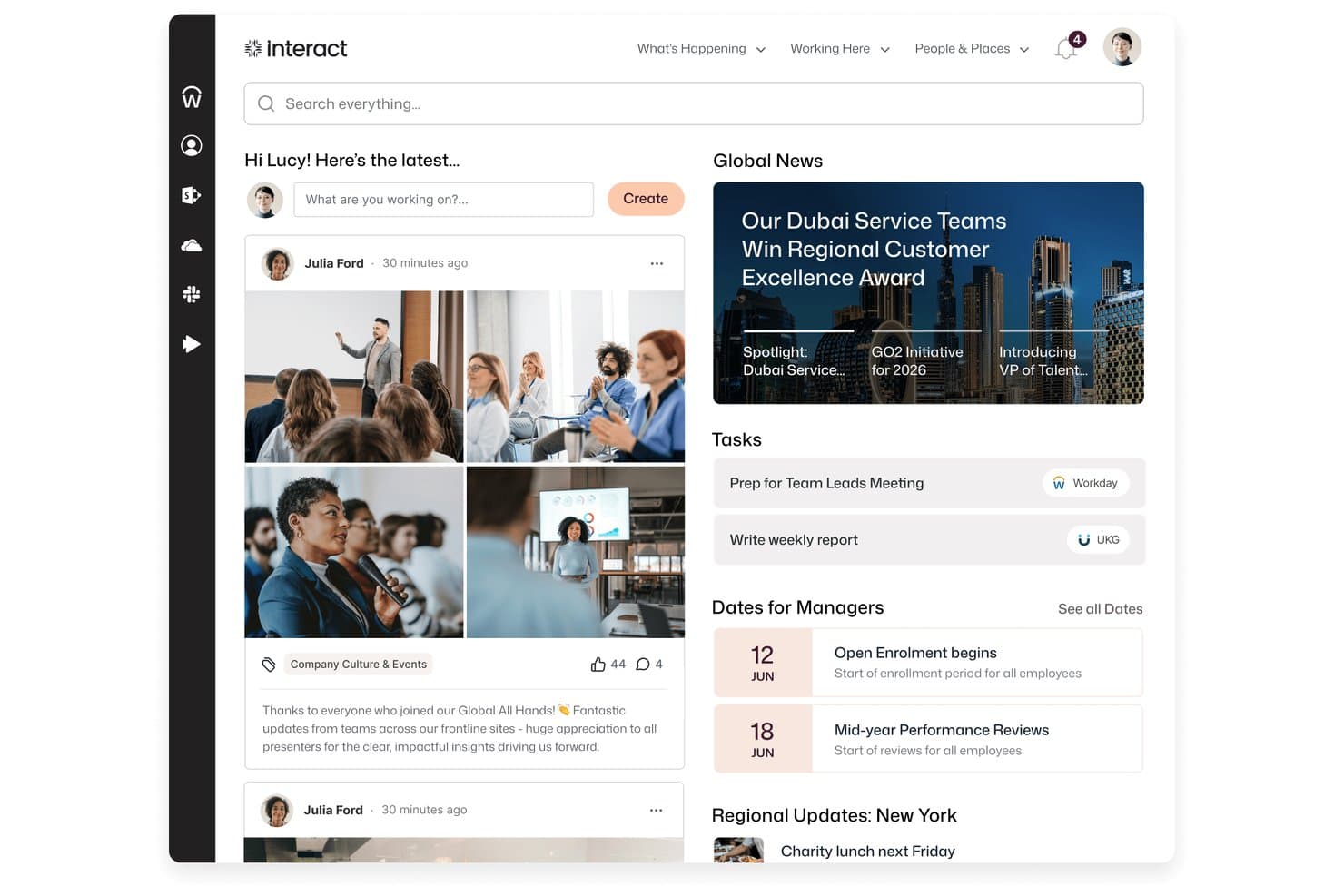
Interact Software centralizes news, tasks, and social updates in one intranet home screen. Interact Software is an enterprise intranet platform that brings together personalized content, AI-powered search, employee recognition, pulse surveys, and communications tools into a single employee experience hub.
Who Is Interact Software Best For?
Interact Software is a strong fit for HR and internal communications teams at large enterprises that want employee recognition and engagement built into the same platform as their intranet.
Why I Picked Interact Software
I picked Interact Software as one of the best because its built-in recognition engine does something most intranets leave to a separate tool: it actively surfaces kudos and positive sentiment through an AI Recognition Agent, then ties that visibility directly into the intranet experience. One Capterra reviewer noted that recognition drove intranet traffic and reached 98% of their organization. Pair that with persona-based content targeting and pulse surveys with real-time sentiment dashboards, and you get a platform where engagement isn't an afterthought.
Interact Software Key Features
- Omnichannel broadcasts: Send employee communications across multiple channels simultaneously and track read and response rates from a single source.
- Workplace Search: Search across both the intranet and connected third-party systems like SharePoint, Google Drive, and ServiceNow in one unified results view.
- Governance workflows: Route content through configurable approval and lifecycle workflows before it reaches employees.
- People directory with org chart: Browse searchable employee profiles and an interactive org chart with reporting lines and profile drill-down.
Interact Software Integrations
Interact lists over 100 integrations, including native connections across Microsoft 365, SharePoint, Microsoft Teams, Microsoft Entra ID, Google Workspace, ServiceNow, Workday, UKG, and SAP SuccessFactors. Its REST API, open API framework, and Application Developer Kit support custom integrations.
Pros and Cons
Pros:
- Targeted communications reach relevant employee groups
- Company news and resources share one hub
- Recognition can drive broad intranet participation
Cons:
- Search results can feel inconsistent
- Complex pages can take time to maintain
Learn more about Interact Software: Best for IC teams managing multichannel reach
- Free demo available
- Pricing upon request
Visit WebsiteCustomer Rating:4.7/5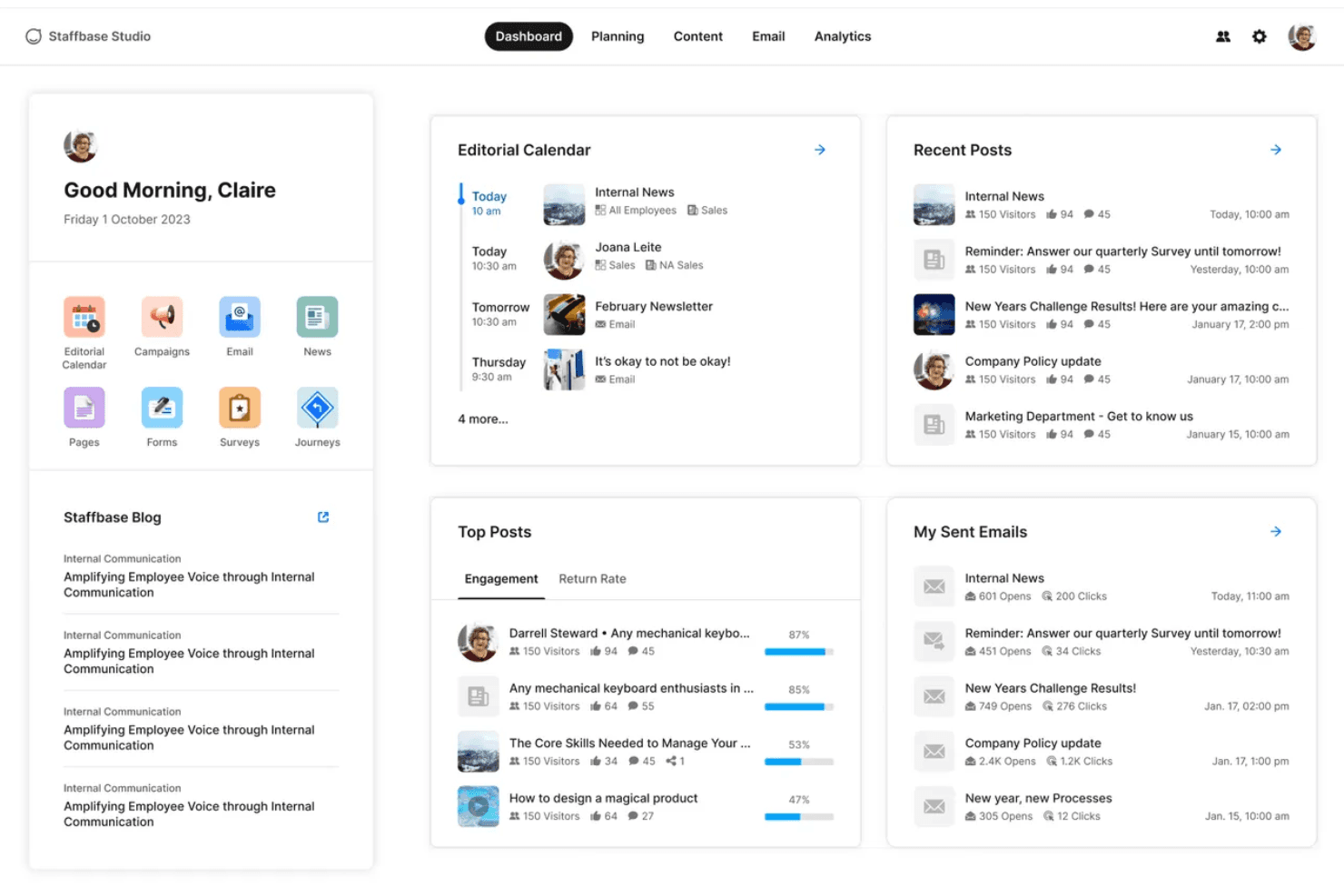
Staffbase centralizes internal comms with a unified intranet dashboard. Staffbase is an enterprise intranet platform that brings together a no-code content editor, multichannel publishing, an AI-powered employee assistant, and frontline-ready mobile access across a single editorial workflow.
Who Is Staffbase Best For?
Staffbase is a strong fit for enterprise internal communications teams managing mixed workforces—where desk-based employees and frontline workers need to be reached through a single, unified channel strategy.
Why I Picked Staffbase
I picked Staffbase as one of the best because it's the only platform I've used that lets an IC team publish simultaneously to the intranet, employee app, email, digital signage, and Microsoft Teams from a single editorial workflow. What really sets it apart is the combination of per-channel analytics with read receipts and mandatory-read tracking, so you can see exactly where a message landed and who missed it. Its AI-powered Navigator assistant also surfaces verified answers from connected systems like SharePoint and Workday, cutting down on repetitive HR and IT queries without any manual curation.
Staffbase Key Features
- No-code drag-and-drop editor: Build and publish news posts and pages using a visual WYSIWYG editor with rich media embedding and branded templates—no developer needed.
- Employee journey automation: Trigger personalized onboarding, role-change, and exit communication sequences directly from HRIS data using lifecycle-stage audience rules.
- Federated search: Surface results from SharePoint, Google Drive, Confluence, and Box alongside Staffbase content in a single unified search experience.
- eNPS and pulse surveys: Run sentiment tracking and engagement measurement surveys that can be embedded in posts, emails, or sent as standalone campaigns with non-responder follow-up targeting.
Staffbase Integrations
Staffbase offers native integrations across the Microsoft ecosystem, Google Workspace, Workday, SAP SuccessFactors, ADP, Oracle, ServiceNow, Box, Confluence, and Cornerstone. Its REST API supports custom integrations.
Pros and Cons
Pros:
- Offline mobile app access for frontline employees
- Multichannel publishing from one editorial workflow
- AI-native assistant answers HR and IT questions
Cons:
- Implementation requires IT support and project resourcing
- No transparent public pricing available
Learn more about Staffbase: 3Best for all-in-one intranet with flat-rate licensing
Hub
- Free demo available
- From £3.75/user/month (billed annually)
Visit WebsiteCustomer Rating:4.5/5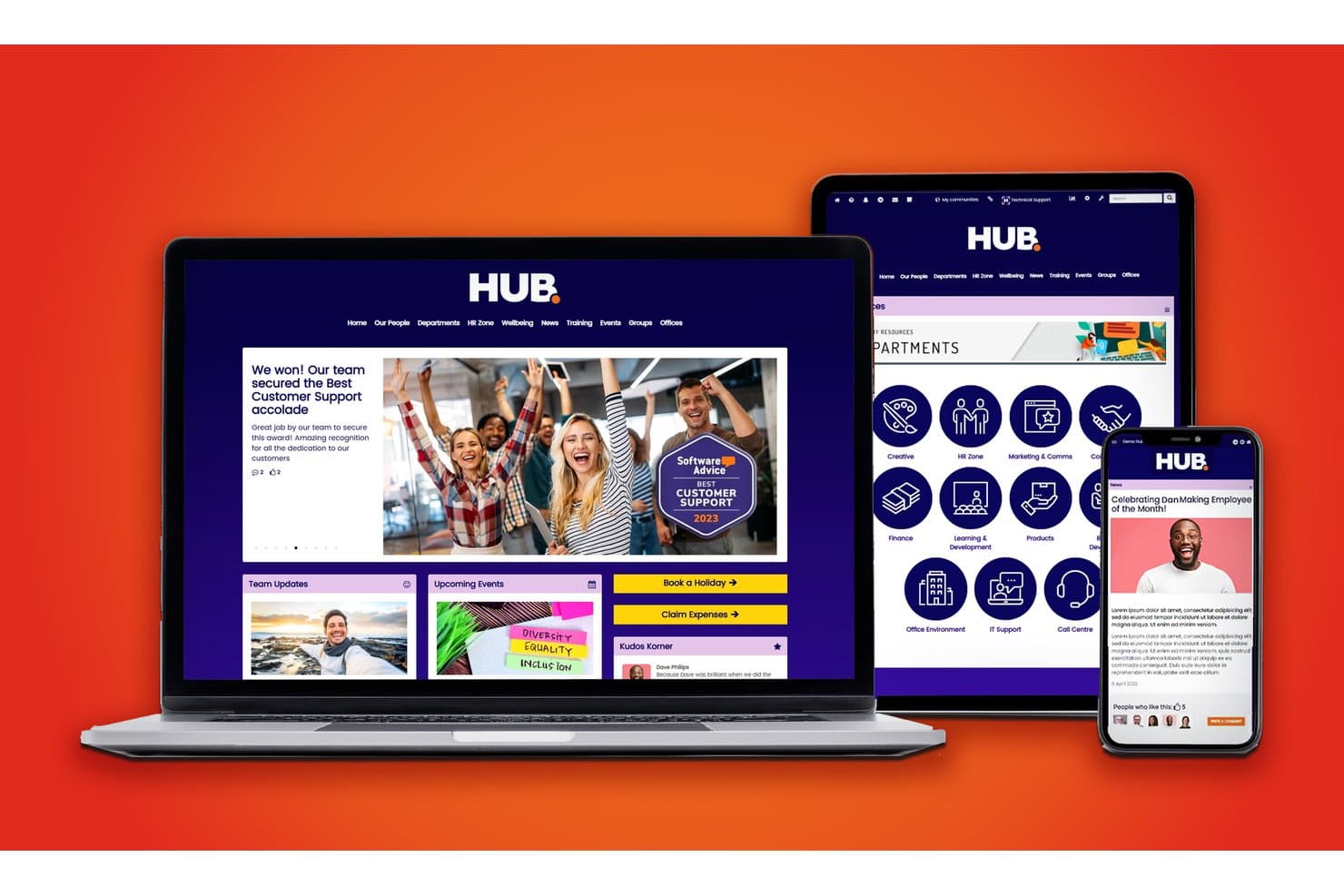
Hub centralizes company news, departments, and tools in one intranet. Hub is an intranet platform that brings together content publishing, employee directory, document management, social engagement, HR self-service tools, and an AI-powered knowledge base in a single environment.
Who Is Hub Best For?
Hub is a strong fit for mid-sized organizations whose HR, communications, and IT teams need a full-featured intranet without navigating tiered pricing or paying extra for core modules.
Why I Picked Hub
Hub earns its spot on my shortlist because its flat-rate licensing means every feature, from "Must Reads" compliance tracking to pulse surveys with wellbeing scoring, is included without gating anything behind a higher tier. I particularly like that HR and comms teams can run leave requests, internal job postings, and peer recognition from one environment without piecing together separate tools. The AI chatbot pulling answers directly from your company knowledge base is a genuinely useful touch for reducing repetitive HR queries at scale.
Hub Key Features
- Must Reads compliance tracking: Employees click to confirm they've read required content, with automated reminders sent to those who haven't.
- Pulse surveys with wellbeing scoring: Built-in surveys collect employee feedback and score results against wellbeing benchmarks.
- Federated search: A single search queries Hub and connected cloud drives like SharePoint, Google Drive, and Box simultaneously.
- Form builder with smart workflows: Custom forms route submissions to assigned owners, handling requests like IT tickets and holiday approvals.
Hub Integrations
Hub offers integrations with SharePoint, Google Drive, Box, Confluence, Slack, Microsoft Teams, Zendesk, Jira, Eventbrite, BambooHR, Microsoft 365, and Google Workspace, plus Microsoft Active Directory user sync.
Pros and Cons
Pros:
- Built-in compliance tracking for critical content
- 100+ granular permissions and audit trails
- All features included at one license price
Cons:
- No built-in multilingual publishing or translation
- Lacks native iOS and Android store apps
Learn more about Hub: Best for Workday-connected frontline intranets
- 14-day free trial + free demo available
- From $3.75/user/month (billed annually)
Visit WebsiteCustomer Rating:4.7/5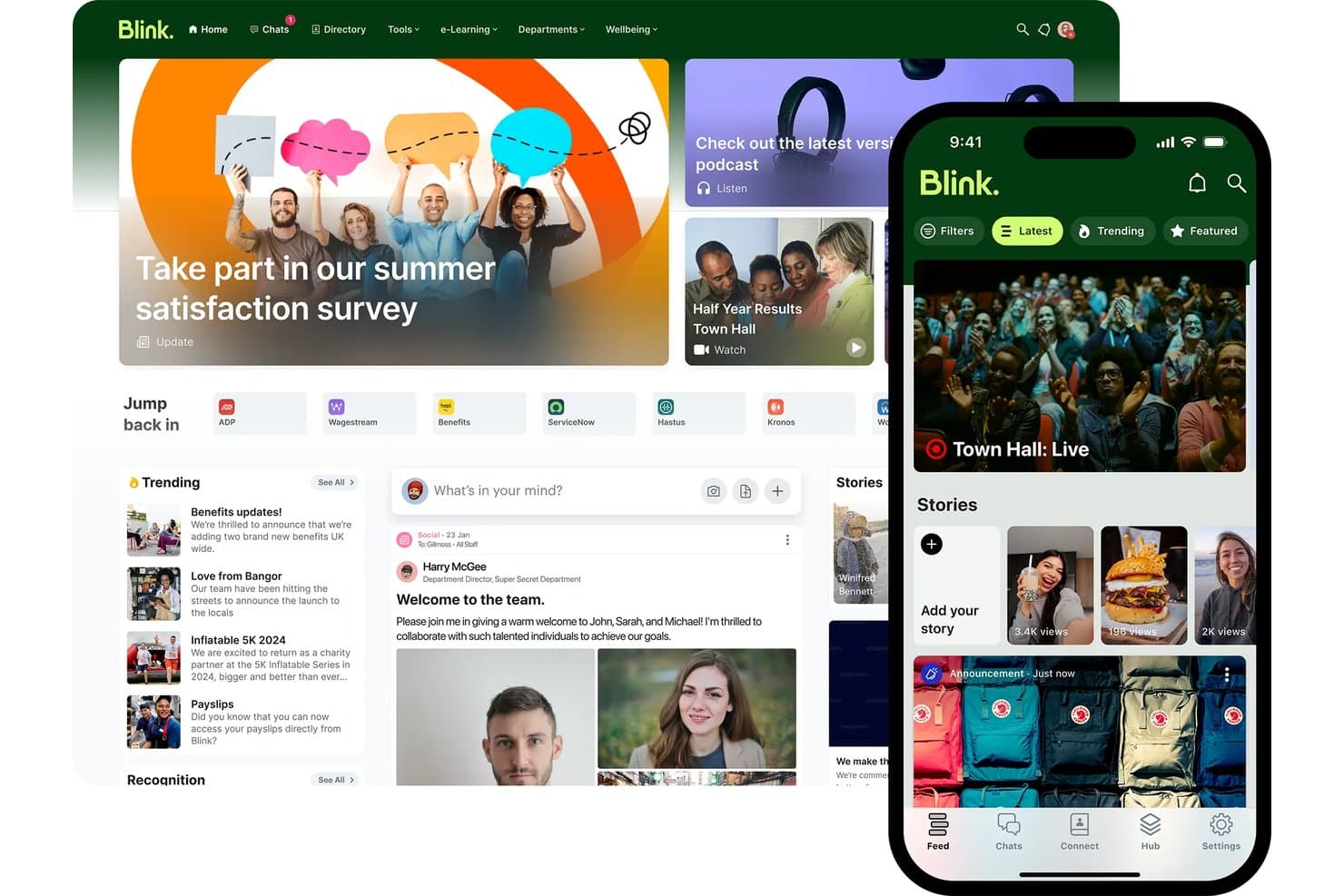
Blink unifies news, tools, and chat in one intranet platform. Blink is a mobile-first intranet platform built for frontline and deskless workforces, combining a social news feed, knowledge Hub, employee directory, pulse surveys, and AI-powered search.
Who Is Blink Best For?
Blink is a strong fit for mid-market and enterprise organizations with large frontline or deskless workforces—especially those already running Workday as their HRIS.
Why I Picked Blink
I picked Blink as one of the best because its Workday Platinum-certified, two-way integration goes far beyond basic provisioning. I've seen it surface Workday payslips, time-off requests, and learning reminders directly inside the Blink feed, so frontline workers get self-service HR access without ever logging into Workday separately. Blink's Employee Journeys then tie this together, automating onboarding content paths triggered by Workday start dates across populations that may never touch a desk.
Blink Key Features
- Blink IQ analytics: Real-time dashboards tracking reach, read receipts, engagement, and sentiment across the Feed, Chat, and Hub, with filtering by department, location, and job title.
- Mandatory Read: Pins critical announcements to the top of the Feed until employees acknowledge them, with read receipts tracked in real time.
- Communities: Dedicated virtual spaces organized around teams, ERGs, or initiatives, with flexible visibility and membership controls.
- Blink Lens: An AI analytics assistant within Blink IQ that answers data queries in plain language and flags metric changes without requiring a data analyst.
Blink Integrations
Blink offers native integrations with Workday, Microsoft SharePoint and M365, ServiceNow, Okta, Microsoft Entra ID, Google Workspace, Vimeo, and YouTube. Enterprise customers can use its Open API for custom integrations.
Pros and Cons
Pros:
- Multilingual publishing and AI translation included
- Workday-certified integration surfaces HR workflows natively
- Exceptional mobile access for frontline employees
Cons:
- No built-in task or workflow automation
- Knowledge management depth limited for heavy DMS needs
Learn more about Blink: Best for multilingual frontline workforce comms
- Free demo available
- Pricing upon request
Visit WebsiteCustomer Rating:4.6/5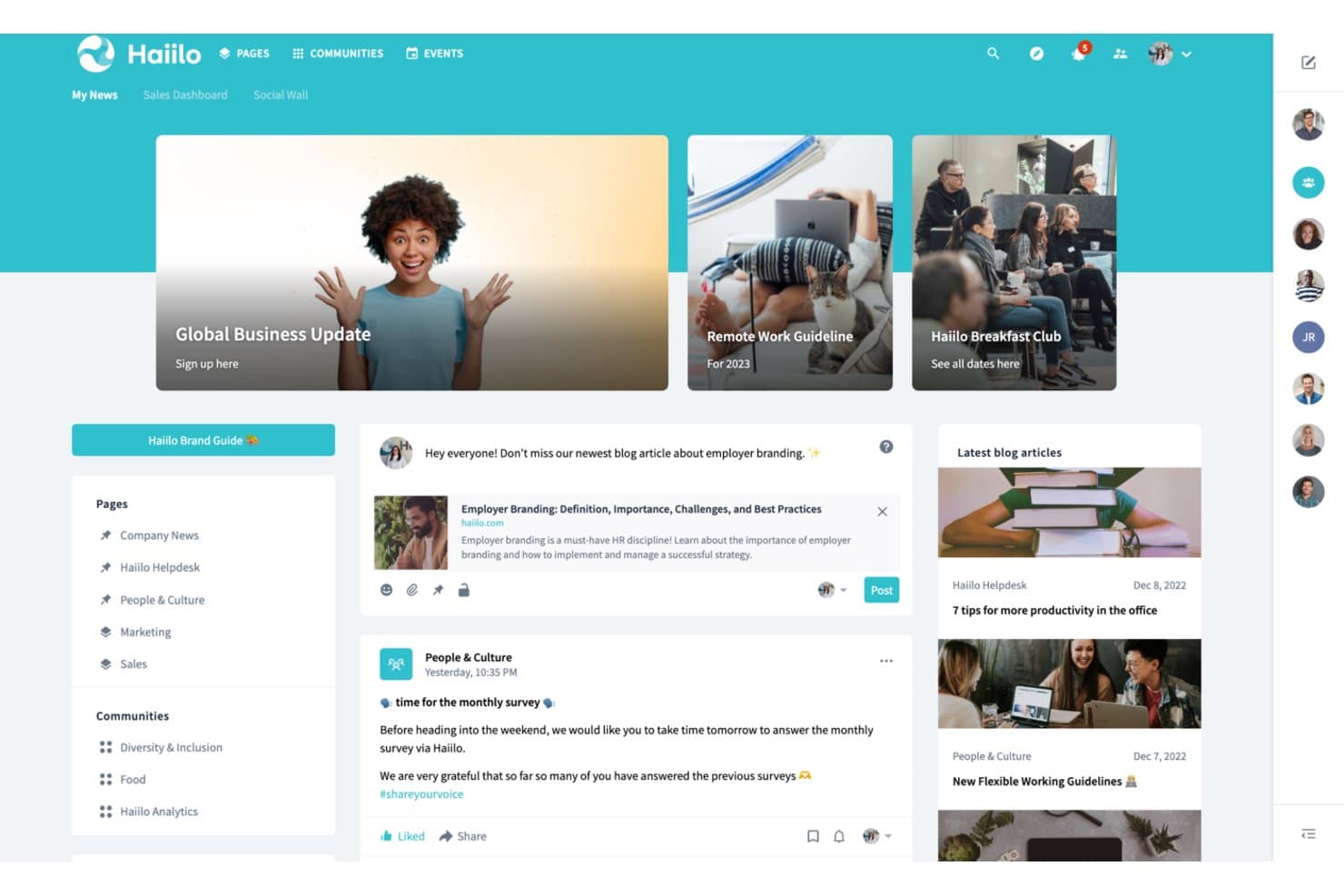
Haiilo centralizes news, communities, and blogs in one intranet hub. Haiilo is an enterprise intranet platform that brings together AI-powered content publishing, employee communications, knowledge management, social engagement tools, and a branded mobile app for frontline and desk-based workers alike.
Who Is Haiilo Best For?
Haiilo is a strong fit for mid-to-large enterprises with distributed or frontline workforces that need to reach employees across multiple languages and locations.
Why I Picked Haiilo
I picked Haiilo as one of the best because its native auto-translation across 28 languages genuinely sets it apart for companies with distributed, multilingual workforces. I've seen it remove a real barrier: a frontline worker in one country reads the same announcement as a colleague in another, each in their own language, with one-click translation handling the gap. The branded mobile app with push notifications and AI-spoken article summaries means deskless workers in retail, healthcare, or manufacturing stay connected without needing a desktop.
Haiilo Key Features
- Employee advocacy module: Share company content to external social channels with one-tap posting, AI-guided writing, and attribution analytics including LinkedIn impressions and UTM tracking.
- Pulse checks and polls: Collect real-time employee feedback directly within the intranet feed using built-in pulse surveys and poll tools.
- Enterprise Search Connector: Index Haiilo content in third-party search tools like Microsoft Search, and surface external content within Haiilo, with permissions respected throughout.
- Digital signage output: Publish internal communications to physical screens in locations like retail stores, hospitals, and warehouses directly from the content publishing workflow.
Haiilo Integrations
Haiilo offers 130+ pre-built integrations, including Workday, SAP SuccessFactors, Personio, HiBob, Okta, ServiceNow, and Jira. It also connects with Microsoft 365, Google Workspace, and Slack, with an open API for custom integrations.
Pros and Cons
Pros:
- AI assistant drafts, summarizes, and translates content
- Branded mobile app supports frontline workers
- Multilingual auto-translation covers 28 languages
Cons:
- Platform design customization options are limited
- Document search receives mixed user feedback
Learn more about Haiilo: Best for Zoom-native social intranet at scale
- Free demo available
- Pricing upon request
Visit WebsiteCustomer Rating:4.8/5
Workvivo centralizes employee updates, ratings, and team news in one hub. Workvivo is an enterprise intranet platform that brings together internal communications, employee engagement, knowledge management, and lifecycle automation in a social-media-style interface built for both desk-based and frontline workers.
Who Is Workvivo Best For?
Workvivo is a strong fit for large enterprises with significant frontline or deskless workforces that need a single platform to connect desk-based and field employees at scale.
Why I Picked Workvivo
I picked Workvivo as one of the best because it's the only enterprise intranet built natively inside the Zoom ecosystem, which means video, voice, and AI Companion aren't bolted on as afterthoughts. I love how Workvivo Journeys automates lifecycle moments like 30/60/90-day check-ins and onboarding without manual HR intervention, and Ask HQ lets employees search across SharePoint, Google Drive, and Workday in plain language from a single bar.
Workvivo Key Features
- Smart Activity Feed: A dynamic, personalized content feed that surfaces company news, posts, and updates based on each employee's role, team, and location.
- Workvivo Journeys: An automated workflow engine that triggers personalized content, tasks, and surveys for employees based on lifecycle stage, department, or start date.
- Seer engagement surveys: A people intelligence add-on with a 12-factor engagement model, pulse surveys, AI comment analysis, and manager dashboards with recommended next steps.
- Workvivo TV: A digital signage add-on that displays company communications on shared workplace screens, reaching frontline workers without requiring individual device logins.
Workvivo Integrations
Workvivo offers 40+ integrations, including Microsoft 365 and Entra ID, Google Workspace, Zoom, Slack, Salesforce, Workday, UKG, and ServiceNow. It also provides an open API, SDK, and webhooks for custom integrations.
Pros and Cons
Pros:
- Automates onboarding, check-ins, and policy rollouts
- AI-powered search spans all connected repositories
- Social-media-style engagement surpasses typical intranets
Cons:
- Search performance can lag in large organizations
- Some features require separate paid add-ons
 Best for analyst-recognized intranet adoption
- Free demo available
- Pricing upon request
Visit WebsiteCustomer Rating:4.8/5
Simpplr unifies news, tasks, and social feeds on one intranet home screen. Simpplr is an AI-powered enterprise intranet platform that combines multichannel content publishing, federated knowledge search, employee directory management, pulse surveys, and sentiment analytics in a single Digital Work Hub.
Who Is Simpplr Best For?
Simpplr is a strong fit for enterprise HR and internal communications teams that need analyst-validated proof points to drive leadership buy-in for a new intranet investment.
Why I Picked Simpplr
Simpplr earns its spot on my shortlist because it's the only intranet vendor recognized as a leader across Gartner Magic Quadrant, Forrester Wave, G2, and IDC MarketScape simultaneously. I find that kind of cross-analyst validation genuinely useful when you're building a business case internally, since skeptical stakeholders are harder to push back against verified third-party recognition. The Auto-Governance Engine™ keeps content fresh automatically, and the EX Knowledge Graph personalizes homepages by role, tenure, and behavior without manual configuration.
Simpplr Key Features
- Comms AI workspace: A dedicated AI environment for internal communications teams that drafts channel-specific content matched to individual sender voice profiles and manages cross-channel publishing from a single interface.
- Recognition and rewards module: Employees can give peer-to-peer recognition tied to company values, with redeemable points, automated milestone awards, and nomination-based recognition options.
- AI-powered sentiment analysis: Captures emotional signals from both active and passive employee interactions over time, surfacing aggregated insights for HR and leadership via role-specific dashboards.
- ABAC-driven audience targeting: Attribute-based access control lets you segment and target content delivery by role, department, location, tenure, and lifecycle stage with granular precision.
Simpplr Integrations
Simpplr offers 200+ pre-built integrations, including Microsoft 365, Google Workspace, Workday, UKG, Oracle HCM, SAP SuccessFactors, Slack, Zoom, SharePoint, and Confluence. Its Extensibility Center provides open APIs for custom integrations.
Pros and Cons
Pros:
- Analyst leader in four major industry reports
- Auto-Governance Engine flags stale intranet content
- Industry-first AI-powered enterprise search
Cons:
- Surveys and analytics require premium add-ons
- Design flexibility limited by predefined templates
 Best for global orgs on M365 and Google Workspace
- Free demo available
- Pricing upon request
Visit WebsiteCustomer Rating:4/5
LumApps unifies news, tasks, courses, and requests in one intranet hub. LumApps is an enterprise intranet platform built for global organizations, offering AI-powered content publishing, employee directories, knowledge management, pulse surveys, and deep integrations with Microsoft 365 and Google Workspace.
Who Is LumApps Best For?
LumApps is a strong fit for large, globally distributed organizations that run Microsoft 365 or Google Workspace and need a single intranet to connect desk-based and frontline employees across multiple languages and regions.
Why I Picked LumApps
LumApps earns its spot on my shortlist because it's one of the few intranet platforms built to run natively inside both Microsoft 365 and Google Workspace, not alongside them. I especially like its AI auto-translation across 200+ languages, which means a global communications team can publish once and reach frontline workers in dozens of regions without manual localization. The Agent Hub is also genuinely useful: employees can query HR policies or IT procedures in plain language and get answers sourced from governed company documents.
LumApps Key Features
- Mandatory-read tracking: Flag specific content as required reading and track which employees have confirmed they've seen it, with read-receipt data available to admins.
- Pulse surveys and sentiment analysis: Run built-in pulse surveys and collect anonymous feedback, with AI-driven sentiment analysis on comments and reactions to monitor workforce morale.
- Role-based homepage personalization: Deliver dynamically tailored homepages and content feeds based on each employee's department, location, role, and lifecycle stage.
- No-code Micro-App builder: Use the LumApps SDK and no-code builder to create custom widgets and mini-apps that surface data from third-party tools directly inside the intranet.
LumApps Integrations
LumApps offers 100+ integrations, including Microsoft 365, Google Workspace, Workday, SAP SuccessFactors, ServiceNow, Slack, and Microsoft Teams. It also supports custom connections through its open API and LumApps SDK.
Pros and Cons
Pros:
- Real-time employee sentiment analytics built in
- Auto-translates content to 200+ languages
- Strong AI tools for content and search
Cons:
- Frequent updates can confuse administrators
- Some analytics require premium add-ons
Learn more about LumApps: Best for HITRUST and FedRAMP-certified intranet
- 14-day free trial + free demo available
- From $9/user/month (billed annually)

MangoApps centralizes news, resources, and employee tools in one intranet hub. MangoApps is an enterprise intranet platform that combines a branded employee portal, AI-powered knowledge management, multi-channel content publishing, social engagement tools, and frontline workforce support across desk and deskless teams.
Who Is MangoApps Best For?
MangoApps is a strong fit for regulated industries like healthcare and government that need a certified, compliance-ready intranet for both desk and deskless employees.
Why I Picked MangoApps
MangoApps earns its spot on my shortlist because it's one of the only enterprise intranet platforms holding both HITRUST CSF and FedRAMP ATO certifications, which matters enormously if your organization operates in healthcare or the public sector. I particularly like that these aren't just checkboxes: the platform runs on single-tenant architecture with full data isolation, real-time audit logs, and DLP controls baked in at the platform level. Its AI assistants also inherit role-based permissions and never pull from the open internet, so governed knowledge delivery is built into the experience.
MangoApps Key Features
- Multi-channel content publishing: Publish a single piece of content simultaneously to the in-app feed, email, SMS, push notifications, and digital signage from one interface.
- Campaign and journey builder: Design multi-touch communication campaigns and employee lifecycle journeys with sequenced content delivery and scheduling.
- Pulse surveys and eNPS tracking: Run anonymous pulse surveys and eNPS polls with built-in analytics dashboards showing participation and sentiment by audience segment.
- Federated semantic search: Search across MangoApps and connected repositories like SharePoint, Google Drive, and ServiceNow in a single AI-powered query.
MangoApps Integrations
MangoApps offers 200+ native integrations, including Workday, UKG, ADP, BambooHR, SAP SuccessFactors, Microsoft 365, Google Workspace, Okta, ServiceNow, and Box. REST API and webhooks support custom integrations.
Pros and Cons
Pros:
- Supports frontline workers without corporate email
- Native AI tools with full governance
- Certified for HITRUST and FedRAMP compliance
Cons:
- Some users report mobile app inconsistencies
- Extensive features can feel overwhelming
Learn more about MangoApps:

Unily centralizes news, links, and social feeds in one intranet homepage. Unily is an AI-native enterprise intranet platform that combines multichannel content publishing, employee journey automation, unified enterprise search, social engagement tools, and conversational AI task execution across connected business systems.
Who Is Unily Best For?
Unily is built for large enterprises—typically 1,000+ employees—that need a centralized digital workplace with AI-driven personalization, lifecycle journey automation, and deep integrations across HR, IT, and productivity systems.
Why I Picked Unily
I picked Unily as one of the best because it's built from the ground up around AI, not retrofitted with it. What impresses me most is the Employee Journeys module, which automatically enrolls employees into sequenced, multichannel experiences (onboarding, parental leave, role transitions) based on live HRIS data synced from Workday or SAP. Pair that with Unily Glass, a conversational AI layer that lets employees complete HR requests or IT tickets without leaving the intranet, and you have a platform that genuinely operationalizes AI across the employee lifecycle.
Unily Key Features
- Unified enterprise search: Search across intranet content, people profiles, and connected external systems like SharePoint, Confluence, and ServiceNow from a single query interface.
- AI-powered content translation: Automatically publish content in multiple languages simultaneously, with protected-terms functionality that preserves brand names and acronyms across translations.
- Gamification tools: Award points, badges, and leaderboard rankings to employees, and let teams submit and upvote ideas through the built-in ideation hub.
- Broadcast email with analytics: Send targeted, scheduled email communications to segmented audiences and track delivery rates, open rates, and click-throughs from a single dashboard.
Unily Integrations
Unily supports 50+ integrations, including Microsoft 365, Google Workspace, Workday, SAP HR, HiBob, ServiceNow, Salesforce, Confluence, Slack, and Zoom. Platform Extensibility provides REST APIs and SDKs for custom integrations.
Pros and Cons
Pros:
- Conversational AI executes tasks across systems
- Advanced multi-language auto-translation support
- AI-native employee journey automation built-in
Cons:
- Key functions require add-on purchases
- Opaque enterprise pricing with no trial
Learn more about Unily:
Diğer Kurumsal İntranet Yazılımları
Kısa listeme giremeyen ancak yine de göz atmaya değer bazı ek kurumsal intranet yazılımı seçenekleri şunlardır:
- 11ClaromentisBest for on-premise intranet with compliance controls
- 12ThoughtFarmerBest for knowledge-worker intranet with AI search
- 13AxeroBest for all-in-one intranet with on-prem option
- 14JostleBest for mid-market intranet with AI Q&A included
- 15HappeoBest for Google Workspace-native intranet
- 16Microsoft SharePointBest for M365 document governance at enterprise scale
- 17AppspaceBest for omnichannel signage and intranet in one
- 18FirstupBest for lifecycle-triggered intranet journeys
- 19Powell IntranetBest for M365 intranet with grounded AI copilots
- 20Viva ConnectionsBest for M365 intranet across frontline and office
How I Evaluate Enterprise Intranet Software
I split my evaluation into baseline capabilities every tool must cover and the differentiators that separate a solid intranet from the right one for your workforce.
Core Functionality (Table Stakes For This List)
When I'm selecting tools for my list, I rank each one on a scale from 0 (does not offer the functionality) to 5 (excels in this area) for each core functionality listed below. I then calculate the tool's total score into a percentage, using 75% as a benchmark to help assess its overall fit for the list.
- Content & publishing: I check whether the platform supports drag-and-drop page building, scheduling, templates, and approval workflows—things IC teams need to keep company news timely and on-brand.
- Employee directory & profiles: A searchable directory with org chart navigation, skills tagging, and HRIS sync matters here, especially for orgs where new hires need to find the right person fast.
- Document & knowledge management: I evaluate how each tool handles versioning, permissions, and search across policies and knowledge base articles, since outdated or buried documents are a constant pain point for HR teams.
- Social engagement tools: Features like comments, reactions, polls, communities, and activity feeds show me whether employees can actually interact with content rather than just consume it.
- Permissions & access control: I look for granular role-based access, audience targeting, SSO, and SCIM provisioning so IT teams can manage who sees what without manual upkeep.
- Integrations & mobile access: The tool should connect with platforms like Microsoft 365, Google Workspace, Slack, and major HRIS systems, and offer a native mobile app with push notifications for frontline workers.
Once I have a list of tools that meet the criteria, I consider what sets each platform apart.
Differentiating Factors (What Sets Vendors Apart)
Here's how I compare and contrast different vendors:
Standout Features
I look for AI-powered search that goes beyond keyword matching—tools like Unily and Simpplr use generative AI to surface direct answers from policies and past posts, which cuts down repetitive questions hitting HR and IT. Multilingual auto-translation is essential for global workforces; I check whether platforms translate not just pages but also comments and push notifications. I also evaluate campaign analytics dashboards, since IC teams need read-receipt tracking and audience reach data to prove mandatory comms actually landed.
Beyond Features
I evaluate how well each platform supports deskless and frontline workers—things like shared-device login, QR-code onboarding, and offline mobile access matter when your workforce doesn't sit at a desk. HRIS integration depth is equally important; I check for pre-built connectors to systems like Workday, SAP SuccessFactors, or BambooHR that auto-sync org charts and trigger onboarding checklists from lifecycle events. I also consider total cost of ownership, since some vendors bundle AI and analytics into base pricing while others charge extra for each module as you scale.
Kurumsal İntranet Yazılımı Nasıl Seçilir?
Ekibinizin gerçek dünyadaki iletişim, güvenlik ve entegrasyon ihtiyaçları için kurumsal intranet yazılımı seçeneklerini daraltırken nelere odaklanmalısınız?
| Önceliğiniz... | Şunları arayın... |
|---|---|
| Önceliğiniz...Masa başında çalışmayan veya saha çalışanlarına ulaşmak | Şunları arayın...Paylaşılan cihazlarda oturum açma, çevrimdışı mobil erişim, QR ile işe alıştırma |
| Önceliğiniz...Çok dilli iletişim | Şunları arayın...Sayfalar, bildirimler ve yorumlar için otomatik çeviri |
| Önceliğiniz...İK sistemi entegrasyonunun kapsamı | Şunları arayın...Workday, SAP veya BambooHR için önceden oluşturulmuş bağlayıcılar |
| Önceliğiniz...Uyumluluk veya denetim gereksinimlerini garanti altına almak | Şunları arayın...Denetim günlükleri, ayrıntılı erişim denetimleri, şirket içi barındırma |
| Önceliğiniz...İletişim etkisini ölçmek | Şunları arayın...Kampanya analizleri, okundu bilgisi izleme araçları |
Kısa Listeniz Nasıl Değerlendirilir?
- Saha çalışanlarının erişilebilirliğini test edin: Paylaşılan veya çevrimdışı bir cihazda mobil oturum açmayı simüle edin ve tüm engelleri 30 dakikadan kısa sürede belgeleyin.
- Çok dilli desteği kontrol edin: Bir dilde haber gönderisi oluşturun ve tek bir canlı deneme sırasında yorumlar ile bildirimler için otomatik çeviriyi doğrulayın.
- HRIS entegrasyonunu doğrulayın: HRIS sisteminizden (ör. Workday) intranetin organizasyon şemasına gerçek zamanlı senkronizasyonu 2 iş günü içinde gösteren bir demo talep edin.
- Uyumluluk kanıtı isteyin: Sözleşme görüşmelerinden önce yakın tarihli bir denetim günlüğü dışa aktarma dosyası ve SOC 2 veya HITRUST sertifikalarının bir kopyasını talep edin.
- Ödünleşimi değerlendirin: Uzun vadede intranetin benimsenmesi açısından İK teknoloji yığınınızla derin entegrasyonun mu, yoksa saha çalışanlarının kullanım kolaylığının mı daha önemli olduğuna karar verin.
Kurumsal İntranet Yazılımı Nedir?
Kurumsal intranet yazılımı, bir kuruluş genelindeki çalışanları birbirine bağlayan, şirket iletişimlerini, kaynaklarını ve iş birliği araçlarını güvenli tek bir alanda merkezileştiren dijital bir platformdur. Güncellemeleri yayımlamak, belgeleri depolamak, kurum içi bilgileri yönetmek ve çalışan bağlılığını güçlendirmek için kullanırsınız. Bu yazılım; dağınık konumlarda çalışan, farklı diller konuşan veya sahada görev yapan çalışanlara ulaşması, uyumluluğu desteklemesi ve mevcut iş yeri platformlarıyla uyum sağlaması gereken İK ve iletişim ekipleri için önemli bir rol oynar.
Özellikler
Kurumsal intranet yazılımı seçerken aşağıdaki temel özelliklere dikkat edin:
- İçerik ve yayımlama: Sürükle ve bırak sayfa oluşturucuları, özelleştirilebilir şablonlar ve onay iş akışlarını kullanarak kurum içi haberleri, duyuruları ve güncellemeleri oluşturun, yönetin ve planlayın. Bu, şirket bilgilerinin güncel, tutarlı ve tüm çalışanlar için erişilebilir olmasını sağlar.
- Çalışan dizini ve profilleri: Ekibinize beceriler, iletişim bilgileri ve organizasyon şeması gezinmesi dahil ayrıntılı profiller içeren aranabilir bir dizin sunun. Bu, çalışanların birbirleriyle bağlantı kurmasını, uzmanlık alanlarını bulmasını ve raporlama yapılarını anlamasını kolaylaştırır.
- Belge ve bilgi yönetimi: Yerleşik sürüm kontrolü, izin ayarları ve gelişmiş arama özellikleriyle politikaları, el kitaplarını ve kurum içi bilgileri tek bir alanda düzenleyin. Böylece herkesin doğru ve güncel bilgilere zahmetsizce erişmesini sağlarsınız.
- Sosyal etkileşim araçları: Çalışanların içeriklerle ve iş arkadaşlarıyla etkileşime girmesini sağlayan yorumları, tepkileri, anketleri ve grup topluluklarını etkinleştirin. Bu, katılımı artırır, geri bildirimleri ortaya çıkarır ve şirket kültürünü destekler.
- İzinler ve erişim denetimi: Ayrıntılı rol tabanlı izinler, hedef kitle belirleme, SSO ve kullanıcı sağlama aracılığıyla içerik görünürlüğünü ve düzenleme haklarını yönetin. Bu, hassas verileri korumanıza ve yalnızca doğru kişilerin doğru bilgileri görmesini sağlamanıza yardımcı olur.
- Entegrasyonlar ve mobil erişim: Microsoft 365, Google Workspace, Slack ve başlıca HRIS sistemleri gibi araçlara bağlanın. Anlık bildirimlere sahip yerel bir mobil uygulama, masa başında çalışmayan veya sahada görev yapan çalışanlara ofis çalışanları kadar kolay ulaşmanıza yardımcı olur.
- Çok dilli destek: Küresel ekipler için güncellemeleri, belgeleri, yorumları ve bildirimleri çevirin. Bu özellik, dilinden bağımsız olarak herkesin bilgilendirilmesini ve sürece dahil olmasını sağlar.
- Kampanya analizleri: Okundu bilgileri, tıklama oranları ve kitle erişimi panolarıyla etkileşimi izleyin. Bu bilgiler, İK ve iletişim ekiplerinin kritik güncellemelerin ve uyumlulukla ilgili iletişimlerin etkisini ölçmesine yardımcı olur.
- HRIS entegrasyonu: Çalışan verilerini, organizasyon şemalarını ve yaşam döngüsü olaylarını Workday, SAP SuccessFactors veya BambooHR gibi sistemlerle senkronize edin. Bu, güncellemeleri otomatikleştirir ve İK ekibinizin manuel iş yükünü azaltır.
- Saha çalışanı desteği: Düzenli bilgisayar erişimi olmayan çalışanlar için intraneti kullanışlı hale getirmek üzere paylaşılan cihazla oturum açma, QR koduyla işe alıştırma ve çevrimdışı mobil erişim sunun. Bu, nerede çalıştıklarına bakılmaksızın her ekip üyesini şirket iletişimine dahil eder.
Faydalar
Kurumsal intranet yazılımını uygulamak, ekibiniz ve işletmeniz için çeşitli faydalar sağlar. Yararlanabileceğiniz bazı avantajlar şunlardır:
- Merkezileştirilmiş şirket iletişimi: Yayımlama araçları ve otomatik bildirimleri kullanarak haberleri, güncellemeleri ve politika değişikliklerini güvenli, aranabilir tek bir alanda bir araya getirin.
- Geliştirilmiş çalışan bağlantısı: Dizinler, organizasyon şemaları ve profil arama özellikleriyle herkesin iş arkadaşlarını, becerileri ve ekipleri hızlıca bulmasına yardımcı olun.
- Sadeleştirilmiş belge ve bilgi erişimi: Gelişmiş arama ve sürüm kontrolüyle el kitaplarını, politikaları ve kurum içi bilgileri kolayca bulunabilir ve güncel tutulabilir hale getirin.
- Geliştirilmiş bağlılık ve geri bildirim: Kurum içi gönderilerde yorum, tepki ve anket gibi sosyal özellikler aracılığıyla şirket genelinde katılımı teşvik edin.
- Daha güçlü güvenlik ve uyumluluk: Ayrıntılı izinler, denetim günlükleri ve uyumluluk ihtiyaçlarıyla uyumlu erişim denetimleriyle hassas bilgileri kontrol edin.
- Sorunsuz entegrasyonlar ve mobil kullanım: Microsoft 365, Google Workspace, HRIS platformları ve daha fazlasına bağlanın; ayrıca mobil uygulamalar ve anlık uyarılarla masa başında çalışmayan ekiplere ulaşın.
- Küresel iş gücünü kapsayıcılık: Güncellemeler, yorumlar ve bildirimler için otomatik çeviri içeren çok dilli destekle tüm çalışanların bilgilendirilmesini sağlayın.
Maliyetler ve Fiyatlandırma
Kurumsal intranet yazılımı seçmek, mevcut çeşitli fiyatlandırma modellerini ve planları anlamayı gerektirir. Maliyetler özelliklere, ekip büyüklüğüne, eklentilere ve daha fazlasına göre değişir. Aşağıdaki tablo, kurumsal intranet yazılımı çözümlerinde yaygın planları, ortalama fiyatlarını ve genellikle dahil edilen özellikleri özetlemektedir:
Kurumsal İntranet Yazılımı İçin Plan Karşılaştırma Tablosu
| Plan Türü | Ortalama Fiyat | Yaygın Özellikler |
|---|---|---|
| Plan TürüÜcretsiz Plan | Ortalama Fiyat$0 | Yaygın ÖzelliklerTemel içerik yayımlama, sınırlı çalışan dizini, belge depolama ve temel sosyal etkileşim araçları. |
| Plan TürüBireysel Plan | Ortalama Fiyat$5–$10/kullanıcı/ay | Yaygın ÖzelliklerTek kullanıcı erişimi, özel profiller, basit bilgi yönetimi ve sınırlı entegrasyonlar. |
| Plan Türüİşletme Planı | Ortalama Fiyat$8–$20/kullanıcı/ay | Yaygın ÖzelliklerÇok kullanıcılı erişim, gelişmiş belge denetimi, ekip sohbeti, analizler, SSO, entegrasyonlar ve mobil erişim. |
| Plan TürüKurumsal Plan | Ortalama Fiyat$15–$40/kullanıcı/ay | Yaygın ÖzelliklerGelişmiş izinler, HRIS senkronizasyonu, çok dilli destek, kampanya analizleri, uyumluluk araçları ve öncelikli destek. |
Kurumsal İntranet Yazılımı SSS
Kurumsal intranet yazılımı hakkında sık sorulan bazı soruların yanıtları:
İntranetimizin masa başı olmayan veya sahada çalışan personeli desteklediğinden nasıl emin olabilirim?
Ortak cihazla giriş, QR koduyla işe başlatma ve çevrimdışı mobil erişim gibi özellikleri arayarak başlayın. Bu özellikler, saha çalışanlarının kendilerine tahsis edilmiş bir iş bilgisayarı olmadan bile kaynaklara ve güncellemelere erişmesini sağlar. Değerlendirme sırasında satıcılardan ortak cihazla veya çevrimdışı giriş özelliğini göstermelerini isteyin ve bir mağaza alanından veya depodan mobil uygulamayla güncellemelere erişmek gibi gerçek hayattaki senaryoları test edin.
Bir intranet platformunda hangi HRIS entegrasyonlarına öncelik vermeliyim?
Workday, SAP SuccessFactors veya BambooHR gibi temel İK sisteminiz için hazır bağlayıcılara odaklanın. Gerçek zamanlı organizasyon şeması senkronizasyonu sunan ve işe başlatma veya transfer gibi yaşam döngüsü olaylarından iş akışlarını tetikleyebilen platformlara öncelik verin. Bu, manuel güncellemeleri azaltır ve İK ile BT ekipleri için verilerin doğruluğunu korur.
Kampanya analizleri İK ve iletişim ekiplerine nasıl yardımcı olur?
Kampanya analizleri, önemli mesajları ve güncellemeleri kimlerin açtığını, okuduğunu veya görmezden geldiğini gösterir. Okundu bilgileri, tıklama takibi ve kitle ayrıştırmaları gibi özellikleri arayın. Bu veriler, acil güncellemelerin etkisini ölçmenize, zorunlu iletişim kurallarına uyumu kanıtlamanıza ve takip gerektirebilecek ekipleri veya konumları belirlemenize yardımcı olur.
İntranet yazılımında izinler ile erişim denetimi arasındaki fark nedir?
İzinler, kullanıcıların intranet içinde neler yapabileceğini (düzenleme, yayımlama, görüntüleme) belirler. Erişim denetimi ise genellikle kitleye, departmana veya kullanıcı rolüne göre belirli içerikleri kimlerin görebileceğine odaklanır. Hassas bilgileri korumak ve herkesin işiyle ilgili önemli içerikleri görmesini sağlamak için her ikisine de ihtiyacınız vardır.
Kurumsal intranet yazılımı çok dilli iletişimleri otomatik olarak yönetebilir mi?
Evet, birçok platform gönderiler, yorumlar ve bildirimler için otomatik çeviri sunar. Bu, küresel ekiplerin günlük olarak hangi dili kullandıklarına bakılmaksızın bilgilenmelerine ve sürece dahil olmalarına yardımcı olur. Deneme süreniz boyunca güncellemeler oluşturup dil ayarlarını değiştirerek bunu test edin.
Çoğu intranet platformu her özellik için ücret alır mı, yoksa bazı özellikler dahil midir?
Bu değişir. Bazı satıcılar yapay zekâ, analizler ve çok dilli desteği standart fiyatlandırmaya dahil ederken, diğerleri kullanımınız arttıkça bu modüller için ek ücret talep eder. Sözleşmeleri dikkatle inceleyin ve karar vermeden önce dahil olan ve premium özelliklerin eksiksiz bir listesini isteyin.