

Yapay zekâ araçları, tekrarlayan görevleri üstlenmekten verilerinizi daha iyi anlamanıza yardımcı olmaya kadar pek çok işi gerçekleştirebilir ve dikkatinizi gerçekten vermeniz gereken çalışmalara odaklayabilmeniz için size zaman kazandırabilir. Sağlık hizmetleri, pazarlama veya işletme alanında çalışıyor olmanız fark etmeksizin, günümüzün çalışan profesyonelleri için kullanılabilecek pek çok yapay zekâ uygulaması bulunuyor.
Farklı yapay zekâ platformlarını incelerken edindiğim deneyime göre, doğru aracın günlük iş akışınızı ne kadar değiştirebildiğini gördüm. Sunduğu özellikleri ve öne çıktığı noktaları adil bir şekilde değerlendirebilmeniz için üretken yapay zekâ ve verimlilik araçlarından toplantı notlarını özetlemeye kadar bu seçenekleri kendim test ettim. Aklınızdaki belirli görev ne olursa olsun, ona uygun bir araç bulmanız muhtemel.
Why Trust Our Software Recommendations
6,700+
Reviews
20
Industry experts
16+
Evaluation factors
14
Years
Our team has been testing and reviewing software since 2012. As HR experts ourselves, we know how difficult—and important—it is to choose the right software.
For this guide, we evaluated tools using hands-on testing and independent research, scoring tools using our selection criteria. We also draw on insights from industry thought leaders and practicing HR experts.
Our reviews reflect our human editorial judgment, not a sales pitch.
Expert reviewers:
- Phil GrayCOO
 Kim BehnkeHR Tech Editor & Analyst
 Josh BarkerPeople Ops Manager

Yapay Zekâ Platformları Karşılaştırma Tablosu
Bu karşılaştırma tablosu, en iyi yapay zekâ platformu seçimlerimin fiyatlandırma ayrıntılarını özetlemektedir:
Score legend (out of 5)
- Excellent4.5–5
- Good4–4.4
- Average3–3.9
- Below average2–2.9
- Poor1–1.9
Sorted by: Default
| Tool | Starting Price | Website | |||||||||||||||||||
|---|---|---|---|---|---|---|---|---|---|---|---|---|---|---|---|---|---|---|---|---|---|
Best for AI-assisted project risk detection | Not rated | 3 | 5 | 5 | 5 | 4 | 5 | Not rated | Not rated | Not rated | Not rated | Not rated | Not rated | Not rated | Not rated | Not rated | Not rated | Not rated | Not rated | $9/user/month Free plan + 14-day trial available | Book Demo |
Best for AI-Powered ITSM | Not rated | 3 | 5 | 4 | 4 | 2 | 3 | Not rated | Not rated | Not rated | Not rated | Not rated | Not rated | Not rated | Not rated | Not rated | Not rated | Not rated | Not rated | $19/user/month 14-day free trial | Book Demo |
Best for workflow process design with drag-and-drop | Not rated | 4 | 5 | 5 | 5 | 4 | 5 | Not rated | Not rated | Not rated | Not rated | Not rated | Not rated | Not rated | Not rated | Not rated | Not rated | Not rated | Not rated | $40/user/month Free demo available | Book Demo |
Best for performance analytics backed by AI | Not rated | 2 | 3 | 2 | 2 | 1 | 4 | Not rated | Not rated | Not rated | Not rated | Not rated | Not rated | Not rated | Not rated | Not rated | Not rated | Not rated | Not rated | Pricing upon request Free demo available | Website |
Best for collaborative inbox management | Not rated | Not rated | Not rated | Not rated | Not rated | Not rated | Not rated | Not rated | Not rated | 1 | Not rated | Not rated | Not rated | Not rated | Not rated | Not rated | Not rated | Not rated | Not rated | $14/user/month 30-day free trial available | Website |
Best for unified data and AI model governance | Not rated | 5 | 5 | 5 | 5 | 5 | 5 | Not rated | Not rated | Not rated | Not rated | Not rated | Not rated | Not rated | Not rated | Not rated | Not rated | Not rated | Not rated | $0.15/DBU Free edition available + 14-day free trial | Book Demo |
Best for no-code AI agent builder | Not rated | 3 | 4 | 2 | 3 | 4 | 4 | Not rated | Not rated | Not rated | Not rated | Not rated | Not rated | Not rated | Not rated | Not rated | Not rated | Not rated | Not rated | $32/month 7-day free trial + demo available | Website |
Best for enterprise knowledge integration | Not rated | Not rated | Not rated | Not rated | Not rated | Not rated | Not rated | Not rated | Not rated | Not rated | Not rated | Not rated | Not rated | 4 | 4 | 4 | 2 | 4 | 4 | Pricing upon request Free trial available | Website |
Best for AI-powered background screening | Not rated | 1 | 3 | 1 | 2 | 1 | 2 | Not rated | Not rated | Not rated | Not rated | Not rated | Not rated | Not rated | Not rated | Not rated | Not rated | Not rated | Not rated | $29.99/report Free demo available | Website |
Best for governing AI across the full ML lifecycle | Not rated | 5 | 5 | 5 | 5 | 5 | 5 | Not rated | Not rated | Not rated | Not rated | Not rated | Not rated | Not rated | Not rated | Not rated | Not rated | Not rated | Not rated | Pricing upon request 14-day free trial | Website |
Best for AI deployment in regulated industries | Not rated | 5 | 4 | 5 | 5 | 5 | 5 | Not rated | Not rated | Not rated | Not rated | Not rated | Not rated | Not rated | Not rated | Not rated | Not rated | Not rated | Not rated | Pricing upon request Free demo available | Website |
Best for secure AI-driven board meeting management | Not rated | 2 | 2 | 1 | 2 | 1 | 4 | Not rated | Not rated | Not rated | Not rated | Not rated | Not rated | Not rated | Not rated | Not rated | Not rated | Not rated | Not rated | Pricing upon request Free demo available | Website |
Best for multi-model agent orchestration at scale | Not rated | 5 | 5 | 5 | 5 | 5 | 5 | Not rated | Not rated | Not rated | Not rated | Not rated | Not rated | Not rated | Not rated | Not rated | Not rated | Not rated | Not rated | $21/user/month 30-day free trial | Website |
Best for enterprise-scale model fleet governance | Not rated | 5 | 5 | 5 | 5 | 5 | 5 | Not rated | Not rated | Not rated | Not rated | Not rated | Not rated | Not rated | Not rated | Not rated | Not rated | Not rated | Not rated | $0.165 per 1M input tokens 30-day free trial available | Website |
Best for customer interaction automation | Not rated | 2 | 3 | 1 | 3 | 2 | 3 | Not rated | Not rated | Not rated | Not rated | Not rated | Not rated | Not rated | Not rated | Not rated | Not rated | Not rated | Not rated | $24.17/month Free plan available; 7-day free trial | Website |


En İyi Yapay Zekâ Platformu İncelemeleri
Aşağıda, kısa listeme giren en iyi yapay zekâ platformlarına ilişkin ayrıntılı özetlerimi bulabilirsiniz. İncelemelerim, sizin için en iyi seçeneği bulmanıza yardımcı olmak amacıyla her aracın temel özelliklerine, artılarına ve eksilerine, entegrasyonlarına ve ideal kullanım alanlarına ayrıntılı bir bakış sunuyor.
 Best for AI-assisted project risk detection
- Free plan + 14-day trial available
- From $9/user/month (billed annually)
Visit WebsiteCustomer Rating:4.6/5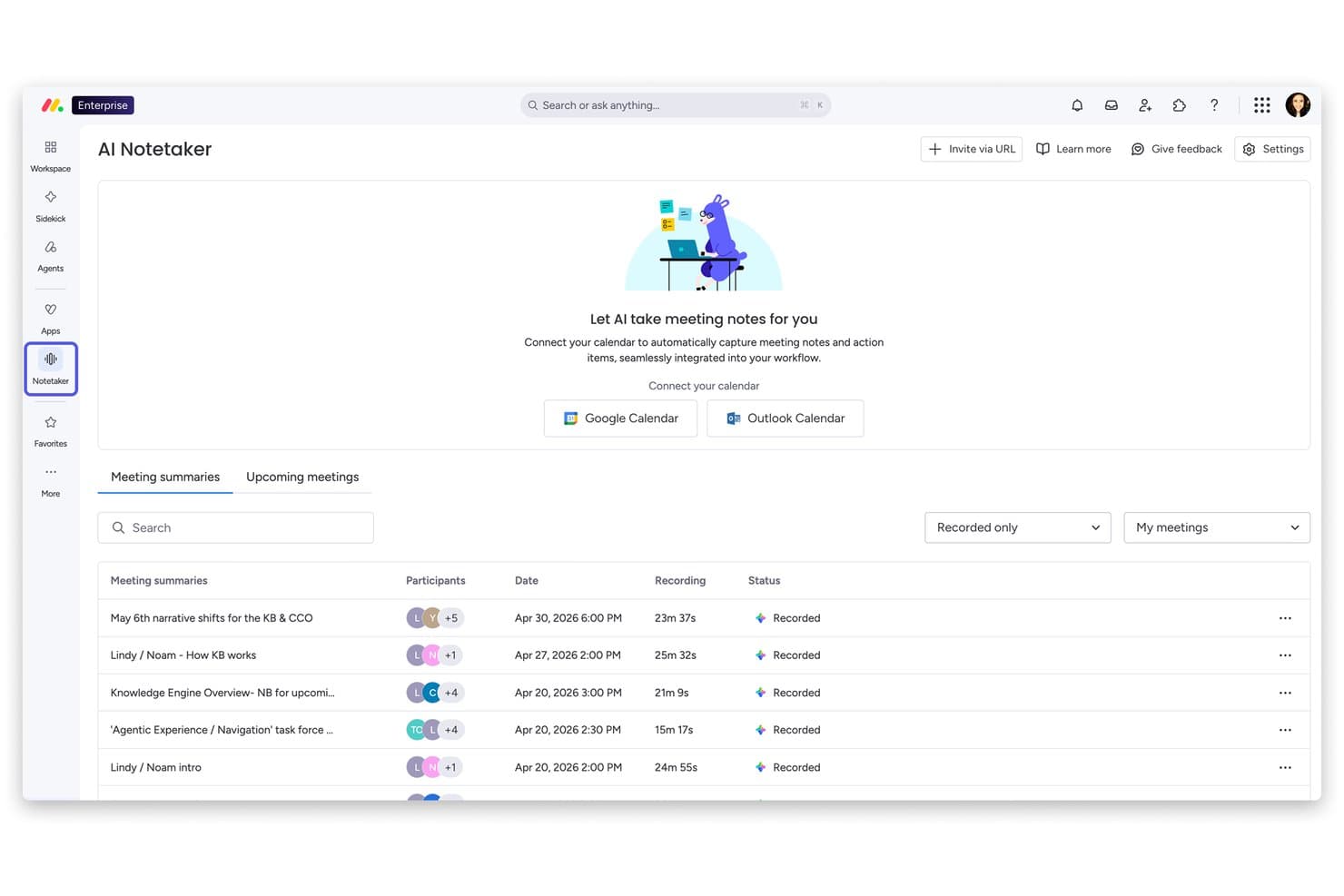
monday AI Workspace offers an AI Notetaker feature that automatically records, transcribes, and summarizes meetings with calendar integration. Monday AI Workspace is a general-purpose AI work platform that combines agentic AI, generative AI tools, and predictive analytics across project management, CRM, service, and dev workflows.
Who Is Monday AI Workspace Best For?
It's a strong fit for cross-functional teams and operations managers at mid-size to enterprise organizations running multiple projects simultaneously.
Why I Picked Monday AI Workspace
Monday AI Workspace earns its spot on my shortlist because of its portfolio-level AI Risk Insights feature. I like that it doesn't just scan one project at a time — it analyzes all linked boards daily, reviewing item names, update sections, and activity logs to surface risks before they become blockers. That kind of proactive, cross-project visibility is genuinely difficult to find in a general-purpose work platform.
Monday AI Workspace Key Features
- AI workflow builder: Automate project processes and tasks with no-code, AI-driven workflow assembly.
- AI meeting notetaker: Capture and summarize meeting discussions directly within your project boards.
- Sidekick AI assistant: Generate project-related content, answer queries, and provide context-aware suggestions in your workspace.
- Portfolio-level dashboards: Visualize and manage multiple projects with real-time, customizable dashboards for tracking progress and metrics.
Monday AI Workspace Integrations
Monday AI Workspace offers hundreds of integrations through its built-in integrations and marketplace, including tools like Slack, Salesforce, HubSpot, Google Workspace, Jira, GitHub, Microsoft Teams, Zoom, Zendesk, and Trello. It also supports Zapier and provides an API for custom integrations.
Pros and Cons
Pros:
- Generative AI covers multiple content creation tasks
- No-code workflow automation with AI assistance
- AI risk detection spans multiple projects simultaneously
Cons:
- Not purpose-built for dedicated HR workflows
- Setup complexity increases with advanced AI configurations
Learn more about monday AI Workspace: Best for AI-Powered ITSM
- 14-day free trial
- From $19/user/month (billed annually)
Visit WebsiteCustomer Rating:4.6/5
Freshservice has an AI-powered assistant for automated conversational prompts. Freshservice is an AI-powered IT service management (ITSM) platform that handles incident management, asset tracking, workflow automation, and enterprise service management across IT, HR, finance, and operations teams.
Who Is Freshservice Best For?
Freshservice is a strong fit for mid-size to enterprise IT teams that need a structured, scalable service desk with built-in AI capabilities.
Why I Picked Freshservice
Freshservice is one of my top picks because I love how deeply automation is baked into its ITSM core. It handles intelligent ticket routing automatically, assigning tickets based on agent availability, workload, and skills. Meanwhile, no-code workflow automation covers everything from approvals to incident resolution without any custom dev work.
Freshservice Key Features
- Service catalog: Lets users browse and request IT services through a configurable self-service portal without contacting the help desk directly.
- Change management: Supports structured CAB approvals with built-in risk assessment and change advisory workflows.
- Freddy AI Copilot: An AI assistant that helps agents draft responses, summarize ticket history, and suggest solutions from within the ticket view.
- Problem management: Links recurring incidents to underlying problems and tracks root cause analysis through to resolution.
Freshservice Integrations
Freshservice offers 1,200+ marketplace integrations, including Microsoft Teams, Slack, Jira, Azure AD, and TeamViewer, along with connector apps for syncing data with external tools via a low-code UI. It's available on Zapier and provides an API for custom integrations.
Pros and Cons
Pros:
- Supports asset tracking from procurement
- Extends beyond IT to HR and facilities
- No-code workflow automator for ticket routing
Cons:
- Freddy AI lacks configuration flexibility
- Reporting customization options are restricted
Learn more about Freshservice: Best for workflow process design with drag-and-drop
- Free demo available
- $40/user/month
Visit WebsiteCustomer Rating:4.7/5
Creatio Studio lets you create campaign flows with drag-and-drop editor. Creatio Studio is a no-code AI platform for building business applications, automating workflows, and designing AI agents using visual drag-and-drop tools and natural language prompts. Creatio AI Studio, launched in July 2026, is a dedicated product for building, deploying and governing AI agents, included in the same platform license.
Who Is Creatio Studio Best For?
Creatio Studio is a strong fit for mid-size to enterprise organizations that want non-technical teams to build and automate business applications without relying on developers.
Why I Picked Creatio Studio
Creatio Studio earns its spot on my shortlist because its BPMN 2.0-driven Process Designer makes workflow design genuinely visual. I like that you can map multi-step approval flows, conditional branching, and parallel gateways by dragging elements onto a canvas. The Workflow Agent Designer extends this further, letting you wire AI agents directly into process logic without writing a line of code.
Creatio Studio Key Features
- Prompt Agent Designer: A visual tool for building AI agents by defining instructions, context, and goals using natural language prompts.
- Agent SDK: A code-based environment for building complex agents, with native support for AI coding tools including Claude Code, GitHub Copilot, and Codex.
- ML model builder: A drag-and-drop interface for creating machine learning models that power predictions and data-driven decisions inside your apps.
- Natural language app generation: A feature that lets you describe an application in plain text and have Creatio Studio generate its structure, UI, and logic automatically.
Creatio Studio Integrations
Creatio Studio connects with the rest of your tech stack through 500+ connectors and ready-to-use templates available on the Creatio Marketplace, including marketplace connectors for SAP HANA, DocuSign, Sage Intacct, SharePoint Office 365, and Formstack. The platform provides built-in integration capabilities via .NET tools, REST, SOAP, OData, and open API, and it's available on Zapier. It supports MCP (Model Context Protocol) for connecting AI agents to the wider AI ecosystem.
Pros and Cons
Pros:
- Agent SDK supports Claude Code and Codex
- Native MCP support for connecting AI agents
- Dedicated AI Studio for building and governing agents
Cons:
- AI Credits are consumption-based and need sizing
- Limited variety of ready-made templates
Learn more about Creatio AI Studio: Best for performance analytics backed by AI
- Free demo available
- Pricing upon request
Visit WebsiteCustomer Rating:4.5/5
HiBob improves HR work by organizing employee data, engagement tools, and performance tracking. HiBob is an HR platform designed to meet the needs of mid-sized companies, offering tools for employee management, engagement, and performance tracking. It caters to HR teams looking to streamline their processes with AI-driven insights and automation.
Why I picked HiBob: It provides tailored features for mid-sized companies, making it an ideal fit for growing teams. With AI-driven analytics, you can gain insights into employee performance and engagement. The platform offers customizable workflows that adapt to your company's specific needs. HiBob's focus on simplifying HR tasks helps your team save time and improve efficiency.
Standout Features & Integrations:
Features include customizable workflows that allow you to tailor processes to fit your company's needs. The platform also offers performance tracking to help you monitor and improve employee productivity. Additionally, HiBob provides engagement tools to keep your team connected and motivated.
Integrations include G Suite, Slack, Microsoft Teams, BambooHR, Greenhouse, Workable, Okta, OneLogin, Zoom, and LinkedIn.
Pros and Cons
Pros:
- AI-driven analytics
- Customizable workflows
- Tailored for mid-sized companies
Cons:
- Initial setup may require time
- Limited advanced features for large enterprises
 Best for collaborative inbox management
- 30-day free trial available
- From $14/user/month (billed annually)
Visit WebsiteCustomer Rating:4.8/5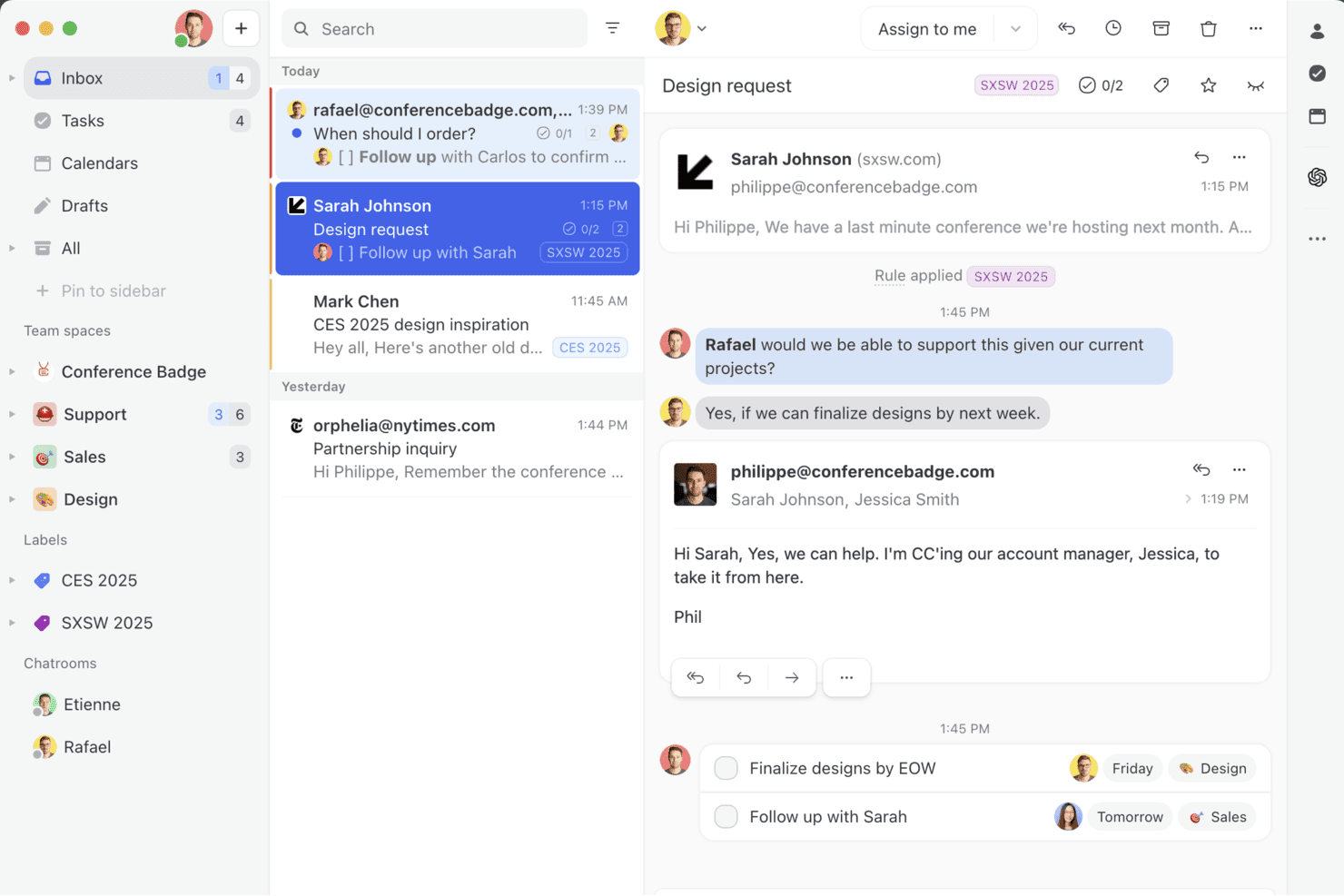
Missive brings shared inboxes, internal comments, and real-time collaboration into one workspace so your team can manage email, SMS, and social messages together — without the back-and-forth. Missive is a collaborative inbox platform that unifies email, SMS, and social messaging channels into a shared team workspace, with an embedded AI assistant for drafting, summarizing, and triaging communications.
Who Is Missive Best For?
Missive suits customer-facing and operations teams that need a shared inbox where multiple people collaborate on incoming emails, messages, and support threads.
Why I Picked Missive
Missive earns its spot on my shortlist because its AI assistant is built directly into the shared inbox, not bolted on as an afterthought. I'm particularly impressed by how it drafts context-aware replies by reading the full conversation thread before generating anything, which cuts down on back-and-forth considerably. The AI-powered automation rules go beyond simple keyword triggers, detecting tone and intent to route and label incoming messages automatically.
Missive Key Features
- Multi-model AI support: Switch between OpenAI, Anthropic Claude, and Google Gemini models, or connect your own API key to control costs and model choice.
- Custom AI prompts: Save and reuse custom prompt templates for recurring tasks like tone adjustment, grammar fixes, or reply generation.
- Missive MCP Server: Connect external AI tools (like Claude or ChatGPT) to query conversations, check calendars, and draft replies—while keeping agent review required before sending.
- Pre-send AI checks: Review outgoing messages with AI before they're sent to catch errors or flag tone issues.
Missive Integrations
Missive offers integrations with OpenAI, Anthropic, Google Gemini, Notion, Linear, Stripe, Attio, and ClickUp. It also provides a REST API with webhooks for custom connections, supports Zapier, and includes its new MCP Server on Productive and Business plans (requires admin activation).
Pros and Cons
Pros:
- AI rules automate message triage and labeling
- Flexible multi-model AI assistant options
- Collaborative inbox with native AI-driven replies
Cons:
- No predictive insights or workforce modeling
- Lacks HR-specific automations and analytics
Learn more about Missive: Best for unified data and AI model governance
- Free edition available + 14-day free trial
- From $0.15/DBU
Visit WebsiteCustomer Rating:4.5/5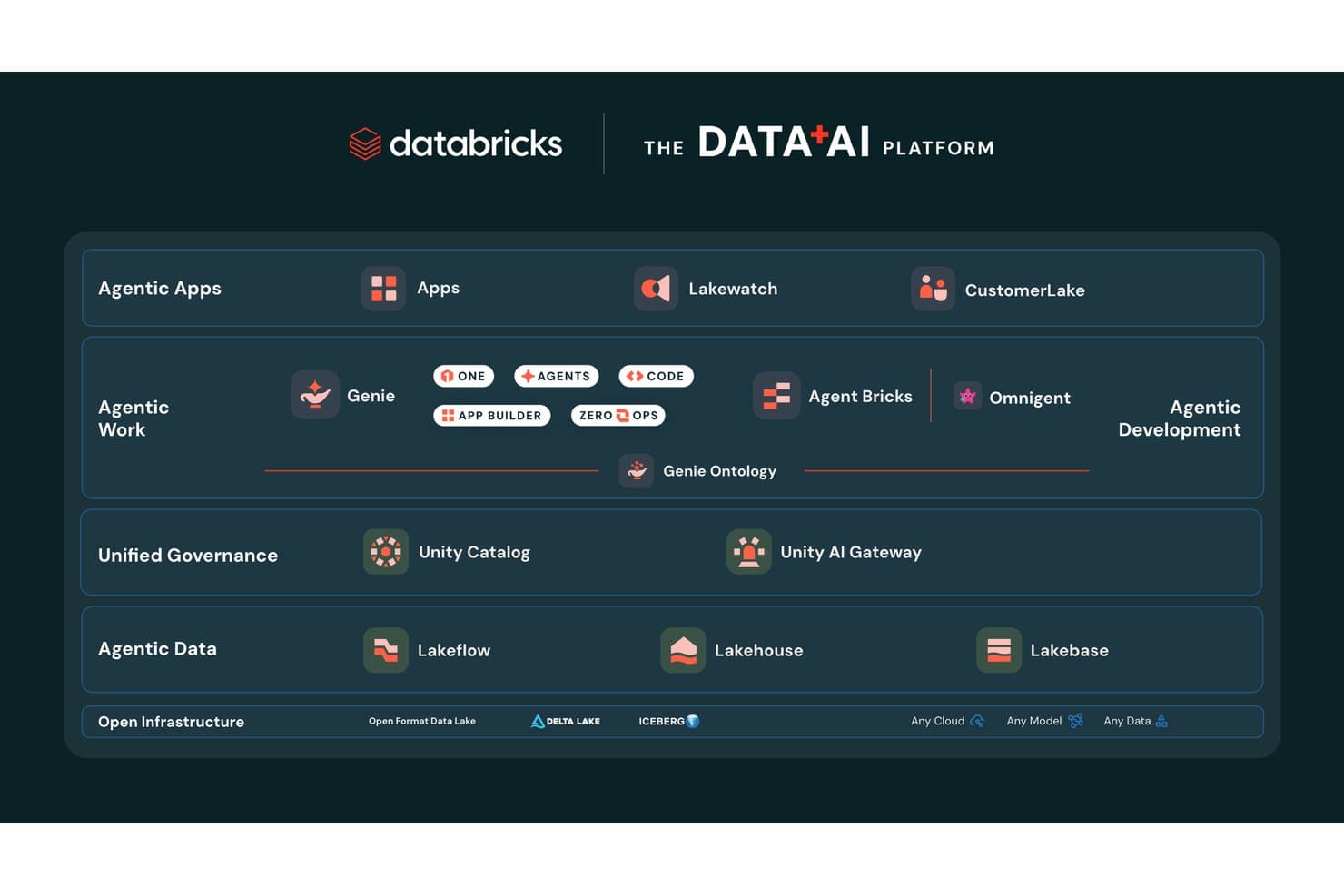
Databricks organizes its Data+AI platform across agentic, governance, and infrastructure layers. Databricks is a unified data and AI platform that combines model training, agent building, pipeline orchestration, and governance across cloud environments.
Who Is Databricks Best For?
Databricks is a strong fit for enterprise data science and engineering teams that need to build, govern, and scale AI models across complex, multi-cloud environments.
Why I Picked Databricks
Databricks earns its spot on my shortlist because no other platform matches its depth of unified governance across data, models, and AI agents simultaneously. I'm particularly impressed by Unity Catalog, which tracks column-level lineage from raw data all the way through model outputs, with automatic PII classification and audit logging built in. Unity Gateway layers on top to enforce rate limits, content filtering, and cost controls across every model your team touches, whether that's GPT-4, Claude, or a fine-tuned Llama.
Databricks Key Features
- Foundation Model APIs: Access state-of-the-art LLMs from OpenAI, Anthropic, Meta, Google, and open-source providers hosted directly on Databricks infrastructure with pay-per-token pricing.
- AI Playground: Test and compare models in a pre-deployment validation environment before committing them to production workflows.
- Managed MLflow: Track experiments, version models, and manage the full ML lifecycle using an enterprise-grade extension of open-source MLflow.
- Databricks Clean Rooms: Collaborate on data analysis with internal teams or external partners without exposing the underlying data to either party.
Databricks Integrations
Databricks offers native integrations with Salesforce, SAP, MySQL, PostgreSQL, Snowflake, Amazon Redshift, Google BigQuery, Tableau, Power BI, and dbt Cloud. It also supports MCP, Delta Sharing, REST APIs, and 6,000+ marketplace and partner connections for custom data and AI workflows.
Pros and Cons
Pros:
- No vendor lock-in with open model access
- Supports multi-agent AI and model orchestration
- Column-level governance for data and AI assets
Cons:
- Initial setup demands advanced technical expertise
- DBU-based billing complicates cost predictability
Learn more about Databricks: Best for no-code AI agent builder
- 7-day free trial + demo available
- From $32/month (billed annually)
Visit WebsiteCustomer Rating:4.4/5
Chatbase homepage showcasing AI agents for building and deploying customer support experiences, with a clean interface and source integration panel. Chatbase is an AI agent platform where you can build, train, and deploy custom chatbots across your website, messaging apps, and business tools—without writing any code.
Who Is Chatbase Best For?
Chatbase is a good fit for small to mid-sized businesses that want to deploy AI-powered customer support or lead generation without a dedicated engineering team.
Why I Picked Chatbase
Chatbase is one of my top picks because I love how directly it connects your existing content to a deployable AI agent. You can upload PDFs, Word docs, or plain text files, and Chatbase trains a chatbot on that material—so when a customer asks a question, the answer comes directly from your documentation. I also like the website crawl feature, where Chatbase scrapes your URLs automatically, so your chatbot stays current without manual re-uploads every time your content changes.
Chatbase Key Features
- Multiple LLM support: Choose from models including GPT-4o, Claude, Gemini, and Llama to power your chatbot based on your performance or cost needs.
- AI Actions: Connect your chatbot to external systems so it can perform tasks like booking appointments, checking order status, or collecting lead information mid-conversation.
- Human handoff: Set escalation rules that automatically route conversations to a live agent when the chatbot reaches the limits of its knowledge.
- Conversation analytics: Review chat logs, user queries, and resolution rates to identify gaps in your training data and improve chatbot responses over time.
Based on the homepage and search results, I can now see the verified integrations. The homepage lists: Make, Zendesk, Notion, Slack, Stripe, Salesforce, Cal.com, Calendly, WhatsApp, Zapier, and Messenger. The blog content also confirms Shopify and Instagram as native integrations. Let me also verify the Instagram and other channel integrations mentioned.
Chatbase Integrations
Chatbase offers native integrations with Shopify, Zendesk, Salesforce, Stripe, Slack, WhatsApp, Messenger, Instagram, Notion, Cal.com, Calendly, and Make. It also connects with Zapier and provides an API for custom integrations.
Pros and Cons
Pros:
- Suggestions flag knowledge base gaps automatically
- AI Actions trigger tasks from chat
- Supports multiple AI model choices
Cons:
- Occasional hallucinations outside training data
- No visual flow builder for conversations
Learn more about Chatbase: Best for enterprise knowledge integration
- Free trial available
- Pricing upon request
Visit WebsiteCustomer Rating:4.7/5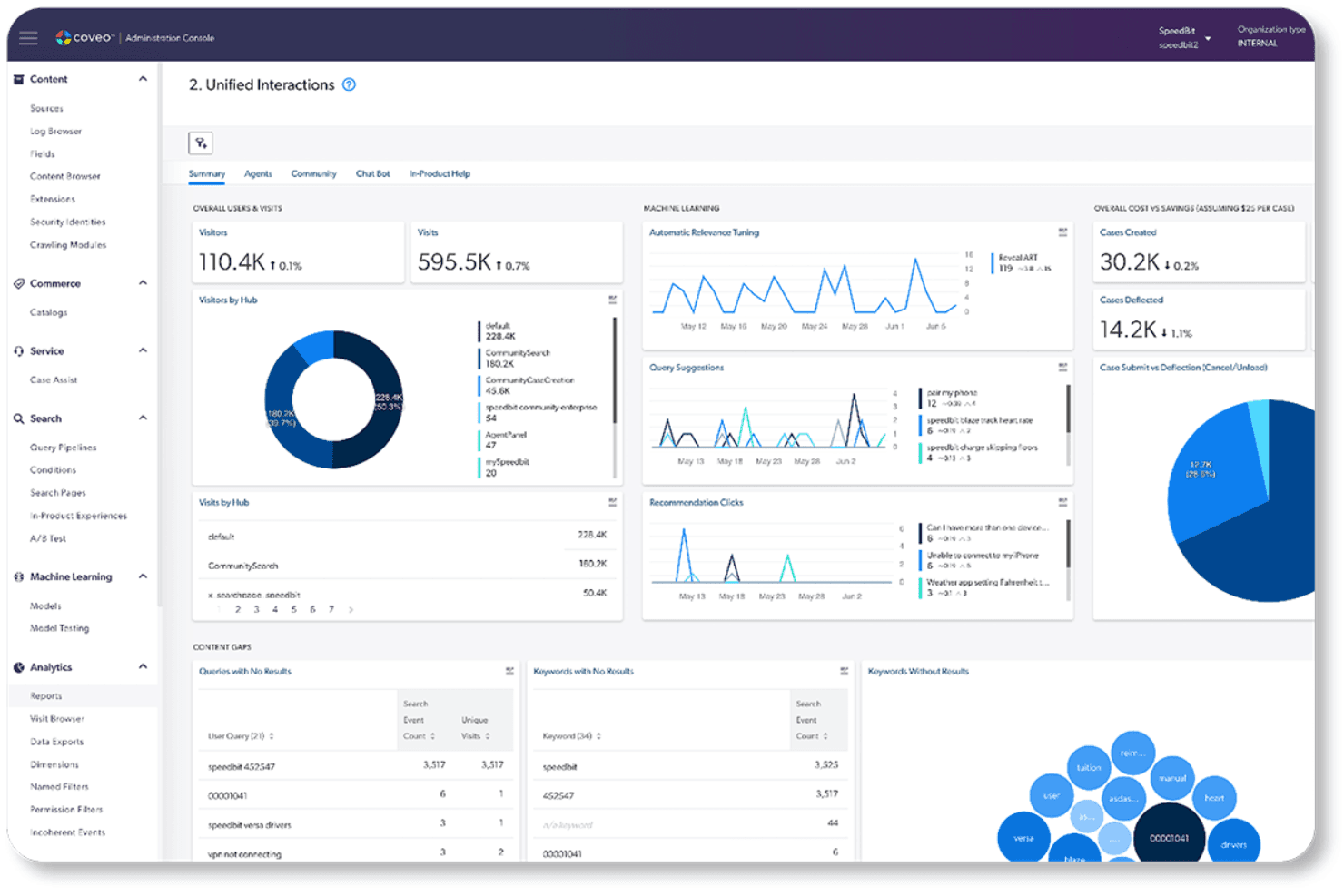
Coveo offers a unified interactions dashboard with analytics covering visitors, machine learning insights, case deflection, and content gap analysis. Coveo is an enterprise AI search and generative answering platform that indexes content across your existing systems and delivers AI-powered search, retrieval-grounded answers, and personalized recommendations through APIs and pre-built integrations.
Who Is Coveo Best For?
Coveo fits mid-market to enterprise teams that need AI-powered search and generative answers across complex, multi-system knowledge environments.
Why I Picked Coveo
I picked Coveo because no other platform on my list handles enterprise knowledge integration the way it does. Its unified hybrid index pulls content from 100+ sources, including Salesforce, SAP, and ServiceNow, and makes that knowledge retrievable through AI-generated answers with source citations. I'm particularly impressed by the Passage Retrieval API, which lets AI agents pull precise text chunks from the unified index in real time to ground responses in trusted content.
Coveo Key Features
- Dynamic navigation: Automatically adjusts facets and filters to help users refine search results.
- Personalized recommendations: Uses user behavior and intent to suggest relevant products or content.
- Role-based access controls: Applies permissions so users access only authorized content.
- Search analytics: Tracks search behavior and conversions through dashboards and attribution tools.
Coveo Integrations
Coveo offers 30+ connectors to hundreds of systems, including Salesforce, SAP, Shopify, AWS, Sitecore, Adobe, ServiceNow, Zendesk, and Agentforce. Its Answer API, Passage Retrieval API, and Headless toolkit support custom integrations and embedding search or retrieval in applications.
Pros and Cons
Pros:
- Document-level security restricts answers by permissions
- Gartner Magic Quadrant Leader for search
- Unified hybrid index across 100+ content sources
Cons:
- Unpredictable costs at enterprise scale
- No custom model training or deployment
Learn more about Coveo: Best for AI-powered background screening
- Free demo available
- From $29.99/report
Visit WebsiteCustomer Rating:4.5/5
Checkr uses AI to detect resume risks and flag suspicious candidate signals. For organizations seeking an AI-driven platform to streamline hiring processes, Checkr presents a compelling solution. Designed with the needs of modern businesses in mind, Checkr leverages AI to enhance background screening, ensuring faster, more accurate, and compliant hiring decisions. Whether you are in retail, healthcare, or technology, Checkr's AI capabilities can help you transform complex data into actionable insights, addressing challenges like inefficient hiring and compliance uncertainties.
Why I Picked Checkr
I picked Checkr for its standout AI capabilities that redefine background screening. The platform's Charge Classifier automatically categorizes criminal charges, simplifying adjudication with custom rules. Additionally, the Name Matcher ensures accurate record matching by identifying and associating various name formats with the correct candidate. These features not only improve report accuracy but also address compliance and efficiency challenges, making Checkr an ideal AI platform for hiring needs.
Checkr Key Features
In addition to AI background screening, Checkr offers:
- Doc Inspector: Analyzes uploaded documents for authenticity, detecting alterations that might indicate forgery.
- Role Matcher: Verifies candidates' job titles against employer data, identifying discrepancies while ignoring minor errors.
- Real-Time Updates: Provides candidates with timely status updates on their background checks, enhancing communication.
- Compliance Tools: Provides tools that keep up with local compliance laws, enabling seamless hiring processes.
Checkr Integrations
Integrations include Workday, Greenhouse, BambooHR, Rippling, Lever, JazzHR, iCIMS, SmartRecruiters, Bullhorn, and Planning Center. Checkr also offers an API for custom integrations.
Pros and Cons
Pros:
- Fast background check results help speed up candidate hiring decisions
- Candidate-friendly interface simplifies completing background check requirements
- Automated background screening reduces manual verification and administrative work
Cons:
- Feature access and workflows sometimes unclear for new platform users
- Some background and employment checks may take longer than expected
Learn more about Checkr: 10Best for governing AI across the full ML lifecycle
Dataiku
- 14-day free trial
- Pricing upon request
Visit WebsiteCustomer Rating:4.6/5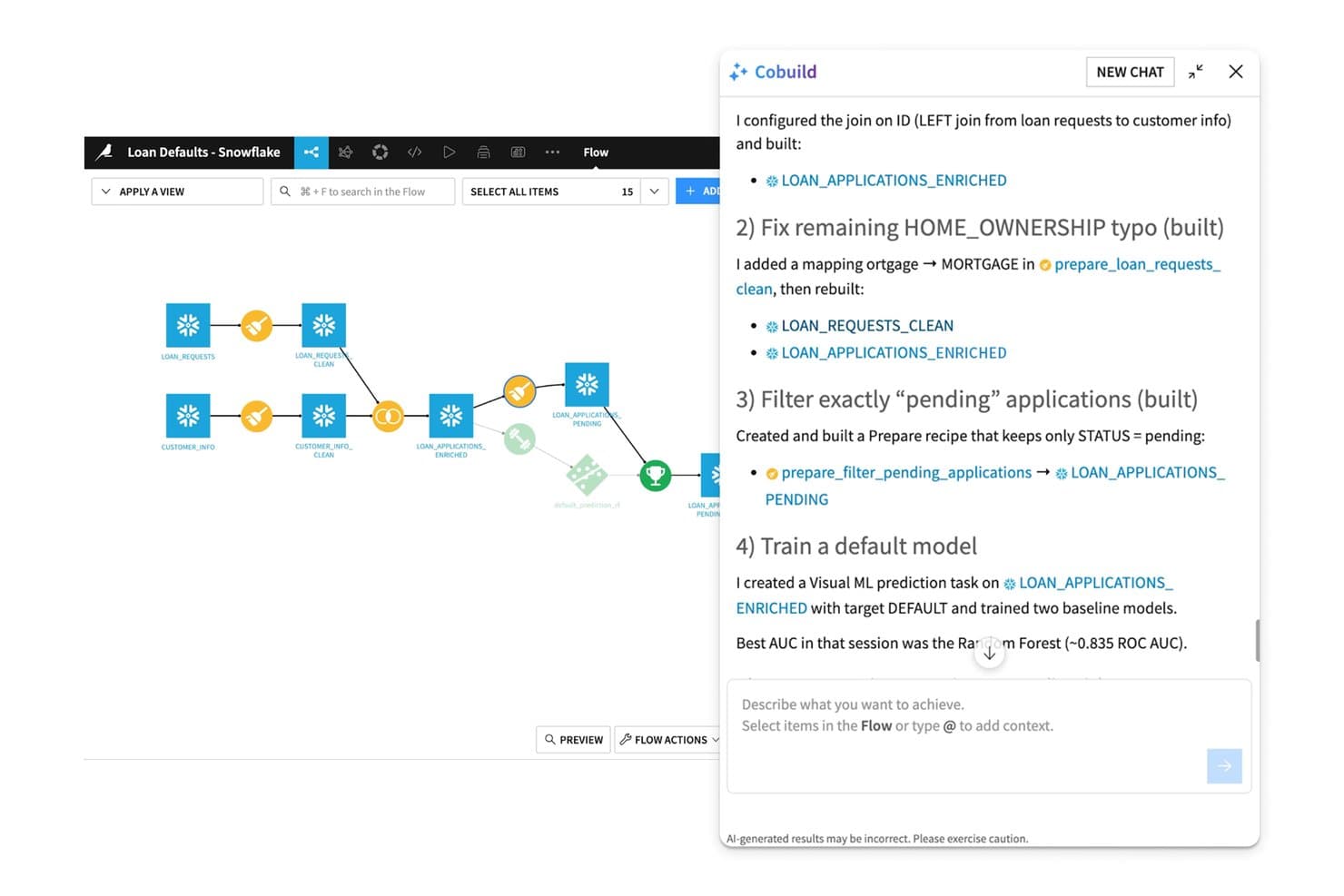
Dataiku's Cobuild AI assistant builds and refines ML pipelines conversationally. Dataiku is an enterprise AI platform that spans data preparation, ML development, AutoML, MLOps, multi-agent orchestration, and governed LLM access through a single unified environment.
Who Is Dataiku Best For?
Dataiku is a strong fit for enterprise data science and ML engineering teams that need a single governed environment to build, deploy, and monitor AI at scale.
Why I Picked Dataiku
Dataiku earns its spot on my shortlist because its governance capabilities are built into the platform's core, not added as an afterthought. I particularly like the AI Inventory and LLM Mesh combination: the AI Inventory tracks every model, agent, and dataset across teams, while LLM Mesh routes requests across providers like OpenAI, Anthropic, and Bedrock through a single governed gateway with cost controls and audit trails. That means a team running GenAI at scale can enforce compliance policies without slowing down deployment.
Dataiku Key Features
- AutoML and custom ML development: Build models using automated machine learning or full-code Python, R, and SQL environments within the same workspace.
- Dataiku Flow pipeline canvas: Design, version, and roll back data and model pipelines visually using a drag-and-drop recipe builder.
- Prompt Studios: A dedicated workspace for designing, testing, and iterating on LLM prompts before deploying them in production.
- Continuous model monitoring: Track drift, bias, and performance degradation post-deployment with automated alerting and retraining triggers.
Dataiku Integrations
Dataiku offers 20+ native SQL database integrations, including Snowflake, Databricks, Google BigQuery, Amazon Redshift, PostgreSQL, Oracle, and SAP HANA, plus Amazon S3, SharePoint, MongoDB, and Apache Iceberg. It connects to major LLM providers and supports custom integrations and CI/CD through its Python API.
Pros and Cons
Pros:
- Handles full ML and GenAI lifecycle
- AI Inventory and LLM Mesh enable compliance
- Governance tools built into platform core
Cons:
- Governance module not accessible during trial
- Collaboration features limited on lower tiers
Learn more about Dataiku:
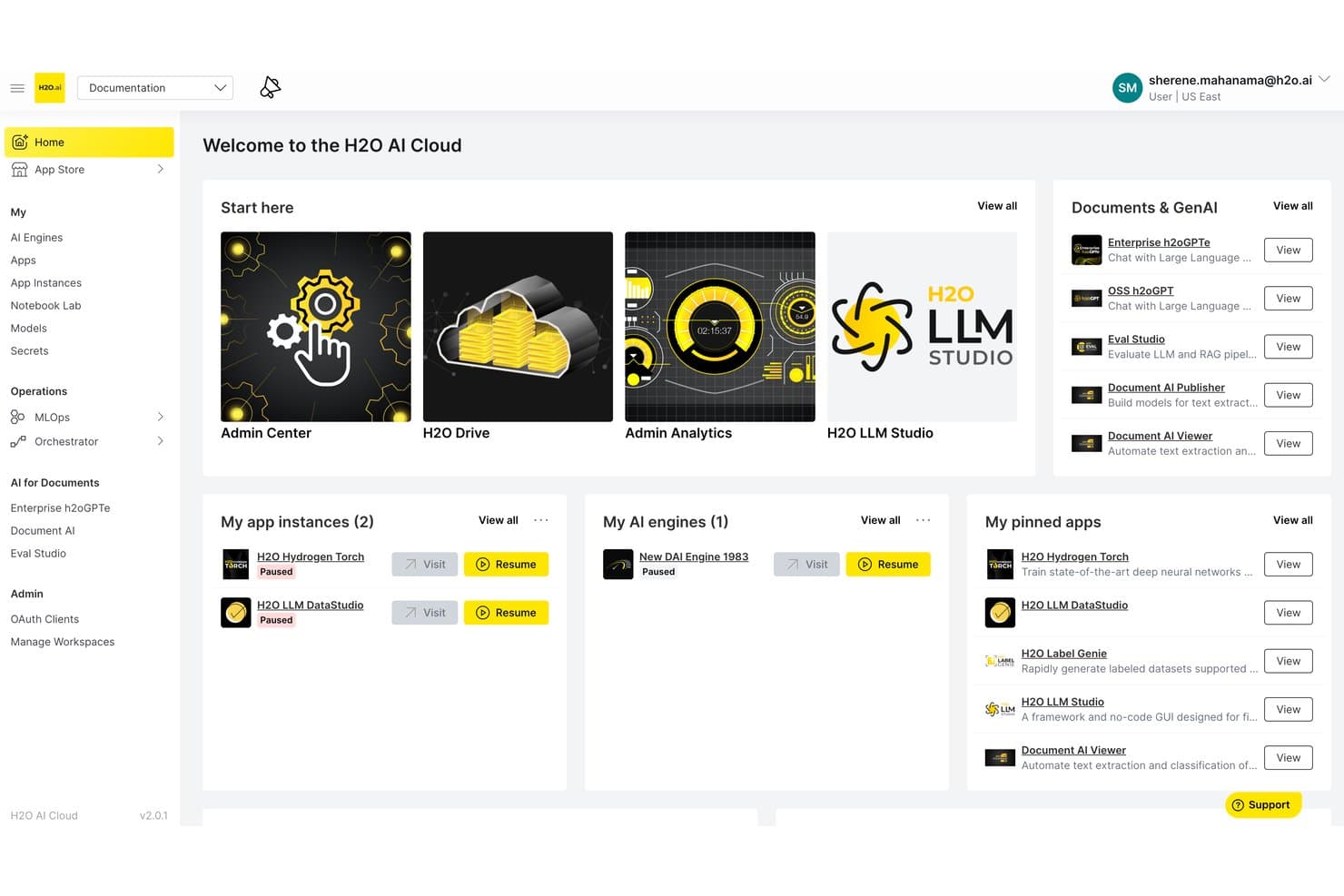
H2O.ai centralizes AI tools, apps, and engines in one cloud dashboard. H2O.ai is an enterprise AI platform that brings together AutoML, generative AI, LLM fine-tuning, and agentic AI orchestration into a single architecture designed for air-gapped, on-premises, and cloud deployments.
Who Is H2O.ai Best For?
H2O.ai is a strong fit for enterprise data science and IT teams in regulated industries like finance, healthcare, and government that need air-gapped or on-premises AI deployment.
Why I Picked H2O.ai
H2O.ai earns its spot on my shortlist because no other platform I've evaluated matches its depth of compliance certifications for sensitive data environments: SOC 2 Type II, FedRAMP High, HIPAA, and IRAP PROTECTED. I picked it specifically for teams in finance, healthcare, and government that need fully air-gapped or on-premises AI deployment, where data cannot leave the organization's environment. Its Intelligent Model Routing and Model Risk Management tools make it practical for audit-ready, regulated AI workflows.
H2O.ai Key Features
- Driverless AI AutoML: An automated machine learning engine that handles feature engineering, model selection, validation, and documentation with GPU-accelerated algorithms.
- H2O LLM Studio: A no-code fine-tuning framework that lets your team train custom LLMs on private data using alignment methods like DPO and IPO.
- Intelligent model routing: Dynamically selects the best-fit LLM for each query based on cost, latency, and accuracy requirements across open-source and third-party models.
- H2O Wave: A low-code app development framework for building and deploying custom AI-powered applications within your organization's environment.
H2O.ai Integrations
H2O.ai supports 200+ documented integrations, including Microsoft SharePoint, Slack, Microsoft Teams, GitHub, AWS, Google Cloud Platform, Azure, Snowflake, Apache Spark, and LangGraph. REST APIs and Python, R, Java, and Scala clients support custom integrations.
Pros and Cons
Pros:
- Fine-tuning without vendor data training risk
- Best-in-class compliance for regulated deployments
- World-record agentic AI performance accuracy
Cons:
- Lacks HR-specific automation and analytics
- Enterprise-only focus excludes smaller teams
Learn more about H2O.ai: Best for secure AI-driven board meeting management
- Free demo available
- Pricing upon request
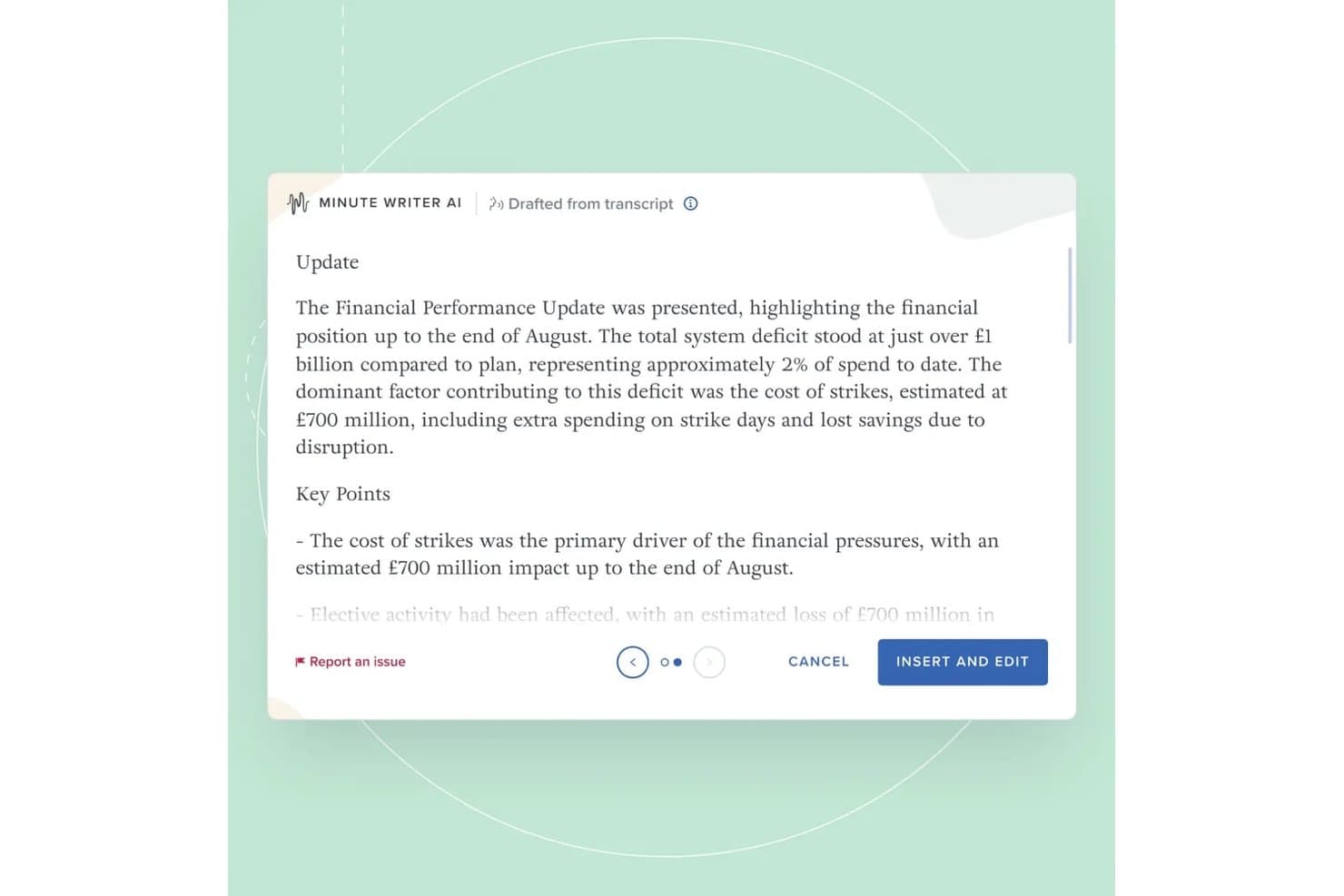
Board Intelligence's Minute Writer AI drafts structured meeting minutes from transcripts, summarizing financial performance updates with key points automatically. Board Intelligence is a board management AI platform that combines AI-powered report writing, minute generation, meeting preparation, agenda planning, and governance insights across the full board cycle.
Who Is Board Intelligence Best For?
Board Intelligence suits company secretaries, general counsel, and governance teams at mid-to-large enterprises managing complex board and committee cycles.
Why I Picked Board Intelligence
Board Intelligence earns its spot on my shortlist because its AI is purpose-built for governance, not adapted from generic tools. I particularly like Minute Writer AI, which produces structured minutes directly from board discussions, and IQ Insights, which surfaces governance-relevant themes across 130+ board domains before meetings start. What really sets it apart is the zero data retention policy, meaning sensitive board content never persists in the AI model.
Board Intelligence Key Features
- Agenda planner: Build board and committee meeting agendas aligned to key business priorities.
- Report briefer: Commission board papers using standardized briefs and approval workflows.
- Action tracker: Track and manage action items assigned during board meetings from one place.
- Board surveys: Run board effectiveness assessments using expert-designed survey templates.
Board Intelligence Integrations
Board Intelligence offers native integrations with Microsoft 365 (including Word), Microsoft Teams, Zoom, and supports single sign-on through enterprise SSO providers.
Pros and Cons
Pros:
- Advanced agenda builder for board meetings
- Automated minute writing saves administrative time
- Secure AI with zero data retention
Cons:
- Limited analytics outside board topics
- No API for custom integrations
Learn more about Board Intelligence: Best for multi-model agent orchestration at scale
- 30-day free trial
- From $21/user/month
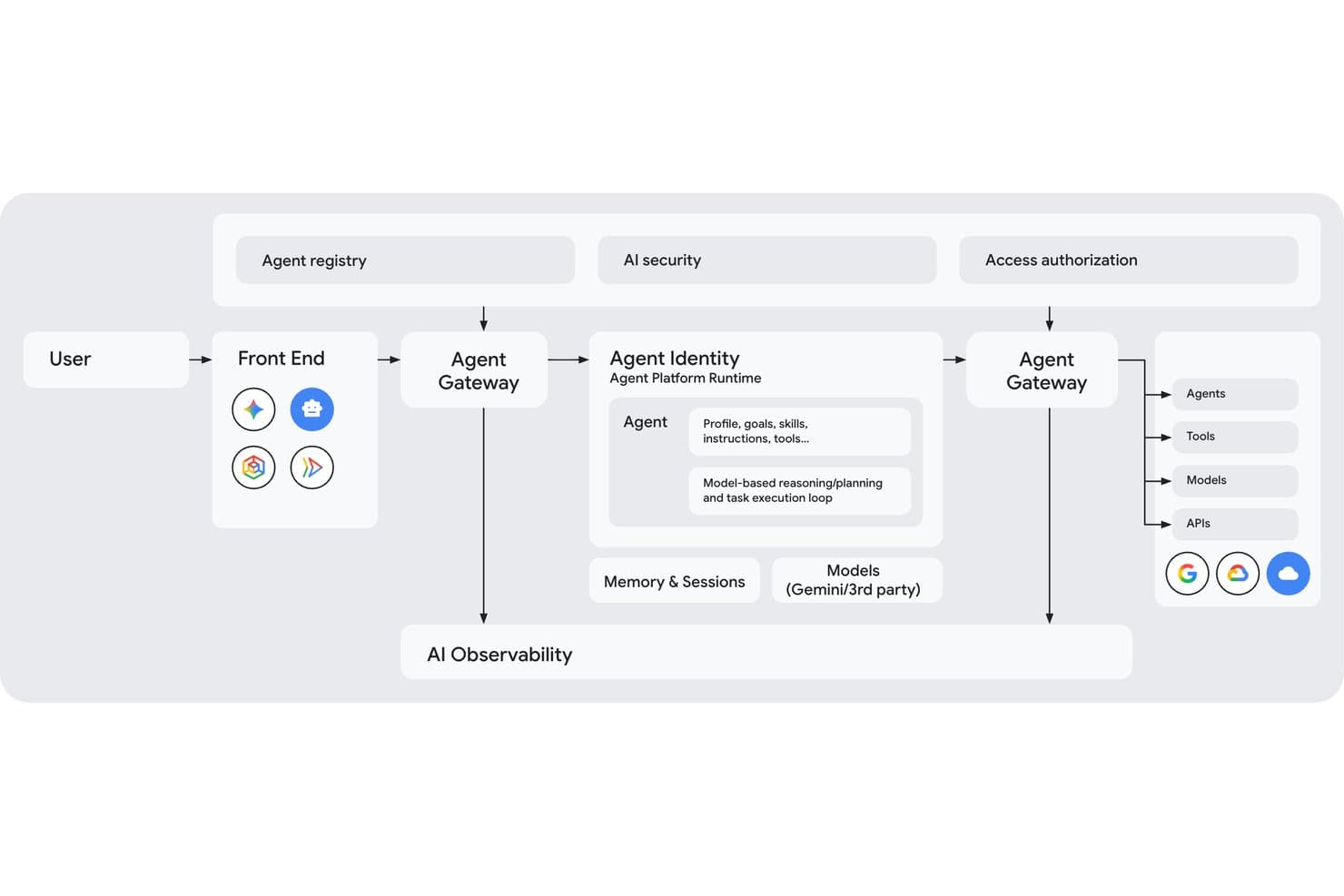
Gemini Enterprise Agent Platform maps its full multi-agent architecture visually. Gemini Enterprise Agent Platform is Google Cloud's enterprise AI platform that gives teams access to 200+ models, multi-agent orchestration, custom model training and fine-tuning, and a full governance suite for deploying and managing AI agents at scale.
Who Is Gemini Enterprise Agent Platform Best For?
It's a strong fit for enterprise engineering and data science teams that need to build, orchestrate, and govern complex multi-agent AI systems on Google Cloud infrastructure.
Why I Picked Gemini Enterprise Agent Platform
I picked Gemini Enterprise Agent Platform as one of the best because its graph-based multi-agent orchestration lets engineering teams coordinate networks of specialized sub-agents across complex, multi-day workflows in a way most platforms simply can't match. The Model Garden's 200+ models, spanning Gemini, Claude, Grok, and Llama, means teams can route each task to the right model based on cost, speed, or accuracy. On top of that, the Agent Identity system assigns every agent a cryptographic SPIFFE ID, giving security teams real auditability across every action taken.
Gemini Enterprise Agent Platform Key Features
- Agent Studio: A low-code, browser-based interface for designing, testing, and iterating on agents using natural language, code, images, or video without deep coding knowledge.
- RAG Engine: Connects your enterprise data sources to LLMs via Vector Search, grounding model outputs in proprietary knowledge to reduce hallucinations.
- Agent simulation: Generates synthetic conversations to test agents against defined success and safety criteria before any live deployment.
- Memory Bank: Retains long-term context across agent sessions, enabling personalized and consistent interactions over time.
Gemini Enterprise Agent Platform Integrations
Gemini Enterprise Agent Platform offers native integrations across Google Cloud and Google Workspace, including BigQuery, Cloud Storage, Google Sheets, Gmail, and Drive, plus Workday’s Sana Self-Service Agent. It supports Apigee, MCP, REST, gRPC, webhooks, and APIs for custom integrations.
Pros and Cons
Pros:
- Complex multi-agent orchestration for advanced workflows
- Enterprise-grade governance with SPIFFE Agent Identity
- Unmatched breadth of curated AI models
Cons:
- Documentation and product rebranding create confusion
- Pricing complexity and unpredictable costs reported
Learn more about Gemini Enterprise Agent Platform: Best for enterprise-scale model fleet governance
- 30-day free trial available
- From $0.165 per 1M input tokens
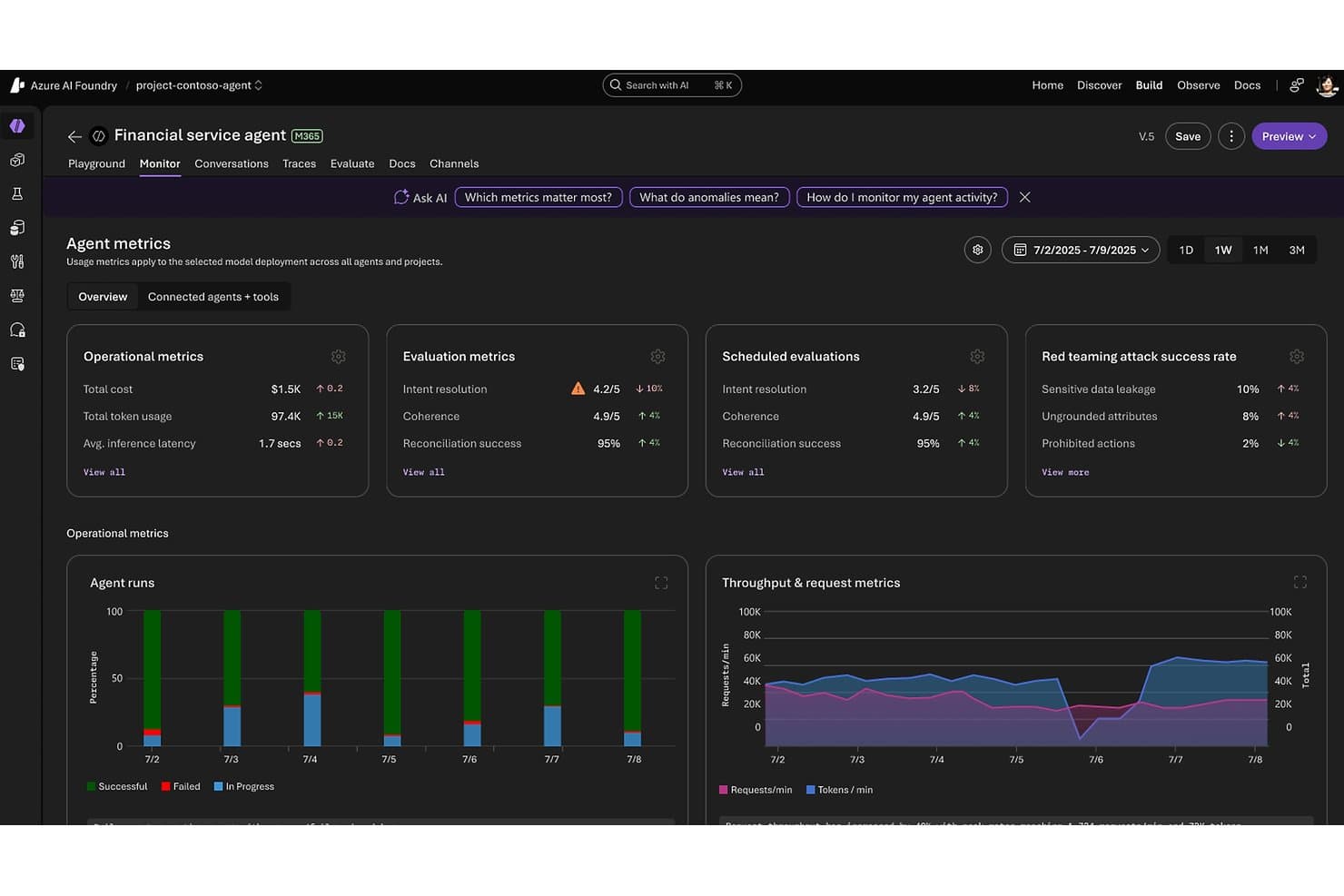
Microsoft Foundry tracks agent performance metrics and safety evaluations. Microsoft Foundry is an enterprise AI platform from Microsoft that unifies model access, agent building, workflow automation, and governance across a catalog of 11,000+ models from providers like OpenAI, Anthropic, Meta, and Mistral.
Who Is Microsoft Foundry Best For?
Microsoft Foundry is best suited for large enterprises with existing Azure infrastructure that need centralized control over multiple AI models, teams, and workloads at scale.
Why I Picked Microsoft Foundry
Microsoft Foundry earns its spot on my shortlist because no other platform comes close to its fleet-level governance at enterprise scale. The Foundry Control Plane gives IT and AI infrastructure leads a centralized dashboard to track compliance posture, cost anomalies, and agent health across every project and team simultaneously. I'm also impressed by the AI Red Teaming Agent, which automatically probes deployments for vulnerabilities, and the Model Router, which cuts inference costs by roughly 50% by routing each query to the optimal model without any code changes.
Microsoft Foundry Key Features
- Foundry Agent Service: Build autonomous agents that can reason, plan, and execute multi-step tasks using tools, memory, and multi-agent orchestration patterns like sequential handoff and group chat.
- Foundry IQ: Connects agents to enterprise data sources—including Snowflake, S3, and OneLake—using dynamic reasoning rather than static vector lookups for next-generation RAG.
- Fine-tuning via portal, SDK, or REST: Customize Azure OpenAI and open-source base models on your own organizational data directly within the Foundry interface.
- Azure Logic Apps integration: Access 1,400+ pre-built connectors to automate workflows across third-party apps, databases, and enterprise systems without custom code.
Microsoft Foundry Integrations
Microsoft Foundry has native integrations across the Microsoft ecosystem, including Microsoft 365, Microsoft Fabric, Microsoft Copilot Studio, Power Automate, Microsoft Entra ID, Azure Machine Learning, and Azure AI Search. It also supports 1,400+ Azure Logic Apps connectors, REST APIs, SDKs, and MCP/OpenAPI connections for custom integrations.
Pros and Cons
Pros:
- Model Router reduces overall inference costs
- Enterprise-grade governance and compliance tools
- Centralized control over 11,000+ AI models
Cons:
- No native HR-specific features or connectors
- Requires existing Azure infrastructure investment
Learn more about Microsoft Foundry: 15Best for customer interaction automation
Tidio
- Free plan available; 7-day free trial
- From $24.17/month
Visit WebsiteCustomer Rating:4.7/5
Tidio automates customer interactions using chatbot triggers and conversation flows. Tidio offers an AI-powered customer service platform that streamlines communication between businesses and their clients. For those managing customer interactions, Tidio provides a comprehensive suite of tools that cater to ecommerce, education, and finance sectors, among others. By integrating AI-driven live chat and help desk capabilities, Tidio enables your team to handle customer inquiries with ease, so you can focus on growth and customer satisfaction.
Why I Picked Tidio
I chose Tidio for its ability to automate customer interactions through the Lyro AI Agent. This feature is particularly beneficial for businesses looking to optimize their customer service operations, as it handles routine queries and provides reliable, AI-generated responses that maintain your brand's voice. Additionally, Tidio's smart automation capabilities help you proactively capture leads and ensure your team can focus on more complex issues without losing touch with customers.
Tidio Key Features
In addition to customer interaction automation, Tidio offers:
- Live Chat: Engage website visitors in real time, providing instant assistance and improving customer satisfaction.
- Omnichannel Inbox: Manage all customer interactions from various channels in one centralized location.
- Help Desk: Organize customer queries and support tickets efficiently, ensuring quick resolution times.
- Analytics: Monitor key performance metrics and gain insights into customer interactions for better decision-making.
Tidio Integrations
Integrations include Shopify, WordPress, Wix, BigCommerce, Zendesk, HubSpot, Mailchimp, Zapier, and Google Analytics.
Pros and Cons
Pros:
- Unified inbox manages candidate messages across website and messaging channels
- Combines chat, email, and messaging channels in one inbox
- AI chatbot automatically answers common customer questions on websites
Cons:
- Scaling costs increase as conversation volume and AI usage grow
- Chat widget may slightly affect career page loading speed
Learn more about Tidio:
Diğer Yapay Zekâ Platformları
İşte kısa listeme giremeyen ancak yine de göz atmaya değer bazı ek yapay zekâ platformu seçenekleri:
- 16TrustibleBest for AI governance policy management
- 17Leena AIBest for AI automations for HR teams
- 18DataRobotBest for AI automated machine learning
- 19Amazon BedrockBest for multi-model access on AWS infrastructure
- 20IBM watsonx.aiBest for enterprise AI with built-in IP indemnity
- 21Palantir AIPBest for AI agents grounded in enterprise ontology
How I Evaluate AI Platforms
To make this list, a tool’s AI needs to handle real AI platform work, like training custom models or automating data pipelines. From there, I evaluate three things. Core functionality carries the most weight, like building and deploying models and connecting and preparing data. Then I look at standout features, like a generative AI model hub, and factors beyond features, like predictable licensing costs.
Core Functionality (Table Stakes For This List)
When I'm selecting tools for my list, I score each one on a scale from 0 (does not offer the functionality) to 5 (excels in this area) for each core functionality listed below. I then convert the total into a percentage to help assess each tool's overall fit, with extra weight on any functionalities I’ve deemed essential.
- Model Build & Deployment (Essential): I look for custom training, fine-tuning, versioning, and production deployment, including models for workforce planning or candidate screening.
- Data Integration & Management (Essential): I check for connectors and preparation tools for structured HR data and unstructured policy documents, including cleaning and access controls.
- Pre-Built Models & APIs: I assess the model and API selection, documentation, and customization options for tasks such as employee-service queries.
- Model Monitoring & Governance: I look for performance tracking, drift alerts, audit trails, and access controls that help teams review models used in people decisions.
- Scalable Infrastructure & Compute: I evaluate how compute scales across cloud, hybrid, or on-prem environments as model workloads and data volumes change.
- Workflow & Pipeline Automation: I check whether teams can automate data ingestion, preparation, training, and retraining while retaining oversight of deployment.
Once I have a list of tools that meet the criteria, I consider what sets each platform apart.
Differentiating Factors (What Sets Vendors Apart)
Here's how I compare and contrast different vendors:
Standout Features
I look for a responsible AI toolkit with built-in bias detection and fairness testing—essential when models touch hiring or performance decisions. A low-code AI builder matters too, since HR teams can create workflows without waiting on engineering. I also check for collaborative workspaces where data scientists and business users co-build solutions in shared notebooks, which speeds up iteration on people analytics projects.
Beyond Features
I check whether pricing is consumption-based or flat-rate, since GPU-heavy model training can spike costs fast if billing isn't predictable. Deployment flexibility matters too—platforms locked to a single cloud make it harder to meet data residency rules or match your existing infrastructure. I also evaluate onboarding resources and enablement programs, because HR teams without deep AI expertise need strong documentation and vendor support to sustain adoption past the initial rollout.
En İyi Ücretsiz Yapay Zekâ Aracı Hangisi?
En iyi ücretsiz yapay zekâ aracı, otomatikleştirmeniz gereken belirli göreve bağlıdır; ancak ChatGPT, Claude, Gemini ve Canva, günlük işletme operasyonları için en yetenekli ücretsiz planları sunar. Çoğu ücretsiz katman, temel modellere ve temel otomasyona erişim sağlar; ancak genellikle günlük kullanımı sınırlar ve kurumsal entegrasyonları kısıtlar.
En iyi ücretsiz seçeneklerin kullanım alanlarına göre dağılımı şöyle:
| Ücretsiz Yapay Zekâ Aracı | En Uygun Olduğu Alan | Temel Özellikler |
|---|---|---|
| Ücretsiz Yapay Zekâ AracıChatGPT | En Uygun Olduğu AlanMetin, yazma ve fikir geliştirme için genel olarak en iyi seçenek | Temel ÖzelliklerMetin taslağı hazırlama, temel kodlama, web'de gezinme ve özel GPT erişimi |
| Ücretsiz Yapay Zekâ AracıClaude | En Uygun Olduğu AlanUzun belgeleri analiz etme ve incelikli metin yazımı için en iyi seçenek | Temel ÖzelliklerUzun dosyaları özetler, PDF'leri ve elektronik tabloları okur, doğal yazım tonları sunar |
| Ücretsiz Yapay Zekâ AracıCanva | En Uygun Olduğu AlanHızlı görsel içerik ve sunumlar için en iyi seçenek | Temel ÖzelliklerMagic Write, sunum şablonları ve temel görsel düzenleme |
| Ücretsiz Yapay Zekâ AracıMicrosoft Copilot | En Uygun Olduğu AlanWeb bağlantılı araştırma için en iyi seçenek | Temel ÖzelliklerKaynak gösteren arama sonuçları, görsel oluşturma ve Edge tarayıcı entegrasyonu |
| Ücretsiz Yapay Zekâ AracıGemini | En Uygun Olduğu AlanGoogle Workspace araştırmaları için en iyi seçenek | Temel ÖzelliklerGerçek zamanlı web araması, Gmail/Docs entegrasyonu ve çok modlu girdiler |
Ücretsiz Bir Yapay Zekâ Aracı Ne Zaman Yeterli Olmaz?
Veri gizliliğine, otomatik iş akışı tetikleyicilerine veya belirli sektörlere yönelik uyumluluğa ihtiyaç duyduğunuz anda ücretsiz yapay zekâ araçları yetersiz kalır. Ücretsiz yapay zekâ araçlarının sınırlamaları şunlardır:
| İhtiyacınız Varsa… | Ücretsiz Yapay Zeka Araçları Şu Nedenlerle Yetersiz Kalır… |
|---|---|
| İhtiyacınız Varsa…Veri Güvenliği ve Gizliliği | Ücretsiz Yapay Zeka Araçları Şu Nedenlerle Yetersiz Kalır…Ücretsiz istemler genel modelleri eğitmek için kullanılabilir ve sıfır veri saklama özelliğinden yoksundur. |
| İhtiyacınız Varsa…İş Akışı Otomasyonu | Ücretsiz Yapay Zeka Araçları Şu Nedenlerle Yetersiz Kalır…İstemleri tarayıcı sekmeleri arasında manuel olarak kopyalayıp yapıştırmanız gerekir. |
| İhtiyacınız Varsa…Uzmanlaşmış Operasyonlar | Ücretsiz Yapay Zeka Araçları Şu Nedenlerle Yetersiz Kalır…Genel modeller, alana özgü uyumluluk veya rol yapma mantığından yoksundur. |
| İhtiyacınız Varsa…Teknoloji Yığınının Tam Entegrasyonu | Ücretsiz Yapay Zeka Araçları Şu Nedenlerle Yetersiz Kalır…Ücretsiz araçlar ayrı bir tarayıcı penceresinde izole şekilde çalışır. |
Öte yandan ücretli yapay zeka platformları, sıfır veri saklama özelliğine sahip özel veri ortamları, çok adımlı iş akışlarını yürüten eller serbest yapay zeka aracıları ve aday geçmişi taraması, iş gücü analitiği ve yönetici eğitimi gibi uzmanlaşmış görevler için özel olarak geliştirilmiş motorlar sunar. En önemlisi de mevcut ATS, HRIS veya hizmet masanızla API'ler aracılığıyla çift yönlü senkronizasyon sağlar.
Yapay Zeka Platformları Nasıl Seçilir
Doğru yapay zeka platformunu seçmek için öncelikle çözmeniz gereken belirli operasyonel sorunu tanımlayın, ardından araçları veri gizliliği standartlarına, mevcut teknoloji yığınınızla entegrasyon derinliğine ve gerçek toplam maliyete göre değerlendirin.
Uzun özellik listeleri veya tedarikçi pazarlama abartıları arasında kaybolmak yerine, seçiminizi şu yedi kritik faktöre odaklayın:
| Faktör | Dikkate Alınması Gerekenler |
| Ölçeklenebilirlik | Platform işletmenizle birlikte büyüyebilir mi? Performansı düşürmeden veya maliyetli yükseltmeler gerektirmeden artan veri hacimlerini ve kullanıcı sayılarını destekleyip desteklemediğini değerlendirin. |
| Entegrasyonlar | Mevcut araçlarınızla çalışıyor mu? Kesintileri ve ek entegrasyon maliyetlerini önlemek için CRM veya ERP sistemleri gibi mevcut teknoloji yığınınızla uyumluluğunu kontrol edin. |
| Özelleştirilebilirlik | Platformu ihtiyaçlarınıza göre uyarlayabilir misiniz? Ekibinizin özel süreçleri ve hedefleriyle uyumlu ayarlarda ve iş akışlarında esneklik arayın. |
| Kullanım Kolaylığı | Arayüz ekibiniz için sezgisel mi? Kullanıcıların benimsemesini yavaşlatabilecek ve hayal kırıklığına yol açabilecek kapsamlı bir eğitim gerektirmediğinden emin olun. |
| Uygulama ve Kullanıma Alma | Ne kadar hızlı çalışmaya başlayabilirsiniz? Uzun gecikmeleri önlemek için veri aktarımı ve kullanıcı eğitimi de dahil olmak üzere kurulum için gereken süreyi ve kaynakları değerlendirin. |
| Maliyet | Fiyatlandırma bütçenize uygun mu? Karşılanabilirliği güvence altına almak için abonelik ücretleri, olası eklentiler ve uzun vadeli mali taahhütler dahil tüm maliyetleri dikkate alın. |
| Güvenlik Önlemleri | Verileriniz ve operasyonlarınız korunuyor mu? Hassas bilgileri güvende tutmak için şifreleme, veri koruma düzenlemelerine uyumluluk ve güçlü erişim denetimleri olup olmadığını kontrol edin. |
Yapay Zeka Platformları Nedir?
Yapay zeka platformları, görevleri otomatikleştirmek, verileri analiz etmek ve içgörüler oluşturmak için yapay zekadan yararlanan yazılım çözümleridir. Veri bilimcilerin, analistlerin ve teknik ekiplerin yapay zeka destekli iş akışları oluşturmak, özelleştirmek ve ölçeklendirmek için kullandığı makine öğrenimi yetenekleri, doğal dil işleme ve öngörücü analitik gibi temel altyapıyı sağlarlar. Bu platformlar işletmelerin süreçleri kolaylaştırmasına, karar alma süreçlerini iyileştirmesine ve operasyonlar genelinde yenilikçiliği teşvik etmesine yardımcı olur.
Yapay zeka platformları, kapsamları bakımından yapay zeka araçlarından farklıdır:
- Yapay zeka platformları, yapay zeka sistemleri oluşturmak ve yönetmek için uçtan uca ortamlar sunar.
- Yapay zeka araçları, yapay zeka destekli belirli bir görevi gerçekleştirmek üzere tasarlanmış kullanıma hazır uygulamalardır.
Yazma, arama, tasarım, üretkenlik ve daha fazlasına yardımcı olan bireysel yapay zeka araçlarını arıyorsanız, ayrı bir makalede yapay zeka araçları listemizi inceleyebilirsiniz.
Özellikler
Yapay zeka platformlarını seçerken aşağıdaki temel özelliklere dikkat edin:
- Makine öğrenimi algoritmaları: Örüntüleri ve eğilimleri belirleyerek veri analizini otomatikleştirir ve karar alma süreçlerini iyileştirir.
- Doğal dil işleme: İletişimi kolaylaştırmak ve görevleri otomatikleştirmek için insan dilini anlar ve işler.
- Tahmine dayalı analiz: Geçmiş verilere dayanarak gelecekteki sonuçları öngörür ve bilinçli iş kararları almanıza yardımcı olur.
- Özelleştirilebilir iş akışları: Süreçleri ekibinizin özel ihtiyaçlarına uyacak şekilde düzenleyerek verimliliği ve uyarlanabilirliği artırır.
- Gerçek zamanlı veri işleme: Verileri toplanırken analiz eder ve bunlara göre işlem yaparak zamanında içgörüler ve yanıtlar sunar.
- Entegrasyon olanakları: Uyumlu bir teknoloji ortamı sağlamak için mevcut araçlara ve sistemlere bağlanır.
- AI destekli içgörüler: Stratejik planlamayı desteklemek için veri analizine dayalı uygulanabilir öneriler ve AI tarafından oluşturulan içgörüler sunar.
- Otomatik karar alma: Verileri otomatik olarak döndürmek için AI aramasını kullanır ve rutin kararları kolaylaştırmak üzere kural tabanlı mantık oluşturur; böylece daha karmaşık görevler için zaman kazandırır.
- Güvenlik önlemleri: Veri bütünlüğünü korumak için hassas bilgileri ve iletişim kanallarını şifreleme ve erişim denetimleriyle güvence altına alır.
- Ölçeklenebilirlik: Performanstan ödün vermeden veya büyük yükseltmeler gerektirmeden artan veri hacimlerini ve kullanıcı sayılarını destekler.
Faydalar
AI platformlarını uygulamak ekibiniz ve işletmeniz için çeşitli faydalar sağlar. Yararlanabileceğiniz avantajlardan bazıları şunlardır:
- Artırılmış verimlilik: Rutin görevleri AI ile otomatikleştirerek daha stratejik çalışmalar için zaman kazandırır.
- Geliştirilmiş karar alma: Veriye dayalı içgörülere dayanarak bilinçli kararlar almak için tahmine dayalı analizden yararlanır.
- Daha iyi iletişim: Doğal dil işleme özellikleriyle daha anlaşılır iletişimi kolaylaştırır.
- Maliyet tasarrufu: Süreçleri otomatikleştirerek ve manuel çabayı en aza indirerek operasyonel maliyetleri azaltır.
- Ölçeklenebilirlik: Ölçeklenebilir AI çözümleri sayesinde performans sorunları konusunda endişelenmeden operasyonlarınızı büyütmenizi sağlar.
- Artan inovasyon: Yeni fırsatları keşfetmek ve işletmenin büyümesini desteklemek için AI destekli içgörülerden yararlanır.
Maliyetler ve Fiyatlandırma
AI platformlarını seçmek, mevcut çeşitli fiyatlandırma modellerinin ve planların anlaşılmasını gerektirir. Maliyetler özelliklere, ekip büyüklüğüne, eklentilere ve diğer unsurlara göre değişir. Aşağıdaki tablo, AI platformu çözümlerinde yaygın planları, ortalama fiyatlarını ve genellikle sunulan özellikleri özetlemektedir:
AI Platformları için Plan Karşılaştırma Tablosu
| Plan Türü | Ortalama Fiyat | Yaygın Özellikler |
| Ücretsiz Plan | $0 | Temel veri analizi, sınırlı AI özellikleri ve entegrasyonlara kısıtlı erişim. |
| Kişisel Plan | $5-$25/kullanıcı/ay | Gelişmiş AI özellikleri, özelleştirilebilir iş akışları ve müşteri desteğine erişim. |
| İşletme Planı | $30-$100/kullanıcı/ay | Gelişmiş analiz, tam entegrasyon olanakları ve öncelikli destek hizmetleri |
| Kurumsal Plan | $100+/kullanıcı/ay | Kapsamlı AI araçları, özel hesap yönetimi ve gelişmiş güvenlik özellikleri. |
Yapay Zekâ Platformları SSS
Yapay zekâ platformları hakkında sık sorulan bazı soruların yanıtları:
ChatGPT'den daha iyi olan yapay zekâ aracı hangisidir?
ChatGPT tek seferlik sohbet istemlerinde iyi çalışsa da özel olarak tasarlanmış araçlar, belirli iş operasyonlarında ondan daha iyi performans gösterir. Örneğin Claude, uzun belgelerin analizinde ve doğal yazım tonunda ChatGPT’den daha başarılıdır. monday AI Workspace, Freshservice ve Tidio gibi amaca yönelik platformlar, otomatik iş akışları için ChatGPT’den daha iyidir.
Uzman Görüşü: Genel fikir üretme ve hızlı günlük taslak hazırlama için ChatGPT’yi kullanın. Çıktı kalitesi ve belge işleme en önemli olduğunda Claude’a geçin veya otomatik iş akışlarına, kapsamlı veri gizliliğine ya da alana özgü görev yürütmeye ihtiyaç duyduğunuzda kısa listemdeki özel platformlara yönelin.
Bir yapay zekâ platformunun ölçeklenebilirliğini nasıl değerlendiririm?
Ölçeklenebilirliği değerlendirmek için platformun artan veri hacimlerini ve kullanıcı sayılarını nasıl yönettiğini göz önünde bulundurun. Dağıtık bilgi işlem ve yük dengeleme gibi özellikleri arayın. Satıcılardan platformlarının büyüyen işletmeleri nasıl desteklediğine ilişkin örnek olaylar veya örnekler isteyin. Ekibiniz büyüdükçe maliyetli yükseltmeler gerektirmeyeceğinden emin olun.
Yapay zekâ platformları mevcut yazılımlarla entegre olabilir mi?
Evet, çoğu yapay zekâ platformu CRM ve ERP sistemleri gibi popüler yazılımlarla entegrasyon özellikleri sunar. Satıcının desteklenen entegrasyonlar listesini kontrol edin. Özel entegrasyonlar için API’leri veya üçüncü taraf araçları kullanmanız gerekebilir. Aksaklıkları önlemek için platformun entegrasyon sürecinin BT altyapınızla uyumlu olduğundan emin olun.
Bir yapay zekâ platformu satıcısından ne tür bir destek beklemeliyim?
E-posta, sohbet ve telefon dâhil olmak üzere çok kanallı destek bekleyin. Özellikle ekibiniz farklı saat dilimlerinde çalışıyorsa 7/24 destek sunan satıcıları arayın. Müşteri yorumlarını inceleyerek yanıt sürelerini ve uzmanlıklarını değerlendirin. Bazı satıcılar kişiselleştirilmiş yardım için özel müşteri yöneticileri sağlar.
Bir yapay zekâ platformuyla veri güvenliğini nasıl sağlayabilirim?
Platformun şifreleme kullandığını ve GDPR gibi veri koruma düzenlemelerine uyduğunu doğrulayın. Rol tabanlı erişim kontrolleri gibi özellikleri kontrol edin. Satıcılara güvenlik denetimleri ve sertifikaları hakkında sorular sorun. Veri ihlalleri için protokolleri olduğundan ve güvenlik uygulamaları hakkında şeffaflık sağladıklarından emin olun.