



QuickBooks Workforce vs. Gusto: Funktionen, Preise und Bewertungen im Jahr 2026



Payroll problems have a sneaky way of turning small admin tasks into full-blown distractions. When your team depends on accurate pay, clean records, and fewer manual fixes, the software you choose matters more than it seems.
I get it. You want payroll and invoicing to just work, without headaches or surprises. Choosing between QuickBooks Workforce and Gusto can feel overwhelming, especially when every minute counts and accuracy matters. If you’re searching for invoicing and payroll software that fits your business, the differences really do impact your daily work.
In this article, I’ll compare these tools side by side—covering their pros and cons, common use cases, pricing, security, and overall usability—so you can decide with confidence.
QuickBooks Workforce vs. Gusto: An Overview
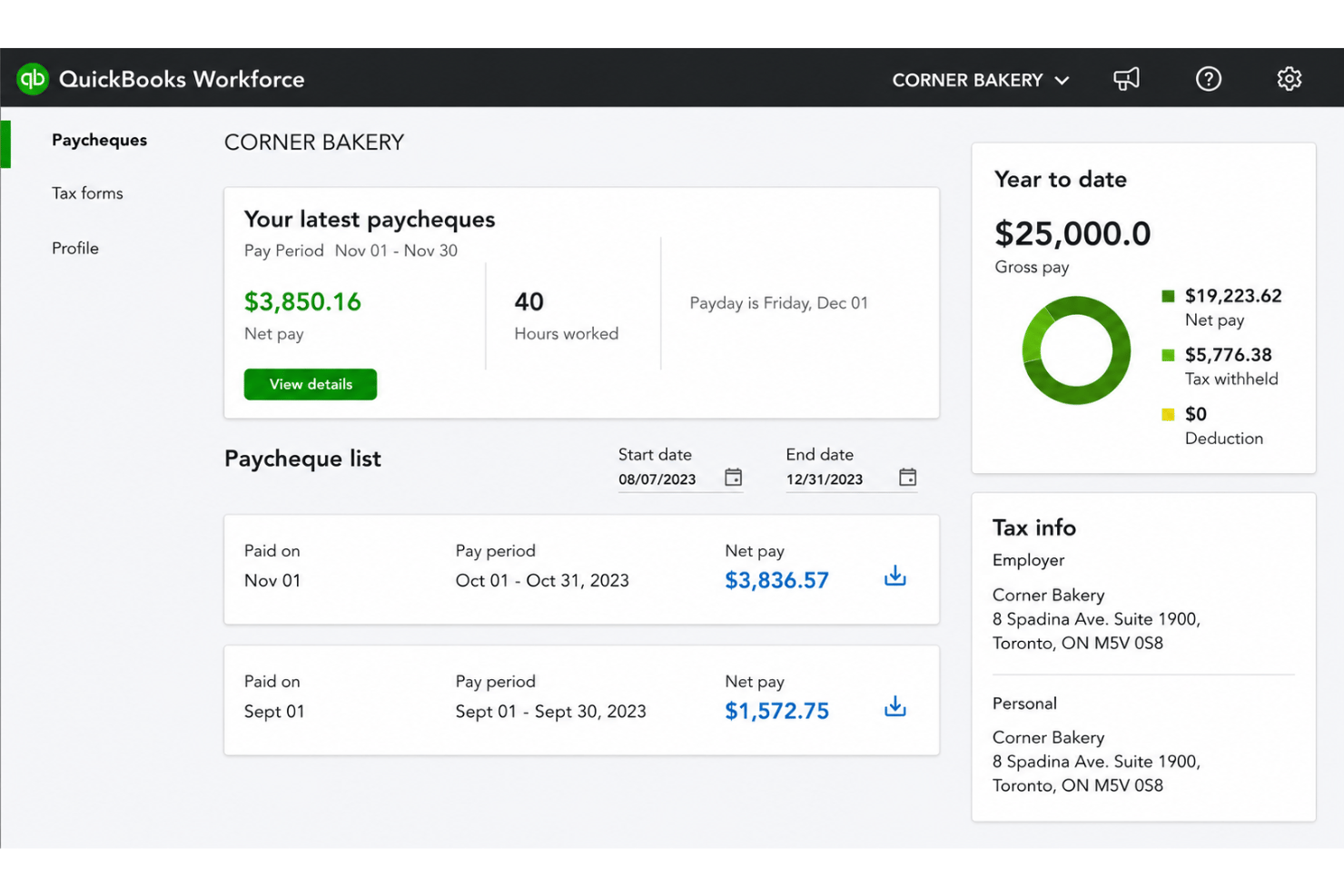
QuickBooks Workforce
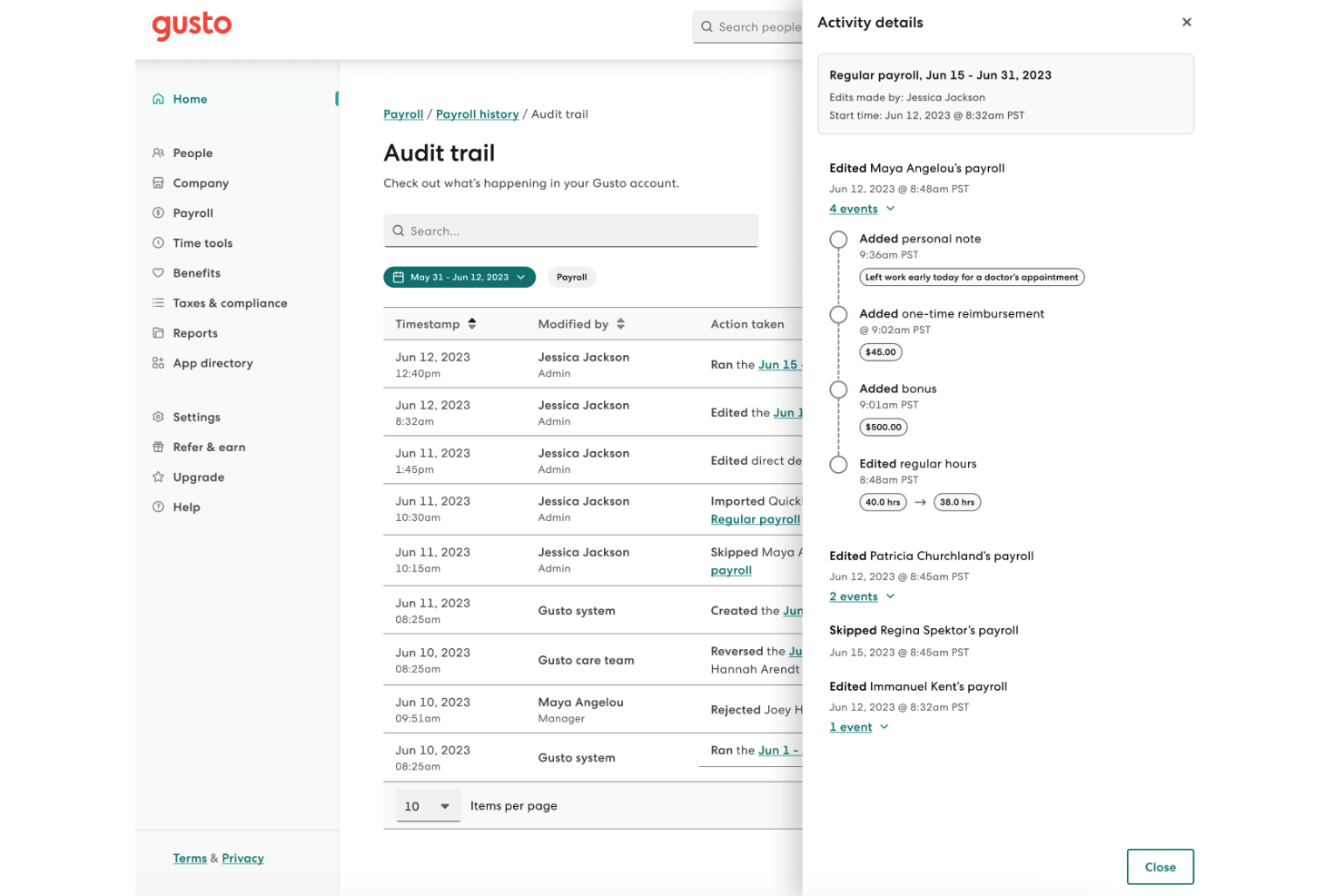
Gusto


Warum Sie unseren Software-Bewertungen vertrauen können
Unser Team testet und bewertet Software seit 2012. Als HR-Experten wissen wir selbst, wie schwierig – und wichtig – es ist, die richtige Software auszuwählen.
Für diesen Leitfaden haben wir Tools mithilfe von praktischen Tests und unabhängiger Recherche bewertet und dabei unsere Bewertungskriterien angewendet. Zudem greifen wir auf Erkenntnisse von Branchenvordenkern und praktizierenden HR-Experten zurück.
Unsere Bewertungen spiegeln unser menschliches redaktionelles Urteilsvermögen wider, keine Verkaufsstrategie.
Expertenprüfer:
QuickBooks Workforce vs. Gusto Pricing Comparison
| QuickBooks Workforce | Gusto | |
|---|---|---|
| Free Trial | 30-day free trial | Free demo available |
| Pricing | From $88/month | From $49/month + $6/month/user |
QuickBooks Workforce vs. Gusto Preise & Versteckte Kosten
QuickBooks Workforce verwendet ein Abonnementmodell, das an QuickBooks Lohn- und Buchhaltungsprodukte geknüpft ist, wobei die Kosten steigen können, wenn Sie zusätzliche Funktionen oder Support hinzufügen. Manche Unternehmen stellen zusätzliche Gebühren für Steuererklärungen, Direktüberweisungen und Integrationen fest. Gusto bietet gestaffelte monatliche Tarife je nach Funktionsumfang und Anzahl der Mitarbeitenden an, dazu können Extras wie einmalige Zahlungen für Aufträge an Vertragspartner oder einen erweiterten Support kommen.
Um die beste Preisentscheidung zu treffen, beginnen Sie damit, die unverzichtbaren Funktionen für Ihr Team aufzulisten – einschließlich Lohnläufe, Berichte, Mitarbeiterzugang und Support. Überprüfen Sie, ob es Funktionen gibt, die als Zusatzpaket oder nur in höheren Tarifen erhältlich sind. Fragen Sie die Anbieter nach allen möglichen Zusatzgebühren – nicht nur nach dem Basispreis –, damit Sie böse Überraschungen bei den Kosten beim Wachstum Ihres Unternehmens vermeiden.
QuickBooks Workforce vs. Gusto Feature Comparison
<div class="slate-p slate-selectable" data-slate-node="element" data-block-id="Qtnq7fNUpR" data-slate-fragment="JTVCJTdCJTIyY2hpbGRyZW4lMjIlM0ElNUIlN0IlMjJ0ZXh0JTIyJTNBJTIyQm90aCUyMFF1aWNrQm9va3MlMjBXb3JrZm9yY2UlMjBhbmQlMjBHdXN0byUyMHByb3ZpZGUlMjBlc3NlbnRpYWwlMjBwYXlyb2xsJTIwZnVuY3Rpb25zJTIwbGlrZSUyMGF1dG9tYXRlZCUyMHBheSUyMHJ1bnMlMkMlMjB0YXglMjBjYWxjdWxhdGlvbnMlMkMlMjBkaXJlY3QlMjBkZXBvc2l0JTJDJTIwYW5kJTIwZW1wbG95ZWUlMjBzZWxmLXNlcnZpY2UlMjBwb3J0YWxzLiUyMFdpdGglMjBlaXRoZXIlMjB0b29sJTJDJTIweW91JUUyJTgwJTk5bGwlMjBmaW5kJTIwZmVhdHVyZXMlMjBmb3IlMjB0aW1lLW9mZiUyMHRyYWNraW5nJTIwYW5kJTIwYmFzaWMlMjBkb2N1bWVudCUyMG1hbmFnZW1lbnQlMkMlMjBzbyUyMHlvdSUyMGNhbiUyMGtlZXAlMjBwYXlyb2xsJTIwc2ltcGxlJTIwYW5kJTIwYWNjdXJhdGUuJTIyJTdEJTVEJTJDJTIydHlwZSUyMiUzQSUyMnAlMjIlMkMlMjJpZCUyMiUzQSUyMmtUMW50UHhZWjUlMjIlN0QlMkMlN0IlMjJjaGlsZHJlbiUyMiUzQSU1QiU3QiUyMnRleHQlMjIlM0ElMjJRdWlja0Jvb2tzJTIwV29ya2ZvcmNlJTIwc3RhbmRzJTIwb3V0JTIwd2l0aCUyMGl0cyUyMGRlZXAlMjBpbnRlZ3JhdGlvbiUyMGludG8lMjB0aGUlMjBJbnR1aXQlMjBlY29zeXN0ZW0lMkMlMjBtYWtpbmclMjBpdCUyMGElMjBzb2xpZCUyMHBpY2slMjBpZiUyMHlvdSVFMiU4MCU5OXJlJTIwYWxyZWFkeSUyMHVzaW5nJTIwdGhlaXIlMjBwbGF0Zm9ybSUyMGZvciUyMGJvb2tlZXBpbmcuJTIwR3VzdG8lMkMlMjBvbiUyMHRoZSUyMG90aGVyJTIwaGFuZCUyQyUyMGJyaW5ncyUyMHVuaXF1ZSUyMEhSJTIwZmVhdHVyZXMlMjBsaWtlJTIwYmVuZWZpdHMlMjBhZG1pbmlzdHJhdGlvbiUyMGFuZCUyMG9uYm9hcmRpbmclMjB3b3JrZmxvd3MlMkMlMjBnaXZpbmclMjB5b3UlMjBtb3JlJTIwc3VwcG9ydCUyMGZvciUyMHRlYW0lMjBncm93dGglMjBhbmQlMjBjb21wbGlhbmNlLiUyMiU3RCU1RCUyQyUyMnR5cGUlMjIlM0ElMjJwJTIyLCUyMmlkJTIyJTNBJTIyUXRucTdmTlVwUiUyMiU3RCU1RA==
| QuickBooks Workforce | Gusto | |
|---|---|---|
| API | ||
| Application Tracking | ||
| Approval Workflows | ||
| Attendance Tracking | ||
| Budgeting | ||
| Calendar Management | ||
| Compliance Tracking | ||
| Dashboard | ||
| Data Export | ||
| Data Import | ||
| Data Visualization | ||
| Employee Database | ||
| Employee Incentive Management | ||
| Employee Onboarding | ||
| Expense Tracking | ||
| External Integrations | ||
| Feedback Management | ||
| Forecasting | ||
| Multi-Currency | ||
| Multi-User | ||
| Notifications | ||
| Payroll | ||
| Scheduling | ||
| Tax Management | ||
| Time Management | ||
| Timesheets | ||
| Travel Management | ||
| Vacation & Absence Calendar |
QuickBooks Workforce vs. Gusto Integrationen
| Integration | QuickBooks Workforce | Gusto |
|---|---|---|
| QuickBooks Online | ✅ | ✅ |
| Xero | ❌ | ✅ |
| FreshBooks | ❌ | ✅ |
| Asana | ❌ | ✅ |
| QuickBooks Time | ✅ | ✅ |
| JazzHR | ✅ | ✅ |
| Clockify | ✅ | ❌ |
| API | ✅ | ✅ |
| Zapier | ✅ | ❌ |
QuickBooks Workforce ist eher ein ergänzendes Tool innerhalb des größeren QuickBooks-Ökosystems. Die direkten Integrationsmöglichkeiten mit externen Anwendungen sind dadurch eingeschränkt und hängen weitgehend von den angeschlossenen Apps in der Hauptplattform ab. Es gibt zwar API- und Zapier-Unterstützung für mehr Flexibilität, doch wenn Sie eigenständige, sofort nutzbare HR- und Lohnabrechnungsintegrationen suchen, ist Gusto meist die stärkere Lösung.
QuickBooks Workforce vs. Gusto Sicherheit, Compliance & Zuverlässigkeit
| Faktor | QuickBooks Workforce | Gusto |
|---|---|---|
| Datenverschlüsselung | Verwendet AES256- und TLS-Verschlüsselung für alle ruhenden Daten sowie RSA-Verschlüsselung für Datenübertragungen. | Datenübertragungen werden mit TLS v1.2 verschlüsselt, ruhende Daten mittels AES256. |
| Regulatorische Compliance | Entspricht PCI DSS, durchläuft SOC-Prüfungen und Berichte und ist nach ISO 27001 zertifiziert. | SOC 1 & 2 konform und erfüllt Anforderungen der HIPAA. |
| Zugriffskontrollen | Anpassbare Benutzerrollen im QuickBooks-Ökosystem. | Rollenbasierte Berechtigungen mit detaillierten Aktivitätsprotokollen. |
| Systemzuverlässigkeit | 99,9 % Verfügbarkeit, unterstützt durch die Infrastruktur von Intuit. | Mehrfache Redundanzen und transparente Berichterstattung zur Verfügbarkeit. |
Beide Produkte bieten starke Sicherheits- und Compliance-Standards, aber Gusto punktet zusätzlich durch HIPAA-Konformität, Überwachung regulatorischer Anforderungen und Transparenz. Ich vertraue QuickBooks Workforce hinsichtlich Zuverlässigkeit und Integration mit der Buchhaltung, während Gusto bei Compliance-Überwachung und klarer Kommunikation hervorsticht.
QuickBooks Workforce vs. Gusto Benutzerfreundlichkeit
| Faktor | QuickBooks Workforce | Gusto |
|---|---|---|
| Benutzeroberfläche | Die Navigation ist für QuickBooks-Nutzer vertraut, allerdings können Menüs umfangreich sein. | Modernes, übersichtliches Design mit intuitiver Navigation und Dashboards. |
| Onboarding | Die Einrichtung erfolgt schrittweise, benötigt aber manchmal Unterstützung von QuickBooks. | Geführtes Onboarding mit hilfreichen Tipps und E-Mail-Support. |
| Lohnabrechnung | Nahtlose Integration, wenn QuickBooks bereits genutzt wird. | Vereinfacht die Lohnabrechnung in mehreren Bundesstaaten und ergänzt deutliche Workflow-Hinweise. |
| Kundensupport | Live-Chat und telefonischer Support zu Geschäftszeiten. | Schneller Support via Chat, E-Mail und mit erweiterten Zeiten. |
| Mobile Erfahrung | Mobile Optionen sind für einige Lohnabrechnungsaufgaben eingeschränkt. | Starke mobile Nutzererfahrung für Administrator:innen und Mitarbeitende. |
Gusto bietet insgesamt eine reibungslosere und einsteigerfreundlichere Nutzererfahrung, während QuickBooks Workforce sich vor allem für bestehende QuickBooks-Anwender natürlich anfühlt. Ich finde Gusto ideal für schnelles Onboarding und klare Workflows und QuickBooks Workforce besonders hilfreich für Teams, die bereits tief in QuickBooks integriert sind.
QuickBooks Workforce vs Gusto: Pros & Cons
QuickBooks Workforce
- Paystubs and W-2s are accessible for employees anytime.
- Automated payroll tax calculations help prevent errors.
- Mobile access lets employees view pay and year-end forms.
- May not suit complex or global payroll needs.
- May lack advanced features found in dedicated enterprise HCM platforms.
- May require transition time when moving from manual payroll processes.
Gusto
- You can run payroll using guided steps, even without prior payroll experience.
- Employees can access pay stubs, tax forms, and update personal details without HR help.
- Health insurance premiums and 401(k) contributions are automatically deducted and synced with payroll.
- Support response times can be slower outside standard business hours.
- Costs can rise quickly as you add employees and features.
- May feel limiting if you need enterprise-level scalability and controls.
Best Use Cases for QuickBooks Workforce and Gusto
QuickBooks Workforce
- Small Businesses Intuitive setup and payroll automation suit leaders without dedicated HR or accounting staff.
- Retail Teams Hourly shift workers and frequent turnover make pay stub access and real-time PTO tracking a key advantage.
- Accountants Easy access to year-end tax forms and long-term pay history streamlines accounting and client payroll work.
- Construction Firms Mobile app access lets field teams check pay, view W-2s, and update info without coming to the office.
- Distributed Teams Remote or hybrid workers benefit from digital payroll and instant access to direct deposit or tax records.
- Growing Startups Features scale for businesses with fluctuating headcounts and evolving payroll needs.
Gusto
- Small Businesses Good fit if you want an easy way to run payroll, file taxes, and manage employee records without needing payroll expertise.
- Mid-Sized Business Works well for growing teams that need automated payroll, benefits management, and support for multiple pay schedules.
- Contractor Business Useful if you pay freelancers or contractors regularly and need simple 1099 generation and payment tracking.
- Accountants Helps accountants manage payroll for multiple clients from one system with automated tax filing and reporting.
- New Businesses Ideal if you want to set up payroll quickly, stay compliant from the start, and avoid manual payroll processing.
- One Employee Teams Suitable for solo employers who need to run compliant payroll and handle taxes without complex HR tools.
Für wen eignet sich QuickBooks Workforce und für wen Gusto?
QuickBooks Workforce ist optimal für kleine bis mittelständische Unternehmen, die QuickBooks bereits für die Buchhaltung einsetzen und die Gehaltsabrechnung eng mit ihren bestehenden Abläufen verzahnen möchten – mit zusätzlichen Funktionen für Human Capital Management. Ich sehe es als Lösung für Buchhalter:innen, Steuerberater:innen und wachsende Teams, die Mitarbeiter-Self-Service, Zeiterfassung und grundlegendes Workforce Management benötigen, aber keine vollständige HR-Enterprise-Lösung suchen. Gusto eignet sich besser für Start-ups, wachsende Teams oder alle, die eine All-in-one-Lösung für Lohnabrechnung sowie weitergehende HR-Funktionen, Benefits, modernes Onboarding und Flexibilität für Freiberufler:innen oder Remote-Mitarbeitende wünschen. Steht ein positives, mitarbeiterorientiertes Arbeitsumfeld im Fokus, ist Gusto vermutlich die bessere Wahl.
Differences Between QuickBooks Workforce and Gusto
| QuickBooks Workforce | Gusto | |
|---|---|---|
| Accounting Integration | Built for seamless sync with QuickBooks accounting. | Connects with multiple accounting tools, not just QuickBooks. |
| Contractor Payments | Supports but prioritizes traditional payroll. | Built-in flexibility for paying contractors and remote teams. |
| Pricing Model | Subscription linked to QuickBooks payroll plans and add-ons. | Tiered monthly pricing based on features and employee count. |
| User Experience | Intuitive for existing QuickBooks users, steeper for others. | Modern, simple UI that's easy even for payroll beginners. |
| Visit QuickBooks WorkforceOpens new window | Visit GustoOpens new window |
Similarities Between QuickBooks Workforce and Gusto
| Compliance Updates | Both keep up with the latest payroll tax laws and compliance changes—Gusto often notifies users, while QuickBooks adjusts calculations automatically. |
|---|---|
| Direct Deposit | Each provides direct deposit for employees; setup is simple and both platforms support scheduled payroll with minimal clicks. |
| Employee Self-Service | Both platforms offer employee portals for pay stubs and tax documents, with Gusto adding more onboarding tools and QuickBooks syncing with accounting. |
| Integration Options | Both offer core integrations (like accounting software and time tracking), plus API and Zapier; Gusto offers more variety but both cover essentials. |
| Payroll Automation | Both automate pay runs, tax calculations, and filings; QuickBooks Workforce emphasizes integration speed, while Gusto focuses on reducing manual entry. |
| Visit QuickBooks WorkforceOpens new window Visit GustoOpens new window | |