

10 mejores alternativas a ClickUp para equipos de RR. HH. en 2026

Selección de alternativas a ClickUp


Las mejores alternativas a ClickUp para equipos de RR. HH. combinan una gestión flexible de tareas, una colaboración clara entre equipos y funciones adaptadas a las operaciones de personal. Si estás buscando alternativas a ClickUp, probablemente necesites herramientas que admitan los flujos de trabajo de RR. HH., simplifiquen el seguimiento de los empleados y se adapten a los procesos únicos de tu equipo.
Elegir la plataforma adecuada puede ayudarte a gestionar la incorporación, las evaluaciones del rendimiento y el cumplimiento normativo sin añadir complejidad. En esta guía encontrarás una lista seleccionada de las mejores alternativas a ClickUp, cada una con puntos fuertes que abordan los desafíos habituales de RR. HH. y te ayudan a crear un entorno de trabajo más organizado y centrado en las personas.
¿Qué es ClickUp?
ClickUp es una plataforma de software de gestión de proyectos diseñada para ayudar a los equipos a gestionar tareas y subtareas, realizar un seguimiento del progreso y colaborar en tiempo real. Como solución SaaS, reúne la gestión del trabajo, el seguimiento de tareas y herramientas de colaboración integrales en una interfaz fácil de usar que admite entornos con varios equipos. Gracias a sus sólidas opciones de personalización y a la compatibilidad con flujos de trabajo complejos, suele ser utilizada por equipos de marketing y operaciones que buscan centralizar el trabajo.
Por qué confiar en nuestras reseñas de software
Nuestro equipo lleva probando y evaluando software desde 2012. Como expertos en RR. HH., sabemos lo difícil —y lo importante— que es elegir el software adecuado.
Para esta guía, evaluamos las herramientas mediante pruebas prácticas e investigación independiente, puntuando las herramientas según nuestros criterios de selección. También nos basamos en la experiencia de líderes de opinión del sector y de profesionales de RR. HH. en activo.
Nuestras reseñas reflejan nuestro criterio editorial humano, no un discurso de ventas.
Revisores expertos:
Resumen de las mejores alternativas a ClickUp
Esta tabla comparativa resume los detalles de precios de mis principales alternativas a ClickUp para ayudarte a encontrar la mejor opción para tu presupuesto y las necesidades de tu empresa.
| Tool | Best For | Trial Info | Price | ||
|---|---|---|---|---|---|
| 1 | Ideal para gestionar proyectos complejos de equipos | Prueba gratuita de 14 días + demostración gratuita disponible | Desde $8/usuario/mes (facturado anualmente) | Website | |
| 2 | Ideal para flujos de trabajo guiados por hitos | Plan gratuito disponible para siempre | Desde $39/mes (facturado anualmente) | Website | |
| 3 | Ideal para crear elementos visuales de líneas de tiempo | Plan gratuito disponible | Precios disponibles bajo solicitud | Website | |
| 4 | Ideal para la planificación y asignación de recursos | Prueba gratuita de 14 días disponible | Desde $9/usuario/mes (facturado anualmente) | Website | |
| 5 | Ideal para la colaboración sencilla en equipo | Prueba gratuita de 30 días + demostración gratuita disponible | Desde $15/usuario/mes | Website | |
| 6 | Ideal para la gestión de agencias creativas | Demo gratuita disponible | Desde $10.50/usuario/mes (facturado anualmente) | Website | |
| 7 | Ideal para programar tareas con IA | Prueba gratuita disponible | Desde $19/usuario/mes (facturado anualmente) | Website | |
| 8 | Ideal para plantillas de proyectos personalizables | Plan gratuito disponible para siempre | Desde $1/usuario/mes (facturado anualmente) | Website | |
| 9 | Ideal para registrar las horas facturables de los empleados | Demostración gratuita disponible | Desde $12/usuario/mes (facturado anualmente) | Website | |
| 10 | La mejor opción para el seguimiento del tiempo de trabajo | Prueba gratuita de 14 días + demostración gratuita disponible | Desde $4.99/usuario/mes (facturado anualmente) | Website |
Opiniones sobre alternativas a ClickUp
A continuación encontrarás mis resúmenes detallados de las mejores alternativas a ClickUp que incluí en mi selección. Mis reseñas ofrecen un análisis detallado de las funciones, los casos de uso más adecuados y las integraciones de cada plataforma para ayudarte a encontrar la mejor opción para ti.

Workzone
Ideal para gestionar proyectos complejos de equipos

Workzone ofrece a los equipos de RR. HH. una plataforma centralizada para coordinar proyectos, gestionar tareas de los empleados y realizar un seguimiento del progreso entre departamentos. Su diseño de espacio de trabajo estructurado es adecuado para organizaciones que necesitan una supervisión clara de iniciativas complejas de RR. HH. y la colaboración entre equipos.
¿Para quién es más adecuado Workzone?
Los departamentos de RR. HH. de organizaciones medianas y grandes que gestionan varios proyectos y equipos multifuncionales.
Por qué Workzone es una buena alternativa a ClickUp
Elegí Workzone por su capacidad para gestionar proyectos de RR. HH. complejos y con múltiples equipos sin perder visibilidad entre los distintos flujos de trabajo. Me gusta cómo sus paneles de proyectos ofrecen una vista clara y en tiempo real de la asignación de tareas y los plazos, algo útil al coordinar campañas de contratación o programas de incorporación entre departamentos. También valoro la función de gestión de carga de trabajo, que me permite ver exactamente dónde los miembros del equipo están sobrecargados antes de asignar nuevas tareas. En la práctica, esto significa que mi equipo puede equilibrar las demandas de los proyectos de RR. HH. sin depender de comprobaciones manuales ni reuniones de seguimiento del estado.
Funciones principales de Workzone
- Dependencias de tareas: Vincula tareas relacionadas para que el trabajo avance en la secuencia correcta en los proyectos de RR. HH.
- Compartición de archivos: Adjunta y almacena documentos directamente dentro de los proyectos para facilitar el acceso del equipo.
- Notificaciones por correo electrónico: Envía actualizaciones automáticas para mantener informadas a las partes interesadas sobre el progreso de las tareas.
- Seguimiento del tiempo: Registra las horas dedicadas a tareas y proyectos de RR. HH. directamente en la plataforma.
Integraciones de Workzone
Las integraciones incluyen Box, Dropbox, Everhour, FreshBooks, GitHub, Google Drive, Harvest, HubSpot, Jira y Microsoft Office 365.
Pros and Cons
Pros:
- Plantillas de proyectos detalladas para flujos de trabajo de RR. HH.
- Potentes opciones de dependencia y secuenciación de tareas
- Almacenamiento centralizado de documentos dentro de cada proyecto
Cons:
- Funcionalidad limitada de la aplicación móvil para equipos de RR. HH.
- No incluye funciones integradas de sistema de seguimiento de candidatos
New Product Updates from Workzone

Workzone Enterprise Adds Multi-Stage Approval Workflows
Workzone Enterprise now includes Approval Workflows, enabling multi-stage document approvals to standardize complex processes and reduce manual effort. For more information, visit Workzone's official site.
 .
.
Nifty
Ideal para flujos de trabajo guiados por hitos
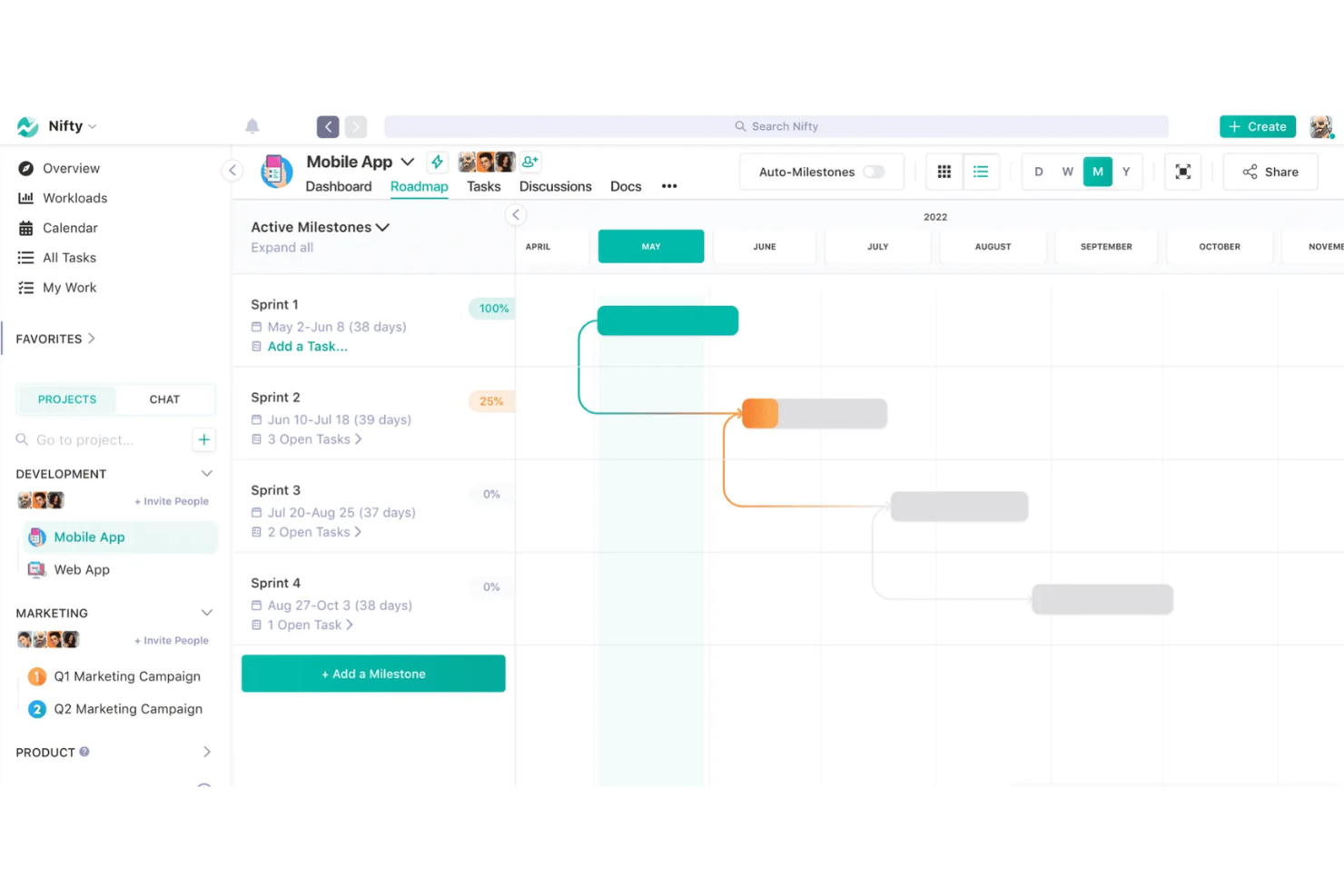
Nifty es una plataforma de gestión de proyectos diseñada para equipos de RR. HH. y responsables de personas que necesitan coordinar tareas, documentos y la comunicación del equipo en un solo lugar. Es una opción atractiva para las organizaciones que buscan una forma estructurada de gestionar proyectos, hacer seguimiento del progreso y mantener a todos alineados sin tener que alternar entre varias herramientas.
¿Para quién es mejor Nifty?
Equipos de RR. HH. en empresas en crecimiento que necesitan coordinar proyectos e hitos entre departamentos.
Por qué Nifty es una buena alternativa a ClickUp
Elegí Nifty específicamente por cómo su función de hojas de ruta vincula el progreso de los hitos directamente con la finalización de las tareas. Por ejemplo, cuando mi equipo configura un proyecto de incorporación, cada fase—aceptación de la oferta, configuración del equipo, orientación del primer día—se convierte en un hito que se actualiza automáticamente a medida que se marcan las tareas como completadas. También valoro la función de dependencias entre hitos, que bloquea las tareas de una fase hasta que se completa la fase anterior. Ese tipo de secuenciación estructurada requiere una configuración más manual en ClickUp para poder replicarse.
Funciones principales de Nifty
- Objetivos: Establece objetivos medibles vinculados a tareas, listas de tareas o campos personalizados, con un progreso que se actualiza automáticamente a medida que se completa el trabajo.
- Seguimiento del tiempo: Registra las horas a nivel de tarea en distintos dispositivos, con hojas de horas exportables desglosadas por proyecto, tarea y miembro del equipo.
- Formularios: Crea formularios de recepción que generan automáticamente tareas, publican mensajes de debate o crean documentos cuando se envía una respuesta.
- Registros automáticos: Programa actualizaciones asíncronas recurrentes con preguntas de seguimiento condicionales para detectar bloqueos sin añadir reuniones.
Integraciones de Nifty
Las integraciones incluyen Slack, Zoom, Webex, Google Drive, Microsoft 365, Harvest, GitHub, Miro, Typeform y Outlook.
Pros and Cons
Pros:
- El seguimiento de hitos se actualiza automáticamente con el progreso de las tareas
- Seguimiento del tiempo integrado y hojas de horas exportables
- Los formularios crean tareas o documentos a partir de los envíos
Cons:
- No incluye una vista de diagrama de Gantt
- Opciones limitadas de automatización avanzada de flujos de trabajo

Lucen
Ideal para crear elementos visuales de líneas de tiempo

OfficeTimeline es un creador de líneas de tiempo y diagramas de Gantt diseñado para profesionales que necesitan presentar visualmente planes de proyectos e hitos. Los equipos de RR. HH. lo utilizan para crear elementos visuales claros y listos para presentaciones sobre cronogramas de contratación, programas de incorporación y planificación de la plantilla.
¿Para quién es más adecuado OfficeTimeline?
Profesionales de RR. HH. y responsables de proyectos que necesitan presentar planes de contratación o de plantilla en un formato visual.
Por qué OfficeTimeline es una buena alternativa a ClickUp
Elegí OfficeTimeline porque la vista de línea de tiempo integrada de ClickUp es funcional, pero no está lista para presentaciones. Cuando necesito explicar a los directivos una hoja de ruta de contratación o un programa de incorporación, el complemento de OfficeTimeline para PowerPoint me permite crear elementos visuales pulidos y listos para diapositivas directamente dentro de PowerPoint, sin necesidad de reformatearlos. También me gusta la función de carriles, que me permite separar flujos de trabajo como la contratación, la incorporación y la formación en pistas visuales diferenciadas dentro de una sola diapositiva. En la práctica, esto significa que mi equipo puede presentar un plan completo de plantilla en una única diapositiva clara, orientada a los directivos, sin exportar datos ni reconstruir elementos visuales desde cero.
Funciones principales de OfficeTimeline
- Seguimiento de lo planificado frente a lo real: Compara los cronogramas originales de los proyectos con el progreso real mediante superposiciones de referencia en la línea de tiempo.
- Editor visual de arrastrar y soltar: Cambia directamente la posición de tareas e hitos en el lienzo de la línea de tiempo sin volver a introducir los datos.
- Plantillas listas para usar: Accede a plantillas prediseñadas de líneas de tiempo y diagramas de Gantt para tipos de proyectos como TI, productos farmacéuticos y hojas de ruta.
- Asignación de tareas: Asigna tareas individuales a los miembros del equipo directamente desde la vista de línea de tiempo en línea.
Integraciones de OfficeTimeline
Las integraciones incluyen Microsoft PowerPoint, Microsoft Excel, Microsoft Project, Microsoft Word y Office 365.
Pros and Cons
Pros:
- Exporta líneas de tiempo directamente a diapositivas de PowerPoint
- Admite carriles para elementos visuales de varios proyectos
- Permite comparar la línea base para el seguimiento de proyectos
Cons:
- No ofrece gestión de tareas mediante Kanban ni listas
- No es una herramienta completa de gestión de proyectos

Birdview
Ideal para la planificación y asignación de recursos
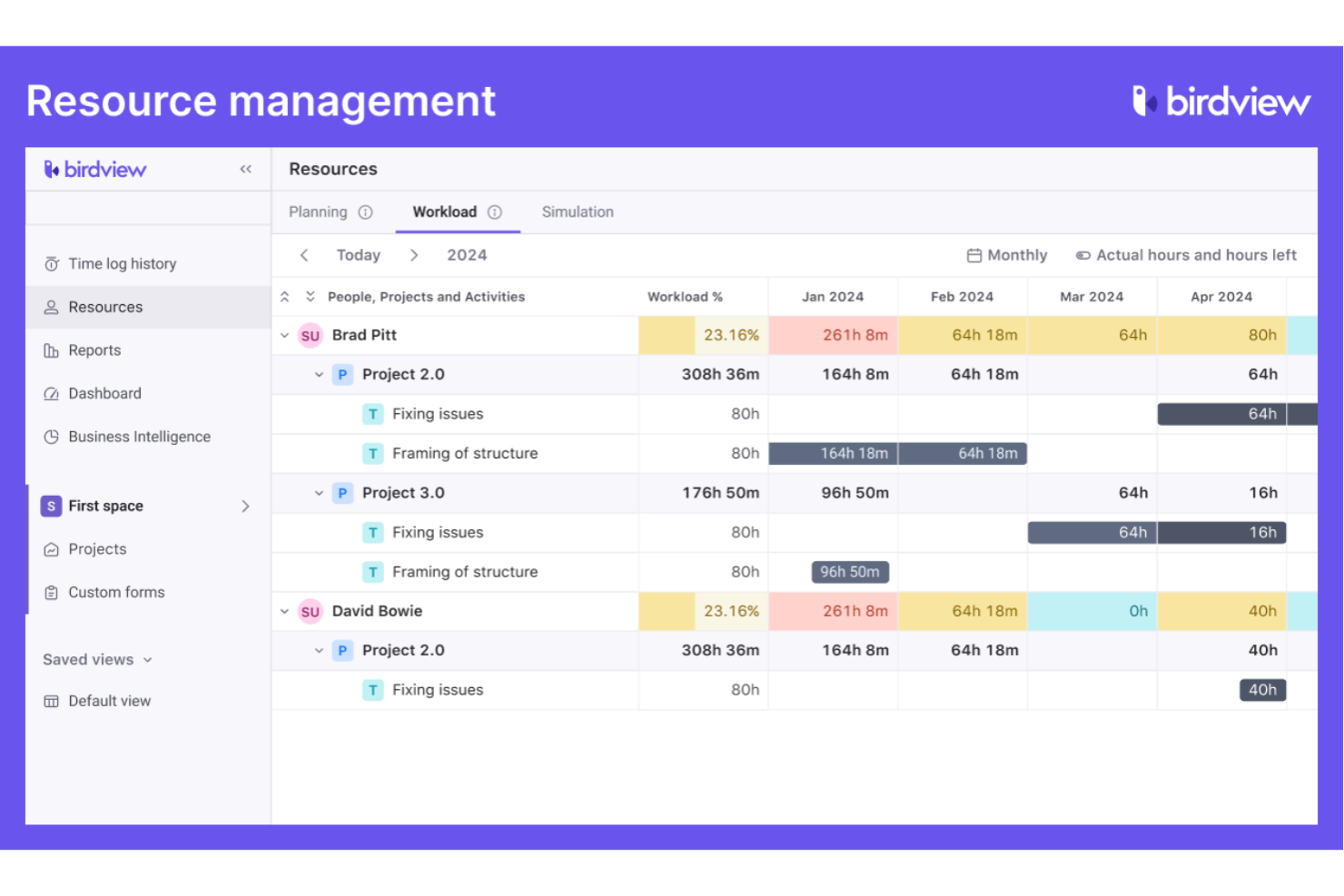
Birdview es una plataforma de gestión de proyectos y recursos diseñada para organizaciones que necesitan coordinar personas, proyectos y capacidad entre equipos. Los profesionales de RR. HH. y los responsables de operaciones utilizan Birdview para obtener visibilidad sobre las cargas de trabajo, prever las necesidades de personal y equilibrar las asignaciones en entornos dinámicos.
¿Para quién es más adecuado Birdview?
Responsables de recursos y equipos de RR. HH. en organizaciones medianas y grandes que coordinan varios proyectos y equipos.
Elegí Birdview porque ClickUp no ofrece una planificación de recursos específica con la profundidad que realmente necesitan los equipos que gestionan varios proyectos simultáneos. El creador de equipos basado en IA de Birdview relaciona los puestos vacantes con empleados o contratistas disponibles según sus habilidades y disponibilidad; así, cuando comienza un nuevo proyecto, no tengo que revisar manualmente hojas de cálculo para averiguar quién puede asumirlo. También utilizo la vista de previsión de demanda frente a capacidad, que me muestra con semanas de antelación dónde está sobrecargado mi equipo, no después de que ocurra. Para los equipos de RR. HH. que apoyan a organizaciones con muchos proyectos, esa visibilidad anticipada cambia la forma de contratar y planificar.
Características principales de Birdview
- Programación mediante diagrama de Gantt: Crea y ajusta los cronogramas de los proyectos con dependencias entre tareas mediante una vista interactiva de diagrama de Gantt.
- Portal del cliente: Ofrece a los clientes externos un espacio específico para revisar el progreso del proyecto, comentar y aprobar los entregables.
- Facturación y emisión de facturas: Genera facturas detalladas según el tiempo registrado, los gastos o las tareas con tarifa fija en varios modelos de facturación.
- Gestión de carteras de proyectos: Agrupa proyectos en carteras para realizar un seguimiento de los presupuestos, estados y prioridades de varias iniciativas a la vez.
Integraciones de Birdview
Las integraciones incluyen QuickBooks, MS Outlook, Jira, Salesforce, HubSpot, Adobe Creative Cloud, MS Project, Excel, Office 365 y Gmail.
Pros and Cons
Pros:
- Herramientas avanzadas de asignación y previsión de recursos
- Portal del cliente específico para la colaboración externa
- Diagrama de Gantt con dependencias entre tareas incluido
Cons:
- No incluye una función de chat o mensajería
- Automatización limitada para tareas repetitivas de RR. HH.

Basecamp
Ideal para la colaboración sencilla en equipo
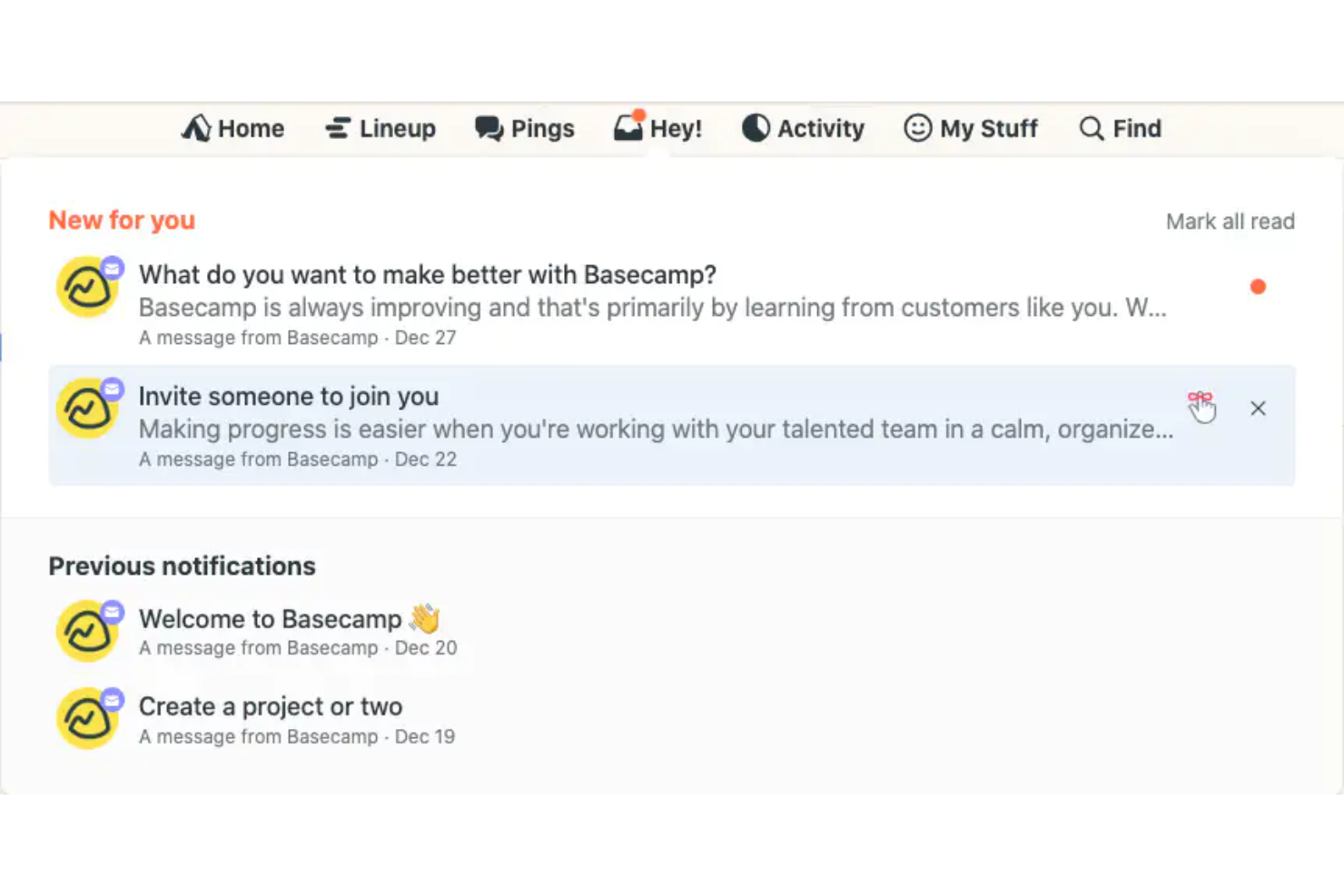
Basecamp es una plataforma de colaboración en equipo diseñada para organizaciones que buscan una forma sencilla de gestionar la comunicación, las tareas y los calendarios. Los equipos de Recursos Humanos y los responsables de personal la utilizan para centralizar las conversaciones de los proyectos, compartir archivos y mantener a todos alineados sin una configuración compleja.
¿Para quién es más adecuado Basecamp?
Equipos pequeños y medianos que buscan un espacio de trabajo sencillo y centralizado para la comunicación y coordinación de proyectos.
Por qué Basecamp es una buena alternativa a ClickUp
Elegí Basecamp porque elimina la complejidad que hace que ClickUp resulte abrumador para los equipos que solo necesitan mantenerse organizados. Cada proyecto tiene su propio espacio dedicado con tablones de mensajes, listas de tareas, almacenamiento de archivos y un chat grupal, todo en un mismo lugar y sin necesidad de configuración. Me gusta cómo la función de chat Campfire mantiene las conversaciones del equipo vinculadas a proyectos específicos, de modo que las conversaciones de Recursos Humanos sobre la incorporación de empleados o las actualizaciones de políticas no quedan enterradas en un canal general. Para los equipos que no necesitan flujos de trabajo avanzados, la estructura plana de Basecamp facilita que todos participen desde el primer día.
- Listas de tareas: Crea y asigna listas de tareas con fechas límite y comentarios adjuntos directamente a cada elemento.
- Documentos y archivos: Carga, almacena y comparte documentos y archivos dentro de cada espacio del proyecto.
- Tabla de tarjetas: Organiza y mueve las tareas por un tablero de estilo kanban para hacer un seguimiento del trabajo en curso.
- Gráficos de colina: Visualiza el progreso de las tareas en una curva para mostrar qué aspectos aún se están definiendo y cuáles están en ejecución.
Integraciones de Basecamp
Las integraciones incluyen Google Drive, Slack, GitHub, Harvest, Clockify, Everhour, Trello, Zendesk, Dropbox y Asana.
Pros and Cons
Pros:
- La estructura plana de los proyectos reduce el desorden organizativo
- Tablones de mensajes integrados para conversaciones específicas de cada proyecto
- Los gráficos de colina visualizan el progreso de una manera única
Cons:
- Opciones limitadas de informes y análisis
- Menos integraciones que la mayoría de los competidores

Ideal para la gestión de agencias creativas

FunctionFox es una plataforma de gestión de proyectos y seguimiento del tiempo diseñada para equipos creativos y agencias que necesitan gestionar el trabajo de los clientes, los plazos y los recursos. Los profesionales de RR. HH. en entornos creativos la utilizan para coordinar las asignaciones de proyectos, supervisar las cargas de trabajo de los equipos y realizar un seguimiento de las horas facturables.
¿Para quién es más adecuado FunctionFox?
Responsables de agencias creativas y líderes de RR. HH. que coordinan proyectos de clientes y cargas de trabajo de los equipos.
Por qué FunctionFox es una buena alternativa a ClickUp
Elegí FunctionFox porque ClickUp está diseñado para la gestión general de proyectos, mientras que FunctionFox está concebido específicamente para agencias creativas. Para los equipos de RR. HH. que apoyan a departamentos creativos, esa diferencia es importante. Valoro la función de gestión de contratos de servicios, que permite a mi equipo realizar un seguimiento de las horas en relación con los acuerdos continuos con los clientes y avisar cuando un contrato está cerca de alcanzar su límite, algo que ClickUp no gestiona de forma nativa. La vista de capacidad en tiempo real también es algo en lo que confío mucho. Puedo ver exactamente quién tiene disponibilidad antes de asignar trabajo nuevo, lo que evita sobrecargar a los miembros del equipo durante los periodos de campañas intensas.
Características principales de FunctionFox
- Flujo de trabajo de aprobación de hojas de horas: Revisa y aprueba las hojas de horas enviadas directamente en la plataforma antes de finalizarlas.
- Seguimiento del tiempo facturable y no facturable: Marca las tareas como facturables o no facturables durante la configuración para que las horas registradas se clasifiquen automáticamente.
- Más de 50 informes prediseñados: Accede a más de 50 tipos de informes listos para usar que abarcan las horas de los clientes, la rentabilidad de los proyectos y la utilización del personal.
- Seguimiento del presupuesto frente a los valores reales: Compara las estimaciones originales del proyecto con las horas y los gastos reales registrados para detectar pronto los excesos.
Integraciones de FunctionFox
No hay integraciones nativas publicadas; sin embargo, hay una API personalizada disponible para crear integraciones a medida.
Pros and Cons
Pros:
- Realiza un seguimiento independiente de las horas facturables y no facturables
- Incluye flujos de trabajo integrados para la aprobación de hojas de horas
- Proporciona seguimiento del presupuesto frente a los valores reales
Cons:
- No incluye dependencias de tareas ni diagramas de Gantt
- Carece de integraciones nativas con otras herramientas

Motion
Ideal para programar tareas con IA
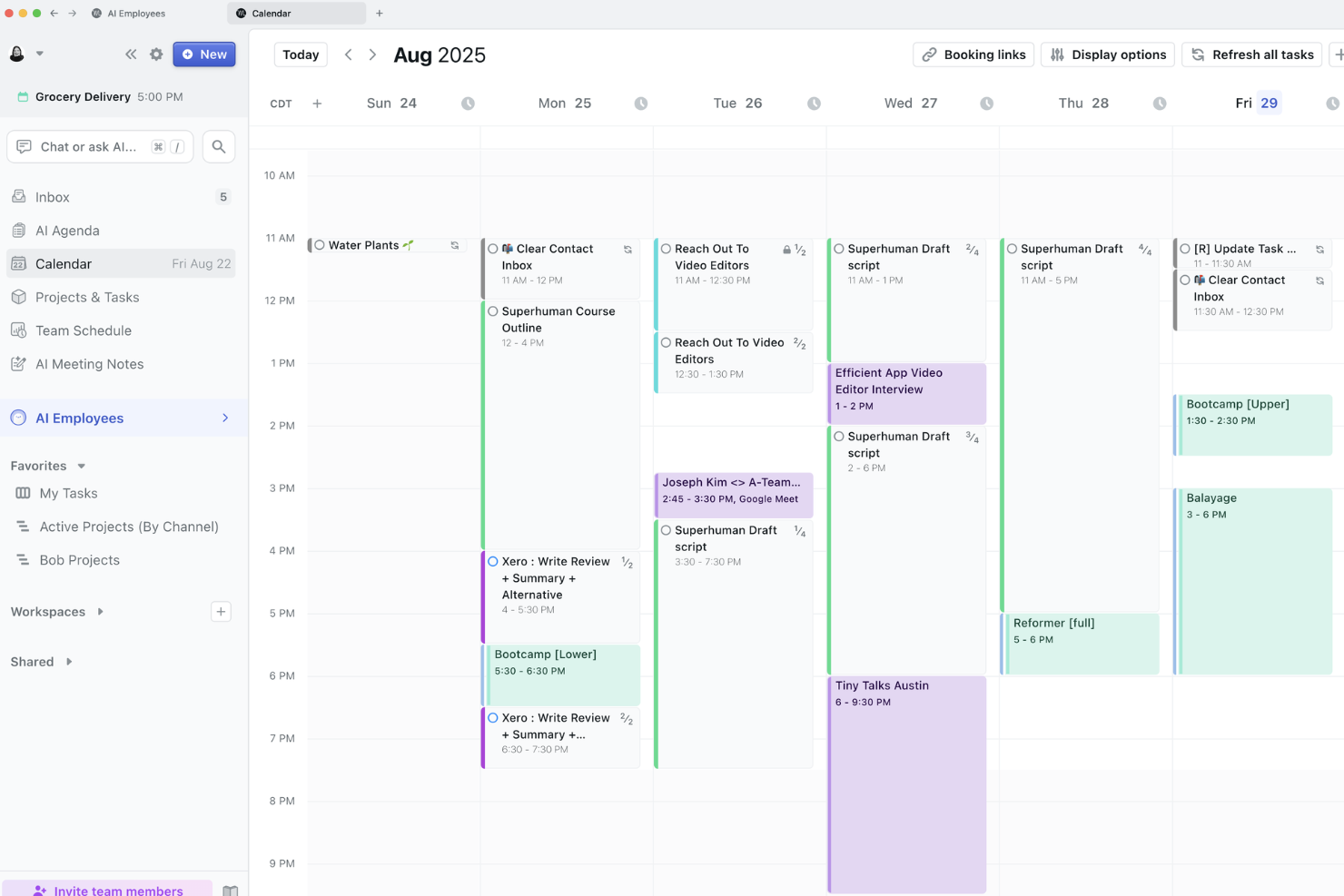
Motion es una plataforma de gestión de proyectos y tareas impulsada por IA, diseñada para equipos de RR. HH. que necesitan coordinar horarios, reuniones y plazos entre departamentos con mucha actividad. Es una opción atractiva para organizaciones que buscan automatizar la priorización de tareas y reducir la gestión manual del calendario.
¿Para quién es más adecuada Motion?
Profesionales de RR. HH. en empresas dinámicas que necesitan programación y gestión de tareas automatizadas.
Por qué Motion es una buena alternativa a ClickUp
Elegí Motion porque su programador con IA crea y reconstruye automáticamente el calendario diario de tareas de mi equipo según los plazos, las prioridades y las horas de trabajo disponibles, algo que ClickUp no hace de forma nativa. Cuando se añade una nueva tarea de contratación o cambia un plazo, Motion reorganiza todo el calendario sin intervención manual. También valoro el asistente de reuniones con IA, que encuentra los horarios óptimos para las reuniones y reserva bloques de tiempo de concentración a su alrededor. En la práctica, esto significa que mi equipo de RR. HH. dedica menos tiempo a coordinar calendarios y más tiempo al trabajo real con las personas.
Funciones principales de Motion
- Diagrama de Gantt con IA: Consulta todos los proyectos en una línea de tiempo activa que actualiza automáticamente las fechas de las tareas y los calendarios de los miembros del equipo cuando cambian los plazos.
- Creador de flujos de trabajo con IA: Genera planes de proyecto completos con tareas y plazos asignados automáticamente a partir de una instrucción escrita o de un procedimiento operativo estándar cargado.
- Tomador de notas de reuniones con IA: Captura y resume automáticamente las notas de las reuniones durante las llamadas.
- Paneles con IA: Supervisa el estado de las tareas, la capacidad del equipo y el progreso de los proyectos de todo el trabajo activo en una sola vista.
Integraciones de Motion
Las integraciones incluyen Google Calendar, Zoom, Gmail, Microsoft Teams, Google Meet, Microsoft Outlook 365, iCloud Calendar y Siri.
Pros and Cons
Pros:
- Programación automática de tareas y reuniones mediante IA
- Sincronización del calendario en tiempo real entre plataformas
- Bloqueo de tiempo de concentración integrado
Cons:
- No incluye un tablero Kanban para la gestión de tareas
- Opciones limitadas de informes y análisis


Hive es una plataforma de gestión de proyectos y procesos diseñada para equipos de RR. HH. que necesitan flujos de trabajo flexibles y colaboración centralizada. Resulta atractiva para las organizaciones que buscan estandarizar la incorporación, gestionar los procesos de selección y coordinar iniciativas de RR. HH. entre equipos desde un solo lugar.
¿Para quién es mejor Hive?
Responsables de RR. HH. en empresas medianas que necesitan estandarizar y automatizar procesos recurrentes relacionados con el personal.
Por qué Hive es una buena alternativa a ClickUp
Elegí Hive específicamente por su biblioteca de plantillas de proyectos, que permite a mi equipo aplicar estructuras prediseñadas para procesos recurrentes de RR. HH., como la incorporación, las evaluaciones de desempeño y los procesos de selección, en cuestión de segundos. Cada plantilla incluye responsables de tareas asignados previamente, fechas de vencimiento y diseños predeterminados que mi equipo puede modificar antes de iniciar un proyecto. También valoro que Hive permita guardar cualquier proyecto existente como una nueva plantilla, de modo que, una vez que hemos perfeccionado un proceso, podemos dejarlo establecido para utilizarlo en el futuro. Esta combinación de plantillas prediseñadas y personalizadas ofrece a los equipos de RR. HH. un nivel de coherencia en los procesos que el sistema de plantillas de ClickUp, aunque es competente, requiere más configuración para alcanzar.
Funciones principales de Hive
- Gestión de recursos: Asigna miembros del equipo a proyectos y consulta su disponibilidad a lo largo de todo el cronograma del proyecto.
- Revisión y aprobaciones: Revisa y aprueba documentos con las partes interesadas internas o externas directamente dentro de Hive.
- Niveles de urgencia: Etiqueta las tareas con indicadores de urgencia codificados por colores para destacar el trabajo de mayor prioridad de un proyecto.
- Notas de Hive: Crea y edita documentos colaborativos en tiempo real con tus compañeros antes, durante o después de las reuniones.
Integraciones de Hive
Las integraciones incluyen Google Drive, Dropbox, Slack, Zoom, Microsoft Teams, Outlook Calendar, Jira, QuickBooks, Box y GitHub.
Pros and Cons
Pros:
- Las plantillas de proyectos se pueden personalizar y guardar
- Flujos de revisión y aprobación integrados
- La vista de gestión de recursos muestra la carga de trabajo del equipo
Cons:
- No incluye una vista de diagrama de Gantt
- Automatización limitada en comparación con ClickUp

Ideal para registrar las horas facturables de los empleados

ClickTime ofrece a los equipos de RR. HH. y a los responsables financieros una forma de registrar las horas de los empleados, gestionar los presupuestos de los proyectos y supervisar la asignación de recursos. Sus herramientas detalladas de registro de tiempo y generación de informes ayudan a las organizaciones a mejorar la precisión de la facturación y controlar los costes laborales.
¿Para quién es más adecuado ClickTime?
Las empresas de servicios profesionales y las consultorías necesitan registrar las horas facturables de los empleados en varios proyectos.
Elegí ClickTime porque se centra específicamente en el registro de horas facturables de una forma que ClickUp no hace. ClickUp considera el registro de tiempo como un complemento de la gestión de proyectos, mientras que ClickTime construye toda su plataforma en torno a esta función. Me gusta que su función de horas facturables permita a mi equipo asignar tarifas de facturación personalizadas por función o proyecto, para que las facturas de los clientes reflejen los costes laborales reales en lugar de estimaciones fijas. También valoro el Estudio de informes, que permite crear informes personalizados de costes laborales por proyecto, departamento o centro de costes, algo que la generación de informes nativa de ClickUp no puede igualar para los equipos centrados en las finanzas.
Funciones principales de ClickTime
- Hojas de horas en línea: Registra y gestiona las entradas de tiempo de los empleados en proyectos y tareas desde un navegador web o una aplicación móvil.
- Gestión de ausencias: Registra las solicitudes de vacaciones, bajas por enfermedad y otras ausencias de los empleados en un rastreador de vacaciones específico.
- Estimación de proyectos: Establece presupuestos de horas y costes por proyecto y supervisa el progreso en relación con esas estimaciones en tiempo real.
- Flujo de trabajo automatizado: Configura reglas para automatizar los recordatorios, las aprobaciones y las entradas de tiempo recurrentes de las hojas de horas.
Integraciones de ClickTime
Las integraciones incluyen ADP WorkforceNow, Azure Entra, Bamboo HR, GitHub, Google Calendar, Google SSO, Hibob, Jira y Microsoft Outlook Calendar. También hay integraciones personalizadas disponibles mediante API.
Pros and Cons
Pros:
- Registra las horas facturables con información detallada a nivel de proyecto
- Ofrece controles detallados de permisos para los responsables
- Incluye seguimiento integrado de ausencias y permisos
Cons:
- No incluye paneles integrados de gestión de tareas
- Automatización de flujos de trabajo limitada en comparación con ClickUp

Hubstaff
La mejor opción para el seguimiento del tiempo de trabajo
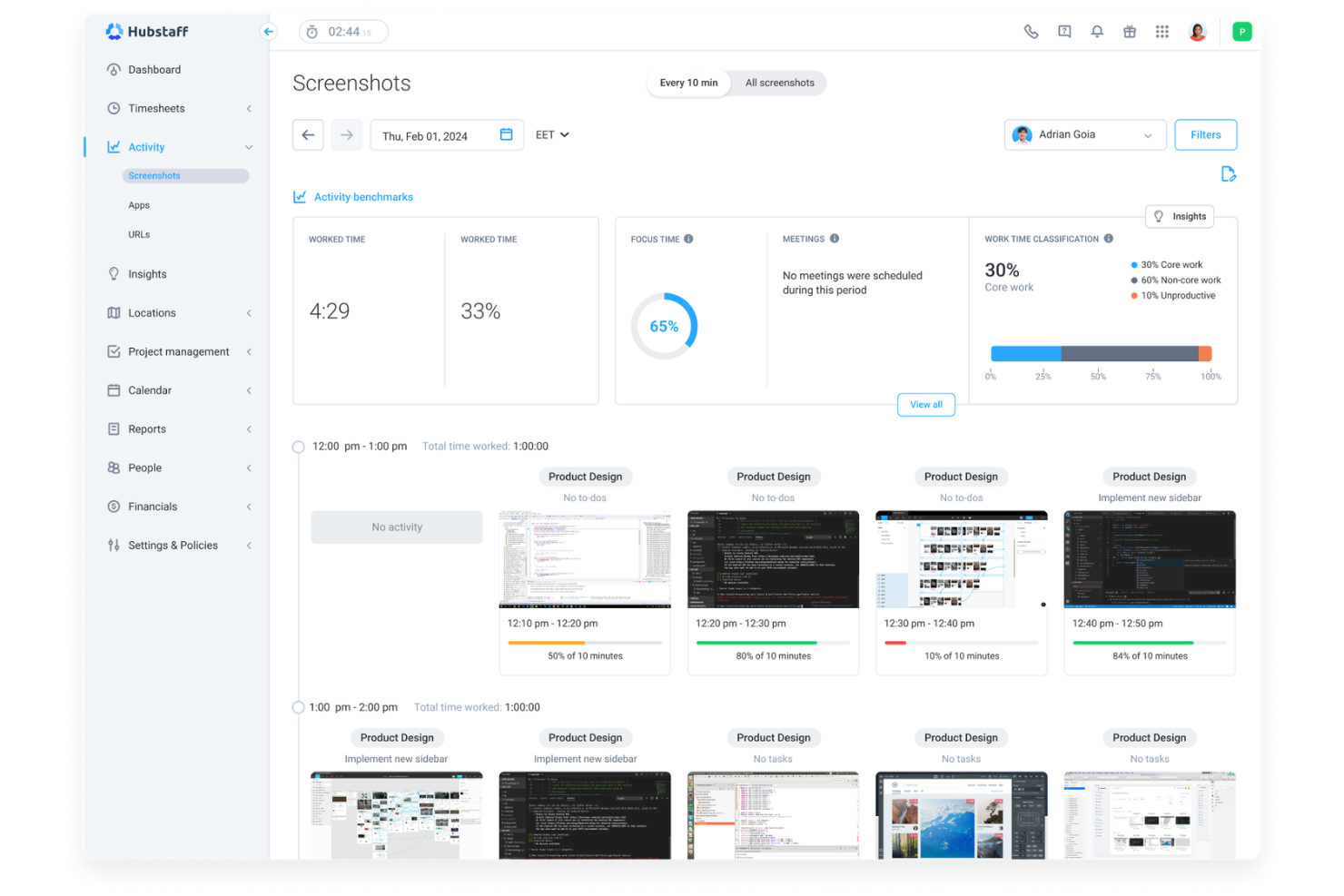
Hubstaff ofrece a los equipos de RR. HH. y a los responsables de operaciones una forma de supervisar el tiempo, la actividad y la productividad de los empleados en plantillas remotas o distribuidas. Sus detalladas funciones de seguimiento y generación de informes ayudan a las empresas a gestionar la asistencia, las nóminas y el cumplimiento normativo con menos esfuerzo manual.
¿Para quién es más adecuado Hubstaff?
Equipos remotos y responsables de RR. HH. en empresas de servicios que necesitan un seguimiento preciso del tiempo de trabajo.
Por qué Hubstaff es una buena alternativa a ClickUp
Elegí Hubstaff porque profundiza mucho más en el seguimiento del tiempo de trabajo que ClickUp. Mientras que ClickUp trata el seguimiento del tiempo como una función secundaria, Hubstaff lo desarrolla como el eje central de toda su plataforma. Me gusta que sus hojas de horas automatizadas conviertan directamente las horas registradas en datos listos para las nóminas; mi equipo no necesita conciliar manualmente las horas al final de un periodo de pago. También valoro la geovalla basada en GPS, que registra automáticamente la entrada y salida de los empleados de campo cuando llegan a un lugar de trabajo o se marchan de él, algo que ClickUp sencillamente no ofrece.
Funciones principales de Hubstaff
- Captura de pantallas: Realiza capturas de pantalla automáticas de las pantallas de los empleados a intervalos establecidos durante el horario laboral.
- Programación: Crea y asigna turnos de empleados con control de los horarios de entrada y salida.
- Presupuestos de proyectos: Establece límites de horas o costes por proyecto y recibe alertas cuando se aproxima al límite.
- Informes de asistencia: Genera informes detallados sobre la asistencia de los empleados, los registros de entrada tardíos y las ausencias.
Integraciones de Hubstaff
Entre las integraciones se incluyen Asana, Trello, Jira, QuickBooks, PayPal, Slack, FreshBooks, Salesforce, Zendesk y Gusto.
Pros and Cons
Pros:
- Supervisión avanzada de empleados con niveles de actividad
- Seguimiento por GPS para equipos móviles y de campo
- Nóminas automatizadas basadas en las horas registradas
Cons:
- No incluye tableros integrados de gestión de tareas
- Funciones limitadas de colaboración documental
Otras alternativas a ClickUp
Estas son algunas alternativas adicionales a ClickUp que no incluí en mi selección, pero que merece la pena considerar:
- Kantata
Ideal para la gestión de recursos en servicios
- Vantage
Ideal para el seguimiento de proyectos gubernamentales
- Portfolio Manager
Ideal para informes a nivel de cartera


Cómo evalúo las alternativas a ClickUp
Divido mi evaluación en criterios básicos —como la gestión de tareas con múltiples vistas y las automatizaciones de flujos de trabajo— y factores diferenciadores, como las funciones de IA, las plantillas específicas para RR. HH. y los controles de cumplimiento.
Funcionalidad principal (requisitos básicos para esta lista)
Al seleccionar herramientas para mi lista, clasifico cada una en una escala del 0 (no ofrece la funcionalidad) al 5 (sobresale en esta área) para cada funcionalidad principal indicada a continuación. Luego, calculo la puntuación total de la herramienta como porcentaje. Cada herramienta debe alcanzar una puntuación total mínima del 65 % para ser considerada.
- Gestión de tareas y proyectos: Busco múltiples vistas —tablero, lista, calendario y Gantt— para que los equipos de RR. HH. puedan gestionar los procesos de selección en un tablero Kanban y hacer un seguimiento de los plazos de incorporación en un diagrama de Gantt.
- Flujos de trabajo y automatizaciones personalizables: Cada herramienta debería permitir crear procesos personalizados y automatizaciones basadas en activadores y acciones, como asignar automáticamente una tarea de inscripción en beneficios cuando una nueva contratación llega a su día 30.
- Plantillas y formularios: Evalúo si las plataformas ofrecen plantillas relevantes para RR. HH. y creadores de formularios, ya que una lista de comprobación sólida para la incorporación o un formulario de recopilación de datos de empleados ahorra horas de configuración.
- Colaboración y gestión de documentos: Los documentos compartidos, los comentarios y las menciones con @ son importantes para el trabajo de RR. HH. entre distintos equipos; por ejemplo, para revisar con el departamento jurídico borradores de políticas o compartir con la dirección las notas de las entrevistas de salida.
- Controles de permisos y privacidad de datos: El acceso granular basado en roles es fundamental cuando los espacios de trabajo de RR. HH. contienen datos confidenciales de empleados, por lo que compruebo la existencia de espacios privados, roles personalizados y restricciones para invitados.
- Integraciones e informes: Analizo los conectores nativos con sistemas de información de recursos humanos, sistemas de seguimiento de candidatos, nóminas y herramientas de comunicación, además de los paneles que realizan un seguimiento de métricas como el tiempo necesario para cubrir una vacante o los porcentajes de finalización de la incorporación.
Una vez que tengo una lista de herramientas que cumplen estos criterios, analizo qué distingue a cada plataforma.
Factores diferenciadores (qué distingue a los proveedores)
Así es como comparo y contrasto los distintos proveedores:
Funciones destacadas
Las funciones basadas en IA son un verdadero factor diferenciador: evalúo si una herramienta puede redactar descripciones de puestos, resumir comentarios de entrevistas o generar documentos de políticas sin salir del espacio de trabajo. El seguimiento del ciclo de vida de los empleados también es importante, ya que algunas plataformas permiten representar todo el recorrido, desde la carta de oferta hasta la desvinculación, en un solo tablero. Las firmas electrónicas y los flujos de aprobación integrados completan la propuesta, ya que permiten a los equipos de RR. HH. enviar cartas de oferta o reconocimientos de políticas sin tener que cambiar a otra herramienta.
Más allá de las funciones
El cumplimiento normativo y la seguridad de los datos tienen un gran peso en mi evaluación: los espacios de trabajo de RR. HH. contienen información de identificación personal confidencial, por lo que compruebo la certificación SOC 2, la preparación para el RGPD y los registros de auditoría. El coste total de propiedad es otro factor que analizo detenidamente, especialmente si los límites de automatización o los precios por usuario elevan los costes a medida que crece el equipo de RR. HH. También evalúo el soporte para la implementación, ya que las plataformas que ofrecen plantillas de incorporación específicas para RR. HH. y gestores de cuentas de clientes dedicados suelen adoptarse más rápidamente en los equipos de operaciones de personal.
¿Por qué buscar una alternativa a ClickUp?
Aunque ClickUp es una buena opción de software de gestión de proyectos, hay varios motivos por los que los equipos de RR. HH. pueden buscar soluciones alternativas. Es posible que estés buscando una alternativa a ClickUp porque…
- Necesitas funciones avanzadas de planificación de recursos
- Tu equipo gestiona carteras de proyectos complejas
- Necesitas un seguimiento más exhaustivo del cumplimiento normativo en RR. HH.
- Quieres integraciones más especializadas para herramientas de RR. HH.
- Tu organización necesita flujos de trabajo específicos para su sector
Si alguna de estas situaciones te resulta familiar, has llegado al lugar adecuado. Mi lista incluye varias opciones de software más adecuadas para equipos que se enfrentan a estos desafíos con ClickUp y buscan soluciones alternativas.
Funciones principales de ClickUp
Estas son algunas de las funciones principales de ClickUp, para ayudarte a contrastar y comparar lo que ofrecen las soluciones alternativas:
- Gestión de tareas: Crea, asigna y realiza un seguimiento de las tareas con compatibilidad para subtareas, listas de comprobación y un seguimiento detallado de las tareas entre equipos.
- Vistas personalizadas: Accede a múltiples vistas de proyectos, incluidas las vistas de lista, tablero y calendario, lo que proporciona a los equipos flexibilidad en la forma de gestionar el trabajo.
- Seguimiento del tiempo: Supervisa el tiempo dedicado a las tareas para facilitar la generación de informes avanzados y una mejor planificación de los recursos.
- Seguimiento de objetivos: Alinea los objetivos del equipo con el trabajo del proyecto, ayudando a las organizaciones con varios equipos a mantenerse coordinadas en tiempo real.
- Documentos y wikis: Crea documentación interna similar a Notion, fomentando el intercambio de conocimientos y mejorando la facilidad de uso.
- Automatizaciones: Gestiona tareas repetitivas mediante automatizaciones basadas en reglas, reduciendo el esfuerzo manual en los flujos de trabajo.
- Informes y paneles: Utiliza herramientas avanzadas de generación de informes para obtener información sobre el rendimiento, las cargas de trabajo y el progreso de los proyectos.
- Integraciones: Conecta con otras plataformas, como sistemas CRM, Airtable y herramientas de colaboración, para ampliar la funcionalidad.
- Constructor de formularios: Recopila datos estructurados para facilitar flujos de trabajo como solicitudes de incorporación o procesos internos.
- Permisos y controles de privacidad: Gestiona el acceso entre equipos, ofreciendo seguridad y control de nivel empresarial.