

Los 10 mejores programas de gestión de casos de RR. HH.: análisis de 2026

10 El mejor software de gestión de casos de RR. HH.


Encontrar el mejor software de gestión de casos de RR. HH. puede resultar abrumador debido a la gran cantidad de opciones disponibles en el mercado. Necesitas un sistema que no solo haga un seguimiento y documente las solicitudes, quejas e investigaciones de los empleados, sino que también garantice una resolución de los casos oportuna, coherente y conforme a la normativa. La herramienta adecuada puede ayudar a los equipos de RR. HH. a reducir el trabajo manual, mejorar los tiempos de respuesta y mantener registros precisos, pero ¿cómo elegir la opción más adecuada para tu organización?
Como especialista en RR. HH. con experiencia práctica en el uso de diversas herramientas de gestión de casos, he evaluado las principales soluciones para ayudarte a tomar una decisión informada. En este artículo, analizaré el mejor software de gestión de casos de RR. HH. basándome en factores clave como la facilidad de uso, las capacidades de automatización, las funciones de cumplimiento normativo y las integraciones. Tanto si tienes una pequeña empresa como una gran organización, encontrarás una solución que se adapte a tus necesidades de RR. HH.
Por qué confiar en nuestras reseñas de software
Nuestro equipo lleva probando y evaluando software desde 2012. Como expertos en RR. HH., sabemos lo difícil —y lo importante— que es elegir el software adecuado.
Para esta guía, evaluamos las herramientas mediante pruebas prácticas e investigación independiente, puntuando las herramientas según nuestros criterios de selección. También nos basamos en la experiencia de líderes de opinión del sector y de profesionales de RR. HH. en activo.
Nuestras reseñas reflejan nuestro criterio editorial humano, no un discurso de ventas.
Revisores expertos:
Software de gestión de casos de RR. HH.: tabla comparativa de precios
Esta tabla comparativa resume los detalles de precios de mis principales soluciones de gestión de casos de RR. HH. para ayudarte a encontrar el mejor software según tu presupuesto y las necesidades de tu empresa.
| Tool | Best For | Trial Info | Price | ||
|---|---|---|---|---|---|
| 1 | Ideal para gestionar casos de RRHH en equipos globales | Demo gratuita disponible | Desde $5/empleado/mes | Website | |
| 2 | Ideal para investigaciones y prevención de mala conducta | Demostración gratuita disponible | Precio bajo consulta | Website | |
| 3 | Mejor para la gestión integral de casos de RR. HH. | Demostración gratuita disponible | Precios a consultar | Website | |
| 4 | La mejor para la visibilidad completa de la carga de casos | Demo gratuita disponible | Precio a consultar | Website | |
| 5 | Ideal para estandarizar la documentación de empleados | Demo gratuita disponible | Precio a consultar | Website | |
| 6 | Ideal para la recepción de casos por múltiples canales | Demostración gratuita disponible | Precio a consultar | Website | |
| 7 | Ideal para la asignación automática de casos | Demo gratuita disponible | Precio a consultar | Website | |
| 8 | Mejor para grandes volúmenes de incidencias laborales | Demostración gratuita disponible | Precio a consultar | Website | |
| 9 | Ideal para autoservicio automatizado | Not available | Precio previa solicitud | Website | |
| 10 | Ideal para funcionalidad de IA conversacional | Demostración gratuita disponible | Precio bajo consulta | Website |

Reseñas del mejor software de gestión de casos de RR. HH.
Estos son mis resúmenes detallados del mejor software de gestión de casos de RR. HH. que llegó a mi lista de los 10 principales, incluidas sus funciones clave, integraciones y casos de uso ideales para cada sistema, con el fin de ayudarte a encontrar la mejor herramienta para ti.

Deel HR
Ideal para gestionar casos de RRHH en equipos globales

Deel HR ayuda a los equipos de RRHH y a los líderes empresariales a gestionar asuntos de empleados, riesgos de cumplimiento y documentación en varios países desde una sola plataforma.
¿Para quién es mejor Deel HR?
Deel HR es ideal para equipos de RRHH que gestionan empleados y contratistas en varios países y necesitan una forma centralizada de manejar el cumplimiento y las operaciones del área.
Por qué elegí Deel HR
Deel HR se gana su puesto como uno de los mejores en mi lista porque me encanta que fue creado para equipos globales desde el primer día en vez de adaptado para uso internacional. Cuando mi equipo gestiona empleados en varios países, las reglas de cumplimiento específicas por país, los contratos localizados y las alertas de cambio de leyes locales están integrados directamente en los flujos de trabajo del sistema HRIS, así que no tengo que estar persiguiendo actualizaciones legales manualmente. También me gusta la función de Reporte Anónimo, que da a los empleados un canal integrado para denunciar problemas laborales sin temor a represalias; algo que realmente es difícil de encontrar en una sola plataforma de RRHH. El hecho de que el proceso de desvinculación conforme a la ley también esté integrado significa que puedo finalizar casos de empleados con la documentación correcta y el proceso adecuado, sin importar en qué país esté el empleado.
Funciones Clave de Deel HR
- Planificación de la plantilla: Proyecta roles, costes y crecimiento de personal utilizando datos en tiempo real de la plantilla y de contratación en lugar de hojas de cálculo.
- Gestión del desempeño: Realiza evaluaciones, establece objetivos y crea rutas de aprendizaje y desarrollo dentro del mismo sistema HRIS.
- Sistema HRIS modular: Comienza con funciones básicas de RRHH y añade módulos como ATS, Engage o Compensación a medida que tu equipo crece.
- Integración con Slack y Microsoft Teams: Aprueba solicitudes, pide días libres y realiza tareas de RRHH directamente en Slack o Teams.
Integraciones de Deel HR
Las integraciones incluyen FaceUp, Snowflake, DefensX, Microsoft Finance, Kintsugi, ReFresh OS, Revo.ai, Keeper, Human Interest y Everyminute.
Pros and Cons
Pros:
- Gran enfoque en el cumplimiento internacional
- Centraliza la gestión documental
- Posibilidad de establecer políticas y crear manuales
Cons:
- Carece de funciones tradicionales de gestión de casos de RRHH
- No es ideal para equipos no distribuidos
New Product Updates from Deel HR

Deel Expands Stablecoin Wallet to 80+ Countries
Deel expands its Stablecoin Wallet to 80+ countries with dollar-backed balances and optional rewards. This gives eligible contractors more ways to hold and manage earnings inside Deel. For more information, visit Deel’s official site.
 .
.
Ideal para investigaciones y prevención de mala conducta

Mitratech ofrece a los equipos de RR. HH. y profesionales de cumplimiento normativo una plataforma para gestionar incidentes en el lugar de trabajo, realizar el seguimiento de investigaciones y abordar cuestiones de riesgo y mala conducta en organizaciones de todos los tamaños.
¿Para quién es mejor Mitratech?
Mitratech es especialmente adecuado para organizaciones enfocadas en cumplimiento normativo que necesitan flujos de trabajo estructurados para el manejo de conductas indebidas de empleados, violaciones éticas e investigaciones en el ámbito laboral.
Por qué elegí Mitratech
Mitratech es una de las mejores opciones en mi lista porque su sistema de gestión de casos vincula de manera integral los reportes anónimos con flujos de investigación estructurados. Cuando un empleado presenta una denuncia a través de la línea ética—ya sea por teléfono, web o chat—el reporte llega directamente a un sistema seguro de gestión de casos (CMS) donde puede ser monitoreado desde su recepción hasta su resolución. Mitratech complementa esto con Hotline Learning for Investigations, un módulo de formación que brinda a gerentes e investigadores las mejores prácticas para realizar investigaciones justas y legalmente sólidas. Esa combinación de recepción de denuncias, seguimiento de casos y capacitación en investigación en un solo lugar lo hace especialmente útil para equipos que buscan detener la mala conducta antes de que se agrave.
Características clave de Mitratech
- Comunicación anónima bidireccional: Los denunciantes e investigadores pueden intercambiar mensajes y adjuntar materiales de soporte sin revelar identidades.
- Gestión de riesgos y prioridades: Asigne niveles de riesgo, estado de prioridad y responsables de casos directamente dentro del sistema de gestión de casos.
- Creación de auditoría: Registre automáticamente la actividad del caso para generar un registro documentado para controles internos y revisiones de cumplimiento.
- Acceso multilingüe a la línea ética: Envíe reportes en más de 140 idiomas mediante teléfono gratuito o formularios web localizados sin costo adicional.
Integraciones de Mitratech
Las integraciones nativas no están listadas actualmente.
Pros and Cons
Pros:
- Integración de líneas éticas y gestión de casos
- Amplias bibliotecas de formación
- Admite múltiples idiomas
Cons:
- Podría ofrecer una gestión de documentos más robusta
- Integraciones nativas limitadas

Mejor para la gestión integral de casos de RR. HH.

HR Acuity ofrece a los equipos de RR. HH. en organizaciones medianas y grandes una plataforma dedicada para documentar, rastrear y resolver problemas de relaciones laborales, manteniendo el cumplimiento normativo y reduciendo el riesgo organizacional.
¿Para quién es mejor HR Acuity?
HR Acuity es ideal para los equipos de relaciones laborales en empresas medianas y grandes que necesitan un sistema estructurado y auditable para gestionar investigaciones laborales y casos delicados de RR. HH.
Por qué elegí HR Acuity
HR Acuity se gana su lugar como uno de los mejores en mi lista porque cubre todo el ciclo de vida de un caso de relaciones laborales: desde el momento en que se reporta un problema hasta el seguimiento posterior a la resolución. Me gusta especialmente la metodología de investigación incorporada, que guía a los investigadores a través de cada paso utilizando guías de entrevista configurables y genera automáticamente informes de casos listos para los tribunales. Mi equipo también puede utilizar el asistente de IA olivER para señalar patrones de riesgo y sugerir los próximos pasos en medio del caso, lo que reduce el intercambio de información que normalmente ralentiza las investigaciones. La función de comparación de métricas es algo que no he visto hacer tan bien en otros lugares; te permite comparar las métricas de casos de tu organización con empresas similares, lo que agrega un contexto real a tus propios datos internos.
Características clave de HR Acuity
- Línea directa anónima para empleados: Los empleados pueden reportar inquietudes en el lugar de trabajo a través de una línea telefónica guiada o un portal en línea, con la opción de permanecer en el anonimato.
- managER para líderes de personas: Ofrece a los gerentes acceso directo a las políticas de la empresa, sugerencias para el acompañamiento y orientación paso a paso para documentar y responder a problemas de empleados.
- Controles de retención legal y privilegio abogado-cliente: Permite aplicar una retención legal a casos, perfiles o ubicaciones específicos para evitar que los datos sean modificados o eliminados, así como marcar comunicaciones para la revisión de privilegio abogado-cliente.
- Mensajería bidireccional en los casos: Permite a los equipos de RR. HH. comunicarse con los empleados directamente dentro del expediente del caso, manteniendo toda la correspondencia fuera de los buzones personales y vinculada al registro relevante.
Integraciones de HR Acuity
Las integraciones incluyen Workday, UKG, SAP SuccessFactors, ServiceNow, ADP, Oracle, Microsoft Teams, y se dispone de una API para integraciones personalizadas.
Pros and Cons
Pros:
- Capacidades integrales de gestión de casos
- Plantillas integradas y procesos estandarizados
- Herramientas robustas de análisis e informes
Cons:
- Algunos usuarios pueden encontrar compleja la configuración inicial
- Se podría mejorar con funcionalidades para entrevistas de salida

La mejor para la visibilidad completa de la carga de casos

Dovetail Software ofrece a los equipos de RRHH en organizaciones medianas y grandes una plataforma centralizada para rastrear, gestionar y resolver incidencias de empleados mientras mantienen el cumplimiento normativo y mejoran los procesos de resolución de casos.
¿Para quién es mejor Dovetail Software?
Dovetail Software es ideal para equipos de RRHH en organizaciones medianas hasta de nivel empresarial que necesitan procesos estructurados y auditables para gestionar casos de relaciones laborales e investigaciones en el lugar de trabajo.
Por qué elegí Dovetail Software
Dovetail Software gana su espacio en mi lista porque su Consola de Inicio de RRHH brinda visibilidad total de la carga de casos en todo el equipo de RRHH. Los datos de los casos se segmentan automáticamente por perfil de RRHH y etapa del ciclo de vida del caso, de modo que los líderes del equipo pueden ver de un vistazo qué casos están abiertos, escalados o cerca de incumplir un SLA, sin necesidad de revisar bandejas de entrada compartidas o hojas de cálculo. La función de priorización por SLA es especialmente útil: los casos se auto-ordenan en la consola según los KPIs de tu equipo, para que los miembros de RRHH trabajen de arriba hacia abajo en vez de adivinar por dónde empezar. Además, la línea de tiempo de auditoría registra cada interacción de forma cronológica—quién hizo qué, cuándo y qué cambió—lo que da a los líderes de RRHH un registro claro y defendible en caso de disputas en los casos.
Características clave de Dovetail Software
- Automatización de flujos de trabajo: Configura flujos de notificaciones y escalado automáticos que se activan en puntos definidos del ciclo de vida del caso.
- Seguimiento de casos de relaciones laborales: Documenta y gestiona conflictos en el lugar de trabajo, quejas, acciones disciplinarias y casos de acoso en una base de datos centralizada.
- Integración con HCM: Extrae datos de empleados directamente desde tu HRIS a la pantalla de casos, para que los miembros de RRHH tengan el contexto completo sin cambiar entre sistemas.
- Informes y análisis: Ejecuta paneles inteligentes en tiempo real e informes ad hoc para identificar tendencias de casos por departamento, tipo de problema o responsable directo.
Integraciones de Dovetail Software
Las integraciones incluyen Workday y XpertHR; hay una API disponible para integraciones personalizadas.
Pros and Cons
Pros:
- Flujos de trabajo y plantillas personalizables
- Registro de auditoría completo y cumplimiento de GDPR
- Visibilidad integral de la carga de casos
Cons:
- No hay prueba gratuita disponible para testear la plataforma
- La experiencia móvil es menos robusta en comparación con la versión de escritorio

Ideal para estandarizar la documentación de empleados
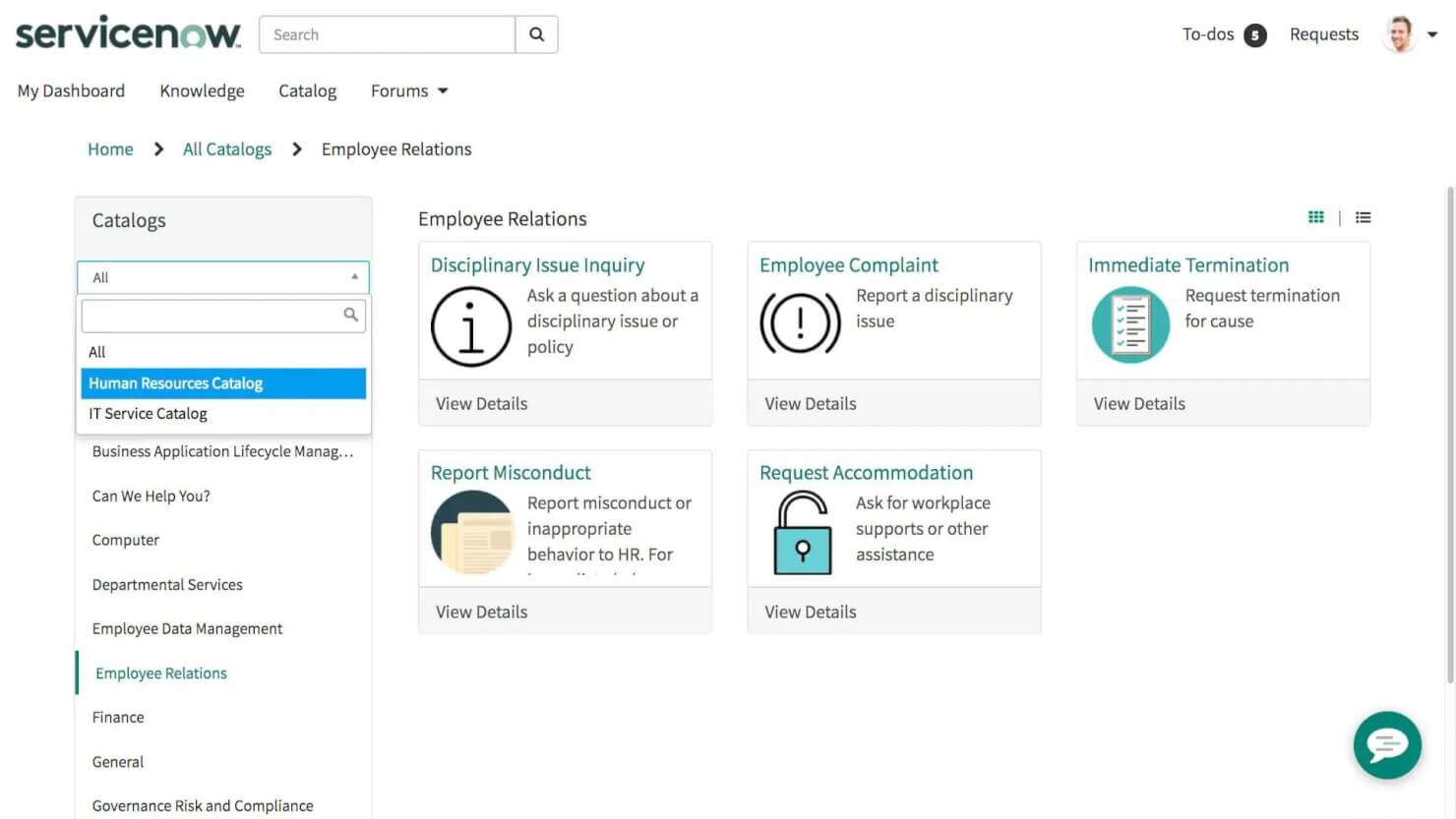
ServiceNow ofrece a los equipos de RR. HH. en grandes organizaciones una plataforma centralizada para gestionar casos de empleados, automatizar flujos de trabajo y hacer seguimiento al cumplimiento, ayudando a resolver problemas y riesgos laborales con mayor consistencia y transparencia.
¿Para quién es mejor ServiceNow?
ServiceNow es una excelente opción para equipos de recursos humanos de empresas que necesitan un sistema escalable y estructurado para gestionar grandes volúmenes de casos de empleados en varios departamentos o ubicaciones.
Por qué elegí ServiceNow
ServiceNow se gana su lugar en mi lista porque su función de Gestión de Casos y Conocimiento maneja muy bien la parte de documentación del trabajo de casos de RR. HH. Me gusta que estandariza la forma en que se registran y resuelven las interacciones con RR. HH.—cada caso sigue una estructura consistente, lo que significa que mi equipo no tiene que reinventar el proceso cada vez que surge un asunto delicado. El complemento de Gestión de Documentos de Empleados va más allá al ofrecer a RR. HH. una vista segura y unificada de los documentos de los empleados desde la contratación hasta el retiro, para que nada se pierda en hilos de correos electrónicos o unidades compartidas. También confío en la función de Relaciones con los Empleados para gestionar casos delicados con el tipo de cuidado y consistencia que protege tanto al empleado como a la organización.
Funciones clave de ServiceNow
- Now Assist para HRSD: Una capa de IA generativa integrada en la plataforma que ayuda a los agentes de RR. HH. a redactar respuestas, resumir casos y mostrar artículos de conocimiento relevantes durante la gestión en vivo de casos.
- Agente Virtual: Un chatbot impulsado por IA que gestiona solicitudes y preguntas rutinarias de empleados en lenguaje natural, sin derivarlas a un agente de RR. HH.
- Gestión del Viaje del Empleado: Un generador de flujos de trabajo que mapea y automatiza eventos multicapa del ciclo de vida del empleado, como la incorporación o transiciones de rol, entre diferentes departamentos.
- Analítica de Desempeño: Una herramienta de reportes en tiempo real que rastrea volúmenes de casos, cumplimiento de SLA y tendencias de servicios de RR. HH. para ayudar a los equipos a identificar brechas y priorizar recursos.
Integraciones de ServiceNow
Las integraciones incluyen Microsoft Teams, Workday, SAP, Salesforce, Slack, Okta, Active Directory, Google Workspace, Jira y Docusign.
Pros and Cons
Pros:
- Base de conocimiento centralizada para información de RR. HH.
- Flujos de trabajo personalizables según las necesidades de la organización
- El portal de autoservicio reduce la carga de trabajo de RR. HH.
Cons:
- La personalización puede requerir experiencia técnica
- Algunas integraciones pueden ser difíciles de configurar

Case IQ
Ideal para la recepción de casos por múltiples canales

Case IQ es una plataforma de gestión de casos de RRHH para organizaciones que investigan, rastrean y resuelven problemas en el lugar de trabajo mientras mantienen la conformidad y la confidencialidad.
¿Para quién es mejor Case IQ?
Case IQ es una excelente opción para organizaciones medianas a grandes en industrias reguladas que necesitan un sistema estructurado y auditable para gestionar investigaciones laborales y casos de relaciones con empleados.
Por qué elegí Case IQ
Elegí Case IQ como uno de los mejores debido a cómo gestiona la recepción de casos a través de múltiples canales sin perder la estructura necesaria para una investigación adecuada. Los empleados pueden enviar reportes mediante formulario web, correo electrónico, teléfono o línea directa anónima, y cada presentación llega a la misma cola centralizada de casos con una captura de datos consistente. También me gustan los formularios de recepción configurables, que te permiten adaptar los campos y las preguntas según el tipo de caso, así que un reporte de mala conducta de RRHH recopila información distinta que un incidente de seguridad desde el principio. Esta precisión en la recepción reduce los idas y vueltas y da como resultado expedientes de casos más limpios cuando comienzan las investigaciones.
Características clave de Case IQ
- Asistente de IA Clairia: Una herramienta de chat de IA integrada que muestra información relevante para el caso consultando las políticas de tu organización y los detalles existentes durante una investigación.
- Marcadores de vinculación de casos: Señala automáticamente conexiones entre casos, permitiendo a los investigadores identificar patrones o incidentes relacionados entre informes separados.
- Listas de control de acceso (ACL): Permite asignar permisos individualizados, roles y banderas de acceso a nivel de caso para que cada usuario solo vea los datos relevantes a su función.
- Paneles de informes en tiempo real: Paneles personalizados con más de 75 tipos de gráficos para monitorear cargas de trabajo de casos, KPIs y tendencias emergentes de incidentes.
Integraciones de Case IQ
Las integraciones incluyen Workday, SAP SuccessFactors, BambooHR, Okta y Azure Active Directory; una API permite integraciones personalizadas.
Pros and Cons
Pros:
- Las opciones de recepción multicanal mejoran la flexibilidad de los reportes
- La analítica avanzada proporciona información accionable
- Los flujos de trabajo personalizables agilizan la gestión de casos
Cons:
- Los usuarios indican tiempos de carga ocasionalmente lentos
- Carece de integraciones nativas

Ideal para la asignación automática de casos

AllVoices es una plataforma de gestión de casos diseñada para equipos de RR. HH. y líderes de personal que necesitan realizar el seguimiento, investigar y resolver problemas laborales, a la vez que apoyan la denuncia anónima de empleados y el cumplimiento normativo.
¿Para quién es mejor AllVoices?
AllVoices es adecuado para equipos de RR. HH. de tamaño medio a empresarial que gestionan un alto volumen de casos de relaciones laborales y necesitan flujos de trabajo estructurados para la admisión, investigación y resolución de casos.
Por qué elegí AllVoices
AllVoices merece su lugar en mi lista porque la forma en que maneja la asignación automática de casos realmente cambia la rapidez con que los equipos de RR. HH. pueden responder a los reportes entrantes. Cuando llega un caso, AllVoices lo dirige al investigador o equipo adecuado según el tipo de caso, categoría u otras reglas configurables, por lo que nada queda en una cola esperando ser clasificado manualmente. También destaco la función de mensajería anónima bidireccional, que permite a los empleados dar seguimiento a sus reportes sin revelar su identidad, manteniendo la comunicación abierta durante toda la investigación. Esa combinación de asignación inteligente y comunicación protegida lo convierte en una de las herramientas más reflexivas que he visto para gestionar temas delicados en el entorno laboral.
Características clave de AllVoices
- Documentación centralizada de casos: Almacena todas las notas, cronologías, decisiones y resultados de los casos en un solo lugar seguro para llevar registros preparados para auditoría.
- Detección de tendencias e informes: Identifica patrones en los datos de casos, como problemas recurrentes dentro de un departamento o aumentos en ciertos tipos de denuncias.
- Formularios de admisión personalizables: Permite que los equipos de RR. HH. controlen las preguntas realizadas al iniciar un caso para captar desde el principio información estructurada y coherente.
- Plantillas para investigaciones: Ofrece plantillas prediseñadas para procesos de investigación y mejora del desempeño, guiando a los equipos en cada paso.
Integraciones de AllVoices
Las integraciones incluyen Workday, BambooHR, Zenefits, Namely y Rippling.
Pros and Cons
Pros:
- El panel centralizado y visual permite seguir fácilmente los casos
- La mensajería bidireccional mantiene la comunicación con los denunciantes
- Las plantillas y los flujos de trabajo integrados facilitan el proceso de admisión
Cons:
- La personalización de categorías podría ser más profunda
- Ciertas demoras ocasionales al cargar el panel

Ciphr
Mejor para grandes volúmenes de incidencias laborales

CIPHR es una plataforma de software de RR. HH. para organizaciones que gestiona, rastrea y resuelve problemas de empleados, ayudando a los equipos de recursos humanos en empresas medianas y grandes a manejar la gestión compleja de casos y los desafíos de cumplimiento.
¿Para quién es mejor CIPHR?
CIPHR es una excelente opción para organizaciones medianas y grandes con equipos de recursos humanos que manejan habitualmente un alto volumen de casos de relaciones laborales y necesitan flujos de trabajo estructurados para gestionarlos.
Por qué elegí CIPHR
Elegí CIPHR como uno de los mejores porque maneja altos volúmenes de casos complejos de relaciones laborales sin que nada se pase por alto. Lo que más me gusta es el sistema de flujos de trabajo definidos: cada tipo de caso sigue un camino estructurado con alertas y recordatorios automáticos, de modo que los usuarios de RR. HH., gerentes y empleados saben exactamente en qué estado se encuentra un caso y qué debe suceder a continuación. También considero útiles los controles de acceso basados en roles: puedes establecer propietarios de casos predeterminados, asignar colaboradores y restringir la visibilidad en casos sensibles, lo cual es fundamental cuando se gestionan quejas o asuntos disciplinarios a gran escala. Además, cada caso genera un historial buscable y auditable con correspondencia y documentos almacenados, lo que es realmente útil si un caso escala a un tribunal.
Características clave de CIPHR
- Flujos de trabajo configurables: Crea rutas de flujo de trabajo específicas para cada caso con recordatorios automáticos y pasos de verificación para mantener los procesos de RR. HH. en marcha.
- Paneles analíticos preconstruidos: Accede a paneles listos para usar que cubren datos de ausencias, DEI y de la organización, con filtros personalizables para informes específicos.
- Portal de autoservicio para empleados: Permite a empleados y gerentes ver, solicitar y gestionar su propia información de RR. HH. directamente, reduciendo la gestión administrativa.
- Resúmenes generados por IA: Genera automáticamente resúmenes de casos y realiza análisis de datos de RR. HH. para reducir el tiempo dedicado a la documentación manual.
Integraciones de CIPHR
Las integraciones incluyen Microsoft, AWS, HMRC, Marshalls y Ciphr LMS. También hay una API disponible para integraciones personalizadas.
Pros and Cons
Pros:
- Almacenamiento seguro y centralizado de la documentación de los casos
- Favorece el cumplimiento del RGPD mediante registros detallados
- Gestiona casos complejos y de alto volumen
Cons:
- No tiene integraciones nativas
- No cuenta con funciones para denuncias anónimas de incidentes


Ivanti Neurons for HR está dirigido a los equipos de RR. HH. en organizaciones medianas y grandes que gestionan incidencias de empleados, rastrean casos y reducen riesgos mediante flujos de trabajo automatizados y documentación segura de casos.
¿Para quién es mejor Ivanti Neurons for HR?
Ivanti Neurons for HR es una opción sólida para equipos de RR. HH. de empresas que necesitan una forma estructurada y escalable de gestionar grandes volúmenes de solicitudes y casos de empleados.
Por qué elegí Ivanti Neurons for HR
Ivanti Neurons for HR se ganó un lugar en mi lista porque gestiona muy bien el autoservicio automatizado para la gestión de casos de RR. HH. Me gusta que los empleados puedan resolver la mayoría de sus solicitudes por sí mismos a través del portal de autoservicio, lo que reduce el volumen de casos que el personal de RR. HH. necesita gestionar directamente. La base de conocimientos filtra el contenido según el estado del empleado, la geografía y el puesto, para que los empleados no tengan que buscar entre información irrelevante para encontrar respuestas. También utilizo la función de Acceso Limitado con un solo clic para proteger casos sensibles, algo que no he visto gestionado de forma tan sencilla en otras herramientas de gestión de casos de RR. HH.
Funciones clave de Ivanti Neurons for HR
- Enrutamiento y asignación de casos: Redirige automáticamente los casos de RR. HH. entrantes al equipo o individuo correcto según reglas predefinidas.
- Gestión segura de documentos: Adjunta y almacena documentos sensibles de RR. HH. directamente dentro del registro del caso con controles de acceso.
- Registro de auditoría: Rastrea cada acción llevada a cabo en un caso, creando un registro con marca de tiempo para conformidad y revisión.
- Panel de analíticas de RR. HH.: Muestra el volumen de casos, los tiempos de resolución y tendencias para ayudar a los equipos de RR. HH. a monitorear la carga de trabajo y el desempeño.
Integraciones de Ivanti Neurons for HR
No se enumeran integraciones.
Pros and Cons
Pros:
- Controles de acceso robustos basados en roles para privacidad
- Opciones de configuración flexibles
- Sólidas funciones de reportes para rastrear tiempos de resolución de casos
Cons:
- La interfaz de usuario se percibe anticuada y recargada
- Problemas de rendimiento al manejar grandes volúmenes de datos


Leena AI es una plataforma de gestión de casos de RRHH para equipos y organizaciones de recursos humanos, que automatiza la resolución de problemas de los empleados, centraliza el seguimiento de casos y mejora los tiempos de respuesta ante preocupaciones en el lugar de trabajo.
¿Para quién es Leena AI?
Leena AI es ideal para medianas y grandes empresas con un alto volumen de consultas de empleados que necesitan automatización impulsada por IA para gestionar la recepción y resolución de casos de RRHH a gran escala.
Por qué elegí Leena AI
Elegí Leena AI como una de las mejores porque su IA conversacional es realmente central en el funcionamiento de la gestión de casos de RRHH en la plataforma, no solo una función añadida. El asistente virtual entiende el lenguaje natural de los empleados y resuelve automáticamente la mayoría de las consultas antes de que lleguen a un agente de RRHH. También me gusta la función de comentarios inteligentes, donde los agentes pueden marcar respuestas específicas durante la resolución del caso, y esas respuestas se añaden automáticamente a la base de conocimientos, por lo que la IA mejora con cada interacción.
Características clave de Leena AI
- Envío de tickets multicanal: Los empleados pueden abrir casos de RRHH directamente desde Microsoft Teams, Slack o WhatsApp sin cambiar de plataforma.
- Panel unificado para agentes: Los agentes de RRHH gestionan todos los casos entrantes de cada canal en una vista centralizada de helpdesk.
- Analítica y seguimiento de KPIs: Supervisa el volumen de casos, el tiempo medio de resolución, el rendimiento de los agentes y las tasas de desvío de tickets desde una sola vista de informes.
- Enrutamiento de tickets basado en roles: Los casos se asignan automáticamente al agente o departamento de RRHH correcto según reglas predefinidas y tipo de caso.
Integraciones de Leena AI
Las integraciones incluyen Workday, UKG Pro, SAP SuccessFactors, BambooHR, ServiceNow, Jira, Salesforce, Slack, Microsoft Teams y Google Workspace.
Pros and Cons
Pros:
- Funciona en varias plataformas
- Ayuda a los empleados a resolver problemas rápidamente
- La plataforma es altamente personalizable
Cons:
- La configuración inicial puede llevar tiempo
- No es ideal para casos de RRHH complejos relacionados con cumplimiento y mala conducta
Otros softwares de gestión de casos de RR. HH.
A continuación encontrarás algunos sistemas más de gestión de casos de RR. HH. que no llegaron a mi lista de los 10 principales, pero que aun así vale la pena consultar:
- UKG People Assist
Mejor para respuestas rápidas a consultas
- Workpro
Ideal para flujos de trabajo estructurados de casos
- ERTrack
Mejor para la gestión de casos de relaciones laborales


Reseñas relacionadas de software de RR. HH.
Si todavía no has encontrado aquí lo que buscas, consulta estas otras herramientas relacionadas que hemos probado y evaluado:
- Software de RR. HH.
- Software de nóminas
- Software de contratación
- Servicios de empleador registrado
- Sistemas de seguimiento de candidatos
- Software de gestión de la plantilla
Wie ich HR-Fallmanagement-Software bewerte
Ich unterteile meine Bewertung in grundlegende Voraussetzungen – Fallaufnahme, Prüfpfade, Zugriffskontrollen – und Unterscheidungsmerkmale, die entscheidend sind, wenn Teams Ermittlungen und Mitarbeitendenbeschwerden in großem Umfang managen.
Kernfunktionen (Grundvoraussetzungen für diese Liste)
Wenn ich Tools für meine Liste auswähle, bewerte ich jedes einzelne auf einer Skala von 0 (Funktion nicht vorhanden) bis 5 (hervorragend in diesem Bereich) für jede unten aufgeführte Kernfunktionalität. Anschließend berechne ich die Gesamtpunktzahl des Tools als Prozentsatz. Jedes Tool muss eine Mindest-Gesamtpunktzahl von 65% erreichen, um für die Aufnahme berücksichtigt zu werden.
- Fallaufnahme & ‑verfolgung: Ich achte auf mehrere Kanäle zur Fallaufnahme und prüfe, ob Fälle nach Typ – Beschwerde, Antrag auf Anpassung, Richtlinienverstoß – kategorisiert und bis zur Lösung durch alle Phasen nachverfolgt werden können.
- Vertraulichkeit & Zugriffskontrollen: Sensible Fälle wie Belästigungsbeschwerden erfordern eingeschränkte Sichtbarkeit. Daher bewerte ich, wie fein granular ein Tool rollenbasierte Berechtigungen und fallbezogene Zugriffsbeschränkungen handhaben kann.
- Fallweiterleitung & Workflow-Automatisierung: Ich prüfe, ob ein Tool Fälle automatisch nach Typ oder Region zuweisen, Eskalationen auslösen kann, wenn Service Level Agreements bevorstehen, und Fälle durch mehrstufige Genehmigungsworkflows steuern kann.
- Prüfpfad & Dokumentation: Jede Aktion an einem Fall – Neuverteilung, hinzugefügte Notiz, Statusänderung – sollte mit Zeitstempel protokolliert werden, was wichtig ist, wenn HR-Teams während rechtlicher Verfahren oder Compliance-Audits belastbare Aufzeichnungen benötigen.
- Mitarbeiter-Self-Service-Portal: Ich bewerte, ob Mitarbeitende Fälle selbst einreichen, Dokumente anhängen und den Bearbeitungsstatus eigenständig einsehen können, anstatt der HR-Abteilung mühsam per E-Mail oder Chat nachzujagen.
- Berichtswesen & Analytik: Dashboards sollten Fallvolumen, durchschnittliche Lösungszeiten und Kategorietrends anzeigen, damit HR-Operations-Manager wiederkehrende Probleme in verschiedenen Abteilungen oder Standorten erkennen können.
Sobald ich eine Liste von Tools habe, die die Kriterien erfüllen, schaue ich, was jede Plattform besonders macht.
Unterscheidungsmerkmale (Was Anbieter voneinander abhebt)
So vergleiche und beurteile ich die verschiedenen Anbieter:
Herausragende Funktionen
Anonyme Meldungen sind wichtig, wenn Mitarbeitende Bedenken bezüglich Belästigung oder Vergeltung äußern müssen, ohne ihre Identität preiszugeben. Ich achte auf Plattformen, die wirklich anonyme Kanäle anbieten, nicht nur vertrauliche. Ermittlungsmanagement-Tools sind ein weiteres Unterscheidungsmerkmal, besonders wenn HR-Teams formelle Fälle mit Beweisführung, Zeugenaussagen und strukturierten Ergebnissen bearbeiten. Zudem bewerte ich, ob ein Tool KI-gestützte Erkennung bietet, etwa um Muster wie wiederholte Beschwerden über eine bestimmte Führungskraft zu erkennen – damit können Employee-Relations-Teams proaktiv handeln.
Über die Funktionen hinaus
HRIS-Integrationen sind ein entscheidender Punkt. Wenn ein Tool sich nicht mit Ihrer bestehenden Plattform – Workday, SAP SuccessFactors, BambooHR – synchronisieren kann, müssen Mitarbeitende im HR-Team personenbezogene Daten während aktiver Fälle manuell abgleichen. Darüber hinaus prüfe ich Compliance-Zertifizierungen wie SOC 2 Typ II und Optionen für Datenspeicherung, da HR-Falldaten häufig geschützte Informationen umfassen, die regionalen Vorschriften unterliegen. Auch die Branchenpassung ist relevant: Eine Plattform, die für regulierte Sektoren wie das Gesundheitswesen oder den Finanzbereich entwickelt wurde, liefert in der Regel vorgefertigte Workflows und Fall-Taxonomien mit, die allgemeinen Standardtools fehlen.
Cómo elegir un software de gestión de casos de RR. HH.
El software de gestión de casos de RR. HH. puede ayudarte a organizar tus solicitudes de RR. HH. y la prestación de servicios para asegurarte de que nada se pase por alto. Para determinar cuál es el mejor software de gestión de casos de RR. HH. para tus necesidades, primero debes identificar a los usuarios principales y documentar sus desafíos específicos.
Mientras desarrollas tu propio proceso único de selección de software, ten en cuenta los siguientes puntos:
- Qué problema estás intentando resolver - Empieza por identificar los desafíos que intentas superar. Esto te ayudará a aclarar las características y funcionalidades que debe ofrecer el software de gestión de casos de RR. HH.
- Quién tendrá que utilizarlo - Para evaluar el coste y los requisitos, considera quién utilizará el software y cuántas licencias necesitarás. Tendrás que evaluar si solo tus profesionales sénior de RR. HH. necesitarán acceso o si lo necesitará todo tu departamento. Una vez que esto esté claro, también es útil clasificar las necesidades de tus diferentes usuarios para identificar tus prioridades principales respecto a los usuarios avanzados, gerentes y empleados del software de RR. HH., y asegurarte de que todas se cumplan.
- Con qué otras herramientas debe funcionar - Aclara qué herramientas estás reemplazando, cuáles conservarás y con cuáles necesitarás integrarlo, como tu sistema de gestión de RR. HH. o el software de TI. Tendrás que decidir si las herramientas deben integrarse entre sí o, alternativamente, si puedes reemplazar varias herramientas con una plataforma integral de gestión de casos de RR. HH.
- Qué resultados son importantes - Revisa las capacidades que quieres obtener o mejorar y cómo medirás el éxito. Por ejemplo, es posible que quieras obtener la capacidad de priorizar los tickets de RR. HH. en función de su urgencia o de dirigir las solicitudes a diferentes miembros de tu equipo de RR. HH. Podrías comparar software de gestión de casos de RR. HH. hasta el agotamiento, pero si no estás pensando en los resultados que quieres lograr, podrías desperdiciar mucho tiempo valioso.
- Cómo funcionaría dentro de tu organización - Considera la selección del software junto con tus flujos de trabajo y sistemas existentes. Evalúa qué funciona bien y qué áreas problemáticas deben abordarse.
Recuerda que cada empresa es diferente — no des por sentado que un sistema de gestión de casos de RR. HH. funcionará para tu organización solo porque es popular.
Características del software de gestión de casos de RR. HH.
Para ayudarme a comparar cada sistema de gestión de casos con el siguiente, elaboré esta lista de características clave que espero que incluya cada sistema:
- Paneles: Una vista general fácil de usar que mantiene a los directivos centrados en los casos más urgentes y, al mismo tiempo, permite ofrecer un portal de autoservicio para empleados.
- Herramientas de gestión de casos: Características que permiten a los agentes realizar un seguimiento del progreso hacia la resolución de los casos y gestionarlo, incluida la escalación.
- Base de conocimientos: Un recurso que proporciona información basada en los datos de los empleados e integrado con las herramientas de gestión de casos.
- Personalización: Contenido muy relevante para cada persona con el fin de aumentar el compromiso de los empleados dentro de la organización.
- Informes: Informes útiles y prácticos que sugieren las acciones necesarias para lograr mejoras.
- Gestión de SLA: Notificaciones automatizadas en tiempo real, además de códigos de colores para garantizar que los casos se mantengan dentro del plazo previsto.
- Gestión de procesos empresariales: Automatización de los procesos manuales de gestión de casos para reducir el tiempo que los directivos dedican a cada caso.
- Gestión del correo electrónico: La capacidad de configurar fácilmente plantillas para mensajes de correo electrónico estándar destinados a solicitudes habituales de los empleados.
- Análisis de encuestas: Información sobre el grado de éxito del sistema al resolver casos de forma eficaz.
- Colaboración confidencial: La capacidad de colaborar con otros departamentos para recopilar información y, al mismo tiempo, respetar la privacidad de los empleados.
¿Qué es el software de gestión de casos de RR. HH.?
El software de gestión de casos de RR. HH. es una herramienta especializada diseñada para gestionar y resolver problemas relacionados con los empleados dentro de las organizaciones. Agiliza el proceso de gestión de diversos casos de RR. HH., como consultas, quejas y solicitudes, al proporcionar una plataforma centralizada para realizar el seguimiento, documentar y abordar estos problemas.
Las herramientas de gestión de casos de RR. HH. facilitan la automatización eficiente de los flujos de trabajo y la priorización de los casos, y mantienen un registro completo de todas las interacciones de RR. HH. Su objetivo es mejorar la eficiencia operativa de RR. HH., garantizar respuestas oportunas y coherentes a las necesidades de los empleados y mantener el cumplimiento de las políticas organizativas y las normas legales.
Preguntas frecuentes sobre el software de gestión de casos de RR. HH.
¿Todavía tienes dudas sobre el software de gestión de casos de RR. HH. y cómo funciona? Echa un vistazo a estas respuestas a preguntas frecuentes sobre este tema:
¿Qué es la gestión de casos de RR. HH.?
La gestión de casos de RR. HH. (o gestión de casos de empleados) es el proceso de gestionar las solicitudes y preguntas de los empleados o abordar cualquier problema que pueda surgir con ellos. Las solicitudes pueden proceder de empleados actuales, nuevas contrataciones, gerentes y socios de RR. HH.
\u003c!– wp:paragraph –\u003e
\u003c!– /wp:paragraph –\u003e \u003c!– wp:paragraph –\u003e
Actualmente, la gestión de casos de RR. HH. suele llevarse a cabo utilizando soluciones de RR. HH. personalizadas. Estas pueden ofrecer funciones como paneles, acuerdos de nivel de servicio, herramientas de colaboración, flujos de trabajo y automatización para ayudar a resolver los casos.
¿Qué hace el software de gestión de casos de RR. HH.?
El software de gestión de casos de RR. HH. ayuda a los responsables de recursos humanos a resolver problemas complejos relacionados con empleados concretos. Estas herramientas facilitan el envío, la revisión y la respuesta a solicitudes específicas, además de apoyar la resolución de asuntos más complejos de los empleados.
Un buen sistema de gestión de casos de recursos humanos ofrece un proceso coherente y repetible que garantiza que cada empleado reciba un trato correcto y justo, independientemente de la complejidad de los problemas involucrados.