

10 mejores alternativas a Whatfix para 2026

Selección de alternativas a Whatfix


Una alternativa sólida a Whatfix ofrece funciones flexibles de incorporación, orientación dentro de la aplicación y capacitación de usuarios que se adaptan a los flujos de trabajo y la pila tecnológica de tu organización. Si buscas las mejores alternativas, probablemente necesites herramientas que admitan la incorporación de clientes, la incorporación de empleados y la capacitación de empleados, con un enfoque en la experiencia del usuario y la facilidad de uso. Muchas plataformas son fáciles de usar y están diseñadas para empresas SaaS, startups y pymes, y ofrecen editores sin código para crear experiencias dentro de la aplicación con orientación contextual. Ayudan a mejorar la experiencia del producto, recopilar comentarios de los clientes y reducir la dependencia de los tickets de soporte, al tiempo que respaldan el crecimiento impulsado por el producto. Al comparar opciones, considera factores como el modelo de precios, el número de usuarios y la compatibilidad con el lanzamiento eficaz de nuevas funciones.
¿Qué es Whatfix?
Whatfix es una plataforma de adopción digital que ayuda a las organizaciones a crear orientación dentro de la aplicación, flujos de incorporación y contenido de capacitación para los usuarios de software. Los equipos utilizan Whatfix para diseñar recorridos interactivos, sugerencias emergentes y listas de tareas que ayudan a empleados o clientes mientras navegan por sistemas nuevos. Al ofrecer ayuda contextual en tiempo real, Whatfix mejora las experiencias dentro de la aplicación, mejora la experiencia del producto y ayuda a los equipos a ofrecer una mejor incorporación y capacitación a gran escala.
Por qué confiar en nuestras reseñas de software
Hemos estado probando y revisando sistemas de software de RRHH desde 2019. Como expertos en RRHH, sabemos lo crítico y difícil que es tomar la decisión correcta al seleccionar un software. Invertimos en una investigación profunda para ayudar a nuestra audiencia a tomar mejores decisiones de compra de software. Hemos probado más de 2,000 herramientas para diferentes casos de uso en gestión de RRHH y escrito más de 1,000 reseñas de software completas. Conoce cómo nos mantenemos transparentes & nuestra metodología de reseñas de software.
Resumen de las mejores alternativas a Whatfix
Esta tabla comparativa resume los detalles de precios de mis principales alternativas seleccionadas a Whatfix para ayudarte a encontrar la mejor opción para tu presupuesto y las necesidades de tu empresa.
| Tool | Best For | Trial Info | Price | ||
|---|---|---|---|---|---|
| 1 | Mejor para orientación de procesos impulsados por el cumplimiento | Demo gratuita disponible | Desde $9500/app | Website | |
| 2 | Ideal para la creación rápida de flujos de incorporación | Prueba gratuita de 14 días + demo gratuita disponible | Desde $240/mes (facturado anualmente) | Website | |
| 3 | Ideal para personalización de onboarding sin código | No disponible | Precio a consultar | Website | |
| 4 | Mejor para la incorporación empresarial a gran escala | Demo gratuita disponible | Precio bajo consulta | Website | |
| 5 | Ideal para analítica de producto dentro de la aplicación | Prueba gratuita de 30 días + plan gratis + demo gratuita disponible | Precios bajo solicitud | Website | |
| 6 | Ideal para la integración con éxito del cliente | Prueba gratuita + demo gratis disponible | Precio bajo consulta | Website | |
| 7 | Ideal para la creación de recorridos interactivos | Demostración gratuita disponible | Precio bajo solicitud | Website | |
| 8 | Ideal para experiencias de incorporación personalizadas | Prueba gratuita de 14 días + demostración gratuita disponible | Desde $299/mes (facturado anualmente) | Website | |
| 9 | Mejor para orientación multilingüe a usuarios | Demo gratuita disponible | Precio a consultar | Website | |
| 10 | Mejor para capacitación en aplicaciones SAP | Demo gratuita disponible | Precio disponible bajo solicitud | Website |
Opiniones sobre alternativas a Whatfix
A continuación encontrarás mis resúmenes detallados de las alternativas a Whatfix que llegaron a mi selección. Mis reseñas ofrecen un análisis detallado de las funciones, los mejores casos de uso y las integraciones de cada plataforma para ayudarte a encontrar la opción más adecuada para ti.

Apty
Mejor para orientación de procesos impulsados por el cumplimiento
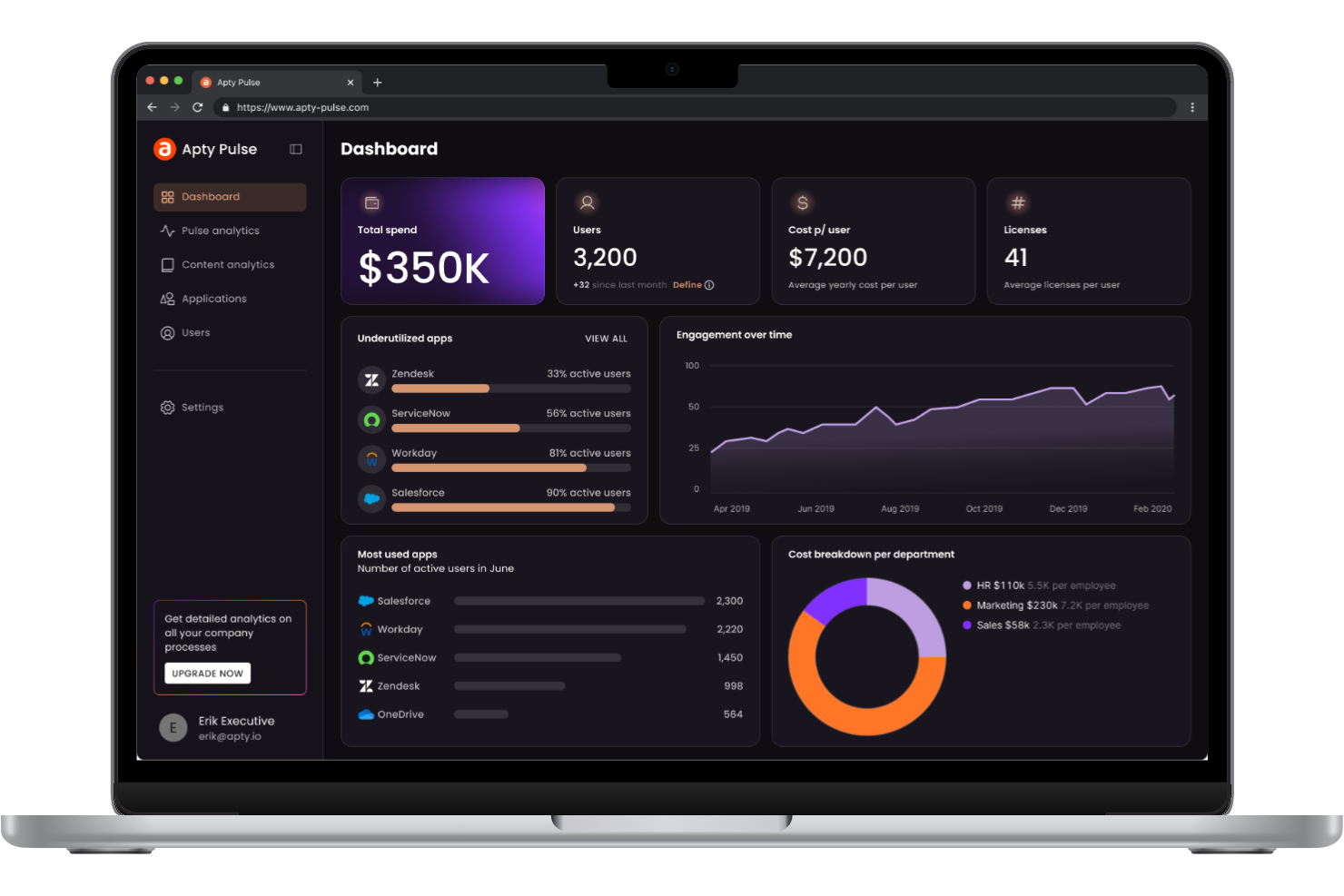
Apty está diseñado para organizaciones que necesitan garantizar que los empleados sigan procesos estrictos y requisitos de cumplimiento dentro de sus herramientas de software. Esta plataforma es especialmente relevante para los equipos de RR. HH., finanzas y operaciones en industrias reguladas que necesitan guiar a los usuarios a través de flujos de trabajo complejos y documentar su cumplimiento. Lo que distingue a Apty de otras alternativas a Whatfix es su enfoque en el seguimiento del cumplimiento, la validación de procesos y la orientación en tiempo real que ayuda a reducir riesgos y brechas de auditoría.
Por qué Apty es una buena alternativa a Whatfix
Si su organización necesita hacer cumplir el cumplimiento dentro de los procesos digitales, Apty ofrece funciones específicas que van más allá de los recorridos estándar. Elegí Apty porque le permite configurar reglas de validación de procesos y verificaciones de cumplimiento en tiempo real directamente dentro de sus aplicaciones empresariales. Puede rastrear acciones de los usuarios, señalar desviaciones y generar informes listos para auditoría para cumplir con los requisitos regulatorios. Esto convierte a Apty en una excelente opción para equipos que necesitan documentar, monitorizar y hacer cumplir el cumplimiento como parte de su estrategia de adopción digital.
Funciones clave de Apty
Otras funciones que hacen de Apty una sólida alternativa a Whatfix incluyen:
- Consejos personalizables: Añada ayuda contextual e instrucciones directamente dentro de sus aplicaciones.
- Flujos de onboarding: Diseñe experiencias de incorporación paso a paso para nuevos usuarios o procesos.
- Analítica de uso: Monitorice cómo interactúan los usuarios con el software e identifique áreas de mejora.
- Soporte multiplataforma: Implemente guías y seguimiento en aplicaciones web y de escritorio.
Integraciones de Apty
Actualmente no se listan integraciones nativas.
Pros and Cons
Pros:
- El seguimiento del cumplimiento está integrado en los flujos de trabajo
- La validación de procesos en tiempo real señala errores de usuario
- Informes listos para auditoría que cumplen necesidades regulatorias
Cons:
- Documentación de autoservicio limitada para administradores
- La configuración de onboarding puede requerir asistencia del proveedor

Userflow
Ideal para la creación rápida de flujos de incorporación
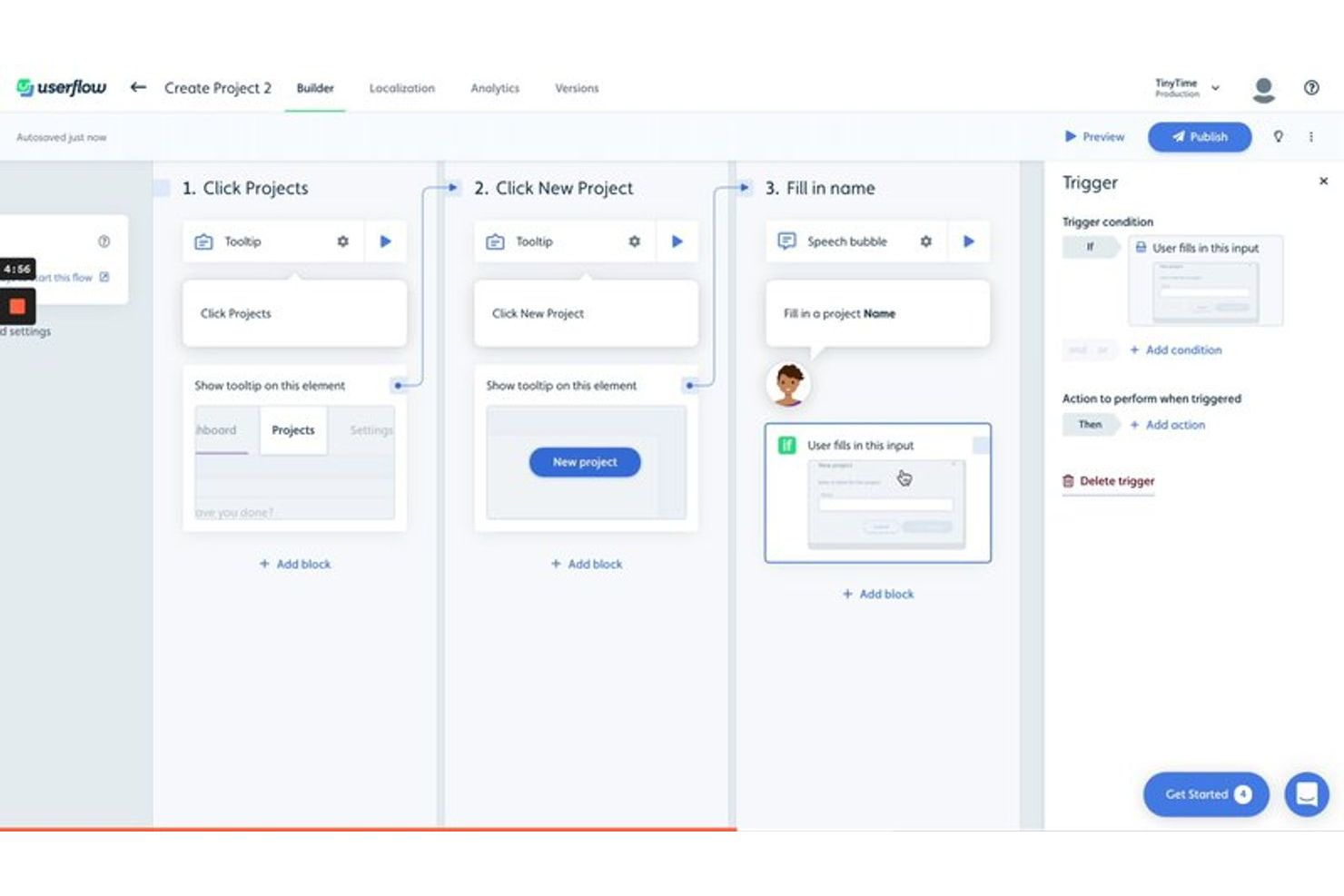
Userflow está diseñado para equipos de producto y empresas SaaS que necesitan crear flujos de incorporación rápidamente sin depender de desarrolladores. Si deseas lanzar guías dentro de la aplicación, listas de verificación y encuestas en minutos, Userflow ofrece un constructor sin código que destaca frente a otras alternativas a Whatfix. Su enfoque en la creación e iteración rápida te ayuda a responder a los comentarios de los usuarios y a los cambios del producto con un retraso mínimo.
Por qué Userflow es una buena alternativa a Whatfix
Cuando necesitas crear flujos de incorporación rápidamente, Userflow ofrece una ventaja clara sobre otras alternativas a Whatfix. Elegí Userflow porque su constructor sin código te permite diseñar y lanzar recorridos dentro de la aplicación, listas de verificación y encuestas en tan solo minutos. La plataforma también admite edición en tiempo real y publicación instantánea, para que puedas iterar sobre tu experiencia de incorporación sin esperar recursos de desarrollo. Para equipos que buscan moverse rápido y adaptar la incorporación a las necesidades cambiantes de los usuarios, Userflow es una opción sólida.
Características clave de Userflow
Otras características que hacen a Userflow atractivo para los equipos, en comparación con alternativas a Whatfix, incluyen:
- Soporte multilingüe: Crea flujos de incorporación en varios idiomas para llegar a una base de usuarios global.
- Segmentación de usuarios: Apunta a grupos de usuarios específicos con experiencias personalizadas de incorporación.
- Seguimiento de eventos personalizados: Realiza un seguimiento de las acciones de los usuarios y activa flujos basados en eventos personalizados dentro de tu producto.
- Integraciones con herramientas de análisis: Conecta Userflow con plataformas como Segment, Amplitude y Mixpanel para obtener análisis más profundos.
Integraciones de Userflow
Las integraciones incluyen Salesforce, HubSpot, Segment, Mixpanel, Amplitude, Heap, RudderStack, Intercom, Zendesk, Zapier y más.
Pros and Cons
Pros:
- Constructor sin código para actualizaciones instantáneas del flujo de incorporación
- Vista previa en tiempo real antes de publicar el contenido de incorporación
- Soporte multilingüe para bases de usuarios globales
Cons:
- No tiene funcionalidad de base de conocimientos integrada
- Hay menos plantillas de incorporación predefinidas disponibles

Usetiful
Ideal para personalización de onboarding sin código
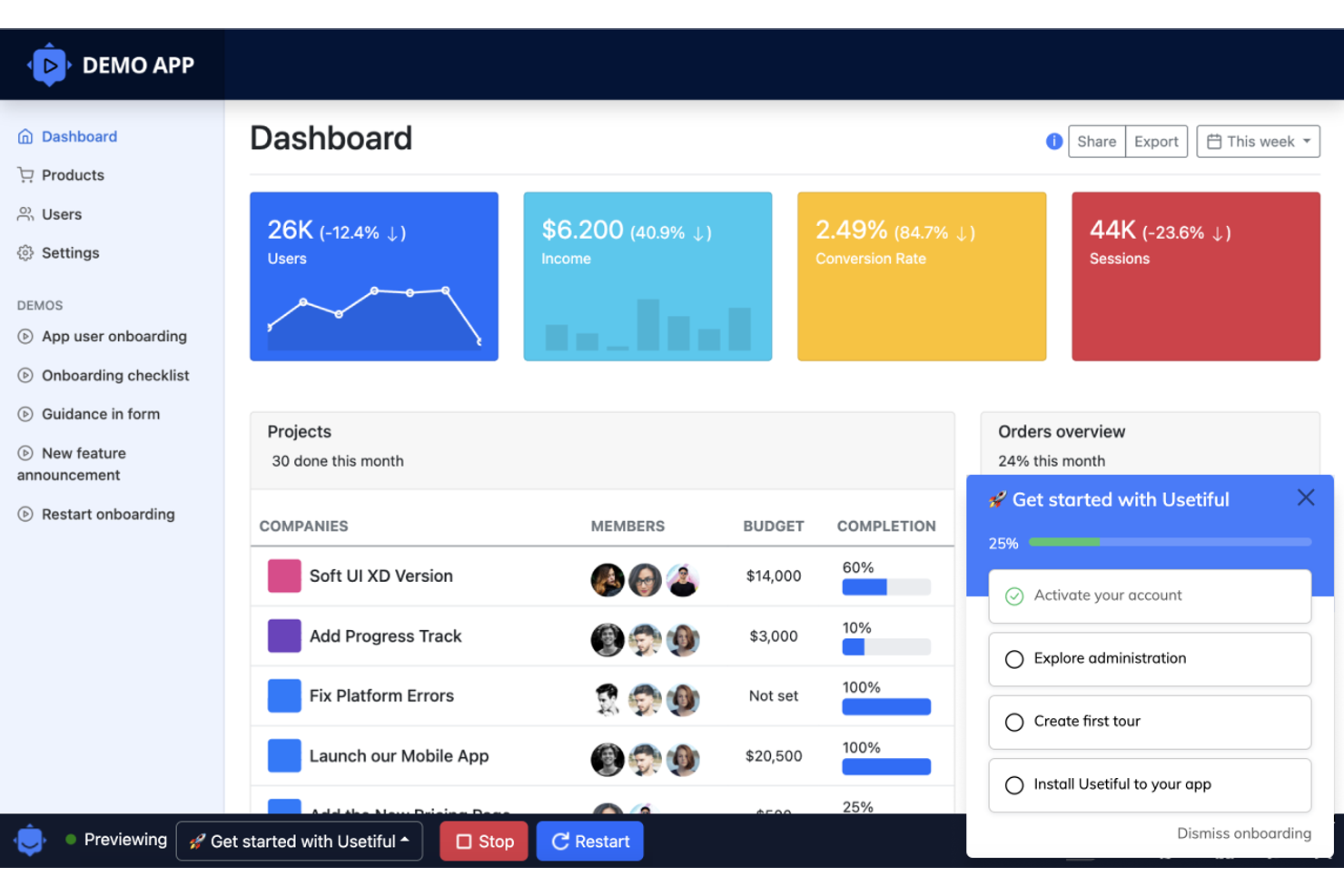
Si buscas una forma sin código de crear experiencias de incorporación, Usetiful merece la pena considerar. Esta herramienta está diseñada para responsables de producto y equipos de éxito del cliente que quieren crear recorridos por el producto, listas de verificación y flujos de onboarding sin depender de desarrolladores. Usetiful destaca frente a otras alternativas a Whatfix porque te permite personalizar visualmente los elementos de onboarding, para que puedas adaptarte rápidamente a las necesidades cambiantes de los usuarios.
Por qué Usetiful es una buena alternativa a Whatfix
A diferencia de muchas herramientas de onboarding que requieren recursos técnicos, Usetiful te permite construir y actualizar flujos de incorporación sin escribir nada de código. Elegí Usetiful porque su editor visual te permite crear recorridos por el producto, listas de verificación y ventanas emergentes directamente en tu navegador. Puedes ajustar rápidamente los pasos de onboarding a medida que evoluciona tu producto, lo que facilita mantener la orientación relevante para los usuarios. Este enfoque sin código es especialmente útil para equipos que quieren mantenerse ágiles y responder rápido sin tener que esperar al soporte de desarrolladores.
Funciones clave de Usetiful
Otras funciones que convierten a Usetiful en una sólida alternativa a Whatfix incluyen:
- Soporte multilingüe: Entrega contenido de onboarding en varios idiomas para llegar a una base de usuarios global.
- Seguimiento del progreso: Haz seguimiento del avance de los usuarios a través de los pasos de incorporación y muestra el estado de finalización.
- Consejos inteligentes: Añade mensajes contextuales que aparecen según las acciones del usuario o los elementos de la página.
- Segmentación de usuarios: Dirige los flujos de onboarding a grupos específicos de usuarios en función de atributos o comportamientos.
Integraciones de Usetiful
Actualmente no se enumeran integraciones nativas.
Pros and Cons
Pros:
- Editor visual para crear flujos de incorporación
- Ofrece segmentación de usuarios para tours dirigidos
- Proporciona consejos inteligentes contextuales y mensajes emergentes
Cons:
- No dispone de panel de análisis integrado
- Opciones limitadas de personalización de marca

WalkMe
Mejor para la incorporación empresarial a gran escala
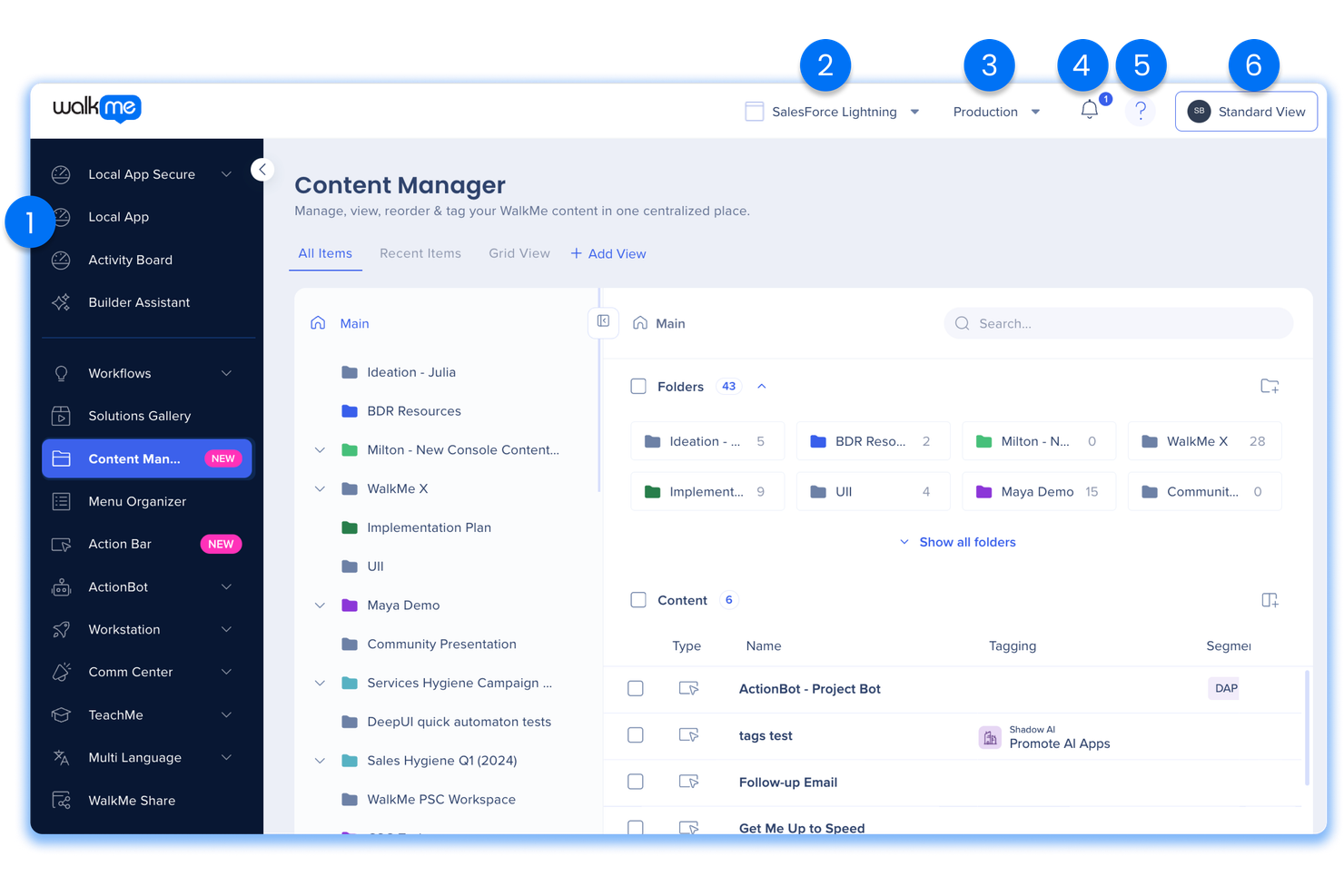
Whatfix es una plataforma de adopción digital (DAP) que ayuda a las organizaciones a crear guías dentro de las aplicaciones, flujos de incorporación y contenido de capacitación para los usuarios de software. Los equipos utilizan Whatfix para diseñar recorridos interactivos, mensajes emergentes y listas de tareas que apoyan a empleados o clientes mientras navegan por nuevos sistemas. Al ofrecer ayuda contextual en tiempo real, Whatfix mejora la experiencia dentro de la aplicación, incrementa la percepción del producto y ayuda a los equipos a ofrecer mejores procesos de incorporación y formación a escala, a menudo complementando sistemas como un LMS para un aprendizaje y desarrollo más amplio.
Por Qué WalkMe Es una Buena Alternativa a Whatfix
Para la incorporación empresarial a gran escala, WalkMe ofrece fortalezas únicas que la diferencian de Whatfix. Elegí WalkMe porque su automatización de flujos de trabajo te permite construir recorridos de incorporación complejos y de varios pasos que se adaptan a diferentes roles y permisos de usuario. Su panel de análisis rastrea el progreso de los usuarios e identifica dónde se quedan atascados los empleados, para que puedas dirigir el soporte donde más se necesita. Estas funciones hacen que WalkMe sea una opción sólida para organizaciones que gestionan la incorporación en varios departamentos o equipos globales.
Características Clave de WalkMe
Otras características de WalkMe pueden ayudarte a abordar una variedad de necesidades de incorporación y capacitación:
- Recorridos Inteligentes: Crea guías interactivas paso a paso que se superponen directamente en tus aplicaciones empresariales.
- Centro de Recursos: Ofrece a los usuarios un centro centralizado para artículos de ayuda, videos y recursos de soporte dentro de la aplicación.
- ShoutOuts: Envía mensajes emergentes dirigidos a los usuarios para anunciar actualizaciones, plazos o información importante.
- Segmentación: Proporciona orientación y contenido personalizados según atributos, roles o comportamientos del usuario.
Integraciones de WalkMe
Las integraciones incluyen Salesforce, Workday, SAP, Microsoft Dynamics 365, ServiceNow, SuccessFactors, Oracle, Zendesk, Cornerstone y más.
Pros and Cons
Pros:
- Automatización avanzada de flujos de trabajo para la incorporación
- Soporte para múltiples aplicaciones en herramientas empresariales
- Analítica detallada para el seguimiento del comportamiento de los usuarios
Cons:
- La personalización a menudo requiere conocimientos de programación
- Generalmente se requieren contratos a largo plazo
Pendo
Ideal para analítica de producto dentro de la aplicación
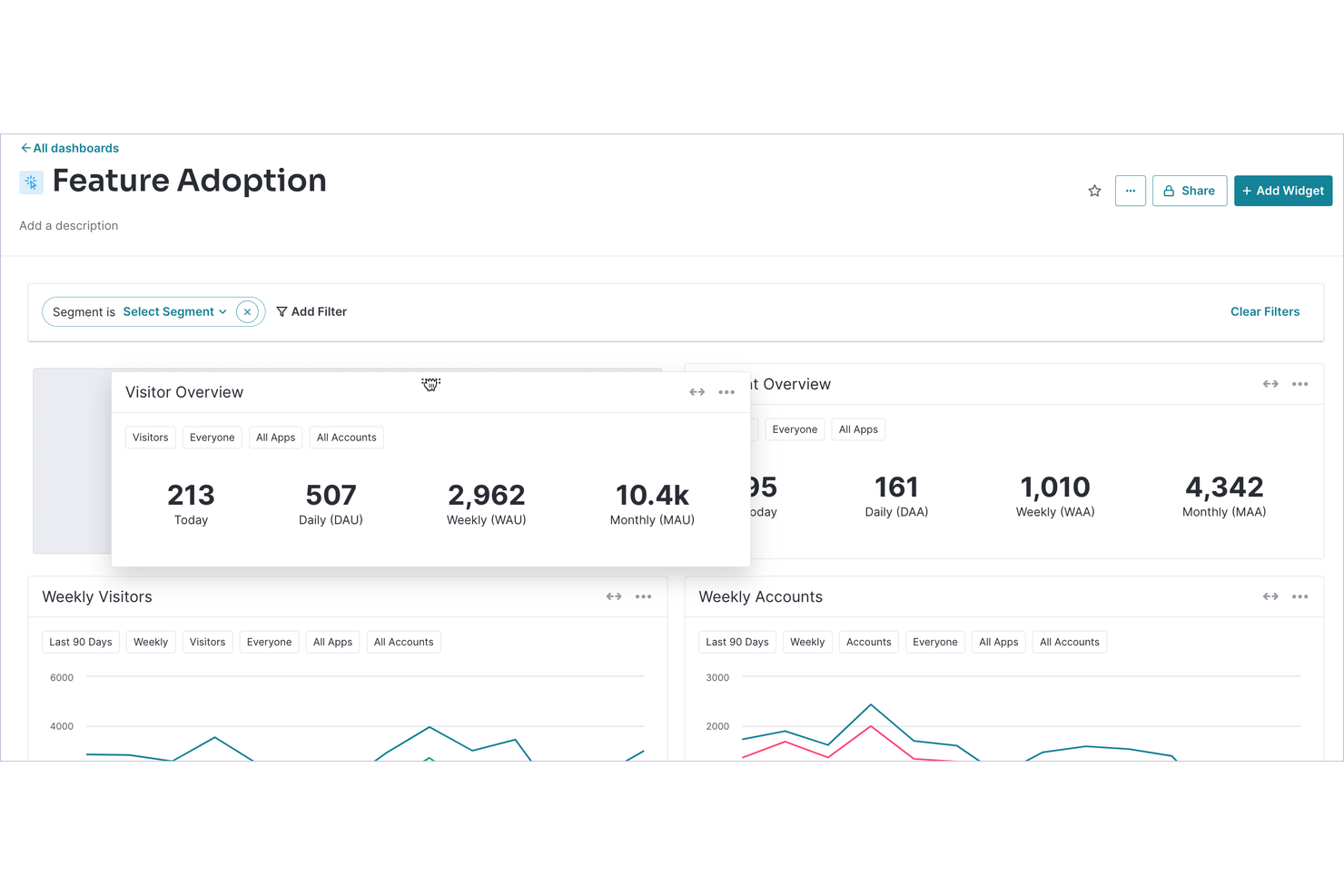
Si buscas una alternativa a Whatfix con un enfoque en la analítica de producto dentro de la aplicación, Pendo merece una mirada detenida. Los responsables de producto y los equipos de experiencia de usuario utilizan Pendo para rastrear el comportamiento de los usuarios y lanzar guías dirigidas dentro de la aplicación sin depender de recursos de ingeniería. Su enfoque basado en datos analíticos te ayuda a identificar puntos de fricción y optimizar la incorporación o adopción de funcionalidades directamente en tu producto.
Por qué Pendo es una buena alternativa a Whatfix
A diferencia de muchas herramientas de adopción digital, Pendo destaca por su analítica de producto dentro de la aplicación que va más allá de la simple orientación al usuario. Elegí Pendo porque te permite rastrear el comportamiento detallado de los usuarios, segmentar audiencias y medir el impacto de los flujos de incorporación o lanzamientos de funcionalidades directamente en tu producto. Su panel analítico te ayuda a detectar dónde los usuarios abandonan o se quedan atascados, para que puedas realizar mejoras basadas en datos en tus contenidos de capacitación e incorporación. Para los equipos que desean combinar orientación al usuario con insights de producto accionables, Pendo ofrece una alternativa sólida a Whatfix.
Funciones clave de Pendo
Otras funciones en Pendo pueden ayudarte a ofrecer capacitación y soporte dirigidos a escala:
- Encuestas dentro de la aplicación: Recoge las opiniones de los usuarios directamente en la interfaz de tu producto.
- Centro de recursos: Proporciona a los usuarios un centro centralizado para contenido de ayuda y materiales de incorporación.
- Soporte para aplicaciones móviles: Amplía la analítica y la orientación a tus aplicaciones móviles.
- Seguimiento de NPS: Mide el Net Promoter Score y monitoriza el sentimiento de los usuarios a lo largo del tiempo.
Integraciones de Pendo
Las integraciones incluyen HubSpot, Jira, Intercom, Marketo, Salesforce, Okta, Segment, Zendesk, Amazon S3, BigQuery y más.
Pros and Cons
Pros:
- Las analíticas in-app rastrean tendencias de adopción de funcionalidades
- Las herramientas de segmentación permiten dirigirse a cohortes específicas de usuarios
- El Centro de Recursos centraliza la ayuda y la incorporación
Cons:
- El etiquetado de elementos a veces no detecta contenido dinámico
- Las exportaciones de reportes tienen opciones de personalización limitadas

Ideal para la integración con éxito del cliente
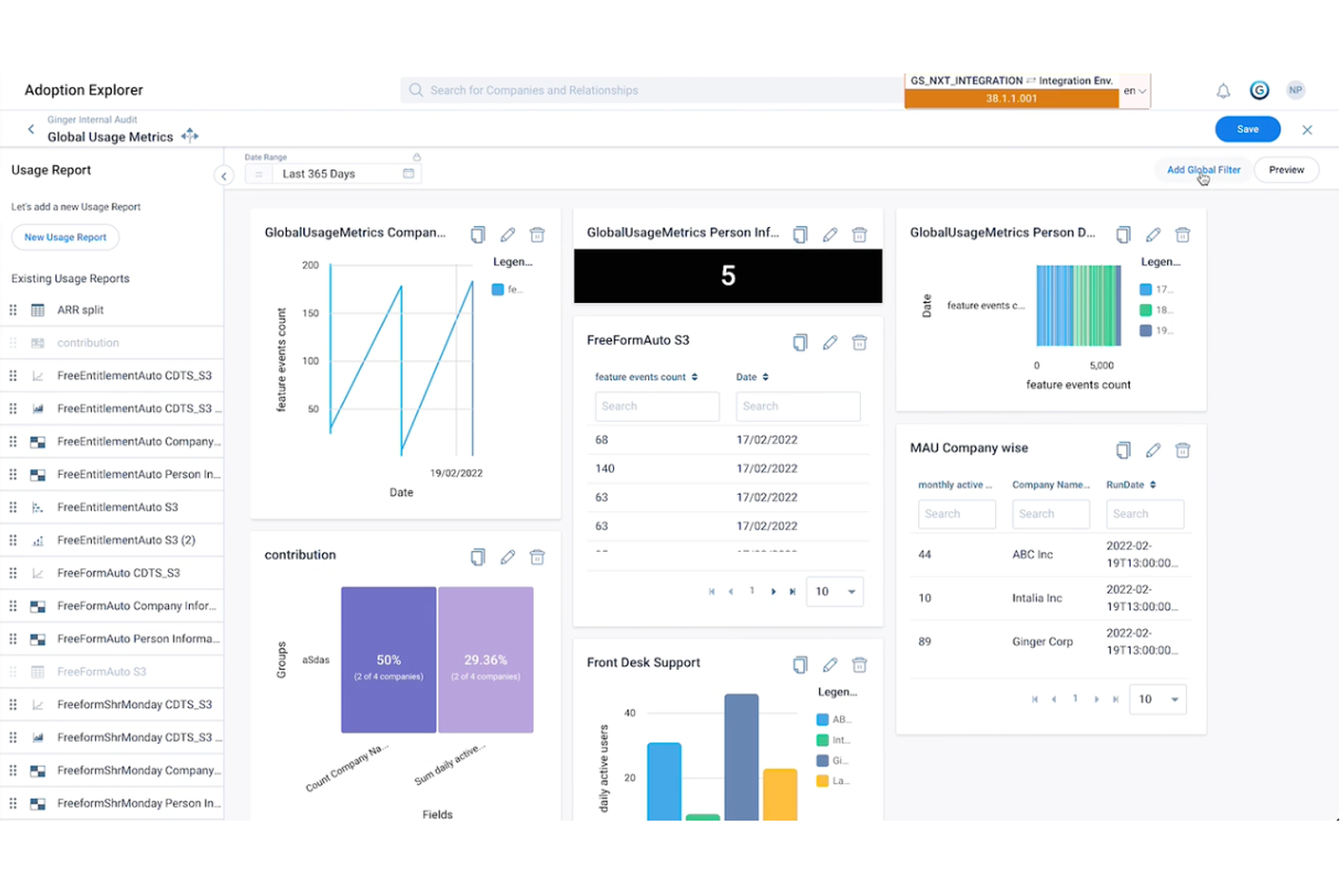
Si buscas una plataforma de adopción digital que conecte el uso del producto con el éxito del cliente, Gainsight es una opción que vale la pena considerar. Esta solución está diseñada para equipos de éxito del cliente y gestores de producto que desean impulsar la adopción mientras supervisan la salud y el compromiso del cliente. Gainsight se destaca de otras alternativas a Whatfix al integrar de manera estrecha los análisis de producto con los flujos de trabajo de éxito del cliente, facilitando la conexión entre el comportamiento del usuario y las estrategias de retención y crecimiento.
Por qué Gainsight es una buena alternativa a Whatfix
Para las organizaciones que desean vincular la adopción digital con los resultados de éxito del cliente, Gainsight ofrece un enfoque único. Elegí Gainsight porque te permite vincular el comportamiento del usuario dentro de la aplicación directamente con los indicadores de salud del cliente y métricas de éxito. La plataforma incluye funcionalidades como análisis de uso del producto y guías automatizadas que ayudan a los equipos de éxito del cliente a abordar de manera proactiva los desafíos de adopción. Si necesitas una solución que cierre la brecha entre la adopción del producto y la retención de clientes, Gainsight es una alternativa sólida a Whatfix.
Principales características de Gainsight
Otras características que hacen que Gainsight resulte atractiva para los equipos que buscan alternativas a Whatfix incluyen:
- Orquestación de recorridos: Crea y automatiza recorridos de cliente a través de múltiples puntos de contacto.
- Encuestas dentro de la aplicación: Recoge comentarios de los usuarios directamente dentro de la interfaz de tu producto.
- Centro de recursos: Ofrece a los usuarios un centro centralizado para guías, anuncios y materiales de soporte.
- Segmentación de audiencia: Proporciona experiencias personalizadas a segmentos específicos de usuarios según el comportamiento o los datos del perfil.
Integraciones de Gainsight
Las integraciones incluyen Champion, CloudEagle, Mixpanel, SearchUnify, TheLoops, Google Analytics, Fivetran y más.
Pros and Cons
Pros:
- Conecta los datos de uso del producto con la salud del cliente
- Ofrece orquestación automatizada del recorrido del cliente
- Incluye encuestas dentro de la aplicación para retroalimentación de usuarios
Cons:
- Requiere una configuración significativa para funcionalidad completa
- Enfocado principalmente en flujos de trabajo de éxito del cliente

Ideal para la creación de recorridos interactivos
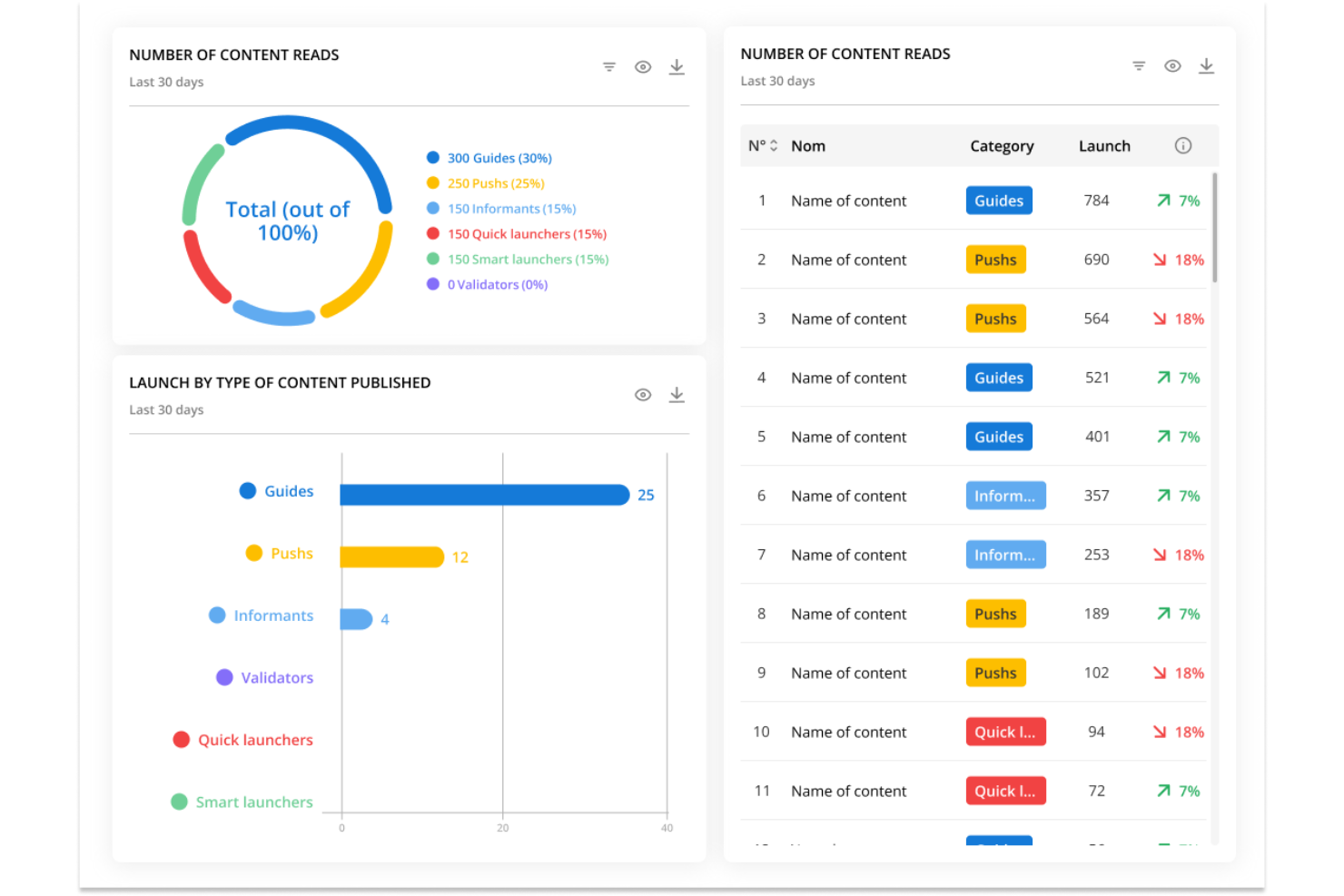
Lemon Learning ofrece a los equipos una forma de crear recorridos interactivos directamente dentro de sus aplicaciones web. Esta herramienta es especialmente útil para líderes de RR. HH., TI y operaciones que necesitan incorporar empleados o implementar nuevo software con orientación paso a paso dentro de la aplicación. Lo que distingue a Lemon Learning de otras alternativas a Whatfix es su enfoque en la creación de tutoriales personalizados e interactivos que se adaptan a diferentes roles de usuario y flujos de trabajo.
Por qué Lemon Learning es una buena alternativa a Whatfix
Para los equipos que desean crear recorridos interactivos adaptados a sus propios procesos, Lemon Learning ofrece una solución flexible. Elegí Lemon Learning porque te permite crear guías paso a paso que se lanzan directamente dentro de tus aplicaciones web, para que los usuarios reciban ayuda exactamente donde la necesitan. Puedes personalizar los recorridos para diferentes roles de usuario y actualizarlos a medida que cambian los flujos de trabajo. Este enfoque en la orientación interactiva dentro de la aplicación hace que Lemon Learning sea una opción sólida para organizaciones que buscan mayor control sobre la incorporación y la capacitación.
Características clave de Lemon Learning
Otras características que hacen de Lemon Learning una sólida alternativa a Whatfix incluyen:
- Despliegue mediante extensión de navegador: Lanza recorridos y guías a través de una extensión del navegador para actualizaciones y despliegues rápidos.
- Soporte multilingüe: Crea y entrega contenido en varios idiomas para equipos globales.
- Panel de análisis: Supervisa la participación de los usuarios y las tasas de finalización de recorridos con análisis integrados.
- Gestión de versiones de contenido: Gestiona y actualiza diferentes versiones de las guías para ajustarlas a los procesos en evolución o cambios en el software.
Integraciones de Lemon Learning
Actualmente no se listan integraciones nativas.
Pros and Cons
Pros:
- Los recorridos pueden desplegarse mediante extensión de navegador
- Soporta contenido multilingüe para equipos globales
- Ofrece análisis para rastrear la participación de los usuarios
Cons:
- El precio no es transparente en el sitio web
- No hay un mercado público de plantillas preconstruidas

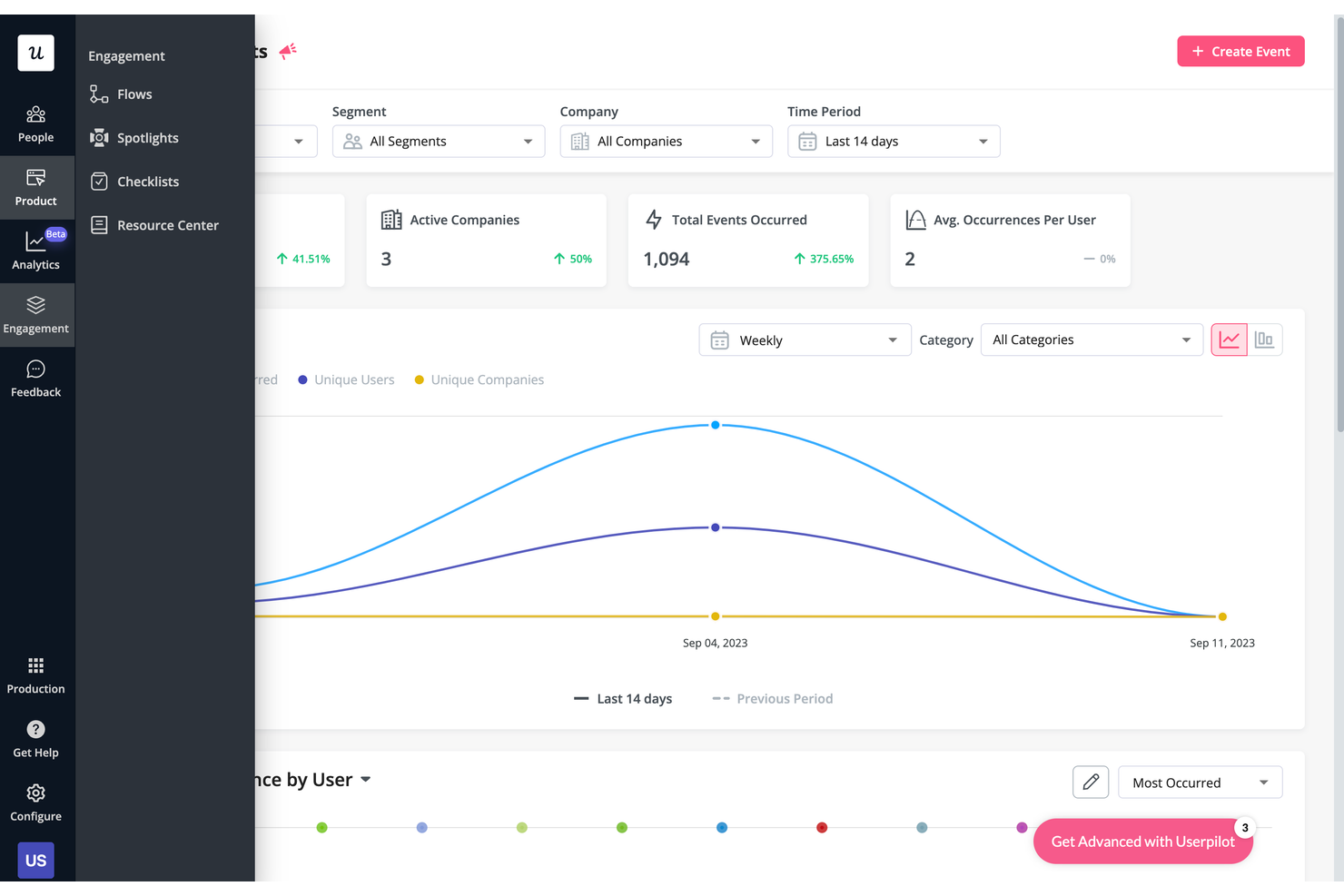
Userpilot destaca para los equipos de productos SaaS y los responsables del éxito del cliente que desean ofrecer experiencias de incorporación adaptadas a las necesidades de cada usuario. A diferencia de muchas alternativas a Whatfix, Userpilot permite activar flujos dentro de la aplicación, información sobre herramientas y listas de verificación según el comportamiento y los segmentos de los usuarios. Este enfoque te ayuda a guiar a los usuarios por productos complejos con una incorporación que se adapta a medida que interactúan con tu plataforma.
Por qué Userpilot es una buena alternativa a Whatfix
Para los equipos que quieren que la incorporación resulte personal y relevante, Userpilot ofrece un nivel de personalización que lo diferencia de otras alternativas a Whatfix. Elegí Userpilot porque permite activar flujos de incorporación, información sobre herramientas y listas de verificación en función de las acciones y los atributos de los usuarios en tiempo real. Puedes segmentar a los usuarios por función, etapa del ciclo de vida o eventos personalizados y, a continuación, ofrecer contenido dirigido que coincida con su recorrido. Esto convierte a Userpilot en una opción sólida si necesitas una incorporación que se adapte a la experiencia única de cada usuario.
Características clave de Userpilot
Algunas otras características que convierten a Userpilot en una opción sólida entre las alternativas a Whatfix son:
- Pruebas A/B: Realiza experimentos con los flujos de incorporación para comparar el rendimiento y optimizar la interacción de los usuarios.
- Widget del centro de recursos: Añade un centro de ayuda personalizable dentro de la aplicación para que los usuarios accedan a guías, preguntas frecuentes y asistencia.
- Herramienta de encuestas NPS: Recopila comentarios sobre la puntuación neta del promotor (NPS) directamente dentro de tu producto para medir la satisfacción de los usuarios.
- Creador de extensiones de Chrome: Crea y edita flujos de incorporación directamente en tu aplicación activa mediante una extensión de Chrome.
Integraciones de Userpilot
Entre las integraciones se incluyen HubSpot, Salesforce, Segment, Google Tag Manager, Zendesk, Google Analytics, Intercom, Amplitude, Mixpanel y muchas más.
Pros and Cons
Pros:
- Activadores basados en el comportamiento para la entrega de flujos de incorporación
- Herramientas de recopilación de NPS y encuestas dentro de la aplicación
- Widget del centro de recursos para ofrecer asistencia autoservicio
Cons:
- Opciones de localización limitadas para usuarios que no hablan inglés
- Carece de creación integrada de artículos para la base de conocimientos

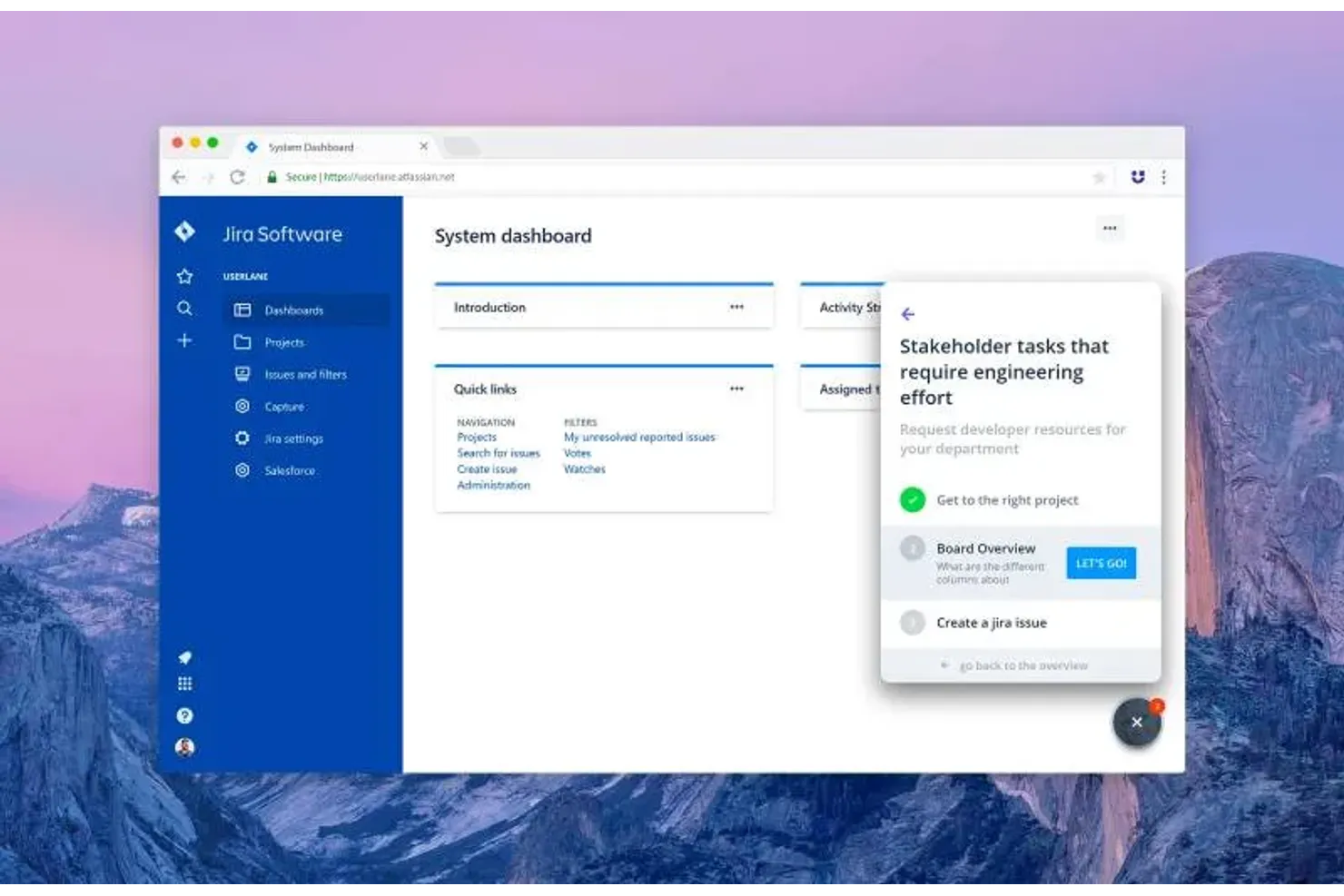
Si necesitas una alternativa a Whatfix que sobresalga en la orientación multilingüe para usuarios, Userlane está diseñada para ti. Equipos de RR. HH., líderes de TI y organizaciones globales utilizan Userlane para crear recorridos interactivos adaptados al idioma para la incorporación y soporte de software. Su enfoque en la traducción en tiempo real dentro de la aplicación te ayuda a ofrecer experiencias de formación y soporte coherentes a usuarios en distintas regiones.
Por qué Userlane es una buena alternativa a Whatfix
Para las organizaciones que necesitan apoyar a usuarios en varios idiomas, Userlane ofrece un enfoque único para la adopción digital. Elegí Userlane porque te permite crear guías interactivas que se adaptan automáticamente al idioma preferido del usuario, haciendo que la incorporación y el soporte sean accesibles para equipos globales. Sus capacidades de traducción en tiempo real y herramientas de gestión de idiomas te ayudan a mantener mensajes coherentes en todas las regiones sin duplicar contenido. Si la orientación multilingüe es una prioridad, Userlane destaca como una sólida alternativa a Whatfix.
Características principales de Userlane
Además de sus capacidades multilingües, Userlane ofrece varias otras funciones que apoyan la adopción digital y la incorporación de usuarios:
- Guías interactivas paso a paso: Crea recorridos personalizados que guían a los usuarios a través de procesos directamente dentro de tu aplicación.
- Panel de análisis: Haz seguimiento del compromiso de los usuarios y las tasas de finalización de cada guía.
- Entrega de contenido según roles: Dirige guías específicas a diferentes grupos de usuarios en función de sus roles o permisos.
- Sugerencias contextuales: Muestra consejos y explicaciones útiles en puntos clave de la interfaz de tu software.
Integraciones de Userlane
Las integraciones incluyen SharePoint, Confluence, Zendesk y KnowledgeOwl.
Pros and Cons
Pros:
- Las guías multilingües se adaptan a la configuración de idioma del usuario
- El contenido según rol se dirige a grupos de usuarios específicos
- Las sugerencias contextuales facilitan el aprendizaje dentro de la app
Cons:
- Documentación pública limitada sobre la configuración de integraciones
- No hay una extensión visible de navegador para la creación de guías

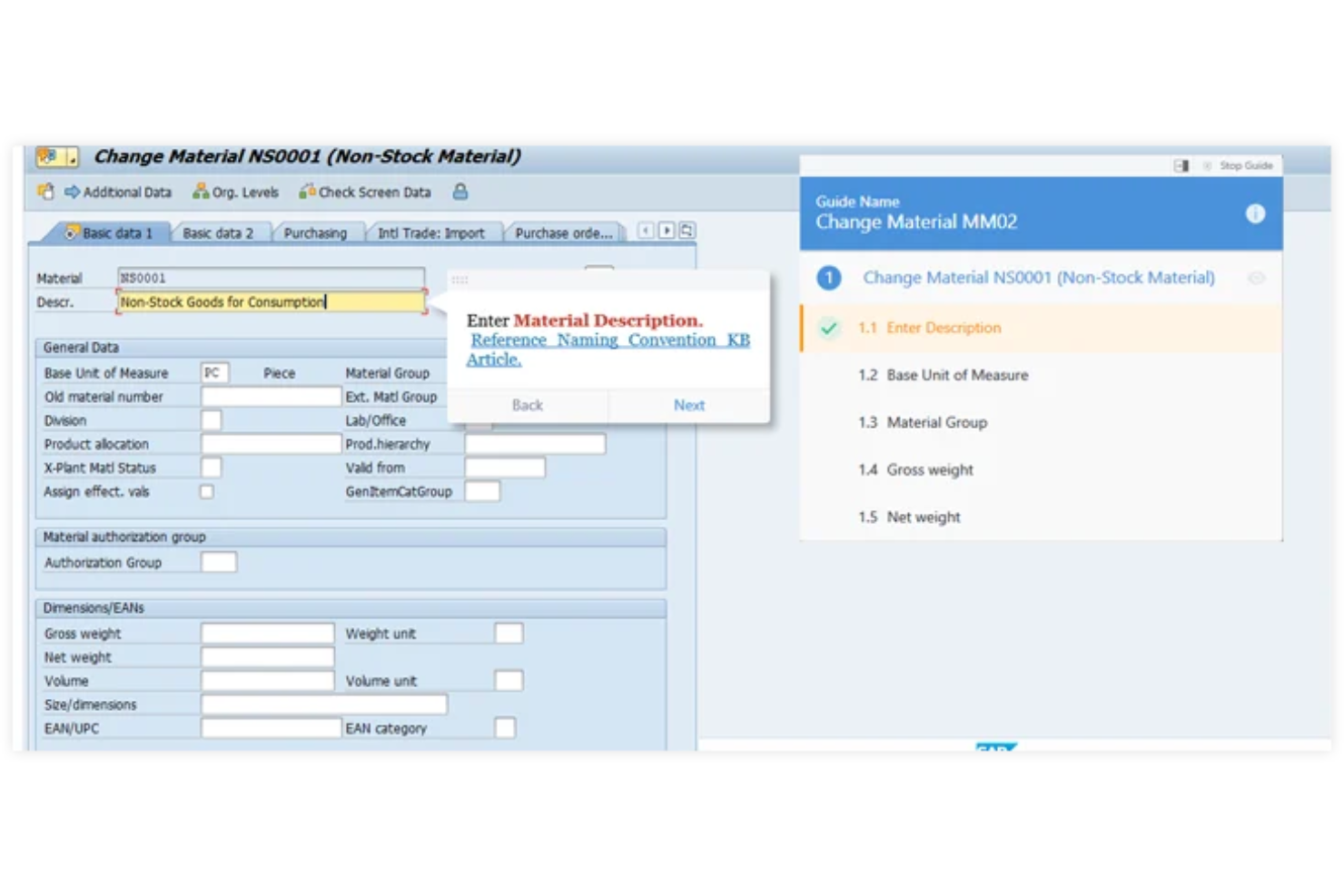
OnScreen está creado específicamente para equipos que necesitan capacitar usuarios en aplicaciones SAP con guías paso a paso directamente dentro de la aplicación. Esta herramienta resulta especialmente útil para equipos de manufactura, cadena de suministro y TI empresarial que dependen de SAP para las operaciones diarias y necesitan reducir el tiempo de formación y los errores. A diferencia de otras alternativas a Whatfix, OnScreen se especializa en superponer instrucciones directamente en las pantallas de SAP, lo que hace que la adopción de procesos y la incorporación de nuevos usuarios sea mucho más enfocada y eficiente.
Por qué OnScreen es una buena alternativa a Whatfix
Para organizaciones centradas en la capacitación de aplicaciones SAP, OnScreen ofrece un nivel de guía en la propia aplicación que está diseñado específicamente para entornos SAP. Elegí OnScreen porque permite crear recorridos paso a paso que se superponen directamente en las pantallas de SAP, para que los usuarios obtengan ayuda en tiempo real exactamente donde la necesitan. La herramienta también soporta la entrega de contenido basado en roles, asegurando que cada usuario vea solo las instrucciones relevantes para su función. Este enfoque dirigido ayuda a reducir el tiempo de formación y los errores en equipos que trabajan con flujos de trabajo SAP complejos.
Funciones clave de OnScreen
Otras características que hacen de OnScreen una alternativa sólida a Whatfix incluyen:
- Soporte multilingüe: Proporciona guías dentro de la aplicación en varios idiomas para equipos globales.
- Panel de análisis: Supervisa el compromiso de los usuarios y las tasas de finalización de cada recorrido.
- Biblioteca de plantillas: Accede a plantillas preconstruidas para agilizar la creación de guías.
- Herramientas de colaboración: Permite que varios miembros del equipo coautoricen y revisen el contenido de formación.
Integraciones de OnScreen
Actualmente no se listan integraciones nativas.
Pros and Cons
Pros:
- La guía superpuesta en SAP es altamente contextual
- Soporte multilingüe para equipos SAP globales
- El panel de análisis rastrea la participación en los recorridos
Cons:
- Los recorridos se centran principalmente en entornos SAP
- Las funciones avanzadas de análisis requieren planes de nivel superior
Otras alternativas a Whatfix
Estas son algunas alternativas adicionales a Whatfix que no llegaron a mi selección, pero que aun así vale la pena consultar:
- Oracle University
Ideal para programas de capacitación certificada en software
- Nexthink Adopt
Ideal para obtener información sobre la experiencia digital de los empleados
- Chameleon
Mejor para personalizar mensajes dentro de la aplicación


Cómo evalúo las alternativas a Whatfix
Divido mi evaluación en criterios básicos —como la orientación dentro de la aplicación y la compatibilidad con HRIS— y factores diferenciadores que separan las herramientas que vale la pena recomendar del resto.
Funcionalidad principal (requisitos básicos para esta lista)
Al seleccionar las herramientas para mi lista, califico cada una en una escala de 0 (no ofrece la funcionalidad) a 5 (sobresale en esta área) para cada funcionalidad principal que se indica a continuación. Después, calculo la puntuación total de la herramienta como porcentaje. Cada herramienta debe alcanzar una puntuación total mínima del 65 % para ser considerada para su inclusión.
- Orientación dentro de la aplicación: Busco recorridos interactivos y textos de ayuda que puedan guiar a un empleado por tareas de varios pasos, como enviar una solicitud de tiempo libre remunerado o actualizar las retenciones fiscales.
- Asistencia de autoservicio: Cada herramienta debe ofrecer un centro de recursos dentro de la aplicación donde los empleados puedan buscar contenido de ayuda sin enviar un ticket ni salir de su plataforma de RR. HH.
- Compatibilidad con plataformas de RR. HH.: Compruebo si la herramienta funciona con sistemas ampliamente utilizados como Workday, SAP SuccessFactors, BambooHR y ADP, no solo con uno o dos.
- Creación de contenido sin código: Los equipos de RR. HH. necesitan crear y actualizar la orientación por su cuenta, por lo que evalúo qué tan accesible es el editor para creadores de contenido no técnicos.
- Segmentación de usuarios: La segmentación es importante: analizo si se puede delimitar el contenido por función, departamento o ubicación, de modo que los nuevos empleados vean flujos diferentes a los del personal con más antigüedad.
- Análisis de uso: Los paneles deben mostrar las tasas de finalización, los puntos de abandono y las tendencias de adopción para que los responsables de operaciones de RR. HH. puedan identificar dónde se atascan los empleados.
Una vez que tengo una lista de herramientas que cumplen estos criterios, considero qué distingue a cada plataforma.
Factores diferenciadores (qué distingue a los proveedores)
Así es como comparo y contrasto distintos proveedores:
Características destacadas
La localización multilingüe es importante cuando la plantilla abarca varias regiones: las guías de inscripción abierta y los flujos de incorporación deben llegar a todos los empleados en su idioma preferido. También evalúo si una plataforma ofrece generación de contenido basada en IA, que puede convertir la documentación existente de RR. HH. en recorridos listos para publicar. Para las organizaciones con personal de primera línea o sin puesto fijo, la orientación mediante aplicaciones móviles es un factor diferenciador real, ya que estos empleados suelen interactuar con las herramientas de RR. HH. exclusivamente desde sus teléfonos.
Más allá de las características
Las integraciones con HRIS y HCM son una de las primeras cosas que compruebo: una herramienta que se conecta de forma nativa con los sistemas existentes, como Workday o ADP, ahorra semanas de configuración en comparación con el trabajo personalizado mediante API. El cumplimiento también tiene mucho peso, especialmente cuando los datos de los empleados circulan por recorridos vinculados a la inscripción en beneficios o a la nómina. Busco como mínimo el cumplimiento de SOC 2 Tipo II y del RGPD. La velocidad de implementación también es importante; las plataformas que ofrecen plantillas de contenido de RR. HH. prediseñadas pueden poner en funcionamiento el primer flujo de incorporación en días en lugar de meses.
¿Por qué buscar una alternativa a Whatfix?
Aunque Whatfix es una buena opción entre las alternativas a Whatfix, hay varias razones por las que algunos usuarios buscan otras soluciones. Es posible que estés buscando una alternativa a Whatfix porque…
- Necesitas una integración más profunda con SAP o ERP
- Quieres análisis e informes más avanzados
- Necesitas compatibilidad con varios idiomas para equipos globales
- Prefieres precios más transparentes o flexibles
- Necesitas funciones adaptadas a sectores regulados
- Quieres más opciones de personalización para la orientación dentro de la aplicación
Si alguna de estas situaciones te resulta familiar, has llegado al lugar indicado. Mi lista contiene varias alternativas a Whatfix que se adaptan mejor a los equipos que afrontan estos desafíos con Whatfix y buscan soluciones alternativas.
Funciones principales de Whatfix
Estas son algunas de las funciones principales de Whatfix, que te ayudarán a contrastar y comparar lo que ofrecen las soluciones alternativas:
- Tutoriales interactivos dentro de la aplicación
- Listas de tareas contextuales para los usuarios
- Creación de contenido en varios formatos (vídeos, PDF, presentaciones)
- Análisis y generación de informes de usuarios en tiempo real
- Segmentación del contenido basada en roles
- Flujos automatizados de incorporación
- Integración con sistemas CRM y ERP populares
- Compatibilidad con varios idiomas
- Widgets de autoayuda y bases de conocimiento
- Exportación de contenido compatible con SCORM