

10 mejores herramientas de IA para resumir reuniones de 2026

Mejores herramientas de IA para resúmenes de reuniones: lista corta


Una herramienta de IA para resúmenes de reuniones utiliza inteligencia artificial para capturar, transcribir y organizar automáticamente los puntos clave de tus reuniones. Si buscas formas de reducir la toma manual de notas, asegurarte de que no se pase nada por alto y mantener a tu equipo alineado, estas herramientas pueden ayudarte a transformar la forma en que documentas y haces seguimiento de las reuniones.
En esta lista encontrarás las mejores opciones de IA para resúmenes de reuniones para 2026, seleccionadas por sus funciones para abordar los desafíos reales a los que se enfrentan cada día los profesionales de RR. HH. y los equipos empresariales. Utiliza esta guía para comparar soluciones y encontrar la que mejor se adapte a tu flujo de trabajo.
Por qué confiar en nuestras reseñas de software
Nuestro equipo lleva probando y evaluando software desde 2012. Como expertos en RR. HH., sabemos lo difícil —y lo importante— que es elegir el software adecuado.
Para esta guía, evaluamos las herramientas mediante pruebas prácticas e investigación independiente, puntuando las herramientas según nuestros criterios de selección. También nos basamos en la experiencia de líderes de opinión del sector y de profesionales de RR. HH. en activo.
Nuestras reseñas reflejan nuestro criterio editorial humano, no un discurso de ventas.
Revisores expertos:
Resumen de las mejores herramientas de IA para resúmenes de reuniones
Esta tabla comparativa resume los detalles de precios de mi selección de las mejores herramientas de IA para resúmenes de reuniones, para ayudarte a encontrar la opción más adecuada para tu presupuesto y las necesidades de tu empresa.
| Tool | Best For | Trial Info | Price | ||
|---|---|---|---|---|---|
| 1 | Ideal con soporte integrado para reuniones de Zoom | Plan gratuito + demo gratuita disponible | Desde $14.16/mes (facturado anualmente) | Website | |
| 2 | Ideal para capturar momentos destacados en Google Meet | Plan gratuito disponible | Desde $8/usuario/mes (facturado anualmente) | Website | |
| 3 | Mejor para transcripción en vivo con etiquetas de hablante | Plan gratuito disponible | Desde $8.33/usuario/mes (facturado anualmente) | Website | |
| 4 | Ideal para capturar notas de audio sin ruido | Plan gratuito + prueba disponible | Desde $8/usuario/mes (facturado anualmente) | Website | |
| 5 | Ideal para exportar notas en múltiples formatos | Plan gratuito disponible | Desde $8.17/mes (facturado anualmente) | Website | |
| 6 | Ideal para la extracción automatizada de puntos de acción | Plan gratuito disponible | Desde $15/mes (facturado anualmente) | Website | |
| 7 | Ideal para soporte multilingüe de resúmenes | Plan gratuito + demo gratis disponible | Desde 39€/usuario/mes (facturado anualmente) | Website | |
| 8 | Ideal para sugerencias de seguimiento impulsadas por IA | Plan gratuito disponible | Desde $9/mes (facturado anualmente) | Website | |
| 9 | Ideal para la privacidad de los datos de IA y el cumplimiento de la norma ISO 27001 | Demostración gratuita disponible | Precios bajo solicitud | Website | |
| 10 | Ideal para resúmenes instantáneos después de las llamadas | Prueba gratuita disponible | Precio a consultar | Website |
Opiniones sobre las mejores herramientas de IA para resúmenes de reuniones
A continuación se incluyen mis resúmenes detallados de las herramientas de IA para resúmenes de reuniones que llegaron a mi lista corta. Mis reseñas ofrecen un análisis detallado de las funciones, integraciones y mejores casos de uso de cada herramienta para ayudarte a encontrar la más adecuada para ti.

Zoom
Ideal con soporte integrado para reuniones de Zoom
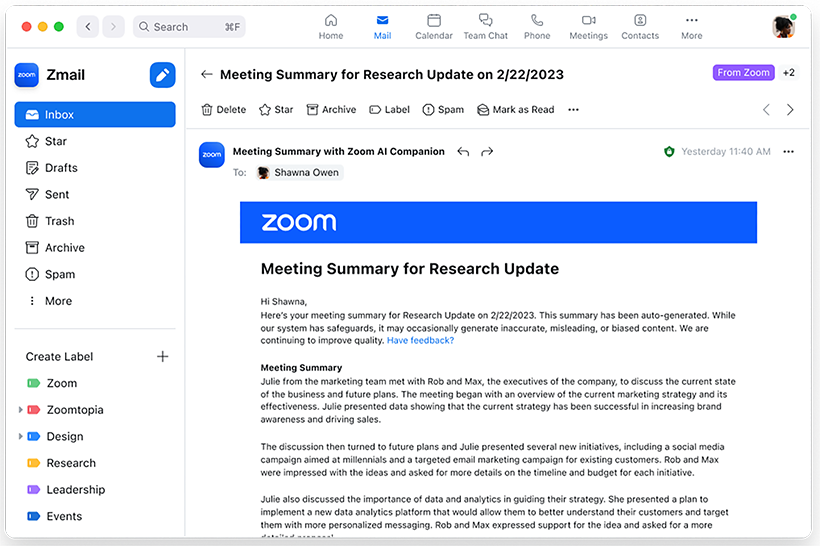
Si tu equipo ya utiliza Zoom para sus reuniones, la función de notas con IA de Zoom aporta resúmenes automáticos de reuniones directamente a tu flujo de trabajo actual. Esta función está pensada para organizaciones que desean obtener resúmenes automáticos, tareas y conclusiones sin salir del entorno de Zoom. Es especialmente útil para RRHH, gestores de proyectos y líderes empresariales que necesitan recapitulaciones instantáneas y contextuales de las reuniones justo donde tienen lugar las conversaciones.
Por qué elegí Zoom
Dado que el asistente de notas con IA de Zoom está integrado directamente en la plataforma de Zoom, es una opción natural para los equipos que ya usan Zoom en sus reuniones. Elegí esta herramienta por su capacidad de generar resúmenes de reuniones y tareas en tiempo real sin tener que configurar nada más ni cambiar de aplicación. La función de IA puede capturar automáticamente los puntos clave y las decisiones tomadas a medida que avanza la reunión, lo que facilita mantener a todos sincronizados. Este enfoque integrado permite recibir información relevante sobre la reunión justo donde ocurren las conversaciones, lo cual es especialmente valioso para equipos de RRHH y líderes empresariales con mucho trabajo.
Funciones clave de Zoom
Otras funciones que hacen de Zoom una herramienta útil para resúmenes con IA incluyen:
- Capítulos inteligentes automatizados: La herramienta divide las grabaciones en secciones etiquetadas para facilitar la navegación.
- Transcripción en vivo durante la reunión: Los usuarios pueden ver subtítulos y transcripciones en tiempo real durante las llamadas.
- Transcripciones post-reunión con búsqueda: Todas las transcripciones se almacenan y pueden buscarse dentro de la plataforma de Zoom.
- Respuestas de chat con IA: El AI Companion puede generar respuestas sugeridas en las conversaciones de Zoom Team Chat.
Integraciones de Zoom
Las integraciones incluyen Google Drive, Microsoft 365, Figma, Confluence, Notion, Coda, Microsoft Teams, Slack, Calendly y Salesforce.
Pros and Cons
Pros:
- Las tareas se autogeneran y se resaltan
- Los capítulos inteligentes organizan grabaciones para su revisión
- Las transcripciones son buscables dentro de la plataforma Zoom
Cons:
- Los resúmenes solo están disponibles para reuniones de Zoom
- Ocasionales errores de transcripción con acentos

Tactiq
Ideal para capturar momentos destacados en Google Meet

Tactiq está diseñado para equipos y profesionales que dependen de Google Meet y desean capturar los momentos clave durante llamadas en vivo. Te permite resaltar puntos importantes de la discusión en tiempo real, facilitando la creación de resúmenes de reuniones generados por IA con acciones prácticas. Esta herramienta resulta especialmente útil para RR. HH., jefes de proyectos y docentes que necesitan consultar o compartir rápidamente los momentos destacados de una reunión sin revisar las transcripciones completas.
Por qué elegí Tactiq
Lo que diferencia a Tactiq es su enfoque en capturar los momentos destacados directamente dentro de Google Meet, ideal para equipos que utilizan Google Workspace como su principal centro de colaboración. Elegí Tactiq porque permite a los usuarios marcar los momentos importantes durante las reuniones en vivo, para que puedas generar rápidamente resúmenes enfocados en lo más relevante. La herramienta transcribe automáticamente las conversaciones y permite añadir destacados y comentarios en tiempo real. Este enfoque ayuda a los profesionales de RR. HH., líderes de proyectos y educadores a ahorrar tiempo al mostrar los puntos clave sin tener que revisar todas las transcripciones.
Funciones clave de Tactiq
Además del resaltado en tiempo real, Tactiq ofrece varias funciones adicionales que cubren necesidades de IA para resúmenes de reuniones:
- Transcripción automática de reuniones: Tactiq genera transcripciones en vivo para las sesiones de Google Meet.
- Identificación de hablantes: La herramienta etiqueta cada línea de la transcripción con el nombre del hablante.
- Exportar a Google Docs y Notion: Los usuarios pueden enviar resúmenes y transcripciones directamente a estas plataformas.
- Resúmenes de reuniones generados por IA: Tactiq utiliza IA para crear resúmenes concisos a partir de la transcripción completa.
Integraciones de Tactiq
Las integraciones incluyen Google Meet, Zoom, Microsoft Teams, Slack, Notion, Linear y HubSpot.
Pros and Cons
Pros:
- Se pueden añadir destacados durante reuniones en vivo
- Exporta resúmenes directamente a Google Docs
- Etiquetas de hablante incluidas en todas las transcripciones
Cons:
- Ocasionales momentos destacados no capturados en reuniones concurridas
- Opciones de edición limitadas para los resúmenes generados

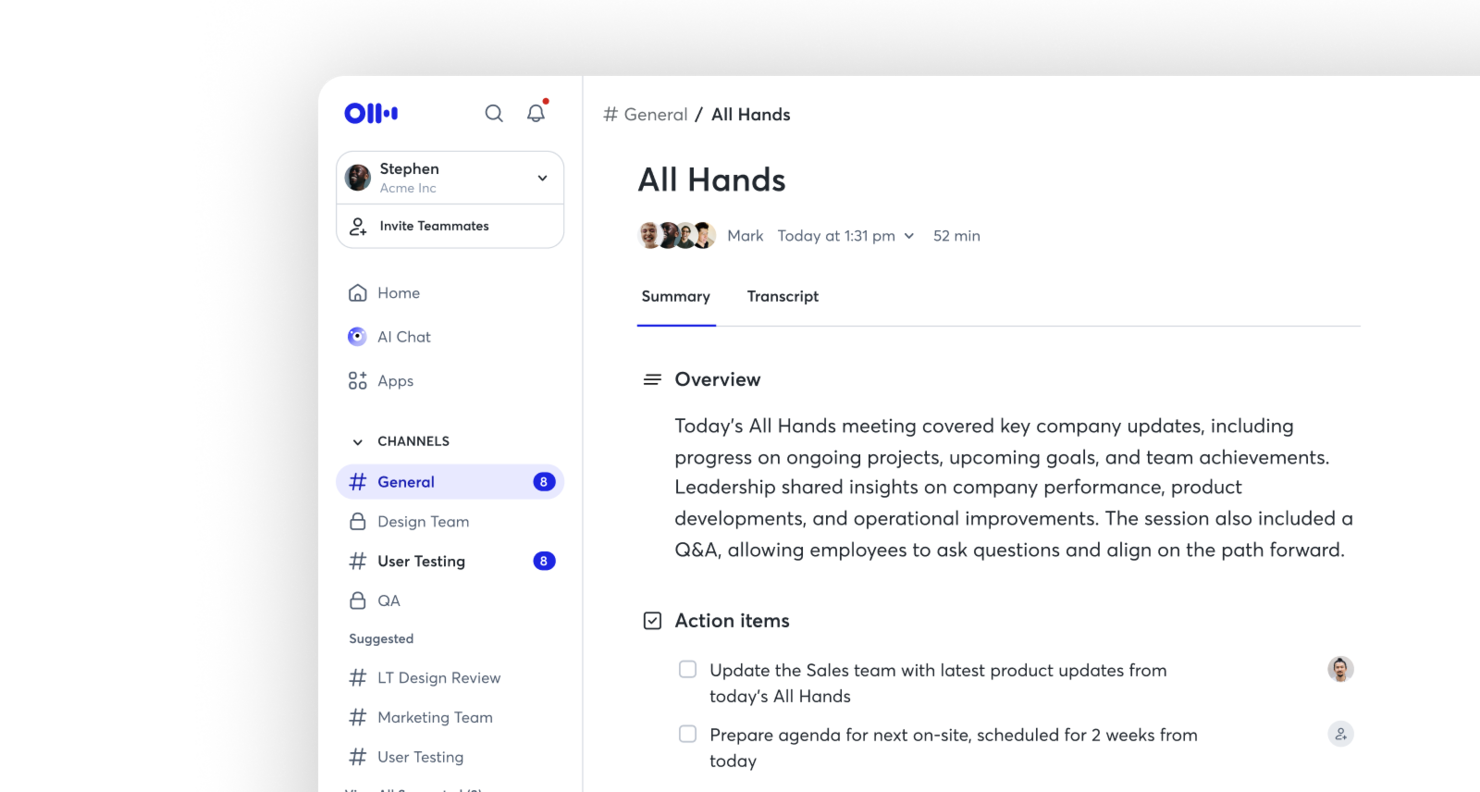
Otter es una inteligencia artificial para resúmenes de reuniones creada para equipos que necesitan transcripción en vivo con etiquetas claras de hablante. Es especialmente útil para profesionales que desean capturar conversaciones en tiempo real e identificar rápidamente quién dijo qué. Si buscas mejorar la documentación y la responsabilidad en las reuniones, la identificación de hablantes y las transcripciones buscables de Otter.ai pueden ayudarte.
Por qué elegí Otter
Para equipos que necesitan registros precisos y en tiempo real de las reuniones, Otter destaca por su transcripción en vivo con etiquetas de hablante. Elegí esta herramienta porque distingue y etiqueta automáticamente a cada hablante, facilitando el seguimiento de las conversaciones y la atribución de comentarios. La función de transcripción en vivo permite captar las discusiones a medida que ocurren, sin esperar al procesamiento posterior a la reunión. Esta combinación es especialmente valiosa para equipos que requieren registros claros y accionables de quién dijo qué durante las reuniones.
Funciones clave de Otter
Además de la transcripción en vivo y el etiquetado de hablantes, también encontré útiles estas funciones para una IA de resúmenes de reuniones:
- Generación automatizada de resúmenes: Otter.ai crea resúmenes concisos de reuniones que destacan los puntos clave y las decisiones.
- Archivo de transcripciones buscable: Almacena y busca transcripciones de reuniones pasadas para localizar rápidamente temas o declaraciones específicas.
- Notas compartidas en vivo: Colabora en notas de reuniones en tiempo real con otros participantes.
- Integración con calendarios: Conecta Otter.ai con calendarios de Google o Microsoft para unirse y grabar automáticamente reuniones programadas.
Integraciones de Otter
Las integraciones incluyen Zoom, Google Meet, Microsoft Teams, Slack, Salesforce, HubSpot, Asana, Jira, Notion y Dropbox.
Pros and Cons
Pros:
- Etiquetas de hablante que identifican participantes con precisión
- Transcripción en vivo actualizada en tiempo real
- Transcripciones buscables para referencia rápida
Cons:
- Errores ocasionales de transcripción con acentos
- Opciones de formato limitadas para las notas exportadas

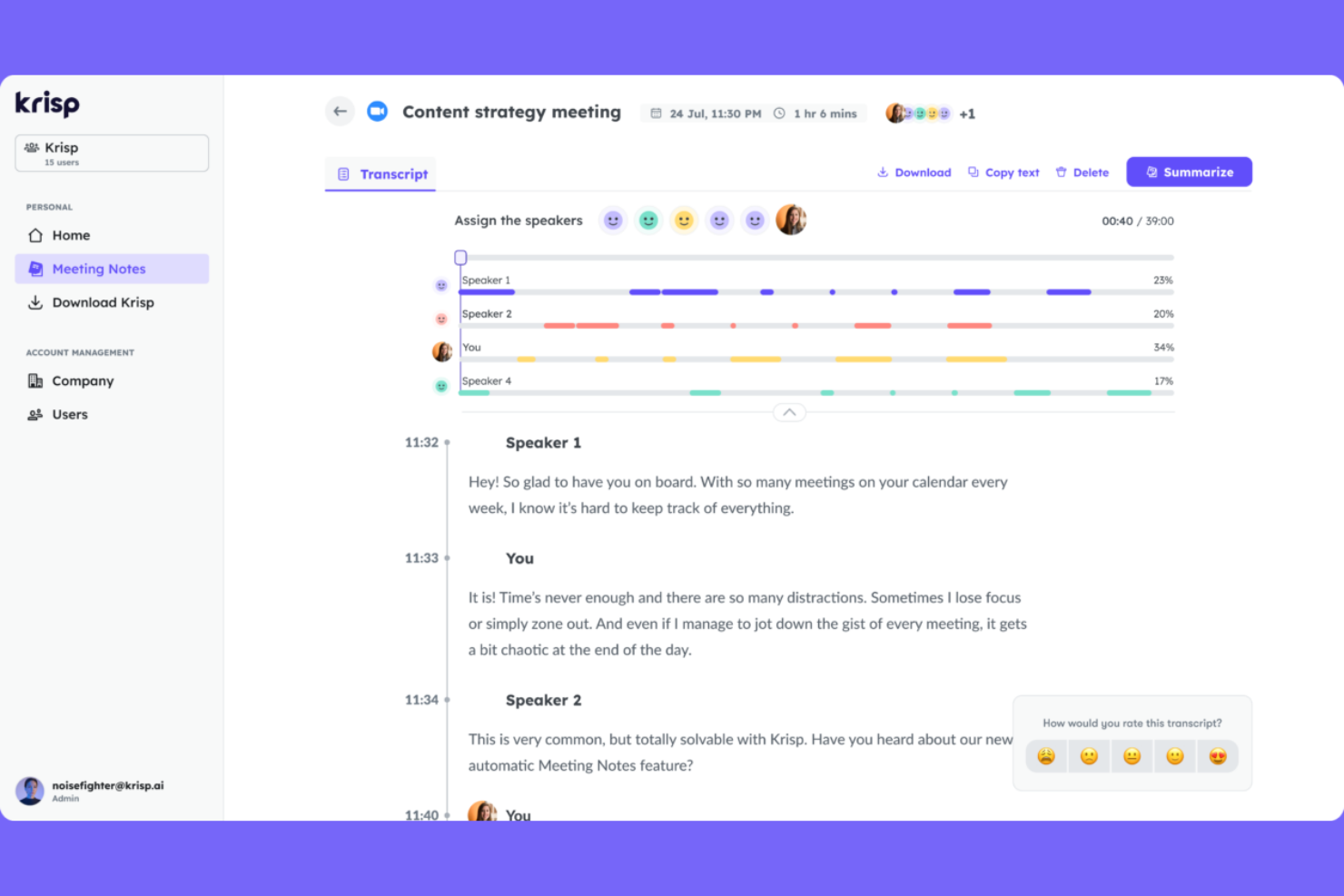
Para equipos que tienen problemas con el ruido de fondo durante reuniones virtuales, Krisp ofrece cancelación de ruido impulsada por IA y captura de notas de audio. Es especialmente útil para profesionales remotos, reclutadores y equipos de recursos humanos que necesitan grabaciones claras y sin distracciones para resúmenes precisos de reuniones. Krisp ayuda a garantizar que tus notas reflejen lo que realmente se dijo, no lo que se perdió entre el ruido.
Por Qué Elegí Krisp
Al capturar notas de reuniones, la calidad del audio puede determinar la utilidad de tus resúmenes. Elegí Krisp porque su cancelación de ruido basada en IA elimina los sonidos de fondo en tiempo real, para que tengas audio limpio y claro en cada reunión. La herramienta también ofrece aislamiento de voz, lo que ayuda a asegurar que solo la voz del hablante sea capturada, reduciendo la confusión en transcripciones y resúmenes. Para quienes necesitan una IA confiable para resúmenes de reuniones, el enfoque de Krisp en un audio libre de ruido te brinda una base sólida para tomar notas precisas.
Funciones Clave de Krisp
Otras funciones que hacen que Krisp sea útil para la IA en resúmenes de reuniones incluyen:
- Asistente de Reunión con IA: Genera automáticamente notas y resúmenes de tus llamadas.
- Transcripción de Llamadas: Proporciona transcripción en tiempo real para reuniones en plataformas compatibles.
- Panel de Analítica de Reuniones: Ofrece información sobre el tiempo de intervención, participación y compromiso en las reuniones.
- Compatibilidad Multiplataforma: Funciona con Zoom, Microsoft Teams, Google Meet y otras herramientas principales de videoconferencia.
Integraciones de Krisp
Las integraciones incluyen Zoom, Google Meet, Microsoft Teams, Slack, HubSpot, Salesforce, Google Calendar, Webex, Outlook y Discord.
Pros and Cons
Pros:
- Elimina el ruido de fondo de las grabaciones
- Rastrea el tiempo de intervención y la participación en reuniones
- Soporta múltiples plataformas de videoconferencia
Cons:
- La precisión de la transcripción disminuye con acentos marcados
- Requiere instalar la aplicación de escritorio para todas las funciones
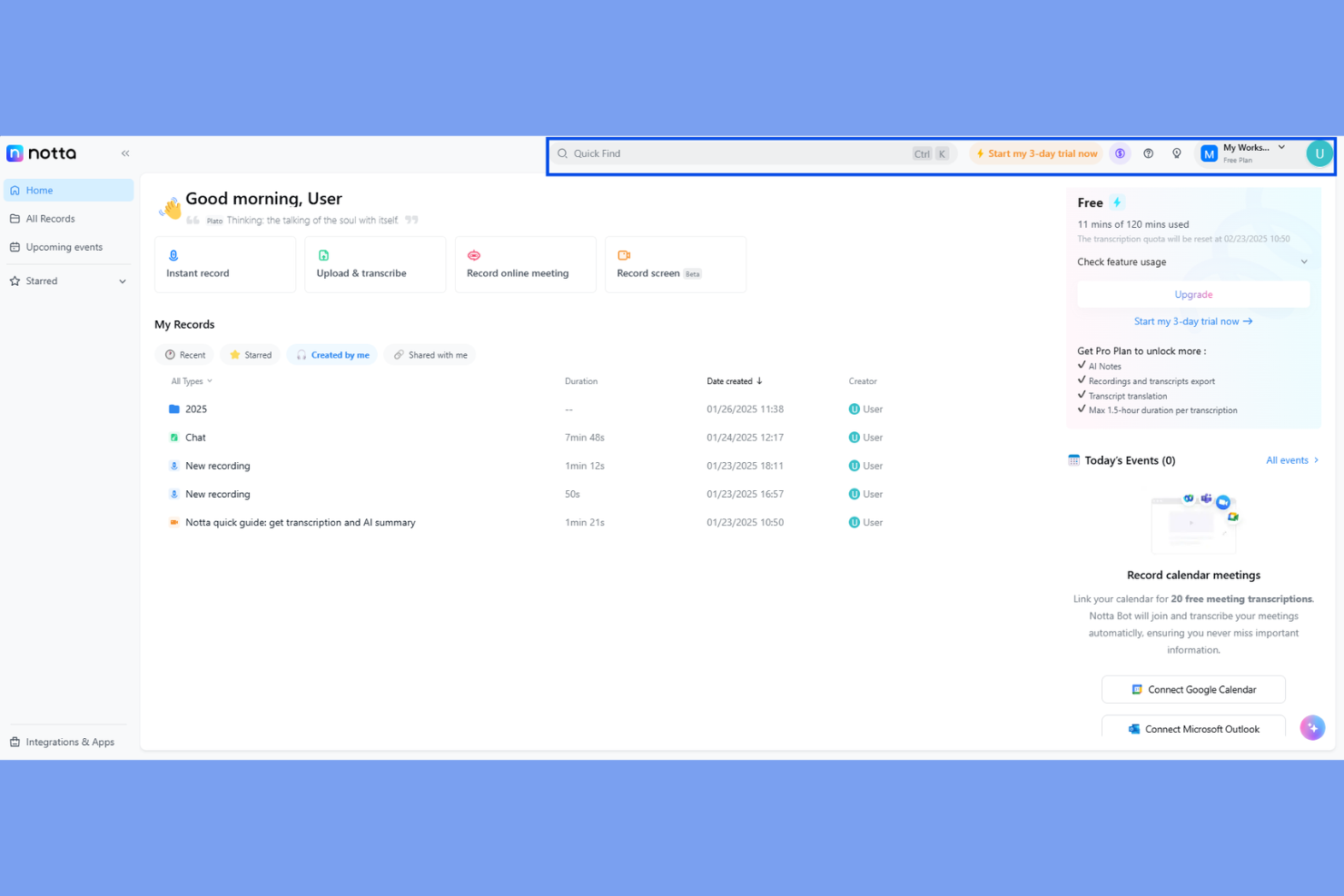
Notta es una inteligencia artificial para resúmenes de reuniones diseñada para equipos y profesionales que necesitan opciones flexibles para compartir y almacenar notas de reuniones. Si trabajas a menudo con clientes, equipos multifuncionales o socios externos, Notta facilita la exportación de transcripciones y resúmenes en una amplia variedad de formatos. Esto te ayuda a mantener a todos alineados, sin importar qué herramientas o flujos de trabajo utilicen tus colaboradores.
Por qué elegí Notta
Lo que diferencia a Notta en el ámbito de la inteligencia artificial para resúmenes de reuniones es su capacidad para exportar notas y transcripciones en varios formatos, lo cual es especialmente útil para equipos que necesitan compartir información en diferentes plataformas. Elegí Notta porque te permite descargar resúmenes de reuniones como PDF, TXT, DOCX, SRT e incluso enlaces compartibles, facilitando su integración en cualquier flujo de trabajo. Esta flexibilidad es valiosa para profesionales de recursos humanos, consultores y gerentes de proyectos que a menudo necesitan distribuir los resultados de las reuniones a diferentes audiencias. Si buscas una herramienta que se adapte a tus necesidades de documentación y compartición, las opciones de exportación de Notta la convierten en una excelente elección.
Funciones clave de Notta
Además de sus opciones flexibles de exportación, Notta ofrece otras características que apoyan las necesidades de resúmenes de reuniones:
- Transcripción en tiempo real: Convierte las palabras habladas en texto mientras la reunión ocurre.
- Identificación de hablantes: Etiqueta quién está hablando durante conversaciones entre varias personas.
- Importación de audio y video: Permite subir grabaciones para su transcripción y resumen.
- Aplicación móvil: Te permite grabar y acceder a notas de reuniones desde cualquier lugar.
Integraciones de Notta
Las integraciones incluyen Zoom, Google Meet, Microsoft Teams, Slack, Notion, Google Docs, Salesforce, HubSpot, ClickUp y Dropbox.
Pros and Cons
Pros:
- Transcribe archivos de audio y video subidos
- La aplicación móvil permite grabar en movimiento
- Las etiquetas de hablantes ayudan a clarificar las transcripciones de reuniones
Cons:
- No tiene programación de reuniones con calendario incorporado
- No hay opción de transcripción humana en vivo disponible


Si necesitas una IA para resúmenes de reuniones que identifique y extraiga automáticamente los puntos de acción, Read AI merece tu atención. Esta herramienta está diseñada para equipos y profesionales que desean capturar los próximos pasos sin tener que revisar transcripciones extensas. Su enfoque en resultados accionables te ayuda a mantener reuniones productivas y seguimientos claros.
Por qué elegí Read AI
Lo que diferencia a Read AI como IA para resúmenes de reuniones es su enfoque en la extracción automática de puntos de acción. Elegí esta herramienta porque identifica y resalta los próximos pasos directamente de las conversaciones de tus reuniones, así no tienes que buscar en las transcripciones. La plataforma utiliza IA para etiquetar y organizar los puntos de acción, facilitando la asignación de tareas y el seguimiento de pendientes. Este enfoque específico ayuda a los equipos a mantenerse responsables y asegura que las tareas importantes no se pierdan después de las reuniones.
Funciones clave de Read AI
Otras funciones de Read AI que destacan para usuarios de IA de resúmenes de reuniones incluyen:
- Transcripción en tiempo real: Captura el contenido hablado a medida que sucede, facilitando la revisión o consulta de discusiones inmediatamente después de la reunión.
- Panel de análisis de reuniones: Accede a resúmenes visuales y métricas de participación para comprender la asistencia y la efectividad de las reuniones.
- Plantillas de resumen personalizables: Elige o diseña formatos de resumen que se adapten al flujo de trabajo y necesidades de documentación de tu equipo.
- Soporte multiplataforma: Utiliza Read AI con herramientas populares de videoconferencias como Zoom, Microsoft Teams y Google Meet.
Integraciones de Read AI
Las integraciones incluyen Zoom, Google Meet, Microsoft Teams, Slack, HubSpot, Salesforce, Atlassian, Notion, Asana y Gmail.
Pros and Cons
Pros:
- Extracción precisa de puntos de acción para reuniones
- Transcripción en tiempo real en múltiples plataformas
- Soporte multilingüe para más de 20 idiomas
Cons:
- Preocupaciones ocasionales sobre la privacidad reportadas
- Profundidad analítica limitada durante reuniones en vivo


Si necesitas resúmenes de reuniones en varios idiomas, Jamie está diseñado para apoyar equipos globales y espacios de trabajo multilingües. Transcribe y resume automáticamente reuniones en más de 15 idiomas, lo que lo convierte en una excelente opción para recursos humanos internacionales, gestores de proyectos y consultores. Jamie te ayuda a superar las barreras del idioma y a mantener a todos alineados, sin importar dónde se encuentre tu equipo.
Por qué elegí Jamie
Jamie destaca por su capacidad de generar resúmenes de reuniones en varios idiomas, algo esencial para equipos que trabajan a través de fronteras. Elegí Jamie porque admite más de 15 idiomas, lo que permite a los usuarios recibir transcripciones y resúmenes precisos, independientemente del idioma hablado en la reunión. La herramienta también detecta automáticamente el idioma hablado, por lo que no tienes que configurar preferencias antes de cada llamada. Esto hace que Jamie sea una gran elección para profesionales de recursos humanos, consultores y equipos globales que necesitan que todos estén en sintonía, sin importar su ubicación.
Funciones clave de Jamie
Otras funciones que hacen útil a Jamie para la IA de resúmenes de reuniones incluyen:
- Extracción automatizada de tareas: Jamie identifica y enumera tareas derivadas de las conversaciones de la reunión.
- Plantillas de resumen personalizables: Los usuarios pueden elegir o diseñar plantillas para personalizar el formato de los resúmenes de reuniones.
- Integración directa con el calendario: La herramienta se conecta con tu calendario para unirse y grabar automáticamente reuniones programadas.
- Gestión de datos conforme a GDPR: Jamie procesa y almacena los datos de las reuniones conforme a los requisitos de GDPR.
Integraciones de Jamie
Las integraciones incluyen Notion, Google Docs, OneNote y HubSpot.
Pros and Cons
Pros:
- Resume en más de 15 idiomas
- Detecta automáticamente el idioma hablado en las reuniones
- Ofrece procesamiento de datos conforme a GDPR
Cons:
- Ocasionales imprecisiones en la extracción de tareas
- No tiene aplicación móvil para acceder en movimiento

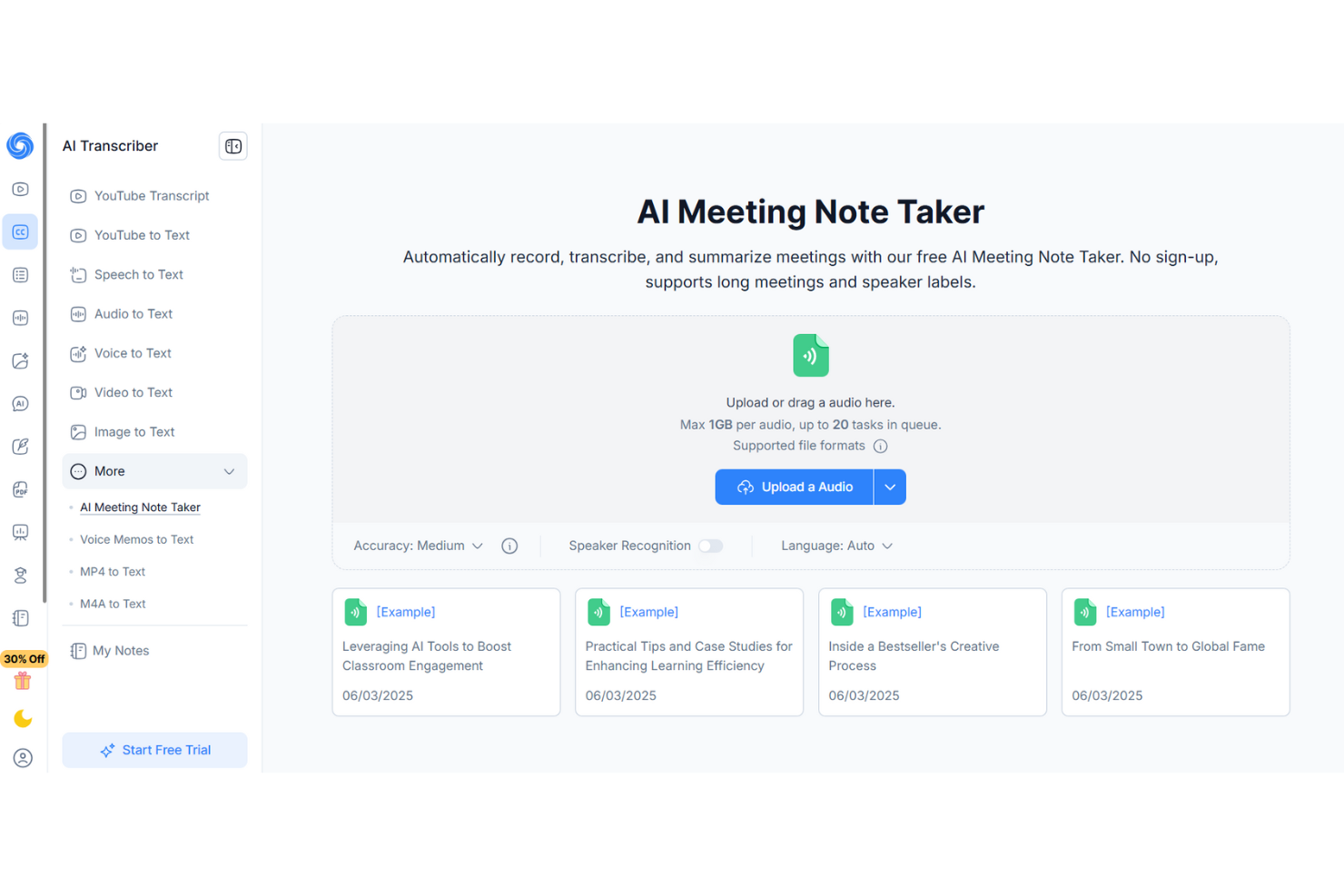
Si buscas una IA para resúmenes de reuniones que vaya más allá de la simple toma de notas, NoteGPT destaca por sus sugerencias de seguimiento impulsadas por inteligencia artificial. Esta herramienta es ideal para equipos de ventas, gestores de proyectos y profesionales de recursos humanos que desean transformar los conocimientos de las reuniones en próximos pasos accionables. NoteGPT te ayuda a capturar los puntos clave y recomienda automáticamente acciones de seguimiento, para que nada importante se pierda por el camino.
Por qué elegí NoteGPT
A diferencia de muchas herramientas de resumen de reuniones que simplemente transcriben y resumen, NoteGPT analiza activamente las conversaciones para sugerir acciones de seguimiento relevantes. Elegí NoteGPT porque su IA no solo captura lo que se dijo, sino que te ayuda a decidir qué hacer a continuación. La herramienta resalta los elementos de acción y genera automáticamente sugerencias de seguimiento basadas en el contenido de la reunión, lo cual es especialmente útil para equipos que necesitan mantener los proyectos en movimiento. Para quienes desean algo más que un registro de sus reuniones, el enfoque de NoteGPT en ofrecer información accionable lo distingue.
Características clave de NoteGPT
Otras características que hacen que NoteGPT sea útil como IA para resúmenes de reuniones incluyen:
- Transcripción multilingüe: Admite transcripción en varios idiomas principales para equipos globales.
- Identificación de hablantes: Distingue entre los diferentes participantes en las grabaciones de reuniones.
- Función de búsqueda en reuniones: Permite buscar en notas y transcripciones de reuniones anteriores.
- Extensión de Chrome: Captura y resume reuniones directamente desde tu navegador.
Integraciones de NoteGPT
Las integraciones no están publicadas de forma pública.
Pros and Cons
Pros:
- La IA sugiere acciones de seguimiento tras las reuniones
- La extensión de Chrome captura reuniones en el navegador
- La función de búsqueda encuentra detalles en reuniones pasadas
Cons:
- Sin integración directa con Zoom o Teams
- El plan gratuito restringe la duración y la cantidad de reuniones subidas

Ideal para la privacidad de los datos de IA y el cumplimiento de la norma ISO 27001
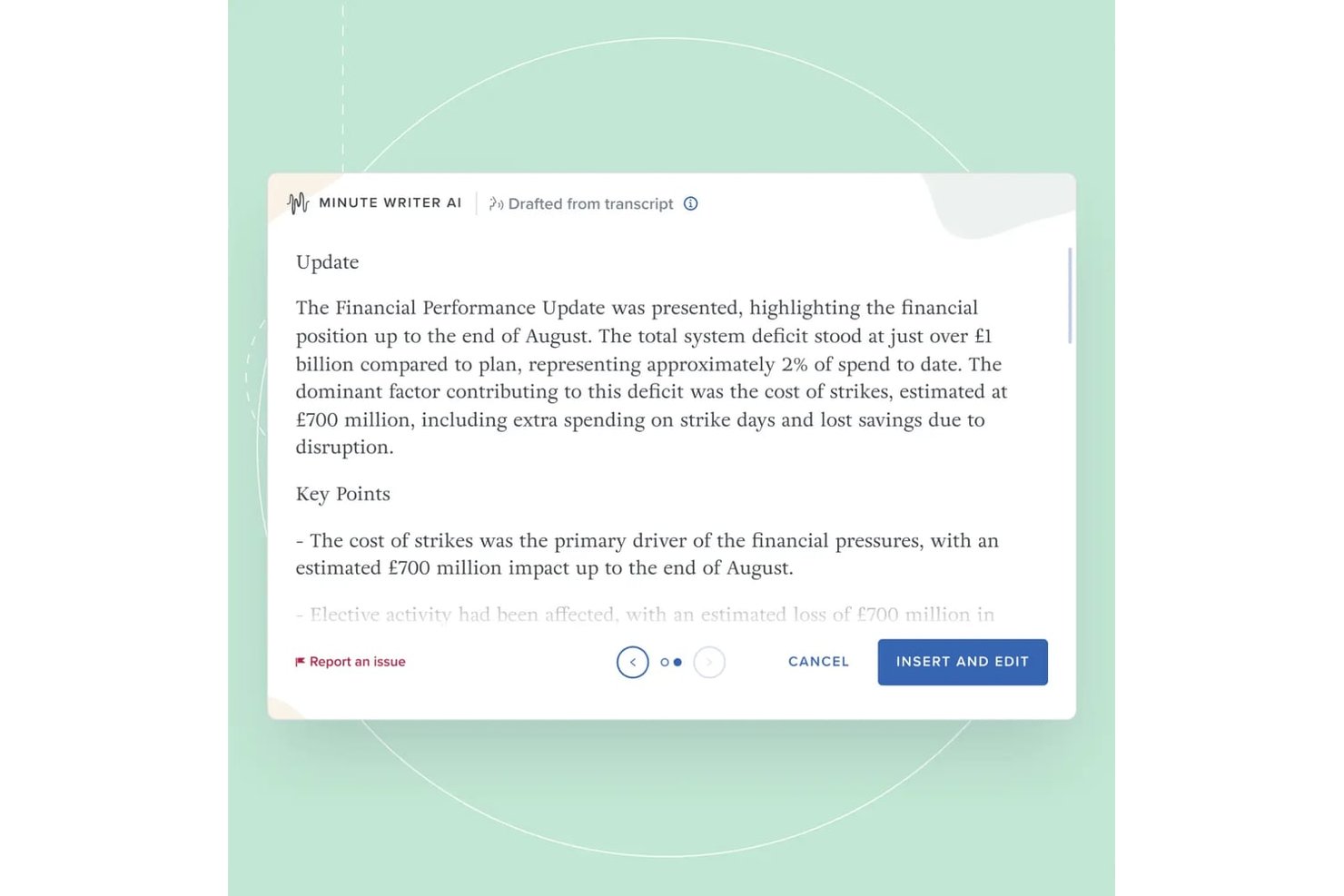
Board Intelligence es una plataforma de gestión de juntas directivas con herramientas de IA diseñadas específicamente para redactar actas de reuniones, resumir paquetes para la junta y escribir documentos de la junta dentro de un flujo de trabajo de gobernanza seguro.
¿Para quién es más adecuado Board Intelligence?
Los secretarios corporativos y los equipos de gobernanza de grandes empresas son quienes más aprovecharán los flujos de trabajo específicos para reuniones y actas de Board Intelligence.
Por qué elegí Board Intelligence
Board Intelligence ocupa un lugar en mi lista de opciones preseleccionadas porque su IA procesa el audio y las transcripciones de las reuniones de la junta únicamente en la memoria temporal, sin conservar ningún dato una vez finalizada la sesión. Me gusta especialmente que esto esté respaldado por la certificación ISO 27001 y no solo por una declaración de políticas. Su IA de redacción de actas también pausa la grabación cuando se solicita, de modo que las conversaciones confidenciales quedan completamente fuera de la transcripción.
Características principales de Board Intelligence
- Creador de agendas: Permite crear y gestionar plantillas de agenda estructuradas y adaptadas a cada reunión.
- Perspectivas IQ impulsadas por IA: Identifica puntos de decisión y riesgos mediante el análisis del contenido de los paquetes para la junta y el resumen de los aspectos importantes.
- Complemento de redacción de informes: Permite a los usuarios redactar informes listos para la junta directamente en Microsoft Word.
- Seguimiento de acciones: Ayuda a los equipos a registrar, asignar y supervisar las acciones acordadas durante las reuniones.
Integraciones de Board Intelligence
Board Intelligence ofrece integraciones nativas con Microsoft 365 y Microsoft Word, admite integraciones de calendario para programar reuniones y acepta transcripciones de reuniones procedentes de herramientas de transcripción de terceros.
Pros and Cons
Pros:
- Actas generadas por IA sin conservación de datos
- Cumplimiento de la norma ISO 27001 para una seguridad estricta
- Pausar la captura de IA para temas confidenciales
Cons:
- No ofrece API para integraciones personalizadas
- Limitado a un flujo de trabajo basado en Microsoft

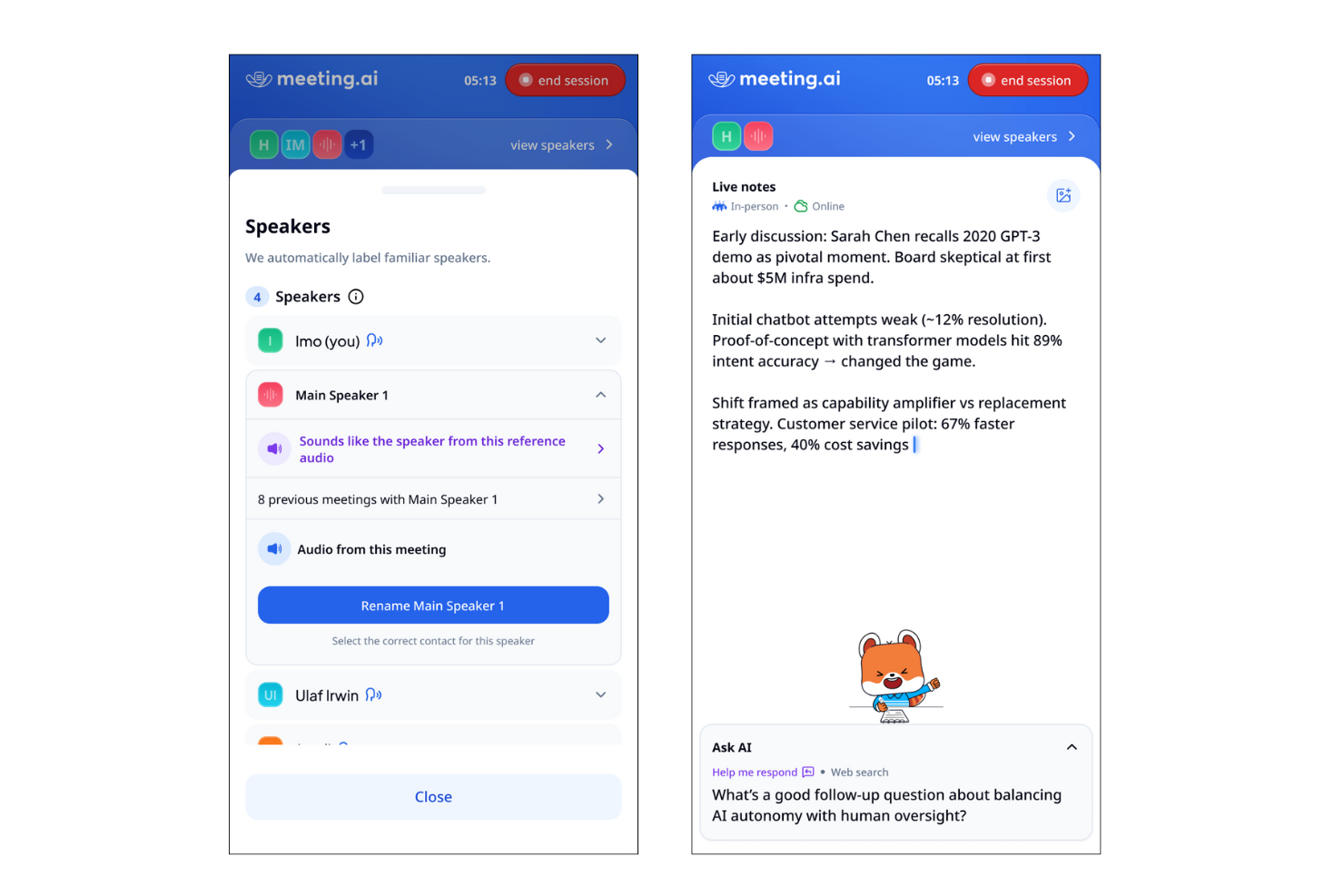
Meeting.ai está diseñado para equipos y profesionales que necesitan resúmenes instantáneos y accionables justo después de sus llamadas. Es una excelente opción para entornos de ritmo acelerado donde el seguimiento rápido y la documentación clara son esenciales. Si deseas capturar los resultados de las reuniones sin demoras, la entrega rápida de resúmenes de Meeting.ai lo distingue de otras herramientas de IA para resúmenes de reuniones.
Por qué elegí Meeting.ai
Lo que me atrajo de Meeting.ai es su enfoque en entregar resúmenes instantáneos justo después de que terminan las llamadas. Para quienes necesitan revisar rápidamente los resultados de la reunión o compartir tareas, la generación rápida de resúmenes de esta herramienta es una gran ventaja. Meeting.ai procesa automáticamente las grabaciones de las llamadas y produce resúmenes concisos y estructurados en cuestión de minutos. Aprecio cómo este enfoque ayuda a los equipos a mantenerse alineados y avanzar sin esperar a tomar notas manuales o a repeticiones demoradas.
Principales funciones de Meeting.ai
Otras funciones que hacen que Meeting.ai sea útil como IA para resúmenes de reuniones incluyen:
- Extracción automatizada de tareas: La herramienta identifica y lista las tareas discutidas durante las reuniones.
- Identificación de oradores: Meeting.ai etiqueta las intervenciones con el orador correcto para mayor claridad.
- Archivo de reuniones con búsqueda: Los usuarios pueden buscar resúmenes y transcripciones pasadas por palabra clave.
- Plantillas de resúmenes personalizables: Los equipos pueden ajustar el formato y la estructura de los resúmenes para adaptarse a su flujo de trabajo.
Integraciones de Meeting.ai
Las integraciones incluyen Zoom, Google Meet, Microsoft Teams y Google Drive.
Pros and Cons
Pros:
- Resúmenes entregados en cuestión de minutos
- Tareas automáticamente resaltadas en los resúmenes
- Identificación de oradores incluida en las transcripciones
Cons:
- Integraciones limitadas con herramientas de gestión de proyectos
- Ocasionalmente falta contexto en las secciones de resumen
Otras herramientas de IA para resúmenes de reuniones
Estas son algunas opciones adicionales de herramientas de IA para resúmenes de reuniones que no llegaron a mi lista corta, pero que aun así vale la pena conocer:


Cómo Evalúo las Apps de Bienestar Corporativo
Evalúo en dos niveles: criterios básicos—como seguimiento de actividad física, retos de bienestar y analíticas de RRHH—y diferenciadores como coaching 1:1 o sincronización con sistemas de información de RRHH (HRIS).
Funcionalidad Principal (Requisitos Indispensables Para Esta Lista)
Cuando selecciono herramientas para mi lista, califico cada una en una escala del 0 (no ofrece la funcionalidad) al 5 (destaca en esta área) para cada funcionalidad principal mencionada a continuación. Luego, calculo la puntuación total de la herramienta como un porcentaje. Cada herramienta debe alcanzar una puntuación total mínima del 65% para ser considerada para su inclusión.
- Seguimiento de Salud y Actividad Física: Verifico si la app se sincroniza con wearables populares como Fitbit, Apple Health y Garmin para que los empleados puedan registrar automáticamente pasos, sueño y biométricos.
- Recursos para el Bienestar Mental: Desde meditaciones guiadas hasta cursos de manejo del estrés y acceso a EAP, evalúo la profundidad y variedad de apoyo a la salud mental que brinda cada plataforma.
- Retos de Bienestar y Gamificación: Busco retos configurables de equipo e individuales con tablas de posiciones y medallas—cosas como competencias de pasos o rachas de hidratación que fomentan la participación.
- Gestión de Incentivos y Recompensas: Cada plataforma debe permitir a los administradores vincular recompensas a actividades específicas, ya sea tarjetas de regalo por completar una HRA o puntos canjeables a través de un catálogo incorporado.
- Panel de Administración y Analíticas: Evalúo si los equipos de RRHH obtienen reportes agregados sobre tasas de participación, finalización de retos y tendencias de compromiso para construir un caso claro del ROI del programa.
- Contenido de Bienestar Multidimensional: Las mejores plataformas abarcan más que la condición física, por eso busco contenidos que incluyan educación financiera, nutrición, conexión social y resiliencia emocional.
Una vez que tengo una lista de herramientas que cumplen los criterios, considero qué distingue a cada plataforma.
Factores Diferenciadores (Qué Distingue a los Proveedores)
Así es como comparo y contrasto a los diferentes proveedores:
Funciones Destacadas
Pongo mucha atención en si una plataforma ofrece coaching de salud 1:1, ya que el acceso a coaches certificados en nutrición, sueño o gestión del estrés brinda a los empleados un apoyo personalizado que los contenidos genéricos no pueden igualar. También sobresalen los recorridos de salud personalizados basados en IA—las plataformas que adaptan las recomendaciones según los resultados del HRA o las tendencias de actividad de un empleado suelen lograr mayor compromiso. Además, busco integración incorporada para cribados biométricos, lo que permite a los equipos de RRHH conectar los resultados de laboratorio directamente con incentivos de bienestar y monitorear las tendencias de salud de la población a lo largo del tiempo.
Más Allá de las Funciones
La integración con HRIS es muy importante aquí—verifico si una plataforma se conecta con sistemas como Workday, ADP o BambooHR para que la elegibilidad de los empleados se sincronice automáticamente y los equipos de RRHH no gestionen las listas manualmente. El cumplimiento normativo es otro factor clave, especialmente la preparación para HIPAA y prácticas claras de desidentificación de datos, ya que los programas de bienestar manejan información de salud sensible. También evalúo qué tan bien respalda un proveedor la medición del ROI, como la capacidad de obtener datos agregados de reclamaciones o comparar la participación con promedios de la industria durante las revisiones trimestrales de negocio.
Cómo elegir un programa de IA para resúmenes de reuniones
Es fácil perderse entre largas listas de funciones y estructuras de precios complejas. Para ayudarte a mantener la concentración mientras avanzas en tu proceso único de selección de programas, aquí tienes una lista de factores que debes tener en cuenta:
| Factor | Qué debes considerar |
|---|---|
| Escalabilidad | ¿La herramienta podrá gestionar el volumen de tus reuniones a medida que crezca tu equipo u organización? Comprueba los límites de usuarios, las capacidades de almacenamiento y los precios para equipos más grandes. |
| Integraciones | ¿La herramienta se conecta de forma nativa con tu calendario, plataforma de videoconferencias o plataformas de colaboración? La falta de integraciones puede generar trabajo manual. |
| Personalización | ¿Puedes adaptar los resúmenes, las plantillas o los flujos de trabajo para que coincidan con los estándares de documentación o las necesidades de cumplimiento de tu organización? |
| Facilidad de uso | ¿La interfaz es intuitiva para todos los usuarios, incluidos aquellos con menos conocimientos tecnológicos? Considera la rapidez con la que los miembros del equipo pueden adoptar la herramienta. |
| Implementación e incorporación | ¿Cuánto tiempo llevará ponerla en funcionamiento? Busca recursos claros de incorporación, asistencia para la migración y una interrupción mínima de los flujos de trabajo existentes. |
| Coste | ¿Los niveles de precios son transparentes y predecibles? Presta atención a las tarifas ocultas, los cargos por usuario o los complementos obligatorios que podrían afectar a tu presupuesto. |
| Medidas de seguridad | ¿La herramienta ofrece procesamiento en el dispositivo, cifrado o políticas estrictas de gestión de datos? Evalúa cómo protege el contenido confidencial de las reuniones. |
| Requisitos de cumplimiento | ¿La herramienta es compatible con los estándares de cumplimiento de tu sector, como el RGPD o HIPAA? Confirma las certificaciones y los registros de auditoría si gestionas datos regulados. |
¿Qué es una plataforma de IA para resúmenes de reuniones?
La plataforma de IA para resúmenes de reuniones es un software que graba, transcribe y resume automáticamente los puntos clave de las reuniones mediante inteligencia artificial. Estas herramientas capturan el contenido hablado, identifican a los interlocutores y generan resúmenes escritos concisos para facilitar la consulta y la documentación. Una herramienta de IA para resúmenes de reuniones ayuda a los equipos a ahorrar tiempo, mejorar la precisión y mantener registros coherentes de las conversaciones sin tomar notas manualmente.
Características de la herramienta de IA para resúmenes de reuniones
Al seleccionar una herramienta de IA para resúmenes de reuniones, presta atención a las siguientes características clave:
- Grabación automatizada: Captura el audio de las reuniones sin intervención manual, lo que garantiza que todas las conversaciones queden documentadas de principio a fin.
- Transcripción: Convierte las palabras habladas en texto escrito, lo que facilita revisar, buscar y consultar el contenido de las reuniones.
- Identificación de interlocutores: Etiqueta y distingue entre los diferentes interlocutores, lo que ayuda a aclarar quién dijo qué durante la reunión.
- Marcas de tiempo: Señala puntos específicos de la transcripción con códigos de tiempo, lo que permite acceder rápidamente a los momentos importantes.
- Opciones de exportación: Permite a los usuarios descargar transcripciones y resúmenes en diversos formatos, como PDF, DOCX o TXT, para compartirlos o archivarlos.
- Función de búsqueda: Permite a los usuarios encontrar temas específicos, decisiones o tareas pendientes dentro de las transcripciones o los resúmenes.
- Plantillas personalizables: Ofrece formatos preestablecidos o ajustables para los resúmenes de reuniones, adaptados a las normas o preferencias de la organización.
- Controles de acceso: Permite a los administradores establecer permisos para determinar quién puede ver, editar o compartir la documentación de las reuniones.
- Compatibilidad con varios idiomas: Ofrece capacidades de transcripción y resumen en varios idiomas para adaptarse a equipos diversos.
- Integración con almacenamiento en la nube: Se conecta con plataformas en la nube para almacenar y organizar archivos de reuniones de forma segura y acceder a ellos desde cualquier lugar.
Características comunes de la IA para resúmenes de reuniones
Además de las características estándar de la IA para resúmenes de reuniones mencionadas anteriormente, muchas de estas soluciones incorporan IA con funciones como:
- Extracción automatizada de tareas pendientes: Utiliza IA para identificar y enumerar tareas de seguimiento o decisiones de las conversaciones de las reuniones, ayudando a los equipos a realizar un seguimiento de las responsabilidades sin una revisión manual.
- Generación de resúmenes con conocimiento del contexto: Aplica IA para generar resúmenes concisos y relevantes que capturan los puntos principales y los resultados, adaptándose al contexto y los temas específicos de la reunión.
- Análisis de sentimientos: Analiza el tono y el estado de ánimo de las conversaciones mediante IA, proporcionando información sobre la dinámica del equipo o posibles inquietudes planteadas durante las reuniones.
- Detección de temas: Utiliza IA para categorizar y etiquetar automáticamente las secciones de la reunión por tema, lo que facilita organizar y recuperar la información posteriormente.
- Destacados inteligentes: Utiliza IA para señalar momentos clave, como anuncios o decisiones importantes, de modo que los usuarios puedan revisar rápidamente las partes más relevantes de una reunión.
Beneficios de la herramienta de IA para resúmenes de reuniones
Implementar una herramienta de IA para resúmenes de reuniones proporciona varios beneficios para tu equipo y tu empresa. Estos son algunos de los que puedes esperar:
- Documentación precisa: La grabación y transcripción automatizadas garantizan que todas las conversaciones se capturen sin omitir detalles ni depender de la memoria.
- Ahorro de tiempo: La generación de resúmenes y la extracción de tareas pendientes impulsadas por IA reducen la necesidad de tomar notas manualmente y realizar seguimientos después de las reuniones.
- Mayor responsabilidad: La identificación de interlocutores y el seguimiento de las tareas pendientes dejan claro quién es responsable de cada tarea o decisión.
- Privacidad mejorada: El procesamiento en el dispositivo y los controles de acceso ayudan a proteger el contenido confidencial de las reuniones y limitar la exposición de los datos.
- Registros coherentes: Las plantillas personalizables y las opciones de exportación estandarizan la documentación de las reuniones en todos los equipos y proyectos.
- Mejor accesibilidad: La compatibilidad con varios idiomas y las transcripciones con función de búsqueda ponen el contenido de las reuniones a disposición de equipos diversos y distribuidos.
- Información útil para actuar: Las funciones de IA, como el análisis de sentimientos y la detección de temas, proporcionan una comprensión más profunda de la dinámica del equipo y los resultados de las reuniones.
Costes y precios de las herramientas de IA para resúmenes de reuniones
Seleccionar herramientas de IA para resúmenes de reuniones requiere comprender los diversos modelos de precios y planes disponibles. Los costes varían según las funciones, el tamaño del equipo, los complementos y otros factores. La tabla siguiente resume los planes habituales, sus precios medios y las características típicas incluidas en las soluciones de IA para resúmenes de reuniones:
Tabla comparativa de planes para herramientas de IA de resumen de reuniones
| Tipo de plan | Precio promedio | Funciones comunes |
|---|---|---|
| Plan gratuito | $0 | Grabación básica, minutos de transcripción limitados, resúmenes sencillos y opciones básicas de exportación. |
| Plan personal | $5-$15/usuario/mes | Grabaciones ilimitadas, transcripciones con búsqueda, identificación de hablantes e integraciones básicas. |
| Plan empresarial | $15-$30/usuario/mes | Gestión de equipos, formatos de exportación avanzados, plantillas personalizables, herramientas de colaboración y asistencia prioritaria. |
| Plan corporativo | $30-$60/usuario/mes | Seguridad mejorada, funciones de cumplimiento, incorporación personalizada, análisis avanzados e integraciones personalizadas. |
Preguntas frecuentes sobre herramientas de IA de resumen de reuniones
Estas son algunas respuestas a preguntas frecuentes sobre las herramientas de IA de resumen de reuniones:
¿Puede una herramienta de IA de resumen de reuniones gestionar varios idiomas?
Sí, muchas soluciones ahora pueden transcribir reuniones en más de 100 idiomas y acentos. Esto resulta especialmente útil para equipos globales que utilizan plataformas como las reuniones de Microsoft Teams, donde el software puede ofrecer traducción en tiempo real y resúmenes generados por IA en el idioma preferido de los participantes. Comprueba siempre las novedades específicas relacionadas con los idiomas antes de elegir una solución, ya que algunas herramientas incluso ofrecen traducción en directo para un pódcast o un vídeo grabado.
¿Qué nivel de seguridad ofrece una herramienta de IA de resumen de reuniones para reuniones confidenciales?
La mayoría de las soluciones profesionales de IA para reuniones ofrecen seguridad de nivel empresarial, incluida la certificación SOC 2 Tipo II, cifrado y controles de acceso. Para reuniones presenciales altamente confidenciales, algunas herramientas ofrecen procesamiento en el dispositivo para garantizar que los datos nunca salgan de tu hardware. Confirmar estas políticas de gestión de datos garantiza que las conclusiones importantes y los registros de las reuniones permanezcan protegidos de acuerdo con los estándares de cumplimiento de tu organización.
¿Necesito instalar un software especial para utilizar una herramienta de IA de resumen de reuniones?
No, muchas herramientas de IA de resumen de reuniones están basadas en la nube y funcionan directamente en tu navegador o se integran con plataformas de videoconferencia. Sin embargo, algunos proveedores ofrecen aplicaciones de escritorio que permiten capturar audio sin que un «bot» se una a la llamada, una forma habitual de transcribir reuniones. Estas aplicaciones también pueden sincronizar las conclusiones directamente con tu CRM, lo que garantiza que las notas de los clientes se actualicen automáticamente sin introducirlas manualmente.
¿Puede una herramienta de IA de resumen de reuniones identificar y etiquetar a distintos hablantes?
Sí, la identificación de hablantes (o diarización) es una función estándar. El motor de transcripción de IA distingue a los participantes mediante el análisis de sus patrones vocales y etiqueta sus intervenciones en la transcripción final. Esto facilita la búsqueda por participante y permite ver la marca de tiempo exacta en la que se tomó una decisión, garantizando la responsabilidad de todo el equipo.
¿Qué ocurre si una reunión tiene una calidad de audio deficiente?
Una calidad de audio deficiente puede afectar a la precisión de la transcripción. Algunas herramientas de IA de resumen de reuniones utilizan IA para filtrar el ruido de fondo y aclarar el habla, pero lo mejor es utilizar un buen micrófono y un entorno silencioso para obtener resultados óptimos.