

Las 10 mejores soluciones de software de intranet de 2026

10 Lista de las mejores soluciones de software para intranets


El mejor software para intranets ayuda a las organizaciones a crear un entorno de trabajo digital y centralizado que mantiene a los equipos alineados, comprometidos e informados.
Si todavía dependes de hojas de cálculo complicadas, interminables cadenas de correos electrónicos o plataformas obsoletas para gestionar la comunicación interna, el intercambio de documentos y la cultura de la empresa, probablemente sientas la presión de encontrar una solución más moderna y optimizada.
En esta guía, compartiré mis principales opciones de plataformas para intranets que simplifican la comunicación, facilitan la búsqueda de recursos y mejoran la colaboración entre departamentos, todo ello basado en investigaciones de primera mano, años de análisis del panorama de la tecnología para RR. HH. y nueve años de trabajo directo en recursos humanos, incluida la gestión de documentos de intranet.
Por qué confiar en nuestras reseñas de software
Nuestro equipo lleva probando y evaluando software desde 2012. Como expertos en RR. HH., sabemos lo difícil —y lo importante— que es elegir el software adecuado.
Para esta guía, evaluamos las herramientas mediante pruebas prácticas e investigación independiente, puntuando las herramientas según nuestros criterios de selección. También nos basamos en la experiencia de líderes de opinión del sector y de profesionales de RR. HH. en activo.
Nuestras reseñas reflejan nuestro criterio editorial humano, no un discurso de ventas.
Revisores expertos:
Las mejores soluciones de software para intranets: tabla comparativa
Esta tabla comparativa resume los detalles de precios, pruebas y demostraciones de mis principales selecciones de software para intranets para ayudarte a encontrar la mejor opción según tu presupuesto y las necesidades de tu empresa.
| Tool | Best For | Trial Info | Price | ||
|---|---|---|---|---|---|
| 1 | Mejor para acceso unificado al conocimiento | Demostración gratuita disponible | Precio a consultar | Website | |
| 2 | La mejor plataforma nativa con IA para la experiencia del empleado | Demostración gratuita | Precios a consultar | Website | |
| 3 | Ideal para un directorio dinámico de empleados y una gestión eficiente de documentos | Prueba gratuita de 30 días | Desde $75/mes | Website | |
| 4 | Ideal para contenido dirigido a usuarios | Demo gratuita disponible | Precios mediante solicitud | Website | |
| 5 | La mejor solución de intranet para una participación interactiva | Prueba gratuita de 30 días | Desde $6 por empleado/mes | Website | |
| 6 | Ideal para funciones de gestión de contenidos y Espacios de equipo personalizables | Prueba gratuita de 30 días | Desde $1,000 USD/mes para hasta 100 usuarios | Website | |
| 7 | Ideal para intranet móvil de equipos de primera línea | Prueba gratuita de 14 días + demo gratuita disponible | Desde $29/mes (facturado anualmente) | Website | |
| 8 | Mejor para un enfoque centrado en las personas | Prueba gratuita disponible | Desde $1.50/usuario/mes | Website | |
| 9 | La mejor intranet social con Espacios colaborativos para una profunda implicación de los empleados | Se puede solicitar una demo personalizada | Precio a consultar | Website | |
| 10 | La mejor solución de intranet móvil para equipos de trabajo en primera línea o sin escritorio | Prueba gratuita de 14 días | Desde $3.40 USD/empleado/mes | Website |

Reseñas del mejor software para intranets
Aquí tienes una breve descripción de cada solución de software de intranet para empleados, con el fin de mostrar el caso de uso más adecuado para cada herramienta, además de algunas funciones destacadas y capturas de pantalla que te ofrecen una visión general de la interfaz de usuario.

Haystack
Mejor para acceso unificado al conocimiento

Haystack es una plataforma de intranet diseñada para organizaciones que desean centralizar el conocimiento de la empresa, optimizar la comunicación interna y facilitar el acceso a los recursos para equipos distribuidos o híbridos.
¿Para quién es mejor Haystack?
Haystack es ideal para empresas medianas con equipos remotos o híbridos que necesitan un lugar central para acceder a noticias de la empresa, documentos e información sobre los empleados.
Por qué elegí Haystack
Haystack merece su lugar en mi lista corta por la forma en que gestiona el acceso unificado al conocimiento para una fuerza laboral distribuida. Me gusta especialmente la función de búsqueda empresarial, que obtiene resultados en aplicaciones de terceros conectadas como Confluence, Guru y Google Workspace, para que mi equipo no tenga que saltar entre pestañas buscando un solo documento. El Freshness Engine es otra característica en la que confío: permite establecer fechas de caducidad para contenidos como manuales de empleados o materiales de cumplimiento, evitando que la información desactualizada permanezca silenciosamente en la base de conocimientos. El glosario interno de la empresa es un pequeño detalle pero realmente útil que ayuda a los nuevos empleados a adaptarse rápidamente sin tener que preguntar el significado de cada acrónimo interno.
Características clave de Haystack
- Lectura obligatoria: Marca publicaciones como lecturas obligatorias y envía recordatorios automáticos a los empleados que aún no las han reconocido.
- Perfiles de empleados y organigrama: Perfiles detallados muestran historial laboral, habilidades e intereses, junto con un organigrama visual que representa la estructura del equipo y las líneas de reporte.
- Insignias verificadas: Etiqueta recursos con un icono de verificación para señalar que el contenido ha sido aprobado oficialmente por los responsables del tema.
- Páginas de grupo: Crea espacios dedicados para equipos, departamentos o grupos de interés para mostrar recursos y contenidos específicos.
Integraciones de Haystack
Las integraciones incluyen Google Workspace, Microsoft Teams, Slack, Atlassian Confluence, Jira, Guru, Zoom, Box, Dropbox, Tableau y Looker.
Pros and Cons
Pros:
- Reduce el tiempo de búsqueda al consolidar el conocimiento y las herramientas
- El sólido directorio de empleados ayuda a que los equipos distribuidos se mantengan conectados
- Admite aplicaciones móviles para que los trabajadores remotos o sin escritorio puedan participar
Cons:
- Algunos usuarios reportan una ligera curva de aprendizaje para empleados menos familiarizados con la tecnología
- Las organizaciones grandes con necesidades simples pueden encontrar que la funcionalidad completa es más de lo necesario

La mejor plataforma nativa con IA para la experiencia del empleado
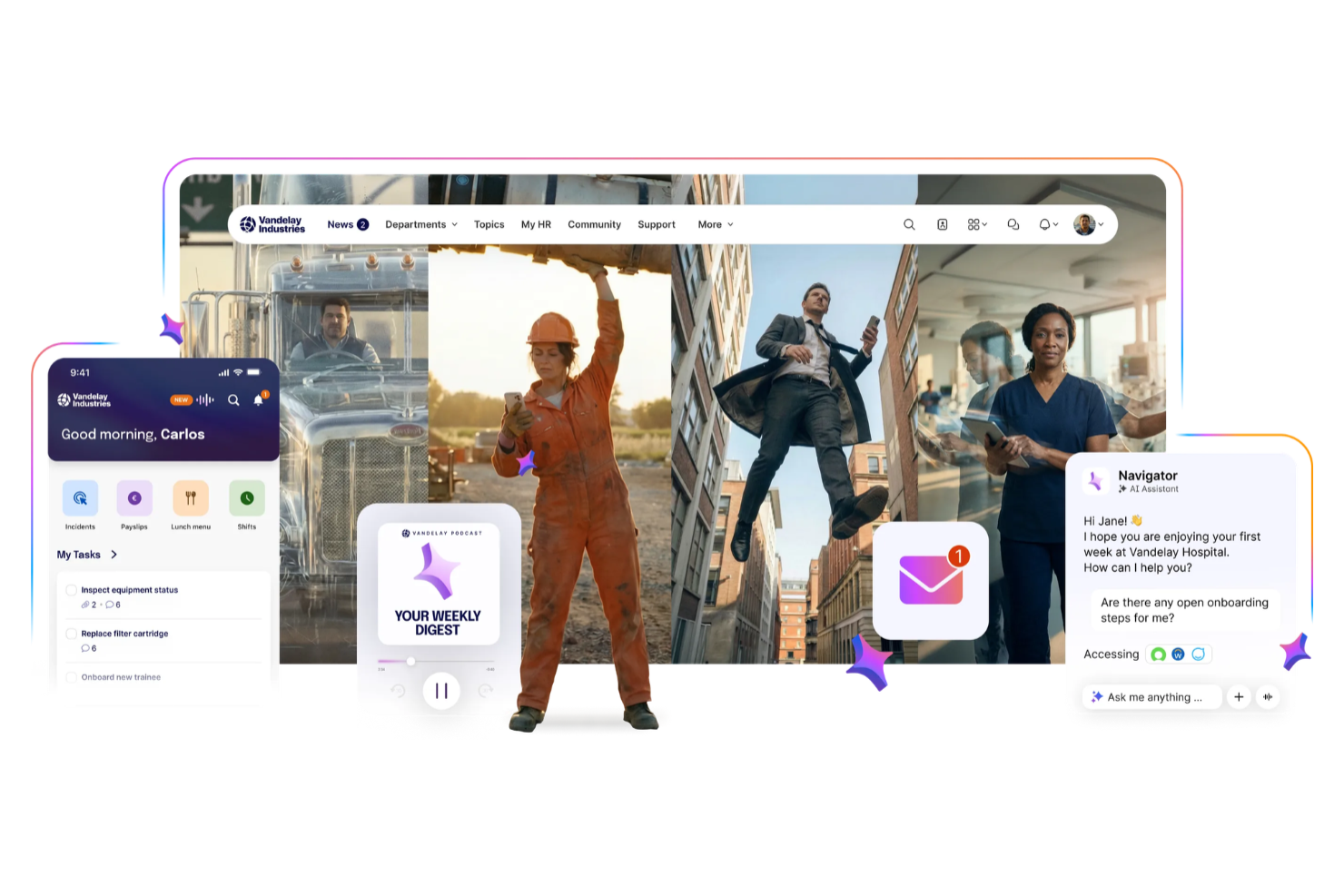
Staffbase es una plataforma de intranet que conecta a equipos sin escritorio, de primera línea y de oficina a través de una comunicación centralizada, acceso móvil y experiencias personalizadas para empleados.
¿Para quién es mejor Staffbase?
Staffbase es especialmente adecuado para organizaciones medianas y grandes empresas con fuerzas laborales distribuidas que necesitan un canal unificado para las comunicaciones internas.
Por qué elegí Staffbase
Elegí Staffbase como una de las mejores opciones porque la inteligencia artificial está profundamente integrada en el flujo de trabajo de creación de contenido y comunicaciones. Me gusta especialmente el asistente de escritura con IA, que ayuda a mi equipo a redactar, traducir y personalizar comunicaciones internas sin cambiar de herramienta o perder tiempo editando manualmente. Staffbase también utiliza IA para mostrar contenido relevante a cada empleado según su función, ubicación e idioma, para que los trabajadores de primera línea no se vean saturados con actualizaciones que no les corresponden.
Características clave de Staffbase
- Recorridos del empleado: Proporciona automáticamente contenido personalizado a los empleados según hitos como la incorporación, cambios de puesto y otros momentos clave.
- Encuestas de pulso: Recoge retroalimentación de los empleados a través de encuestas breves o cuestionarios detallados directamente en la plataforma.
- Asambleas en vivo: Transmite vídeo interactivo en tiempo real a cada pantalla de empleado, incluyendo a los trabajadores de primera línea y sin escritorio.
- Directorio de empleados: Mantiene perfiles de usuario personalizables con datos de contacto y otra información para mantener a la fuerza laboral conectada.
Integraciones de Staffbase
Las integraciones incluyen Microsoft 365, Cornerstone, ServiceNow, Google Workspace, SAP, Workday, BambooHR, Salesforce, Confluence y Box.
Pros and Cons
Pros:
- Soporta gobernanza de contenido y segmentación asistidas por IA
- Permite la comunicación entre equipos de oficina y de primera línea
- Ofrece análisis de participación en múltiples canales
Cons:
- Diseñado principalmente para grandes organizaciones y empresas
- Los precios no se divulgan públicamente

Jostle
Ideal para un directorio dinámico de empleados y una gestión eficiente de documentos
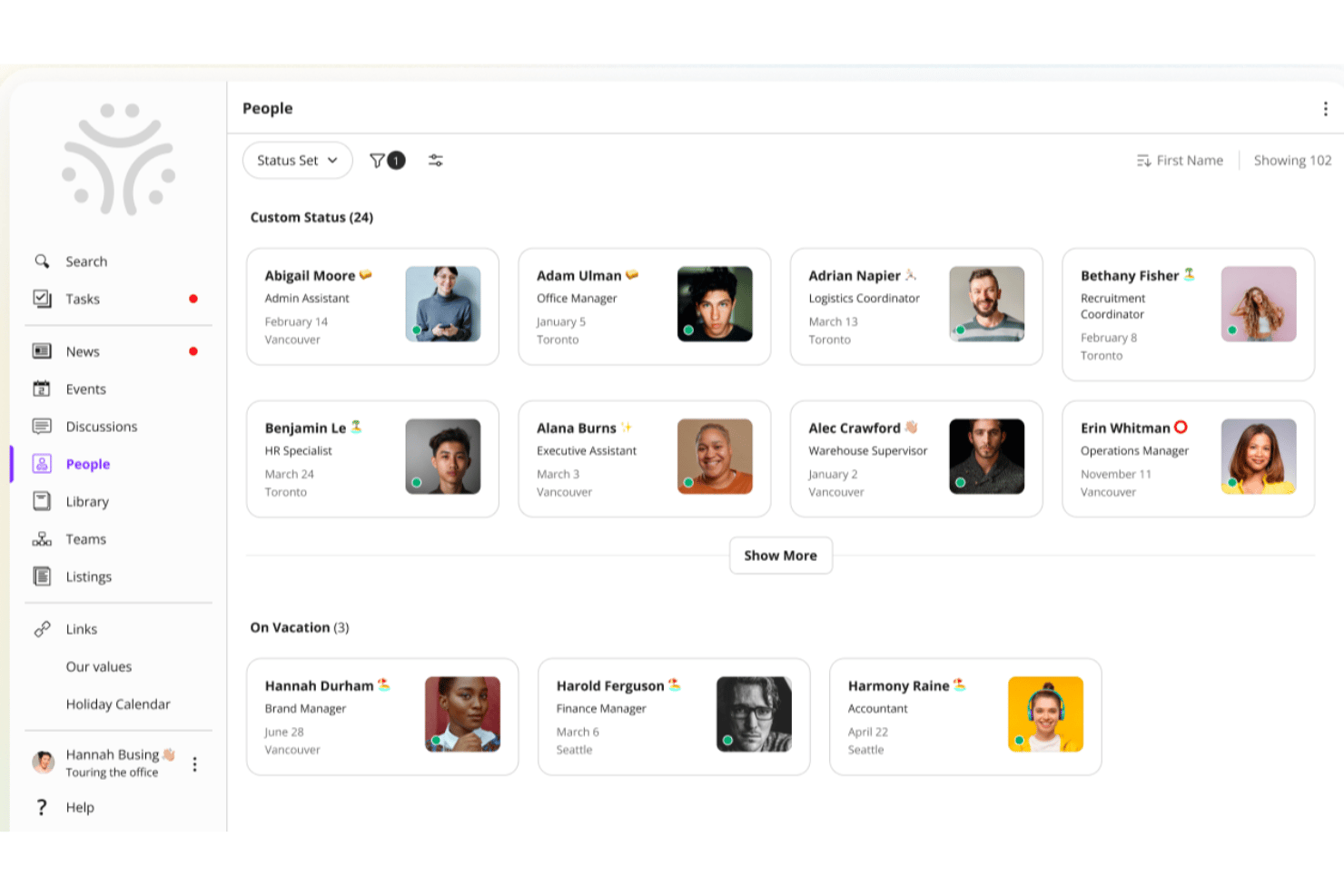
Jostle es una plataforma de intranet diseñada para organizaciones que quieren impulsar la conexión entre equipos, simplificar la comunicación interna y facilitar que los empleados encuentren personas, documentos y actualizaciones en un solo lugar.
¿Para quién es más adecuada Jostle?
Jostle es una buena opción para organizaciones medianas que buscan una intranet sencilla que mantenga conectados a los empleados sin la complejidad de las plataformas de nivel empresarial.
Por qué elegí Jostle
Jostle se gana un lugar en mi lista de favoritas por lo bien que su directorio de Personas y su Biblioteca funcionan conjuntamente como un sistema para encontrar conocimiento. La sección de Personas permite a los empleados buscar por puesto, ubicación, departamento o incluso una habilidad específica, así que, si necesito encontrar a alguien que gestione el cumplimiento normativo de beneficios en una oficina regional, puedo hacerlo en cuestión de segundos. En cuanto a los documentos, la Biblioteca de Jostle asigna una responsabilidad clara a cada volumen, lo que significa que los expertos en la materia gestionan sus propios archivos y todos saben siempre qué versión está actualizada. Esa combinación de «encontrar a la persona adecuada» y «encontrar el documento adecuado» es exactamente lo que los equipos distribuidos necesitan de una intranet.
Funciones principales de Jostle
- Fuente de noticias: Publica anuncios para toda la empresa y actualizaciones de los equipos que los empleados pueden reaccionar y comentar.
- Calendario de eventos: Crea y comparte eventos para toda la organización o específicos de un equipo a los que los empleados pueden confirmar su asistencia directamente en la plataforma.
- Reconocimientos: Reconoce públicamente a empleados individuales mediante menciones entre compañeros visibles en toda la intranet.
- Debates: Organiza conversaciones por hilos según el tema o el equipo para mantener el diálogo interno enfocado y fácil de buscar.
Integraciones de Jostle
Las integraciones incluyen Google Workspace, Microsoft 365, Slack, Salesforce, Zoom, Dropbox, BambooHR, HubSpot, QuickBooks Online y Zendesk.
Pros and Cons
Pros:
- Altas tasas de adopción por parte de los usuarios
- Organización simplificada de archivos y documentos
- Organigramas visuales claros
Cons:
- Opciones rígidas de personalización del diseño
- Mercado limitado de aplicaciones de terceros

Hub
Ideal para contenido dirigido a usuarios
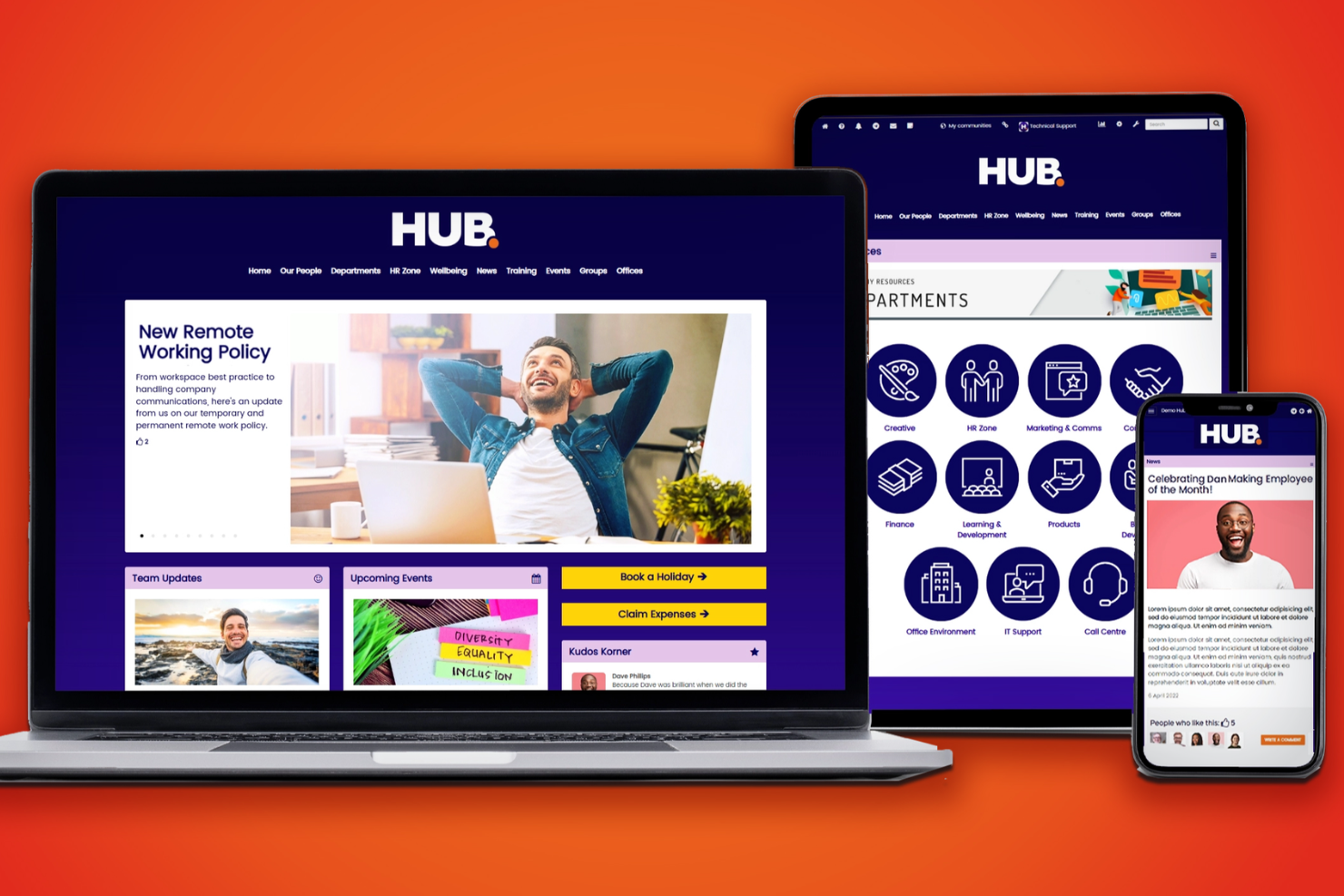
Hub es una plataforma de intranet moderna diseñada para organizaciones que buscan potenciar la comunicación interna, el intercambio de conocimientos y la colaboración, ofreciendo experiencias personalizadas para cada equipo.
¿Para quién es mejor Hub?
Hub es ideal para organizaciones medianas y grandes con equipos diversos que necesitan entregar contenido relevante y específico según el rol a diferentes grupos de empleados.
Por qué elegí Hub
Hub merece su lugar en mi lista corta por su capacidad para gestionar la entrega de contenido dirigido a distintos grupos de empleados. Me gusta mucho la función de segmentación de audiencia, que permite enviar noticias, recursos y actualizaciones específicas a grupos definidos según el rol, departamento o ubicación—de modo que un trabajador de primera línea en operaciones ve algo completamente diferente a un gerente en finanzas. Mi equipo también utiliza los diseños de página de inicio personalizables de Hub para mostrar las herramientas y contenidos más relevantes a cada segmento de usuario sin que tengan que buscarlo. Ese nivel de personalización hace que Hub se adapte muy bien a organizaciones que gestionan fuerzas laborales diversas y distribuidas.
Características clave de Hub
- Encuestas rápidas: Envía encuestas anónimas a los empleados con puntuaciones ocultas para cuantificar las respuestas y seguir tendencias de bienestar a lo largo del tiempo.
- Lecturas obligatorias: Marca contenido como obligatorio para que los empleados confirmen su lectura, con recordatorios automáticos para quienes no lo hayan hecho.
- Foros de grupos: Crea espacios grupales públicos, privados u ocultos donde los miembros puedan acceder a contenido exclusivo y colaborar en discusiones organizadas por hilos.
- Aplicación móvil PWA: Da a los empleados acceso completo a la intranet en cualquier dispositivo móvil sin necesidad de descargar desde la tienda de aplicaciones, incluyendo notificaciones push para nuevos contenidos.
Integraciones de Hub
Las integraciones incluyen Microsoft 365 y Google Workspace; hay una API disponible para integraciones personalizadas.
Pros and Cons
Pros:
- Paneles personalizados para adaptar la experiencia de la intranet
- Búsqueda avanzada para encontrar documentos y personas
- Funciones de noticias y anuncios
Cons:
- Funcionalidad limitada de la aplicación móvil
- Opciones limitadas de personalización de marca y diseño

La mejor solución de intranet para una participación interactiva
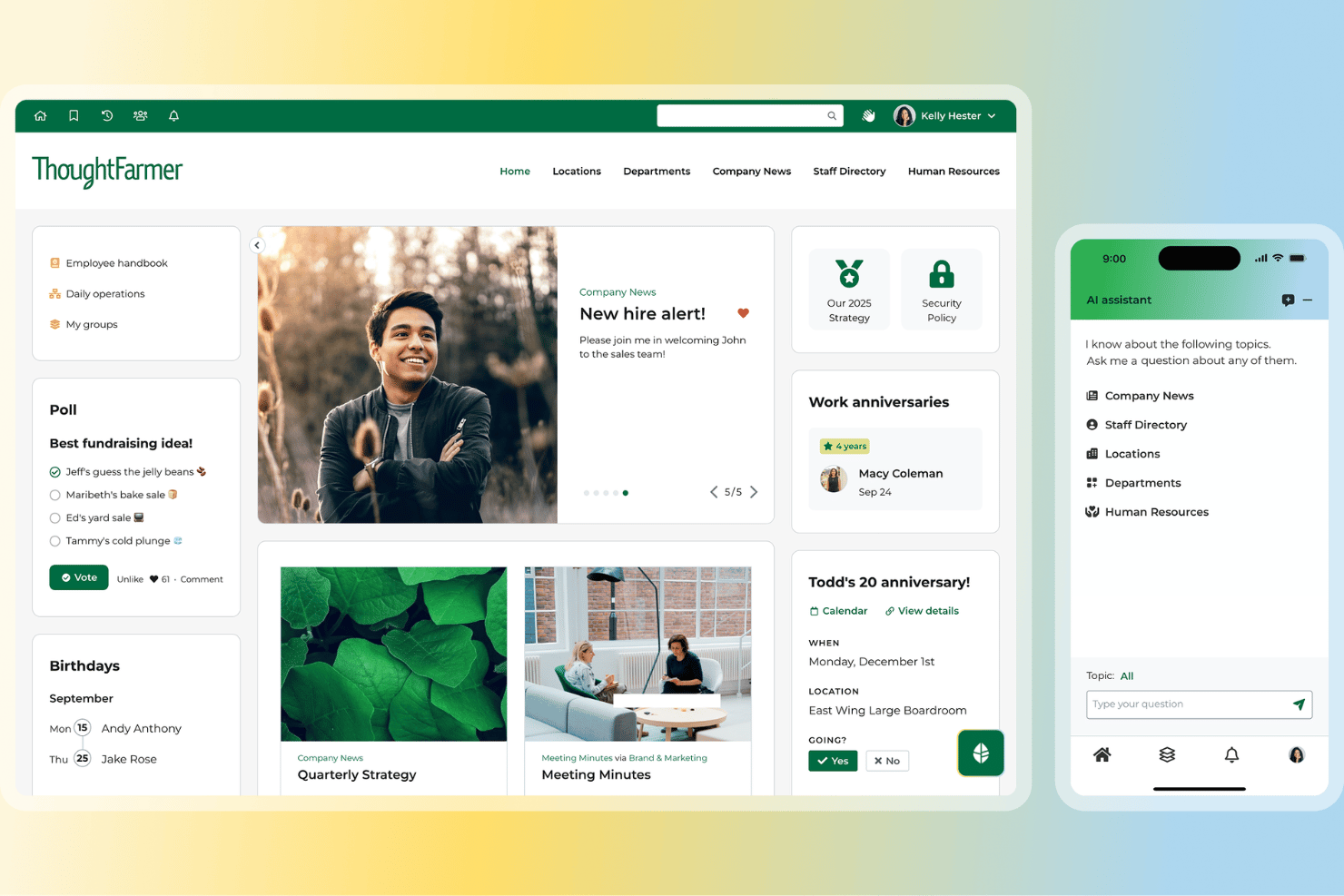
Si buscas una plataforma de intranet que fomente la participación de los empleados y facilite la recopilación de datos, vale la pena considerar ThoughtFarmer. Es una opción ideal para organizaciones que quieren aumentar la participación mediante la gamificación y necesitan formularios personalizables para recopilar comentarios o información. ThoughtFarmer destaca por sus herramientas integradas que ayudan a los equipos a conectarse, reconocer las contribuciones y recopilar información sin depender de complementos de terceros.
¿Para quién es más adecuado ThoughtFarmer?
Líderes de comunicación interna y recursos humanos en organizaciones medianas de los sectores de servicios profesionales y la administración pública. Es adecuado para empresas que quieren fomentar la participación mediante funciones de gamificación y una recopilación flexible de datos internos.
Por qué elegí ThoughtFarmer
Lo que me atrajo de ThoughtFarmer es su enfoque en hacer que la participación de los empleados sea divertida y medible. Las funciones de gamificación de la plataforma, como las insignias y las clasificaciones, ayudan a motivar la participación y reconocer las contribuciones de los equipos. También me gusta que ThoughtFarmer incluya herramientas flexibles para crear formularios, de modo que puedas crear encuestas, sondeos o formularios personalizados para recopilar datos directamente dentro de tu intranet. Estas funciones la convierten en una opción sólida para las organizaciones que quieren fomentar un entorno de trabajo digital dinámico e interactivo mientras recopilan comentarios e información valiosos.
Funciones principales de ThoughtFarmer
Otras funciones que hacen que ThoughtFarmer destaque para quienes buscan una solución de intranet incluyen:
- Directorio de empleados: Encuentra rápidamente a tus colegas y consulta la estructura organizativa mediante perfiles con función de búsqueda.
- Flujos de trabajo para la aprobación de contenido: Configura procesos de revisión de varios pasos para publicar contenido interno.
- Aplicación móvil: Accede a las funciones y actualizaciones de la intranet desde cualquier dispositivo móvil.
- Gestión de documentos: Almacena, organiza y comparte archivos de forma segura dentro de la plataforma.
Integraciones de ThoughtFarmer
Las integraciones incluyen Microsoft 365, Google Workspace, Slack, Okta, Azure AD, SAML y más.
Pros and Cons
Pros:
- Interfaz de usuario muy intuitiva y limpia
- Sistema de administración simplificado para administradores sin conocimientos técnicos
- Actualizaciones automatizadas de los perfiles en todo el sitio
Cons:
- El precio puede suponer un desafío para las empresas emergentes de SaaS más pequeñas
- El sistema de notificaciones carece de un control detallado
Axero
Ideal para funciones de gestión de contenidos y Espacios de equipo personalizables
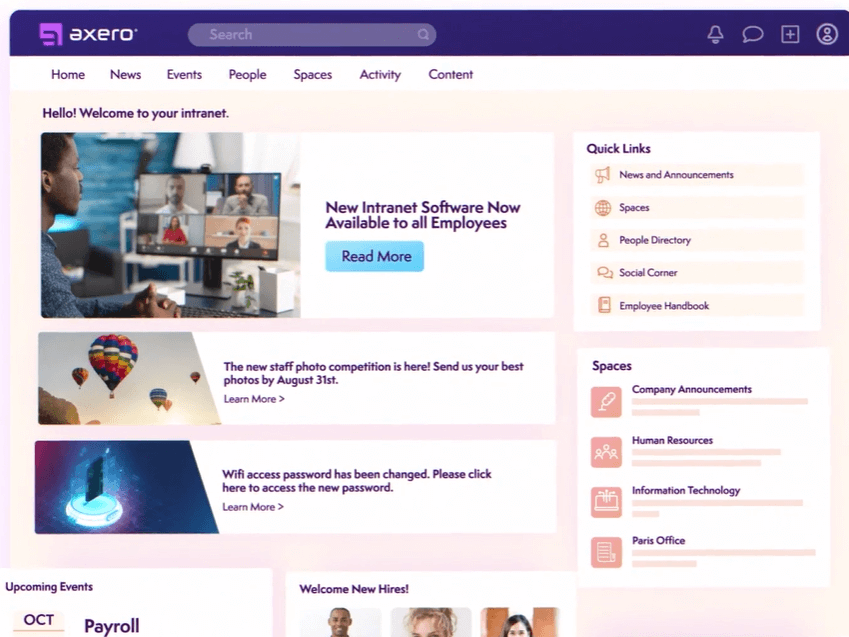
Axero es una plataforma de intranet diseñada para organizaciones que desean centralizar la comunicación, el intercambio de conocimientos y la colaboración entre equipos, facilitando que los empleados encuentren recursos, se conecten y trabajen juntos en un solo espacio digital.
¿Para Quién es Mejor Axero?
Axero es adecuado para organizaciones medianas y grandes que necesitan una intranet estructurada para gestionar contenido interno, conectar equipos distribuidos y ofrecer a cada departamento su propio espacio digital dedicado.
Por Qué Elegí Axero
Axero se gana su lugar como uno de los mejores en mi lista gracias a la manera en que gestiona la administración de contenidos y los Espacios de equipos en un mismo lugar. Me encanta que los flujos de trabajo de contenidos en Axero incluyan control de versiones, fechas de expiración y seguimiento de lecturas obligatorias, así cuando mi equipo publica una actualización de política o una guía interna, puedo configurar notificaciones automáticas para los autores cuando el contenido envejece y confirmar que los empleados clave realmente lo han leído. Los Espacios personalizables son igualmente impresionantes: cada departamento o proyecto tiene su propio centro dedicado con permisos segmentados, así que RRHH, IT y operaciones no tienen que buscar entre el contenido de los demás. También uso el constructor de páginas para adaptar la disposición de cada Espacio con widgets de arrastrar y soltar, lo que significa que el centro de cada equipo luce y funciona exactamente como lo necesitan.
Características Clave de Axero
- Directorio de empleados: Busca perfiles de empleados completos con campos personalizables que destacan habilidades, roles e intereses en toda la organización.
- Chatbot AI (Axero Copilot): Un asistente de inteligencia artificial entrenado en la base de conocimiento de tu intranet que responde preguntas de los empleados directamente en la plataforma.
- Anuncios y comunicaciones: Envía actualizaciones dirigidas a grupos específicos o a toda la organización, con soporte para noticias urgentes y comunicaciones de alto nivel.
- Casos y tickets: Una herramienta de mesa de ayuda nativa para gestionar preguntas de empleados, asignar tareas, hacer seguimiento de estados y configurar fechas límite.
Integraciones de Axero
Las integraciones incluyen Slack, Microsoft Office 365, Google Workspace, Twilio, Microsoft Teams, Zoom y SharePoint Online Documents.
Pros and Cons
Pros:
- La Lectura Obligatoria asegura que los empleados realmente vean las publicaciones importantes
- La expiración de contenidos ayuda a que tu intranet esté limpia y actualizada
- Espacios/Subespacios mantienen organizado el contenido de los departamentos y fácil de navegar
Cons:
- La configuración de permisos por Espacio puede volverse compleja a medida que crece la intranet
- La analítica requiere configuración inicial para mostrar los insights más útiles

Ideal para intranet móvil de equipos de primera línea
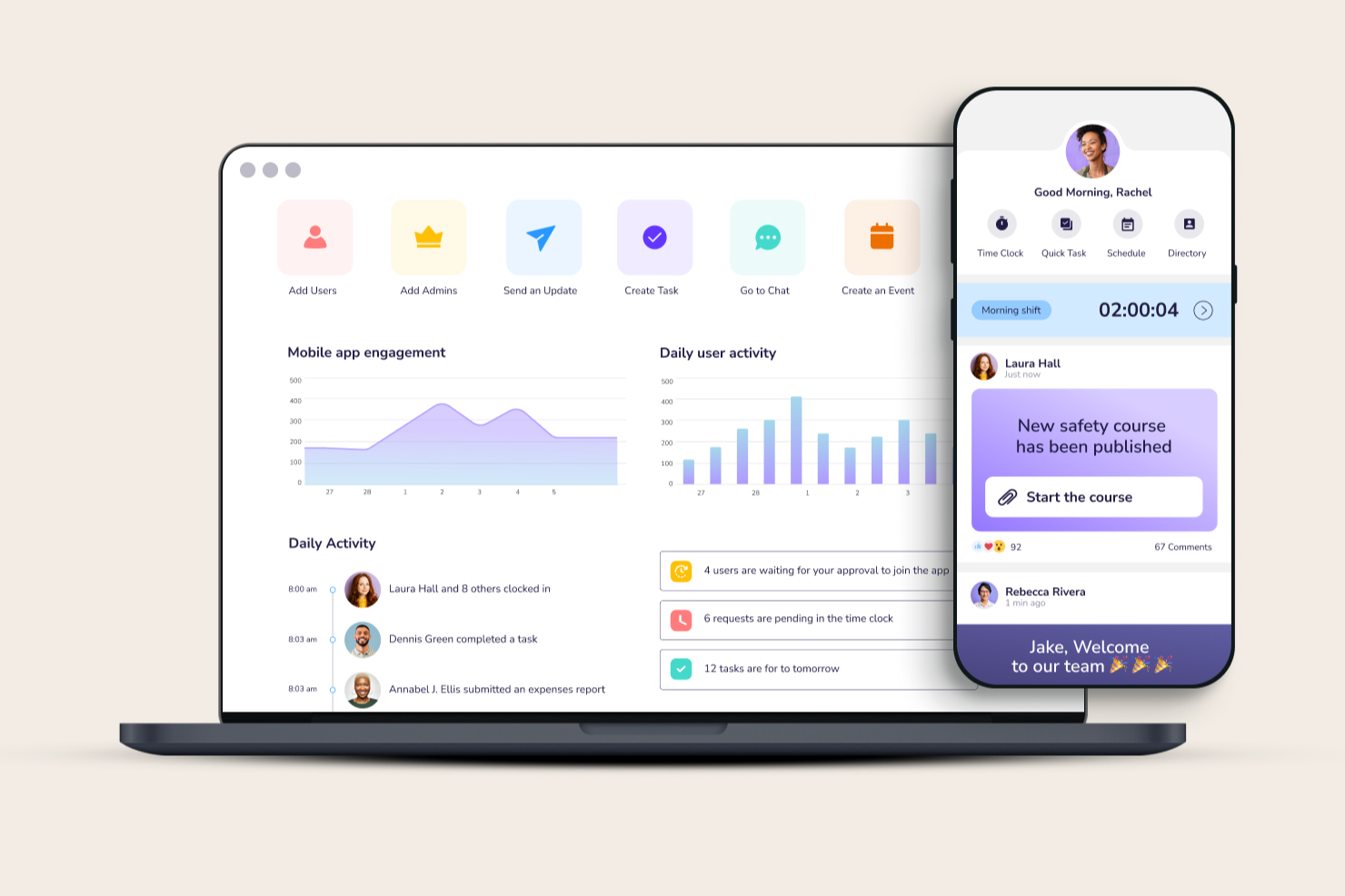
Connecteam proporciona a las organizaciones con equipos sin escritorio y distribuidos una plataforma centralizada para gestionar la comunicación interna, compartir recursos y coordinar las operaciones diarias, facilitando así que todos estén conectados e informados.
¿Para quién es mejor Connecteam?
Connecteam es ideal para pequeñas y medianas empresas de sectores como el comercio minorista, hostelería, construcción y salud que dependen en gran medida de trabajadores de primera línea o de campo.
Por qué elegí Connecteam
Connecteam se gana su lugar entre los mejores de mi lista porque está diseñada desde cero para equipos que no están en un escritorio. Lo elegí específicamente por su diseño centrado en el móvil: la aplicación pone el canal de noticias de la empresa, el chat del equipo y la biblioteca de documentos directamente en el bolsillo del trabajador, algo fundamental cuando tu personal se encuentra en una obra o en el piso de una tienda. También me gusta la función de base de conocimientos para empleados, donde mi equipo puede almacenar y acceder a PPOs, materiales de formación y documentos de RR. HH. sin necesidad de una computadora portátil. El sistema de notificaciones push mantiene a todos al tanto de las novedades en tiempo real, para que nada se pierda entre turnos.
Funciones clave de Connecteam
- Directorio de empleados: Consulta un directorio de la empresa con búsqueda de datos de contacto e información sobre el rol de cada integrante del equipo.
- Encuestas y sondeos: Crea y envía encuestas o sondeos a través de la app para recopilar opiniones del equipo.
- Gestión de tareas: Asigna, controla y administra tareas individuales o grupales con fechas límite y actualizaciones de estado.
- Programación: Crea y comparte horarios de empleados, gestiona asignaciones y cambios de turnos desde la plataforma.
Integraciones de Connecteam
Las integraciones incluyen QuickBooks, Gusto, Xero, ADP, Wix, Lightspeed, PrismHR, Square, BambooHR y Shopify.
Pros and Cons
Pros:
- Diseño fuerte de la app móvil para equipos sin escritorio y de primera línea
- Una sola app para comunicación y tareas evita usar varias aplicaciones separadas
- El control de tiempos + geovallado permite seguimiento de asistencia en sitio
Cons:
- Las funciones de informes y analítica son menos avanzadas que en plataformas especializadas
- La personalización de formularios y permisos puede sentirse limitada a gran escala
New Product Updates from Connecteam

Connecteam Expands Break and Timesheet Controls
Connecteam adds flexible break thresholds, personalized policies, auto-end options, a centralized exceptions report, and improved timesheet issue visibility to help teams manage breaks and timesheets more effectively. For more information, visit Connecteam’s official site.
 .
.
Sift
Mejor para un enfoque centrado en las personas
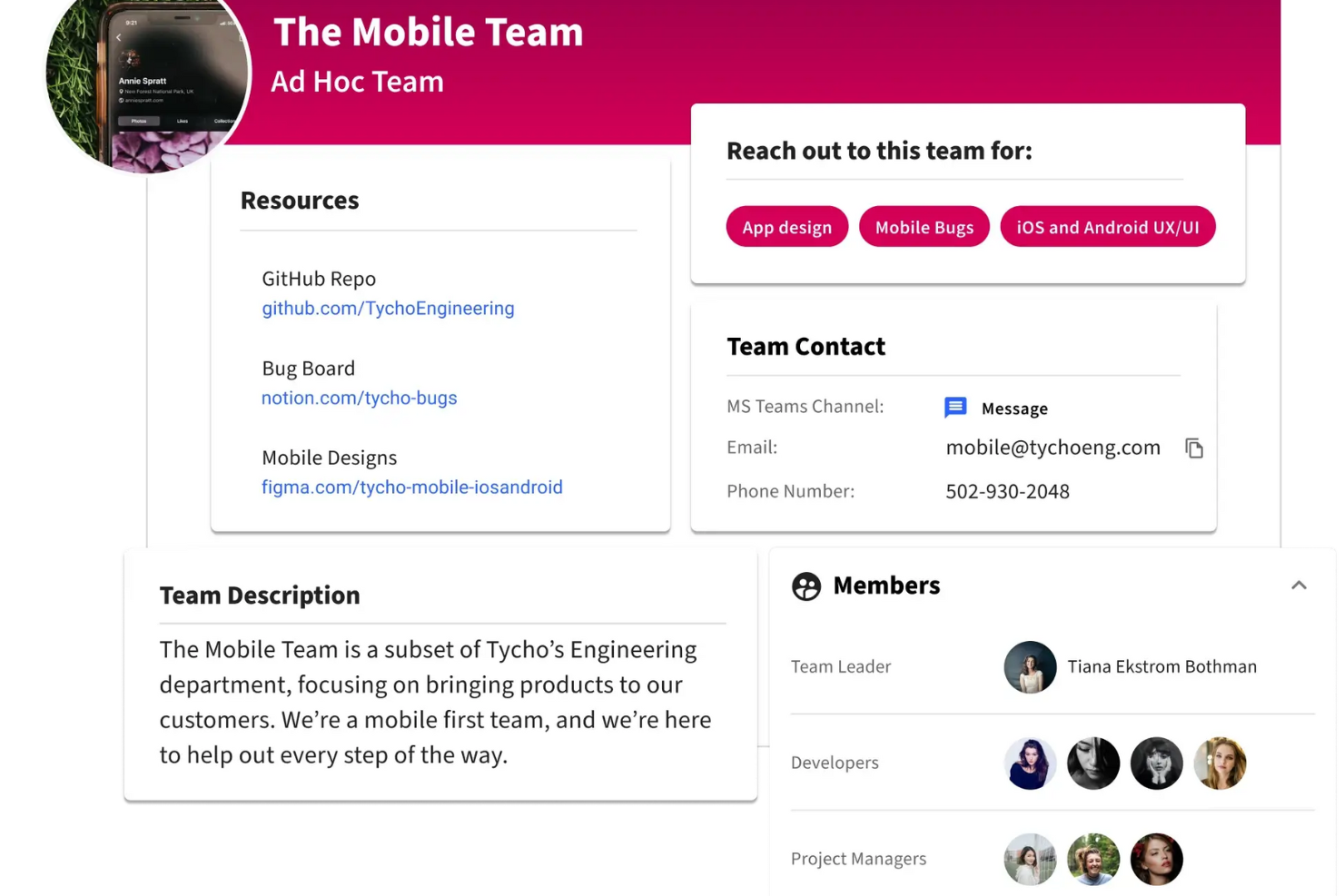
Sift es una plataforma de intranet para organizaciones que necesitan conectar a los empleados, mostrar el conocimiento interno y ayudar a los equipos a encontrar a las personas y recursos adecuados en toda la empresa.
¿Para quién es mejor Sift?
Sift es ideal para organizaciones medianas y grandes donde los equipos de RR. HH. y comunicaciones internas necesitan ayudar a los empleados a encontrar colegas, navegar por las estructuras organizativas y mantenerse conectados a través de los departamentos.
Por qué elegí Sift
Sift se gana su lugar en mi lista porque pone a las personas en el centro de la experiencia de la intranet de una manera que la mayoría de las plataformas no hacen. Me encanta cómo los perfiles de los empleados van más allá de la información básica de contacto: los miembros del equipo pueden mostrar sus habilidades, intereses y áreas de experiencia, lo que lo hace realmente útil para encontrar a la persona adecuada en una organización grande. También me gusta el organigrama dinámico, que se actualiza automáticamente y brinda a mi equipo una visión clara de cómo está estructurada la empresa, sin que nadie tenga que mantenerlo manualmente.
Características clave de Sift
- Páginas Sift: Crea páginas dedicadas para departamentos, proyectos, equipos remotos y grupos de recursos de empleados para que cada parte de tu organización tenga un espacio accesible y buscable.
- Exhibición de certificaciones: Muestra las certificaciones de los empleados en los perfiles para que los equipos puedan identificar rápidamente quién tiene la experiencia necesaria para proyectos o roles específicos.
- Búsqueda avanzada y filtros: Busca y filtra empleados por cualquier atributo, como puesto, habilidades, experiencia o ubicación, para encontrar a la persona adecuada para cualquier tarea.
- Analítica: Haz seguimiento de cómo los empleados interactúan con el directorio y la información de personas en toda la organización.
Integraciones de Sift
Las integraciones incluyen Azure Active Directory, Google Workspace, LDAP, Slack y Microsoft Teams, con una API disponible para integraciones personalizadas.
Pros and Cons
Pros:
- Perfiles altamente visuales e interactivos
- Integración profunda con los sistemas de RR. HH. existentes
- Gestiona el descubrimiento del talento interno
Cons:
- Funciones nativas limitadas de gestión de proyectos
- Requiere actualizaciones constantes de los perfiles de empleados
Workvivo
La mejor intranet social con Espacios colaborativos para una profunda implicación de los empleados
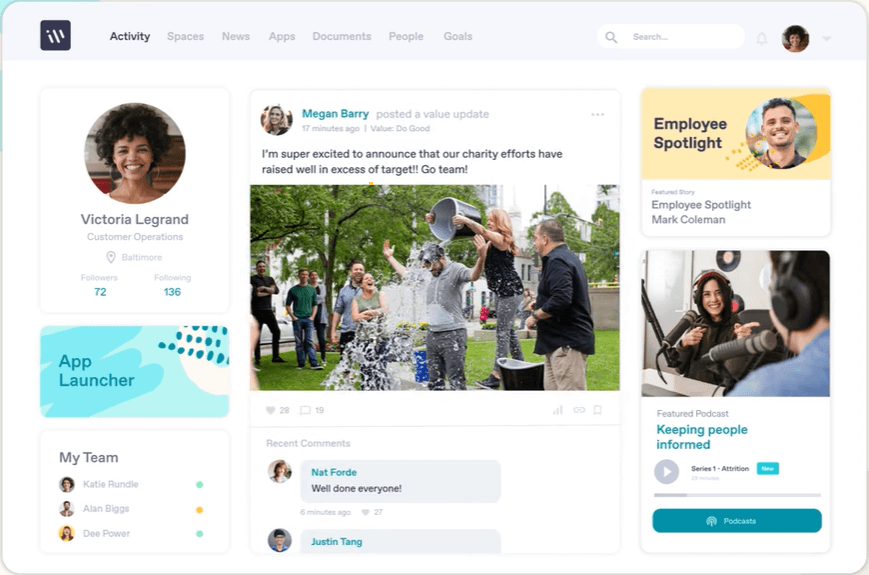
Workvivo es una plataforma moderna de intranet diseñada para organizaciones que desean potenciar la conexión entre empleados, simplificar las comunicaciones internas y crear un entorno digital laboral dinámico para equipos de cualquier tamaño.
¿Para Quién es Mejor Workvivo?
Workvivo es ideal para organizaciones medianas y grandes, con fuerzas laborales distribuidas o en primera línea, que necesitan algo más que una intranet tradicional para mantener a los empleados informados y conectados.
Por Qué Elegí Workvivo
Workvivo se gana su lugar como uno de los mejores en mi lista porque aborda la intranet como una experiencia social y no solo como un repositorio de contenido estático. Me gusta especialmente la función Espacios, que permite a los equipos crear centros dedicados para departamentos, proyectos o comunidades, con fuentes de noticias, documentos y listas de miembros en un solo lugar. También encuentro muy útil el feed de actividad social, que hace más visible el reconocimiento, los anuncios y las interacciones entre colegas en un formato que se siente más como una red social que como un tablero corporativo. Esa combinación facilita mucho más el desarrollo de una participación continua que la mayoría de las intranets tradicionales simplemente no logran.
Funciones Clave de Workvivo
- Encuestas y sondeos: Recoge la opinión de los empleados con encuestas integradas y sondeos rápidos que puedes enviar a equipos específicos o a toda la organización.
- Traducción automática: Traduce el contenido automáticamente al idioma materno de los empleados para que los equipos globales puedan acceder a cada actualización sin barreras de idioma.
- Base de conocimientos y wikis: Almacena y organiza la información, políticas y documentos de la empresa en una ubicación central y de fácil búsqueda.
- Analítica de compromiso del empleado: Haz seguimiento de cómo interactúan los empleados con el contenido en toda la plataforma para entender qué es lo que más impacto tiene y dónde está disminuyendo la participación.
Integraciones de Workvivo
Las integraciones incluyen Microsoft 365, Google Workspace, Slack, Zoom, BambooHR, Workday, Sage HR, Personio, HiBob y Trello.
Pros and Cons
Pros:
- Interfaz familiar al estilo de las redes sociales
- Potente aplicación móvil para accesibilidad
- Difusión simplificada a nivel global para toda la empresa
Cons:
- Precio más alto para startups
- Carece de herramientas avanzadas para coautoría de documentos
Blink
La mejor solución de intranet móvil para equipos de trabajo en primera línea o sin escritorio

Blink es una plataforma moderna de intranet diseñada para organizaciones con equipos distribuidos o sin escritorio, conectando a los empleados a través de comunicación móvil, intercambio de documentos y actualizaciones en tiempo real.
¿Para quién es mejor Blink?
Blink es ideal para industrias como el comercio minorista, la atención médica, la logística y la hostelería, donde grandes partes del personal están en movimiento y rara vez se sientan en un escritorio.
Por qué elegí Blink
Blink se gana un lugar en mi lista porque está diseñado específicamente para los trabajadores que la mayoría de las intranets olvida: aquellos que no tienen correo electrónico de la empresa ni escritorio. Lo elegí especialmente por su fuente de noticias móvil, que permite a los gerentes enviar anuncios dirigidos directamente al personal de primera línea por ubicación, turno o función. También me gustan los formularios digitales integrados y el centro de documentos, lo que significa que un trabajador de almacén o un asociado de ventas puede consultar una política o completar una lista de verificación de incorporación desde su teléfono sin necesidad de una laptop ni acceso a un sistema aparte.
Características clave de Blink
- Chat seguro: Envía mensajes directos y grupales a individuos o equipos dentro de la app de Blink.
- Reconocimiento de empleados: Da reconocimientos personalizados a colegas con Blink Kudos.
- Encuestas: Crea y distribuye encuestas de una o varias preguntas directamente a los empleados dentro de la aplicación.
- Comunidades: Crea espacios virtuales compartidos donde los empleados pueden conectarse según intereses o equipos comunes.
Integraciones de Blink
Las integraciones incluyen Microsoft 365, Google Workspace, Workday, ADP, Okta, OneLogin, ServiceNow, Salesforce, Slack y SAP. Hay una API disponible para integraciones personalizadas.
Pros and Cons
Pros:
- Inicio de sesión único para personal de primera línea
- Mensajería instantánea segura para equipos
- Formularios digitales y listas de verificación eficientes
Cons:
- La versión de escritorio carece de la fluidez móvil
- Opciones mínimas de visualización de datos avanzados
Otros programas de intranet para empleados
Aquí tienes algunas opciones más de software de intranet para empleados que no llegaron a la lista principal:
- Simpplr
Mejor software de intranet moderna para analítica prescriptiva y un directorio de personas dinámico
- Xoxoday
Mejor software de intranet social para reconocimiento entre pares
- Happeo
Mejor solución de intranet para fuentes de noticias personalizadas y herramientas de interacción
- MyHub
El mejor software de intranet corporativa para profesionales de TI, recursos humanos y marketing
- Microsoft SharePoint
Mejor para la comunicación dirigida a empleados
- Noodle
El mejor software de intranet con opciones SaaS y local
- Igloo
Mejor plataforma de lugar de trabajo digital con plantillas prediseñadas para retos empresariales
- LumApps
Ideal para la personalización de intranets impulsada por IA
- Guru
La mejor solución de software de intranet con búsqueda empresarial impulsada por IA
- Interact Software
Ideal para la entrega personalizada de contenido
- Unily
La mejor plataforma para la experiencia del empleado a nivel empresarial con funciones de comunicación, gestión del conocimiento y extranet.
- Eleviant Tech
Mejor intranet móvil y basada en la web para usuarios de Microsoft 365
- IntranetPro
Ideal para compartir documentos a través de Microsoft 365 y SharePoint
- Assembly
Mejor plataforma integral de intranet y comunicaciones para tu equipo y herramientas
- Nectar
Ideal para crear anuncios atractivos
- PeopleOne
Mejor solución moderna de intranet para usuarios de Microsoft 365


Cómo Evalúo el Software de Intranet
Divido mi evaluación en dos capas: las capacidades básicas que una herramienta debe ofrecer para calificar—como la gestión de documentos y los directorios de empleados—y los diferenciadores que distinguen a las mejores opciones.
Funcionalidad Básica (Requisitos Indispensables Para Esta Lista)
Cuando selecciono herramientas para mi lista, califico cada una en una escala de 0 (no ofrece la funcionalidad) a 5 (sobresale en esta área) para cada funcionalidad básica que se enumera a continuación. Luego, calculo la puntuación total de la herramienta como porcentaje. Cada herramienta debe alcanzar una puntuación mínima total del 65% para ser considerada para su inclusión.
- Gestión de Contenidos y Documentos: Analizo cómo cada plataforma gestiona las páginas de políticas de RR. HH., manuales y bibliotecas de archivos—especialmente el control de versiones y si los autores de contenido pueden programar o aprobar actualizaciones antes de publicarlas.
- Directorio de Empleados y Perfiles: Un buen directorio va más allá de una lista de contactos. Reviso las vistas de organigrama, campos de perfil personalizados como habilidades y certificaciones, y si el directorio se sincroniza con un HRIS.
- Herramientas de Comunicación Interna: Evalúo cómo cada herramienta difunde noticias de la empresa, desde anuncios generales hasta publicaciones dirigidas por departamento, ubicación o rol, junto con el seguimiento de lectura para confirmar que los mensajes fueron recibidos.
- Funcionalidades Sociales y de Compromiso: Las plataformas que permiten comentarios, reacciones, grupos comunitarios y reconocimiento entre pares le dan recursos a RR. HH. para fortalecer la cultura. Observo cuán naturalmente se integran estas funciones en el uso diario.
- Permisos y Control de Acceso: Los equipos de RR. HH. gestionan contenido sensible como políticas de compensación y detalles de beneficios. Compruebo los permisos basados en roles, segmentación de audiencia por atributos y visibilidad de auditoría.
- Búsqueda e Integraciones: Evalúo si la búsqueda abarca páginas, documentos y personas en una sola consulta, y si la herramienta se conecta con aplicaciones colaborativas como Slack, Teams, Microsoft 365 o Google Workspace.
Una vez que tengo una lista de herramientas que cumplen los criterios, considero qué diferencia a cada plataforma.
Factores Diferenciadores (Lo Que Distingue a los Proveedores)
Así es como comparo y contrasto varios proveedores:
Características Destacadas
El acceso móvil es relevante cuando tu fuerza laboral incluye empleados en primera línea o sin escritorio que rara vez se sientan en una computadora. Verifico si la aplicación ofrece funcionalidad completa o solo un feed reducido. Los recorridos de incorporación son otro diferenciador—las plataformas con listas de verificación automatizadas y contenido escalonado para nuevas contrataciones ahorran horas de seguimiento manual a RR. HH. También busco encuestas de pulso integradas y análisis de compromiso, que ayudan a medir si realmente los empleados leen las actualizaciones de políticas y cómo reciben el contenido en los equipos.
Más Allá de las Características
Las integraciones con la pila tecnológica de RR. HH. son importantes aquí. Si tu intranet no puede sincronizar datos de empleados desde tu HRIS—ya sea Workday, BambooHR o ADP—terminarás gestionando registros duplicados. Además, evalúo la postura de seguridad y cumplimiento, revisando la certificación SOC 2 Tipo II y las opciones de residencia de datos, especialmente para organizaciones con empleados en varias regiones. También vale la pena mirar con detalle el soporte de implementación. Desplegar una intranet es un esfuerzo de gestión del cambio, y los proveedores que ofrecen guías de lanzamiento y métricas de adopción suelen lograr un mayor compromiso a largo plazo.
¿Qué es el software para intranets?
El software para intranets es una plataforma digital segura que las organizaciones utilizan para centralizar la comunicación interna, los recursos y las herramientas de colaboración. Ayuda a los equipos a compartir actualizaciones, gestionar documentos y acceder al conocimiento de la empresa desde un solo lugar.
Los profesionales de recursos humanos y los responsables de equipo utilizan las plataformas de intranet para optimizar la comunicación, reducir los silos de información y mejorar el compromiso de los empleados, especialmente en equipos remotos e híbridos.
Funciones principales del software para intranets
Al seleccionar un software para intranets, presta atención a las siguientes funciones principales:
- Interfaz de usuario: Un diseño intuitivo y limpio te ayuda a encontrar rápidamente elementos esenciales como el directorio de personas, la biblioteca de conocimientos o los documentos clave de la empresa. Las mejores plataformas también te permiten personalizar tu página de inicio para adaptarla a tus preferencias, de modo que comenzar el día se sienta un poco más como estar en casa que como atravesar un laberinto interminable.
- Facilidad de uso: Una navegación sencilla cambia las reglas del juego. Una estructura de menú bien organizada significa que puedes olvidarte de buscar como si estuvieras en una cacería del tesoro y acceder directamente a los recursos que necesitas, sin hacer clic interminablemente ni enfrentarte a menús desplegables misteriosos.
- Integraciones de software: Las mejores soluciones de intranet funcionan sin problemas con tus otras herramientas, como sistemas de gestión documental como Google Workspace y Microsoft SharePoint, plataformas de correo electrónico o aplicaciones de participación de los empleados. De este modo, no necesitas manejar varias pestañas ni cambiar de plataforma solo para hacer tu trabajo.
- Gestión de contenidos: Necesitas poder crear, organizar y actualizar contenidos fácilmente. Una gestión eficaz de contenidos mantiene a todos informados y garantiza que la información actualizada esté siempre al alcance de tu equipo.
- Herramientas de colaboración: Las funciones integradas de chat, los foros de debate, los tablones de anuncios y las opciones para compartir archivos ayudan a tu equipo a comunicarse y colaborar sin necesitar una docena de herramientas diferentes. Todo lo que necesitas para trabajar en equipo, en un solo lugar.
- Control de acceso y permisos: Unos ajustes de permisos fiables te permiten decidir quién puede ver o editar información específica. Esto protege los contenidos sensibles y garantiza que cada persona solo acceda a lo que realmente necesita.
- Accesibilidad móvil: El mejor software de intranet funciona sin problemas en teléfonos inteligentes y tabletas, además de ordenadores de escritorio, lo que facilita que los usuarios se mantengan conectados e informados desde cualquier lugar.
- Funcionalidad de búsqueda: Una función de búsqueda potente te permite encontrar rápidamente personas, documentos y conocimientos de la empresa. Olvídate de desplazarte durante horas: escribe lo que necesitas y accede a ello en cuestión de segundos.
Funciones habituales de inteligencia artificial del software de intranet
Además de las funciones estándar del software de intranet mencionadas anteriormente, muchas de estas soluciones están incorporando inteligencia artificial con funciones como las siguientes:
- Búsqueda basada en inteligencia artificial: Las herramientas de búsqueda avanzada utilizan inteligencia artificial para comprender las consultas en lenguaje natural y anticipar lo que estás buscando, de modo que puedas encontrar documentos y recursos, incluso si no estás seguro del título exacto o de dónde se encuentran.
- Recomendaciones automatizadas de contenidos: La inteligencia artificial sugiere artículos relevantes, novedades de la empresa o recursos del equipo en función de tu actividad o tus intereses anteriores, lo que facilita mucho el descubrimiento y lo hace más personalizado.
- Notificaciones inteligentes: En lugar de bombardearte con alertas, la inteligencia artificial aprende qué actualizaciones son más importantes para ti y envía notificaciones cuando realmente resultan útiles, evitando que recibas demasiadas notificaciones.
- Gestión automatizada de flujos de trabajo: La inteligencia artificial puede reconocer procesos repetitivos y sugerir automatizaciones para aprobaciones, solicitudes o comunicaciones rutinarias, ayudándote a ahorrar tiempo y evitar errores manuales.
- Análisis de sentimientos: Las herramientas de inteligencia artificial pueden analizar foros internos o conversaciones de chat para evaluar el estado de ánimo del equipo o detectar problemas emergentes, de modo que puedas abordarlos antes de que se conviertan en grandes dificultades.
Preguntas frecuentes sobre el software de intranet
Estas son algunas respuestas a preguntas frecuentes que quizá tengas sobre el software de intranet y su funcionamiento:
¿Cómo elijo el software de intranet adecuado para mi organización?
Empieza por definir las necesidades específicas de tu equipo en materia de comunicación, colaboración y gestión de documentos. Haz una lista de las funciones imprescindibles, como compartir archivos fácilmente, publicar noticias o disponer de directorios de empleados. Compara varias plataformas de intranet, centrándote en la facilidad de uso, una atención al cliente fiable y una sólida integración con tus sistemas actuales. Lee reseñas de otros responsables de RR. HH. y profesionales de comunicación interna para obtener información basada en experiencias reales. Solicita demostraciones en directo o acceso de prueba e involucra tanto al departamento de TI como a los usuarios finales en el proceso de evaluación para comprobar qué software resulta más intuitivo y completo para tu equipo.
¿Cuáles son los desafíos más comunes al implementar un software de intranet?
Los mayores desafíos suelen incluir una baja adopción por parte de los usuarios, objetivos poco claros para las partes interesadas, dificultades con la migración de datos y problemas para adaptar la plataforma a la cultura de tu organización.
Para abordarlos, establece objetivos claros desde el principio, consigue el respaldo de la dirección y comunica de forma constante a los empleados los beneficios. Planifica una incorporación completa y ofrece sesiones de formación continuas. Designa embajadores internos de distintos departamentos para fomentar la participación y recopila comentarios para poder perfeccionar la implementación.
Una sólida colaboración entre TI y RR. HH. ayuda a abordar tanto los problemas técnicos como los relacionados con la gestión del cambio.
¿Cómo puede el software de intranet mejorar el compromiso y la comunicación de los empleados?
El software de intranet funciona como un centro centralizado para las noticias, las actualizaciones corporativas y los recursos, lo que ayuda a que los empleados se sientan informados e incluidos. Funciones como los canales sociales, las encuestas, los tablones de reconocimientos y los foros de debate permiten al personal compartir comentarios y conectar con sus compañeros. Muchas plataformas incluyen calendarios de eventos, programas de reconocimiento y herramientas para establecer contactos entre compañeros.
Para los responsables de RR. HH. y de comunicación interna, estas funciones permiten mantener un diálogo dinámico y transparente, y garantizan que todos tengan acceso a la información importante, independientemente de su ubicación. Con el tiempo, observarás un mayor compromiso, una mejor moral y una mayor alineación entre los equipos.
¿Puede el software de intranet integrarse con otras herramientas de trabajo, como HRIS o Slack?
Sí, casi todas las plataformas de intranet modernas ofrecen una integración completa con herramientas de trabajo populares. Esto incluye sistemas de información de recursos humanos (HRIS), aplicaciones de comunicación como Slack o Microsoft Teams, plataformas de gestión de proyectos y servicios de almacenamiento de documentos como Google Drive o SharePoint.
Pide a los proveedores una lista de las integraciones integradas o información sobre la disponibilidad de API abiertas para crear conexiones personalizadas. Una integración fluida permite a los empleados acceder a todo desde un único portal, reduce los silos de datos y automatiza las tareas habituales de RR. HH. o comunicación, lo que simplifica el trabajo diario para todos.
¿Qué funciones de seguridad debería buscar en las plataformas de intranet?
Da prioridad a las plataformas que ofrezcan elementos de seguridad esenciales y sólidos: control de acceso basado en roles, autenticación multifactor, cifrado de datos en tránsito y en reposo, y opciones de inicio de sesión único (SSO). Asegúrate de que el proveedor del software realice actualizaciones de seguridad periódicas y corrija las vulnerabilidades.
Para el uso en RR. HH. y comunicaciones internas, la configuración detallada de permisos es fundamental para proteger datos confidenciales, como los expedientes del personal o los comunicados de la empresa. Comprueba también si la plataforma cumple con normas de privacidad como el RGPD o la HIPAA, según tus necesidades, y pregunta por las herramientas de auditoría y generación de informes para disfrutar de una mayor tranquilidad.
Otras reseñas de software de comunicación
Si ya tienes en mente el software de intranet, quizá te interese obtener más información sobre otros tipos de software de comunicación interna. Para ahorrarte horas de búsqueda, echa un vistazo a algunas de mis otras listas de software especializado:
- Software de comunicación para empleados
- Software de compromiso de los empleados
- Aplicaciones de comunicación para equipos
- Plataformas de reconocimiento de empleados
- Software de colaboración remota
- Software para trabajar a distancia
Próximos pasos
Si has llegado hasta aquí, espero que hayas adquirido una comprensión más profunda de cómo la solución de software de intranet adecuada puede transformar tu empresa. En caso de que aún quieras conocer más detalles, echa un vistazo a nuestras mejores prácticas para desarrollar una intranet para empleados.
¿Ya tienes una intranet que te gusta? Tenemos una lista de los mejores sistemas de gestión del aprendizaje si estás tratando de impulsar tu formación interna y el desarrollo de los empleados.
Por último, antes de irte, me encantaría que te suscribieras a nuestro boletín de People Managing People. Al registrarte, tendrás acceso a nuestro contenido más reciente y destacado sobre liderazgo de RR. HH. y desarrollo organizacional.