

Las 10 mejores plataformas para eventos virtuales analizadas en 2026

10 Lista de las mejores plataformas para eventos virtuales


Las mejores plataformas para eventos virtuales te ayudan a organizar experiencias en línea atractivas y profesionales, ya sea que dirijas una pequeña reunión de equipo, una asamblea general de toda la empresa o una gran conferencia internacional.
Gestionar eventos en línea puede ser complicado sin las herramientas adecuadas. Una plataforma sólida reúne todo —transmisión en directo, salas para grupos pequeños, registro, análisis y funciones de networking— para que puedas ofrecer experiencias interactivas y fluidas que mantengan al público interesado.
Después de probar docenas de herramientas para eventos virtuales, he seleccionado una lista de las mejores plataformas, intuitivas, fiables y diseñadas para adaptarse a distintos estilos y presupuestos de eventos. En esta guía encontrarás soluciones que simplifican la planificación, mejoran la participación de los asistentes y hacen que organizar eventos virtuales sea sencillo.
Por qué confiar en nuestras reseñas de software
Nuestro equipo lleva probando y evaluando software desde 2012. Como expertos en RR. HH., sabemos lo difícil —y lo importante— que es elegir el software adecuado.
Para esta guía, evaluamos las herramientas mediante pruebas prácticas e investigación independiente, puntuando las herramientas según nuestros criterios de selección. También nos basamos en la experiencia de líderes de opinión del sector y de profesionales de RR. HH. en activo.
Nuestras reseñas reflejan nuestro criterio editorial humano, no un discurso de ventas.
Revisores expertos:
Resumen de las mejores plataformas para eventos virtuales
Esta tabla comparativa resume los detalles de precios de mis principales selecciones de plataformas para eventos virtuales, para ayudarte a encontrar la mejor opción según tu presupuesto y las necesidades de tu empresa.
| Tool | Best For | Trial Info | Price | ||
|---|---|---|---|---|---|
| 1 | Ideal para eventos virtuales de equipo seleccionados | No hay prueba gratuita disponible | Desde $2500 | Website | |
| 2 | Ideal para aplicación móvil de eventos | No disponible | Desde $2,495/evento | Website | |
| 3 | La mejor plataforma de eventos virtuales para marketing B2B | Demo gratis disponible | Precio a consultar | Website | |
| 4 | Mejor para funciones de networking | Demostración gratuita disponible | Precio a consultar | Website | |
| 5 | Mejor plataforma de eventos virtuales para marketing de eventos | Demo gratuita disponible | Precio a consultar | Website | |
| 6 | Ideal para conferencias virtuales | Plan gratuito disponible | Desde $9/usuario/mes (mínimo 10 plazas, facturación anual) | Website | |
| 7 | Mejor para la creación de contenido de alta calidad | Plan gratuito disponible | Desde $24/mes (facturado anualmente) | Website | |
| 8 | Ideal para la colaboración | Plan gratuito disponible | Desde $7/usuario/mes (facturado anualmente) | Website | |
| 9 | Ideal para eventos a gran escala | Demostración gratuita disponible | Desde $499/usuario/mes (facturado anualmente) | Website | |
| 10 | Mejor plataforma de eventos virtuales para accesibilidad e inclusión | Demostración gratuita disponible | Precio bajo solicitud | Website |
Reseñas de las mejores plataformas para eventos virtuales
A continuación encontrarás mis resúmenes detallados de las mejores plataformas para eventos virtuales que llegaron a mi lista final. Mis reseñas ofrecen un análisis detallado de las funciones principales, ventajas e inconvenientes, integraciones y casos de uso ideales de cada herramienta para ayudarte a encontrar la mejor opción para ti.

Confetti
Ideal para eventos virtuales de equipo seleccionados
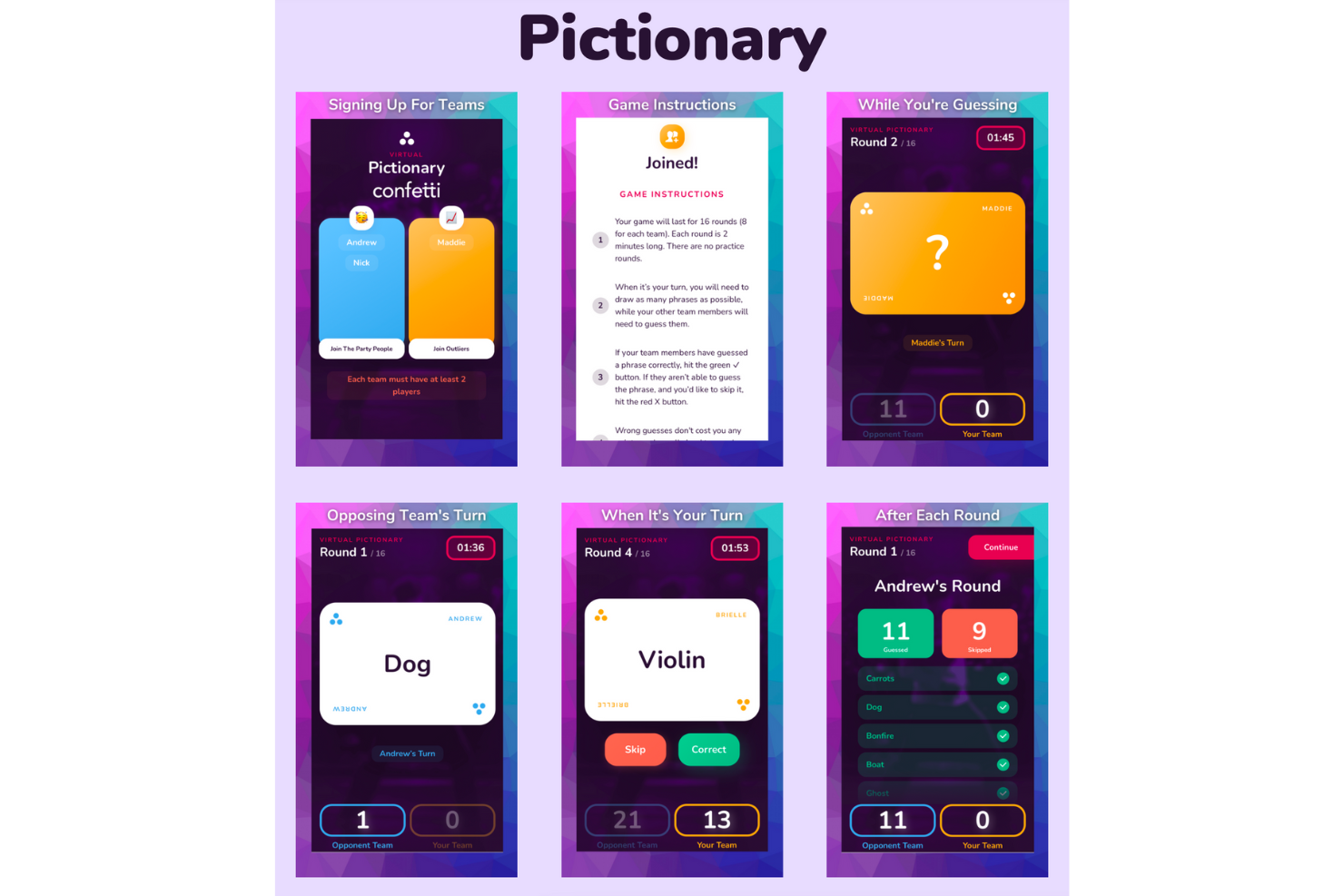
Confetti es una atractiva plataforma de eventos virtuales dirigida a organizaciones que buscan aumentar el compromiso de los empleados y la cohesión del equipo, especialmente en entornos de trabajo remoto. Ofrece una amplia variedad de actividades en vivo, como ejercicios de formación de equipos, clases de bienestar y eventos de diversidad, equidad e inclusión (DEI), diseñados para fomentar conexiones y mejorar la moral. Al abordar desafíos como la desconexión del equipo y la baja moral de los empleados, Confetti ofrece una solución para las empresas que desean crear una fuerza laboral más conectada y motivada.
Por qué elegí Confetti
Elegí Confetti porque destaca en la prestación de experiencias únicas y en vivo que promueven la participación digital y la unión del equipo. Una característica sobresaliente es su extenso catálogo de más de 150 eventos seleccionados, incluidos ejercicios de formación de equipos y actividades de bienestar, lo que permite adaptar las experiencias según las necesidades de tu equipo. Otra función que valoro es el soporte dedicado en la planificación de eventos de la plataforma, asegurando una ejecución impecable de las actividades, desde la ideación hasta la finalización. Estas características son cruciales para organizaciones que buscan mantener la moral y la conexión en un entorno virtual.
Características clave de Confetti
Además de sus funciones destacadas, Confetti ofrece varias otras funcionalidades clave:
- Centro de Eventos: Esta función te permite mostrar todos tus eventos en un único lugar centralizado, facilitando a los asistentes explorar y registrarse.
- Integración con CRM: El CRM integrado de Confetti ayuda a gestionar la información de los asistentes y su participación, agilizando la comunicación y los seguimientos.
- Capacidades de transmisión en vivo: Esta función permite la interacción y el compromiso en tiempo real durante los eventos virtuales, mejorando la experiencia global de los participantes.
- Creación de formularios e informes: Crea fácilmente formularios personalizados y accede a informes detallados para obtener información y medir el éxito de tus eventos.
Integraciones de Confetti
Las integraciones incluyen Salesforce, HubSpot, Google Analytics, Rule, Jobylon y Mailchimp. Confetti también ofrece una API REST y webhooks para integraciones personalizadas.
Pros and Cons
Pros:
- Sistema de reservas en línea intuitivo
- Amplia variedad de eventos en vivo
- Soporte dedicado al éxito del cliente
Cons:
- Capacidades de grabación nativas limitadas
- Las funciones híbridas pueden variar según el plan

Ideal para aplicación móvil de eventos

Expo Pass es una plataforma tecnológica para eventos diseñada para impulsar la participación digital en eventos presenciales, virtuales e híbridos, incluida la funcionalidad de aplicación móvil para eventos. Resulta atractiva para organizadores de eventos en diversos sectores que buscan mejorar la experiencia de los asistentes mediante herramientas eficientes de registro, registro de entrada y participación. Al simplificar la gestión de eventos, Expo Pass ayuda a los equipos a organizar eventos complejos de manera más fluida tanto para organizadores como para asistentes.
Por qué elegí Expo Pass
Elegí Expo Pass por su aplicación móvil para eventos, que favorece la participación digital al reunir los detalles del evento y las interacciones en un solo lugar. Los asistentes pueden consultar los horarios, recibir actualizaciones y unirse a chats de networking a través de la aplicación, lo que facilita estar conectados durante eventos virtuales. Las herramientas de captación de contactos también apoyan a los expositores al recopilar y organizar la información de los asistentes en tiempo real.
Características clave de Expo Pass
Además de la aplicación móvil para eventos, Expo Pass ofrece:
- Impresión de acreditaciones: Permite la creación fluida de acreditaciones en el sitio, brindando un toque profesional a tu evento.
- Seguimiento de asistencia: Proporciona información detallada sobre la participación de los asistentes, ayudándote a medir el éxito del evento.
- Páginas de eventos personalizables: Te permite diseñar páginas que se adapten a tu marca, mejorando la presencia online de tu evento.
- Analítica en tiempo real: Ofrece información basada en datos para comprender el comportamiento de los asistentes y optimizar futuros eventos.
Integraciones de Expo Pass
Las integraciones incluyen Swoogo, Guidebook y Avery.
Pros and Cons
Pros:
- Centraliza la actividad de los asistentes y la participación en sesiones
- Las notificaciones push mantienen a los participantes informados en tiempo real
- Impulsa la participación digital en eventos virtuales e híbridos
Cons:
- Las herramientas de networking pueden parecer limitadas para grandes audiencias
- Los informes sobre la participación digital son bastante básicos

Goldcast
La mejor plataforma de eventos virtuales para marketing B2B
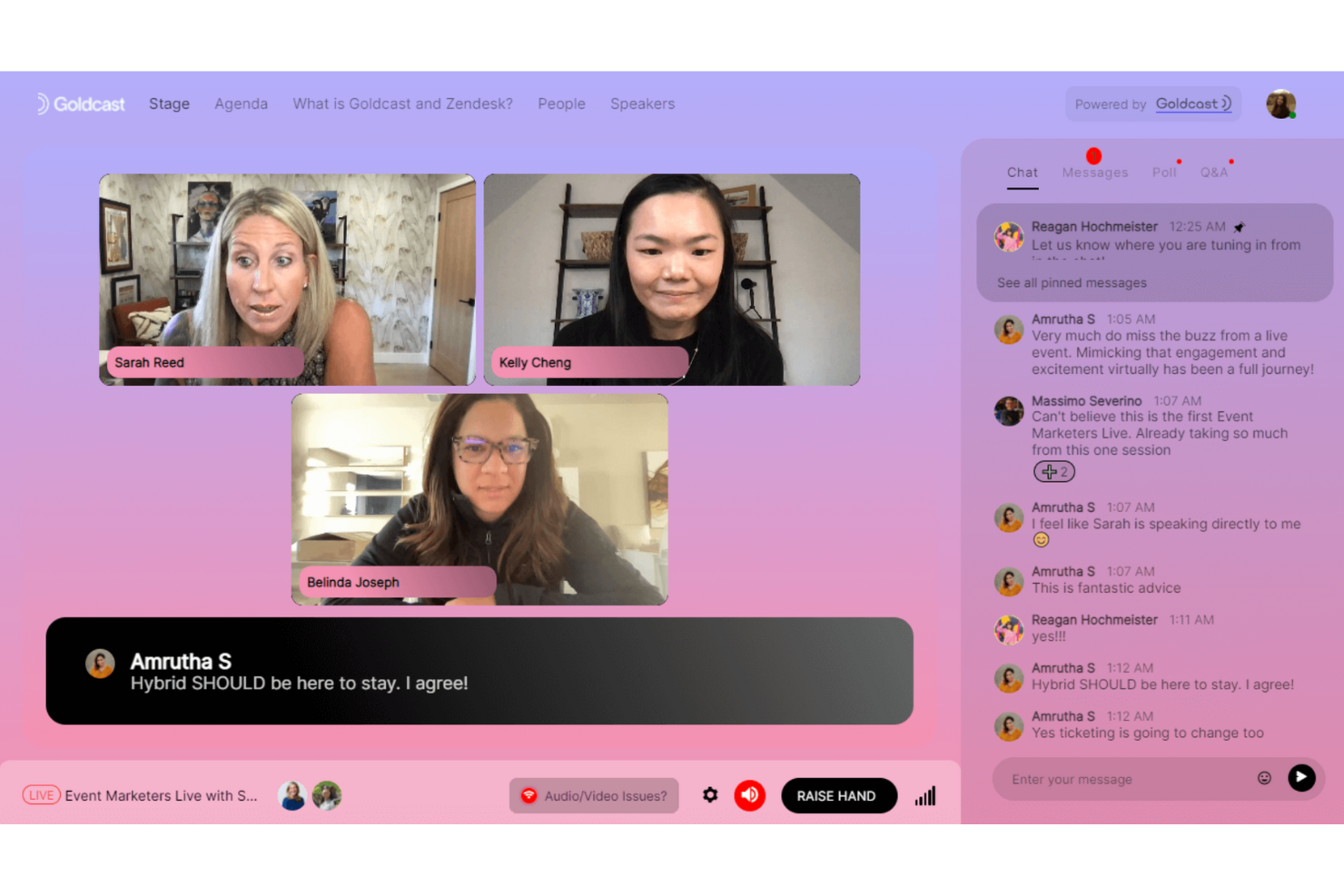
Goldcast es una plataforma de eventos virtuales diseñada específicamente para satisfacer las necesidades de los especialistas en marketing B2B.
Por qué elegí Goldcast: Goldcast describe sus eventos bellamente personalizados como similares a ver Netflix. La interfaz de usuario es elegante y atractiva, y sus controles de estudio incorporados permiten a los usuarios crear experiencias de eventos con un escenario totalmente personalizado, preguntas y respuestas en vivo y superposiciones.
Además de su atractivo visual, Goldcast captura información detallada de los asistentes y la recopila en tu CRM para que puedas actuar sobre tus clientes potenciales cuando finalice el evento. También puedes albergar centros de recursos para patrocinadores y compartir contenido de patrocinadores, maximizando el ROI de cada evento.
Funciones destacadas e integraciones de Goldcast
Funciones incluyen generación de prospectos, mensajería, recordatorios por correo electrónico, programación de eventos, captura de prospectos, visualización de presentaciones, análisis, un vestíbulo virtual y personalización de la marca.
Integraciones incluyen Drift, Eloqua, Enigamio, HubSpot, Marketo, SalesForce, Slack, Splash, Validar, Webooth y Wistia.
Pros and Cons
Pros:
- Diseñado específicamente para B2B
- Interfaz visual elegante
- Atención al cliente súper receptiva
Cons:
- Las salas de networking tienen una capacidad de 15
- Altos requisitos de ancho de banda

Whova
Mejor para funciones de networking

Whova es una plataforma de conferencias virtuales diseñada para organizadores de eventos que buscan mejorar el compromiso y la interacción entre los asistentes. Ofrece soporte a empresas y organizaciones proporcionando herramientas para la gestión de eventos, interacción con los asistentes y oportunidades de networking.
Por qué elegí Whova: Whova facilita el networking a través de su panel comunitario y funciones de emparejamiento de asistentes. Puedes crear grupos de discusión y habilitar reuniones individuales para fomentar conexiones. Las funciones de votaciones en vivo y preguntas y respuestas mantienen a tu audiencia involucrada durante todo el evento. El fuerte enfoque de Whova en funciones de networking lo convierte en una excelente opción para eventos donde la interacción entre los asistentes es clave.
Funciones destacadas e integraciones:
Funciones incluyen agendas personalizables que se adaptan a diferentes necesidades de los asistentes, anuncios en tiempo real para mantener a todos informados y una herramienta de generación de leads para ayudarte a conectar con posibles clientes. La plataforma también ofrece gestión de expositores y patrocinadores para incrementar las oportunidades de ingresos del evento.
Las integraciones incluyen Zoom, Slack, Salesforce, HubSpot, Google Calendar, Outlook, Mailchimp, Eventbrite, Stripe y PayPal.
Pros and Cons
Pros:
- Agendas personalizables
- Anuncios en tiempo real
- Efectivas herramientas de generación de leads
Cons:
- Curva de aprendizaje para nuevos usuarios
- Requiere una conexión a internet estable

Hubilo
Mejor plataforma de eventos virtuales para marketing de eventos

Hubilo es una plataforma de eventos virtuales con varias funciones de marketing de eventos.
Por qué elegí Hubilo: Desde el inicio hasta la finalización, Hubilo puede ayudarte en cada paso del viaje de marketing de eventos. Su generador de páginas de destino te permite crear y personalizar tu página con plantillas, widgets y formularios de registro. La venta de entradas también se puede gestionar desde su plataforma y las campañas dirigidas pueden ayudarte a alcanzar públicos específicos.
Una vez que los asistentes se han registrado, puedes aumentar la asistencia al evento con correos de recordatorio. Durante el evento, los asistentes pueden visitar el lounge de networking, ver a los ponentes en el escenario y participar en actividades de gamificación.
Características destacadas e integraciones de Hubilo
Características incluyen chat en vivo, aplicación móvil, interacción en redes sociales, análisis, sesiones patrocinadas, páginas de destino personalizadas, fondos virtuales y la colocación de banners y logotipos para patrocinadores.
Integraciones incluyen Captello, Interprefy, Kahoot, Kudo, Mailchimp, MootUp, Salesforce, Verbit y Vodium.
Pros and Cons
Pros:
- Los eventos son fáciles de configurar
- Alta escalabilidad
- Oportunidades de personalización de marca extensas
Cons:
- Falta cierta profundidad en los materiales de incorporación
- El lounge de networking se cierra después de 60 minutos

Airmeet
Ideal para conferencias virtuales
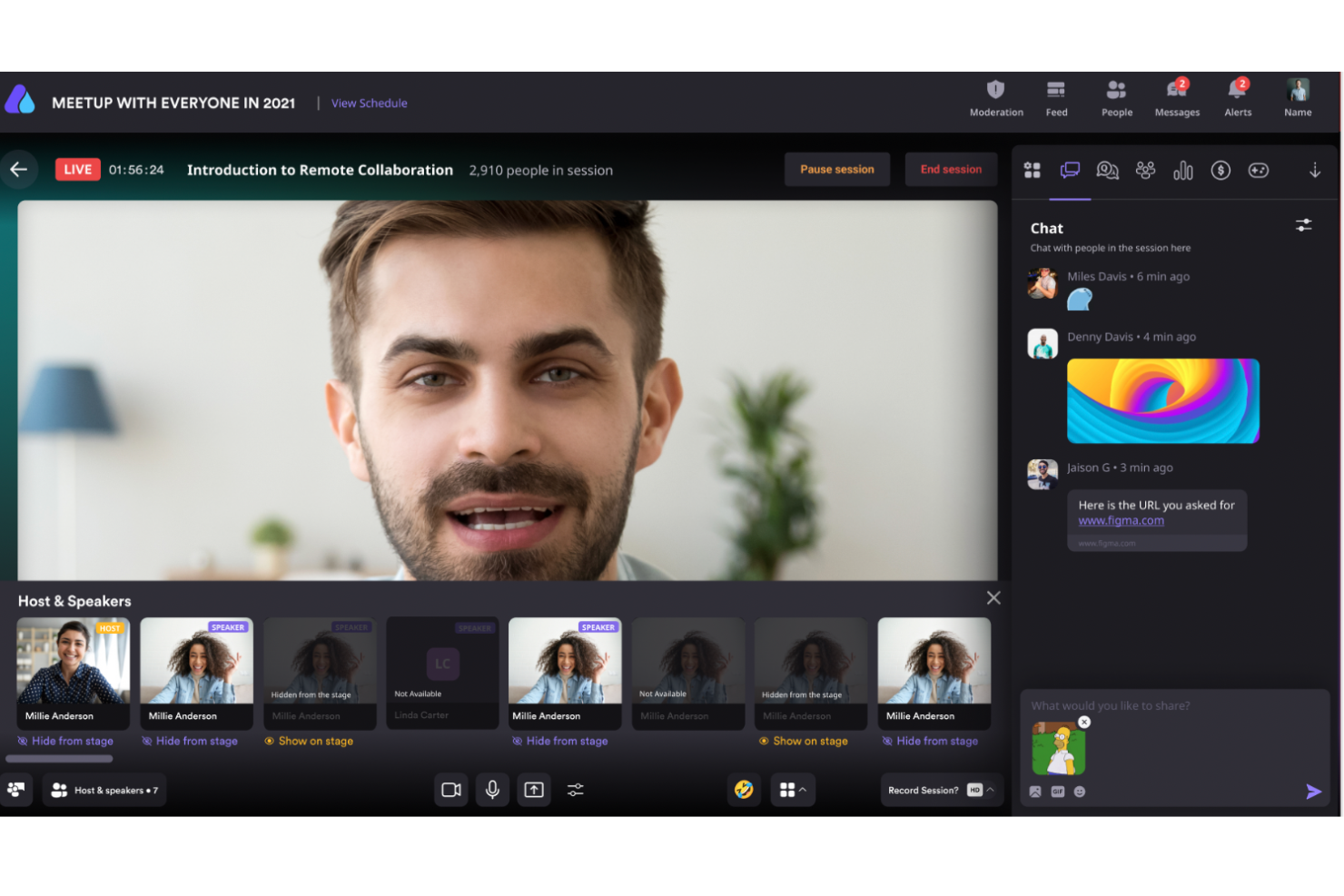
Airmeet es una plataforma de eventos virtuales diseñada para organizar conferencias a gran escala y eventos comunitarios. Está orientada a empresas y organizaciones que requieren herramientas para gestionar y mantener el compromiso de grandes audiencias.
Por qué elegí Airmeet: Airmeet está adaptada para conferencias virtuales con funciones como espacios virtuales personalizables y sesiones interactivas. Puedes organizar sesiones de trabajo en grupo y salones de networking para facilitar la interacción entre asistentes. El enfoque de la plataforma en crear experiencias inmersivas la convierte en una opción ideal para involucrar eficientemente a grandes audiencias. Su capacidad para manejar un alto volumen de asistentes garantiza la ejecución fluida de eventos.
Características destacadas e integraciones:
Características incluyen escenarios de eventos personalizables que te permiten diseñar la disposición de tu evento, herramientas de participación en tiempo real como encuestas y preguntas y respuestas, y un salón social para crear redes de contacto. La plataforma también ofrece análisis detallados para rastrear la participación y el compromiso de los asistentes.
Integraciones incluyen Zoom, Slack, Salesforce, HubSpot, Mailchimp, Eventbrite, Stripe, PayPal, Google Calendar y Zapier.
Pros and Cons
Pros:
- Se proporciona análisis detallado
- Herramientas de participación en tiempo real
- Espacios virtuales personalizables
Cons:
- No se puede agregar información de LinkedIn a los perfiles de asistentes
- Algunas limitaciones en la aplicación móvil

Mejor para la creación de contenido de alta calidad

Como profesional que busca una plataforma dinámica para eventos virtuales, Riverside podría ser tu solución ideal para experiencias digitales atractivas. Diseñada para crear podcasts y videos de alta calidad, ofrece funciones como grabación en 4K y herramientas de edición impulsadas por IA que pueden transformar tus seminarios web y conferencias virtuales. Ya seas un profesional de marketing, educador o creador de contenido, las capacidades de Riverside en transmisión en vivo e interacción con la audiencia pueden satisfacer tus necesidades de compromiso digital sin interrupciones.
Por qué elegí Riverside
Elegí Riverside por su capacidad inigualable para mejorar el compromiso digital a través de la creación de contenido de alta calidad. La capacidad de grabación en 4K de la plataforma garantiza que tus eventos virtuales se transmitan con la máxima nitidez, mientras que sus herramientas de edición impulsadas por IA te permiten pulir tu contenido sin esfuerzo. Además, la función de transmisión en vivo de Riverside te permite emitir en Full HD a múltiples plataformas, asegurando que tu mensaje llegue a una audiencia más amplia. Estas características lo convierten en una excelente opción para cualquiera que desee elevar su experiencia en eventos virtuales.
Características clave de Riverside
Además de sus funciones destacadas, también encontré varias otras capacidades que hacen de Riverside un fuerte candidato para el compromiso digital.
- Grabación multipista: Captura pistas de audio y video por separado para cada participante, asegurando flexibilidad en la edición postproducción.
- Herramientas de interacción con la audiencia: Utiliza elementos interactivos como chat en vivo y preguntas y respuestas para mantener a tu audiencia involucrada durante los eventos virtuales.
- Opciones de personalización de marca: Personaliza tus eventos con diseños, logotipos y superposiciones a medida para alinearlos con la identidad de tu marca.
- Transcripciones automáticas: Genera transcripciones precisas y notas automáticamente, facilitando la reutilización de contenido.
Integraciones de Riverside
Actualmente, Riverside no enumera integraciones nativas.
Pros and Cons
Pros:
- Edición por texto impulsada por IA
- Plan gratuito sin tarjeta de crédito
- Transcripción y división de capítulos automática
Cons:
- El plan gratuito está limitado a 720p
- Se requiere Chrome para el mejor rendimiento

Ideal para la colaboración

Google Meet es una herramienta de videoconferencias que forma parte de Google Workspace, diseñada para facilitar eventos virtuales, seminarios web y sesiones colaborativas. Está repleta de funciones como compartir pantalla y chat en tiempo real, lo que la convierte en una solución ideal para empresas, instituciones educativas y organizaciones sin fines de lucro.
Por qué elegí Google Meet: Me gusta su enfoque en la accesibilidad y la participación. Funciones como subtítulos en vivo y transcripción facilitan que todos puedan seguir la reunión, mejorando la inclusión en tus eventos virtuales. La plataforma también ofrece herramientas interactivas como encuestas y salas para grupos pequeños, permitiéndote fomentar la participación y colaboración entre los asistentes. Además, Google Meet incluye cancelación de ruido, lo que ayuda a mantener la claridad del audio al reducir el ruido de fondo, asegurando que tu mensaje se escuche fuerte y claro.
Características e integraciones destacadas de Google Meet
Funciones como la función de compartir en vivo para videos de YouTube, música y juegos te permite crear experiencias interactivas y atractivas durante tus eventos. Google Meet también ofrece subtítulos traducidos, que pueden superar barreras idiomáticas y garantizar que todos puedan participar plenamente.
Integraciones incluyen Amazon Alexa, Discord, Wix, Google Forms, Spotify, Moodle, Jotform, Calendly, Zoom, Salesforce, HubSpot y Slack.
Pros and Cons
Pros:
- Se integra bien con herramientas de Google Workspace como Calendario, Gmail y Google Drive
- Herramientas como chat en vivo, encuestas para la audiencia y compartir pantalla mejoran la interacción durante las reuniones
- La plataforma es compatible con navegadores, lo que permite un acceso fluido en varios dispositivos, incluidos móviles
Cons:
- Faltan funciones como análisis de asistentes, lo cual puede dificultar reuniones más grandes
- Algunos usuarios experimentan retrasos al compartir video y caídas en las llamadas

Bizzabo
Ideal para eventos a gran escala

Bizzabo es una plataforma de gestión de eventos diseñada para conferencias y eventos corporativos de gran escala. Sirve a los organizadores de eventos proporcionando herramientas para registro, marketing y compromiso de los asistentes, asegurando la ejecución exitosa del evento.
Por qué elegí Bizzabo: Bizzabo es ideal para eventos a gran escala debido a sus soluciones escalables y herramientas completas de gestión de eventos. Puedes administrar el registro y la venta de entradas sin inconvenientes mientras accedes a análisis en tiempo real para medir el éxito del evento. La capacidad de la plataforma para manejar grandes volúmenes de asistentes y estructuras de eventos complejas la convierte en una opción líder para eventos grandes. Sus funciones de automatización de marketing amplían aún más el alcance e impacto de tu evento.
Características destacadas e integraciones:
Características incluyen un creador de sitios web con función de arrastrar y soltar, que te permite crear páginas de eventos personalizadas, herramientas avanzadas de marketing por correo electrónico para interactuar con tu audiencia y una plataforma de networking para conectar a los asistentes. La plataforma también ofrece análisis sólidos para ayudarte a entender el comportamiento de los asistentes y mejorar eventos futuros.
Integraciones incluyen Salesforce, Marketo, HubSpot, Slack, Mailchimp, Zoom, Eventbrite, Stripe, PayPal y Google Analytics.
Pros and Cons
Pros:
- Herramientas completas de gestión de eventos
- Automatización avanzada de marketing
- Páginas de eventos personalizables
Cons:
- Curva de aprendizaje pronunciada al inicio
- Las funciones complejas requieren exploración

SpotMe
Mejor plataforma de eventos virtuales para accesibilidad e inclusión
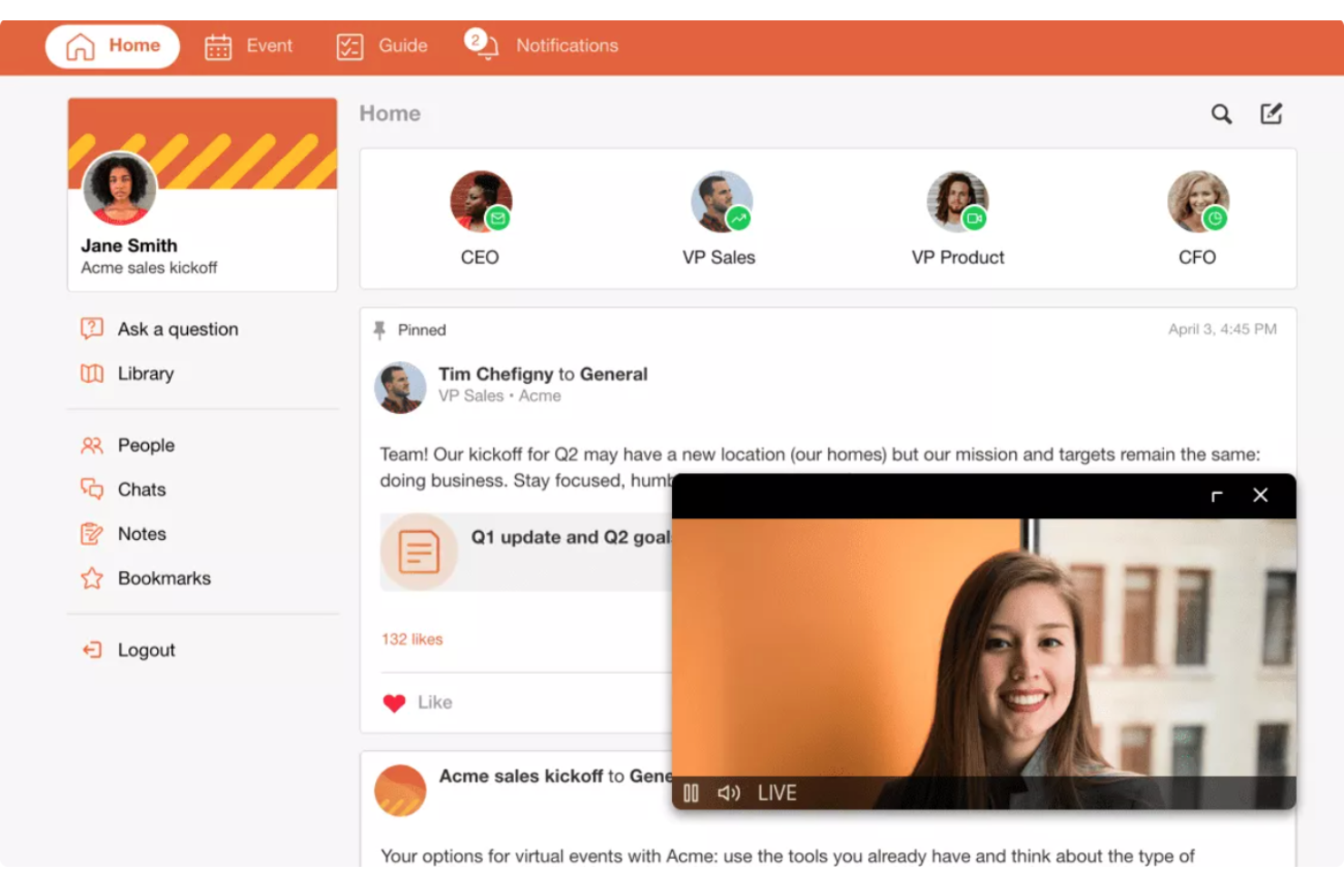
SpotMe es una plataforma de eventos virtuales con amplias funciones de subtitulado y traducción.
Por qué elegí SpotMe: La accesibilidad debe seguir siendo una prioridad para tu evento, ya sea presencial o en línea. SpotMe ofrece una herramienta de traducción, subtitulado e interpretación líder en la industria impulsada por Interprefy y AI-Media. El servicio cubre casi 20 idiomas, extendiendo el alcance a participantes en cualquier ubicación y con diferentes necesidades.
Páginas de registro optimizadas para conversiones, funciones de participación para asistentes como preguntas y respuestas y encuestas, y sesiones paralelas flexibles permiten que los grupos se conecten profundamente entre sí. Las plantillas de SpotMe vienen con contenido, navegación y diseños preconfigurados, facilitando el inicio.
Funciones y integraciones destacadas de SpotMe
Funciones incluyen feed de actividad, transmisión en vivo, registro de asistentes, sesiones paralelas, repeticiones a demanda, subtitulado en vivo, herramientas de participación y un estudio de diseño.
Integraciones incluyen Eloqua, HubSpot, Marketo, Pardot, RainFocus, Salesforce y Veeva.
Pros and Cons
Pros:
- Interfaz intuitiva
- Guarda grabaciones inmediatamente después de las transmisiones en vivo
- Herramientas de accesibilidad
Cons:
- El registro de asistentes / proceso de descarga es lento
- La personalización del backstage es compleja
Otras plataformas para eventos virtuales
Estas son algunas opciones adicionales de plataformas para eventos virtuales que no llegaron a mi lista final, pero que aún vale la pena consultar:
- EventMobi
Ideal para personalización de marca
- Accelevents
La mejor plataforma de eventos virtuales para organizaciones empresariales
- RingCentral Events
Mejor plataforma de eventos virtuales para eventos digitales a gran escala
- Microsoft Teams
Ideal para la participación de asistentes basada en avatares
- ON24
La mejor para la organización de seminarios web
- Hivebrite
Ideal para el compromiso comunitario
- SpatialChat
Ideal para entornos virtuales interactivos
- Weve
Ideal para eventos de formación de equipos
- vFairs
Mejor plataforma de eventos virtuales para sedes 3D realistas
- EventsAir
La mejor plataforma de eventos virtuales para mantener la continuidad entre eventos virtuales, híbridos y presenciales
- Kaltura
Mejor para integraciones de video
- BigMarker
La mejor plataforma de eventos virtuales para personalización de diseño
- PheedLoop
Mejor para eventos híbridos
- HeySummit
Ideal para la gestión de ponentes


Cómo Evalúo las Plataformas de Eventos Virtuales para la Participación Digital
Divido mi evaluación en dos capas: la base mínima que una herramienta debe cumplir para gestionar con fiabilidad una reunión general de 1.000 personas y los diferenciadores que hacen destacar a los proveedores para los equipos de RR. HH.
Funcionalidad Principal (Requisitos Básicos para Esta Lista)
Cuando selecciono herramientas para mi lista, califico cada una en una escala de 0 (no ofrece la funcionalidad) a 5 (se destaca en esta área) para cada funcionalidad principal que se menciona a continuación. Después, calculo la puntuación total de la herramienta como un porcentaje. Cada plataforma necesita obtener una puntuación total mínima del 65% para ser considerada en la selección.
- Transmisión en Vivo y Difusión: Verifico si una plataforma puede ofrecer vídeo HD de forma fiable para eventos de varias sesiones, como reuniones generales de toda la empresa con miles de asistentes simultáneos.
- Herramientas de Participación Interactiva: Encuestas integradas, preguntas y respuestas, chat y reacciones son importantes aquí, especialmente para mantener la atención de empleados remotos durante largas sesiones de incorporación o de formación y desarrollo.
- Salas de Trabajo y Networking: Busco sesiones de trabajo en grupo configurables que permitan actividades como círculos de mentoría en pequeños grupos, presentaciones de nuevas cohortes de empleados o talleres de equipos.
- Registro y Gestión de Asistentes: Desde páginas de inscripción personalizables hasta flujos de invitaciones, evalúo la eficacia con la que cada plataforma gestiona la logística para que las personas correctas accedan a las sesiones adecuadas.
- Analítica y Reportes del Evento: Los datos posteriores al evento sobre asistencia, participación en las sesiones y colaboración ayudan a los equipos de RR. HH. a demostrar el impacto del evento, por eso busco informes exportables y paneles de control.
- Integraciones con RR. HH. y Colaboración: La conectividad con herramientas como Slack, Microsoft Teams, Workday y las plataformas LMS comunes es esencial para integrar los eventos virtuales en los flujos de trabajo existentes de RR. HH.
Una vez que tengo una lista de herramientas que cumplen los criterios, considero qué distingue a cada plataforma.
Factores Diferenciadores (Qué Distingue a los Proveedores)
Así es como comparo y contrasto los diferentes proveedores:
Características Destacadas
El subtitulado multilingüe y las funciones de accesibilidad son importantes para los equipos de RR. HH. que organizan eventos en oficinas de todo el mundo; busco traducción en vivo integrada y soporte para lectores de pantalla. Los centros de contenido bajo demanda también sobresalen, ya que empleados en diferentes husos horarios pueden necesitar ver repeticiones de sesiones como recorridos para la inscripción en beneficios. También evalúo el nivel de control que una plataforma ofrece sobre la personalización de la imagen de marca, desde vestíbulos personalizados hasta entornos escénicos que refuerzan la identidad de la empresa durante eventos de reclutamiento.
Más Allá de las Características
Certificaciones de seguridad y cumplimiento como SOC 2 y GDPR son aspectos a revisar, especialmente cuando los eventos recogen datos confidenciales de empleados durante la incorporación o sesiones sobre beneficios. También evalúo la escalabilidad: si una plataforma puede gestionar tanto un taller para 50 personas una semana como una asamblea general para 5.000 la siguiente. La transparencia en los precios es igualmente importante, ya que los presupuestos de RR. HH. deben justificar los costos recurrentes de los programas internos de eventos sin cargos sorpresa por grabaciones o complementos.
Cómo elegir una plataforma para eventos virtuales
Es fácil perderse entre largas listas de funciones y estructuras de precios complejas. Para ayudarte a mantener el enfoque mientras avanzas en tu proceso de selección de software, aquí tienes una lista de factores que debes tener en cuenta:
| Factor | Qué considerar |
|---|---|
| Escalabilidad | ¿Puede la plataforma crecer con su organización? Considere el tamaño de los eventos y el número de participantes en el futuro. Asegúrese de que pueda gestionar sus eventos más grandes sin problemas de rendimiento. |
| Integraciones | ¿Funciona con sus herramientas actuales? Compruebe la compatibilidad con su CRM, su software de marketing por correo electrónico y sus herramientas de gestión de proyectos para optimizar los flujos de trabajo. |
| Personalización | ¿Puede adaptar la plataforma a su marca? Busque opciones para personalizar los diseños, los temas y los elementos de marca de los eventos de acuerdo con la identidad de su organización. |
| Facilidad de uso | ¿La plataforma es intuitiva tanto para los organizadores como para los participantes? Considere la experiencia del usuario para evitar curvas de aprendizaje pronunciadas que puedan afectar la adopción. |
| Implementación e incorporación | ¿Cuánto tiempo llevará comenzar? Evalúe el tiempo de configuración y la disponibilidad de recursos de incorporación, como tutoriales y asistencia, para garantizar una transición fluida. |
| Coste | ¿El precio se ajusta a su presupuesto? Analice los diferentes planes y las tarifas ocultas. Considere el coste por asistente y los posibles descuentos para contratos a largo plazo. |
| Medidas de seguridad | ¿Están protegidos sus datos y participantes? Busque cifrado, cumplimiento de las leyes de protección de datos y funciones como controles de acceso para proteger la información confidencial. |
| Disponibilidad de asistencia | ¿Qué tan accesible es la ayuda cuando la necesita? Compruebe si ofrece asistencia las 24 horas, los 7 días de la semana, los tiempos de respuesta y canales disponibles como chat, correo electrónico o teléfono para garantizar una atención oportuna. |
¿Qué son las plataformas para eventos virtuales?
Las plataformas para eventos virtuales son soluciones de software que permiten a las organizaciones organizar eventos en línea, lo que permite a los participantes conectarse desde cualquier lugar. Estas herramientas son utilizadas habitualmente por organizadores de eventos, profesionales de recursos humanos y especialistas en marketing para conectarse de manera eficiente con grandes audiencias. Funciones como la transmisión en directo, el chat interactivo y la personalización de la marca ayudan a atraer a los asistentes y crear experiencias memorables. En general, estas plataformas ofrecen una forma práctica y accesible de organizar eventos sin limitaciones geográficas.
Funciones
Al seleccionar plataformas para eventos virtuales, preste atención a las siguientes funciones clave:
- Transmisión en directo: Transmita eventos en tiempo real para involucrar a los participantes y llegar a una audiencia más amplia.
- Chat interactivo: Facilite la comunicación entre los asistentes y los anfitriones para mejorar la participación y la creación de redes de contacto.
- Personalización de la marca: Adapte los diseños y los temas de los eventos para que coincidan con la identidad de su organización y mantenga la coherencia de la marca.
- Análisis de eventos: Realice un seguimiento de las métricas de participación y compromiso para medir el éxito de sus eventos.
- Funciones de grabación: Capture y almacene las sesiones de los eventos para consultarlas en el futuro o verlas bajo demanda.
- Creación de redes con inteligencia artificial: Conecte a participantes con intereses similares mediante inteligencia artificial para fomentar interacciones significativas.
- Stands virtuales: Cree espacios interactivos para que los expositores presenten productos y servicios durante los eventos.
- Asistencia multilingüe: Atienda a audiencias internacionales ofreciendo contenido en varios idiomas.
- Medidas de seguridad: Proteja la información confidencial mediante cifrado y controles de acceso para garantizar la privacidad de los datos.
Beneficios
La implementación de plataformas para eventos virtuales ofrece varios beneficios para su equipo y su empresa. Estos son algunos de los que puede esperar:
- Mayor accesibilidad: Llegue a una audiencia global organizando eventos en línea, eliminando las barreras geográficas y los costes de desplazamiento.
- Mayor participación: Utilice funciones interactivas como el chat en directo y la creación de redes con inteligencia artificial para mantener a los participantes involucrados y conectados.
- Eficiencia de costes: Ahorre en gastos de espacios y logística al pasar a los eventos virtuales, lo que permite ajustarse al presupuesto.
- Información basada en datos: Obtenga información valiosa de los análisis de eventos para comprender el comportamiento de los participantes y mejorar los eventos futuros.
- Coherencia de la marca: Mantenga la identidad de su marca con opciones de personalización que se ajusten a la imagen y el estilo de su organización.
- Flexibilidad: Ofrezca acceso bajo demanda a las sesiones grabadas, permitiendo que los participantes interactúen con el contenido cuando les resulte conveniente.
- Garantía de seguridad: Proteja los datos confidenciales con medidas de seguridad avanzadas para garantizar interacciones virtuales seguras y privadas.
Costes & precios
Seleccionar plataformas para eventos virtuales requiere comprender los diversos modelos de precios y planes disponibles. Los costos varían según las funciones, el tamaño del equipo, los complementos y otros factores. La tabla a continuación resume los planes comunes, sus precios promedio y las funciones habituales incluidas en las soluciones de plataformas para eventos virtuales:
Tabla comparativa de planes para plataformas de eventos virtuales
| Tipo de plan | Precio promedio | Funciones comunes |
|---|---|---|
| Plan gratuito | $0 | Alojamiento básico de eventos, capacidad limitada de participantes y opciones mínimas de personalización de marca. |
| Plan personal | $10-$30/usuario/mes | Mayor capacidad de participantes, análisis básicos y algunas opciones de personalización. |
| Plan empresarial | $50-$100/usuario/mes | Análisis avanzados, personalización de marca mejorada, múltiples sesiones e integración con otras herramientas. |
| Plan corporativo | $200+/usuario/mes | Personalización a gran escala, soporte especializado, funciones de seguridad integrales y capacidades avanzadas de networking. |
Preguntas frecuentes sobre plataformas de eventos virtuales
Estas son algunas respuestas a preguntas frecuentes sobre las plataformas de eventos virtuales:
¿Las plataformas de eventos virtuales admiten eventos híbridos?
Sí, muchas plataformas ofrecen actualmente funciones híbridas, lo que permite involucrar tanto a las audiencias presenciales como a las remotas mediante contenido sincronizado y herramientas de interacción.
¿Pueden los asistentes establecer contactos en un evento virtual con la misma eficacia que en uno presencial?
Establecer contactos de forma virtual puede acercarse a la eficacia de los eventos presenciales si se utilizan las herramientas y estrategias adecuadas. Las plataformas modernas para eventos virtuales están diseñadas para imitar la espontaneidad y la interacción de los encuentros cara a cara mediante funciones como salas de grupos, «apretones de manos» virtuales y emparejamiento basado en IA, que conecta a los asistentes según sus intereses y objetivos. Las funciones de chat, las reuniones por video y las sesiones interactivas de preguntas y respuestas también facilitan conexiones más profundas.
Aunque la dinámica puede ser diferente, el potencial para interacciones significativas sigue siendo alto, lo que permite a los asistentes establecer contactos eficazmente desde cualquier lugar. Este artículo también ofrece consejos para ayudarte a crear tu red profesional si quieres mejorar tus resultados.
¿Cómo ayudan las plataformas de eventos virtuales a fomentar la participación de los asistentes?
Las plataformas virtuales incluyen funciones como encuestas en directo, preguntas y respuestas, chat, cuestionarios, salas de grupos y gamificación para mantener la participación de los asistentes. Algunas ofrecen desafíos con tablas de clasificación o espacios virtuales para establecer contactos que imitan las experiencias presenciales. Estas herramientas no solo aumentan la interacción, sino que también ayudan a los organizadores a hacer un seguimiento de la participación en tiempo real.
¿Qué nivel de seguridad ofrecen las plataformas de eventos virtuales?
La mayoría de las plataformas de eventos virtuales priorizan la seguridad, pero es esencial verificar sus medidas. Busca funciones de cifrado, cumplimiento de las normativas de protección de datos y control de acceso. Pregunta al proveedor sobre sus protocolos de seguridad y cualquier incidente ocurrido en el pasado. También debes instruir a tu equipo y a los participantes sobre las prácticas recomendadas, como utilizar contraseñas seguras y reconocer intentos de phishing, para reforzar aún más la seguridad.
¿Qué sigue?
Si estás investigando plataformas para eventos virtuales, ponte en contacto con un asesor de SoftwareSelect para obtener recomendaciones gratuitas.
Rellenas un formulario y mantienes una breve conversación en la que se analiza en detalle lo que necesitas. Después recibirás una lista breve de programas para revisar. Incluso te ayudarán durante todo el proceso de compra, incluidas las negociaciones de precios.