

Los 10 Mejores Software de Gobernanza de Juntas de 2026

10 Lista de los mejores software de gobernanza de juntas directivas


Navegar por reuniones de la junta y la toma de decisiones puede ser complicado. Necesitas una solución que elimine el caos y mantenga a todos alineados. El software de gobernanza de juntas puede ser tu aliado para gestionar tareas, documentos y comunicación de forma eficiente.
He dedicado tiempo a probar y analizar estas herramientas, enfocándome en lo que realmente importa para tu equipo. Ya sea que te enfrentes a temas de cumplimiento, gestión de materiales para la junta o busques potenciar la colaboración, el software adecuado puede marcar la diferencia.
En este artículo, compartiré mis principales recomendaciones de software de gobernanza de juntas directivas. Obtendrás información sobre características, facilidad de uso y qué diferencia a cada uno. Mi objetivo es ayudarte a encontrar una solución que se ajuste a tus necesidades y respalde el éxito de tu equipo.
Por qué confiar en nuestras reseñas de software
Nuestro equipo lleva probando y evaluando software desde 2012. Como expertos en RR. HH., sabemos lo difícil —y lo importante— que es elegir el software adecuado.
Para esta guía, evaluamos las herramientas mediante pruebas prácticas e investigación independiente, puntuando las herramientas según nuestros criterios de selección. También nos basamos en la experiencia de líderes de opinión del sector y de profesionales de RR. HH. en activo.
Nuestras reseñas reflejan nuestro criterio editorial humano, no un discurso de ventas.
Revisores expertos:
Resumen del mejor software de gobernanza de juntas directivas
Esta tabla comparativa resume los detalles de precios de mis principales selecciones de software de gobernanza de juntas para ayudarte a encontrar el mejor para tu presupuesto y necesidades empresariales.
| Tool | Best For | Trial Info | Price | ||
|---|---|---|---|---|---|
| 1 | Mejor para integración con Microsoft 365 | Prueba gratuita disponible | Precio previa solicitud | Website | |
| 2 | Ideal para herramientas de liderazgo de juntas directivas | Prueba gratuita disponible | Precios bajo solicitud | Website | |
| 3 | Ideal para la transcripción automática de reuniones por videollamada | Not available | Precio bajo solicitud | Website | |
| 4 | La mejor opción para funciones avanzadas de gestión de contratos | Prueba gratuita de 30 días + demo gratis | Desde $9.50 USD/usuario/mes | Website | |
| 5 | Mejor para un portal de junta escalable | Demostración gratuita disponible | Precio a consultar | Website | |
| 6 | Mejor para evaluación avanzada de miembros de la junta | Demostración gratuita disponible | Precio bajo solicitud | Website | |
| 7 | El mejor para empresas del sector educativo | Not available | Precios a consultar | Website | |
| 8 | La mejor opción para reclutar nuevos miembros de la junta | Demostración gratuita disponible | Precios a consultar | Website | |
| 9 | Mejor para organizaciones financieras | Prueba gratuita disponible | Desde $85 USD/usuario/mes | Website | |
| 10 | El mejor con características de seguridad de grado militar | 30 días de prueba gratuita | Precios bajo solicitud | Website |
Reseñas del mejor software de gobernanza de juntas directivas
A continuación encontrarás mis resúmenes detallados del mejor software de gobernanza de juntas que ha llegado a mi lista corta. Mis reseñas ofrecen una visión detallada de las características clave, pros y contras, integraciones y casos de uso ideales de cada herramienta para ayudarte a encontrar la mejor para ti.


Pervasent es una solución de gobernanza para juntas directivas construida sobre Microsoft SharePoint y Teams que ayuda a las organizaciones a entregar y revisar documentos de reuniones sin depender del papel. Es ideal para equipos que ya utilizan Microsoft 365 y desean mantener el control total de los materiales confidenciales de la junta, mientras ofrecen a los directores acceso rápido y sin conexión a agendas y documentos.
Por qué elegí Pervasent
Elegí Pervasent porque se mantiene dentro de tu entorno actual de Microsoft 365, lo que significa que los paquetes de la junta viven donde ya están tus documentos y respetan tus políticas actuales de seguridad y acceso.
Su interfaz similar a la de un libro permite a tu equipo abrir agendas de reuniones y documentos de apoyo en solo un par de toques, ya sea en tabletas, portátiles o teléfonos. Los usuarios pueden marcar páginas con bolígrafo, resaltador o notas de texto, y emitir votos o firmar directamente en la aplicación, haciendo las reuniones más productivas.
Por último, las plantillas y el montaje por arrastrar y soltar reducen el tiempo necesario para crear paquetes de reuniones recurrentes, y todo funciona sin conexión para que los miembros puedan prepararse en cualquier lugar.
Funciones clave de Pervasent
Aquí tienes algunas funciones principales que vale la pena destacar:
- Datos bajo tu control: Tus documentos de reuniones permanecen en tu alojamiento de Microsoft 365 o en tu granja de SharePoint, por lo que mantienes todos los controles de gobernanza y cumplimiento.
- Agendas completas: Interfaz de arrastrar y soltar para crear agendas e índices que agrupen temas y enlacen directamente a los documentos.
- Acceso rápido a documentos: La aplicación de estilo libro permite a los participantes abrir cualquier documento de reunión en dos toques, ya sea en iOS, Android o escritorio.
- Anotaciones y decisiones: Agrega notas privadas o públicas, resalta contenido, emite votos y firma páginas, todo dentro de la aplicación para reuniones.
Integraciones de Pervasent
Las integraciones incluyen Microsoft SharePoint, Microsoft Teams, políticas de acceso de usuario de Microsoft 365 (SSO/MFA), permisos de Microsoft Graph y los ecosistemas de aplicaciones móviles (iOS y Android).
Pros and Cons
Pros:
- Mantiene los documentos confidenciales de la junta en tu propio arrendatario de Microsoft 365
- Interfaz tipo libro familiar para usuarios con mínima capacitación
- Acceso sin conexión con anotaciones y firmas
Cons:
- Solo es adecuado si utilizas Microsoft 365/SharePoint
- Analíticas/informes avanzados limitados en comparación con algunos portales empresariales
Ideal para herramientas de liderazgo de juntas directivas
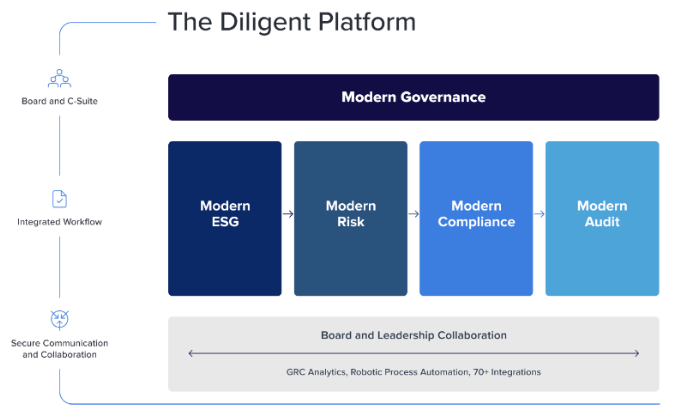
Diligent ayuda a líderes, directivos y terceros a colaborar y hacer seguimiento de la información en toda su organización para tomar decisiones informadas y cumplir los objetivos empresariales. Su sistema puede utilizarse para gestionar reuniones de junta, comités y liderazgo, así como entidades individuales y filiales de corporaciones multinacionales. Dentro de su software, los usuarios pueden automatizar flujos de trabajo, comunicarse de forma segura y personalizar sus propios tableros para hacer seguimiento de las métricas que más les importan.
Su software es muy adecuado para organizaciones a nivel empresarial que necesitan recursos adicionales para gestionar sus procesos de gobernanza. La suite de software de Diligent incluye herramientas para apoyar auditoría, gestión de riesgos, cumplimiento y objetivos de ESG (ambiental, social y de gobernanza). Su plataforma también puede utilizarse para visualizar estructuras corporativas, gestionar fusiones y adquisiciones (M&A) y estar preparados para auditorías. Para ayudar a los consejos a operar de manera más eficiente, su solución de Gobierno Moderno digitaliza libros de actas y materiales de reuniones, incluidos agendas y actas de reuniones, evaluaciones de la junta y cuestionarios.
Diligent tiene integraciones con Microsoft Teams, Messenger, Okta y SecurityScorecard. Hay otras integraciones disponibles, aunque las plataformas de software específicas no se mencionan en su sitio web.
Los detalles de precios para Diligent están disponibles bajo solicitud. También puede solicitar una demostración gratuita y una prueba gratuita a través de su sitio web.

Ideal para la transcripción automática de reuniones por videollamada

Azeus Convene es una plataforma de gobernanza para juntas directivas creada para juntas y ejecutivos que dependen de reuniones por videollamada y necesitan registros precisos sin trabajo administrativo adicional. Es especialmente adecuada para organizaciones que desean que las discusiones de las reuniones se capturen de forma automática, que sean fáciles de buscar y se almacenen de manera segura para cumplir con requisitos normativos y para el seguimiento posterior.
Por qué elegí Azeus Convene
Elegí Azeus Convene porque elimina el trabajo manual de documentar las reuniones de la junta mediante su grabación y transcripción automática de video. Puedes llevar a cabo las reuniones directamente en la plataforma o al mismo tiempo que herramientas como Zoom o Microsoft Teams, mientras que Convene genera una transcripción escrita para la revisión posterior a la reunión y la conservación de registros.
También me gusta que se puedan vincular anotaciones, votos y tareas de seguimiento directamente a las discusiones, manteniendo todo conectado en un solo lugar. Combinado con controles de seguridad de nivel empresarial, es una excelente opción para juntas que manejan información sensible o regulada.
Funciones clave de Azeus Convene
Aquí hay algunas funciones clave a destacar:
- Creador de agenda: Crea agendas estructuradas para juntas con documentos de respaldo usando herramientas de arrastrar y soltar.
- Votación electrónica y resoluciones: Recoge las decisiones de la junta de forma segura durante o después de las reuniones.
- Gestión de tareas: Asigna y haz seguimiento a las tareas de seguimiento vinculadas a los resultados de la reunión.
- Acceso sin conexión: Revisa, haz anotaciones y aprueba documentos sin conexión a internet.
Integraciones de Azeus Convene
Las integraciones incluyen Microsoft Teams, Zoom, Microsoft Exchange, Microsoft Outlook, SharePoint, Google Drive, DocuSign y Microsoft Active Directory (SSO).
Pros and Cons
Pros:
- Transcribe automáticamente las reuniones grabadas de la junta para fácil consulta
- Vincula transcripciones, votos y tareas de seguimiento a los registros de la reunión
- Controles de acceso robustos para materiales confidenciales de la junta directiva
Cons:
- La interfaz resulta más funcional que moderna
- La configuración puede requerir ajustes administrativos para juntas grandes

La mejor opción para funciones avanzadas de gestión de contratos

ContractZen es un servicio basado en la nube que combina la gestión de reuniones de junta con la gestión de contratos y salas de datos virtuales. Su sistema está construido sobre una tecnología robusta dirigida por metadatos que simplifica el almacenamiento de documentos mediante etiquetas meta buscables, junto con otras funciones útiles como la capacidad de establecer recordatorios para fechas críticas de contratos y así asegurar que no se pierda ningún plazo importante.
Puedes utilizar ContractZen para programar reuniones de junta, desarrollar órdenes del día y hacer el seguimiento de las actas de las reuniones. Su sistema también admite la gestión de tareas, incluyendo herramientas para priorizar asuntos y colaborar con otros miembros de la junta. Para ayudar a los equipos que trabajan en empresas conjuntas o situaciones de fusiones y adquisiciones, ContractZen también incluye salas de datos virtuales en las que puedes almacenar documentos financieros, fiscales y otros legales requeridos durante los procesos de due diligence.
ContractZen se integra con plataformas de firma digital como Adobe Sign, Assently, DocuSign, SignHero y Visma Sign. También cuenta con integraciones nativas con Microsoft Office 365, Microsoft Outlook y otros sistemas de inicio de sesión único como Microsoft Azure.
El precio de ContractZen comienza en $9.50 USD/usuario/mes. Si trabajas para una organización sin fines de lucro, contacta con ellos para solicitar un descuento para organizaciones sin fines de lucro. También puedes solicitar una demostración gratuita o una prueba gratuita de 30 días a través de su sitio web.

Govenda
Mejor para un portal de junta escalable
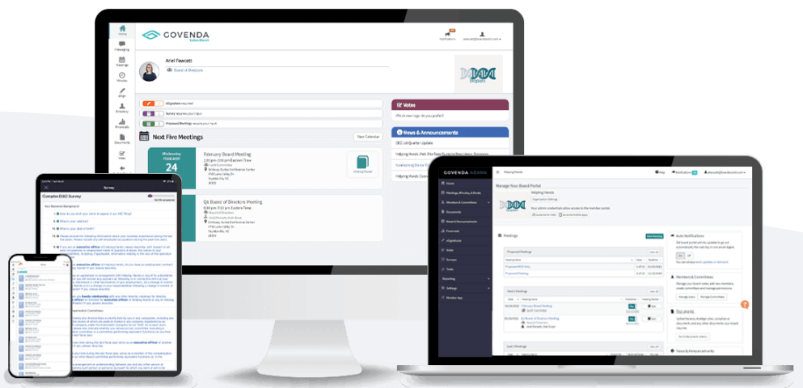
El software escalable de portal de junta de Govenda actúa como un repositorio central para la planificación previa a las reuniones, discusiones durante la reunión, actas posteriores y otras funciones de gestión de documentos. Dentro del sistema de Govenda, los usuarios pueden confirmar asistencia (RSVP) a las reuniones, acceder a documentos como actas de reuniones y libros de actas electrónicos, y revisar noticias y anuncios de la empresa. Su plataforma también permite la colaboración con otros miembros a través de chats grupales o individuales.
Las características adicionales de su software incluyen la votación electrónica para ayudar a finalizar el proceso de resoluciones del consejo, y la capacidad de firmar documentos electrónicamente. Su modo de presentación sincroniza todos los dispositivos de los asistentes con el mismo material de presentación, lo que facilita mantener a todos en la misma página. La única desventaja es que actualmente la videoconferencia no está integrada en su sistema, aunque aparentemente estará «próximamente disponible».
Los detalles sobre precios de Govenda solo están disponibles a solicitud. También puedes solicitar una demostración gratuita a través de su sitio web.

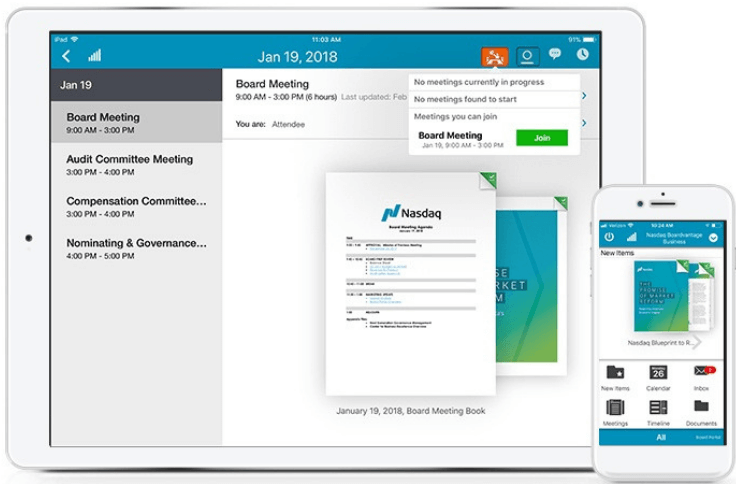
El portal para juntas de Nasdaq Boardvantage está diseñado tanto para directores de junta, comités y equipos de liderazgo ejecutivo, como para los equipos administrativos que los apoyan, incluidos secretarios, administradores y profesionales de tecnologías de la información y seguridad. Actualmente es utilizado por varias compañías grandes y reconocidas, incluidas Starbucks, P&G, Lenovo, Suncor Energy y AAA. Su sistema simplifica el intercambio de información confidencial y actúa como un repositorio centralizado para documentos importantes de la junta. También soporta procesos de votación y aprobación, así como encuestas y cuestionarios para recopilar opiniones.
Además de las funciones típicas que se esperan en un portal de gestión de juntas, Nasdaq Boardvantage también ofrece servicios para ayudarle a implementar evaluaciones de los miembros y asegurar que su junta directiva funcione correctamente. Su equipo asesor para juntas puede trabajar con su comité ejecutivo para desarrollar un proceso de evaluación personalizado en función de los objetivos y necesidades específicas de su organización. Una vez iniciado el proceso de evaluación, los comentarios de los directores se recogen y se compilan en un informe que presenta un mapa de calor, una matriz de habilidades, un gráfico de prioridades, respuestas anonimizadas, puntos de acción y hallazgos clave.
Nasdaq Boardvantage está disponible en las instalaciones o como SaaS (software como servicio), dependiendo de las necesidades de su organización. Su sistema también tiene integraciones con Microsoft Teams y Zoom, para simplificar el proceso de videoconferencias.
Los detalles de precios de Nasdaq Boardvantage están disponibles sólo bajo solicitud. También puede solicitar una demostración gratuita a través de su sitio web.

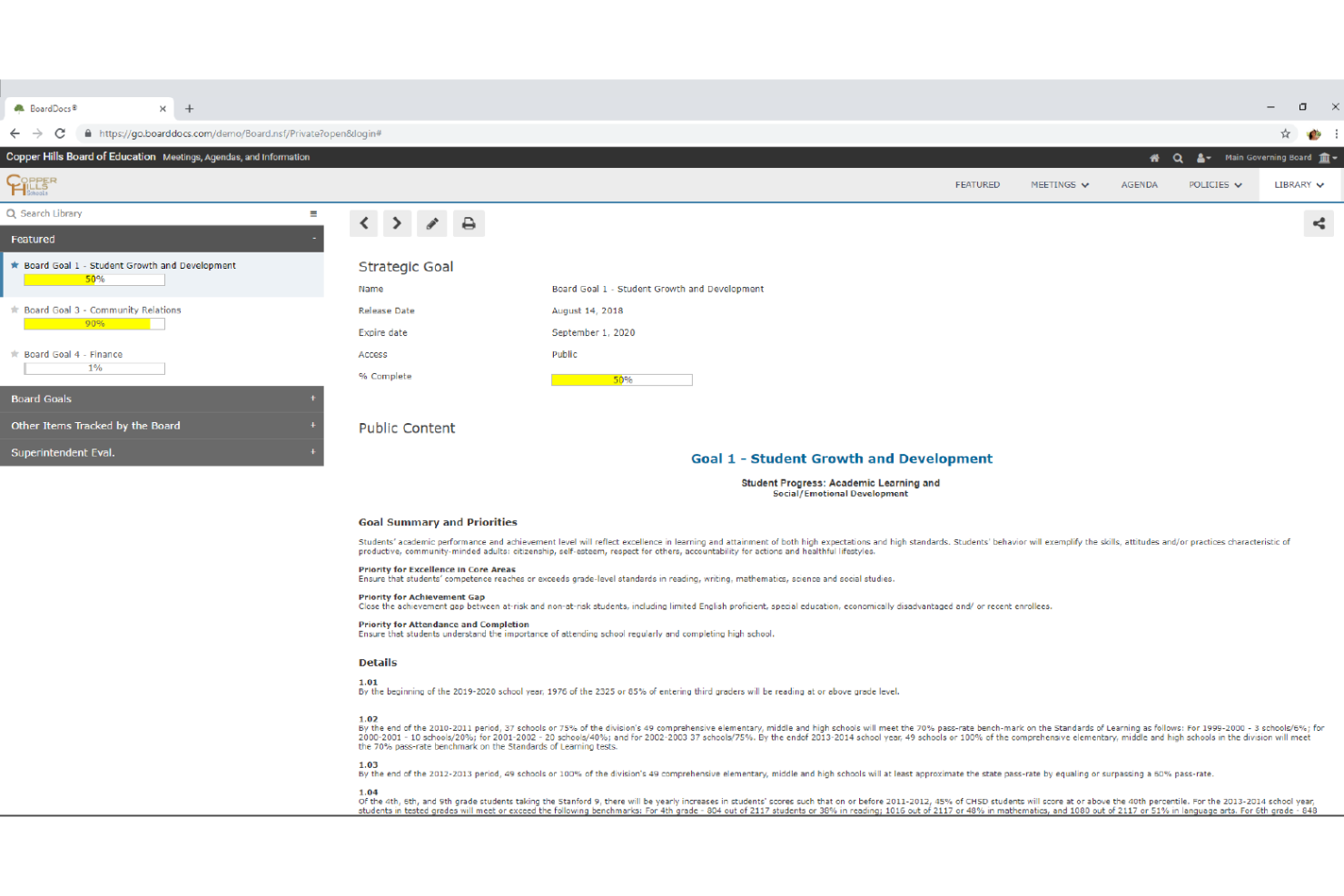
BoardDocs es una solución de gestión de juntas y gobernanza basada en la web, diseñada para empresas del sector educativo pequeñas y medianas. Facilita la creación de agendas para reuniones, la comunicación de objetivos, el envío de invitaciones y la gestión de actividades clave.
BoardDocs permite a los usuarios crear agendas de reuniones detalladas, gestionar materiales de reuniones y anotar documentos. Estas capacidades de gestión de reuniones son especialmente útiles para organizaciones que necesitan mantener registros meticulosos y garantizar que todos los miembros de la junta estén bien preparados para las reuniones. La posibilidad de buscar información de reuniones pasadas y gestionar eventos en el calendario mejora aún más la eficiencia de las operaciones de la junta, facilitando el seguimiento de decisiones y la supervisión de tareas pendientes.
Otra ventaja importante de BoardDocs es su enfoque en la seguridad y la gestión de usuarios. El software emplea cifrado para datos sensibles, autenticación de múltiples factores y configuraciones personalizables de permisos para garantizar que solo las personas autorizadas tengan acceso a documentos e información específicos.
Además, BoardDocs ofrece plantillas de documentos personalizables y opciones de personalización de marca, lo que permite a las organizaciones adaptar el software a sus necesidades específicas y mantener una apariencia profesional coherente.

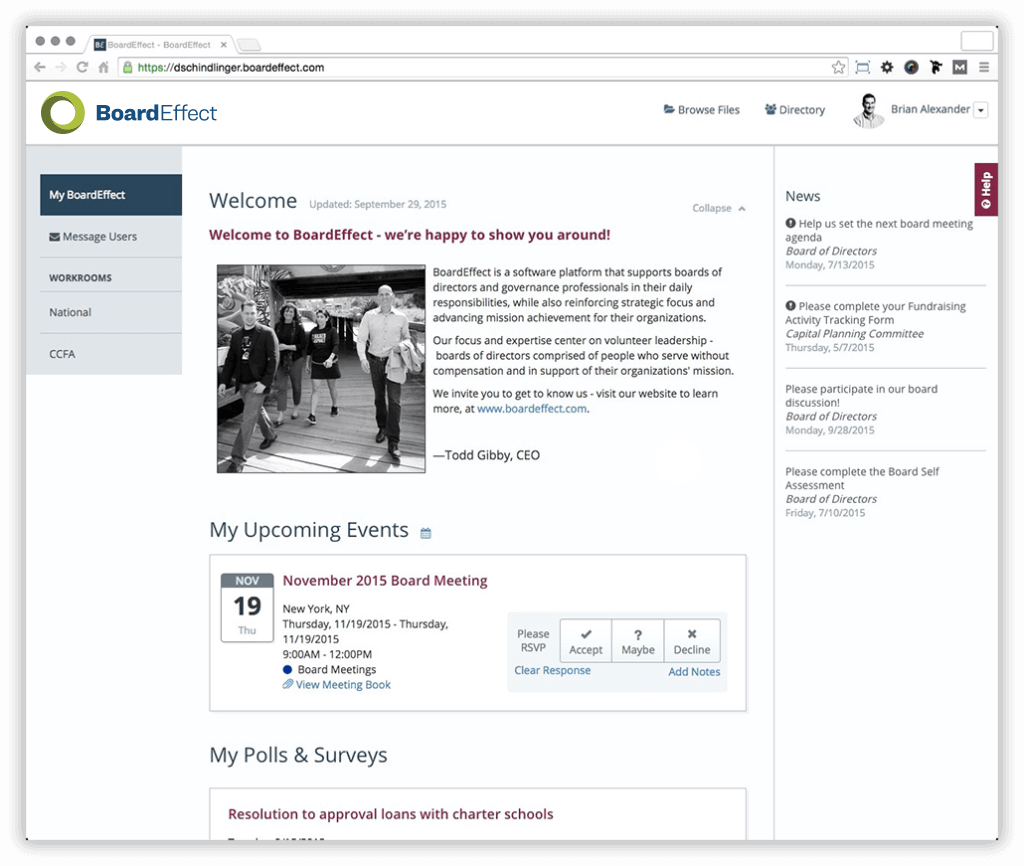
BoardEffect es una solución moderna de software de gobernanza para juntas directivas que se adapta perfectamente a organizaciones sin fines de lucro, instituciones de educación superior y juntas de gobierno de atención médica. Su sistema integral está diseñado para respaldar todas las fases del ciclo típico de una junta directiva.
Sus herramientas para el ciclo de reuniones ayudan a programar reuniones, crear libros de juntas en línea, hacer el seguimiento de tareas y gestionar aprobaciones. Para ayudar con las responsabilidades anuales de la junta, BoardEffect incluye herramientas para encuestas y evaluaciones, presupuestación y auditoría, y cumplimiento normativo. Además, puede utilizar su sistema como repositorio digital para todos los documentos corporativos, como políticas y procedimientos, que pueden requerir una revisión anual.
Un área que me llamó la atención al evaluar el software de BoardEffect son las funciones en su ciclo de desarrollo de la junta. Dado que los miembros suelen servir términos de 3 a 5 años, es importante contar con un ciclo bien estructurado para reclutar y capacitar a nuevos miembros de forma continua. BoardEffect puede ayudar con esto al optimizar el proceso de incorporación de nuevos miembros a la junta, proporcionándoles digitalmente toda la información que necesitarán para convertirse en miembros efectivos. Considero que esto es realmente valioso para juntas con alta rotación, y no es algo que haya visto incluirse en otros programas de gestión para juntas directivas.
Los detalles sobre precios de BoardEffect solo están disponibles previa solicitud. También puedes solicitar una demostración gratuita a través de su sitio web.


Ansarada Board es una solución conocida y confiable de software de gestión de juntas que es utilizada por muchas empresas de renombre, incluyendo Visa, Coca Cola, Nestlé, Shell, Quantas, Goldman Sachs, Morgan Stanley, Deloitte, KPMG, Rothschild & Co. y Credit Suisse. De hecho, los 100 bancos más importantes del mundo representan el 80% de sus clientes.
Su plataforma ayuda a los miembros de la junta a crear paquetes de información, establecer agendas de reuniones, registrar actas, asignar tareas, almacenar archivos digitales, votar resoluciones y firmar documentos digitales electrónicamente. Entre las funciones más avanzadas se incluyen alertas de nuevo contenido, analíticas en tiempo real, carpetas inteligentes, sincronización de anotaciones en diferentes dispositivos y comparación de documentos lado a lado. Además, el sistema registra una pista de auditoría que muestra quién ha revisado o anotado un documento y cuándo, lo que facilita a los equipos de soporte administrativo el seguimiento de actualizaciones.
Ansarada Board cuenta con integraciones con herramientas de software comúnmente utilizadas como Box, Dropbox, Google Drive, OneDrive y otras. También dispone de aplicaciones nativas para iPhone/iPad y dispositivos Windows 10.
Ansarada Board ofrece un plan freemium con funciones limitadas para una junta o comité individual, o planes de pago desde $85 USD/usuario/mes.

El mejor con características de seguridad de grado militar
iDeals Virtual Board Room es una plataforma basada en la nube que facilita la comunicación digital y el intercambio de documentos entre los miembros de la junta distribuidos. Está impulsada por su plataforma matriz, iDeals Virtual Data Room, que es una plataforma segura destinada a transacciones administrativas de alto nivel como fusiones y adquisiciones (M&A).
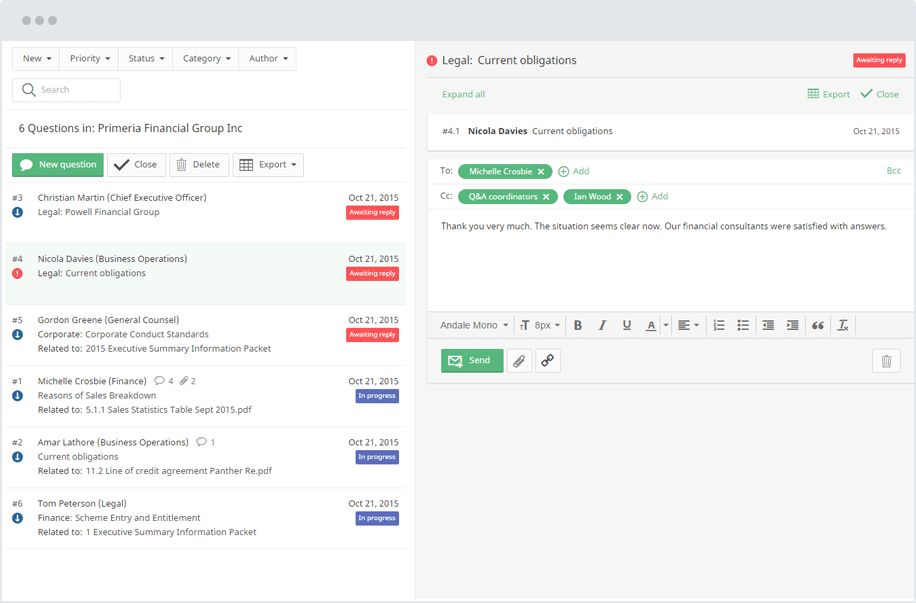
iDeals Virtual Board Room permite a los usuarios distribuir materiales de la junta previos a las reuniones, hacer seguimiento de actualizaciones en actividades clave y acceder a documentación corporativa tanto en línea como sin conexión. Su función de preguntas y respuestas (Q&A) mostrada arriba facilita la comunicación bidireccional entre los miembros de la junta, donde las preguntas pueden ser clasificadas y escaladas según su estado. También cuenta con una función de búsqueda de texto completo para localizar información rápidamente, y un registro de auditoría compatible con SOX.
Su sistema presume características de seguridad de nivel militar, que cumplen con los estándares ISO/IEC 27001:2013, GDPR, HIPAA, SOC 1 y 2. Para prevenir la distribución no autorizada de documentos, utilizan marcas de agua dinámicas en el contenido y la función Fence View, que evita que los elementos se compartan mediante captura o impresión de pantalla. También cuentan con una función de borrado remoto que puede revocar el acceso a archivos a nivel de usuario individual en todos los dispositivos.
iDeals se integra con muchos proveedores de inicio de sesión único, como Active Directory, AuthAnvil, Bitium, Centrify, JumpCloud, MiniOrange, Okta, OneLogin, Ping Identity y RSA.
Los detalles de precios de iDeals solo están disponibles bajo solicitud. También puedes solicitar una prueba gratuita de 30 días a través de su sitio web.
Otros softwares de gobernanza de juntas directivas
Aquí hay algunas opciones adicionales de software de gobernanza de juntas directivas que no entraron en mi lista corta, pero que aún vale la pena revisar:
- Board Intelligence
Ideal para actas de reuniones asistidas por IA
- BoardMaps
Ideal para procesos de reuniones de junta de principio a fin
- Board Director
Software de portal para juntas todo en uno para organizar reuniones, facilitar la colaboración del equipo y almacenar documentos de forma segura, disponible como prueba gratuita.


Cómo Evalúo el Software de Gobernanza de Juntas Directivas
Divido mi evaluación en dos capas: criterios básicos como libros de la junta seguros y votos auditados con registro, y diferenciadores que revelan qué herramientas realmente funcionan para directores y ejecutivos de RR. HH.
Funcionalidad Básica (Requisitos Esenciales para Esta Lista)
Cuando selecciono herramientas para mi lista, califico cada una en una escala de 0 (no ofrece esta funcionalidad) a 5 (destaca en esta área) para cada funcionalidad principal que aparece a continuación. Luego, calculo la puntuación total de la herramienta como un porcentaje. Cada herramienta debe lograr una puntuación total mínima del 65% para ser considerada para su inclusión.
- Gestión de Reuniones de Junta: Evalúo qué tan bien maneja cada herramienta el ciclo completo de la reunión, desde construir agendas y ensamblar los paquetes de la junta hasta el seguimiento de confirmaciones de asistencia y la gestión de calendarios específicos de comités.
- Repositorio Seguro de Documentos: El almacenamiento de archivos de cada plataforma debe ofrecer acceso cifrado basado en permisos para que los directores puedan recuperar informes de compensación o borradores de políticas sin exponerlos a usuarios no autorizados.
- Votación y Resoluciones: Verifico si la herramienta permite votaciones digitales en mociones, consentimientos escritos unánimes y firmas electrónicas integradas para aprobar resoluciones entre reuniones programadas.
- Actas y Anotaciones: Las buenas plataformas permiten a los administradores redactar actas estructuradas durante una sesión y a los directores anotar los libros de la junta de manera privada o colaborativa antes de una reunión.
- Controles de Acceso Basados en Roles: Observo el nivel de segmentación del acceso que realiza la plataforma, como restringir los archivos del comité de compensaciones a directores que solo estén en el comité de auditoría.
- Cumplimiento y Registro de Auditoría: Cada acción, desde consultas de documentos hasta el envío de votos, debe quedar registrada en logs con sello de tiempo que los administradores puedan exportar para reguladores o auditores internos.
Una vez que tengo una lista de herramientas que cumplen con los criterios, considero qué distingue a cada plataforma.
Factores Diferenciadores (Lo Que Distingue a los Proveedores)
Así comparo y contrasto los diferentes proveedores:
Características Destacadas
Busco herramientas integradas de planificación de sucesión que permitan a los responsables de RR. HH. trazar líneas de liderazgo y presentar paneles de preparación durante las sesiones de la junta. También son importantes las encuestas de evaluación de la junta—las plataformas que automatizan las revisiones entre pares y las evaluaciones de comités ahorran semanas de seguimiento manual. Para los directores que viajan con frecuencia, el acceso sin conexión al libro de la junta a través de apps móviles cifradas es un diferenciador práctico que mantiene la preparación de reuniones en marcha entre sesiones.
Más Allá de las Funcionalidades
Certificaciones de seguridad como SOC 2 Tipo II e ISO 27001 me indican que un proveedor toma en serio la protección de datos, lo cual es relevante cuando los materiales de la junta incluyen detalles de compensaciones ejecutivas y discusiones de fusiones y adquisiciones. También evalúo integraciones con sistemas de información de recursos humanos (HRIS)—las plataformas que se conectan con herramientas como Workday o BambooHR facilitan la importación de datos de personal y compensación en los informes de la junta. La escalabilidad es otro factor que considero, en particular si una plataforma soporta configuraciones multi-junta y multi-entidad para organizaciones con estructuras de gobernanza complejas.
Cómo elegir un software de gobernanza de juntas directivas
Es fácil perderse en largas listas de funciones y estructuras de precios complejas. Para ayudarte a mantenerte enfocado durante tu proceso de selección de software, aquí tienes una lista de criterios a tener en cuenta:
| Factor | Qué considerar |
|---|---|
| Escalabilidad | ¿Puede el software crecer junto con tu organización? Considera si admite un número creciente de usuarios y datos sin problemas de rendimiento. |
| Integraciones | ¿Funciona con tus herramientas actuales? Asegúrate de que se conecte con tu correo electrónico, calendario y sistemas de gestión documental para flujos de trabajo fluidos. |
| Personalización | ¿Puedes adaptar el software a tus necesidades? Busca opciones para personalizar tableros, informes y permisos. |
| Facilidad de uso | ¿La interfaz es intuitiva para todos los usuarios? Un diseño simple reduce el tiempo de capacitación y aumenta la adopción entre los miembros de la junta. |
| Implementación y onboarding | ¿Cuánto tiempo lleva la puesta en marcha? Evalúa la facilidad para migrar datos, la disponibilidad de recursos de formación y el soporte durante el proceso de incorporación. |
| Costo | ¿El precio se ajusta a tu presupuesto? Considera el costo total de propiedad, incluidas tarifas de configuración, modelos de suscripción y posibles costos ocultos. |
| Salvaguardias de seguridad | ¿Tus datos y comunicaciones están seguras? Verifica el cumplimiento de normativas de protección de datos y la disponibilidad de cifrado y controles de acceso. |
| Requisitos normativos | ¿Cumple con las regulaciones específicas del sector? Asegúrate de que el software soporte los estándares de cumplimiento necesarios para tu sector, como SOX o HIPAA. |
¿Qué es un software de gobierno de juntas?
El software de gobierno de juntas es una herramienta que ayuda a los consejos directivos y sus equipos de apoyo a gestionar reuniones, compartir documentos y manejar las comunicaciones del consejo en un solo lugar. Los líderes y administradores de organizaciones sin fines de lucro, empresas y otras entidades lo utilizan para planificar reuniones, establecer agendas, tomar actas y llevar el control de las responsabilidades del consejo sin verse abrumados por el papeleo. Puedes acceder a todo de forma segura en línea, de modo que dedicas menos tiempo a tareas administrativas y más a tomar decisiones.
Características
Al seleccionar un software de gobierno de juntas, debes prestar atención a las siguientes características clave:
- Al seleccionar un software de gobierno de juntas, debes prestar atención a las siguientes características clave:
- Gestión de documentos: Organiza, almacena y comparte documentos del consejo en un repositorio digital seguro. Puedes actualizar archivos fácilmente, controlar el acceso y localizar materiales importantes para reuniones próximas sin interminables cadenas de correos electrónicos ni archivos adjuntos perdidos.
- Creación de agendas: Crea, edita y distribuye agendas de reuniones con plantillas personalizables. Esto te ayuda a mantener las discusiones estructuradas, asegurar que nada se pase por alto y agilizar la preparación de cada reunión del consejo.
- Gestión de actas: Registra, edita y aprueba electrónicamente las actas de las reuniones. Con esta función, puedes mantener un registro accesible de decisiones y seguimientos, facilitando mucho la rendición de cuentas.
- Votaciones y resoluciones: Facilita votaciones en línea seguras sobre mociones y resoluciones, tanto durante las reuniones como de forma remota. Los miembros del consejo emiten su voto con un clic, y obtienes un recuento transparente y auditable sin confusiones.
- Seguimiento de tareas y acciones: Asigna, monitorea y gestiona los temas de acción después de las reuniones. Esto te ayuda a hacer seguimiento de las tareas, establecer recordatorios y asegurarte de que nada se quede sin atender tras las reuniones.
- Integración de calendario: Sincroniza los horarios de reuniones y plazos con tu herramienta de calendario preferida. Así, el consejo se mantiene al tanto de próximos eventos, solicitudes de confirmación de asistencia y recordatorios importantes—todo en un solo lugar.
- Control de acceso por roles: Personaliza los permisos para controlar quién puede ver, editar o gestionar los materiales del consejo. Esto mantiene la información sensible segura y, al mismo tiempo, permite que las personas adecuadas realicen su trabajo.
- Herramientas de colaboración: Habilita la mensajería segura, foros de discusión o funciones de anotación dentro de la plataforma. Esto brinda a los miembros un espacio para comunicarse en tiempo real y revisar documentos, incluso fuera de reuniones formales.
Beneficios
Implementar un software de gobierno de juntas aporta diversos beneficios para tu equipo y tu empresa. Aquí algunos que puedes esperar:
- Colaboración mejorada: Las herramientas de trabajo colaborativo en tiempo real permiten que los miembros del consejo trabajen juntos de manera eficiente, sin importar dónde se encuentren.
- Mayor seguridad: La comunicación y el intercambio de documentos seguros protegen la información confidencial y garantizan la privacidad.
- Ahorro de tiempo: La creación automatizada de agendas y la programación de reuniones reducen las tareas administrativas, liberando tiempo para discusiones estratégicas.
- Mejor cumplimiento normativo: Las funciones de seguimiento del cumplimiento te ayudan a mantenerte al día con las regulaciones del sector, minimizando riesgos y problemas legales.
- Mayor accesibilidad: El acceso móvil permite que los miembros del consejo participen en reuniones y accedan a documentos desde cualquier lugar.
- Experiencia personalizada: Los paneles y controles de acceso personalizables ofrecen una experiencia adaptada a las necesidades de diferentes usuarios.
Costos y Precios
Seleccionar un software de gobierno de juntas requiere comprender los distintos modelos y planes de precios disponibles. Los costos varían según las funciones, el tamaño del equipo, los complementos y más. La siguiente tabla resume los planes habituales, sus precios promedio y las características típicas incluidas en las soluciones de software de gobierno de juntas:
Tabla comparativa de planes para software de gobierno de juntas
| Tipo de plan | Precio promedio | Características comunes |
|---|---|---|
| Plan gratuito | $0 | Almacenamiento de documentos básico, programación limitada de reuniones y controles básicos de acceso de usuarios. |
| Plan personal | $5-$25/user/month | Compartición segura de documentos, seguimiento básico del cumplimiento y acceso móvil. |
| Plan empresarial | $30-$60/user/month | Programación avanzada de reuniones, herramientas de colaboración en tiempo real y paneles personalizables. |
| Plan corporativo | $70-$120/user/month | Capacidades de integración completa, creación automatizada de agendas y salvaguardas de seguridad integrales. |
Preguntas frecuentes sobre el software de gobernanza de juntas
Aquí tienes algunas respuestas a preguntas comunes sobre el software de gobernanza de juntas:
¿Es seguro el almacenamiento de datos en el software de gobernanza de juntas?
Sí, el software de gobernanza de juntas de confianza incluye funciones de seguridad como el cifrado y los controles de acceso para proteger tus datos. Busca un software que cumpla con los estándares y normativas de la industria para asegurar que la información de tu organización permanezca confidencial y segura.
¿Es posible migrar de herramientas antiguas de junta a un software moderno de gobernanza?
Así es. Muchas soluciones modernas ayudan a importar documentos existentes de la junta, actas previas y datos de los miembros al nuevo sistema. Esto permite que tu junta conserve los datos históricos mientras pasa a una plataforma más eficiente.
¿Cómo apoya el software de gobernanza de juntas los requisitos de auditoría y cumplimiento?
Puedes confiar en el software de gobernanza de juntas para registrar un historial claro de acciones—como votaciones, visualización de documentos y aprobaciones—que ayuda a tu equipo a cumplir con las necesidades de cumplimiento. También te proporciona controles de acceso basados en roles para que solo las personas adecuadas puedan ver información sensible.
¿Cuánto tiempo toma implementar el software de gobernanza de juntas?
El tiempo para implementar un software de gobernanza de juntas varía dependiendo de la complejidad de tu organización y del software elegido. Una configuración sencilla puede tomar solo unos días, mientras que integraciones más complejas podrían tomar semanas. Asegúrate de contar con un equipo dedicado para supervisar el proceso y aprovechar los recursos de capacitación disponibles.
¿Qué sigue?
Si estás en proceso de investigar software de gobernanza de juntas, conéctate con un asesor de SoftwareSelect para recibir recomendaciones gratuitas.
Completarás un formulario y tendrás una breve conversación donde se detallarán las necesidades específicas de tu organización. Luego recibirás una lista corta de software para revisar. Incluso te asistirán durante todo el proceso de compra, incluyendo las negociaciones de precio.