

10 programas de seguimiento del kilometraje para 2026

10 Lista de software de seguimiento del kilometraje


El software de seguimiento del kilometraje registra, categoriza e informa automáticamente de las distancias recorridas durante los desplazamientos de trabajo para garantizar reembolsos precisos y el cumplimiento fiscal. Si buscas los mejores rastreadores de kilometraje, probablemente necesites simplificar el registro de viajes, hacer un seguimiento de los kilómetros de trabajo, reducir los errores manuales y mantener tus registros listos para una auditoría, tanto si formas parte de un equipo como si trabajas por cuenta propia. Esta lista te ayudará a comparar las principales opciones, entender qué funciones son más importantes para tus necesidades y elegir una solución que se adapte a tu flujo de trabajo y a tus requisitos de cumplimiento.
Por qué confiar en nuestras reseñas de software
Nuestro equipo lleva probando y evaluando software desde 2012. Como expertos en RR. HH., sabemos lo difícil —y lo importante— que es elegir el software adecuado.
Para esta guía, evaluamos las herramientas mediante pruebas prácticas e investigación independiente, puntuando las herramientas según nuestros criterios de selección. También nos basamos en la experiencia de líderes de opinión del sector y de profesionales de RR. HH. en activo.
Nuestras reseñas reflejan nuestro criterio editorial humano, no un discurso de ventas.
Revisores expertos:
Tabla comparativa del software de seguimiento del kilometraje
Esta tabla comparativa resume los detalles de precios de mis principales selecciones de software de seguimiento del kilometraje:
| Tool | Best For | Trial Info | Price | ||
|---|---|---|---|---|---|
| 1 | La mejor opción con alertas en tiempo real de compras con tarjeta de crédito | Demostración gratuita disponible | Desde $11.99/usuario/mes (facturado anualmente) | Website | |
| 2 | Mejor para integraciones con plataformas de nómina y RR.HH. | Prueba gratuita de 14 días disponible | Desde $3.66/usuario/mes (facturado anualmente) | Website | |
| 3 | Mejor para integraciones con sistemas financieros | Demostración gratuita disponible | Desde $8/usuario/mes (facturado anualmente) | Website | |
| 4 | Ideal para aprender rutas y etiquetar automáticamente | Demostración gratuita disponible | Precios bajo consulta | Website | |
| 5 | Mejor para pagos de reembolso directos | Demostración gratuita disponible | Precio a consultar | Website | |
| 6 | La mejor con sincronización automática de gastos | Plan gratuito disponible y prueba gratis de 7 días | Desde $8.99/mes | Website | |
| 7 | Lo mejor con rastreo GPS ahorrador de batería | Demo gratuita disponible | Precio a consultar | Website | |
| 8 | Ideal para el seguimiento integrado de tiempo y gastos | Plan gratuito disponible | Desde $4.99/usuario/mes (facturado anualmente) | Website | |
| 9 | Ideal para la clasificación de viajes mediante deslizamiento | Plan gratuito disponible | Desde $7.50/mes (facturado anualmente) | Website | |
| 10 | Ideal para registros de kilometraje de varios vehículos | Plan gratuito disponible | Desde $11/usuario/mes | Website |
Análisis del software de seguimiento del kilometraje
A continuación se presentan mis resúmenes detallados del software de seguimiento del kilometraje que llegó a mi lista. Mis análisis ofrecen una visión detallada de las funciones, integraciones y mejores casos de uso de cada programa para ayudarte a encontrar el que mejor se adapte a ti.

La mejor opción con alertas en tiempo real de compras con tarjeta de crédito
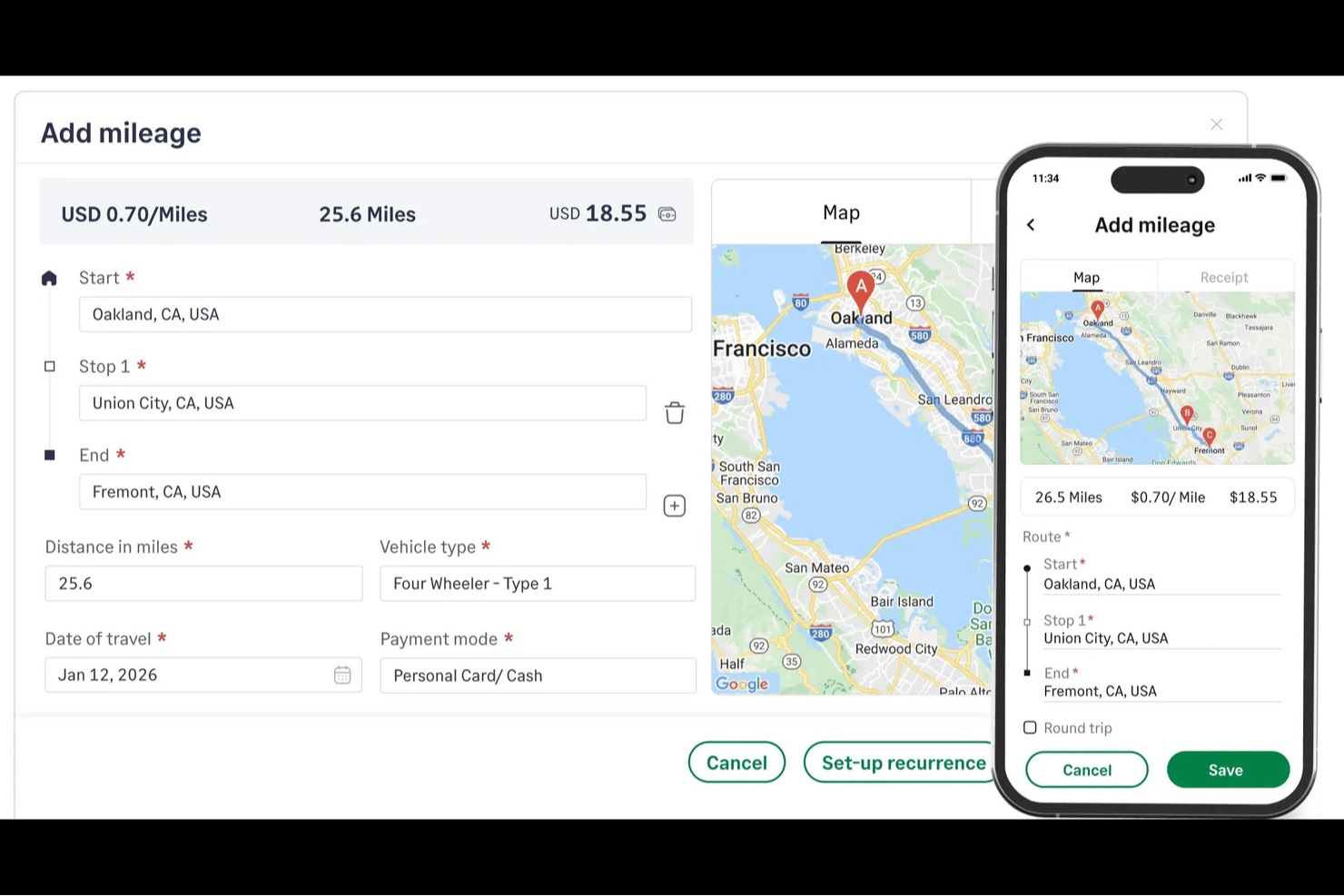
Sage Expense Management es una plataforma de gestión de gastos que combina el registro manual del kilometraje, alertas de transacciones de tarjetas corporativas en tiempo real, captura de recibos y flujos de trabajo de aprobación de varios niveles.
¿Para quién es más adecuada Sage Expense Management?
Sage Expense Management es una buena opción para los equipos financieros de pequeñas y medianas empresas que necesitan informes de gastos estructurados y conciliación de tarjetas corporativas, además del reembolso del kilometraje.
Por qué elegí Sage Expense Management
He incluido Sage Expense Management entre mis principales opciones porque sus alertas de transacciones de tarjetas en tiempo real la distinguen: en el momento en que se utiliza una tarjeta corporativa, los empleados reciben un mensaje de texto y pueden responder con una foto del recibo, vinculando directamente los gastos de la tarjeta con los informes de kilometraje y gastos, sin el intercambio habitual de mensajes. También me gusta cómo la función de deducción de desplazamientos resta automáticamente los kilómetros del trayecto entre el domicilio y la oficina de las distancias declaradas, manteniendo los reembolsos conformes con el IRS sin trabajo administrativo adicional. El motor de tarifas configurable admite el tipo de vehículo, el tipo de combustible, el tamaño del motor y tramos de distancia anual, de modo que los equipos financieros pueden reflejar con precisión su política de reembolsos.
Funciones principales de Sage Expense Management
- Registro de kilometraje con varias paradas: Registra trayectos con hasta 10 paradas por recorrido, mientras Google Maps calcula automáticamente la distancia total.
- Tarifas por tramos de distancia anual: Configura tarifas que cambian automáticamente cuando un empleado supera un umbral anual de kilometraje establecido, reproduciendo las políticas de reembolso escalonadas.
- Complemento de tarifa por pasajero: Establece una tarifa independiente por pasajero y por milla que se aplica además de la tarifa base por kilometraje para los reembolsos por uso compartido del automóvil.
- Aprobaciones de kilometraje de varios niveles: Dirige los informes de gastos de kilometraje a través de cadenas de aprobación de una o varias etapas, y permite que los responsables de aprobación actúen directamente desde Gmail, Slack o la aplicación móvil.
Integraciones de Sage Expense Management
Sage Expense Management ofrece integraciones nativas con Google Maps, QuickBooks Online, Xero, Sage 50, Sage Intacct y Sage 300 CRE para calcular el kilometraje y sincronizar los gastos. Una API permite realizar integraciones personalizadas.
Pros and Cons
Pros:
- Google Maps calcula rutas con varias paradas
- Tarifas de reembolso configurables según el vehículo y tramos anuales
- Los informes de kilometraje conservan los detalles del trayecto exigidos por el IRS
Cons:
- Los trayectos requieren introducir manualmente el inicio y el final
- No permite clasificar los trayectos como empresariales o personales
New Product Updates from Sage Expense Management (formerly Fyle)

Sage Expense Management Adds Reconciliation and Expense Review Updates
Sage Expense Management introduced a new Reconciliation module, faster expense review tools, expanded admin controls, and new AI and security features. These help finance teams reconcile transactions, review expenses, manage permissions, and access corporate card data more efficiently. For more information, visit Sage Expense Management’s official site.
 .
.
Timeero
Mejor para integraciones con plataformas de nómina y RR.HH.

Timeero ofrece un seguimiento de kilometraje basado en GPS diseñado para empresas que necesitan monitorear el desplazamiento y el tiempo en ruta de sus empleados. Es una solución ideal para equipos de servicio de campo, empresas de construcción y organizaciones con fuerzas de trabajo móviles. Timeero ayuda a reducir los registros manuales de kilometraje y favorece el reembolso preciso para equipos que siempre están en movimiento.
¿Para Quién es Mejor Timeero?
Timeero es adecuado para pequeñas y medianas empresas con equipos móviles o de campo que necesitan rastrear kilometraje e integrar datos de viajes con sistemas de nómina y RR.HH.
Por Qué Elegí Timeero
Lo que me atrajo de Timeero para el seguimiento de kilometraje es su excelente integración con plataformas de nómina y RR.HH. Considero que esto es especialmente valioso para empresas que desean que los datos de kilometraje se transfieran directamente al procesamiento de nómina, lo que reduce la entrada manual y los errores. Timeero ofrece integraciones directas con proveedores como Gusto, QuickBooks Payroll y ADP, para que el reembolso de kilometraje pueda gestionarse junto con los procesos de nómina habituales. Esto facilita que los equipos de RR.HH. y finanzas gestionen los gastos de viaje y garanticen que los empleados reciban un pago correcto por su kilometraje.
Características Clave de Timeero
Otras funciones que hacen a Timeero útil para el seguimiento de kilometraje incluyen:
- Seguimiento automático de kilometraje por GPS: La app móvil registra automáticamente el kilometraje en tiempo real a medida que los empleados se desplazan entre lugares de trabajo.
- Geocercas para ubicaciones de trabajo: Configura geocercas para rastrear cuándo los empleados entran o salen de ubicaciones específicas para registros de kilometraje más precisos.
- Repetición de rutas: Revisa mapas detallados de las rutas de los empleados para verificar los viajes y reclamaciones de kilometraje.
- Registros de auditoría de kilometraje y tiempo: Acceso a un historial completo de registros de kilometraje y tiempo para requisitos de cumplimiento y reportes.
Integraciones de Timeero
Las integraciones incluyen QuickBooks, Gusto, ADP, Paycor, Paychex, Paylocity y Sage Intacct.
Pros and Cons
Pros:
- Seguimiento segmentado para días con múltiples paradas
- Rutas precisas con rastreo GPS por huellas digitales
- Las rutas sugeridas ahorran costos de combustible
Cons:
- Costo mayor para funciones de equipo avanzadas
- Edición limitada de kilometraje después de terminar la jornada

Rydoo
Mejor para integraciones con sistemas financieros
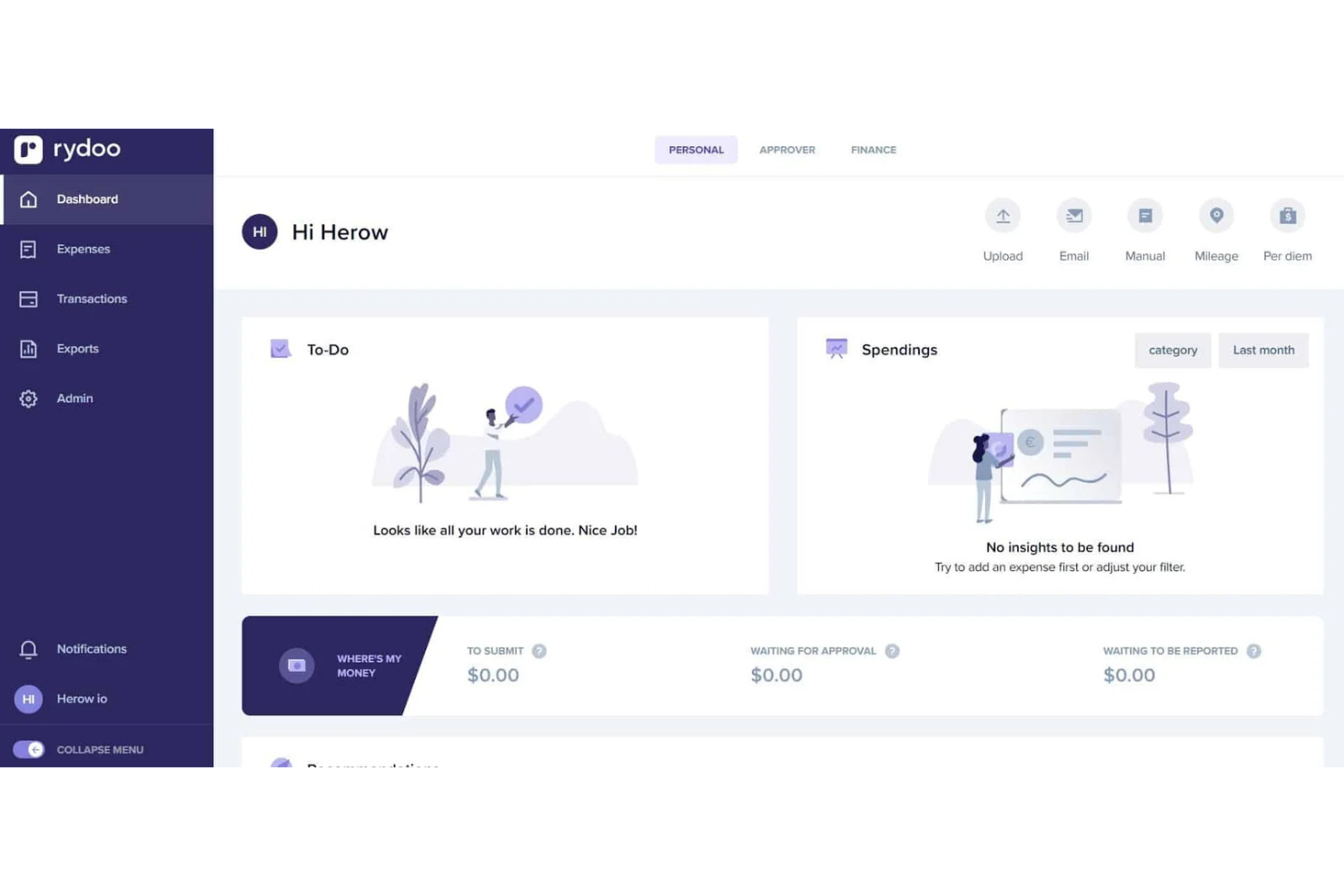
Rydoo es una plataforma de gestión de gastos diseñada para organizaciones que necesitan rastrear kilometraje y costes de viajes de negocios. Es ideal para equipos de finanzas y profesionales de RRHH que desean automatizar la presentación de gastos y garantizar el cumplimiento normativo. Rydoo ayuda a las empresas a simplificar el registro de kilómetros, la aplicación de políticas y los flujos de trabajo de reembolso en un solo lugar.
¿Para quién es Rydoo más adecuado?
Rydoo es una buena opción para empresas medianas y grandes con necesidades complejas de gestión de gastos, especialmente aquellas con equipos distribuidos o viajeros frecuentes de negocios.
Por qué elegí Rydoo
Lo que hace que Rydoo destaque para el seguimiento de kilometraje es su profunda integración con los principales sistemas financieros y contables. Elegí Rydoo porque se conecta directamente con plataformas como SAP, Oracle y Xero, de modo que los gastos de kilometraje se transfieren automáticamente a los registros financieros de la empresa. Esto reduce la entrada manual de datos y ayuda a los equipos financieros a conciliar los reembolsos de kilometraje con otros gastos empresariales. Para las organizaciones que necesitan que el seguimiento de kilometraje se integre en sus flujos de trabajo financieros globales, Rydoo ofrece un nivel de conectividad difícil de igualar.
Funciones clave de Rydoo
Otras funciones que hacen útil Rydoo para el seguimiento de kilometraje incluyen:
- Captura de kilometraje móvil: Los empleados pueden registrar trayectos y kilómetros directamente desde sus teléfonos inteligentes usando la app de Rydoo.
- Aplicación automatizada de políticas: La plataforma detecta y señala reclamaciones de kilometraje fuera de política y aplica automáticamente las normas de la empresa.
- Soporte multidivisa: Rydoo gestiona los reembolsos de kilometraje en diferentes monedas para equipos globales.
- Flujos de aprobación personalizados: Puedes configurar procesos de aprobación multinivel para las reclamaciones de kilometraje y gastos.
Integraciones de Rydoo
Las integraciones incluyen SAP S/4HANA, Oracle NetSuite, Microsoft Dynamics 365, Xero, QuickBooks y Uber.
Pros and Cons
Pros:
- Cumplimiento fiscal y legal global incorporado
- Fusiona sin problemas el kilometraje con los recibos
- OCR de alta velocidad para otros costes de viaje
Cons:
- No tiene inicio y parada GPS totalmente automático
- Demasiado avanzado para un seguimiento simple de kilometraje

Hurdlr
Ideal para aprender rutas y etiquetar automáticamente
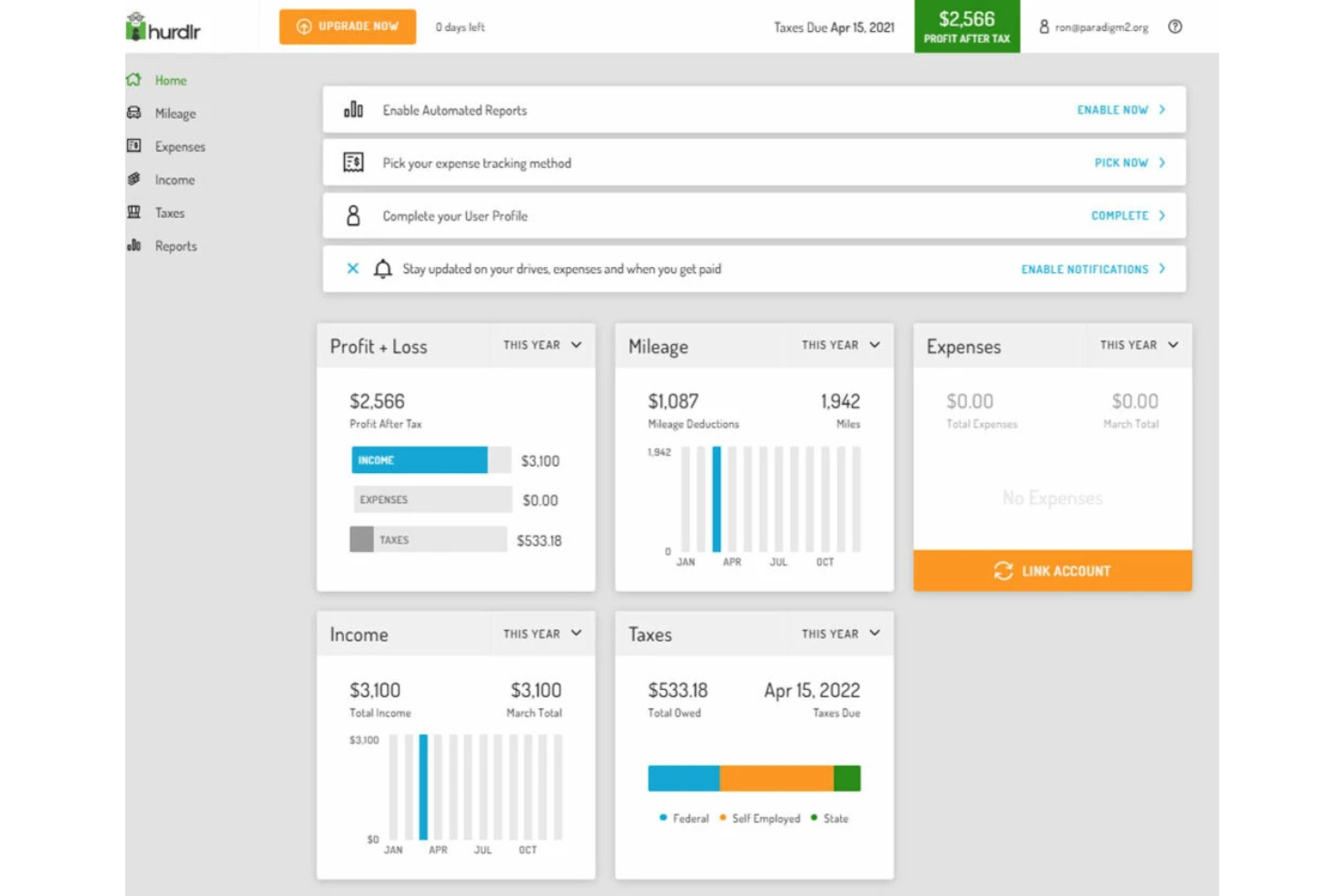
Hurdlr ofrece software de seguimiento de kilometraje diseñado para profesionales autónomos, trabajadores independientes y propietarios de pequeñas empresas que necesitan mantener registros precisos para fines fiscales o de reembolso. La plataforma destaca por sus funciones de automatización, que ayudan a los usuarios a minimizar la introducción manual de datos y reducir errores. Si buscas una herramienta que simplifique el seguimiento del kilometraje y, al mismo tiempo, facilite la gestión de gastos e ingresos, vale la pena considerar Hurdlr.
¿Para quién es más adecuado Hurdlr?
Hurdlr es una opción ideal para profesionales autónomos, trabajadores independientes y propietarios de pequeñas empresas que necesitan realizar un seguimiento automatizado del kilometraje y los gastos para fines fiscales o de reembolso.
Por qué elegí Hurdlr
Lo que hace destacar a Hurdlr para mí son sus funciones de aprendizaje de rutas y etiquetado automático, especialmente útiles para quienes recorren rutas similares con frecuencia. La plataforma reconoce automáticamente las rutas recorridas habitualmente y puede etiquetar los viajes como laborales o personales según tu comportamiento anterior, lo que reduce la clasificación manual. También me gusta que Hurdlr utilice aprendizaje automático para mejorar con el tiempo la categorización de los viajes, haciendo que los registros de kilometraje sean más precisos y requieran menos tiempo de mantenimiento. Para los usuarios que desean automatizar tareas de seguimiento repetitivas y minimizar errores, estas funciones convierten a Hurdlr en una opción convincente.
Características principales de Hurdlr
Otras funciones de Hurdlr que facilitan el seguimiento del kilometraje y la gestión de gastos incluyen:
- Seguimiento automático de gastos: La aplicación realiza un seguimiento automático de los gastos empresariales mediante la sincronización con tus cuentas bancarias y tarjetas de crédito.
- Cálculos fiscales en tiempo real: Hurdlr calcula tus deducciones fiscales y los impuestos estimados a medida que registras viajes y gastos.
- Fuentes de ingresos personalizables: Puedes añadir y gestionar varias fuentes de ingresos, incluidos trabajos independientes, transporte compartido y reparto.
- Informes financieros detallados: Genera y exporta informes que desglosan tu kilometraje, gastos e ingresos para facilitar el mantenimiento de registros.
Integraciones de Hurdlr
Las integraciones incluyen Uber, Square, Stripe, PayPal y Shopify.
Pros and Cons
Pros:
- Etiqueta automáticamente los viajes según los patrones de conducción aprendidos
- Realiza un seguimiento de los ingresos y gastos junto con el kilometraje
- Ofrece estimaciones de deducciones fiscales en tiempo real
Cons:
- Las notificaciones de la aplicación móvil pueden ser inconsistentes
- Carece de funciones de optimización de rutas o despacho

Cardata
Mejor para pagos de reembolso directos
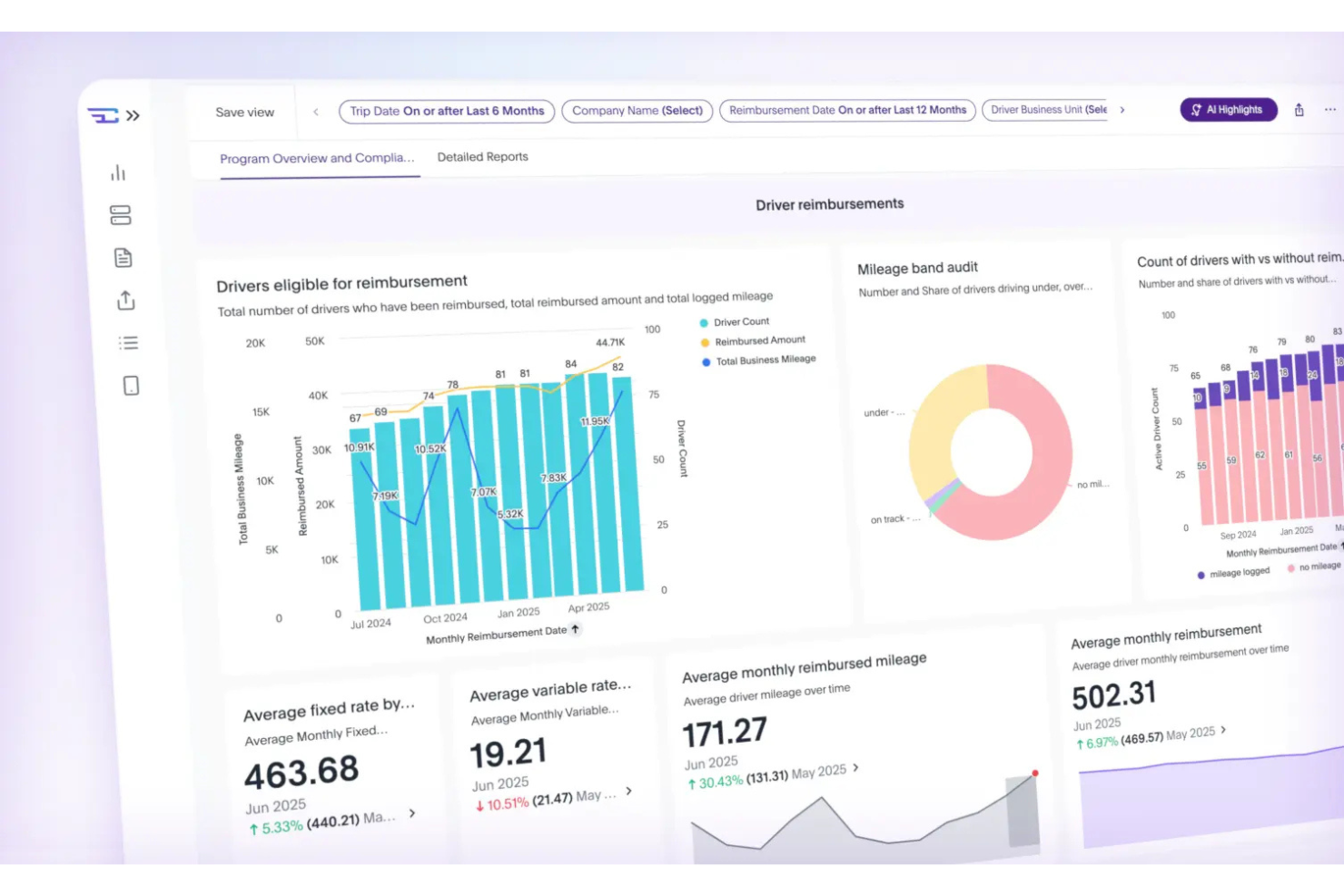
Cardata ofrece una plataforma de reembolso por kilometraje diseñada para organizaciones con empleados que conducen por motivos laborales. El software atrae a equipos de RR. HH., finanzas y operaciones que buscan automatizar el cumplimiento y simplificar la administración de programas de vehículos. Cardata ayuda a las empresas a gestionar registros de kilometraje, reembolsos y aplicación de políticas en un solo lugar.
¿Para quién es mejor Cardata?
Cardata es ideal para organizaciones medianas y grandes que necesitan gestionar y automatizar el reembolso de kilometraje para empleados móviles.
Por qué elegí Cardata
Lo que destaca de Cardata es su enfoque en pagos de reembolso directos, una preocupación clave para las organizaciones con fuerzas laborales móviles. Cardata gestiona todo el proceso de reembolso, desde el seguimiento del kilometraje hasta la distribución del pago, para que los empleados reciban los pagos de manera directa y puntual. Valoro que la plataforma automatice los cálculos de kilometraje conforme a las normativas del IRS e integre controles de políticas para garantizar precisión y cumplimiento. Para los equipos que quieren eliminar los pasos manuales de reembolso y reducir la carga administrativa, Cardata ofrece una solución optimizada de principio a fin.
Características clave de Cardata
Otras funciones de Cardata que respaldan el seguimiento del kilometraje y la gestión de programas de vehículos incluyen:
- Captura automática de kilometraje: La aplicación detecta y registra automáticamente los viajes mediante GPS, lo que reduce la entrada manual.
- Monitoreo del cumplimiento de políticas: Cardata rastrea la actividad del conductor para asegurar la adherencia a las políticas de vehículos y reembolsos de la empresa.
- Herramientas de informes personalizables: Genere informes detallados sobre kilometraje, gastos y actividad de los conductores para auditorías o revisiones de gestión.
- Carga de documentos desde el móvil: Los conductores pueden cargar documentos requeridos, como seguro o registro, directamente a través de la aplicación.
Integraciones de Cardata
Las integraciones incluyen SAP Concur., ADP, Workday y UKG.
Pros and Cons
Pros:
- Auditorías en vivo de seguros y cumplimiento
- Admite planes FAVR y CPM libres de impuestos
Cons:
- La aplicación puede detenerse durante el modo de bajo consumo
- El precio personalizado requiere una cotización directa

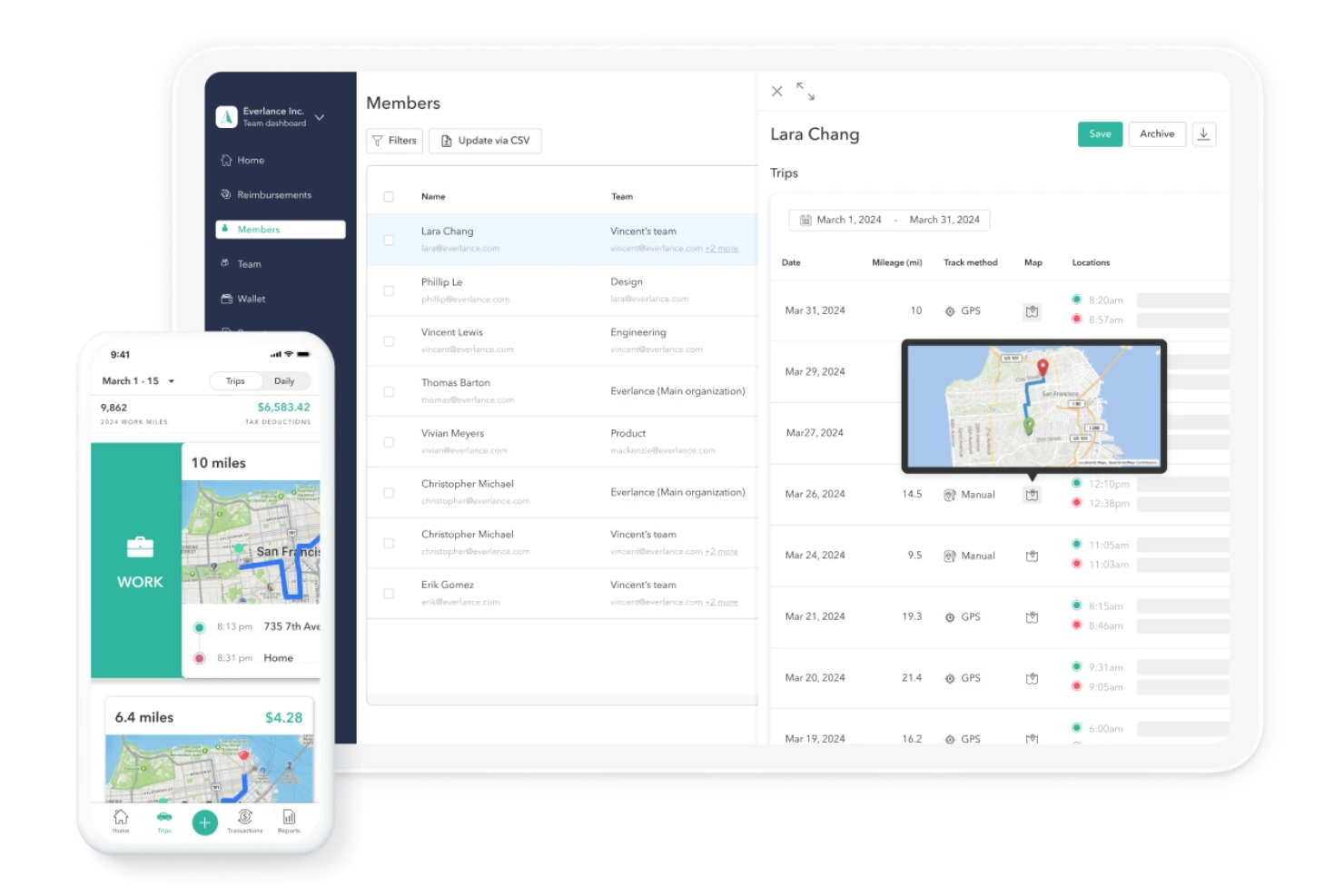
Everlance ofrece una solución de seguimiento de kilometraje diseñada para trabajadores independientes, pequeñas empresas y equipos que necesitan gestionar tanto el kilometraje como los gastos en un solo lugar. La plataforma ayuda a los usuarios a automatizar el registro de viajes y organizar los recibos para informes precisos. Si buscas simplificar el mantenimiento de registros conforme a la IRS y reducir la entrada manual, Everlance está hecha para satisfacer esas necesidades.
¿Para quién es mejor Everlance?
Everlance es una buena opción para trabajadores independientes, propietarios de pequeñas empresas y equipos distribuidos que necesitan rastrear kilometraje y gastos para fines fiscales o de reembolso.
Por qué elegí Everlance
Elegí Everlance porque la sincronización automática de gastos se destaca para los usuarios que quieren gestionar tanto los viajes como los gastos sin tener que usar múltiples aplicaciones. La plataforma importa y categoriza automáticamente los gastos de cuentas bancarias y tarjetas de crédito vinculadas, lo que facilita asociar los viajes con los costos relacionados. También me gusta que Everlance permite adjuntar recibos directamente a los viajes, lo que ayuda a mantener los registros organizados para auditorías o reembolsos. Estas funciones lo hacen especialmente útil para quienes necesitan un enfoque unificado para el seguimiento de viajes y gastos.
Características clave de Everlance
Otras funciones que hacen de Everlance una opción sólida para el seguimiento de kilometraje incluyen:
- Detección automática de viajes: La aplicación utiliza GPS para detectar y registrar recorridos automáticamente sin ingreso manual.
- Registros de kilometraje conformes a la IRS: Everlance genera informes de kilometraje detallados que cumplen con los requisitos de la IRS para deducciones fiscales.
- Clasificación personalizable de viajes: Los usuarios pueden establecer reglas para clasificar los viajes automáticamente como de negocios, personales, o tipos personalizados.
- Panel de gestión de equipos: Los administradores pueden ver, aprobar y gestionar los informes de kilometraje y gastos del equipo desde un panel centralizado.
Integraciones de Everlance
Las integraciones incluyen QuickBooks, Xero, ADP, Gusto, Rippling, Paychex, Zenefits y SAP Concur.
Pros and Cons
Pros:
- Informes conformes a IRS para declaración de impuestos
- Reglas personalizables de clasificación de viajes
- Panel de equipo para supervisión administrativa
Cons:
- Ocasionales viajes no registrados con el seguimiento GPS
- Sin optimización de ruta incorporada


Motus ofrece una aplicación de seguimiento de kilometraje diseñada para empresas con fuerzas de trabajo móviles y equipos distribuidos. La plataforma resulta atractiva para organizaciones que necesitan registros de kilometraje precisos y conformes para fines de reembolso e impuestos. Motus ayuda a reducir la entrada manual de datos y la carga administrativa al automatizar la captura de viajes y la elaboración de informes.
¿Para Quién es Mejor Motus?
Motus es ideal para empresas medianas y grandes con empleados móviles que necesitan un seguimiento de kilometraje automatizado y conforme para reembolsos.
Por Qué Elegí Motus
Lo que me atrajo de Motus es su enfoque en el seguimiento GPS que ahorra batería, lo cual resuelve una frustración común para los trabajadores móviles que dependen de sus teléfonos durante todo el día. Motus utiliza una tecnología patentada que captura el kilometraje con precisión mientras minimiza el consumo de batería, así los usuarios no tienen que preocuparse porque sus dispositivos se queden sin energía durante turnos largos. También valoro que Motus detecta los viajes automáticamente en segundo plano, reduciendo la necesidad de ingreso manual. Para equipos que necesitan un seguimiento confiable y continuo del kilometraje sin sacrificar el rendimiento del teléfono, Motus ofrece una solución práctica.
Características Clave de Motus
Además de su seguimiento GPS ahorrador de batería, Motus ofrece varias otras funciones para el seguimiento y reembolso de kilometraje:
- Captura automática de kilometraje: La aplicación detecta los viajes automáticamente y registra el kilometraje sin ingreso manual.
- Registros de kilometraje conformes con el IRS: Motus genera registros de kilometraje que cumplen los requisitos del IRS para fines fiscales y de reembolso.
- Tarifas de reembolso personalizables: Configura y gestiona tarifas de reembolso según la política de la empresa o las directrices del IRS.
- Captura de recibos desde el móvil: Sube y almacena recibos directamente en la aplicación para el seguimiento y la elaboración de informes de gastos.
Integraciones de Motus
Las integraciones incluyen SAP Concur.
Pros and Cons
Pros:
- Seguimiento GPS automático de inicio y parada
- Modelos avanzados de reembolso FAVR
- Integraciones empresariales con CRM y RRHH
Cons:
- La interfaz puede resultar compleja para conductores
- Problemas de cierre de sesión en la app móvil en Android

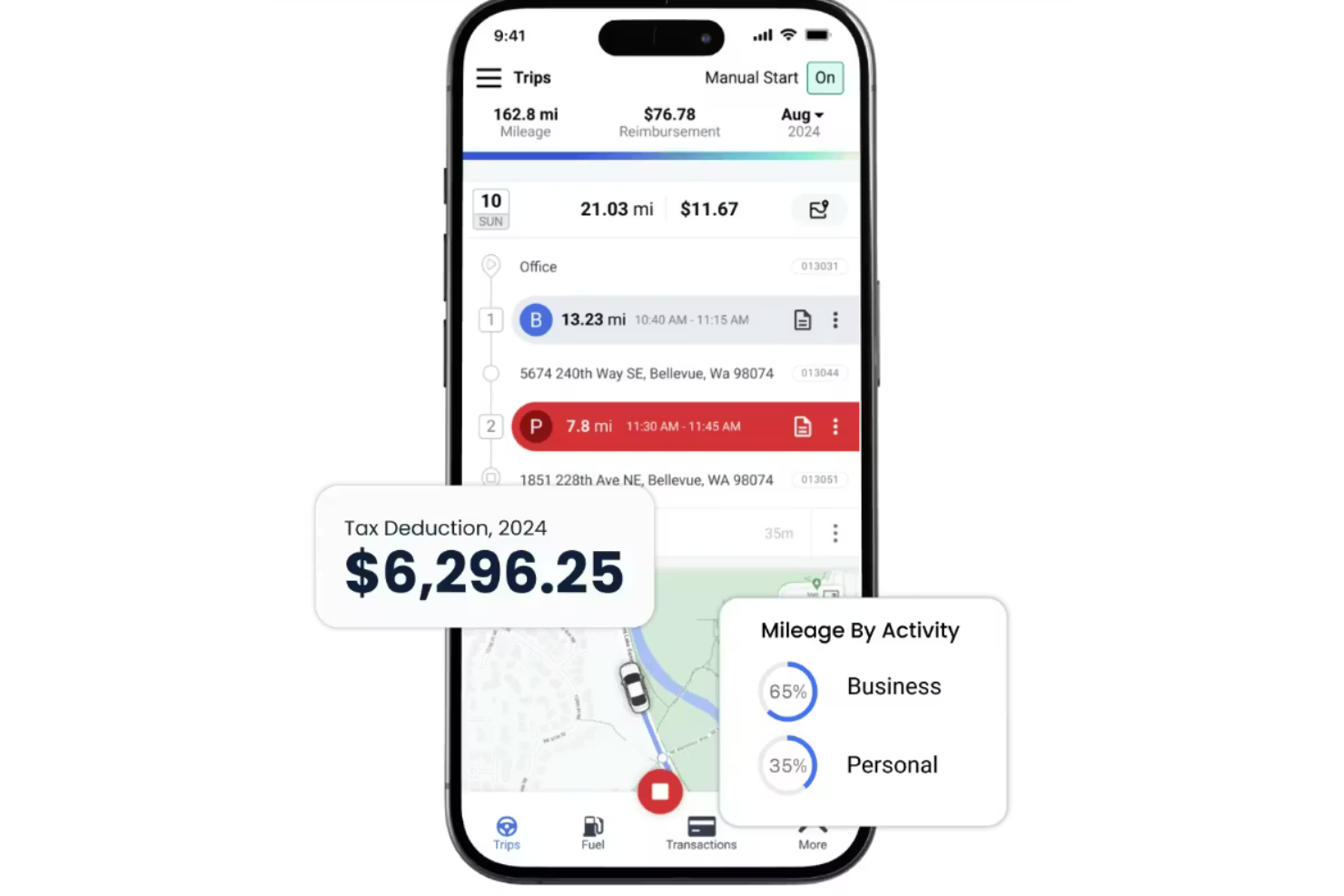
TripLog ofrece una aplicación de seguimiento de kilometraje automática diseñada para empresas y profesionales que necesitan gestionar tanto la conducción como los gastos relacionados. La herramienta es especialmente útil para equipos que desean llevar un control del kilometraje, el tiempo y los gastos en un solo lugar. Si buscas una solución que reúna el registro de viajes y la gestión de gastos, TripLog merece ser considerado.
¿Para quién es mejor TripLog?
TripLog es ideal para pequeñas y medianas empresas y equipos de contabilidad que deben controlar kilometraje, tiempo y gastos juntos.
Por qué elegí TripLog
Lo que destaca de TripLog es cómo integra el seguimiento de kilometraje, tiempo y gastos en una sola plataforma. Esto es especialmente útil para empresas que necesitan gestionar reembolsos a empleados y cumplir tanto con los registros de conducción como las horas laborales. Me gusta que TripLog permita registrar viajes, capturar recibos y controlar el tiempo todo desde la misma app, lo cual reduce la necesidad de múltiples herramientas. Este enfoque integrado facilita generar informes precisos y mantener todos los datos de reembolso organizados en un mismo lugar.
Características principales de TripLog
Otras funciones que hacen útil a TripLog para el seguimiento de kilometraje incluyen:
- Detección automática de viajes: La aplicación utiliza GPS y sensores de movimiento para detectar y registrar viajes automáticamente sin intervención manual.
- Soporte para múltiples vehículos: Puedes controlar el kilometraje de varios vehículos bajo una sola cuenta, lo que es más cómodo para usuarios con más de un coche.
- Tarifas de kilometraje personalizables: Establece diferentes tarifas de reembolso para varios tipos de vehículos, clientes o ubicaciones conforme a las políticas de tu organización.
- Captura de lectura del odómetro: Introduce y almacena lecturas del odómetro para asegurar registros de kilometraje precisos y cumplimiento de requisitos fiscales.
Integraciones de TripLog
Las integraciones incluyen SAP Concur, ADP, UKG, Sage Intacct, Emburse y Outlook Calendar.
Pros and Cons
Pros:
- Registros de odómetro integrados para auditorías fiscales
- Registra combustible, estacionamiento y peajes fácilmente
- Ofrece inicio automático vía Bluetooth y USB
Cons:
- La interfaz parece anticuada y compleja
- Preocupaciones de privacidad por el GPS en segundo plano


MileIQ ofrece una solución de seguimiento de kilometraje orientada al uso móvil, diseñada para profesionales ocupados y propietarios de pequeñas empresas que necesitan registros precisos y en cumplimiento con el IRS. La aplicación registra los trayectos automáticamente en segundo plano y ayuda a los usuarios a separar viajes de negocios y personales con un esfuerzo mínimo. Si deseas simplificar el seguimiento del kilometraje para deducciones fiscales o reembolsos, MileIQ brinda un enfoque enfocado y fácil de usar.
¿Para Quién es Mejor MileIQ?
MileIQ es ideal para profesionales autónomos, propietarios de pequeñas empresas y empleados móviles que necesitan una forma sencilla de rastrear y clasificar kilómetros para fines fiscales o de reembolso.
Por Qué Elegí MileIQ
Lo que distingue a MileIQ es su clasificación de viajes mediante deslizamiento, que hace que separar los viajes de negocios y personales sea rápido e intuitivo. Elegí MileIQ porque los usuarios pueden simplemente deslizar a la derecha para negocios y a la izquierda para personal, reduciendo el tiempo dedicado a la entrada o edición manual. Además, la aplicación detecta y registra automáticamente los trayectos en segundo plano, por lo que no tienes que recordar iniciar o detener el seguimiento. Este enfoque es especialmente útil para quienes desean mantener registros precisos de kilometraje sin interrumpir su día.
Características Clave de MileIQ
Otras características que hacen de MileIQ una opción sólida para el seguimiento de kilometraje incluyen:
- Detección automática de trayectos: La aplicación utiliza GPS para registrar los viajes automáticamente sin requerir entrada manual.
- Soporte para múltiples vehículos: Los usuarios pueden rastrear kilómetros para varios vehículos dentro de una sola cuenta.
- Tarifas de kilometraje personalizables: Puedes establecer tarifas de reembolso personalizadas para ajustarse a las políticas de tu organización o a las directrices del IRS.
- Informes mensuales detallados: Genera y exporta informes de kilometraje compatibles con el IRS para la temporada de impuestos o para fines de reembolso de gastos.
Integraciones de MileIQ
Las integraciones incluyen QuickBooks Online y Xero.
Pros and Cons
Pros:
- El registro automático de viajes funciona en segundo plano
- Admite múltiples vehículos por cuenta de usuario
- Tarifas de kilometraje personalizadas para diferentes organizaciones
Cons:
- Se han reportado problemas de consumo de batería en algunos dispositivos móviles
- No integra directamente con plataformas de contabilidad

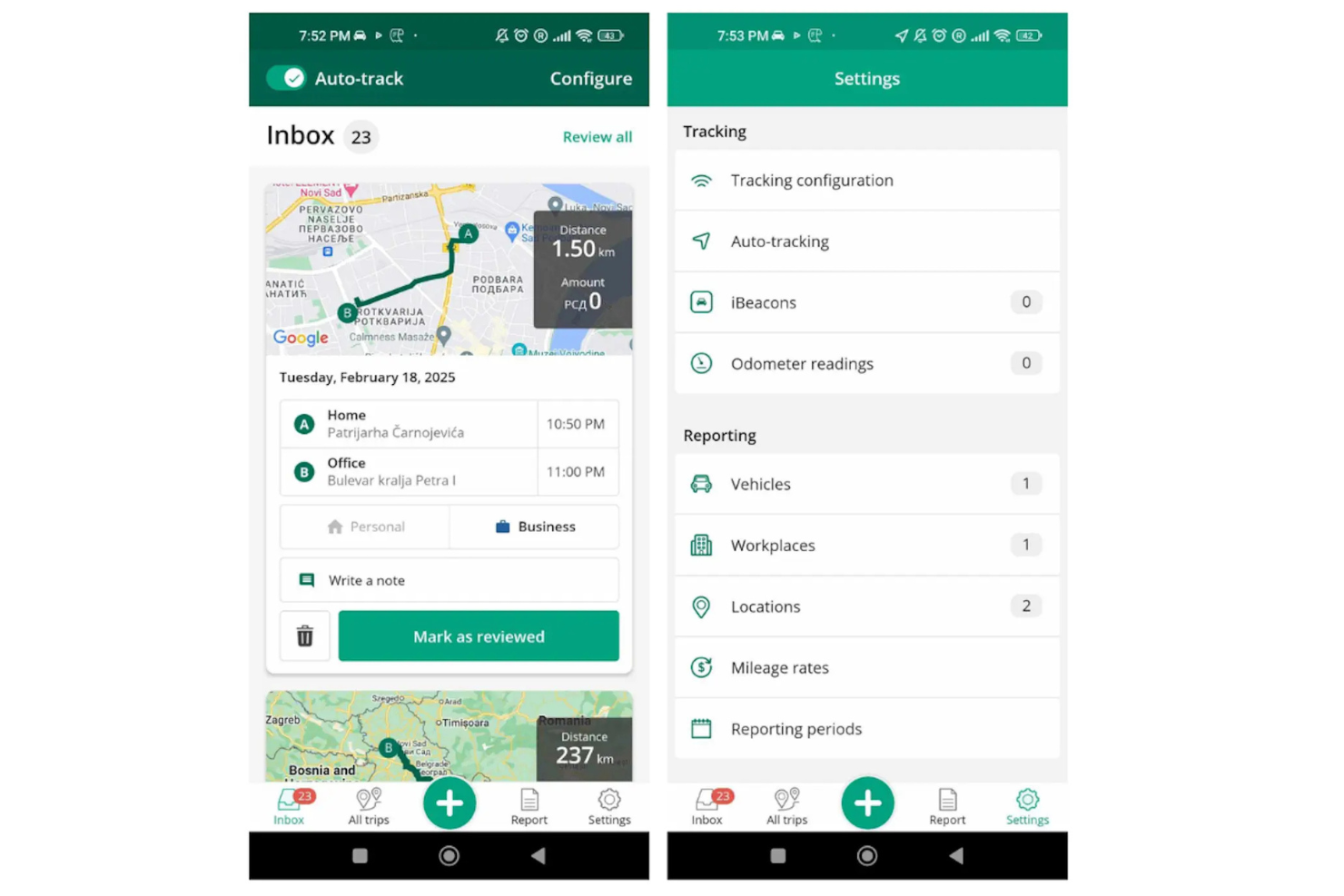
Driversnote ofrece una solución de seguimiento de kilometraje diseñada para profesionales y empresas que necesitan registros precisos y conformes para varios vehículos. La aplicación atrae a usuarios que gestionan flotas, conducen por trabajo o necesitan documentar viajes para fines fiscales o de reembolso. Con funciones adaptadas para un registro y reporte detallado de viajes, Driversnote elimina las complicaciones de la gestión del kilometraje para equipos e individuos ocupados.
¿Para quién es mejor Driversnote?
Driversnote es una buena opción para pequeñas empresas, gestores de flotas y profesionales autónomos que necesitan rastrear el kilometraje en varios vehículos para cumplir con normativas o reembolsos.
Por qué elegí Driversnote
Driversnote destaca para equipos o personas que necesitan rastrear kilometraje en varios vehículos. Lo elegí porque te permite crear registros separados para cada vehículo, facilitando la gestión de viajes de negocios y personales sin confusiones. La aplicación registra automáticamente los viajes usando GPS y te permite asignar cada viaje a un vehículo específico con solo un toque. Este enfoque en el soporte para varios vehículos convierte a Driversnote en una excelente opción para quienes manejan varios autos o gestionan una pequeña flota.
Características clave de Driversnote
Otras funciones que hacen útil a Driversnote para el seguimiento de kilometraje incluyen:
- Lecturas del odómetro: Ingresa y rastrea las lecturas del odómetro para asegurar registros de kilometraje precisos y verificar los datos de los viajes.
- Tarifas personalizadas de kilometraje: Configura diferentes tasas de reembolso para varios tipos de vehículos, ubicaciones o propósitos.
- Clasificación automática de viajes: Categoriza los viajes como de negocios o personales con un solo toque para facilitar los reportes.
- Reportes conformes con IRS y HMRC: Genera informes detallados de kilometraje que cumplen con los requisitos de las autoridades fiscales en varios países.
Integraciones de Driversnote
Las integraciones incluyen Wave.
Pros and Cons
Pros:
- Fácil de clasificar tipos de viaje con solo deslizar
- Soporta múltiples vehículos y tarifas
- Versión gratuita disponible para usuarios ocasionales
Cons:
- No incluye seguimiento de combustible ni gastos
- La automatización completa requiere hardware de pago
Otro software de seguimiento del kilometraje
Estas son algunas opciones adicionales de software de seguimiento del kilometraje que no llegaron a mi lista, pero que aun así merece la pena consultar:
- MileageWise
Mejor con importación de Google Maps Timeline
- Psngr
Ideal para compartir viajes en colaboración
- Sage Expense Management
Mejor para alertas en tiempo real de infracciones de políticas


Wie ich Kilometererfassungssoftware bewerte
Ich teile meine Bewertung in zwei Ebenen auf: die grundlegenden Funktionen, die ein Tool unbedingt bieten muss – wie automatische GPS-Erfassung und steuerkonforme Berichte – und die Alleinstellungsmerkmale, die die besten Anbieter voneinander unterscheiden.
Kernfunktionalität (Grundvoraussetzungen für diese Liste)
Wenn ich Tools für meine Liste auswähle, bewerte ich jedes einzelne auf einer Skala von 0 (bietet diese Funktion nicht) bis 5 (leistet Herausragendes in diesem Bereich) für jede der unten aufgeführten Kernfunktionen. Anschließend berechne ich die Gesamtpunktzahl des Tools als Prozentsatz. Jedes Tool muss mindestens 65 % der Gesamtpunktzahl erreichen, um für die Aufnahme berücksichtigt zu werden.
- Automatische Kilometererfassung: Ich prüfe, ob die App Fahrten eigenständig erkennt oder ob Benutzer jede Fahrt manuell starten müssen – die Hintergrund-GPS-Erfassung ist besonders für Außendienstteams entscheidend.
- Steuerkonforme Kilometerberichte: Die Berichte müssen Fahrtdatum, Ziel, Zweck und Entfernung enthalten, damit sie einer Steuerprüfung standhalten, ohne dass zusätzliche manuelle Dokumentation notwendig ist.
- Verwaltung von Erstattungssätzen: Ich achte darauf, ob Tools individuell einstellbare Sätze je nach Fahrzeugtyp, Rolle oder Region erlauben, anstatt auf einen Pauschalsatz festgelegt zu sein.
- Integration in Lohnabrechnung & HRIS: Die Kilometerdaten sollten mit Plattformen wie ADP, Gusto oder QuickBooks synchronisiert werden, damit Erstattungen ohne erneute Eingabe in die Lohnabrechnung übertragen werden.
- Genehmigungsworkflows: Ich bewerte, ob Manager eingereichte Fahrten überprüfen, freigeben oder markieren können – und ob Routingregeln an die Genehmigungshierarchie Ihrer Organisation angepasst werden können.
- Klassifizierung geschäftlicher vs. privater Fahrten: Das Tool sollte es Fahrern leicht machen, Fahrten zu kategorisieren – ob per Wischgeste, festgelegter Arbeitszeiten oder gespeicherter Standortregeln.
Sobald ich eine Liste von Tools habe, die die Kriterien erfüllen, sehe ich mir an, wodurch sich die einzelnen Plattformen voneinander abheben.
Unterscheidungsmerkmale (Was Anbieter einzigartig macht)
So vergleiche ich verschiedene Anbieter miteinander:
Herausragende Funktionen
Betrugserkennung ist ein wichtiges Kriterium – ich suche nach Tools, die doppelte Fahrten, ungerechtfertigte Kilometerangaben oder ungewöhnliche Muster erkennen, bevor Ansprüche bei der Lohnabrechnung landen. Geofencing bietet eine weitere Ebene, indem Fahrten automatisch kategorisiert werden, sobald Fahrer gespeicherte Kundenstandorte betreten oder verlassen. Außerdem schaue ich mir Team-Dashboards und Analysen an, denn Personal- und Betriebsleiter brauchen Gesamtübersichten über Kilometerkosten in Abteilungen oder Kostenstellen, um Trends zu erkennen und Budgets zu steuern.
Über die Funktionen hinaus
Da Kilometer-Tools Echtzeit-Standortdaten erheben, achte ich besonders darauf, wie jeder Anbieter den Datenschutz für Mitarbeitende handhabt – etwa Optionen zum Pausieren der Erfassung außerhalb der Arbeitszeit oder rollenbasierte Zugriffsrechte, die für Personalabteilungen besonders wichtig sind. Auch die Skalierbarkeit bewerte ich: Funktionieren Preise und Verwaltungsrechte für ein zehnköpfiges Vertriebsteam ebenso wie für eine verteilt arbeitende Belegschaft mit mehreren Kostenstellen? Außerdem spielt die Bedienfreundlichkeit der mobilen App für Fahrer eine Rolle, denn eine geringe Nutzungsrate macht jedes Kilometerprogramm wertlos.
Cómo elegir un software de seguimiento del kilometraje
Es fácil perderse entre largas listas de funciones y estructuras de precios complejas. Para ayudarte a mantener la atención mientras avanzas en tu proceso particular de selección de software, aquí tienes una lista de factores que debes tener en cuenta:
| Factor | Qué debes tener en cuenta |
| Escalabilidad | ¿El software podrá gestionar el tamaño actual y futuro de tu equipo, incluido el crecimiento estacional o rápido? |
| Integraciones | ¿Se conecta de forma nativa con tus sistemas de nóminas, recursos humanos o contabilidad para evitar la introducción manual de datos? |
| Personalización | ¿Puedes adaptar las categorías de kilometraje, los flujos de trabajo de aprobación o los formatos de informes para ajustarlos a tus políticas? |
| Facilidad de uso | ¿Los empleados con cualquier nivel de conocimientos tecnológicos encontrarán fácil de usar la aplicación y el panel de administración? |
| Implementación e incorporación | ¿Cuánto tardarás en ponerlo en funcionamiento y qué recursos o asistencia ofrece el proveedor? |
| Coste | ¿Los niveles de precios son claros y se ajustan a tus patrones de uso y limitaciones presupuestarias? |
| Medidas de seguridad | ¿El proveedor ofrece cifrado de datos, controles de acceso de usuarios y cumplimiento de las normas de privacidad? |
| Disponibilidad del servicio de asistencia | ¿Puedes contactar con el servicio de asistencia durante tu horario laboral y se ofrecen varios canales (chat, teléfono, correo electrónico)? |
¿Qué es el software de seguimiento del kilometraje?
El software de seguimiento del kilometraje es una herramienta digital que registra automáticamente la distancia recorrida en desplazamientos relacionados con el trabajo. Utiliza el GPS o la introducción manual para recopilar los detalles de los viajes y ayuda a las empresas a realizar un seguimiento de los desplazamientos de los empleados con fines de reembolso, fiscales o de cumplimiento normativo. Estos sistemas suelen generar informes, ofrecer acceso desde dispositivos móviles e integrarse con plataformas de nóminas o contabilidad para simplificar la gestión del kilometraje y reducir los errores manuales.
Características del software de seguimiento del kilometraje
Al seleccionar un software de seguimiento del kilometraje, presta atención a las siguientes características clave:
- Seguimiento GPS automático: Utiliza el GPS de tu dispositivo para registrar el kilometraje en tiempo real, reduciendo la introducción manual de datos y aumentando la precisión de cada trayecto.
- Categorización de trayectos: Permite a los usuarios etiquetar los trayectos como profesionales o personales, lo que facilita separar el kilometraje reembolsable de los desplazamientos no reembolsables.
- Mapeo de rutas: Muestra un mapa visual de cada trayecto, lo que ayuda a verificar las rutas de desplazamiento y a cumplir con las necesidades de auditoría o cumplimiento normativo.
- Informes de kilometraje: Genera informes detallados que resumen el kilometraje por fecha, usuario o proyecto, y que pueden exportarse para fines de reembolso o fiscales.
- Acceso mediante aplicación móvil: Permite a los empleados registrar el kilometraje mientras se desplazan utilizando sus teléfonos inteligentes, garantizando registros precisos incluso cuando están fuera de la oficina.
- Integración con nóminas o contabilidad: Se conecta directamente con los sistemas de nóminas o contabilidad, de modo que los datos del kilometraje se transfieren automáticamente para el reembolso o el seguimiento de gastos.
- Geovallas: Configura límites virtuales alrededor de centros de trabajo u oficinas para iniciar o detener automáticamente el seguimiento del kilometraje al entrar o salir de ubicaciones específicas.
- Tarifas de reembolso personalizables: Permite a los administradores establecer tarifas de reembolso por kilometraje que coincidan con la política de la empresa o con la normativa local.
- Registro de auditoría: Mantiene un registro seguro de todas las entradas y modificaciones del kilometraje, facilitando el cumplimiento normativo y la resolución de disputas.
- Gestión multiusuario: Permite a los administradores gestionar permisos, supervisar el uso y revisar los registros de kilometraje de distintos equipos o departamentos.
Ventajas del software de seguimiento del kilometraje
La implementación de un software de seguimiento del kilometraje ofrece varias ventajas para tu equipo y tu empresa. Estas son algunas de las que puedes esperar:
- Registros precisos del kilometraje: El seguimiento GPS automatizado y los registros de auditoría ayudan a garantizar que cada trayecto se registre correctamente para el reembolso o el cumplimiento normativo.
- Menor introducción manual de datos: Las aplicaciones móviles y las integraciones con los sistemas de nóminas o contabilidad eliminan la necesidad de utilizar registros en papel y hojas de cálculo.
- Proceso de reembolso simplificado: Los informes personalizables y las exportaciones directas de datos facilitan la tramitación rápida y uniforme de las solicitudes de reembolso del kilometraje.
- Mejora del cumplimiento normativo: Funciones como los registros de auditoría, el mapeo de rutas y las geovallas ayudan a cumplir la normativa fiscal y laboral.
- Mayor visibilidad: Los paneles en tiempo real y la gestión multiusuario ofrecen a los administradores una visión clara de los desplazamientos y gastos del equipo.
- Control de costes: Las tarifas de reembolso personalizables y los informes detallados ayudan a las empresas a supervisar y gestionar los gastos relacionados con los desplazamientos.
- Comodidad para los empleados: El acceso móvil y la categorización automática de trayectos facilitan que los empleados registren el kilometraje sin interrumpir su flujo de trabajo.
Costes y precios del software de seguimiento del kilometraje
Seleccionar un software de seguimiento del kilometraje requiere comprender los distintos modelos de precios y planes disponibles. Los costes varían en función de las características, el tamaño del equipo, los complementos y otros factores. La siguiente tabla resume los planes habituales, sus precios medios y las características que suelen incluir las soluciones de software de seguimiento del kilometraje:
Tabla comparativa de planes de software de seguimiento del kilometraje
| Tipo de plan | Precio medio | Características habituales |
| Plan gratuito | $0 | Seguimiento GPS básico, introducción manual de trayectos, informes limitados y acceso mediante aplicación móvil. |
| Plan personal | $4-$11/usuario/mes | Seguimiento automático del kilometraje, categorización de trayectos, informes básicos y exportación a hojas de cálculo. |
| Plan empresarial | $9-$25/usuario/mes | Gestión multiusuario, informes avanzados, integraciones con nóminas, geovallas y registros de auditoría. |
| Plan corporativo | $10+/usuario/mes | Integraciones personalizadas, asistencia específica, seguridad avanzada, herramientas de cumplimiento normativo y flujos de trabajo personalizados. |
Preguntas frecuentes sobre el software de seguimiento del kilometraje
Estas son algunas respuestas a preguntas frecuentes sobre el software de seguimiento del kilometraje:
¿Cómo registra los trayectos el software de seguimiento del kilometraje?
El software de seguimiento del kilometraje utiliza tecnología GPS o la introducción manual de datos para registrar los puntos de inicio y final de cada trayecto. La mayoría de los sistemas detectan automáticamente cuándo comienza y termina un trayecto, y registran la distancia y los detalles de la ruta para ofrecer registros precisos del kilometraje.
¿Se puede utilizar el software de seguimiento del kilometraje tanto para trayectos personales como laborales?
Sí, la mayoría de los programas de seguimiento del kilometraje permite a los usuarios categorizar los trayectos como personales o laborales. Esto ayuda a separar el kilometraje reembolsable de los desplazamientos no reembolsables y simplifica los informes para cumplir con las obligaciones fiscales o las políticas de la empresa.
¿Cumple el software de seguimiento del kilometraje con las normativas fiscales del IRS o locales?
Sí, muchas soluciones están diseñadas para generar registros e informes de kilometraje que cumplen con los requisitos del IRS. Normalmente incluyen funciones como registros de auditoría, datos detallados de los trayectos y tarifas de reembolso personalizables para facilitar el cumplimiento de las normativas fiscales y laborales.
¿Qué dispositivos pueden utilizar los empleados para realizar el seguimiento del kilometraje?
Por lo general, los empleados pueden realizar el seguimiento del kilometraje mediante aplicaciones móviles en teléfonos inteligentes o tabletas. Algunas soluciones también ofrecen paneles web para introducir o revisar datos manualmente, lo que facilita el registro de los trayectos desde el lugar de trabajo o la oficina.
¿Hasta qué punto son seguros los datos recopilados por el software de seguimiento del kilometraje?
La mayoría de los proveedores de software de seguimiento del kilometraje con buena reputación utilizan cifrado de datos, autenticación segura de usuarios y controles de acceso. Estas medidas de protección ayudan a proteger los datos confidenciales de ubicación y de los trayectos frente a accesos no autorizados o filtraciones.
¿Se puede integrar el software de seguimiento del kilometraje con sistemas de nóminas o contabilidad?
Sí, muchas herramientas de seguimiento del kilometraje ofrecen integraciones directas con plataformas de nóminas, recursos humanos o contabilidad. Esto permite transferir automáticamente los datos del kilometraje, reducir la introducción manual y agilizar los procesos de reembolso.