Reseña de Recruit CRM 2026: Ventajas, Desventajas, Funciones y Precios



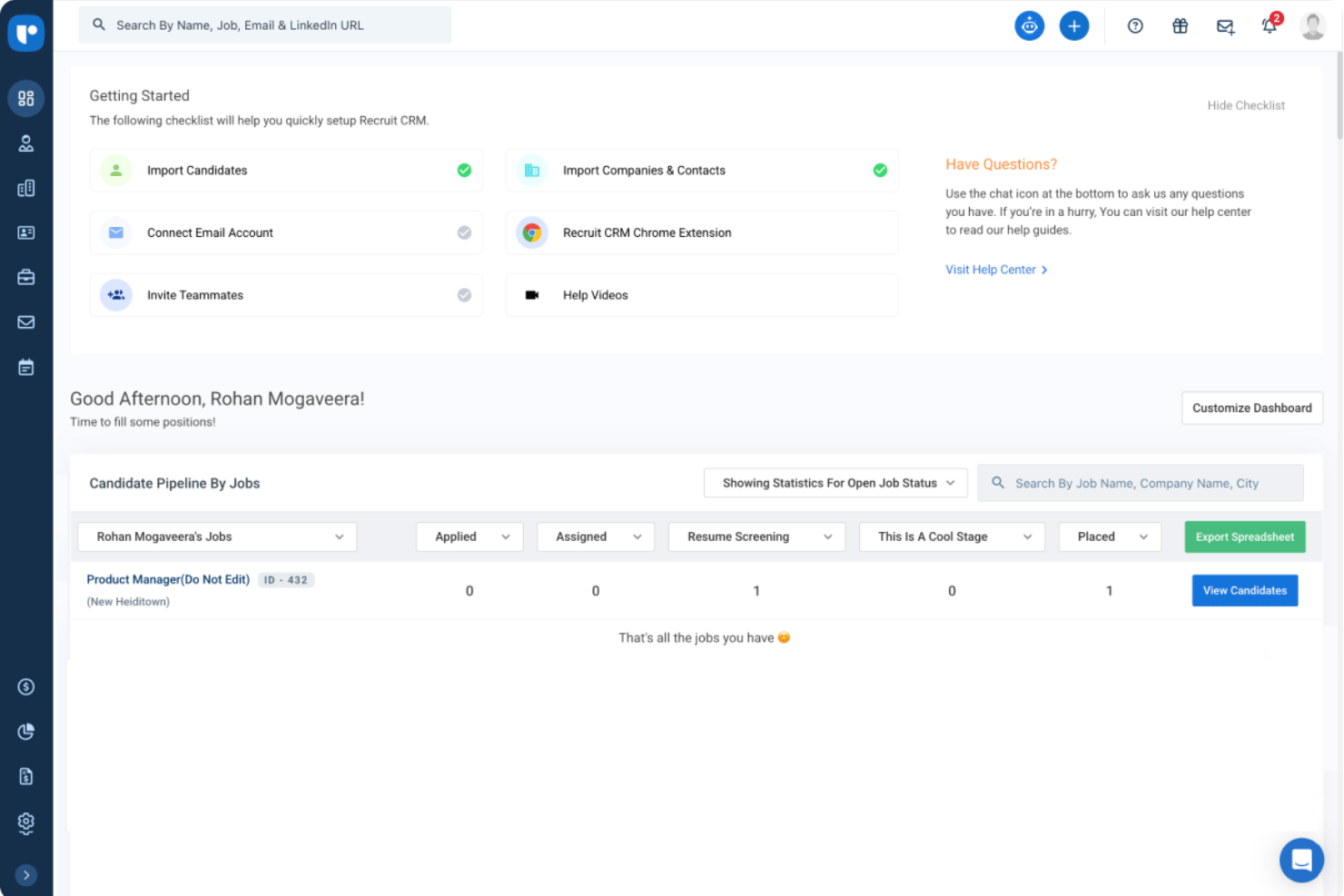
Recruit CRM is a recruiting CRM built for staffing agencies and executive search firms that need to track candidates, manage client relationships, and log placements in one place. I'd consider it if you want the core functionality of a tool like Bullhorn but with a faster setup, a cleaner interface, and pricing that doesn't require an enterprise contract to get started.
Recruit CRM Evaluation Summary
- From $85/user/month (billed annually)
- 30-day free trial + free demo available
Por qué confiar en nuestras reseñas de software
Nuestro equipo lleva probando y evaluando software desde 2012. Como expertos en RR. HH., sabemos lo difícil —y lo importante— que es elegir el software adecuado.
Para esta guía, evaluamos las herramientas mediante pruebas prácticas e investigación independiente, puntuando las herramientas según nuestros criterios de selección. También nos basamos en la experiencia de líderes de opinión del sector y de profesionales de RR. HH. en activo.
Nuestras reseñas reflejan nuestro criterio editorial humano, no un discurso de ventas.
Revisores expertos:
Recruit CRM Overview
When judging Recruit CRM against its competitors, I find the intuitive interface, flexible pipeline customization, and detailed email tracking make it a strong pick, especially for boutique and mid-sized agencies. Pricing is transparent, and onboarding is quick, but while integrations cover popular tools, API-based customizations require more effort.
If you’re choosing a system for collaborative recruiting, global outreach, or candidate management with minimal training headaches, I think Recruit CRM outperforms in ease of use and hands-on support, but may underperform if you need highly complex, enterprise-level workflows and deep reports out of the box.
pros
-
Custom pipeline stages for each recruiting process
-
Chrome sourcing extension automatically adds candidates from LinkedIn
-
Built-in email sequencing and bulk outreach tools
cons
-
Mobile app features are less comprehensive than desktop
-
Reports offer limited filtering and visualization options
-
Mass updating records can feel slow with large databases
-

Justworks
Visit WebsiteThis rating combines scores from multiple user review sites to reflect overall customer sentiment about the product.4.6 -
Small Improvements
Visit WebsiteThis rating combines scores from multiple user review sites to reflect overall customer sentiment about the product.4.3 -
HiBob
Visit WebsiteThis rating combines scores from multiple user review sites to reflect overall customer sentiment about the product.4.5





Cómo probamos y puntuamos nuestras herramientas
Hemos pasado años construyendo, refinando y mejorando nuestro sistema de pruebas y puntuación de software. La rúbrica está diseñada para capturar los matices de la selección de software y lo que hace que una herramienta sea efectiva, centrándose en los aspectos críticos del proceso de toma de decisiones. A continuación, puedes ver exactamente cómo funcionan nuestras pruebas y puntuaciones a través de siete criterios. Esto nos permite ofrecer una evaluación imparcial del software basada en la funcionalidad principal, características destacadas, facilidad de uso, incorporación, soporte al cliente, integraciones, reseñas de clientes y relación calidad-precio.
Funcionalidad principal (25% de la puntuación final)
El punto de partida de nuestra evaluación siempre es la funcionalidad principal de la herramienta. ¿Tiene las funciones básicas que se espera encontrar? ¿Alguna de esas funciones básicas está restringida a planes de precio superiores? En esencia, esperamos que una herramienta se compare favorablemente con las capacidades básicas de sus competidores.
Características destacadas (25% de la puntuación final)
Luego, evaluamos características poco comunes que van más allá de la funcionalidad principal que normalmente se encuentra en herramientas de su tipo. Una puntuación alta refleja funciones especializadas o únicas que hacen que el producto sea más rápido, eficiente o que ofrezca un valor adicional al usuario. También evaluamos lo fácil que es integrar con otras herramientas comúnmente usadas en el entorno tecnológico para ampliar la funcionalidad y utilidad del software. Las herramientas que ofrecen muchas integraciones nativas, conexiones de terceros y acceso a API para construir integraciones personalizadas obtienen las mejores puntuaciones.
Facilidad de uso (10% de la puntuación final)
Consideramos qué tan rápido y fácil es ejecutar las tareas definidas en la funcionalidad principal utilizando la herramienta. El software que obtiene una puntuación alta está bien diseñado, es intuitivo, ofrece aplicaciones móviles, proporciona plantillas y hace que tareas relativamente complejas parezcan simples.
Incorporación (10% de la puntuación final)
Sabemos lo importante que es la rápida adopción del equipo para una nueva plataforma, por eso evaluamos qué tan fácil es aprender y usar una herramienta con una capacitación mínima. Evaluamos cuán rápido un miembro del equipo puede configurarse y comenzar a usar la herramienta sin experiencia. Las soluciones con mejores puntuaciones requieren poco o ningún soporte.
Soporte al cliente (10% de la puntuación final)
Revisamos cuán rápido y fácil es obtener ayuda mediante teléfono, chat en vivo o base de conocimientos. Las herramientas y empresas que ofrecen soporte en tiempo real obtienen las mejores puntuaciones, mientras que los chatbots obtienen las peores.
Reseñas de clientes (10% de la puntuación final)
Además de nuestras propias pruebas y evaluaciones, consideramos el puntaje neto de promotores de clientes presentes y pasados. Revisamos su probabilidad, dada la opción, de elegir nuevamente la herramienta por su funcionalidad principal. El software con una puntuación alta refleja un alto puntaje neto de promotores por parte de clientes actuales o anteriores.
Relación calidad-precio (10% de la puntuación final)
Por último, considerando todos los demás criterios, revisamos el precio promedio de los planes de entrada frente a las funciones principales y valoramos el resto de los criterios de evaluación. El software que ofrece más por menos tendrá una mejor puntuación.
Core Features
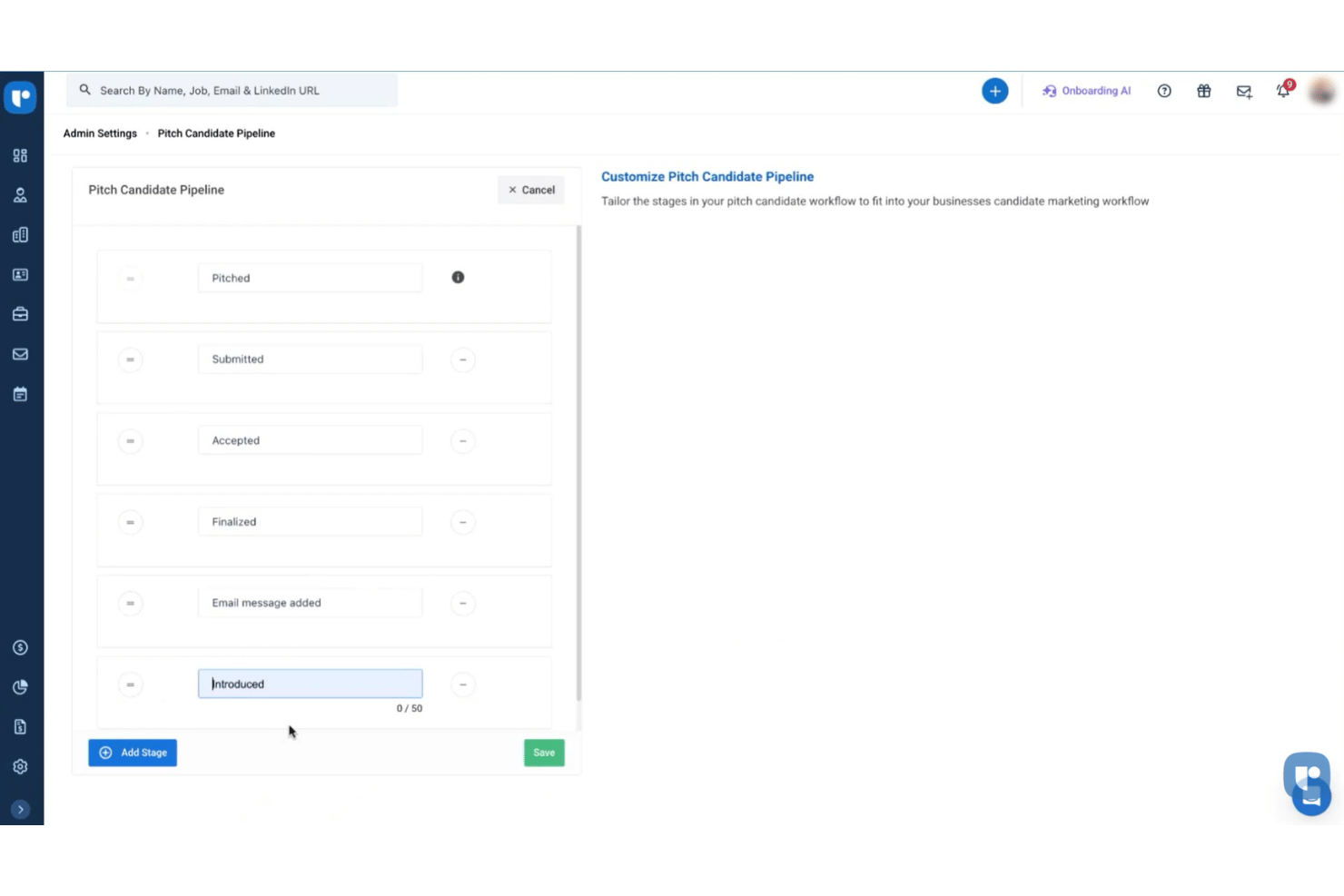
Customizable Recruitment Pipelines
Set unique stages for each job or client and move candidates visually through hiring steps. This makes tracking progress and bottlenecks clear at a glance.
Resume Parsing and Search
Automatically extract candidate data from resumes and store them in searchable profiles. Find qualified talent quickly with advanced keyword and filter tools.
Chrome Sourcing Extension
Add candidates directly from LinkedIn and other sites into your database in one click. This streamlines sourcing and cuts out manual data entry.
Built-in Email Sequencing
Schedule personalized email campaigns and follow-ups to candidates or clients. See who opened, clicked, and replied—all within your dashboard.
Task and Activity Management
Assign, track, and monitor tasks for yourself or team members linked to candidates and jobs. Set reminders to ensure you never miss crucial follow-ups.
Reporting and Analytics Dashboard
View metrics like placement rates, pipeline velocity, and consultant performance. Use dashboards to make data-backed business and hiring decisions.
Ease of Use
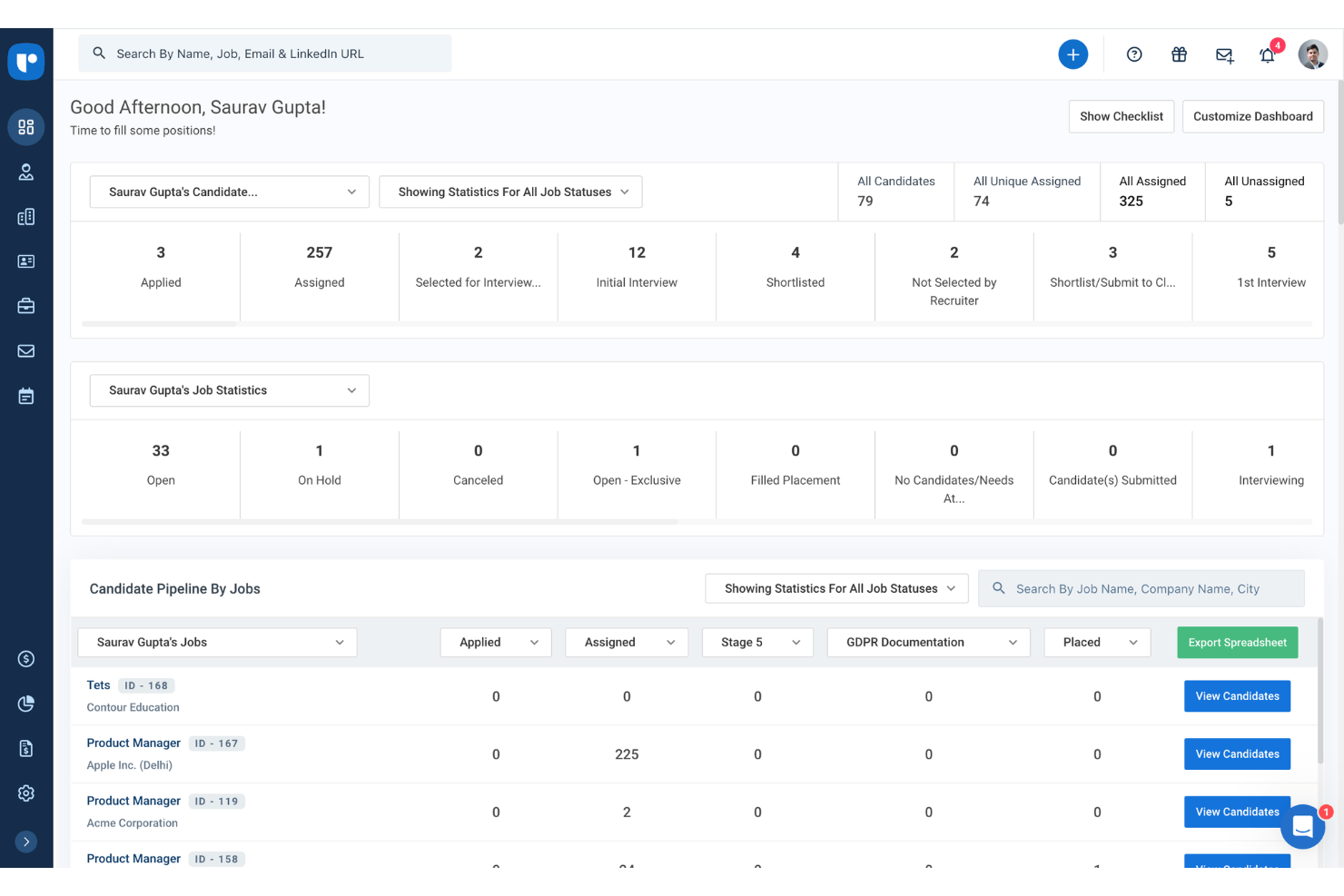
Recruit CRM’s user-friendliness is above average for recruiting CRM software, thanks to clear dashboards, color-coded pipelines, and drag-and-drop candidate management.
Users regularly point out how quick setup, easy access to sourcing tools, and built-in email outreach speed up daily tasks. You might still hit occasional lag with bulk data edits, but day-to-day workflow feels intuitive and smooth.
Integrations
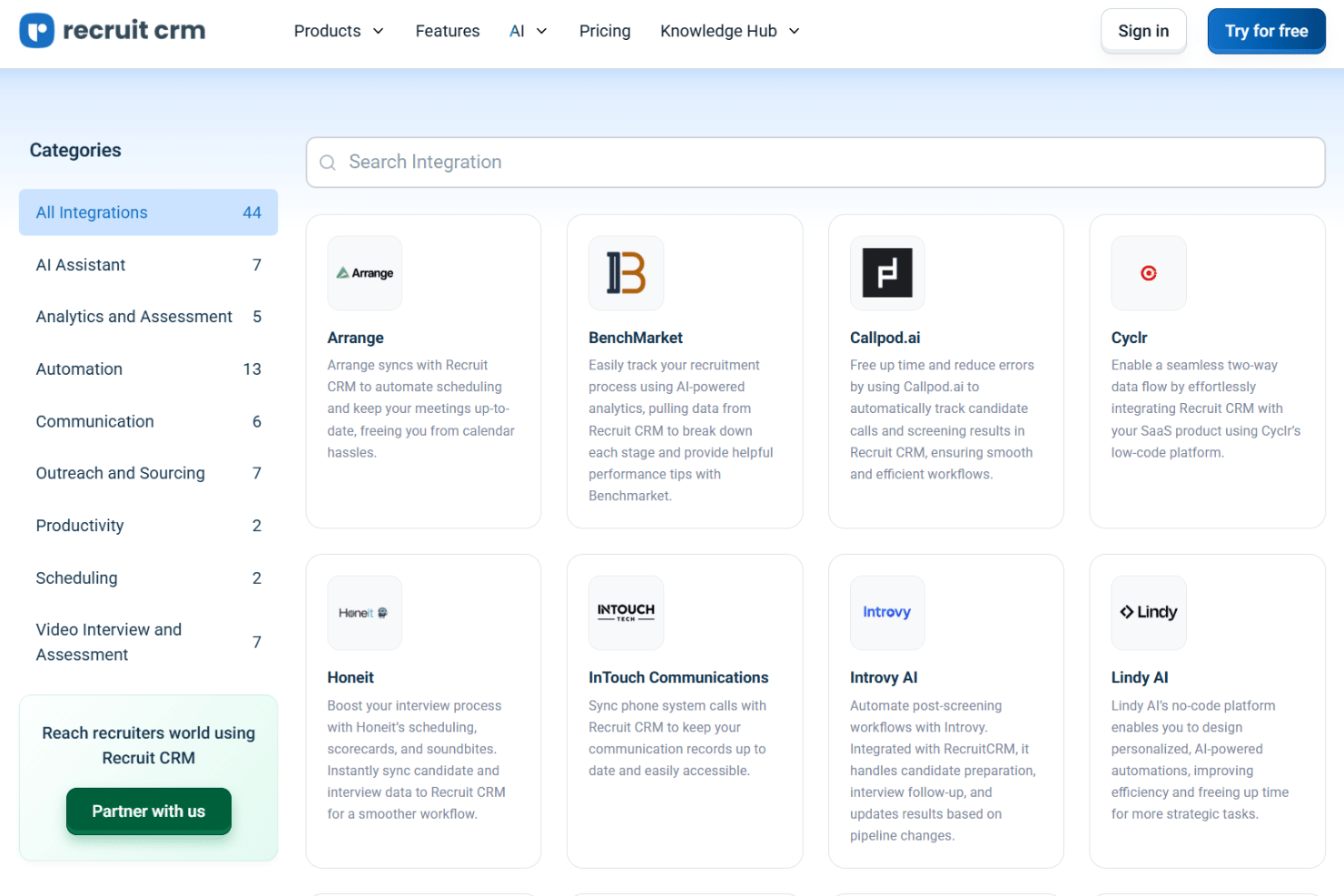
Recruit CRM integrates with LinkedIn, Gmail, Outlook, Mailchimp, Slack, WhatsApp, Zapier, Google Calendar, Microsoft Teams, and Zoom, among others.
Recruit CRM also offers an open API and connects with third-party integration tools like Zapier.
New Product Updates from Recruit CRM

Recruit CRM Adds AI Candidate Matching and Resume Parsing
Recruit CRM introduces AI candidate matching with bimetric scoring and enhanced resume parsing powered by Sovren. These updates improve candidate discovery and streamline screening with more accurate data extraction. Highlights include:
- AI Candidate Matching: Uses bimetric scoring to match candidates based on full profiles.
- Enhanced Resume Parsing: Extracts detailed data from resumes with improved accuracy.
- Multilingual Support: Parses resumes across multiple languages for global hiring.
- Profile Enrichment: Updates candidate records with structured data automatically.
Visit Recruit CRM’s official site for more details.
 for more details.
Recruit CRM Specs
- API
- Application Tracking
- Behavioral Testing
- Budgeting
- Calendar Management
- Candidate Database
- Cognitive Testing
- Contact Management
- Custom Assessments
- Dashboard
- Dashboards
- Data Export
- Data Import
- Data Visualization
- Email Integration
- Employee Database
- Employee Onboarding
- External Integrations
- Feedback Management
- Forecasting
- Interview Scheduling
- Multi-Source Feedback
- Multi-User
- Notifications
- Personality Testing
- Psychometric Testing
- Scheduling
- Status Notifications
- Travel Management