


Avis sur monday.com : Avantages, Inconvénients, Fonctionnalités & Tarification



monday AI Workspace is a workforce management software that combines AI-assisted planning, task automation, and cross-team workflow building in one flexible platform. It's worth a close look if your team manages multiple projects at once and wants AI tools embedded directly into daily work—not bolted on separately. I'd choose it over Asana if AI-native features matter to you, since monday AI Workspace weaves AI into planning, updates, and automation in ways that Asana's more traditional project tracking approach doesn't match.
monday AI Workspace Evaluation Summary
- From $9/user/month (billed annually)
- Free plan + 14-day free trial available
Pourquoi faire confiance à nos avis sur les logiciels
Notre équipe teste et évalue des logiciels depuis 2012. En tant qu’experts RH nous-mêmes, nous savons à quel point il est difficile — et important — de choisir le bon logiciel.
Pour ce guide, nous avons évalué les outils grâce à des tests pratiques et une recherche indépendante, en notant les outils selon nos critères de sélection. Nous nous appuyons également sur les enseignements de leaders d’opinion du secteur et de professionnels des RH en activité.
Nos avis reflètent notre jugement éditorial humain, et non un argumentaire de vente.
Réviseurs experts:
monday AI Workspace Overview
In my opinion, monday.com gives you a strong mix of flexibility, speed, and clarity for workforce management, especially if you’re handling shifting workloads across multiple teams. When I compare it to other tools, it stands out with its visual boards and automations that actually reduce daily admin instead of adding more steps. It does fall short if you need extremely advanced scheduling or deep HR-specific modules, but for most teams it’s easy to judge it as a reliable, scalable choice. If you want something that adapts to how your team works—and not the other way around—it’s a solid pick.
pros
-
You can automate routine steps so your daily work runs with fewer manual updates.
-
You get clear visibility into workloads, timelines, and task owners across your team.
-
You can set up workflows fast with simple boards, columns, and drag-and-drop tools.
cons
-
You may run into limits when handling advanced workforce needs like detailed labor rules.
-
You’ll need time to build and maintain boards if your team manages complex processes.
-
You may find the flexible setup overwhelming if you want strict, structured workflows.
Is monday AI Workspace Right For Your Needs?
Who Would be a Good Fit for monday AI Workspace?
monday.com works well for teams that need a flexible workforce management software to organize people, schedules, and daily operations in one place. It’s especially helpful if you run cross-team work, handle shifting priorities, or manage a mix of employees and contractors because its boards and automations adapt quickly. You’ll get the most value if you want clear visibility into workloads and need a simple way to standardize processes across your team.
-
HR Teams
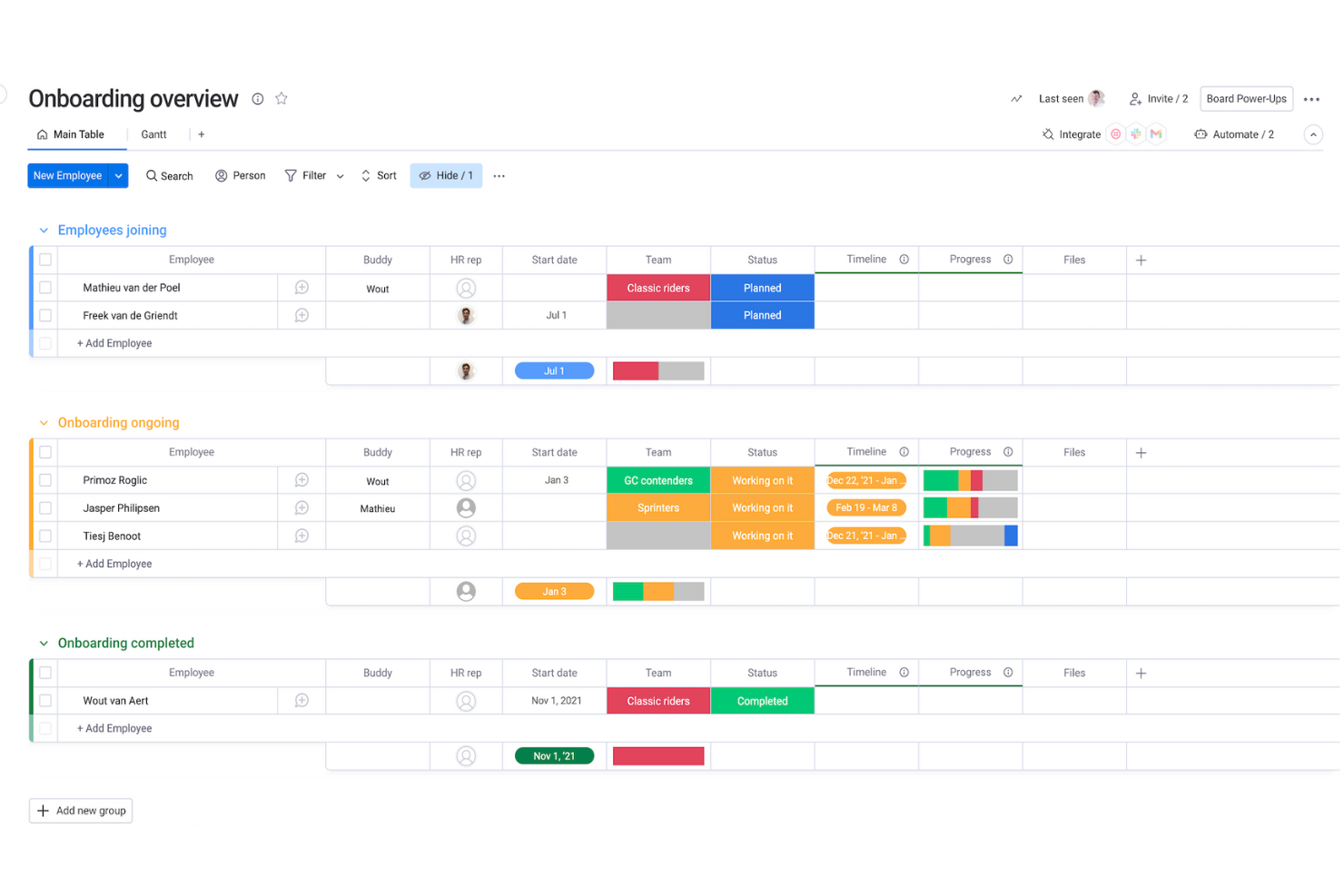
It helps you track onboarding, schedules, and employee requests with customizable boards that match your workflows.
-
Operations Teams
You can map processes, set automations, and keep everyone aligned without messy manual steps.
-
Retail Staff Scheduling
Drag-and-drop scheduling and real-time updates make it easy to plan shifts and avoid coverage gaps.
-
Project Managers
Timelines, owners, and status boards give you clear visibility into progress so your team always knows what’s next.
-
Agencies
It makes it simple to balance workloads, track client deliverables, and keep your team from being overloaded.
-
Small Businesses
You get an easy, visual way to coordinate people and tasks without needing technical setup or heavy processes.
Who Would be a Bad Fit for monday AI Workspace?
monday.com isn’t ideal if your work requires deep, specialized workforce systems like advanced payroll, complex compliance tracking, or industry-specific labor rules. You may struggle if you need highly rigid reporting standards because monday.com is built to be flexible rather than strict. It also won’t be a strong match if your team prefers traditional, spreadsheet-style tools and doesn’t want to maintain visual boards.
-
Unionized Labor
Complex contract rules and auto-enforced scheduling policies aren’t supported natively.
-
Healthcare Staffing
Strict compliance, credentialing, and shift-swap rules require more specialized systems than monday.com provides.
-
Large Call Centers
It lacks the deep forecasting and real-time staffing tools these environments depend on.
-
Manufacturing Plants
Highly detailed labor tracking and machine-level scheduling aren’t built into its core workflows.
-
Heavy Payroll
It doesn’t offer the complex calculations and regulation-specific rules you’d need for payroll-driven teams.
-
Finance Departments
If you need rigid audit-ready structures, monday.com’s flexible boards may feel too loose for your requirements.
Comment nous testons et évaluons nos outils
Nous avons passé des années à construire, affiner et améliorer notre système de test et d’évaluation des logiciels. La grille d’évaluation est conçue pour saisir les nuances de la sélection des logiciels et ce qui rend un outil efficace, en se concentrant sur les aspects critiques du processus décisionnel. Ci-dessous, vous pouvez voir exactement comment fonctionne notre test et notre système d’évaluation à travers sept critères. Cela nous permet de fournir une évaluation impartiale des logiciels basée sur les fonctionnalités principales, les caractéristiques remarquables, la facilité d’utilisation, l’intégration, le support client, les intégrations, les avis clients et le rapport qualité-prix.
Fonctionnalités principales (25 % de la note finale)
Le point de départ de notre évaluation est toujours la fonctionnalité principale de l’outil. Dispose-t-il des fonctionnalités de base qu’un utilisateur s’attend à voir ? Certaines de ces fonctionnalités principales sont-elles réservées à des forfaits plus élevés ? En substance, nous nous attendons à ce qu’un outil soit à la hauteur des capacités de base de ses concurrents.
Fonctionnalités remarquables (25 % de la note finale)
Ensuite, nous évaluons les fonctionnalités remarquables, peu courantes, qui vont au-delà de la fonction principale habituellement présente dans les outils de ce type. Un score élevé reflète des fonctionnalités spéciales ou uniques qui rendent le produit plus rapide, plus efficace, ou offrent une valeur ajoutée à l’utilisateur. Nous évaluons également la facilité d’intégration avec d’autres outils généralement présents dans la pile technologique pour étendre la fonctionnalité et l’utilité du logiciel. Les outils qui proposent de nombreuses intégrations natives, des connexions tierces et un accès API pour développer des intégrations personnalisées obtiennent les meilleurs résultats.
Facilité d’utilisation (10 % de la note finale)
Nous prenons en compte la rapidité et la simplicité d’exécution des tâches définies par la fonctionnalité principale à l’aide de l’outil. Un logiciel bien noté est bien conçu, intuitif à utiliser, offre des applications mobiles, propose des modèles, et permet de simplifier des tâches relativement complexes.
Mise en route (10 % de la note finale)
Nous savons à quel point une adoption rapide par l’équipe est cruciale pour une nouvelle plateforme, c’est pourquoi nous évaluons la facilité d’apprentissage et d’utilisation d’un outil avec un minimum de formation. Nous évaluons la rapidité avec laquelle un membre de l’équipe peut s’installer et commencer à utiliser l’outil sans expérience préalable. Les solutions bien notées impliquent qu’aucune ou très peu d’assistance soit requise.
Support client (10 % de la note finale)
Nous examinons la rapidité et la simplicité d’obtention d’aide par téléphone, chat en direct ou base de connaissances. Les outils et sociétés qui proposent une assistance en temps réel obtiennent les meilleurs scores, tandis que les chatbots sont moins bien notés.
Avis clients (10 % de la note finale)
En plus de nos propres tests et évaluations, nous prenons en compte le score net de recommandation (NPS) des clients actuels et passés. Nous évaluons leur propension, s’ils en avaient l’option, à choisir à nouveau l’outil pour la fonctionnalité principale. Un logiciel obtenant un score élevé reflète un NPS élevé de clients actuels ou passés.
Rapport qualité-prix (10 % de la note finale)
Enfin, en tenant compte de tous les autres critères, nous comparons le prix moyen des forfaits d’entrée de gamme aux principales fonctionnalités et considérons la valeur des autres critères d’évaluation. Un logiciel qui en offre plus, pour moins, sera mieux noté.
New Product Updates from monday AI Workspace
monday AI Workspace Adds Human Approval Routing
monday AI Workspace adds a human-in-the-loop approval block that sends approval requests and branches AI Workflows based on the response. The update lets teams incorporate human decisions into automated workflows before determining which path the workflow should follow. Highlights include:
- Human Approval Block: Adds a human approval step directly within AI Workflows.
- Approval Requests: Sends requests to users when human input is required.
- Conditional Routing: Routes the workflow to different paths based on the approval response.
Visit monday AI Workspace’s official site for more details.
 for more details.
monday.com Adds Managed Columns Across Boards
monday.com adds Managed Column to help teams create reusable status, dropdown, and label columns with predefined labels across boards. The update helps organizations standardize workflows and sync column updates automatically from one central source. Highlights include:
- Reusable Managed Columns: Teams can reuse standardized status, dropdown, priority, and label columns across multiple boards.
- Centralized Label Syncing: Updates made to Managed Columns automatically sync across connected boards for more consistent workflows.
Visit monday.com's official site for more details.

monday.com Adds Clearer AI Result Feedback in Cells
monday.com adds clearer feedback for AI-generated cell results to help users review and improve AI outputs more easily. The update helps teams adjust prompts and inputs for more accurate and useful results. Highlights include:
- Clearer AI Feedback: Users can better understand AI-generated results directly within cells.
- Prompt Refinement Support: Teams can adjust prompts and inputs more effectively to improve AI outcomes.
Visit monday.com’s official site for more details.
monday.com Enhances List View With Column Mapping
monday.com adds column mapping to List View, allowing users to include board-specific columns for better visibility. This update helps teams view and manage data across multiple boards more efficiently. Highlights include:
- Add Board-Specific Columns: Users can now add unique board-specific columns to the List View, allowing for a more personalized data organization.
- Map Columns Across Boards: This feature enables users to map columns across different boards, ensuring that all data is accurately represented and easily accessible.
- Complete Visibility: By mapping columns, users can achieve complete visibility of their workflow, enhancing decision-making and productivity.
Visit monday.com's official site for more details.
monday AI Workspace Specs
- API
- Batch Permissions & Access
- Budgeting
- Calendar Management
- Collaboration Support
- Contact Management
- Contact Sharing
- Customer Management
- Dashboard
- Dashboards
- Data Export
- Data Import
- Data Visualization
- Dependency Tracking
- Document Sharing
- Expense Tracking
- External Integrations
- File Sharing
- Gantt Charts
- Kanban Boards
- Multi-User
- Notifications
- Project Management
- Resource Management
- Scheduling
- Task Scheduling/Tracking
- Third-Party Plugins/Add-Ons
- Time Management
- Travel Management
- Workflow Management
monday AI Workspace FAQs
Can monday.com support complex HR workflows as my team grows?
How well does monday.com handle sensitive employee data?
Can my team collaborate in real time on HR tasks and updates?
Will monday.com help me keep track of workloads across multiple departments?
Can monday.com support hiring and applicant tracking needs?
Does monday.com support documentation for HR audits or compliance?
Can monday.com help me streamline onboarding for new hires?
Will monday.com work for HR teams that manage remote or hybrid employees?
monday AI Workspace Company Overview & History
monday.com Ltd. is a publicly traded software company headquartered in Tel Aviv, Israel, and has grown to more than 2,500 employees while supporting thousands of teams globally. It began as daPulse in 2012 and changed its name to monday.com in 2017, and now serves clients including over 60% of the Fortune 500. The company went public on Nasdaq in June 2021 and reported revenue of around $730 million in 2023.
monday.com Major Milestones
- 2012: Incorporated as daPulse Labs Ltd. in Israel.
- 2017: Rebranded to monday.com.
- 2019: Raised $150 million in Series D at a valuation of $1.9 billion.
- 2021: Completed an IPO on Nasdaq under ticker MNDY.
- 2023: Achieved positive free cash flow of $212.7 million.
- 2024: Reported revenue of roughly $729.7 million for fiscal year.
Et ensuite ?
Pour rester informé de toutes les dernières tendances en gestion des ressources humaines, abonnez-vous à notre newsletter pour dirigeants et managers. Vous recevrez des analyses et des suggestions personnalisées pour les responsables et professionnels RH directement dans votre boîte mail.