

I 10 migliori generatori IA di descrizioni del lavoro nel 2026

Elenco dei migliori generatori di descrizioni delle mansioni basati sull'IA


Un generatore di descrizioni delle mansioni basato sull'IA è uno strumento che utilizza l'intelligenza artificiale per scrivere o migliorare gli annunci di lavoro al posto tuo. Se stai cercando un modo più rapido per creare descrizioni delle mansioni chiare, inclusive e accurate, non sei il solo. I professionisti delle risorse umane e i recruiter sono sottoposti a una pressione costante per attrarre talenti, evitare un linguaggio discriminatorio e stare al passo con le mutevoli esigenze di assunzione. Questa guida ti aiuterà a confrontare rapidamente i migliori generatori di descrizioni delle mansioni basati sull'IA nel 2026, così potrai scegliere quello giusto per semplificare il tuo processo e sostenere i tuoi obiettivi di assunzione.
Perché fidarsi delle nostre recensioni sui software
Il nostro team testa e recensisce software dal 2012. In quanto esperti HR noi stessi, sappiamo quanto sia difficile — e importante — scegliere il software giusto.
Per questa guida, abbiamo valutato gli strumenti attraverso test pratici e ricerche indipendenti, assegnando un punteggio agli strumenti in base ai nostri criteri di selezione. Ci basiamo inoltre sulle competenze di leader di pensiero del settore e di professionisti HR attivi.
Le nostre recensioni riflettono il nostro giudizio editoriale umano, non un discorso di vendita.
Revisori esperti:
Tabella comparativa dei generatori di descrizioni delle mansioni basati sull'IA
Questa tabella comparativa riassume i dettagli dei prezzi delle mie migliori selezioni di generatori di descrizioni delle mansioni basati sull’IA:
| Tool | Best For | Trial Info | Price | ||
|---|---|---|---|---|---|
| 1 | Ideale per creare descrizioni di ruoli di progetto | Prova gratuita di 7 giorni + demo gratuita disponibile | A partire da $99/mese (con fatturazione annuale) | Website | |
| 2 | Ideale per abbinare le competenze ai requisiti lavorativi | Demo gratuita disponibile | Prezzo su richiesta | Website | |
| 3 | Ideale per la semplicità gestionale di startup e piccole imprese | Demo gratuita disponibile | Prezzo su richiesta | Website | |
| 4 | Ideale per il rilevamento integrato dei cliché aziendali | Demo gratuita disponibile | Prezzo su richiesta | Website | |
| 5 | Ideale per l’analisi del bias di genere nelle descrizioni | Prova gratuita di 7 giorni + demo gratuita disponibile | Da $165/team/mese (fatturazione annuale) | Website | |
| 6 | Ideale per contenuti di lavoro strutturati e privi di pregiudizi | Demo gratuita disponibile | Da $4,900/anno | Website | |
| 7 | Ideale per l'automazione della distribuzione mirata | Demo gratuita disponibile | Prezzo su richiesta | Website | |
| 8 | Ideale per configurazioni di workflow collaborativi veloci | Prova gratuita di 15 giorni + demo gratuita disponibile | Da $299/mese (fatturazione annuale) | Website | |
| 9 | Ideale per integrare workflow di posizione lavorativa con onboarding | Demo gratuita disponibile | Prezzi su richiesta | Website | |
| 10 | Ideale per migliorare grammatica e chiarezza | Prova gratuita + demo gratuita disponibili | A partire da 12 $/utente/mese (fatturato annualmente) | Website |

Recensioni dei migliori generatori di descrizioni delle mansioni basati sull'IA
Di seguito trovi i miei riepiloghi dettagliati dei migliori generatori di descrizioni delle mansioni basati sull’IA inclusi nella mia selezione. Le mie recensioni offrono una panoramica dettagliata delle funzionalità, dei migliori casi d’uso e delle integrazioni di ciascuna piattaforma per aiutarti a trovare quella più adatta a te.

AvaHR
Ideale per creare descrizioni di ruoli di progetto
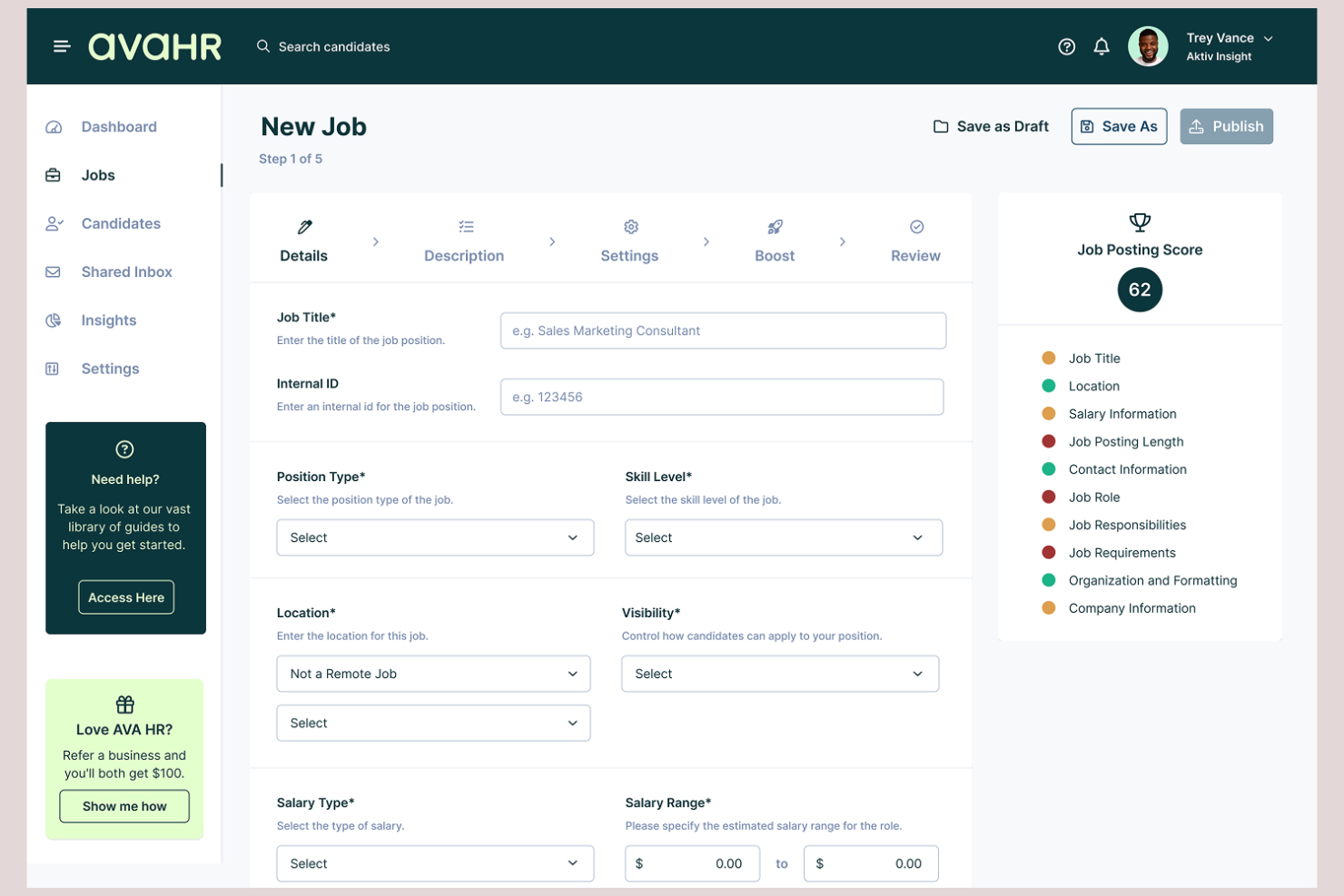
AvaHR è un sistema di monitoraggio dei candidati con un generatore integrato di descrizioni di lavoro basato sull'IA, che offre modelli di ruolo predefiniti, pubblicazione di annunci su più piattaforme e strumenti di valutazione dei candidati basati sull'IA.
Per chi è più indicato AvaHR?
AvaHR è adatto alle piccole e medie imprese che necessitano di una piattaforma di assunzione completa senza personale dedicato al reclutamento.
Perché ho scelto AvaHR
Ho scelto AvaHR come una delle soluzioni migliori perché include modelli di descrizione del lavoro pronti all'uso per ruoli legati ai progetti, come responsabile di progetto, responsabile tecnico di progetto, responsabile senior di progetto e responsabile junior di progetto. Quando stai avviando il processo di assunzione di un nuovo PM, puoi inserire direttamente uno di questi modelli in un annuncio di lavoro senza doverlo scrivere da zero. Il generatore integrato di descrizioni di lavoro basato sull'IA aiuta poi a ottimizzare il testo per la SEO dei portali di lavoro, un aspetto importante quando pubblichi contemporaneamente su oltre 100 portali dalla stessa piattaforma.
Funzionalità principali di AvaHR
- Valutazione dei candidati basata sull'IA: AvaHR assegna un punteggio e classifica i candidati in base alla corrispondenza con i requisiti dell'annuncio pubblicato.
- Creazione di pagine carriere personalizzate: Crea una pagina carriere personalizzata per pubblicare le offerte di lavoro sul sito della tua azienda senza strumenti di terze parti.
- Domande di preselezione personalizzate: Aggiungi domande di preselezione specifiche per il ruolo agli annunci di lavoro per filtrare i candidati prima che entrino nel flusso di selezione.
- Strumenti collaborativi per le assunzioni: Invita i membri del team a esaminare i candidati, lasciare riscontri e collaborare per far avanzare i candidati attraverso le fasi del processo di assunzione.
Integrazioni AvaHR
AvaHR si collega a numerose app tramite Zapier, tra cui Gusto, BambooHR, Checkr, Slack, Google Calendar, Calendly, Salesforce, HubSpot, Microsoft Teams e ADP Workforce Now. È inoltre disponibile un'API per integrazioni personalizzate.
Pros and Cons
Pros:
- Il generatore di descrizioni di lavoro basato sull'IA produce bozze efficaci
- I profili culturali mostrano l'ambiente di lavoro con contenuti multimediali
- I trigger della pipeline automatizzano le azioni in ogni fase
Cons:
- Non dispone di filtri Boolean e di filtri personalizzati per i candidati
- Le firme elettroniche richiedono un costo aggiuntivo nei piani inferiori

Skima.ai
Ideale per abbinare le competenze ai requisiti lavorativi
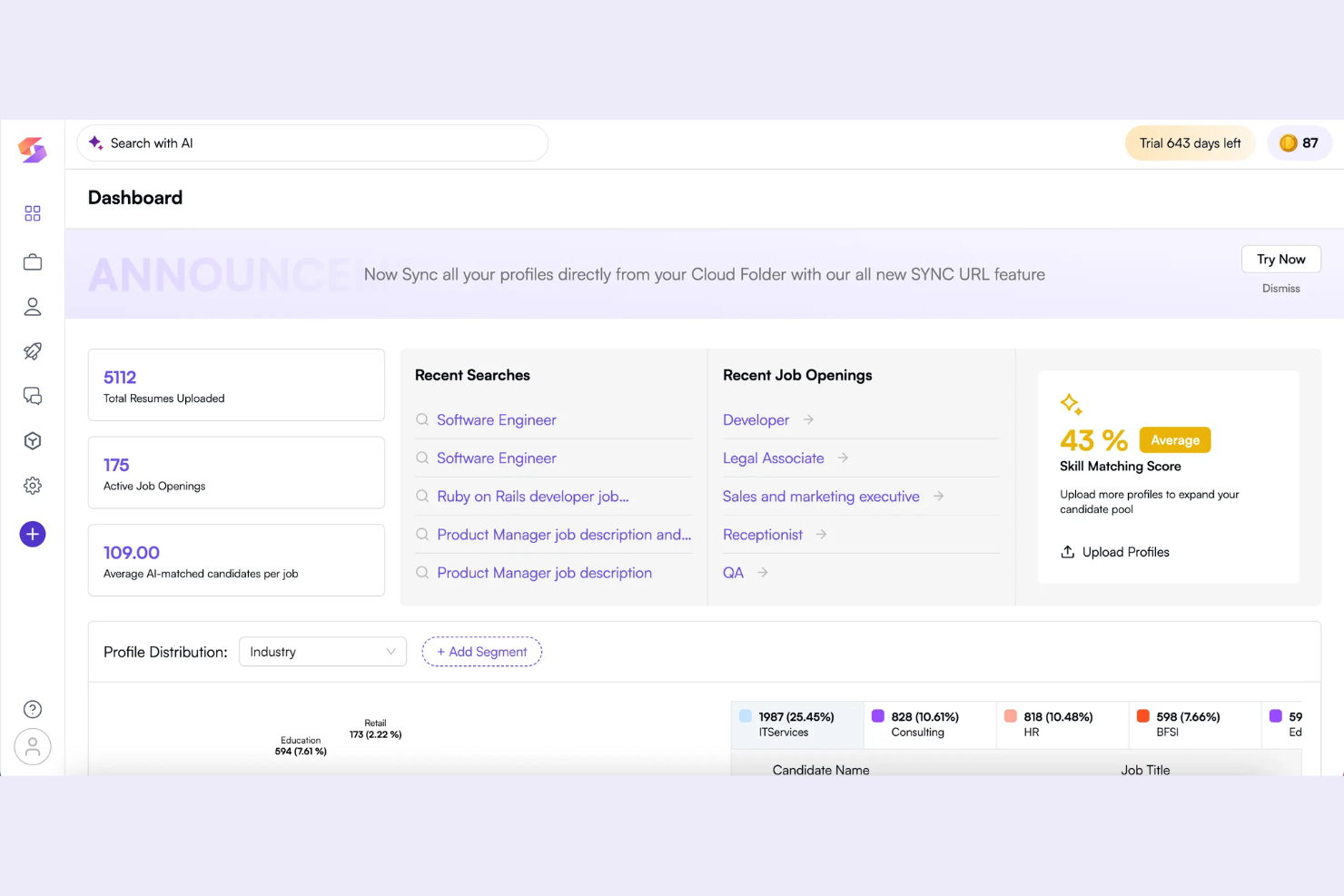
Skima.ai è un generatore di descrizioni lavorative basato sull'intelligenza artificiale, progettato per analizzare i ruoli, identificare le competenze chiave e automatizzare la redazione di requisiti e responsabilità dei lavori.
Per chi è Skima.ai?
Skima.ai è adatto a team di Risorse Umane o recruiter in aziende in crescita che hanno bisogno di analizzare e abbinare con precisione le competenze dei candidati ai requisiti dei ruoli.
Perché ho scelto Skima.ai
Ho scelto Skima.ai perché analizza automaticamente le descrizioni dei ruoli e abbina le competenze necessarie attraverso una tassonomia globale di competenze proprietaria. Posso confrontare i ruoli e assicurarmi che solo le competenze più rilevanti siano incluse per ciascuna posizione.
Funzionalità principali di Skima.ai
- Generatore di descrizioni di lavoro basato su AI: Crea descrizioni di lavoro personalizzate utilizzando modelli di apprendimento automatico.
- Editor dei contenuti lavorativi: Permette ai team di affinare le descrizioni generate all'interno della piattaforma.
- Analisi del gap di competenze: Confronta le competenze attuali dei dipendenti con le aspettative del ruolo.
- Libreria dei ruoli: Fornisce un archivio di ruoli predefiniti e delle relative competenze.
Integrazioni Skima.ai
Le integrazioni includono Avature, BambooHR, Breathe, BreezyHR, Bullhorn, Capsule, Caterer, CatererGlobal, CATS e Ceipal.
Pros and Cons
Pros:
- Fornisce una libreria globale di tassonomie di competenze
- Aggiornamento dei dati delle competenze per analisi comparative
- Automatizza la creazione delle descrizioni di lavoro con l'AI
Cons:
- Personalizzazione dei modelli limitata
- Richiede formazione amministrativa degli utenti

GoHire
Ideale per la semplicità gestionale di startup e piccole imprese

GoHire è una piattaforma software per il reclutamento progettata per piccole imprese e startup che supporta la pubblicazione di annunci di lavoro, la gestione dei candidati e la generazione di descrizioni delle posizioni tramite l'AI.
A chi è rivolto GoHire?
GoHire è adatto a titolari di piccole imprese e fondatori di startup che desiderano uno strumento tutto-in-uno per selezionare il personale e generare descrizioni delle offerte, senza configurazioni complesse o costi aggiuntivi.
Perché ho scelto GoHire
Ho scelto GoHire come uno dei miei strumenti preferiti per la generazione di descrizioni dei lavori tramite AI perché posso avviare nuove ricerche utilizzando modelli alimentati dall'intelligenza artificiale e pubblicare annunci su diversi siti da una singola dashboard. Mi piace la semplicità con cui posso modificare e pubblicare rapidamente le inserzioni.
Caratteristiche principali di GoHire
- Gestione della pipeline dei candidati: Trascina e rilascia i candidati attraverso fasi della pipeline personalizzate.
- Selezione collaborativa in team: Invita i membri del team a esaminare e commentare i candidati.
- Portale di messaggistica con i candidati: Invia email e aggiornamenti ai candidati direttamente dalla dashboard.
- Pagina carriere con branding aziendale: Crea e personalizza una pagina ospitata per le offerte di lavoro della tua azienda.
Integrazioni di GoHire
GoHire offre integrazioni native con LinkedIn, Indeed, ZipRecruiter, Glassdoor e Google Jobs. È disponibile un'API per integrazioni personalizzate.
Pros and Cons
Pros:
- L’IA compila automaticamente le descrizioni dei lavori dai prompt
- Pubblicazione diretta degli annunci su più piattaforme
- Modelli di annunci ottimizzati per assunzioni nelle piccole imprese
Cons:
- Nessuna modifica di massa per descrizioni generate dall’IA
- Personalizzazione limitata dei flussi di approvazione


Develop Diverse è un generatore di descrizioni di lavoro basato sull'intelligenza artificiale progettato per aiutare le organizzazioni ad analizzare il linguaggio, segnalare termini discriminatori e ottimizzare i contenuti per campagne di reclutamento inclusive.
Per chi è più adatto Develop Diverse?
I team di acquisizione talenti e i professionisti HR nelle organizzazioni più grandi che desiderano identificare e ridurre il linguaggio discriminatorio o esclusivo negli annunci di lavoro.
Perché ho scelto Develop Diverse
Ho scelto Develop Diverse tra i migliori perché lo uso realmente per l'analisi linguistica in tempo reale, così da individuare cliché aziendali e frasi escludenti che possono insinuarsi nelle descrizioni di lavoro. Mi affido inoltre ai suoi suggerimenti automatici per riscrivere il testo all'istante.
Caratteristiche principali di Develop Diverse
- Rilevamento dei bias di genere e di età: Segnala linguaggio che può rinforzare pregiudizi di genere o di età nelle descrizioni di lavoro.
- Dashboard di reportistica: Visualizza le analisi linguistiche e le tendenze di miglioramento su tutti gli annunci modificati.
- Filtri linguistici personalizzati: Permettono di adattare il rilevamento agli standard o alle esigenze della propria azienda.
- Strumenti per la collaborazione di team: Consentono agli utenti di revisionare ed editare i contenuti degli annunci di lavoro simultaneamente.
Integrazioni di Develop Diverse
Develop Diverse offre integrazioni native con Greenhouse, Workday, Teamtailor, HR-ON, SAP SuccessFactors e SmartRecruiters. Dispone anche di un add-in per Microsoft Word che porta il suo editor inclusivo direttamente nei tuoi documenti.
Pros and Cons
Pros:
- Evidenzia linguaggio legato all'età e agli stereotipi
- Supporta il lavoro di squadra con ruoli utente avanzati
- Fornisce analisi dettagliate sulle scelte linguistiche
Cons:
- Mancano opzioni di esportazione verso le principali piattaforme ATS
- La configurazione personalizzata del riconoscimento richiede intervento manuale


UInclude è uno strumento di analisi delle descrizioni dei lavori basato su intelligenza artificiale progettato per scansionare, revisionare e valutare le descrizioni dei ruoli in cerca di un linguaggio inclusivo, con particolare attenzione all’individuazione e gestione delle parole connotate dal punto di vista di genere.
Per chi è più indicato UInclude?
Recruiter e team HR che desiderano verificare la presenza di termini connotati dal punto di vista di genere o linguaggio non inclusivo all’interno di diverse posizioni aperte.
Perché ho scelto UInclude
Ho scelto UInclude perché posso caricare annunci di lavoro o incollare il testo e vedere immediatamente una suddivisione delle parole connotate come maschili, femminili e neutre. Mi affido ai suoi suggerimenti e alla codifica a colori ogni volta che ho bisogno di una revisione dell’eventuale bias di genere nei contenuti per l’assunzione.
Caratteristiche principali di UInclude
- Analisi in blocco delle descrizioni dei ruoli: consente di caricare più annunci di lavoro contemporaneamente per una revisione simultanea.
- Dashboard di valutazione della diversità: monitora e visualizza le metriche sul linguaggio inclusivo per ruolo o dipartimento.
- Gestione degli account team: permette a recruiter o manager delle assunzioni di collaborare sui progetti.
- Esportazione report PDF: esporta i risultati delle analisi in file PDF scaricabili.
Integrazioni UInclude
Offre un’API per integrazioni personalizzate.
Pros and Cons
Pros:
- Evidenzia istantaneamente linguaggio connotato di genere
- Visualizza metriche di diversità per dipartimento
- Consente l’analisi in blocco di più descrizioni
Cons:
- Nessuna esportazione ATS o HRIS pre-configurata
- Personalizzazione limitata per settori specifici


Ongig è un software cloud per la creazione di descrizioni di lavoro che utilizza l’IA per automatizzare la scrittura, la modifica e l’ottimizzazione dei contenuti delle offerte di lavoro per i team HR e di selezione del personale.
Per chi è ideale Ongig?
Responsabili delle risorse umane e team di acquisizione talenti di aziende di medie e grandi dimensioni che desiderano standardizzare e ottimizzare le descrizioni di lavoro.
Perché ho scelto Ongig
Ho scelto Ongig perché la sua piattaforma si concentra su contenuti di lavoro strutturati e ridotti nei pregiudizi. Utilizzo gli avvisi integrati per individuare un linguaggio problematico e l’editor organizza ogni descrizione con sezioni coerenti come requisiti e responsabilità.
Caratteristiche principali di Ongig
- Editing collaborativo: Più utenti possono co-modificare e revisionare le descrizioni in tempo reale.
- Dashboard di analisi dei contenuti: Monitora conteggio parole, livelli di leggibilità e trend nei tuoi annunci.
- Strumenti di branding personalizzati: Aggiungi il logo, i font e i colori aziendali a tutte le descrizioni.
- Pubblicazione automatizzata degli annunci: Pubblica le descrizioni finali direttamente su più portali da un’unica interfaccia.
Integrazioni di Ongig
Ongig offre integrazioni native con Greenhouse, iCIMS, SAP SuccessFactors, Workday e SmartRecruiters. È inoltre disponibile un’API per integrazioni personalizzate.
Pros and Cons
Pros:
- Rileva modelli di tono discriminatorio
- Garantisce una struttura coerente per tutte le posizioni
- Offre collaborazione in tempo reale per i team
Cons:
- L'installazione richiede il provisioning del server
- Opzioni di esportazione dei formati delle descrizioni limitate


JobTarget è una piattaforma di pubblicità per il reclutamento progettata per distribuire, gestire e ottimizzare gli annunci di lavoro su migliaia di job board e siti specializzati per il reclutamento.
Per chi è ideale JobTarget?
JobTarget è ideale per reclutatori o team HR di organizzazioni di medie o grandi dimensioni che hanno bisogno di distribuire annunci di lavoro a pool di candidati mirati e diversificati.
Perché ho scelto JobTarget
Ho scelto JobTarget tra i migliori perché posso automatizzare dove e come vengono distribuiti gli annunci con un targeting dettagliato. Utilizzo i suoi strumenti intelligenti di gestione delle campagne per raggiungere job board di nicchia e ottimizzare le pubblicazioni in base a dati di mercato reali.
Funzionalità principali di JobTarget
- Marketplace di job board: Accedi a migliaia di job board da un'unica piattaforma.
- Controllo del budget delle campagne: Imposta e gestisci limiti di spesa specifici per ciascuna pubblicazione.
- Analisi delle performance: Monitora in tempo reale il traffico dei candidati e l'efficacia delle pubblicazioni.
- Opzioni di job board per la diversità: Pubblica opportunità su piattaforme dedicate a gruppi sottorappresentati.
Integrazioni di JobTarget
JobTarget offre integrazioni native con Greenhouse, Workday, iCIMS, ADP, UKG, SmartRecruiters, Lever, Taleo, JazzHR e Oracle Taleo. È disponibile un'API per integrazioni personalizzate.
Pros and Cons
Pros:
- Automatizza la distribuzione degli annunci su più job board
- Suggerisce piattaforme in base ai criteri della posizione lavorativa
- Traccia i flussi di lavoro di selezione in tempo reale
Cons:
- Modalità offline non disponibile
- Non dispone di strumenti di modifica integrati per le descrizioni

Workable
Ideale per configurazioni di workflow collaborativi veloci

Workable è una piattaforma di recruiting e assunzione che offre generazione di descrizioni delle posizioni alimentata da IA, ricerca di candidati, automazione dei flussi di lavoro e strumenti collaborativi per i team che gestiscono il processo di assunzione.
Per Chi è Ideale Workable?
Team di recruiting di piccole e medie imprese che hanno bisogno di configurare, automatizzare e collaborare rapidamente su flussi di lavoro di assunzione end-to-end.
Perché Ho Scelto Workable
Ho scelto Workable come uno dei migliori per il suo generatore di descrizioni di lavoro con IA abbinato a modelli, e perché posso configurare flussi di lavoro di assunzione in più fasi in pochi minuti. Il mio team utilizza gli strumenti collaborativi per modificare, approvare e pubblicare annunci rapidamente.
Funzionalità Chiave di Workable
- Ricerca di candidati tramite IA: trova e suggerisce automaticamente candidati rilevanti per le tue posizioni aperte.
- Distribuzione sulle bacheche di lavoro: pubblica i tuoi annunci di lavoro su centinaia di bacheche con un solo clic.
- Strumenti per la pianificazione dei colloqui: consentono a candidati e team di assunzione di autogestire la pianificazione dei colloqui tramite la piattaforma.
- Dashboard di reportistica: traccia e visualizza le metriche d’assunzione su tutte le posizioni attive.
Integrazioni di Workable
Workable offre integrazioni native con LinkedIn, Indeed, Google Workspace, Slack, Zoom, DocuSign, HackerRank e Calendly, e fornisce anche un’API per integrazioni personalizzate.
Pros and Cons
Pros:
- L’IA riscrive le descrizioni delle offerte in pochi secondi
- Modifiche in tempo reale per più collaboratori
- Include un’ampia libreria di modelli di annunci
Cons:
- Richiede supervisione manuale attiva
- Tutte le funzionalità richiedono connessione internet
New Product Updates from Workable
Workable Recruiting Enables Direct LinkedIn Job Promotion
Workable Recruiting lets teams purchase and manage paid LinkedIn job promotion directly in Workable. This gives recruiters more control over campaign spend and performance. For more information, visit Workable’s official site.

ClearCo
Ideale per integrare workflow di posizione lavorativa con onboarding

ClearCompany è una piattaforma di gestione dei talenti che riunisce reclutamento, generazione di descrizioni delle posizioni basata su IA, tracciamento dei candidati, onboarding e gestione delle prestazioni in un unico sistema.
Per chi è ideale ClearCompany?
ClearCompany è adatta a responsabili delle risorse umane e recruiter in organizzazioni di medie o grandi dimensioni che necessitano di unificare i flussi di lavoro di assunzione e onboarding.
Perché ho scelto ClearCompany
Ho scelto ClearCompany perché posso creare descrizioni delle posizioni generate dall’IA, automatizzare le fasi dei flussi di lavoro dei candidati e collegare questi modelli di lavoro alle attività di onboarding in un sistema condiviso. Questo mantiene il reclutamento strettamente collegato ai progressi dell’onboarding.
Funzionalità principali di ClearCompany
- Libreria di competenze: Fornisce abilità e requisiti predefiniti per i ruoli lavorativi.
- Workflow di approvazione delle posizioni: Permette ai manager di automatizzare e tracciare le approvazioni delle richieste di assunzione.
- Azioni in blocco sui candidati: Consente l’invio di email di gruppo, l’aggiornamento e lo spostamento dei candidati in batch.
- Modulo di gestione delle prestazioni: Consente di valutare e rivedere i nuovi assunti direttamente nella piattaforma.
Integrazioni ClearCompany
ClearCompany offre integrazioni native con ADP, Paylocity, UKG, Indeed, Sterling, Verified First e DocuSign. È disponibile un’API per integrazioni personalizzate.
Pros and Cons
Pros:
- Modelli di posizione basati su IA adattati ai settori
- Automazione del routing delle approvazioni delle posizioni lavorative
- Collegamento diretto tra creazione posizione e onboarding
Cons:
- Flessibilità limitata nella modifica dei contenuti generati
- La reportistica degli strumenti per descrizione posizione è basilare

Grammarly
Ideale per migliorare grammatica e chiarezza

Altri generatori di descrizioni delle mansioni basati sull'IA
Ecco alcune ulteriori opzioni di generatori di descrizioni delle mansioni basati sull’IA che non sono state incluse nella mia selezione, ma che vale comunque la pena prendere in considerazione:
- Recooty
Ideale per la gestione centralizzata delle offerte di lavoro
- Jasper
Ideale per modelli di scrittura AI personalizzabili
- Simplified
Ideale per bozze istantanee di descrizioni multilingue


Come Valuto i Generatori di Descrizioni di Lavoro con l’AI
Ogni strumento in questa lista deve fare più che racchiudere un semplice prompt attorno a un LLM—cerco un’AI che effettivamente faccia risparmiare tempo ai recruiter trasformando un titolo di lavoro e pochi input in una JD pronta da pubblicare. Suddivido la mia valutazione in funzionalità di base che uno strumento deve avere per qualificarsi e fattori differenzianti che separano le buone opzioni da quelle eccellenti.
Funzionalità di Base (Requisiti Fondamentali per Questa Lista)
Quando scelgo gli strumenti per la mia lista, valuto ciascuno su una scala da 0 (non offre la funzionalità) a 5 (eccelle in quest’area) per ogni funzionalità principale elencata qui sotto. Calcolo poi il punteggio totale dello strumento in percentuale. Ogni strumento deve raggiungere un punteggio minimo totale del 65% per essere preso in considerazione per l’inclusione.
- Generazione di JD Supportata dall’AI: Controllo se lo strumento può produrre una descrizione di lavoro completa e strutturata partendo soltanto da un titolo, livello e un elenco di competenze—senza solo riempire degli spazi vuoti in un modello statico.
- Analisi di Bias e Inclusività: Ogni strumento dovrebbe evidenziare linguaggio esclusivo su aspetti come genere, età e abilità, e poi suggerire alternative invece di limitarsi a evidenziare i problemi.
- Modelli di JD Personalizzabili: Cerco modelli modificabili con sezioni brandizzate—come un’introduzione aziendale o un piè di pagina con i benefit standard—che i team possono riutilizzare tra reparti e ruoli.
- Controlli su Tono e Stile: I recruiter che pubblicano per una startup o una società di servizi finanziari necessitano di voci differenti. Lo strumento dovrebbe permettere di adattare tono, lunghezza e livello di lettura per ogni risultato.
- Suggerimenti su Competenze e Abilità: Gli strumenti migliori raccomandano competenze e qualifiche rilevanti in base al contesto del ruolo, traendo dai dati di mercato del lavoro invece che affidarsi a un elenco statico ridotto.
- Esportazione e Integrazione ATS: Valuto se le JD generate possono essere esportate in formati come DOCX o PDF e inviate su piattaforme come Greenhouse, Workday o Lever senza necessità di modifiche manuali.
Una volta che ho una lista di strumenti che soddisfano questi criteri, considero cosa distingue ogni piattaforma.
Fattori Differenzianti (Cosa Distingue i Vendor)
Ecco come confronto e metto a confronto i vari vendor:
Funzionalità Distintive
L’ottimizzazione SEO e per i job board sono elementi distintivi importanti. Gli strumenti che strutturano titoli e parole chiave per piattaforme come Indeed e Google for Jobs evitano modifiche manuali ai recruiter e aumentano direttamente il volume di candidati. Guardo anche alla personalizzazione della voce aziendale, in particolare se l’AI può apprendere il tono e l’EVP di un’azienda così che i risultati rimangano coerenti su centinaia di annunci. Per i team di assunzione globali, la generazione multilingue conta molto. Mi assicuro che uno strumento possa localizzare JD in più lingue senza perdere accuratezza specifica per il ruolo.
Oltre le Funzionalità
Pongo molta attenzione a sicurezza dei dati e governance dell’AI—in particolare se un vendor comunica come vengono trattati gli input e se i dati aziendali vengono usati per addestrare i loro modelli. Anche la profondità dell’integrazione ATS è importante. Uno strumento che si sincronizza con il flusso di lavoro delle richieste in Greenhouse o Workday fa risparmiare molto più tempo rispetto a uno che esporta solo i file. Valuto anche la velocità di implementazione, specialmente nei team dove i manager delle assunzioni con poca esperienza di AI devono contribuire a revisioni e approvazioni delle JD.
Come scegliere un generatore di descrizioni delle mansioni basato sull'IA
È facile perdersi in lunghi elenchi di funzionalità e strutture tariffarie complesse. Per aiutarti a rimanere concentrato mentre analizzi il tuo processo specifico di selezione del software, ecco un elenco di fattori da tenere a mente:
| Fattore | Cosa considerare |
|---|---|
| Scalabilità | Lo strumento supporterà la tua crescita se le assunzioni aumentano rapidamente o si spostano tra regioni o dipartimenti? Assicurati che sia in grado di gestire esigenze di assunzione variabili. |
| Integrazioni | Si collega nativamente al tuo ATS, HRIS o alle principali piattaforme per le assunzioni? Verifica che le integrazioni siano facili da configurare e adeguatamente supportate. |
| Personalizzazione | Puoi adattare modelli, istruzioni e avvisi di conformità per soddisfare le esigenze della tua organizzazione, delle tue sedi e dei tuoi valori? Evita generatori rigidi e uguali per tutti. |
| Facilità d'uso | Con quale rapidità il tuo team può generare e modificare le descrizioni? L'interfaccia è accessibile agli utenti non tecnici senza formazione o supporto aggiuntivi? |
| Implementazione e inserimento | Cosa richiede la configurazione iniziale in termini di tempo, risorse IT e formazione? Cerca un supporto all'inserimento come assistenti virtuali, tour guidati o raccolte di modelli. |
| Costo | I prezzi sono in linea con le tue esigenze di assunzione attuali e future? Fai attenzione ai costi che aumentano in base al numero di utenti o al volume di offerte di lavoro. Verifica in anticipo tutte le tariffe. |
| Misure di sicurezza | In che modo il fornitore protegge i dati dell'azienda e dei candidati? Esamina la crittografia, i controlli degli accessi e le certificazioni sulla privacy dei dati per verificarne la conformità. |
| Disponibilità del supporto | Quali canali di supporto sono disponibili e in quali orari? Valuta se per il tuo team siano importanti la chat dal vivo, il supporto telefonico o i responsabili dedicati. |
Cosa sono i generatori di descrizioni delle mansioni basati sull'IA?
I generatori di descrizioni delle offerte di lavoro basati sull'IA sono strumenti software che utilizzano l'intelligenza artificiale per creare, adattare e ottimizzare gli annunci di lavoro. Questi strumenti analizzano descrizioni esistenti, ruoli e requisiti in termini di competenze per generare contenuti chiari e pertinenti per le posizioni aperte. Aiutano i team delle risorse umane a redigere, perfezionare e aggiornare più rapidamente le descrizioni delle offerte di lavoro, promuovendo al contempo la coerenza e riducendo i pregiudizi tra gli annunci.
Funzionalità dei generatori di descrizioni delle offerte di lavoro basati sull'IA
Quando selezioni un generatore di descrizioni delle offerte di lavoro basato sull'IA, presta attenzione alle seguenti funzionalità chiave:
- Generazione di contenuti basata sull'IA: redige automaticamente le descrizioni delle offerte di lavoro in base a un ruolo, una parola chiave o un prompt, facendoti risparmiare tempo e standardizzando il linguaggio tra gli annunci.
- Opzioni di personalizzazione: consentono di modificare modelli, tono e linguaggio per riflettere la cultura e i valori della tua azienda, oltre ai requisiti specifici della posizione.
- Rilevamento e rimozione dei pregiudizi: analizza i contenuti generati alla ricerca di un linguaggio potenzialmente discriminatorio, aiutandoti a creare descrizioni delle offerte di lavoro più inclusive.
- Controlli di conformità integrati: verifica le descrizioni rispetto alle leggi sul lavoro o alle linee guida sulle migliori pratiche, contribuendo a garantire la conformità legale e a ridurre al minimo i rischi.
- Modelli specifici per ruolo: offre modelli pronti all'uso adattati a un'ampia gamma di titoli di lavoro, funzioni e livelli di anzianità.
- Strumenti di collaborazione: consentono ai membri del team di esaminare, commentare o modificare insieme le descrizioni delle offerte di lavoro all'interno della piattaforma.
- Supporto multilingue: consente di generare descrizioni in più lingue, supportando le attività di selezione internazionali e rivolte a candidati diversi.
- Opzioni di esportazione e pubblicazione: offre funzionalità di esportazione o pubblicazione diretta sul sito dedicato alle carriere, sui portali di lavoro o sulle piattaforme per le risorse umane.
- Raccomandazioni su competenze e parole chiave: suggerisce competenze e parole chiave pertinenti per migliorare la visibilità sui portali di lavoro e attrarre candidati qualificati.
- Analisi dell'utilizzo: monitora e mostra report sulle prestazioni o sull'utilizzo delle descrizioni generate, fornendo indicazioni per le future strategie di assunzione e dei contenuti.
Vantaggi dei generatori di descrizioni delle offerte di lavoro basati sull'IA
L'implementazione di un generatore di descrizioni delle offerte di lavoro basato sull'IA offre numerosi vantaggi al tuo team e alla tua azienda. Eccone alcuni:
- Creazione più rapida delle descrizioni delle offerte di lavoro: l'IA redige e perfeziona rapidamente gli annunci di lavoro, riducendo il tempo dedicato alla scrittura manuale.
- Maggiore coerenza: modelli e linguaggio standardizzati promuovono l'uniformità tra i ruoli e i team che si occupano delle assunzioni.
- Riduzione dei pregiudizi: gli strumenti di rilevamento integrati contribuiscono a ridurre al minimo il linguaggio discriminatorio o escludente nelle descrizioni delle offerte di lavoro.
- Maggiore conformità: i controlli di conformità automatizzati contribuiscono a garantire l'accuratezza legale e l'allineamento alle linee guida normative.
- Targeting più efficace dei candidati: l'IA suggerisce competenze e parole chiave per attrarre i candidati più pertinenti e qualificati.
- Collaborazione più semplice: le funzionalità di modifica e commento condivise consentono ai responsabili delle assunzioni e alle parti interessate di contribuire in un unico spazio.
- Supporto alle assunzioni a livello globale: le funzionalità multilingue e le opzioni di localizzazione aiutano a raggiungere un bacino di talenti più ampio e internazionale.
Costi e prezzi dei generatori di descrizioni delle offerte di lavoro basati sull'IA
La scelta di un generatore di descrizioni delle offerte di lavoro basato sull'IA richiede la comprensione dei vari modelli di prezzo e dei piani disponibili. I costi variano in base alle funzionalità, alle dimensioni del team, agli extra e ad altri fattori. La tabella seguente riassume i piani più comuni, i relativi prezzi medi e le funzionalità generalmente incluse nelle soluzioni di generazione di descrizioni delle offerte di lavoro basate sull'IA:
Tabella comparativa dei piani per i generatori di descrizioni delle offerte di lavoro basati sull'IA
| Tipo di piano | Prezzo medio | Funzionalità comuni |
|---|---|---|
| Piano gratuito | $0 | Generazione di base delle descrizioni delle offerte di lavoro tramite IA, un numero limitato di modelli e opzioni di esportazione standard. |
| Piano personale | $5-$25/user/month | Descrizioni delle offerte di lavoro illimitate, accesso a tutti i modelli, opzioni di personalizzazione e semplici strumenti di collaborazione. |
| Piano aziendale | $30-$80/user/month | Modelli specifici per ruolo, strumenti di collaborazione, controlli di conformità, analisi e supporto multilingue. |
| Piano per grandi aziende | $100+/user/month | Personalizzazione del marchio, automazione dei flussi di lavoro, integrazioni avanzate, supporto dedicato e funzionalità di sicurezza avanzate. |
Domande frequenti sul generatore di descrizioni delle mansioni basato sull'IA
Ecco alcune risposte alle domande più comuni sul generatore di descrizioni delle mansioni basato sull’IA:
I generatori di descrizioni delle mansioni basati sull'IA possono eliminare i pregiudizi nelle assunzioni?
No, i generatori di descrizioni delle mansioni basati sull’IA non possono eliminare completamente i pregiudizi, ma possono contribuire a ridurli. La maggior parte degli strumenti di IA individua le parole con connotazioni di genere o i termini escludenti, ma la revisione umana è comunque importante per garantire che le descrizioni siano eque e inclusive. Utilizzare un generatore gratuito di descrizioni delle mansioni basato sull’IA per trovare i migliori talenti aiuta a standardizzare il linguaggio, attirando più candidati qualificati provenienti da contesti diversi, inclusi settori specializzati come quello sanitario.
Le descrizioni delle mansioni generate dall'IA sono accurate?
Sì, le descrizioni delle mansioni generate dall’IA sono generalmente accurate per i ruoli e i requisiti standard. Tuttavia, è necessario rivederle e modificarle per assicurarsi che siano in linea con le competenze specifiche, le responsabilità del ruolo o le esigenze particolari dell’azienda. Aggiungere gli anni di esperienza richiesti e requisiti chiari garantisce di attrarre il candidato ideale, preservando al contempo il nome e la cultura distintivi dell’azienda. Questo intervento umano aiuta a trasformare una traccia generica in una descrizione della mansione coinvolgente.
Come posso personalizzare le descrizioni delle mansioni generate dall'IA per la mia organizzazione?
La maggior parte delle piattaforme consente di modificare i modelli, aggiungere sezioni personalizzate o impostare una lingua preferita. Cerca strumenti gratuiti con funzionalità di modifica flessibili, richieste specifiche per l’azienda e funzioni di collaborazione, in modo che il tuo team possa adattare i contenuti prima della pubblicazione. Inserire nel modello le proprie aspettative precise è fondamentale per creare una descrizione della mansione di alta qualità, rivolta ai candidati giusti.
Quali integrazioni dovrei cercare in un generatore di descrizioni delle mansioni basato sull'IA?
Dovresti cercare l’integrazione con il tuo sistema di gestione dei candidati (ATS), il sistema informativo delle risorse umane (HRIS) e i portali di lavoro. Questo facilita l’esportazione delle descrizioni, la pubblicazione delle posizioni aperte e il mantenimento della coerenza dei dati tra i sistemi. Un’integrazione approfondita migliora il flusso di lavoro complessivo del reclutamento basato sull’IA, rendendo semplice condividere le posizioni aperte sui social media e aumentare la visibilità attraverso le migliori pratiche SEO.
È sicuro condividere dati sensibili sulle posizioni di lavoro con questi strumenti?
Sì, purché si scelgano piattaforme affidabili che offrano crittografia dei dati, controlli degli accessi e informative sulla privacy chiare. Verifica sempre la conformità alle normative pertinenti sulla protezione dei dati prima di condividere informazioni sull’azienda o sui candidati durante il processo di selezione. Proteggere questi dati garantisce che il percorso per scrivere la descrizione della mansione perfetta rimanga sicuro.
Le piccole imprese possono trarre vantaggio dai generatori di descrizioni delle mansioni basati sull'IA?
Sì, le piccole imprese possono trarne vantaggio risparmiando tempo, migliorando la coerenza e accedendo a modelli pronti all’uso, anche senza team dedicati alle risorse umane. Questi sistemi possono persino aiutare a generare domande per colloqui personalizzate per i responsabili delle assunzioni. Cerca piani e funzionalità adatti a volumi e budget di assunzione più contenuti, per individuare efficacemente i candidati giusti.