

10 Migliori Software Open Source per il Monitoraggio dei Dipendenti nel 2026

Lista dei Migliori Software Open Source per il Monitoraggio dei Dipendenti


Il software open source per il monitoraggio dei dipendenti offre al tuo team strumenti per tracciare le ore di lavoro, le attività e la produttività, con un codice sorgente che puoi esaminare e adattare. Trovare soluzioni open source per il monitoraggio e la produttività dei dipendenti non è facile: la maggior parte degli strumenti di monitoraggio a livello enterprise sono proprietari, poiché necessitano di alti livelli di sicurezza e aggiornamenti costanti per aggirare le restrizioni sulla privacy dei sistemi operativi.
Tuttavia, questa lista ti aiuterà a confrontare le migliori soluzioni open source, a comprenderne le caratteristiche peculiari e a scegliere quella più adatta alle esigenze della tua organizzazione.
Perché fidarsi delle nostre recensioni sui software
Il nostro team testa e recensisce software dal 2012. In quanto esperti HR noi stessi, sappiamo quanto sia difficile — e importante — scegliere il software giusto.
Per questa guida, abbiamo valutato gli strumenti attraverso test pratici e ricerche indipendenti, assegnando un punteggio agli strumenti in base ai nostri criteri di selezione. Ci basiamo inoltre sulle competenze di leader di pensiero del settore e di professionisti HR attivi.
Le nostre recensioni riflettono il nostro giudizio editoriale umano, non un discorso di vendita.
Revisori esperti:
Riepilogo dei Migliori Software Open Source per il Monitoraggio dei Dipendenti
Questa tabella comparativa riassume i dettagli sui prezzi delle mie migliori scelte di software open source per il monitoraggio dei dipendenti, per aiutarti a trovare quello più adatto al tuo budget e alle esigenze aziendali.
| Tool | Best For | Trial Info | Price | ||
|---|---|---|---|---|---|
| 1 | Ideale per il monitoraggio delle attività multipiattaforma | Uso gratuito | Gratuito per sempre | Website | |
| 2 | La dashboard di EmpMonitor mostra un report sulle attività dei dipendenti. | Prova gratuita di 15 giorni | A partire da $9/utente/mese (fatturato annualmente) | Website | |
| 3 | Ideale per configurazioni di monitoraggio del tempo multi-utente | Piano gratuito disponibile | Prezzi su richiesta | Website | |
| 4 | Ideale per l'integrazione con editor di codice | Prova gratuita + piano gratuito disponibile | Da $9/utente/mese | Website | |
| 5 | Ideale per il controllo dati su server privati | Piano gratuito disponibile | Prezzi su richiesta | Website | |
| 6 | Ideale per la visualizzazione in tempo reale degli schermi | Non disponibile | Da €250/anno | Website | |
| 7 | Ideale per la gestione di team remoti | Prova gratuita + piano gratuito per sempre disponibile | Da $99 (pagamento una tantum) | Website | |
| 8 | Ideale per il monitoraggio delle ore di lavoro basate sui progetti | Prova gratuita di 14 giorni disponibile | Da $5.49/mese (fatturato annualmente) | Website | |
| 9 | Ideale per il monitoraggio orientato alla privacy | Prova gratuita + piano gratuito disponibili | Da $1/dipendente/mese | Website | |
| 10 | Ideale per la gestione unificata di paghe e risorse umane | Prova gratuita di 30 giorni + demo gratuita disponibile | Da $50/mese | Website |
Recensioni sui Software Open Source per il Monitoraggio dei Dipendenti
Qui sotto trovi i miei riassunti dettagliati dei software open source per il monitoraggio dei dipendenti che compongono la mia selezione. Le mie recensioni offrono uno sguardo completo alle funzionalità, ai migliori casi d’uso e alle integrazioni di ciascun software, per aiutarti a trovare quello più adatto a te.


ActivityWatch è uno strumento open-source per il monitoraggio delle attività, pensato per team e singoli che hanno bisogno di informazioni dettagliate e multipiattaforma sull’uso del computer. È pensato per organizzazioni che desiderano un monitoraggio trasparente e personalizzabile senza vincoli con fornitori o compromessi sulla privacy. Se stai cercando una soluzione che funzioni su Windows, macOS e Linux, ActivityWatch ti aiuta a monitorare le abitudini di lavoro e la produttività con pieno controllo dei tuoi dati.
Per chi è ideale ActivityWatch?
ActivityWatch è adatto a team e singoli che necessitano di un monitoraggio delle attività open-source e multipiattaforma in ambienti Windows, macOS e Linux.
Perché ho scelto ActivityWatch
Ho scelto ActivityWatch perché è uno dei pochi strumenti open-source che offre un vero monitoraggio delle attività multipiattaforma senza compromessi. Il software è eseguibile nativamente su Windows, macOS e Linux, così puoi monitorare team con dispositivi diversi senza dover gestire soluzioni multiple. Apprezzo anche il fatto che ActivityWatch garantisce agli utenti il pieno controllo sui propri dati, proteggendoli da eventuali fughe di informazioni. Per le organizzazioni che danno valore a trasparenza e flessibilità nel controllo dei dipendenti, queste caratteristiche rendono ActivityWatch una scelta valida.
Funzionalità principali di ActivityWatch
Altre funzionalità di ActivityWatch che spiccano per il monitoraggio open-source dei dipendenti includono:
- Sistema modulare di watcher: È possibile abilitare o disabilitare moduli specifici per tracciare diversi tipi di attività, come l’uso delle app o la navigazione web.
- Visualizzazione della timeline: La dashboard mostra una timeline visiva delle attività, facilitando la revisione dei modelli di lavoro e della distribuzione del tempo.
- Etichettatura e categorizzazione: Gli utenti possono etichettare e categorizzare le attività per report e analisi più dettagliate.
- Dati esportabili: I registri delle attività possono essere esportati in vari formati, supportando ulteriori analisi o esigenze di conformità.
Integrazioni ActivityWatch
Le integrazioni non sono disponibili pubblicamente.
Pros and Cons
Pros:
- Funziona su Windows, macOS e Linux
- Archiviazione locale dei dati per il controllo della privacy
- Watcher modulari per un monitoraggio delle attività flessibile
Cons:
- Nessuno strumento integrato per il deployment remoto
- Manca una dashboard centrale per più utenti

La dashboard di EmpMonitor mostra un report sulle attività dei dipendenti.

EmpMonitor è una piattaforma di monitoraggio progettata per organizzazioni che necessitano di una supervisione dettagliata dell'attività e del comportamento dei dipendenti. È particolarmente utile per team IT, finanziari e orientati alla conformità che desiderano tracciare le azioni degli utenti, l'utilizzo delle applicazioni e l'accesso ai dati. Se stai cercando una soluzione che ti aiuti a individuare comportamenti rischiosi e mantenere la visibilità su team distribuiti, EmpMonitor merita considerazione.
Per chi è ideale EmpMonitor?
EmpMonitor è una scelta solida per i team IT e della sicurezza all’interno di organizzazioni di medie e grandi dimensioni che devono monitorare l’attività degli utenti per scopi di conformità e rilevamento di minacce interne.
Perché ho scelto EmpMonitor
Ciò che mi ha attirato verso EmpMonitor è il suo focus sulla rilevazione delle minacce interne, un tema sempre più rilevante per le organizzazioni che gestiscono dati sensibili. La piattaforma offre monitoraggio in tempo reale delle attività degli utenti e analisi dettagliate del comportamento, facilitando l’individuazione di azioni sospette prima che si aggravino. Apprezzo anche il fatto che EmpMonitor fornisca avvisi automatici per violazioni delle policy e tenga traccia di trasferimenti di file, uso di USB e attività sulle applicazioni. Queste funzionalità lo rendono adatto a team che devono identificare e rispondere in modo proattivo ai rischi di sicurezza interni.
Funzionalità principali di EmpMonitor
Altre funzionalità di EmpMonitor che potrebbero interessarti includono:
- Registrazione delle sequenze di tasti: Cattura e registra tutte le sequenze di tasti effettuate sui dispositivi monitorati per un’analisi dettagliata delle attività.
- Cattura degli screenshot: Scatta periodicamente screenshot dei desktop degli utenti per fornire una traccia visiva delle attività.
- Analisi della produttività: Monitora il tempo trascorso su applicazioni e siti web per aiutare a valutare i pattern di produttività dei dipendenti.
- Gestione remota dei dispositivi: Permette agli amministratori di monitorare e gestire i terminali da una dashboard centralizzata, anche per team distribuiti.
Integrazioni di EmpMonitor
Attualmente non sono elencate integrazioni native.
Pros and Cons
Pros:
- Monitoraggio in tempo reale dei log delle attività degli utenti
- Avvisi automatici per comportamenti sospetti
- Report dettagliati su produttività e tempi di inattività
Cons:
- Funzionalità di monitoraggio mobile limitate
- Nessuna integrazione nativa con piattaforme HR

Kimai è un software open-source per il monitoraggio del tempo progettato per team che devono gestire più utenti e progetti. È particolarmente adatto per società di consulenza, agenzie e organizzazioni con esigenze complesse di rilevamento orario tra dipartimenti o clienti. Kimai aiuta a centralizzare i dati relativi al tempo, rendendo più semplice monitorare la produttività e allocare accuratamente le risorse.
Per chi è ideale Kimai?
Kimai è adatto a organizzazioni e team che devono tracciare il tempo per più utenti su vari progetti o clienti.
Perché ho scelto Kimai
Ho scelto Kimai perché è stato sviluppato per gestire configurazioni di monitoraggio temporale multi-utente, una sfida comune per i team che gestiscono diversi progetti o clienti contemporaneamente. La piattaforma consente di assegnare utenti a diversi progetti, monitorare le loro ore individualmente e generare report dettagliati per ciascun utente o team. Apprezzo anche il supporto per permessi granulari basati sui ruoli, così puoi controllare chi vede o modifica i dati relativi al tempo. Queste funzionalità rendono Kimai una scelta solida per organizzazioni che necessitano di monitorare l’attività dei dipendenti e il tempo di progetto in un ambiente open-source e flessibile.
Funzionalità principali di Kimai
Altre funzionalità utili di Kimai per il monitoraggio open-source dei dipendenti includono:
- Esportazione fogli presenze: Esporta i dati dei fogli presenze in diversi formati per esigenze di buste paga o conformità.
- Monitoraggio assenze: Registra e gestisci le assenze e i permessi dei dipendenti direttamente sulla piattaforma.
- Sistema di etichettatura: Aggiungi etichette alle registrazioni temporali per un filtro e una reportistica più facile.
- Accesso API: Collega Kimai ad altri sistemi o crea integrazioni personalizzate tramite la sua API.
Integrazioni Kimai
Kimai offre integrazioni native con CodeTimer Mobile, Kimai Mobile (Android), Kimai Mobile (iOS), Timai, CodeTimer Desktop, Eon Timer e altri ancora.
Pros and Cons
Pros:
- Traccia il tempo con registri dettagliati ed esportabili
- Supporta permessi utente granulari per tracciare le attività
- Offre un sistema di plugin per funzionalità di monitoraggio personalizzate
Cons:
- Manca la cattura integrata di screenshot o di tasti digitati
- Nessuna dashboard per il monitoraggio in tempo reale delle attività degli utenti
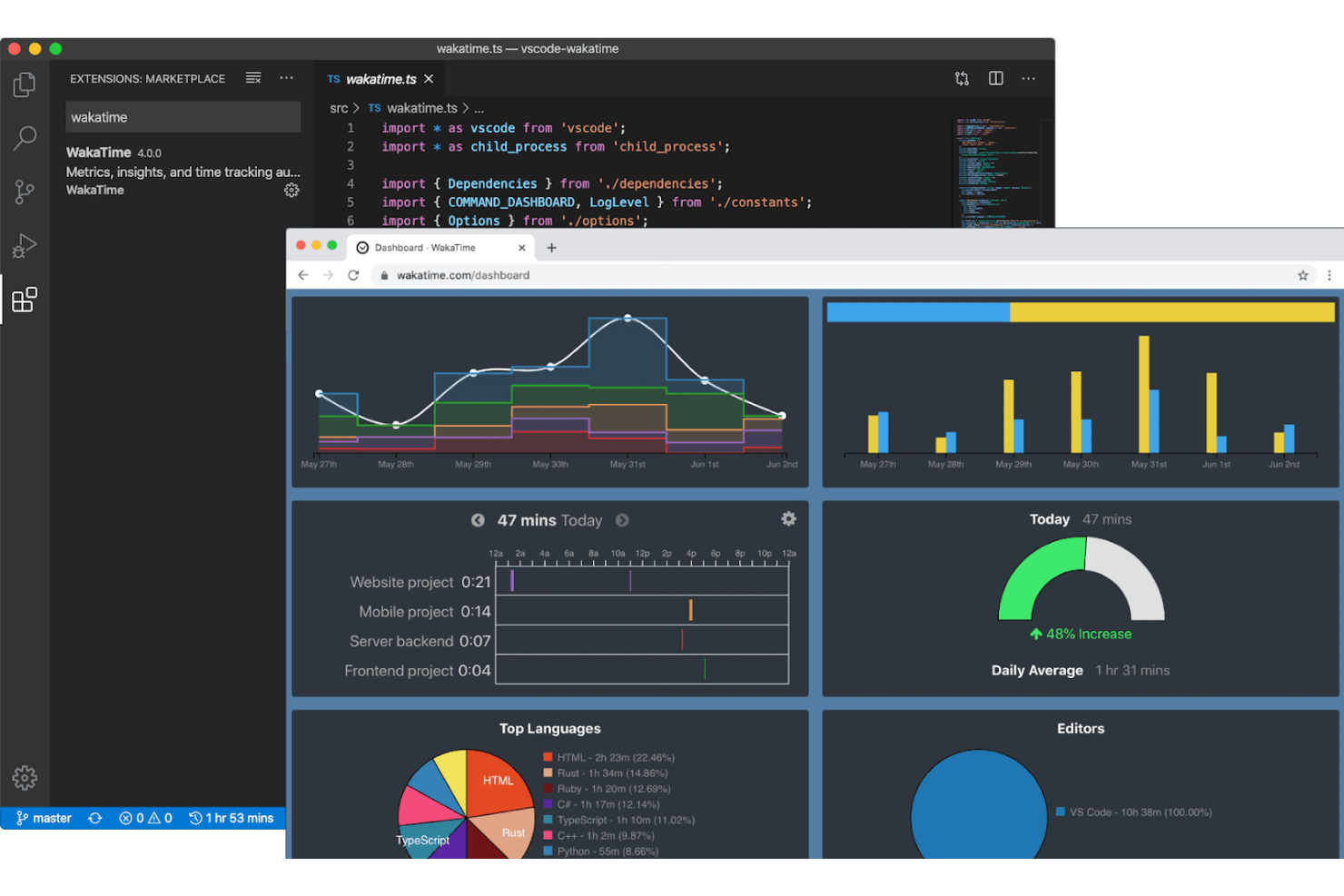
WakaTime offre il tracciamento del tempo open-source che si integra direttamente con i più diffusi editor di codice e IDE. È una soluzione ideale per team di ingegneri e responsabili tecnici che desiderano monitorare l’attività di programmazione senza interrompere i flussi di lavoro degli sviluppatori. Se hai bisogno di approfondimenti dettagliati sul tempo dedicato alla programmazione e sulla concentrazione sui progetti, WakaTime offre questa visibilità direttamente nel tuo ambiente di sviluppo.
A chi è più adatto WakaTime?
WakaTime si rivolge a team di sviluppo software e professionisti tecnici che desiderano il tracciamento automatico dell’attività di programmazione nei loro editor di codice preferiti.
Perché ho scelto WakaTime
Ho scelto WakaTime perché è uno degli unici strumenti di monitoraggio open-source che si integra direttamente con editor di codice e IDE, risultando particolarmente prezioso per monitorare la produttività degli sviluppatori. WakaTime registra automaticamente il tempo di programmazione, l’attività sui file e il focus sui progetti senza bisogno di inserimento manuale da parte degli utenti. Questo approccio offre a manager tecnici e team lead una chiara e immediata panoramica di come vengono impiegate le ore di sviluppo nei vari progetti. Per le organizzazioni che desiderano monitorare il lavoro tecnico senza interrompere i flussi di lavoro degli sviluppatori, il modello basato su plugin di WakaTime si distingue.
Funzionalità principali di WakaTime
Altre funzionalità di WakaTime che supportano il monitoraggio dei dipendenti nei team tecnici includono:
- Client open-source: Gli utenti possono esaminare, modificare o gestire autonomamente il client principale di tracciamento del tempo per una maggiore trasparenza e controllo.
- Dashboard dettagliata: Visualizza statistiche giornaliere, settimanali e mensili sulla programmazione suddivise per progetto, linguaggio ed editor.
- Riepiloghi dell’attività di team: Raggruppa e confronta l’attività di programmazione su più utenti all’interno di uno spazio di lavoro condiviso.
- Plugin disponibili per decine di editor: Installa plugin per Visual Studio Code, JetBrains IDE, Sublime Text, Atom e molti altri ambienti di sviluppo.
Integrazioni di WakaTime
Le integrazioni includono Visual Studio Code, JetBrains IDE, Sublime Text, Atom, Vim, Emacs, Eclipse, NetBeans, Xcode e altri ancora.
Pros and Cons
Pros:
- Traccia automaticamente il tempo di programmazione negli editor
- Supporta decine di editor di codice popolari
- Impatto minimo sul flusso di lavoro degli sviluppatori
Cons:
- Nessun monitoraggio per attività non collegate alla programmazione
- Manca di funzionalità per screenshot o registrazione dello schermo
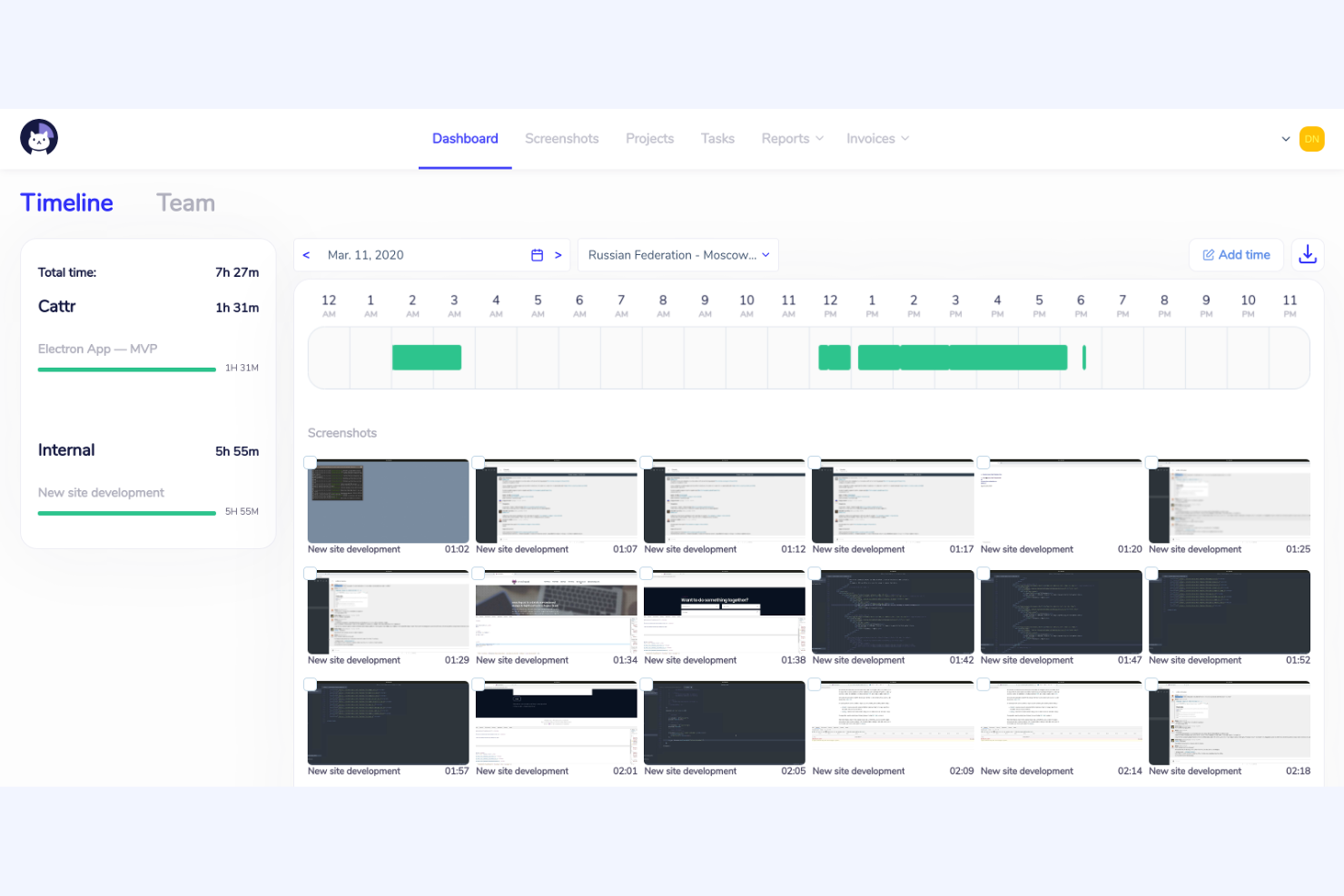
Cattr è una piattaforma open source per il monitoraggio dei dipendenti, progettata per le organizzazioni che desiderano il pieno controllo sui propri dati e sulla modalità di implementazione. È particolarmente adatta a team IT, agenzie e aziende attente alla privacy che hanno bisogno di tracciare le ore di lavoro e le attività senza fare affidamento su servizi cloud di terze parti. Se cerchi una soluzione che puoi ospitare e personalizzare per adattarla alla tua infrastruttura, Cattr è sicuramente da prendere in considerazione.
A chi è più adatto Cattr?
Cattr è una scelta solida per i team IT e le organizzazioni orientate alla privacy che necessitano di una soluzione di monitoraggio dei dipendenti self-hosted e open source.
Perché ho scelto Cattr
Cattr è progettato specificamente per la comunità on-premises/self-hosted. Mentre altri strumenti offrono versioni cloud, l'identità principale di Cattr è quella di fornire all’utente la completa proprietà dei propri dati di monitoraggio sull’hardware aziendale, garantendo un livello di privacy e conformità che gli strumenti cloud proprietari non possono offrire.
La natura open source di Cattr significa anche che puoi verificare il codice e personalizzare lo strumento per adattarlo alle esigenze uniche della tua organizzazione. Per i team che desiderano evitare l’archiviazione cloud di terze parti e mantenere le informazioni sensibili internamente, Cattr offre un livello di trasparenza e controllo difficilmente raggiungibile altrove.
Funzionalità principali di Cattr
Altre funzionalità di Cattr che potrebbero interessarti includono:
- Monitoraggio automatico del tempo: Traccia automaticamente le ore di lavoro e l’attività senza necessità di input manuale dagli utenti.
- Cattura schermate: Acquisisce periodicamente schermate per fornire una registrazione visiva dell’attività degli utenti.
- Gestione di progetti e attività: Permette di assegnare progetti e attività agli utenti e tracciare il tempo dedicato a ciascuno di essi.
- Supporto multipiattaforma: Offre applicazioni desktop per Windows, macOS e Linux per coprire un’ampia gamma di dispositivi.
Integrazioni di Cattr
Al momento non sono elencate integrazioni native. È disponibile un’API per integrazioni personalizzate.
Pros and Cons
Pros:
- Supporta utenti illimitati senza costi aggiuntivi
- Offre report dettagliati su attività e tempo
- Comunità attiva per supporto e sviluppo
Cons:
- Non dispone di funzionalità integrate per buste paga o fatturazione
- Gli aggiornamenti dell’interfaccia possono essere più lenti rispetto alla concorrenza


Veyon è una piattaforma open source progettata per le organizzazioni che necessitano di monitorare e gestire più computer dei dipendenti da una posizione centrale. È particolarmente utile per amministratori IT, educatori e responsabili che desiderano osservare l’attività degli utenti e fornire supporto remoto. Se sei alla ricerca di una soluzione che consenta una supervisione dal vivo e un controllo centralizzato in un ambiente di rete, Veyon offre funzionalità pensate per queste esigenze.
A chi è rivolto Veyon?
Veyon è particolarmente indicato per amministratori IT ed educatori che necessitano di una supervisione centralizzata e in tempo reale di più computer in ambienti di rete.
Perché ho scelto Veyon
Quello che mi ha attratto di Veyon è la sua capacità di mostrare in tempo reale lo schermo di più computer, una funzione essenziale per un monitoraggio trasparente dei dipendenti in ambienti open source. Pur essendo progettato principalmente per le aule scolastiche, Veyon può essere facilmente implementato anche in strutture aziendali.
La funzione di monitoraggio dal vivo permette di vedere immediatamente cosa succede su qualsiasi postazione collegata, facilitando l'individuazione dei problemi o la fornitura di supporto immediato. Apprezzo anche la possibilità offerta da Veyon di catturare schermate e trasmettere il proprio schermo agli altri, particolarmente utile per la formazione o la risoluzione dei problemi. Queste capacità rendono Veyon una scelta pratica per le organizzazioni che necessitano di visibilità diretta e in tempo reale sulle attività degli utenti.
Funzionalità principali di Veyon
Altre funzionalità di Veyon che potrebbero interessarti includono:
- Gestione delle sessioni utente: Disconnessione, riavvio o spegnimento remoto delle sessioni degli utenti dal pannello di controllo centrale.
- Controllo degli accessi: Imposta permessi dettagliati per limitare o consentire azioni specifiche a determinati utenti o gruppi.
- Esecuzione remota di comandi: Esegui script o comandi su più computer contemporaneamente per manutenzione o aggiornamenti.
- Raggruppamento per posizione: Organizza i dispositivi monitorati in base a posizioni fisiche o logiche per una gestione e supervisione più semplici.
Integrazioni Veyon
Le integrazioni includono Microsoft Entra ID.
Pros and Cons
Pros:
- Monitoraggio in tempo reale di più schermi utente
- Controlli per la gestione remota delle sessioni
- Modalità broadcast per dimostrazioni o formazione dal vivo
Cons:
- Nessuna analisi delle attività o della forza lavoro integrata
- Opzioni limitate di reporting ed esportazione


Se cerchi un software di monitoraggio dei dipendenti open-source con una forte attenzione alla gestione dei team remoti, Ever Gauzy Platform merita attenzione. È progettato per team distribuiti che hanno bisogno di tracciare la produttività, gestire progetti e occuparsi delle attività HR in un unico luogo. La piattaforma si distingue per la sua combinazione di monitoraggio del tempo, fatturazione e altre funzionalità avanzate.
A chi è più adatto Ever Gauzy Platform?
Ever Gauzy Platform si adatta ad aziende distribuite e team remoti che necessitano di funzionalità integrate di monitoraggio, HR e gestione progetti in un'unica piattaforma open-source.
Perché ho scelto Ever Gauzy Platform
Ciò che mi colpisce di Ever Gauzy Platform è il modo in cui integra il monitoraggio del tempo dei dipendenti e la gestione dei team remoti in un'unica piattaforma open-source. L'ho scelto perché va oltre il semplice rilevamento delle ore, includendo funzionalità come la gestione di progetti e attività, la fatturazione e moduli HR per permessi e stipendi. Queste capacità lo rendono particolarmente utile per le organizzazioni con team distribuiti che devono coordinare il lavoro, monitorare la produttività e gestire i processi HR a distanza. La possibilità di gestire così tanti aspetti del lavoro remoto da una sola dashboard è un vero elemento distintivo nel panorama open-source.
Funzionalità principali di Ever Gauzy Platform
Oltre all'attenzione per la gestione dei team remoti, ho riscontrato anche diverse altre funzionalità che supportano il monitoraggio e la supervisione dei dipendenti:
- Screenshot delle attività: La piattaforma può acquisire screenshot periodici dei desktop dei dipendenti per fornire prove visive dell'attività lavorativa.
- Inserimento manuale del tempo: Gli utenti possono inserire manualmente le ore per attività non tracciate automaticamente, supportando scenari di lavoro più flessibili.
- Permessi basati sui ruoli: Gli amministratori possono assegnare livelli di accesso granulari agli utenti, garantendo che i dati sensibili siano visibili solo alle persone autorizzate.
- App desktop e web: I dipendenti possono tracciare tempi e attività sia da applicazioni desktop che tramite browser per una maggiore accessibilità.
Integrazioni di Ever Gauzy Platform
Attualmente non sono elencate integrazioni native.
Pros and Cons
Pros:
- Offre moduli HR e payroll integrati
- Supporta multi-tenant e multi-organizzazione
- Permette controlli di accesso granulari basati sui ruoli
Cons:
- Nessun monitoraggio integrato di tasti o utilizzo di app
- La community di supporto è ancora relativamente piccola

Se il tuo team gestisce più progetti e ha bisogno di un monitoraggio preciso delle ore di lavoro, eHour offre una soluzione flessibile e open source. È progettato per organizzazioni che fatturano in base al progetto o necessitano di report dettagliati per il lavoro svolto con i clienti. eHour ti aiuta a monitorare l'allocazione del tempo per progetto e supporta una fatturazione trasparente e accurata.
Per chi è più indicato eHour?
I project manager e le società di consulenza che devono monitorare le ore fatturabili su vari progetti per clienti troveranno eHour particolarmente utile.
Perché ho scelto eHour
Ho scelto eHour perché è progettato specificamente per la rilevazione delle ore di lavoro basate sui progetti, esigenza comune per i team che gestiscono più clienti o consegne. Lo strumento ti permette di assegnare i dipendenti a progetti specifici e monitorare il loro tempo con dettaglio, rendendo semplice generare report accurati per la fatturazione o per analisi interne. Mi piace che eHour supporti strutture e ruoli di progetto personalizzabili, così puoi adattarlo a diversi flussi di lavoro o accordi con i clienti. Essendo open source, puoi anche personalizzare la piattaforma per soddisfare esigenze di tracciamento particolari.
Caratteristiche principali di eHour
Altre funzionalità di eHour che spiccano per il monitoraggio dei dipendenti includono:
- Gestione delle assenze: Monitora ferie e assenze dei dipendenti insieme alle ore di progetto per avere una panoramica completa della disponibilità.
- Monitoraggio degli straordinari: Tieni traccia e registra le ore di straordinario per supportare conformità e processi di compensazione.
- Report personalizzati: Crea ed esporta report dettagliati per progetto, utente o periodo di tempo per audit o trasparenza verso i clienti.
- Permessi utente: Imposta controlli di accesso dettagliati per ruoli diversi, assicurando che i dati sensibili siano visibili solo agli utenti autorizzati.
Integrazioni di eHour
Le integrazioni includono Jortt, Jira, Power BI e altre.
Pros and Cons
Pros:
- Monitora il tempo per progetto, cliente e attività
- Supporta più utenti e progetti
- Permette flussi di approvazione flessibili per i timesheet
Cons:
- Nessun rilevamento integrato delle attività utente o inattività
- Non dispone di monitoraggio automatico della presenza o degli accessi
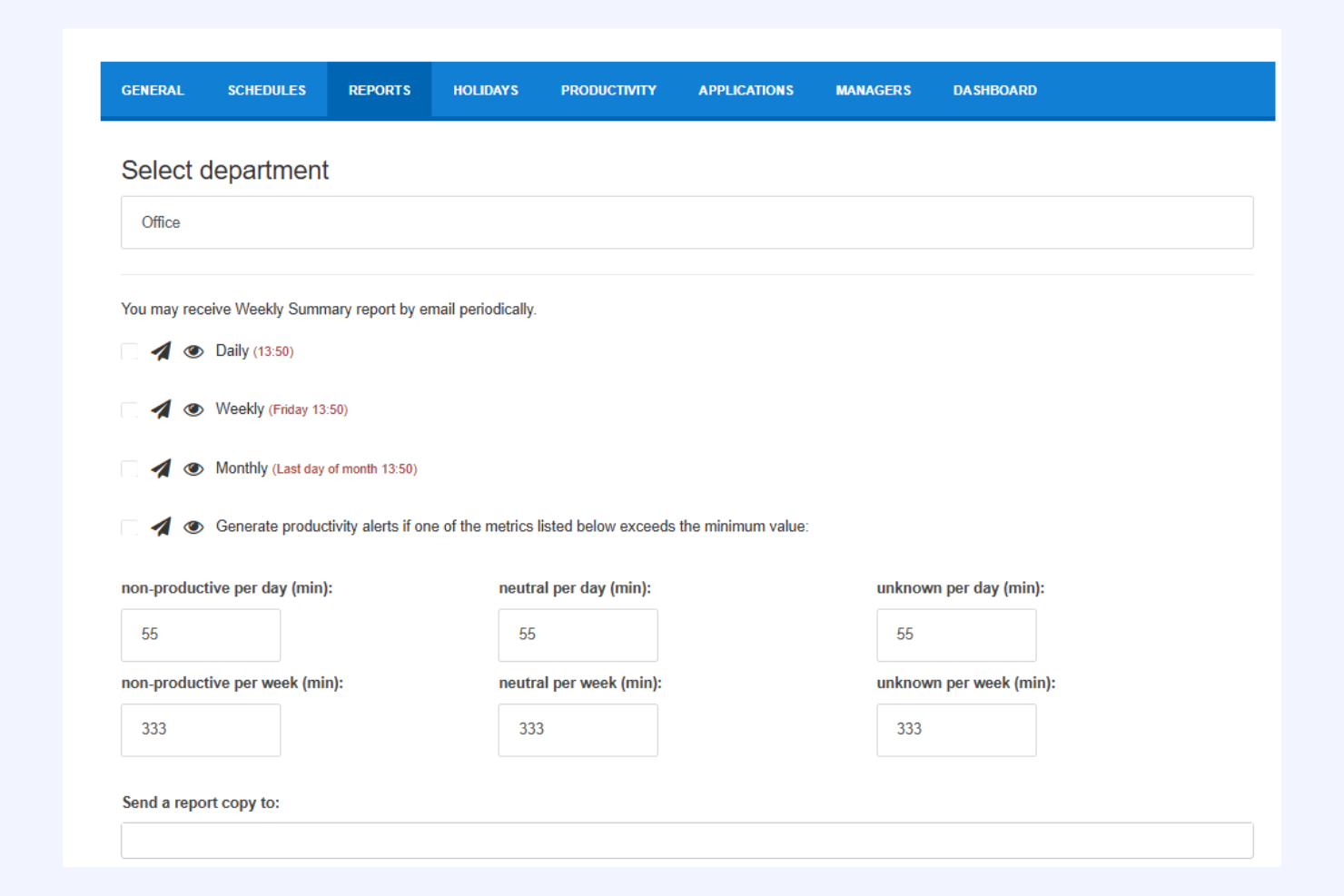
StaffCounter offre un monitoraggio dei dipendenti incentrato sulla privacy per le organizzazioni che desiderano supervisione senza una sorveglianza invasiva. È indicato per aziende e team che devono bilanciare il controllo della produttività con il rispetto della privacy degli utenti. Se cerchi un software di monitoraggio che punti su trasparenza e protezione dei dati, StaffCounter è stato progettato con queste priorità in mente.
Per chi è più adatto StaffCounter?
StaffCounter è ideale per piccole e medie imprese e organizzazioni che necessitano di un monitoraggio dei dipendenti con solide protezioni della privacy e una gestione trasparente dei dati.
Perché ho scelto StaffCounter
Ho scelto StaffCounter perché mette la privacy al centro del monitoraggio dei dipendenti, un aspetto raro in questo settore. Lo strumento offre funzioni come la raccolta anonima dei dati e livelli di monitoraggio personalizzabili, così le organizzazioni possono tracciare la produttività senza oltrepassare i limiti. Apprezzo anche che StaffCounter fornisca audit trail chiari e consenta agli utenti di vedere esattamente quali dati vengono raccolti. Per i team che vogliono monitorare le attività lavorative nel rispetto della privacy dei dipendenti, queste caratteristiche rendono StaffCounter una scelta valida.
Funzionalità principali di StaffCounter
Altre funzionalità di StaffCounter che supportano il monitoraggio orientato alla privacy includono:
- Monitoraggio offline: StaffCounter può tracciare l'attività anche quando il dispositivo non è connesso a Internet, sincronizzando i dati appena viene ristabilita la connessione.
- Archiviazione dati criptata: Tutti i dati raccolti dal monitoraggio vengono archiviati tramite crittografia per proteggere le informazioni sensibili.
- Screenshot automatici: Lo strumento può acquisire screenshot periodici a intervalli personalizzabili per fornire ulteriore contesto.
- Monitoraggio dispositivi mobili: StaffCounter offre capacità di monitoraggio per dispositivi Android, estendendo la supervisione oltre desktop e laptop.
Integrazioni StaffCounter
Le integrazioni native non sono elencate pubblicamente.
Pros and Cons
Pros:
- Offre monitoraggio anonimo per la conformità
- Garantisce l'archiviazione criptata dei dati per la sicurezza
- Supporta il monitoraggio offline e la sincronizzazione dei dati
Cons:
- Nessuna funzione di monitoraggio dispositivi mobili disponibile
- Manca di avvisi integrati o rilevamento anomalie

TimeTrex
Ideale per la gestione unificata di paghe e risorse umane
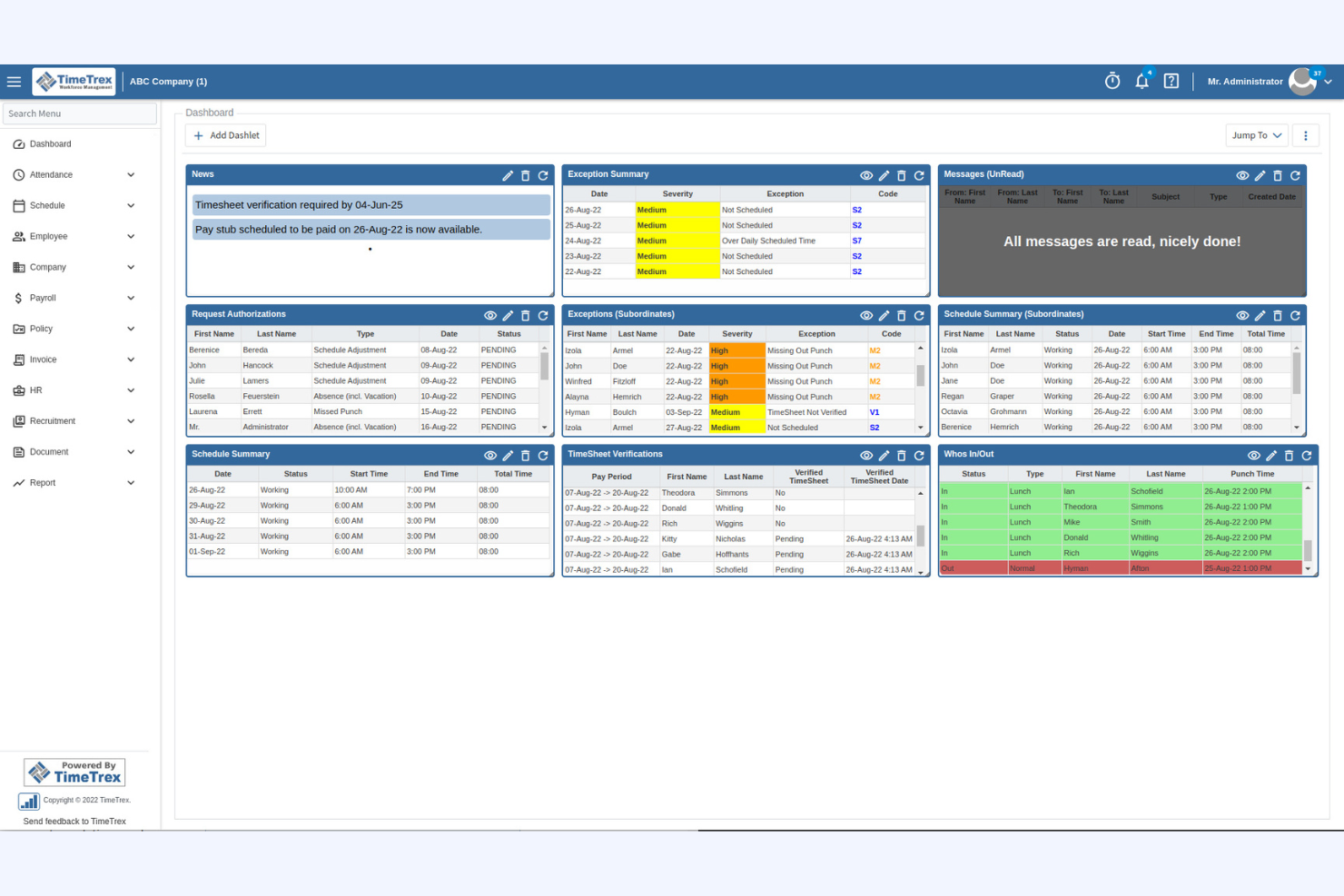
TimeTrex è una piattaforma open-source che combina il monitoraggio dei dipendenti con la gestione delle risorse umane e delle paghe. Questo software è adatto alle organizzazioni che desiderano tracciare la presenza, gestire i turni e occuparsi delle paghe in un unico luogo. TimeTrex può aiutare i team HR e i titolari d'impresa a ridurre i processi manuali e a ottimizzare la supervisione delle operazioni relative alla forza lavoro.
Per chi è più adatto TimeTrex?
TimeTrex è ideale per le piccole e medie imprese che necessitano di monitoraggio integrato dei dipendenti, gestione dei turni e delle paghe in un'unica soluzione open-source.
Perché ho scelto TimeTrex
Ho scelto TimeTrex perché si distingue per le organizzazioni che vogliono unificare il monitoraggio dei dipendenti con i processi di paghe e risorse umane. La sua piattaforma open-source consente di tracciare la presenza dei dipendenti, monitorare le ore lavorative e collegare direttamente questi dati al calcolo delle paghe. Sebbene TimeTrex non monitori le attività sullo schermo, include altre funzionalità di monitoraggio come pianificazione dei turni, gestione delle assenze e controllo della conformità. Questa combinazione lo rende particolarmente utile per i team che necessitano sia di supervisione sia di una gestione integrata della forza lavoro senza dover ricorrere a più strumenti.
Funzionalità principali di TimeTrex
Altre funzionalità di TimeTrex che potrebbero interessarti includono:
- Integrazione con orologio biometrico: Si connette con dispositivi biometrici per verificare le ore di lavoro dei dipendenti e prevenire il fenomeno del 'buddy punching' (timbratura per conto di altri).
- Tracciamento tramite geolocalizzazione: Registra la posizione fisica dei dipendenti quando timbrano entrata o uscita, supportando lavoratori da remoto e squadre sul campo.
- Report personalizzabili: Permette di generare report dettagliati su presenze, straordinari e conformità per audit o revisioni interne.
- Controlli di accesso basati sui ruoli: Consente di impostare permessi e limitare l'accesso ai dati sensibili di HR e paghe in base ai ruoli degli utenti.
Integrazioni di TimeTrex
Le integrazioni includono ADP, QuickBooks, Sage, Paychex, Surepay, Ceridian, Meditech, Insync, Millennium e altre ancora.
Pros and Cons
Pros:
- Paghe, HR e monitoraggio in un'unica piattaforma
- Opzioni di rilevamento tramite biometrico e geolocalizzazione
- Tracciabilità dettagliata per esigenze di conformità
Cons:
- Mancano funzionalità di monitoraggio delle attività degli utenti
- Esperienza utente datata
New Product Updates from TimeTrex
TimeTrex Adds Quick Punch App With Offline and QR Support
TimeTrex adds a new Quick Punch app, offline punching, QR code scanning, punch images, configurable messages, and punch warnings or lockouts to improve employee clock-ins across browsers and local computers. For more information, visit TimeTrex’s official site.
 .
.
Come valuto il software open source per il monitoraggio dei dipendenti
Valuto su due livelli: la base che ogni strumento deve raggiungere—come il codice con licenza OSI e la possibilità di implementazione self-hosted—e i fattori distintivi che sono importanti per i team HR che monitorano i lavoratori da remoto.
Funzionalità di base (Requisiti fondamentali per questa lista)
Quando seleziono gli strumenti per la mia lista, valuto ciascuno su una scala da 0 (la funzionalità non è presente) a 5 (eccellenza in quest'area) per ogni funzionalità di base elencata di seguito. Successivamente, calcolo il punteggio totale dello strumento in percentuale. Ogni strumento deve ottenere un punteggio totale minimo del 65% per essere considerato per l'inclusione.
- Licenza Open Source: Verifico che il codice sorgente sia pubblicamente disponibile con una licenza riconosciuta e approvata da OSI come GPL, MIT o Apache, così che il vostro team possa modificarlo e ridistribuirlo liberamente.
- Monitoraggio delle attività e del tempo: Che si tratti di tracciare i tempi di inattività durante i turni remoti o di registrare le ore sui progetti dei clienti, cerco il monitoraggio automatico che vada oltre i semplici fogli ore manuali.
- Monitoraggio di app e siti web: Gli strumenti dovrebbero registrare quali applicazioni e URL vengono utilizzati dai dipendenti durante l'orario di lavoro, preferibilmente con la possibilità di categorizzarli come produttivi o improduttivi.
- Cattura screenshot o schermo: Valuto se lo strumento offre intervalli di cattura configurabili e controlli di privacy come l'offuscamento, poiché i team HR spesso devono bilanciare la supervisione con la fiducia dei dipendenti.
- Report di produttività e dashboard: Un manager che esamina la produttività del team distribuito ha bisogno di più dei semplici log grezzi. Cerco dashboard visive e report esportabili con metriche chiare di produttività.
- Implementazione Self-Hosted: Cerco percorsi di distribuzione documentati come immagini Docker o script di installazione, poiché il senso dell'open source in questo caso è mantenere i dati sensibili della forza lavoro nella propria infrastruttura.
Dopo aver ottenuto una lista di strumenti che soddisfano questi criteri, considero cosa distingue ciascuna piattaforma.
Fattori differenzianti (Cosa distingue i fornitori)
Ecco come confronto e metto a fuoco i diversi fornitori:
Funzionalità distintive
Il supporto degli agent cross-platform è importante quando la forza lavoro utilizza dispositivi Windows, macOS e Linux. Controllo se ogni strumento copre tutte e tre le piattaforme senza lacune funzionali tra i sistemi operativi. Anche i controlli di accesso basati sui ruoli sono fondamentali—i direttori HR, i team leader e i responsabili della conformità necessitano ciascuno di una vista differente dei dati di monitoraggio. Inoltre, cerco avvisi DLP e di minacce interne che permettano di definire regole per comportamenti a rischio come trasferimenti di file non autorizzati o accessi al sistema fuori dall'orario di lavoro.
Oltre alle funzionalità
La salute della community è un forte indicatore della sostenibilità nel tempo. Valuto la frequenza dei commit, il numero di contributori e se i maintainer rispondono attivamente alle segnalazioni—un repository inattivo significa che siete soli quando qualcosa si rompe. Anche le tutele per la conformità e la privacy hanno un ruolo importante, soprattutto per i team HR che necessitano di meccanismi di consenso, policy di conservazione dei dati e registri di audit per rispettare le normative regionali sul lavoro. Il costo totale di proprietà completa la mia valutazione, perché un software "gratuito" richiede comunque infrastruttura, tempo DevOps per aggiornamenti e, potenzialmente, livelli enterprise a pagamento per il supporto.
Come Scegliere un Software Open Source per il Monitoraggio dei Dipendenti
È facile perdersi in lunghi elenchi di funzionalità e strutture di prezzo complesse. Per aiutarti a restare focalizzato durante il tuo processo di selezione del software, ecco una checklist di fattori a cui prestare attenzione:
| Fattore | Cosa Considerare |
|---|---|
| Scalabilità | Il software supporta il numero attuale e futuro di dipendenti? Verifica eventuali limiti di utenti e il supporto per installazioni multi-sede. |
| Integrazioni | Si collega nativamente ai tuoi sistemi HR, payroll o IT? Elenca le integrazioni imprescindibili prima di fare una selezione. |
| Personalizzabilità | Puoi adattare flussi di lavoro, permessi e report alle tue policy? Valuta se hai bisogno di accesso al codice o controlli amministrativi. |
| Facilità d’uso | Il team HR e i manager lo adotteranno velocemente? Cerca navigazione intuitiva, formazione minima richiesta e interfacce accessibili. |
| Implementazione e onboarding | Quanto tempo e competenze tecniche richiede la configurazione? Informati su strumenti di migrazione, documentazione e supporto della community o del vendor. |
| Costo | Quali sono i costi reali, inclusi hosting, supporto e aggiornamenti? Confronta le condizioni di licenza open source e eventuali componenti aggiuntivi a pagamento. |
| Tutele di sicurezza | Lo strumento offre crittografia, log di audit e controlli di accesso? Valuta come protegge i dati sensibili dei dipendenti e supporta la compliance. |
| Disponibilità del supporto | Quali canali di supporto sono disponibili—community, vendor o terze parti? Considera quanto il tuo team si senta a proprio agio con il self-service rispetto al supporto diretto. |
Che Cos’è un Software Open Source per il Monitoraggio dei Dipendenti?
Il software open-source per il monitoraggio dei dipendenti è un software che traccia l’attività, la presenza e la produttività dei dipendenti, il cui codice sorgente è liberamente disponibile per chiunque desideri utilizzarlo, modificarlo o distribuirlo. Questi strumenti aiutano i team HR e i manager a supervisionare le operazioni della forza lavoro, consentendo alle organizzazioni di personalizzare funzionalità, flussi di lavoro e impostazioni di sicurezza per adattarsi alle proprie esigenze specifiche e ai requisiti di conformità.
Funzionalità
Quando selezioni un software open-source per il monitoraggio dei dipendenti, fai attenzione alle seguenti funzionalità chiave:
- Monitoraggio orario: Rileva quando i dipendenti iniziano e finiscono il lavoro, registrando le ore lavorate per buste paga, conformità e monitoraggio della produttività.
- Registrazione delle attività: Monitora le azioni degli utenti sui dispositivi o all’interno delle applicazioni, fornendo un registro dettagliato delle attività, dei siti visitati e dell’utilizzo dei software.
- Gestione delle presenze: Registra presenza, assenze e richieste di permesso, aiutando i team HR a gestire gli orari e a garantire registri di presenza accurati.
- Controlli d’accesso basati sui ruoli: Permette agli amministratori di impostare permessi per utenti diversi, proteggendo i dati sensibili e assicurando l’accesso solo agli autorizzati.
- Reportistica automatizzata: Genera report personalizzabili su attività dei dipendenti, presenze e produttività, supportando decisioni HR guidate dai dati.
- Tracciamento delle azioni (audit trail): Mantiene un registro sicuro delle modifiche e delle azioni all’interno del sistema, favorendo la conformità e le indagini interne.
- Automazione dei flussi di lavoro personalizzati: Consente alle organizzazioni di progettare e automatizzare processi HR come onboarding, approvazioni e notifiche.
- Gestione documentale: Archivia e organizza documenti HR come contratti, policy e valutazioni delle prestazioni dei dipendenti in un’unica posizione centrale.
- Capacità di integrazione: Si collega ad altri sistemi HR, paghe o IT per sincronizzare i dati dei dipendenti e semplificare le operazioni.
Vantaggi
L’implementazione di un sistema open-source per il monitoraggio dei dipendenti offre diversi vantaggi sia per i membri del tuo team sia per il tuo business. Ecco alcuni benefici a cui puoi aspirare:
- Personalizzazione: Adatta flussi di lavoro, permessi e report affinché rispecchino le specifiche policy e necessità di conformità della tua organizzazione.
- Risparmio sui costi: Evita costose licenze e riduci il costo totale di proprietà sfruttando codice sorgente disponibile gratuitamente.
- Trasparenza: Controlla e audita il codice del software per assicurarti che rispetti i tuoi standard di sicurezza, privacy e operativi.
- Flessibilità di integrazione: Connettiti ai tuoi sistemi HR, paghe o IT esistenti per creare un flusso di lavoro unificato ed efficiente.
- Supporto della community: Accedi a una community globale per risoluzione problemi, miglioramenti e sviluppi continui.
- Controllo avanzato dei dati: Mantieni la proprietà e il controllo sui dati sensibili dei dipendenti ospitando il software sulla tua infrastruttura.
- Scalabilità: Adatta la soluzione alla crescita della tua organizzazione, aggiungendo nuovi utenti o funzionalità senza limiti imposti dai fornitori.
Costi e Prezzi
La scelta di un software open-source per il monitoraggio dei dipendenti richiede la comprensione dei vari modelli di prezzo e piani disponibili. I costi variano in base a funzionalità, dimensione del team, componenti aggiuntivi e altro ancora. La tabella seguente riassume i piani più comuni, i relativi prezzi medi e le funzionalità tipiche incluse nelle soluzioni open-source per il monitoraggio dei dipendenti:
Tabella di confronto dei piani per il software open-source di monitoraggio dei dipendenti
| Tipo di piano | Prezzo medio | Funzionalità comuni |
|---|---|---|
| Piano gratuito | $0 | Monitoraggio orario di base, gestione presenze, reportistica limitata e supporto della community. |
| Piano business | $1–$50/user/month | Tutte le funzionalità personali, reportistica avanzata, automazione dei flussi di lavoro, controlli di accesso basati sui ruoli e tracciamento delle azioni. |
| Piano enterprise | $25–$149/user/month | Tutte le funzionalità business, integrazioni personalizzate, sicurezza avanzata, supporto prioritario e strumenti per la conformità. |
Domande frequenti sul software open source per il monitoraggio dei dipendenti
Ecco alcune risposte alle domande più comuni sul software open source per il monitoraggio dei dipendenti:
Quanto è sicuro il software open source per il monitoraggio dei dipendenti?
La sicurezza dipende da come il software viene configurato e mantenuto. Gli strumenti open source ti permettono di esaminare e modificare il codice, ma è necessario garantire aggiornamenti regolari, controlli di accesso solidi e un hosting sicuro per proteggere i dati sensibili dei dipendenti.
Il software open source per il monitoraggio dei dipendenti può integrarsi con i sistemi HR esistenti?
Sì, molti strumenti open source per il monitoraggio dei dipendenti offrono capacità di integrazione. Spesso puoi collegarli a sistemi HR, paghe o IT tramite API o plugin, ma alcune integrazioni potrebbero richiedere una configurazione tecnica o uno sviluppo su misura.
Quali competenze tecniche sono necessarie per implementare un software open source per il monitoraggio dei dipendenti?
In genere sono necessarie competenze IT di base per l’installazione, la configurazione e la manutenzione continua. Personalizzazioni o integrazioni più avanzate possono richiedere conoscenza di database, scripting o gestione di server.
Ci sono costi nascosti con il software open source per il monitoraggio dei dipendenti?
Sebbene il software di solito sia gratuito, potresti dover sostenere costi per hosting, assistenza, componenti aggiuntivi premium o per assumere personale tecnico per l’installazione e la manutenzione. Valuta sempre il costo totale di proprietà prima di impegnarti.
Come funzionano aggiornamenti e assistenza per il software open source per il monitoraggio dei dipendenti?
Gli aggiornamenti vengono solitamente rilasciati dalla community o dai manutentori del progetto. L’assistenza è spesso fornita da forum utenti, documentazione o fornitori terzi a pagamento. Sei tu responsabile dell’applicazione degli aggiornamenti e della risoluzione dei problemi, a meno che tu non acquisti servizi di supporto.
Cosa succede ora:
Se stai cercando informazioni su software open source per il monitoraggio dei dipendenti, contatta un consulente SoftwareSelect per ricevere consigli gratuiti.
Compila un modulo e fai una breve chiacchierata in cui verranno approfondite le tue esigenze specifiche. Poi riceverai una shortlist di software da valutare. Ti supportano anche durante tutto il processo di acquisto, comprese le trattative sui prezzi.